Oracle HCM Cloud Redwood Key Dates

Have you read my previous blog on Redwood in HCM Cloud? If not, check it out here! Now you know what Redwood UI is, it’s time to review the timeline for implementing Redwood for Oracle HCM Cloud.

Image by Kjjj3 from Pixabay

As of January 2024, these are the key dates, that organisations who use Oracle HCM Cloud should know, for Redwood implementation:

Release 24A

Majority of key HR and Payroll processes available in Redwood UI

Newly provisioned pods will be delivered with Redwood-enabled

Image by tigerlily713 from Pixabay

Release 24B

Redwood for Learn Self Service becomes mandatory

Image by Jagrit Parajuli from Pixabay

Release 24D

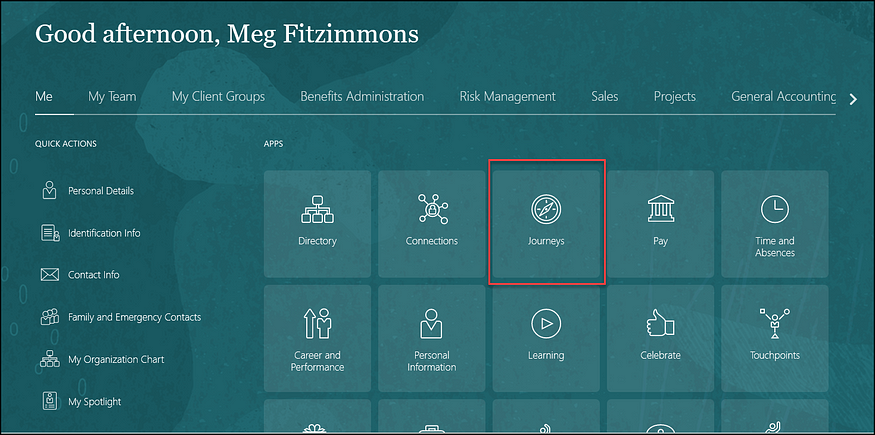
Checklists and Onboarding replaced with Journeys

Redwood for Timecards becomes mandatory

Image by Nile from Pixabay

Release 25A

New Go-lives must be Redwood

Image by WOKANDAPIX from Pixabay

Release 25B

All Employee Self Service (ESS) / Manager Self Service (MSS) must be Redwood

Image by StartupStockPhotos from Pixabay

Now is the time to start planning for your move to Redwood UI. Version 1 can help you plan and implement Redwood UI for all your Oracle Cloud modules — EPM, ERP and HCM. For more details, please get in touch!

About the author:

Kate Mead is an Oracle-certified HCM Consultant and Solution Architect at Version 1 with 14 years of experience in Oracle HR and Payroll systems, including 7 years with Oracle HCM Cloud. She has worked across implementation projects and managed services, has a sound knowledge of UK Payroll legislation and — before becoming a consultant — was an HR Manager.

If you have any questions or would like more information on how Version 1 can help you realise the full potential of your Oracle HCM Cloud instances, please contact her at kate.mead@version1.com

Are You Getting the Most from Oracle Guided Learning (OGL)?

Firstly, what is Oracle Guided Learning? OGL is part of Oracle’s Digital Adoption Platforms (DAP). It’s a highly configurable tool which allows organisations to use in-application guides within their Cloud instances to guide users to follow processes in their preferred way. The guiding includes in-app messages, process guides, step guides, smart tips and beacons. It can be utilised to help an organisation handle change with technology, processes or to help make decisions.

Image by StartupStockPhotos from Pixabay

Organisations have the flexibility to use the pre-defined Oracle guides or develop their own content. As with all seeded content from Oracle, it is also possible to copy the Oracle guides and modify them to meet the organisation’s needs for a hybrid approach to content development.

Examples of Features in OGL

In-app feature messages can be customised or displayed based on the user’s roles, the time of day or the specific content. Additionally, it is possible to measure users’ interaction with the messages, to monitor the effectiveness of the communication.

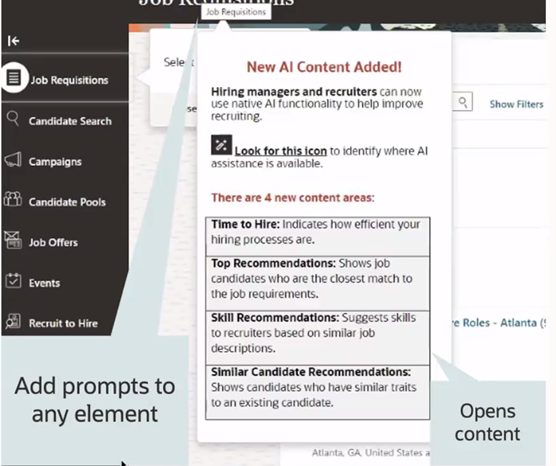
Example Prompt for OGL

The use of prompts can help users navigate through the process. Prompts can be added to any element within a page. Within the content, it is possible to view any key information, including highlighting any AI content.

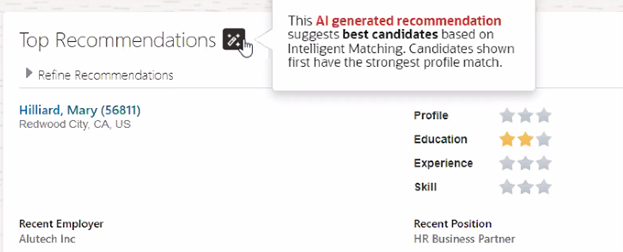
Example Use of AI within OGL

OGL is provided as part of the licence for organisations using Oracle HCM, ERP or EPM Cloud. As part of the licence, an organisation is allowed to have 15 individual OGL guides. If more than 15 are required, Oracle Guided Learning Premium will be required.

About the author:

Kate Mead is an Oracle-certified HCM Consultant and Solution Architect at Version 1 with 14 years of experience in Oracle HR and Payroll systems, including 7 years with Oracle HCM Cloud. She has worked across implementation projects and managed services, has a sound knowledge of UK Payroll legislation and — before becoming a consultant — was an HR Manager.

If you have any questions or would like more information on how Version 1 can help you realise the full potential of your Oracle HCM Cloud instances, please contact her at kate.mead@version1.com

Please note all screenshots are the property of Oracle and are used according to their Copyright Guidelines

Oracle HCM Cloud Release 24A — Key New Features in Global HR

The first iteration of the What’s New 24A Oracle HCM Cloud has been released and it looks like it’s going to be a big one! There are a lot of changes, particularly around Journeys and Redwood.

Photo by Christin Hume on Unsplash

Here are a few of my highlights:

1. Redwood Global HR Enhancements

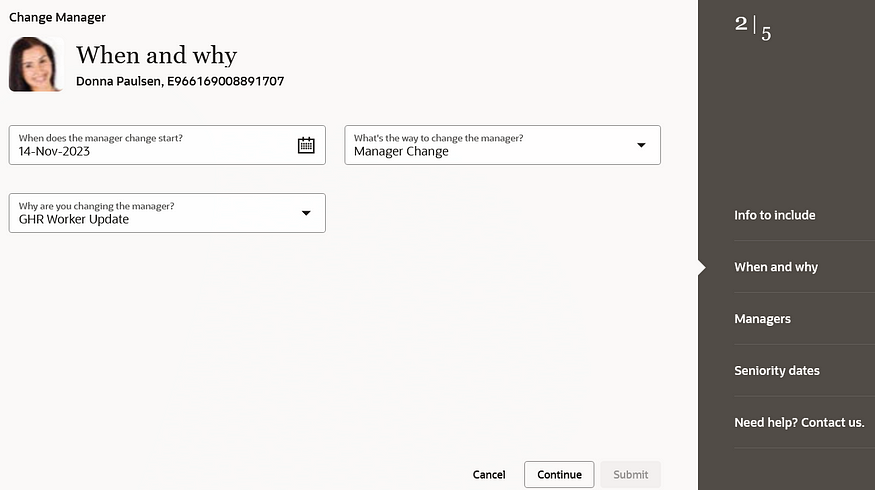
24A is the first HCM Cloud Release that brings the Redwood User Interface to the masses. All the key processes that your HR users follow are now available in the new UI. For more details, please check out my article on Redwood in 24A.

Redwood Change Manager

2. Journeys

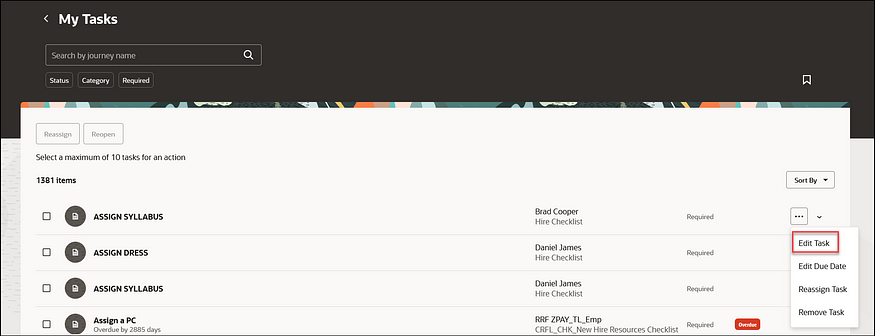
24A has a substantial number of new Journey-related features. These include an improved search functionality; allowing the use of Contextual Journeys in Redwood pages and the simplification of editing tasks. All of these new features are to help streamline processes for users.

Edit Journey Tasks

3. Work Pattern Templates and Assignment Rules

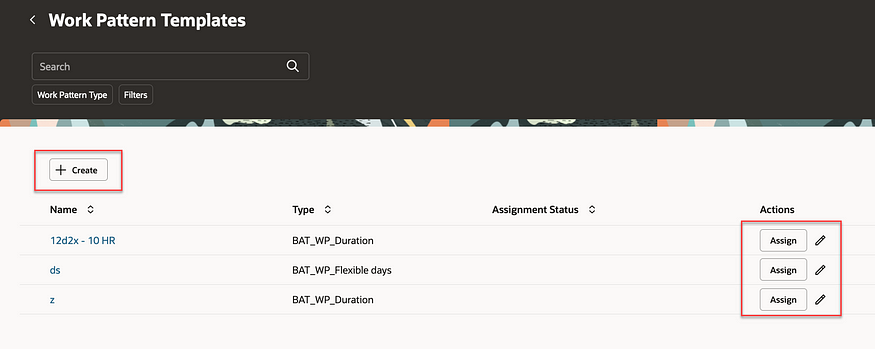
This is a helpful new feature that allows you to create rules to automatically assign working pattern templates to employees based on rules. This will minimise mistakes with incorrect working patterns being assigned to employees. The automation will speed up the hiring process and simplify making changes to employee data.

Work Pattern Templates

4. Approvals Work Area

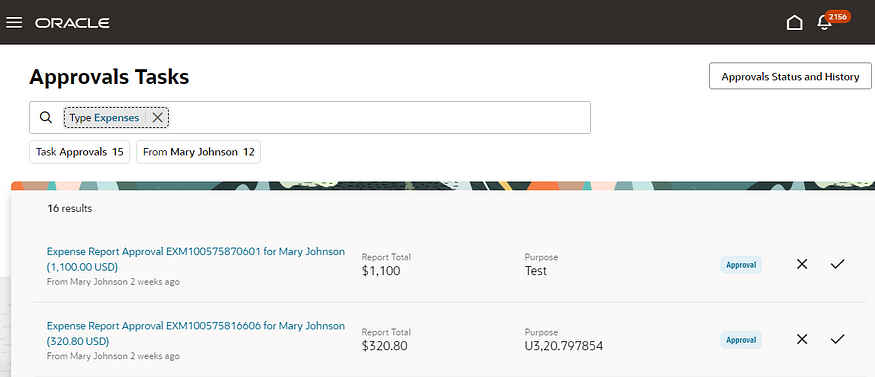
The new Approvals Work Area is a new application that works across the whole of HCM Cloud. This new page has a user-friendly interface and intuitive search functionality which allows users to find tasks more easily than within the current BPM Worklist. Approvals and rejections of transactions can be made in the Work Area as well as viewing the status of historical transactions.

Approvals Work Area

5. Other Functionality of Note

Two areas of functionality are being made redundant in 2024. The first is the Share Personal Info page which will be made redundant in release 24B and there is no replacement for this functionality. Secondly, Checklists and Onboarding Tasks will be made redundant in release 24D. Oracle recommends moving to Redwood Journeys as soon as possible.

About the author:

Kate Mead is an Oracle-certified HCM Consultant and Solution Architect at Version 1 with 14 years of experience in Oracle HR and Payroll systems, including 7 years with Oracle HCM Cloud. She has worked across implementation projects and managed services, has a sound knowledge of UK Payroll legislation and — before becoming a consultant — was an HR Manager.

If you have any questions or would like more information on how Version 1 can help you realise the full potential of your Oracle HCM Cloud instances, please contact her at kate.mead@version1.com
Please note all screenshots are the property of Oracle and are used according to their Copyright Guidelines

Oracle HCM Cloud 24A — The Redwood Release!

As Oracle promised, 24A is the release that brings Redwood to the masses! There are so many Redwood new features in this release, now is the time to start your move away from Responsive UI to the new and improved Redwood-enabled Core HR applications.

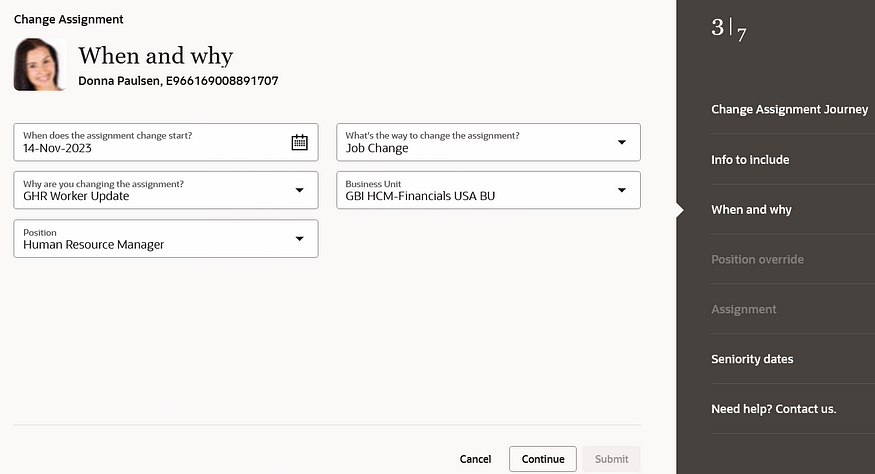
Change Assignment

So what is Redwood and why should I be excited about this?

Redwood is the new Oracle User Interface (UI) for all Oracle products. The long-term plan is for all applications within the Oracle Cloud EPM, ERP and HCM modules to have the same look and feel. The Redwood UI is designed to be mobile and tablet-friendly. When personalising pages, you can view how the page will look on named mobile device and tablet models, to see how the page will appear based on the dimensions of that particular device. All of this is to ensure that accessibility is central to the application.

Photo by Domenico Loia on Unsplash

So back to 24A. What features should I be looking out for?

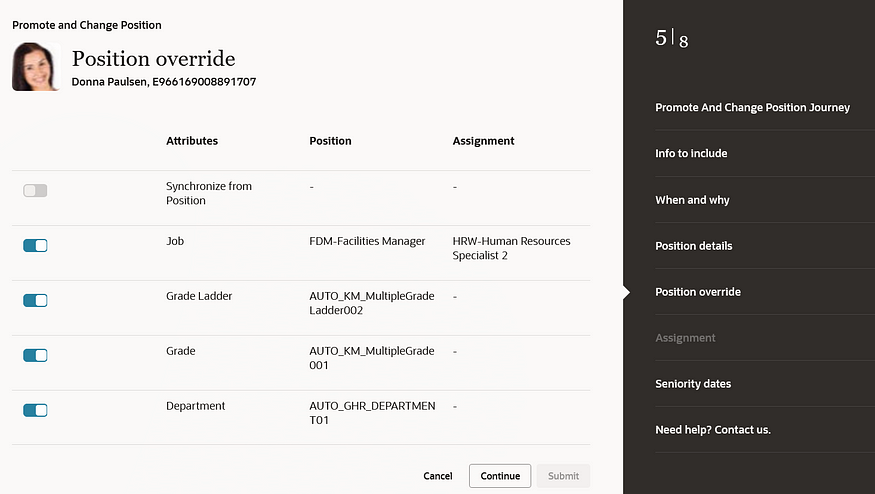
There are numerous process flows now incorporated into the Redwood experience. These include Change Assignment, Promote, Change Position, Employment and Transfer. These are the processes that Oracle users have been waiting for.

Position Override

Before 24A, the main applications that were within the Redwood UI were in the configuration areas, such as Workforce Structures. Now your HR users can carry out their day-to-day processes, such as carrying out promotions; changing line managers; managing contracts; and using the latest and greatest Oracle technology in a user-friendly and accessible interface.

For more details on release 24A, please see the Oracle 24A What’s New page here.

About the author:

Kate Mead is an Oracle-certified HCM Consultant and Solution Architect at Version 1 with 14 years of experience in Oracle HR and Payroll systems, including 7 years with Oracle HCM Cloud. She has worked across implementation projects and managed services, has a sound knowledge of UK Payroll legislation and — before becoming a consultant — was an HR Manager.

If you have any questions or would like more information on how Version 1 can help you realise the full potential of your Oracle HCM Cloud instances, please contact her at kate.mead@version1.com
Please note all screenshots are the property of Oracle and are used according to their Copyright Guidelines