Oracle’s HCM Professional Concierge: What It Is, How It Works, and Why It Matters for HR Teams

Oracle has been steadily building out its AI story in HCM Cloud, but the HCM Professional Concierge is one of the first examples that really feels tangible for HR teams. This is not AI added for the sake of it. It is a set of purpose-built, role-aware conversational agents, built directly into the HCM Redwood experience. For me, it stands out as one of the more considered uses of AI Agents in enterprise HR.

If you work in HR operations or as an HR Business Partner, the scenario will feel familiar. A manager wants to understand where their team sits on compensation ahead of a salary review. They open Employment Info, scroll through individual records, try to piece together performance data from one place, compensation history from another, and absence data from somewhere else. It is not a difficult task, but it is a fragmented one. Before long, ten minutes have passed just getting a basic view.

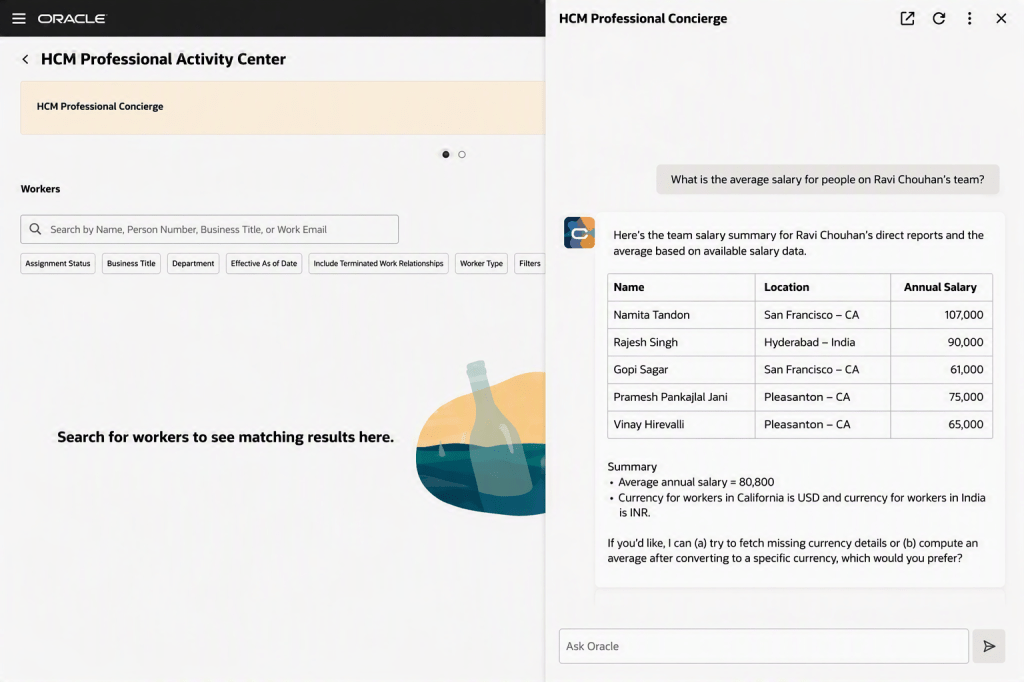
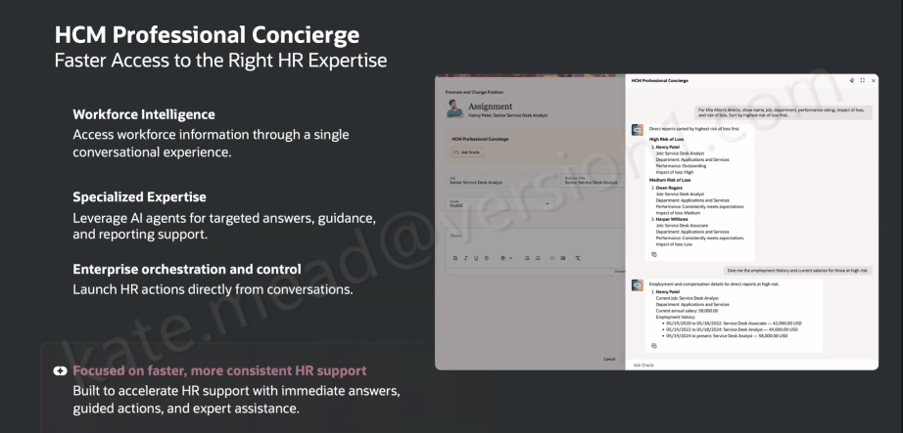
The HCM Professional Concierge simplifies this by bringing everything into a single conversational experience, embedded wherever the HR user is already working. Instead of navigating between screens, they ask a question. The agent brings together the relevant data, guides the next step, and in some cases can even trigger the action directly from the conversation.

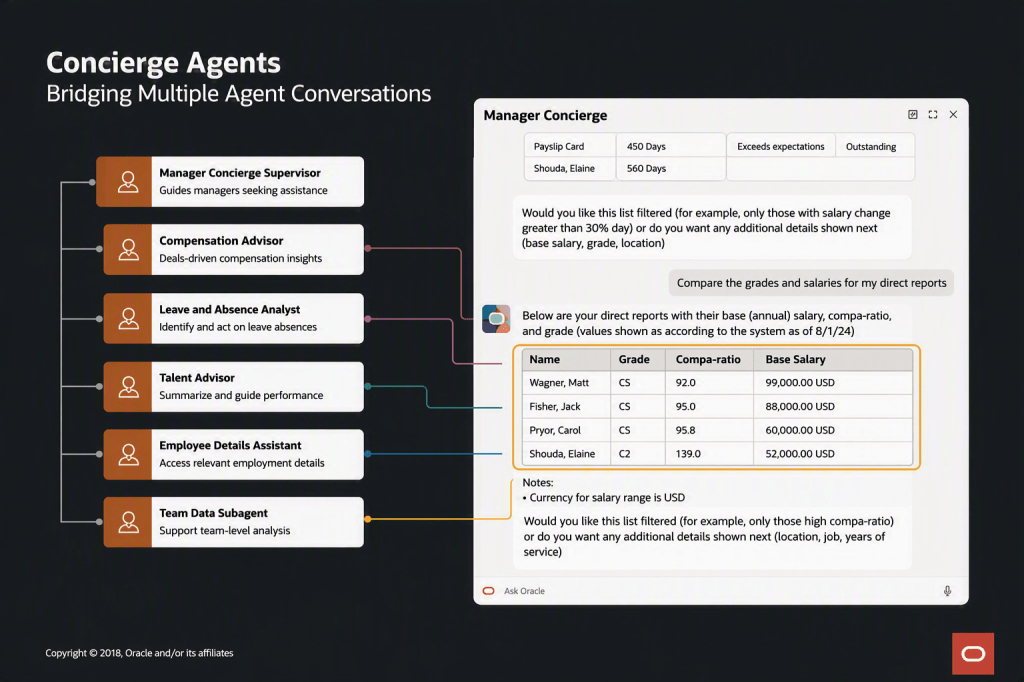
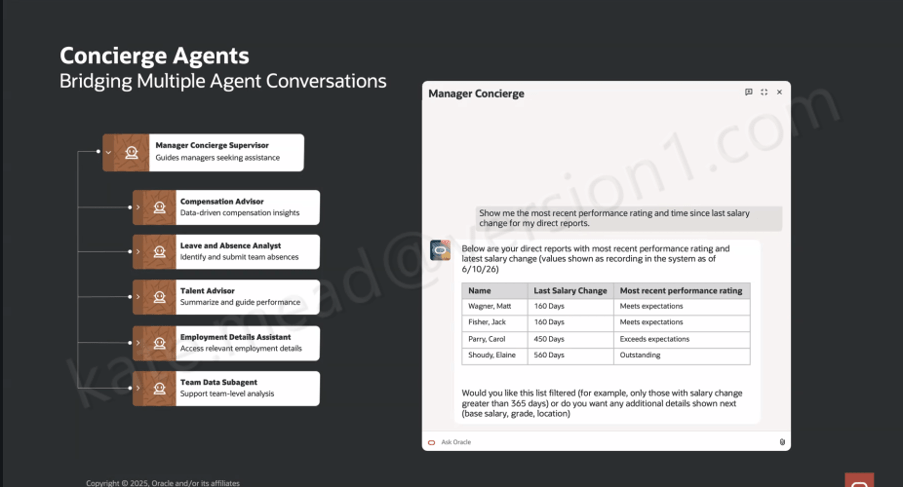
It is worth understanding that this is not a single AI agent working behind the scenes. Oracle has taken a supervisor and sub-agent approach, where a top-level Concierge Supervisor receives the user’s query, interprets the intent, and then routes it to the most appropriate specialist agent.

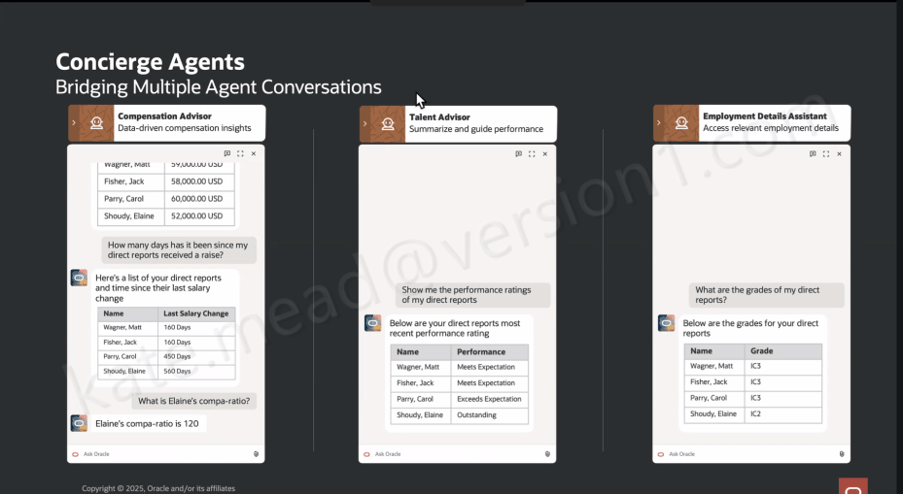
Within the HR Professional Concierge, those specialist agents each focus on a particular area of HR. For example, the Compensation Advisor brings together key information such as compensation data, compa‑ratios, time since the last salary change, and pay grade details for a manager’s direct reports. The Talent Advisor focuses on performance, helping to summarise ratings and support more informed performance conversations.

Other agents support core HR data and processes. The Employment Details Assistant provides access to employment history, assignment information and worker details, while the Leave and Absence Analyst helps identify and manage absence across a team. There is also support for understanding organisational design through the Workforce Structures agent.

In addition, the Concierge can surface policy and guidance through the Policy sub-agent, review personal worker data where needed, and launch reporting through the Reports sub-agent. For broader, team-level insight, the Team Data Hub helps bring data together to support analysis.

What this means in practice is that the user experiences a single, coherent conversation, even though multiple specialist agents may be working in the background to fulfil the request.

So when a manager asks, “show me the most recent performance rating and time since the last salary change for my direct reports”, the Manager Concierge Supervisor recognises that the query spans both compensation and talent data. It then coordinates across the Compensation Advisor and the Talent Advisor behind the scenes. What comes back is a single, joined-up view, rather than two separate outputs that the manager has to reconcile themselves.

That orchestration across multiple agents is where the real value starts to show. Conversational assistants in enterprise applications are not new in themselves. What is more interesting here is the ability to coordinate specialist agents within a single interaction, carry context across the conversation, and route requests intelligently based on both the topic and the data required.

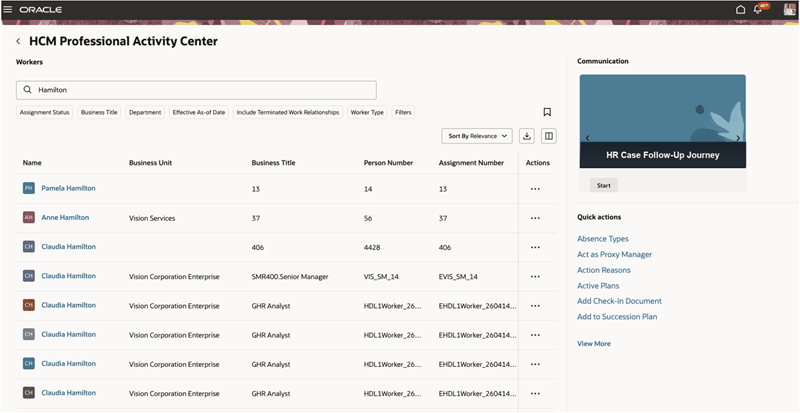
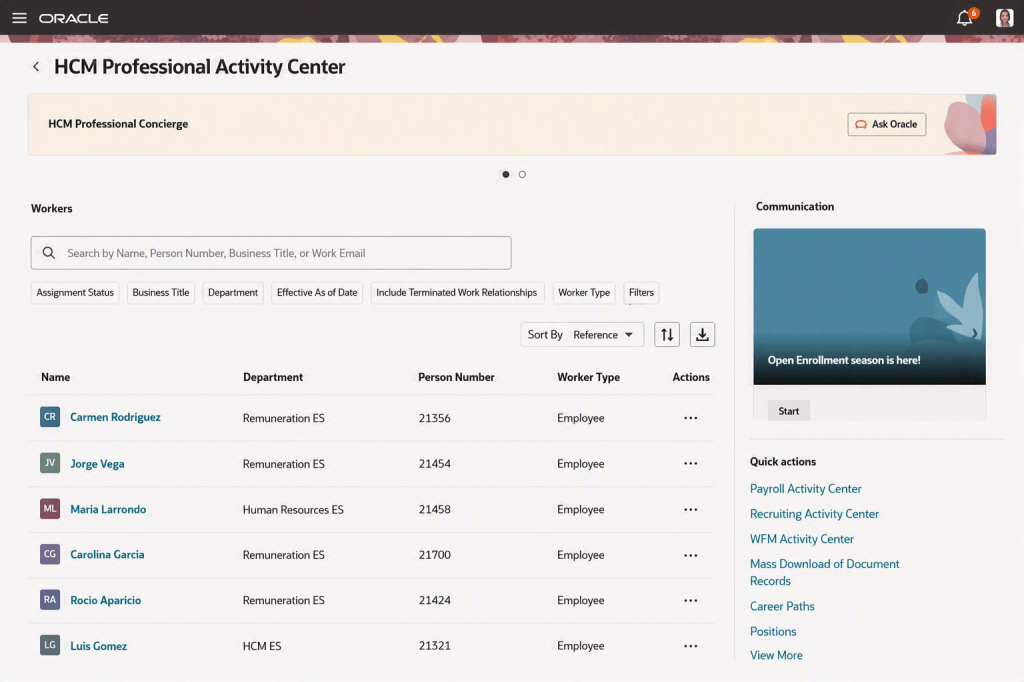
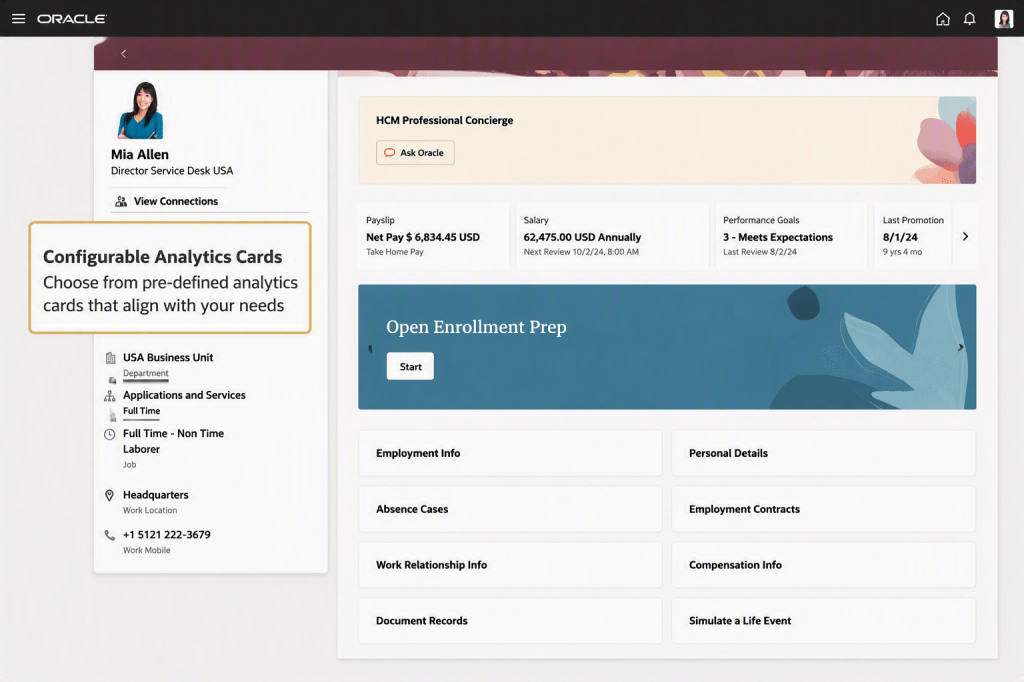
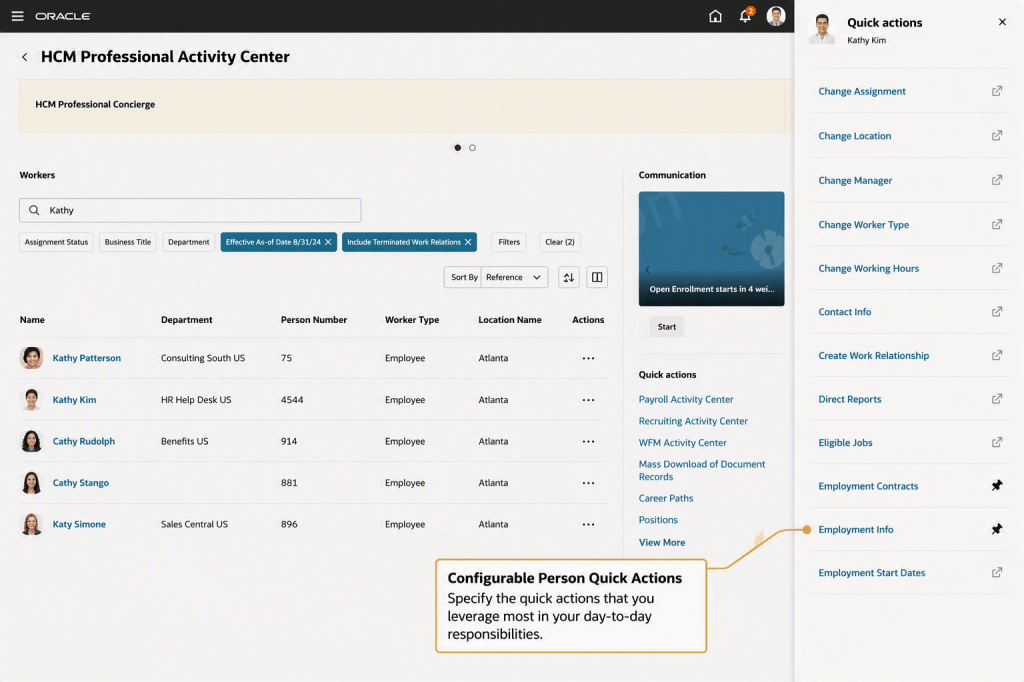
Oracle has introduced three distinct Concierge experiences, each designed around a specific user group and how they typically work. The HCM Professional Concierge is aimed at HR specialists and HR Business Partners. It sits within the HCM Professional Activity Centre, which has become the central workspace for HR service delivery, and supports the sort of queries an HR analyst would usually run. That includes pulling together workforce data for individuals or manager populations, reviewing compensation and employment history, running reports, looking up policies, and guiding HR actions within the flow of work.

The Manager Concierge is focused on line managers who need quick, straightforward access to information about their teams. It brings together compensation, absence, talent and employment data without the need to navigate into individual worker records. The experience adapts based on both the question being asked and the context of the manager’s team, giving them a practical way to not only view information but also complete common HR tasks directly.

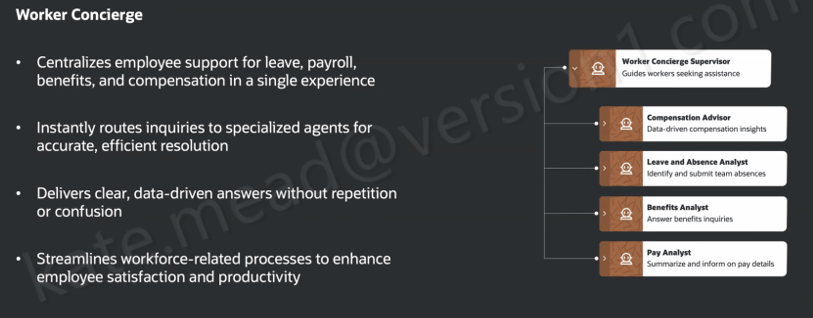
The Worker Concierge, meanwhile, is designed for employees themselves. It brings together support for areas such as leave, payroll, benefits and compensation into a single, consistent experience. Behind the scenes, it routes queries to the relevant specialist agent, whether that relates to absence, benefits, pay, or compensation, so the employee does not need to think about where to go to get the answer.

A simple scenario helps bring this to life. A line manager has been told that budget has been allocated for pay rises and promotions across the organisation. Before making any decisions, she wants a clear view of where her team currently stands. Using the Manager Concierge, she can ask a straightforward question in natural language, such as “how long has it been since my direct reports received a pay rise?” The Compensation Advisor returns the answer in a structured, easy-to-read format. She then follows up with a more specific question, “what is Elaine’s compa-ratio?”, and gets a direct response.

Within the same conversation, she can ask for performance ratings through the Talent Advisor and pull through grade information using the Employment Details Assistant. It all happens in one place, without needing to navigate between screens. Multiple specialist agents are working in the background, but from the manager’s perspective it feels like a single, joined-up interaction.

The HR specialist perspective is just as telling. If someone is working on an Employment Info page for a specific worker, they can open the Concierge panel and ask something like, “what is the salary history for Ravi?” or “where is Ravi located?” The response comes back as structured data pulled directly from HCM, without the need to navigate away or open multiple pages.

One question that comes up consistently when Oracle’s AI features are discussed is around data access and security. It is an important one, and the answer here is reassuring. The HCM Professional Concierge works within the same data and functional security model already applied across the HCM Redwood experience. If an HR specialist does not have permission to view a particular employee’s salary in the core application, they will not be able to access it through the Concierge either. There is no separate access layer being introduced. It simply operates within the role-based controls that are already in place.

For organisations working across multiple geographies, the same principle applies. The agent respects the existing configuration of Redwood pages, including any geography-specific policies and legislative requirements. There is also flexibility to tailor how the agent behaves by refining prompts to reflect your organisation’s terminology or local nuances.

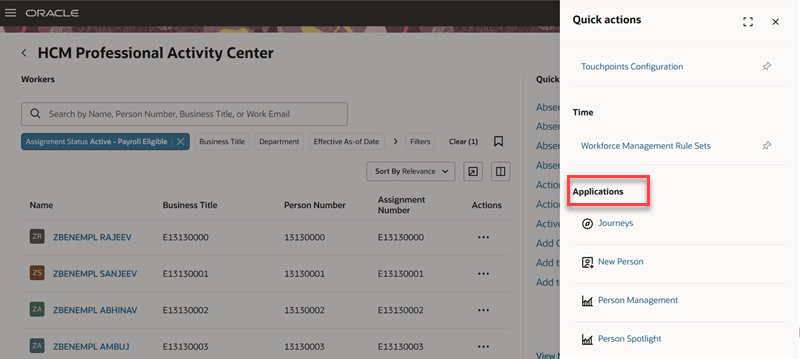
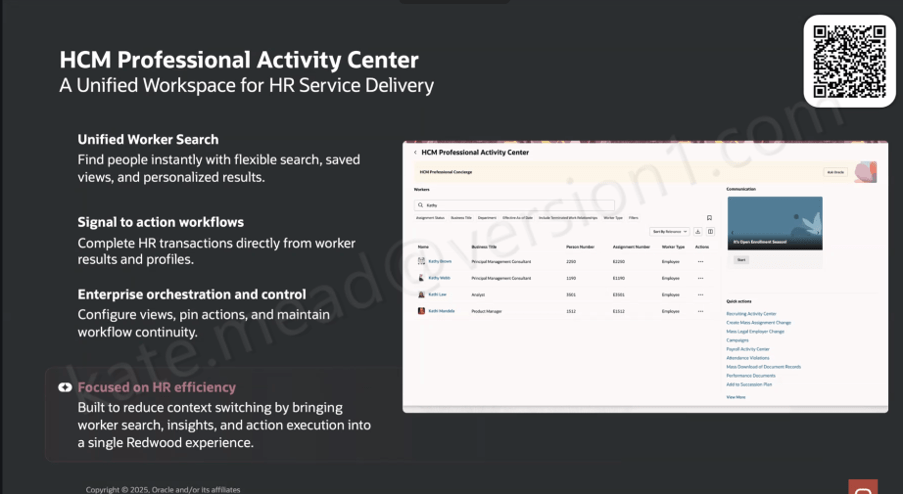
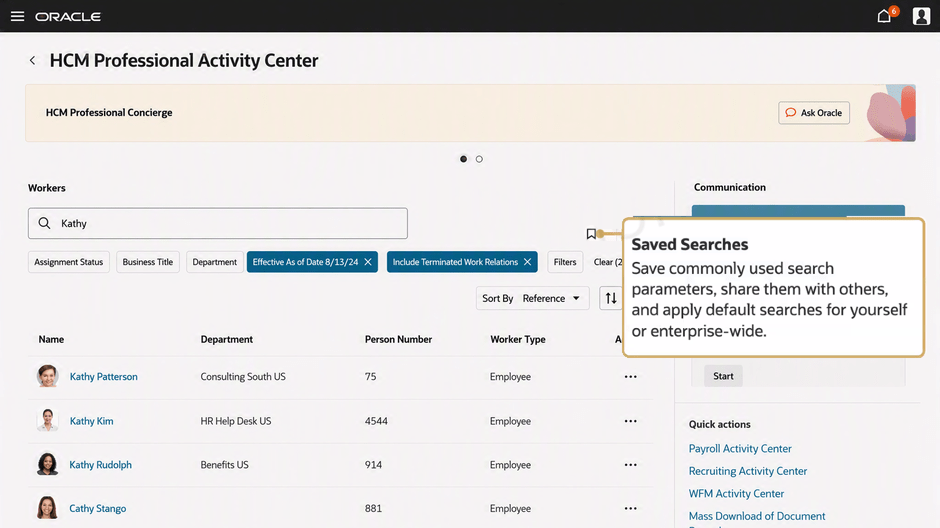
The Concierge also sits within a broader shift in how Oracle is shaping the HR user experience. It is alongside the HCM Professional Activity Centre, which acts as a unified Redwood workspace for HR administration. The Activity Centre brings together a more flexible approach to worker search, with filtering, saved views and personalised results. From there, HR specialists can move straight into transactions from a worker’s profile without switching to a separate area. Common actions are surfaced directly in the interface, including access to areas such as the Recruiting Activity Centre, Mass Assignment Change, Mass Legal Employer Change, Payroll Activity Centre and Attendance Violations, which makes it easier to act on information as soon as it is identified.

The Concierge is always present within the Activity Center, giving HR specialists access to conversational support in the context of the work they are already doing.

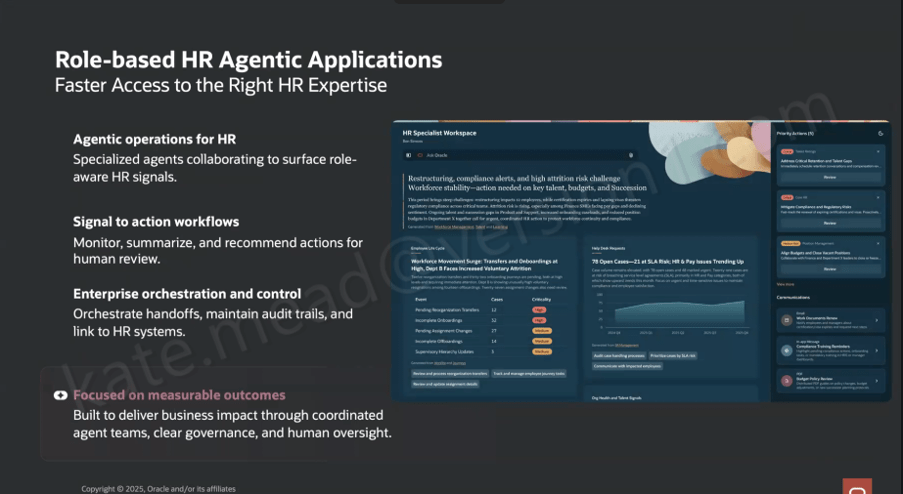
It also sits within a much broader direction Oracle is taking with role-based, agent-led HR applications. The HR Specialist Workspace is a good example of where this is heading. It builds on the same foundations, but moves towards a Redwood workspace where multiple specialist agents work together to surface relevant insights more proactively.

In that model, the workspace brings together a view of workforce priorities, potential restructuring impacts, compliance alerts, attrition risk and open HR cases. These are drawn from coordinated agent outputs across areas such as Workforce Management, Talent and Learning. The shift here is subtle but important. The agents are not just responding to questions, they are actively identifying what might need attention and presenting it to the user.

There is also a clear emphasis on governance. Audit trails, controls and human oversight are built into how actions are handed off. Oracle is quite deliberate in positioning this around measurable outcomes, with coordinated agent activity and clear decision points. That creates an important distinction from more autonomous AI models. Here, the agents surface and recommend, but people remain firmly in control of decisions and actions.

From an implementation perspective, the HCM Professional Concierge and its supporting agents are delivered as part of Oracle HCM Cloud Release 26C. There is no need to build these capabilities from the ground up. They are available out of the box, with the ability to adapt behaviour through prompt configuration so that it reflects your organisation’s terminology and ways of working.

As ever, I will keep a close eye on how this develops across the HCM suite and share updates as new capabilities emerge. If you are starting to think about how this fits into your wider HCM AI strategy, or you are planning for a 26C upgrade, now is a sensible point to begin that conversation.

Please note all screenshots are the property of Oracle and are used according to their Copyright Guidelines
Oracle HCM Cloud Core HR 26C

It’s that time in the quarter again. Oracle has just shared what’s coming in Release 26C, and as you’d expect there is a clear emphasis on AI-driven enhancements, with plenty to take note of. More updates are likely to follow over the coming weeks, but for now it is worth taking a look at what has been announced so far.

The first feature worth calling out is one many HR teams have been waiting for. Ever since the original Person Management page was effectively retired back in 2020, there has not really been a single, equivalent experience to replace it. What Oracle has delivered here is not a direct like-for-like replacement, and it is clear that is not the intention. Instead, this move aligns with the Redwood design approach and rethinks how users interact with person data. The result is a more modern, task-focused experience that brings together key information and actions in a way that feels far more consistent with the rest of the HCM suite.

In practical terms, it changes how users work day to day. Rather than navigating across multiple pages or relying on memory to find the right option, a HR user can open a worker’s record and see relevant insights alongside the actions they are most likely to take, whether that is updating employment details, reviewing assignments, or initiating changes. This reduces the need for constant clicking and context switching, making everyday tasks quicker and more intuitive. For those who have used the system for a long time, there may still be a sense that the original “one stop shop” is missing. However, this is a clear step forward. It signals a shift away from a single static page towards a more guided and contextual experience that better reflects how people actually work today. It may not replicate everything that Person Management once offered, but it goes a long way towards closing a gap that organisations have felt for some time.

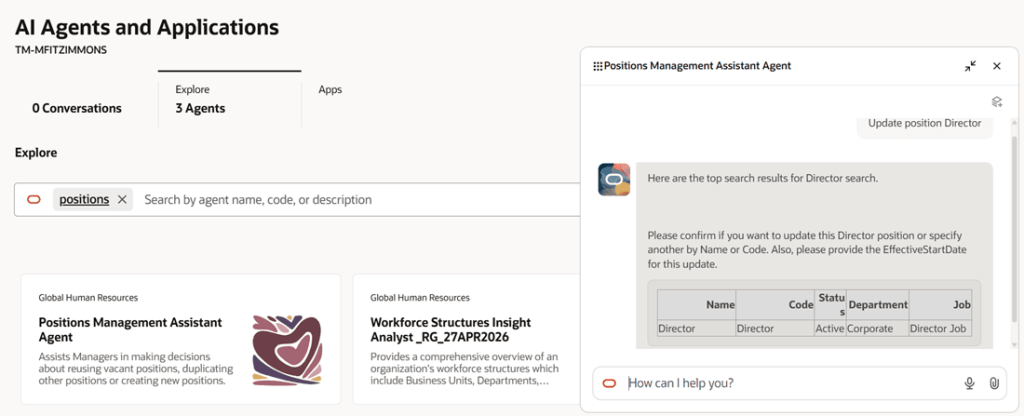
The next feature worth highlighting is AI-led, the Positions Management Assistant. This builds on the Positions Assistant introduced in 25D but takes things a step further by broadening what can be done through a single experience. Rather than focusing only on creating or viewing positions, it now brings editing into the same flow, giving HR teams and line managers a more complete way to manage positions. It uses natural language to understand what the user is trying to do and responds with relevant actions and guidance, which fits with the wider move towards more conversational, AI-driven ways of working.

In practice, this simplifies what can often be a fragmented process. A manager can ask to see vacant positions within their team and the assistant will surface them, suggest next steps and provide a direct route to raise a requisition. If a new position is needed, it can guide the user through creating one, reusing existing information where possible to save time and reduce errors. This makes the experience far more intuitive, particularly for occasional users, while also helping to improve consistency and accuracy. The overall result is a smoother, more guided approach that reduces manual effort, speeds up position management activities and helps organisations move more quickly when filling roles.

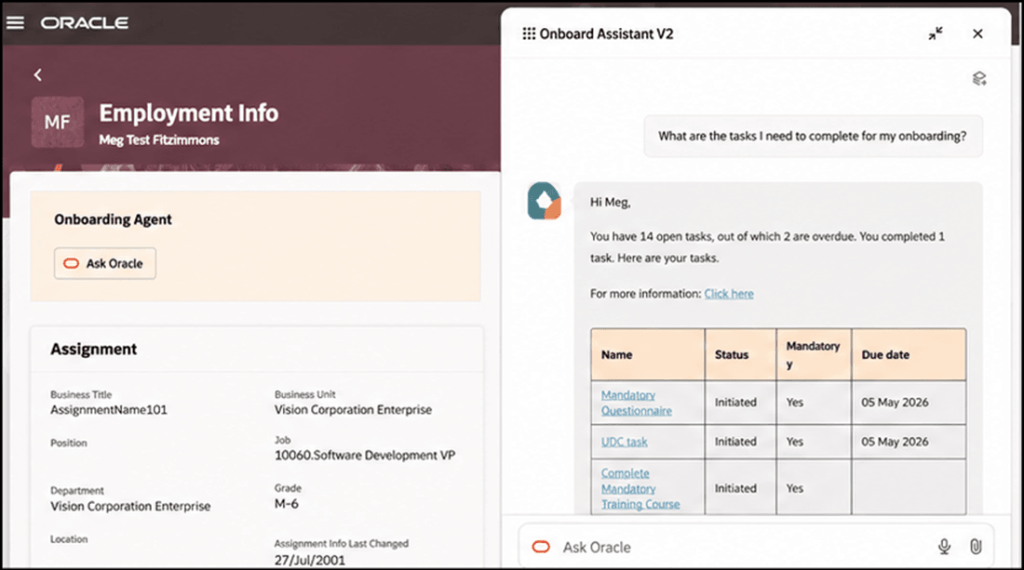
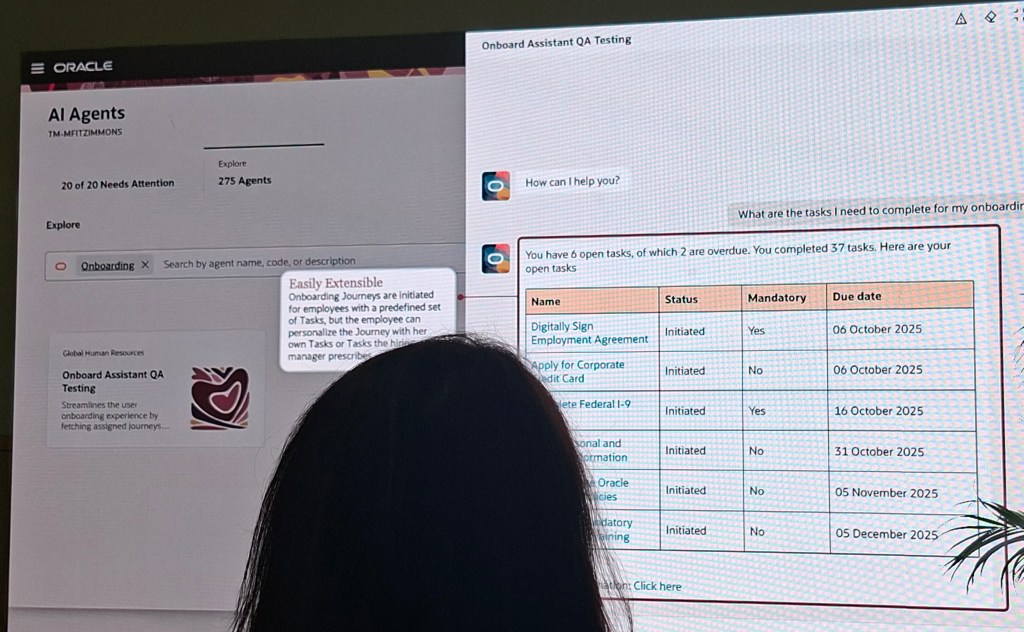
The next feature builds on something we saw introduced in 25D. The Onboarding Agent has now evolved into a workflow agent, marking another step in Oracle’s move towards more intelligent, guided employee experiences. The new Onboard Assistant takes the earlier self-service capability and turns it into a more interactive, conversational experience for new hires. Rather than working through static checklists or searching for information, users can ask questions in plain language and receive clear, relevant answers tailored to their role, location and organisational policies.

In practice, this makes the onboarding journey feel far more straightforward. A new starter can ask what tasks still need to be completed, check for anything overdue and follow a direct link to take action. The assistant can also surface useful resources, provide reminders and guide users through more complex steps when needed. For anyone unfamiliar with the system, this removes much of the uncertainty that can come with getting started. Overall, it creates a more supported and personalised experience that helps new hires get up to speed more quickly, reduces confusion and ensures that key onboarding activities are completed on time.

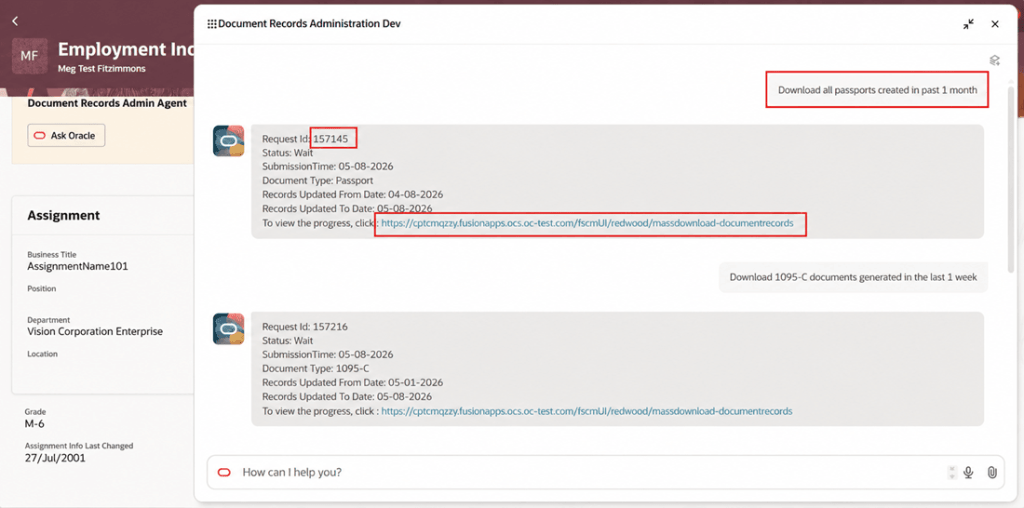
There are a couple of notable updates in Document Records, particularly around the use of AI. The first is the Document Records Administration Assistant, which is a clear example of how Oracle is embedding AI into everyday HR administration. In this case, the focus is on simplifying how users retrieve document records. Rather than working through multiple screens and manually applying filters, users can describe what they need in plain language. The assistant interprets the request and submits the appropriate mass download action, removing much of the effort from what has traditionally been quite a manual process.

In practice, this makes a real difference. A HR user could ask to download all passports created in the past month or retrieve payslips generated in the last week, and the assistant will identify the document type, apply the relevant criteria and trigger the correct request. For infrequent users in particular, this removes the need to understand the underlying navigation. The process becomes far quicker and far more straightforward. Overall, it provides a more intuitive way to retrieve document records, reducing admin time, improving accuracy and helping users get to the right outcome first time.

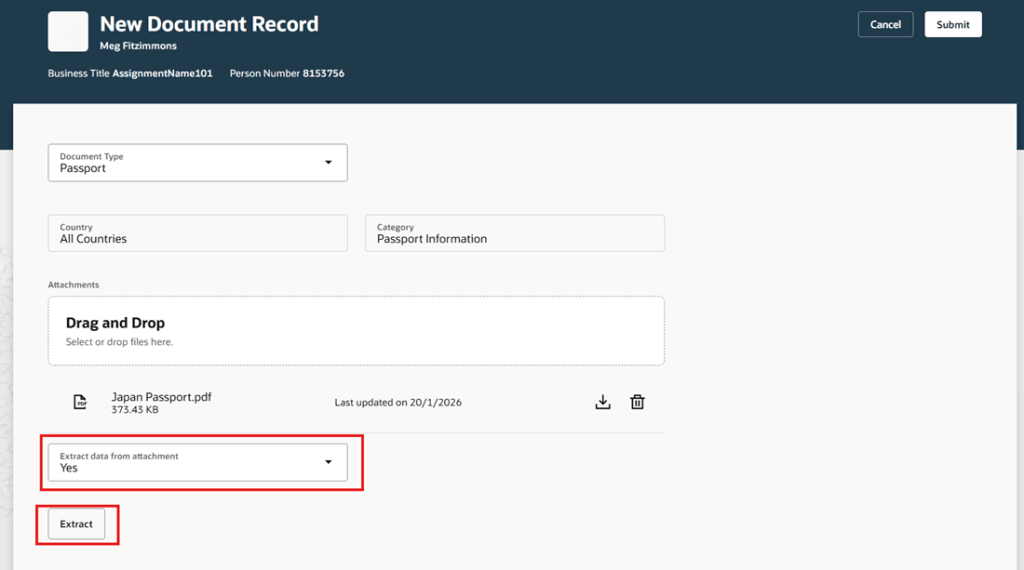
The second update focuses on using AI to extract data from attachments and prefill document record attributes. It is a relatively simple enhancement, but one that addresses a very common pain point in HR administration. When creating document records, users often have to rekey information that already exists in the uploaded file. This feature reduces that effort by using AI to identify and extract key details from the attachment and populate the relevant fields automatically. It aligns closely with the Redwood approach of reducing manual input and making everyday tasks quicker and easier to complete.

In practice, when a user uploads something like a passport or certification, the system can pick up details such as the document number, issuing country and validity dates, and populate these directly into the record. The user can then review and amend the information before saving, rather than starting from scratch. This not only saves time but also reduces the likelihood of manual errors. Over time, capabilities like this can have a noticeable impact on data quality, while also making the process far more efficient for both HR teams and employees managing their own records.

There are a number of upcoming changes around Redwood pages, and the timelines are now starting to feel very close. From 26C, the Redwood person pages will be enabled by default, covering key areas such as Personal Details, Contact Information, Identification Details, Family and Emergency Contacts, Additional Person Information and Person Identifiers for External Applications. For many organisations, this is the point where the move to Redwood becomes unavoidable for core HR data.

This continues in 26D, with areas such as Jobs, Locations, Departments, Enterprise HCM Information, Grade Ladders and all Employment pages, including actions like Add Assignment and Employment Information, also switching to Redwood by default. The same pattern carries into 27A, where processes such as Resign from Employment, Mass Assignment Change and Terminate Employment will be automatically enabled.

If you have not already moved to these Redwood pages, now is the time to start planning. Leaving it until they are switched on by default means losing control over when the change happens and removes the option to step back if needed. Moving earlier gives you the opportunity to test properly, prepare your users and resolve any issues before the transition becomes mandatory.

As mentioned earlier, Oracle is expected to release additional Core HR updates later this month. If anything stands out as particularly impactful, I will share a further update with a more detailed view. In the meantime, keep an eye out for the upcoming posts in this series where we will explore other areas of Fusion as part of Release 26C. If you are reviewing your own roadmap or considering how these changes might affect your organisation, now is a good time to start the conversation.

Please note all screenshots are the property of Oracle and are used according to their Copyright Guidelines
Oracle HCM Cloud Core HR 26B

It’s my favourite point in the quarter: Oracle has just announced what’s coming in Release 26B. As you’d expect, this update brings a strong focus on AI‑led enhancements, with plenty to be excited about. While Oracle may add further features as the month goes on, let’s start by exploring what’s been announced so far.

The first thing I want to call out actually relates to Release 26C, but it’s important enough to flag now. For organisations that are a little behind in their move to Redwood, Oracle will be automatically enabling a number of pages in 26C. These include the Team Activity Center, Personal Details, Contact Information, Family and Emergency Contacts, Identification Information, Additional Person Information, Person Identifiers for External Applications, Grades, Grade Rates, Legal Entity HCM Information, Legal Reporting HCM Information and Reporting Establishments. While not all of these pages are end‑user facing, if you haven’t already enabled them, I’d strongly recommend completing your testing and switching them on as soon as possible. That way, you can be confident everything works as required for your organisation before Oracle enables them automatically.

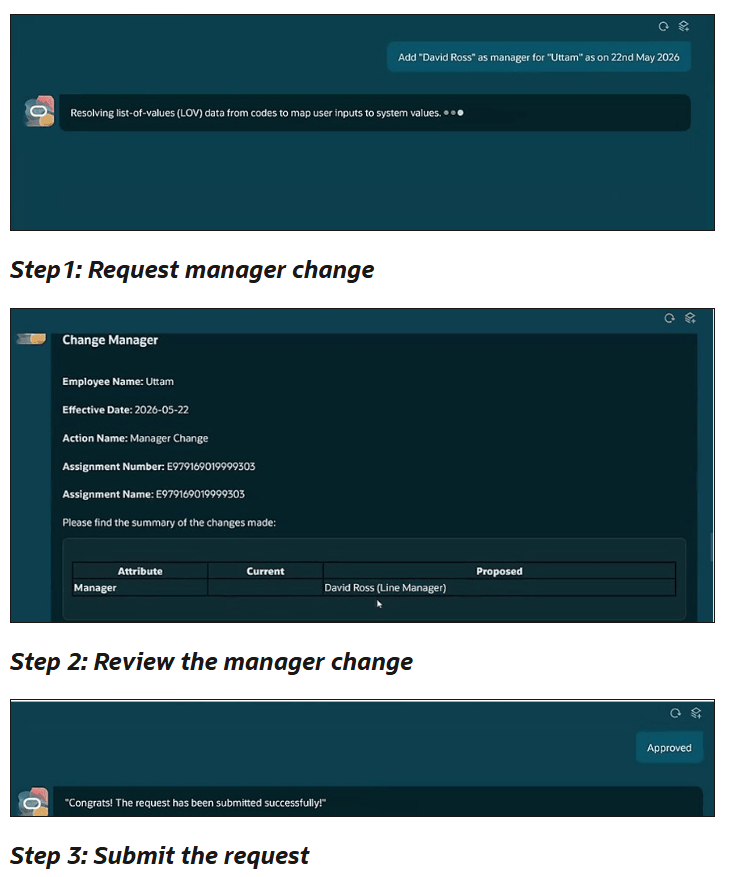
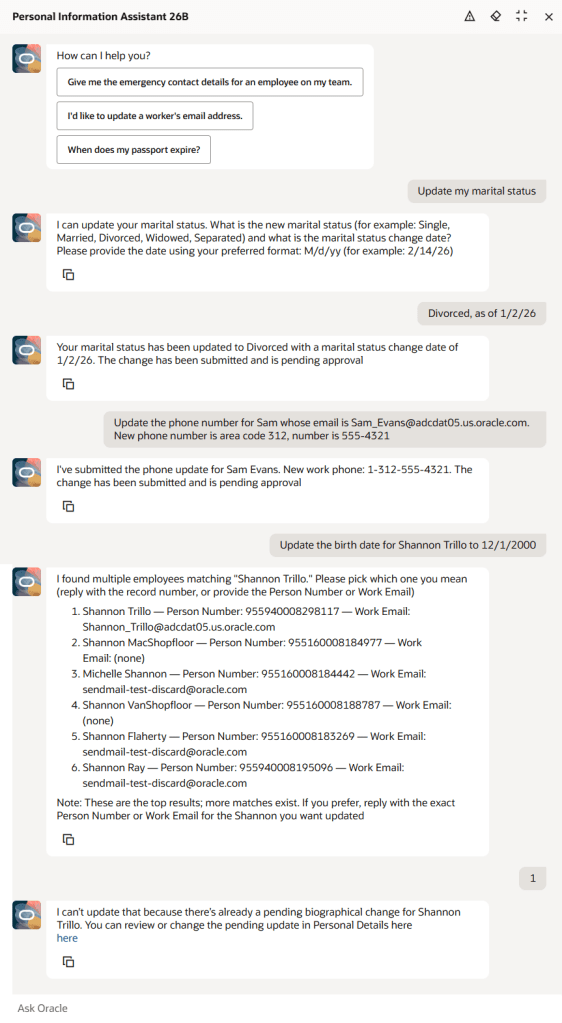
Now let’s turn to AI, which is probably why you’re here. The Personal Information Assistant has been enhanced to go well beyond simply retrieving data, allowing users to create, update and delete selected personal information directly within the chat experience, all in line with existing role‑based access controls and approval rules. It supports key personal details such as demographic and biographical information, email addresses and phone numbers, validates entries where lists of values apply, and guides users through any required choices. The assistant can still view information for the user or others, search by name, email address or person number, and provide direct links to the relevant pages where a change needs to be completed in the application. Importantly, it fully respects your existing Fusion security configuration, so users will only ever see data they’re entitled to access, and where fields have been hidden using VBS, the agent prompt can be adjusted to ensure those fields remain restricted.

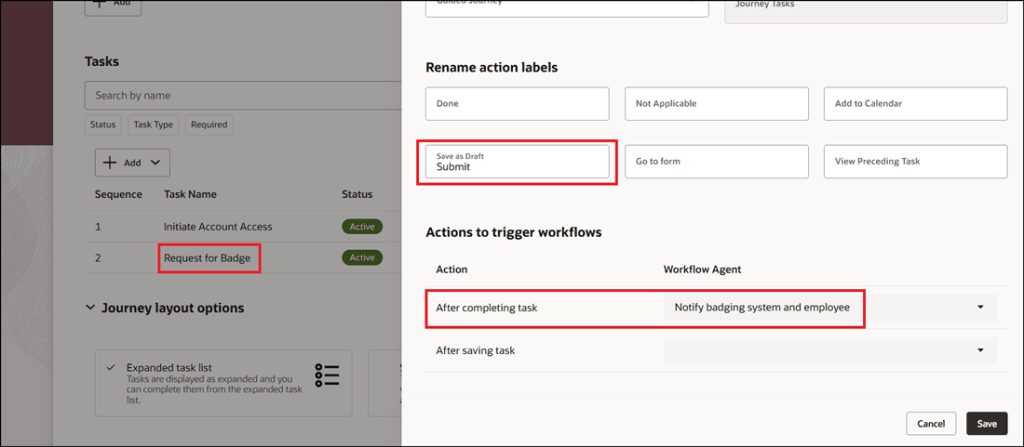
There are two new, closely related features in this release, both focused on Journeys. AI can now be used to trigger a workflow agent when a Journey task is completed or even when it’s saved, enabling key business actions to run automatically without manual follow‑up. As soon as a task is marked complete, the associated workflow agent executes the required logic, such as sending notifications or integrating with external systems, ensuring downstream processes are triggered immediately and consistently. For example, when a manager approves a badge request, the agent can notify the badging system, confirm approval to the employee and kick off badge creation straight away. The same applies when a Journey task is saved as a draft, allowing certain processes to start earlier, improving responsiveness and reducing unnecessary delays.

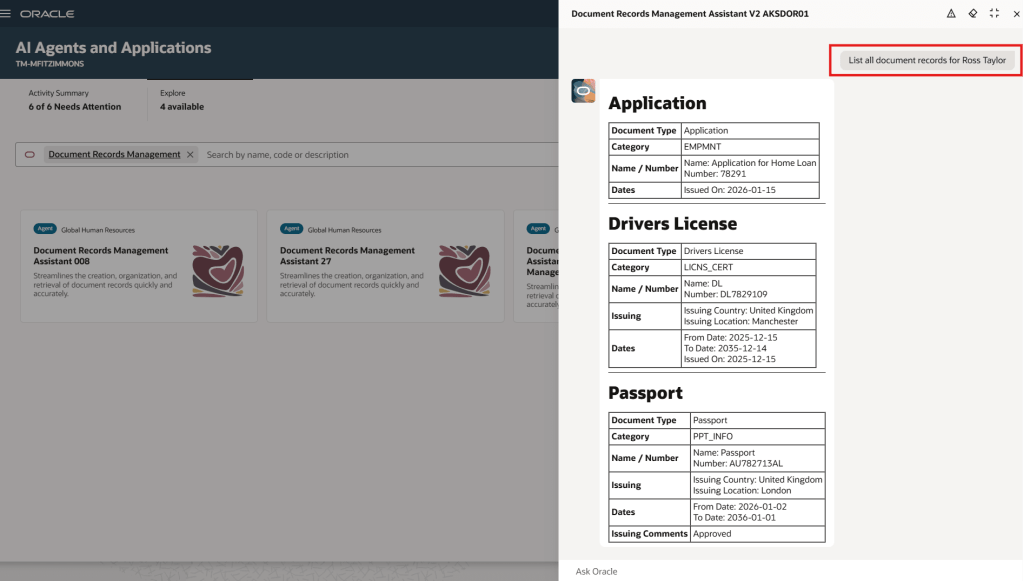
The Document Records Management Assistant has been further enhanced in Release 26B with the introduction of Document Records Management Assistant V2, extending the capabilities introduced in 26A beyond employee self‑service to support line managers and HR specialists. This new workflow agent uses natural‑language interaction and advanced language models to help users quickly find, create and manage document records across their teams, while the original 26A agent remains available for employee self‑service without disruption. By bringing document management into a single conversational experience, the assistant simplifies access to records, automatically understands user intent, guides users through record creation with the right metadata, and provides clear, policy‑aligned responses and direct links where needed, reducing training effort and making document management faster and more intuitive for everyone involved.

The final AI capability worth highlighting is the new AI Assistant for Managing Jobs. This AI‑powered companion for Oracle Cloud HCM Jobs enables HR teams to create, view, update and manage job data through a single conversational experience. Using natural‑language interaction and Oracle’s AI Agent framework, it provides clear, policy‑aligned responses, making it quicker and safer to work with job records without navigating multiple screens. The assistant highlights changes across job versions, generates helpful summaries and insights, guides users step by step through updates and validations, identifies missing or outdated information, and can also edit or delete jobs where appropriate. By reducing manual administration and minimising the risk of errors, it helps HR teams maintain accurate, compliant job data while freeing up time to focus on more strategic priorities.

I’d also like to highlight a number of updates in Release 26B that will be particularly relevant for UK public sector organisations. Enhancements to the HCM UK TPS Generic Setup Diagnostics report introduce more robust checks, making it easier to identify and resolve Teachers’ Pension setup issues, with additional validation highlighting mismatches in Annual Full‑Time Equivalent salary rate definitions and expanded balance feeds helping administrators spot missing or incorrect inputs that impact pension calculations. Updates have also been made to the Civil Service Pension Scheme interface to reflect new and revised validation rules introduced by Capita as scheme administrator, with many of these changes already supported within the existing extract logic, helping ensure submissions continue to meet current scheme requirements and removing remaining references to MyCSP from user‑facing text. Finally, support has been added for proportional TLR1 and TLR2 payments within the Teachers’ Pension Scheme, enabling awards to be calculated, reported and pensioned in line with updated guidance effective from September 2025, and ensuring full‑time and part‑time arrangements are treated accurately based on contract type.

As mentioned earlier, Oracle will be rolling out additional Core HR features later this month. If any of these updates prove particularly noteworthy, I’ll share a follow‑up blog with the details. In the meantime, keep an eye out for upcoming posts where we’ll take a closer look at other Fusion modules as part of Release 26B.

Please note all screenshots are the property of Oracle and are used according to their Copyright Guidelines
Oracle HCM Cloud Core HR 26A

It’s the most wonderful time of the quarter! Sorry, I just put up my Christmas tree and now I’m feeling festive. Oracle have just announced the latest features that will be coming in release 26A. As you would expect, it’s an AI heavy one! As usual, additional features may follow later this month. In the meantime, let’s review what’s been introduced so far.

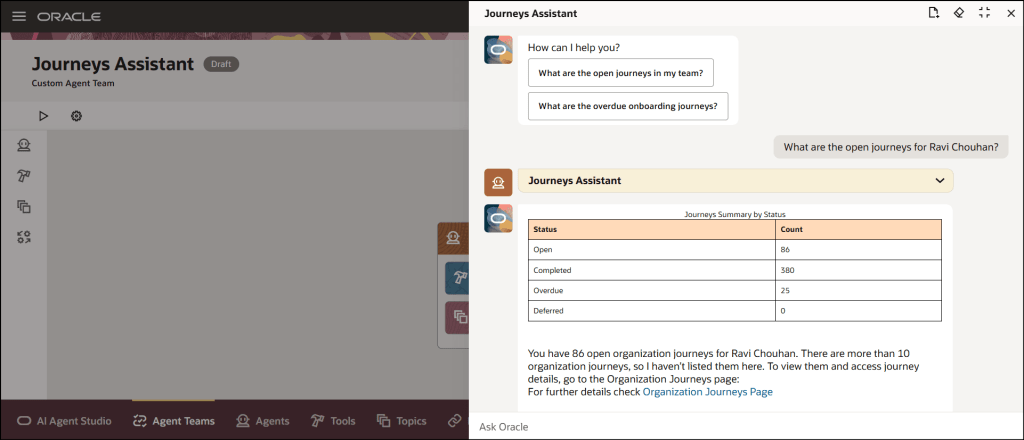
The first feature is one I saw at AI World in October and I thought it was great, so I’m glad it’s here now. The new Manage Journeys with AI Assistant makes managing employee journeys so easy. Powered by Oracle’s AI, it understands your everyday questions and gives you clear answers that fit your organisation’s rules. Need to check overdue tasks, see onboarding progress, or jump straight to the right page? Just ask. It cuts through the clutter, saves you time, and means less training for your team. Managers and HR can quickly get the info they need without digging through menus, so you can spend less time clicking and more time supporting your people.

Everyone loves a good dashboard, and now there’s the new Redwood View Legal Employer Changes Dashboard. It’s your one-stop shop for reviewing and keeping track of all global transfers, but only those that you have access to. The dashboard gives you a clear summary of each worker’s transfer details, making it easy to stay on top of changes. One thing to note: even if the Change Legal Employer dashboard is enabled for Redwood, the deep links on this page still follow their own product-specific profile settings. For example, if you click the Compensation Info link, it will open the Compensation page based on its profile option. It will only open in Redwood if that page’s Redwood setting is enabled, otherwise it will open in the responsive view.

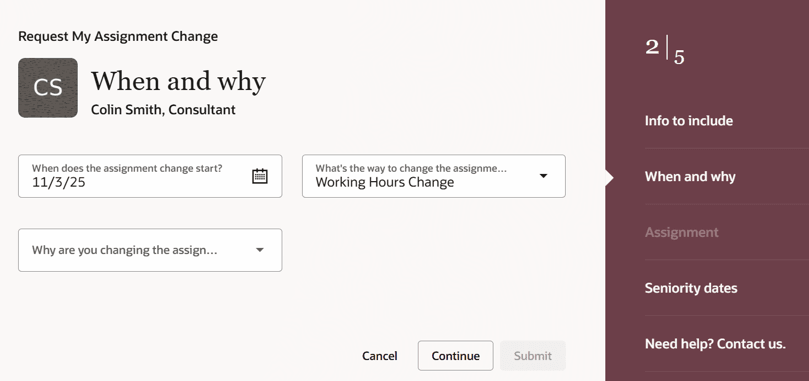
HR teams already have plenty on their plate, so there’s a growing shift towards employees taking ownership of their own data and using self-service wherever possible. The new Request My Assignment Change feature makes this easier than ever, allowing employees to update their own assignment details through a simple Redwood process. From the self-service interface, employees can now request changes to update their work location or adjust their working hours, without any HR involvement. The Request My Assignment Change process uses the existing assignment approval framework. To customise approvals for this request type, configure rules with:
sensorDataReferenceCode = "RequestMyAssignmentChange".

Two new AI features are now available in Workforce Structures: the Job Assistant and the Workforce Structures Insight Analyst. The Job Assistant speeds up creating roles by asking a few simple questions and setting up the job with minimal details like name and code – quick, straightforward, done. The Workforce Structures Insight Analyst is where things get really powerful. Acting as an intelligent companion, it gives you instant access to workforce structure data without the need to build custom reports or navigate complex analytics. You can ask natural language questions and receive clear, actionable answers tailored to your organisation’s policies. Managers can quickly get summaries of job families, positions, and organisational hierarchies; compare structures across teams; and even analyse areas that aren’t covered by standard reporting tools. It’s designed to save time, reduce complexity, and provide insights that help you make informed decisions faster, all from a single, intuitive interface.

The Document Records Management Assistant brings AI to one of the most essential yet often overlooked areas, document records. This smart assistant makes creating, organising, and finding records quick and effortless. Using advanced language models, it understands the context of each document type and offers helpful suggestions, so you can capture records accurately, categorise them correctly, and retrieve them when needed. With natural language interaction, direct links, and intuitive guidance, it removes complexity, reduces training, and even anticipates intent, such as fetching the latest passport record. In short, it streamlines document management into a simple, conversational experience.

As mentioned earlier, Oracle will be rolling out new Core HR features later this month. If any of these updates turn out to be particularly significant, I’ll share an updated blog post with the details. In the meantime, keep an eye out for upcoming posts where we’ll dive into other Fusion modules as part of Release 26A.

Please note all screenshots are the property of Oracle and are used according to their Copyright Guidelines
Oracle AI World – Day 3

Day 3 was the last day of Oracle AI World and whilst it was only a half day, it was one of my favourites! We all breakfast together, before going our separate ways. It was a lovely start to the day. I managed to fit in two sessions, one on AI Powered EPM and the final one was Amplifying Human Potential. I had lunch with lots of my fellow ACE program members, before we all went off on our ACE Adventure to the Atomic Museum.

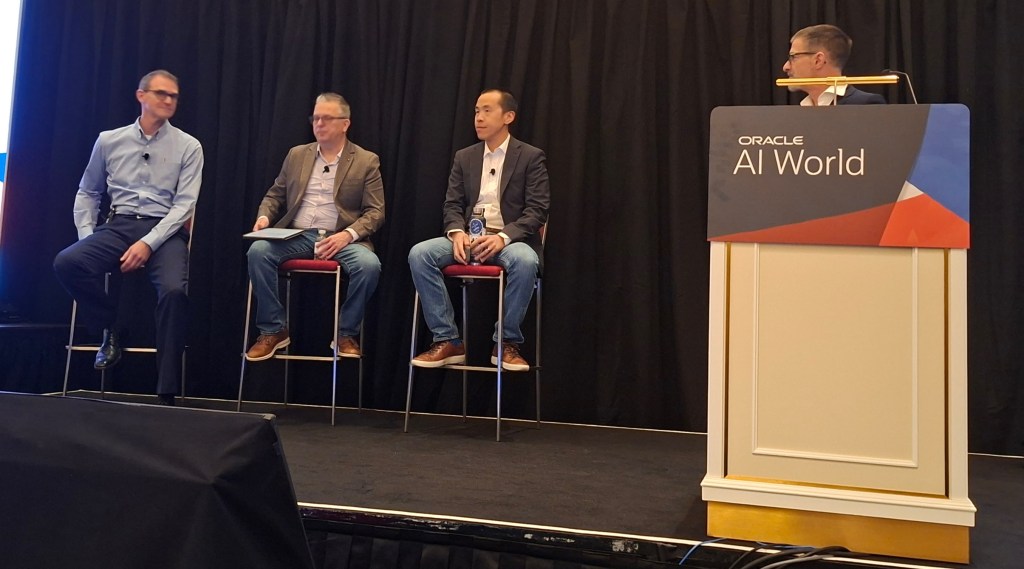
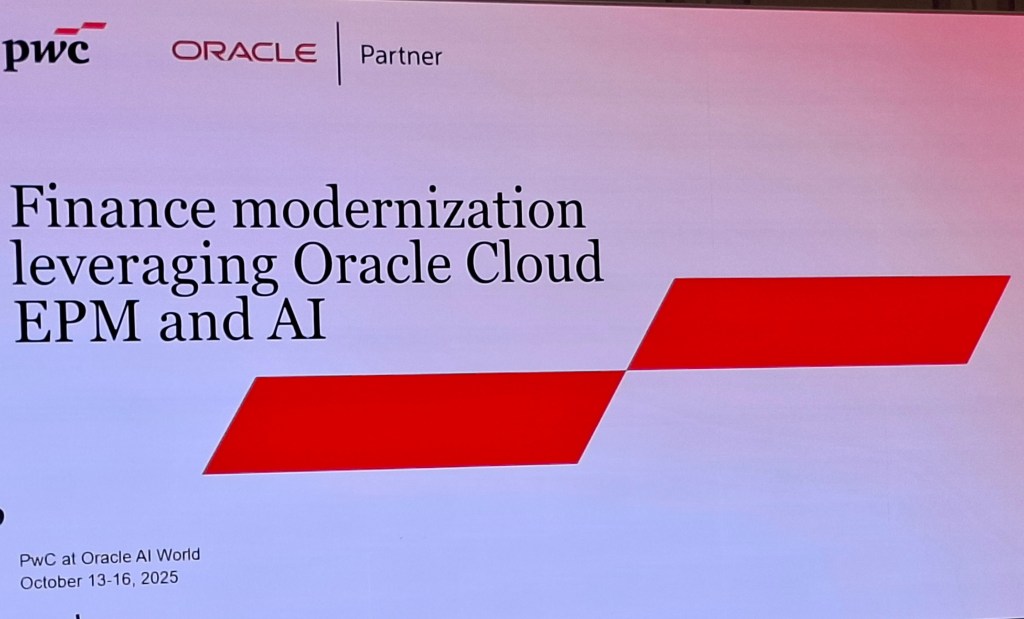
The first session was on AI Powered EPM. Not only was the customer panel hosted by Marc Seewald, the EPM Product Manager, but I was able to sit in the front row next to Andy King, the King of EPM. I was surrounded by extensive EPM experience and it was extremely interesting. I particularly liked the inclusion of Andrew, the VP of Finance at Oracle. It was really interesting to hear his perspective on the value EPM brings to Oracle’s internal Finance processes.

All members of the Panel had extensive experience of Finance Transformation. EPM has been a fundamental part of their financial planning, albeit in different areas. As an EPM novice, it was really interesting to hear the different ways EPM has added value. It definitely has made me want to find out more about EPM. Hopefully I can share my learnings in the future.

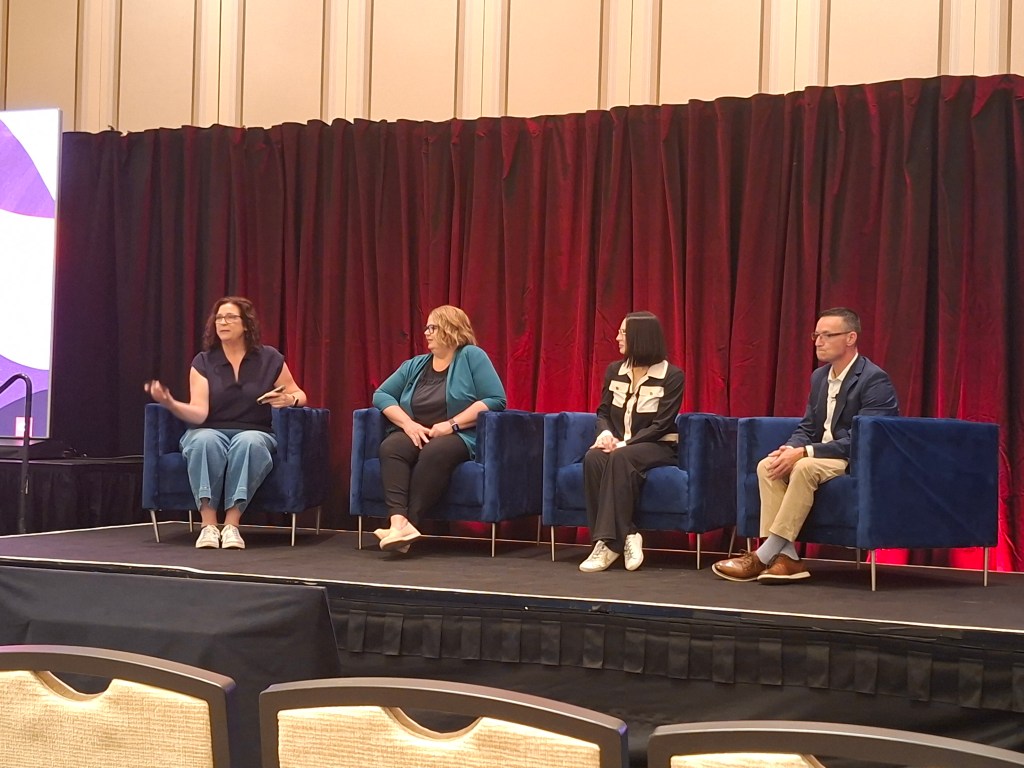
The second, and last session of the day was Amplifying Human Potential. Again it was a panel discussion, this time about using HCM Cloud to improve business processes. As a HCM Nerd who loves innovation,  this was definitely the session for me.

It was a really good panel, Julie has a HCM background,  Kamwin has a systems background and Paul recently led an implementation of Recruiting Cloud. It was a great balance of Oracle experience and system viewpoints.

Not only was the knowledge sharing from the panel really inspiring, what I took away most from the session was how much I love the HCM Cloud community. During the Q&A at the end, a number of people asked for advice. One key question was around how to handle incorporating innovation when the organisation had only just gone live and were struggling to keep on top of BAU work. The panel were very reassuring and provided personal experiences,  but so did the audience. A number of people, myself included, stopped to speak to the question asker at the end to provide advice and reassurance. I highlighted the importance of Cloud Success Navigator as they could record the new features that are of interest on their roadmap, then review them in the future when they feel in a better place to start switching on additional functionality. The general conversation and support given made me very proud of the community.

I can’t believe this is the end of my AI World blogs. I hope you found them all interesting. I’d love to hear what you think. Thanks for joining me on this journey.

Please note all screenshots are the property of Oracle and are used according to their Copyright Guidelines
Oracle AI World – Day 2 Part 1

Day 2 was a jam packed day! I started with a session on using AI to accelerate HR processes; had another wander around the stands learning about all the upcoming features, attended Steve Miranda’s inspirational Key Note and finished the day with a session on AI use in EPM, which is a product I’m trying to learn more about. It was also the day of the Oracle ACE dinner and the party with Def Leppard, but I was so tired I gave the party a miss! There was so much happening on Day 2 that I’ve had to split it out into 2 blogs. This one will cover Accelerating HR with AI and EPM and AI. Steve Miranda’s key note will be in the second blog.

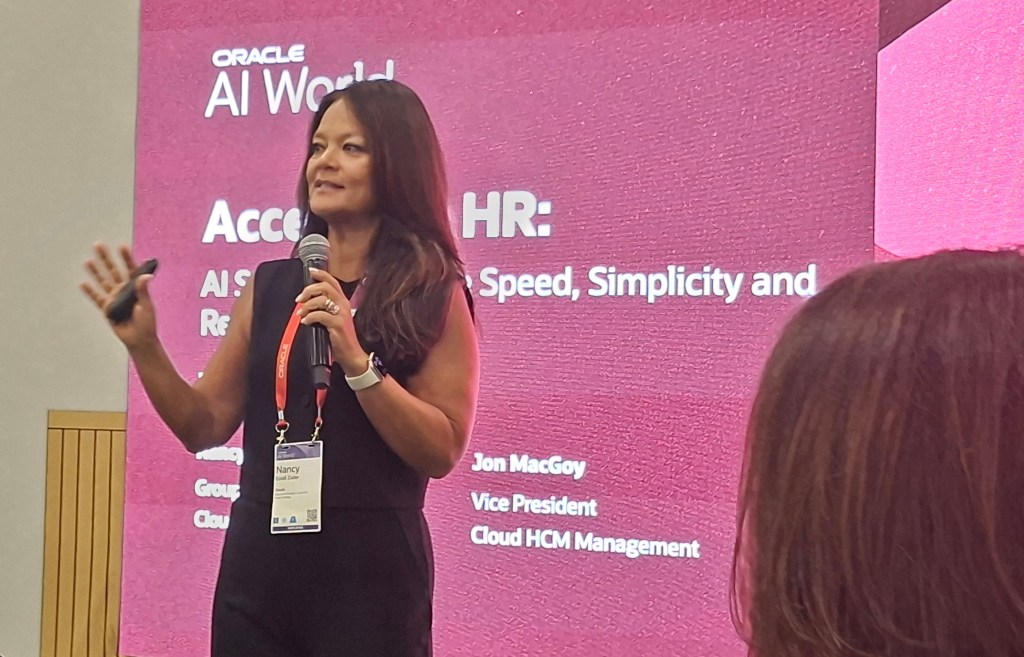
As soon as I saw Nancy Estell Zoder was presenting this session, I knew I wanted to see it. Having attended the Partner Day following Oracle CloudWorld in London, Nancy was a really dynamic presenter and it made me want to attend this one, I wasn’t disappointed! There was the added bonus of Jon MacGoy presenting too.

The overall introduction was really interesting. As someone who loves a stat, I loved hearing how successful the HCM Cloud product has been this year. It also recapped the breadth of the product, which whilst it is known by most, it’s always helpful to see the info graphic listing them all and how they relate to each other.

The feature that Jon demoed was one of my absolute favourites of the whole conference. Oracle are introducing a new way to use Journeys, Personal Journeys. If a user has some tasks they wish to carry out, but don’t want to write a to do list to remind them, Oracle have now provided a systemised solution. A user can now add tasks to a Personal Journey and create their own custom checklist of activities. On top of this, an AI Agent can be used to make the creation of the Personal Journey more streamlined. By asking what tasks do I have outstanding, the AI Agent will generate a Personal Journey that will incorporate all outstanding tasks that the user wishes.

AI World has really triggered an interest in EPM. I’ve enjoyed discussions with Product Managers, colleagues and other attendees on EPM. Given this, I was very keen to learn more about AI use in EPM. The session was a customer forum, but was really interactive. Numerous questions were asked of the audience who responded by displaying paddles with responses on.

It was an interesting discussion giving the perspective from both IT and Finance. The key points were the speed and accuracy of Financial Planning, which was cumbersome prior to the use of EPM. It has definitely triggered a lot more questions for me, which I will do further research on. When I do, I will share it with you!

That wraps up my summary of the first part of Day 2 at Oracle AI World in Las Vegas 2025. Keep an eye for more posts, as I’ll be sharing write-ups from Steve Miranda’s key note and also from day 3.

Please note all screenshots are the property of Oracle and are used according to their Copyright Guidelines

Oracle HCM Cloud Core HR 25C

It doesn’t feel that long since we started talking about 25B, but now its time for 25C! With Core HR being mandatory in Redwood by Release 25C, I would be lying if I said there were a significant number of new features for Core HR in 25C, but there are some features of note! Please keep in mind that Oracle will continue to roll out additional features throughout the quarter, if there are any subsequent features of note, I will do a follow up blog on these.

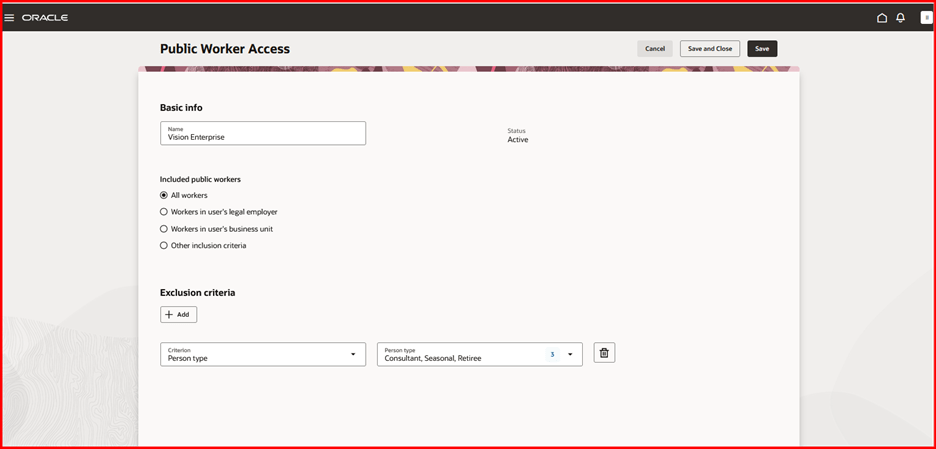
A lot of organisations, particularly in the public sector have been eagerly awaiting the changes to the Public Worker Search functionality. For those of you who don’t know what Public Workers Access is, it determines which employee records are returned in searches and other public-facing views. This allows for controlling the visibility of sensitive information like job codes or positions by applying user-defined criteria. 25C is the first release that brings Public Worker Access support to Oracle Search and Redwood. So what does this mean? If you need to limit employees or positions being available in Public Search due to the confidential nature of their role, now you can! It can be configured in a variety of ways including adding exclusion criteria.

Public Worker Access

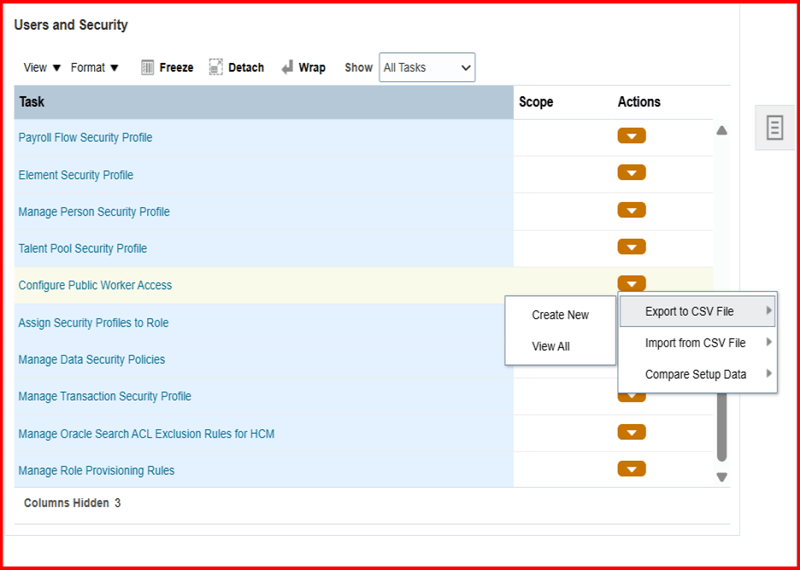
In addition, Oracle have introduced the ability to export your Public Worker Access between pods. This will allow the migration of Public Worker Access configuration to be much simpler and remove any risk of human error. It will ensure that the config that has been tested in your development pod is the same as what is deployed in Production.

Exporting Public Worker Access Configuration

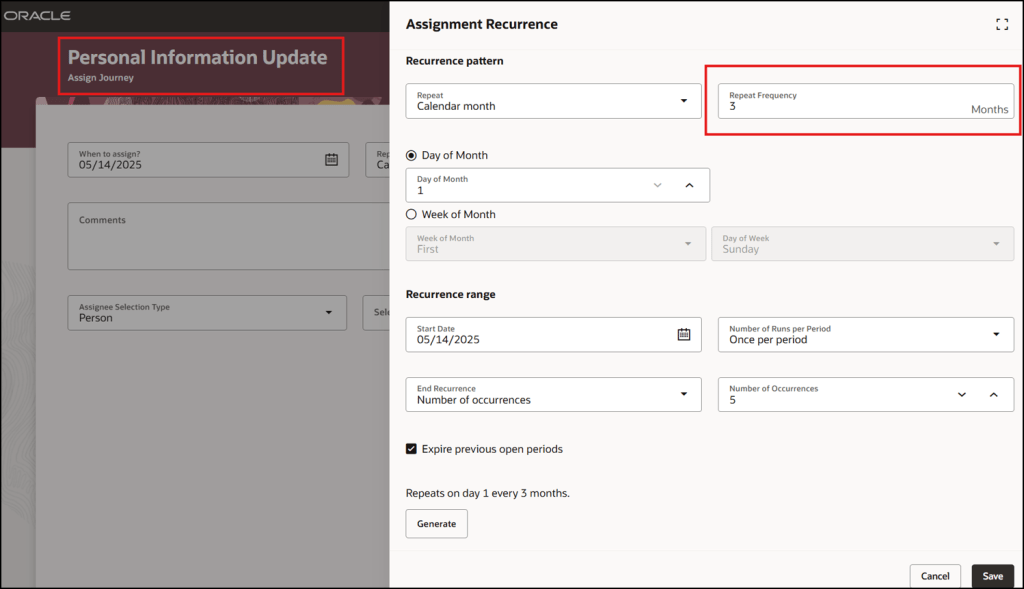
There are a lot of Journey related features in this release. One I particularly like is quite a simple change but I think it will add significant value. The ability to easily schedule recurring Journeys will make Journey administration a lot easier. The flexibility of being able to chose the frequency, but also limit the number of times the Journey is assigned makes this such a great addition.

The final Journey feature that I want to highlight is the ability to embed Multi Agents into Guided Journeys. This will allow a variety of different AI Agents to be embedded into pages with ease. Added AI Agents to pages is done via Guided Journeys and this new functionality makes it much easier. This is the perfect time for this improvement when we’re all prepping for the introduction of AI Agent Studio to speed up the process of creating AI Agents!

Embedded Multi AI Agents in Guided Journeys

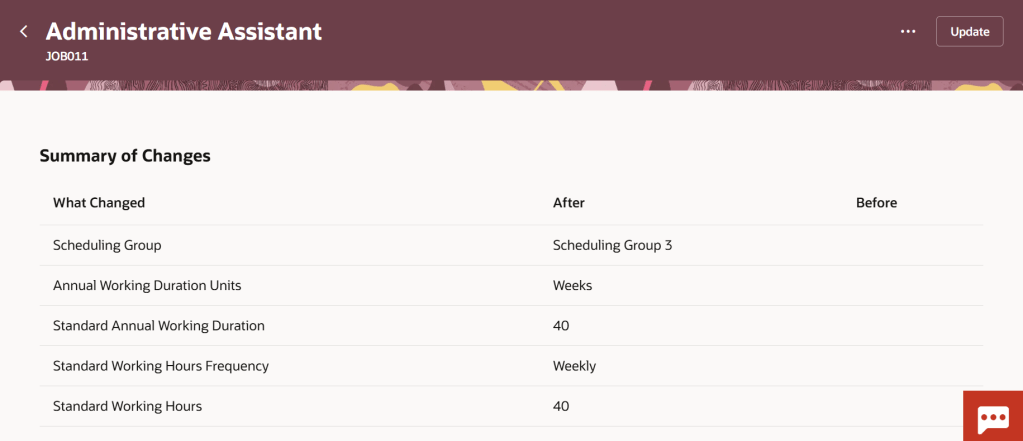
The other area of Core HR with significant changes are within the Workforce Structures workspace. There are a number of new pages that have moved over to Redwood, including the  Legal Entity HCM Information and Legal Reporting Unit HCM Information pages. Additionally Oracle have given more flexibility in adding extra attributes on the summary of changes page for all Workforce Structure changes. These fields can be added in via VBS to allow for the easy review of changes to fields that are important to your organisation.

Additional Attributes in Redwood Workforce Structures Change Summary

As mentioned earlier, Oracle plans to roll out new features in Core HR later this month. Should these updates turn out to be noteworthy, I’ll publish a refreshed blog post. Additionally, keep an eye out for upcoming posts that will cover other modules within Fusion for Release 25C!

Please note all screenshots are the property of Oracle and are used according to their Copyright Guidelines
Oracle HCM Cloud Core HR 24D

It’s that time of the quarter again, new features time! If you’re a New Features Nerd like me, I’m sure you’re equally as excited. Despite the date changes with the Redwood timelines, Oracle are still giving us lots of Redwood treats in this Core HR 24D release.

Redwood New Timeline

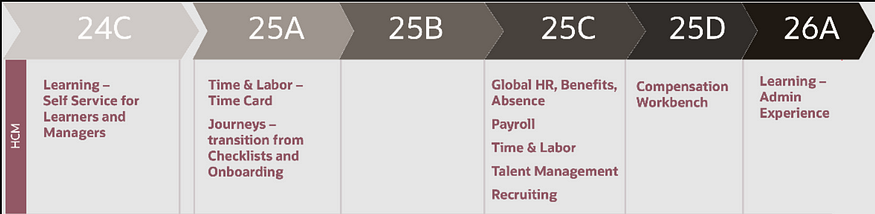
Originally Journeys and Time Cards were going to be mandatory in 24D, but these have been pushed back to 25A. This gives us a bit more breathing room to move forward in our Redwood journey.

Here are the top 5 new features in Core HR for Release 24D. Please keep in mind that Oracle will continue to roll out additional features throughout the quarter, if there are any subsequent features of note, I will do a follow up blog on these.

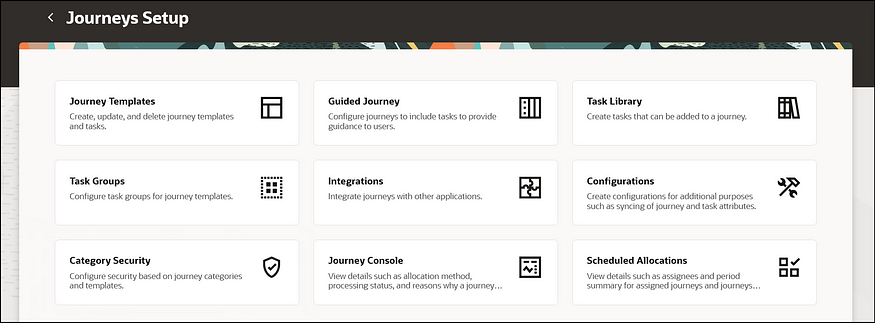
Redwood Journey Setup Page

1)Redwood Journey Setup page. It won’t surprise anyone that given the mandatory move to Redwood Journeys in Release 25A, this is a very Journey heavy release. The first key point of note is the new Redwood Journey Setup page. This is the new landing page for anyone wanting to do any configuration relating to Journeys. As part of this, the Journey Templates; Journey Task Groups and Journey Task Libraries have all moved to Redwood.

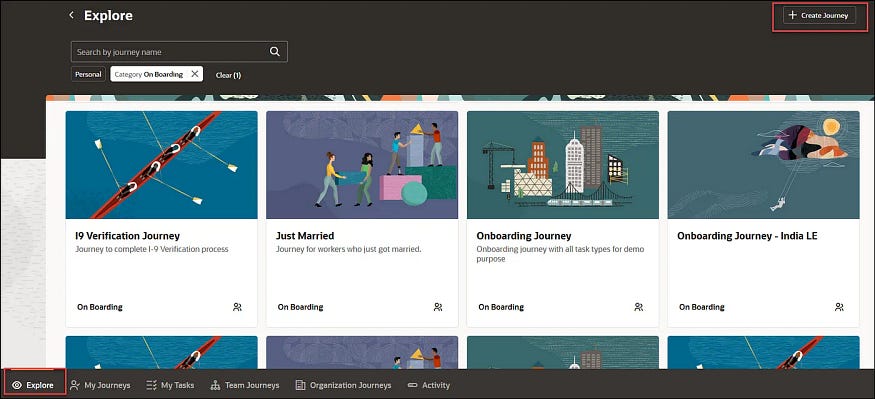
Redwood Journeys Explore

2) Journeys Available for Non Workers. Keeping on the Journeys theme, I’m delighted that Oracle have now made it possible to assign Journeys to non-workers. Given the push towards the use of Journeys into all areas of Oracle Cloud, particularly SCM and Procurement, this doesn’t come as a large surprise. It does mean that where you have agency workers or Non Exec Directors set up as non-workers, it’s possible to assign Journeys and Journey tasks to them.

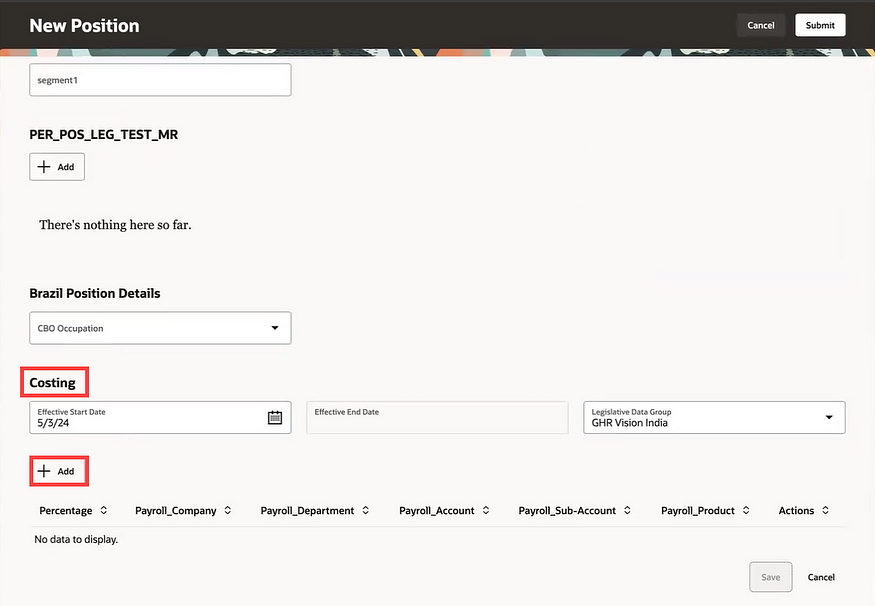
Redwood Position Costing

3) Redwood Position Costing. The introduction of position costing to Redwood might be quite a simple change, but it’s something that has been lacking in Redwood positions until now. Many organisations that also use ERP Cloud Financials want to be able to control where the costing of an employee is posted to based on the role they are doing. The introduction of Redwood position costing now allows this. It’s also possible to do split costing by percentage if multiple cost centres need to be charged for the work.

Redwood Pages Delivered Enabled in 24D

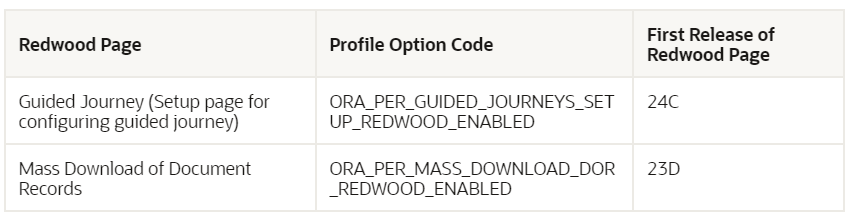
4) Redwood Pages Delivered Enabled in Release 24D. As we’re getting closer to the mandatory switch to Redwood pages, Oracle will be delivering certain Redwood pages automatically enabled. In 24D for Core HR there are only 2 pages being delivered switched on, the setup page for Guided Journeys and the Mass Download of Document Records. If you’re not ready for these to be in Redwood yet, they will need to be manually switched off in Manage Administrator Profile Values by setting the profile option to N.

Redwood Default Expense Account in Employment Update Flow

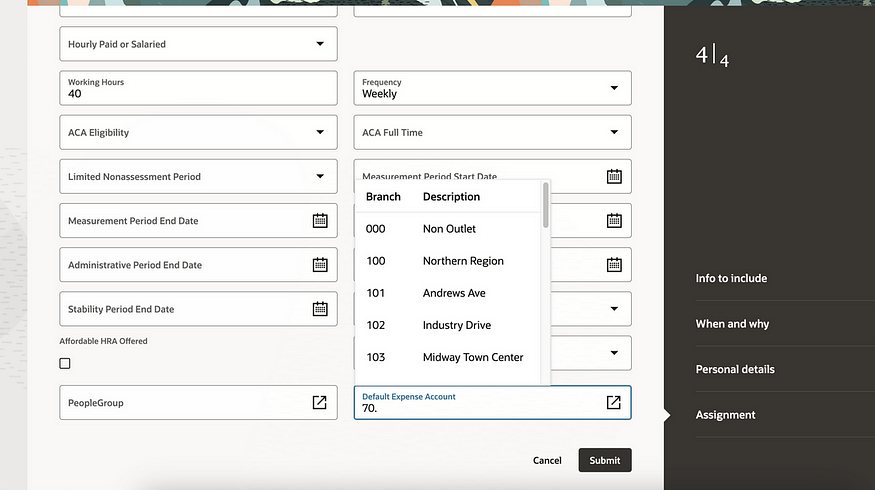
5) Default Expense Account added to Redwood Employment Update Flow. These do need to be configured in the Business Rules area of VBS to be visible, but this is a feature that has been missed by many since Person Management became non-supported. Default Expense Accounts are required before any employee can claim expenses in the ERP Cloud Expenses module. Adding them into the hiring and updating employment flows will minimise the risk of this valuable data not being recorded.

As previously mentioned, Oracle is expected to introduce additional features in Core HR later this month. If these new features prove to be of note, I will create an updated blog post. Stay tuned for blogs covering other modules within HCM Cloud for Release 24D.

Click here to read more about Version 1’s Oracle capabilities.

About the author:

Kate Mead is an Oracle-certified HCM Consultant and Solution Architect at Version 1 with 14 years of experience in Oracle HR and Payroll systems, including 7 years with Oracle HCM Cloud. She has worked across implementation projects and managed services, has a sound knowledge of UK Payroll legislation and — before becoming a consultant — was an HR Manager.

If you have any questions or would like more information on how Version 1 can help you realise the full potential of your Oracle Cloud instances, please contact her at kate.mead@version1.com

Please note all screenshots are the property of Oracle and are used according to their Copyright Guidelines
Oracle HCM Cloud Core HR 24C

If you’ve followed my previous posts, you’ll know I love quarterly release time! There’s nothing better than the day when Oracle release the new features that we’re getting. As anticipated, this release is once again brimming with Redwood and Journey enhancements. Oracle is gearing up for 24D, where Checklists will be replaced by Journeys, and in 25B, Employee and Management Self Services tasks become mandatory in the Redwood interface.

Redwood Journeys Explore Landing Page

Here are the top 5 new features in Core HR for Release 24C. Keep in mind that Oracle will continue to roll out additional features throughout the quarter, so stay tuned for my follow-up post:

1)Redwood and Journeys are combined for the first feature. Business Rules, which allow you to personalise Redwood pages within Visual Builder Studio (VBS), are brought to Journeys. You can now use rules to incorporate or hide features within a Journey, to improve the experience for your users.

2) Any organisation which uses Expenses knows the importance of the Default Expense Account on an employee’s record. The journey to making all HR functions carried out in the Redwood toolset has made another leap forward. It is now possible to configure both the People Group and Default Expense Account key flexfields (KFF) within the Hire an Employee; Add a Contingent Worker / Pending Worker / Nonworker; Convert a Pending Worker and Create a Work Relationship.

3) There have been significant improvements to the Redwood Update Employment flow in 24C. These include the automatic calculation of FTE and Headcount; Probation Period and End Date; Defaulting of Location from Department; Ability to Add Non-Workers as Managers; and the new display of the remaining working hours in the ‘Weekly Working Hours Step’. All these automatic calculations will remove the need for manual intervention.

4) There is a new Redwood experience for Terminating Employment and for Employees to undertake Self Service Resignation. In addition to the process flow being moved to the Redwood toolset, so have the View, Reverse and Correct Termination. This ensures that more of the employee lifecycle process from onboarding to offboarding can be managed in the new streamlined Redwood UI.

5) There has been an improvement to the Work Patterns, which is particularly helpful for organisations which use rolling work patterns. The inclusion of non-working weeks provides significant value, especially for organisations with patterns like 2 weeks on, 2 weeks off.

As previously mentioned, Oracle is expected to introduce additional features in Core HR later this month. If these new features prove to be significant, I will create an updated blog post. Stay tuned for blogs covering other modules within HCM Cloud for Release 24C.

Click here to read more about Version 1’s Oracle capabilities.

About the author:

Kate Mead is an Oracle-certified HCM Consultant and Solution Architect at Version 1 with 14 years of experience in Oracle HR and Payroll systems, including 7 years with Oracle HCM Cloud. She has worked across implementation projects and managed services, has a sound knowledge of UK Payroll legislation and — before becoming a consultant — was an HR Manager.

If you have any questions or would like more information on how Version 1 can help you realise the full potential of your Oracle Cloud instances, please contact her at kate.mead@version1.com

Please note all screenshots are the property of Oracle and are used according to their Copyright Guidelines
Oracle HCM Cloud Core HR 24B

It’s my favourite time of the quarter when Oracle release the details of what’s coming in the next release! Oracle will continue to reveal details of 24B over March, but what has been announced in Core HR so far, is already looking great.

Team Activity Centre

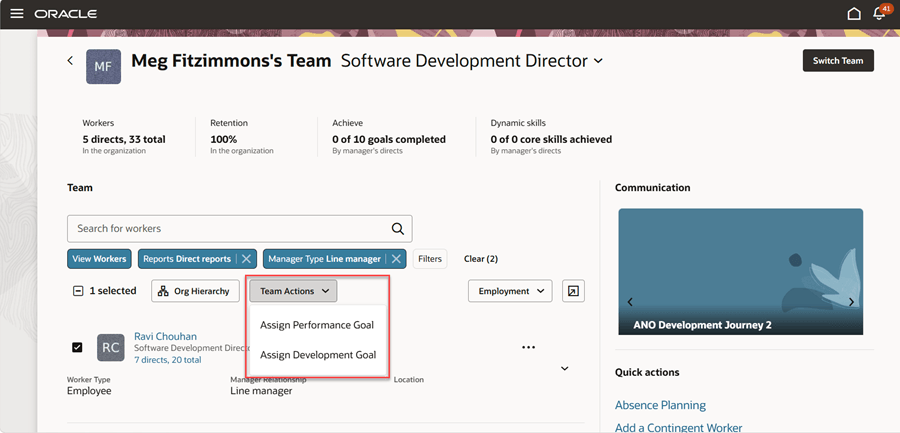
Unsurprisingly, this is another Redwood-heavy release and I’m delighted with what has already been announced. As part of the drive to move Employee and Manager Self Service to Redwood, there is a new Team Activity Centre. This gives Line Managers a high-level overview of the important metrics relating to their team, including staff turnover and progression with goals and skills.
If your organisation is using Journeys, Line Managers can see details of outstanding tasks waiting to be completed. Additionally, key information that the Line Manager needs to view for their team, can be seen directly in the new Activity Centre, for example, compensation details, talent ratings and the status of recruitment requisitions.

Pending Workers

Pending Workers have joined Redwood now! This is another key page that HR teams use regularly which has been completely rewritten within the VBS toolset. It’s now a guided process and Guided Journeys can be incorporated into the process too.

Convert Pending Worker Flow

Journeys are another key theme of recent Core HR releases and this is no different. The worlds of Redwood and Journeys are meeting perfectly with a number of key new features in 24B.

Journeys Configuration

Configuration has now moved to Redwood, with the new Journeys Configuration page. The new Journey Configurations page is the equivalent of the existing Configurations tab where Journeys were previously set up. The new page is designed to be easier to use, with fewer button clicks and better performance.

Journeys Console

Additionally, there is a new Journeys Console and Journeys Integrations application written in VBS to replace the existing View Console and Integrations tabs on the Checklist Templates page. These include the same optimisations that the Journeys Configuration page has.

One more exciting new feature is the Autoprovisioning of Areas of Responsibility based on templates. It is now possible to mass assign, but also automatically end date, AOR based on user-defined template criteria. The new Assign by Criteria section allows organisations to add criteria and values that identify the user who should receive the responsibility with the Basic Info and Scope defined in the prior sections of the page.

As I said earlier, Oracle is likely to release more features in Core HR later in the month, so I will do an updated blog later in the month. Also, keep an eye out for blogs on other modules within HCM Cloud for Release 24B.

Learn more about how Version 1 can help you maximise your Oracle Cloud instances here.

About the author:

Kate Mead is an Oracle-certified HCM Consultant and Solution Architect at Version 1 with 14 years of experience in Oracle HR and Payroll systems, including 7 years with Oracle HCM Cloud. She has worked across implementation projects and managed services, has a sound knowledge of UK Payroll legislation and — before becoming a consultant — was an HR Manager.

If you have any questions or would like more information on how Version 1 can help you realise the full potential of your Oracle Cloud instances, please contact her at kate.mead@version1.com

Please note all screenshots are the property of Oracle and are used according to their Copyright Guidelines