Before we get started, a quick thank you to one of my blog readers. This article came about following a direct request from a customer who asked if I could explain what is happening with Oracle Learning Offerings and the new Learning Paths functionality. It’s the first time I’ve been specifically asked to write a blog on a particular Oracle Fusion topic, and after looking into it I realised they’re probably not alone in being confused.
If you’ve recently seen references to Learning Paths, heard that Offerings are going away, or wondered what Redwood means for Oracle Learning, you’re not the only one. Oracle is changing terminology, introducing new Redwood-native learning objects and modernising Learning administration at the same time. That makes it difficult to understand exactly what is changing and, more importantly, what it means for customers who have spent years building and managing learning content in Oracle Learning. So let’s unpack it.
One of the biggest sources of confusion is that two separate changes are happening at the same time. In Oracle Fusion Learning 26B, Oracle rebranded Specialisations as Learning Paths. Oracle states that the self-service learning experience now consistently presents Specialisations as Learning Paths, although administrators may still see the old terminology in some classic administration pages for the time being.
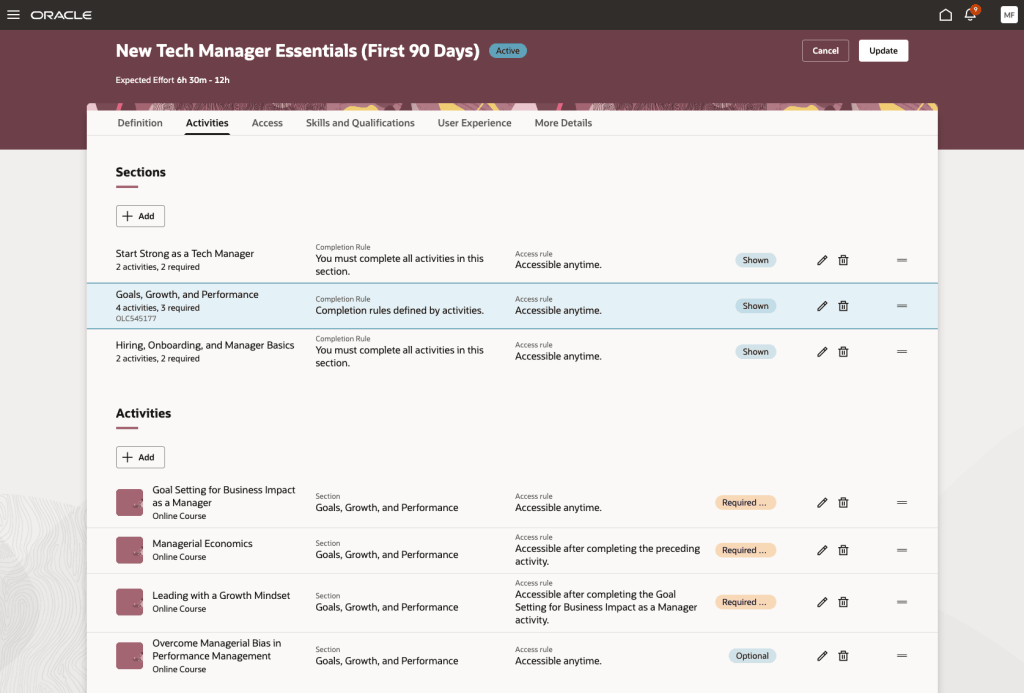
Learning Paths are therefore the new name for what many Learning administrators have known as Specialisations. They are designed to provide a structured learning journey containing multiple learning items, helping organisations create role-based, compliance-based or career-development learning programmes. They are not a direct replacement for a single Offering.
For many years, Oracle Learning followed a fairly structured hierarchy. A typical eLearning item might look something like this: Course → Offering → Activity. This provided flexibility but often resulted in multiple objects needing to be created and maintained for even relatively simple learning content. If you wanted to publish a straightforward self-paced training course, you typically found yourself creating several related objects before learners could access the content. It worked, but it wasn’t always intuitive.
Oracle has been redesigning Learning as part of its broader Redwood strategy. One of the most significant developments arrived in 24D with the introduction of the new Redwood Self-Paced Learning experience. Oracle describes this as a redesigned process that combines what were previously separate activities into a single workflow, bringing together content, activities and learning publication within one experience.
The goal is simple: reduce complexity; simplify administration; improve usability and create a more modern learner experience. Rather than forcing administrators through multiple setup steps, Oracle is moving towards a more streamlined content creation model.
So are Offerings being removed? This is where things get interesting. There is a lot of discussion within the Oracle Learning community about Offerings becoming less central to the Learning architecture. Industry commentators have suggested Oracle’s long-term direction is towards Redwood-native learning objects rather than the traditional Offering-centred model. However, what is important is separating community interpretation from Oracle’s documented position.
What Oracle has clearly documented is:
Specialisations are becoming Learning Paths.
Redwood Self-Paced Learning introduces a simplified approach to managing self-paced learning content.
Oracle continues to invest heavily in Redwood Learning experiences.
What I have not yet found in Oracle readiness documentation is a statement saying: “Learning Paths replace Offerings.” In fact, these are different concepts serving different purposes. Think of a Learning Path as a curriculum rather than an individual training item. A Learning Path might include: multiple self-paced learning items; instructor-led training; assessments; recommended learning sequences or mandatory prerequisites. In other words, Learning Paths help define what learners should complete and in what order. They are ideal for: new starter onboarding; leadership programmes; compliance journeys; certification pathways and role-based development programmes. This is broadly the same purpose that Specialisations have always served, just under a new name.
For most organisations, I don’t think there is a need to panic. My advice would be: first, start becoming familiar with Redwood Learning administration if you haven’t already. Second, review how much you rely on traditional Course and Offering structures for new content creation. Third, start thinking about Learning Paths from a learner journey perspective rather than viewing them as a replacement for individual training content. Most importantly, don’t assume that every mention of Learning Paths is related to Offerings. In many cases Oracle is simply referring to the rebranding of Specialisations rather than introducing a direct replacement for existing Offerings.
Having worked with Oracle Learning for many years, I can understand why customers are asking questions. The terminology changes are significant, and because they are arriving alongside the wider Redwood transformation it’s easy to assume everything is changing at once. What I find encouraging is Oracle’s clear focus on simplifying Learning administration. The historic Course, Offering and Activity model could be powerful, but it could also feel overly complex for straightforward learning scenarios. Redwood Self-Paced Learning is a good example of Oracle reducing that complexity and making content easier to create and maintain.
For now, my advice is simple: treat Learning Paths as the evolution of Specialisations, keep an eye on Oracle’s Redwood Learning roadmap, and avoid assuming that Learning Paths are a direct one-for-one replacement for Offerings. The reality is a little more nuanced than that.
And finally, thank you again to the customer who suggested this topic. If there are other areas of Oracle Fusion you’d like me to explore in a future blog, feel free to get in touch. It seems I’ve accidentally opened the suggestions box.
Please note all screenshots are the property of Oracle and are used according to their Copyright Guidelines.
It’s that time again, quarterly release time, and Oracle Recruiting 26D is shaping up to be one of the more interesting releases we’ve seen for a while. At first glance, it’s easy to assume this is simply another AI-heavy update. After all, almost every major enhancement includes some form of advisor, agent or generative capability. But looking a little deeper, I think there’s a more interesting story here.
For years, recruiting technology has largely focused on helping recruiters process candidates more efficiently once a vacancy exists. A requisition opens, recruiters search for candidates, screening begins, interviews are arranged and eventually an offer is made. Release 26D starts to challenge that model.
Many of the new capabilities are focused on helping organisations anticipate hiring demand, build pipelines earlier, make more informed decisions and reduce administrative effort throughout the recruitment lifecycle. In other words, moving from reactive hiring towards proactive recruiting.
The feature that caught my attention most is Candidate Sourcing Workspace. Most recruitment teams know the pressure that comes with a new vacancy. As soon as a requisition is approved, the clock starts ticking. Recruiters begin searching, hiring managers want candidate shortlists immediately, and the race is on to identify suitable people. Oracle is trying to change that.
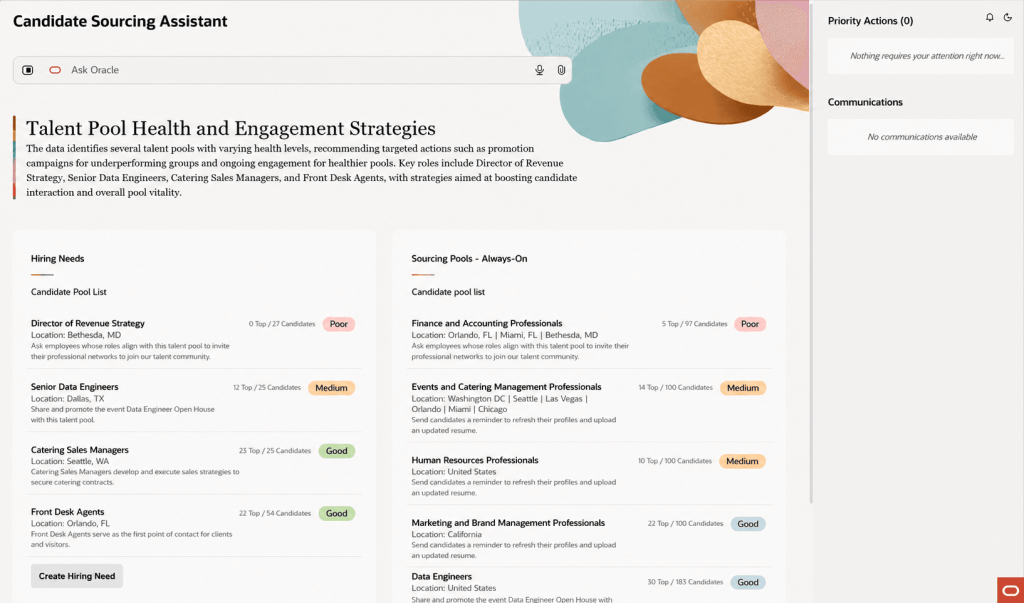
The new Candidate Sourcing Workspace allows recruiters to build and maintain talent pipelines before a requisition even exists. Using previous hiring patterns and anticipated demand, Oracle can help recruiters identify and nurture potential candidates in advance, creating a pool of talent ready to engage when opportunities arise.
Rather than starting every search from scratch, recruiters can draw from existing talent pools, review AI-generated candidate summaries and quickly identify the strongest matches for anticipated hiring needs. For organisations that regularly recruit into similar roles, this could have a significant impact on time-to-hire. More importantly, it allows recruiters to spend less time hunting for candidates and more time building relationships with them. That’s a much more strategic use of everyone’s time.
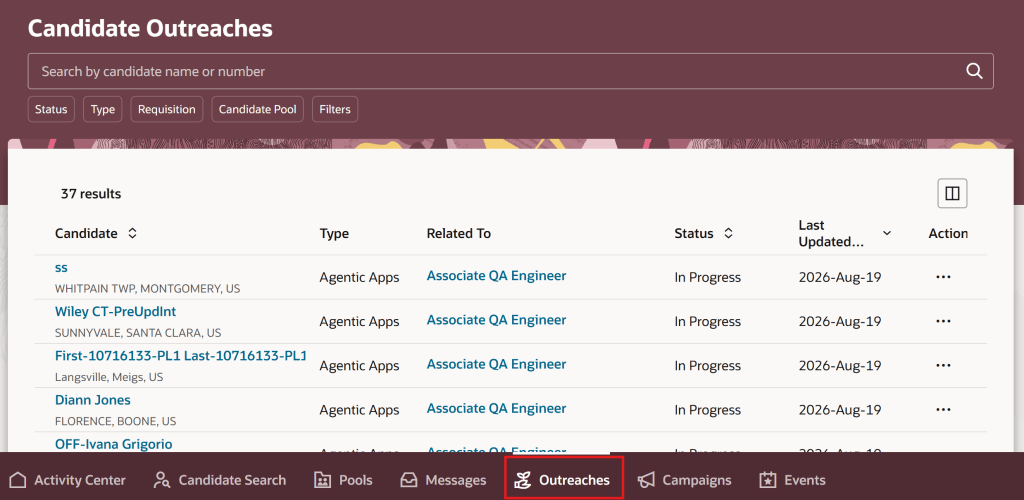
Supporting the new sourcing workspace is an enhanced outreach experience that brings together all candidate engagement activity into a single view. That might not sound particularly exciting on paper, but anyone who has ever managed a large recruitment campaign knows how easy it is for conversations to lose momentum. Candidates don’t respond immediately, follow-ups are forgotten, and promising prospects gradually disappear from the process. Oracle is addressing that problem with automated reminders, consolidated outreach tracking and AI-generated summaries of candidate responses. The result is a much clearer picture of who has been contacted, where conversations stand and what action should happen next.
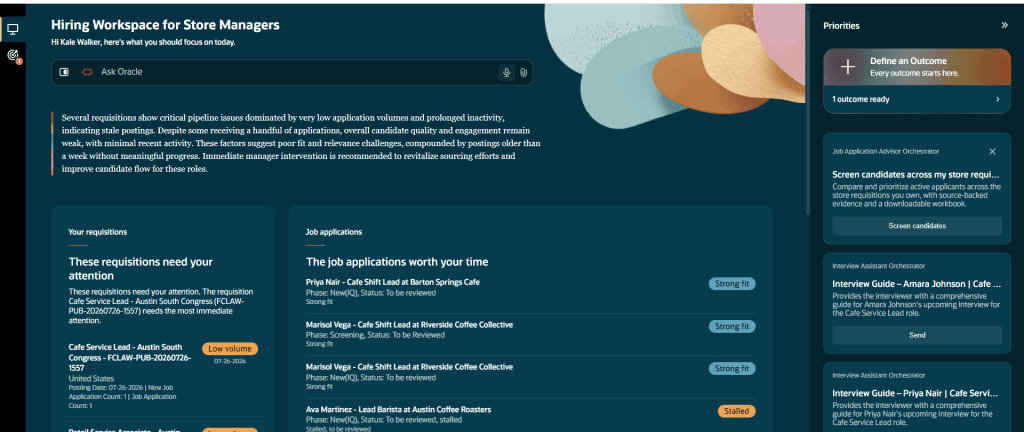
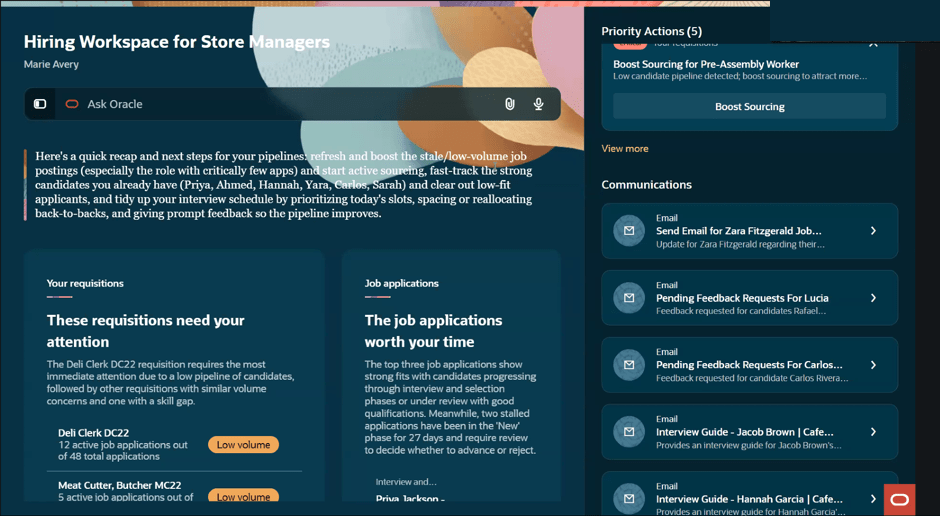
Another interesting addition is the new Hiring Workspace for Store Manager. Although initially aimed at retail organisations, the broader theme here is relevant to any organisation managing high-volume recruitment. The workspace allows managers to ask natural-language questions such as: “What requires my attention today?” or “Where is hiring off track?” and receive a structured response that highlights issues, priorities and recommended actions.
What I like about this feature is that Oracle isn’t simply presenting data differently. The platform is actively helping managers understand what requires attention and what they should do next. That may sound like a subtle distinction, but it’s an important one. Most recruitment systems already provide dashboards and reports. The challenge isn’t usually accessing information. It’s understanding what action should be taken based on that information. This workspace starts to bridge that gap.
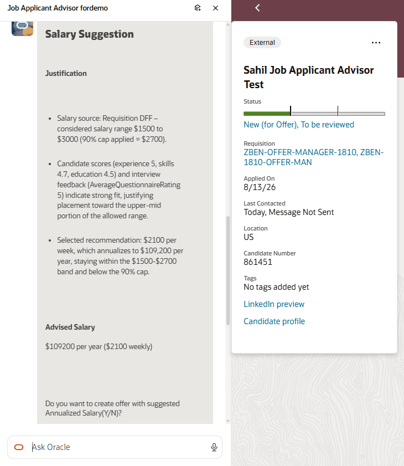
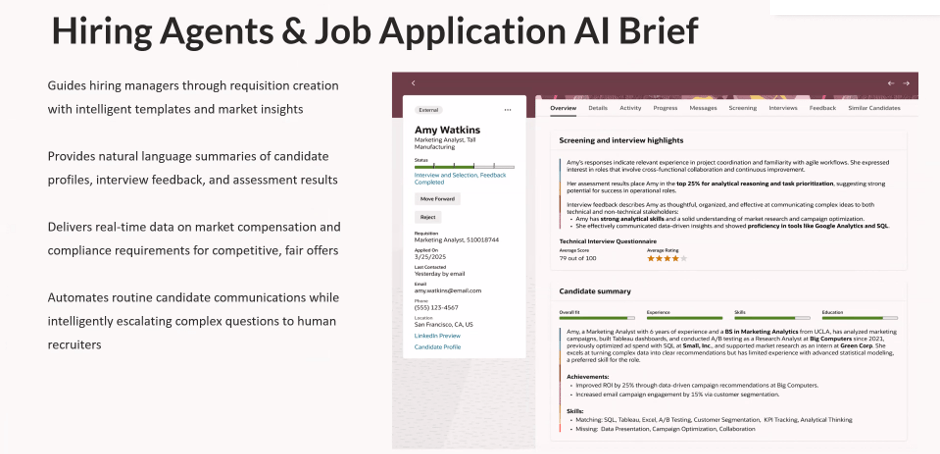
Probably the most practical AI enhancement in the release is the new Compensation Recommendation and Job Offer Creation Advisor. Creating a competitive offer has traditionally involved a mixture of salary benchmarking, internal comparisons and professional judgement. It can also be surprisingly time-consuming. Oracle’s new advisor pulls together relevant information from the requisition, candidate assessments and internal salary data to provide a recommended salary range before helping create the draft offer itself.
What particularly stood out to me is Oracle’s emphasis on explainability and guardrails. The recommendations are based on defined business criteria and Oracle explicitly states that protected characteristics such as age, gender, race and disability are not used when generating recommendations. In a world where organisations are rightly paying more attention to AI governance and pay equity, that’s an important message. Will recruiters still want human oversight? Absolutely. But reducing the administrative effort involved in preparing offers while supporting consistency of decision-making feels like a genuinely useful application of AI.
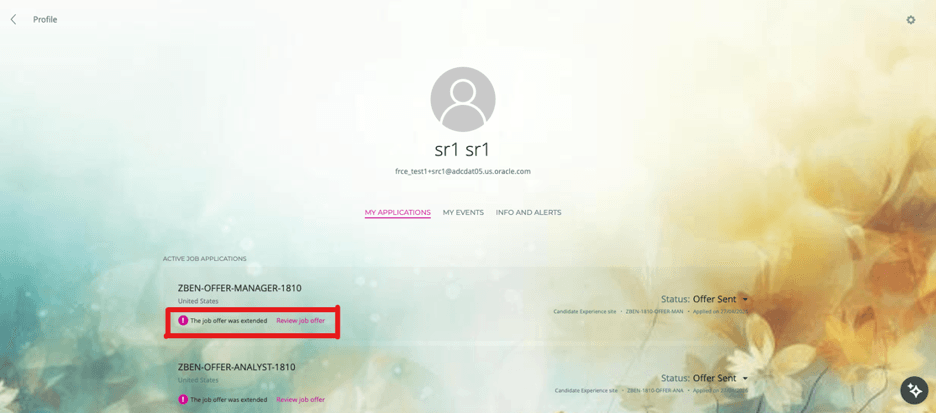
Not every valuable enhancement in 26D relies on AI. Oracle has also simplified how candidates access and respond to job offers by making offers available directly through candidate-facing experiences. External candidates can access offers through career sites, while internal candidates can access them through Opportunity Marketplace. They can review offer documentation, accept or decline offers and access completed documentation after acceptance.
It’s a relatively simple change, but one that removes a common point of friction. Offer emails can be missed, filtered or buried in busy inboxes. Giving candidates a consistent place to access offer information feels like a sensible improvement that should help remove avoidable delays from the process.
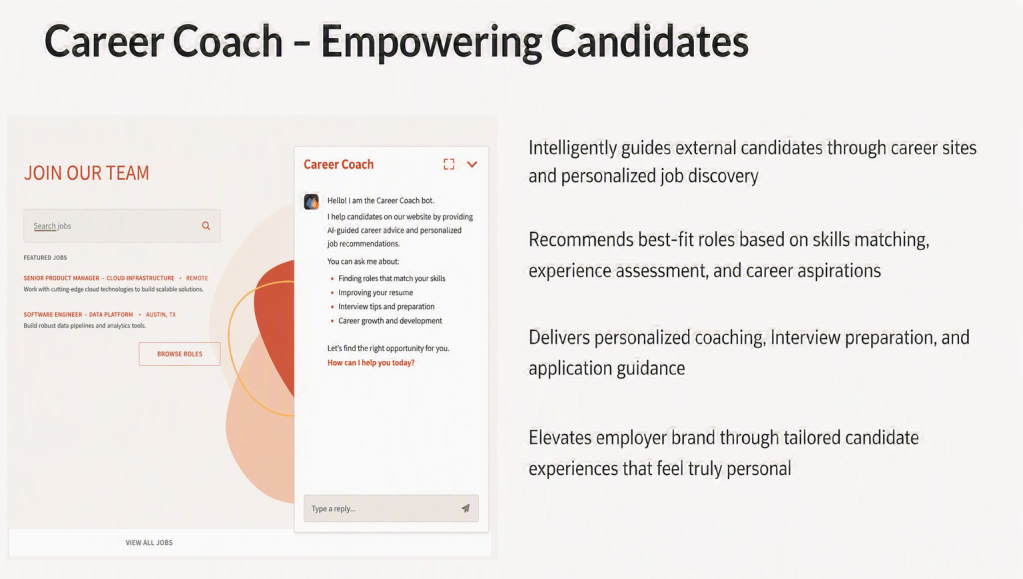
While most of the release focuses on new innovation, there is one update that deserves immediate attention. Oracle has confirmed that Digital Assistant (ODA) Fusion Apps templates for Recruiting will no longer be supported from November 2026. If your career site currently relies on Oracle Digital Assistant, now is the time to begin planning your transition. Oracle’s recommended path forward is Career Coach, which becomes the strategic candidate assistance experience going forward. This isn’t something I’d leave until the last minute. November 2026 will arrive much faster than many organisations expect, and early planning will help avoid unnecessary disruption.
What stands out to me about Recruiting in 26D is that Oracle appears to be focusing on the right problems. The most valuable features aren’t necessarily the ones generating content faster. They’re the ones helping organisations build stronger talent pipelines, make more consistent hiring decisions and remove friction from the recruitment process.
That’s why Candidate Sourcing Workspace was the feature that caught my eye. If organisations can move from scrambling to find candidates every time a requisition opens to maintaining an always-on pipeline of talent, that has the potential to transform recruitment performance far more than any chatbot ever could. There are still plenty of AI announcements in this release, but for once they feel connected to genuine business outcomes rather than being technology in search of a problem. And if you’re still relying on Oracle Digital Assistant on your career site, don’t overlook the deprecation announcement. November 2026 will arrive faster than you think.
Please note all screenshots are the property of Oracle and are used in accordance with Oracle’s Copyright Guidelines.
It’s quarterly release time again, and Oracle Fusion Absence Management 26D is one of those releases that probably won’t grab headlines. There’s no shiny new AI capability. No major redesign of the absence process. No feature that’s going to fundamentally change how organisations manage leave. What there is, however, is a collection of enhancements that solve genuine problems.
Some of these updates close long-standing gaps between Absence Management, Time and Labor, Payroll and Project Costing. Others make life easier for administrators. There’s even a small but welcome improvement that makes organisational events much more visible to employees. Individually, none of these features are ground breaking. Collectively, they make the product noticeably better.
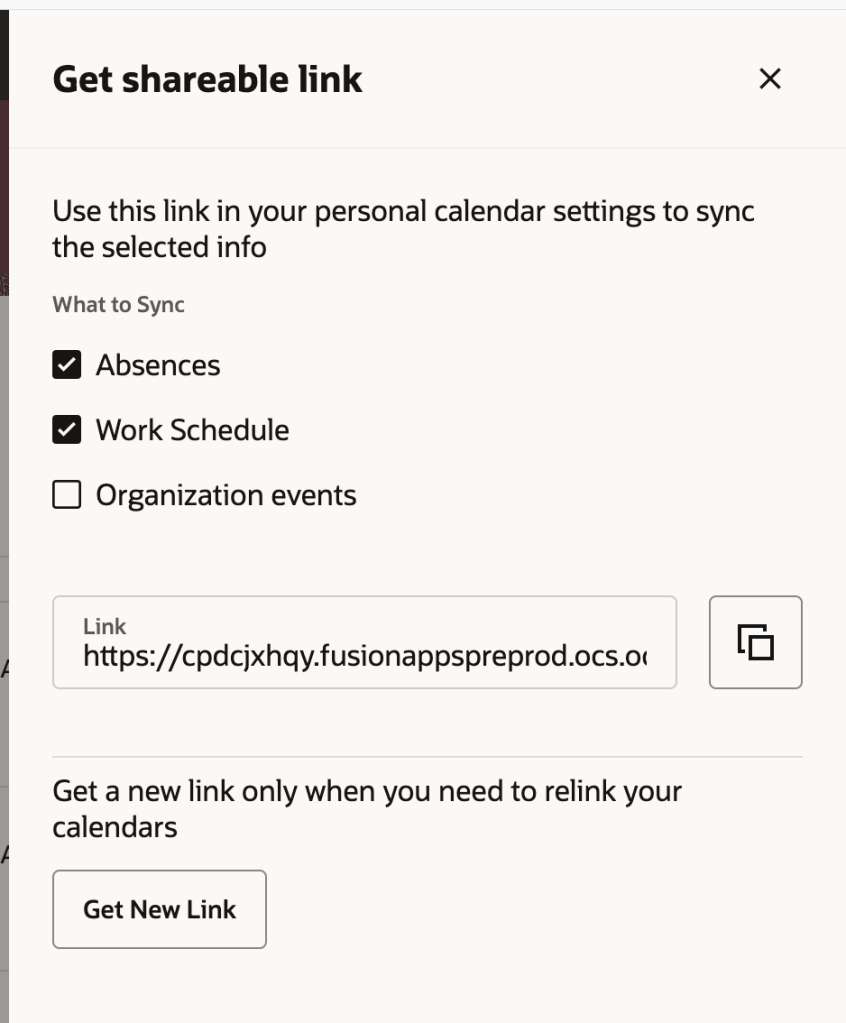
If I had to pick the feature that will have the biggest day-to-day impact, it’s probably Organisation Calendar Events in Calendar and Calendar Synchronisation. Many organisations maintain company shutdowns, public holidays, site closures, special events, or other important dates within organisation calendars. The problem has always been visibility. Unless employees actively looked in Oracle, those events were easy to miss.
With 26D, employees can now synchronise organisation calendar events alongside their absences and shifts using Oracle’s existing calendar integration. That means important organisation events can appear directly in the calendar applications people already use every day. For employees, it’s a small change that removes a surprising amount of friction. Instead of checking multiple systems to understand what’s happening, everything becomes visible in one place.
Oracle has also improved the Redwood calendar experience itself by allowing users to open calendar events and immediately see additional details such as descriptions, categories and timings without having to search elsewhere for information. It’s a simple enhancement, but one that’s likely to improve awareness and reduce confusion around organisation-wide events.
Oracle continues its journey towards a fully Redwood-based HCM experience, and in 26D the Leave Agreements administration page receives the Redwood treatment. While this might sound like another routine Redwood migration, it’s actually a worthwhile improvement for absence administrators. The previous experience wasn’t particularly intuitive and often required moving between different screens to manage agreements and related information. The new Redwood page brings everything together in a single location, making it much easier to search, filter, review and maintain leave agreements.
For organisations that manage complex collective agreements, union arrangements or other entitlement frameworks, reducing administrative effort is always welcome. This won’t fundamentally change how leave agreements work, but it does make them significantly easier to manage. And that’s often what good Redwood design should do.
One of the quieter additions in 26D is also one of the most sensible. Oracle has introduced a dedicated security role that provides access to the Absences and Entitlements page without requiring organisations to rely on broader HR Specialist access. That may not sound exciting, but it addresses a challenge many customers face when trying to align Oracle security with real-world operating models.
Not every organisation wants absence administrators to have the wider access typically associated with HR roles. Until now, customers often had to make compromises or develop workarounds. The new role provides much more flexibility when designing security models and supports the principle of providing users with only the access they actually need. For organisations with dedicated absence administration teams, that’s a genuinely useful addition.
This next enhancement will be particularly valuable for organisations using Oracle Project Costing. Historically, absence entries captured through Time and Labor didn’t always flow cleanly into Project Costing, creating gaps when organisations were trying to understand the true cost of project resources.
That might not sound significant initially, but when you’re managing project budgets or analysing resource utilisation, missing absence costs can distort the picture. With 26D, eligible absence entries can now be transferred to Project Costing while retaining the relevant project information. The result is more complete project cost data and fewer manual workarounds to reconcile information across systems. This is one of those features that many organisations may never notice directly, but finance teams and project managers will certainly appreciate the improved accuracy behind the scenes.
In my view, this is probably the most important update in the release: Transfer Calculated Time Entries for Absences to Payroll, Many organisations use Time and Labor calculations to generate additional payments such as overtime, shift premiums and other pay-related adjustments. The problem was that when those calculations were associated with absences rather than worked time, Payroll didn’t always receive the complete picture. That could create reconciliation challenges and introduce additional administrative effort during payroll processing. 26D closes that gap.
Calculated entries associated with absences can now be transferred through to Payroll alongside the underlying absence information. What sounds like a technical integration enhancement actually delivers a very practical benefit: payroll calculations become more complete, more accurate and require less manual intervention. For organisations with complex shift patterns, premium payments or heavily unionised environments, this could remove a long-standing source of frustration. And honestly, it feels like one of those features that should always have worked this way.
Absence Management 26D isn’t a release built around a single headline feature. Instead, Oracle has focused on improving existing processes, tightening integrations and making administration easier. The calendar enhancements make absence-related information more visible to employees. The new Redwood Leave Agreements experience provides a cleaner administration experience. Security becomes more flexible. Project costing becomes more accurate. Payroll receives more complete absence-related calculations.
The interesting thing about this release is that Oracle has focused on the areas customers typically only notice when something isn’t working properly. Whether it’s absence-related payments not reaching Payroll, project costing not reflecting employee leave, or staff struggling to find important organisation calendar events, these aren’t glamorous problems, but they’re the sort of issues that create extra administration, reconciliation work and user frustration. 26D won’t transform the way you manage absence, but it does remove a number of small pain points that many organisations have simply learned to live with. For me, that’s what makes this a stronger release than it first appears.
Please note that all screenshots are the property of Oracle and are used in accordance with Oracle’s Copyright Guidelines.
It’s quarterly release time again and, while Talent Management doesn’t have quite the same headline-grabbing AI announcements we’ve seen elsewhere in Oracle Fusion Cloud, Release 26D delivers something arguably more valuable. It removes friction.
Across performance management, succession planning and skills, Oracle continues to focus on helping managers and HR teams spend less time navigating processes and more time focusing on their people. There is a clear theme running through many of the enhancements in this release: making the information you already have easier to access and turning time-consuming tasks into something much simpler.
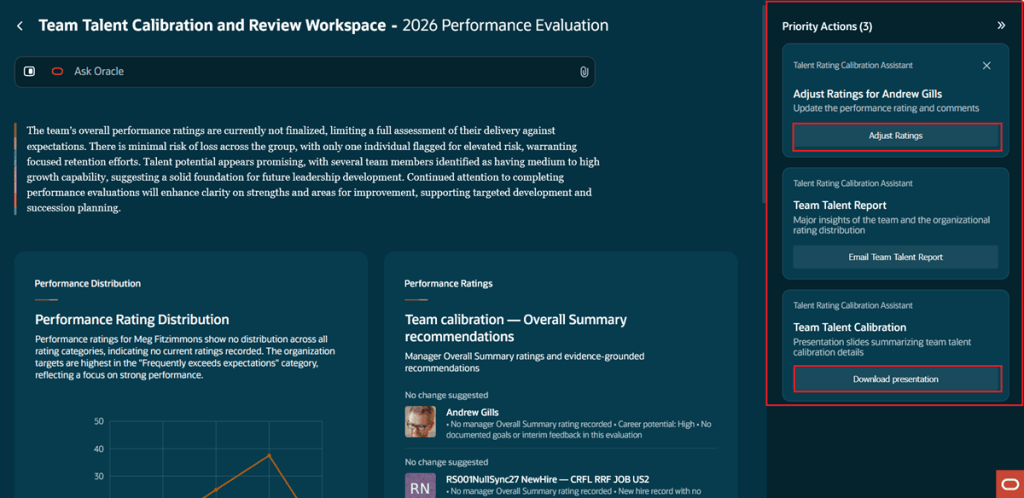
Oracle introduced the Team Talent Calibration and Review Workspace in 26C, but Release 26D feels like the point where it starts delivering real value. Managers can now see AI recommendations suggesting whether an employee’s overall performance rating should be adjusted or remain unchanged. What makes this more interesting than a simple AI-generated recommendation is the amount of information Oracle is now evaluating behind the scenes.
Rather than looking at a narrow set of data, Oracle is drawing on feedback, check-ins, goals, questionnaire responses and other performance information to build a richer picture of an employee’s contribution throughout the year. Let’s be clear, AI should never replace managerial judgement, particularly when it comes to performance discussions. However, it can help surface information that might otherwise be forgotten or overlooked during calibration sessions, especially in larger teams where managers are balancing multiple priorities.
One feature I particularly like is the new Talent Summary presentation. Oracle can now generate a ready-made presentation covering each employee’s performance and talent indicators, along with AI-generated strengths and development opportunities. Anyone who has ever spent hours building calibration packs before a talent review meeting will immediately understand the value of that enhancement.
Check-ins have quietly become one of the strongest parts of Oracle Performance Management and 26D continues that steady evolution. Several enhancements have been introduced that make the experience more structured and, perhaps more importantly, easier for managers to prepare for.
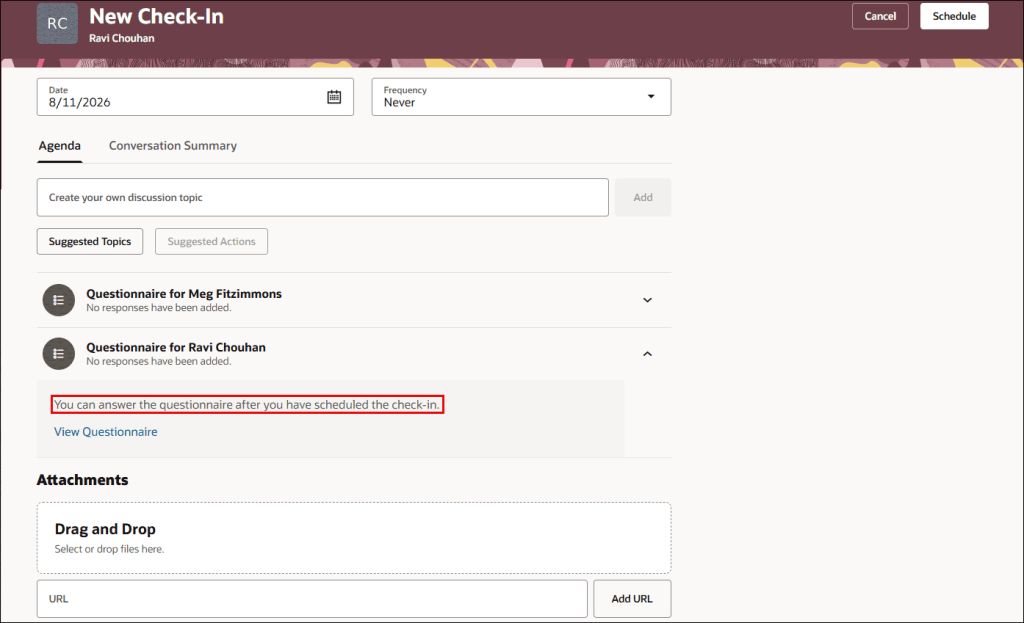
Organisations can now define default templates for check-ins, helping to drive consistency while reducing the amount of setup required when creating new conversations. Oracle has also introduced the ability to include questionnaires directly within check-ins and surface recent employee feedback alongside the discussion. What I like about these changes is that they help managers come into conversations with context already available.
One of the biggest challenges with performance management isn’t collecting information. It’s getting the right information in front of managers at the point they need it. By bringing feedback, discussion points and supporting information together in one place, Oracle is helping make those conversations more meaningful.
The AI-generated summaries introduced in earlier releases have also been enhanced, allowing Oracle to use a broader range of information when generating check-in notes and conversation summaries. Individually, these enhancements may seem relatively small. Together, they make the entire check-in process feel much more mature.
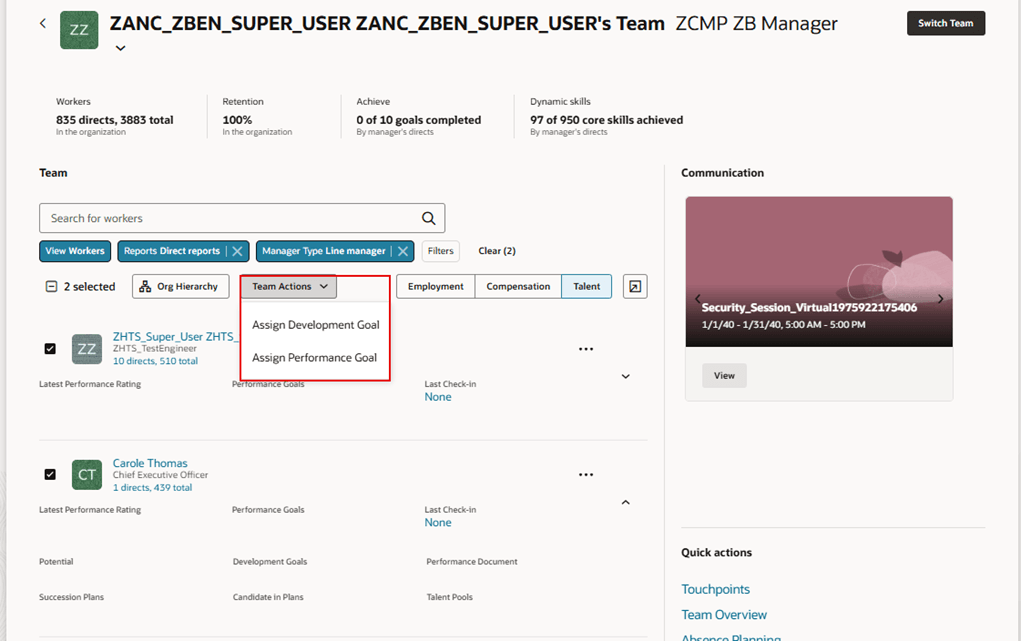
One of my favourite enhancements in this release is also one of the least complicated. Managers can now assign performance and development goals to multiple employees at the same time from the Team Activity Centre This isn’t an exciting AI announcement. It isn’t revolutionary. It’s simply practical.
Many organisations establish common goals across teams or departments, yet managers have traditionally had to assign those goals employee by employee. It’s not difficult, but it is repetitive and time-consuming. Release 26D removes that unnecessary administrative effort and allows managers to assign goals to multiple team members in a single action. Features like this don’t usually make marketing headlines, but they’re often the ones users appreciate the most because they save time every single day.
Most organisations recognise the importance of succession planning. The challenge is often finding the right information when you need it. Even organisations with well-maintained talent profiles and strong skills data can struggle to identify suitable successors quickly and consistently. Release 26D aims to simplify that process through enhancements to the Succession Planning Agent. HR teams can now describe the type of candidate they’re looking for using natural language and receive recommendations based on available workforce, talent and skills information.
What stands out to me is not necessarily the AI itself, but the accessibility it creates. For years, organisations have invested significant effort building richer talent profiles, managing skills data and maintaining employee information. Features like this finally make that data easier to use during real-life talent decisions. That’s where the true value lies.
Skills continue to be a major focus area across Oracle HCM, with many organisations looking beyond traditional job-based workforce planning and moving towards a more skills-driven approach. For customers using Techwolf, Oracle has introduced a new integration that synchronises Techwolf skills directly into Oracle Fusion HCM.
Now, I appreciate this won’t apply to every organisation. However, for those already using Techwolf as part of their skills strategy, this could remove a significant amount of ongoing administration. Maintaining multiple skills repositories is rarely a sustainable long-term approach. Automating the movement of skills data between systems helps improve consistency and gives organisations greater confidence in the information they’re using to support talent decisions. As skills initiatives continue to mature, integrations like this become increasingly important.
A smaller enhancement that shouldn’t be overlooked is the additional flexibility Oracle has introduced within All-in-One Evaluations. HR teams can now make greater use of star-based ratings, define read-only sections within evaluation documents and customise some of the terminology displayed to managers and employees. None of these changes are transformational on their own, but they provide welcome flexibility for organisations that have invested time tailoring performance processes around their own ways of working.
The ability to lock down completed sections is particularly useful for organisations that want tighter control over different stages of the evaluation process while still maintaining visibility for managers and employees. Sometimes success isn’t about introducing entirely new functionality. It’s about giving organisations more control over the tools they already use.
Talent Management 26D isn’t a release packed with revolutionary new capabilities, and honestly, I think that’s perfectly fine. Instead, Oracle has focused on making existing processes easier, smarter and less time-consuming. Calibration becomes more informed, check-ins become more effective, goal management becomes simpler, succession planning becomes more accessible and skills information becomes better connected.
What links all these enhancements together is a common objective: helping managers and HR teams spend less time administering talent processes and more time focusing on the people behind them. Sometimes those are the releases that deliver the biggest impact. As always, Oracle may add additional functionality to the release over the coming weeks. If any significant talent features appear, I’ll be sure to cover them in a future update.
Please note all screenshots are the property of Oracle and are used in accordance with Oracle’s Copyright Guidelines.
It’s quarterly release season again and Oracle has already revealed a healthy batch of new features for Help Desk in 26D. What struck me most this quarter wasn’t necessarily the number of new features, but how much Oracle continues to invest in making support part of the wider employee experience. The latest updates are less about helping agents work faster and more about helping employees find answers, complete actions and stay on top of requests without having to navigate multiple areas of HCM.
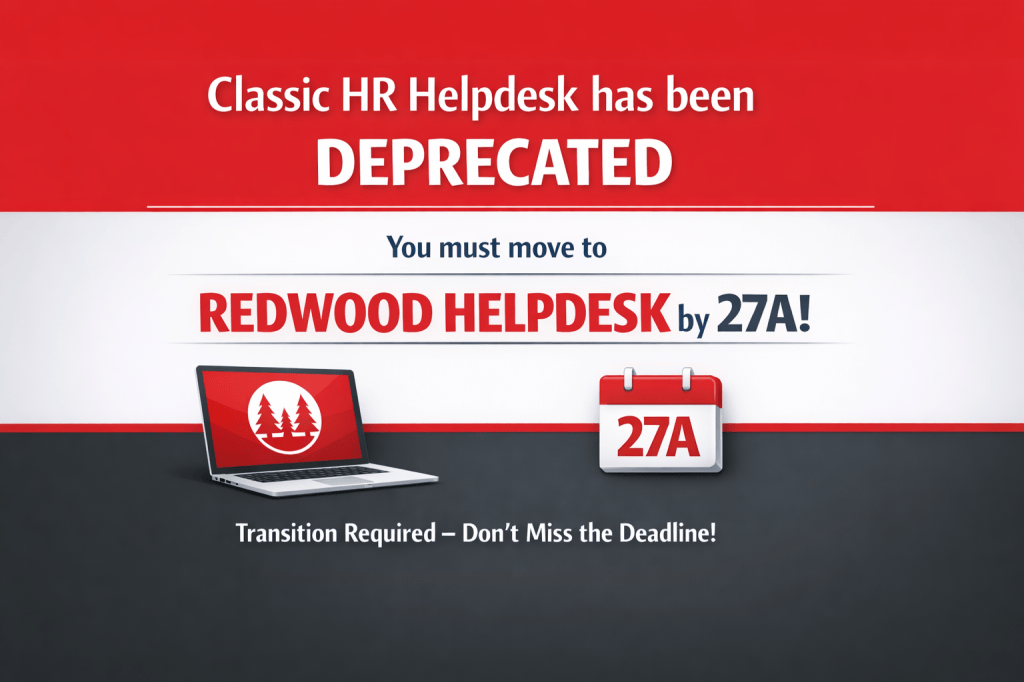
There’s also an important reminder for anyone still running Classic HR Help Desk. Oracle has reconfirmed that the Redwood migration deadline is fast approaching and, if you haven’t started planning yet, now is the time. As always, Oracle may add further features as the release progresses, but let’s take a look at the highlights from the first wave of 26D announcements.
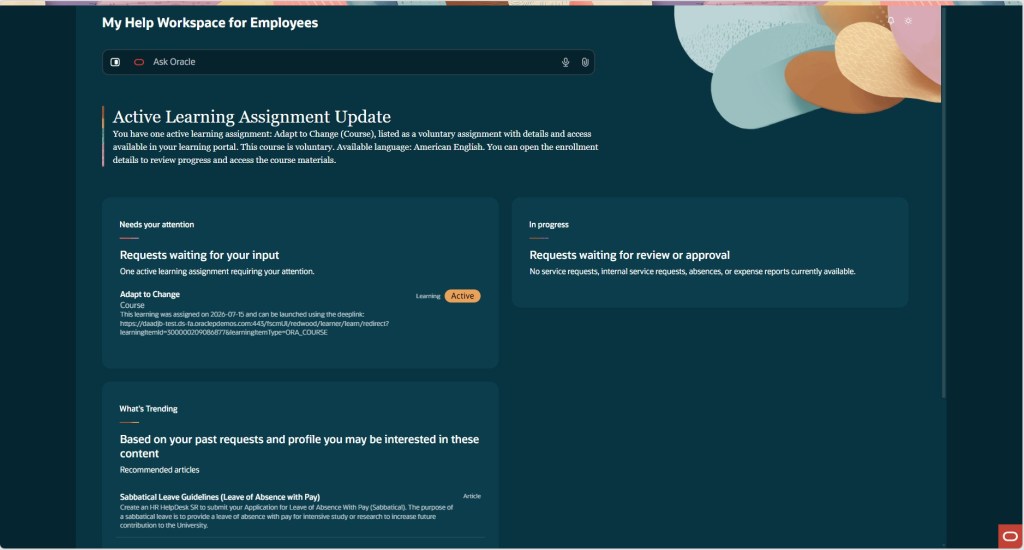
The standout feature in 26D for me is the new My Help Workspace for Employees. If you’ve ever watched employees navigate Oracle HCM, you’ll know one of the biggest frustrations isn’t necessarily finding information. It’s remembering where everything lives. Help requests sit in one place, learning assignments in another, expenses somewhere else, and absence requests somewhere else again. Oracle is clearly trying to tackle that problem.
The new workspace gives employees a single place to see the activities and requests that need their attention. Whether that’s a Help Desk request waiting for a response, an outstanding task, or useful knowledge content, employees can quickly see what requires action without having to navigate around multiple parts of Oracle HCM.
What I particularly like is that it isn’t just a reporting page. Employees can take action directly from the workspace. If a Help Desk analyst is waiting for additional information, the employee can respond immediately. If a request seems to have gone quiet, they can follow up without having to navigate elsewhere.
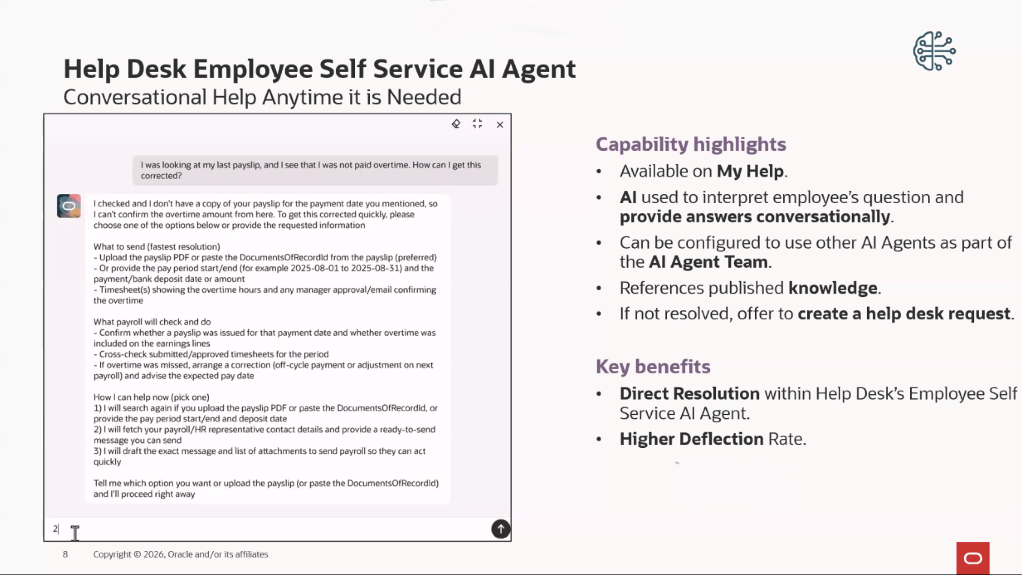
Oracle has also made it easier to get support when employees need it. The Ask Oracle search capability is available directly within the workspace, with access to a full AI-powered chat experience without taking users away from what they’re doing. This feels very much like the direction Oracle is heading with many of its AI investments. Rather than forcing users to jump between modules, Oracle is bringing information and actions together in a single experience and letting AI help guide employees to the next thing they should do.
For organisations exploring Oracle’s Agentic AI strategy, this is probably one of the clearest real-world examples we’ve seen so far. It’s practical, employee-facing and solves a genuine problem rather than introducing technology for technology’s sake.
The Employee Help Desk Self Service Assistant continues to mature with every release, and 26D includes a collection of smaller enhancements that together make a significant difference. The most interesting addition is the use of the Classification Agent when requests are created through the assistant. Instead of employees having to work out categories, priorities and classifications themselves, the AI can now determine much of that information automatically. That might not sound particularly exciting on the surface, but anyone who has spent time reviewing Help Desk data will immediately recognise the value. Better categorisation means better reporting, more consistent routing and less manual effort for support teams.
Oracle has also improved how knowledge content is surfaced by filtering results based on Business Unit. In practice, that means employees are more likely to see information that is relevant to their part of the organisation rather than scrolling through articles that may not apply to them.
One enhancement that I think many customers will appreciate is the ability to identify requests created through the AI assistant using a dedicated source code. Until now, measuring AI adoption has often been surprisingly difficult. Organisations can now report on how many requests originated through the assistant, making it far easier to understand whether employees are actually using the capability and whether it is delivering value. For me, that’s an important step. AI shouldn’t just be implemented. It should be measurable.
Oracle has also continued its push to make AI Agent Studio the centre of AI configuration by allowing the assistant to be run and customised directly from the platform. That gives organisations more flexibility to tailor the experience as their AI strategy evolves.
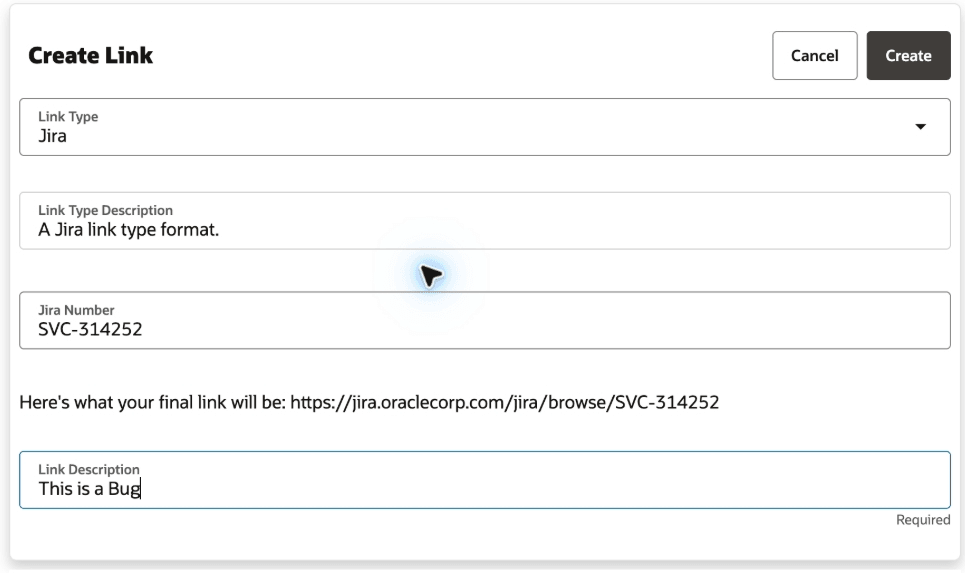
One of the more practical additions in 26D is the ability to associate external links directly with Help Desk requests. Whether your teams work with Jira, SharePoint, Confluence, Google Workspace or other business systems, agents can now link relevant records directly from within a service request.
This isn’t a headline-grabbing feature, but it’s exactly the sort of improvement that saves people time every day. Instead of searching through emails, chat messages or separate applications to find supporting information, agents can access everything they need from the Help Desk request itself. For organisations where support processes span multiple systems and teams, small improvements like this can have a surprisingly positive impact on efficiency and collaboration.
Another area receiving attention in 26D is administration. A number of Help Desk configuration pages have now been brought into the Redwood experience, including Categories, Severities, Channels and Visibilities, Message Types and SmartText. On the surface, this might not feel like a particularly exciting enhancement. However, administrators who regularly manage Help Desk configurations will probably appreciate it more than most.
One of the frustrations during Oracle’s Redwood journey has been moving backwards and forwards between Redwood pages and older administration screens. Every additional configuration page that moves to Redwood helps create a more consistent experience. It’s not transformational, but it is another sign that Oracle’s commitment to Redwood remains firmly on track.
Normally I finish these blogs by talking about what’s coming next. This quarter, I want to finish with a warning. Oracle has reconfirmed that Classic HR Help Desk will no longer be available from 27B. If you’re already running Help Desk in Redwood, that’s not a problem. If you’re still using Classic HR Help Desk, however, this deadline should be firmly on your radar. The reason isn’t simply that Oracle is retiring the old experience. Increasingly, the innovation is happening exclusively in Redwood.
Many of the capabilities organisations are looking at today, including AI-powered self-service, modern employee experiences, enhanced case management capabilities and the new My Help Workspace for Employees, are only available in the Redwood experience. As each quarterly update arrives, that gap is becoming more noticeable. That’s becoming a recurring theme across Oracle HCM as a whole. The question is no longer whether organisations should move to Redwood. The question is whether they’re leaving themselves enough time to get there.
Migration isn’t something I’d recommend leaving until the final few months before an update. There are prerequisites to review, validation activities to complete, testing cycles to run and potentially business processes that need to be reviewed along the way. Starting early gives you time to resolve issues before they become critical path activities. Oracle has provided migration guidance, workbooks and checklists to support the transition, but the key message remains the same: if you’re still on Classic HR Help Desk, this should be a priority for the remainder of 2026.
Overall, this isn’t a release packed with dozens of transformational features, but it does show a very clear direction of travel. Oracle continues to invest heavily in AI-assisted support, employee self-service and Redwood-first experiences, while gradually bringing together information and actions that have traditionally been scattered across multiple areas of HCM.
For most organisations, the new My Help Workspace for Employees and the continued evolution of the Self Service Assistant will be the features worth paying closest attention to. They demonstrate how Oracle is moving beyond simply answering questions and towards helping employees complete tasks, resolve issues and manage their work through AI-assisted experiences. And if you’re still running Classic HR Help Desk, the Redwood migration deadline should probably be the feature getting the most attention of all.
Please note that all screenshots are the property of Oracle and are used in accordance with Oracle’s Copyright Guidelines.
It’s quarterly release time again, and while Payroll 26D doesn’t contain the sort of headline-grabbing feature that will completely transform how payroll teams work, it does include a collection of enhancements that solve real-world problems. There’s continued progress on Oracle’s Redwood journey, some useful legislative updates for UK and Irish payroll, stronger visibility into tax calculations for US payroll teams, and a handful of practical improvements that should reduce administration effort and simplify troubleshooting.
What stood out to me this quarter is that many of the enhancements focus on making payroll easier to manage rather than simply adding new functionality. Several address common frustrations that payroll teams have been dealing with for years, while others provide much-needed transparency into processes that have traditionally felt like a black box. As always, Oracle may introduce additional features over the coming weeks, but here’s what has caught my attention so far.
One theme that won’t surprise anyone by now is Redwood. Oracle continues to replace classic payroll pages with their modern Redwood equivalents, and 26D brings another significant batch of payroll administration pages across. At this stage, most payroll customers understand that the question is no longer whether Redwood is coming, but when they’re going to adopt it. Releases like 26D continue to chip away at the remaining classic pages and make that transition increasingly inevitable. While not every Redwood page introduces brand new functionality, many do improve usability and create a more consistent experience across HCM Cloud.
The Legal Entity Calculation Card and Legal Reporting Unit Calculation Card have now moved to Redwood. These cards hold payroll statutory unit and tax reporting unit defaults, making them some of the more important configuration pages within Payroll. For customers already using Redwood profile options, the new experience is enabled automatically. Functionally, very little changes, but it continues Oracle’s journey towards a consistent user experience across the application.
The Fast Formula migration is probably the Redwood enhancement that will attract the most attention from payroll specialists. The new page introduces a genuinely modern code editor experience, including syntax highlighting and quicker access to database items and functions. Anyone who spends their day building or troubleshooting formulas will likely find it easier to navigate than the classic version. That said, there is one notable omission. Expression Builder isn’t available in the Redwood experience yet, which may influence how quickly some organisations choose to move over. It’s not a blocker for everyone, but it’s definitely something worth testing before making the switch.
Oracle has also moved a further six payroll setup pages into Redwood: Balance Exceptions, Balance Exceptions and Reports, Element Security Profiles, Features by Country or Territory, Organisation Payment Methods and Run Types. It should be noted that these pages are enabled by default. One point worth highlighting relates to Organisation Payment Methods. If you’ve previously granted access through custom job roles, you’ll need to review those roles and ensure they include both the Organisation Payment Method Management Duty role and the Manage Organisation Payment Method function privilege.
One Redwood enhancement I’m particularly pleased to see is the update to Balance Adjustments. Historically, making multiple balance corrections could be a fairly manual process, particularly when trying to understand the wider impact of those changes. The new experience allows administrators to work with multiple adjustments in a single transaction while immediately seeing the before and after effect across affected balances.
The ability to apply separate costing to individual adjustments and navigate directly from Balance Results into Balance Adjustment creates a much smoother experience than before. It’s the sort of enhancement that won’t generate much excitement in release announcements, but for payroll teams dealing with corrections and reconciliations it could save a significant amount of time.
The Retropay enhancement is another feature that feels small on paper but addresses an issue that has caught a number of organisations out in practice. Where employees are processed through multiple payroll runs within the same period, for example a bonus run followed by the regular payroll run, previous behaviour could sometimes create duplicate retro entries or unnecessary offset adjustments. Those situations could take time to understand and even longer to explain.
The new logic helps Oracle determine whether the entry has already been processed within a later payroll run before generating retrospective adjustments, creating a cleaner and more predictable outcome. This feature is disabled by default and requires the Set Late Recurring Retro Entry Earliest Date process to be run, so customers will want to carefully consider when to enable it.
There are a number of UK-specific enhancements in 26D and, I’ve called out three that address genuine operational scenarios rather than simply introducing administrative changes. The first on is Process Results Enhancements. Anyone who regularly analyses payroll results will appreciate this one. The Run Pension Automatic Enrolment Letters process now displays the employee name and payroll relationship number. Send HMRC XML results show the flow name instead of the payroll action ID, and Pension Assessor Updates include employee details alongside a direct link to the pension component within Earnings and Deductions. These aren’t transformational changes, but they’re exactly the sort of usability improvements that reduce investigation time when payroll teams are trying to locate information quickly.
This Enhanced Statutory Parental Bereavement Leave and Pay for Northern Ireland Employees enhancement delivers support for legislative changes effective from 6 April 2026. Oracle now supports the expanded eligibility requirements for Northern Ireland employees, including miscarriage-related absences and day-one eligibility. The system also records and reports qualifying payments separately from existing statutory parental bereavement pay arrangements. The enhancement is automatically enabled and requires no customer action.
The next one is the Use Published Schedules to Determine UK Statutory Sick Pay Qualifying Days. Customers using Workforce Management alongside UK Statutory Sick Pay should pay close attention to this enhancement. Where a published schedule exists before the absence begins, Oracle can now use that published schedule to determine SSP qualifying days rather than relying solely on the employee’s work pattern. For organisations with complex scheduling arrangements, this should help ensure SSP calculations more accurately reflect planned working patterns. Customers planning to use this functionality should review the Schedule Hierarchy Starting Point configuration within relevant sickness absence types.
The US payroll enhancements arguably provide the strongest collection of updates this quarter, combining compliance improvements, increased transparency, and continued investment in AI-assisted payroll analysis. Managing SECURE 603 eligibility has often required manual effort, particularly for organisations with large employee populations. Oracle now automates the determination of catch-up eligibility outcomes through the Start-of-Year process, evaluating high-earner status based on payroll statutory units, tax reporting units, or tax groups depending on configuration. The inclusion of a draft mode is particularly welcome, allowing payroll teams to review outcomes before committing them in final mode. Some complex organisational structures will still require manual intervention, but for many employers this should significantly reduce annual administration effort.
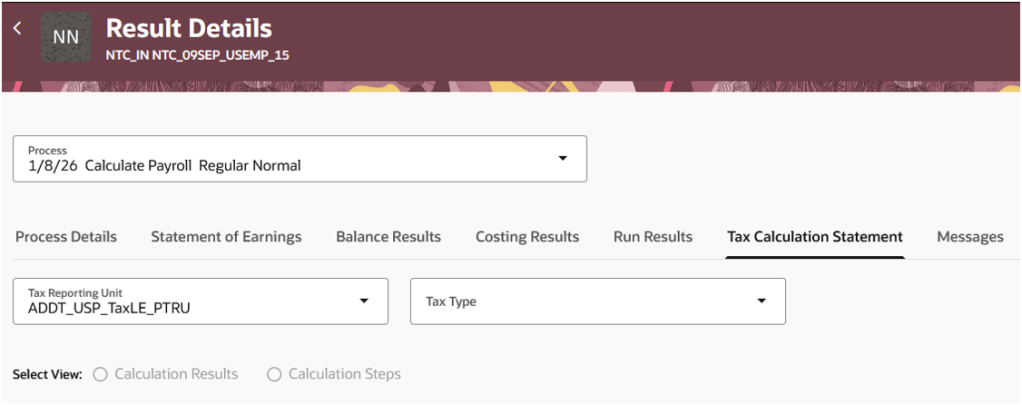
The next feature is the Tax Calculation Statement Page: Federal Income Tax. This is probably my favourite enhancement in the US payroll release. Payroll teams are regularly asked why a particular tax deduction was calculated in a certain way, yet historically obtaining that answer often meant navigating several screens or performing manual calculations. Oracle has introduced a new Tax Calculation Statement view that provides complete visibility into Federal Income Tax calculations. Administrators can either review the calculation components directly or work through a step-by-step breakdown showing intermediate values and calculation logic. For troubleshooting and employee query resolution alone, this has the potential to save a huge amount of time.
Oracle continues to expand the capabilities of its Payroll Run Analyst AI Agent. The agent can now answer natural language questions relating to Federal Income Tax calculations, allowing administrators to ask questions such as why a calculation was performed a particular way or which attributes contributed to the result. This is one of the more practical examples of AI within payroll. Rather than trying to automate the payroll process itself, Oracle is using AI to make it easier for payroll professionals to understand and investigate payroll outcomes.
Oracle has added a new Tax Enforcement Level field within the Federal component of the employee Tax Withholding card. This allows administrators to determine whether annual limit tax tracking should occur at the PSU, TRU, or tax group level. Because the setting exists at employee level, it can also override organisation-level defaults when required. For organisations with more complex employment structures, the additional flexibility will be welcome.
Oracle has also improved how USOPTE statutory tax rule overrides are managed. Payroll administrators can now create, update, delete, and end-date override records directly from the Statutory Rules interface, while also reviewing override history over previous years. It brings what has sometimes been tracked externally back into Oracle in a much more controlled and auditable way.
Oracle continues to invest heavily in Irish payroll, and that’s entirely understandable. Irish Payroll is still relatively new within Oracle Fusion compared to some of the more mature localisations, and Oracle have been steadily expanding both functionality and legislative coverage release after release. The pace of delivery remains impressive, with large number of enhancements arriving in 26D alone. While some of these changes are legislative in nature, others help bring Irish Payroll into line with capabilities that customers in longer-established payroll localisations have already been benefiting from.
The Payroll Activity Centre is now available for Irish payroll customers. This provides administrators with a consolidated view of payroll activity, balances, and exceptions, including Irish-specific values such as PAYE, PRSI, USC, and My Future Fund deductions. The real value isn’t the visibility itself, but the ability to identify and resolve issues earlier in the payroll cycle before they become employee-facing problems.
Oracle has updated eligibility calculations for SSP and Illness Benefit so that they now use recorded sickness absence dates rather than medical certificate dates. It’s a relatively straightforward change, but one that better reflects how absences are typically managed in practice.
The Periodic Foreign Tax Credit enhancement allows payroll teams to apply periodic or annual foreign tax credits through the employee’s PAYE Additional Information card. Rather than waiting for relief to be claimed after year end, payroll can now reduce tax liability during payroll processing itself. For employees with cross-border tax obligations, that has the potential to improve cash flow and reduce the impact of dual taxation while relief is being processed.
Oracle now automatically applies the Department of Social Protection’s 15% net-pay deduction cap for applicable Notice of Attachment deductions. Whenever statutory limits apply, the payroll calculation automatically uses the lower of the requested deduction amount or the permitted cap.
The final enhancement supports deletion requests for previously submitted My Future Fund contribution records. The Send File Submission process can now determine whether an earlier submission exists and automatically generate either an initial submission or a deletion request as appropriate. Additional audit reporting has also been introduced to maintain visibility of deleted contribution records.
Overall, I wouldn’t describe 26D as a blockbuster Payroll release, but that’s not necessarily a criticism. Some of the most valuable payroll enhancements aren’t the flashy ones. They’re the improvements that make investigations quicker, reduce administration effort, improve compliance, or remove manual work that payroll teams have quietly accepted as part of daily life.
For me, the stand-out areas this quarter are the continued maturity of the Redwood payroll experience, the Retropay processing enhancement, and the new transparency around US Federal Income Tax calculations. Together they show Oracle continuing to focus on usability and operational efficiency rather than simply adding more functionality.
If you’re planning your 26D review, I’d recommend paying particular attention to the Redwood changes and checking whether there are opportunities to simplify payroll administration processes as part of your wider upgrade planning. And as always, keep an eye on the What’s New documentation throughout the release cycle. Oracle occasionally slips in additional gems after the initial announcement, and payroll is no exception.
Please note that all screenshots are the property of Oracle and are used in accordance with Oracle’s Copyright Guidelines.
It’s quarterly release season again and Oracle Learning has delivered a surprisingly strong set of updates in 26D. What stood out to me wasn’t any individual feature. It was the direction of travel. Over the last couple of years, we’ve seen Oracle talk extensively about AI, skills intelligence, digital assistants and, more recently, Agentic Apps. For many customers, the question has been whether these capabilities would genuinely change the way people work or simply provide another layer of technology to navigate. With 26D, Oracle Learning starts to answer that question.
Several of the headline updates focus on something far more practical than flashy AI demonstrations. They help managers understand whether learning is driving development, reduce administrative effort for learning teams, and make it easier for employees to manage their own learning journeys.
What’s particularly noticeable is that Oracle is investing across the entire learning ecosystem. Managers gain better visibility into skill development, learning specialists receive more powerful AI-assisted administration tools, and learners benefit from a significantly upgraded self-service experience. As always, Oracle may add additional functionality as the quarter progresses, but let’s take a look at the highlights announced so far.
If you’ve been following Oracle’s Agentic Apps journey, the Team Learning and Development Workspace for Managers is perhaps the most interesting Learning enhancement in 26D. One of the challenges managers often face is connecting learning activity with actual employee development. Completion rates and learning hours tell part of the story, but they rarely answer the question that really matters: is this learning helping people develop the skills they need? Oracle is clearly trying to bridge that gap.
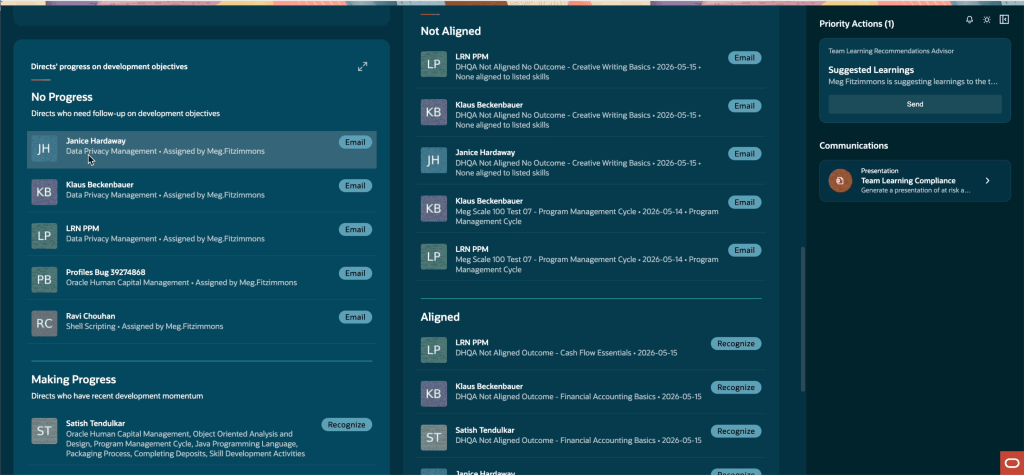
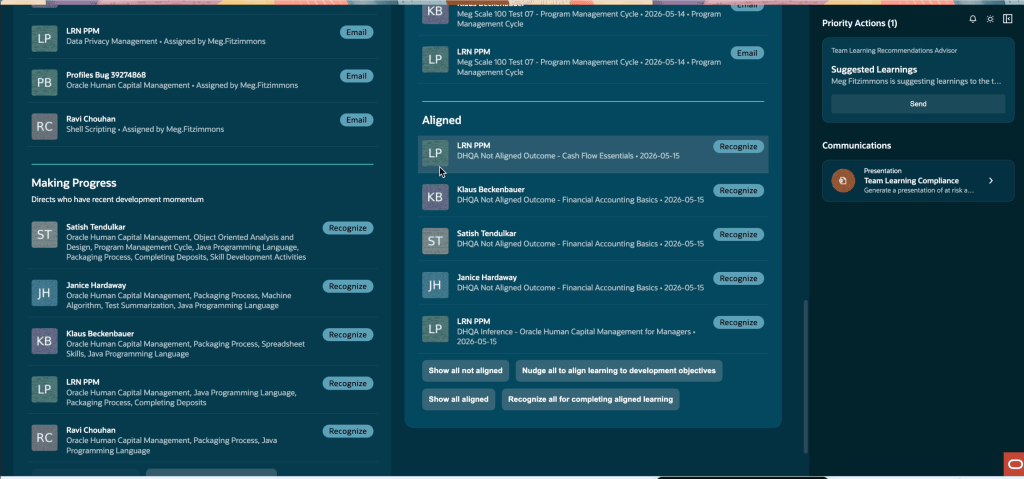
The previous Skills Development by Skill and Skills Development by Direct panels have been replaced with two new views: Directs’ Progress on Development Objectives and Directs’ Learning Alignment with Development Objectives. Rather than simply showing learning activity, managers can now see whether development goals are progressing and whether completed learning is contributing towards those goals.
The Directs’ Progress on Development Objectives panel highlights which team members are making progress against assigned development skills during a 90-day evaluation period. Managers can take action directly from the workspace through delivered email actions, either nudging employees who haven’t started progressing or recognising those who have. The Directs’ Learning Alignment with Development Objectives panel provides a different perspective. It helps managers understand whether completed non-compliance learning aligns with an employee’s development objectives, using completion outcomes and learning context to make those connections visible.
One of the concerns I often hear when discussing AI in HR is whether we’re removing too much human judgement from people processes. Oracle has struck a sensible balance here. The agent analyses learning activity, identifies who may need support and drafts appropriate communications, but managers remain firmly in control. Nothing is sent automatically. The manager decides whether intervention is needed and whether the suggested communication is appropriate. To me, that’s where enterprise AI delivers the most value. Not by replacing managers, but by helping them spend less time finding issues and more time acting on them.
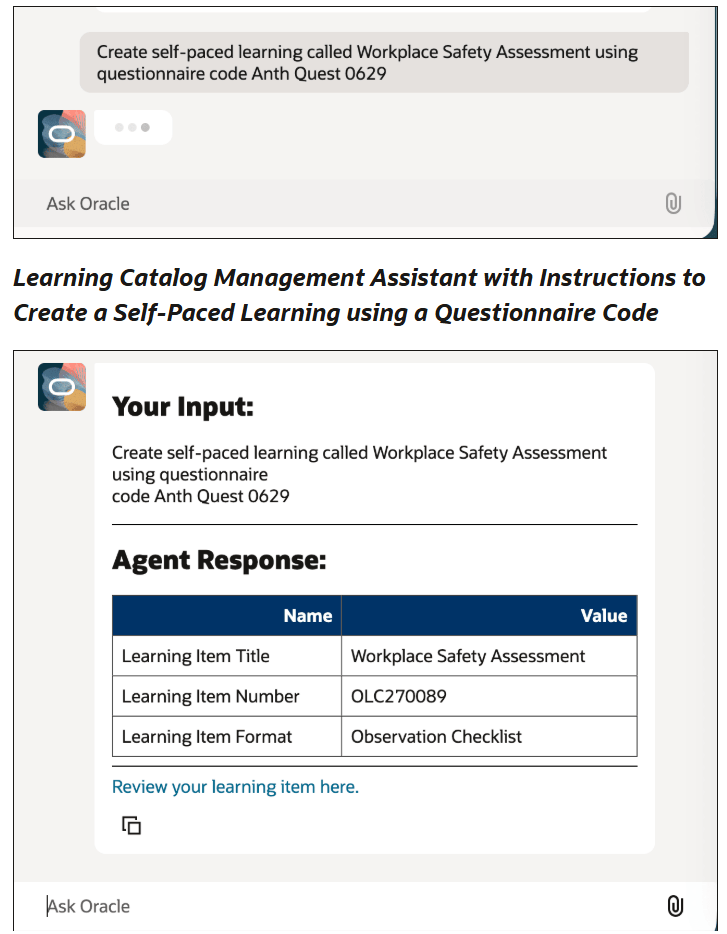
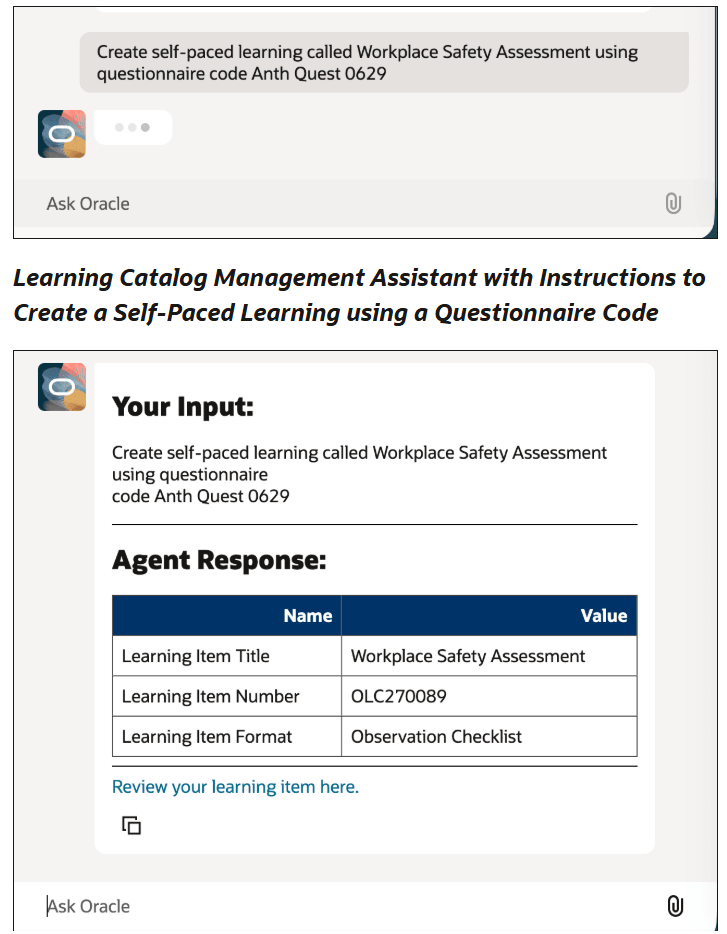
You may remember the Learning Creation Assistant, first introduced in 25D and enhanced further in 26B. In 26D, it has been renamed the Learning Catalog Management Assistant, and Oracle continues to expand what it can do. The main enhancement is support for questionnaire-based self-paced learning.
Learning specialists can now provide a questionnaire title or code and instruct the assistant to create the associated learning item. The assistant validates the questionnaire, determines whether it should be implemented as an assessment or observation checklist, and creates the learning in draft status ready for review and activation.
At first glance this might feel like a relatively small enhancement. In reality, it’s another step towards natural language administration. Learning specialists can focus on what they’re trying to achieve rather than remembering every configuration step required to get there. By allowing administrators to describe the learning experience they want to create and letting the assistant build the underlying structure, Oracle continues to remove friction from content administration. It’s exactly the type of repetitive setup activity that AI should be helping with. The assistant can also capture additional details such as mastery scores, attempt limits and visibility settings as part of the prompt, reducing the amount of manual configuration required.
Customers who already implemented the earlier Learning Creation Assistant should note that the property on the agent must be updated to reference the new delivered runnable agent. Any customisations made against copied templates will also need to be reapplied.
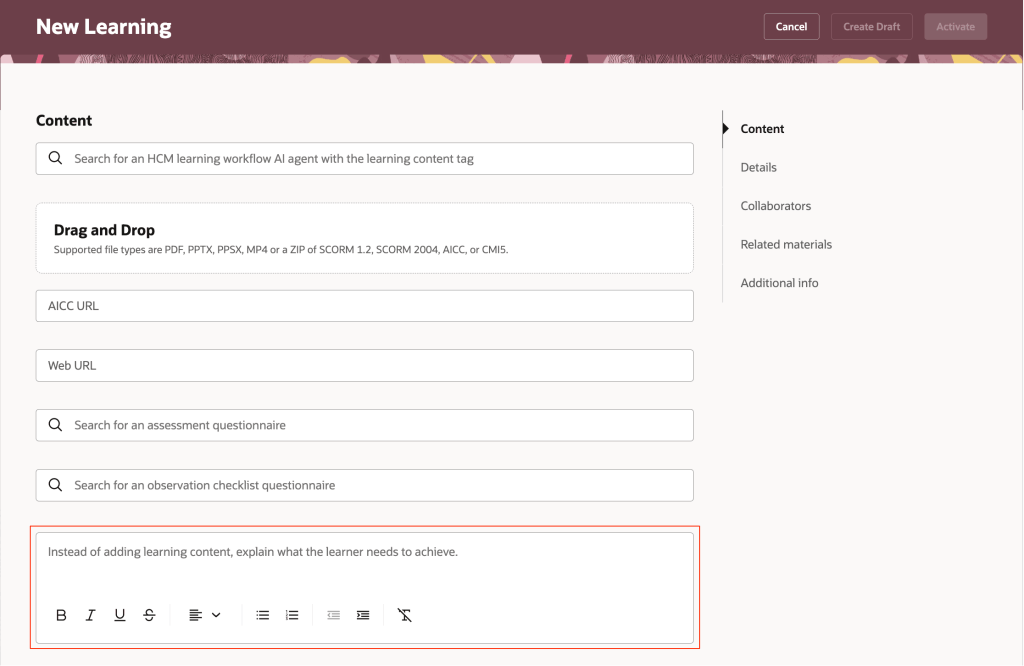
One of my favourite enhancements in 26D is also one of the simplest. Learning specialists can now create task-based self-paced learning directly from rich text instructions, removing the need for a supporting content asset. That may not sound revolutionary, but anyone who has implemented Learning Cloud will recognise the problem it solves.
Many organisations need to track activities that happen outside the platform. Reading a policy, completing an offline activity, attending an external event or carrying out a workplace task are all valid learning experiences, yet administrators have often needed to create workaround content simply to make those activities available in Learning Cloud. 26D removes that complexity entirely.
Learning specialists can simply enter instructions directly within the Redwood learning experience. Learners see those instructions as part of the enrolment details page and complete the activity according to the configured completion rules. Where learner confirmation is enabled, employees can mark the activity as completed themselves. Where administrator verification is required, that option is hidden and completion remains under administrative control.
It’s not necessarily the most exciting feature in the release, but I suspect it will become one of the most useful. The feature is enabled automatically and requires no additional configuration.
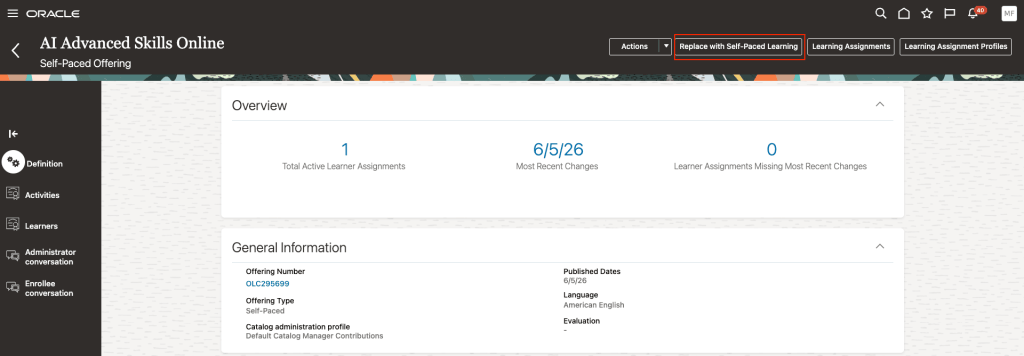
This enhancement originated in Oracle Ideas Lab, which is always encouraging to see. Learning specialists can now add self-paced learning directly into a course structure, allowing learners to access online content through courses in the same way they access instructor-led or virtual offerings. From the course details page, administrators can either attach an existing self-paced learning item or create a new one directly within the workflow.
The standout capability, however, is the new Replace with Self-Paced Learning action. I particularly like the inclusion of the replacement capability. Replacing learning content in large catalogues can be surprisingly challenging. Organisations need to modernise content without losing visibility of historical completions, compliance records and in-progress learning.
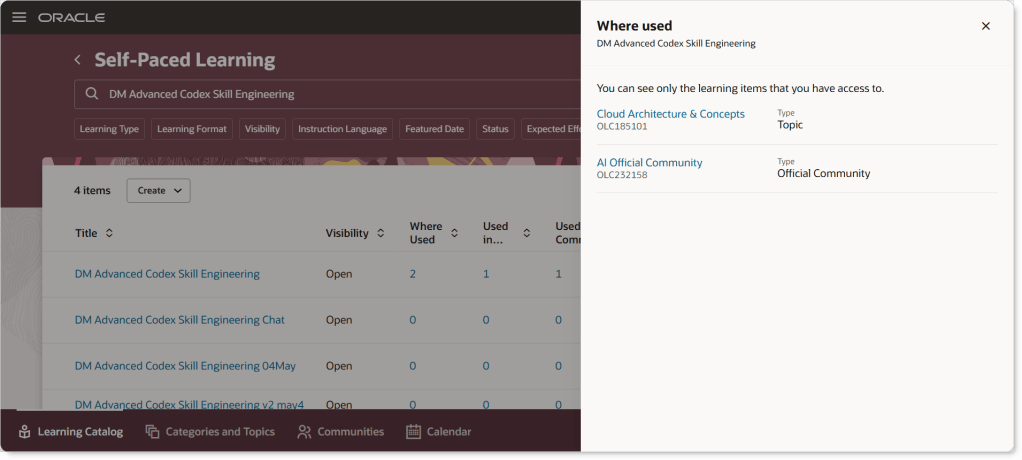
Oracle has clearly thought beyond simply enabling a new feature and considered the operational reality of managing learning catalogues over time. When a legacy offering is replaced, completed and in-progress learning records are preserved for reporting and audit purposes. Learners already progressing through an offering can still complete it, while future assignments are redirected towards the new self-paced learning. Deprecated offerings become read-only and are no longer available for enrolment, assignment or discovery within the catalogue.
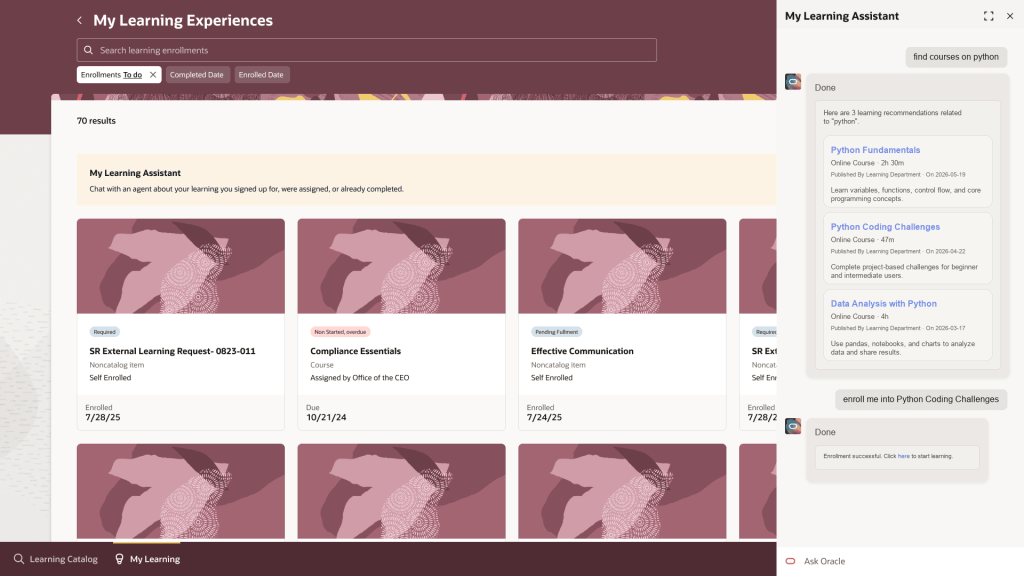
The final enhancement that caught my attention is the continued evolution of My Learning Assistant. We’ve moved well beyond the stage where conversational assistants simply answer questions. Oracle is increasingly positioning learning assistants as task-oriented experiences, helping users complete actions rather than just retrieve information. In 26D, learners can review assignments, explore recommendations, enrol onto learning and access key learning processes from a single conversation. That moves the assistant much closer to becoming a genuine learning companion rather than simply a search tool.
The assistant can now answer questions about active, overdue, mandatory, upcoming, self-enrolled and completed learning. It can recommend content from the catalogue, support enrolment directly where eligibility allows, and launch processes such as Record External Learning and Request Noncatalog Learning. Recommendation cards are also richer, displaying details including learning type, effort, pricing information, AI-generated reasoning and links to catalogue information.
Just as importantly, Oracle continues to ground responses in actual Learning data and workflows. If information doesn’t exist, the assistant won’t invent it. That may sound obvious, but trust is one of the most important factors in successful enterprise AI adoption. Users need confidence that recommendations and answers are based on real information, particularly when they’re making decisions about compliance or professional development.
Customers who deployed My Learning Assistant using the original 25D template should take note. Oracle recommends replacing the existing template with the updated delivered version to avoid inconsistent behaviour. Depending on your deployment approach, guided journeys used to surface the assistant through the Ask Oracle banner may also require updates.
If I had to summarise Oracle Learning 26D in a single phrase, it would be practical AI. There are no headline-grabbing announcements or futuristic concepts here. Instead, Oracle continues to focus on helping managers, learning specialists and learners spend less time navigating systems and more time focusing on development.
What I find particularly interesting is that Learning is becoming one of the strongest showcases for Oracle’s broader AI strategy. Across multiple features, Oracle isn’t attempting to remove people from the process. The technology is being used to surface insights, reduce administration and support decision-making while keeping humans firmly in control. That’s where I believe enterprise AI creates the greatest value. Not by replacing expertise, but by helping people apply it more effectively. And if Oracle continues along this path, Learning could become one of the strongest examples of AI delivering measurable business value within Oracle Fusion Applications.
Please note all screenshots are the property of Oracle and are used in accordance with Oracle’s Copyright Guidelines.
It’s that time again, quarterly release time, and 26D brings a solid set of updates for Core HR teams. There’s a meaningful enhancement to the Assignment Change Assistant, a quiet but important fix for position synchronisation via HCM Data Loader (HDL), continued evolution of the Activity Centre experience, and a deprecation notice that anyone who built agents in the last couple of releases needs to act on. As usual, Oracle may add further features throughout the month, so let’s take a look at what’s been introduced so far.
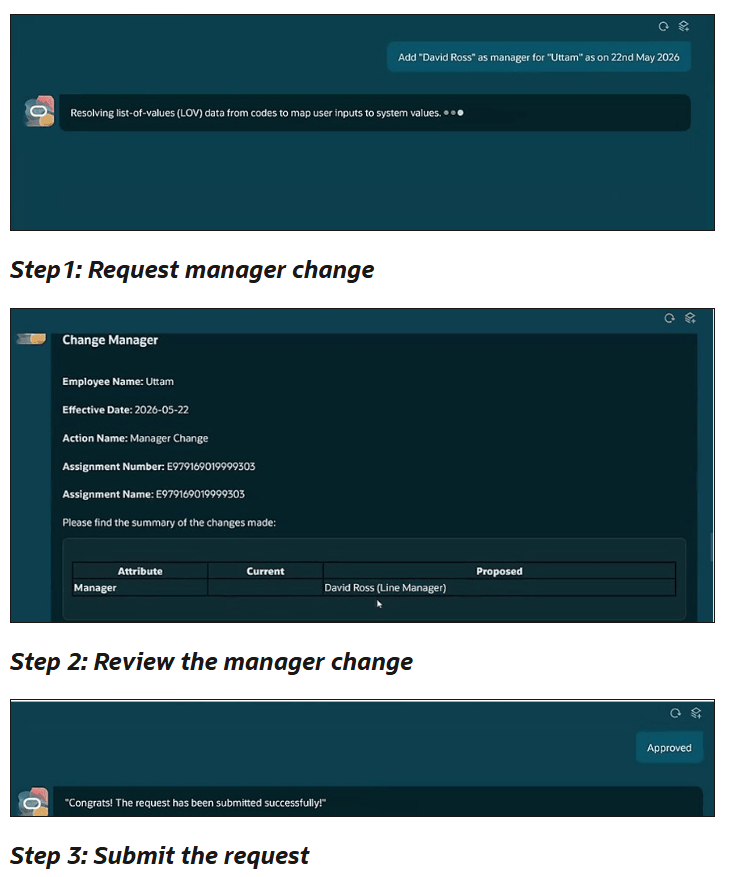
First introduced in 26C, the Assignment Change Assistant, now referred to as the Employment Updates Agent, has been extended considerably in 26D. The original release allowed managers and HR specialists to initiate assignment changes conversationally through the AI agent framework. In 26D, Oracle has addressed one of the natural limitations of that first version: users can now ask the agent for information before deciding what to change.
So rather than jumping straight into a transaction, a manager can open a conversation and ask something like “Who is David’s current manager?” or “What job is this person assigned to?” and get a direct answer from the agent before initiating any update. That’s a genuinely useful shift in how the assistant works. It moves from being a transaction tool to being a decision-support tool as well.
Beyond information retrieval, the supported transaction scope has grown. Change Working Hours and Change Manager are now supported processes alongside the original capabilities. Salary updates are also now handled directly through the agent: managers or HR specialists can specify either a new salary amount or a percentage increase , which covers the majority of straightforward salary adjustment scenarios without needing to exit to a quick action. For anything more complex, Oracle’s guidance is to use the standard quick actions, which is sensible.
Two other additions worth noting: Business Title can now be derived automatically from the selected Job or Position and presented in the review summary before submission, and on the review page, users can now click Request Change to modify any supported assignment attribute before submitting, not just the manager notes as was the case in 26C.
One thing to note: salary update access through the agent requires the user to already hold the privilege and data access needed to create a salary change through the standard application. The agent doesn’t grant any additional access beyond what the user already has.
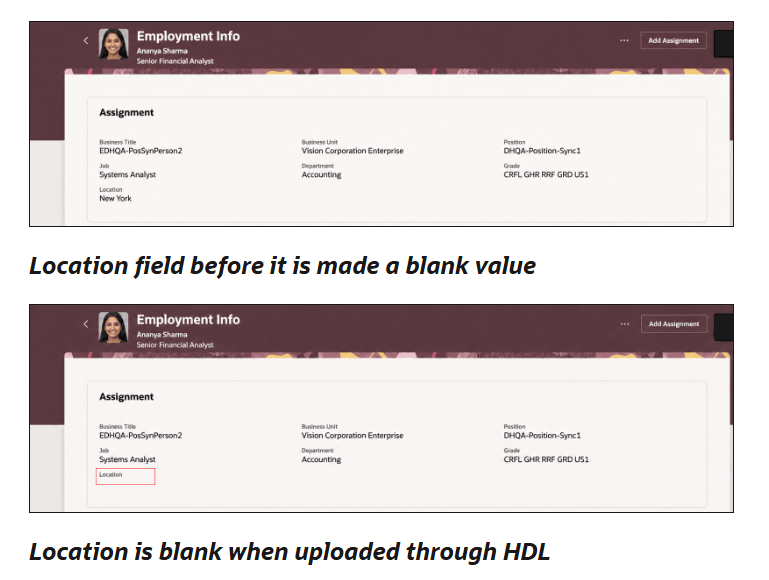
The next feature I want to highlight is Blank Position Values Now Synchronise Correctly via HDL. This one might look small on paper, but if you’ve ever had to unpick mismatched position and assignment data after a bulk load, you’ll appreciate exactly why it matters.
Prior to 26D, when a position attribute configured for synchronisation was cleared, running an HCM Data Loader (HDL) load would not propagate that blank value down to the assignment. The result was that the assignment retained a old value even though the corresponding position attribute had been removed. For organisations that rely on position synchronisation to keep assignment data consistent, this created a category of data discrepancy that was difficult to detect and time-consuming to resolve.
From 26D, blank values are synchronised to the assignment provided the attribute is configured for position synchronisation. The logic is straightforward: if Grade Ladder is a synchronised attribute and it’s removed from a position, the next HDL load can now clear that value on the corresponding assignments. In addition, Position Name can now be configured to synchronise with Assignment Name through HDL, so the Assignment Name is derived from the Position Name as part of the synchronisation process.
If your organisation built agents in 26A or 26B using either the Personal Information Assistant or the Person Legislative Information supervisor agent templates, this is the announcement you need to pay attention to. Both templates are deprecated in 26D. Agents already created from these templates will continue to function for now, but Oracle has confirmed these templates will no longer be enhanced. The replacement is the Person Data Assistant, introduced in 26C as a workflow agent that extends person data management with workflow-based child agents for selected data areas.
The practical implication is clear: any new development should be on Person Data Assistant, and existing agents built on the deprecated templates should be migrated. If your organisation has already deployed either of the old agents in production, now is the right time to start your migration planning. The agents won’t break overnight, but you’ll be building on a foundation that Oracle is no longer investing in, and the gap between the deprecated templates and Person Data Assistant will only widen with each subsequent release.
Start by reviewing what data areas your existing agents cover, map those to the Person Data Assistant’s workflow-based child agent structure, and assess the configuration effort involved. There’s no need to rush into a weekend migration, but equally don’t leave this until the deprecated templates stop functioning without warning.
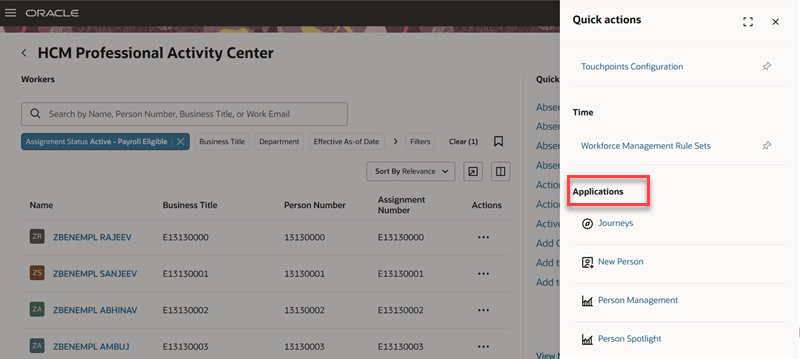
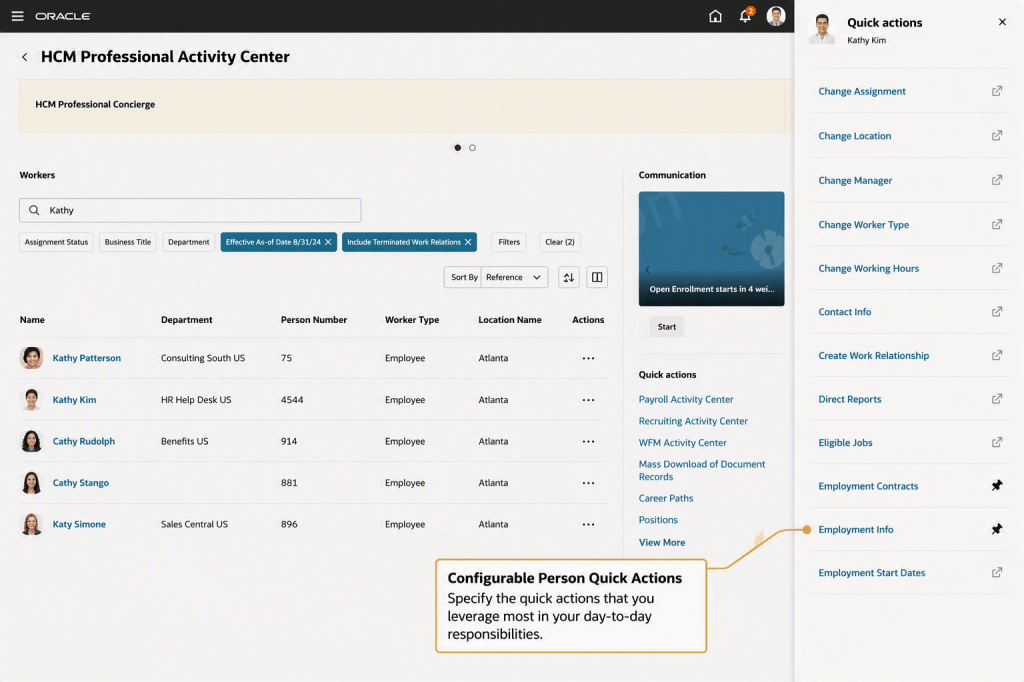
The HCM Professional Activity Centre was introduced in 26C and is already a firm favourite. 26D brings a couple of enhancements that make it meaningfully easier to use for both HR professionals and the administrators who configure it. Applications and quick actions are now consolidated into a single list under the Quick Actions section. Previously these were presented separately, which added navigation steps for users looking to get to a specific action or application. Now, selecting View More in the Quick Actions section shows pinned quick actions first, followed by other quick actions, and then the list of applications in one continuous view.
The second enhancement is organisation-level default pinning. Administrators can now define a default set of pinned quick actions for all users via the Structure tool. If a user hasn’t set their own pins, they’ll see the organisation defaults. If they have already personalised their pins, those personal choices remain and aren’t overridden. This gives administrators a sensible way to surface the most commonly needed actions for their user population without forcing any individual into a rigid layout.
One thing to note: navigation to a future hire’s person activity centre from search results has been disabled in this release.
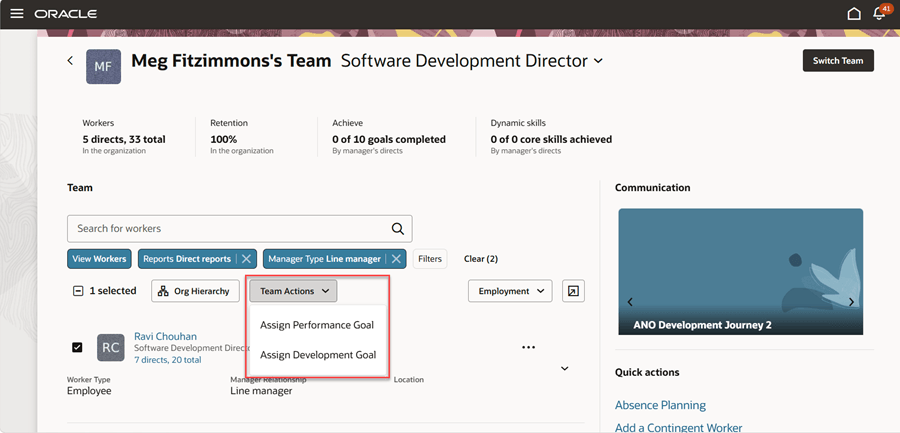
The Team Activity Centre enhancements in 26D follow a similar pattern to the Professional Activity Centre improvements above, with the addition of a genuinely useful capability for managers around goal assignment. Managers can now assign a performance or development goal to multiple direct and indirect reports selected through Team Activity Centre filters, all in a single action. Previously, assigning the same goal to a group of employees meant repeating the process person by person. For managers cascading goals across a team or department, that was a real time cost. This feature removes it.
The same quick actions and applications consolidation available in the Professional Activity Centre applies here too. Quick actions and applications are now in a single list under View More, with pinned actions appearing first. Organisation-level default pins work the same way.
Overall, 26D is another incremental but worthwhile update for Core HR. The headline change is the deprecation of the older personal information templates, so if you’ve built agents using those templates it’s worth starting your migration planning sooner rather than later. Beyond that, Oracle continues to refine both the AI and user experience story, with improvements that should make everyday HR processes a little smoother. As always, keep an eye on the readiness materials throughout the quarter, as Oracle sometimes introduces additional enhancements after the initial announcement.
Please note all screenshots are the property of Oracle and are used according to their Copyright Guidelines
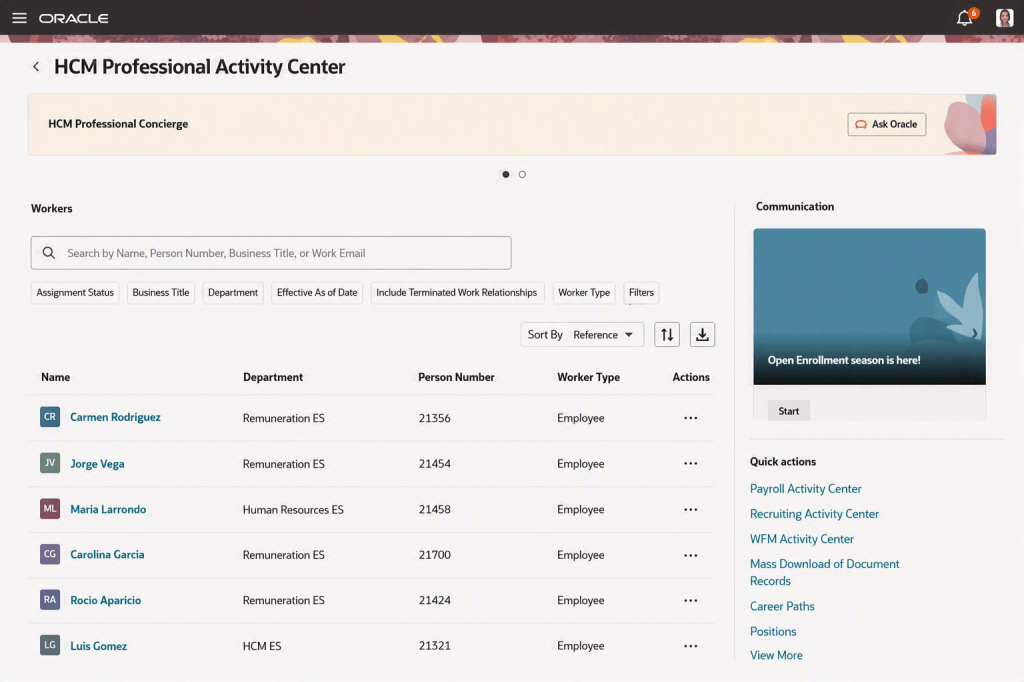
Oracle continues to reshape the HCM user experience, and one of the most significant innovations arriving in Release 26C might not be getting the attention it deserves. The new HCM Professional Activity Centre brings together worker search, employee information, HR transactions and AI-powered assistance into a single workspace designed specifically for HR professionals.
At first glance, it looks like another Redwood-enhanced page. In reality, it represents something much bigger. For years, Person Management has been the starting point for most HR administration activities within Oracle Fusion HCM. Whether updating assignments, reviewing employment information or managing employee records, HR teams have become accustomed to navigating in and out of multiple pages to get their work done.
The HCM Professional Activity Centre changes that approach completely. More importantly, Oracle has confirmed that Person Management will eventually be decommissioned, with the new Activity Centre becoming the strategic destination moving forward. While the retirement date is not yet immediate, organisations that rely heavily on Person Management should see 26C as an opportunity to start preparing for the future.
One of the biggest frustrations for HR teams is context switching. A typical HR task might involve searching for an employee, reviewing employment details, checking absence history, viewing compensation information and then processing a transaction. Individually these tasks are simple, but moving between multiple pages and menus can quickly become inefficient.
The HCM Professional Activity Centre brings these activities together into a single experience. Users can search for workers, review key information and launch transactions without continually navigating around the application. The result is a more streamlined way of working that keeps HR professionals focused on the employee rather than the system.
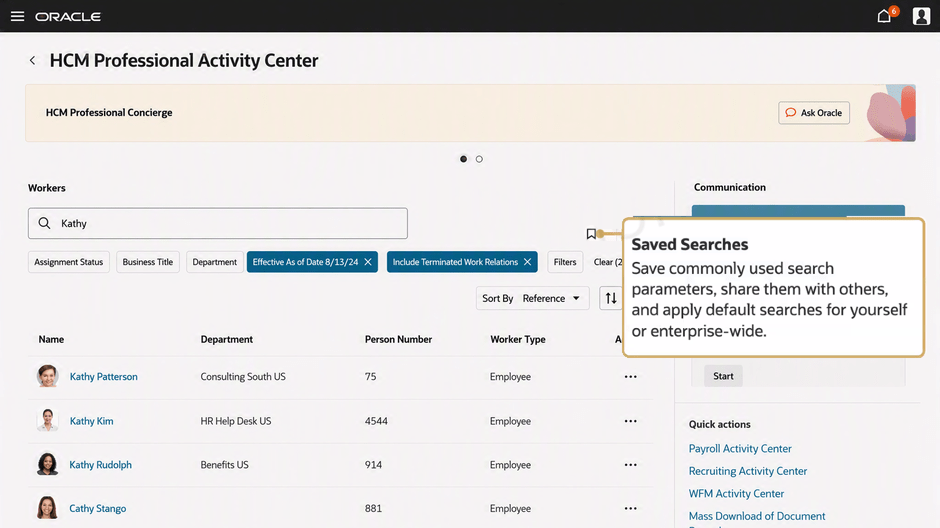
The first thing many users will notice is the search experience. Oracle has introduced a flexible worker search capability that supports names, person numbers, business titles and email addresses. It also includes fuzzy search functionality, making it far more forgiving when users do not enter exact values. For organisations with large workforces, this can remove a surprising amount of frustration from everyday HR administration.
Filters can be saved, shared and reused, allowing teams to create views tailored to particular business units, countries or employee populations. Search results are also configurable, ensuring users only see the information most relevant to their role. If required, results can be exported directly to Excel for further analysis or sharing. While these may appear to be small enhancements, they can significantly reduce the time spent performing routine HR activities.
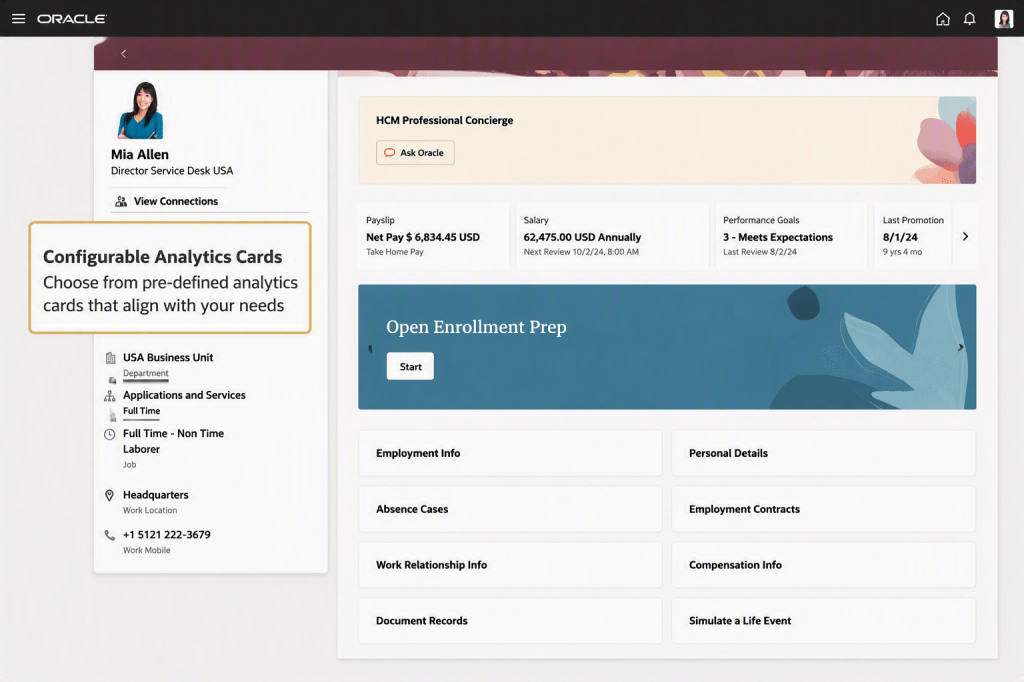
Once a worker has been selected, the real strength of the Activity Centre becomes apparent. Rather than opening separate pages for different areas of employee information, HR professionals are presented with a unified worker profile that consolidates key data in a single location. Employment details, absence information, compensation data, benefits and document records are all readily accessible, alongside a timeline view that helps users understand an employee’s history and changes over time.
Oracle has also introduced configurable insight cards, enabling organisations to surface the information most relevant to their HR processes. This could include salary information, performance ratings, recent promotions or other workforce metrics. The focus is clearly on helping HR teams access information faster and make decisions with greater confidence.
A key theme throughout the Activity Centre is reducing unnecessary navigation. HR users can initiate transactions directly from the worker profile or search results, allowing them to move seamlessly from reviewing information to taking action. Common tasks such as assignment changes, location updates and salary changes can be accessed through configurable quick actions, helping teams complete work more efficiently.
The Activity Centre also provides fast access to related workspaces such as Payroll, Recruiting and Workforce Management, creating a connected experience across Oracle HCM. The ability to open worker records in separate browser tabs may sound like a small enhancement, but anyone managing multiple cases simultaneously will appreciate the flexibility it brings. Taken together, these improvements create a more intuitive and productive way of working for HR teams.
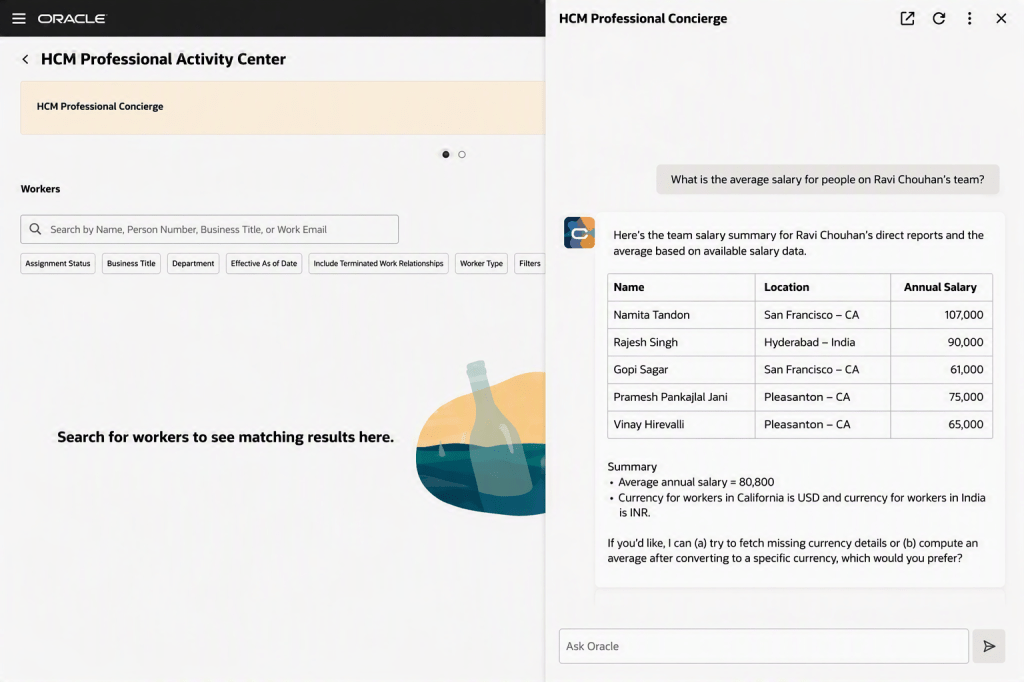
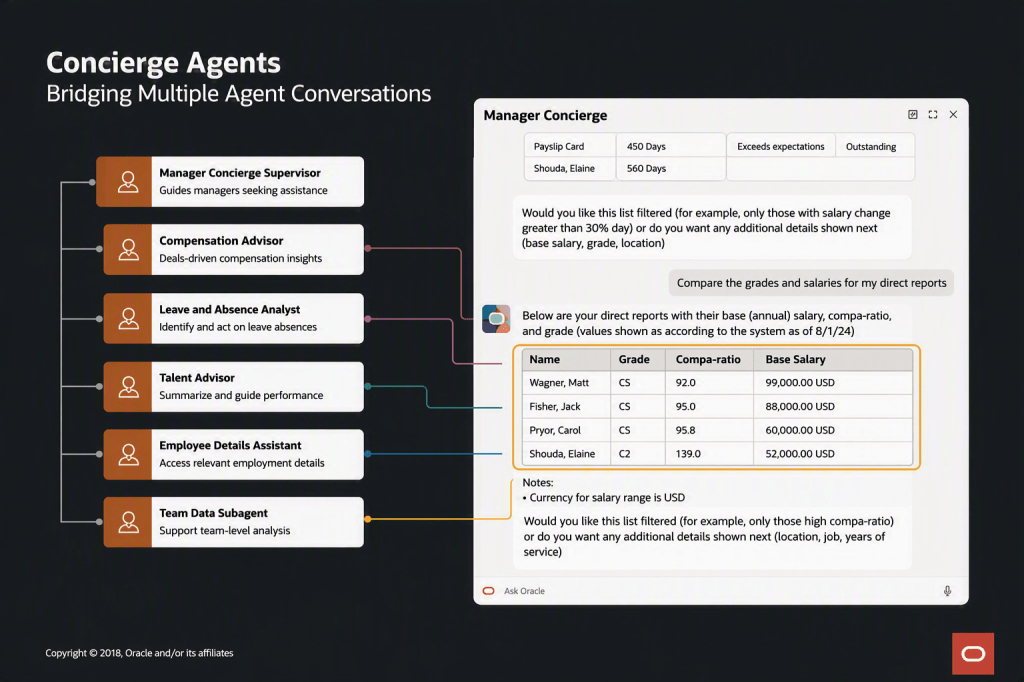
While the redesigned workspace is impressive, the most significant aspect of this announcement is what sits behind it. Oracle has embedded the new HCM Professional Concierge directly into the experience. Rather than searching through reports or navigating to analytics dashboards, HR professionals can ask questions in natural language and receive answers drawn directly from live HCM data.
Need to understand salary distribution within a team? Investigate performance ratings? Review an employee’s employment history? The Concierge can provide answers in seconds while respecting existing security roles and access controls. What makes this particularly interesting is that users can ask follow-up questions and continue the conversation naturally, without needing to start over or navigate elsewhere in the application.
Oracle has also made the Concierge available through Microsoft Teams, allowing HR professionals to access HCM insights from the collaboration tools they already use every day. This feels less like a traditional reporting tool and more like the beginning of a genuinely AI-assisted HR operating model.
What’s particularly interesting is how Oracle has structured the solution behind the scenes. The Concierge does not rely on a single AI assistant. Instead, it orchestrates a collection of specialist agents covering areas such as compensation, absence management, reporting, employment information and HR policies. Users do not need to know which agent is responding. They simply ask a question and Oracle routes the request to the most appropriate specialist automatically.
This architecture mirrors Oracle’s wider strategy for agentic applications, where specialist AI agents collaborate behind the scenes to solve increasingly complex business problems.
The practical outcome is that HR professionals can ask richer, more contextual questions and receive consolidated answers without manually gathering information from multiple sources. For users, the technology behind the scenes matters less than the outcome: faster answers, less effort and easier access to information when it is needed.
The HCM Professional Activity Centre is not simply a replacement for Person Management. It is the foundation for a broader vision where AI does not just answer questions but actively assists HR professionals by identifying risks, surfacing recommendations and helping prioritise actions.
Future experiences such as the HR Specialist Workspace build on this concept by proactively highlighting compliance concerns, attrition risks and organisational changes that may require attention. Rather than spending time searching for information, HR teams can focus on decision-making, employee engagement and strategic workforce planning. That’s a subtle but significant shift.
It also provides a clear indication of Oracle’s direction of travel. Future innovation is increasingly centred around unified workspaces, AI-driven insights and agentic experiences rather than traditional menu-driven administration.
The HCM Professional Activity Centre is far more than a new page in Oracle Fusion HCM. It represents a significant shift in how Oracle is bringing together employee information, HR transactions, analytics and AI into a single, unified experience.
For HR professionals, the immediate benefits are easy to see. Less navigation, faster access to information, more intuitive search capabilities and the ability to complete common tasks without moving between multiple pages all have the potential to make day-to-day administration more efficient.
However, the bigger story is what this tells us about Oracle’s direction of travel. The introduction of the HCM Professional Concierge, the use of specialist AI agents and the roadmap towards proactive, agent-driven workspaces suggest Oracle is moving beyond simply modernising screens. The focus is increasingly on helping HR professionals find information, make decisions and take action more effectively.
The planned retirement of Person Management reinforces that message. While many organisations will continue to use Person Management for some time, the HCM Professional Activity Centre is clearly where Oracle is concentrating future investment and innovation.
If you’re preparing for Release 26C, this is certainly a feature worth exploring. Even if you’re not planning an immediate move away from Person Management, taking the time to understand how the Activity Centre works and how it fits into Oracle’s wider HCM strategy will help you prepare for what’s coming next.
For me, this is one of the most important HCM enhancements in 26C. Not because of any single feature, but because it provides perhaps the clearest view yet of how Oracle expects HR professionals to interact with Fusion HCM in the years ahead.
Please note that all screenshots are the property of Oracle and are used in accordance with Oracle’s Copyright Guidelines.
Recruitment teams are under pressure from every angle. Candidates expect faster responses, personalised interactions and greater transparency throughout the hiring process. At the same time, organisations are increasingly shifting towards skills-based hiring and talent management, often while juggling disconnected systems, inconsistent processes and growing workloads. This is where Oracle’s latest AI-powered recruiting capabilities are aiming to make a real difference. Rather than introducing another standalone AI tool, Oracle is embedding intelligent agents throughout the recruitment lifecycle to help organisations attract, engage, hire and onboard talent more effectively.
Oracle’s AI Agent Framework for Recruiting brings together a collection of specialised AI agents that support different stages of the hiring process. Instead of acting as isolated tools, these agents work together across the recruitment journey, sharing context and information to create a more seamless experience for both candidates and hiring teams. The objective is straightforward: improve candidate experiences, reduce manual effort and help organisations make better hiring decisions more quickly.
One of the most visible innovations is Career Coach, Oracle’s candidate-facing AI assistant. Integrated directly into career sites, Career Coach helps candidates discover relevant opportunities based on their skills, experience and career interests. Rather than searching through dozens of vacancies, candidates receive personalised recommendations and guidance throughout the application process. They can upload CVs, ask questions and complete applications through a conversational experience that feels far more natural than traditional online forms.
Perhaps most interesting is Career Coach’s ability to provide personalised application feedback. Candidates can receive recommendations on how well their application aligns with the role requirements, highlighting skills, qualifications or experiences that may strengthen their submission. For organisations, this has the potential to improve application quality while creating a more supportive and engaging candidate experience.
Maintaining regular communication throughout recruitment remains a challenge for many organisations, particularly when managing high application volumes. Oracle addresses this through AI-powered messaging capabilities that can answer routine candidate questions and provide updates through channels such as email, SMS and WhatsApp. Candidates can receive information about interview stages, scheduling, timelines and next steps without waiting for a recruiter to respond. The result is a more responsive recruitment process while allowing recruiters to focus their attention on higher-value interactions.
Recruiters are not the only beneficiaries of Oracle’s AI investment. Hiring managers are often required to review large volumes of candidate information, interview feedback and assessment results before making decisions. Oracle’s Hiring Assistant helps simplify this process by generating concise candidate summaries and surfacing key information from across the recruitment lifecycle.
Instead of reviewing multiple documents and feedback forms, hiring managers can quickly understand a candidate’s suitability, relevant experience and alignment with role requirements, helping them make more informed decisions while reducing administrative effort.
Interviews remain one of the most important stages of the recruitment process, yet they can be time-consuming to organise and document. Oracle is introducing new capabilities that help streamline interview management. Interview Companion, arriving across upcoming releases, will assist interviewers before, during and after interviews.
Before the interview, it can generate interview guides tailored to the specific role and candidate. During the interview, it can help interviewers track discussion topics and ensure key areas are covered. Afterwards, it can automatically generate transcripts, summaries, interview notes and suggested follow-up actions.
These capabilities have the potential to improve consistency across interviews while reducing the administrative burden placed on hiring managers and interviewers. Oracle is also expanding its partner ecosystem through integrations with organisations such as Eightfold.ai and Phenom, bringing additional capabilities including AI-driven interviewing and skills assessment.
For organisations operating in sectors such as retail, hospitality and frontline services, recruitment often centres around hiring large numbers of employees quickly. Oracle’s Hiring Workspace for Store Managers has been designed specifically for these environments. The workspace provides managers with a simple, action-focused view of recruitment activity, highlighting vacancies requiring attention, identifying potential pipeline issues and recommending next steps.
Managers can quickly identify strong candidates, progress applications and manage recruitment activity without needing extensive experience with a traditional applicant tracking system. For organisations managing high-volume recruitment, this could significantly improve hiring speed and reduce delays in filling critical roles. It should be noted that this is an Agentic App and as such requires the Agentic Application Platform licence.
Finding talent remains one of the most challenging aspects of recruitment. Oracle is investing heavily in AI-powered sourcing capabilities to make this process more efficient. Recruiters can use natural language search to identify candidates based on skills, experience and other criteria, without relying on complex search strings. AI-powered recommendations help identify suitable candidates from existing talent pools, reducing the risk of overlooking qualified individuals who may already exist within the organisation’s database. Combined with automated outreach and personalised engagement, these capabilities aim to help recruiters build stronger pipelines while reducing manual sourcing effort.
The recruitment experience does not end when an offer is accepted. Oracle is continuing to strengthen the transition between recruitment and onboarding by helping organisations maintain communication with new hires from offer acceptance through to their first day. Automated communications, onboarding updates and personalised engagement help reduce the risk of candidate drop-off while creating a more consistent experience. This continuity can be particularly valuable in competitive talent markets, where maintaining engagement after offer acceptance is just as important as attracting candidates in the first place.
Oracle’s vision for recruiting is becoming increasingly clear. Rather than viewing AI as a collection of disconnected features, Oracle is building an ecosystem of specialised agents that work together across the entire hiring lifecycle. Many of these capabilities are already available today, while others will be introduced through upcoming releases such as 26C and 26D. Together, they represent a significant shift towards more intelligent, proactive and personalised recruitment experiences.
For organisations looking to improve candidate engagement, increase recruiter productivity and support skills-based hiring strategies, these innovations offer a glimpse into how recruitment technology is evolving from process automation to genuinely intelligent talent acquisition.
Please note that some capabilities discussed may require additional Oracle licensing, including Oracle Recruiting Booster. Organisations should confirm availability and licensing requirements with Oracle before implementation.
All screenshots are the property of Oracle and are used in accordance with Oracle’s Copyright Guidelines.