Oracle Recruiting 26D: From Reactive Hiring to Proactive Recruiting

It’s that time again, quarterly release time, and Oracle Recruiting 26D is shaping up to be one of the more interesting releases we’ve seen for a while. At first glance, it’s easy to assume this is simply another AI-heavy update. After all, almost every major enhancement includes some form of advisor, agent or generative capability. But looking a little deeper, I think there’s a more interesting story here.

For years, recruiting technology has largely focused on helping recruiters process candidates more efficiently once a vacancy exists. A requisition opens, recruiters search for candidates, screening begins, interviews are arranged and eventually an offer is made. Release 26D starts to challenge that model.

Many of the new capabilities are focused on helping organisations anticipate hiring demand, build pipelines earlier, make more informed decisions and reduce administrative effort throughout the recruitment lifecycle. In other words, moving from reactive hiring towards proactive recruiting.

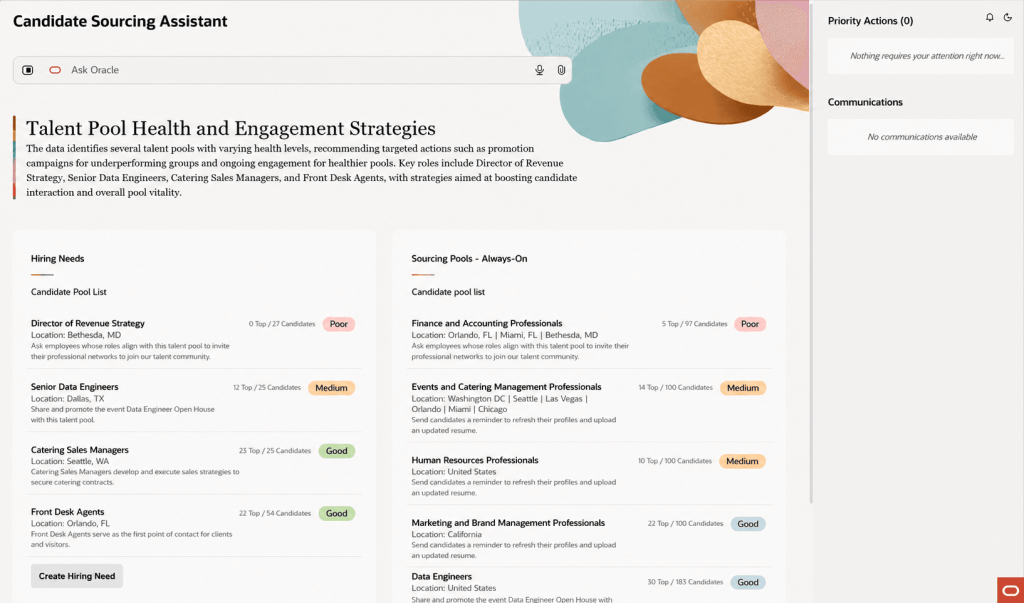
The feature that caught my attention most is Candidate Sourcing Workspace. Most recruitment teams know the pressure that comes with a new vacancy. As soon as a requisition is approved, the clock starts ticking. Recruiters begin searching, hiring managers want candidate shortlists immediately, and the race is on to identify suitable people. Oracle is trying to change that.

The new Candidate Sourcing Workspace allows recruiters to build and maintain talent pipelines before a requisition even exists. Using previous hiring patterns and anticipated demand, Oracle can help recruiters identify and nurture potential candidates in advance, creating a pool of talent ready to engage when opportunities arise.

Rather than starting every search from scratch, recruiters can draw from existing talent pools, review AI-generated candidate summaries and quickly identify the strongest matches for anticipated hiring needs. For organisations that regularly recruit into similar roles, this could have a significant impact on time-to-hire. More importantly, it allows recruiters to spend less time hunting for candidates and more time building relationships with them. That’s a much more strategic use of everyone’s time.
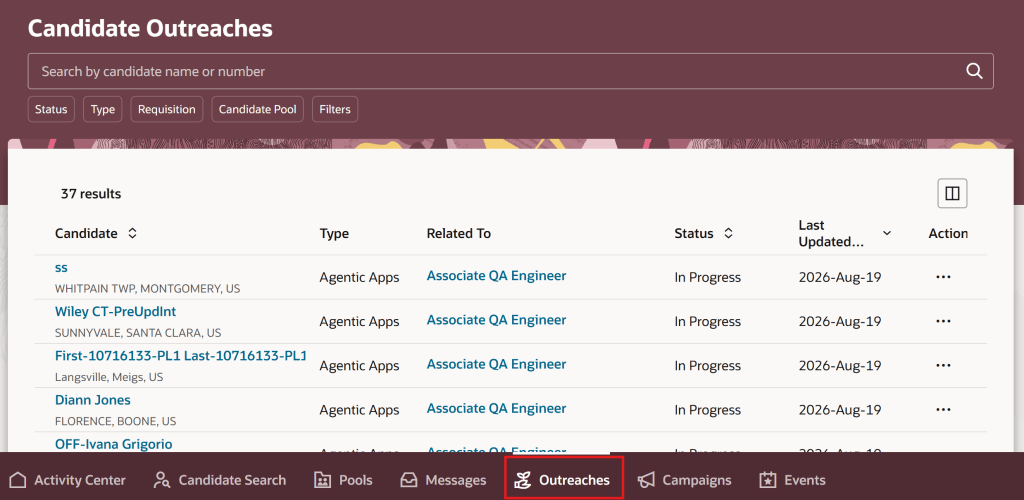
Supporting the new sourcing workspace is an enhanced outreach experience that brings together all candidate engagement activity into a single view. That might not sound particularly exciting on paper, but anyone who has ever managed a large recruitment campaign knows how easy it is for conversations to lose momentum. Candidates don’t respond immediately, follow-ups are forgotten, and promising prospects gradually disappear from the process. Oracle is addressing that problem with automated reminders, consolidated outreach tracking and AI-generated summaries of candidate responses. The result is a much clearer picture of who has been contacted, where conversations stand and what action should happen next.
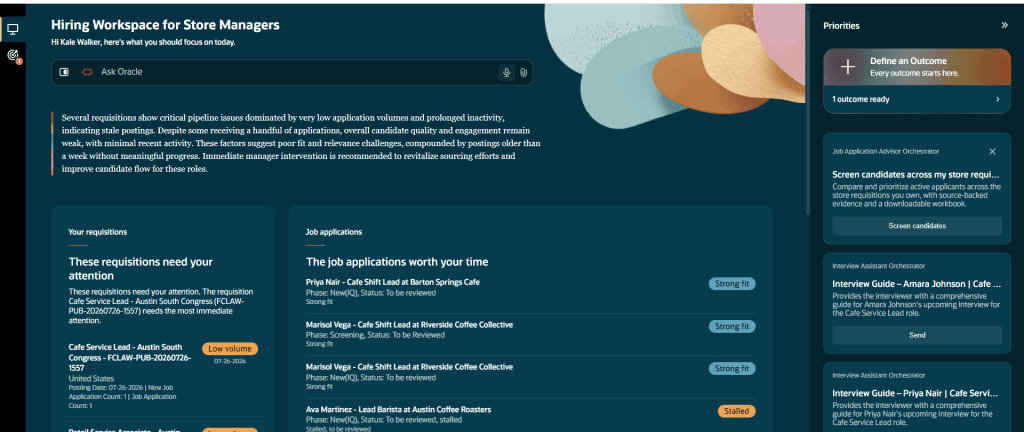
Another interesting addition is the new Hiring Workspace for Store Manager. Although initially aimed at retail organisations, the broader theme here is relevant to any organisation managing high-volume recruitment. The workspace allows managers to ask natural-language questions such as: “What requires my attention today?” or “Where is hiring off track?” and receive a structured response that highlights issues, priorities and recommended actions.

What I like about this feature is that Oracle isn’t simply presenting data differently. The platform is actively helping managers understand what requires attention and what they should do next. That may sound like a subtle distinction, but it’s an important one. Most recruitment systems already provide dashboards and reports. The challenge isn’t usually accessing information. It’s understanding what action should be taken based on that information. This workspace starts to bridge that gap.
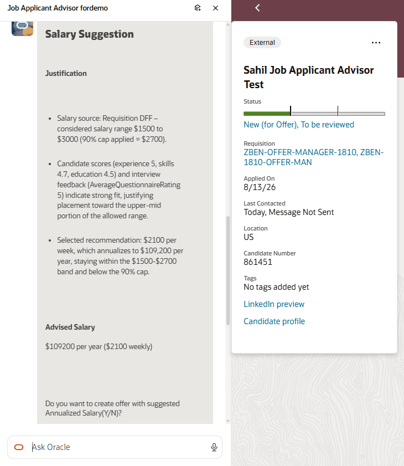
Probably the most practical AI enhancement in the release is the new Compensation Recommendation and Job Offer Creation Advisor. Creating a competitive offer has traditionally involved a mixture of salary benchmarking, internal comparisons and professional judgement. It can also be surprisingly time-consuming. Oracle’s new advisor pulls together relevant information from the requisition, candidate assessments and internal salary data to provide a recommended salary range before helping create the draft offer itself.

What particularly stood out to me is Oracle’s emphasis on explainability and guardrails. The recommendations are based on defined business criteria and Oracle explicitly states that protected characteristics such as age, gender, race and disability are not used when generating recommendations. In a world where organisations are rightly paying more attention to AI governance and pay equity, that’s an important message. Will recruiters still want human oversight? Absolutely. But reducing the administrative effort involved in preparing offers while supporting consistency of decision-making feels like a genuinely useful application of AI.
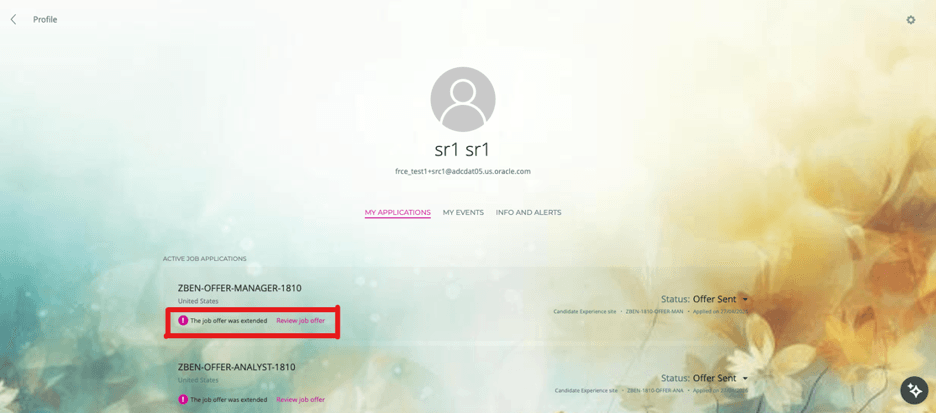
Not every valuable enhancement in 26D relies on AI. Oracle has also simplified how candidates access and respond to job offers by making offers available directly through candidate-facing experiences. External candidates can access offers through career sites, while internal candidates can access them through Opportunity Marketplace. They can review offer documentation, accept or decline offers and access completed documentation after acceptance.

It’s a relatively simple change, but one that removes a common point of friction. Offer emails can be missed, filtered or buried in busy inboxes. Giving candidates a consistent place to access offer information feels like a sensible improvement that should help remove avoidable delays from the process.
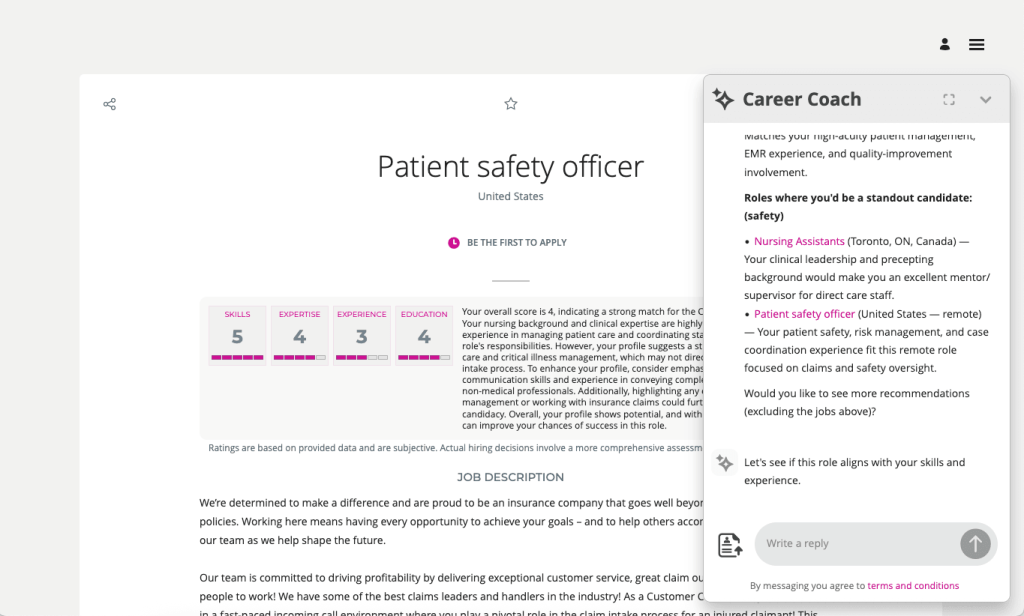
While most of the release focuses on new innovation, there is one update that deserves immediate attention. Oracle has confirmed that Digital Assistant (ODA) Fusion Apps templates for Recruiting will no longer be supported from November 2026. If your career site currently relies on Oracle Digital Assistant, now is the time to begin planning your transition. Oracle’s recommended path forward is Career Coach, which becomes the strategic candidate assistance experience going forward. This isn’t something I’d leave until the last minute. November 2026 will arrive much faster than many organisations expect, and early planning will help avoid unnecessary disruption.

What stands out to me about Recruiting in 26D is that Oracle appears to be focusing on the right problems. The most valuable features aren’t necessarily the ones generating content faster. They’re the ones helping organisations build stronger talent pipelines, make more consistent hiring decisions and remove friction from the recruitment process.

That’s why Candidate Sourcing Workspace was the feature that caught my eye. If organisations can move from scrambling to find candidates every time a requisition opens to maintaining an always-on pipeline of talent, that has the potential to transform recruitment performance far more than any chatbot ever could. There are still plenty of AI announcements in this release, but for once they feel connected to genuine business outcomes rather than being technology in search of a problem. And if you’re still relying on Oracle Digital Assistant on your career site, don’t overlook the deprecation announcement. November 2026 will arrive faster than you think.

Please note all screenshots are the property of Oracle and are used in accordance with Oracle’s Copyright Guidelines.
Oracle HCM Cloud Recruit 26B

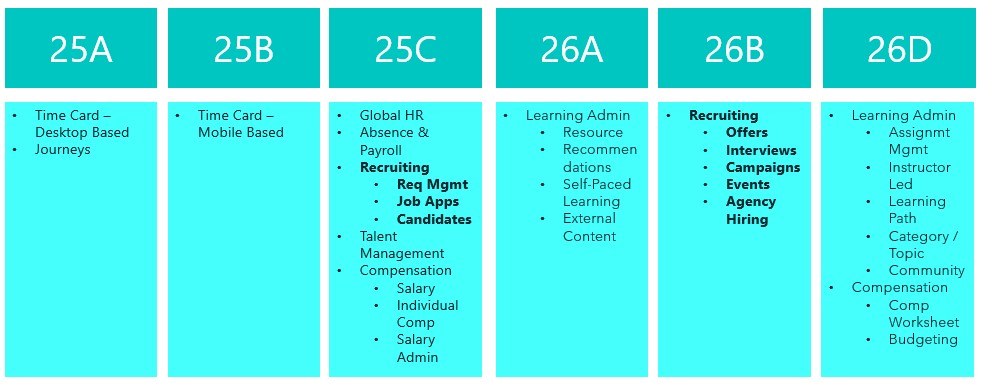
The final deadline to move to Recruit Redwood is the 26B release, so if you haven’t made the move yet, I’d strongly recommend doing so as soon as possible. With that in mind, let’s take a look at what’s coming up for Recruiting in 26B. As is often the case, Oracle may introduce additional features as the quarter progresses, and if any of those are particularly noteworthy, I’ll share a follow‑up update.

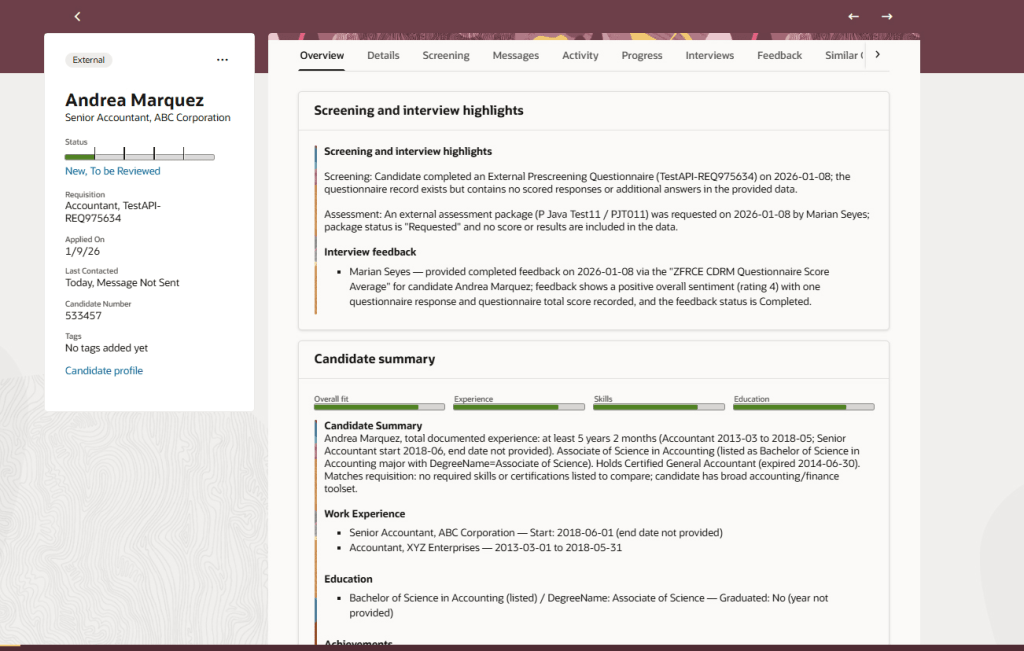
The Job Application Overview in the Redwood experience introduces an AI‑generated summary to help recruiters review applications more efficiently. When a candidate uploads a CV or adds further information after applying, the Overview tab automatically presents a concise summary across three key areas. This includes screening and interview highlights, showing the status of questionnaires, assessments and feedback; an AI‑driven candidate summary covering recent experience, education, skills, achievements and work preferences, with clear call‑outs where these align to the requisition; and a dedicated section for candidate attachments, bringing all supporting documents into one place.

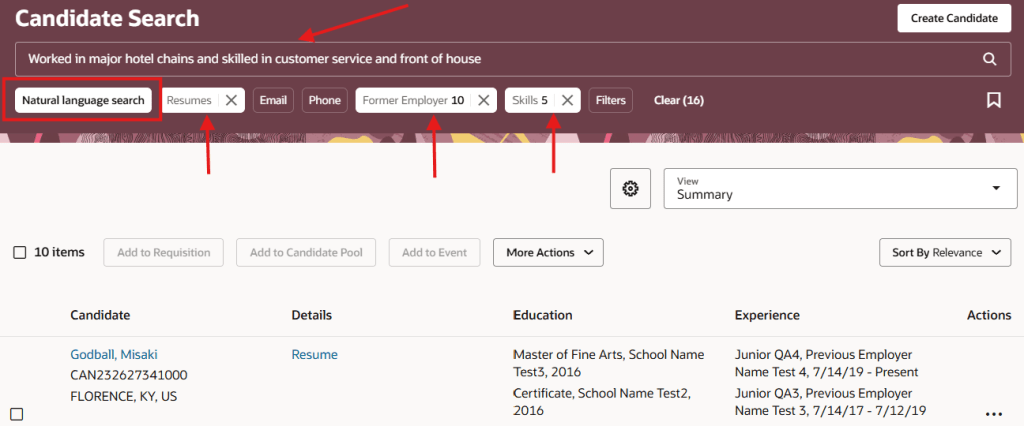
The next feature will not surprise you to hear, is another AI one. The generative AI search capability in the Redwood Candidate Experience makes it quicker and easier to find the right candidates using natural language. By simply describing the type of candidate you’re looking for, the AI automatically translates your input into relevant search filters and values. The search intelligently matches your wording to structured candidate data, applying keywords and related synonyms, and can also include CV content if required. Clear aggregation counts show how many candidates match each filter, while synonym‑based suggestions highlight potential matches found within resumes. All filters remain fully editable, allowing you to refine or adjust the results further and quickly narrow down to the most relevant candidates.

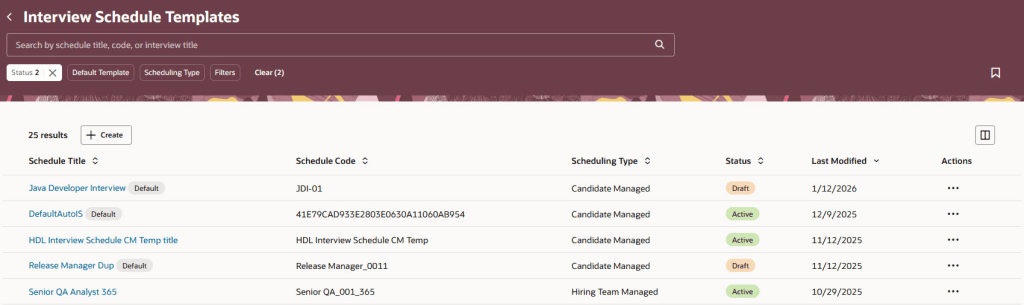
The Interview Schedule Templates list has been rebuilt in the Redwood experience using Visual Builder Studio, making it quicker and easier for recruiters to manage interview scheduling at scale. When the relevant profile options are enabled, the list is accessed via My Client Groups > Hiring. The redesigned page is built to reduce clicks and save time, with intuitive search and filtering, the ability to save searches, flexible sorting, and customisable columns so recruiters can see the information that matters most to them. Templates can be opened, reviewed and actioned directly from the list, and new interview schedule templates can be created just as easily. By aligning interview schedule management with other Redwood list pages, this update delivers a more consistent and efficient experience, helping recruiters spend less time on administration and more time focusing on candidates.

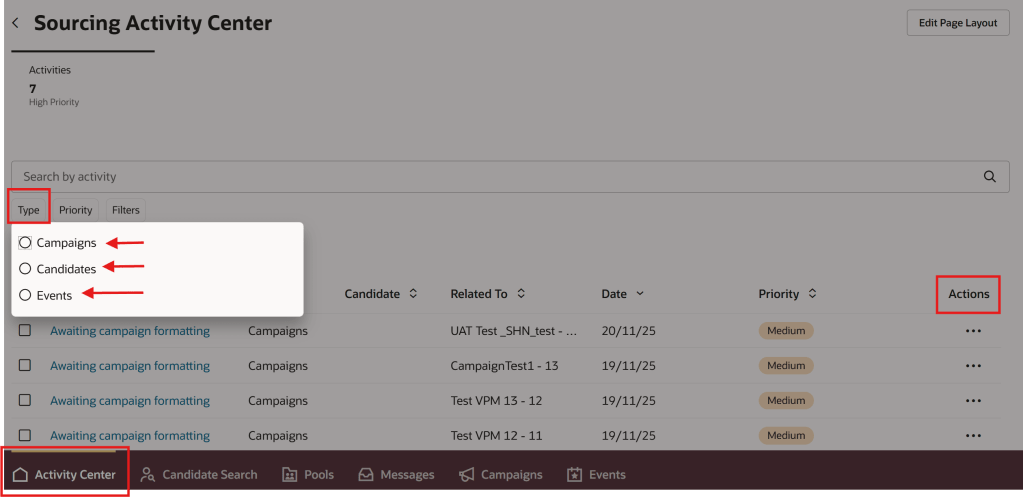
I love an Activity Centre, they’re a one stop shop for all transactions relating to that area. The new Sourcing Activity Centre provides recruiters with a single place to manage all sourcing‑related activities across campaigns, candidates and events, helping them stay on top of priorities and reduce manual tracking. Users with the appropriate access can reach the Sourcing Activity Centre directly from Candidate Sourcing or via a Quick Action. The activity list gives clear visibility of everything requiring attention, with the ability to filter by activity type and quickly identify high‑priority items. Recruiters can open activities to view more detail and take action directly from the list, making it easier to keep sourcing work moving without switching between pages. Activities span campaigns, candidates and events, including follow‑up tasks, campaign status updates and event‑related actions such as registrations and capacity management. By bringing these into one central view, the Sourcing Activity Centre helps recruiters work more efficiently, respond faster, and maintain momentum across their sourcing activities.

Oracle often introduce additional features as the quarter progresses, so it’s worth keeping an eye out for further updates. If anything particularly impactful appears, I’ll share a follow‑up blog to make sure you’re fully up to date. In the meantime, you may also be interested in my latest write‑up on the new Core HR features in Release 26B, which you can find here.

Please note all screenshots are the property of Oracle and are used according to their Copyright Guidelines

Oracle HCM Cloud Recruit 26A

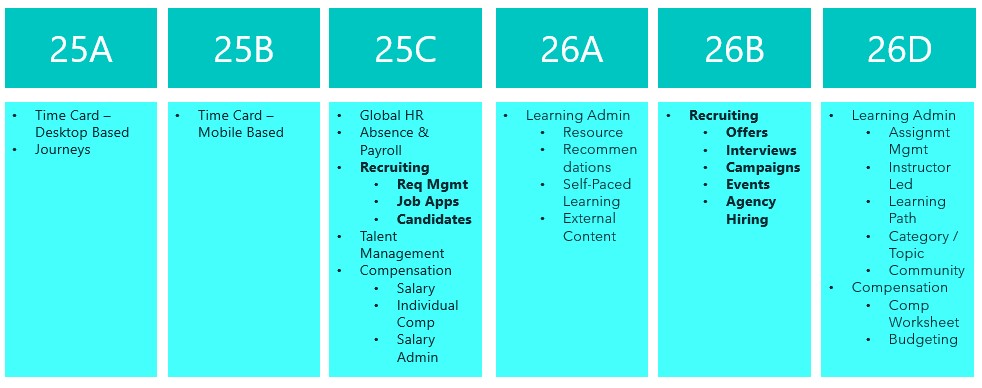
Things are really heating up in the world of Recruit as we approach the final deadline to move the remaining Recruiting pages over to Redwood in 26B. This release is your last opportunity to make the switch. With the 25C deadline behind us, you should already be managing requisitions, job applications and candidates in Redwood. The next phase brings exciting updates around offers, interviews, campaigns, events and agency hiring. So, let’s dive in and see what’s new…

The AI Career Coach, first introduced in 25D to help candidates find roles that match their skills, has already been enhanced in 26A. The Career Coach now uses the Supervisor model, which brings all agents together under one umbrella, streamlining information sharing and removing redundancies. The agent is pre-seeded and ready to run, so there’s no need to create agents from templates. You can also choose to display the widget as an overlay, ideal for highly customised sites, rather than the default side panel, ensuring it doesn’t interfere with your design. For one-page application flows, the widget now displays correctly, and when shown as a side panel, the navigation menu is replaced with a horizontal progress bar. The fixer button appears on the page instead of the left-hand side, and a clickable Terms and Conditions link pulls content from the job application legal disclaimer in the Recruiting Content Library. If you’ve enabled CV parsing, candidate CVs will be parsed into the application flow when uploaded via the widget. From this release, any CV uploaded into the recommended jobs widget in the candidate experience will also be available to the agent.

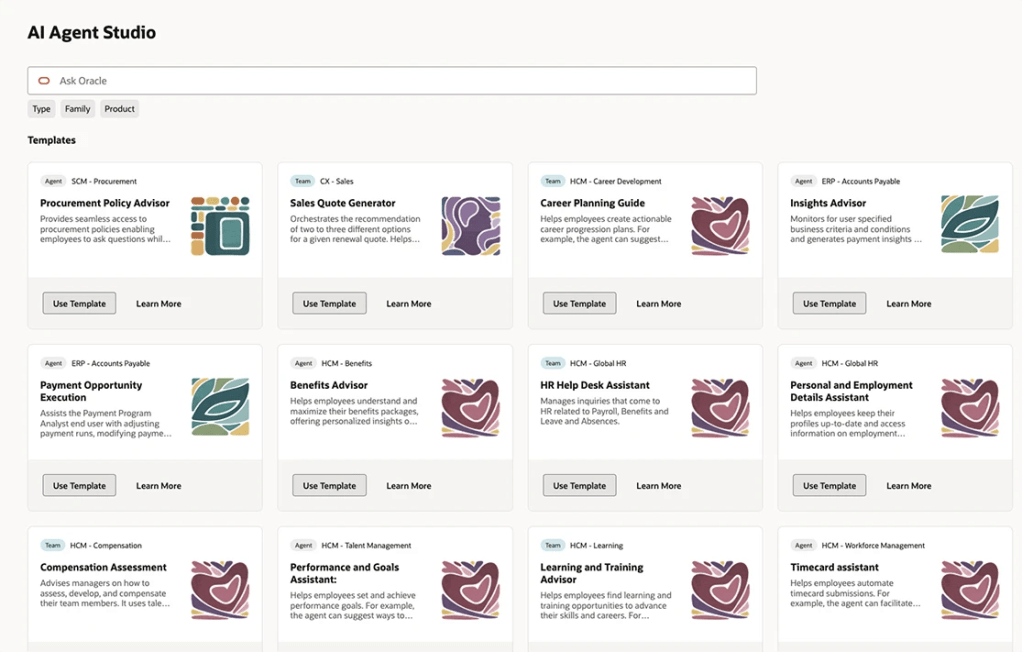
As many of you know, I’m a big fan of AI, anything that makes life easier. The next update introduces an AI assistant for job requisition creation, working like a smart, on-page helper that answers both general and field-specific questions as you build a requisition. Because its guidance is driven entirely by the documents you upload and the prompt you configure, it’s easy to tailor to your organisation’s policies and practices. The agent helps users get it right first time, capturing the correct data, minimising downstream issues and boosting overall efficiency without interrupting the flow.

By 26B, the Job Offer process must be fully transitioned to Redwood, and Oracle has introduced a new AI agent to make this easier. Acting as an FAQ-style assistant, the agent helps users by answering both general and field-specific questions during job offer creation. Its guidance is based entirely on the documents you upload and the prompt you configure, making it simple to align with your organisation’s policies and practices. This smart assistant ensures job offers are created smoothly, reduces downstream issues by capturing accurate data, and boosts overall efficiency without disrupting the process.

Another useful Redwood Offer feature is the Initiate Job Offer Creation for Hiring Managers functionality. Hiring managers with the Initiate Job Offer privilege can now start the process and share notes with the recruiting team using the Create Job Offer action from the Redwood job applications list or details page. On the Create Job Offer page, they can add comments in the Notes to Recruiter field to provide context or instructions. Once they click Save and Close, the candidate’s application moves to Offer – Draft status and appears on the Redwood Job Offers list page. The recruiter receives a notification to complete the offer details using the Edit Offer action, with the manager’s notes displayed in a banner above the Details and Offer tabs. When ready, the recruiter can submit the job offer for approval or save it for further editing later.

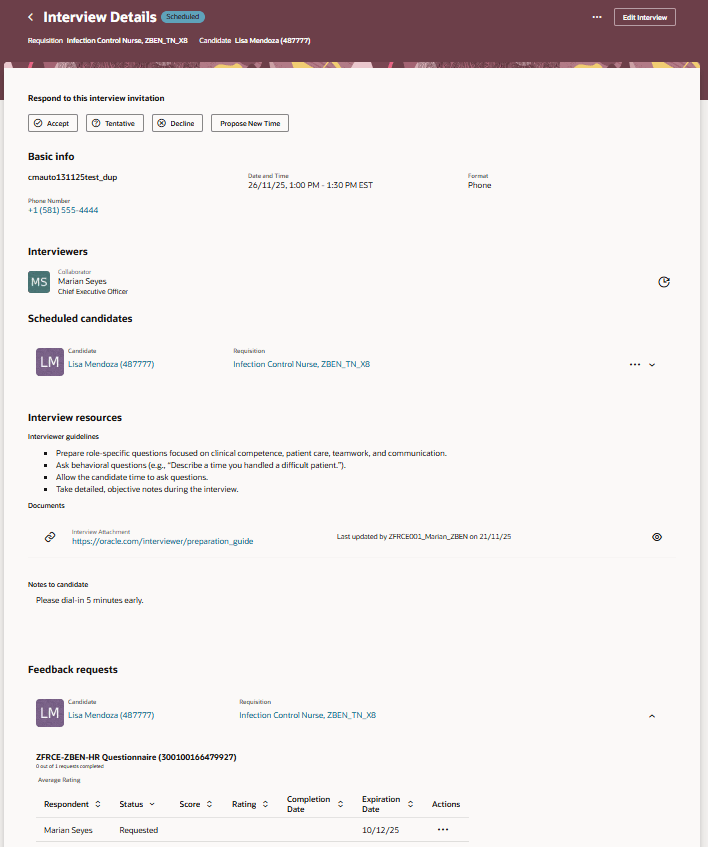
The final feature worth mentioning is the new Redwood Interview Details page, which brings several improvements over the previous responsive version. A new Basic Info section now displays key interview details at a glance. In the Interviewers section, you can easily resend the Interview Scheduled notification, handy if someone says they haven’t received it. The Scheduled Candidates section allows you to click candidate and job requisition links to open a drawer with more information, and the Actions menu lets you manage candidates scheduled for the interview. Under Interview Resources, you’ll find interviewer guidelines, attachments and candidate notes added to the interview. If you’re an interviewer, you can respond directly to the invitation, accept, tentatively accept, decline or propose a new time. When proposing a new time, the drawer can even display your availability if calendar integration (Microsoft 365 or Google) is enabled.

Oracle often slip in new features during the month, so it’s worth keeping an eye out. If anything truly game-changing appears, I’ll share another blog post to keep you updated and make sure you don’t miss out. In the meantime, why not check out my latest write-up on the new Core HR features in Release 26A? You can find it here.

Please note all screenshots are the property of Oracle and are used according to their Copyright Guidelines

Discover Oracle HCM Cloud’s Activity Centres

Have you seen the new Oracle HCM Cloud Activity Centres? They’re a fundamental part of the new Redwood pages and I love them! When they first came out, they were called ‘Spotlights’, but they’ve since been rebranded and now there are 4 Activity Centres.

The original Activity Centres were for Employees and Line Managers. All Activity Centres are ‘One Stop Shops’ for the relevant user. Focusing first on the Employee Activity Centre, this is where an employee can view / update their personal details; view their payslips; book annual leave and absences and many other things. If there is information that need to be shared with employees in bulk, they can be posted on there too. Any activity the employee is likely to carry out can be linked from the activity centre. If there are tasks that aren’t needed, they can be easily hidden via VBS.

Employee Activity Centre

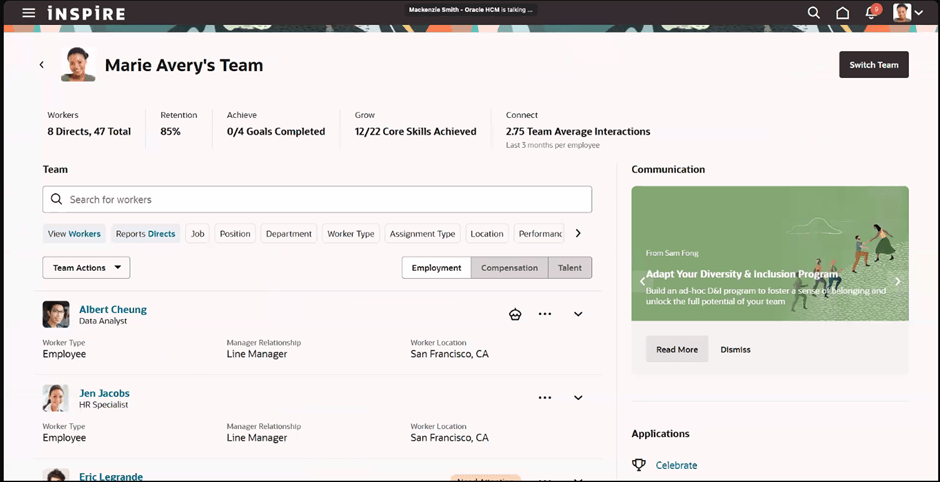
In the Manager Activity Centre, Line Managers can easily access all of their team members records in one place. From here you can view employment and compensation details and also monitor talent and performance. Again important communications for line manager can be posted in here. Additionally bulk actions can be carried out for team members, such as creating communications, adding Journeys and creating surveys for feedback.

Manager Activity Centre

The Recruiting Activity Centre was the first one that was launched as an ‘Activity Centre’ and I regularly talk about it to my customers. It’s a great landing site for the Recruitment team to use. Originally it was only available to Recruiters and Hiring Managers, but last year it was extended to Collaborators too, so the whole team has access to this great tool. It summarises key data like high priority tasks and the number of new applicants that need reviewing. It’s easy to view the status of requisitions and offers and, my personal favourite, communication history between the Recruitment team and the candidate in conversation format. This is something that a lot of my customers have enquired about in the past.

Recruiting Activity Centre

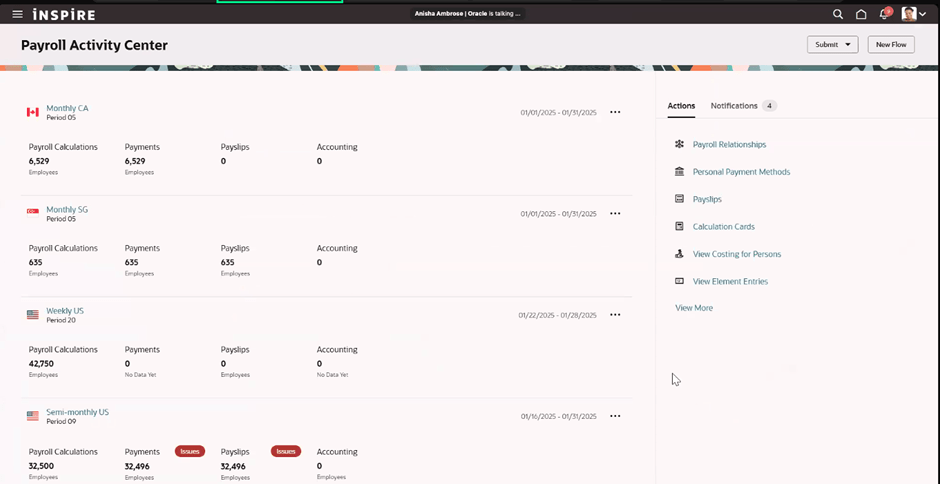
The final, and most recent, Activity Centre is the Payroll one. It allows the Payroll team to view all payrolls in one location, easily view notifications that might indicate their has been an error or significant disparity in a payroll run and investigate the root cause. All the usual actions that the team would need to carry out are easily accessible, such as calculation cards, element entries, costing etc as well as to be able to submit payroll flows. It speeds up the time to run processes and investigate issues.

Payroll Activity Centre

The Activity Centres are all designed to improve the user’s experience and reduce the number of menus / clicks they need to make. It has all the information that you need at your fingertips and in my personal opinion, is a massive improvement! I’m sure this won’t be the last of the Activity Centres that we see and Oracle are constantly improving the existing ones, so keep an eye out on those quarterly release updates for more news.

Please note all screenshots are the property of Oracle and are used according to their Copyright Guidelines