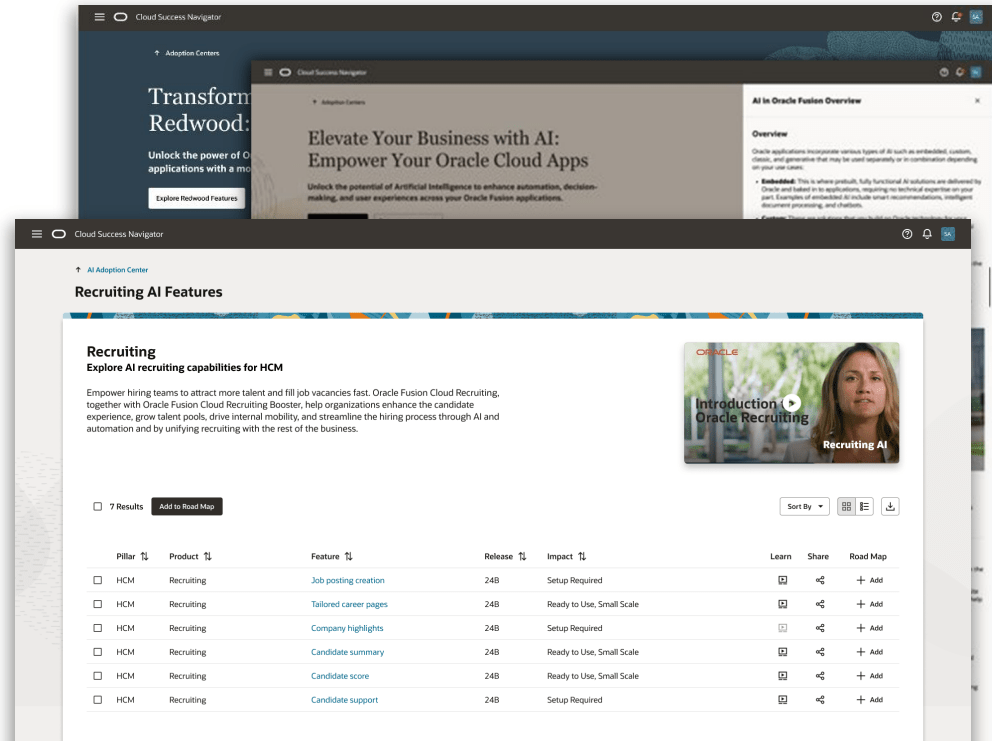
Oracle AI Success Navigator 26.2: The Shift from Guidance to Action

I’ve written about Oracle AI Success Navigator a few times now, and I’ve always liked the principle behind it. But with 26.2, I think we’re starting to see something more significant happening. Success Navigator is moving beyond simply helping customers understand their Fusion estate and what Oracle recommends they consider next. Increasingly, it is starting to help connect those insights to decisions, roadmaps, implementation and adoption.

And that matters because most Oracle Fusion customers don’t have a shortage of information. In fact, I’d argue that the problem is often the opposite. There are quarterly releases, new AI capabilities, Redwood changes, business process improvements, configuration recommendations and an ever-growing list of things that you could be doing.

The harder questions are much more practical. Which of those things actually matter to us? What should we prioritise? And how do we turn that into something we can realistically deliver? That, for me, is where Oracle AI Success Navigator 26.2 starts to get really interesting.

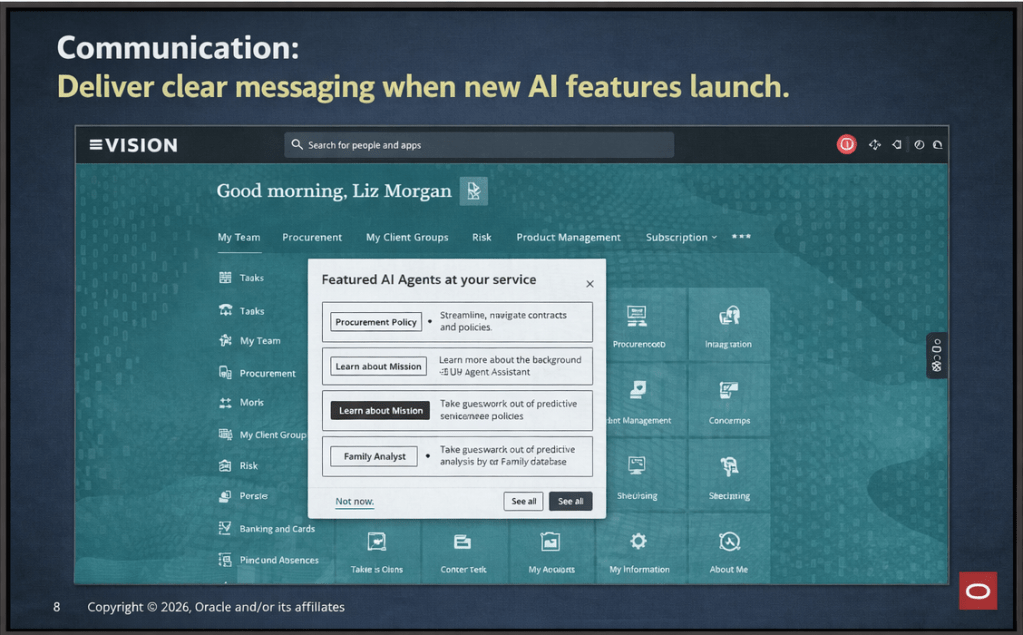
One of the changes that immediately caught my attention is Innovation Opportunities. Rather than expecting customers to work through everything Oracle has released and decide what might be relevant, Success Navigator will use information from the customer’s Account Profile to surface relevant Fusion capabilities and suggested actions. Customers can review those opportunities and, where appropriate, add them directly into their Adoption Roadmap. It sounds like a relatively simple change, but I think it addresses a very real problem.
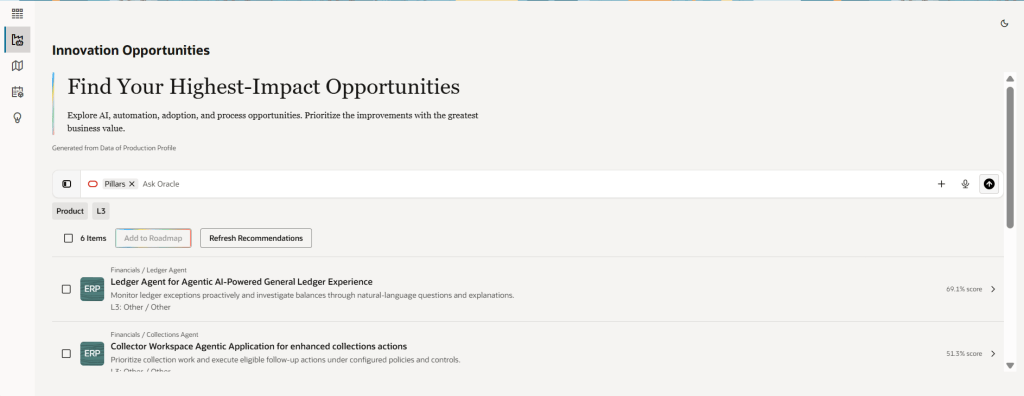
I speak to customers regularly who know there is functionality within Fusion they aren’t using. Sometimes they aren’t sure what they are entitled to. Sometimes they know about a capability but haven’t had the time to investigate whether it is relevant. And increasingly, particularly with AI, the sheer pace of new functionality makes keeping up difficult.

Success Navigator starts to change the question from: “What has Oracle released?” to: “What could actually make a difference to our organisation?” For me, that is a much more useful conversation. There is an important caveat though. A recommendation isn’t a business case. Just because something is technically available doesn’t mean it should automatically go onto the implementation backlog. You still need to consider process maturity, data, security, integrations, change capacity and, most importantly, the business outcome you are trying to achieve. I see Innovation Opportunities as providing a much better starting point for those conversations, not replacing them.

Then we get to Agentic Implementation. This is probably the area that gives us the clearest indication of where Oracle is heading, although it is important to separate what is available in 26.2 from what has been announced for the future. At AI World in Las Vegas, Oracle introduced its plans for specialised implementation agents covering Discovery, Design, Configuration, Testing, Integration and Innovation. Central to that vision is the Oracle Fusion Setup and Configuration Registry, or FSCR, which Oracle describes as an authoritative, machine-readable source for Fusion setup, configuration and product-defined best practice. FSCR isn’t really a feature of this AI Success Navigator release yet. It is better thought of as part of the emerging architecture behind where Oracle wants Agentic Implementation to go. But for me, it is still one of the more interesting parts of the overall direction.
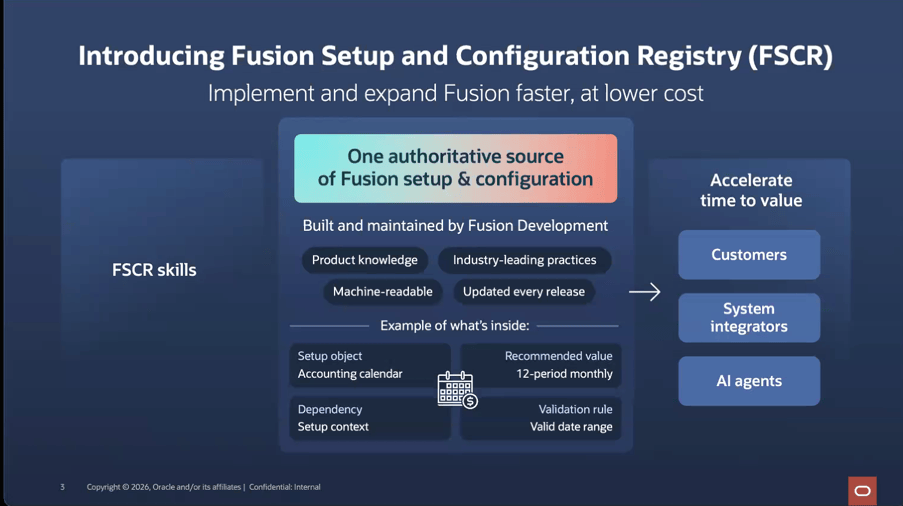
For years, implementations have relied on consultants taking product knowledge, documentation, previous experience and customer requirements and translating all of that into designs, configuration workbooks, setup activities and test scenarios. The promise of FSCR is that more of that underlying Oracle product knowledge could become machine-readable. Configuration options, dependencies, sequencing, execution, testing and validation could increasingly become reusable AI skills that implementation agents can work with.

Importantly, Oracle’s model still includes expert review, with AI-generated configurations able to be reviewed, adjusted and approved before deployment. So I don’t see this as “AI replaces the implementation team”. I think that is far too simplistic.

Instead, I see the potential for implementation teams to spend less time on repeatable mechanics and more time on the things that genuinely require experience and judgement: understanding the organisation, challenging processes, dealing with exceptions, designing controls, considering security, managing integrations, assuring what AI has produced and making sure the solution actually delivers the intended business outcome. That is potentially quite a fundamental shift.

Oracle has talked about some significant improvements in design and configuration effort from its early work in this area. I’d still be cautious about turning those into generic productivity claims, particularly while FSCR and the associated implementation capabilities are still emerging. For now, I see this less as a headline feature of 26.2 and more as a signpost towards what AI Success Navigator could become.

Another change that may receive less attention than the agents, but could be extremely useful in practice, is the evolution of Adoption Roadmaps, Release Readiness and the Update Planning Center. Success Navigator already supports quarterly Fusion release planning. With 26.2, Oracle is also introducing monthly maintenance guidance alongside improvements intended to make it easier to explore features, prioritise innovations and track progress. For me, this brings us closer to continuous innovation.
A quarterly release really shouldn’t be a frantic exercise every three months where teams download a spreadsheet, identify the mandatory features, send dozens of emails, decide what they can realistically test and then repeat everything the following quarter. There should be a continuous process for understanding change, assessing impact, deciding what to adopt, planning testing and change activities, recording decisions and then coming back afterwards to see whether the expected value was actually achieved. Bringing more of that into the same environment could help move release management away from being a periodic technical exercise and towards becoming part of the organisation’s ongoing Fusion operating model.

The Configuration Assessment updates also deserve some attention. The existing capability already helps customers look at the relationship between Fusion entitlements, configuration and usage, including identifying processes that are configured and used, configured but not used, or neither configured nor used. Oracle has confirmed Configuration Assessment updates for 26.2, although the detailed enhancements weren’t fully documented in the material I reviewed.

I think the opportunity here is bigger than simply finding unused configuration. If something has been configured but isn’t being used, why isn’t it being used? Was the functionality never properly embedded? Is the process wrong? Has training been missed? Is security preventing people from accessing it? Is an integration getting in the way? Or was it configured years ago and simply isn’t relevant anymore? That creates a very different optimisation conversation.

Instead of starting with a fairly generic question like “How can we get more from Fusion?”, you can begin with evidence about the customer’s existing environment and work out where there is genuinely an opportunity to improve. The technology provides the starting point. The important part is still interpreting what that evidence means for the business.
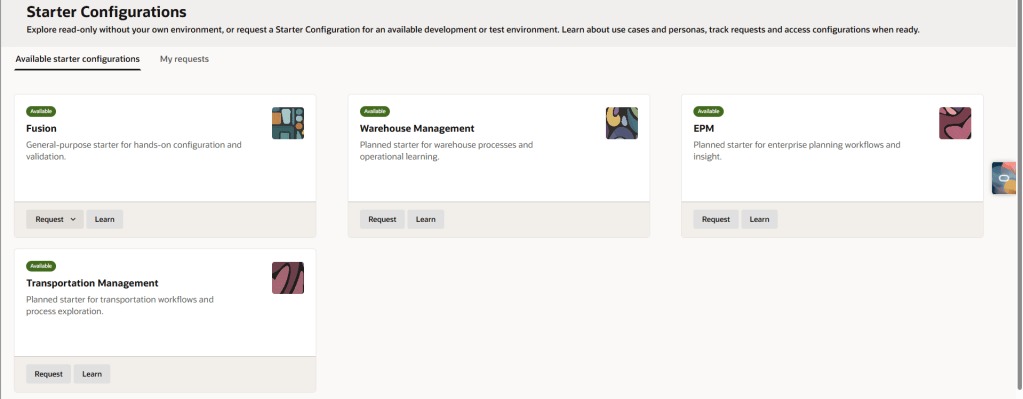
Oracle is also redesigning the Starter Configuration experience and refreshing its Business Processes content in 26.2. The detailed changes haven’t yet been fully published, but I think the principle behind Starter Configuration remains really useful. Let people see something tangible earlier.

Business users don’t necessarily want to spend weeks discussing an abstract future-state process captured in documents and diagrams. Being able to look at a working Fusion environment, walk through personas and processes and then have a fit-to-standard conversation can make design much more meaningful.

The interesting part for me is what happens when you connect that experience to Agentic Implementation. Discovery, process design, configuration and testing potentially start becoming much more connected rather than being separate implementation phases with documents passed between them. That connection between guidance and execution is where the direction of Success Navigator becomes much clearer.
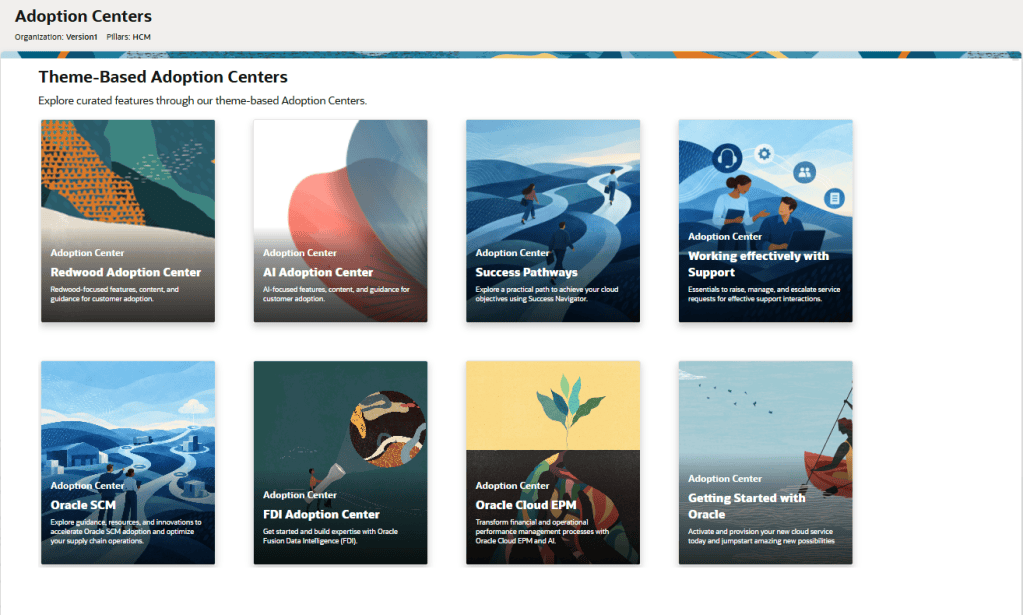
Finally, Oracle is introducing new Adoption Centers with resources focused on product adoption, achieving business outcomes and working effectively with Support. And this brings me back to something I say quite often about AI and transformation. Technology availability does not equal adoption. You can recommend the right feature, configure it perfectly and release it successfully. That doesn’t mean anybody is going to use it properly.

People still need to understand why something is changing. Processes need to change around the technology. Managers need to reinforce new behaviours. Training and communications need to be relevant to the people actually doing the job. And somebody needs to come back afterwards and ask: Did this actually deliver what we expected? I actually think AI makes that part of transformation more important, not less. As more of the technical implementation activity becomes automated or agent-assisted, the proportion of effort needed around judgement, assurance, people and organisational change potentially becomes greater.
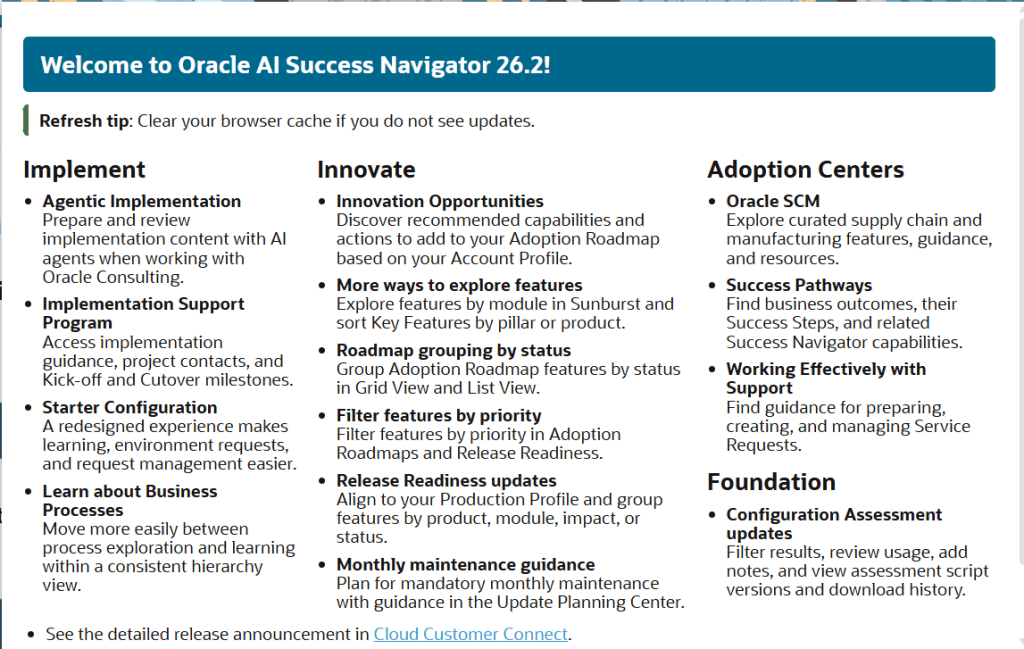
When I step back from the individual 26.2 enhancements, this is the real story for me. Success Navigator is beginning to form a much more connected lifecycle: Understand where you are. Identify opportunities. Decide what matters. Plan the change. Implement it. Adopt it. Measure it. Then optimise again. That is much closer to how customers actually need to manage a continuously evolving SaaS platform.

It is also why I’m particularly interested in how Innovation Opportunities, FSCR and Agentic Implementation develop. If Oracle can provide more product intelligence and repeatable execution through the platform, it changes where customers and implementation partners should spend their time. Less effort interpreting documentation and recreating standard configuration knowledge. More effort understanding the business, designing the right transformation, managing risk, integrating the wider technology landscape and making sure new capability translates into measurable value.

For me, that is where AI in enterprise applications becomes much more interesting. Not simply: “What can AI do?” But: “What can we now spend our time doing because AI can take care of more of the repeatable work?” Oracle AI Success Navigator 26.2 feels like another step towards answering that question. And I suspect the shift from guidance to action is going to become much more important than any individual feature in this release.

Please note all screenshots are the property of Oracle and are used according to their Copyright Guidelines.
A Day with Oracle: AI Success Navigator and Guided Learning Partner Enablement

Today I had the opportunity to attend and present at a partner enablement event hosted by the Oracle AI Success Navigator product team, focused on how partners like Version 1 can best use Oracle’s tooling to bring genuine, measurable value to our customers. The session brought together presentations, product demos, hands-on labs, and open discussion, covering Oracle Cloud Success Navigator and Oracle Guided Learning (OGL). It was a useful day, and I wanted to share some of the key takeaways while they’re fresh.

If you haven’t come across Cloud Success Navigator yet, it’s Oracle’s digital engagement platform, provided free to Oracle Fusion Cloud customers, designed to help organisations design, implement, and accelerate their cloud and AI roadmaps. It sits at the centre of Oracle’s broader AI Factory offering, which Oracle launched as a bundled set of partner and customer services aimed at speeding up AI adoption.

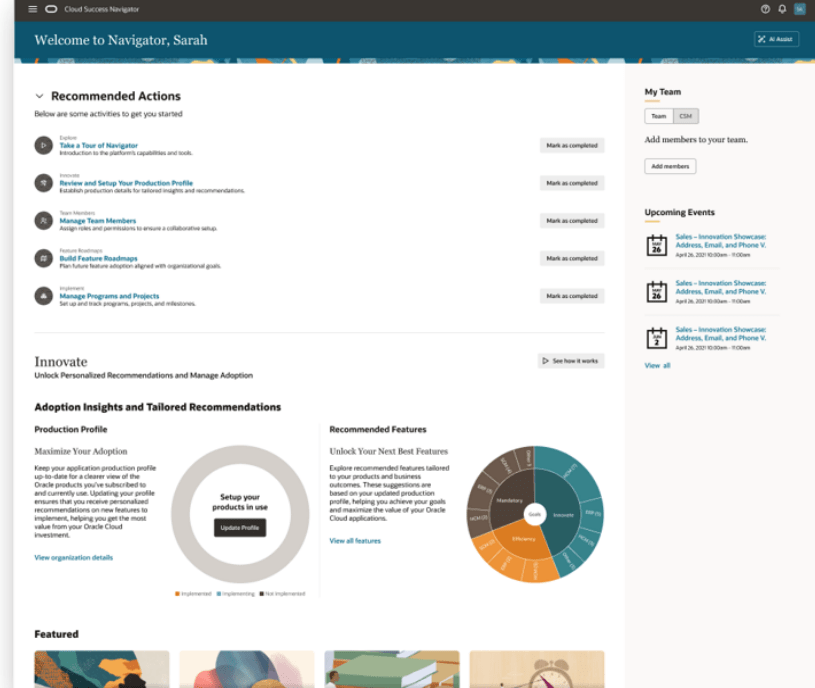
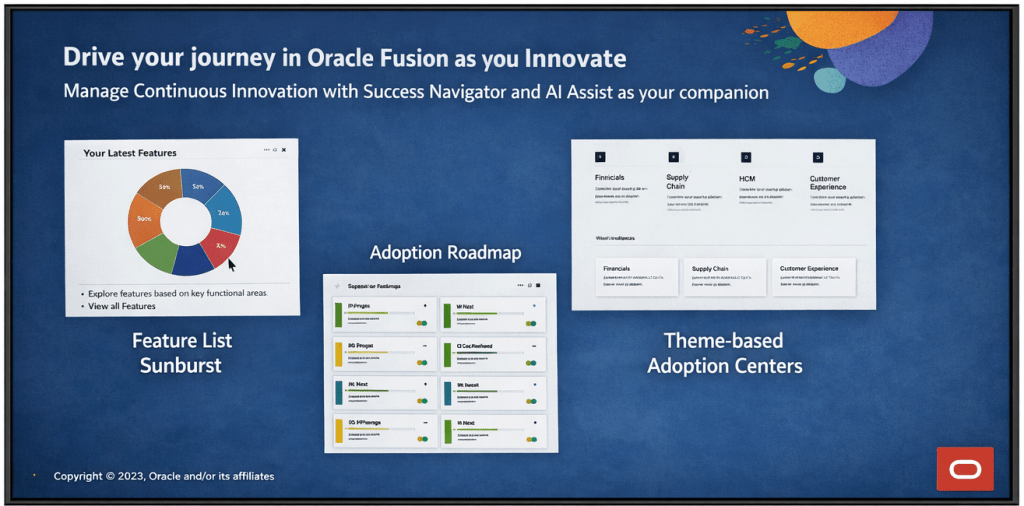
At its core, Cloud Success Navigator gives customers a single place to discover new features, plan adoption, track key milestones, and access Oracle Modern Best Practice (OMBP) guidance. The sunburst visualisation is particularly useful: it surfaces relevant features based on your production profile, so your team isn’t wading through capabilities that don’t apply to your configuration. You can tag features across Now, Next, and Later columns, which gives a clean, structured view of your innovation roadmap.

A significant addition to the platform is AI Assist, which was made generally available in late 2025. AI Assist is a generative AI-enabled assistant embedded throughout Navigator. It goes beyond a standard chatbot: it provides tailored recommendations, surfaces relevant documentation, highlights release roadmap changes based on your context, and flags project milestone risks. For partners, the practical implication is that our customers now have a self-service layer of intelligent guidance that can accelerate feature discovery and planning without always needing to raise a support request or wait for a consultant touchpoint.

How should Partners be using Success Navigator? This was, for me, the most valuable part of the day. The Oracle product team was clear that Navigator is not just a tool for customers to log into independently. The expectation is that partners should be actively bringing Navigator into their delivery model, whether that’s during implementation, post go-live optimisation, or ongoing managed service.

In practice, that means a few things. During implementation, your partner should be walking you through Navigator as part of onboarding, not treating it as a nice-to-have that gets mentioned at the end of a project. Feature planning sessions are more productive when they’re anchored in Navigator’s release data and OMBP content, rather than relying on spreadsheets or static documentation that goes out of date.

Post go-live, Navigator becomes a continuous value tool. The AI Assist agents can help customer teams stay ahead of quarterly release content, plan for Redwood migration milestones, and identify AI features that fit their production profile. Partners who are actively guiding their customers through this ensure their customers are in a much stronger position than those who are leaving customers to self-serve without direction.

One thing to note: Oracle has indicated that the platform continues to evolve, with enhancements planned around streamlined account management for customers with multiple accounts and improved programme management views. It’s worth keeping an eye on the in-application release announcements for Navigator itself.

The second major focus of the day was Oracle Guided Learning (OGL), Oracle’s digital adoption platform (DAP) built natively for Oracle Cloud applications. OGL delivers in-application guidance, directly overlaid onto the Oracle Fusion interface, so users get real-time, contextual help without having to leave the system or refer to separate documentation. The core capabilities OGL brings to a customer environment are worth spelling out clearly, because I still encounter organisations that underestimate what the platform can do.

Process guides provide step-by-step walkthroughs for complex transactions, walking a user through the exact steps required to complete a task within the application. Smart tips and beacons offer contextual pop-up hints and visual cues at key points in the UI. The Help Panel gives users access to self-service guidance and documentation from within the application. In-app messaging allows administrators to send announcements, policy updates, and maintenance communications directly to users as they work, rather than relying on email campaigns that often go unread. Analytics then close the loop: OGL captures how users are engaging with content, where they’re dropping off, and which features or processes need additional guidance investment.

What’s particularly relevant for customers right now is the AI integration within OGL. The OGL 26A release introduced generative AI capabilities into the content authoring experience: content developers can use an AI assistant within the Full Editor to generate and rephrase step text for process guides, smart tips, beacons, and messages. This significantly reduces the time needed to build and maintain a library of guides, which has historically been a barrier to adoption on smaller or resource-constrained engagements.

OGL also extends beyond Oracle applications. It can be deployed across third-party applications including Salesforce, ServiceNow, Microsoft SharePoint, and others, which is useful context for customers running a mixed application estate.

A thread running through both topics today was change management, and it’s one that I think partners sometimes treat as a soft add-on rather than a structural part of delivery. The reality is that both Navigator and OGL exist precisely because technology adoption is a change management problem as much as a technical one.

Navigator gives you the roadmap visibility and planning structure to keep customers engaged with what’s coming and why it matters. OGL gives you the in-application mechanism to reinforce new behaviours, communicate changes, and support users at the moment of need. Used together, they cover a significant portion of the adoption lifecycle: from feature discovery and prioritisation, through to in-system guidance and analytics-driven optimisation.

The enablement message from Oracle today was straightforward: partners who embed these tools into their delivery model are better placed to demonstrate continuous value to customers. Customers who have a structured adoption programme, supported by Navigator and OGL, tend to see higher feature utilisation and lower support overhead than those who treat go-live as the end of the engagement.

It was a practical and well-structured day. The Oracle AI Success Navigator product team clearly has a strong vision for how the platform should be used within the partner ecosystem, and the investment Oracle has made in AI Assist and the broader AI Factory infrastructure is evident. For those of us working in Oracle Fusion Cloud implementations and managed services, the message is clear: these tools are available, they’re free as part of the Oracle subscription, and using them well is increasingly a differentiator in how we position value to our customers.

If you’re currently working on an Oracle Fusion Cloud engagement and you haven’t had a detailed look at what Cloud Success Navigator and OGL can offer, now is a good time to start that conversation.

Please note all screenshots are the property of Oracle and are used according to their Copyright Guidelines

Oracle AI Success Navigator and OGL: A Partnership That’s Changing How We Adopt Oracle Fusion

Oracle has rebranded Oracle Cloud Success Navigator as Oracle AI Success Navigator, and while a name change might sound like a cosmetic exercise, what’s happening underneath is far more interesting. Oracle is actively strengthening the partnership between AI Success Navigator and Oracle Guided Learning (OGL), and for those of us who have long championed both products, this new direction is very exciting!

Oracle AI Success Navigator (formerly Oracle Cloud Success Navigator, or CSN) is Oracle’s platform for helping customers plan, implement, and continuously innovate with Oracle Cloud Applications. It’s included as part of your Oracle Cloud subscription, so if you’re not using it, you’re missing a trick to get more from your Fusion instance.

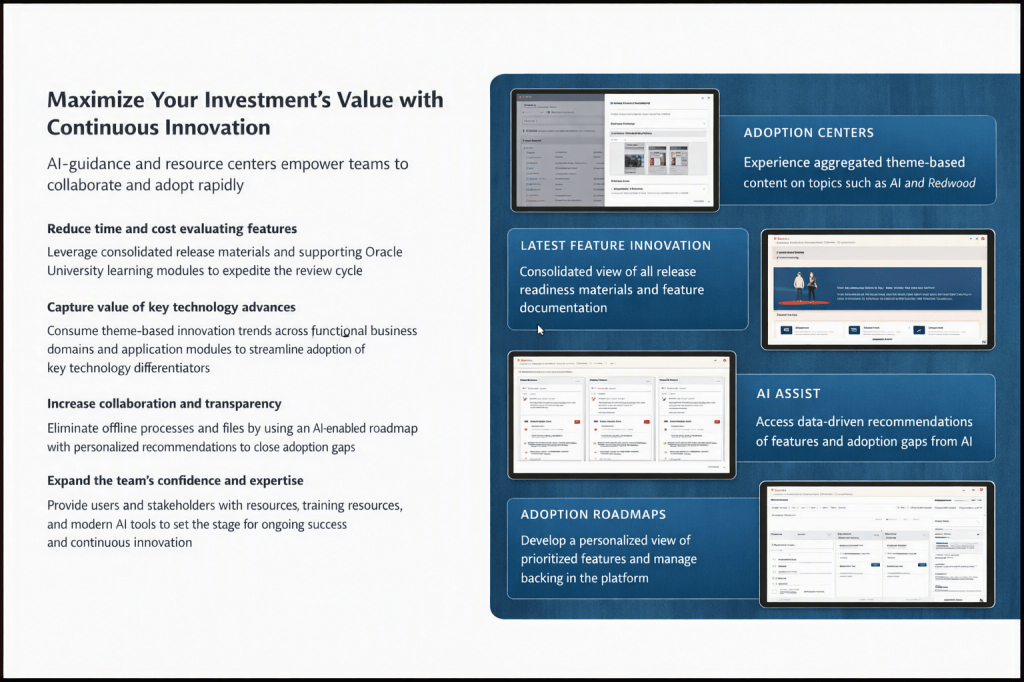
The AI Success Navigator platform gives you four key areas to work with: Latest Feature Innovation, a consolidated view of release readiness materials across your product pillars; Adoption Roadmaps, a personalised and prioritised feature backlog managed directly in the platform; Adoption Centres, theme-based content hubs covering topics like AI and Redwood; and AI Assist, an OCI Generative AI-powered chat interface that I’ll come back to in some detail.

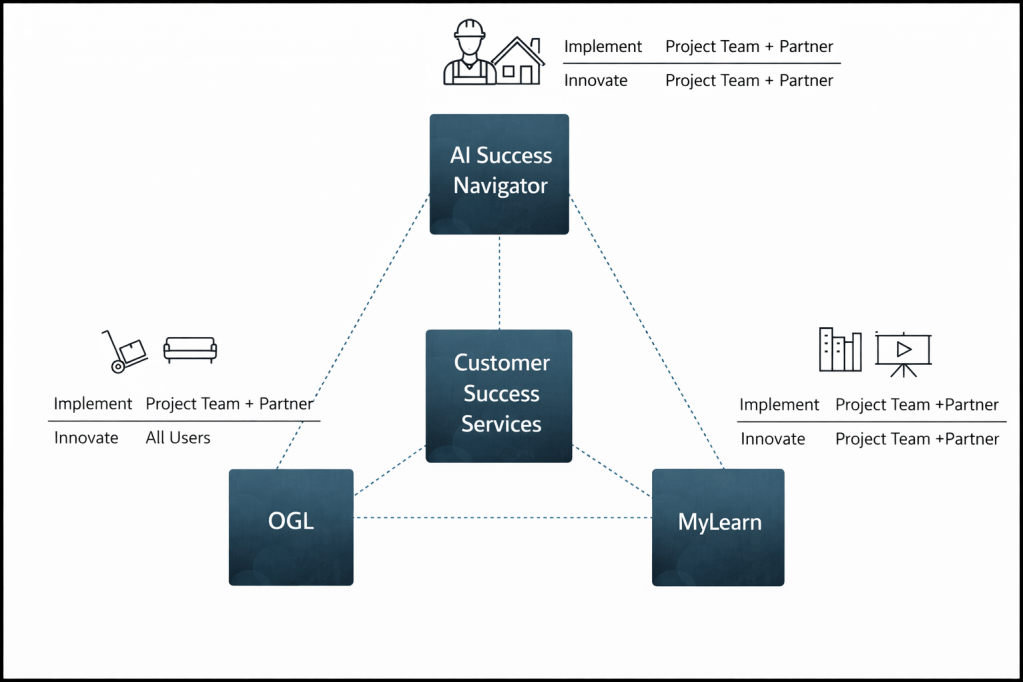
AI Success Navigator, OGL, and MyLearn are all interconnected and Oracle’s Customer Success Services sits in the middle of each. AI Success Navigator is the planning and intelligence layer and OGL is the point-of-need delivery mechanism inside the application. During implementation, OGL is primarily the concern of the project team and partner. Post-go-live, it becomes relevant to all users. MyLearn is the key mechanism for users to learn about Oracle Fusion and therefore is an important consideration.

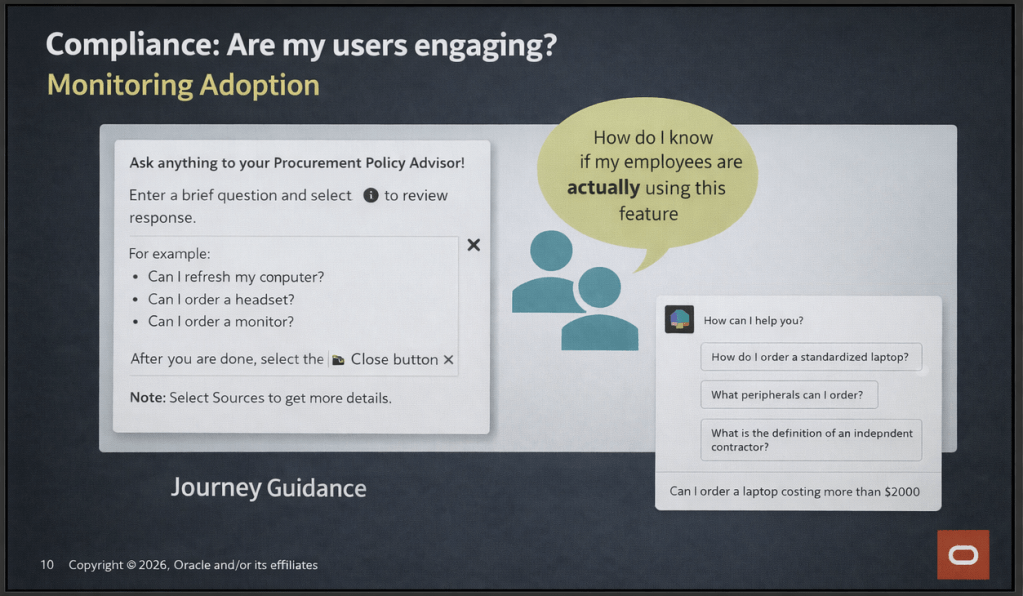
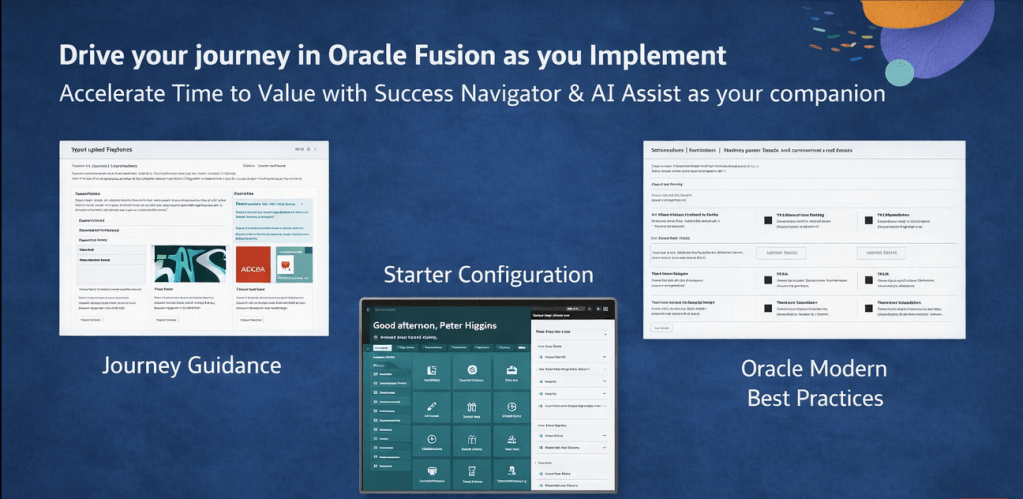
What’s changing is that these products are no longer operating in isolation. OGL content is now surfaced within AI Success Navigator in the Oracle Modern Best Practice (OMBP) area as job aids, and within Starter Configuration. AI Assist is also being increasingly trained on OGL best practices and project success indicators, meaning the recommendations it produces are grounded in what good OGL adoption actually looks like.

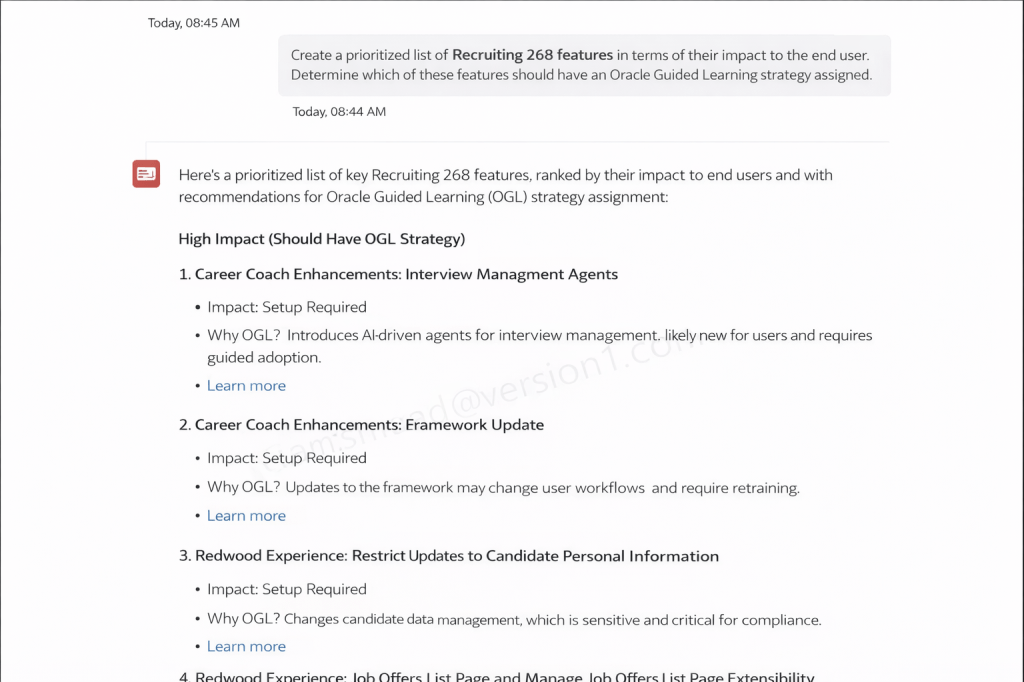
Are you aware of the opportunity to use Success Navigator’s AI Assist to help produce OGL Content? On a recent webinar the presenter asked AI Assist to produce a prioritised list of Recruiting 26B features ranked by end-user impact, with a recommendation on which should have an OGL strategy assigned. The output was a ranked list classifying features as high, medium, or low impact, with a clear rationale for each. Features like Career Coach Enhancements (Interview Management Agents) and the Redwood Experience changes to candidate data management were flagged as high impact, with specific reasoning around setup requirements and workflow changes for end users.

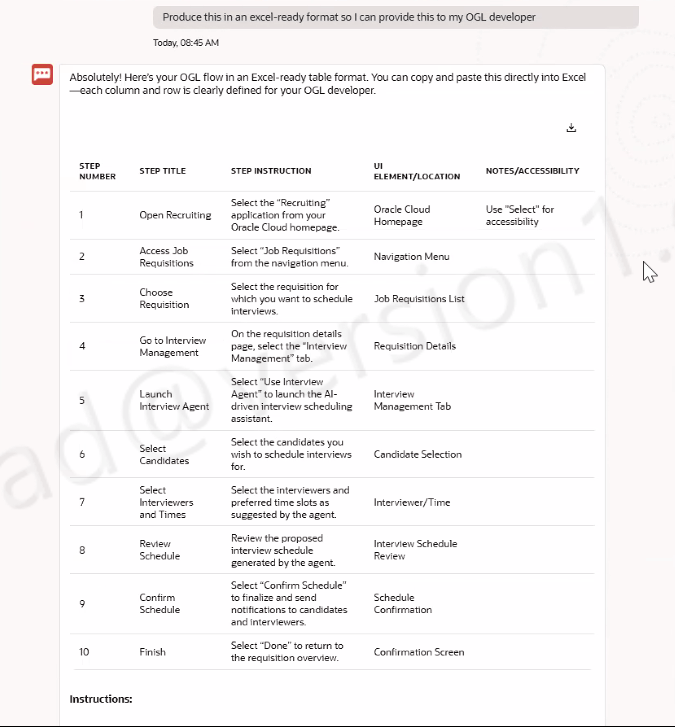
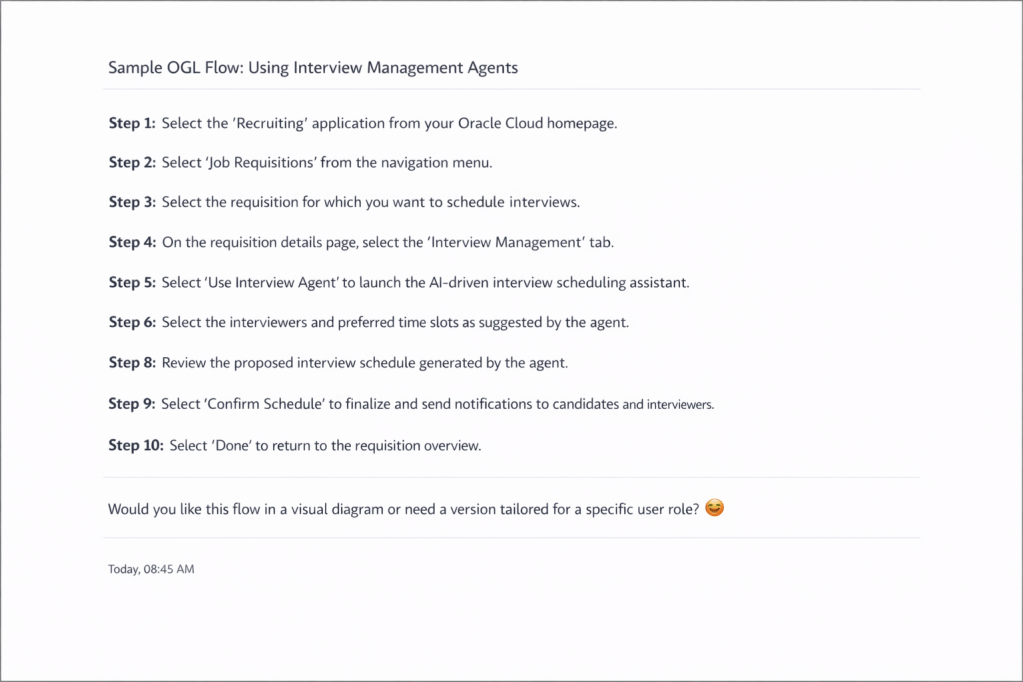
The next step was even more useful. Having identified that the Interview Management Agent feature needed OGL coverage, the presenter asked AI Assist to produce a sample OGL flow. The output was a structured, step-by-step guide covering navigation path, UI element locations, and accessibility notes. When the presenter asked for it in an Excel-ready format, AI Assist reformatted the output into a table with columns for Step Number, Step Title, Step Instruction, UI Element/Location, and Notes/Accessibility, ready for an OGL developer to pick up directly.

So what does this mean in practice? An OGL team no longer has to start from a blank page when a quarterly release drops. AI Success Navigator can triage features, identify which ones need OGL attention, and produce a first-draft flow that a developer can then validate and publish. That’s a material reduction in the time between a feature dropping and users having contextual guidance in the application.

One thing to note: AI-generated flows still need validation against the actual application UI and tailoring to your specific user roles and configuration. The AI is a starting point, not a finished product. But it’s a very good starting point.

The webinar also covered the Testing Agent, which I think gets overlooked. It lets you create test cases from scratch using AI, upload existing test scripts for conversion, and refine them through AI Assist. The connection to OGL is practical: well-structured test cases describe real user workflows, and those workflows are exactly the raw material you need to build accurate OGL guides. If your testing and OGL content creation are happening in silos today, AI Success Navigator gives you a way to bring them closer together.

I’ve always felt that AI Success Navigator and OGL were solving related problems without talking to each other enough. What Oracle is doing now is starting to close that gap, and it’s a direction I’m very happy about.

If you’re not already using Oracle AI Success Navigator and you have an Oracle Cloud subscription, start exploring it. If you’re an OGL practitioner, the AI Assist capability is worth your attention specifically. And if you want to understand how the two products can work together in your programme, now is a good time to start that conversation.

Please note all screenshots are the property of Oracle and are used according to their Copyright Guidelines

Oracle Modern Best Practice – The Term Everyone is Going to be Talking About!

Have you heard of Oracle Modern Best Practice? It’s actually not a new thing, Oracle have been talking about it for nearly 10 years, but with the introduction of the amazing tool Cloud Success Navigator, Oracle Modern Best Practice (OMBP) is now taking centre stage! Oracle have created OMBPs for Cloud Fusion products for the first time and they will prove invaluable.

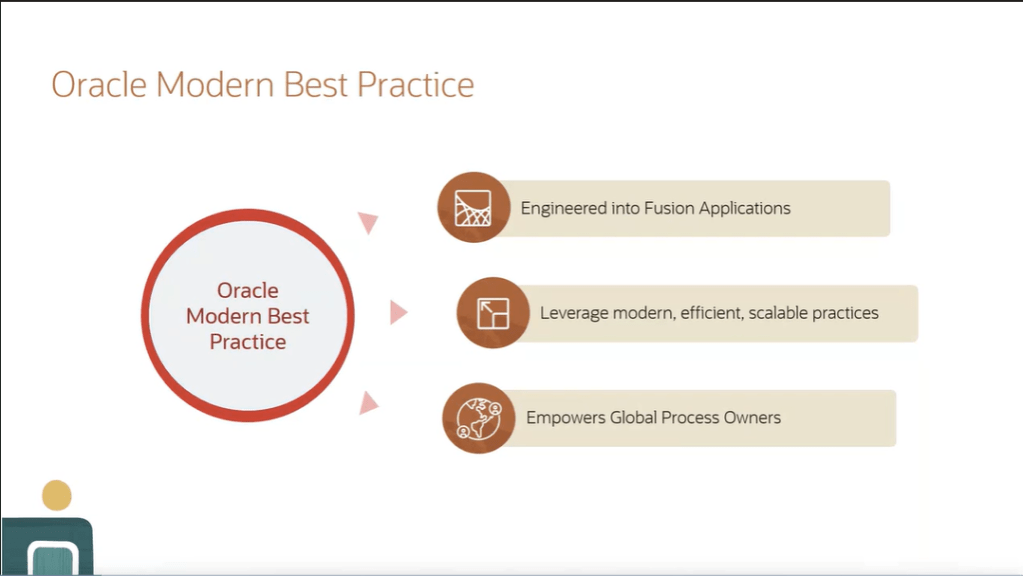
So what are OMBPs? They are common business processes that Oracle have optimised to improve the performance of applications using the latest technology. Oracle have done thousands of implementations and have taken learnings from both the successful and unsuccessful ones. These learnings have been analysed by Oracle experts to put together their OMBPs and related process flows. These flows incorporate scalable and efficient practices which empower the business’ process owners which will, in turn, produce improved results. Oracle are constantly evolving their Fusion product and as such, the OMBPs are also evolving. OMBPs can be used to educate users; demonstrate business processes; help to plan an adoption path and structure the scope of an implementation.

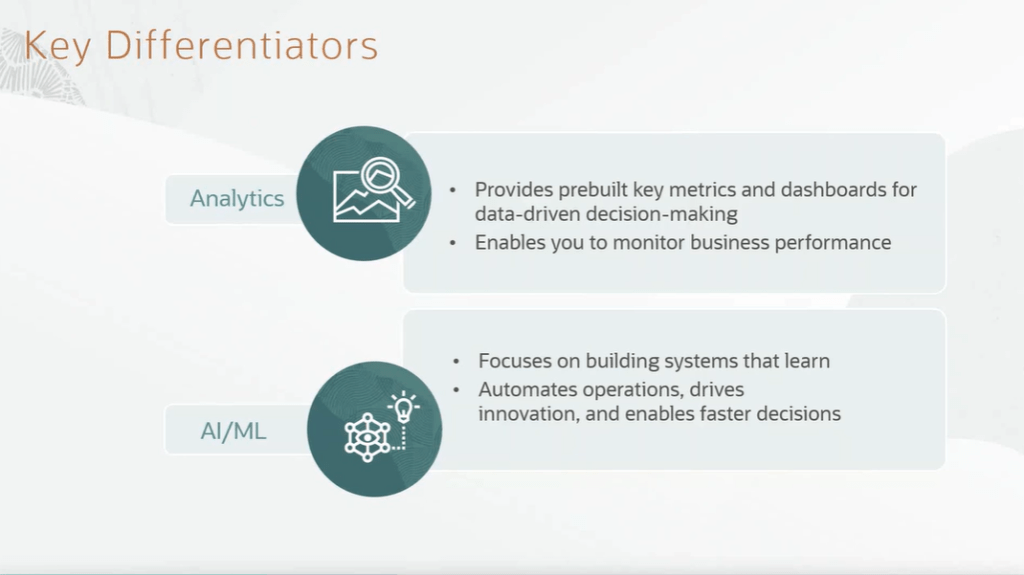
So what is included in an OMBP process flow? They incorporate all of the required steps within the process. Often users can miss a step as they don’t appreciate the criticality of it and this will prevent this from happening. My favourite part of the OMBPs are the recommendations on analytics that provide organisations with key metrics that they might not have been aware of. Analytics help organisations to monitor performance of specific areas of the business and gain a better understanding which will help with decision making. Additionally the OMBPs incorporate AI and Machine Learning. The processes incorporate innovations which aim to automate processes and help organisations make faster decisions.

OMBPs are currently available for the majority of an organisation’s processes. These include ERP, EPM, HCM, SCM and CX. Additionally there are industry specific OMBPs, including Banking, Healthcare, Higher Education, Insurance, Public Sector, Utilities and Retail.

So why should you care? Organisations always ask me, ‘What is the Best Practice?’. The introduction of OMBPs enable organisations to have access to this information at their fingertips, without needing to search for it. This will ensure your organisation is using the latest functionality with the greatest efficiency. Cloud Success Navigator incorporating Oracle Modern Best Practice within the tool will make this even easier. Please check on my blog on Cloud Success Navigator here, for more details.

Please note all screenshots are the property of Oracle and are used according to their Copyright Guidelines

Oracle Cloud Success Navigator – What Is It and What Value will it Bring?

Oracle announced the Cloud Success Navigator at CloudWorld in Vegas in September 2024 and will be launching it at CloudWorld in London in March 2025. So what is it? It’s an interactive tool to help existing and new customers of Oracle Fusion / SaaS products to get the most value from their implementations. The tool helps right from the beginning of an implementation project through to when the system is fully established, by helping with by the road-mapping and adoption of new features from the quarterly releases.

Cloud Success Navigator has many different facets. As the name suggests, it ‘navigates’ you through your whole Oracle Cloud journey. As someone who is involved with volunteering in Scouting, I love all the outdoor references in Oracle’s training materials. Every time I see a compass or someone climbing, it makes me smile. Whilst it might not seem relevant to everyone, I think it’s a really great metaphor and it shows how Oracle is investing in working with Customers and Partners to ensure that every customer gets the most value from their Fusion implementation, whatever stage of the journey they are currently in.

So, when will I get it? Some partners and customers have been part of the ‘Limited Availability’ programme since June 2024 and I was delighted to be a part of this. General availability of the tool will be after CloudWorld on 20th March 2025, via your Customer Success Manager, Partner or by direct request. Being part of the Limited Availability programme gave me the opportunity to be involved early and provide feedback to Oracle to help shape the future of the tool. When I initially used the tool, it was very implementation centric, but the focus over the past six months has moved more towards the ‘Evolve’ stage to enable customers to take advantage of new features more easily.

There are so many features the Cloud Success Navigator provides. These include Starter Configuration; Oracle Modern Best Practice; Deployment Guidance; Cloud Quality Standards; Milestone Dashboard; and Quarterly Release Environments. Most of these features will be included in the General Availability version, but Oracle have big plans to develop it further.

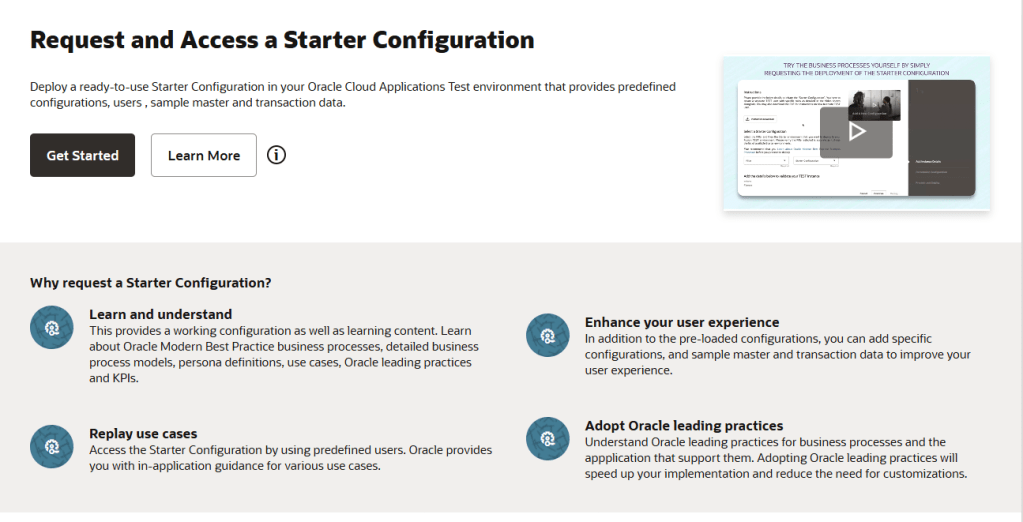
The Starter Configuration is aimed at customers right at the beginning of their implementation or those who will be carrying out an implementation of a new module, post go live. The starter configuration requires a completely empty pod to be deployed into. The configuration is the same data that Oracle puts in their Demo pods, often referred to as Vision data. Whilst it’s not unique to the customer’s data, it does allow users the opportunity to go into a pod and have a play with processes, to enable them to understand them without having to wait for their organisation’s configuration to be created in a environment. This is particular useful for people who learn best by ‘doing’ and can be a useful tool in workshops. Have you considered exploring Oracle Guided Learning (OGL)? The Starter Configuration includes OGL, allowing you to test it with users and assess its value; but also it can help to guide your users through new processes that might be unfamiliar to them.

One of the things I particularly love about the Oracle Modern Best Practices section is the simplified process flows that have been incorporated. Within E-Business Suite there have always been process flows that you could download, but these were lacking in Fusion. There are videos, process flows and information which explains every step of a process that an organisation would carry out. This information can be used to explore how the business’ current processes can be mapped to those in Fusion. Alternatively they can be used retrospectively to see where current processes deviate from Oracle’s recommended approach. There are helpful suggestions as well and all of it is presented in different mediums to accommodate the majority of learning styles.

Deployment Guidance might be the area of the tool that most organisations feel they already have covered and therefore least likely to use. Before you jump to this conclusion, I’d really recommend checking it out. There’s advice and guidance from Oracle, based on the thousands of implementations that they have experienced and it’s in one handy place. It’s useful from a Change Management perspective and gives easy access to documents that your Project Sponsors and Stakeholders will appreciate in a business appropriate style. There are also example Cut Over Plans and Business Transition Documents which could reduce the time the business needs to develop these.

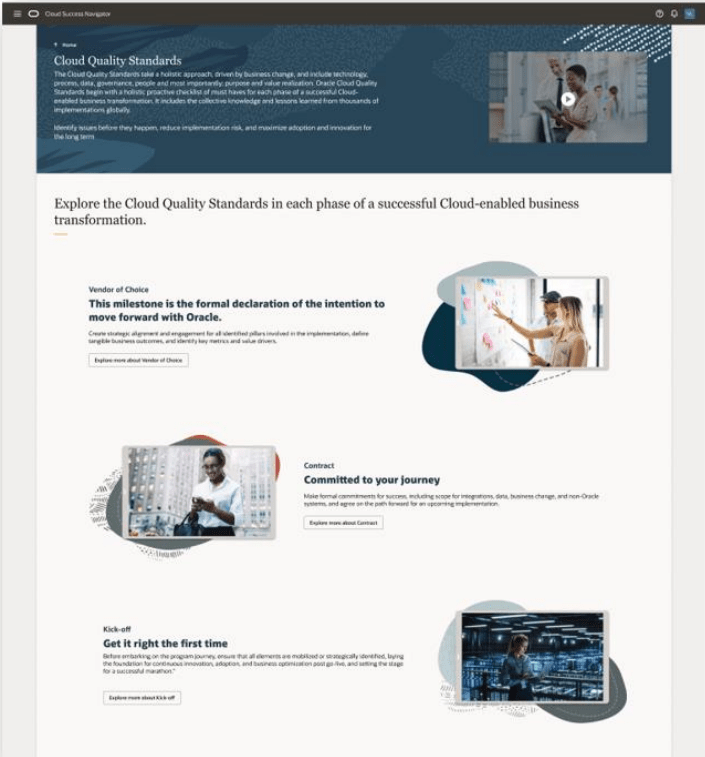
The Cloud Quality Standards section of the tool does ‘exactly what is says on the tin’. This section provides you with learning content and guidance at every step of the implementation journey, to ensure that you’re adhering to best practice, which in turn will lead to a more successful Cloud implementation.

The Milestone Dashboard is a wonderful addition to the tool which allows you to assess where you are at every key milestone in the project. You answer questions and it produces a helpful chart to highlight your progress towards the milestone. This visual summary would be helpful to share with Senior Managers for a quick overview of how close the project is to achieving the next milestone. It may help determine whether that milestone can be formally signed off and the important ‘Go / No Go’ decision.

The Quarterly Release section is my personal favourite and this is where Oracle has been focusing a lot of their efforts recently. There are lots of features coming in this section which I desperately want to share with you all, but have promised my Oracle partners I won’t ruin the announcements coming at CloudWorld! I can assure you they are really exciting advancements and everyone will want to utilise them when they are available. I’ll do a follow up blog on these additional features after the CloudWorld announcement. Despite the exciting additions coming, there are already great features for quarterly releases in the tool. Oracle has incorporated every feature from all Fusion modules from 24A onwards into the tool. Every feature has detail from the What’s New page, but some additionally have a short video demoing what the feature does. It’s also possible to share a link to a specific feature to a colleague, for them to easily check it out!

Finally, I wanted to highlight the new Adoption Centres. At the moment these focus on Redwood and AI as these are the key focus for the Oracle Cloud products at the moment. The Adoption Centres have training embedded in them to help speed up the adoption of these key new features and help organisations adapt to the new technologies.

Please let me know what you think of the Cloud Success Navigator and keep an eye out for my next blog!

Please note all screenshots are the property of Oracle and are used according to their Copyright Guidelines