Oracle’s HCM Professional Concierge: What It Is, How It Works, and Why It Matters for HR Teams

Oracle has been steadily building out its AI story in HCM Cloud, but the HCM Professional Concierge is one of the first examples that really feels tangible for HR teams. This is not AI added for the sake of it. It is a set of purpose-built, role-aware conversational agents, built directly into the HCM Redwood experience. For me, it stands out as one of the more considered uses of AI Agents in enterprise HR.

If you work in HR operations or as an HR Business Partner, the scenario will feel familiar. A manager wants to understand where their team sits on compensation ahead of a salary review. They open Employment Info, scroll through individual records, try to piece together performance data from one place, compensation history from another, and absence data from somewhere else. It is not a difficult task, but it is a fragmented one. Before long, ten minutes have passed just getting a basic view.

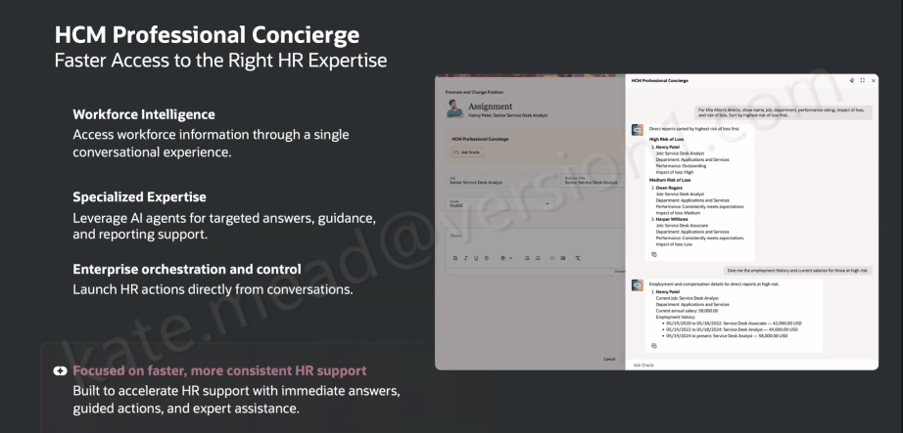
The HCM Professional Concierge simplifies this by bringing everything into a single conversational experience, embedded wherever the HR user is already working. Instead of navigating between screens, they ask a question. The agent brings together the relevant data, guides the next step, and in some cases can even trigger the action directly from the conversation.

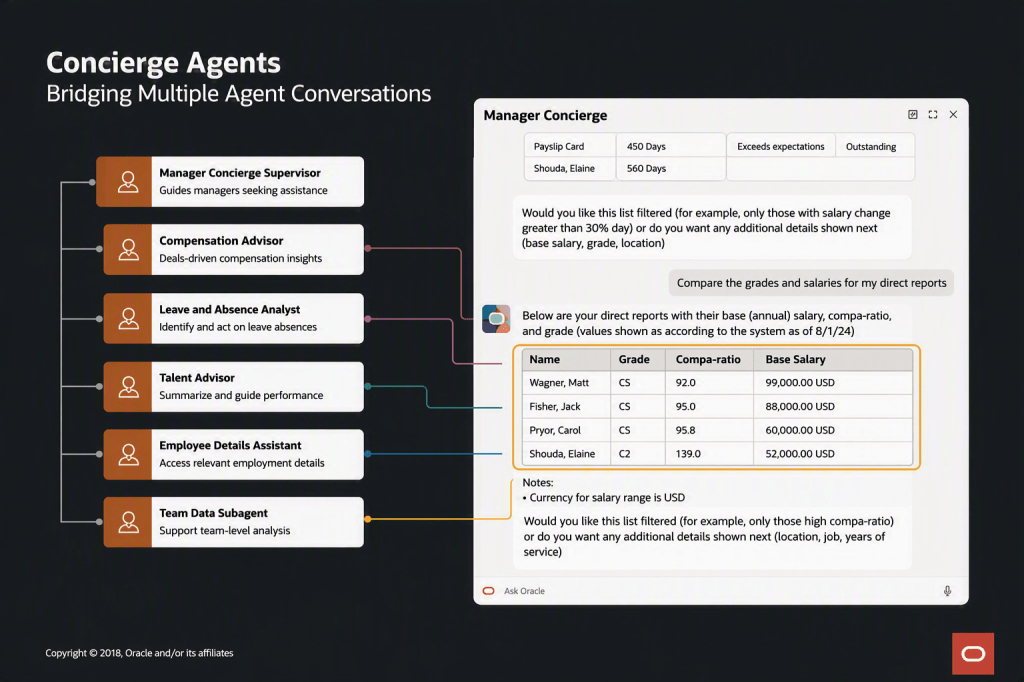
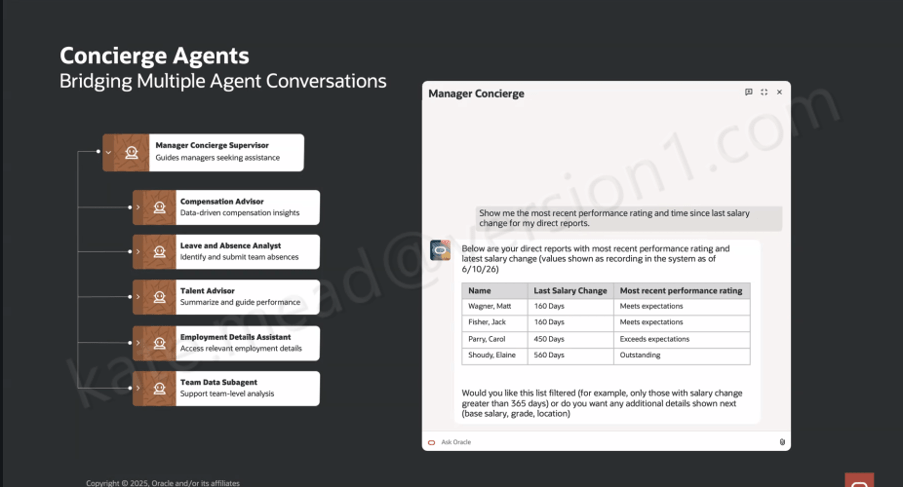
It is worth understanding that this is not a single AI agent working behind the scenes. Oracle has taken a supervisor and sub-agent approach, where a top-level Concierge Supervisor receives the user’s query, interprets the intent, and then routes it to the most appropriate specialist agent.

Within the HR Professional Concierge, those specialist agents each focus on a particular area of HR. For example, the Compensation Advisor brings together key information such as compensation data, compa‑ratios, time since the last salary change, and pay grade details for a manager’s direct reports. The Talent Advisor focuses on performance, helping to summarise ratings and support more informed performance conversations.

Other agents support core HR data and processes. The Employment Details Assistant provides access to employment history, assignment information and worker details, while the Leave and Absence Analyst helps identify and manage absence across a team. There is also support for understanding organisational design through the Workforce Structures agent.

In addition, the Concierge can surface policy and guidance through the Policy sub-agent, review personal worker data where needed, and launch reporting through the Reports sub-agent. For broader, team-level insight, the Team Data Hub helps bring data together to support analysis.

What this means in practice is that the user experiences a single, coherent conversation, even though multiple specialist agents may be working in the background to fulfil the request.

So when a manager asks, “show me the most recent performance rating and time since the last salary change for my direct reports”, the Manager Concierge Supervisor recognises that the query spans both compensation and talent data. It then coordinates across the Compensation Advisor and the Talent Advisor behind the scenes. What comes back is a single, joined-up view, rather than two separate outputs that the manager has to reconcile themselves.

That orchestration across multiple agents is where the real value starts to show. Conversational assistants in enterprise applications are not new in themselves. What is more interesting here is the ability to coordinate specialist agents within a single interaction, carry context across the conversation, and route requests intelligently based on both the topic and the data required.

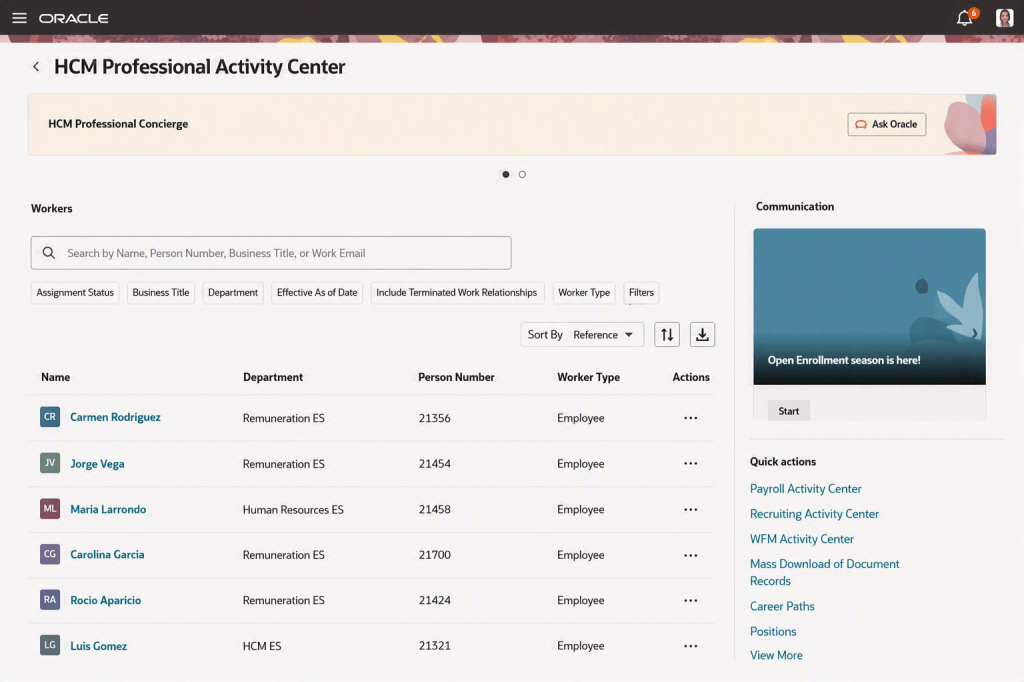
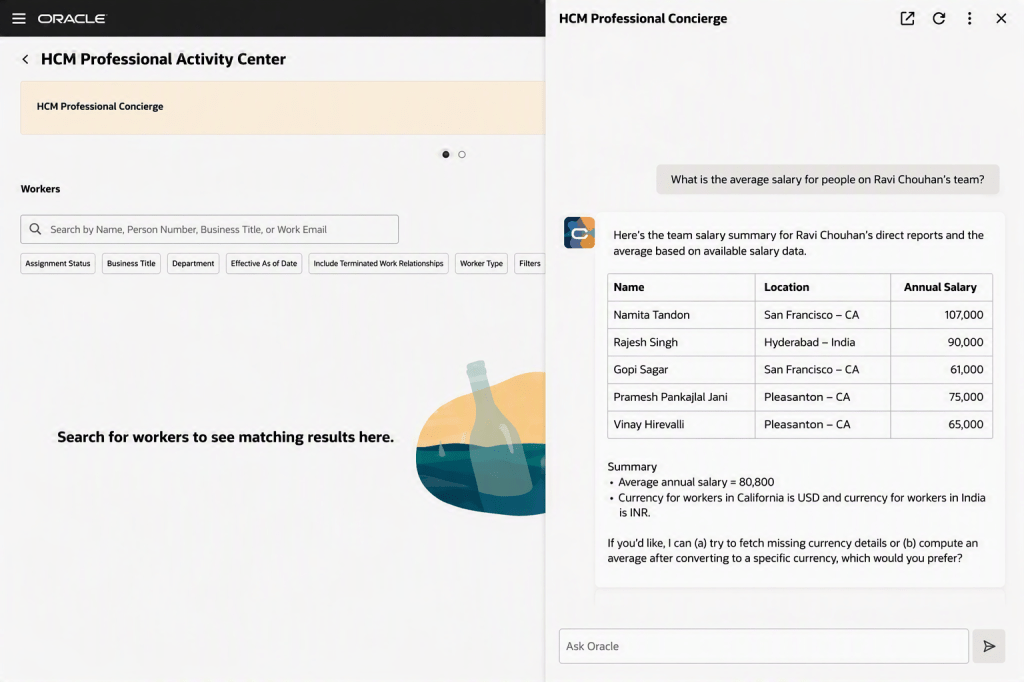
Oracle has introduced three distinct Concierge experiences, each designed around a specific user group and how they typically work. The HCM Professional Concierge is aimed at HR specialists and HR Business Partners. It sits within the HCM Professional Activity Centre, which has become the central workspace for HR service delivery, and supports the sort of queries an HR analyst would usually run. That includes pulling together workforce data for individuals or manager populations, reviewing compensation and employment history, running reports, looking up policies, and guiding HR actions within the flow of work.

The Manager Concierge is focused on line managers who need quick, straightforward access to information about their teams. It brings together compensation, absence, talent and employment data without the need to navigate into individual worker records. The experience adapts based on both the question being asked and the context of the manager’s team, giving them a practical way to not only view information but also complete common HR tasks directly.

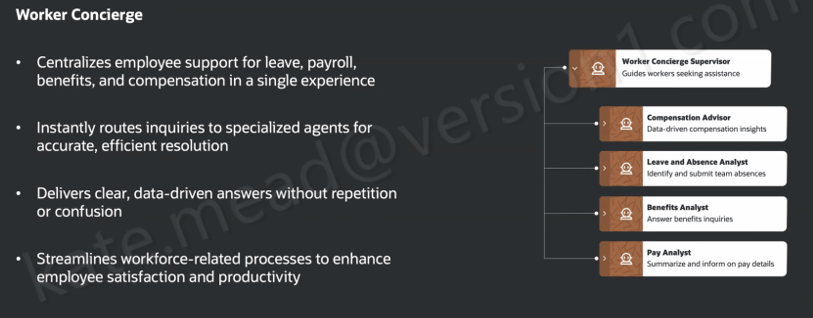
The Worker Concierge, meanwhile, is designed for employees themselves. It brings together support for areas such as leave, payroll, benefits and compensation into a single, consistent experience. Behind the scenes, it routes queries to the relevant specialist agent, whether that relates to absence, benefits, pay, or compensation, so the employee does not need to think about where to go to get the answer.

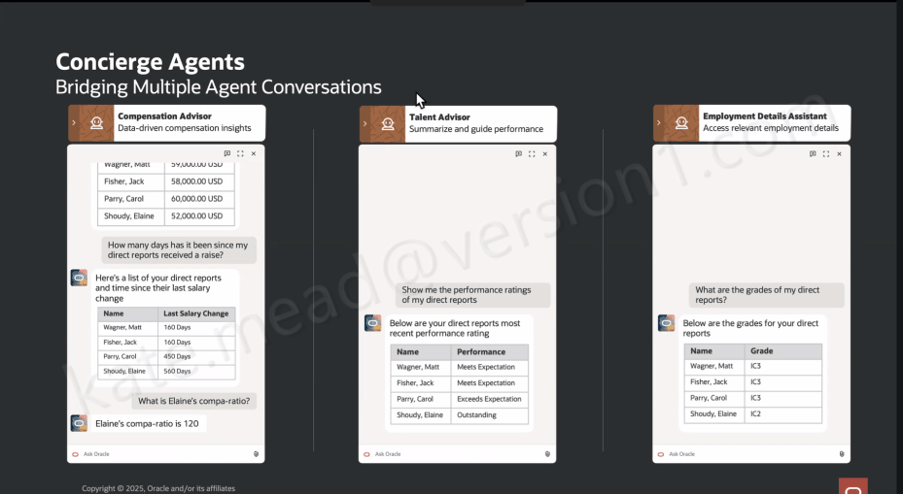
A simple scenario helps bring this to life. A line manager has been told that budget has been allocated for pay rises and promotions across the organisation. Before making any decisions, she wants a clear view of where her team currently stands. Using the Manager Concierge, she can ask a straightforward question in natural language, such as “how long has it been since my direct reports received a pay rise?” The Compensation Advisor returns the answer in a structured, easy-to-read format. She then follows up with a more specific question, “what is Elaine’s compa-ratio?”, and gets a direct response.

Within the same conversation, she can ask for performance ratings through the Talent Advisor and pull through grade information using the Employment Details Assistant. It all happens in one place, without needing to navigate between screens. Multiple specialist agents are working in the background, but from the manager’s perspective it feels like a single, joined-up interaction.

The HR specialist perspective is just as telling. If someone is working on an Employment Info page for a specific worker, they can open the Concierge panel and ask something like, “what is the salary history for Ravi?” or “where is Ravi located?” The response comes back as structured data pulled directly from HCM, without the need to navigate away or open multiple pages.

One question that comes up consistently when Oracle’s AI features are discussed is around data access and security. It is an important one, and the answer here is reassuring. The HCM Professional Concierge works within the same data and functional security model already applied across the HCM Redwood experience. If an HR specialist does not have permission to view a particular employee’s salary in the core application, they will not be able to access it through the Concierge either. There is no separate access layer being introduced. It simply operates within the role-based controls that are already in place.

For organisations working across multiple geographies, the same principle applies. The agent respects the existing configuration of Redwood pages, including any geography-specific policies and legislative requirements. There is also flexibility to tailor how the agent behaves by refining prompts to reflect your organisation’s terminology or local nuances.

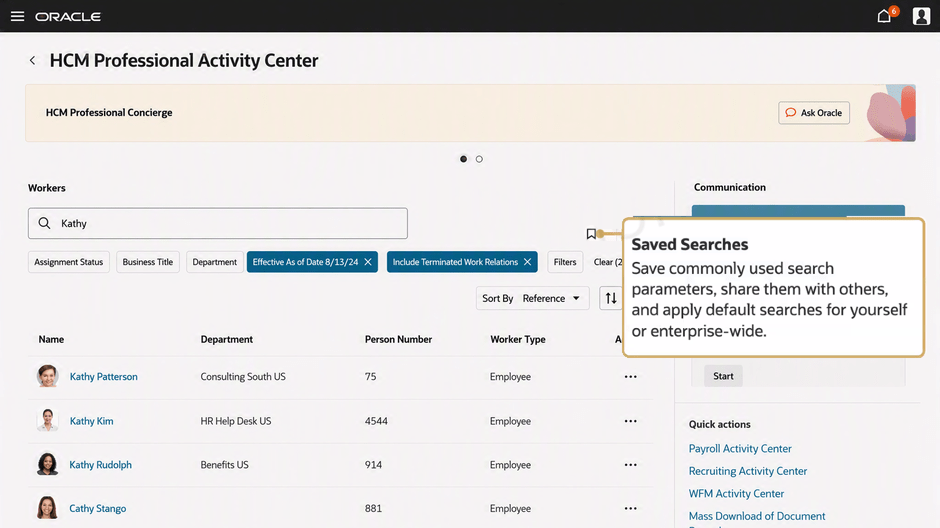
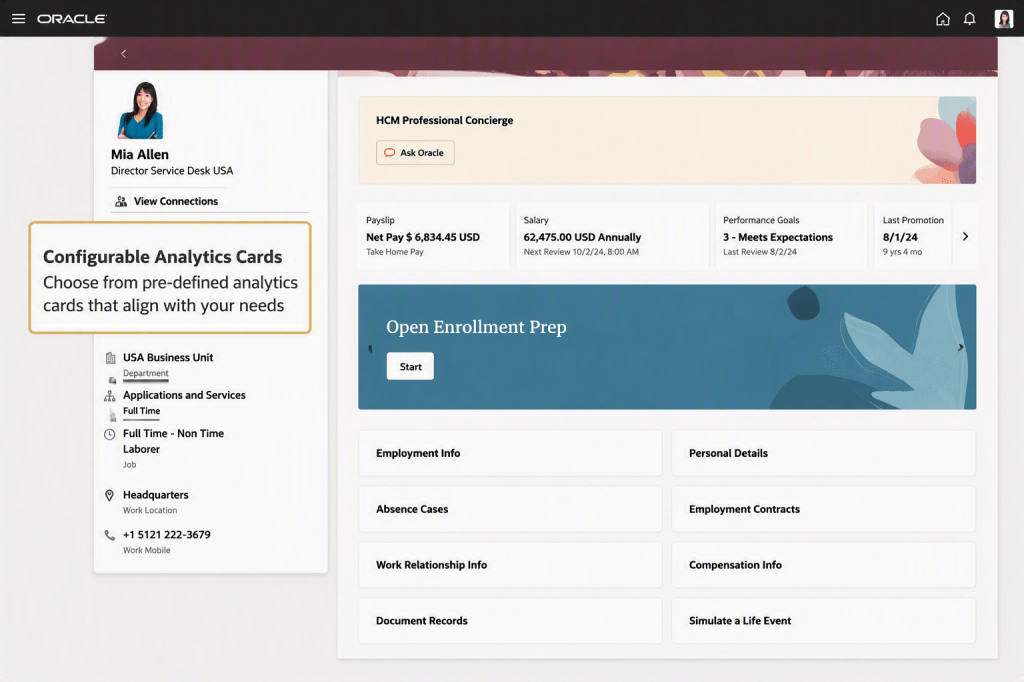
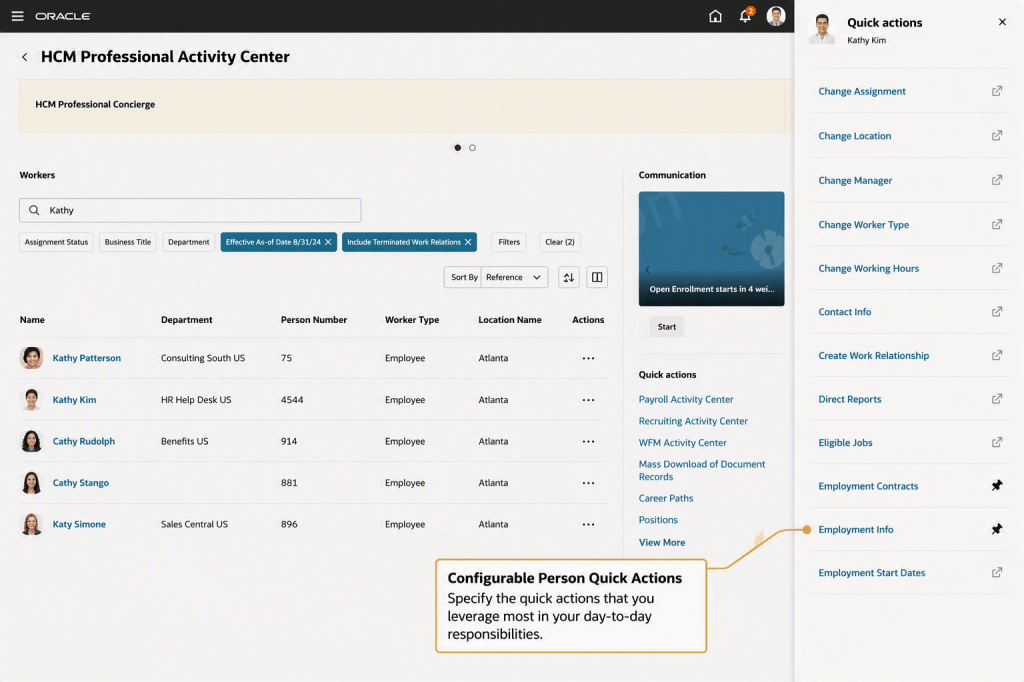
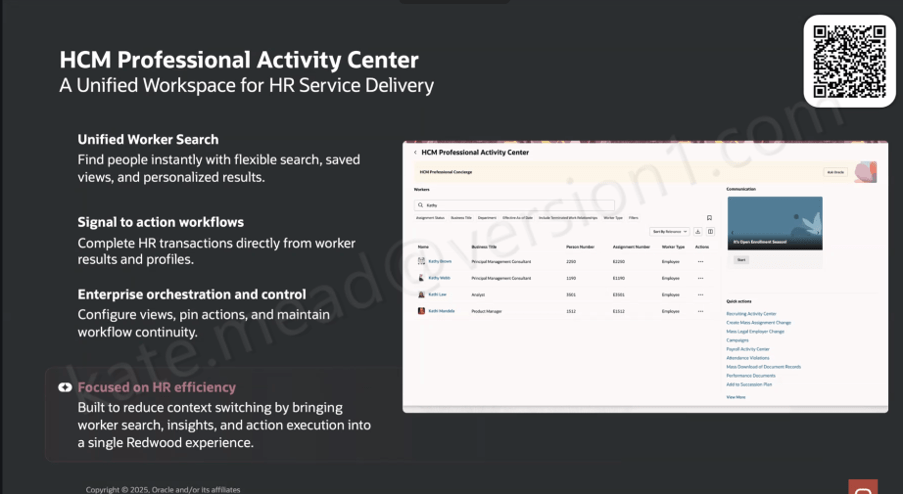
The Concierge also sits within a broader shift in how Oracle is shaping the HR user experience. It is alongside the HCM Professional Activity Centre, which acts as a unified Redwood workspace for HR administration. The Activity Centre brings together a more flexible approach to worker search, with filtering, saved views and personalised results. From there, HR specialists can move straight into transactions from a worker’s profile without switching to a separate area. Common actions are surfaced directly in the interface, including access to areas such as the Recruiting Activity Centre, Mass Assignment Change, Mass Legal Employer Change, Payroll Activity Centre and Attendance Violations, which makes it easier to act on information as soon as it is identified.

The Concierge is always present within the Activity Center, giving HR specialists access to conversational support in the context of the work they are already doing.

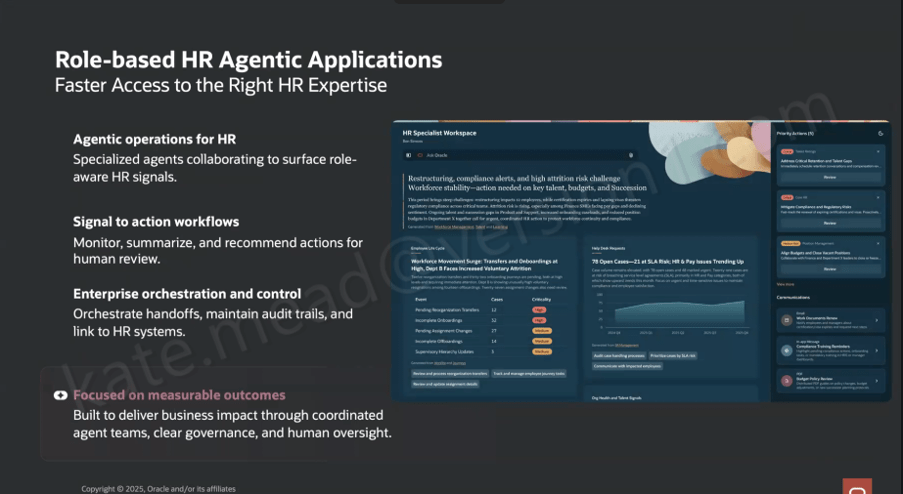
It also sits within a much broader direction Oracle is taking with role-based, agent-led HR applications. The HR Specialist Workspace is a good example of where this is heading. It builds on the same foundations, but moves towards a Redwood workspace where multiple specialist agents work together to surface relevant insights more proactively.

In that model, the workspace brings together a view of workforce priorities, potential restructuring impacts, compliance alerts, attrition risk and open HR cases. These are drawn from coordinated agent outputs across areas such as Workforce Management, Talent and Learning. The shift here is subtle but important. The agents are not just responding to questions, they are actively identifying what might need attention and presenting it to the user.

There is also a clear emphasis on governance. Audit trails, controls and human oversight are built into how actions are handed off. Oracle is quite deliberate in positioning this around measurable outcomes, with coordinated agent activity and clear decision points. That creates an important distinction from more autonomous AI models. Here, the agents surface and recommend, but people remain firmly in control of decisions and actions.

From an implementation perspective, the HCM Professional Concierge and its supporting agents are delivered as part of Oracle HCM Cloud Release 26C. There is no need to build these capabilities from the ground up. They are available out of the box, with the ability to adapt behaviour through prompt configuration so that it reflects your organisation’s terminology and ways of working.

As ever, I will keep a close eye on how this develops across the HCM suite and share updates as new capabilities emerge. If you are starting to think about how this fits into your wider HCM AI strategy, or you are planning for a 26C upgrade, now is a sensible point to begin that conversation.

Please note all screenshots are the property of Oracle and are used according to their Copyright Guidelines

Redwood for Global HR – What Do you Need to Know?

As you will know, Redwood is mandatory for Global HR from Release 25C, so now is time to make the move!  The first question I am asked is will there be a replacement for Person Management? I’ll be honest with you, I love Person Management! The good news is that Oracle have confirmed that there will be, the ‘HR Activity Centre’. The date for release hasn’t been confirmed, but it is coming. Oracle have caveated that it won’t be a like-for-like replacement, but it will be a centralised location for transactions rather than having to go to different quick actions.

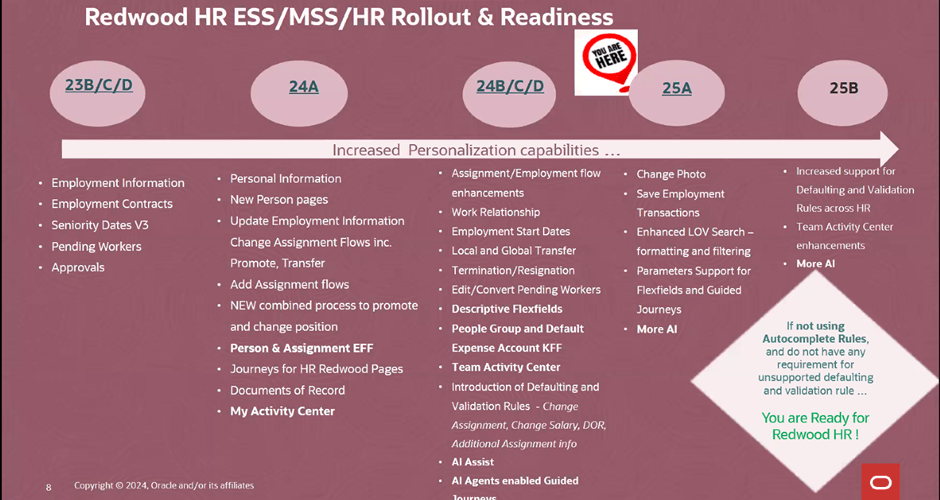
Oracle massively ramped up the number of Global HR features available within Redwood in 2024, so the majority of features are already available to you right now. As the picture above shows, if you’re not currently using autocomplete rules and have no requirement for creating unsupported defaulting rules, you can move to Redwood for Global HR right now. If you do have a requirement to default in data using rules, the amount of rules for defaulting data available will be significantly increased in 25B. This doesn’t mean wait for 25B though, it’s important that if you haven’t started, to start the switch in a non-production pod. Using a dedicated Redwood pod is always my recommended approach as it won’t impact on quarterly regression testing or issue resolution, due to the pod not matching what is currently in Production.

Global HR differs slightly to other modules when moving to Redwood. There are the usual steps, enabling Oracle Search, Updating Custom Security Roles; Reviewing and Migrating Personalisations using the Personalisation Helper Tool and Switching on the Redwood Flows via Profile Options. For Global HR, there are two additional prerequisites. Firstly, to be able to use the Redwood pages for Termination and / or Resignation, you must have migrated to Termination V3. To be able to use the Redwood page for Seniority Dates, you must be using Version 3 of Seniority Dates. So what happens if you’re not using one or both of the prerequisite versions? For terminations and resignations, you won’t be able to use the Redwood page. For Seniority Dates, there is an alternative, you can manage the dates via the Redwood Work Relationship page. If you want the full Redwood experience, I would recommend making the move to the latest versions of both Termination and Seniority Dates. My other recommendation is to migrate the V3s now, not after you’ve moved to Redwood. This will make the process more straightforward and therefore easier.

So what are my top tips? The Redwood ‘Bible’ only lists the key flexfields the need switching on. Check the What’s New Documents for all related modules for all the historic Redwood updates. Have you seen the Feature Listing Report on the Cloud Readiness website? From here you can download every upgrade since 2023 for every Fusion module in a handy spreadsheet. You can then use filters to find all the Redwood features for a given module.

A lot of users have reported issues with flexfields whilst testing Redwood. If this happens, redeploy the flexfields and make sure all flexfield personalisations have been migrated. Likewise if you’re having issues with pages, firstly ensure that the appropriate profile options for Oracle Search are switched on. If that doesn’t work, ensure custom roles have the correct privileges.

The Redwood Personalisation Tool is extremely helpful. Whilst it can’t migrate all personalisations, it will migrate some of them and reduce the amount of manual personalisations that will need to be applied. I would always recommend only using it in Migration mode for a small subset at a given time. Preferably one flow at a time. This gives you the chance to review the personalisations and make corrections more easily. Additionally once the tool has been used to migrate a flow, you can’t use it again for that specific flow. Even if a newer version of the tool provides more migration options within that flow.

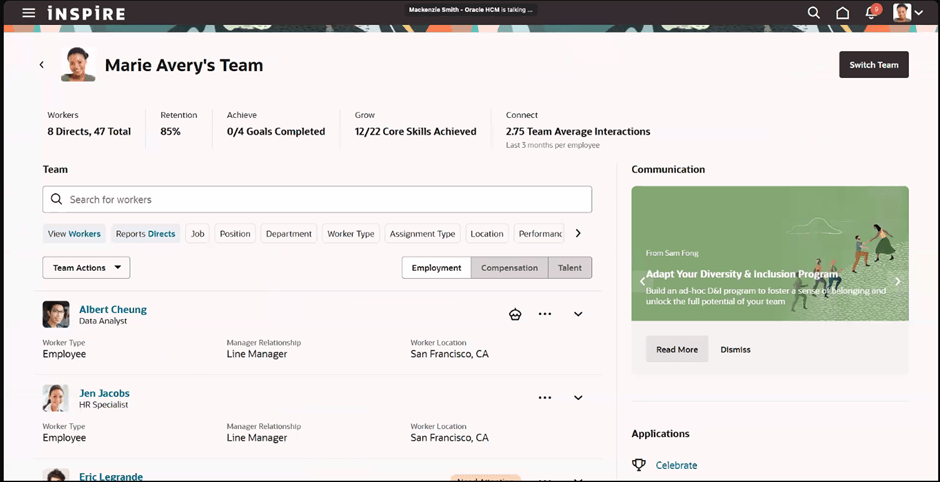
Finally, use the new Activity Centres. Within the Global HR space, there is currently one for employees and one for line managers. These are a one stop shop for users to access all their and their team’s HR records and carry out their tasks. As I said earlier, one for the HR Team to replace Person Management is coming, so watch this space! Check out my earlier blog on Activity Centres here.

Please note all screenshots are the property of Oracle and are used according to their Copyright Guidelines.
Discover Oracle HCM Cloud’s Activity Centres

Have you seen the new Oracle HCM Cloud Activity Centres? They’re a fundamental part of the new Redwood pages and I love them! When they first came out, they were called ‘Spotlights’, but they’ve since been rebranded and now there are 4 Activity Centres.

The original Activity Centres were for Employees and Line Managers. All Activity Centres are ‘One Stop Shops’ for the relevant user. Focusing first on the Employee Activity Centre, this is where an employee can view / update their personal details; view their payslips; book annual leave and absences and many other things. If there is information that need to be shared with employees in bulk, they can be posted on there too. Any activity the employee is likely to carry out can be linked from the activity centre. If there are tasks that aren’t needed, they can be easily hidden via VBS.

Employee Activity Centre

In the Manager Activity Centre, Line Managers can easily access all of their team members records in one place. From here you can view employment and compensation details and also monitor talent and performance. Again important communications for line manager can be posted in here. Additionally bulk actions can be carried out for team members, such as creating communications, adding Journeys and creating surveys for feedback.

Manager Activity Centre

The Recruiting Activity Centre was the first one that was launched as an ‘Activity Centre’ and I regularly talk about it to my customers. It’s a great landing site for the Recruitment team to use. Originally it was only available to Recruiters and Hiring Managers, but last year it was extended to Collaborators too, so the whole team has access to this great tool. It summarises key data like high priority tasks and the number of new applicants that need reviewing. It’s easy to view the status of requisitions and offers and, my personal favourite, communication history between the Recruitment team and the candidate in conversation format. This is something that a lot of my customers have enquired about in the past.

Recruiting Activity Centre

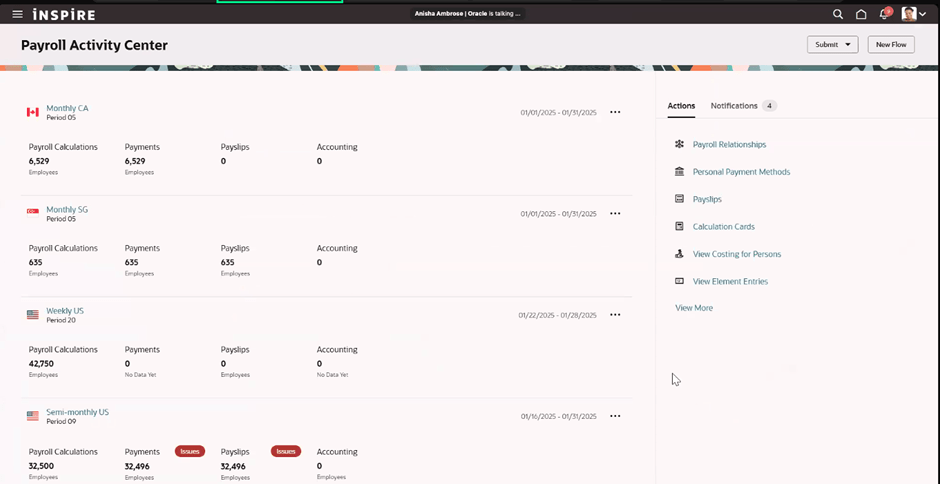
The final, and most recent, Activity Centre is the Payroll one. It allows the Payroll team to view all payrolls in one location, easily view notifications that might indicate their has been an error or significant disparity in a payroll run and investigate the root cause. All the usual actions that the team would need to carry out are easily accessible, such as calculation cards, element entries, costing etc as well as to be able to submit payroll flows. It speeds up the time to run processes and investigate issues.

Payroll Activity Centre

The Activity Centres are all designed to improve the user’s experience and reduce the number of menus / clicks they need to make. It has all the information that you need at your fingertips and in my personal opinion, is a massive improvement! I’m sure this won’t be the last of the Activity Centres that we see and Oracle are constantly improving the existing ones, so keep an eye out on those quarterly release updates for more news.

Please note all screenshots are the property of Oracle and are used according to their Copyright Guidelines

Redwood Updates from Oracle HCM Cloud CoE Summit

I’ve already blogged about the Key Note from Chris Leone that kicked off the HCM Cloud Centre of Excellence Customer Summit. If you haven’t seen it, check it out here. The main themes for the summit were AI and Redwood. The ‘Jump Into Redwood Session’ with Laura Froehlich and Todd Wall was extremely interesting and a good follow up to the key note on the first day.

Having recently completed my Prosci Certified Change Practioner qualification, I was delighted when the session kicked off with ‘Why Change’. I think this question is often skipped because it’s a mandated change from Oracle, but as there are so many benefits to moving to Redwood, it’s a really important question. It’s true that change can be scary and users and organisations can be reluctant to do so, but there are so many advantages when you embrace that change.

One of the key benefits is the integration of AI. It’s so fundamental to the way businesses anticipate operating, a number of customers have added objectives to their team to incorporate AI into their daily work. Oracle are making it so much easier to achieve this goal by embedding AI and AI Agents into the Redwood applications. Whilst not everyone wants to use AI, Oracle have incorporated in such a way it can appease both those who do and those who don’t want to use AI. For those who don’t want to use it, it is delivered switched off. For those that do, a quick change to the page in VB Studio, involving ticking a box and publishing it and you have AI embedded in the particular page. It really is that easy! It should be noted that AI functionality is not available to all users, it depends on the server / region the organisation is in. Those in the UK Government Cage cannot access it at present, but it will be available in 2025.

When talking to customers about the new features being delivered in a particular quarterly release, they often only apply to the Redwood versions of the pages. So, if you want the latest functionality, switching to Redwood is your only option. The final key benefit is the improved performance Redwood brings. This wasn’t just a ‘lift and shift’ project to create the Redwood pages, they were completely rewritten from scratch in a new toolset.

5 Myths about Redwood

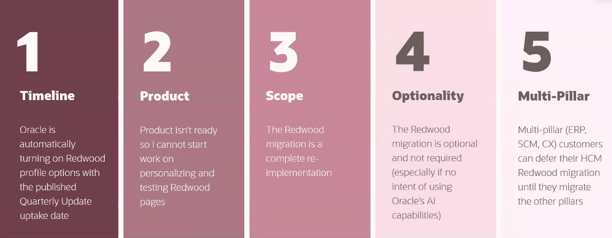
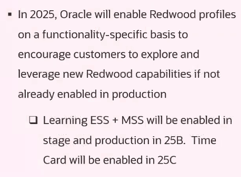
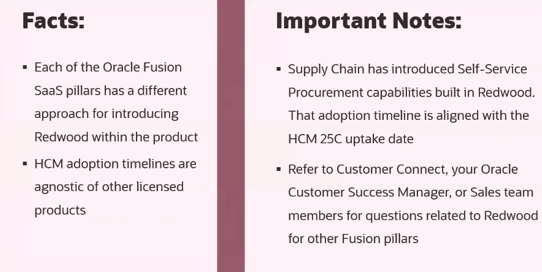
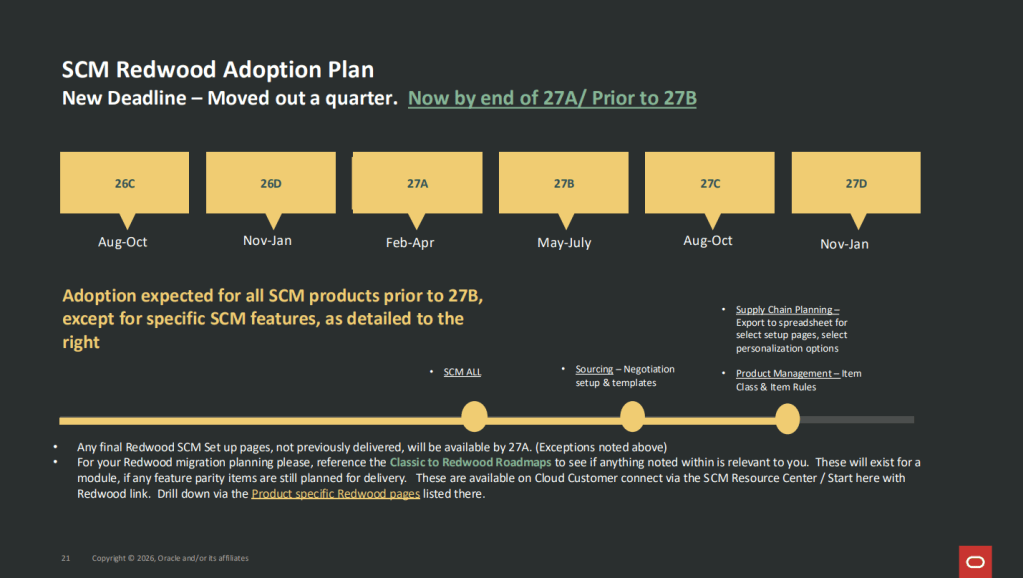
One of the stand out parts of the session was the 5 myths about Redwood. Some I’ve heard before and some I haven’t, but I thought they were interesting and I wanted to share them with you. The first one about the profile options being automatically switched on when reaching the the quarterly update uptake date is actually a complex one. Whilst the quarterly release date is when it is mandatory to have made the move, it’s not actually delivered switched on. If you raise an SR after the uptake date, the analyst will advise you to move to the Redwood page, as the non-Redwood pages are out of support. One key announcement during this session was that in 25B, Learn will be delivered switched on in Redwood and in 25C, Timecards will be delivered with Redwood switched on. Whilst this isn’t on the uptake date, it’s 2-3 quarters later, it does mean that at some point Redwood will be automatically switched on for all organisations.

The second myth is around the product not being ready yet and therefore there is no point in starting work on testing and personalising pages. Whilst new features are constantly being released in Redwood, the uptake date is just that, the date you should have made the move for that module, it’s not a date to start making the move. The third myth is that it’s a massive and complex reimplementation. The move is only complex if the organisation chooses to make it such. It is possible to switch on the Redwood pages, make the appropriate security changes, migrate personalisations (using the Personalisation Helper Tool), test and deploy. If you wish to make it more complex by revisiting features that weren’t previously implemented or fundamentally change your existing configuration, this is when it becomes a reimplementation.

The fourth myth is that Redwood is optional. It really isn’t, if you wish to continue being in support, you must make the move. As announced on the session, eventually Oracle will force Redwood on users by delivering it switched on. It’s better to do it early so you’ve got time to test and update users as once it’s automatically applied, it will be too late. The final myth is not one I’ve come across, but that organisations are going to wait until ERP and SCM is available in Redwood, before moving HCM over. It might be because I’ve been regularly discussing the disparity between the timelines of ERP and HCM in terms of Redwood, that I haven’t heard this discussion before. With regards to SCM, Self Service Procurement is mandatory in Redwood from 25C, so this is on a similar timeline to HCM anyway.

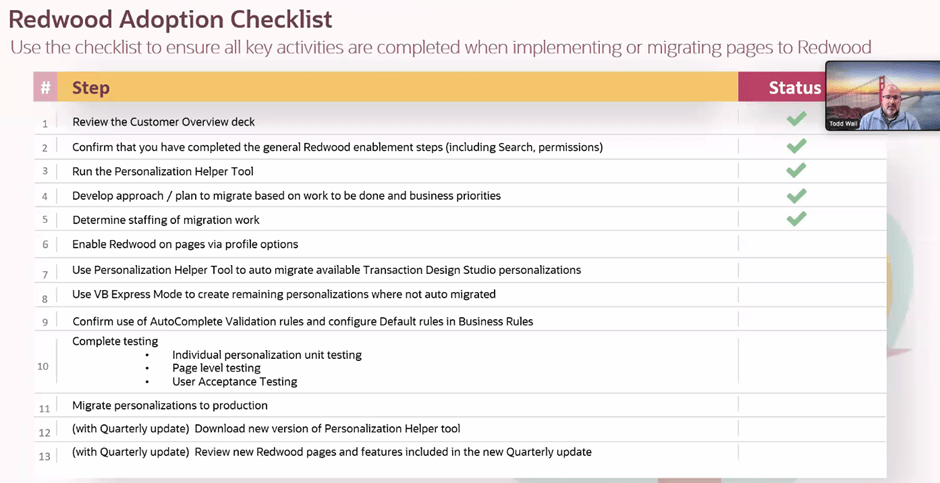
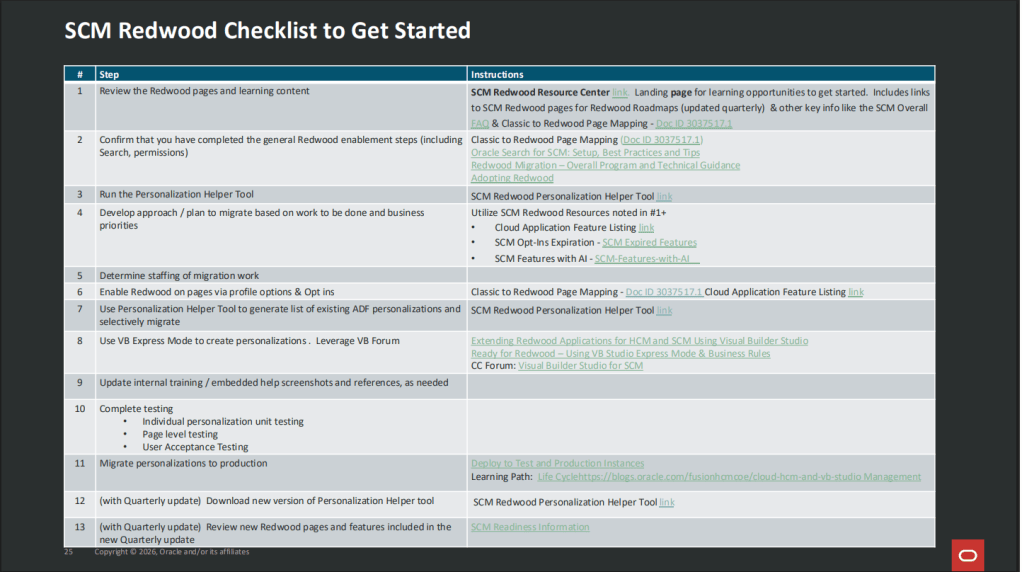
The final item I want to share from the session is the Redwood Adoption Checklist. This is really helpful to remind us all of the steps involved in moving to Redwood. If you’re anything like me, you’ll love ticking items off the list!

Please note all screenshots are the property of Oracle and are used according to their Copyright Guidelines

Key Highlights from Oracle’s HCM Cloud Centre of Excellence Summit

This week was the HCM Cloud Centre of Excellence Customer Summit. This was my first one, but I believe it was Oracle’s fifth summit. Oracle tried to be as inclusive as possible with the timings to accommodate different time zones, but I will be honest the 4-9pm UK time was a bit tricky to juggle, but I was able to go to every session and I’m really glad I did.

Chris Leone, the EVP of HCM and SCM apps development kicked things off. Some of the things announced on Chris’ key note were so new, the session couldn’t be recorded. It’s always a delight to hear Chris speak, he’s so passionate about Cloud Apps and makes you want to join him on his journey. As you would expect, the theme of the whole summit was Redwood and AI as these are the main two key areas of interest from HCM Cloud customers at the moment.

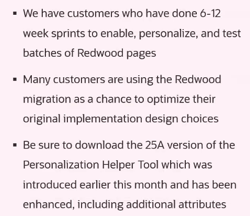
It was nice to get a recap on the functionality that Redwood brings, both embedded within the new pages, but also the ability to extend them using VBS. There was a recap on the Personalisation Helper Tool, both for HCM and SCM. If you don’t know what this is, check out my earlier blog on the tool. If you’ve never used it, I would recommend you check it out!

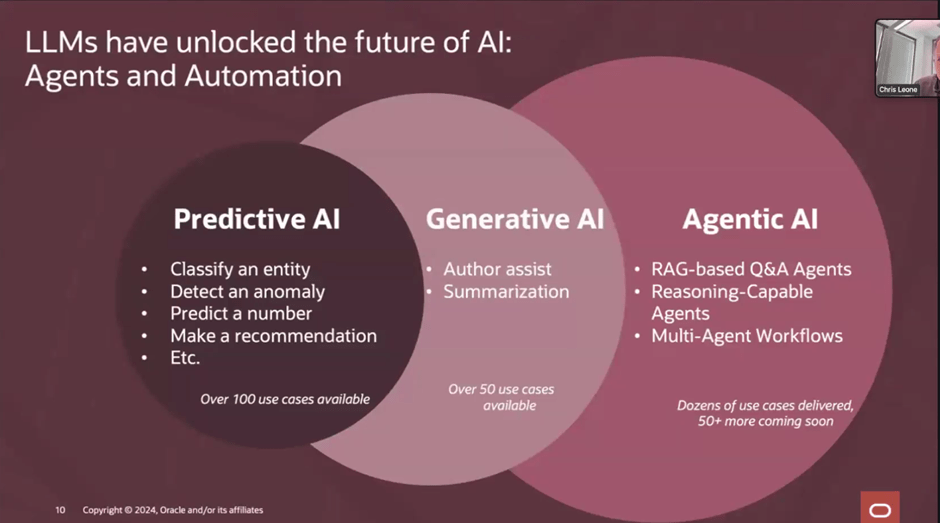
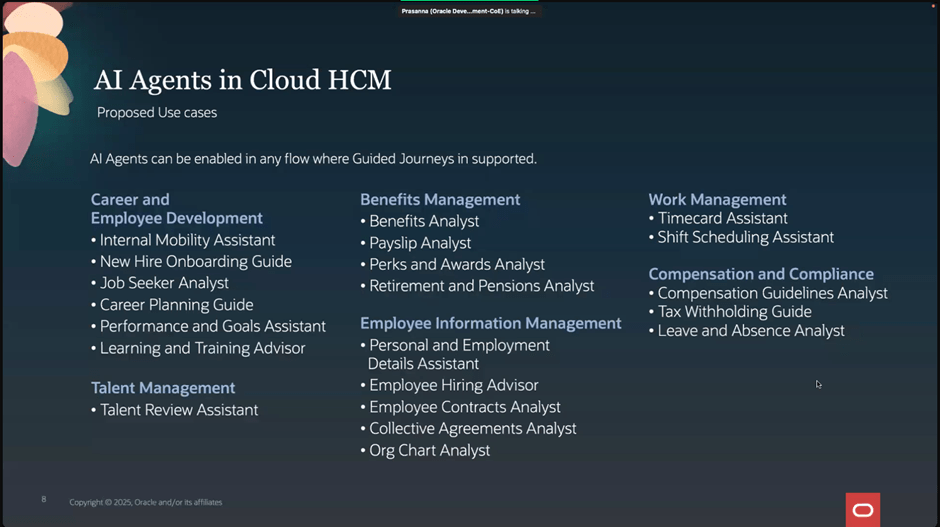
The piece that excited me the most, was the AI. We’ve all heard of Gen AI, check out my earlier blog on the use of it within Oracle HCM Cloud, if you missed it. Agentic AI takes it to the next level and I’m delighted that Oracle are incorporating it into their applications. Agentic AI is a type of AI that can independently make decisions and solve problems. It takes Machine Learning (ML), Large Language Models (LLM) and Enterprise Automation to create agents that can learn and adapt over time. The slide above refers to RAG based agents, but what are they? RAG stands for Retrieval Augmented Generation and RAG agents are part of RAG applications, which combine external data retrieval with LLMs to generate answers to user queries. In terms of practical application, the AI Agents can complete tasks autonomously, but also know when to loop in an actual user, either for approvals or review.

Oracle already have all of the above AI Agents available now. They can be activated in any process flow that supports Guided Journeys. This is just the start though, Oracle are in the process of developing more AI Agents, with plans for Agentic Agents too, for solutions such as sourcing candidates and scheduling interviews in Recruit and Succession Planning within Talent.

It’s a very exciting time in the Oracle HCM Cloud world and I can’t wait to see all the upcoming AI developments. I’ve got so many things to share from the Summit, so keep an eye out for more blogs. I’ll also write more updates on AI as Oracle announce them.

Please note all screenshots are the property of Oracle and are used according to their Copyright Guidelines

Updated Redwood Timelines

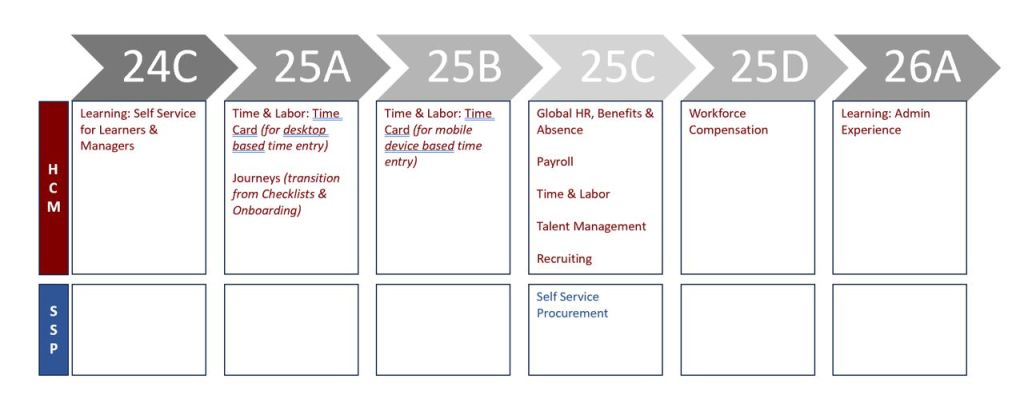
Oracle have made a slight change to the Redwood Timelines that were announced in August. Whilst it is not a significant change, there has been a separation of the deadlines for moving timecards to Redwood.

Those who complete timecards on a desktop / laptop, will still need to migrate to Redwood timecards by release 25A. The change is for those who complete timecards on a mobile device, have a little longer to make the move to Redwood. This has been pushed out to release 25B to give more time to make the necessary changes.

All other dates remain the same. The initial focus is Redwood Journeys and Redwood Timecards for desktop users. These are all mandatory in release 25A. The first deadline in the Procurement area is Self Service Procurement in release 25C.

About the Author:

Kate Mead is an Oracle-certified HCM Consultant and Solution Architect at Version 1 with 14 years of experience in Oracle HR and Payroll systems, including 7 years with Oracle HCM Cloud. She has worked across implementation projects and managed services, has a sound knowledge of UK Payroll legislation and — before becoming a consultant — was an HR Manager.

If you have any questions or would like more information on how Version 1 can help you realise the full potential of your Oracle Cloud instances, please contact her at kate.mead@version1.com

Please note all screenshots are the property of Oracle and are used according to their Copyright Guidelines

Redwood Notifications in Release 24D

Lots of people have asked about the move to Redwood for notifications in release 24D, so I thought I’d better write a blog on it! In several modules, including Compensation, Absence and Recruit, the seeded notifications have moved over to the new Redwood style.

So what does this mean for organisations? If you’re already using Redwood, there is nothing needed to be done. However, what if you’ve not made the move to Redwood yet? Unfortunately it isn’t possible to switch off the Redwood notifications for these modules. There are two options available, firstly to use the notifications as delivered with the Redwood theme applied. Alternatively, create a custom BI notification to replace the seeded Oracle BI notification. It is the specific seeded Oracle BI notifications that have moved to Redwood, rather than all notifications within those modules being in the Redwood toolset.

So what do these notifications look like? An example is below, but they are cleaner and easier to read. The actual content hasn’t changed, it is the layout that has.

The only issue is where organisations have a mix of seeded and custom notifications within the modules that have made the move to Redwood notifications. This will mean that some notifications will be in the Redwood look and feel and some won’t. Additionally, where organisations have a mix of modules where some notifications are now in Redwood and some aren’t, they will have the same issue. This will potentially cause confusion with some users, but if I’m honest, the majority are unlikely to notice.

If custom BI notifications have previously been created and they are causing an issue due to the inconsistency of appearance with the mix of Redwood and non-Redwood notifications, it is possible to move the existing custom BI notifications to the Redwood style. If you create a copy of the custom BI notification, the Redwood style will automatically be applied. This can then be set as the active notification.

About the author:

Kate Mead is an Oracle-certified HCM Consultant and Solution Architect at Version 1 with 14 years of experience in Oracle HR and Payroll systems, including 7 years with Oracle HCM Cloud. She has worked across implementation projects and managed services, has a sound knowledge of UK Payroll legislation and — before becoming a consultant — was an HR Manager.

If you have any questions or would like more information on how Version 1 can help you realise the full potential of your Oracle Cloud instances, please contact her at kate.mead@version1.com

Please note all screenshots are the property of Oracle and are used according to their Copyright Guidelines

Redwood Time & Labor — Planning Your Move

Everyone is talking Redwood for Oracle SaaS solutions, but let’s focus on Time & Labor (OTL). OTL stands out as one of the select modules that influences both Human Capital Management (HCM) and Enterprise Resource Planning (ERP). It serves a dual purpose: tracking time for payroll purposes and allocating costs within the Project Portfolio Management (PPM) module.

Redwood Timecard

With the upcoming Release 24D, the transition to Redwood Timecards becomes compulsory, signalling the end of support for Responsive Timecards. What does this entail? Post 24D, no bug fixes will be issued for Responsive Timecards. Moreover, should you submit a Service Request (SR) to Oracle concerning a Responsive Timecard, the recommended resolution will be to switch to Redwood. Considering that Release 24D is on the horizon, less than six months away, it’s crucial to start planning your migration immediately.

New Calculated Time View

As you start on the transition to Redwood, there are several key factors to consider. Security takes precedence; employees must possess edit rights to submit timecards, a shift from the current Responsive system. Similarly, managers will need edit rights to approve timecards directly within the interface.

Furthermore, please be aware of the following updates: 1)The Timecard Template now supersedes the ‘Copy Other’ feature found in Responsive timecards. 2) There is no support for daily details. 3) The Cost Override Layout is not supported. 4) Calculated Time has a new look (refer to the above screenshot). 5) For customising the sequence of timecard fields, the new unified layout is required.

Redwood Existing Time Cards

So what are the benefits of the Unified Layout? It’s much simpler to configure, there is only one layout for reported time, calculated time, entry, edit and view. The guided process has been streamlined, so there are just three steps — display properties; timecard fields and time totals. The timecard attributes can be configured by role — Worker, Line Manager and Time & Labor Manager. Additionally, it is possible to filter the data sources by role.

Configure Time Entry Layout

What do you need to consider before you turn on the Unified Layout? The great news is that the delivered time entry layout components will continue to work! There is no need to set them up again. From a security role perspective, Time & Labor Administrators can edit existing non-unified layouts, but they cannot create new ones. The unified layout can include a combination of non-unified and unified timecard fields. If you have dependent timecard fields on a non-unified layout, they must be switched to independent timecard fields when moving to the unified layouts. Finally, if you need to be able to control the order of the timecard fields on a Redwood timecard, you must use the unified layout.
Oracle is set to introduce new features in the 23C and 24D updates. However, all essential functionalities required for transitioning to Redwood Time Cards are currently accessible. It’s advisable to activate Oracle Search and configure the necessary profile options for OTL within a separate pod for thorough testing. Familiarising yourself with the system through hands-on experience is vital for devising a realistic deployment schedule for Production before the 24D release.

Learn more about how Version 1 can help you maximise your Oracle Cloud instances here.

About the author:

Kate Mead is an Oracle-certified HCM Consultant and Solution Architect at Version 1 with 14 years of experience in Oracle HR and Payroll systems, including 7 years with Oracle HCM Cloud. She has worked across implementation projects and managed services, has a sound knowledge of UK Payroll legislation and — before becoming a consultant — was an HR Manager.

If you have any questions or would like more information on how Version 1 can help you realise the full potential of your Oracle Cloud instances, please contact her at kate.mead@version1.com

Please note all screenshots are the property of Oracle and are used according to their Copyright Guidelines

Oracle Cloud Redwood Customization Helper Tool

Today is the day! Oracle has released details of how to run the Redwood Customization Helper Tool. So what is it? It is a new tool that reports on your Responsive UX page personalisations that have been made in either Page Composer or Transaction Design Studio.

Page Composer Customizations Output

The tool outputs a JAR file which indicates which personalisations are supported in your current version of Visual Builder Express (VB Express) Business Rules. What’s even more exciting than the tool providing details of your personalisations to make the move to Redwood easier? Well, the tool also offers the option to migrate supported personalisations to your Redwood environment! It might not be quite as manual as we originally thought.
HCM Experience Design Studio Rules Supported for Migration

The above table lists all of the HCM Design Studio Rules which have the potential to be migrated using the Redwood Customization Helper Tool. Whilst not all functionality can be migrated, this is a massive improvement on what was originally communicated about the move from Responsive UX to the Redwood UX.

One key point to note is that the Customization Tool does not work with Single Sign On (SSO) accounts. If your Production pods are SSO only, you may want to run it against a non-prod pod where SSO is optional, providing all of the personalisations are present.

The second point of note is that you have to download an .exe file for it, so if your organisation has tight rules about what you can download, this may cause an additional complication. If you can obtain permission to download the file, it is definitely worth it.

Redwood Customization Helper Tool Forum on Customer Connect

The final piece of information that I want to highlight is that Oracle has also created a new forum area on Customer Connect as well. This will make it easier to raise any questions relating to the new tool. If you add a tag of ‘Redwood’ the core team at the Oracle Centre of Excellence will pick up the query and answer it more quickly.

About the author:

Kate Mead is an Oracle-certified HCM Consultant and Solution Architect at Version 1 with 14 years of experience in Oracle HR and Payroll systems, including 7 years with Oracle HCM Cloud. She has worked across implementation projects and managed services, has a sound knowledge of UK Payroll legislation and — before becoming a consultant — was an HR Manager.

If you have any questions or would like more information on how Version 1 can help you realise the full potential of your Oracle Cloud instances, please contact her at kate.mead@version1.com

Please note all screenshots are the property of Oracle and are used according to their Copyright Guidelines

Oracle HCM Cloud Redwood Key Dates

Have you read my previous blog on Redwood in HCM Cloud? If not, check it out here! Now you know what Redwood UI is, it’s time to review the timeline for implementing Redwood for Oracle HCM Cloud.

Image by Kjjj3 from Pixabay

As of January 2024, these are the key dates, that organisations who use Oracle HCM Cloud should know, for Redwood implementation:

Release 24A

Majority of key HR and Payroll processes available in Redwood UI

Newly provisioned pods will be delivered with Redwood-enabled

Image by tigerlily713 from Pixabay

Release 24B

Redwood for Learn Self Service becomes mandatory

Image by Jagrit Parajuli from Pixabay

Release 24D

Checklists and Onboarding replaced with Journeys

Redwood for Timecards becomes mandatory

Image by Nile from Pixabay

Release 25A

New Go-lives must be Redwood

Image by WOKANDAPIX from Pixabay

Release 25B

All Employee Self Service (ESS) / Manager Self Service (MSS) must be Redwood

Image by StartupStockPhotos from Pixabay

Now is the time to start planning for your move to Redwood UI. Version 1 can help you plan and implement Redwood UI for all your Oracle Cloud modules — EPM, ERP and HCM. For more details, please get in touch!

About the author:

Kate Mead is an Oracle-certified HCM Consultant and Solution Architect at Version 1 with 14 years of experience in Oracle HR and Payroll systems, including 7 years with Oracle HCM Cloud. She has worked across implementation projects and managed services, has a sound knowledge of UK Payroll legislation and — before becoming a consultant — was an HR Manager.

If you have any questions or would like more information on how Version 1 can help you realise the full potential of your Oracle HCM Cloud instances, please contact her at kate.mead@version1.com