Discover Oracle HCM Cloud’s Activity Centres

Have you seen the new Oracle HCM Cloud Activity Centres? They’re a fundamental part of the new Redwood pages and I love them! When they first came out, they were called ‘Spotlights’, but they’ve since been rebranded and now there are 4 Activity Centres.

The original Activity Centres were for Employees and Line Managers. All Activity Centres are ‘One Stop Shops’ for the relevant user. Focusing first on the Employee Activity Centre, this is where an employee can view / update their personal details; view their payslips; book annual leave and absences and many other things. If there is information that need to be shared with employees in bulk, they can be posted on there too. Any activity the employee is likely to carry out can be linked from the activity centre. If there are tasks that aren’t needed, they can be easily hidden via VBS.

Employee Activity Centre

In the Manager Activity Centre, Line Managers can easily access all of their team members records in one place. From here you can view employment and compensation details and also monitor talent and performance. Again important communications for line manager can be posted in here. Additionally bulk actions can be carried out for team members, such as creating communications, adding Journeys and creating surveys for feedback.
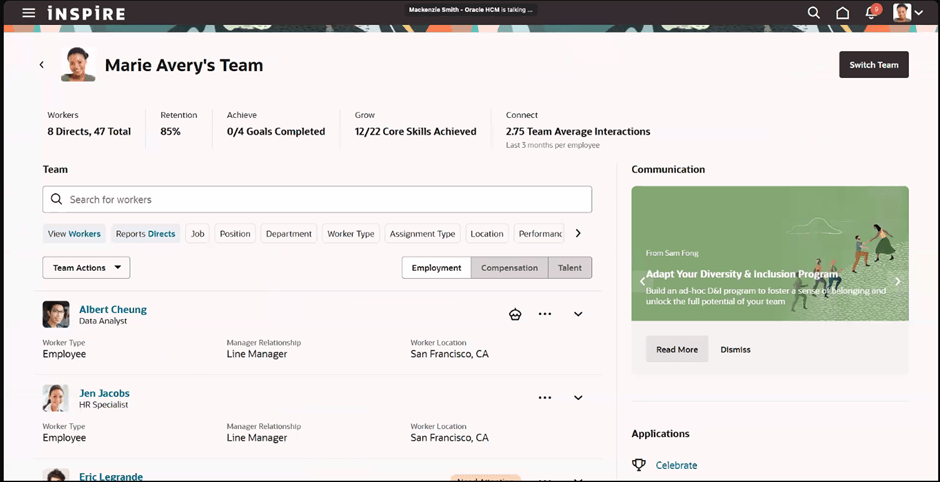
Manager Activity Centre

The Recruiting Activity Centre was the first one that was launched as an ‘Activity Centre’ and I regularly talk about it to my customers. It’s a great landing site for the Recruitment team to use. Originally it was only available to Recruiters and Hiring Managers, but last year it was extended to Collaborators too, so the whole team has access to this great tool. It summarises key data like high priority tasks and the number of new applicants that need reviewing. It’s easy to view the status of requisitions and offers and, my personal favourite, communication history between the Recruitment team and the candidate in conversation format. This is something that a lot of my customers have enquired about in the past.

Recruiting Activity Centre

The final, and most recent, Activity Centre is the Payroll one. It allows the Payroll team to view all payrolls in one location, easily view notifications that might indicate their has been an error or significant disparity in a payroll run and investigate the root cause. All the usual actions that the team would need to carry out are easily accessible, such as calculation cards, element entries, costing etc as well as to be able to submit payroll flows. It speeds up the time to run processes and investigate issues.
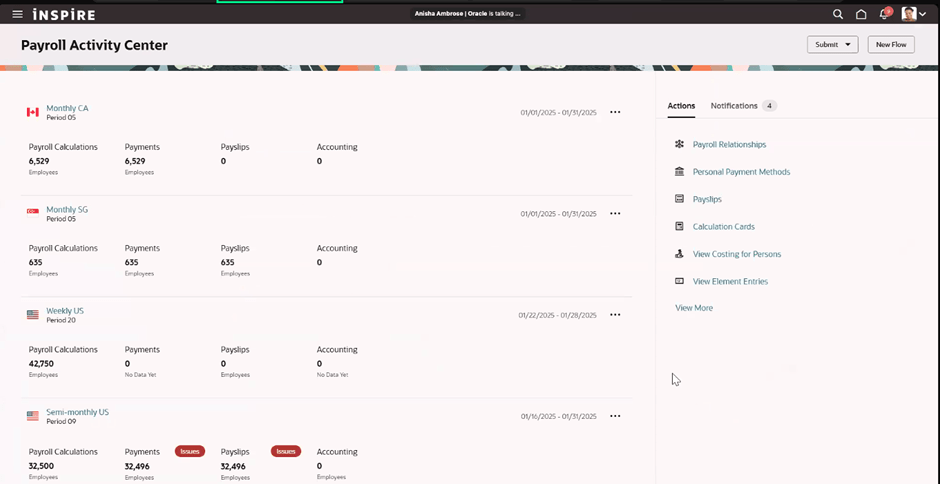
Payroll Activity Centre

The Activity Centres are all designed to improve the user’s experience and reduce the number of menus / clicks they need to make. It has all the information that you need at your fingertips and in my personal opinion, is a massive improvement! I’m sure this won’t be the last of the Activity Centres that we see and Oracle are constantly improving the existing ones, so keep an eye out on those quarterly release updates for more news.

Please note all screenshots are the property of Oracle and are used according to their Copyright Guidelines

Redwood Updates from Oracle HCM Cloud CoE Summit

I’ve already blogged about the Key Note from Chris Leone that kicked off the HCM Cloud Centre of Excellence Customer Summit. If you haven’t seen it, check it out here. The main themes for the summit were AI and Redwood. The ‘Jump Into Redwood Session’ with Laura Froehlich and Todd Wall was extremely interesting and a good follow up to the key note on the first day.

Having recently completed my Prosci Certified Change Practioner qualification, I was delighted when the session kicked off with ‘Why Change’. I think this question is often skipped because it’s a mandated change from Oracle, but as there are so many benefits to moving to Redwood, it’s a really important question. It’s true that change can be scary and users and organisations can be reluctant to do so, but there are so many advantages when you embrace that change.

One of the key benefits is the integration of AI. It’s so fundamental to the way businesses anticipate operating, a number of customers have added objectives to their team to incorporate AI into their daily work. Oracle are making it so much easier to achieve this goal by embedding AI and AI Agents into the Redwood applications. Whilst not everyone wants to use AI, Oracle have incorporated in such a way it can appease both those who do and those who don’t want to use AI. For those who don’t want to use it, it is delivered switched off. For those that do, a quick change to the page in VB Studio, involving ticking a box and publishing it and you have AI embedded in the particular page. It really is that easy! It should be noted that AI functionality is not available to all users, it depends on the server / region the organisation is in. Those in the UK Government Cage cannot access it at present, but it will be available in 2025.

When talking to customers about the new features being delivered in a particular quarterly release, they often only apply to the Redwood versions of the pages. So, if you want the latest functionality, switching to Redwood is your only option. The final key benefit is the improved performance Redwood brings. This wasn’t just a ‘lift and shift’ project to create the Redwood pages, they were completely rewritten from scratch in a new toolset.

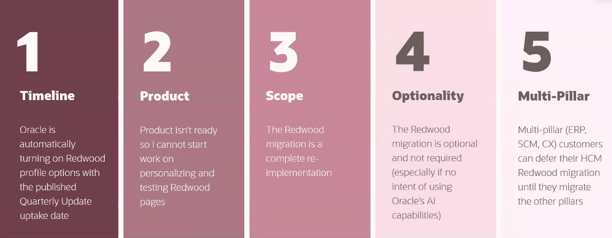
5 Myths about Redwood

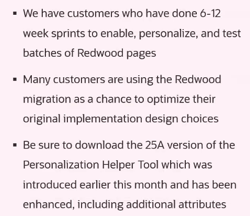
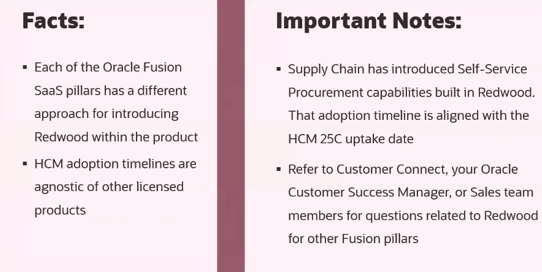
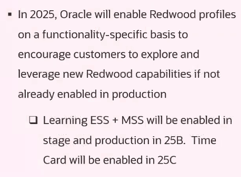
One of the stand out parts of the session was the 5 myths about Redwood. Some I’ve heard before and some I haven’t, but I thought they were interesting and I wanted to share them with you. The first one about the profile options being automatically switched on when reaching the the quarterly update uptake date is actually a complex one. Whilst the quarterly release date is when it is mandatory to have made the move, it’s not actually delivered switched on. If you raise an SR after the uptake date, the analyst will advise you to move to the Redwood page, as the non-Redwood pages are out of support. One key announcement during this session was that in 25B, Learn will be delivered switched on in Redwood and in 25C, Timecards will be delivered with Redwood switched on. Whilst this isn’t on the uptake date, it’s 2-3 quarters later, it does mean that at some point Redwood will be automatically switched on for all organisations.

The second myth is around the product not being ready yet and therefore there is no point in starting work on testing and personalising pages. Whilst new features are constantly being released in Redwood, the uptake date is just that, the date you should have made the move for that module, it’s not a date to start making the move. The third myth is that it’s a massive and complex reimplementation. The move is only complex if the organisation chooses to make it such. It is possible to switch on the Redwood pages, make the appropriate security changes, migrate personalisations (using the Personalisation Helper Tool), test and deploy. If you wish to make it more complex by revisiting features that weren’t previously implemented or fundamentally change your existing configuration, this is when it becomes a reimplementation.

The fourth myth is that Redwood is optional. It really isn’t, if you wish to continue being in support, you must make the move. As announced on the session, eventually Oracle will force Redwood on users by delivering it switched on. It’s better to do it early so you’ve got time to test and update users as once it’s automatically applied, it will be too late. The final myth is not one I’ve come across, but that organisations are going to wait until ERP and SCM is available in Redwood, before moving HCM over. It might be because I’ve been regularly discussing the disparity between the timelines of ERP and HCM in terms of Redwood, that I haven’t heard this discussion before. With regards to SCM, Self Service Procurement is mandatory in Redwood from 25C, so this is on a similar timeline to HCM anyway.

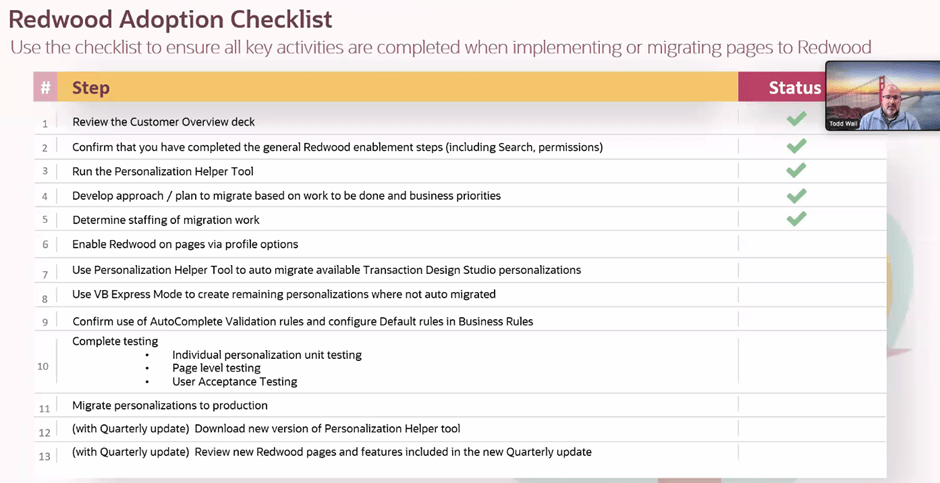
The final item I want to share from the session is the Redwood Adoption Checklist. This is really helpful to remind us all of the steps involved in moving to Redwood. If you’re anything like me, you’ll love ticking items off the list!

Please note all screenshots are the property of Oracle and are used according to their Copyright Guidelines
Key Highlights from Oracle’s HCM Cloud Centre of Excellence Summit

This week was the HCM Cloud Centre of Excellence Customer Summit. This was my first one, but I believe it was Oracle’s fifth summit. Oracle tried to be as inclusive as possible with the timings to accommodate different time zones, but I will be honest the 4-9pm UK time was a bit tricky to juggle, but I was able to go to every session and I’m really glad I did.

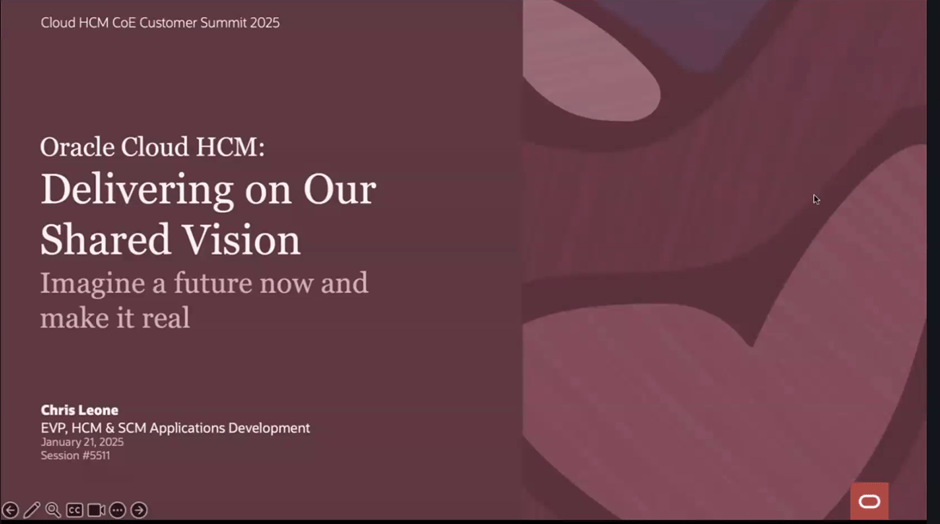
Chris Leone, the EVP of HCM and SCM apps development kicked things off. Some of the things announced on Chris’ key note were so new, the session couldn’t be recorded. It’s always a delight to hear Chris speak, he’s so passionate about Cloud Apps and makes you want to join him on his journey. As you would expect, the theme of the whole summit was Redwood and AI as these are the main two key areas of interest from HCM Cloud customers at the moment.

It was nice to get a recap on the functionality that Redwood brings, both embedded within the new pages, but also the ability to extend them using VBS. There was a recap on the Personalisation Helper Tool, both for HCM and SCM. If you don’t know what this is, check out my earlier blog on the tool. If you’ve never used it, I would recommend you check it out!

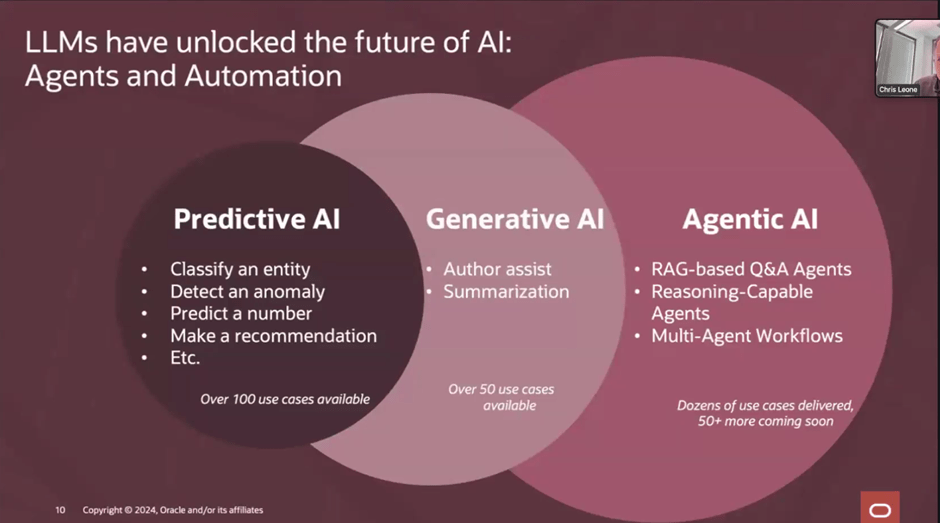
The piece that excited me the most, was the AI. We’ve all heard of Gen AI, check out my earlier blog on the use of it within Oracle HCM Cloud, if you missed it. Agentic AI takes it to the next level and I’m delighted that Oracle are incorporating it into their applications. Agentic AI is a type of AI that can independently make decisions and solve problems. It takes Machine Learning (ML), Large Language Models (LLM) and Enterprise Automation to create agents that can learn and adapt over time. The slide above refers to RAG based agents, but what are they? RAG stands for Retrieval Augmented Generation and RAG agents are part of RAG applications, which combine external data retrieval with LLMs to generate answers to user queries. In terms of practical application, the AI Agents can complete tasks autonomously, but also know when to loop in an actual user, either for approvals or review.

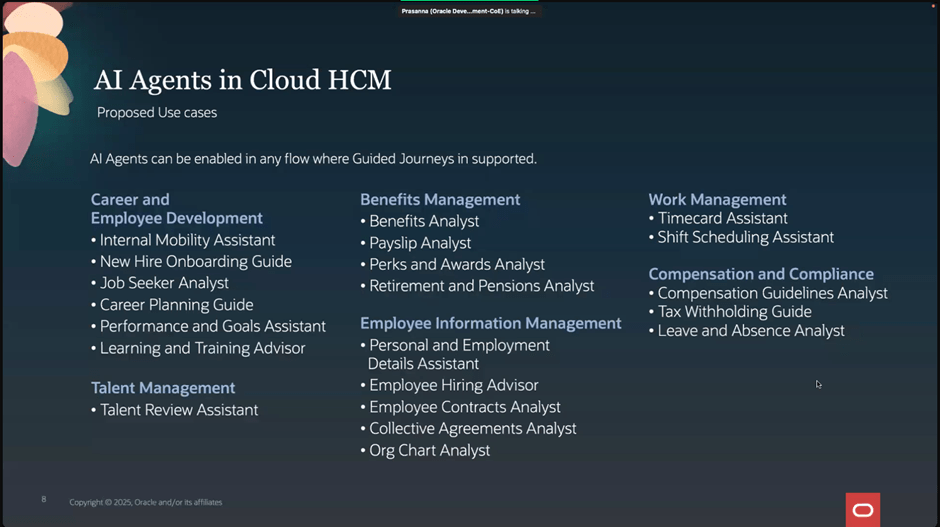
Oracle already have all of the above AI Agents available now. They can be activated in any process flow that supports Guided Journeys. This is just the start though, Oracle are in the process of developing more AI Agents, with plans for Agentic Agents too, for solutions such as sourcing candidates and scheduling interviews in Recruit and Succession Planning within Talent.

It’s a very exciting time in the Oracle HCM Cloud world and I can’t wait to see all the upcoming AI developments. I’ve got so many things to share from the Summit, so keep an eye out for more blogs. I’ll also write more updates on AI as Oracle announce them.

Please note all screenshots are the property of Oracle and are used according to their Copyright Guidelines