Oracle has just introduced a new set of AI agents within its Fusion Cloud Applications, and they’re set to make a real difference for HR teams. These agents are designed to support HR leaders throughout the entire employee journey—from hiring to retirement—by streamlining processes, improving the employee experience, and freeing up time for more strategic work. Whether you’re in recruitment, management, or part of the wider workforce, these tools are here to make everyday tasks easier and more efficient.
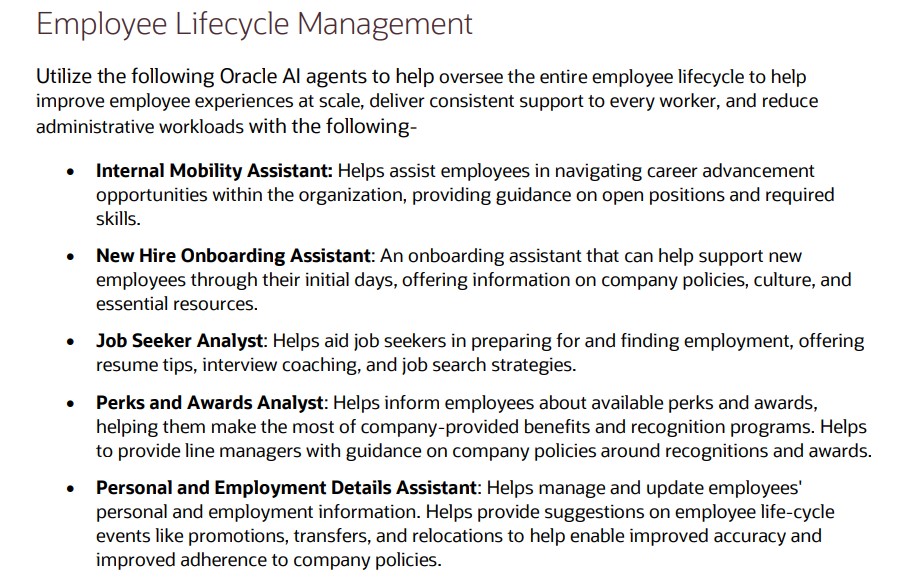
Built into Oracle Fusion Applications and running on Oracle Cloud Infrastructure, the AI agents are secure, fast, and included at no extra cost. They’re designed to work seamlessly within your existing workflows, so there’s no need to learn a new system. From helping employees discover internal job opportunities to assisting recruiters with interview scheduling, these agents are all about making HR more intuitive and responsive.
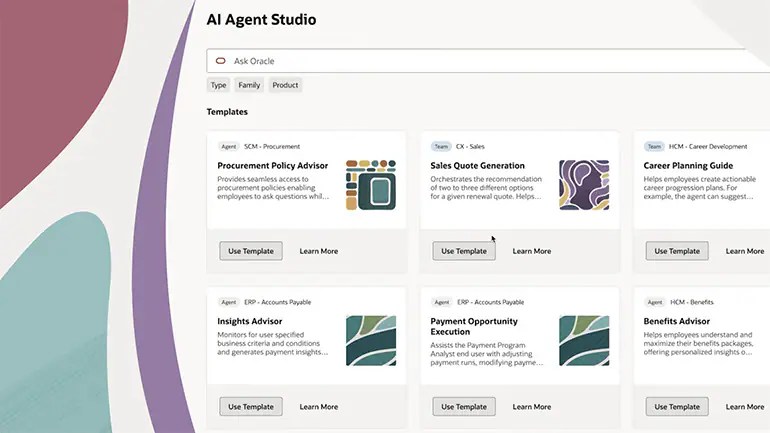
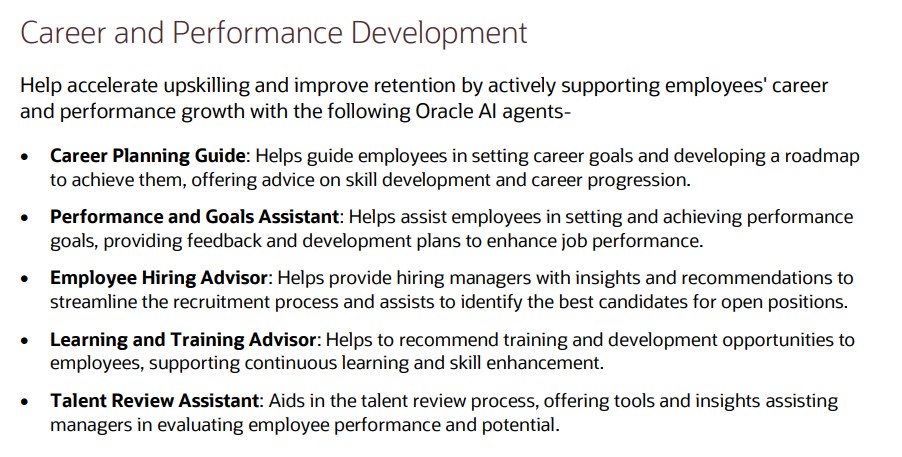
When it comes to career development, Oracle’s new agents offer some genuinely helpful features. Managers can get support with setting and tracking team goals, while employees receive tailored advice on roles that match their skills and aspirations. There’s even a Learning Tutor agent to help employees get more out of training courses, and a Talent Advisor agent that helps managers plan promotions and career growth using real performance data.
Core HR tasks are also getting a boost. Employees can quickly get answers to questions about pay, leave, or benefits through the Employee Concierge agent, while managers have their own version to help with team-related queries. There’s also a Positions Assistant agent that helps HR leaders make smarter staffing decisions by analysing organisational data and policies.
Finally, the agents support the full employee lifecycle, including onboarding, development, and offboarding. The Succession Planning Advisor helps HR teams stay ahead of leadership gaps, and the Payroll Run Analyst keeps payroll running smoothly by flagging anomalies and explaining any issues. Altogether, these AI agents mark a big step forward in making HR more proactive, personalised, and data-driven.
Please note all screenshots are the property of Oracle and are used according to their Copyright Guidelines
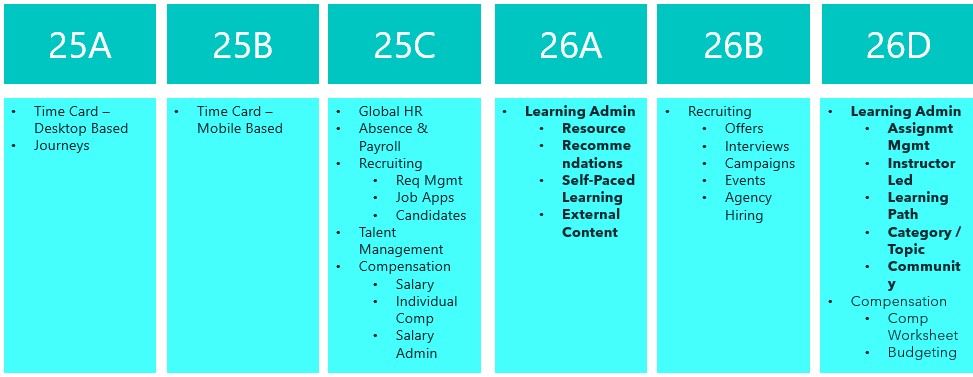
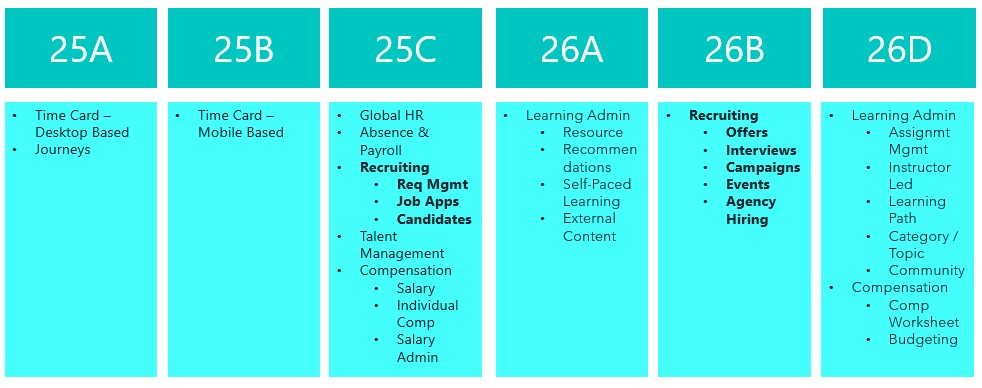
Release 25D has landed, and Oracle are gearing up for phase 2 of Redwood for Learn—this time turning the spotlight on Learn Admin pages, which are mandatory by release 26A. The focus is on making things smoother and smarter when it comes to resources, recommendations, self-paced learning, and external content. With the deadline fast approaching, it’s no surprise there’s a whole bunch of handy features to help you make the switch. Let’s dive in and see what’s new!
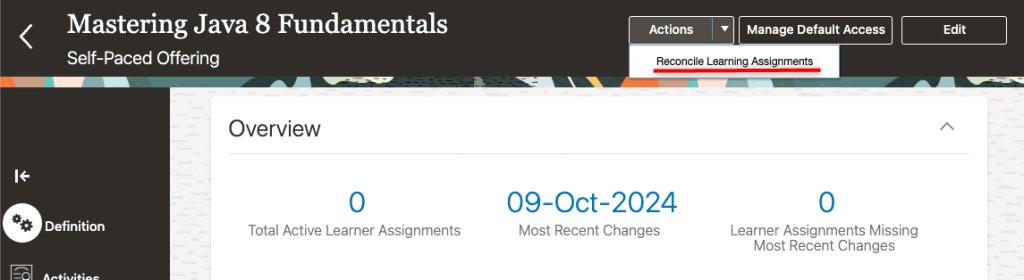
If you’re someone who often forgets to reconcile learning assignments, this new feature is for you. With just a quick tweak to a profile value, any course, offering, specialisation, or self-paced learning you kick off will now automatically trigger the reconciliation process. That means all your linked learning assignments stay up to date, saving you from the hassle of mismatched or outdated info.
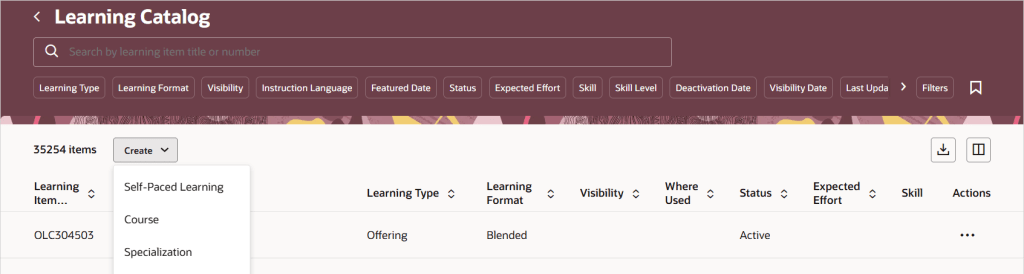
25D is bringing with it a new unified catalogue listing page, which will be your central location for all your Learn admin tasks. This new feature changes how admin access works for courses, specialisations, and offerings. Once you switch to the single learning catalogue view, courses, offerings, and specialisations will show up on the Learning Catalogue page. Just a heads-up: the old data security rules won’t apply anymore for the following tasks: viewing, managing courses, offerings, or specialisations in the catalogue. If your admins already have full access, there’s nothing you need to do. If you’ve been limiting access to certain items, now’s a great time to simplify things using catalogue administration profiles. Just set up profiles that define who can manage what, replacing the old security roles. Then, link your courses, offerings, and specialisations to the right profile—HCM Data Loader (CourseV3, OfferingV3, and SpecializationV3) can help with bulk updates.
If your organisation uses external learning content, you can now set default visibility rules for each provider, deciding who gets access and how the content shows up in topics and communities. It’s a great way to make sure the right people see the right stuff in the right places, all while keeping things aligned with your learning strategy. This update gives you more control over how third-party content is delivered, helps avoid misuse, and lets you manage licensing costs more efficiently. To get started, just head to My Client Groups > Learning and Development > Configure External Provider and tweak the audience and catalogue settings for any providers whose content is imported as self-paced learning.
With learning content getting better and richer, it’s no surprise the file sizes are growing too. Oracle’s on the ball, they’ve upped the max file size for Self Paced Learning, so you can now upload videos, SCORM packages (1.2 and 2004), AICC ZIPs, and presentations up to a whopping 2GB. PDFs are still capped at 1GB, but that should cover most needs. If you’ve already got Self Paced Learning switched on, there’s nothing you need to do—just enjoy the extra space!
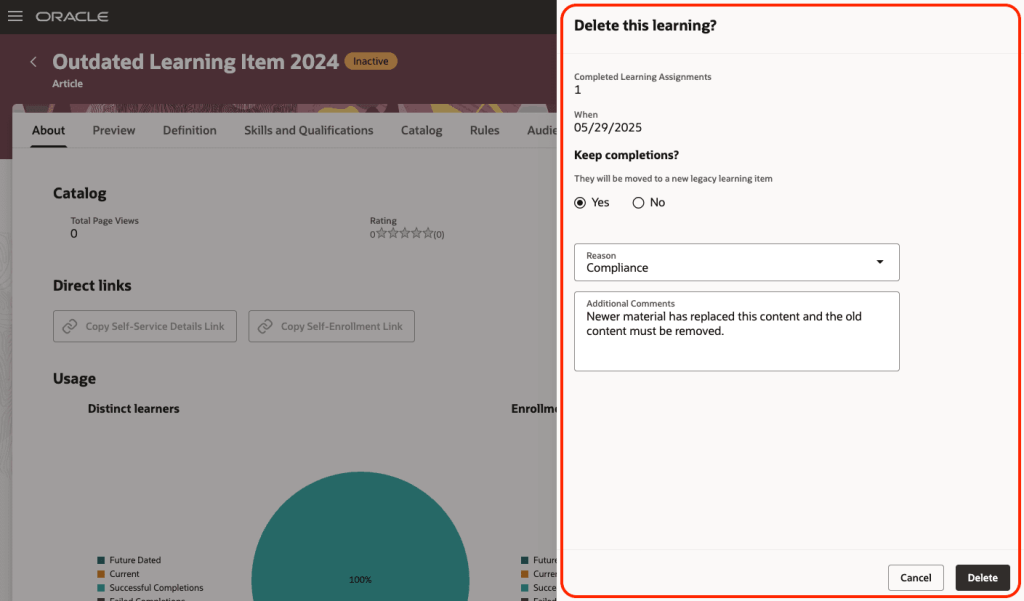
The final feature I want to highlight, is one that has been a frustration for many people and now it has been resolved. You can now clear out old self-paced learning from your Oracle Learning catalogue—whether it’s inactive or has missing content. Just click the new Delete button and you’ll see how many people completed it. You can choose to keep those completions by moving them to a legacy item, note down a reason for deleting it, and add a quick comment if you like. Once you confirm, the system runs a scheduled process that permanently removes the learning and all its links—like specialisations, communities, recommendations, initiatives, HCM goals and journeys. If you’ve chosen to keep completions, they’ll be safely moved so learner history isn’t lost. Just make sure self-paced learning is switched on and that you’ve added the new security privilege: WLF_DELETE_LEARNING_CATALOG_ITEM_PRIV.
Oracle often slip in a few extra new features throughout the month, so it’s always worth keeping an eye out. If anything truly exciting drops, I’ll put up another blog post to keep you in the know and make sure you’re not missing out. In the meantime, please check out my latest write-up on the new Core HR features in Release 25D, you can find it here.
Please note all screenshots are the property of Oracle and are used according to their Copyright Guidelines
Great news – 25D has landed! Unlike most modules, Recruit has a two-step journey to Redwood, and 26B is the big one to focus on to make sure users stay compliant and fully switched over for core Recruit tasks. If you’ve already got 25C, you should be handling requisitions, job applications and candidates in Redwood by now. The next wave is all about offers, interviews, campaigns, events and agency hiring. While 25C gave us a few Redwood features for offers, 25D really ramps things up to help you stay on track for the 26B deadline, but even more excitingly, it’s full of AI features to make your lives easier! So let’s dive in and explore what’s new….
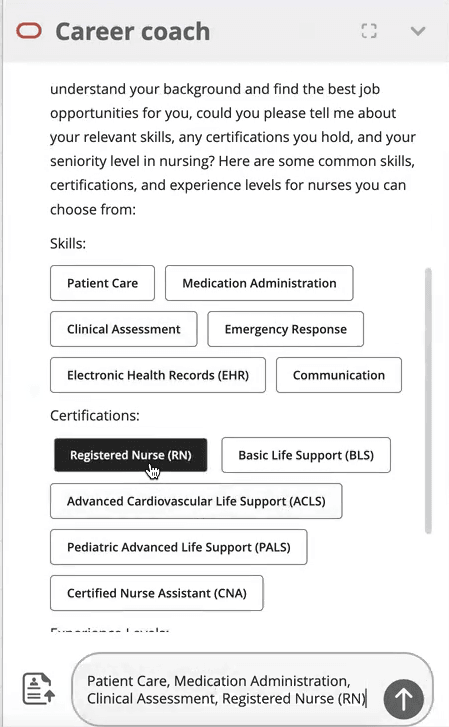
This first feature isn’t actually a Redwood specific one, but it’s a great one that I’m very excited about! Given Oracle’s push to embed AI into Fusion, wherever it is relevant, this feature is a great use case for it! The new AI Agent for Candidate Experience introduces an AI Chatbot called Career Coach directly onto the Career Site. It will be much easier for candidates to search for a new role with the Job Recommendations Agent and Job Fit Agent, as they get tailored suggestions based on their experience and skills. The candidate just need to upload their CV, answer a couple of questions and then the Job Recommendations Agent will highlight roles that match their profile, while the Job Fit Agent helps them figure out if a particular job is the right fit and answers any questions. Both agents can even use uploaded documents to give more personalised advice, making the whole process smoother and more relevant.
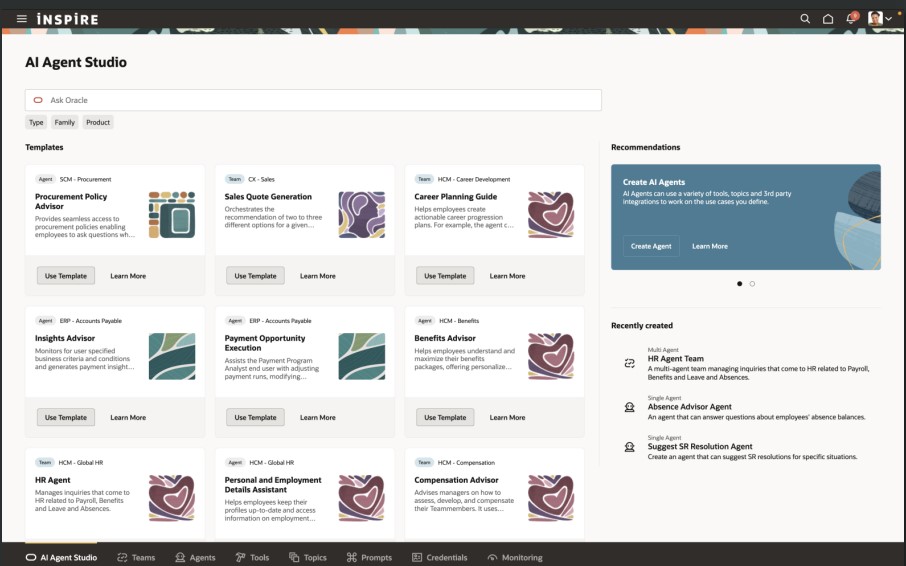
There’s another AI feature I’m excited about. This was shown at CloudWorld London and customers have been asking me about it ever since! The Job Applicant Screening Agent Template lets you create a handy agent team in AI Agent Studio, which Recruiters can get to straight from the Job Application page. It’s a super helpful “ask me anything” assistant that can dig up all sorts of info, including feedback scores, background checks, recent updates, and what’s happened over the past few weeks. You can ask things like “What’s going on with this application?” or “Give me the full lowdown,” and it’ll even suggest things like interview feedback, timelines, assessments, and offer details. It’s a real time-saver, especially for people who don’t use the system much and just want quick answers without the faff.
If you’re anything like me and find creating job offers a bit laborious, you’ll definitely want to check out the new Job Offer Creation Agent in AI Agent Studio. It’s like having a helpful friend on hand, it’s ready to answer all your questions, whether they’re general or specific to certain fields. You can customise it with your own documents and prompts, so it fits your organisation’s policies perfectly. Wondering if you can tweak the start date after sending an offer? Not sure about the typical job grade for a Chief of Staff? Curious about salary differences between cities, or what to do if a candidate already has another offer? This agent’s got your back. It helps you breeze through the offer process smoothly, fills in the right info, and cuts down on errors, so you can focus on getting the right people on board, faster.
The final Recruit AI Agent I want to highlight is one I particularly love, the newJob Requisition Creation Agent to help speed up the process of creating Job Reqs. Think of it as your go-to FAQ buddy, it answers all sorts of questions, whether you’re wondering about salary grades, attachments, or who’s recruiting in a specific location. It works entirely off the documents you upload and the prompts you set, so it’s easy to tailor to your company’s policies and ways of working. Whether you’re asking if you can change job grades later or need to know the salary range for consultants in Dallas, this assistant helps you get it right first time, no interruptions, fewer downstream issues, and a smoother, more efficient experience all round.
In 25C, the Candidate Sourcing tile was added. In 25D, the Campaigns and Events tabs are no longer under Hiring, but moved to Candidate Sourcing. When you head into the Candidate Sourcing tab, you’ll find everything you need to start building your talent pipeline – from Candidate Search and Pools to Messages, Campaigns, and Events. Over in the Hiring tile, you’ve got quick access to the Activity Centre, Messages, Requisitions, Offers, and you’ll spot Candidate Search and Pools again here too, so you’re never far from the tools that help you keep hiring on track.
Oracle often sneak in new features throughout the month, so it’s worth keeping an eye out. If anything truly game-changing drops, I’ll write up another blog post to keep you posted and make sure you’re not missing out. In the meantime, feel free to check out my latest write-up on the new Core HR features in Release 25D, you can find it here.
Please note all screenshots are the property of Oracle and are used according to their Copyright Guidelines
I’m a big fan of innovation, which is why I always look forward to the Oracle Fusion Quarterly Releases. While this one doesn’t bring a huge wave of new features for Global Payroll, there are still some important updates across various legislations worth noting. In this blog, I’ll give you a quick rundown of the key highlights from both the global and local perspectives. Oracle’s got plenty more in the pipeline this quarter, so keep your eyes peeled, and if anything particularly exciting crops up, I’ll be back with another post to keep you in the loop!
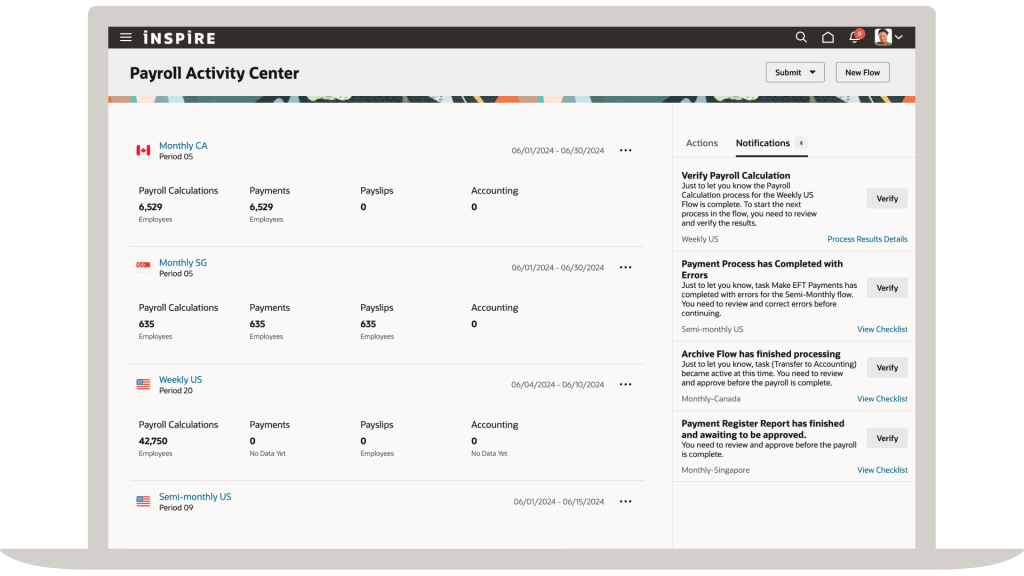
The first feature in Global Payroll is the new Redwood Archive Results page. Whilst this isn’t a glamourous new feature, it is an important page. The redesigned Redwood Archive Results page offers payroll admins the modern Redwood functionality for managing their payroll data with greater efficiency and accuracy. With enhanced navigation, flexible search, customisable views, and inline editing, it’s easier than ever to identify and resolve errors, unprocessed assignments, or missing records directly within the archive. These improvements help reduce manual effort, minimise rework, and ensure smoother payslip generation and external payment processing. The feature is enabled by default via the Redwood Payroll Activity Enabled profile option, so you don’t even need to do anything and can start benefiting straight away.
Payroll Activity Centre
All Payroll admins know that reporting is critical to the job! Oracle have made a small, but helpful update to the Payroll Costing Report. Prior to 25D, the report was a standard BI Publisher output, but listening to feedback, Oracle have rewritten the report as an extract-based one. This new version will handle larger payroll volumes and has added in more report output options, including Excel, XML and text. There are some simple steps to enable this new version of the report. First go to the Switch Task Action Version flow. Select Run Payroll Costing Report from the task list, choose the Extract-based Report version, and set it as active. From then on, all flows using this task will automatically run with the new version.
Moving on to the different legislations. There are a number of key features for Local Government in the UK. The first one is for the MCR for Teacher’s Pensions. A new input value, Error Number, is now available on the predefined TPS When Earned Details element, enabling employers to directly record error numbers linked to corrections for MCR files, particularly for When Earned U lines that typically require a TPS When Earned Details entry. This enhancement streamlines the reconciliation process for Teachers’ Pension errors. It’s easy to apply this update, navigate to Submit a Flow → Payroll, run the Run Feature Upgrade payroll flow task, and select Update Element Eligibility to Link Error Number for TPS When Earned Details Element.
There are two changes for LGPS included. Firstly a solution for the Pensionable Pay calculation for non-recurring payments. You can now easily work out the right Pensionable Pay for employees who’ve had time off mid-month and received one-off pensionable payments during their working days. With new balances in place, regular and irregular earnings are handled separately, so the LGPS employer contribution is calculated correctly without needing to prorate the monthly Pensionable Pay. Creating a new Main Pension Scheme element allows you to feed regular and irregular earnings into dedicated balances, ensuring accurate Pensionable Pay calculations for periods with one-off payments during working time. The second LGPS change relates to KIT and SPLIT days. You can now mark earnings as KIT or SPLIT days so they’re added to the right pensionable pay balances (CPP1 or CPP2). Just make sure to include the actual date worked when entering these, so the system can compare the day’s earnings with the assumed pensionable pay and use whichever is higher. If the day falls during unpaid leave, the full KIT or SPLIT earnings will be included in the pensionable pay.
With the introduction of Irish legislation for the first time, it is unsurprising that there are a significant number of new features in this release for it. These include Illness Benefit Payment or Offset; Public Sector Pensions; Salary Sacrifice; Send File Submission Process; Additional Superannuation Contribution (ASC) Forms; Check Revenue Submission Request; Payroll Submission Correction Request and Payslip Template. Additionally there are enhancements to reporting; Create Element template; Shadow Payroll; Special Assignee Relief Program and Withholding Taxes only on Irish Income. We know a few of you are already ahead of the curve when it comes to Irish legislation, so this’ll definitely be of interest. But even if you’re just starting to think about switching to Oracle Payroll, it’s still worth a look for our Irish customers.
There’s just one update this time for our US customers, but it’s worth flagging. The Retroactive Overpayment and Recovery for Earnings Elements feature is now switched on by default. Honestly, I can’t think why you wouldn’t want to use it, but just so you know, it’s no longer optional. This functionality gives you more control over how Retropay results are managed, especially when they reduce an employee’s net pay. Instead of the full overpayment being automatically deducted, you can now set up a repayment plan for the employee.
As I mentioned earlier, Oracle tend to roll out new features throughout the month. If any of these updates turn out to be game-changers, I’ll pop up a fresh blog post to keep you in the loop. In the meantime, feel free to check out my latest write-up on the new Core HR features in Release 25D, you can find it here.
Please note all screenshots are the property of Oracle and are used according to their Copyright Guidelines
This year seems to be flying by — it’s hard to believe we’re already talking about Release 25D! That said, Oracle has now published the initial set of documents for 25D. As is usually the case, further features are expected to be added throughout the month, but for now, let’s take a look at what’s been announced so far.
Unsurprisingly given AI Agent Studio was released in 25C and the current focus on AI, this is an AI heavy release. The first feature I want to highlight is for AI Agents. Oracle has introduced a smart enhancement to Guided Journeys on Redwood pages by allowing AI Agent tasks to appear at the section level, not just across the whole page. This means users get more focused, real-time support exactly where they need it, helping them move through transactions faster and with more confidence. Once enabled via a profile option, this feature brings cleaner UI design, smarter guidance, and reduced reliance on support teams—all without storing any interaction data. It’s a subtle but powerful upgrade that makes Redwood journeys more intuitive and intelligent.
AI Agent Embedded in Guided Journeys
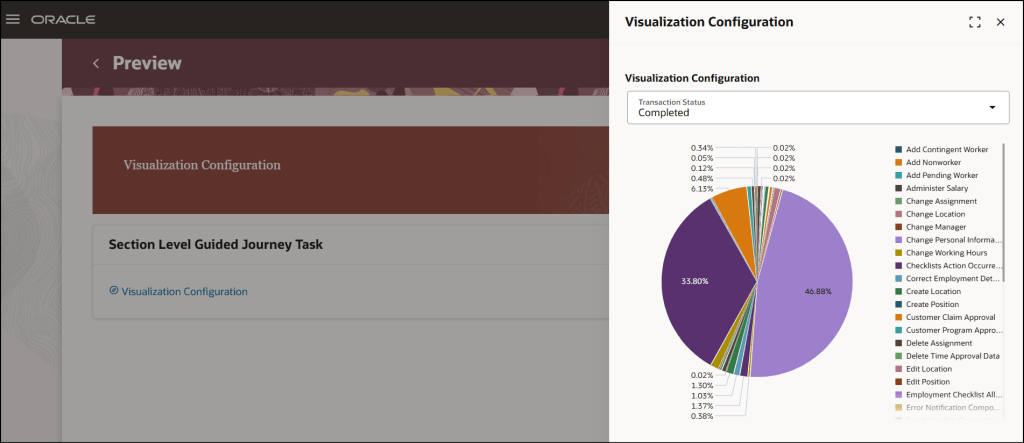
Another key focus for Oracle lately has been the embedding of Analytics into pages. As a data nerd I love any opportunity to embed a graph or other visualisation of data into a page. Oracle have now introduced a new enhancement to the Analytics task type in Journeys, the Visualization Configuration subtask, which enables users to seamlessly view Oracle Transactional Business Intelligence (OTBI) analyses, including any supported parameters, directly within a journey task. This integration allows for real-time insights and decision-making without leaving the task flow. It should be noted that users configuring these will not only need Journeys config access, but also security access to the new Visualization Configurator. There are three new privileges for this: ZCA_VIEW_DATA_VISUALIZATION_CONFIGURATION_PRIV, ZCA_MANAGE_DATA_VISUALIZATION_CONFIGURATION_PRIV and HRC_MANAGE_SYSTEM_SEARCHES_PRIV.
Visualization Configuration in Guided Journeys
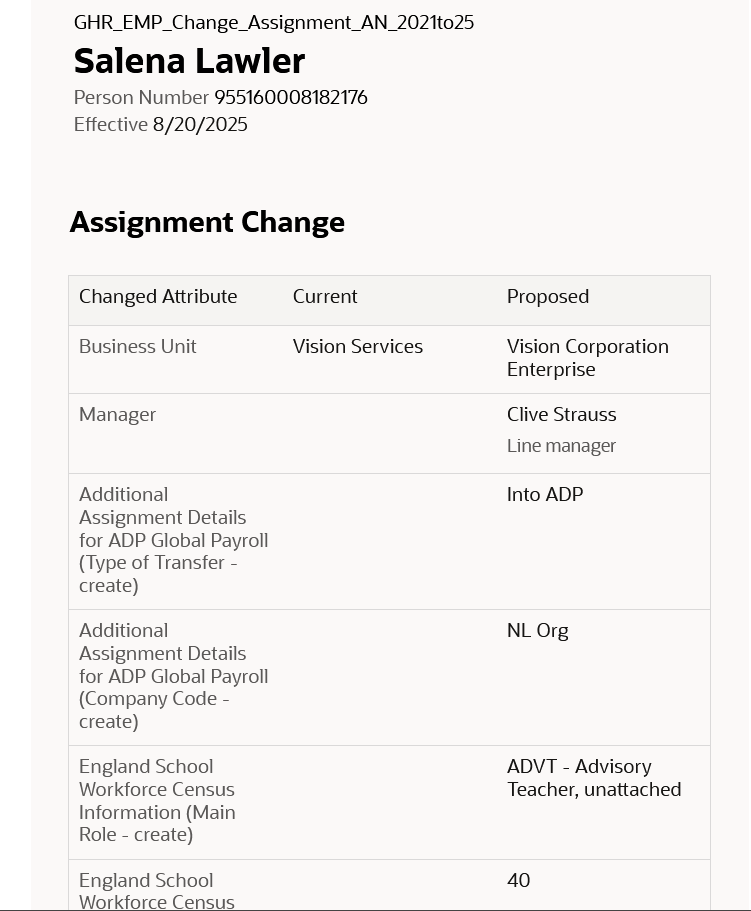
The next feature might not be the most thrilling, but it’s one you’ll want to be aware of. Oracle’s been steadily shifting notifications from the old Responsive style to the newer Redwood look, and now it’s Employment notifications getting the makeover. If you’re using Oracle’s seeded notification, it’ll automatically switch to the Redwood version, just a heads-up, there’s no going back unless you move to a custom notification. If you are using custom notifications, you’ll need to tweak your template to the Redwood style. On the plus side, the new notifications automatically adjust to the screen they’re being viewed on, so they’ll look spot-on whether you’re on a laptop, tablet or mobile. If you haven’t customised your existing notifications, the update rolls out without you lifting a finger. The fresh design is cleaner, more user-friendly, and helps you get things done quicker. Plus, it now supports date, time and number formats based on each user’s preferences.
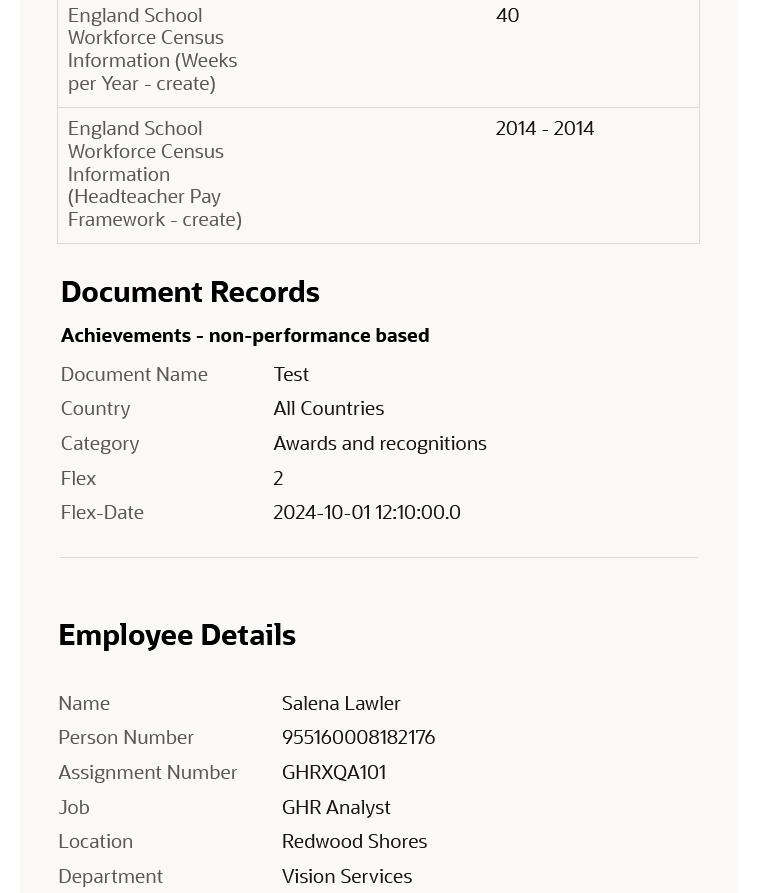
The final update I’d like to highlight is for those who’ve not yet transitioned to Redwood. I understand some organisations have held off for various reasons, so it’s important to note that from release 25D, the Redwood Document of Records page will be automatically enabled, and the Responsive page will no longer be displayed. If you’re not quite ready to move to Redwood, you can revert to the Responsive version by setting the profile value ORA_PER_DOCUMENT_RECORDS_REDWOOD_ENABLED to ‘N’. However, as with other Redwood transitions, once the deadline has passed, any issues with the Responsive page will no longer be supported, and Oracle Support will only recommend using the Redwood version. That said, the Redwood page offers a significantly improved experience, including the need for fewer clicks and faster load times, so this change should be seen as a positive step forward rather than a forced inconvenience.
Redwood Document of Records
As previously mentioned, Oracle is set to introduce new features in Core HR later this month. Should these enhancements prove to be particularly noteworthy, I’ll publish an updated blog post. In the meantime, please keep an eye out for forthcoming blogs that will explore additional modules within Fusion as part of Release 25D.
Please note all screenshots are the property of Oracle and are used according to their Copyright Guidelines







 K8 Mead