AI Use in HCM Cloud

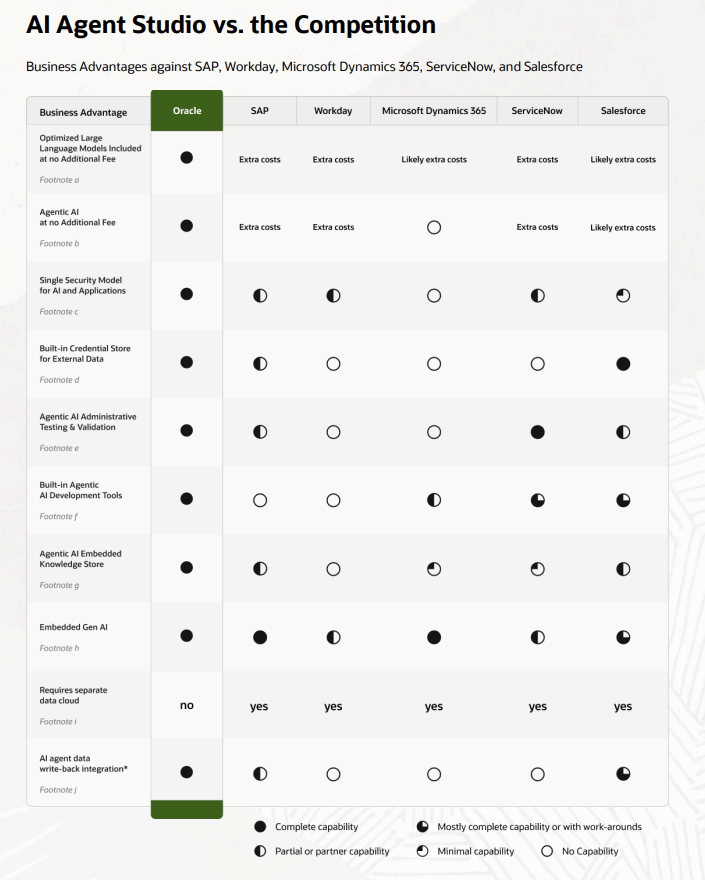
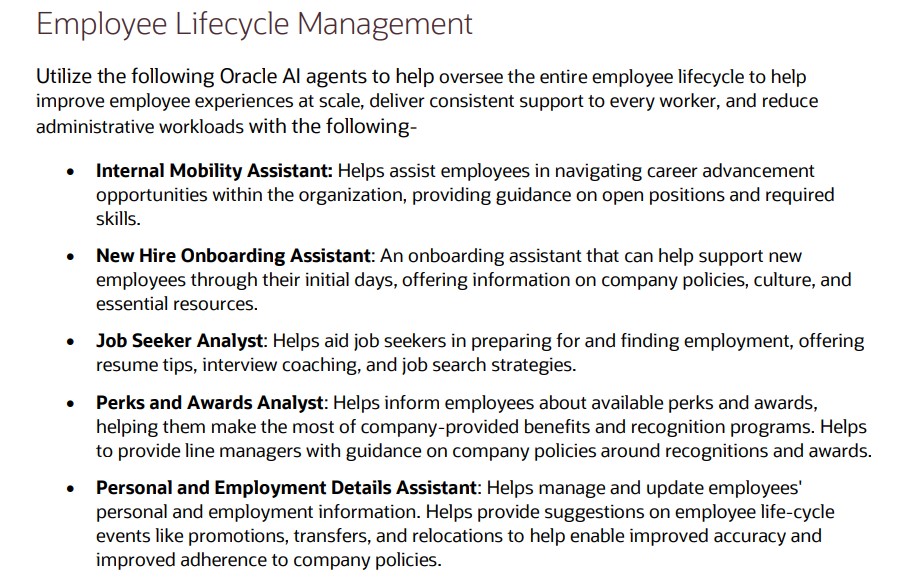
Oracle has just introduced a new set of AI agents within its Fusion Cloud Applications, and they’re set to make a real difference for HR teams. These agents are designed to support HR leaders throughout the entire employee journey—from hiring to retirement—by streamlining processes, improving the employee experience, and freeing up time for more strategic work. Whether you’re in recruitment, management, or part of the wider workforce, these tools are here to make everyday tasks easier and more efficient.

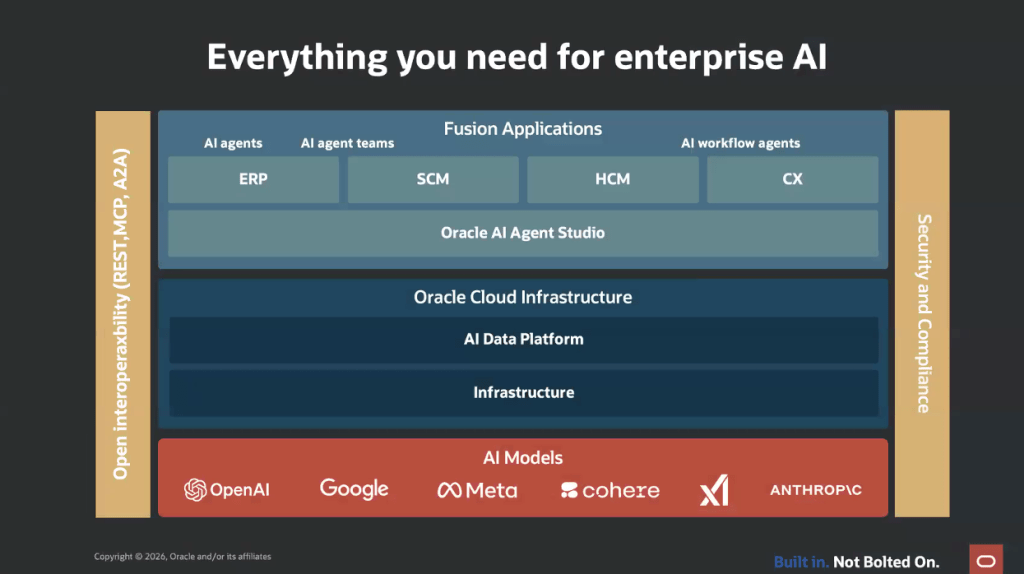
Built into Oracle Fusion Applications and running on Oracle Cloud Infrastructure, the AI agents are secure, fast, and included at no extra cost. They’re designed to work seamlessly within your existing workflows, so there’s no need to learn a new system. From helping employees discover internal job opportunities to assisting recruiters with interview scheduling, these agents are all about making HR more intuitive and responsive.

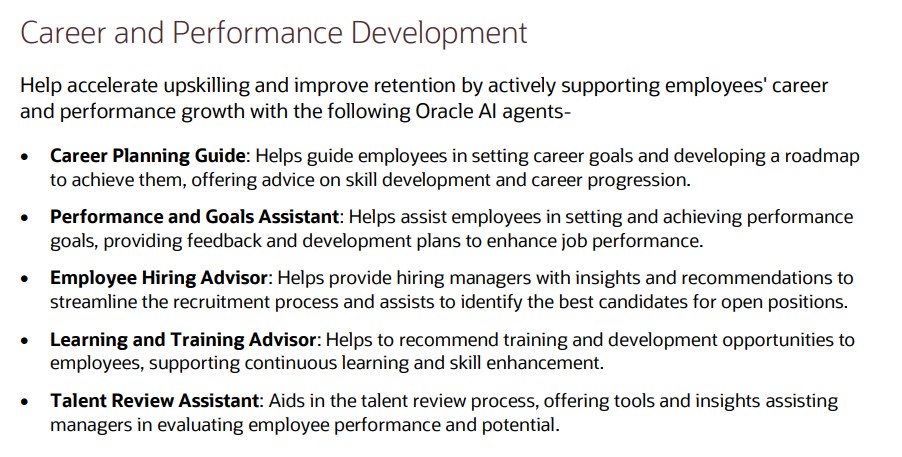
When it comes to career development, Oracle’s new agents offer some genuinely helpful features. Managers can get support with setting and tracking team goals, while employees receive tailored advice on roles that match their skills and aspirations. There’s even a Learning Tutor agent to help employees get more out of training courses, and a Talent Advisor agent that helps managers plan promotions and career growth using real performance data.

Core HR tasks are also getting a boost. Employees can quickly get answers to questions about pay, leave, or benefits through the Employee Concierge agent, while managers have their own version to help with team-related queries. There’s also a Positions Assistant agent that helps HR leaders make smarter staffing decisions by analysing organisational data and policies.

Finally, the agents support the full employee lifecycle, including onboarding, development, and offboarding. The Succession Planning Advisor helps HR teams stay ahead of leadership gaps, and the Payroll Run Analyst keeps payroll running smoothly by flagging anomalies and explaining any issues. Altogether, these AI agents mark a big step forward in making HR more proactive, personalised, and data-driven.

Please note all screenshots are the property of Oracle and are used according to their Copyright Guidelines
Oracle Digital Assistant – Does it have a Future?

With the introduction of AI Agents in Fusion, many are questioning the future role of Oracle Digital Assistant (ODA) within Oracle’s roadmap. During the AI Agent Studio training, it was mentioned that ODA seeded skills will eventually become obsolete, although no further details with regards to a timeline were provided. Since then, Oracle’s 25C What’s New documentation has confirmed that some older seeded skills are beginning to be deprecated—however, this is not a new development, as the phasing out of legacy skills has been an ongoing process.

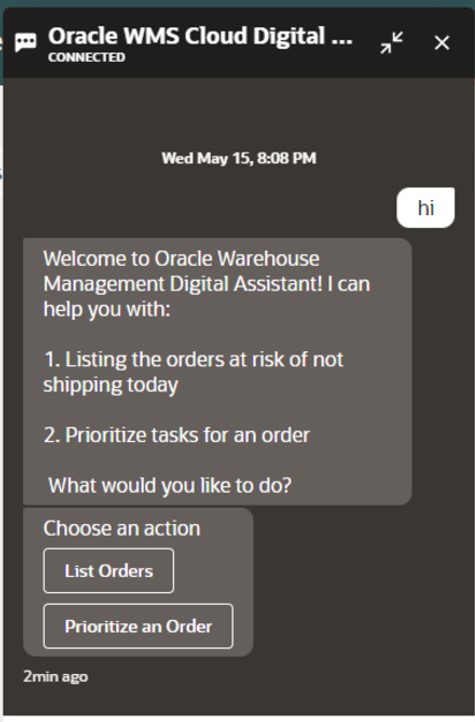
Oracle Digital Assistant

Several Oracle Digital Assistant (ODA) skills are now deprecated and may soon become obsolete, requiring timely updates to maintain compatibility with Fusion Cloud Applications’ quarterly releases. The Expenses skill built on ODA version 20.08, the Candidate Experience skill on version 22.08, and the Internal Candidate Experience skill version 1 on version 23.06 are all deprecated—customers should ensure they have deployed the appropriate V2 versions of these skills to stay aligned with the latest updates.

An additional key point of note is that the HCM Knowledge skill has been decommissioned as of release 25A, and customers using the Classic HR Help Desk are advised to transition to the ‘Search Knowledge Article’ intent within the Helpdesk skill for continued support.

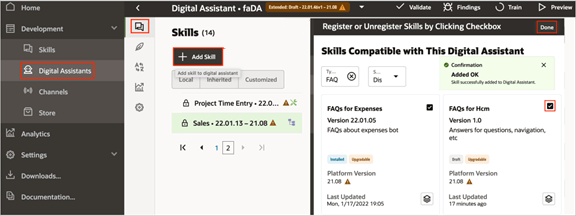
Adding Skills in Oracle Digital Assistant

Oracle advises customers to check the Skill Store for updated versions for every release. If you access a skill built on a deprecated platform version, a warning message will appear, and you can click the ‘Tell me more’ option to view additional details about the platform versions. Skills will cease to function once their underlying platform version becomes inactive, which typically occurs no later than two years after their release.

To ensure your Digital Assistant or skill remains up to date, you can easily install the latest version from the Skill Store whenever an update is available. Simply sign in to Oracle Digital Assistant, navigate to Development > Digital Assistants via the Navigator, and within the tile for the relevant skill or digital assistant, click the menu icon and select Install Update. After upgrading your digital assistant, it’s essential to reassign the appropriate channels to the new version to ensure continued functionality. To do this, sign in to Oracle Digital Assistant and navigate to Development > Channels via the Navigator. Click on Channel, and in the Create Channel dialog box, enter the necessary details, selecting the required channel type from the list. Once created, to link this channel to the latest version of FADigitalAssistant, use the Route To drop-down menu to search for and select the updated version. Finally, click Reset Sessions, and in the Change Channel Routing dialog box, confirm by clicking Change.

Oracle AI Agent Studio

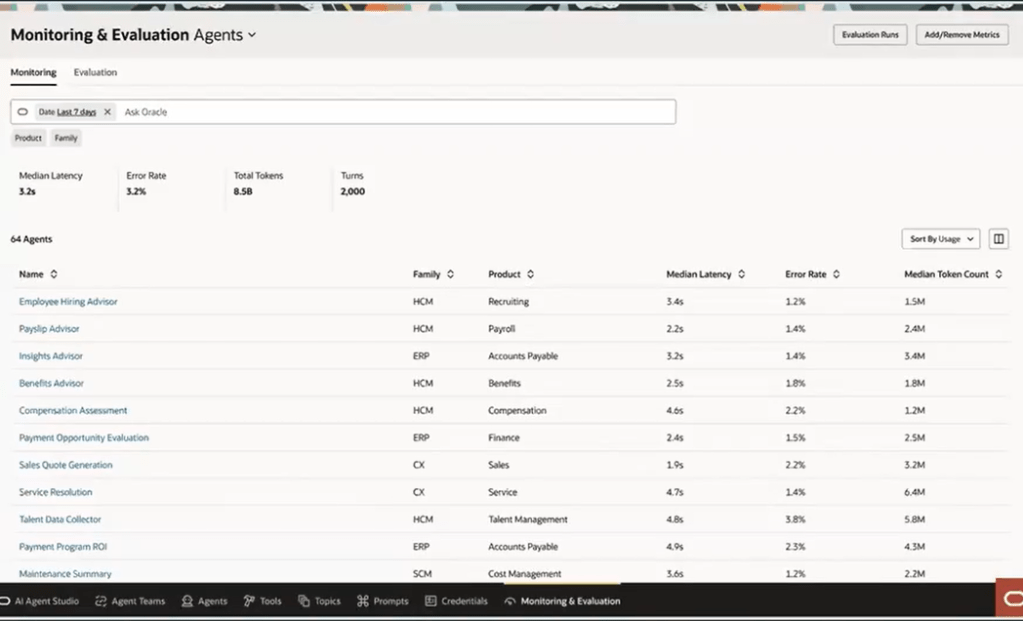
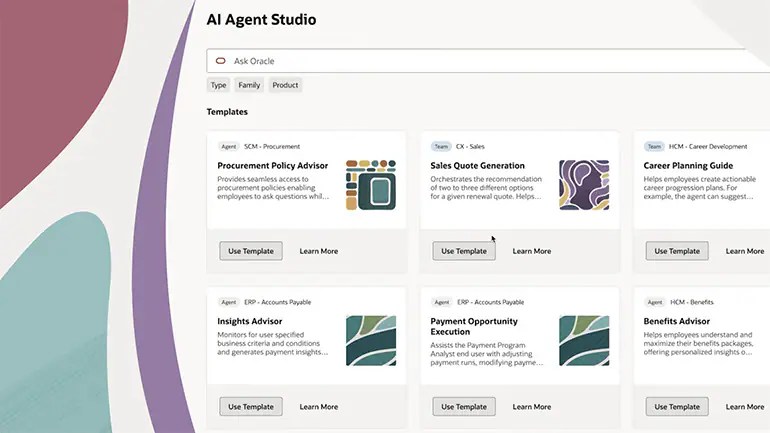
At this stage, there’s no immediate need for customers to move away from Oracle Digital Assistant (ODA); however, it’s a good time to begin reviewing the skills currently in use and identifying the types of questions your users typically ask. These insights can serve as a valuable foundation for developing AI Agents using the new AI Agent Studio, which is being introduced in release 25C. Taking a proactive approach now will give you ample time to plan and transition before ODA eventually becomes obsolete—whenever that may be.

Please note all screenshots are the property of Oracle and are used according to their Copyright Guidelines

Ask Oracle – The New Way to Interact with Fusion

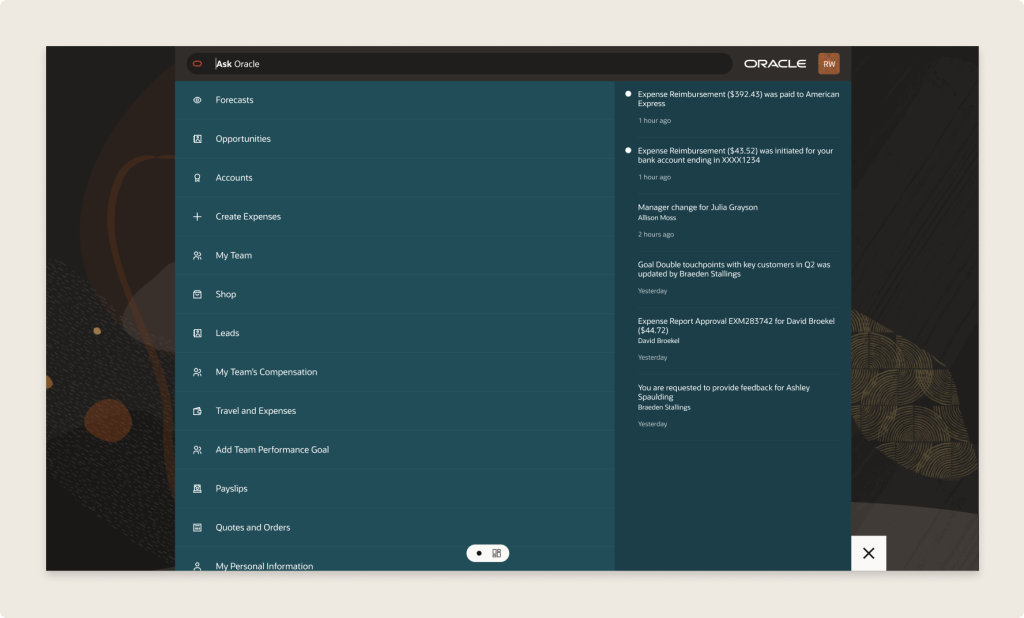
Have you heard about Ask Oracle? I was chatting with someone from Oracle recently and left the conversation genuinely excited! It gets a brief mention in the Common Features for 25C, but there’s not much detail available just yet. So, what is it? Ask Oracle will form part of a new navigation experience being introduced in 25D. You’ll be able to use it to search for tasks, applications, and information—and it will also serve as your way of navigating between different areas. The Home page with Ask Oracle will remember where you’ve recently been and the places you visit most often, helping you get to what you need more quickly and intuitively.

Ask Oracle Homepage

Oracle understands that when users open Fusion, it’s usually with a specific task in mind. The new Ask Oracle experience is designed to make that journey more intuitive—whether you prefer to simply ask for what you need or browse a curated list of intelligent suggestions. To support this, the redesigned home experience brings together three key elements: a product map view to help you explore what’s available; intelligent suggestions that surface the most relevant items based on your likely next steps; and a modern search function with rapid type-ahead, synonym recognition, and integrated business objects—making it easy to find what you’re looking for, even if you’re unsure of the exact name or didn’t realise you needed it.

Ask Oracle Navigation

The version being released in 25D is the first iteration. This will continue to evolve over time. Future versions of the Home experience with Ask Oracle will support a full range of user goals: whether you’re exploring what’s possible with “What can I do?”, tackling a specific task with “I want to do ‘x’…”, or checking in with “What needs my attention?” to understand what actions are required to keep things moving. The application will intelligently highlight tasks and priorities to help maintain workflow momentum.

If you’d like to use Ask Oracle, it will need to be enabled following the 25D release. Once enabled, the Home experience with Ask Oracle will replace both the global header and the existing home page used in the News Feed layout. You can set Home with Ask Oracle as the default home page layout via the Appearance work area.

Please note all screenshots are the property of Oracle and are used according to their Copyright Guidelines
Key Highlights from Oracle’s HCM Cloud Centre of Excellence Summit

This week was the HCM Cloud Centre of Excellence Customer Summit. This was my first one, but I believe it was Oracle’s fifth summit. Oracle tried to be as inclusive as possible with the timings to accommodate different time zones, but I will be honest the 4-9pm UK time was a bit tricky to juggle, but I was able to go to every session and I’m really glad I did.

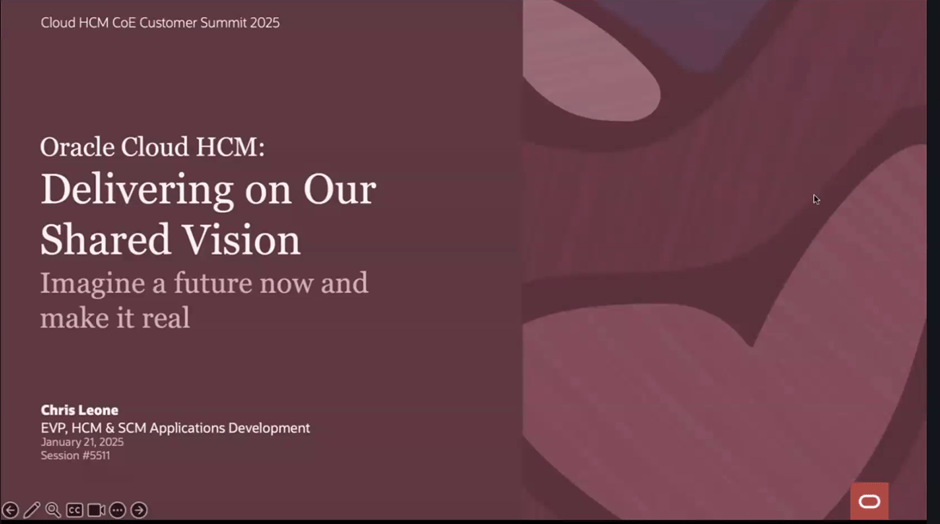
Chris Leone, the EVP of HCM and SCM apps development kicked things off. Some of the things announced on Chris’ key note were so new, the session couldn’t be recorded. It’s always a delight to hear Chris speak, he’s so passionate about Cloud Apps and makes you want to join him on his journey. As you would expect, the theme of the whole summit was Redwood and AI as these are the main two key areas of interest from HCM Cloud customers at the moment.

It was nice to get a recap on the functionality that Redwood brings, both embedded within the new pages, but also the ability to extend them using VBS. There was a recap on the Personalisation Helper Tool, both for HCM and SCM. If you don’t know what this is, check out my earlier blog on the tool. If you’ve never used it, I would recommend you check it out!

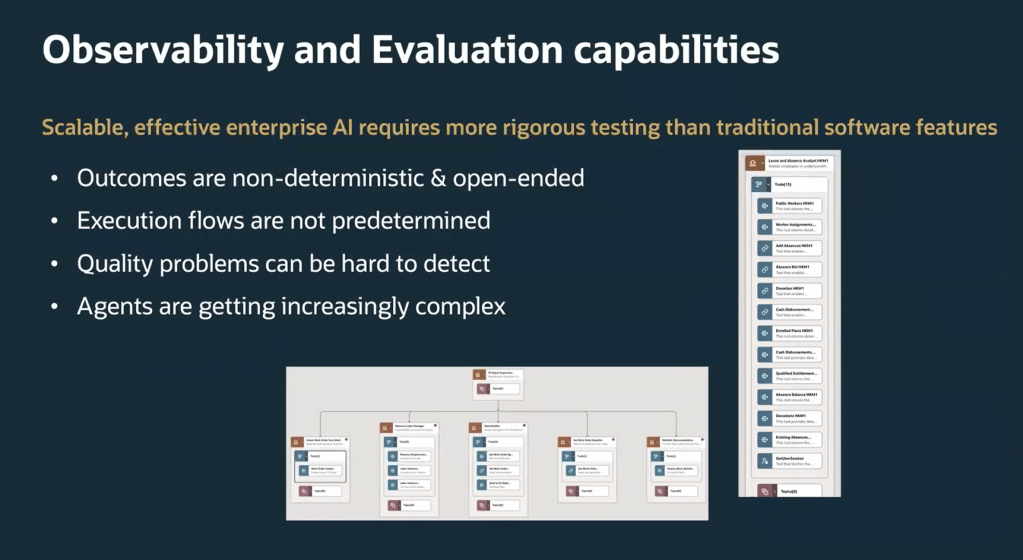
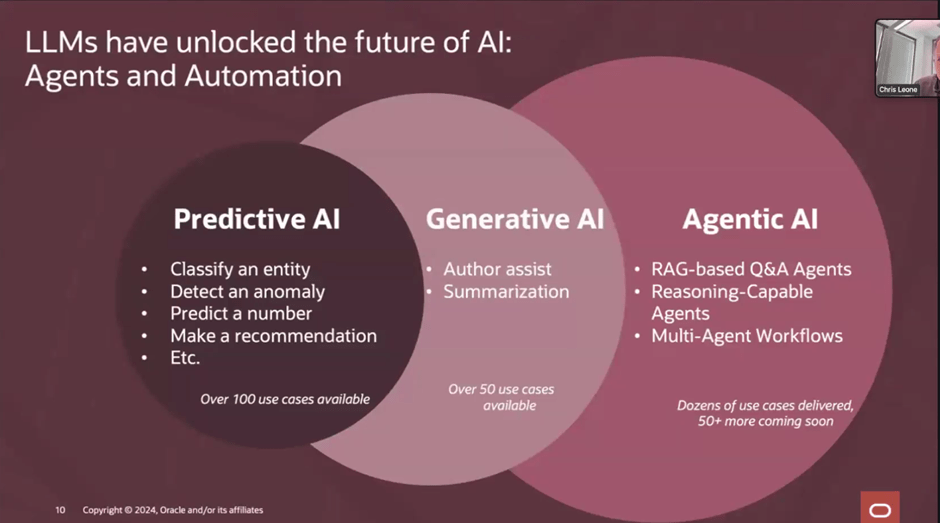
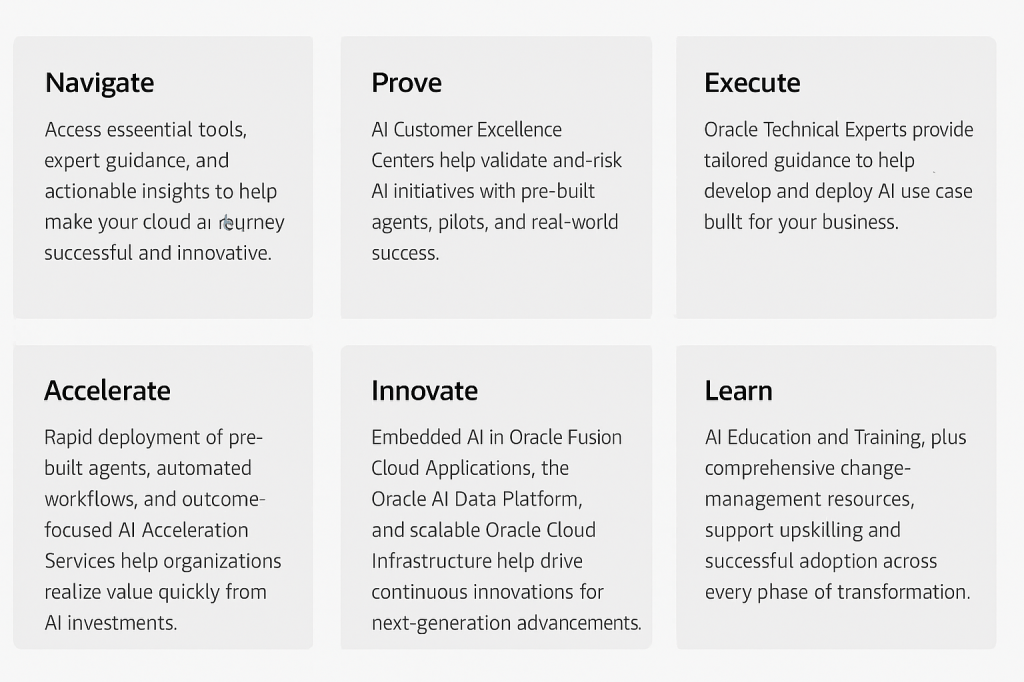
The piece that excited me the most, was the AI. We’ve all heard of Gen AI, check out my earlier blog on the use of it within Oracle HCM Cloud, if you missed it. Agentic AI takes it to the next level and I’m delighted that Oracle are incorporating it into their applications. Agentic AI is a type of AI that can independently make decisions and solve problems. It takes Machine Learning (ML), Large Language Models (LLM) and Enterprise Automation to create agents that can learn and adapt over time. The slide above refers to RAG based agents, but what are they? RAG stands for Retrieval Augmented Generation and RAG agents are part of RAG applications, which combine external data retrieval with LLMs to generate answers to user queries. In terms of practical application, the AI Agents can complete tasks autonomously, but also know when to loop in an actual user, either for approvals or review.

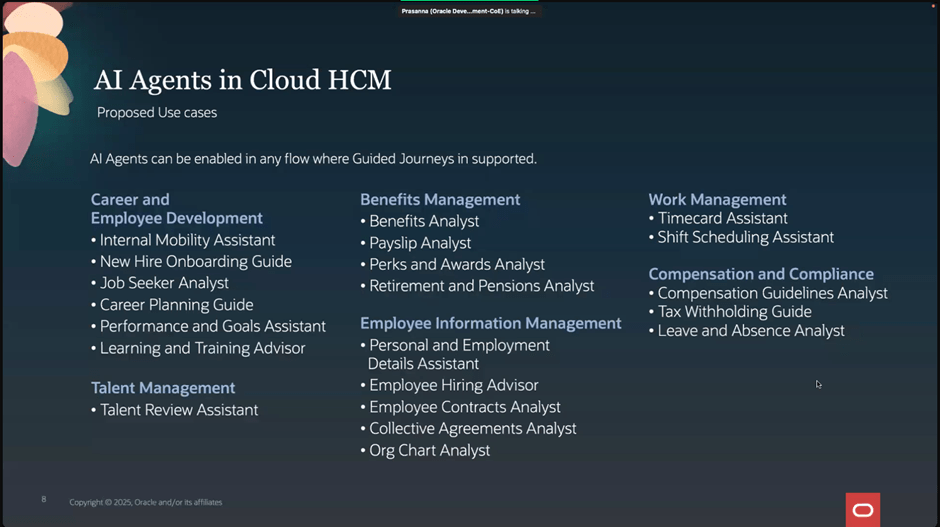
Oracle already have all of the above AI Agents available now. They can be activated in any process flow that supports Guided Journeys. This is just the start though, Oracle are in the process of developing more AI Agents, with plans for Agentic Agents too, for solutions such as sourcing candidates and scheduling interviews in Recruit and Succession Planning within Talent.

It’s a very exciting time in the Oracle HCM Cloud world and I can’t wait to see all the upcoming AI developments. I’ve got so many things to share from the Summit, so keep an eye out for more blogs. I’ll also write more updates on AI as Oracle announce them.

Please note all screenshots are the property of Oracle and are used according to their Copyright Guidelines
Generative AI in Oracle HCM Cloud

Everyone is talking about AI these days and Oracle is no different! The use of AI within Oracle applications isn’t new – Digital Assistant, Oracle’s chatbot has been in action for a while. Digital Assistant uses ‘skills’ similar to Alexa which are used as a basis for enquiries. Oracle provides seeded skills but custom ones can also be created.

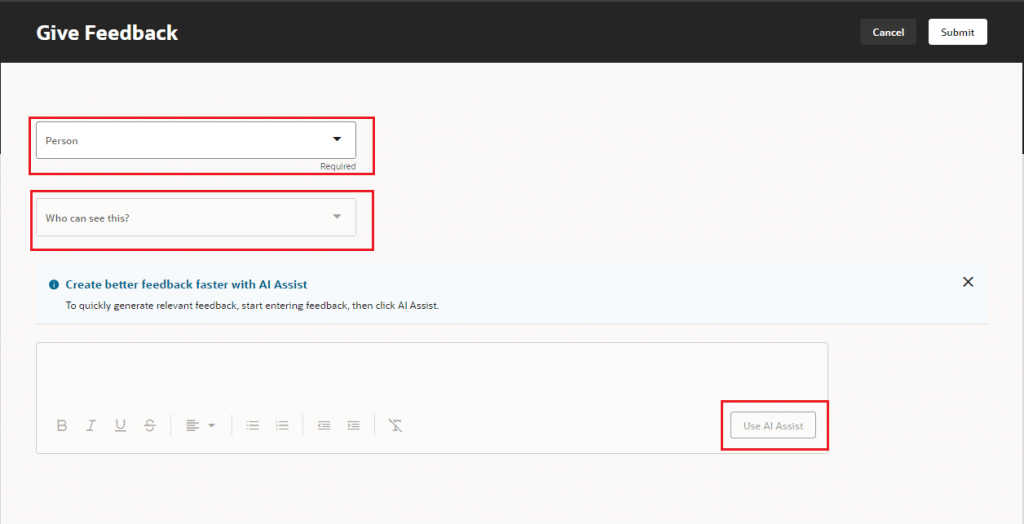
But what about Generative AI or Gen AI? Gen AI uses machine learning to learn patterns from the data and then create content based on it. Oracle have been incorporating Gen AI into HCM Cloud since release 24A. All of the features released require Redwood as they can be activated via VB Studio. Oracle have introduced AI Assist in a lot of applications, although predominantly in the Talent and Performance modules. AI Assist will take the information provided and summarise it. For instance, when a Line Manager reviews all Performance Documents, the AI Assist button will compile and summarise all pertinent performance information for that Employee. This feature saves the manager time by providing an editable summary, designed to enhance efficiency without eliminating the human touch.

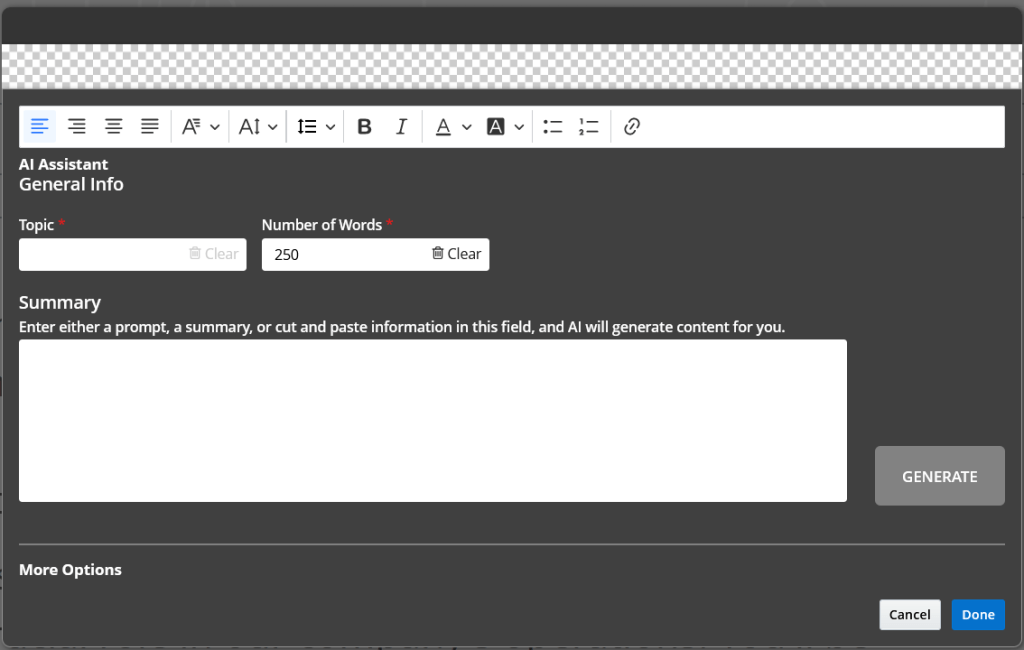
Gen AI is also available in Recruit to help produce content for your Career Site. By populating the topic, how many words you require it to be and a few key terms / words, the AI Assistant will generate the text for you. As with all Gen AI within Oracle, you can tweak the content as much as required, but it will make the process much easier.

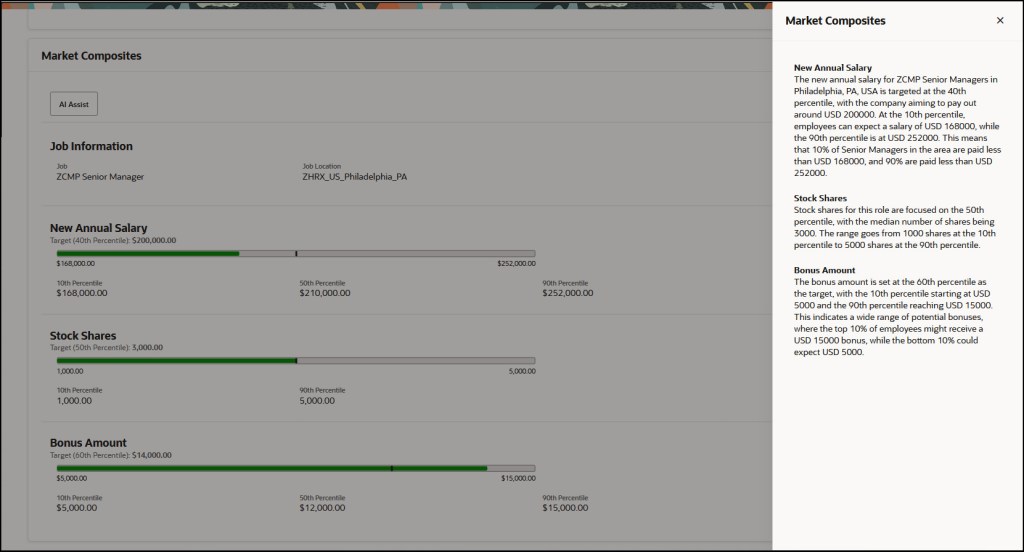
The new AI features continued in 24D, which included the introduction of AI Assistance for Market Composites in Compensation Info. This allows organisations to utilise Gen AI to generate explanations for market composites to Line Managers within the Compensation module. This will help guide the conversations between Line Managers and Employees about the competitiveness of their compensation package.

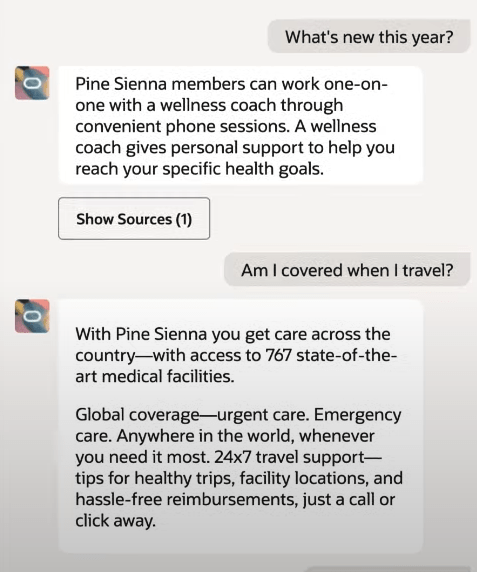
Oracle are constantly working on new use cases for Gen AI. It is anticipated that in 25A, the Benefits Analyst Agent will be available. This will allow Employees and Line Managers to ask the chatbot about available benefits for them, but also question why things have changed etc. It can also link to the sources that it used to determine the response, so the Employee can validate the information, if required.

Oracle is investing heavily in Gen AI and other ways to optimise user’s experience, so there will be more announcements soon. I expect a number of features to be included in 25A, not just the Benefits Analyst Agent. Once they are announced, I will do another post.

About the author:

Kate Mead is an Oracle-certified HCM Consultant and Solution Architect at Version 1 with 14 years of experience in Oracle HR and Payroll systems, including 7 years with Oracle HCM Cloud. She has worked across implementation projects and managed services, has a sound knowledge of UK Payroll legislation and — before becoming a consultant — was an HR Manager.

If you have any questions or would like more information on how Version 1 can help you realise the full potential of your Oracle Cloud instances, please contact her at kate.mead@version1.com

Please note all screenshots are the property of Oracle and are used according to their Copyright Guidelines