Redwood Notifications in Release 24D

Lots of people have asked about the move to Redwood for notifications in release 24D, so I thought I’d better write a blog on it! In several modules, including Compensation, Absence and Recruit, the seeded notifications have moved over to the new Redwood style.

So what does this mean for organisations? If you’re already using Redwood, there is nothing needed to be done. However, what if you’ve not made the move to Redwood yet? Unfortunately it isn’t possible to switch off the Redwood notifications for these modules. There are two options available, firstly to use the notifications as delivered with the Redwood theme applied. Alternatively, create a custom BI notification to replace the seeded Oracle BI notification. It is the specific seeded Oracle BI notifications that have moved to Redwood, rather than all notifications within those modules being in the Redwood toolset.

So what do these notifications look like? An example is below, but they are cleaner and easier to read. The actual content hasn’t changed, it is the layout that has.
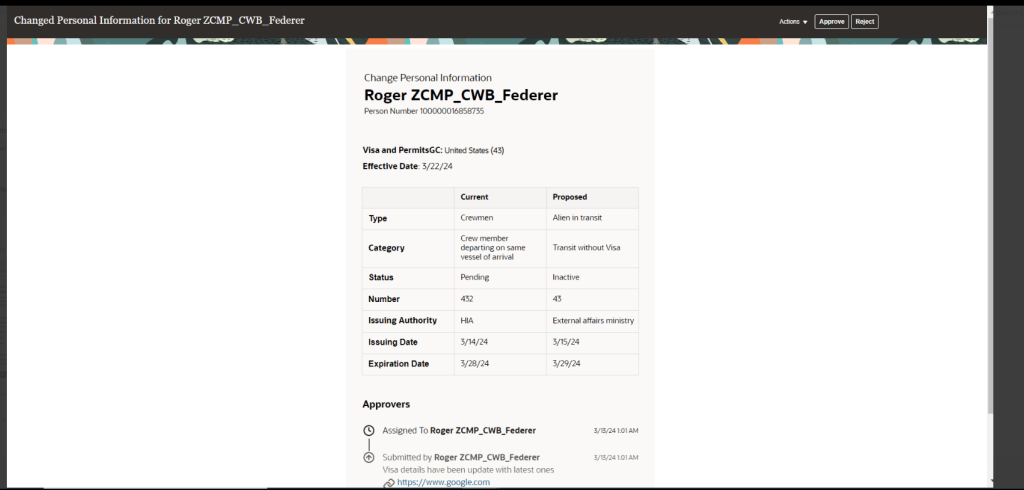
The only issue is where organisations have a mix of seeded and custom notifications within the modules that have made the move to Redwood notifications. This will mean that some notifications will be in the Redwood look and feel and some won’t. Additionally, where organisations have a mix of modules where some notifications are now in Redwood and some aren’t, they will have the same issue. This will potentially cause confusion with some users, but if I’m honest, the majority are unlikely to notice.

If custom BI notifications have previously been created and they are causing an issue due to the inconsistency of appearance with the mix of Redwood and non-Redwood notifications, it is possible to move the existing custom BI notifications to the Redwood style. If you create a copy of the custom BI notification, the Redwood style will automatically be applied. This can then be set as the active notification.

About the author:

Kate Mead is an Oracle-certified HCM Consultant and Solution Architect at Version 1 with 14 years of experience in Oracle HR and Payroll systems, including 7 years with Oracle HCM Cloud. She has worked across implementation projects and managed services, has a sound knowledge of UK Payroll legislation and — before becoming a consultant — was an HR Manager.

If you have any questions or would like more information on how Version 1 can help you realise the full potential of your Oracle Cloud instances, please contact her at kate.mead@version1.com

Please note all screenshots are the property of Oracle and are used according to their Copyright Guidelines
Oracle HCM Cloud Core HR 24D

It’s that time of the quarter again, new features time! If you’re a New Features Nerd like me, I’m sure you’re equally as excited. Despite the date changes with the Redwood timelines, Oracle are still giving us lots of Redwood treats in this Core HR 24D release.

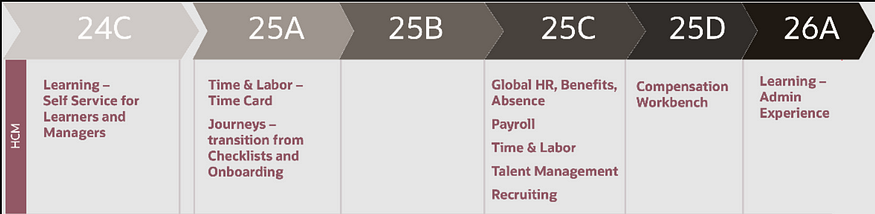
Redwood New Timeline

Originally Journeys and Time Cards were going to be mandatory in 24D, but these have been pushed back to 25A. This gives us a bit more breathing room to move forward in our Redwood journey.

Here are the top 5 new features in Core HR for Release 24D. Please keep in mind that Oracle will continue to roll out additional features throughout the quarter, if there are any subsequent features of note, I will do a follow up blog on these.

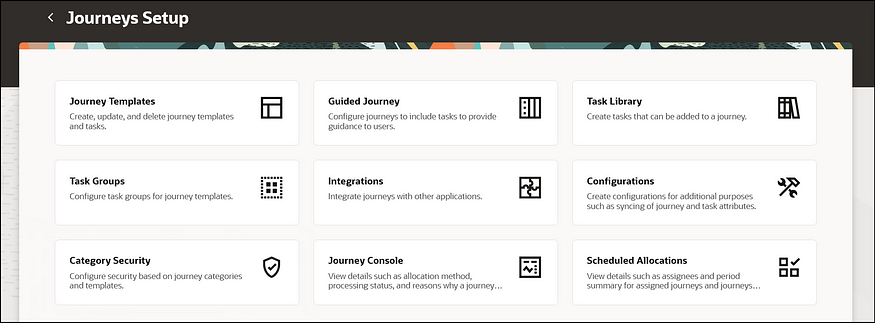
Redwood Journey Setup Page

1)Redwood Journey Setup page. It won’t surprise anyone that given the mandatory move to Redwood Journeys in Release 25A, this is a very Journey heavy release. The first key point of note is the new Redwood Journey Setup page. This is the new landing page for anyone wanting to do any configuration relating to Journeys. As part of this, the Journey Templates; Journey Task Groups and Journey Task Libraries have all moved to Redwood.

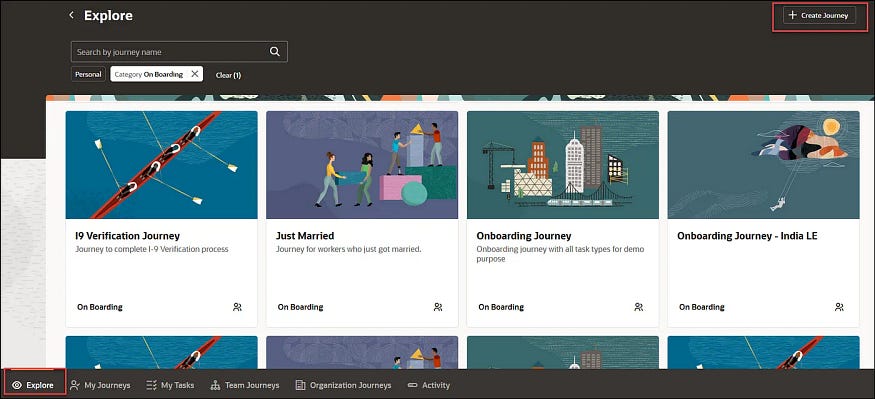
Redwood Journeys Explore

2) Journeys Available for Non Workers. Keeping on the Journeys theme, I’m delighted that Oracle have now made it possible to assign Journeys to non-workers. Given the push towards the use of Journeys into all areas of Oracle Cloud, particularly SCM and Procurement, this doesn’t come as a large surprise. It does mean that where you have agency workers or Non Exec Directors set up as non-workers, it’s possible to assign Journeys and Journey tasks to them.

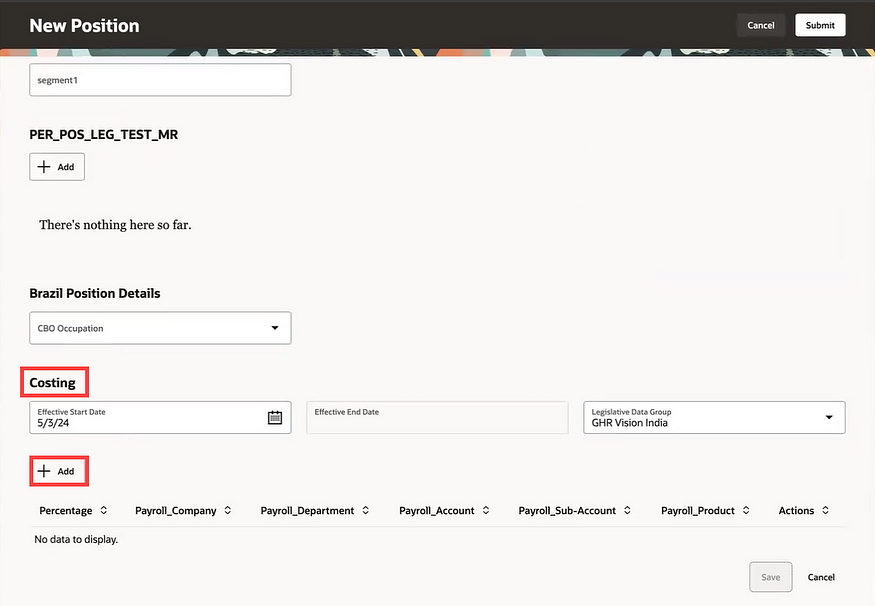
Redwood Position Costing

3) Redwood Position Costing. The introduction of position costing to Redwood might be quite a simple change, but it’s something that has been lacking in Redwood positions until now. Many organisations that also use ERP Cloud Financials want to be able to control where the costing of an employee is posted to based on the role they are doing. The introduction of Redwood position costing now allows this. It’s also possible to do split costing by percentage if multiple cost centres need to be charged for the work.

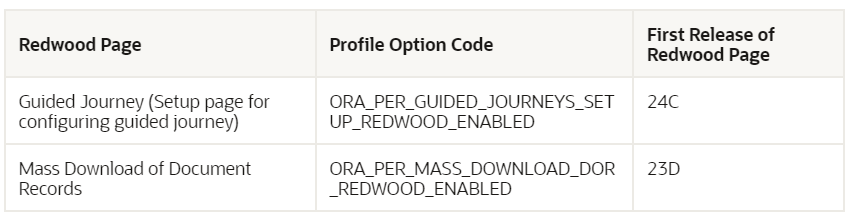
Redwood Pages Delivered Enabled in 24D

4) Redwood Pages Delivered Enabled in Release 24D. As we’re getting closer to the mandatory switch to Redwood pages, Oracle will be delivering certain Redwood pages automatically enabled. In 24D for Core HR there are only 2 pages being delivered switched on, the setup page for Guided Journeys and the Mass Download of Document Records. If you’re not ready for these to be in Redwood yet, they will need to be manually switched off in Manage Administrator Profile Values by setting the profile option to N.

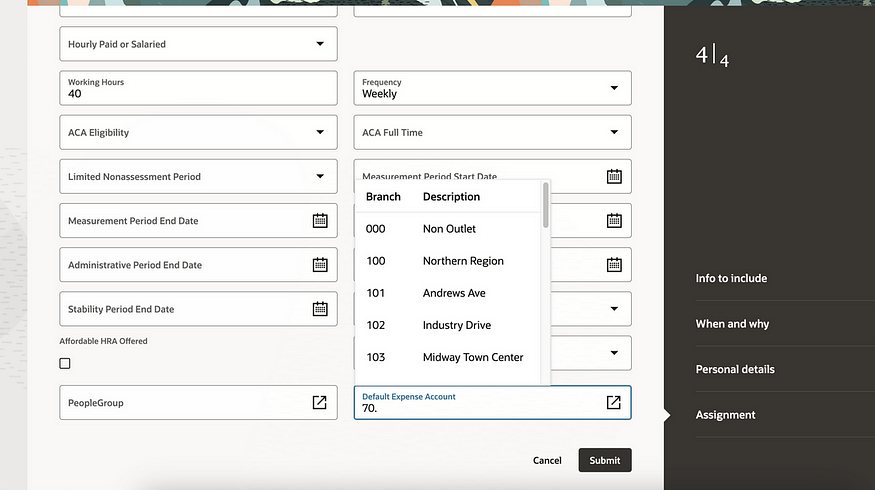
Redwood Default Expense Account in Employment Update Flow

5) Default Expense Account added to Redwood Employment Update Flow. These do need to be configured in the Business Rules area of VBS to be visible, but this is a feature that has been missed by many since Person Management became non-supported. Default Expense Accounts are required before any employee can claim expenses in the ERP Cloud Expenses module. Adding them into the hiring and updating employment flows will minimise the risk of this valuable data not being recorded.

As previously mentioned, Oracle is expected to introduce additional features in Core HR later this month. If these new features prove to be of note, I will create an updated blog post. Stay tuned for blogs covering other modules within HCM Cloud for Release 24D.

Click here to read more about Version 1’s Oracle capabilities.

About the author:

Kate Mead is an Oracle-certified HCM Consultant and Solution Architect at Version 1 with 14 years of experience in Oracle HR and Payroll systems, including 7 years with Oracle HCM Cloud. She has worked across implementation projects and managed services, has a sound knowledge of UK Payroll legislation and — before becoming a consultant — was an HR Manager.

If you have any questions or would like more information on how Version 1 can help you realise the full potential of your Oracle Cloud instances, please contact her at kate.mead@version1.com

Please note all screenshots are the property of Oracle and are used according to their Copyright Guidelines