Oracle HCM Cloud Talent 25C

Talent became mandatory in Redwood by Release 25C, but that doesn’t mean that Oracle haven’t given us some new features in this release. As usual, Oracle do usually continue to announce more features throughout the month, so if any significant additional features are announced, I will do a follow up post to highlight them.

In 25C Oracle have enabled combined goal administration pages, where you can view the performance and development goals administrative tasks on a single page. On the Performance and Development Goals page, unsurprisingly you can view and manage performance goals and development goals of any persons you have access On the Goals Library page, you can view and manage performance and development library goals. Then there is the Setup of Goals Mass Processes, which manages mass assignment process for performance and development goals and also the mass sharing process for performance goals. The final page within the admin pages are the Scheduled Processes for Goals, which again is fairly self explanatory. These changes are a simple one, but it will make life easier for Talent Administrators which can only be a positive thing!
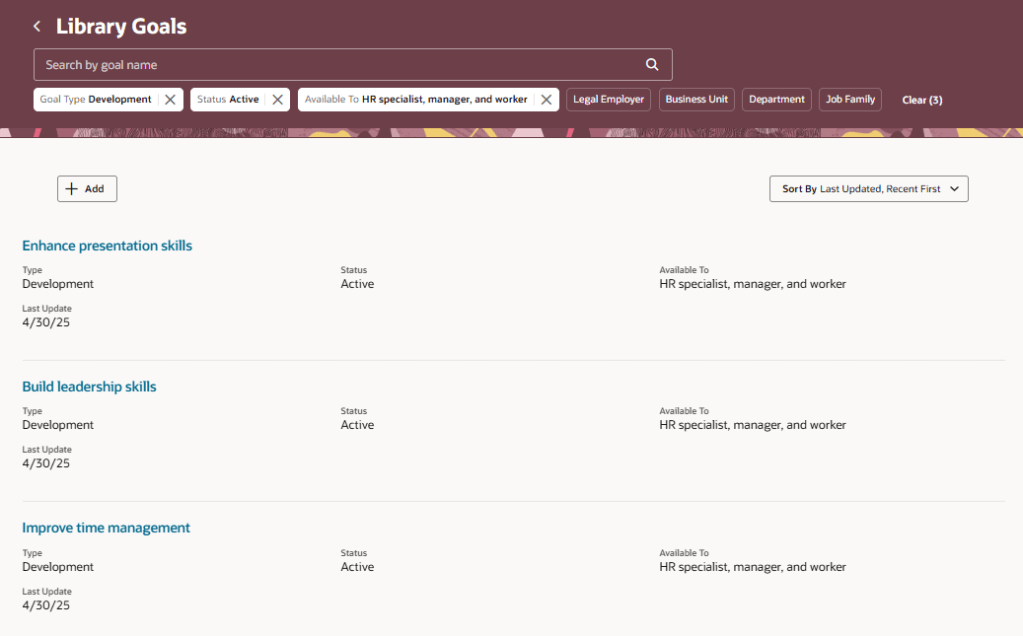
Library Goals Page Listing Performance Library Goals

Oracle has rolled out valuable enhancements to its Check-in templates, making performance conversations more efficient and tailored. You can now link Touchpoints check-in documents directly to performance review periods, eliminating duplication and ensuring a smoother flow of information. A particularly helpful update is the ability to include competencies from an employee’s position, job, or talent profile as discussion topics—this provides structure and relevance to each conversation. Additionally, organisations can now target specific employee groups by assigning eligibility profiles to Touchpoints templates, allowing for a more personalised and strategic approach to performance management.

Add Talent, Position, and Job Competencies as Discussion Topics

A small but impactful update from Oracle is set to make HR workflows more efficient—notifications can now be automatically sent to HR when general or goal-related feedback is submitted in response to an HR request. These alerts include a direct link to the feedback, saving HR teams from having to manually check each employee’s Goals or Feedback page. It’s a simple enhancement, but one that will be widely appreciated for the time and effort it saves.
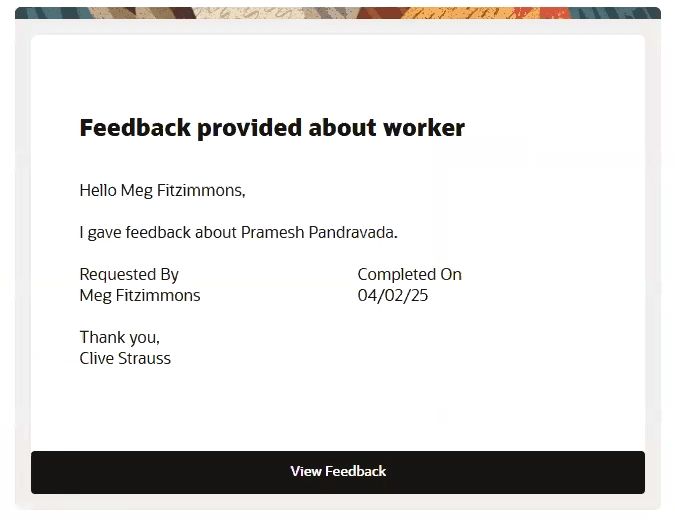
HR notified when feedback is received for a worker

It wouldn’t be an Oracle release without a touch of AI—and this one delivers just that. Managers using Redwood performance documents can now benefit from enhanced AI support during evaluations, making the process smarter and more intuitive. What’s especially reassuring is the new transparency feature: the data sources used to generate AI-suggested comments are now clearly displayed, helping to build trust in the insights provided. Additionally, a new page property allows you to set a minimum character count before an overall summary comment is generated, giving organisations more control over the quality and depth of AI-generated feedback.
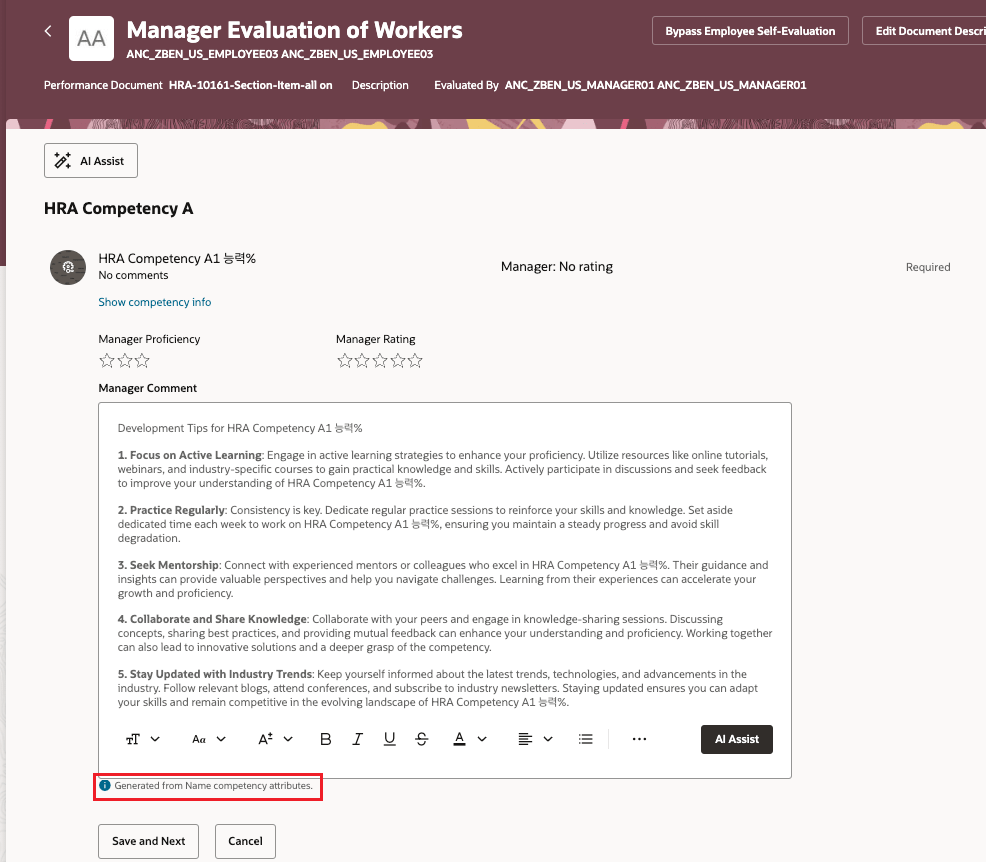
AI Enhancements For Manager Evaluations in Redwood Performance Documents

As mentioned earlier, Oracle often roll out additional features throughout the month. Should these updates be significant, I’ll publish a follow up blog post. Please check out my blog on the new features in Core HR for Release 25C here.

Please note all screenshots are the property of Oracle and are used according to their Copyright Guidelines

Oracle HCM Cloud Recruiting 25C

Earlier this year there was a split in the timelines for when Recruiting becomes mandatory in Redwood. Requisition Management, Job Applications and Candidate Management are all mandatory by Release 25C. Offer and Interview Management, Campaigns, Event and Agency Hiring are now mandatory by Release 26B. With this in mind, there are a lot of new features in release 25C to prepare for the second phase of Redwood for Recruiting. Oracle continues to deliver innovation, with new features rolling out throughout the quarter. I’ll be keeping a close eye on the updates, and if anything particularly noteworthy emerges, I’ll share a follow-up post to keep you in the loop.

Updated Redwood Timeline

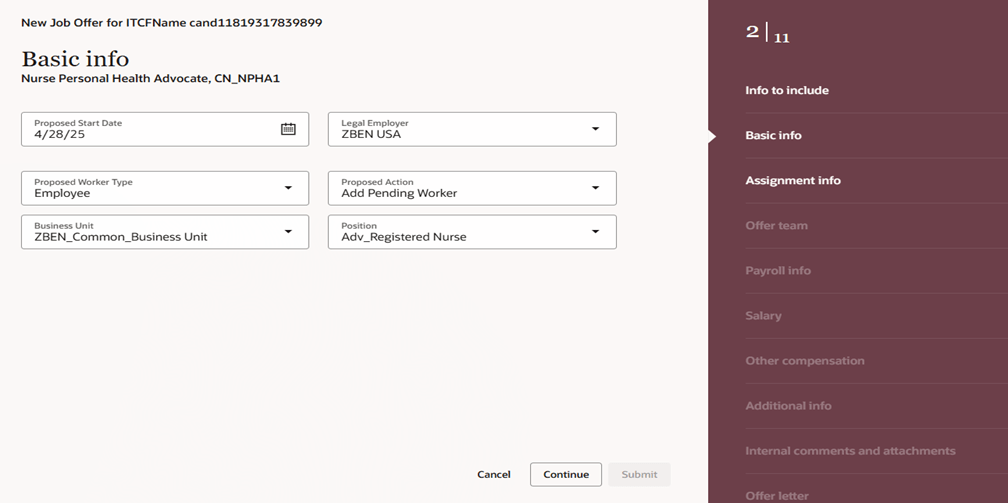
This release introduces Redwood functionality for Offers. It’s now possible to both create and delete an offer within Redwood. It’s possible to override information from the position during the offer process, unless Position Sync is switched on and then the option is greyed out. As with all new Redwood pages, I would recommend switching it on in your Development pod and checking out the functionality as soon as you receive 25B. The earlier you start testing, the easier it will be to adopt Redwood for Offers.

Create an Offer in Redwood

In this release Oracle have split out the Hiring tab, into two separate ones: Hiring and Candidate Sourcing. The Hiring tile now contains these tabs: Activity Centre; Messages; Requisitions; Offers; Candidate Search; Pools; Campaigns and Events. The new Candidate Sourcing tile contains these tabs: Events; Candidate Search; Pools; Messages and Campaigns. The separation of tiles will automatically happen if you have the ORA_REC_RECRUITING_REDWOOD_ENABLED profile. Only users who have security access to Candidate Sourcing will have access to the tile and it’s content.

Hiring Tile and Candidate Sourcing Tile

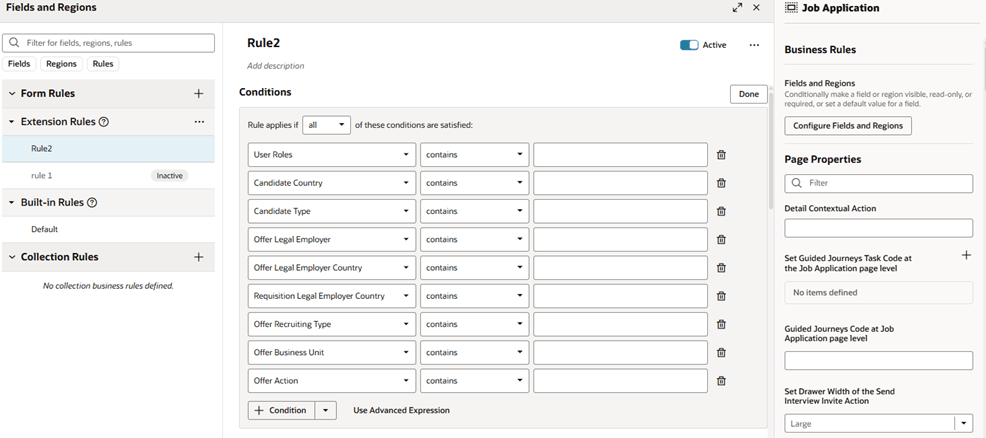
Whilst Job Applications are mandatory in Redwood by Release 25C, Oracle have added extra functionality within VBS to personalise the Job Application page. This is following customer feedback that requested additional fields to be available within Job Applications. Whilst the move to Redwood hasn’t always been smooth, I do think Oracle’s response to client feedback on additional personalisations that are requested and movement on mandatory timelines has been significantly more flexible than I would expect of an organisation of their size.

Visual Builder Studio to Personalize the Job Application Page

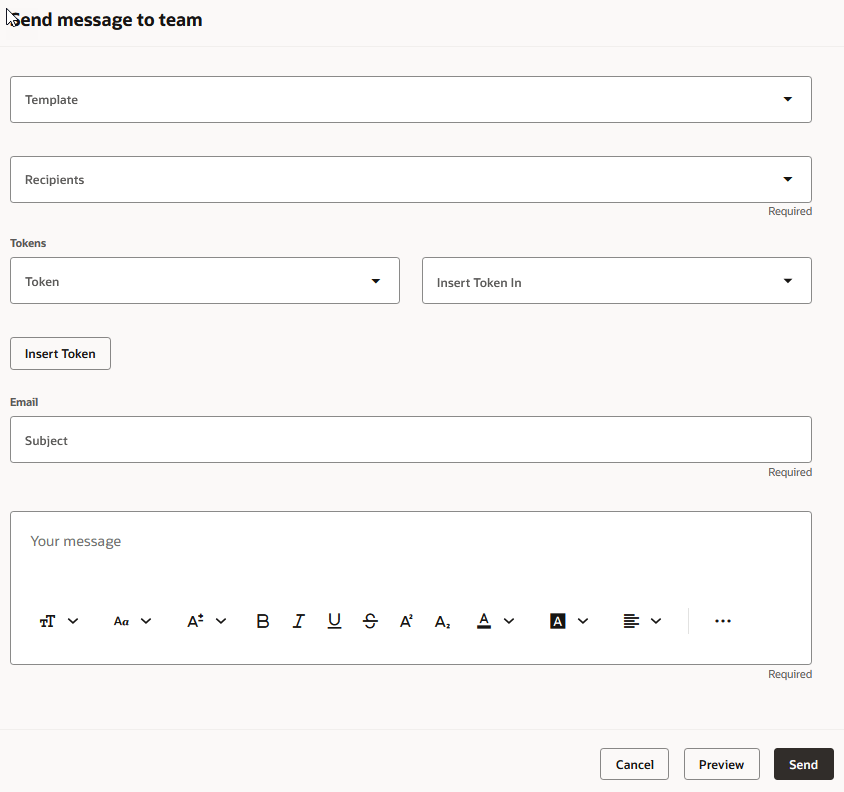
The Send Job Requisition and Job Application Related Messages to members of the hiring team has now been moved to Redwood. You can use a template to create the message or create it from scratch. The Recipients list will automatically display all the hiring team members, but you can type in the list to find other recipients. When you’re ready to send it, you can preview the message to ensure the content is correct and tokens are being resolved as expected. Once the message is sent, it’s available on the Messages tab of the job requisition, and on the Activity tab of the job application. 

Send Message to Team Panel

As I said earlier, Oracle generally continue to add new features throughout the quarter. I’ll be keeping a close watch on the updates, and if anything particularly impactful comes through, I’ll share a follow-up post to keep you informed and ahead of the curve. Please check out my blog on the new features in Core HR for Release 25C here.

Please note all screenshots are the property of Oracle and are used according to their Copyright Guidelines

Oracle HCM Cloud Payroll 25C

Everyone who knows me, knows that Quarterly Release time is my favourite time of the quarter, as I love finding out all the new features that Oracle have released. Payroll is mandatory in Redwood by release 25C, therefore there isn’t a large number of new features for Global Payroll in this release, but there are still some significant changes! Oracle will continue to roll out new features throughout the quarter. If any additional updates stand out, I’ll share a follow-up blog to keep you informed.

The first key point of note is that the Payroll Activity Centre will be automatically switched on in 25C. Given that it’s a really helpful tool, I would imagine this won’t cause any Payroll users hassle, but I wanted to flag it in case any organisations have delayed their move to Redwood for Payroll. If you don’t know what the Payroll Activity Centre is, it’s a one stop shop for all your payroll needs. You can run flows, check person results and do all of your usual Payroll transactions from one place. I’m a massive fan of all the activity centres, but this one is a massive leap forward for Payroll users.

Payroll Activity Centre

A number of pages have made the move to Redwood in this release. These include the Payroll Costing Setup and Process Summary pages. The Process Summary page allows for a high level summary of all payroll processes that have been submitted. The new page can either be accessed from the Payroll Quick Actions or the Payroll Activity Centre. This a much more user friendly way of reviewing any processes that have been submitted.

A new feature has been introduced to control how Retropay results are processed. Oracle have introduced the Retroactive Overpayment and Recovery for Earnings Elements process. How this differs from current behaviour is that rather than automatically processing the deduction for the overpayment in full, it is now offset resulting in no immediate impact to the employee’s net pay. You can then chose to setup and track repayments by the employee until it is paid back in full. This will ensure the fair recovery of overpayment.

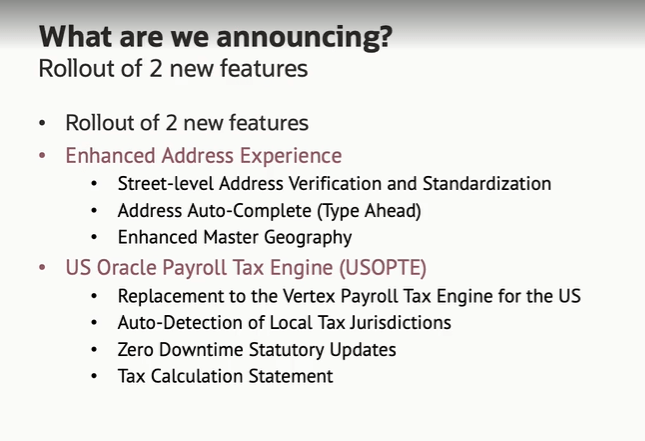
For those customers in the US, there is a significant change to US Payroll Engine. Oracle have introduced the new US Oracle Payroll Tax Engine (USOPTE) solution.  The key change is that all statutory tax data information is now maintained and delivered by Oracle Cloud. These include wage limits, filing statuses and allowance amounts. The new Engine will also perform federal, state, and local tax calculations within the payroll product and provide improved visibility of tax calculations with a Tax Calculation Statement.

US Payroll Engine Changes

As mentioned earlier, Oracle often roll out new features throughout the month. Should these updates turn out to be significant, I’ll publish a refreshed blog post. Please check out my blog on the new features in Core HR for Release 25C here.

Please note all screenshots are the property of Oracle and are used according to their Copyright Guidelines
Oracle HCM Cloud Core HR 25C

It doesn’t feel that long since we started talking about 25B, but now its time for 25C! With Core HR being mandatory in Redwood by Release 25C, I would be lying if I said there were a significant number of new features for Core HR in 25C, but there are some features of note! Please keep in mind that Oracle will continue to roll out additional features throughout the quarter, if there are any subsequent features of note, I will do a follow up blog on these.

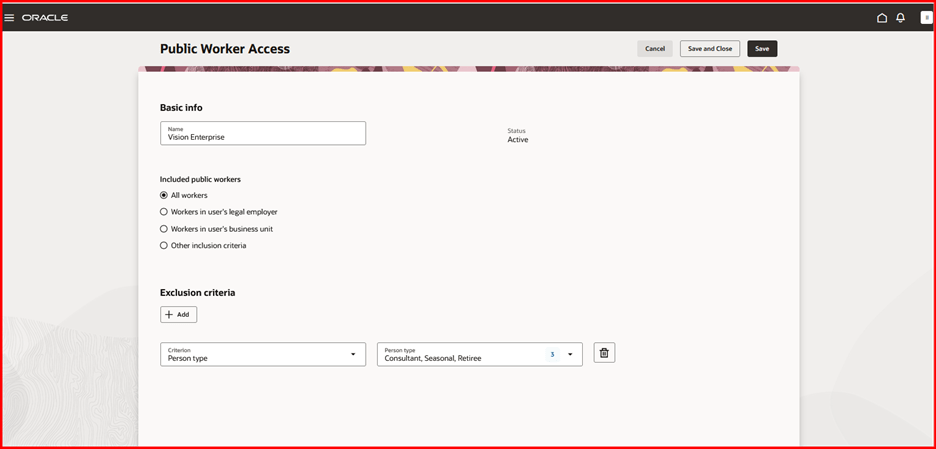
A lot of organisations, particularly in the public sector have been eagerly awaiting the changes to the Public Worker Search functionality. For those of you who don’t know what Public Workers Access is, it determines which employee records are returned in searches and other public-facing views. This allows for controlling the visibility of sensitive information like job codes or positions by applying user-defined criteria. 25C is the first release that brings Public Worker Access support to Oracle Search and Redwood. So what does this mean? If you need to limit employees or positions being available in Public Search due to the confidential nature of their role, now you can! It can be configured in a variety of ways including adding exclusion criteria.

Public Worker Access

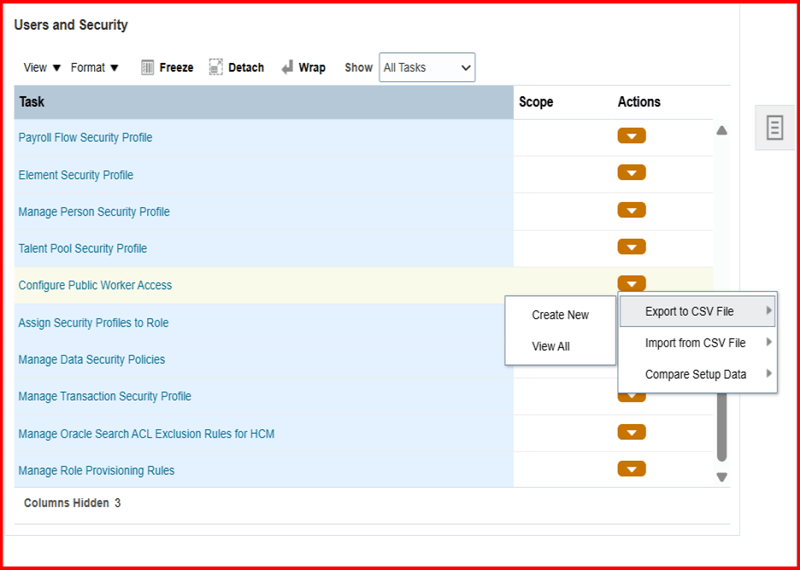
In addition, Oracle have introduced the ability to export your Public Worker Access between pods. This will allow the migration of Public Worker Access configuration to be much simpler and remove any risk of human error. It will ensure that the config that has been tested in your development pod is the same as what is deployed in Production.

Exporting Public Worker Access Configuration

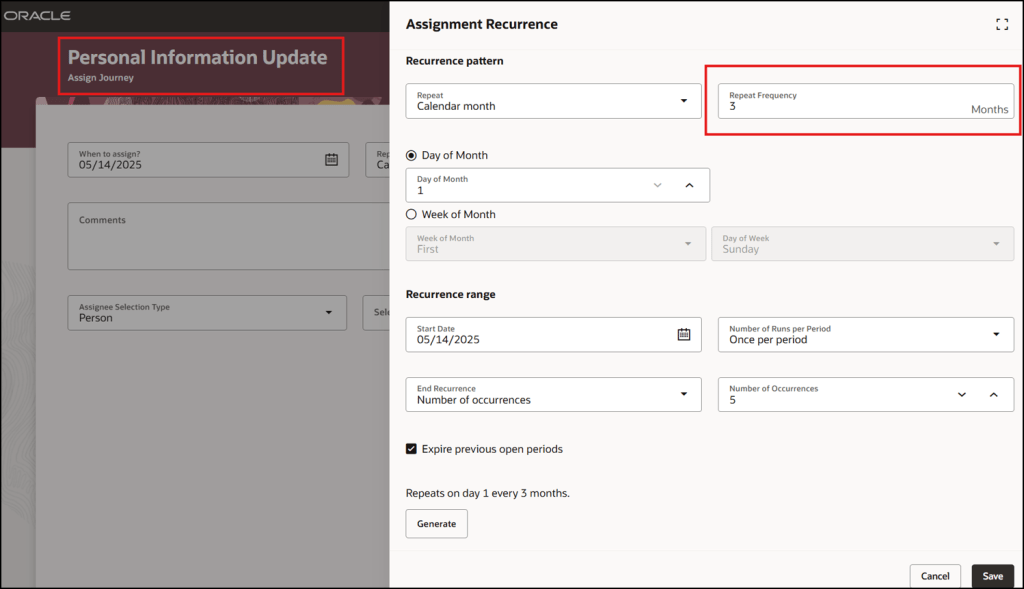
There are a lot of Journey related features in this release. One I particularly like is quite a simple change but I think it will add significant value. The ability to easily schedule recurring Journeys will make Journey administration a lot easier. The flexibility of being able to chose the frequency, but also limit the number of times the Journey is assigned makes this such a great addition.

The final Journey feature that I want to highlight is the ability to embed Multi Agents into Guided Journeys. This will allow a variety of different AI Agents to be embedded into pages with ease. Added AI Agents to pages is done via Guided Journeys and this new functionality makes it much easier. This is the perfect time for this improvement when we’re all prepping for the introduction of AI Agent Studio to speed up the process of creating AI Agents!

Embedded Multi AI Agents in Guided Journeys

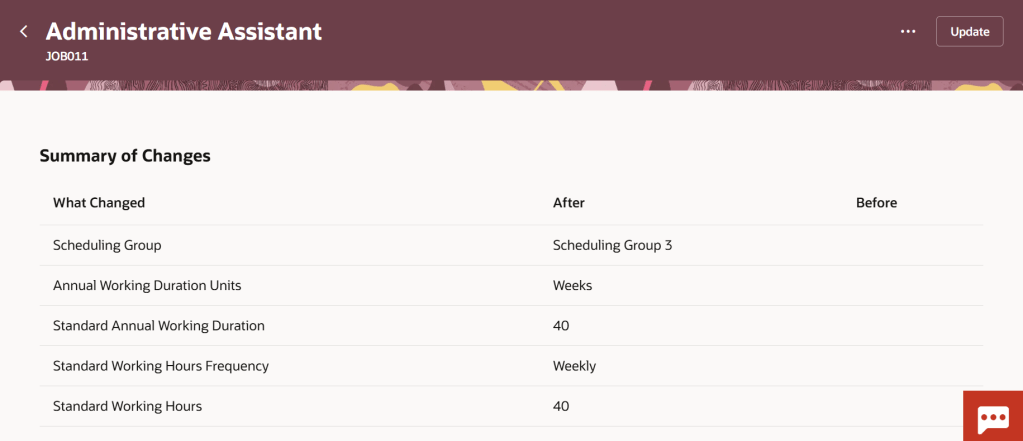
The other area of Core HR with significant changes are within the Workforce Structures workspace. There are a number of new pages that have moved over to Redwood, including the  Legal Entity HCM Information and Legal Reporting Unit HCM Information pages. Additionally Oracle have given more flexibility in adding extra attributes on the summary of changes page for all Workforce Structure changes. These fields can be added in via VBS to allow for the easy review of changes to fields that are important to your organisation.

Additional Attributes in Redwood Workforce Structures Change Summary

As mentioned earlier, Oracle plans to roll out new features in Core HR later this month. Should these updates turn out to be noteworthy, I’ll publish a refreshed blog post. Additionally, keep an eye out for upcoming posts that will cover other modules within Fusion for Release 25C!

Please note all screenshots are the property of Oracle and are used according to their Copyright Guidelines