Why Embedded AI Is the Real Differentiator in Enterprise Automation

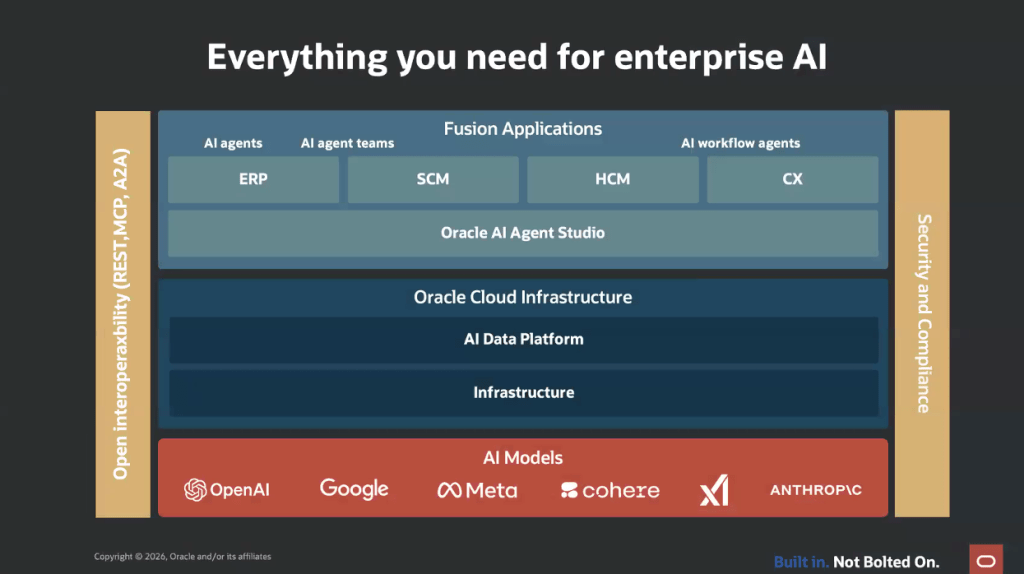
AI is everywhere at the moment, there’s really no getting away from it, but not all AI is created equal. Plenty of platforms promise co‑pilots, assistants and automation, yet very few can actually take action inside core business systems. That’s why Oracle’s approach with AI Agent Studio for Fusion Applications really stands out.

Most enterprise AI tools today act as co‑pilots: brilliant for drafting content or answering questions, but far less capable when it comes to genuine process automation. Oracle has taken a different approach. Its AI agents are embedded directly within Fusion Applications, giving them the power to:

  • Understand business data in real time
  • Make decisions with full context
  • Write back into transactional systems securely
  • Automate tasks end‑to‑end without relying on extra tools

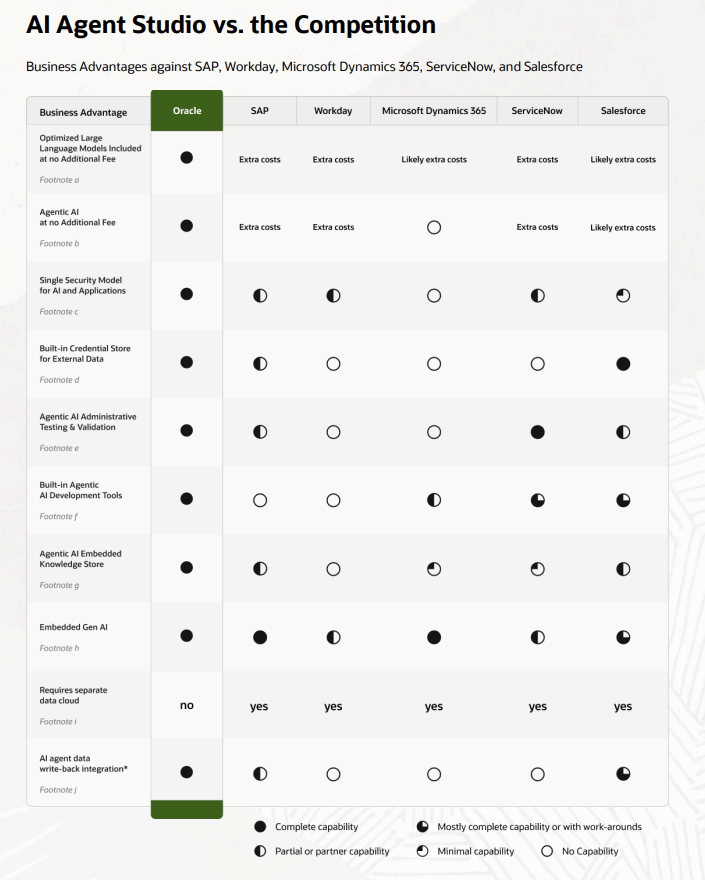
This isn’t AI “bolted on”, it’s AI woven right into the core of the application. And yes, I realise I’m starting to sound like an Oracle salesperson, but the difference between Oracle and other providers is hard to ignore. The image below highlights just how significant that gap is, comparing what Oracle delivers with five other major service providers.

Across the market, vendors are running into the same familiar obstacles:

  1. Added AI costs. Whether it’s Copilot capacity, ServiceNow’s AI tiers or Salesforce Flex Credits, AI is frequently positioned as an optional extra rather than something included as standard.
  2. Co‑pilots, not agents. Microsoft, Salesforce, Workday and others are excellent at generating content and offering recommendations, but they seldom deliver true autonomous action within transactional systems.
  3. Fragmented platforms. Many providers depend on several data models, clouds and integration layers. Their AI often relies on separate analytics environments or copied data, which strips away workflow context and makes automation far more difficult.

You may have already come across Oracle’s One Platform, and this is where Oracle really pulls ahead of the pack. Oracle keeps things refreshingly straightforward: Fusion Applications, data and AI all sit within a single, unified ecosystem. That brings three key advantages:

  • Embedded intelligence — agents work directly inside the applications employees use every day.
  • A unified security and data model — consistent governance and safer, more reliable automation.
  • True write‑back — agents can update transactions natively, without middleware or separate AI clouds getting in the way.

So you might be wondering, “That all sounds impressive, but what does it actually mean for me?” At its core, agentic AI is about cutting down manual effort, improving accuracy and boosting operational efficiency. Oracle’s embedded approach ensures that automation is reliable, properly governed and able to scale as your business does. Crucially, it isn’t stitched together from multiple products. With Oracle, AI is built in, a fundamental part of the system that runs your business, not an optional extra layered on top. It marks a shift from AI that simply talks, to AI that genuinely delivers.

Please note all screenshots are the property of Oracle and are used according to their Copyright Guidelines

METRO – The Jewel in the Crown in Oracle AI Agent Studio

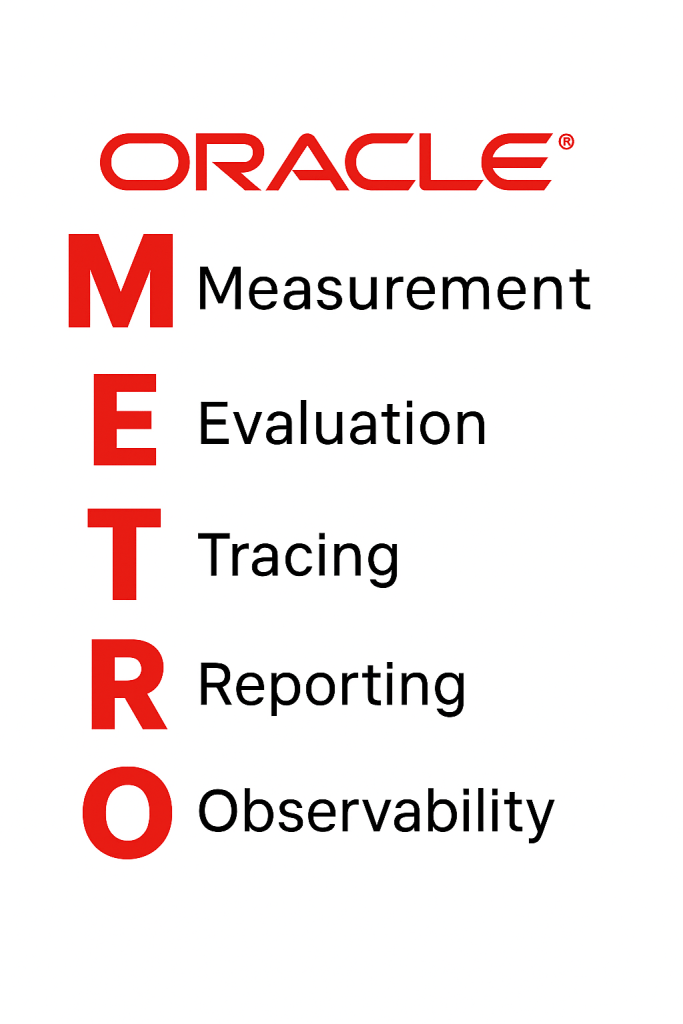
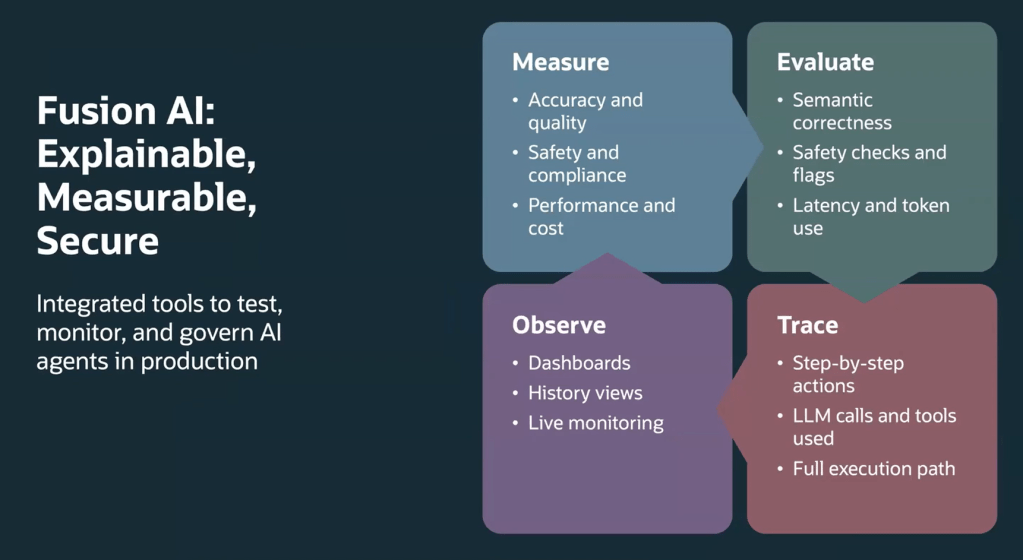
Have you heard about METRO? METRO is the embedded measurement and observability framework within Oracle AI Agent Studio. It stands for:

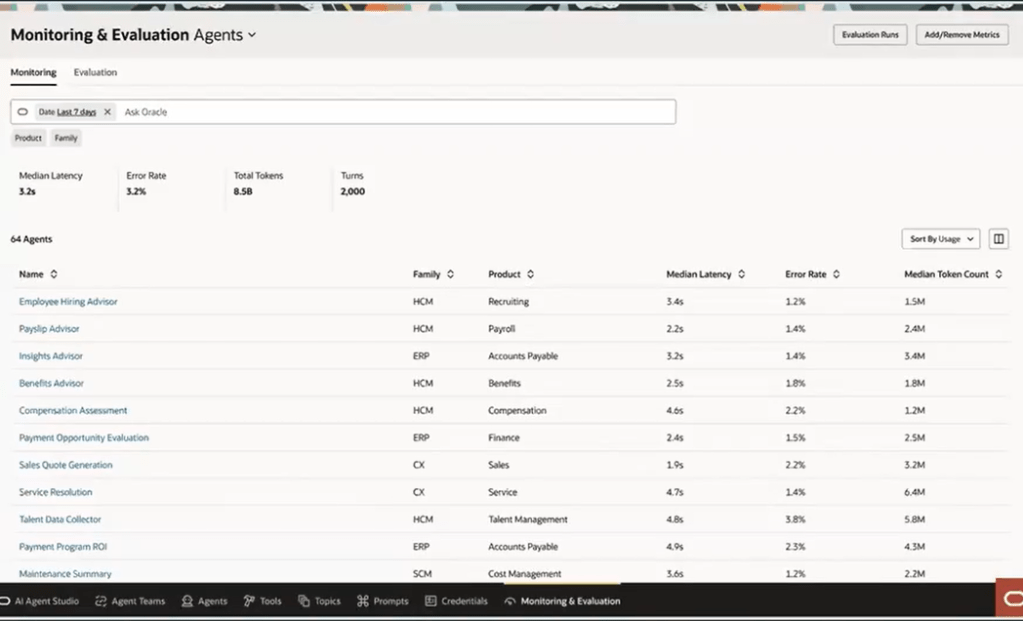
Oracle have introduced METRO as part of release 25D. It is a brand-new set of monitoring and evaluation tools built right into Oracle AI Agent Studio. Think of METRO as your control centre for AI agents in production. It gives you everything you need to keep an eye on accuracy, compliance, performance, costs, latency and even token usage. In short, it helps you make sure your agents are doing exactly what you expect, without any surprises.

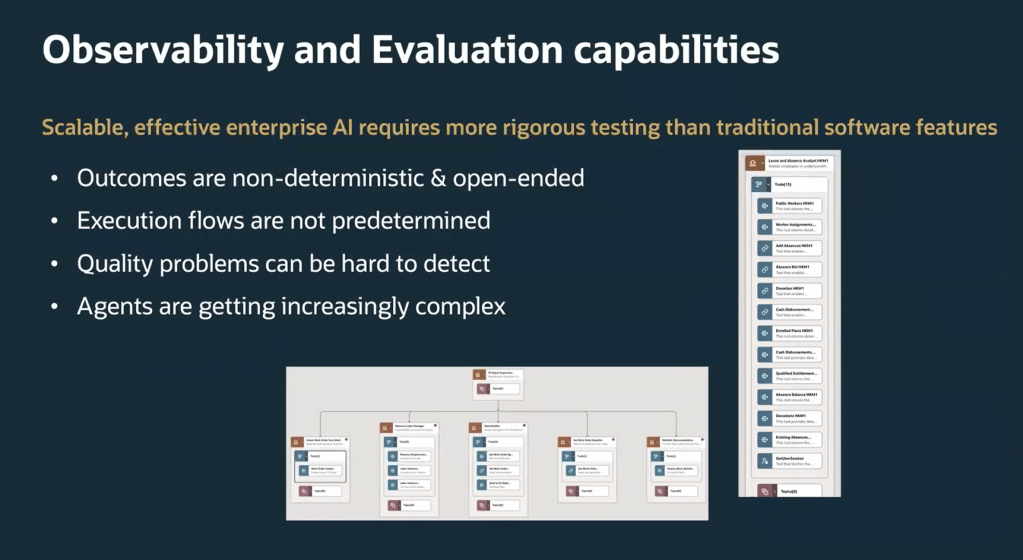
The world of AI agents isn’t straightforward, responses can vary, workflows aren’t always predictable, and traditional checks don’t always work. That’s where METRO steps in. It’s designed for this new reality, offering smart ways to check semantic correctness, track detailed performance metrics and keep guardrails in place against risks like prompt injection. Whether you’re running complex multi-agent setups or more structured workflows, METRO makes it easier to stay on top of quality and reliability.

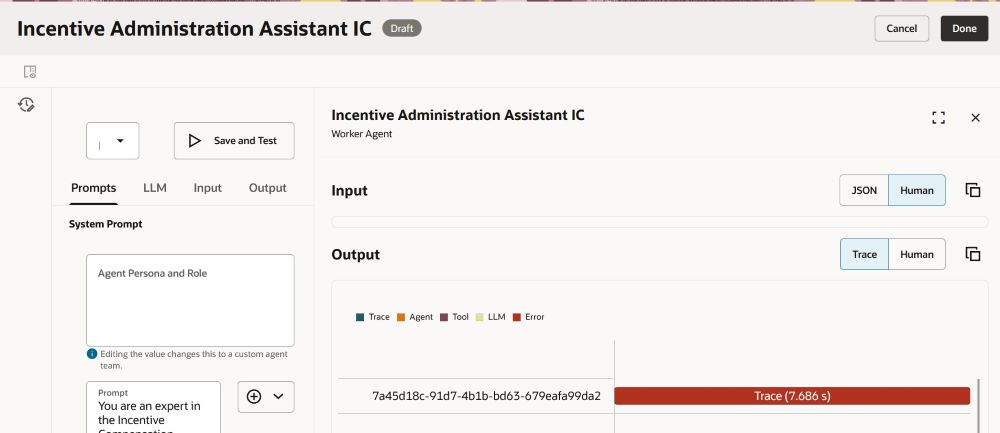
One of the best parts? The dashboard. It gives you a clear view of key stats like latency, error rates, token counts and correctness scores. And if you want to dig deeper, you can trace every single step an agent took, from LLM calls to tools used and outputs generated. This level of detail means you can troubleshoot quickly and optimise performance without the guesswork.

METRO also helps with testing, using the industry-standard LLM-as-a-Judge approach to score responses and provide feedback you can act on. Combine that with new features in 25D, like deterministic workflow agents and support for models such as GPT‑5 mini, and you’ve got flexibility to build agents for any scenario.

METRO isn’t just another feature, it’s a game-changer for anyone looking to manage AI agents with confidence. By combining deep insights, flexible evaluation tools and full traceability, it gives you everything you need to keep your AI ecosystem running smoothly. And with the added power of new models and workflow options in 25D, you’ve got all the tools to innovate faster and smarter. The future of AI governance starts here and METRO makes it simple!

Oracle HCM Cloud Recruit 26A

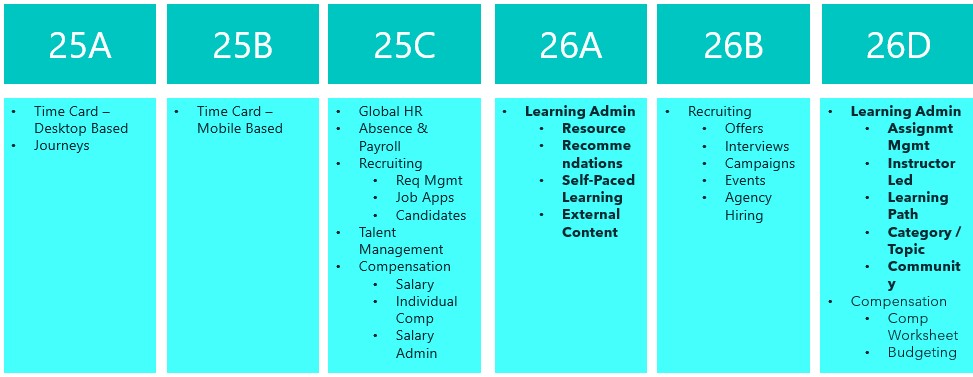
Things are really heating up in the world of Recruit as we approach the final deadline to move the remaining Recruiting pages over to Redwood in 26B. This release is your last opportunity to make the switch. With the 25C deadline behind us, you should already be managing requisitions, job applications and candidates in Redwood. The next phase brings exciting updates around offers, interviews, campaigns, events and agency hiring. So, let’s dive in and see what’s new…

The AI Career Coach, first introduced in 25D to help candidates find roles that match their skills, has already been enhanced in 26A. The Career Coach now uses the Supervisor model, which brings all agents together under one umbrella, streamlining information sharing and removing redundancies. The agent is pre-seeded and ready to run, so there’s no need to create agents from templates. You can also choose to display the widget as an overlay, ideal for highly customised sites, rather than the default side panel, ensuring it doesn’t interfere with your design. For one-page application flows, the widget now displays correctly, and when shown as a side panel, the navigation menu is replaced with a horizontal progress bar. The fixer button appears on the page instead of the left-hand side, and a clickable Terms and Conditions link pulls content from the job application legal disclaimer in the Recruiting Content Library. If you’ve enabled CV parsing, candidate CVs will be parsed into the application flow when uploaded via the widget. From this release, any CV uploaded into the recommended jobs widget in the candidate experience will also be available to the agent.

As many of you know, I’m a big fan of AI, anything that makes life easier. The next update introduces an AI assistant for job requisition creation, working like a smart, on-page helper that answers both general and field-specific questions as you build a requisition. Because its guidance is driven entirely by the documents you upload and the prompt you configure, it’s easy to tailor to your organisation’s policies and practices. The agent helps users get it right first time, capturing the correct data, minimising downstream issues and boosting overall efficiency without interrupting the flow.

By 26B, the Job Offer process must be fully transitioned to Redwood, and Oracle has introduced a new AI agent to make this easier. Acting as an FAQ-style assistant, the agent helps users by answering both general and field-specific questions during job offer creation. Its guidance is based entirely on the documents you upload and the prompt you configure, making it simple to align with your organisation’s policies and practices. This smart assistant ensures job offers are created smoothly, reduces downstream issues by capturing accurate data, and boosts overall efficiency without disrupting the process.

Another useful Redwood Offer feature is the Initiate Job Offer Creation for Hiring Managers functionality. Hiring managers with the Initiate Job Offer privilege can now start the process and share notes with the recruiting team using the Create Job Offer action from the Redwood job applications list or details page. On the Create Job Offer page, they can add comments in the Notes to Recruiter field to provide context or instructions. Once they click Save and Close, the candidate’s application moves to Offer – Draft status and appears on the Redwood Job Offers list page. The recruiter receives a notification to complete the offer details using the Edit Offer action, with the manager’s notes displayed in a banner above the Details and Offer tabs. When ready, the recruiter can submit the job offer for approval or save it for further editing later.

The final feature worth mentioning is the new Redwood Interview Details page, which brings several improvements over the previous responsive version. A new Basic Info section now displays key interview details at a glance. In the Interviewers section, you can easily resend the Interview Scheduled notification, handy if someone says they haven’t received it. The Scheduled Candidates section allows you to click candidate and job requisition links to open a drawer with more information, and the Actions menu lets you manage candidates scheduled for the interview. Under Interview Resources, you’ll find interviewer guidelines, attachments and candidate notes added to the interview. If you’re an interviewer, you can respond directly to the invitation, accept, tentatively accept, decline or propose a new time. When proposing a new time, the drawer can even display your availability if calendar integration (Microsoft 365 or Google) is enabled.

Oracle often slip in new features during the month, so it’s worth keeping an eye out. If anything truly game-changing appears, I’ll share another blog post to keep you updated and make sure you don’t miss out. In the meantime, why not check out my latest write-up on the new Core HR features in Release 26A? You can find it here.

Please note all screenshots are the property of Oracle and are used according to their Copyright Guidelines
Oracle HCM Cloud Payroll 26A

It’s that time again, quarterly release time, and there’s plenty to look forward to! With Oracle’s strong focus on AI, Release 26A promises some exciting updates. Oracle often adds extra features throughout the month, so keep an eye out for more enhancements as they arrive. This release is especially important for UK Payroll customers, as it includes all the new tax year functionality.

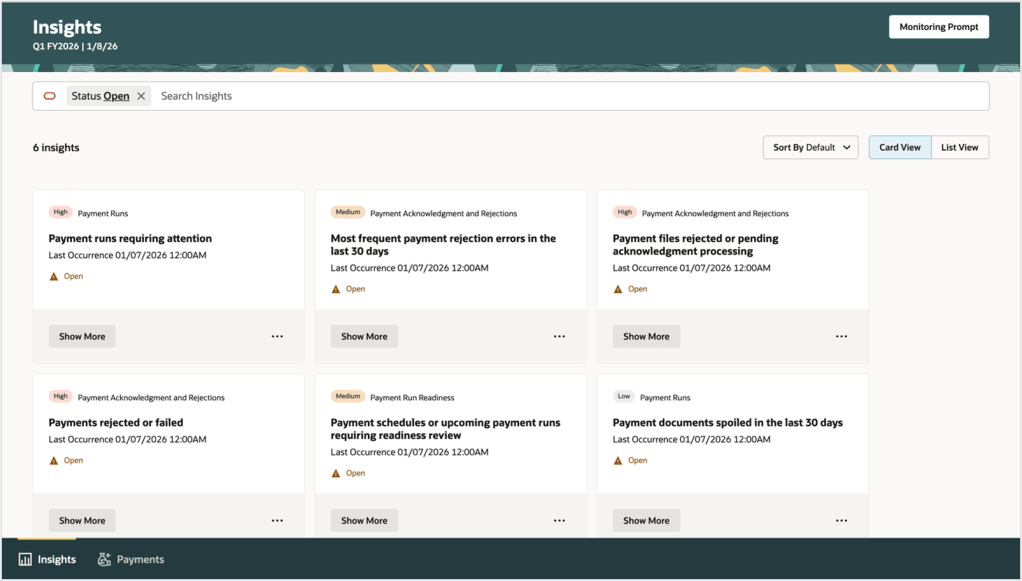
Global Payroll introduces an exciting new AI-powered tool, the Payroll Administrator Troubleshooting Agent. Known as the Payroll Run Analyst, this assistant helps payroll administrators validate employee payroll results directly from the Payroll Results page, including reviewing statements of earnings. Built on Oracle’s AI Agent framework, it delivers secure, role-based information within your permissions and significantly reduces manual effort during payroll reconciliation. It also streamlines corrective actions with deep links to related HCM pages, such as earnings and deductions, for quick updates. Best of all, it requires no extra setup and is ready to use immediately, with a chat experience coming in a future release.

Another feature worth highlighting is the redesign of payslip templates using the Redwood toolkit. The new Redwood Payslip offers a far better experience than the previous responsive version, but until now it only worked with the seeded payslip, which most organisations don’t use. With this update, the Redwood payslip can be viewed online or downloaded, and the PDF/UA templates are fully accessible while meeting all legislative requirements for payslip reporting. To stay compliant with local regulations, Oracle recommend adopting the Redwood payslip template as soon as possible.

As mentioned earlier, this release includes the UK legislative updates for the new tax year. Please note that a monthly patch may be required to incorporate any additional changes announced by the UK Government closer to April. One key update relates to the Full Payment Submission (FPS). You can now choose whether employee addresses are reported for all employees or only new starters. This option applies to the FPS processes for tax years ending April 2025 and April 2026. To set this, use the new field Employee Address on FPS from Tax Year 2024–25 on the organisation-level Statutory Deductions calculation card. By default, this is set to All Employees.

There’s also an update to the P60 template for the 2025/26 tax year. A new Statutory Neonatal Payment field has been added to the Statutory Payments section of the P60, along with a corresponding balance in the UK Balances for the End-of-Year Archive group. To generate and issue P60 End-of-Year Statements to employees, use the updated templates for 2025/26: Type LE(P), eP60 – Online and Plain Paper.

New payroll attributes have been introduced to help organisations set up adoption, maternity, and paternity absences for calculating benefit payments or offsets. Detailed steps are provided to guide you through creating the necessary elements, entitlement formula result rules, balance feeds, and validation formulas based on delivered templates. You’ll also find instructions for setting up entitlement formulas, certificates, absence plans, and absence types, ensuring a smooth and compliant process.

Oracle has now introduced Advance Pay for Irish legislation, giving employees the option to request payment before going on holiday. The amount is then recovered over a set period, such as weekly, bi-weekly, or lunar cycles, as needed. Before processing Advance Pay, make sure all other earnings and deductions have been completed. You’ll also need to configure Advance Pay usage and ensure that earnings are correctly processed during the holiday period.

Enhanced Reporting Revenue (ERR) Requests are now available, making compliance easier. After payroll runs and prepayments that include ERR element entries, use the Run Enhanced Reporting Submission Request. You can also run this process for a specific time period to report on unprocessed ERR entries, such as Travel and Subsistence, Remote Working Daily Allowance, and Small Benefit Exemption. The process generates three outputs: an ERR Audit Report showing archived employee and element details, an Errors and Warnings report, and a JSON file for Revenue submission via the Send File Submission process. For corrections, use the Run Enhanced Reporting Correction Request on previously submitted ERR files. This creates a revised JSON file, an ERC Audit Report, and an Errors and Warnings report—ready to send to Revenue.

As I mentioned earlier, Oracle usually drops extra features throughout the month, so keep an eye out! If anything really exciting comes along, I’ll post an update to make sure you’re in the loop. In the meantime, why not check out my latest blog on the new Core HR features in Release 26A? You can find it here.

Please note all screenshots are the property of Oracle and are used according to their Copyright Guidelines
Oracle HCM Cloud Core HR 26A

It’s the most wonderful time of the quarter! Sorry, I just put up my Christmas tree and now I’m feeling festive. Oracle have just announced the latest features that will be coming in release 26A. As you would expect, it’s an AI heavy one! As usual, additional features may follow later this month. In the meantime, let’s review what’s been introduced so far.

The first feature is one I saw at AI World in October and I thought it was great, so I’m glad it’s here now. The new Manage Journeys with AI Assistant makes managing employee journeys so easy. Powered by Oracle’s AI, it understands your everyday questions and gives you clear answers that fit your organisation’s rules. Need to check overdue tasks, see onboarding progress, or jump straight to the right page? Just ask. It cuts through the clutter, saves you time, and means less training for your team. Managers and HR can quickly get the info they need without digging through menus, so you can spend less time clicking and more time supporting your people.

Everyone loves a good dashboard, and now there’s the new Redwood View Legal Employer Changes Dashboard. It’s your one-stop shop for reviewing and keeping track of all global transfers, but only those that you have access to. The dashboard gives you a clear summary of each worker’s transfer details, making it easy to stay on top of changes. One thing to note: even if the Change Legal Employer dashboard is enabled for Redwood, the deep links on this page still follow their own product-specific profile settings. For example, if you click the Compensation Info link, it will open the Compensation page based on its profile option. It will only open in Redwood if that page’s Redwood setting is enabled, otherwise it will open in the responsive view.

HR teams already have plenty on their plate, so there’s a growing shift towards employees taking ownership of their own data and using self-service wherever possible. The new Request My Assignment Change feature makes this easier than ever, allowing employees to update their own assignment details through a simple Redwood process. From the self-service interface, employees can now request changes to update their work location or adjust their working hours, without any HR involvement. The Request My Assignment Change process uses the existing assignment approval framework. To customise approvals for this request type, configure rules with:
sensorDataReferenceCode = "RequestMyAssignmentChange".

Two new AI features are now available in Workforce Structures: the Job Assistant and the Workforce Structures Insight Analyst. The Job Assistant speeds up creating roles by asking a few simple questions and setting up the job with minimal details like name and code – quick, straightforward, done. The Workforce Structures Insight Analyst is where things get really powerful. Acting as an intelligent companion, it gives you instant access to workforce structure data without the need to build custom reports or navigate complex analytics. You can ask natural language questions and receive clear, actionable answers tailored to your organisation’s policies. Managers can quickly get summaries of job families, positions, and organisational hierarchies; compare structures across teams; and even analyse areas that aren’t covered by standard reporting tools. It’s designed to save time, reduce complexity, and provide insights that help you make informed decisions faster, all from a single, intuitive interface.

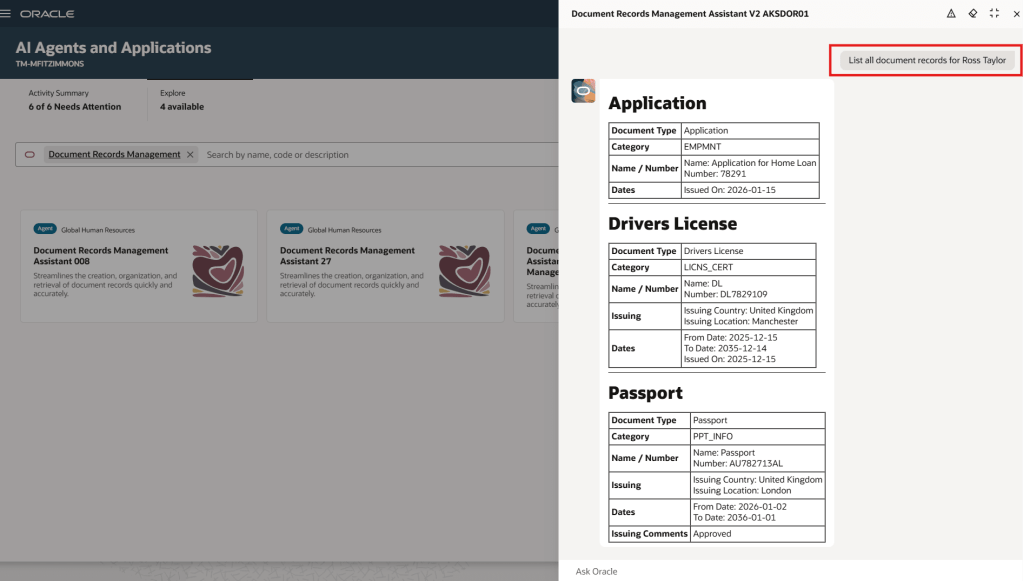
The Document Records Management Assistant brings AI to one of the most essential yet often overlooked areas, document records. This smart assistant makes creating, organising, and finding records quick and effortless. Using advanced language models, it understands the context of each document type and offers helpful suggestions, so you can capture records accurately, categorise them correctly, and retrieve them when needed. With natural language interaction, direct links, and intuitive guidance, it removes complexity, reduces training, and even anticipates intent, such as fetching the latest passport record. In short, it streamlines document management into a simple, conversational experience.

As mentioned earlier, Oracle will be rolling out new Core HR features later this month. If any of these updates turn out to be particularly significant, I’ll share an updated blog post with the details. In the meantime, keep an eye out for upcoming posts where we’ll dive into other Fusion modules as part of Release 26A.

Please note all screenshots are the property of Oracle and are used according to their Copyright Guidelines
Oracle AI World – Day 2 Part 1

Day 2 was a jam packed day! I started with a session on using AI to accelerate HR processes; had another wander around the stands learning about all the upcoming features, attended Steve Miranda’s inspirational Key Note and finished the day with a session on AI use in EPM, which is a product I’m trying to learn more about. It was also the day of the Oracle ACE dinner and the party with Def Leppard, but I was so tired I gave the party a miss! There was so much happening on Day 2 that I’ve had to split it out into 2 blogs. This one will cover Accelerating HR with AI and EPM and AI. Steve Miranda’s key note will be in the second blog.

As soon as I saw Nancy Estell Zoder was presenting this session, I knew I wanted to see it. Having attended the Partner Day following Oracle CloudWorld in London, Nancy was a really dynamic presenter and it made me want to attend this one, I wasn’t disappointed! There was the added bonus of Jon MacGoy presenting too.

The overall introduction was really interesting. As someone who loves a stat, I loved hearing how successful the HCM Cloud product has been this year. It also recapped the breadth of the product, which whilst it is known by most, it’s always helpful to see the info graphic listing them all and how they relate to each other.

The feature that Jon demoed was one of my absolute favourites of the whole conference. Oracle are introducing a new way to use Journeys, Personal Journeys. If a user has some tasks they wish to carry out, but don’t want to write a to do list to remind them, Oracle have now provided a systemised solution. A user can now add tasks to a Personal Journey and create their own custom checklist of activities. On top of this, an AI Agent can be used to make the creation of the Personal Journey more streamlined. By asking what tasks do I have outstanding, the AI Agent will generate a Personal Journey that will incorporate all outstanding tasks that the user wishes.

AI World has really triggered an interest in EPM. I’ve enjoyed discussions with Product Managers, colleagues and other attendees on EPM. Given this, I was very keen to learn more about AI use in EPM. The session was a customer forum, but was really interactive. Numerous questions were asked of the audience who responded by displaying paddles with responses on.

It was an interesting discussion giving the perspective from both IT and Finance. The key points were the speed and accuracy of Financial Planning, which was cumbersome prior to the use of EPM. It has definitely triggered a lot more questions for me, which I will do further research on. When I do, I will share it with you!

That wraps up my summary of the first part of Day 2 at Oracle AI World in Las Vegas 2025. Keep an eye for more posts, as I’ll be sharing write-ups from Steve Miranda’s key note and also from day 3.

Please note all screenshots are the property of Oracle and are used according to their Copyright Guidelines
Oracle AIWorld – Day 1

Day 1 was a completely different experience to Day 0. The crowds descended, and to be honest, it was a bit overwhelming. On Day 0, I had the freedom to drop into any session I fancied; by Day 1, everything was packed and sessions were full to the brim. Rather than resting on my laurels, I took the opportunity to explore the exhibition stands, chat with Oracle Product Managers, and get a sneak peek at what’s coming soon in the Fusion product line.

My background is in HCM, so I really appreciated the chance to speak with the ERP and SCM Product Owners and watch their demos, which, unsurprisingly, centred around AI Agents. There’s been a fair bit of frustration among customers over the limited AI functionality in the ERP space, so I’m genuinely pleased to see how much is now in the pipeline. There are some brilliant AI Agents on the horizon, and it’s clear that ERP customers have a lot to look forward to.

The big Key Note of Day 0 was Larry Ellison! Sadly he wasn’t able to join us in the room, but his presence was still very much felt! The key points that I immediately think of are the innovations that Larry and Oracle have been involved in, but might not directly impact our work in Fusion, but actually listening back to it, there were a number of changes covered that actually are relevant to us all.

I think this slide is particularly significant. It highlights that Oracle isn’t just focused on training AI models, but also on developing AI Reasoning. If, like me, you weren’t familiar with the term, AI Reasoning refers to the ability of AI systems to apply logic to analyse information, draw inferences, and reach conclusions, essentially mimicking human thought processes. It goes beyond basic pattern recognition by using structured logic and knowledge to solve problems, make decisions, and deliver transparent, explainable outputs. This approach will enhance the quality of AI Agents and, in turn, improve the experience for all Oracle Fusion users.

This is another crucial point. Many organisations are understandably concerned about how their data is handled when using AI. It’s reassuring to know that not only is your organisation’s data not shared, but it’s also not used to train Oracle’s AI models. Another exciting development is the flexibility around which AI models can be used. You’re no longer limited to a single provider, Fusion AI Agents now support models from OpenAI, Claude, Gemini, xAI and Meta. So, if your organisation has a preferred or approved model, there’s a much greater chance it can be integrated seamlessly.

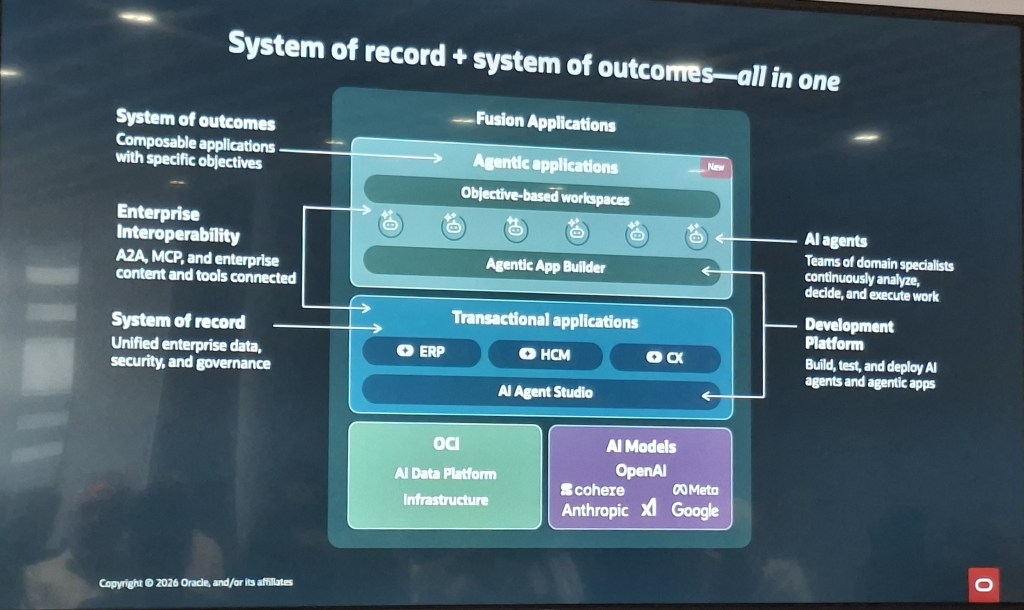
This slide really captures the essence of Larry’s announcements. Oracle stands out by offering a complete stack, infrastructure, database, and applications, all from a single provider. On top of that, there are industry-specific solutions, such as those tailored for healthcare. By choosing a fully integrated Oracle solution, organisations can ensure they’re getting the most out of the available AI functionality. It’s a exciting proposition for customers looking to maximise value and innovation.

Larry’s passion was unmistakable throughout his keynote, but I’ve aimed to keep this focused on the key takeaways that matter most to Oracle users. If you get the chance, I’d highly recommend watching the keynote back online, the future really is here. Keep an eye out over the next few days, as I’ll be sharing write-ups from the remaining two days of the event. There’s plenty more insight and innovation still to come.

Oracle AI World – Day 0 Part 2

Following on from my previous blog covering Day 0 of Oracle AI World (do give it a read if you haven’t already), this post shifts the focus to the afternoon’s Partner Success Summit. Day 0 served as the partner-focused launch for Oracle AI World, and while my earlier piece explored the morning sessions, this one dives into the insights and highlights from the summit itself.

The session was hosted by Leah Yomtovian and featured insights from Oracle’s new CEOs, Clay Magouyrk and Mike Sicilia, alongside Steve Miranda, Executive Vice President of Applications Development. It was genuinely refreshing to hear directly from such senior leaders about Oracle’s strategic direction and, importantly, how Partners are being positioned within that vision.

What truly sets Oracle apart from other providers is its comprehensive suite of solutions – spanning Applications, Database, and Infrastructure. For Fusion Apps customers, this means we benefit from the best of all three. The platform is powered by OCI and leverages Oracle’s database technology, all of which is designed to scale seamlessly for AI. This enables customers to access cutting-edge innovation straight out of the box, without the need for complex integrations or custom builds.

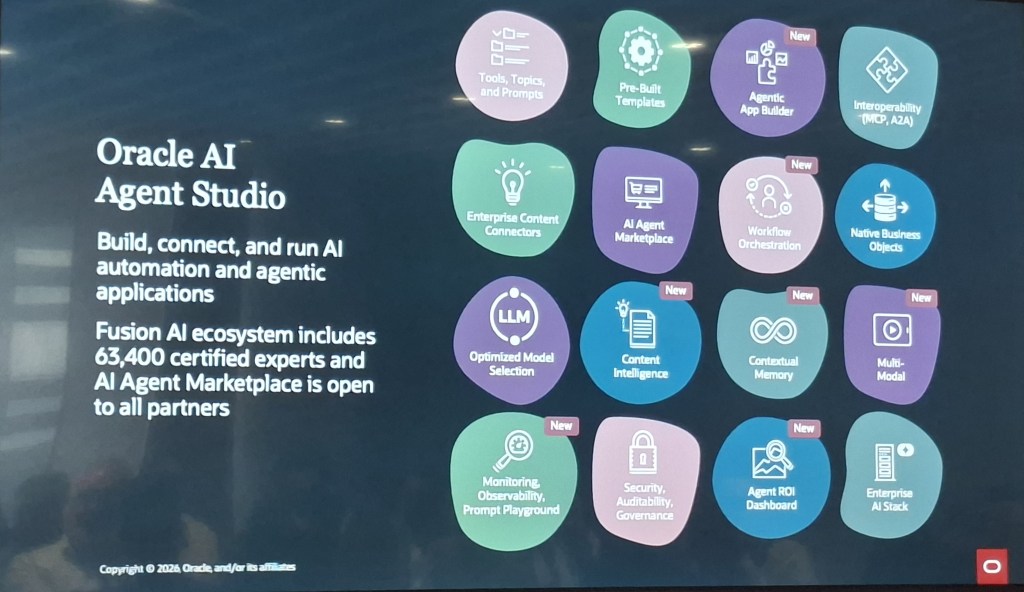
I’m already a big fan of AI Agent Studio, it offers our customers the flexibility to use out-of-the-box AI Agents or to copy and tailor the seeded ones to suit their needs. I’m also proud to be among the 32,000 individuals who’ve successfully earned their AI Agent Studio certification.

The slide below summarises the impressive functionality that makes up AI Agent Studio. The features shown in white boxes are all new additions since its initial launch in release 25C, highlighting the rapid pace of development Oracle is driving.

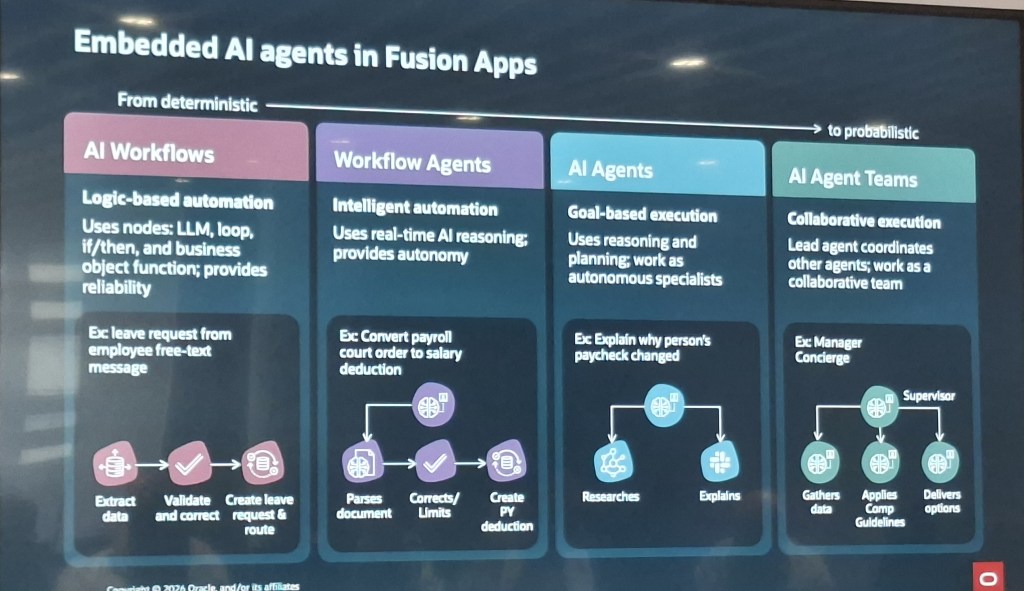
One standout capability is Agent Teams, which allow multiple niche AI Agents to be linked together to deliver complex, end-to-end solutions, which is a real game changer. The ability to call REST APIs opens the door to integrating data from third-party systems directly into the AI Agent, creating exciting opportunities for broader integration.

The introduction of a Prompt Library is another brilliant enhancement. It empowers users to be more creative by browsing, copying and tweaking prompts to meet business needs, all without requiring deep coding expertise.

Support for OpenAI, Anthropic, Google, and xAI means users can now work with their preferred Large Language Models (LLMs), offering even more flexibility for tailored solutions.

Finally, the monitoring tools introduced in release 25D give organisations clear visibility into how AI Agents are performing. This not only ensures optimal usage but also provides senior leadership with confidence in the value of their AI investment.

Oracle is actively exploring how AI can enhance processes across Finance, HR, Supply Chain and Customer Experience, alongside broader innovation in the development space. These advancements are all aimed at boosting productivity, speeding up processing and freeing people from repetitive tasks so they can focus on more strategic work. Since announcing a target of 100 AI Agents in the first year at Oracle CloudWorld London in March 2025, Oracle has far exceeded expectations, with over 600 AI Agents already released. The launch of the AI Agent Marketplace, where third parties can showcase and promote their custom-built AI Agents, adds even more depth to the ecosystem. Combined with the powerful capabilities of OCI AI Services and the Oracle AI Database, the opportunities for innovation and integration are truly phenomenal.

That wraps up my summary of Day 0 at Oracle AI World in Las Vegas 2025. Keep an eye out over the coming days, as I’ll be sharing write-ups from the remaining three days of the event, there’s plenty more insight and innovation to come.

Please note all screenshots are the property of Oracle and are used according to their Copyright Guidelines
Oracle AI World – Day 0 Part 1

I’d never been to Vegas before, so I wasn’t entirely sure what to expect. It’s a city that’s often described in extremes, and I was curious to see how it would all unfold. Thankfully, Oracle made the transition smooth with their Partner-focused Day 0 sessions, which offered a relaxed and informative start to what promised to be a busy and exciting week.

The first session was a brilliant way to kick things off, featuring none other than the AI legend himself, Chris Leone. If you’ve even a passing interest in how AI is being used within Fusion Apps, you’ll know exactly who Chris is. I was incredibly fortunate to hear him speak in an small setting alongside a group of fellow partners, where he shared insights, which led to lots of interesting discussions afterwards.

The big announcement from Oracle AI World for Fusion Applications was the launch of the AI Agent Studio Marketplace. Chris gave us an early preview ahead of the official reveal later in the week. In essence, it’s an App Store for Fusion AI Agents, allowing third parties to showcase and share the agents they’ve developed, while customers can browse and purchase those that meet their needs. This opens up exciting possibilities for organisations to access ready-made AI Agents for use cases where Oracle hasn’t yet built a native solution.

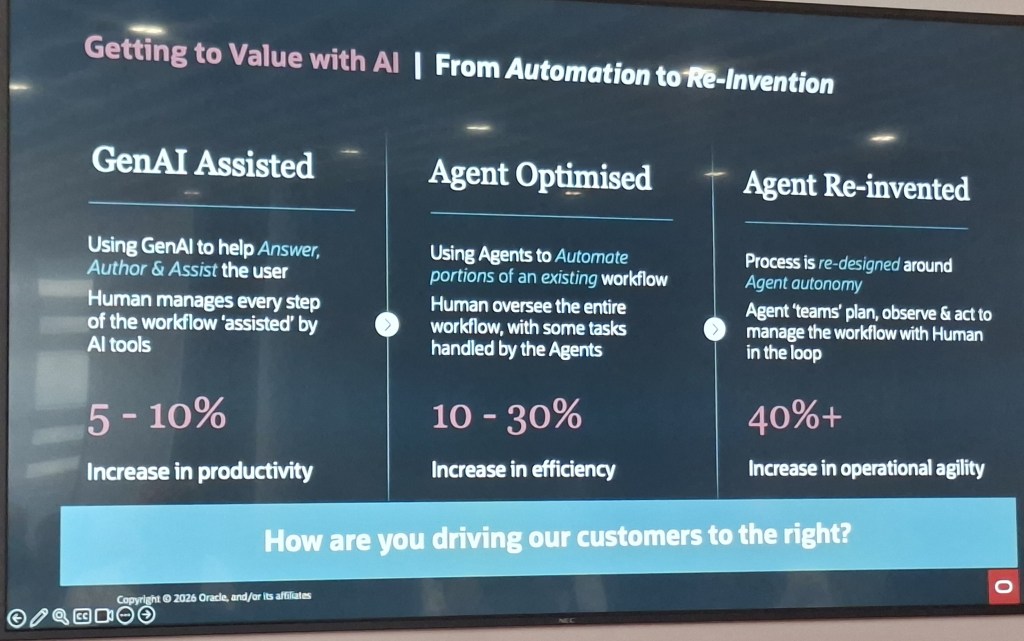
One statement that really stood out for me was: “2026 is the year to operationalise AI.” It struck a chord, especially as so many organisations have told me they’re keen to adopt AI but struggle to justify it with a clear business case. Often, the ‘why’ hasn’t been considered — it’s simply a case of needing AI because senior leadership says so. What’s exciting about AI within Oracle Fusion Applications is that it changes this narrative entirely. The AI isn’t bolted on as an afterthought; it’s embedded within the core applications, designed to enhance everyday business processes seamlessly. With Oracle’s quarterly release cycle, there’s no room to rest on your laurels — innovation is constant. The AI functionality is a key driver in this ongoing cycle of continuous improvement.

The second session of the morning was a long one, but packed with valuable insights. As soon as I saw that it included the Cloud Success Navigator, I knew I was in the right place! I even persuaded my colleague Marc to join me so he could see just how brilliant the tool is. It was also a real pleasure to finally meet Lorin Bookout in person, after having exchanged messages with her for so long — putting a face to the name made the experience all the more rewarding.

The core focus of the session was on how Oracle Customer Success Services can collaborate with Partners to deliver the best possible outcomes for our customers. The Cloud Success Navigator has played a pivotal role in enabling this three-way success, so it was encouraging to hear that Oracle Customer Success Services are embedding this collaborative approach across everything they do. It’s a clear sign that the commitment to partnership and customer value isn’t just a talking point — it’s being actively put into practice.

The introduction to Cloud Success Navigator was very well received in the room. Having been involved since the pilot phase and watching it grow into such a powerful tool has been genuinely rewarding. That said, I was quite surprised by how many organisations admitted they weren’t using it yet. It’s clear there’s still work to be done in raising awareness and helping teams understand the value it can bring.

The demo of Success Navigator was very well received by the audience, but the real highlight was the new AI functionality that went live just a few weeks ago. Rather than having to trawl through Oracle documentation or Cloud Customer Connect to find answers, you can now simply enter your query into Success Navigator’s chatbot and get an instant response, complete with links to the source material. What’s more, this functionality is available to customers in the UK Gov Cage, who don’t yet have access to the full suite of Oracle AI features within Fusion Applications, as it operates as a standalone tool. This means UK Gov Cage customers can begin exploring Oracle’s AI capabilities sooner than they might have expected, giving them a valuable head start.

All in all, it was a brilliant start to my first AI World experience. If you enjoyed this, do keep an eye out for my second blog from Day 0, coming soon! I’ll be covering the key takeaways from the Partner Summit held that afternoon — definitely not one to miss.

Please note all screenshots are the property of Oracle and are used according to their Copyright Guidelines
AI Use in HCM Cloud

Oracle has just introduced a new set of AI agents within its Fusion Cloud Applications, and they’re set to make a real difference for HR teams. These agents are designed to support HR leaders throughout the entire employee journey—from hiring to retirement—by streamlining processes, improving the employee experience, and freeing up time for more strategic work. Whether you’re in recruitment, management, or part of the wider workforce, these tools are here to make everyday tasks easier and more efficient.

Built into Oracle Fusion Applications and running on Oracle Cloud Infrastructure, the AI agents are secure, fast, and included at no extra cost. They’re designed to work seamlessly within your existing workflows, so there’s no need to learn a new system. From helping employees discover internal job opportunities to assisting recruiters with interview scheduling, these agents are all about making HR more intuitive and responsive.

When it comes to career development, Oracle’s new agents offer some genuinely helpful features. Managers can get support with setting and tracking team goals, while employees receive tailored advice on roles that match their skills and aspirations. There’s even a Learning Tutor agent to help employees get more out of training courses, and a Talent Advisor agent that helps managers plan promotions and career growth using real performance data.

Core HR tasks are also getting a boost. Employees can quickly get answers to questions about pay, leave, or benefits through the Employee Concierge agent, while managers have their own version to help with team-related queries. There’s also a Positions Assistant agent that helps HR leaders make smarter staffing decisions by analysing organisational data and policies.

Finally, the agents support the full employee lifecycle, including onboarding, development, and offboarding. The Succession Planning Advisor helps HR teams stay ahead of leadership gaps, and the Payroll Run Analyst keeps payroll running smoothly by flagging anomalies and explaining any issues. Altogether, these AI agents mark a big step forward in making HR more proactive, personalised, and data-driven.

Please note all screenshots are the property of Oracle and are used according to their Copyright Guidelines