Oracle AI World – Day 2 Part 2

Welcome to second blog on Day 2 from Oracle AI World. My earlier post on the HCM and EPM sessions from Day 2 can be found here. This post focuses on Steve Miranda’s Key Note, which I was fortunate enough to sit in the front row for.

As a Functional Consultant, Steve Miranda’s keynote was a must see. For those of you who don’t know, Steve is the Executive VP of Applications Development.

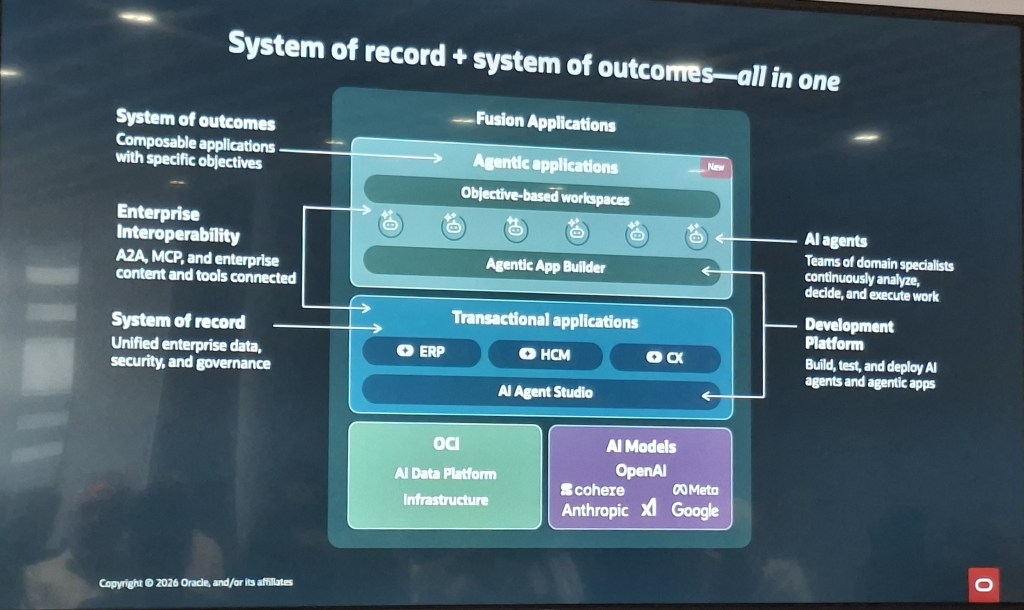
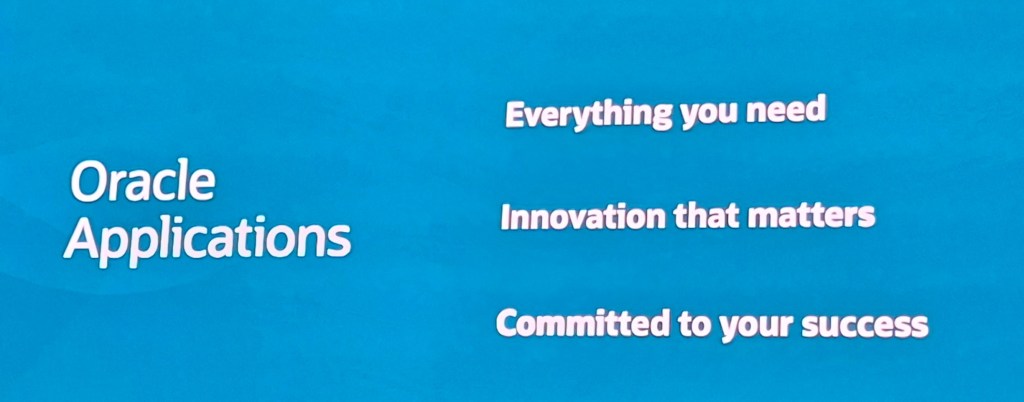
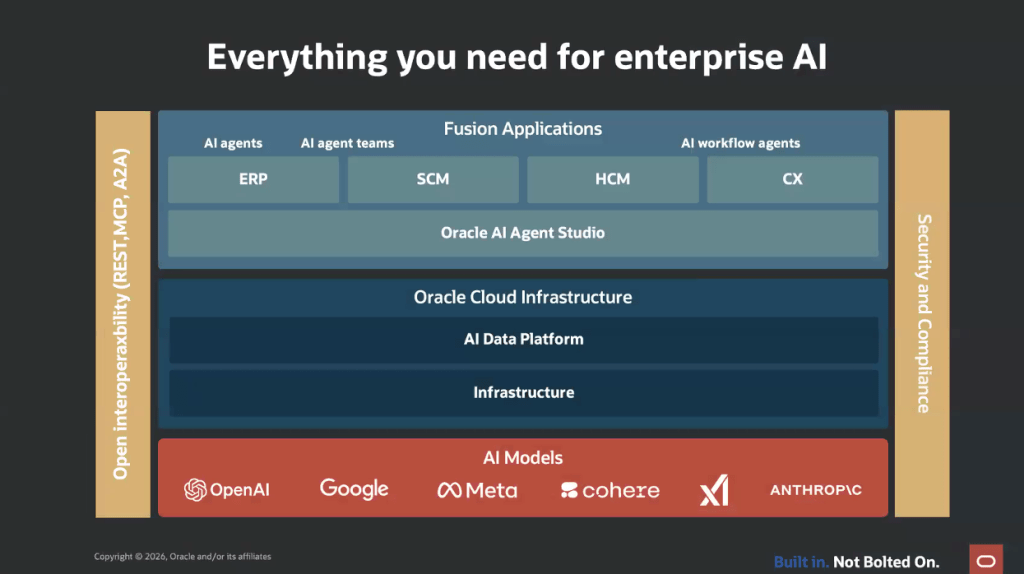
This slide was a good summary of the overall content of the Keynote. Fusion Apps are designed to cover all functionality that a customer needs, but continues to bring continuous innovation in areas that customers want and most importantly,  Oracle are completely focused on solutions that will enable customers to succeed in their aims. There was one statement that really resonated, “we are hyperfocused on growth”. This shows the commitment that Oracle are making to developing Fusion Apps but also to their customers.

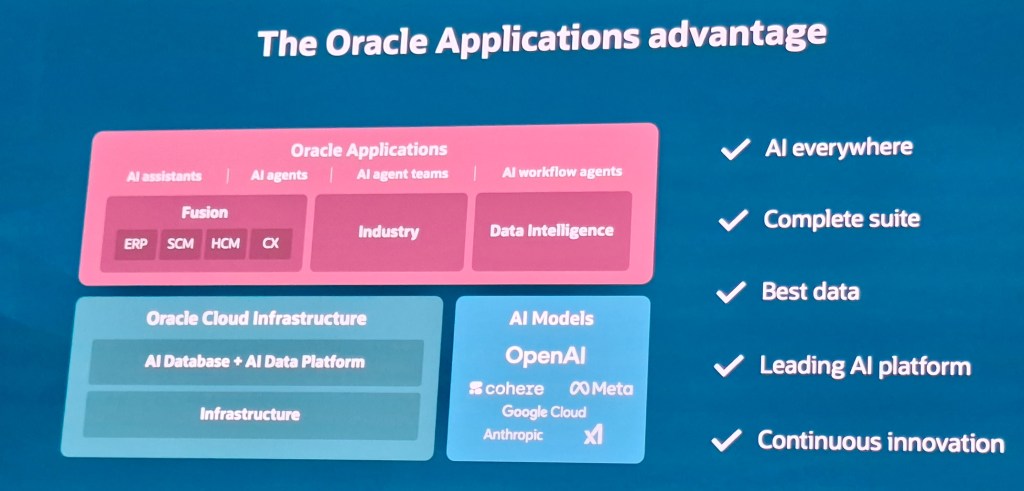
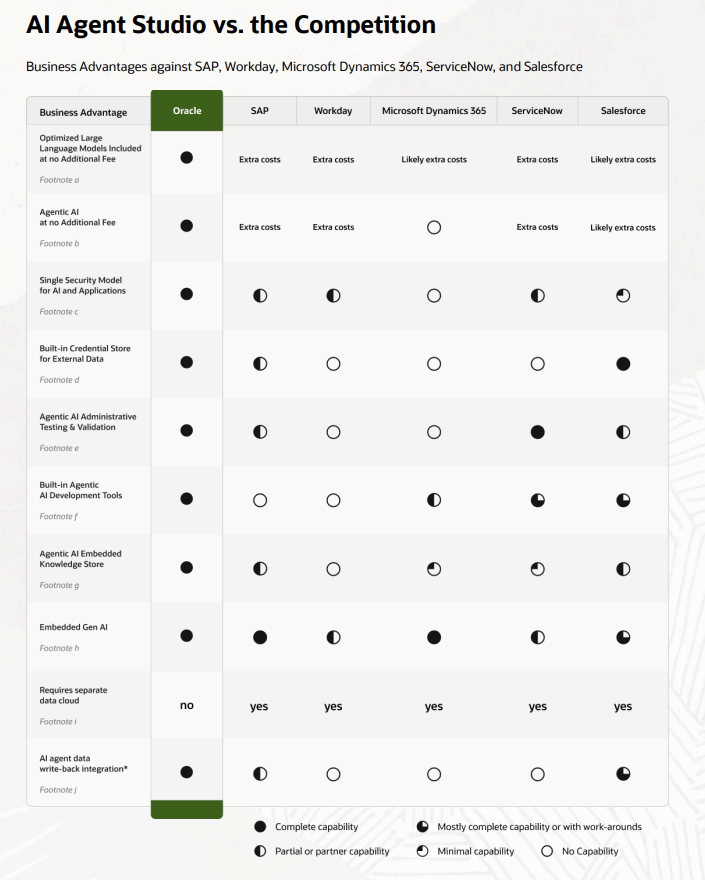
Oracle don’t only provide HCM, ERP, SCM and EPM solutions, which is what a lot of customers think of, but there are numerous industry specific solutions that are available as well. As mentioned in previous sessions, Oracle Apps have the benefits on having AI available throughout the technology stack. It has embedded AI in the actual applications, but also Oracle incorporates AI into their databases and infrastructure,  all of which Fusion uses. The addition of the flexibility that is now available in selecting the AI Large Language Models (LLMs) that customers can use, gives Oracle customers a significant advantage over users of non-Oracle ERP solutions. For other solutions, AI has generally been an afterthought, and there certainly isn’t the option to pick the LLM that best meets the need of the organisation,  usually it is decided for you.

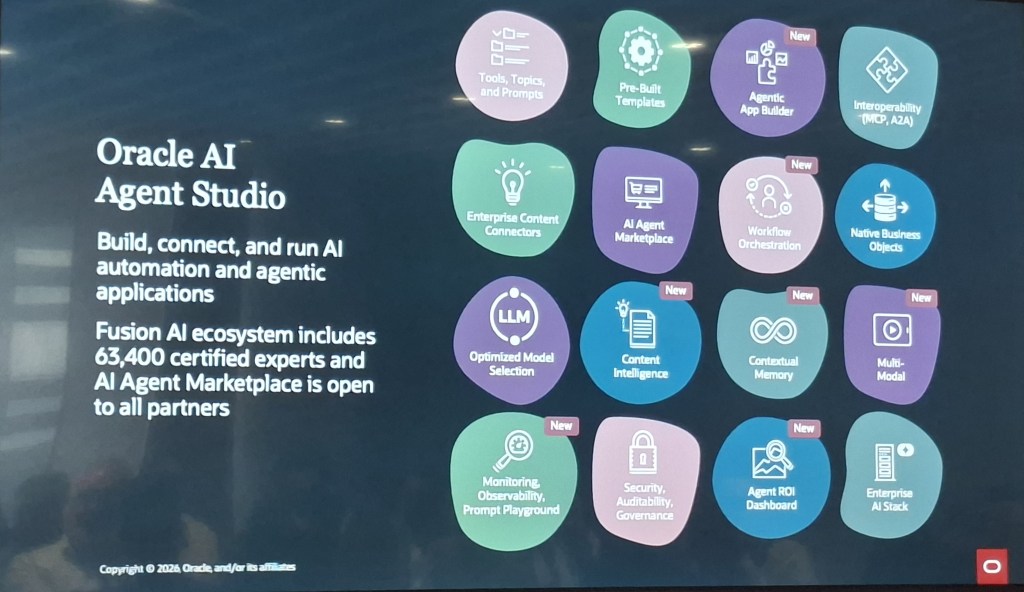
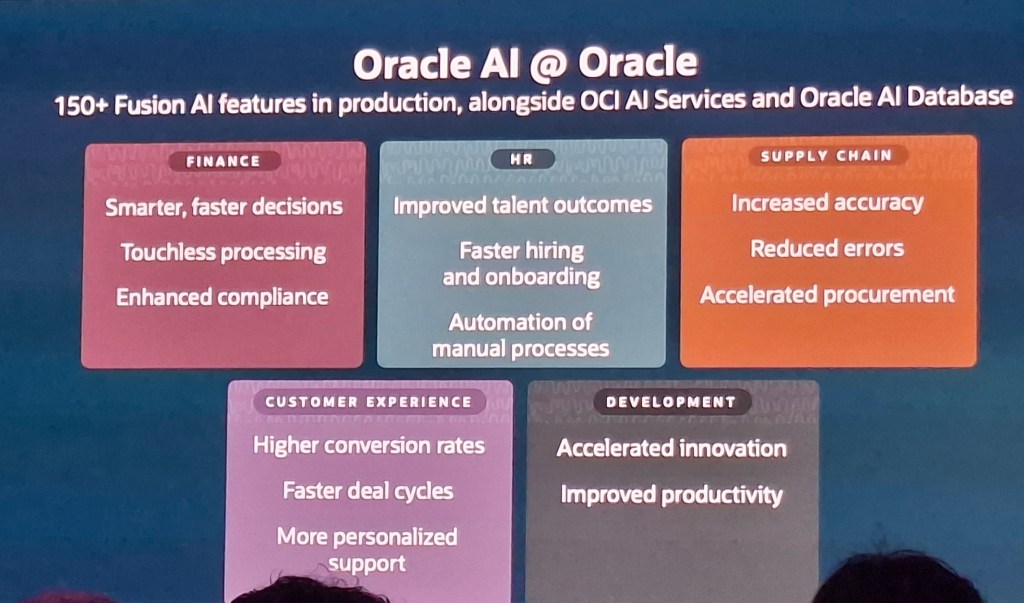
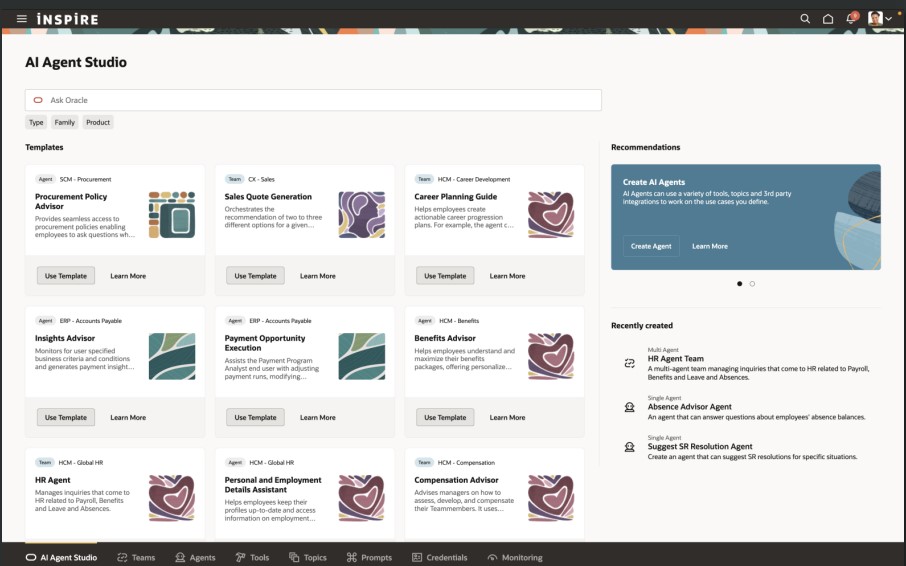
Whilst this slide was also shown in the Partner Summit, it reiterates that Oracle have AI solutions across all aspects of Fusion, but not just within the functional space, there’s additional AI functionality embedded into the development tools that Oracle offers too. The fact that customers can use the same functionality that the Oracle Dev team uses, for example VBS and AI Agent Studio, shows that Oracle are supporting their customers to extend their applications with the best tools possible.

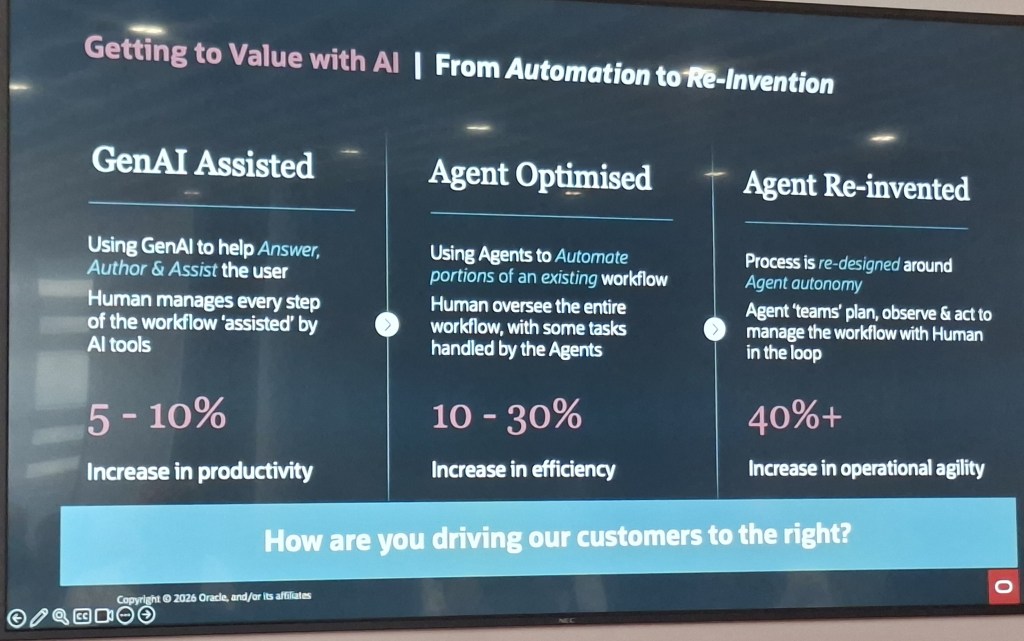
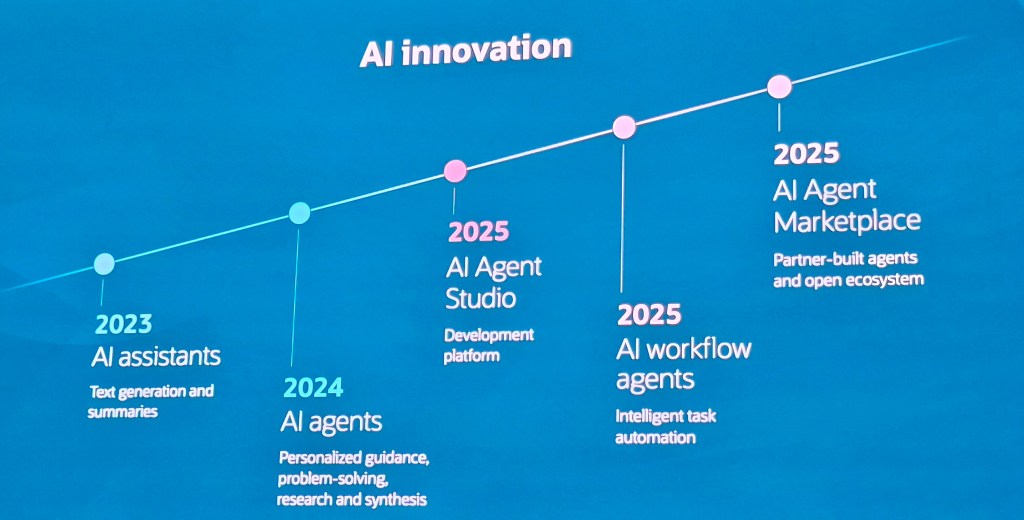
Its remarkable to consider how much progress Oracle have made in their AI journey. I did know it had progressed rapidly, but this time line really brought it all home. To think we’ve moved from the introduction of the first AI Assistant in 2023, to the AI Agent Studio and Marketplace in 2 years is phenomenal. Whilst I know Oracle won’t be resting on their laurels, its hard to think where they can go to next. Having said that, Oracle have reassured us that there will always be a ‘Human in the Loop’.

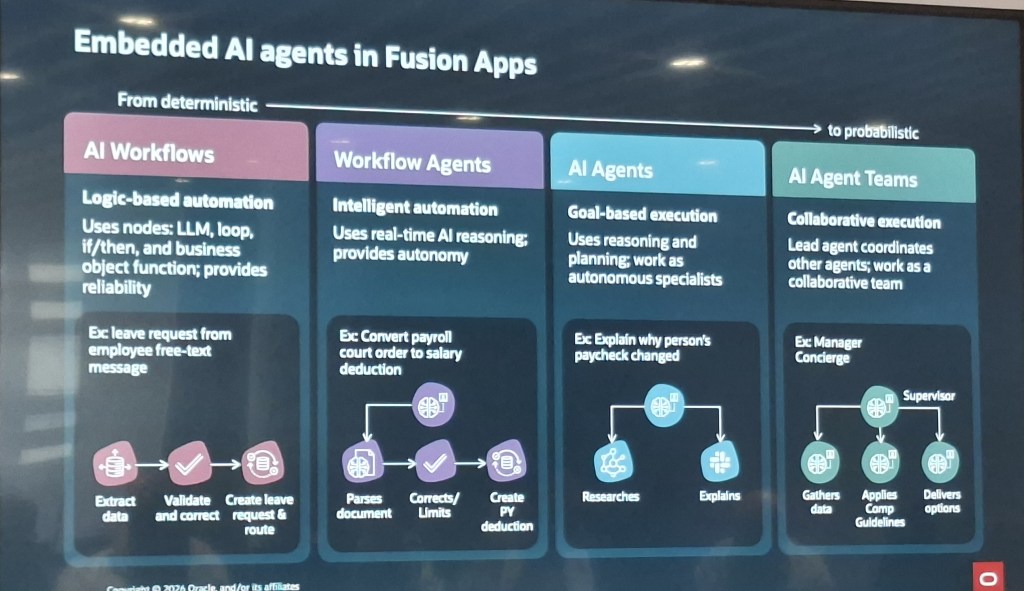
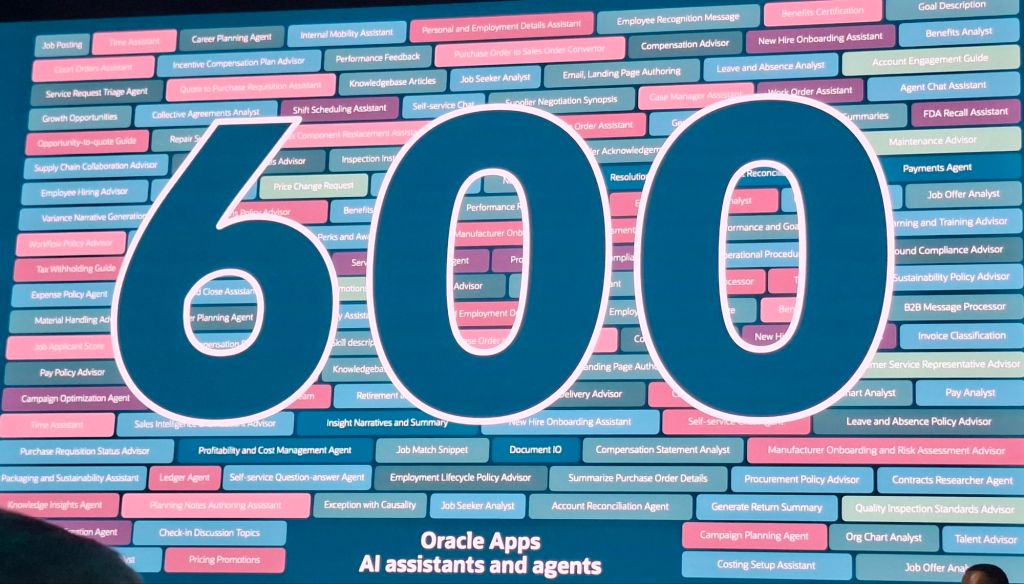
This is an eye watering number and I think it should be appreciated. At Oracle CloudWorld in London in March, Steve announced there would be 100 AI Agents developed in 2025, 7 months later and there are over 600! It should be caveated that 400 are within Fusion and the remaining 200 are across the Industry specific solutions. On top of this, there are a significant number of AI Agents available on the AI Agent Marketplace that was announced this week. As more Partners have their AI Agents vetted by Oracle, this number will continue to grow. This means the development of AI Agents will increase two fold, by Oracle’s in house Development Team but also by third parties who can share their own solutions on the Marketplace. This gives customers the greatest flexibility in obtaining the latest technology in AI Agents without the need to have internal development resource.

This screenshot shows the flexibility of LLMs that Oracle now allow users to utilise in their AI Agents. As the image shows, when creating or modifying an AI Agent, on the Credentials tab,  you can select the appropriate LLM and enter the relevant key. It should be noted that some options can only be used with the premium options and therefore aren’t free.

Steve also reiterated that Oracle will never share customer’s data via AI tools as it always remains within customer’s systems, but equally as importantly Oracle will never use a customer’s data to train their LLMs. This is a frequent question that customers often ask, so it was really good to have this reiterated.

That wraps up my summary of Day 2 at Oracle AI World in Las Vegas 2025. Day 3 was a short one, but was one of my favourites. Please keep a look out for my blog on this which will be coming imminently.

Please note all screenshots are the property of Oracle and are used according to their Copyright Guidelines
Oracle HCM Cloud Recruit 25D

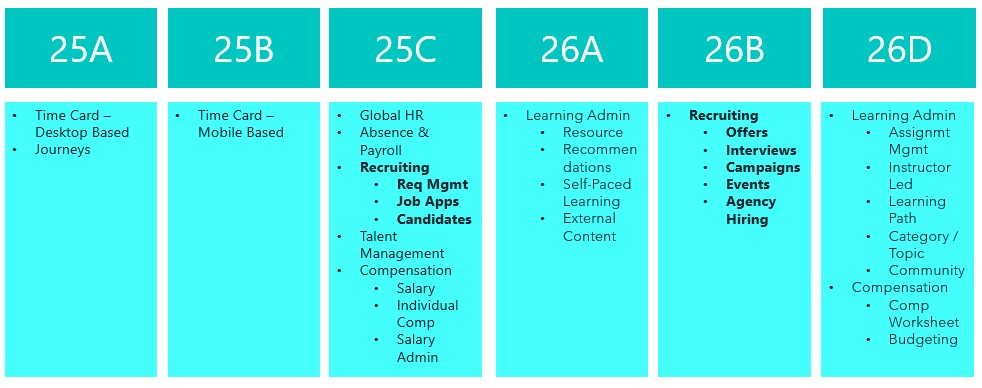
Great news – 25D has landed! Unlike most modules, Recruit has a two-step journey to Redwood, and 26B is the big one to focus on to make sure users stay compliant and fully switched over for core Recruit tasks. If you’ve already got 25C, you should be handling requisitions, job applications and candidates in Redwood by now. The next wave is all about offers, interviews, campaigns, events and agency hiring. While 25C gave us a few Redwood features for offers, 25D really ramps things up to help you stay on track for the 26B deadline, but even more excitingly, it’s full of AI features to make your lives easier! So let’s dive in and explore what’s new….

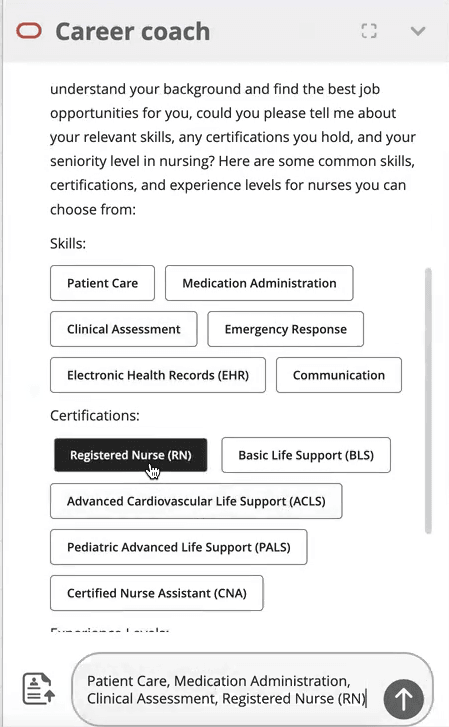
This first feature isn’t actually a Redwood specific one, but it’s a great one that I’m very excited about! Given Oracle’s push to embed AI into Fusion, wherever it is relevant, this feature is a great use case for it! The new AI Agent for Candidate Experience introduces an AI Chatbot called Career Coach directly onto the Career Site. It will be much easier for candidates to search for a new role with the Job Recommendations Agent and Job Fit Agent, as they get tailored suggestions based on their experience and skills. The candidate just need to upload their CV, answer a couple of questions and then the Job Recommendations Agent will highlight roles that match their profile, while the Job Fit Agent helps them figure out if a particular job is the right fit and answers any questions. Both agents can even use uploaded documents to give more personalised advice, making the whole process smoother and more relevant.

There’s another AI feature I’m excited about. This was shown at CloudWorld London and customers have been asking me about it ever since! The Job Applicant Screening Agent Template lets you create a handy agent team in AI Agent Studio, which Recruiters can get to straight from the Job Application page. It’s a super helpful “ask me anything” assistant that can dig up all sorts of info, including feedback scores, background checks, recent updates, and what’s happened over the past few weeks. You can ask things like “What’s going on with this application?” or “Give me the full lowdown,” and it’ll even suggest things like interview feedback, timelines, assessments, and offer details. It’s a real time-saver, especially for people who don’t use the system much and just want quick answers without the faff.

If you’re anything like me and find creating job offers a bit laborious, you’ll definitely want to check out the new Job Offer Creation Agent in AI Agent Studio. It’s like having a helpful friend on hand, it’s ready to answer all your questions, whether they’re general or specific to certain fields. You can customise it with your own documents and prompts, so it fits your organisation’s policies perfectly. Wondering if you can tweak the start date after sending an offer? Not sure about the typical job grade for a Chief of Staff? Curious about salary differences between cities, or what to do if a candidate already has another offer? This agent’s got your back. It helps you breeze through the offer process smoothly, fills in the right info, and cuts down on errors, so you can focus on getting the right people on board, faster.

The final Recruit AI Agent I want to highlight is one I particularly love, the new Job Requisition Creation Agent to help speed up the process of creating Job Reqs. Think of it as your go-to FAQ buddy, it answers all sorts of questions, whether you’re wondering about salary grades, attachments, or who’s recruiting in a specific location. It works entirely off the documents you upload and the prompts you set, so it’s easy to tailor to your company’s policies and ways of working. Whether you’re asking if you can change job grades later or need to know the salary range for consultants in Dallas, this assistant helps you get it right first time, no interruptions, fewer downstream issues, and a smoother, more efficient experience all round.

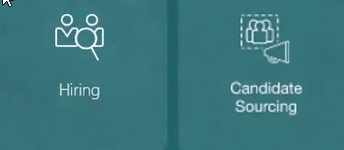
In 25C, the Candidate Sourcing tile was added. In 25D, the Campaigns and Events tabs are no longer under Hiring, but moved to Candidate Sourcing. When you head into the Candidate Sourcing tab, you’ll find everything you need to start building your talent pipeline – from Candidate Search and Pools to Messages, Campaigns, and Events. Over in the Hiring tile, you’ve got quick access to the Activity Centre, Messages, Requisitions, Offers, and you’ll spot Candidate Search and Pools again here too, so you’re never far from the tools that help you keep hiring on track.

Oracle often sneak in new features throughout the month, so it’s worth keeping an eye out. If anything truly game-changing drops, I’ll write up another blog post to keep you posted and make sure you’re not missing out. In the meantime, feel free to check out my latest write-up on the new Core HR features in Release 25D, you can find it here.

Please note all screenshots are the property of Oracle and are used according to their Copyright Guidelines