Oracle HCM Cloud Payroll 25D

I’m a big fan of innovation, which is why I always look forward to the Oracle Fusion Quarterly Releases. While this one doesn’t bring a huge wave of new features for Global Payroll, there are still some important updates across various legislations worth noting. In this blog, I’ll give you a quick rundown of the key highlights from both the global and local perspectives. Oracle’s got plenty more in the pipeline this quarter, so keep your eyes peeled, and if anything particularly exciting crops up, I’ll be back with another post to keep you in the loop!

The first feature in Global Payroll is the new Redwood Archive Results page. Whilst this isn’t a glamourous new feature, it is an important page. The redesigned Redwood Archive Results page offers payroll admins the modern Redwood functionality for managing their payroll data with greater efficiency and accuracy. With enhanced navigation, flexible search, customisable views, and inline editing, it’s easier than ever to identify and resolve errors, unprocessed assignments, or missing records directly within the archive. These improvements help reduce manual effort, minimise rework, and ensure smoother payslip generation and external payment processing. The feature is enabled by default via the Redwood Payroll Activity Enabled profile option, so you don’t even need to do anything and can start benefiting straight away. 

Payroll Activity Centre

All Payroll admins know that reporting is critical to the job! Oracle have made a small, but helpful update to the Payroll Costing Report. Prior to 25D, the report was a standard BI Publisher output, but listening to feedback, Oracle have rewritten the report as an extract-based one. This new version will handle larger payroll volumes and has added in more report output options, including Excel, XML and text. There are some simple steps to enable this new version of the report. First go to the Switch Task Action Version flow. Select Run Payroll Costing Report from the task list, choose the Extract-based Report version, and set it as active. From then on, all flows using this task will automatically run with the new version.

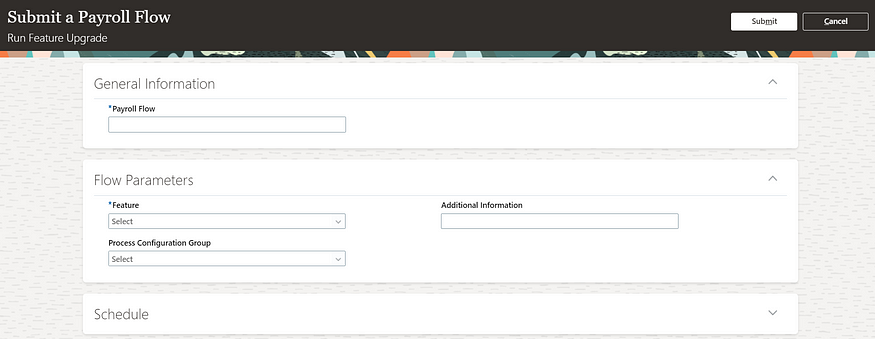
Moving on to the different legislations. There are a number of key features for Local Government in the UK. The first one is for the MCR for Teacher’s Pensions. A new input value, Error Number, is now available on the predefined TPS When Earned Details element, enabling employers to directly record error numbers linked to corrections for MCR files, particularly for When Earned U lines that typically require a TPS When Earned Details entry. This enhancement streamlines the reconciliation process for Teachers’ Pension errors. It’s easy to apply this update, navigate to Submit a Flow → Payroll, run the Run Feature Upgrade payroll flow task, and select Update Element Eligibility to Link Error Number for TPS When Earned Details Element.

There are two changes for LGPS included. Firstly a solution for the Pensionable Pay calculation for non-recurring payments. You can now easily work out the right Pensionable Pay for employees who’ve had time off mid-month and received one-off pensionable payments during their working days. With new balances in place, regular and irregular earnings are handled separately, so the LGPS employer contribution is calculated correctly without needing to prorate the monthly Pensionable Pay. Creating a new Main Pension Scheme element allows you to feed regular and irregular earnings into dedicated balances, ensuring accurate Pensionable Pay calculations for periods with one-off payments during working time. The second LGPS change relates to KIT and SPLIT days. You can now mark earnings as KIT or SPLIT days so they’re added to the right pensionable pay balances (CPP1 or CPP2). Just make sure to include the actual date worked when entering these, so the system can compare the day’s earnings with the assumed pensionable pay and use whichever is higher. If the day falls during unpaid leave, the full KIT or SPLIT earnings will be included in the pensionable pay.

With the introduction of Irish legislation for the first time, it is unsurprising that there are a significant number of new features in this release for it. These include Illness Benefit Payment or Offset; Public Sector Pensions; Salary Sacrifice; Send File Submission Process; Additional Superannuation Contribution (ASC) Forms; Check Revenue Submission Request; Payroll Submission Correction Request and Payslip Template. Additionally there are enhancements to reporting; Create Element template; Shadow Payroll; Special Assignee Relief Program and Withholding Taxes only on Irish Income. We know a few of you are already ahead of the curve when it comes to Irish legislation, so this’ll definitely be of interest. But even if you’re just starting to think about switching to Oracle Payroll, it’s still worth a look for our Irish customers.

There’s just one update this time for our US customers, but it’s worth flagging. The Retroactive Overpayment and Recovery for Earnings Elements feature is now switched on by default. Honestly, I can’t think why you wouldn’t want to use it, but just so you know, it’s no longer optional. This functionality gives you more control over how Retropay results are managed, especially when they reduce an employee’s net pay. Instead of the full overpayment being automatically deducted, you can now set up a repayment plan for the employee.

As I mentioned earlier, Oracle tend to roll out new features throughout the month. If any of these updates turn out to be game-changers, I’ll pop up a fresh blog post to keep you in the loop. In the meantime, feel free to check out my latest write-up on the new Core HR features in Release 25D, you can find it here.

Please note all screenshots are the property of Oracle and are used according to their Copyright Guidelines
Oracle HCM Cloud Payroll 25C

Everyone who knows me, knows that Quarterly Release time is my favourite time of the quarter, as I love finding out all the new features that Oracle have released. Payroll is mandatory in Redwood by release 25C, therefore there isn’t a large number of new features for Global Payroll in this release, but there are still some significant changes! Oracle will continue to roll out new features throughout the quarter. If any additional updates stand out, I’ll share a follow-up blog to keep you informed.

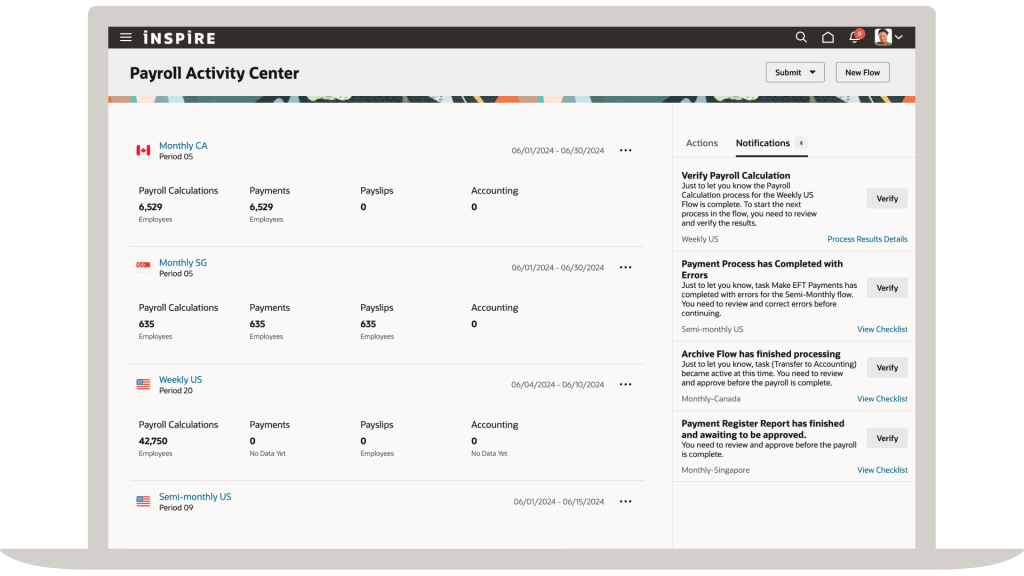
The first key point of note is that the Payroll Activity Centre will be automatically switched on in 25C. Given that it’s a really helpful tool, I would imagine this won’t cause any Payroll users hassle, but I wanted to flag it in case any organisations have delayed their move to Redwood for Payroll. If you don’t know what the Payroll Activity Centre is, it’s a one stop shop for all your payroll needs. You can run flows, check person results and do all of your usual Payroll transactions from one place. I’m a massive fan of all the activity centres, but this one is a massive leap forward for Payroll users.

Payroll Activity Centre

A number of pages have made the move to Redwood in this release. These include the Payroll Costing Setup and Process Summary pages. The Process Summary page allows for a high level summary of all payroll processes that have been submitted. The new page can either be accessed from the Payroll Quick Actions or the Payroll Activity Centre. This a much more user friendly way of reviewing any processes that have been submitted.

A new feature has been introduced to control how Retropay results are processed. Oracle have introduced the Retroactive Overpayment and Recovery for Earnings Elements process. How this differs from current behaviour is that rather than automatically processing the deduction for the overpayment in full, it is now offset resulting in no immediate impact to the employee’s net pay. You can then chose to setup and track repayments by the employee until it is paid back in full. This will ensure the fair recovery of overpayment.

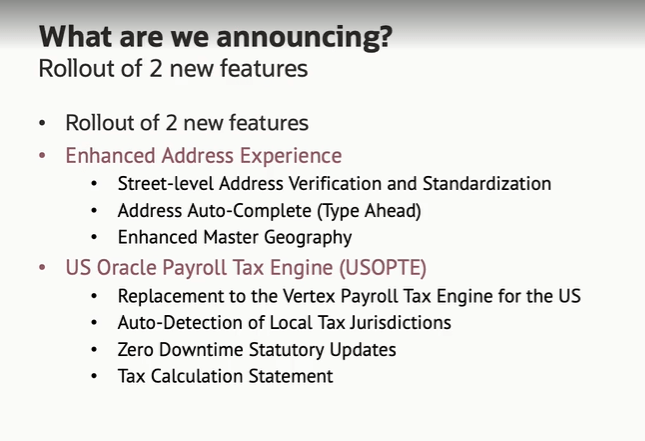
For those customers in the US, there is a significant change to US Payroll Engine. Oracle have introduced the new US Oracle Payroll Tax Engine (USOPTE) solution.  The key change is that all statutory tax data information is now maintained and delivered by Oracle Cloud. These include wage limits, filing statuses and allowance amounts. The new Engine will also perform federal, state, and local tax calculations within the payroll product and provide improved visibility of tax calculations with a Tax Calculation Statement.

US Payroll Engine Changes

As mentioned earlier, Oracle often roll out new features throughout the month. Should these updates turn out to be significant, I’ll publish a refreshed blog post. Please check out my blog on the new features in Core HR for Release 25C here.

Please note all screenshots are the property of Oracle and are used according to their Copyright Guidelines

Oracle HCM Cloud Payroll 24C

I love new feature announcement time, it’s my favourite time of the quarter! For Release 24C, this is quite a small release for Global Payroll, but that doesn’t make it any less important. With the move to Redwood for all Employee and Management Self Service processes in Release 25B, every new Redwood page released makes the journey to Redwood much easier.

Oracle may announce additional features prior to the release being deployed to Wave 1 customers in August, but I have picked my key new features that have been announced at present. If additional features are announced that will add significant value, I will provide an updated post.

Redwood Payment Results

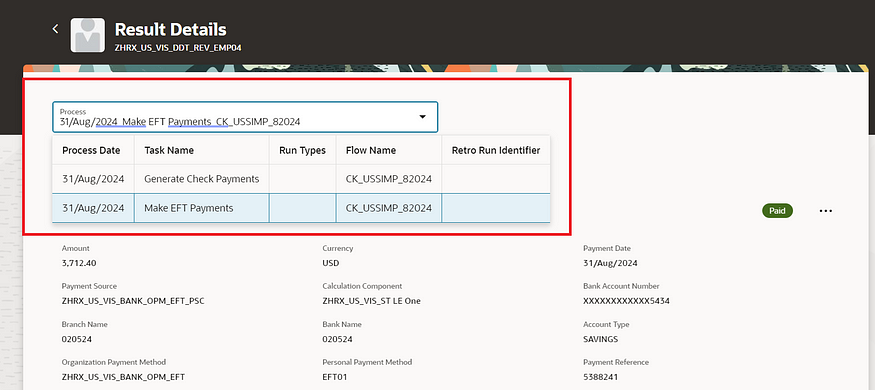
The first page to move to the Redwood toolset in this release is the Payment Results page. This doesn’t just have the Redwood ‘look’, it’s been rewritten in the Redwood toolset from scratch, so has all of the benefits this provides in terms of performance and useability. The page has all the functionality you would expect. Firstly you can view employee payment details: Dive into the specifics of each payroll run, examining payment details for individual employees. Secondly, status tracking: Quickly identify the status of any payment — whether it’s pending, completed, or encountering issues. Thirdly, corrective actions: Based on payment status, take necessary corrective measures effortlessly. Finally, external payments: Execute actions like initiating external payments directly from the page.

Redwood Payroll Flow

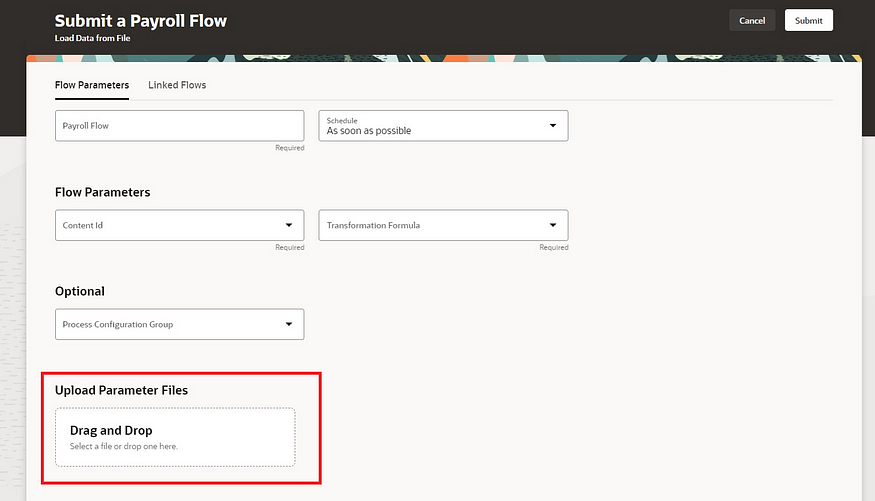
The Submit a Flow page has also been moved to the Redwood toolset. As well as submitting payroll flows, you can schedule the submission for a future time and date and view recently submitted flows. It is now possible to use the ‘Linked Flow’ tab to link flows together in an easy, user friendly way. Additionally there is now the functionality to allow the uploading of files using drag and drop, as per the screenshot above. This can be used for single or multiple files. This option only displays on the page if you have defined the flow to allow the upload of files.

Audit Element Security Profiles

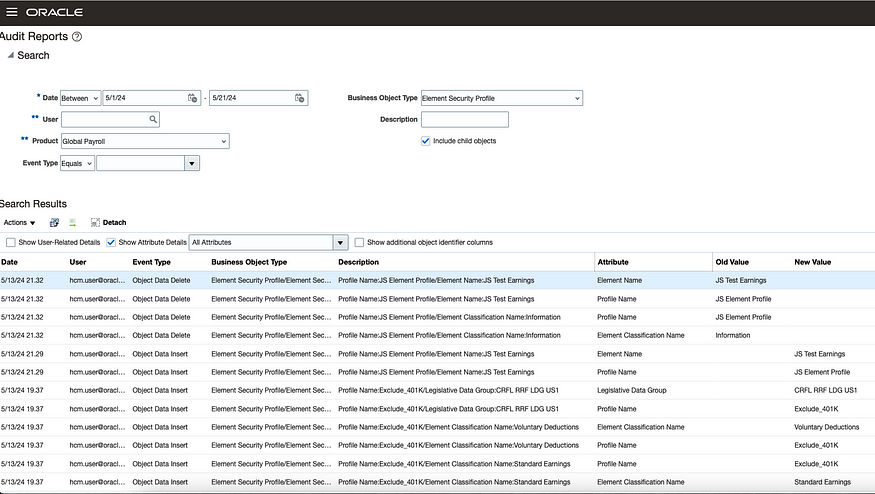
For those organisations using Auditing, it is now possible to audit and track the change history of the Element Security Profile. Once the auditing is switched on, any changes made to element security profiles will trigger the audit process and then they will be reported upon. This will ensure that any changes made to the element specific security profiles can be monitored and reported on more easily, which will provide more reassurance to auditors and senior management.

Redwood Person Messages

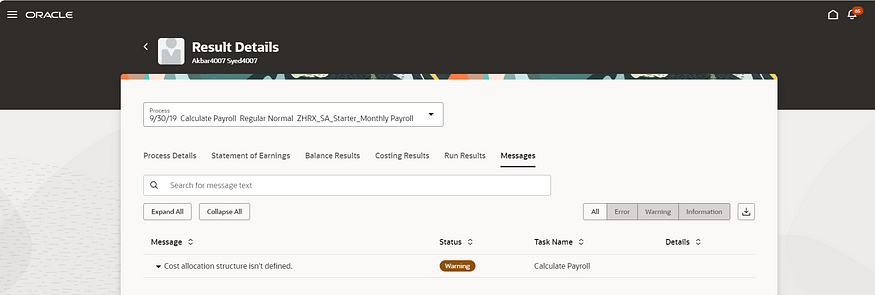
Another page which has moved to the Redwood toolset is the Person Messages page, which can be accessed via the Person Results application. This page is critical for understanding issues with payroll processes, so the move to Redwood for this is a big step forward. All messages can be searched for, additional details of the message can be viewed and can be exported to Excel.

Redwood Payslip

The final feature I wish to highlight is an update to the existing Redwood Payslip. The Redwood page has now added in the ability to export the payslip. You can select the folder you wish to download it to and it will automatically zip them to minimise storage usage.

As previously stated, Oracle may announce further new features in Release 24C later this month. Should these features demonstrate significance, I shall produce an updated blog. Please check out my blog on the my top 5 new features in Release 24C within Core HR below:

Oracle HCM Cloud Core HR 24C – K8 Mead

Click here to read more about Version 1’s Oracle capabilities.

About the author:

Kate Mead is an Oracle-certified HCM Consultant and Solution Architect at Version 1 with 14 years of experience in Oracle HR and Payroll systems, including 7 years with Oracle HCM Cloud. She has worked across implementation projects and managed services, has a sound knowledge of UK Payroll legislation and — before becoming a consultant — was an HR Manager.

If you have any questions or would like more information on how Version 1 can help you realise the full potential of your Oracle Cloud instances, please contact her at kate.mead@version1.com

Please note all screenshots are the property of Oracle and are used according to their Copyright Guidelines

Oracle HCM Cloud Payroll Release 24B

Oracle have started to release what’s coming in release 24B. Whilst there will be more features released over March, I wanted to highlight a few key new features that have already been announced within the Payroll space.

Redwood Personal Payment Methods

In Release 23D Oracle released the Redwood Personal Payment Methods page. In 24B, this, as well as the Redwood Payroll Relationships page are being delivered switched on automatically. This means that any organisation who haven’t already moved these pages over to Redwood will need to do thorough testing prior to 24B to ensure they meet their needs. Alternatively, it will need to be manually switched off- via the appropriate profile options.

Redwood Payslip

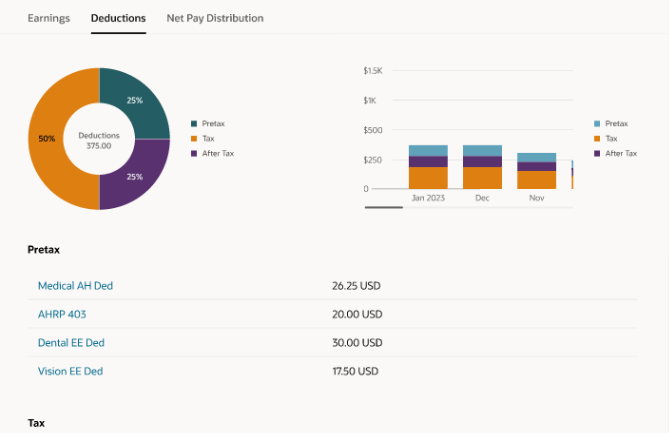
Keeping on with the Redwood theme, the earnings and deductions amount on the payslip summary page has now been moved to the Redwood toolset. These can be displayed based on the element primary classification. In the example screenshot above, they are displayed under the headings pre-tax, tax and after tax.

Run Feature Upgrade

The new ‘Upgrade Cost Results’ feature in the ‘Run Feature Upgrade’ payroll flow allows users to upgrade the prior period payroll cost results. These can be updated for assignment, tax reporting unit, and the calculation breakdown values from the payroll run results. This will make adjustments to prior period results much easier.

Click here to read more about Version 1’s Oracle capabilities.

So far there aren’t any UK legislation specific Payroll updates announced in 24B. All of the 2024/25 tax year statutory changes are included in the CWB prior to tax year end. I wouldn’t be surprised if there aren’t some extra UK specific features announced later in March though.

Also keep an eye out for blogs on other modules within HCM Cloud for Release 24B. Please check out my post on the key features so far in Core HR:

https://k8mead.com/?p=100

About the author:

Kate Mead is an Oracle-certified HCM Consultant and Solution Architect at Version 1 with 14 years of experience in Oracle HR and Payroll systems, including 7 years with Oracle HCM Cloud. She has worked across implementation projects and managed services, has a sound knowledge of UK Payroll legislation and — before becoming a consultant — was an HR Manager.

If you have any questions or would like more information on how Version 1 can help you realise the full potential of your Oracle Cloud instances, please contact her at kate.mead@version1.com

Please note all screenshots are the property of Oracle and are used according to their Copyright Guidelines