Oracle HCM Cloud Recruit 26A

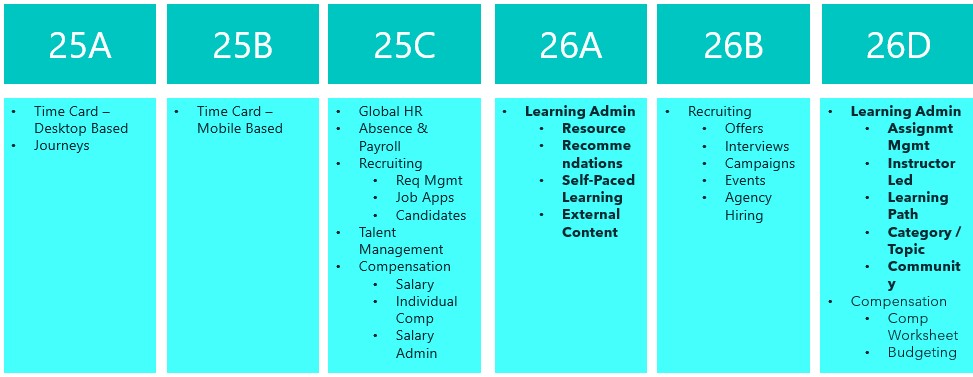
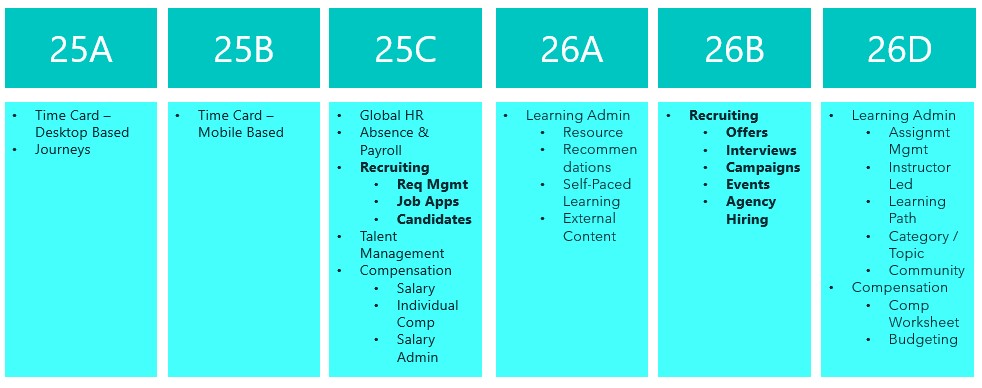
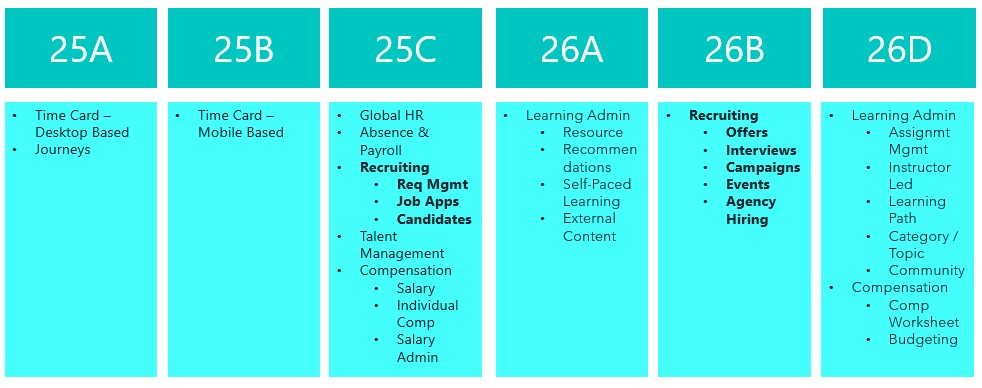
Things are really heating up in the world of Recruit as we approach the final deadline to move the remaining Recruiting pages over to Redwood in 26B. This release is your last opportunity to make the switch. With the 25C deadline behind us, you should already be managing requisitions, job applications and candidates in Redwood. The next phase brings exciting updates around offers, interviews, campaigns, events and agency hiring. So, let’s dive in and see what’s new…

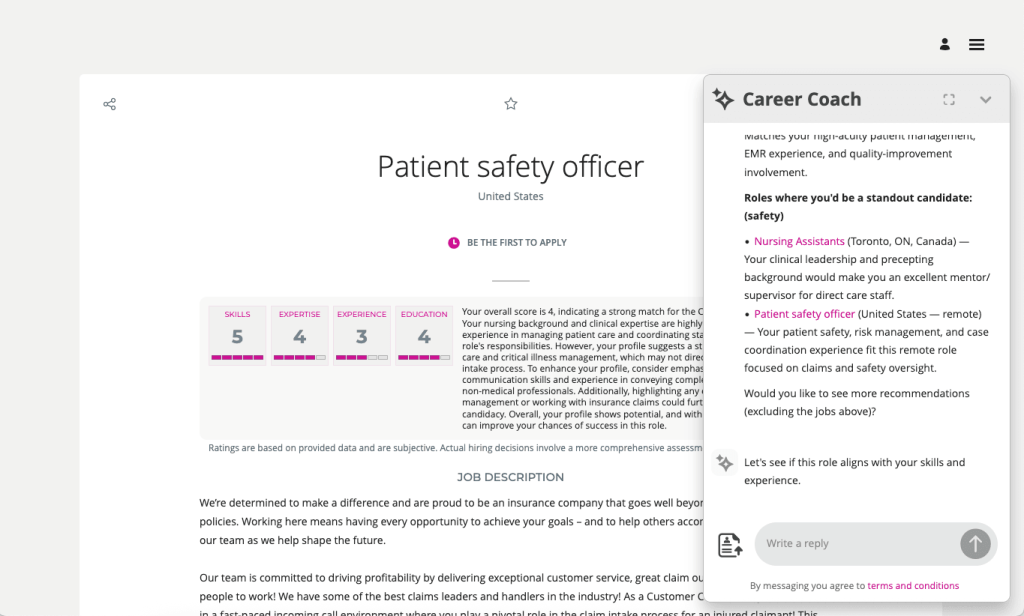
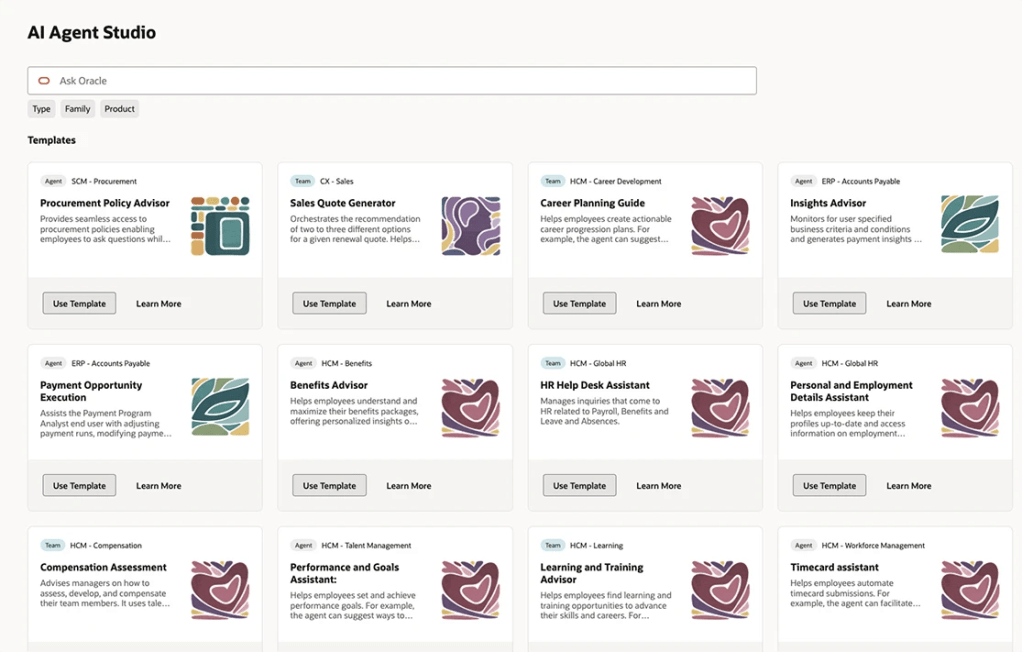
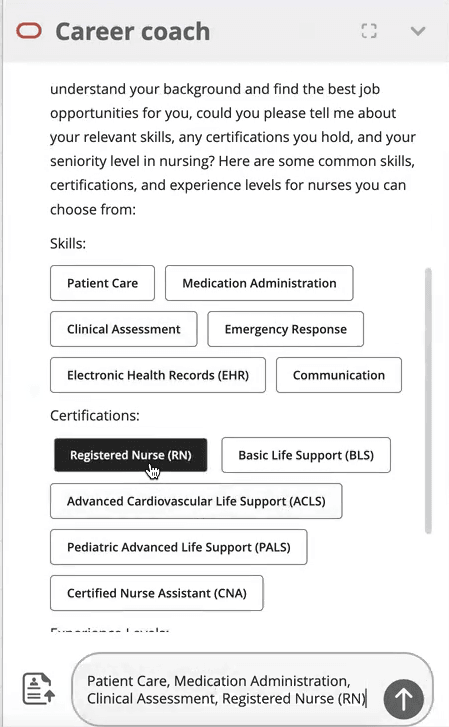
The AI Career Coach, first introduced in 25D to help candidates find roles that match their skills, has already been enhanced in 26A. The Career Coach now uses the Supervisor model, which brings all agents together under one umbrella, streamlining information sharing and removing redundancies. The agent is pre-seeded and ready to run, so there’s no need to create agents from templates. You can also choose to display the widget as an overlay, ideal for highly customised sites, rather than the default side panel, ensuring it doesn’t interfere with your design. For one-page application flows, the widget now displays correctly, and when shown as a side panel, the navigation menu is replaced with a horizontal progress bar. The fixer button appears on the page instead of the left-hand side, and a clickable Terms and Conditions link pulls content from the job application legal disclaimer in the Recruiting Content Library. If you’ve enabled CV parsing, candidate CVs will be parsed into the application flow when uploaded via the widget. From this release, any CV uploaded into the recommended jobs widget in the candidate experience will also be available to the agent.

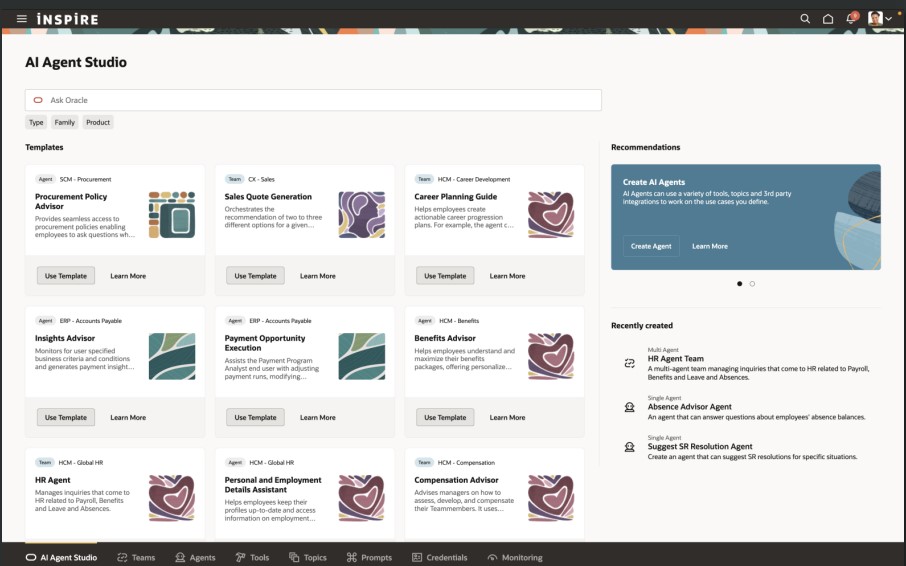
As many of you know, I’m a big fan of AI, anything that makes life easier. The next update introduces an AI assistant for job requisition creation, working like a smart, on-page helper that answers both general and field-specific questions as you build a requisition. Because its guidance is driven entirely by the documents you upload and the prompt you configure, it’s easy to tailor to your organisation’s policies and practices. The agent helps users get it right first time, capturing the correct data, minimising downstream issues and boosting overall efficiency without interrupting the flow.

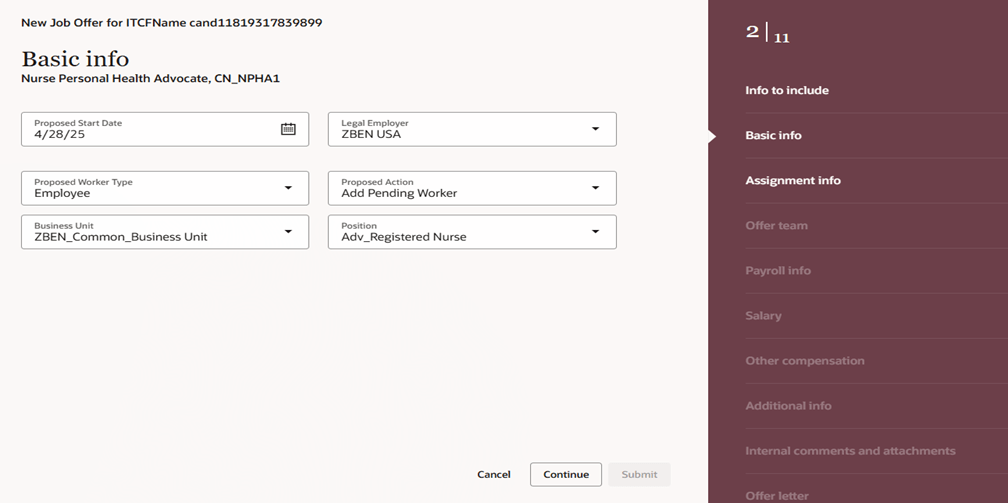
By 26B, the Job Offer process must be fully transitioned to Redwood, and Oracle has introduced a new AI agent to make this easier. Acting as an FAQ-style assistant, the agent helps users by answering both general and field-specific questions during job offer creation. Its guidance is based entirely on the documents you upload and the prompt you configure, making it simple to align with your organisation’s policies and practices. This smart assistant ensures job offers are created smoothly, reduces downstream issues by capturing accurate data, and boosts overall efficiency without disrupting the process.

Another useful Redwood Offer feature is the Initiate Job Offer Creation for Hiring Managers functionality. Hiring managers with the Initiate Job Offer privilege can now start the process and share notes with the recruiting team using the Create Job Offer action from the Redwood job applications list or details page. On the Create Job Offer page, they can add comments in the Notes to Recruiter field to provide context or instructions. Once they click Save and Close, the candidate’s application moves to Offer – Draft status and appears on the Redwood Job Offers list page. The recruiter receives a notification to complete the offer details using the Edit Offer action, with the manager’s notes displayed in a banner above the Details and Offer tabs. When ready, the recruiter can submit the job offer for approval or save it for further editing later.

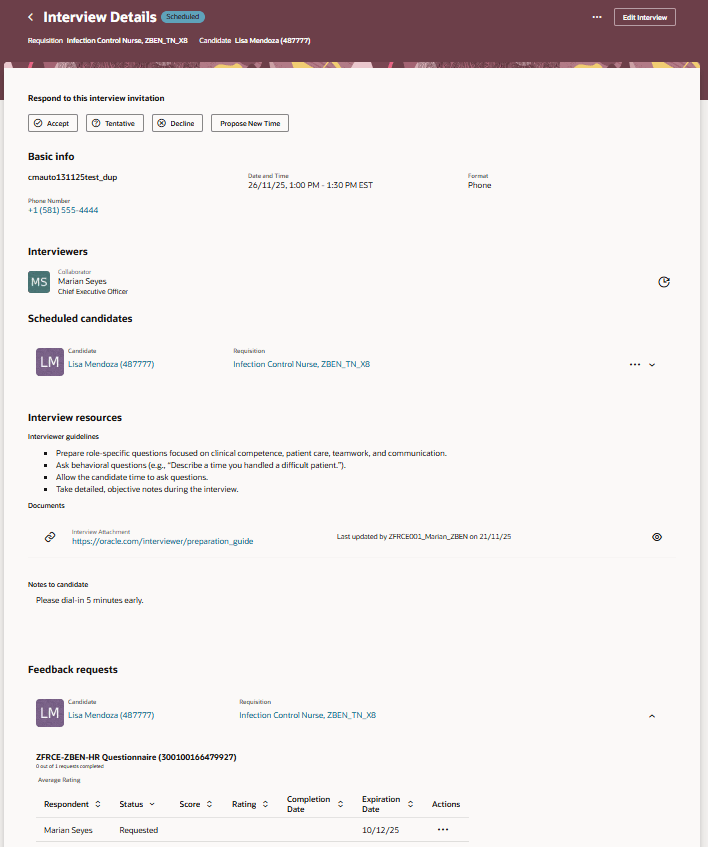
The final feature worth mentioning is the new Redwood Interview Details page, which brings several improvements over the previous responsive version. A new Basic Info section now displays key interview details at a glance. In the Interviewers section, you can easily resend the Interview Scheduled notification, handy if someone says they haven’t received it. The Scheduled Candidates section allows you to click candidate and job requisition links to open a drawer with more information, and the Actions menu lets you manage candidates scheduled for the interview. Under Interview Resources, you’ll find interviewer guidelines, attachments and candidate notes added to the interview. If you’re an interviewer, you can respond directly to the invitation, accept, tentatively accept, decline or propose a new time. When proposing a new time, the drawer can even display your availability if calendar integration (Microsoft 365 or Google) is enabled.

Oracle often slip in new features during the month, so it’s worth keeping an eye out. If anything truly game-changing appears, I’ll share another blog post to keep you updated and make sure you don’t miss out. In the meantime, why not check out my latest write-up on the new Core HR features in Release 26A? You can find it here.

Please note all screenshots are the property of Oracle and are used according to their Copyright Guidelines
Oracle AI World – Day 3

Day 3 was the last day of Oracle AI World and whilst it was only a half day, it was one of my favourites! We all breakfast together, before going our separate ways. It was a lovely start to the day. I managed to fit in two sessions, one on AI Powered EPM and the final one was Amplifying Human Potential. I had lunch with lots of my fellow ACE program members, before we all went off on our ACE Adventure to the Atomic Museum.

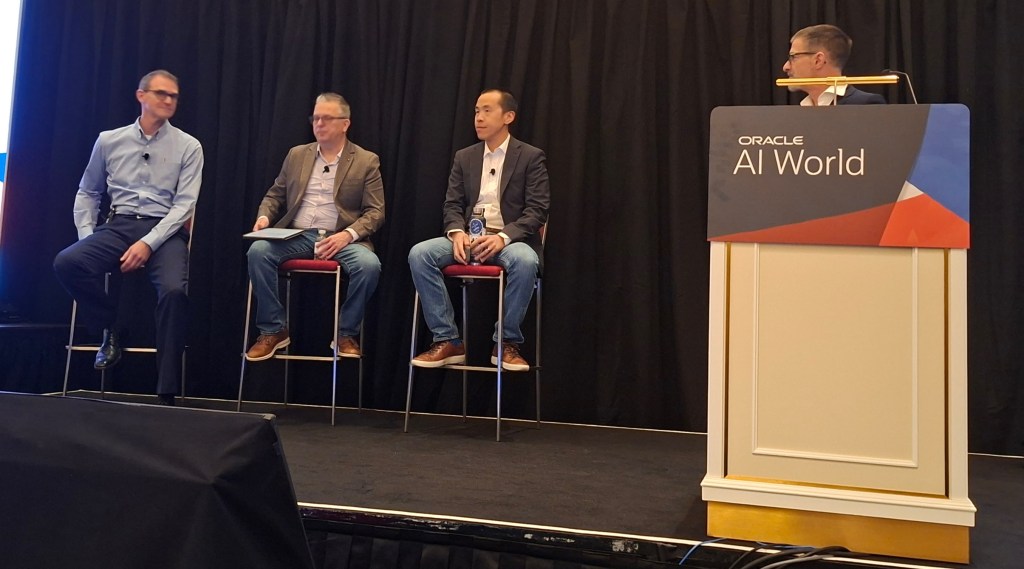
The first session was on AI Powered EPM. Not only was the customer panel hosted by Marc Seewald, the EPM Product Manager, but I was able to sit in the front row next to Andy King, the King of EPM. I was surrounded by extensive EPM experience and it was extremely interesting. I particularly liked the inclusion of Andrew, the VP of Finance at Oracle. It was really interesting to hear his perspective on the value EPM brings to Oracle’s internal Finance processes.

All members of the Panel had extensive experience of Finance Transformation. EPM has been a fundamental part of their financial planning, albeit in different areas. As an EPM novice, it was really interesting to hear the different ways EPM has added value. It definitely has made me want to find out more about EPM. Hopefully I can share my learnings in the future.

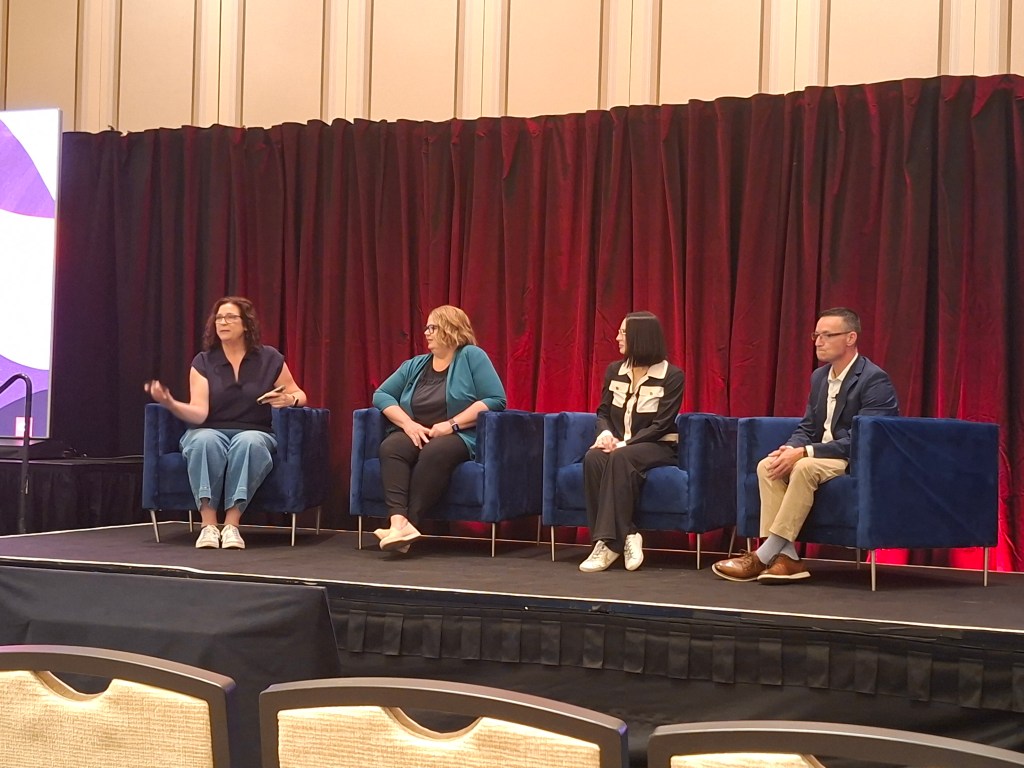
The second, and last session of the day was Amplifying Human Potential. Again it was a panel discussion, this time about using HCM Cloud to improve business processes. As a HCM Nerd who loves innovation,  this was definitely the session for me.

It was a really good panel, Julie has a HCM background,  Kamwin has a systems background and Paul recently led an implementation of Recruiting Cloud. It was a great balance of Oracle experience and system viewpoints.

Not only was the knowledge sharing from the panel really inspiring, what I took away most from the session was how much I love the HCM Cloud community. During the Q&A at the end, a number of people asked for advice. One key question was around how to handle incorporating innovation when the organisation had only just gone live and were struggling to keep on top of BAU work. The panel were very reassuring and provided personal experiences,  but so did the audience. A number of people, myself included, stopped to speak to the question asker at the end to provide advice and reassurance. I highlighted the importance of Cloud Success Navigator as they could record the new features that are of interest on their roadmap, then review them in the future when they feel in a better place to start switching on additional functionality. The general conversation and support given made me very proud of the community.

I can’t believe this is the end of my AI World blogs. I hope you found them all interesting. I’d love to hear what you think. Thanks for joining me on this journey.

Please note all screenshots are the property of Oracle and are used according to their Copyright Guidelines
Oracle HCM Cloud Recruit 25D

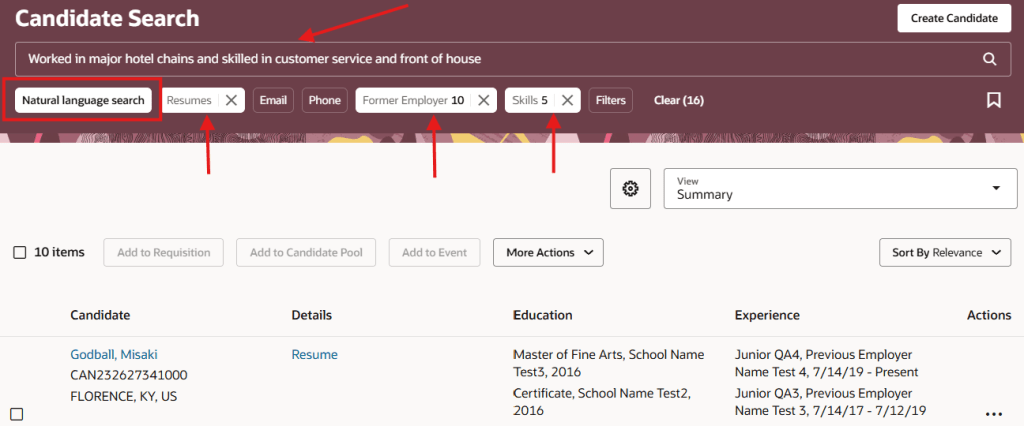
Great news – 25D has landed! Unlike most modules, Recruit has a two-step journey to Redwood, and 26B is the big one to focus on to make sure users stay compliant and fully switched over for core Recruit tasks. If you’ve already got 25C, you should be handling requisitions, job applications and candidates in Redwood by now. The next wave is all about offers, interviews, campaigns, events and agency hiring. While 25C gave us a few Redwood features for offers, 25D really ramps things up to help you stay on track for the 26B deadline, but even more excitingly, it’s full of AI features to make your lives easier! So let’s dive in and explore what’s new….

This first feature isn’t actually a Redwood specific one, but it’s a great one that I’m very excited about! Given Oracle’s push to embed AI into Fusion, wherever it is relevant, this feature is a great use case for it! The new AI Agent for Candidate Experience introduces an AI Chatbot called Career Coach directly onto the Career Site. It will be much easier for candidates to search for a new role with the Job Recommendations Agent and Job Fit Agent, as they get tailored suggestions based on their experience and skills. The candidate just need to upload their CV, answer a couple of questions and then the Job Recommendations Agent will highlight roles that match their profile, while the Job Fit Agent helps them figure out if a particular job is the right fit and answers any questions. Both agents can even use uploaded documents to give more personalised advice, making the whole process smoother and more relevant.

There’s another AI feature I’m excited about. This was shown at CloudWorld London and customers have been asking me about it ever since! The Job Applicant Screening Agent Template lets you create a handy agent team in AI Agent Studio, which Recruiters can get to straight from the Job Application page. It’s a super helpful “ask me anything” assistant that can dig up all sorts of info, including feedback scores, background checks, recent updates, and what’s happened over the past few weeks. You can ask things like “What’s going on with this application?” or “Give me the full lowdown,” and it’ll even suggest things like interview feedback, timelines, assessments, and offer details. It’s a real time-saver, especially for people who don’t use the system much and just want quick answers without the faff.

If you’re anything like me and find creating job offers a bit laborious, you’ll definitely want to check out the new Job Offer Creation Agent in AI Agent Studio. It’s like having a helpful friend on hand, it’s ready to answer all your questions, whether they’re general or specific to certain fields. You can customise it with your own documents and prompts, so it fits your organisation’s policies perfectly. Wondering if you can tweak the start date after sending an offer? Not sure about the typical job grade for a Chief of Staff? Curious about salary differences between cities, or what to do if a candidate already has another offer? This agent’s got your back. It helps you breeze through the offer process smoothly, fills in the right info, and cuts down on errors, so you can focus on getting the right people on board, faster.

The final Recruit AI Agent I want to highlight is one I particularly love, the new Job Requisition Creation Agent to help speed up the process of creating Job Reqs. Think of it as your go-to FAQ buddy, it answers all sorts of questions, whether you’re wondering about salary grades, attachments, or who’s recruiting in a specific location. It works entirely off the documents you upload and the prompts you set, so it’s easy to tailor to your company’s policies and ways of working. Whether you’re asking if you can change job grades later or need to know the salary range for consultants in Dallas, this assistant helps you get it right first time, no interruptions, fewer downstream issues, and a smoother, more efficient experience all round.

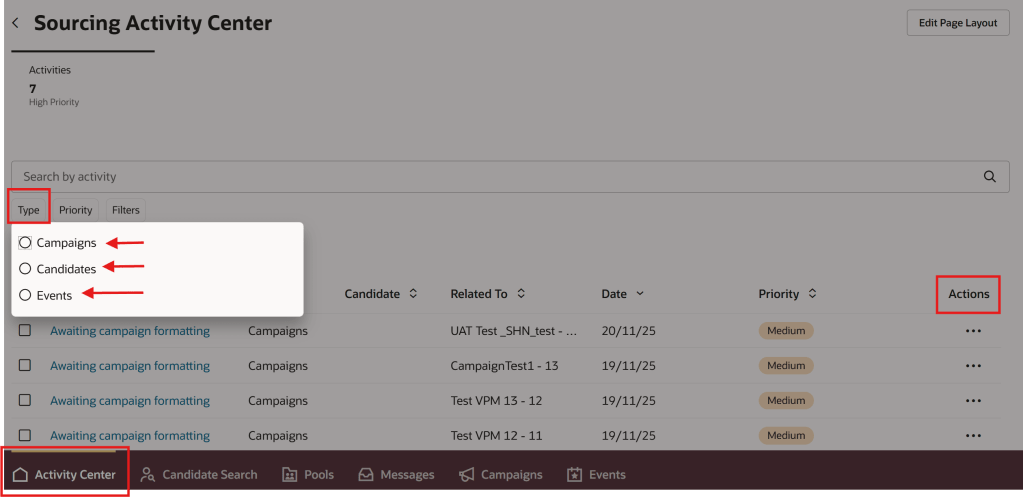
In 25C, the Candidate Sourcing tile was added. In 25D, the Campaigns and Events tabs are no longer under Hiring, but moved to Candidate Sourcing. When you head into the Candidate Sourcing tab, you’ll find everything you need to start building your talent pipeline – from Candidate Search and Pools to Messages, Campaigns, and Events. Over in the Hiring tile, you’ve got quick access to the Activity Centre, Messages, Requisitions, Offers, and you’ll spot Candidate Search and Pools again here too, so you’re never far from the tools that help you keep hiring on track.

Oracle often sneak in new features throughout the month, so it’s worth keeping an eye out. If anything truly game-changing drops, I’ll write up another blog post to keep you posted and make sure you’re not missing out. In the meantime, feel free to check out my latest write-up on the new Core HR features in Release 25D, you can find it here.

Please note all screenshots are the property of Oracle and are used according to their Copyright Guidelines
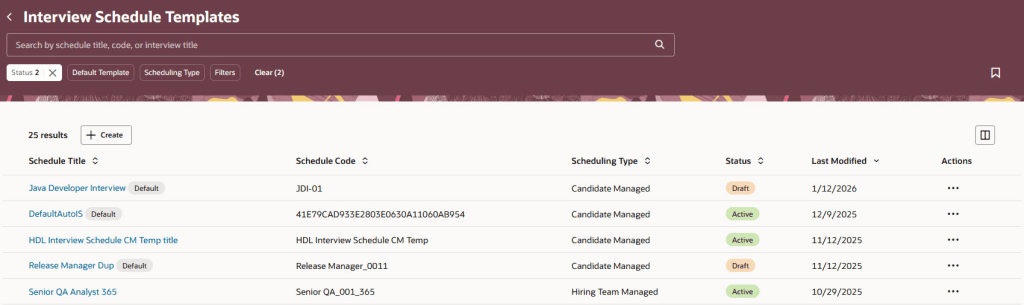
Oracle HCM Cloud Recruiting 25C

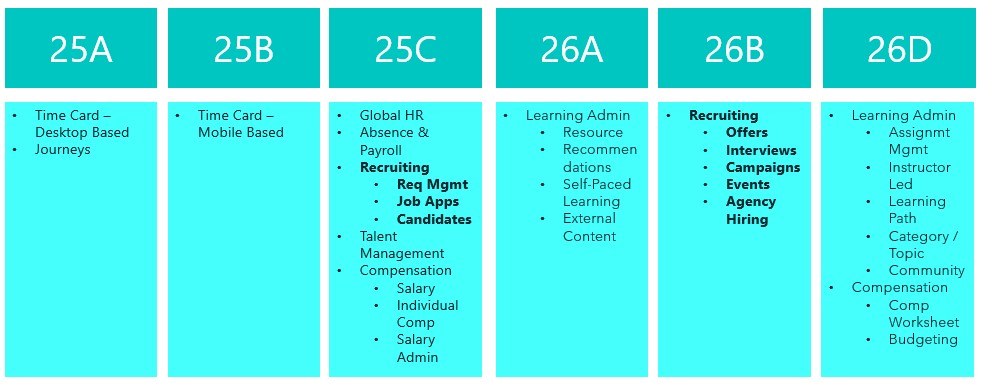
Earlier this year there was a split in the timelines for when Recruiting becomes mandatory in Redwood. Requisition Management, Job Applications and Candidate Management are all mandatory by Release 25C. Offer and Interview Management, Campaigns, Event and Agency Hiring are now mandatory by Release 26B. With this in mind, there are a lot of new features in release 25C to prepare for the second phase of Redwood for Recruiting. Oracle continues to deliver innovation, with new features rolling out throughout the quarter. I’ll be keeping a close eye on the updates, and if anything particularly noteworthy emerges, I’ll share a follow-up post to keep you in the loop.

Updated Redwood Timeline

This release introduces Redwood functionality for Offers. It’s now possible to both create and delete an offer within Redwood. It’s possible to override information from the position during the offer process, unless Position Sync is switched on and then the option is greyed out. As with all new Redwood pages, I would recommend switching it on in your Development pod and checking out the functionality as soon as you receive 25B. The earlier you start testing, the easier it will be to adopt Redwood for Offers.

Create an Offer in Redwood

In this release Oracle have split out the Hiring tab, into two separate ones: Hiring and Candidate Sourcing. The Hiring tile now contains these tabs: Activity Centre; Messages; Requisitions; Offers; Candidate Search; Pools; Campaigns and Events. The new Candidate Sourcing tile contains these tabs: Events; Candidate Search; Pools; Messages and Campaigns. The separation of tiles will automatically happen if you have the ORA_REC_RECRUITING_REDWOOD_ENABLED profile. Only users who have security access to Candidate Sourcing will have access to the tile and it’s content.

Hiring Tile and Candidate Sourcing Tile

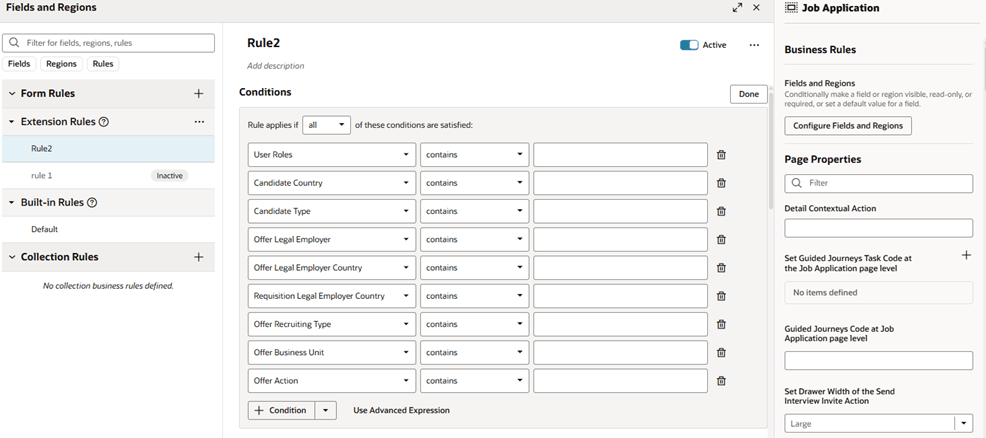
Whilst Job Applications are mandatory in Redwood by Release 25C, Oracle have added extra functionality within VBS to personalise the Job Application page. This is following customer feedback that requested additional fields to be available within Job Applications. Whilst the move to Redwood hasn’t always been smooth, I do think Oracle’s response to client feedback on additional personalisations that are requested and movement on mandatory timelines has been significantly more flexible than I would expect of an organisation of their size.

Visual Builder Studio to Personalize the Job Application Page

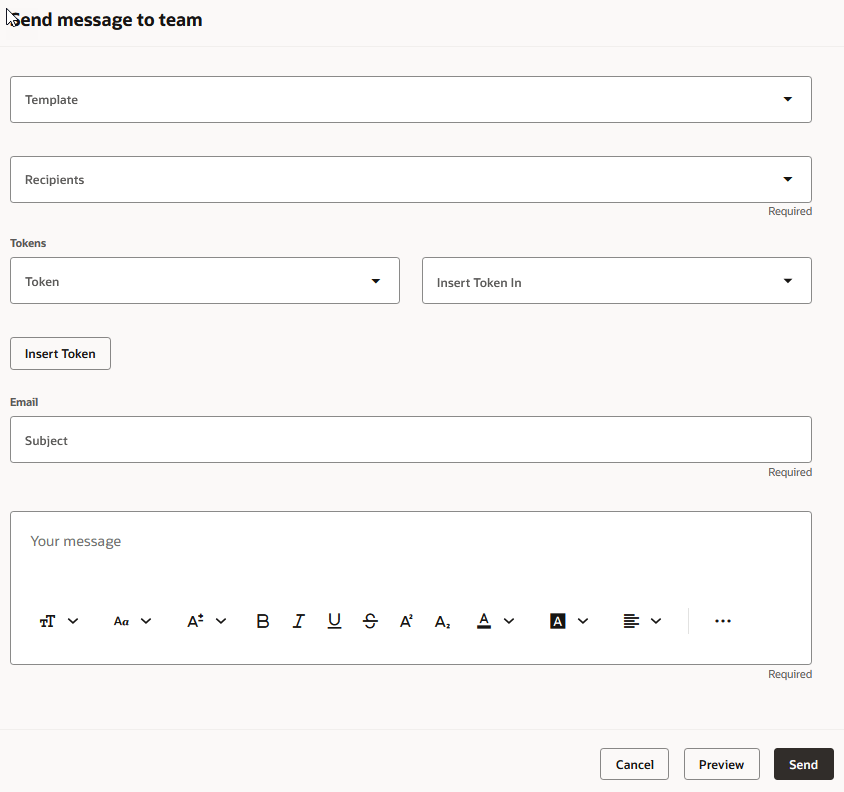
The Send Job Requisition and Job Application Related Messages to members of the hiring team has now been moved to Redwood. You can use a template to create the message or create it from scratch. The Recipients list will automatically display all the hiring team members, but you can type in the list to find other recipients. When you’re ready to send it, you can preview the message to ensure the content is correct and tokens are being resolved as expected. Once the message is sent, it’s available on the Messages tab of the job requisition, and on the Activity tab of the job application. 

Send Message to Team Panel

As I said earlier, Oracle generally continue to add new features throughout the quarter. I’ll be keeping a close watch on the updates, and if anything particularly impactful comes through, I’ll share a follow-up post to keep you informed and ahead of the curve. Please check out my blog on the new features in Core HR for Release 25C here.

Please note all screenshots are the property of Oracle and are used according to their Copyright Guidelines
Oracle HCM Cloud Recruiting 24C

Oracle have announced the new features that will be coming in Release 24C. Given Oracle’s move towards Redwood, it’s not surprising that there are a number of Redwood features for Oracle Recruiting Cloud (ORC) in this release. Whilst there hasn’t been a definitive date announced for when ORC will be mandatory in Redwood, it is likely to be soon and these features are another step on the journey.

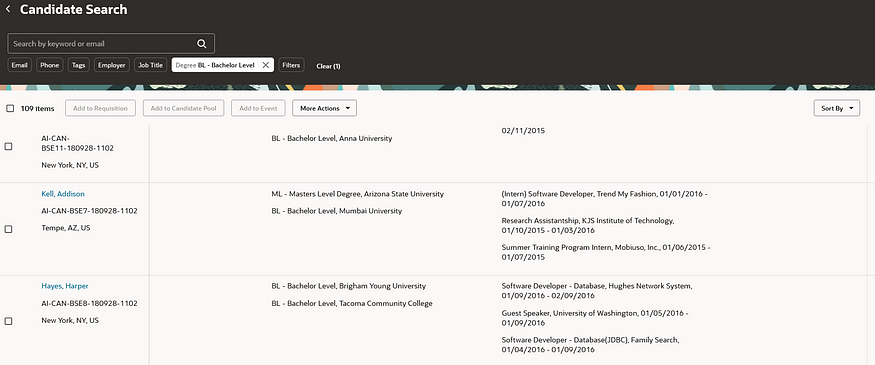
The first area that has moved to Redwood is for candidates. Both the Candidate List page and Candidate Details page have moved to the Redwood toolset. The Candidate List page is where you search for candidates. In addition to the functionality that is available in the Responsive pages, there are some new features in the Redwood version. These include a new summary view for the list of Prospect and Event Audience Lists and the addition of new filters for Pool Members, Prospects and Event Audience.

Redwood Candidate List

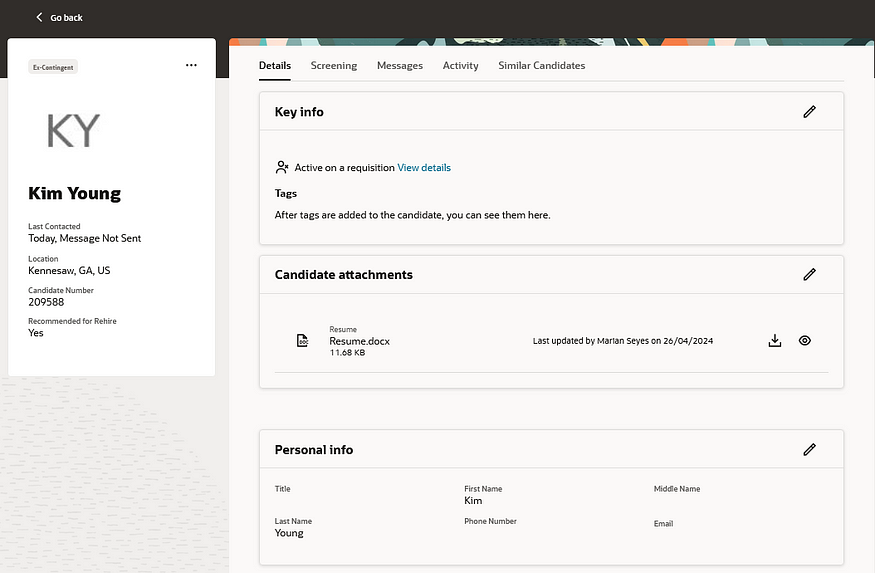
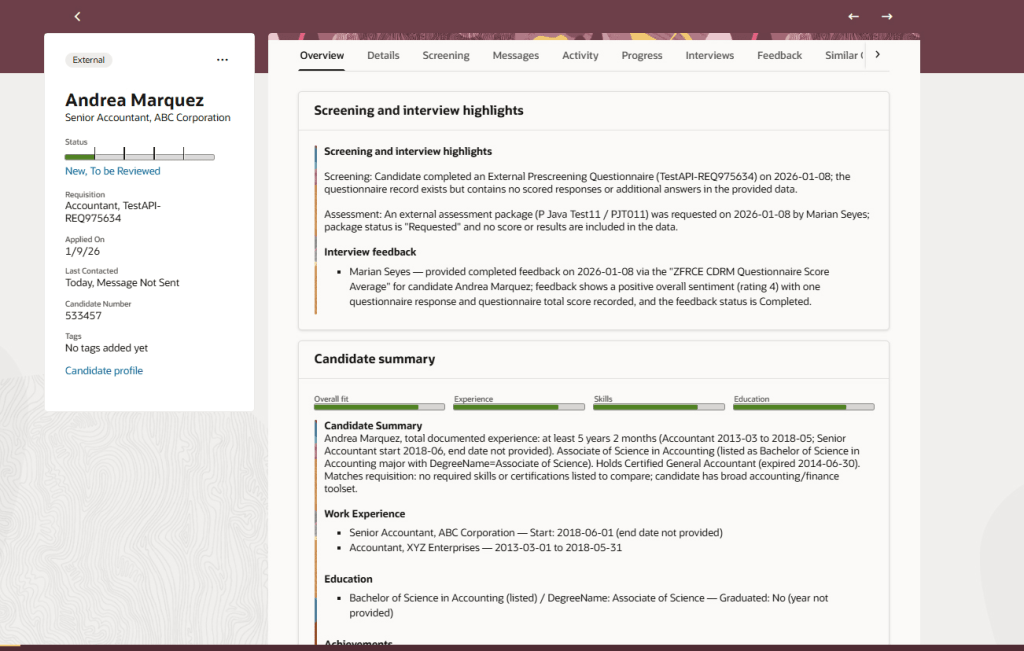
The Candidate Details page has also moved to Redwood. The layout has changed with the introduction of several tabs. The ‘Details’ tab contains all the candidate’s key information including personal details, CV, previous employment etc. The ‘Screening’ tab lists the completed assessments for the candidate across their job applications. The ‘Messages’ tab shows emails and text messages sent to the candidate. The ‘Activity’ tab shows any system activities related to the candidate, this includes all the requisitions, candidate pools, and events the candidate is associated with. The ‘Similar’ Candidates tab lists candidates who are similar to the candidate you’re viewing.

Redwood Candidate Details

Oracle’s Redwood candidate page now also features AI Assist, a cutting-edge tool designed to streamline communication with candidates. By harnessing artificial intelligence, AI Assist empowers users to quickly compose personalised emails and text messages. Its advanced generative capabilities produce content that is not only ready-to-use but also tailored to the specific topic at hand. To utilise AI Assist, users simply start the process by telling the tool about the subject of their correspondence, and AI Assist takes care of crafting both the subject line and the body of the message with pertinent information.

AI Assist for Redwood Candidate Communication

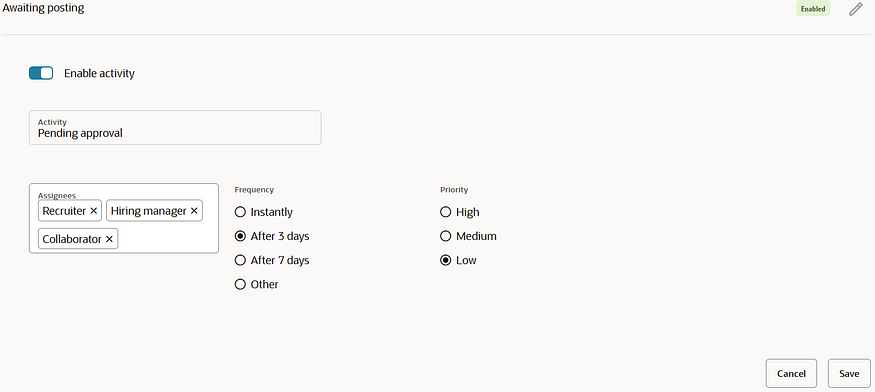
Recruiting Activity Centre was introduced in Release 23C. One year later and Oracle are continuing to improve it. It is now possible to assign activities to all members of the Recruiting Team, including Collaborators, not just the the Recruiters and Hiring Managers as was the option previously. This change means that you can keep all members of the hiring team up to date on activities and Collaborators can access the Recruiting Activity Centre to view them.

Recruiting Activity Centre — Configuring Assignees for a Recruiting Activity Item

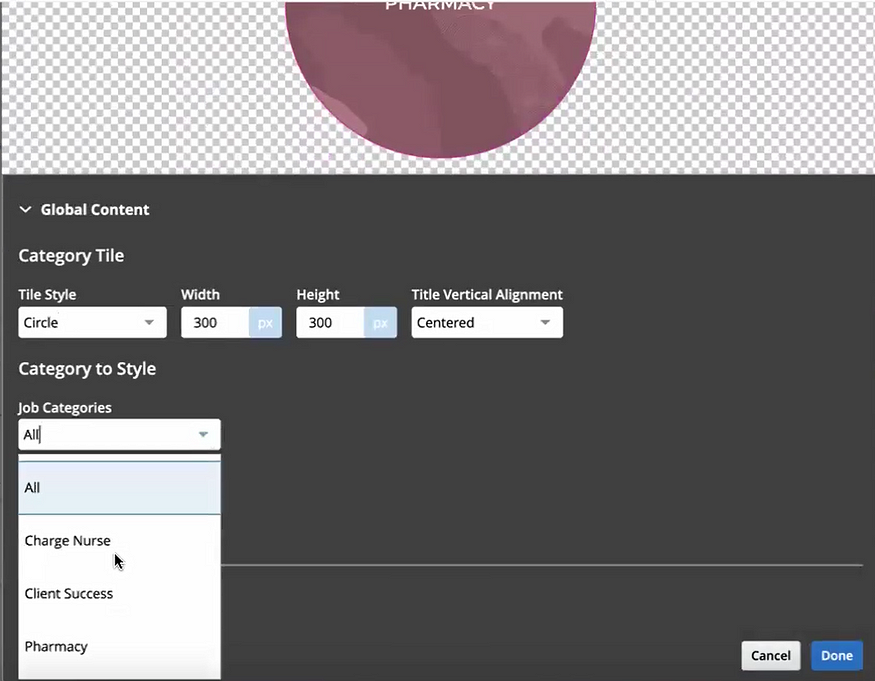
The final feature I want to highlight is a change to the configuration of the Career Site. With the introduction of a dedicated section in the Category Tiles Element, users now have the autonomy to style each category tile on the Career Site individually. This new feature not only allows for a more detailed personalisation but also significantly elevates the site’s aesthetics and enriches the candidate’s journey through the site.

Career Site — Edit an Individual Tile Category

As indicated earlier, Oracle is likely to unveil additional enhancements in the upcoming Release 24C. In the event that these new features prove to be substantial, I will provide an updated blog to share the latest developments and insights. Please check out my blog on the my top 5 new features in Release 24C within Core HR below:

Oracle HCM Cloud Core HR 24C – K8 Mead

Click here to read more about Version 1’s Oracle capabilities.

About the author:

Kate Mead is an Oracle-certified HCM Consultant and Solution Architect at Version 1 with 14 years of experience in Oracle HR and Payroll systems, including 7 years with Oracle HCM Cloud. She has worked across implementation projects and managed services, has a sound knowledge of UK Payroll legislation and — before becoming a consultant — was an HR Manager.

If you have any questions or would like more information on how Version 1 can help you realise the full potential of your Oracle Cloud instances, please contact her at kate.mead@version1.com

Please note all screenshots are the property of Oracle and are used according to their Copyright Guidelines