
It’s my favourite moment in the quarter, Oracle has just unveiled what’s coming in Release 26B. As you’d expect, this Payroll update includes a strong focus on Redwood‑driven improvements, alongside a welcome number of enhancements that have come directly from customer ideas, which is always great to see. While Oracle may add more features as the month progresses, let’s start by taking a look at what’s been announced so far.

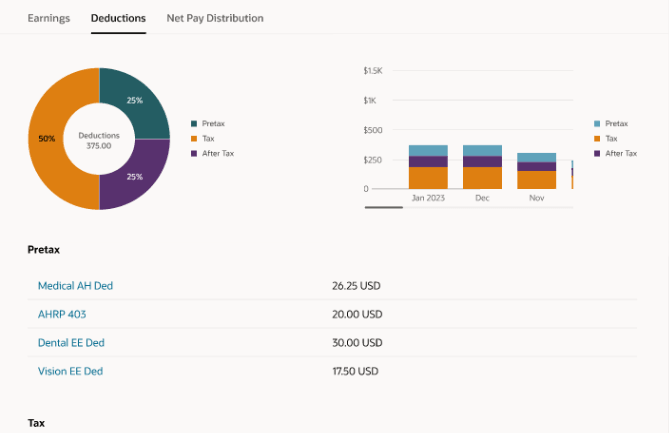
The first feature I want to call out is one that originated directly from a customer idea. If you’re not familiar with Oracle’s Ideas page, it’s where customers can submit suggestions and vote on others, and those that gain the most support often attract Oracle’s attention. While there’s no guarantee an idea will make it into the product, it’s a great way to influence the roadmap. One such idea has led to the new Redwood Earnings and Deductions page, which brings all employee earnings and deductions into a single, streamlined workspace. From one clear summary view, payroll administrators can review and manage records across a chosen date range, drill into details such as values, costing and processing history, create new entries and even submit QuickPay, all without switching between pages. The result is a more intuitive day‑to‑day experience that supports accurate, timely payroll processing.
Another set of enhancements that’s worth calling out has also come directly from customer ideas, and it’s great to see Oracle responding to what users have been asking for. The new Redwood QuickPay and QuickPay Cycle flows make it far easier to run payroll for an individual employee when needed, all within a guided, Redwood‑based experience. Administrators can review and adjust earnings and deductions, submit QuickPay, and move through each stage of the process with clear visibility of tasks, results and statuses, including payslips and payments where required. With flexible task selection, automatic skipping of steps that aren’t relevant, and the ability to verify results as you go, off‑cycle processing becomes much simpler without losing control or confidence.
Alongside this, Oracle has also made it easier to manage corrective actions across payroll flows. A new security approach allows administrators to grant designated users the ability to resolve issues on flows they didn’t initiate, without relying on complex, per‑task group ownership. This reduces administrative overhead, speeds up issue resolution, and ensures access remains tightly controlled to only the flows each user is responsible for managing.
Turning to legislative updates, UK users will be pleased to see that a long‑awaited permanent solution for Statutory Neonatal Care Leave and Pay is now in place. Employers can record neonatal care absences and make statutory payments where eligibility is met from April 2025, with support for day‑one entitlement, accrual of up to 12 weeks’ leave, and flexible take‑up within 68 weeks of discharge, all backed by the necessary legislative data and RTI reporting. Alongside this, LGPS pension calculations during child‑related leave have been improved to ensure contributions are based on actual pensionable pay where it exceeds assumed pensionable pay, using daily proration to accurately handle pay changes mid‑leave and deliver more precise employee and employer contributions.

With the recent introduction of new Irish legislation, it’s no surprise that this release includes a strong set of updates for Ireland. Support has been added for Parent’s Leave Benefit payments and offsets through new payroll attributes that simplify absence setup and improve the accuracy and consistency of benefit calculations, alongside additional attributes to support the processing of parental leave more broadly. There are also important enhancements for statutory redundancy and termination lump sum payments, including a new predefined redundancy element to handle tax‑exempt payments and improved support for calculating and reporting termination lump sums based on service and exemption rules.
Further updates introduce payroll attributes to support Health and Safety entitlements and payments, helping organisations correctly calculate both statutory and benefit‑based payments linked to these absences. Finally, a new Ireland Gender Pay Gap reporting solution provides an assignment‑level extract and a ready‑to‑use spreadsheet template, streamlining the collection of pay and hours data and supporting all required statutory calculations. Together, these changes significantly reduce administrative effort while helping organisations remain compliant with Irish legislative requirements.

There’s just one update to call out for our US customers this time, but it’s an important one. Address Search has been enhanced to support FedRAMP‑compliant environments, meaning organisations operating in federally regulated pods can use the same address search functionality while meeting stringent security and data protection requirements. The experience remains unchanged for users, ensuring consistent behaviour across both commercial and FedRAMP environments while continuing to support downstream processes such as payroll.
As mentioned earlier, Oracle often releases additional features as the month goes on. If any of these turn out to be real stand‑outs, I’ll share a follow‑up blog to keep you up to date. In the meantime, you might like to take a look at my latest post on the new Core HR features in Release 26B, which you can find here.
Please note all screenshots are the property of Oracle and are used according to their Copyright Guidelines






 K8 Mead