Oracle HCM Cloud Recruit 26A

Things are really heating up in the world of Recruit as we approach the final deadline to move the remaining Recruiting pages over to Redwood in 26B. This release is your last opportunity to make the switch. With the 25C deadline behind us, you should already be managing requisitions, job applications and candidates in Redwood. The next phase brings exciting updates around offers, interviews, campaigns, events and agency hiring. So, let’s dive in and see what’s new…
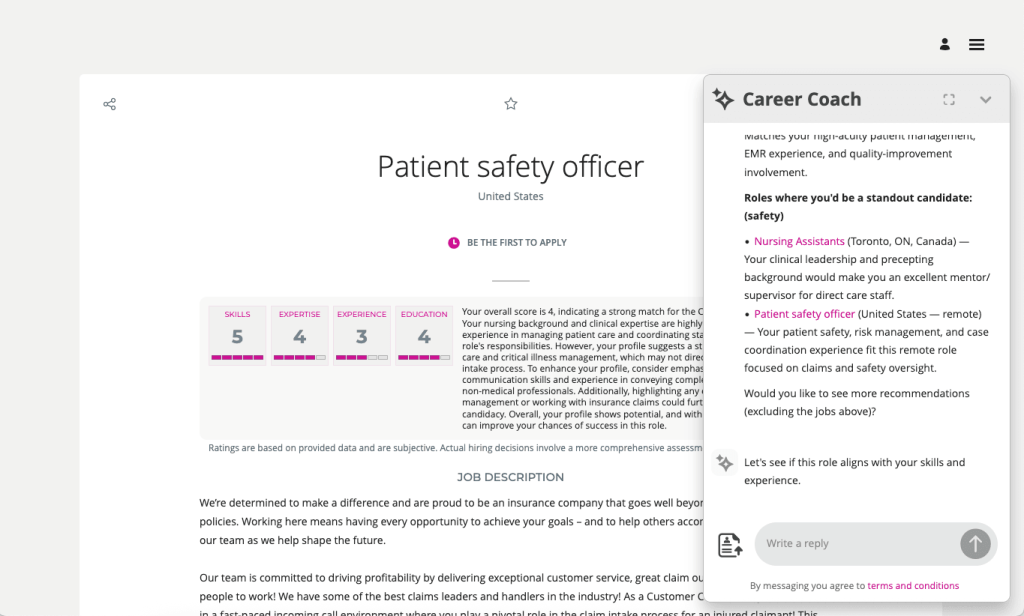
The AI Career Coach, first introduced in 25D to help candidates find roles that match their skills, has already been enhanced in 26A. The Career Coach now uses the Supervisor model, which brings all agents together under one umbrella, streamlining information sharing and removing redundancies. The agent is pre-seeded and ready to run, so there’s no need to create agents from templates. You can also choose to display the widget as an overlay, ideal for highly customised sites, rather than the default side panel, ensuring it doesn’t interfere with your design. For one-page application flows, the widget now displays correctly, and when shown as a side panel, the navigation menu is replaced with a horizontal progress bar. The fixer button appears on the page instead of the left-hand side, and a clickable Terms and Conditions link pulls content from the job application legal disclaimer in the Recruiting Content Library. If you’ve enabled CV parsing, candidate CVs will be parsed into the application flow when uploaded via the widget. From this release, any CV uploaded into the recommended jobs widget in the candidate experience will also be available to the agent.
As many of you know, I’m a big fan of AI, anything that makes life easier. The next update introduces an AI assistant for job requisition creation, working like a smart, on-page helper that answers both general and field-specific questions as you build a requisition. Because its guidance is driven entirely by the documents you upload and the prompt you configure, it’s easy to tailor to your organisation’s policies and practices. The agent helps users get it right first time, capturing the correct data, minimising downstream issues and boosting overall efficiency without interrupting the flow.
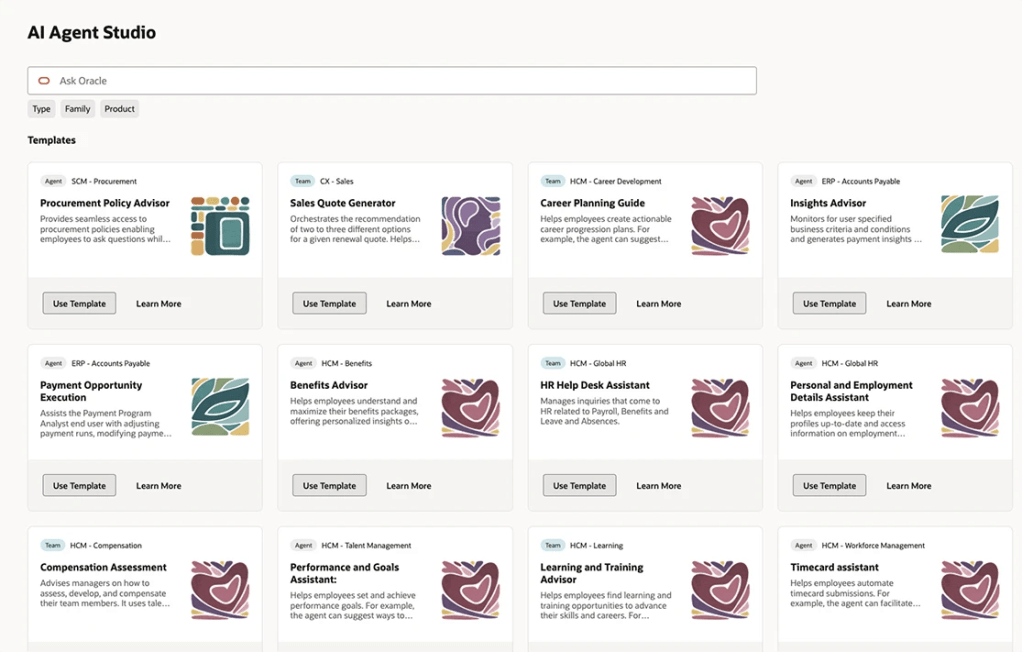
By 26B, the Job Offer process must be fully transitioned to Redwood, and Oracle has introduced a new AI agent to make this easier. Acting as an FAQ-style assistant, the agent helps users by answering both general and field-specific questions during job offer creation. Its guidance is based entirely on the documents you upload and the prompt you configure, making it simple to align with your organisation’s policies and practices. This smart assistant ensures job offers are created smoothly, reduces downstream issues by capturing accurate data, and boosts overall efficiency without disrupting the process.

Another useful Redwood Offer feature is the Initiate Job Offer Creation for Hiring Managers functionality. Hiring managers with the Initiate Job Offer privilege can now start the process and share notes with the recruiting team using the Create Job Offer action from the Redwood job applications list or details page. On the Create Job Offer page, they can add comments in the Notes to Recruiter field to provide context or instructions. Once they click Save and Close, the candidate’s application moves to Offer – Draft status and appears on the Redwood Job Offers list page. The recruiter receives a notification to complete the offer details using the Edit Offer action, with the manager’s notes displayed in a banner above the Details and Offer tabs. When ready, the recruiter can submit the job offer for approval or save it for further editing later.

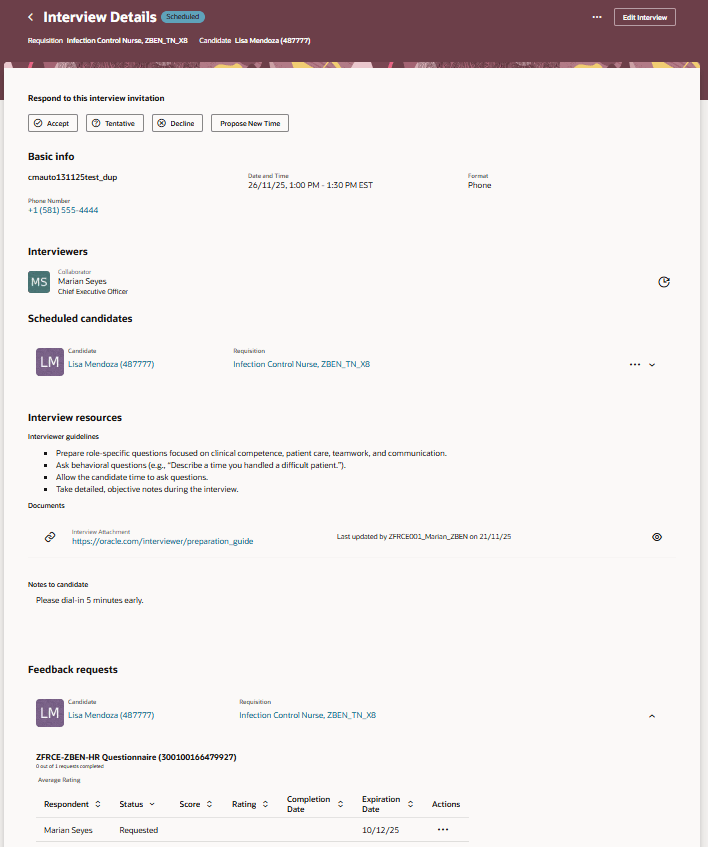
The final feature worth mentioning is the new Redwood Interview Details page, which brings several improvements over the previous responsive version. A new Basic Info section now displays key interview details at a glance. In the Interviewers section, you can easily resend the Interview Scheduled notification, handy if someone says they haven’t received it. The Scheduled Candidates section allows you to click candidate and job requisition links to open a drawer with more information, and the Actions menu lets you manage candidates scheduled for the interview. Under Interview Resources, you’ll find interviewer guidelines, attachments and candidate notes added to the interview. If you’re an interviewer, you can respond directly to the invitation, accept, tentatively accept, decline or propose a new time. When proposing a new time, the drawer can even display your availability if calendar integration (Microsoft 365 or Google) is enabled.
Oracle often slip in new features during the month, so it’s worth keeping an eye out. If anything truly game-changing appears, I’ll share another blog post to keep you updated and make sure you don’t miss out. In the meantime, why not check out my latest write-up on the new Core HR features in Release 26A? You can find it here.

Please note all screenshots are the property of Oracle and are used according to their Copyright Guidelines
Redwood for Global HR – What Do you Need to Know?

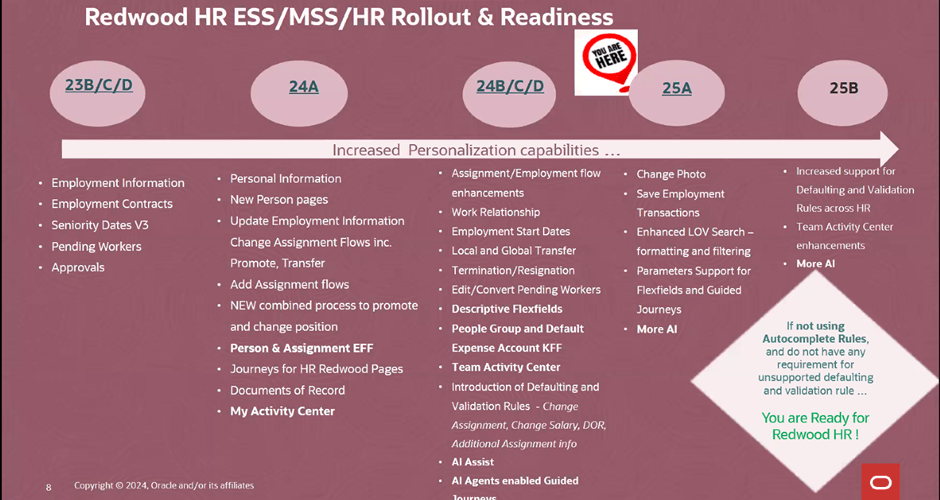
As you will know, Redwood is mandatory for Global HR from Release 25C, so now is time to make the move!  The first question I am asked is will there be a replacement for Person Management? I’ll be honest with you, I love Person Management! The good news is that Oracle have confirmed that there will be, the ‘HR Activity Centre’. The date for release hasn’t been confirmed, but it is coming. Oracle have caveated that it won’t be a like-for-like replacement, but it will be a centralised location for transactions rather than having to go to different quick actions.

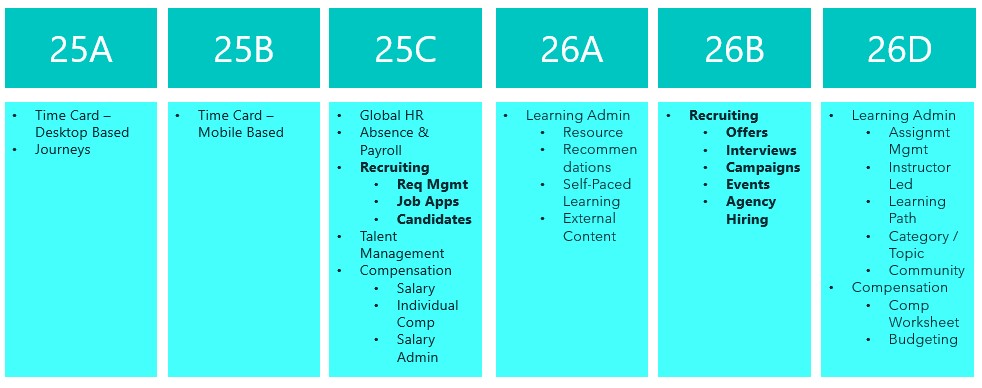
Oracle massively ramped up the number of Global HR features available within Redwood in 2024, so the majority of features are already available to you right now. As the picture above shows, if you’re not currently using autocomplete rules and have no requirement for creating unsupported defaulting rules, you can move to Redwood for Global HR right now. If you do have a requirement to default in data using rules, the amount of rules for defaulting data available will be significantly increased in 25B. This doesn’t mean wait for 25B though, it’s important that if you haven’t started, to start the switch in a non-production pod. Using a dedicated Redwood pod is always my recommended approach as it won’t impact on quarterly regression testing or issue resolution, due to the pod not matching what is currently in Production.

Global HR differs slightly to other modules when moving to Redwood. There are the usual steps, enabling Oracle Search, Updating Custom Security Roles; Reviewing and Migrating Personalisations using the Personalisation Helper Tool and Switching on the Redwood Flows via Profile Options. For Global HR, there are two additional prerequisites. Firstly, to be able to use the Redwood pages for Termination and / or Resignation, you must have migrated to Termination V3. To be able to use the Redwood page for Seniority Dates, you must be using Version 3 of Seniority Dates. So what happens if you’re not using one or both of the prerequisite versions? For terminations and resignations, you won’t be able to use the Redwood page. For Seniority Dates, there is an alternative, you can manage the dates via the Redwood Work Relationship page. If you want the full Redwood experience, I would recommend making the move to the latest versions of both Termination and Seniority Dates. My other recommendation is to migrate the V3s now, not after you’ve moved to Redwood. This will make the process more straightforward and therefore easier.

So what are my top tips? The Redwood ‘Bible’ only lists the key flexfields the need switching on. Check the What’s New Documents for all related modules for all the historic Redwood updates. Have you seen the Feature Listing Report on the Cloud Readiness website? From here you can download every upgrade since 2023 for every Fusion module in a handy spreadsheet. You can then use filters to find all the Redwood features for a given module.

A lot of users have reported issues with flexfields whilst testing Redwood. If this happens, redeploy the flexfields and make sure all flexfield personalisations have been migrated. Likewise if you’re having issues with pages, firstly ensure that the appropriate profile options for Oracle Search are switched on. If that doesn’t work, ensure custom roles have the correct privileges.

The Redwood Personalisation Tool is extremely helpful. Whilst it can’t migrate all personalisations, it will migrate some of them and reduce the amount of manual personalisations that will need to be applied. I would always recommend only using it in Migration mode for a small subset at a given time. Preferably one flow at a time. This gives you the chance to review the personalisations and make corrections more easily. Additionally once the tool has been used to migrate a flow, you can’t use it again for that specific flow. Even if a newer version of the tool provides more migration options within that flow.

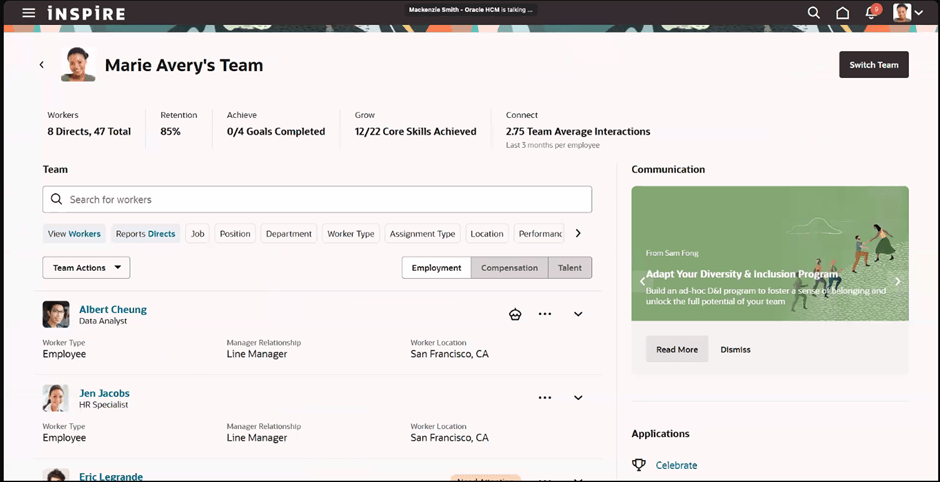
Finally, use the new Activity Centres. Within the Global HR space, there is currently one for employees and one for line managers. These are a one stop shop for users to access all their and their team’s HR records and carry out their tasks. As I said earlier, one for the HR Team to replace Person Management is coming, so watch this space! Check out my earlier blog on Activity Centres here.

Please note all screenshots are the property of Oracle and are used according to their Copyright Guidelines.

Oracle Modern Best Practice – The Term Everyone is Going to be Talking About!

Have you heard of Oracle Modern Best Practice? It’s actually not a new thing, Oracle have been talking about it for nearly 10 years, but with the introduction of the amazing tool Cloud Success Navigator, Oracle Modern Best Practice (OMBP) is now taking centre stage! Oracle have created OMBPs for Cloud Fusion products for the first time and they will prove invaluable.

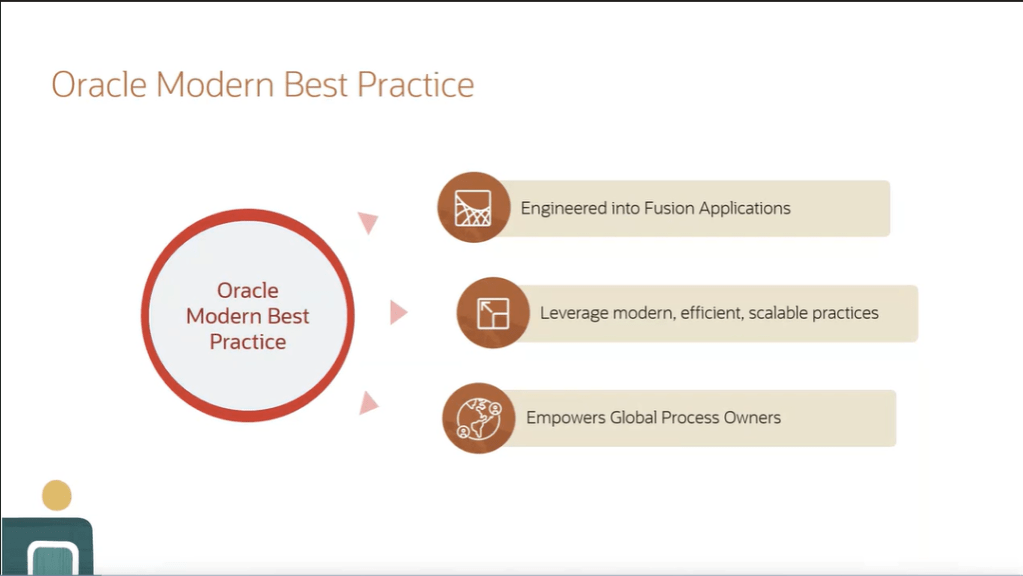
So what are OMBPs? They are common business processes that Oracle have optimised to improve the performance of applications using the latest technology. Oracle have done thousands of implementations and have taken learnings from both the successful and unsuccessful ones. These learnings have been analysed by Oracle experts to put together their OMBPs and related process flows. These flows incorporate scalable and efficient practices which empower the business’ process owners which will, in turn, produce improved results. Oracle are constantly evolving their Fusion product and as such, the OMBPs are also evolving. OMBPs can be used to educate users; demonstrate business processes; help to plan an adoption path and structure the scope of an implementation.

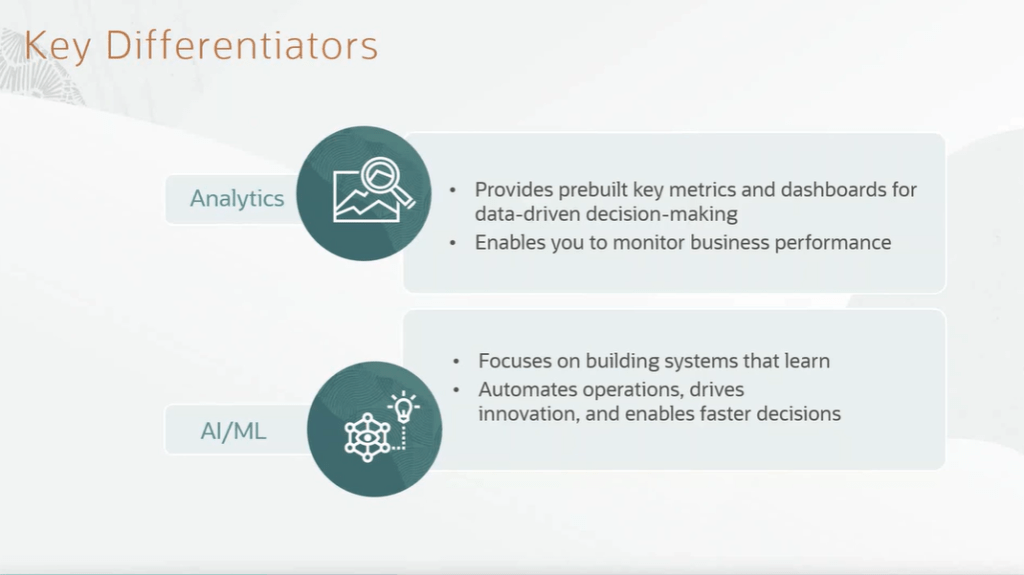
So what is included in an OMBP process flow? They incorporate all of the required steps within the process. Often users can miss a step as they don’t appreciate the criticality of it and this will prevent this from happening. My favourite part of the OMBPs are the recommendations on analytics that provide organisations with key metrics that they might not have been aware of. Analytics help organisations to monitor performance of specific areas of the business and gain a better understanding which will help with decision making. Additionally the OMBPs incorporate AI and Machine Learning. The processes incorporate innovations which aim to automate processes and help organisations make faster decisions.

OMBPs are currently available for the majority of an organisation’s processes. These include ERP, EPM, HCM, SCM and CX. Additionally there are industry specific OMBPs, including Banking, Healthcare, Higher Education, Insurance, Public Sector, Utilities and Retail.

So why should you care? Organisations always ask me, ‘What is the Best Practice?’. The introduction of OMBPs enable organisations to have access to this information at their fingertips, without needing to search for it. This will ensure your organisation is using the latest functionality with the greatest efficiency. Cloud Success Navigator incorporating Oracle Modern Best Practice within the tool will make this even easier. Please check on my blog on Cloud Success Navigator here, for more details.

Please note all screenshots are the property of Oracle and are used according to their Copyright Guidelines

Oracle HCM Cloud Redwood Key Dates

Have you read my previous blog on Redwood in HCM Cloud? If not, check it out here! Now you know what Redwood UI is, it’s time to review the timeline for implementing Redwood for Oracle HCM Cloud.

Image by Kjjj3 from Pixabay

As of January 2024, these are the key dates, that organisations who use Oracle HCM Cloud should know, for Redwood implementation:

Release 24A

Majority of key HR and Payroll processes available in Redwood UI

Newly provisioned pods will be delivered with Redwood-enabled

Image by tigerlily713 from Pixabay

Release 24B

Redwood for Learn Self Service becomes mandatory

Image by Jagrit Parajuli from Pixabay

Release 24D

Checklists and Onboarding replaced with Journeys

Redwood for Timecards becomes mandatory

Image by Nile from Pixabay

Release 25A

New Go-lives must be Redwood

Image by WOKANDAPIX from Pixabay

Release 25B

All Employee Self Service (ESS) / Manager Self Service (MSS) must be Redwood

Image by StartupStockPhotos from Pixabay

Now is the time to start planning for your move to Redwood UI. Version 1 can help you plan and implement Redwood UI for all your Oracle Cloud modules — EPM, ERP and HCM. For more details, please get in touch!

About the author:

Kate Mead is an Oracle-certified HCM Consultant and Solution Architect at Version 1 with 14 years of experience in Oracle HR and Payroll systems, including 7 years with Oracle HCM Cloud. She has worked across implementation projects and managed services, has a sound knowledge of UK Payroll legislation and — before becoming a consultant — was an HR Manager.

If you have any questions or would like more information on how Version 1 can help you realise the full potential of your Oracle HCM Cloud instances, please contact her at kate.mead@version1.com

Oracle HCM Cloud 24A — The Redwood Release!

As Oracle promised, 24A is the release that brings Redwood to the masses! There are so many Redwood new features in this release, now is the time to start your move away from Responsive UI to the new and improved Redwood-enabled Core HR applications.

Change Assignment

So what is Redwood and why should I be excited about this?

Redwood is the new Oracle User Interface (UI) for all Oracle products. The long-term plan is for all applications within the Oracle Cloud EPM, ERP and HCM modules to have the same look and feel. The Redwood UI is designed to be mobile and tablet-friendly. When personalising pages, you can view how the page will look on named mobile device and tablet models, to see how the page will appear based on the dimensions of that particular device. All of this is to ensure that accessibility is central to the application.

Photo by Domenico Loia on Unsplash

So back to 24A. What features should I be looking out for?

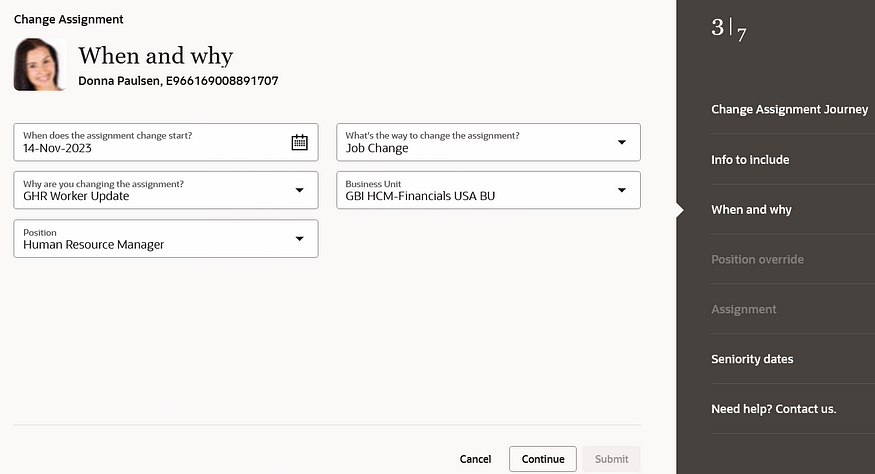
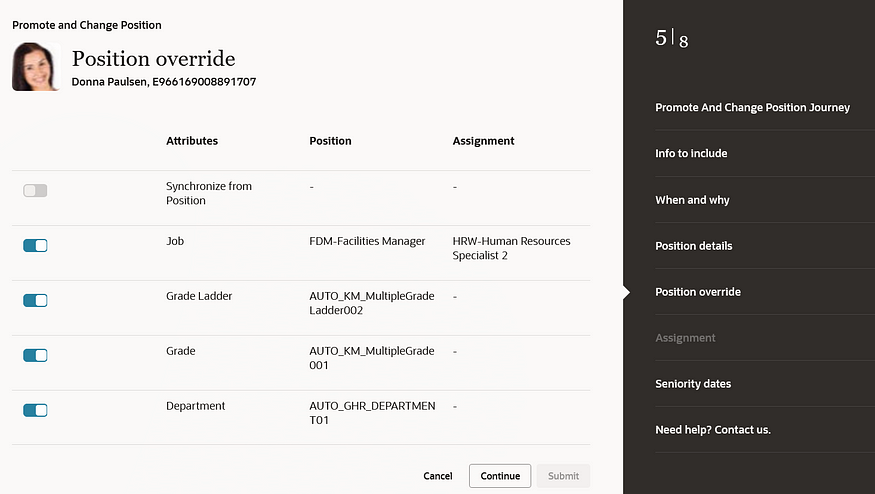
There are numerous process flows now incorporated into the Redwood experience. These include Change Assignment, Promote, Change Position, Employment and Transfer. These are the processes that Oracle users have been waiting for.

Position Override

Before 24A, the main applications that were within the Redwood UI were in the configuration areas, such as Workforce Structures. Now your HR users can carry out their day-to-day processes, such as carrying out promotions; changing line managers; managing contracts; and using the latest and greatest Oracle technology in a user-friendly and accessible interface.

For more details on release 24A, please see the Oracle 24A What’s New page here.

About the author:

Kate Mead is an Oracle-certified HCM Consultant and Solution Architect at Version 1 with 14 years of experience in Oracle HR and Payroll systems, including 7 years with Oracle HCM Cloud. She has worked across implementation projects and managed services, has a sound knowledge of UK Payroll legislation and — before becoming a consultant — was an HR Manager.

If you have any questions or would like more information on how Version 1 can help you realise the full potential of your Oracle HCM Cloud instances, please contact her at kate.mead@version1.com

Please note all screenshots are the property of Oracle and are used according to their Copyright Guidelines