
As you will know, Redwood is mandatory for Global HR from Release 25C, so now is time to make the move! The first question I am asked is will there be a replacement for Person Management? I’ll be honest with you, I love Person Management! The good news is that Oracle have confirmed that there will be, the ‘HR Activity Centre’. The date for release hasn’t been confirmed, but it is coming. Oracle have caveated that it won’t be a like-for-like replacement, but it will be a centralised location for transactions rather than having to go to different quick actions.
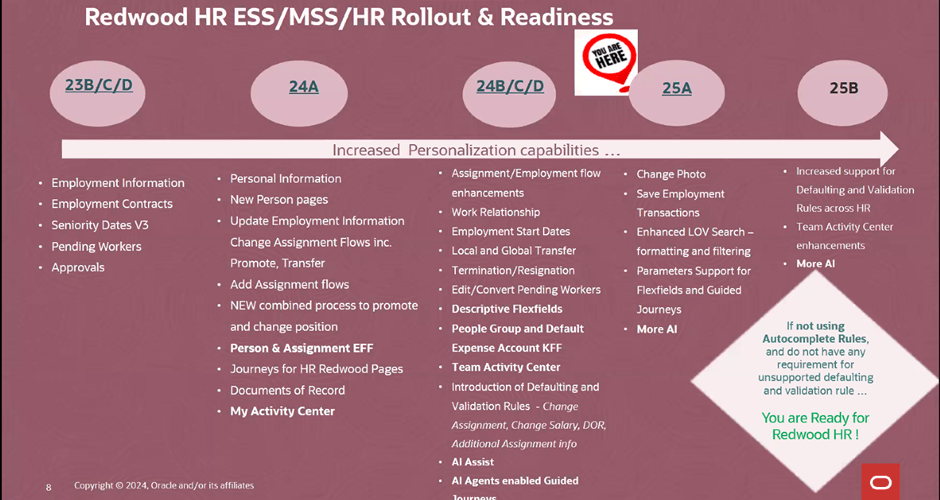
Oracle massively ramped up the number of Global HR features available within Redwood in 2024, so the majority of features are already available to you right now. As the picture above shows, if you’re not currently using autocomplete rules and have no requirement for creating unsupported defaulting rules, you can move to Redwood for Global HR right now. If you do have a requirement to default in data using rules, the amount of rules for defaulting data available will be significantly increased in 25B. This doesn’t mean wait for 25B though, it’s important that if you haven’t started, to start the switch in a non-production pod. Using a dedicated Redwood pod is always my recommended approach as it won’t impact on quarterly regression testing or issue resolution, due to the pod not matching what is currently in Production.

Global HR differs slightly to other modules when moving to Redwood. There are the usual steps, enabling Oracle Search, Updating Custom Security Roles; Reviewing and Migrating Personalisations using the Personalisation Helper Tool and Switching on the Redwood Flows via Profile Options. For Global HR, there are two additional prerequisites. Firstly, to be able to use the Redwood pages for Termination and / or Resignation, you must have migrated to Termination V3. To be able to use the Redwood page for Seniority Dates, you must be using Version 3 of Seniority Dates. So what happens if you’re not using one or both of the prerequisite versions? For terminations and resignations, you won’t be able to use the Redwood page. For Seniority Dates, there is an alternative, you can manage the dates via the Redwood Work Relationship page. If you want the full Redwood experience, I would recommend making the move to the latest versions of both Termination and Seniority Dates. My other recommendation is to migrate the V3s now, not after you’ve moved to Redwood. This will make the process more straightforward and therefore easier.

So what are my top tips? The Redwood ‘Bible’ only lists the key flexfields the need switching on. Check the What’s New Documents for all related modules for all the historic Redwood updates. Have you seen the Feature Listing Report on the Cloud Readiness website? From here you can download every upgrade since 2023 for every Fusion module in a handy spreadsheet. You can then use filters to find all the Redwood features for a given module.

A lot of users have reported issues with flexfields whilst testing Redwood. If this happens, redeploy the flexfields and make sure all flexfield personalisations have been migrated. Likewise if you’re having issues with pages, firstly ensure that the appropriate profile options for Oracle Search are switched on. If that doesn’t work, ensure custom roles have the correct privileges.

The Redwood Personalisation Tool is extremely helpful. Whilst it can’t migrate all personalisations, it will migrate some of them and reduce the amount of manual personalisations that will need to be applied. I would always recommend only using it in Migration mode for a small subset at a given time. Preferably one flow at a time. This gives you the chance to review the personalisations and make corrections more easily. Additionally once the tool has been used to migrate a flow, you can’t use it again for that specific flow. Even if a newer version of the tool provides more migration options within that flow.
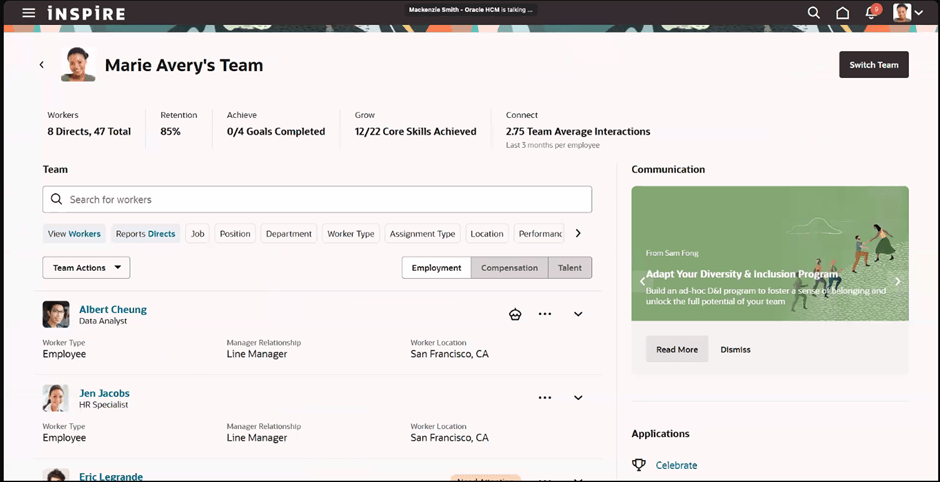
Finally, use the new Activity Centres. Within the Global HR space, there is currently one for employees and one for line managers. These are a one stop shop for users to access all their and their team’s HR records and carry out their tasks. As I said earlier, one for the HR Team to replace Person Management is coming, so watch this space! Check out my earlier blog on Activity Centres here.
Please note all screenshots are the property of Oracle and are used according to their Copyright Guidelines.

 K8 Mead