Oracle Fusion Common Features 26B

It’s my favourite time of the quarter, Oracle has just shared what’s coming in release 26B. I don’t usually write about the Common Features releases, but this is where the really exciting developments for AI Agent Studio tend to appear, and this update is no exception. As ever, more features may follow later in the month, but for now let’s take a look at what’s been announced so far.
AI Agent Studio now supports the creation of agentic apps, bringing together multiple specialised AI agents to deliver a single, seamless user experience. Rather than relying on one general‑purpose agent, organisations can combine task‑focused agents such as Sales, Inventory or Finance, each with its own context and reasoning, to provide deeper insights and more relevant actions. This modular approach makes it easy to scale and evolve apps over time, while enabling them to analyse information, prioritise activities and recommend actions that help drive the business forward.
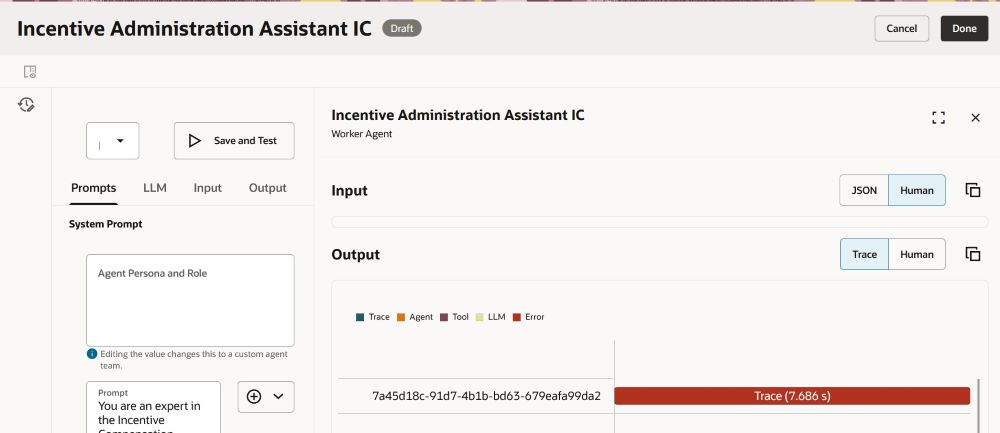
The new Playground capability in AI Agent Studio makes it much quicker, and safer, to refine and validate custom AI Agents by letting you edit and test individual parts of an agent team directly in the studio, rather than running the entire end‑to‑end flow each time. You can isolate specific nodes (including supervisor, agent and LLM nodes), tune prompts and parameters, and see results immediately using Save and Run, with dynamic prompt insertion to add expressions on the fly and Run History to track changes. In practice, this shortens the build–test cycle, improves quality control, and gives teams far more confidence when creating and evolving custom AI Agents because they can verify behaviour in real time before publishing. I’m really looking forward to this one!

AI Agent Studio now includes a set of Oracle‑managed, predefined topics that can be applied across agents and agent teams to help deliver more consistent and professional interactions. These topics support areas such as professional voice and tone, age‑neutral language and gender‑neutral responses, automatically shaping outputs to be appropriate, inclusive and business‑ready. By applying these topics directly within agents and nodes, organisations can accelerate agent design while increasing confidence that responses align with expected standards and organisational values.
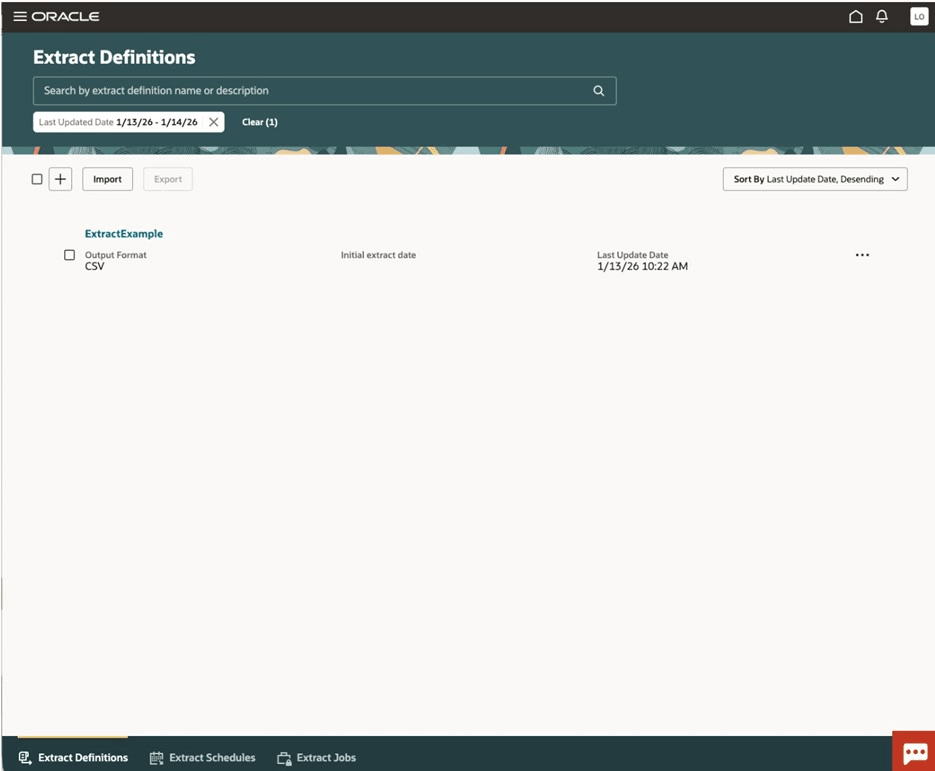
The final feature isn’t an AI one, but a integration change. This Redwood enhancement enables faster and more reliable data extraction by shifting reporting and integration workloads away from the transactional system and onto a read‑optimised replica, synchronised in near real time. By extracting data from a replicated Autonomous Data Warehouse, organisations can reduce load on live Fusion applications while benefiting from a modern architecture that abstracts business objects from the underlying data model. To support this, specific security changes are required, including enabling the external application integration profile option, assigning new extract and scheduling privileges, and granting roles to allow users to manage extracts and securely view or download files, ensuring controlled access to this high‑performance data extraction capability.

As noted earlier, Oracle may introduce further Common Features later this month. If any of these updates stand out, I’ll share a follow‑up blog covering the highlights. In the meantime, you might like to read my latest post exploring the new Core HR features in Release 26B, which you can find here.

Please note all screenshots are the property of Oracle and are used according to their Copyright Guidelines
Oracle HCM Cloud Core HR 26B

It’s my favourite point in the quarter: Oracle has just announced what’s coming in Release 26B. As you’d expect, this update brings a strong focus on AI‑led enhancements, with plenty to be excited about. While Oracle may add further features as the month goes on, let’s start by exploring what’s been announced so far.

The first thing I want to call out actually relates to Release 26C, but it’s important enough to flag now. For organisations that are a little behind in their move to Redwood, Oracle will be automatically enabling a number of pages in 26C. These include the Team Activity Center, Personal Details, Contact Information, Family and Emergency Contacts, Identification Information, Additional Person Information, Person Identifiers for External Applications, Grades, Grade Rates, Legal Entity HCM Information, Legal Reporting HCM Information and Reporting Establishments. While not all of these pages are end‑user facing, if you haven’t already enabled them, I’d strongly recommend completing your testing and switching them on as soon as possible. That way, you can be confident everything works as required for your organisation before Oracle enables them automatically.

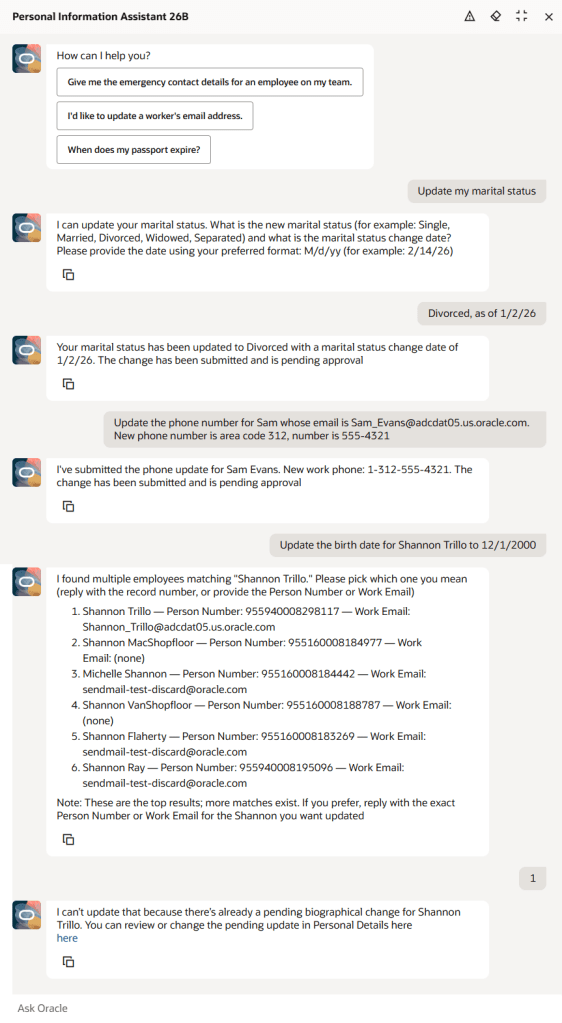
Now let’s turn to AI, which is probably why you’re here. The Personal Information Assistant has been enhanced to go well beyond simply retrieving data, allowing users to create, update and delete selected personal information directly within the chat experience, all in line with existing role‑based access controls and approval rules. It supports key personal details such as demographic and biographical information, email addresses and phone numbers, validates entries where lists of values apply, and guides users through any required choices. The assistant can still view information for the user or others, search by name, email address or person number, and provide direct links to the relevant pages where a change needs to be completed in the application. Importantly, it fully respects your existing Fusion security configuration, so users will only ever see data they’re entitled to access, and where fields have been hidden using VBS, the agent prompt can be adjusted to ensure those fields remain restricted.

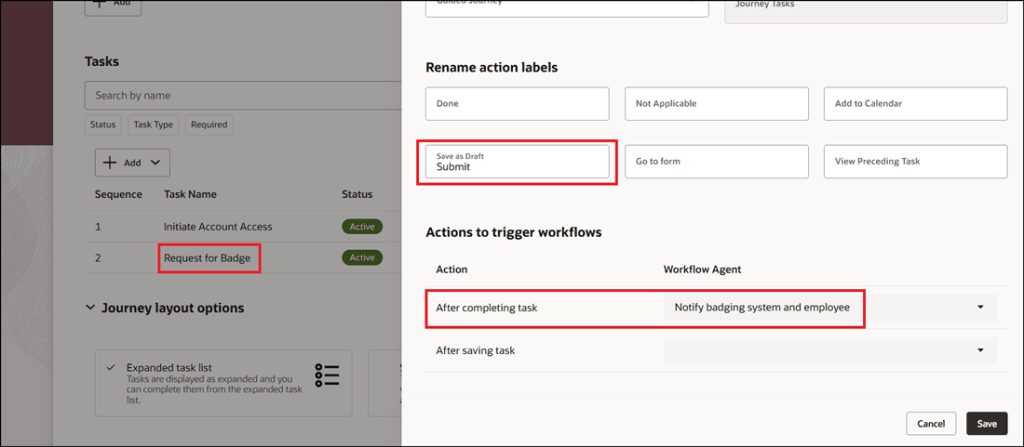
There are two new, closely related features in this release, both focused on Journeys. AI can now be used to trigger a workflow agent when a Journey task is completed or even when it’s saved, enabling key business actions to run automatically without manual follow‑up. As soon as a task is marked complete, the associated workflow agent executes the required logic, such as sending notifications or integrating with external systems, ensuring downstream processes are triggered immediately and consistently. For example, when a manager approves a badge request, the agent can notify the badging system, confirm approval to the employee and kick off badge creation straight away. The same applies when a Journey task is saved as a draft, allowing certain processes to start earlier, improving responsiveness and reducing unnecessary delays.

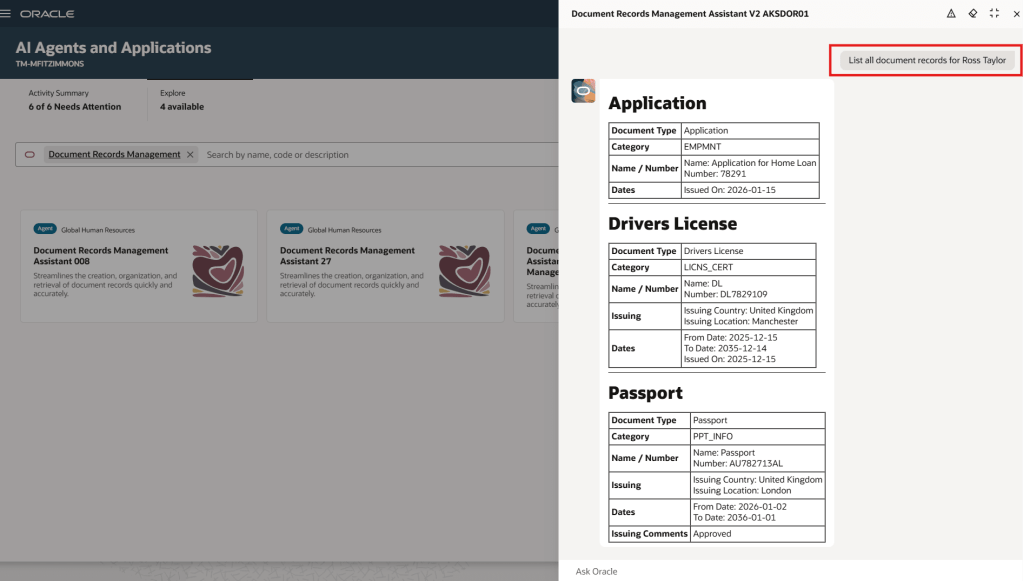
The Document Records Management Assistant has been further enhanced in Release 26B with the introduction of Document Records Management Assistant V2, extending the capabilities introduced in 26A beyond employee self‑service to support line managers and HR specialists. This new workflow agent uses natural‑language interaction and advanced language models to help users quickly find, create and manage document records across their teams, while the original 26A agent remains available for employee self‑service without disruption. By bringing document management into a single conversational experience, the assistant simplifies access to records, automatically understands user intent, guides users through record creation with the right metadata, and provides clear, policy‑aligned responses and direct links where needed, reducing training effort and making document management faster and more intuitive for everyone involved.

The final AI capability worth highlighting is the new AI Assistant for Managing Jobs. This AI‑powered companion for Oracle Cloud HCM Jobs enables HR teams to create, view, update and manage job data through a single conversational experience. Using natural‑language interaction and Oracle’s AI Agent framework, it provides clear, policy‑aligned responses, making it quicker and safer to work with job records without navigating multiple screens. The assistant highlights changes across job versions, generates helpful summaries and insights, guides users step by step through updates and validations, identifies missing or outdated information, and can also edit or delete jobs where appropriate. By reducing manual administration and minimising the risk of errors, it helps HR teams maintain accurate, compliant job data while freeing up time to focus on more strategic priorities.

I’d also like to highlight a number of updates in Release 26B that will be particularly relevant for UK public sector organisations. Enhancements to the HCM UK TPS Generic Setup Diagnostics report introduce more robust checks, making it easier to identify and resolve Teachers’ Pension setup issues, with additional validation highlighting mismatches in Annual Full‑Time Equivalent salary rate definitions and expanded balance feeds helping administrators spot missing or incorrect inputs that impact pension calculations. Updates have also been made to the Civil Service Pension Scheme interface to reflect new and revised validation rules introduced by Capita as scheme administrator, with many of these changes already supported within the existing extract logic, helping ensure submissions continue to meet current scheme requirements and removing remaining references to MyCSP from user‑facing text. Finally, support has been added for proportional TLR1 and TLR2 payments within the Teachers’ Pension Scheme, enabling awards to be calculated, reported and pensioned in line with updated guidance effective from September 2025, and ensuring full‑time and part‑time arrangements are treated accurately based on contract type.

As mentioned earlier, Oracle will be rolling out additional Core HR features later this month. If any of these updates prove particularly noteworthy, I’ll share a follow‑up blog with the details. In the meantime, keep an eye out for upcoming posts where we’ll take a closer look at other Fusion modules as part of Release 26B.

Please note all screenshots are the property of Oracle and are used according to their Copyright Guidelines