
After sharing my initial thoughts on the Oracle AI World announcements earlier this week, I’ve since taken a closer look at what sits behind the headlines. The announcements focused on what Oracle is delivering, but what really interests me now is the how. That is where things get genuinely exciting for those of us who will be hands-on, building and configuring these new capabilities.
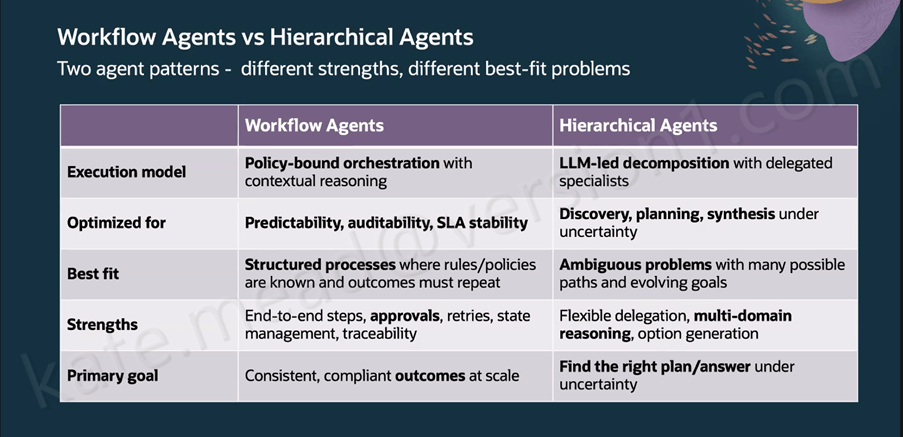
One thing that really helped me make sense of Oracle’s approach was the clear distinction between workflow agents and hierarchical agents. They serve very different purposes, and treating them as interchangeable would quickly lead to the wrong outcomes. Workflow Agents follow policy‑bound orchestration with contextual reasoning and are designed for predictability, auditability and stable SLAs, making them ideal for things like payroll deductions, purchase requisitions or leave approvals where governance and consistency are essential. Hierarchical Agents work differently, using LLM‑led decomposition with specialist sub‑agents, which makes them a better fit for open‑ended problems with many possible paths where multi‑domain reasoning matters more than repeatability. Oracle has intentionally designed the two to complement each other, with Workflow Agents providing the structure by defining stages, approvals, retries and SLAs, while Hierarchical Agents take on the heavier analytical or generative work within specific steps. The result is a balanced model that preserves governance while still giving teams the flexibility to tackle more complex reasoning tasks.
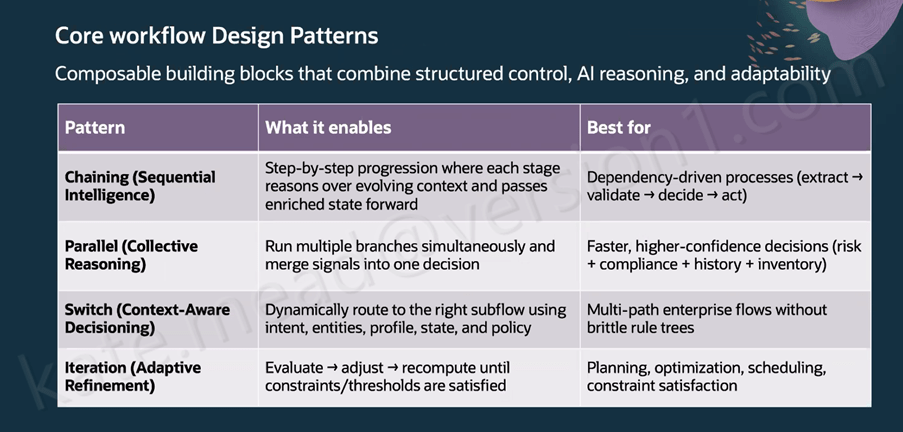
Oracle has outlined seven composable design patterns for building Workflow Agents, each suited to a different type of process. Chaining uses sequential intelligence to pass enriched context from one step to the next, which works well for extract‑validate‑decide‑act processes. Parallel execution allows multiple branches to run at the same time and then consolidates their outputs into a single decision, making it a strong fit for compliance or risk scenarios. Switch flows use context‑aware decisioning to route work based on intent, profile, state and policy; for example, an employee updating deductions after a new baby can trigger both Benefits and Payroll updates automatically with no handoff. Iteration supports adaptive refinement by recalculating until constraints are met, which suits planning and scheduling tasks. Looping introduces self‑correction, such as regenerating and revalidating an invoice when OCR results do not match. RAG‑assisted Reasoning retrieves the right policy information before applying thresholds or routing logic. Finally, timer‑based execution triggers actions on a schedule, such as checking invoice status and notifying the accounts payable owner before an SLA is at risk.
The Workflow Agent canvas in AI Agent Studio groups its building blocks into four areas that shape how an automation behaves. AI nodes include LLM, Agent, Workflow and the RAG Document Tool. Data nodes cover things like the Document Processor, Business Object Function, External REST, Tool and the Vector DB Reader or Writer. Logic nodes provide Code and Set Variables, while the Workflow Control nodes handle governance through Human Approval, If Condition, For Loop, While Loop, Switch, Run in Parallel, Wait and Return. At workflow level, the Triggers tab supports Webhook, Email and Schedule triggers, and the Error Handling section lets you notify recipients by email if a workflow reaches a permanent failure, using context expressions such as $context.$workflow.$traceId. For image-related tasks, the Vision LLM node is the correct choice, although it is classed as a premium tool and comes with associated pricing considerations.
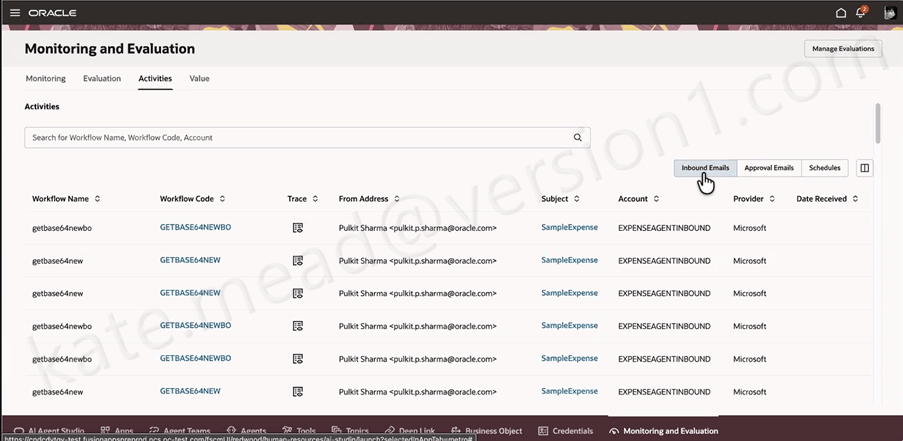
METRO, Oracle’s monitoring layer for Measurement, Evaluation and Testing for Real‑time Observability, gives teams a clear view of what their Workflow Agents are doing across inbound emails, approvals and scheduled runs. From the 26C release, it will also surface AI Unit consumption, which becomes increasingly important as organisations scale their use of agents and need tighter visibility and cost control.
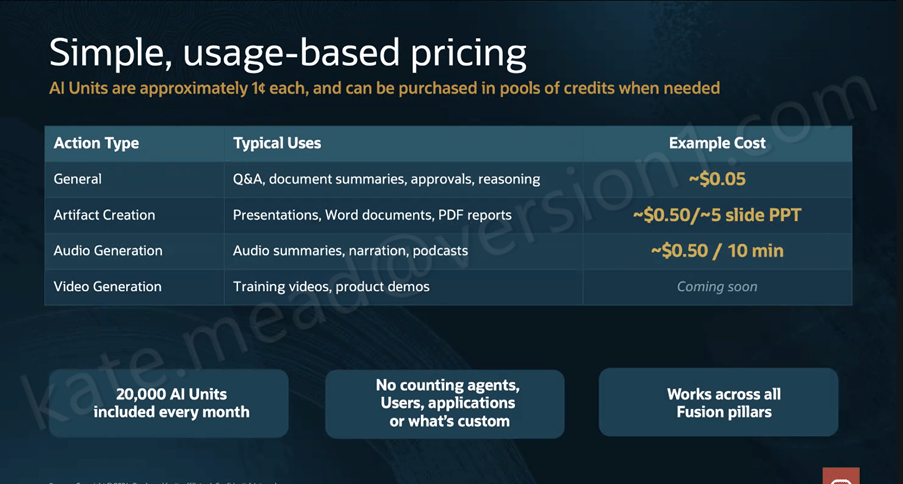
Pricing has been a major consideration for customers exploring AI Agents, and the new structure aims to simplify things through the introduction of AI Units, or AUs. Oracle is expected to publish the full details in April or May, but the core concept is that an AU costs roughly $0.01 and is calculated as: AU consumption = CEILING((Input Tokens + Output Tokens) / 10,000) × Action Value Factor. The Action Value Factor varies depending on the action type and the LLM tier being used. General actions such as Q&A, approvals and reasoning have a 0x factor on the Basic LLM, while Premium and Bring Your Own apply higher factors. Artifact creation and audio generation sit in higher tiers again, with video generation marked as coming soon. Every Fusion customer receives 20,000 AUs per month at no charge, pooled across all pillars with unused units rolling over to the end of the contract term. Additional AUs are available in $1,000 increments.
What I find most compelling about this architecture is that it’s built for the realities of enterprise work rather than an idealised version of it. The self‑correction loops, governance controls, evaluation framework and hybrid agent pattern all acknowledge that real business processes can be messy and that auditability is essential. The 22 new agentic applications arriving in 26B across ERP, HCM, SCM and CX give us a clear benchmark for what good looks like in practice. If you’re interested in exploring how Workflow Agents could support your organisation’s processes, now is a great time to start that conversation.
In the meantime, why not check out my earlier post covering the Oracle AI World announcements? You can find it here.
Please note all screenshots are the property of Oracle and are used according to their Copyright Guidelines

 K8 Mead