
I’ve written quite a bit recently about Oracle AI Agent Studio and what it can do at a high level, and those posts have led to some really valuable conversations. A question that keeps coming up, though, is a very practical one: “This all sounds great, but how does it actually fit into the rest of my technology landscape?” Closely followed by, “How do I build something that’s reliable and production‑ready, rather than just impressive in a demo?” This post is my attempt to answer both, drawing on the training content from the AI World partner sessions, which goes into a level of detail that genuinely changes how you think about building with AI Agent Studio, particularly when it comes to integration, robustness and real‑world use. I should say up front that this series is a little more technical than my usual blogs, but it feels important to share, because this is the detail that turns AI from an interesting idea into something you can confidently run and scale.
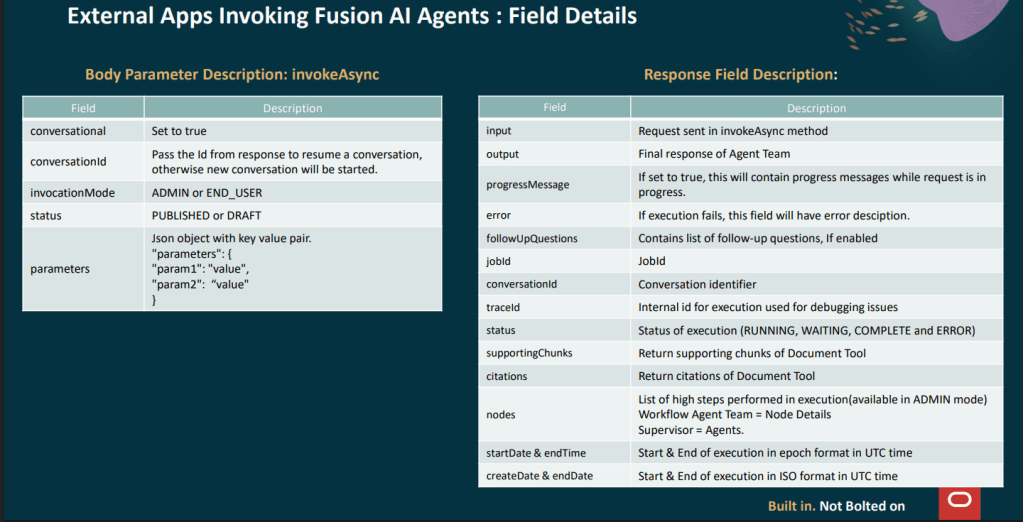
One announcement I haven’t covered yet is the invokeAsync REST API, introduced in 26A, which allows external applications to programmatically call published Agent Teams in Fusion, and this is a significant step forward for organisations where Fusion sits alongside other enterprise systems. It means those systems can now trigger Fusion AI agents directly, without a user ever needing to open the chat interface. The process works in two stages: an external application sends a POST request to the invoke endpoint, passing either a user prompt or structured data, and because AI agents may need time to reason or retrieve information, the call returns a job ID rather than an immediate response. That job ID is then used to poll a separate status endpoint, which returns the final output along with useful metadata such as status, conversation ID, trace ID and timing information. For development and testing, adding ?invocationMode=ADMIN to the status endpoint provides detailed debug output, including the full node execution trace, which is invaluable when you are building and troubleshooting. Authentication follows the standard OAuth 2.0 bearer token approach used across Fusion APIs, so if you are already familiar with OCI IAM and IDCS, there is nothing fundamentally new to configure.
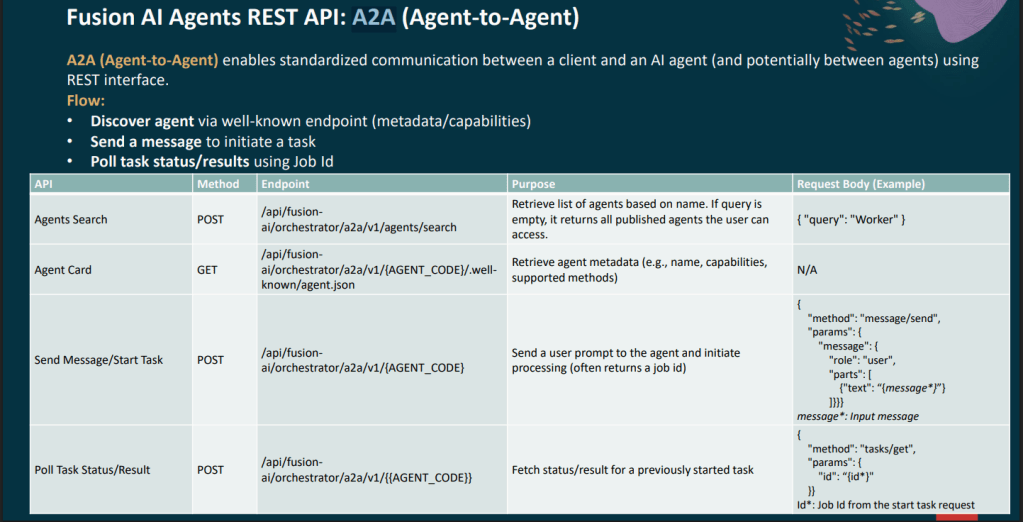
For those looking for a more standardised integration approach, Oracle also introduced support for the A2A, or Agent‑to‑Agent, protocol in 26A. A2A allows a client to discover agents through a well‑known metadata endpoint, often referred to as the agent card, initiate a task by sending a message, and then poll for the result using the same job ID pattern. The agents search endpoint makes it possible to query for published agents by name, which is particularly useful when you are building orchestration layers that need to dynamically discover and delegate work to specialist agents. The agent card itself returns the agent’s capabilities and supported methods in a structured format, making it much easier to establish interoperability between Fusion agents and third‑party systems without relying on custom, point‑to‑point integrations.
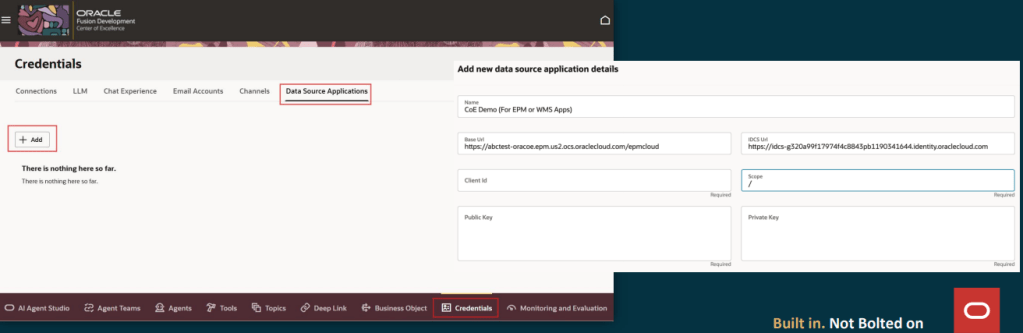
The relationship between Fusion and the outside world does not just work in one direction. In 26A, Oracle introduced Data Source Applications within the Credentials tab of AI Agent Studio, allowing administrators to configure OAuth connections to non‑Fusion systems such as EPM Cloud, WMS, or any external application with a compatible identity provider. Once a Data Source Application is set up with the base URL, IDCS URL, client ID, scope and key pair, it becomes available as a selectable source when creating a Business Object using the resource type “Other Data Source Application”. This makes it much easier for AI agents to securely reach out to external systems, bringing data back into Fusion in a controlled and repeatable way rather than relying on custom or hard‑coded integrations.
At runtime, when a Business Object function within a workflow needs to call an external system, the platform simply uses the saved configuration to obtain an OAuth token and invoke the target API behind the scenes. From the workflow designer’s point of view, it behaves exactly like any other Business Object node, with no additional complexity to manage. This opens up some genuinely powerful patterns, such as an HCM Workflow Agent that validates a job requisition in Fusion, checks headcount or budget in EPM, and then writes the outcome back to a Fusion record, all within a single, governed automation that remains transparent, secure and easy to maintain.
This blog is the first in a short series of four, where I will walk through some of the latest and most important functionality in Oracle AI Agent Studio introduced in 26A. In this opening post, I’ve focused on how agents connect to the wider enterprise landscape, because integration, reliability and governance are what ultimately determine whether AI delivers real value. In the next blogs, I’ll build on this foundation and explore other new capabilities in more detail, looking at how they work in practice and how you can apply them confidently in real‑world scenarios.
Please note all screenshots are the property of Oracle and are used according to their Copyright Guidelines

 K8 Mead
One thought on “Going Deeper with Oracle AI Agent Studio: Connecting, Triggering, and Building with Confidence – Part 1”