
Over the last three blogs, I’ve explored how AI Agent Studio connects to the wider enterprise, how agents are triggered and interacted with, and how workflows are designed to be reliable and production‑ready. In this final part of the series, I want to pull those threads together and focus on the capabilities that help agents scale safely and operate with confidence over time. This is where governance, control and operational discipline really come into play, and where the newer 26A and 26B features start to show how Oracle is shaping AI Agent Studio for long‑term, enterprise use rather than short‑lived experimentation.
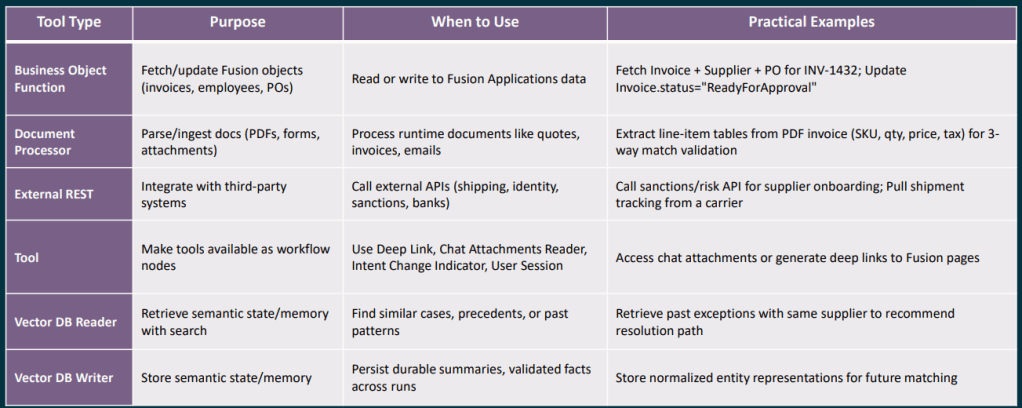
Choosing the right document or memory node is an area where I see a lot of confusion in conversations with clients, so it is worth being very clear about what each one is designed to do. The Document Processor node is intended for runtime documents, attachments that arrive as part of a specific workflow execution, such as a supplier quote received by email, an invoice uploaded through chat, or a UCM attachment linked to a Fusion business object. Its job is to retrieve the file, extract the text, and pass that content on to the next node in the workflow. It is not designed for querying a stable or long‑lived corpus of documents, such as policy or reference material that you want to reuse and search repeatedly over time.
The RAG Document Tool node is designed for exactly that stable, reusable collection of information. You curate a set of documents within an Oracle AI Agent Studio Document Tool, move them through the lifecycle from Ready to Publish to Published, and the RAG node then performs semantic retrieval against that content to ground downstream LLM reasoning in your own policies, playbooks or manuals. To get the best results, it is important to use specific queries with clear discriminators such as module, process area, country or version, which helps improve retrieval precision. It is also good practice to include an explicit “no results” fallback path in your workflow, rather than allowing the LLM to guess when retrieval confidence is low.
The Vector DB Reader and Writer nodes serve a different purpose again, providing durable semantic memory that persists across workflow runs. They are best used to store normalised, reusable knowledge units such as validated resolution summaries, previous exception details, or extracted entity representations. Entries should be kept short and semantically focused, enriched with meaningful metadata to support filtering, and assigned stable document IDs to avoid duplicates. Raw PII or permission‑restricted data should never be stored without a deliberate access control design. When reading from the vector store, metadata filters should always be applied, and low‑confidence matches should be treated the same as no result at all, routing the workflow to a deterministic fallback rather than continuing on uncertain ground.
One theme that came through strongly in the partner training sessions, and one I think represents genuinely good discipline, is treating Workflow Agent testing as a first‑class concern rather than something bolted on at the end. Oracle’s evaluation framework for Workflow Agents, often referred to as Workflow Evals, is based on supplying structured JSON test inputs and asserting expected outputs. These evaluations are intended to be run as a regression suite whenever you change a prompt, adjust a node configuration, swap a tool, or update a policy, helping you catch unintended side effects early and keep agent behaviour stable as it evolves.
A good starting point is to define around five core paths through the workflow: the happy path, two or three of the most common exception scenarios, and at least one case that deals with missing or poor‑quality input data. From there, you should be tracking things like overall pass rate, branch accuracy, schema validity, and retry or escalation behaviour. The aim is not simply to prove that the workflow reaches an end state, but to make sure it routes correctly and predictably under every condition that genuinely matters in production.
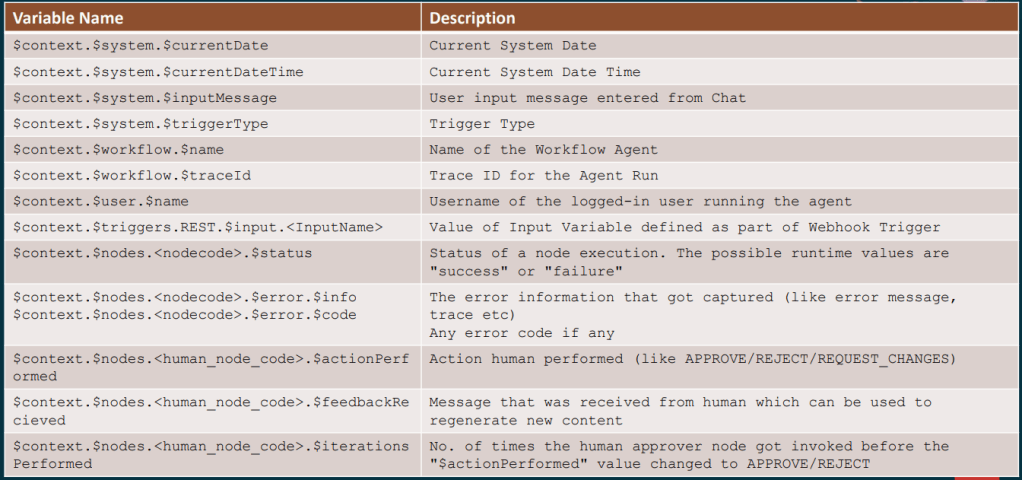
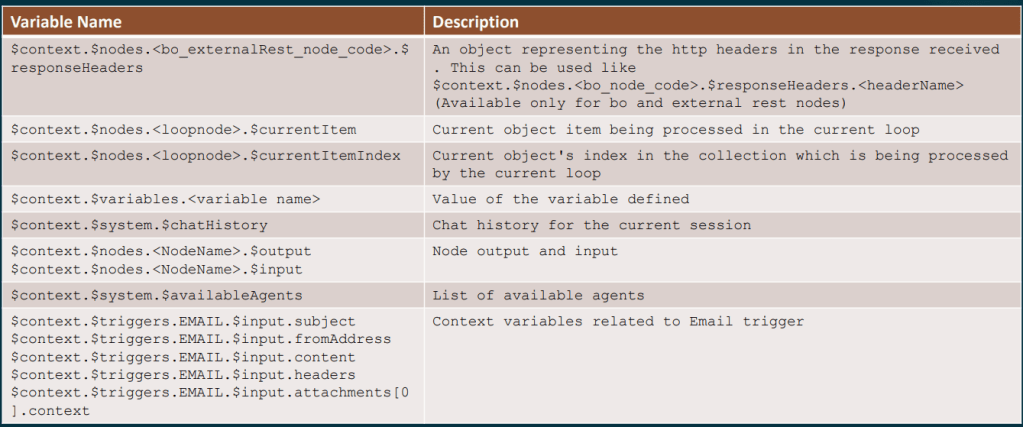
For anyone building more complex workflows, the full context variable reference is well worth bookmarking. In practice, a small set of variables tends to do a lot of the heavy lifting, such as $context.$nodes.<nodecode>.$status to check whether a preceding node succeeded or failed, and $context.$nodes.<human_node_code>.$actionPerformed to capture whether a Human Approval step resulted in APPROVE, REJECT or REQUEST_CHANGES. You can also use $context.$nodes.<human_node_code>.$feedbackReceived to pick up any comments provided by the approver, and $context.$workflow.$traceId to generate idempotency keys or include trace references in error notifications. For conversational workflows, $context.$system.$chatHistory is particularly useful, as it exposes the full session history and allows the agent to reason about what has already been discussed.
The 26A roadmap also includes several upcoming capabilities that will significantly extend what is possible in the near term. Support for the Model Context Protocol, or MCP, means Workflow Agents will be able to invoke tools exposed by MCP servers, broadening the integration landscape well beyond traditional REST APIs. The Agent Studio Help Assistant, an AI‑driven guide embedded directly within the studio, should also make agent design far more accessible, particularly for practitioners who are new to the tooling. Alongside this, multi‑modal enhancements, including end‑user Q&A over images and documents uploaded in chat and semantic search across non‑text assets, open up an entirely new set of document understanding and reasoning use cases.
Looking a little further ahead, the roadmap includes capabilities such as breakpoint‑style debugging, automated prompt engineering, multi‑user development environments, and a Bring Your Own LLM option, alongside additional interaction channels including WhatsApp, SMS and telephony. Taken together, these signal a sustained level of investment in the platform and a clear focus on making AI Agent Studio more powerful, more accessible, and more suitable for enterprise‑scale use. The overall direction is a positive one, and it is clear that Oracle is building towards a mature, long‑term agent platform rather than a short‑term experiment.
The partner training sessions that informed this post covered a lot of practical ground, and I genuinely believe they will save teams a significant amount of time as they start building in earnest. If you are already exploring AI Agent Studio and would like to talk through any of these patterns in more detail, I would be very happy to continue the conversation. And if you have not yet read the earlier posts in this series, it is worth starting at the beginning with the overview of how Workflow Agents are structured, which sets the context for everything covered here.
Please note all screenshots are the property of Oracle and are used according to their Copyright Guidelines

 K8 Mead