Oracle HCM Cloud Time & Labor 24C

It’s my favourite time of the quarter — new features time! As Redwood Timecards within Time and Labor is mandatory from Release 24D, 24C is a critical one for your journey to Redwood. Check out my recent post on planning your move to Redwood Time and Labor for more details: https://k8mead.com/?p=114

Redwood Timecard

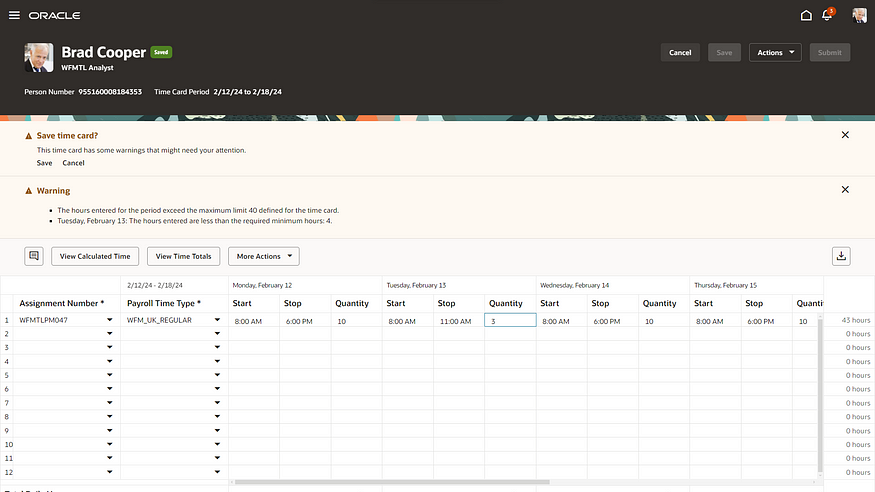
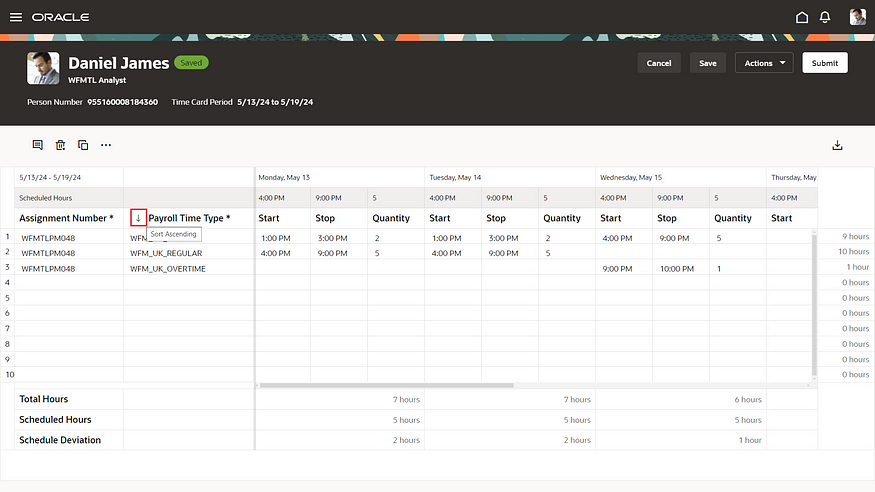
There are a number of updates to the Redwood Timecard, including being able to add row level comments; the ability to sort any of the grid columns on the timecard; the ability to show scheduled hours on the timecard in addition to the recorded time; and finally the ability to resize the timecard in such a way that it will remember it next time you open it on the same device. All of these features are small but are impactful as they will improve the user experience significantly within minimal effort.
Timecard Template

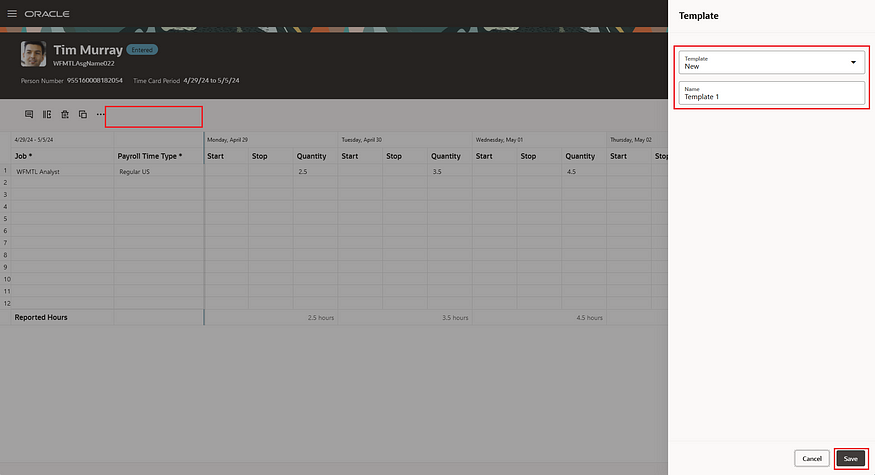
Oracle have now added the functionality to allow you to now save a Redwood timecard as a named template. This template can then be used to create Redwood timecards with the same assignment ID and layout set ID as the template. At present you can save up to 6 templates, but the use of the word ‘currently’ by Oracle implies that this limitation will be amended in the near future. This will make it easier for implementors to create updated timecard templates.

Default On-Call on Redwood Timecard

In a previous release, Oracle introduced the defaulting of Workforce Scheduling on-call shifts. In 24C this has been improved by the introduction of linking the defaulted on-call shifts with assigned workday definitions. Using workday rules, it is now possible to assign the on-call shift to the days specified in the rules. Additionally, if the rules specify on-call shifts but those shifts aren’t worked in the current timecard period, it will automatically assign them to the next timecard period once it’s created. This will reduce the need for manual assigning of on-call shifts but has the added flexibility of using automation to only assigning the payments if that shift is included in the timecard period.
Timecard Approval Notification

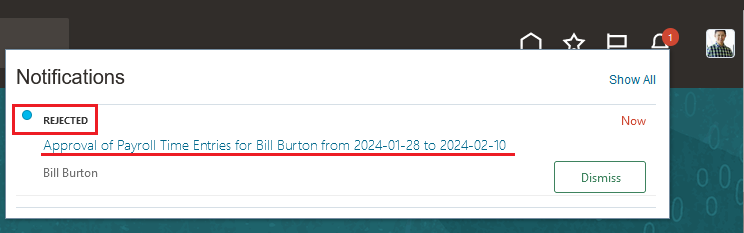
Whilst this is a relatively small change, it will make the review of the approval of timecards easier. You can now view approval comments for each completed Redwood timecard approval task from the Bell icon or the email notification. It should be noted that the notification now shows the status, but won’t show the comments, for confidentially reasons. Approvers can see instantly the status of the timecard without having to drill down into the application.
Additional Status on Team Time Cards

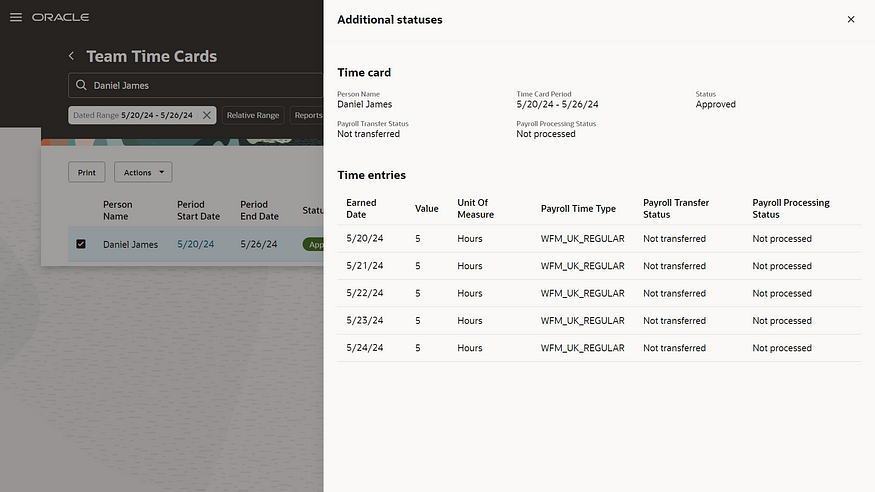
The final feature I want to highlight is the introduction of additional statuses on the Redwood Team Timecard. These allow the users to review the processing and transfer statuses for timecards, by their specific role, for example payroll, project costing etc. There is a ‘drawer’ that can be opened to see more details, as shown in the screenshot above. This ensures that the functionality that is currently available in the Responsive Timecards is available in Redwood Timecards, so there is no loss of functionality.

As previously stated, Oracle is anticipated to unveil further enhancements in Release 24C later this month. Should these features demonstrate significance, I shall produce an updated blog. Please check out my blog on the my top 5 new features in Release 24C within Core HR below:

https://k8mead.com/?p=117

Click here to read more about Version 1’s Oracle capabilities.

About the author:

Kate Mead is an Oracle-certified HCM Consultant and Solution Architect at Version 1 with 14 years of experience in Oracle HR and Payroll systems, including 7 years with Oracle HCM Cloud. She has worked across implementation projects and managed services, has a sound knowledge of UK Payroll legislation and — before becoming a consultant — was an HR Manager.

If you have any questions or would like more information on how Version 1 can help you realise the full potential of your Oracle Cloud instances, please contact her at kate.mead@version1.com

Please note all screenshots are the property of Oracle and are used according to their Copyright Guidelines
Redwood Time & Labor — Planning Your Move

Everyone is talking Redwood for Oracle SaaS solutions, but let’s focus on Time & Labor (OTL). OTL stands out as one of the select modules that influences both Human Capital Management (HCM) and Enterprise Resource Planning (ERP). It serves a dual purpose: tracking time for payroll purposes and allocating costs within the Project Portfolio Management (PPM) module.

Redwood Timecard

With the upcoming Release 24D, the transition to Redwood Timecards becomes compulsory, signalling the end of support for Responsive Timecards. What does this entail? Post 24D, no bug fixes will be issued for Responsive Timecards. Moreover, should you submit a Service Request (SR) to Oracle concerning a Responsive Timecard, the recommended resolution will be to switch to Redwood. Considering that Release 24D is on the horizon, less than six months away, it’s crucial to start planning your migration immediately.

New Calculated Time View

As you start on the transition to Redwood, there are several key factors to consider. Security takes precedence; employees must possess edit rights to submit timecards, a shift from the current Responsive system. Similarly, managers will need edit rights to approve timecards directly within the interface.

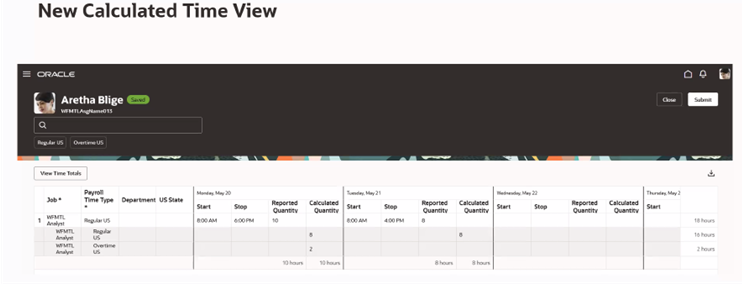
Furthermore, please be aware of the following updates: 1)The Timecard Template now supersedes the ‘Copy Other’ feature found in Responsive timecards. 2) There is no support for daily details. 3) The Cost Override Layout is not supported. 4) Calculated Time has a new look (refer to the above screenshot). 5) For customising the sequence of timecard fields, the new unified layout is required.

Redwood Existing Time Cards

So what are the benefits of the Unified Layout? It’s much simpler to configure, there is only one layout for reported time, calculated time, entry, edit and view. The guided process has been streamlined, so there are just three steps — display properties; timecard fields and time totals. The timecard attributes can be configured by role — Worker, Line Manager and Time & Labor Manager. Additionally, it is possible to filter the data sources by role.

Configure Time Entry Layout

What do you need to consider before you turn on the Unified Layout? The great news is that the delivered time entry layout components will continue to work! There is no need to set them up again. From a security role perspective, Time & Labor Administrators can edit existing non-unified layouts, but they cannot create new ones. The unified layout can include a combination of non-unified and unified timecard fields. If you have dependent timecard fields on a non-unified layout, they must be switched to independent timecard fields when moving to the unified layouts. Finally, if you need to be able to control the order of the timecard fields on a Redwood timecard, you must use the unified layout.

Oracle is set to introduce new features in the 23C and 24D updates. However, all essential functionalities required for transitioning to Redwood Time Cards are currently accessible. It’s advisable to activate Oracle Search and configure the necessary profile options for OTL within a separate pod for thorough testing. Familiarising yourself with the system through hands-on experience is vital for devising a realistic deployment schedule for Production before the 24D release.

Learn more about how Version 1 can help you maximise your Oracle Cloud instances here.

About the author:

Kate Mead is an Oracle-certified HCM Consultant and Solution Architect at Version 1 with 14 years of experience in Oracle HR and Payroll systems, including 7 years with Oracle HCM Cloud. She has worked across implementation projects and managed services, has a sound knowledge of UK Payroll legislation and — before becoming a consultant — was an HR Manager.

If you have any questions or would like more information on how Version 1 can help you realise the full potential of your Oracle Cloud instances, please contact her at kate.mead@version1.com

Please note all screenshots are the property of Oracle and are used according to their Copyright Guidelines
Oracle HCM Cloud Time and Labor Release 24B

It’s 24B time! Given the imminent mandatory requirement for all Timesheets to be in the new Redwood UI by 24D, it’s not surprising that there are a number of Redwood new features in this current release. Whilst Oracle are likely to release more enhancements over March, I wanted to highlight a few key features that have already been announced.

Absence Plan Balances in Time Cards

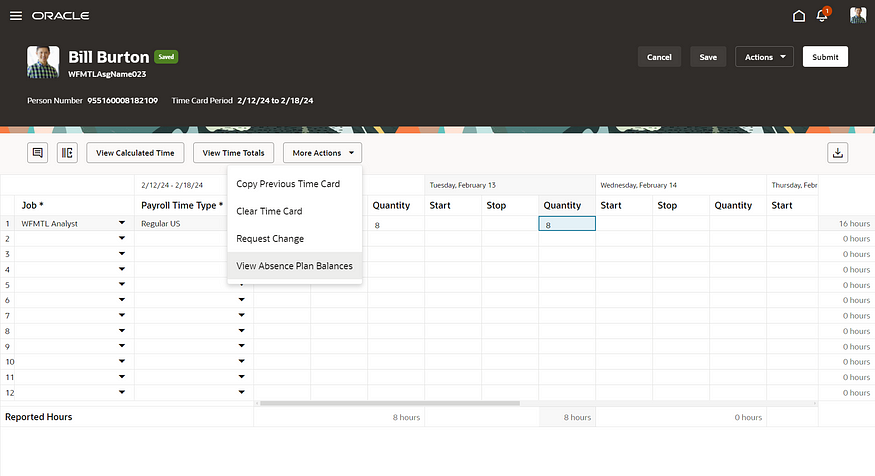
The first feature I also mentioned in my Absence 24B blog, but it’s important for those who use Time and Labor. Oracle have provided users the ability to view absence plan balances directly in the Redwood Time Card. This will save employees from having to check their balances in the absence area and then go back to their time cards to log the absence.

Redwood Existing Time Cards

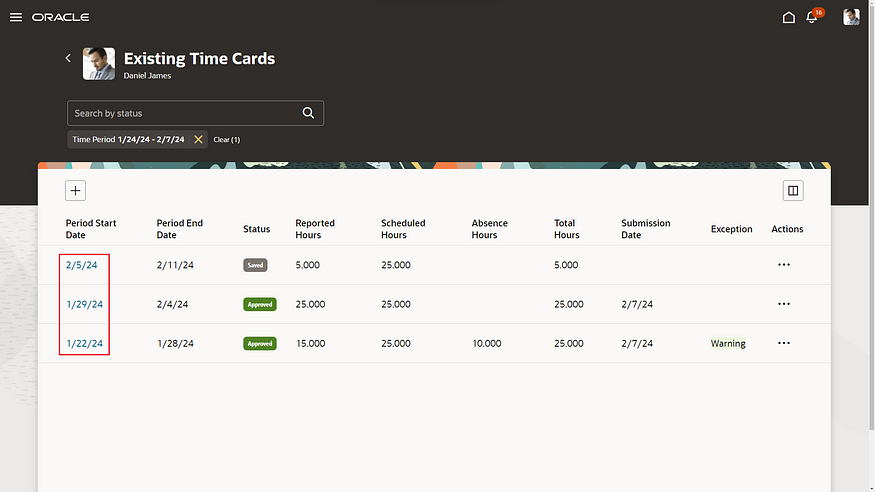
The new Redwood Existing Time Cards page allows users the ability to open and view their existing timecards more quickly using the row-level Edit action or by clicking the period start date link. If users aren’t allowed to edit existing timecards, they will open in read-only mode. The same functionality has also been applied to the new Redwood Team Time Cards page.

Automatic Addition of On Call Shifts on Redwood Time Cards

I love this feature! Oracle has made it so much easier to handle on-call payments via timecards with this new enhancement. Whenever a timecard is created for a period with worker-assigned on-call shifts, rules can be created to automatically assign an on-call entry onto the timecard. The rules can be configured to include/exclude specific pay types.

Redwood Review of Warnings Page

Whilst there are a significant number of Redwood features in the 24B Time and Labor release, I can’t cover them all in this post. The final key feature I wish to highlight is the new Redwood Review of Warnings page. When an employee or line manager saves or submits a timecard, a warning may be received. The new Warnings page allows the user to review these warnings and correct if necessary, immediately at the point of submission. It’s a much more user-friendly page and provides easier to understand messages with recommendations on how to resolve the warnings.

As I said earlier, Oracle is likely to release more features in Time and Labor later in the month, so I will do an updated blog if the additional features are significant. Please keep an eye out for blogs on other modules within HCM Cloud for Release 24B. Finally, I’d love it if you could check out my post on the key features so far in Core HR:

https://k8mead.com/?p=100

Click here to read more about Version 1’s Oracle capabilities.

About the author:

Kate Mead is an Oracle-certified HCM Consultant and Solution Architect at Version 1 with 14 years of experience in Oracle HR and Payroll systems, including 7 years with Oracle HCM Cloud. She has worked across implementation projects and managed services, has a sound knowledge of UK Payroll legislation and — before becoming a consultant — was an HR Manager.

If you have any questions or would like more information on how Version 1 can help you realise the full potential of your Oracle Cloud instances, please contact her at kate.mead@version1.com

Please note all screenshots are the property of Oracle and are used according to their Copyright Guidelines