Oracle HCM Cloud Recruit 26A

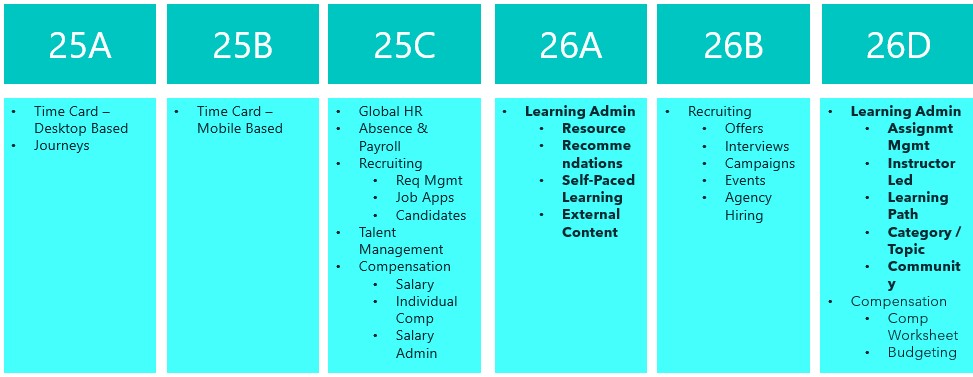
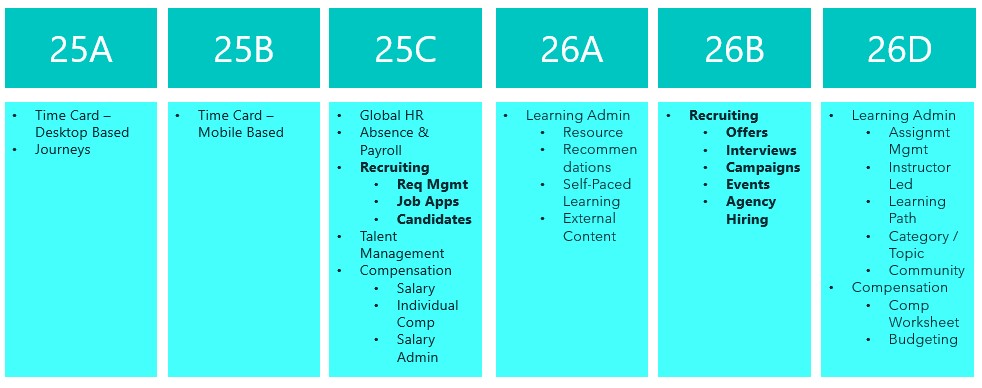
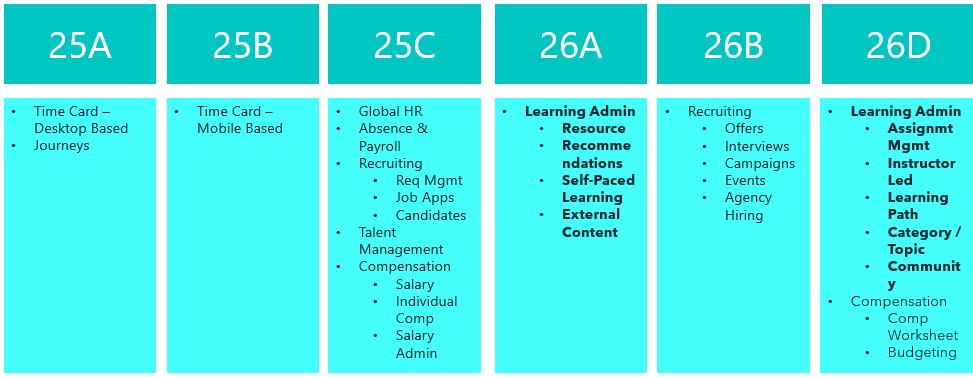
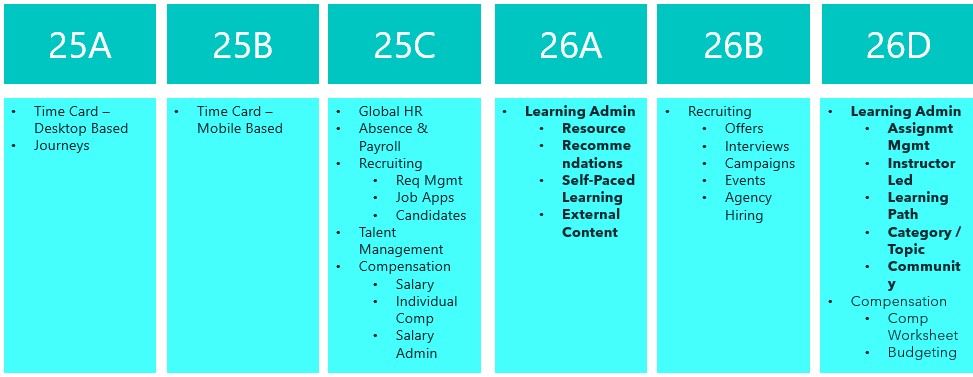
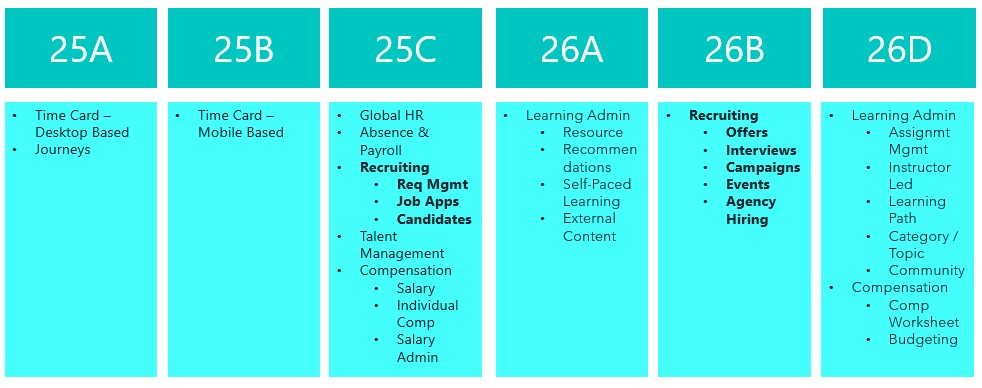
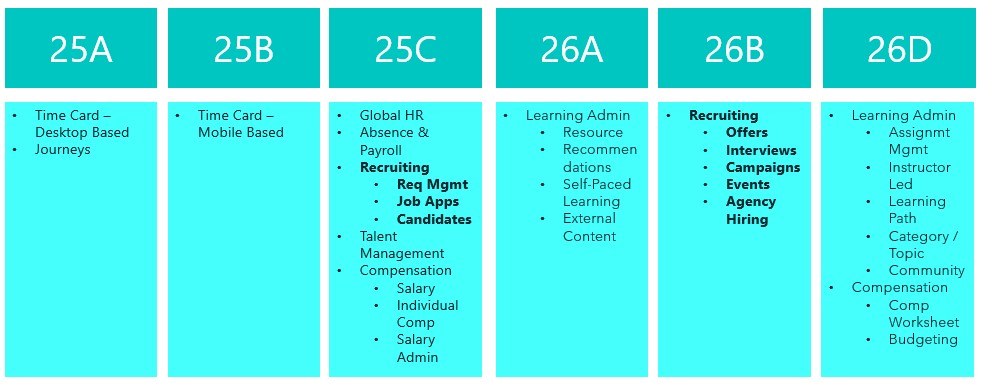
Things are really heating up in the world of Recruit as we approach the final deadline to move the remaining Recruiting pages over to Redwood in 26B. This release is your last opportunity to make the switch. With the 25C deadline behind us, you should already be managing requisitions, job applications and candidates in Redwood. The next phase brings exciting updates around offers, interviews, campaigns, events and agency hiring. So, let’s dive in and see what’s new…

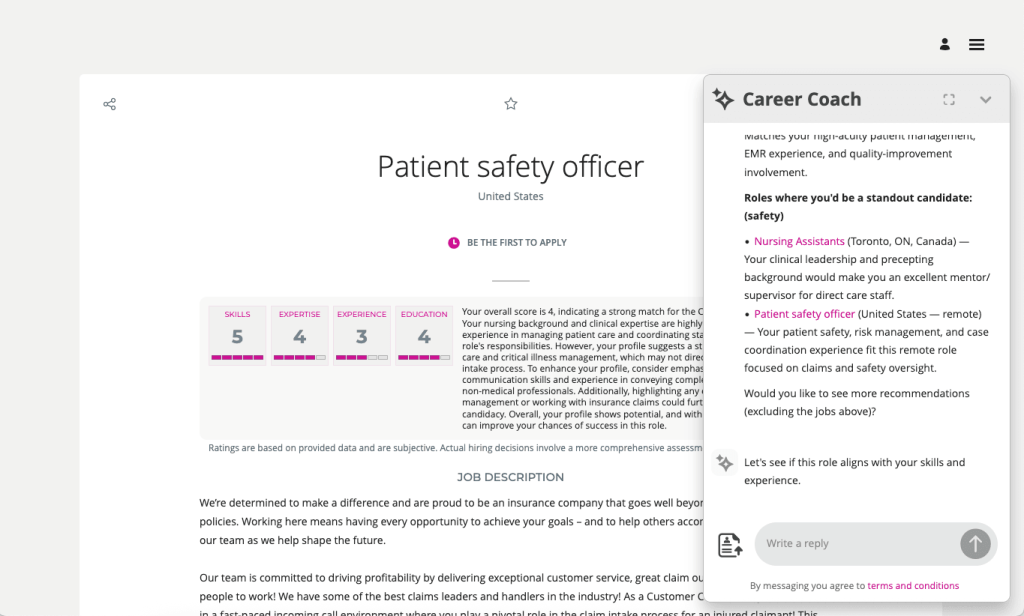
The AI Career Coach, first introduced in 25D to help candidates find roles that match their skills, has already been enhanced in 26A. The Career Coach now uses the Supervisor model, which brings all agents together under one umbrella, streamlining information sharing and removing redundancies. The agent is pre-seeded and ready to run, so there’s no need to create agents from templates. You can also choose to display the widget as an overlay, ideal for highly customised sites, rather than the default side panel, ensuring it doesn’t interfere with your design. For one-page application flows, the widget now displays correctly, and when shown as a side panel, the navigation menu is replaced with a horizontal progress bar. The fixer button appears on the page instead of the left-hand side, and a clickable Terms and Conditions link pulls content from the job application legal disclaimer in the Recruiting Content Library. If you’ve enabled CV parsing, candidate CVs will be parsed into the application flow when uploaded via the widget. From this release, any CV uploaded into the recommended jobs widget in the candidate experience will also be available to the agent.

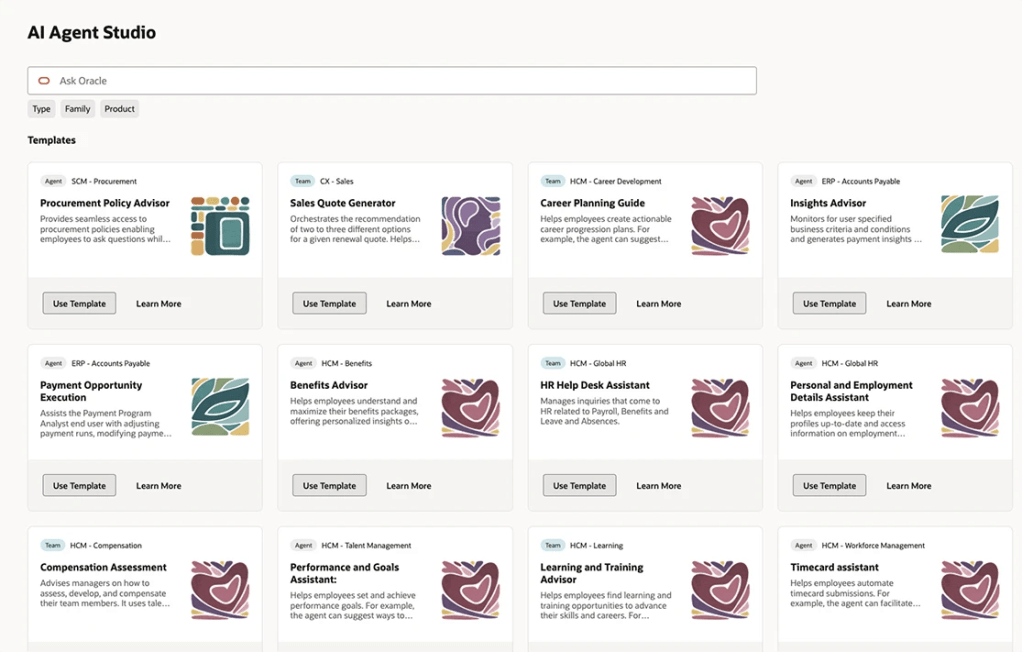
As many of you know, I’m a big fan of AI, anything that makes life easier. The next update introduces an AI assistant for job requisition creation, working like a smart, on-page helper that answers both general and field-specific questions as you build a requisition. Because its guidance is driven entirely by the documents you upload and the prompt you configure, it’s easy to tailor to your organisation’s policies and practices. The agent helps users get it right first time, capturing the correct data, minimising downstream issues and boosting overall efficiency without interrupting the flow.

By 26B, the Job Offer process must be fully transitioned to Redwood, and Oracle has introduced a new AI agent to make this easier. Acting as an FAQ-style assistant, the agent helps users by answering both general and field-specific questions during job offer creation. Its guidance is based entirely on the documents you upload and the prompt you configure, making it simple to align with your organisation’s policies and practices. This smart assistant ensures job offers are created smoothly, reduces downstream issues by capturing accurate data, and boosts overall efficiency without disrupting the process.

Another useful Redwood Offer feature is the Initiate Job Offer Creation for Hiring Managers functionality. Hiring managers with the Initiate Job Offer privilege can now start the process and share notes with the recruiting team using the Create Job Offer action from the Redwood job applications list or details page. On the Create Job Offer page, they can add comments in the Notes to Recruiter field to provide context or instructions. Once they click Save and Close, the candidate’s application moves to Offer – Draft status and appears on the Redwood Job Offers list page. The recruiter receives a notification to complete the offer details using the Edit Offer action, with the manager’s notes displayed in a banner above the Details and Offer tabs. When ready, the recruiter can submit the job offer for approval or save it for further editing later.

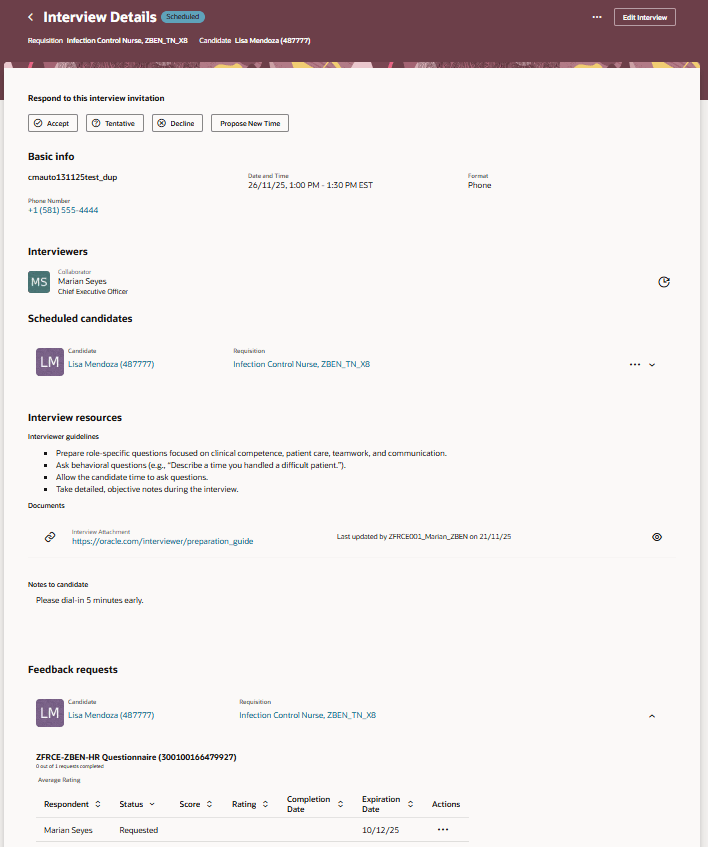
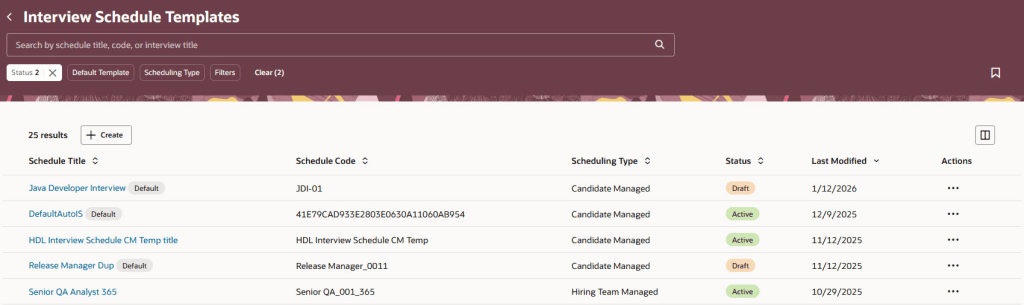
The final feature worth mentioning is the new Redwood Interview Details page, which brings several improvements over the previous responsive version. A new Basic Info section now displays key interview details at a glance. In the Interviewers section, you can easily resend the Interview Scheduled notification, handy if someone says they haven’t received it. The Scheduled Candidates section allows you to click candidate and job requisition links to open a drawer with more information, and the Actions menu lets you manage candidates scheduled for the interview. Under Interview Resources, you’ll find interviewer guidelines, attachments and candidate notes added to the interview. If you’re an interviewer, you can respond directly to the invitation, accept, tentatively accept, decline or propose a new time. When proposing a new time, the drawer can even display your availability if calendar integration (Microsoft 365 or Google) is enabled.

Oracle often slip in new features during the month, so it’s worth keeping an eye out. If anything truly game-changing appears, I’ll share another blog post to keep you updated and make sure you don’t miss out. In the meantime, why not check out my latest write-up on the new Core HR features in Release 26A? You can find it here.

Please note all screenshots are the property of Oracle and are used according to their Copyright Guidelines
Oracle HCM Cloud Learn 26A

Release 26A has arrived, marking the start of the second phase of Recruitment for Learn becoming mandatory. This update sets the deadline for the first half of the required changes to Learning Admin pages, covering Resources, Recommendations, Self-Paced Learning and External Content. The remaining updates to Learn Admin pages will become mandatory with Release 26D. Let’s take a look at what is new!

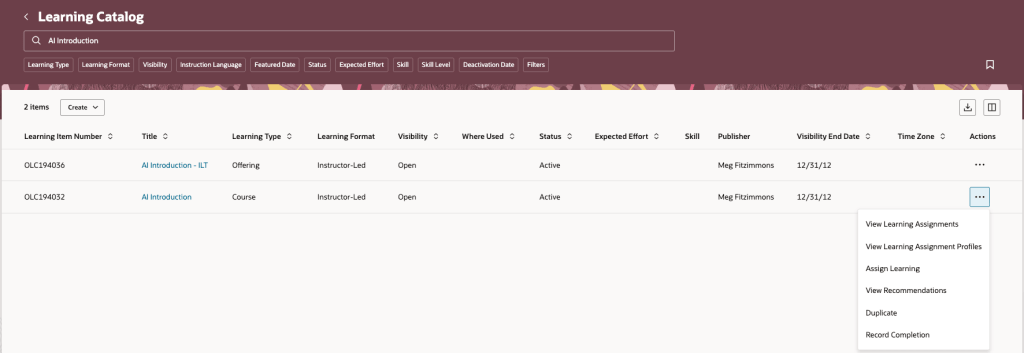
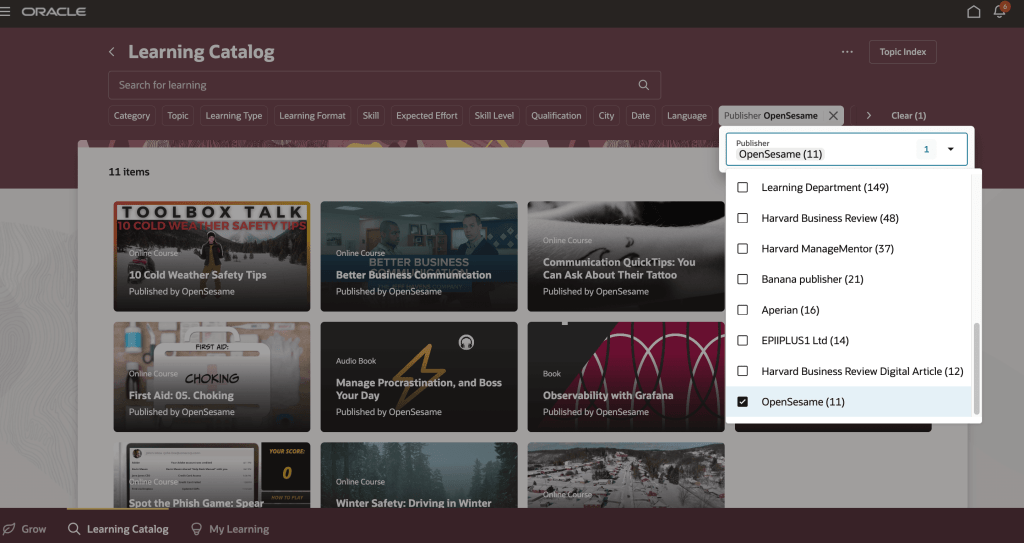
Before you can use this first feature, Dynamic Skills must be enabled. Oracle have updated the licensing for Dynamic Skills over the past year, so it may already be included in your Core HR licence. If you’re unsure, it’s worth checking with your Oracle Customer Success Manager. Once enabled, you can take advantage of the AI Learning Catalogue Smart Search Advisor. This clever tool lets you search the learning catalogue using questions rather than just keywords, delivering more focused and higher-quality results. The results are semantically relevant to your query and tailored to you, taking into account your work history, talent profile and learning record. When active, you’ll notice a new section on the learning catalogue page after you search. This section highlights up to five learning items the advisor has identified as most suitable for you and your request.

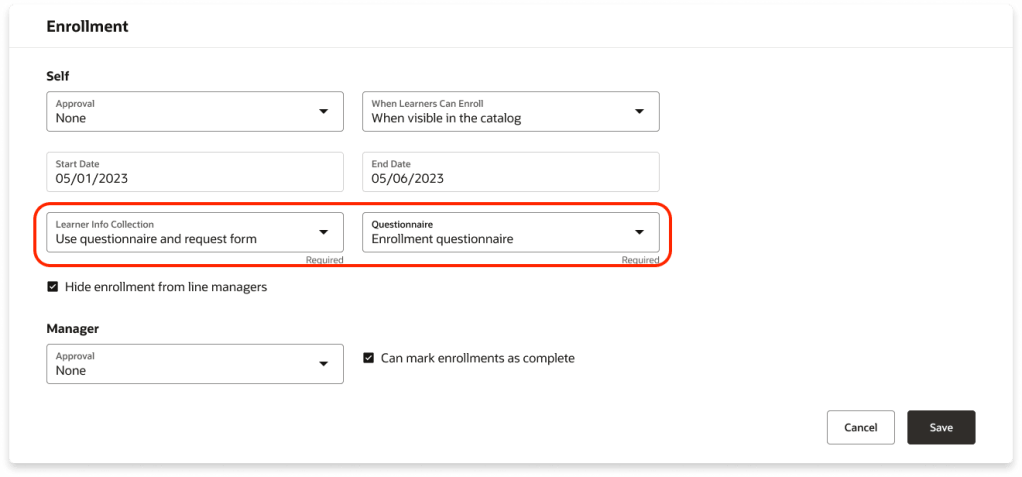
There are several new features for Self-Paced Learning, starting with Redwood functionality for enrolment forms, evaluations and feedback. You can now collect the information you need when learners enrol by requiring an enrolment form, a questionnaire, or both. The Learner Info Collection options available in the Self-Paced Learning configuration under the Rules tab in the Enrolment section, offering four choices: no extra information, a combined page with both questionnaire and request form, just the questionnaire, or just the request form, each leading to the Enrolment Details page. These options are controlled by a single setting within Self-Paced Learning.

Oracle has added support for two new content types in Self-Paced Learning: CMI5 and AICC URLs. You can now upload CMI5 .zip archive packages when creating self-paced courses. This format combines the structured approach of SCORM with the flexible, detailed tracking of xAPI, enabling richer data sharing between the learning item and the server. The result? Deeper insights into learner progress and engagement. In addition, you can create self-paced courses by adding an AICC URL as content. Once the page refreshes, the Learning Format field appears, defaulted to Online Course, alongside the Mastery Score field. You can adjust the format as needed and set a mastery score, which moves to its usual spot on the Rules tab under Completion when you create the draft. The score can be updated later if required.

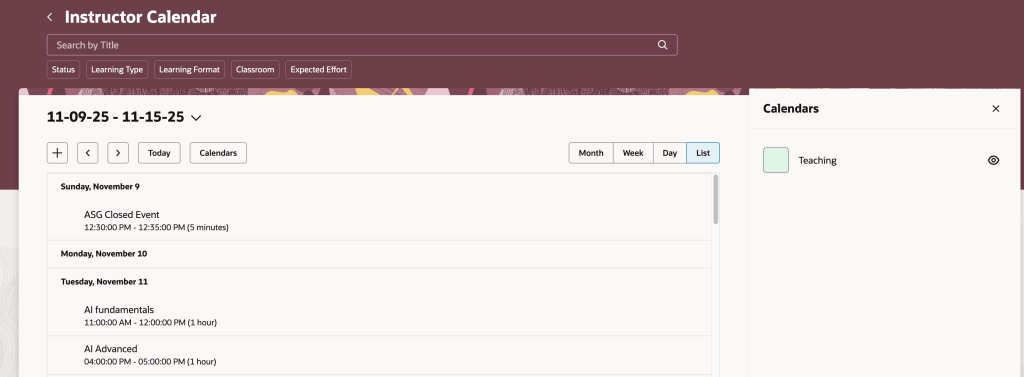
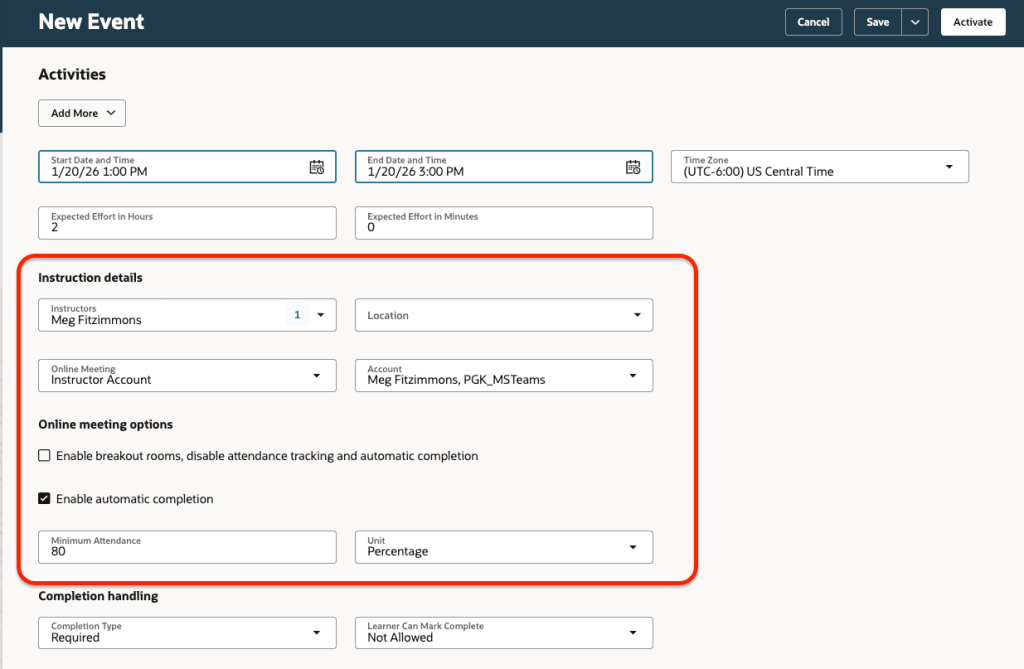
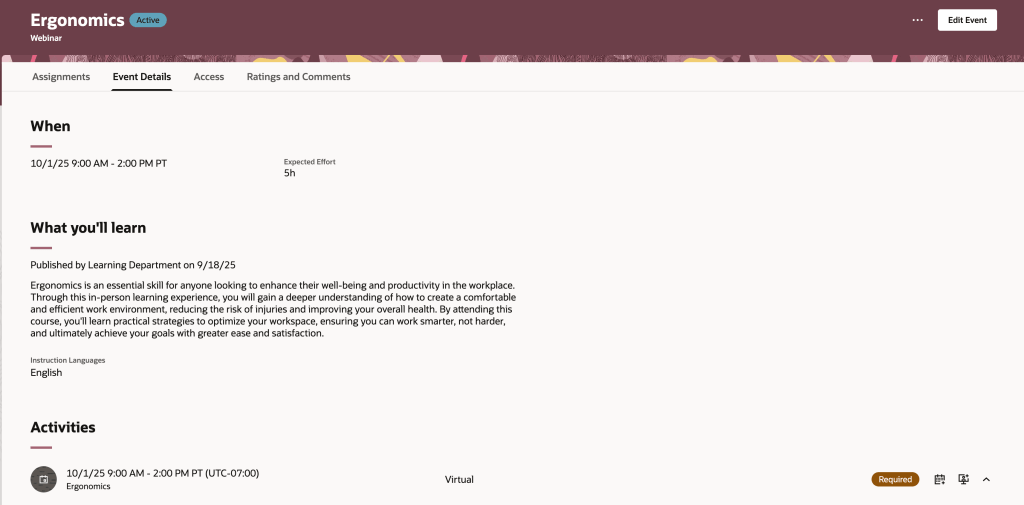
Oracle has introduced a new Redwood Learning Events page, offering a streamlined way to publish instructor-led training directly to your learning catalogue. This update simplifies setup and adds flexibility, allowing events to be defined by formats such as In-Person, Webinar, or custom options tailored to your organisation. Events can be delivered as standalone offerings or included in a course for equivalency, with improved scheduling that supports multiday and overnight sessions and calculates effort automatically. You can specify dates and times via a calendar or manual entry, integrate feedback through evaluations and ratings, and control when learners provide it. Enrolment periods can now be configured separately from catalogue visibility, enabling early access via deep links, while enhanced withdrawal and waitlist options give greater control. Although events cannot yet be added to specialisations and pricing isn’t included in this release, both features are planned for future updates.

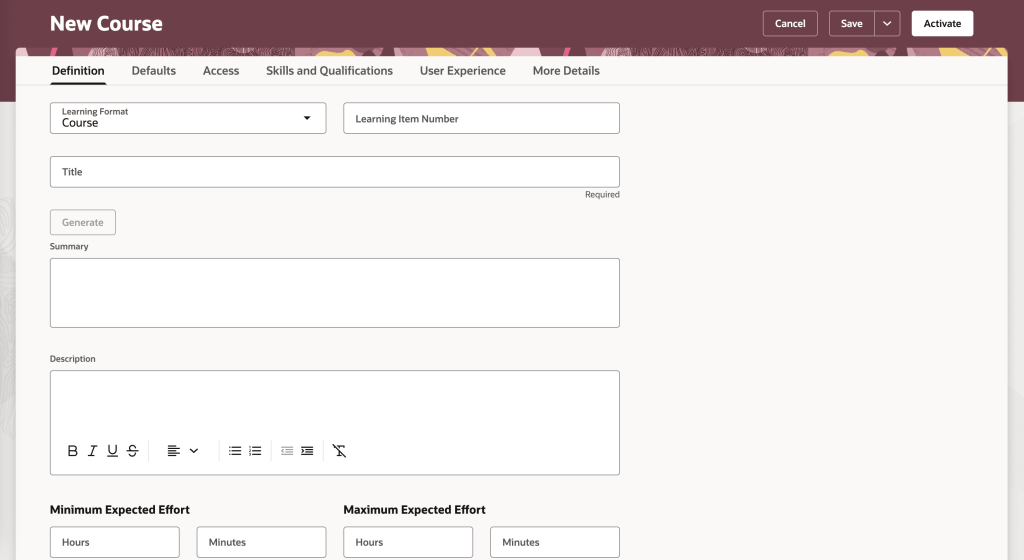
The final feature worth highlighting is the new Redwood Course Management page, which brings a modern, visually appealing interface to Oracle Learning. Learning Specialists can now enjoy a streamlined experience with grouped tabs for managing courses, Definitions, Defaults, Access, Skills and Qualifications, User Experience, and More Details, alongside a step-by-step creation process for organising core details, descriptions, visuals and settings. All course offerings, whether instructor-led, self-paced or blended, plus associated events, are accessible from a single Offerings tab for quicker navigation. Learners benefit from improved course detail pages with clearer layouts, showcasing included content, expected effort, acquired skills, instructors, outcomes, languages and celebratory completion notices. They can also engage through ratings, comments and lively discussions via dedicated interaction tabs.

Oracle often slip in a few extra features during the month, so it’s always worth keeping an eye out. If anything truly exciting comes along, I’ll share another blog post to keep you updated and ensure you don’t miss out. In the meantime, take a look at my latest write-up on the new Core HR features in Release 26A, you can find it here.

Please note all screenshots are the property of Oracle and are used according to their Copyright Guidelines
Oracle HCM Cloud Payroll 26A

It’s that time again, quarterly release time, and there’s plenty to look forward to! With Oracle’s strong focus on AI, Release 26A promises some exciting updates. Oracle often adds extra features throughout the month, so keep an eye out for more enhancements as they arrive. This release is especially important for UK Payroll customers, as it includes all the new tax year functionality.

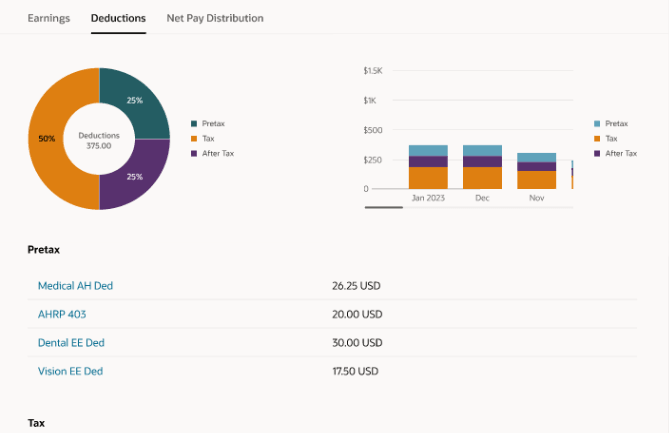
Global Payroll introduces an exciting new AI-powered tool, the Payroll Administrator Troubleshooting Agent. Known as the Payroll Run Analyst, this assistant helps payroll administrators validate employee payroll results directly from the Payroll Results page, including reviewing statements of earnings. Built on Oracle’s AI Agent framework, it delivers secure, role-based information within your permissions and significantly reduces manual effort during payroll reconciliation. It also streamlines corrective actions with deep links to related HCM pages, such as earnings and deductions, for quick updates. Best of all, it requires no extra setup and is ready to use immediately, with a chat experience coming in a future release.

Another feature worth highlighting is the redesign of payslip templates using the Redwood toolkit. The new Redwood Payslip offers a far better experience than the previous responsive version, but until now it only worked with the seeded payslip, which most organisations don’t use. With this update, the Redwood payslip can be viewed online or downloaded, and the PDF/UA templates are fully accessible while meeting all legislative requirements for payslip reporting. To stay compliant with local regulations, Oracle recommend adopting the Redwood payslip template as soon as possible.

As mentioned earlier, this release includes the UK legislative updates for the new tax year. Please note that a monthly patch may be required to incorporate any additional changes announced by the UK Government closer to April. One key update relates to the Full Payment Submission (FPS). You can now choose whether employee addresses are reported for all employees or only new starters. This option applies to the FPS processes for tax years ending April 2025 and April 2026. To set this, use the new field Employee Address on FPS from Tax Year 2024–25 on the organisation-level Statutory Deductions calculation card. By default, this is set to All Employees.

There’s also an update to the P60 template for the 2025/26 tax year. A new Statutory Neonatal Payment field has been added to the Statutory Payments section of the P60, along with a corresponding balance in the UK Balances for the End-of-Year Archive group. To generate and issue P60 End-of-Year Statements to employees, use the updated templates for 2025/26: Type LE(P), eP60 – Online and Plain Paper.

New payroll attributes have been introduced to help organisations set up adoption, maternity, and paternity absences for calculating benefit payments or offsets. Detailed steps are provided to guide you through creating the necessary elements, entitlement formula result rules, balance feeds, and validation formulas based on delivered templates. You’ll also find instructions for setting up entitlement formulas, certificates, absence plans, and absence types, ensuring a smooth and compliant process.

Oracle has now introduced Advance Pay for Irish legislation, giving employees the option to request payment before going on holiday. The amount is then recovered over a set period, such as weekly, bi-weekly, or lunar cycles, as needed. Before processing Advance Pay, make sure all other earnings and deductions have been completed. You’ll also need to configure Advance Pay usage and ensure that earnings are correctly processed during the holiday period.

Enhanced Reporting Revenue (ERR) Requests are now available, making compliance easier. After payroll runs and prepayments that include ERR element entries, use the Run Enhanced Reporting Submission Request. You can also run this process for a specific time period to report on unprocessed ERR entries, such as Travel and Subsistence, Remote Working Daily Allowance, and Small Benefit Exemption. The process generates three outputs: an ERR Audit Report showing archived employee and element details, an Errors and Warnings report, and a JSON file for Revenue submission via the Send File Submission process. For corrections, use the Run Enhanced Reporting Correction Request on previously submitted ERR files. This creates a revised JSON file, an ERC Audit Report, and an Errors and Warnings report—ready to send to Revenue.

As I mentioned earlier, Oracle usually drops extra features throughout the month, so keep an eye out! If anything really exciting comes along, I’ll post an update to make sure you’re in the loop. In the meantime, why not check out my latest blog on the new Core HR features in Release 26A? You can find it here.

Please note all screenshots are the property of Oracle and are used according to their Copyright Guidelines
Oracle HCM Cloud Core HR 26A

It’s the most wonderful time of the quarter! Sorry, I just put up my Christmas tree and now I’m feeling festive. Oracle have just announced the latest features that will be coming in release 26A. As you would expect, it’s an AI heavy one! As usual, additional features may follow later this month. In the meantime, let’s review what’s been introduced so far.

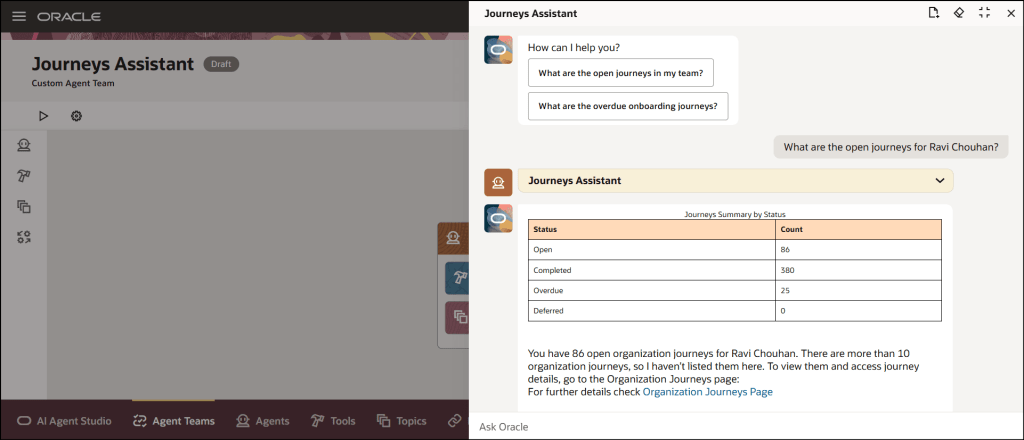
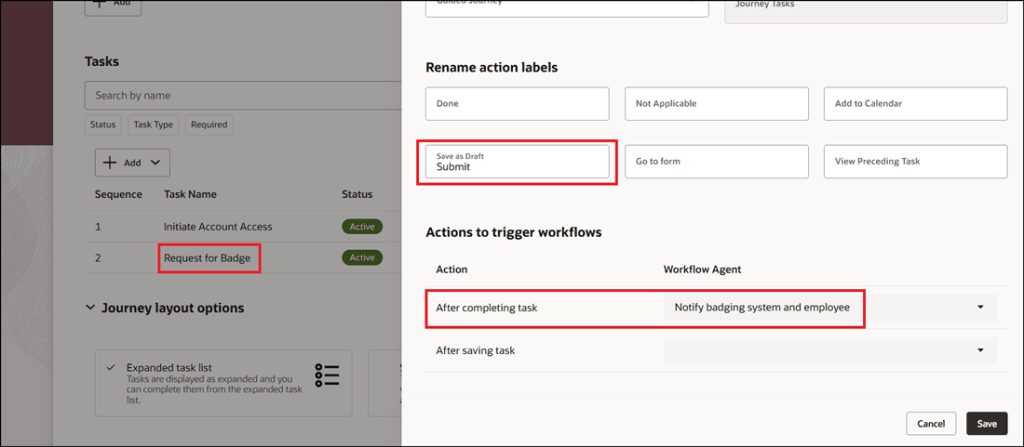
The first feature is one I saw at AI World in October and I thought it was great, so I’m glad it’s here now. The new Manage Journeys with AI Assistant makes managing employee journeys so easy. Powered by Oracle’s AI, it understands your everyday questions and gives you clear answers that fit your organisation’s rules. Need to check overdue tasks, see onboarding progress, or jump straight to the right page? Just ask. It cuts through the clutter, saves you time, and means less training for your team. Managers and HR can quickly get the info they need without digging through menus, so you can spend less time clicking and more time supporting your people.

Everyone loves a good dashboard, and now there’s the new Redwood View Legal Employer Changes Dashboard. It’s your one-stop shop for reviewing and keeping track of all global transfers, but only those that you have access to. The dashboard gives you a clear summary of each worker’s transfer details, making it easy to stay on top of changes. One thing to note: even if the Change Legal Employer dashboard is enabled for Redwood, the deep links on this page still follow their own product-specific profile settings. For example, if you click the Compensation Info link, it will open the Compensation page based on its profile option. It will only open in Redwood if that page’s Redwood setting is enabled, otherwise it will open in the responsive view.

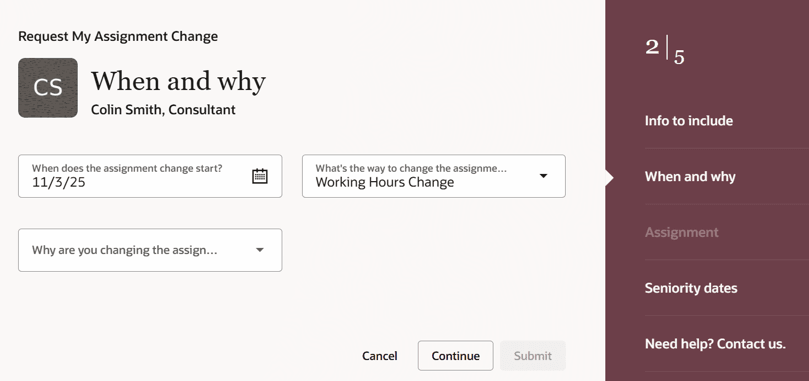
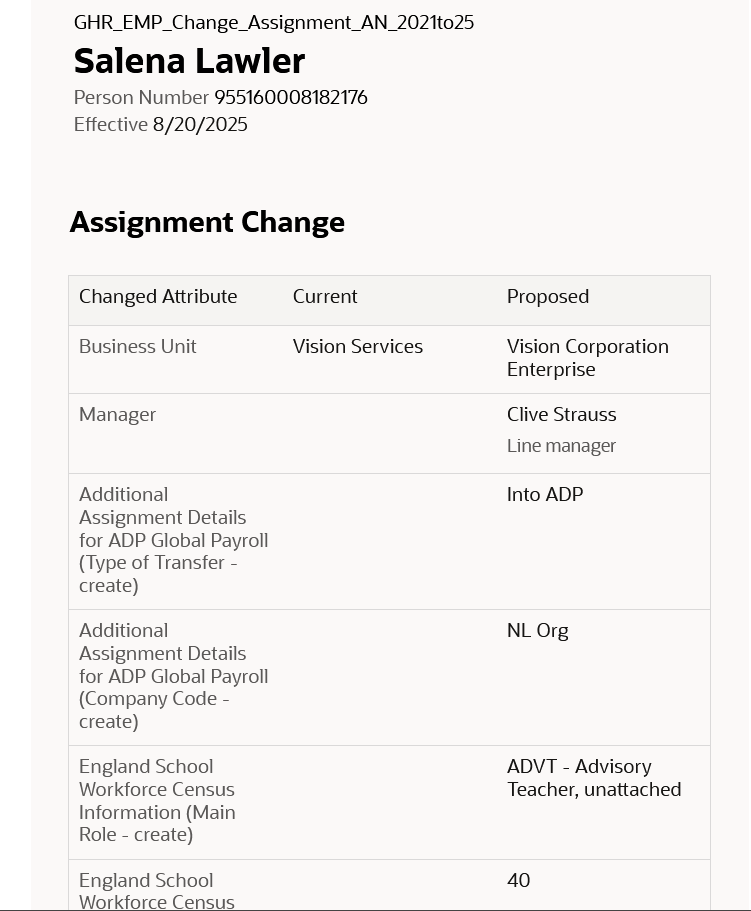
HR teams already have plenty on their plate, so there’s a growing shift towards employees taking ownership of their own data and using self-service wherever possible. The new Request My Assignment Change feature makes this easier than ever, allowing employees to update their own assignment details through a simple Redwood process. From the self-service interface, employees can now request changes to update their work location or adjust their working hours, without any HR involvement. The Request My Assignment Change process uses the existing assignment approval framework. To customise approvals for this request type, configure rules with:
sensorDataReferenceCode = "RequestMyAssignmentChange".

Two new AI features are now available in Workforce Structures: the Job Assistant and the Workforce Structures Insight Analyst. The Job Assistant speeds up creating roles by asking a few simple questions and setting up the job with minimal details like name and code – quick, straightforward, done. The Workforce Structures Insight Analyst is where things get really powerful. Acting as an intelligent companion, it gives you instant access to workforce structure data without the need to build custom reports or navigate complex analytics. You can ask natural language questions and receive clear, actionable answers tailored to your organisation’s policies. Managers can quickly get summaries of job families, positions, and organisational hierarchies; compare structures across teams; and even analyse areas that aren’t covered by standard reporting tools. It’s designed to save time, reduce complexity, and provide insights that help you make informed decisions faster, all from a single, intuitive interface.

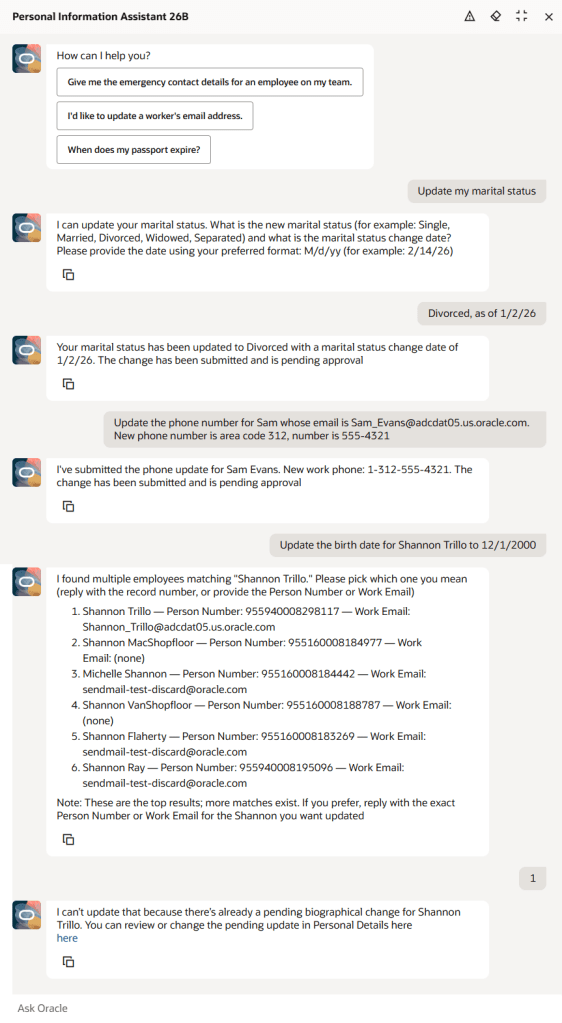
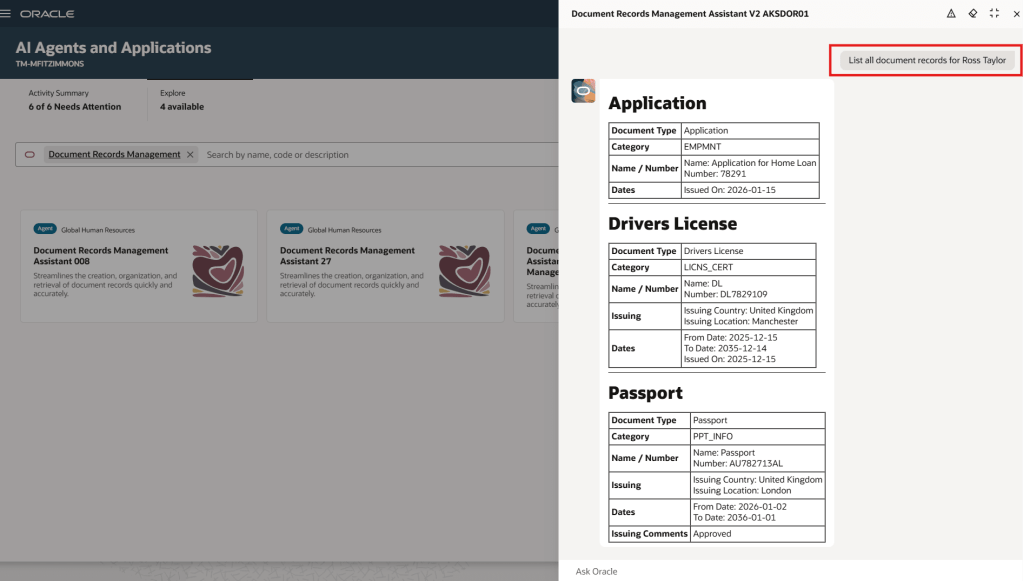
The Document Records Management Assistant brings AI to one of the most essential yet often overlooked areas, document records. This smart assistant makes creating, organising, and finding records quick and effortless. Using advanced language models, it understands the context of each document type and offers helpful suggestions, so you can capture records accurately, categorise them correctly, and retrieve them when needed. With natural language interaction, direct links, and intuitive guidance, it removes complexity, reduces training, and even anticipates intent, such as fetching the latest passport record. In short, it streamlines document management into a simple, conversational experience.

As mentioned earlier, Oracle will be rolling out new Core HR features later this month. If any of these updates turn out to be particularly significant, I’ll share an updated blog post with the details. In the meantime, keep an eye out for upcoming posts where we’ll dive into other Fusion modules as part of Release 26A.

Please note all screenshots are the property of Oracle and are used according to their Copyright Guidelines
Oracle HCM Cloud Learn 25D

Release 25D has landed, and Oracle are gearing up for phase 2 of Redwood for Learn—this time turning the spotlight on Learn Admin pages, which are mandatory by release 26A. The focus is on making things smoother and smarter when it comes to resources, recommendations, self-paced learning, and external content. With the deadline fast approaching, it’s no surprise there’s a whole bunch of handy features to help you make the switch. Let’s dive in and see what’s new!

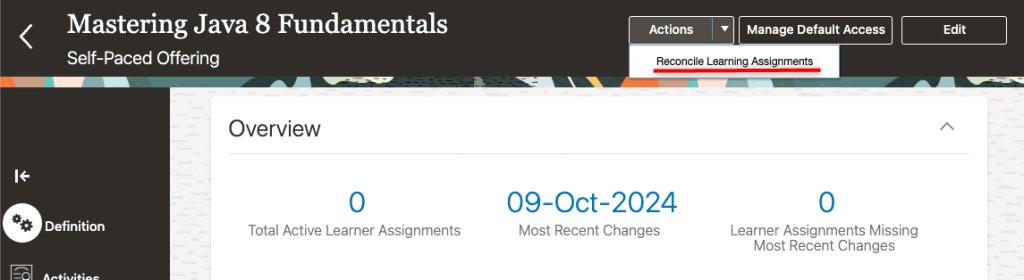
If you’re someone who often forgets to reconcile learning assignments, this new feature is for you. With just a quick tweak to a profile value, any course, offering, specialisation, or self-paced learning you kick off will now automatically trigger the reconciliation process. That means all your linked learning assignments stay up to date, saving you from the hassle of mismatched or outdated info.

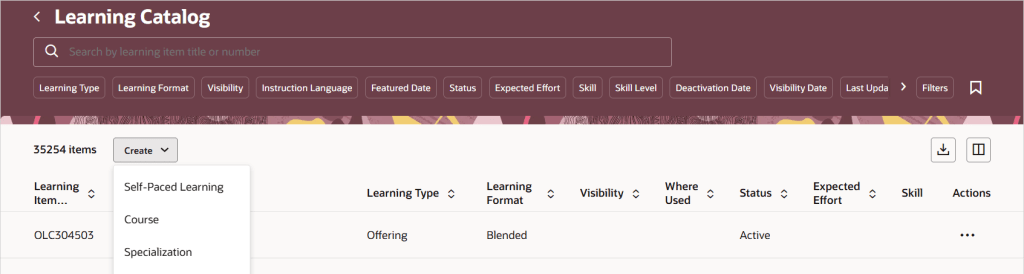
25D is bringing with it a new unified catalogue listing page, which will be your central location for all your Learn admin tasks. This new feature changes how admin access works for courses, specialisations, and offerings. Once you switch to the single learning catalogue view, courses, offerings, and specialisations will show up on the Learning Catalogue page. Just a heads-up: the old data security rules won’t apply anymore for the following tasks: viewing, managing courses, offerings, or specialisations in the catalogue. If your admins already have full access, there’s nothing you need to do. If you’ve been limiting access to certain items, now’s a great time to simplify things using catalogue administration profiles. Just set up profiles that define who can manage what, replacing the old security roles. Then, link your courses, offerings, and specialisations to the right profile—HCM Data Loader (CourseV3, OfferingV3, and SpecializationV3) can help with bulk updates.

If your organisation uses external learning content, you can now set default visibility rules for each provider, deciding who gets access and how the content shows up in topics and communities. It’s a great way to make sure the right people see the right stuff in the right places, all while keeping things aligned with your learning strategy. This update gives you more control over how third-party content is delivered, helps avoid misuse, and lets you manage licensing costs more efficiently. To get started, just head to My Client Groups > Learning and Development > Configure External Provider and tweak the audience and catalogue settings for any providers whose content is imported as self-paced learning.

With learning content getting better and richer, it’s no surprise the file sizes are growing too. Oracle’s on the ball, they’ve upped the max file size for Self Paced Learning, so you can now upload videos, SCORM packages (1.2 and 2004), AICC ZIPs, and presentations up to a whopping 2GB. PDFs are still capped at 1GB, but that should cover most needs. If you’ve already got Self Paced Learning switched on, there’s nothing you need to do—just enjoy the extra space!

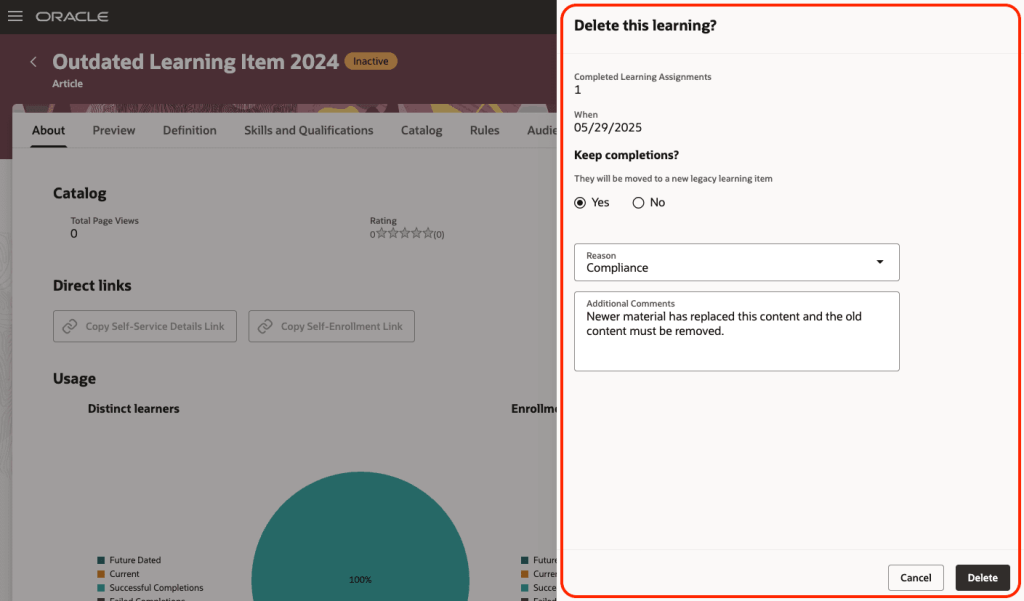
The final feature I want to highlight, is one that has been a frustration for many people and now it has been resolved. You can now clear out old self-paced learning from your Oracle Learning catalogue—whether it’s inactive or has missing content. Just click the new Delete button and you’ll see how many people completed it. You can choose to keep those completions by moving them to a legacy item, note down a reason for deleting it, and add a quick comment if you like. Once you confirm, the system runs a scheduled process that permanently removes the learning and all its links—like specialisations, communities, recommendations, initiatives, HCM goals and journeys. If you’ve chosen to keep completions, they’ll be safely moved so learner history isn’t lost. Just make sure self-paced learning is switched on and that you’ve added the new security privilege: WLF_DELETE_LEARNING_CATALOG_ITEM_PRIV.

Oracle often slip in a few extra new features throughout the month, so it’s always worth keeping an eye out. If anything truly exciting drops, I’ll put up another blog post to keep you in the know and make sure you’re not missing out. In the meantime, please check out my latest write-up on the new Core HR features in Release 25D, you can find it here.

Please note all screenshots are the property of Oracle and are used according to their Copyright Guidelines
Oracle HCM Cloud Recruit 25D

Great news – 25D has landed! Unlike most modules, Recruit has a two-step journey to Redwood, and 26B is the big one to focus on to make sure users stay compliant and fully switched over for core Recruit tasks. If you’ve already got 25C, you should be handling requisitions, job applications and candidates in Redwood by now. The next wave is all about offers, interviews, campaigns, events and agency hiring. While 25C gave us a few Redwood features for offers, 25D really ramps things up to help you stay on track for the 26B deadline, but even more excitingly, it’s full of AI features to make your lives easier! So let’s dive in and explore what’s new….

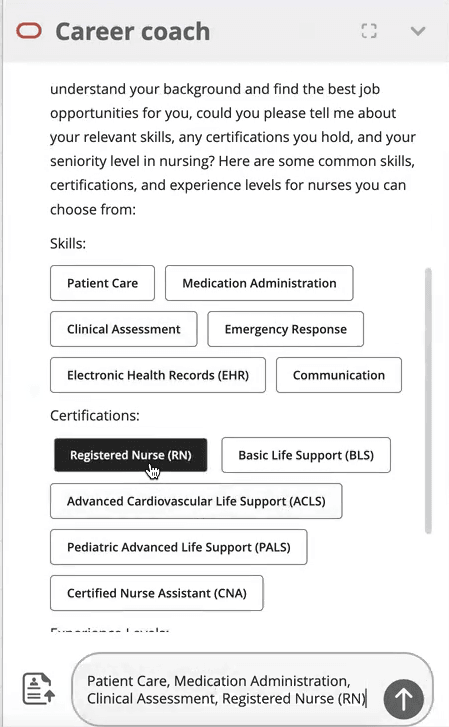
This first feature isn’t actually a Redwood specific one, but it’s a great one that I’m very excited about! Given Oracle’s push to embed AI into Fusion, wherever it is relevant, this feature is a great use case for it! The new AI Agent for Candidate Experience introduces an AI Chatbot called Career Coach directly onto the Career Site. It will be much easier for candidates to search for a new role with the Job Recommendations Agent and Job Fit Agent, as they get tailored suggestions based on their experience and skills. The candidate just need to upload their CV, answer a couple of questions and then the Job Recommendations Agent will highlight roles that match their profile, while the Job Fit Agent helps them figure out if a particular job is the right fit and answers any questions. Both agents can even use uploaded documents to give more personalised advice, making the whole process smoother and more relevant.

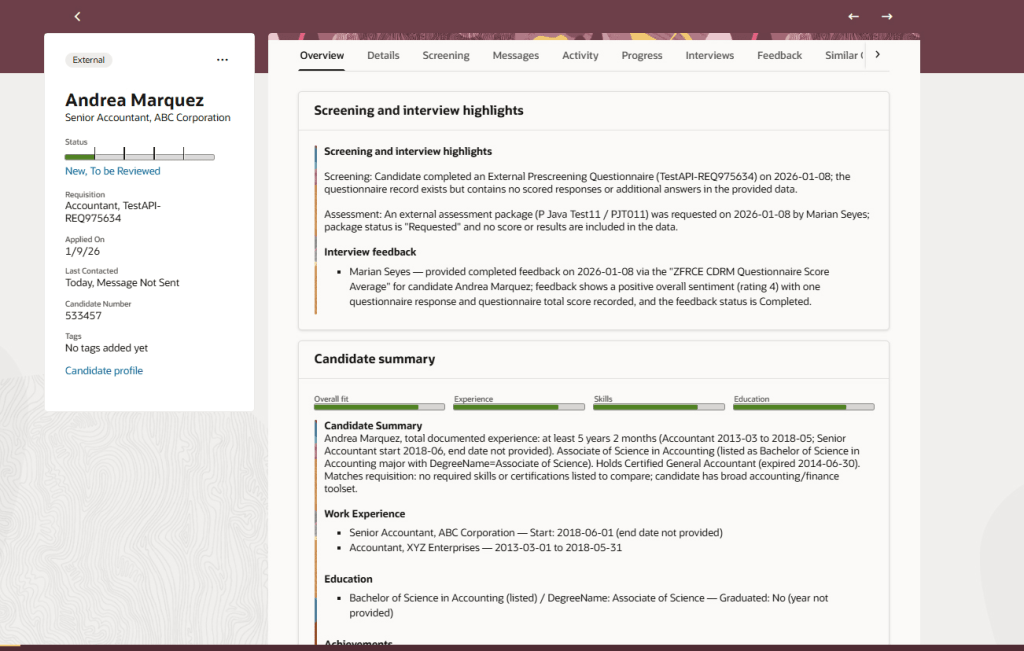
There’s another AI feature I’m excited about. This was shown at CloudWorld London and customers have been asking me about it ever since! The Job Applicant Screening Agent Template lets you create a handy agent team in AI Agent Studio, which Recruiters can get to straight from the Job Application page. It’s a super helpful “ask me anything” assistant that can dig up all sorts of info, including feedback scores, background checks, recent updates, and what’s happened over the past few weeks. You can ask things like “What’s going on with this application?” or “Give me the full lowdown,” and it’ll even suggest things like interview feedback, timelines, assessments, and offer details. It’s a real time-saver, especially for people who don’t use the system much and just want quick answers without the faff.

If you’re anything like me and find creating job offers a bit laborious, you’ll definitely want to check out the new Job Offer Creation Agent in AI Agent Studio. It’s like having a helpful friend on hand, it’s ready to answer all your questions, whether they’re general or specific to certain fields. You can customise it with your own documents and prompts, so it fits your organisation’s policies perfectly. Wondering if you can tweak the start date after sending an offer? Not sure about the typical job grade for a Chief of Staff? Curious about salary differences between cities, or what to do if a candidate already has another offer? This agent’s got your back. It helps you breeze through the offer process smoothly, fills in the right info, and cuts down on errors, so you can focus on getting the right people on board, faster.

The final Recruit AI Agent I want to highlight is one I particularly love, the new Job Requisition Creation Agent to help speed up the process of creating Job Reqs. Think of it as your go-to FAQ buddy, it answers all sorts of questions, whether you’re wondering about salary grades, attachments, or who’s recruiting in a specific location. It works entirely off the documents you upload and the prompts you set, so it’s easy to tailor to your company’s policies and ways of working. Whether you’re asking if you can change job grades later or need to know the salary range for consultants in Dallas, this assistant helps you get it right first time, no interruptions, fewer downstream issues, and a smoother, more efficient experience all round.

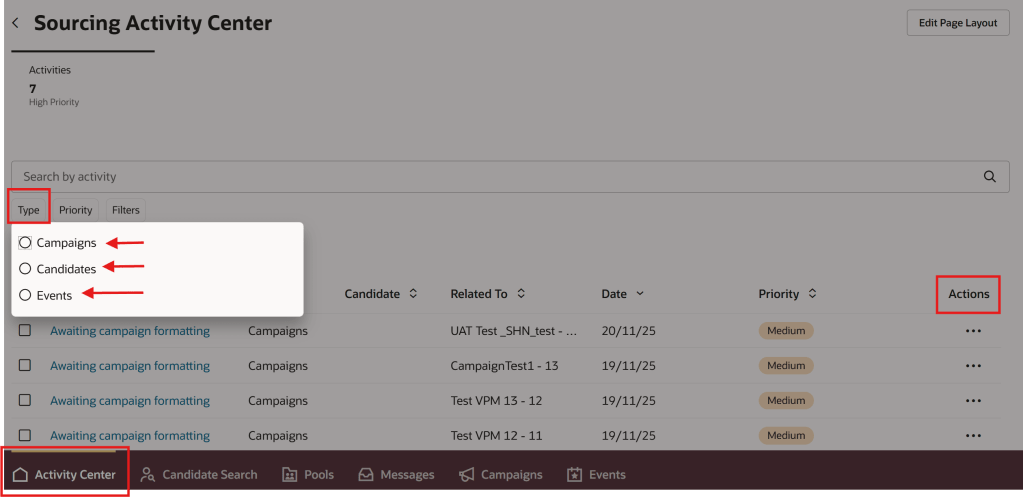
In 25C, the Candidate Sourcing tile was added. In 25D, the Campaigns and Events tabs are no longer under Hiring, but moved to Candidate Sourcing. When you head into the Candidate Sourcing tab, you’ll find everything you need to start building your talent pipeline – from Candidate Search and Pools to Messages, Campaigns, and Events. Over in the Hiring tile, you’ve got quick access to the Activity Centre, Messages, Requisitions, Offers, and you’ll spot Candidate Search and Pools again here too, so you’re never far from the tools that help you keep hiring on track.

Oracle often sneak in new features throughout the month, so it’s worth keeping an eye out. If anything truly game-changing drops, I’ll write up another blog post to keep you posted and make sure you’re not missing out. In the meantime, feel free to check out my latest write-up on the new Core HR features in Release 25D, you can find it here.

Please note all screenshots are the property of Oracle and are used according to their Copyright Guidelines
Oracle HCM Cloud Core HR 25D

This year seems to be flying by — it’s hard to believe we’re already talking about Release 25D! That said, Oracle has now published the initial set of documents for 25D. As is usually the case, further features are expected to be added throughout the month, but for now, let’s take a look at what’s been announced so far.

Unsurprisingly given AI Agent Studio was released in 25C and the current focus on AI, this is an AI heavy release. The first feature I want to highlight is for AI Agents. Oracle has introduced a smart enhancement to Guided Journeys on Redwood pages by allowing AI Agent tasks to appear at the section level, not just across the whole page. This means users get more focused, real-time support exactly where they need it, helping them move through transactions faster and with more confidence. Once enabled via a profile option, this feature brings cleaner UI design, smarter guidance, and reduced reliance on support teams—all without storing any interaction data. It’s a subtle but powerful upgrade that makes Redwood journeys more intuitive and intelligent.

AI Agent Embedded in Guided Journeys

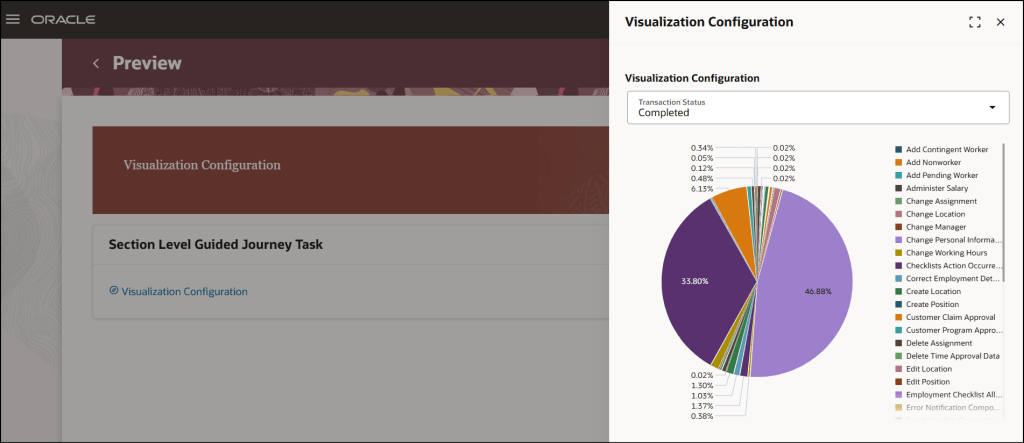
Another key focus for Oracle lately has been the embedding of Analytics into pages. As a data nerd I love any opportunity to embed a graph or other visualisation of data into a page. Oracle have now introduced a new enhancement to the Analytics task type in Journeys, the Visualization Configuration subtask, which enables users to seamlessly view Oracle Transactional Business Intelligence (OTBI) analyses, including any supported parameters, directly within a journey task. This integration allows for real-time insights and decision-making without leaving the task flow. It should be noted that users configuring these will not only need Journeys config access, but also security access to the new Visualization Configurator. There are three new privileges for this: ZCA_VIEW_DATA_VISUALIZATION_CONFIGURATION_PRIV, ZCA_MANAGE_DATA_VISUALIZATION_CONFIGURATION_PRIV and HRC_MANAGE_SYSTEM_SEARCHES_PRIV.

Visualization Configuration in Guided Journeys

The next feature might not be the most thrilling, but it’s one you’ll want to be aware of. Oracle’s been steadily shifting notifications from the old Responsive style to the newer Redwood look, and now it’s Employment notifications getting the makeover. If you’re using Oracle’s seeded notification, it’ll automatically switch to the Redwood version, just a heads-up, there’s no going back unless you move to a custom notification. If you are using custom notifications, you’ll need to tweak your template to the Redwood style. On the plus side, the new notifications automatically adjust to the screen they’re being viewed on, so they’ll look spot-on whether you’re on a laptop, tablet or mobile. If you haven’t customised your existing notifications, the update rolls out without you lifting a finger. The fresh design is cleaner, more user-friendly, and helps you get things done quicker. Plus, it now supports date, time and number formats based on each user’s preferences.

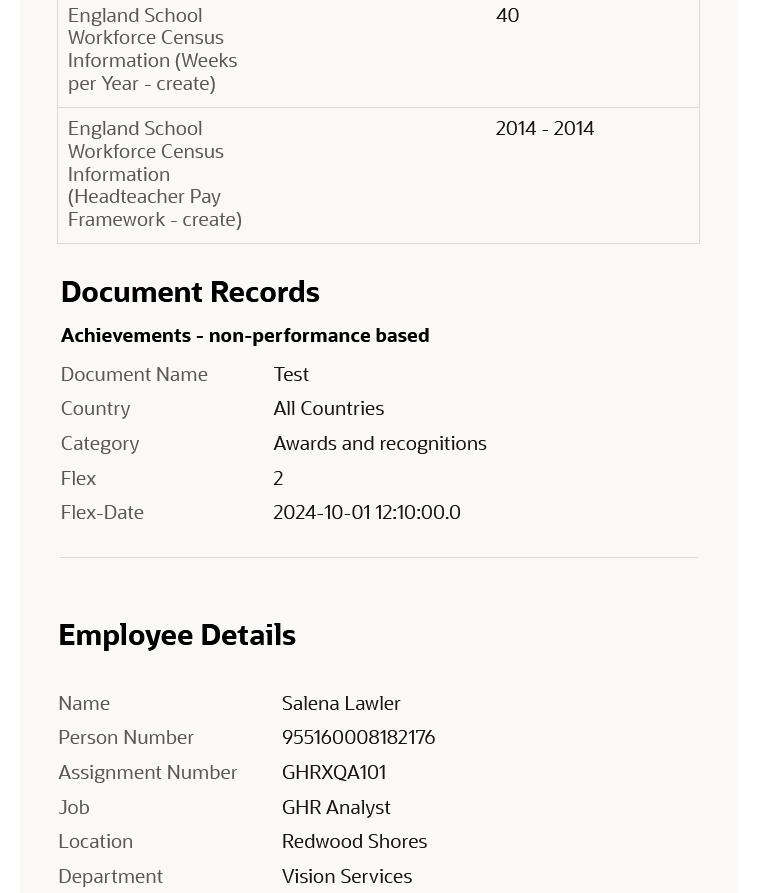
The final update I’d like to highlight is for those who’ve not yet transitioned to Redwood. I understand some organisations have held off for various reasons, so it’s important to note that from release 25D, the Redwood Document of Records page will be automatically enabled, and the Responsive page will no longer be displayed. If you’re not quite ready to move to Redwood, you can revert to the Responsive version by setting the profile value ORA_PER_DOCUMENT_RECORDS_REDWOOD_ENABLED to ‘N’. However, as with other Redwood transitions, once the deadline has passed, any issues with the Responsive page will no longer be supported, and Oracle Support will only recommend using the Redwood version. That said, the Redwood page offers a significantly improved experience, including the need for fewer clicks and faster load times, so this change should be seen as a positive step forward rather than a forced inconvenience.

Redwood Document of Records

As previously mentioned, Oracle is set to introduce new features in Core HR later this month. Should these enhancements prove to be particularly noteworthy, I’ll publish an updated blog post. In the meantime, please keep an eye out for forthcoming blogs that will explore additional modules within Fusion as part of Release 25D.

Please note all screenshots are the property of Oracle and are used according to their Copyright Guidelines
Ask Oracle – The New Way to Interact with Fusion

Have you heard about Ask Oracle? I was chatting with someone from Oracle recently and left the conversation genuinely excited! It gets a brief mention in the Common Features for 25C, but there’s not much detail available just yet. So, what is it? Ask Oracle will form part of a new navigation experience being introduced in 25D. You’ll be able to use it to search for tasks, applications, and information—and it will also serve as your way of navigating between different areas. The Home page with Ask Oracle will remember where you’ve recently been and the places you visit most often, helping you get to what you need more quickly and intuitively.

Ask Oracle Homepage

Oracle understands that when users open Fusion, it’s usually with a specific task in mind. The new Ask Oracle experience is designed to make that journey more intuitive—whether you prefer to simply ask for what you need or browse a curated list of intelligent suggestions. To support this, the redesigned home experience brings together three key elements: a product map view to help you explore what’s available; intelligent suggestions that surface the most relevant items based on your likely next steps; and a modern search function with rapid type-ahead, synonym recognition, and integrated business objects—making it easy to find what you’re looking for, even if you’re unsure of the exact name or didn’t realise you needed it.

Ask Oracle Navigation

The version being released in 25D is the first iteration. This will continue to evolve over time. Future versions of the Home experience with Ask Oracle will support a full range of user goals: whether you’re exploring what’s possible with “What can I do?”, tackling a specific task with “I want to do ‘x’…”, or checking in with “What needs my attention?” to understand what actions are required to keep things moving. The application will intelligently highlight tasks and priorities to help maintain workflow momentum.

If you’d like to use Ask Oracle, it will need to be enabled following the 25D release. Once enabled, the Home experience with Ask Oracle will replace both the global header and the existing home page used in the News Feed layout. You can set Home with Ask Oracle as the default home page layout via the Appearance work area.

Please note all screenshots are the property of Oracle and are used according to their Copyright Guidelines
Oracle HCM Cloud Talent 25C

Talent became mandatory in Redwood by Release 25C, but that doesn’t mean that Oracle haven’t given us some new features in this release. As usual, Oracle do usually continue to announce more features throughout the month, so if any significant additional features are announced, I will do a follow up post to highlight them.

In 25C Oracle have enabled combined goal administration pages, where you can view the performance and development goals administrative tasks on a single page. On the Performance and Development Goals page, unsurprisingly you can view and manage performance goals and development goals of any persons you have access On the Goals Library page, you can view and manage performance and development library goals. Then there is the Setup of Goals Mass Processes, which manages mass assignment process for performance and development goals and also the mass sharing process for performance goals. The final page within the admin pages are the Scheduled Processes for Goals, which again is fairly self explanatory. These changes are a simple one, but it will make life easier for Talent Administrators which can only be a positive thing!

Library Goals Page Listing Performance Library Goals

Oracle has rolled out valuable enhancements to its Check-in templates, making performance conversations more efficient and tailored. You can now link Touchpoints check-in documents directly to performance review periods, eliminating duplication and ensuring a smoother flow of information. A particularly helpful update is the ability to include competencies from an employee’s position, job, or talent profile as discussion topics—this provides structure and relevance to each conversation. Additionally, organisations can now target specific employee groups by assigning eligibility profiles to Touchpoints templates, allowing for a more personalised and strategic approach to performance management.

Add Talent, Position, and Job Competencies as Discussion Topics

A small but impactful update from Oracle is set to make HR workflows more efficient—notifications can now be automatically sent to HR when general or goal-related feedback is submitted in response to an HR request. These alerts include a direct link to the feedback, saving HR teams from having to manually check each employee’s Goals or Feedback page. It’s a simple enhancement, but one that will be widely appreciated for the time and effort it saves.

HR notified when feedback is received for a worker

It wouldn’t be an Oracle release without a touch of AI—and this one delivers just that. Managers using Redwood performance documents can now benefit from enhanced AI support during evaluations, making the process smarter and more intuitive. What’s especially reassuring is the new transparency feature: the data sources used to generate AI-suggested comments are now clearly displayed, helping to build trust in the insights provided. Additionally, a new page property allows you to set a minimum character count before an overall summary comment is generated, giving organisations more control over the quality and depth of AI-generated feedback.

AI Enhancements For Manager Evaluations in Redwood Performance Documents

As mentioned earlier, Oracle often roll out additional features throughout the month. Should these updates be significant, I’ll publish a follow up blog post. Please check out my blog on the new features in Core HR for Release 25C here.

Please note all screenshots are the property of Oracle and are used according to their Copyright Guidelines
Oracle HCM Cloud Recruiting 25C

Earlier this year there was a split in the timelines for when Recruiting becomes mandatory in Redwood. Requisition Management, Job Applications and Candidate Management are all mandatory by Release 25C. Offer and Interview Management, Campaigns, Event and Agency Hiring are now mandatory by Release 26B. With this in mind, there are a lot of new features in release 25C to prepare for the second phase of Redwood for Recruiting. Oracle continues to deliver innovation, with new features rolling out throughout the quarter. I’ll be keeping a close eye on the updates, and if anything particularly noteworthy emerges, I’ll share a follow-up post to keep you in the loop.

Updated Redwood Timeline

This release introduces Redwood functionality for Offers. It’s now possible to both create and delete an offer within Redwood. It’s possible to override information from the position during the offer process, unless Position Sync is switched on and then the option is greyed out. As with all new Redwood pages, I would recommend switching it on in your Development pod and checking out the functionality as soon as you receive 25B. The earlier you start testing, the easier it will be to adopt Redwood for Offers.

Create an Offer in Redwood

In this release Oracle have split out the Hiring tab, into two separate ones: Hiring and Candidate Sourcing. The Hiring tile now contains these tabs: Activity Centre; Messages; Requisitions; Offers; Candidate Search; Pools; Campaigns and Events. The new Candidate Sourcing tile contains these tabs: Events; Candidate Search; Pools; Messages and Campaigns. The separation of tiles will automatically happen if you have the ORA_REC_RECRUITING_REDWOOD_ENABLED profile. Only users who have security access to Candidate Sourcing will have access to the tile and it’s content.

Hiring Tile and Candidate Sourcing Tile

Whilst Job Applications are mandatory in Redwood by Release 25C, Oracle have added extra functionality within VBS to personalise the Job Application page. This is following customer feedback that requested additional fields to be available within Job Applications. Whilst the move to Redwood hasn’t always been smooth, I do think Oracle’s response to client feedback on additional personalisations that are requested and movement on mandatory timelines has been significantly more flexible than I would expect of an organisation of their size.
Visual Builder Studio to Personalize the Job Application Page

The Send Job Requisition and Job Application Related Messages to members of the hiring team has now been moved to Redwood. You can use a template to create the message or create it from scratch. The Recipients list will automatically display all the hiring team members, but you can type in the list to find other recipients. When you’re ready to send it, you can preview the message to ensure the content is correct and tokens are being resolved as expected. Once the message is sent, it’s available on the Messages tab of the job requisition, and on the Activity tab of the job application. 

Send Message to Team Panel

As I said earlier, Oracle generally continue to add new features throughout the quarter. I’ll be keeping a close watch on the updates, and if anything particularly impactful comes through, I’ll share a follow-up post to keep you informed and ahead of the curve. Please check out my blog on the new features in Core HR for Release 25C here.

Please note all screenshots are the property of Oracle and are used according to their Copyright Guidelines