Generative AI in Oracle HCM Cloud

Everyone is talking about AI these days and Oracle is no different! The use of AI within Oracle applications isn’t new – Digital Assistant, Oracle’s chatbot has been in action for a while. Digital Assistant uses ‘skills’ similar to Alexa which are used as a basis for enquiries. Oracle provides seeded skills but custom ones can also be created.

But what about Generative AI or Gen AI? Gen AI uses machine learning to learn patterns from the data and then create content based on it. Oracle have been incorporating Gen AI into HCM Cloud since release 24A. All of the features released require Redwood as they can be activated via VB Studio. Oracle have introduced AI Assist in a lot of applications, although predominantly in the Talent and Performance modules. AI Assist will take the information provided and summarise it. For instance, when a Line Manager reviews all Performance Documents, the AI Assist button will compile and summarise all pertinent performance information for that Employee. This feature saves the manager time by providing an editable summary, designed to enhance efficiency without eliminating the human touch.
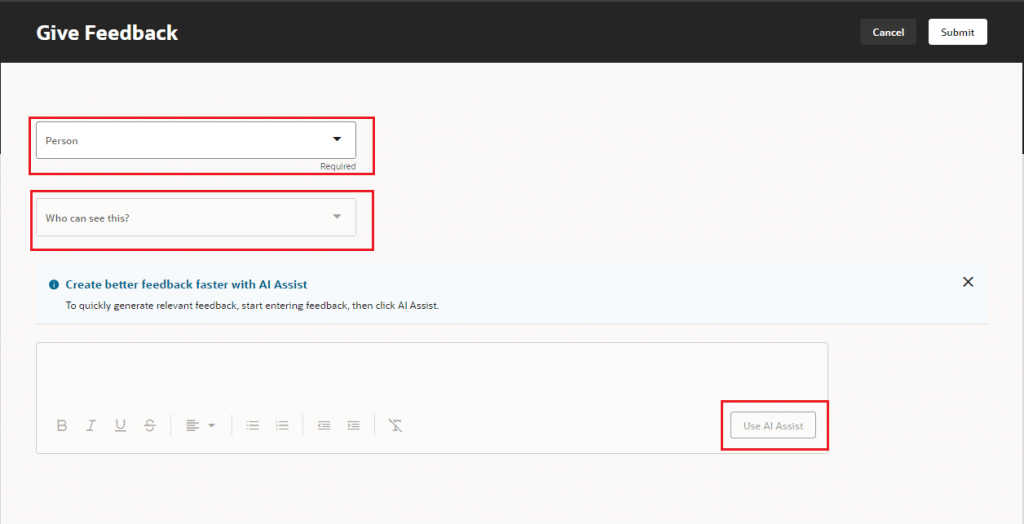
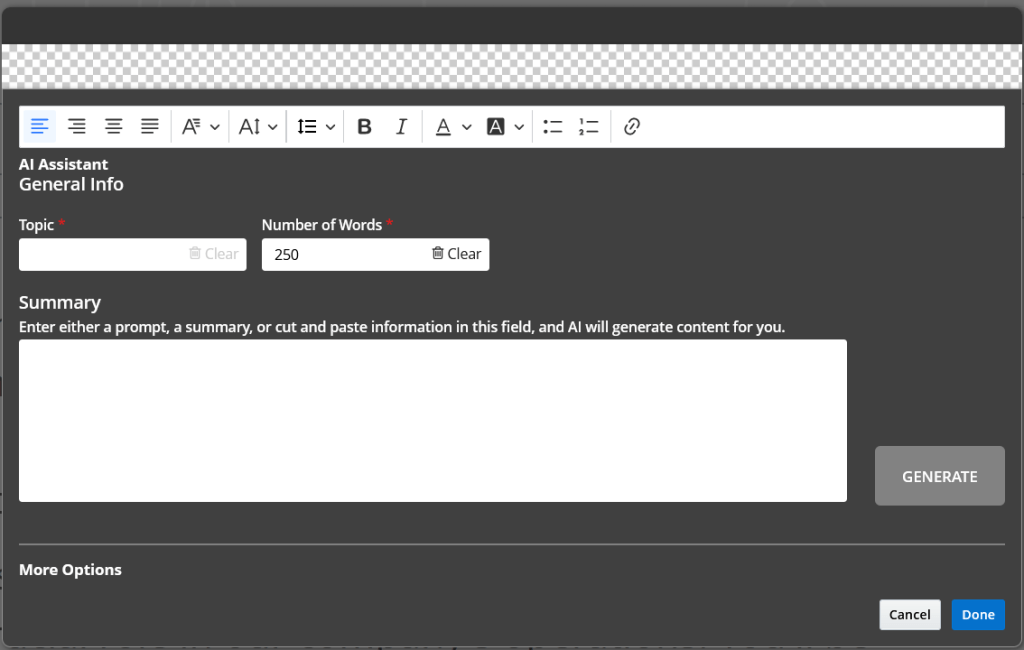
Gen AI is also available in Recruit to help produce content for your Career Site. By populating the topic, how many words you require it to be and a few key terms / words, the AI Assistant will generate the text for you. As with all Gen AI within Oracle, you can tweak the content as much as required, but it will make the process much easier.
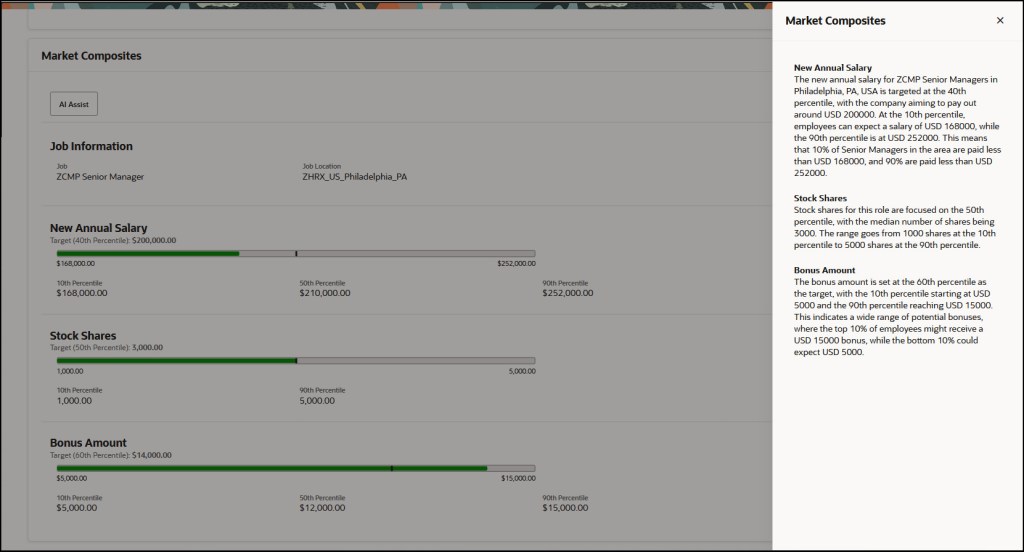
The new AI features continued in 24D, which included the introduction of AI Assistance for Market Composites in Compensation Info. This allows organisations to utilise Gen AI to generate explanations for market composites to Line Managers within the Compensation module. This will help guide the conversations between Line Managers and Employees about the competitiveness of their compensation package.
Oracle are constantly working on new use cases for Gen AI. It is anticipated that in 25A, the Benefits Analyst Agent will be available. This will allow Employees and Line Managers to ask the chatbot about available benefits for them, but also question why things have changed etc. It can also link to the sources that it used to determine the response, so the Employee can validate the information, if required.
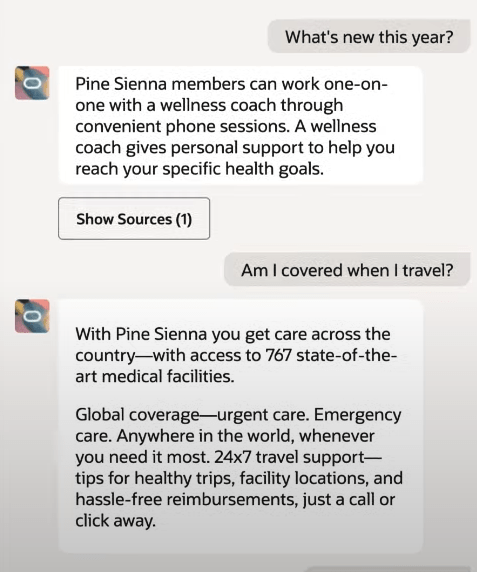
Oracle is investing heavily in Gen AI and other ways to optimise user’s experience, so there will be more announcements soon. I expect a number of features to be included in 25A, not just the Benefits Analyst Agent. Once they are announced, I will do another post.

About the author:

Kate Mead is an Oracle-certified HCM Consultant and Solution Architect at Version 1 with 14 years of experience in Oracle HR and Payroll systems, including 7 years with Oracle HCM Cloud. She has worked across implementation projects and managed services, has a sound knowledge of UK Payroll legislation and — before becoming a consultant — was an HR Manager.

If you have any questions or would like more information on how Version 1 can help you realise the full potential of your Oracle Cloud instances, please contact her at kate.mead@version1.com

Please note all screenshots are the property of Oracle and are used according to their Copyright Guidelines
Redwood Notifications in Release 24D

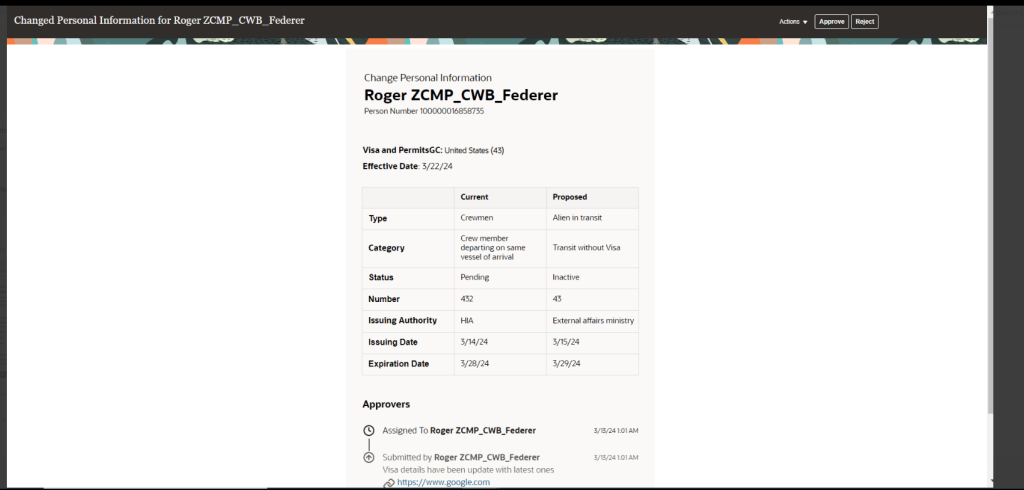
Lots of people have asked about the move to Redwood for notifications in release 24D, so I thought I’d better write a blog on it! In several modules, including Compensation, Absence and Recruit, the seeded notifications have moved over to the new Redwood style.

So what does this mean for organisations? If you’re already using Redwood, there is nothing needed to be done. However, what if you’ve not made the move to Redwood yet? Unfortunately it isn’t possible to switch off the Redwood notifications for these modules. There are two options available, firstly to use the notifications as delivered with the Redwood theme applied. Alternatively, create a custom BI notification to replace the seeded Oracle BI notification. It is the specific seeded Oracle BI notifications that have moved to Redwood, rather than all notifications within those modules being in the Redwood toolset.

So what do these notifications look like? An example is below, but they are cleaner and easier to read. The actual content hasn’t changed, it is the layout that has.

The only issue is where organisations have a mix of seeded and custom notifications within the modules that have made the move to Redwood notifications. This will mean that some notifications will be in the Redwood look and feel and some won’t. Additionally, where organisations have a mix of modules where some notifications are now in Redwood and some aren’t, they will have the same issue. This will potentially cause confusion with some users, but if I’m honest, the majority are unlikely to notice.

If custom BI notifications have previously been created and they are causing an issue due to the inconsistency of appearance with the mix of Redwood and non-Redwood notifications, it is possible to move the existing custom BI notifications to the Redwood style. If you create a copy of the custom BI notification, the Redwood style will automatically be applied. This can then be set as the active notification.

About the author:

Kate Mead is an Oracle-certified HCM Consultant and Solution Architect at Version 1 with 14 years of experience in Oracle HR and Payroll systems, including 7 years with Oracle HCM Cloud. She has worked across implementation projects and managed services, has a sound knowledge of UK Payroll legislation and — before becoming a consultant — was an HR Manager.

If you have any questions or would like more information on how Version 1 can help you realise the full potential of your Oracle Cloud instances, please contact her at kate.mead@version1.com

Please note all screenshots are the property of Oracle and are used according to their Copyright Guidelines
Redwood Time & Labor — Planning Your Move

Everyone is talking Redwood for Oracle SaaS solutions, but let’s focus on Time & Labor (OTL). OTL stands out as one of the select modules that influences both Human Capital Management (HCM) and Enterprise Resource Planning (ERP). It serves a dual purpose: tracking time for payroll purposes and allocating costs within the Project Portfolio Management (PPM) module.

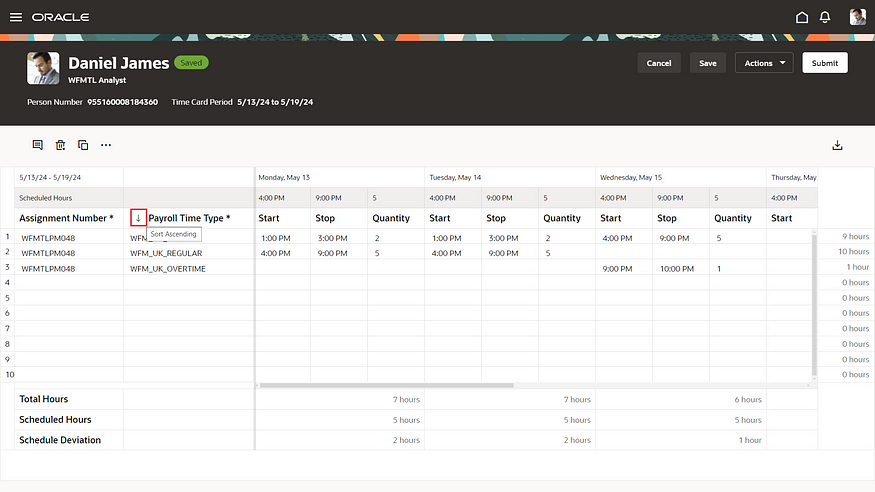
Redwood Timecard

With the upcoming Release 24D, the transition to Redwood Timecards becomes compulsory, signalling the end of support for Responsive Timecards. What does this entail? Post 24D, no bug fixes will be issued for Responsive Timecards. Moreover, should you submit a Service Request (SR) to Oracle concerning a Responsive Timecard, the recommended resolution will be to switch to Redwood. Considering that Release 24D is on the horizon, less than six months away, it’s crucial to start planning your migration immediately.

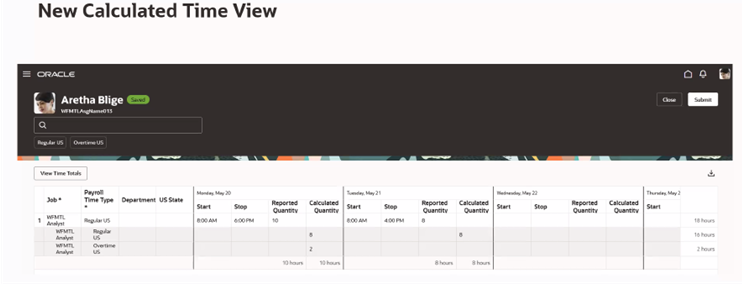
New Calculated Time View

As you start on the transition to Redwood, there are several key factors to consider. Security takes precedence; employees must possess edit rights to submit timecards, a shift from the current Responsive system. Similarly, managers will need edit rights to approve timecards directly within the interface.

Furthermore, please be aware of the following updates: 1)The Timecard Template now supersedes the ‘Copy Other’ feature found in Responsive timecards. 2) There is no support for daily details. 3) The Cost Override Layout is not supported. 4) Calculated Time has a new look (refer to the above screenshot). 5) For customising the sequence of timecard fields, the new unified layout is required.

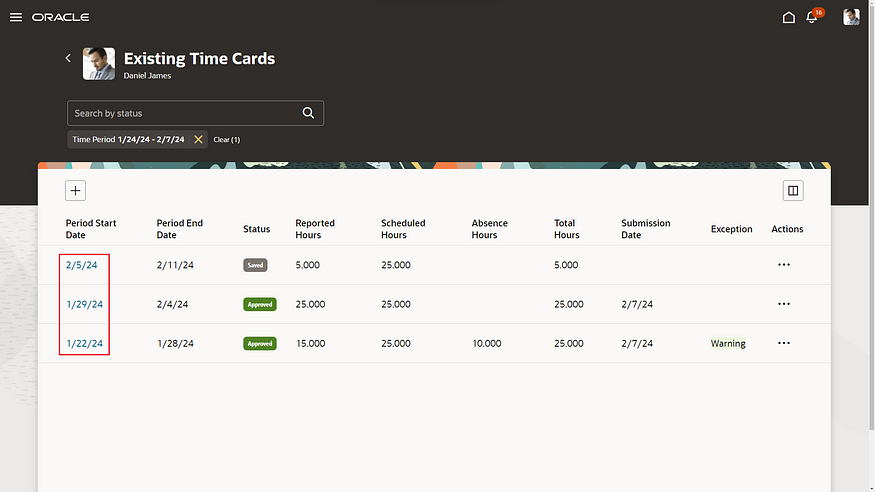
Redwood Existing Time Cards

So what are the benefits of the Unified Layout? It’s much simpler to configure, there is only one layout for reported time, calculated time, entry, edit and view. The guided process has been streamlined, so there are just three steps — display properties; timecard fields and time totals. The timecard attributes can be configured by role — Worker, Line Manager and Time & Labor Manager. Additionally, it is possible to filter the data sources by role.

Configure Time Entry Layout

What do you need to consider before you turn on the Unified Layout? The great news is that the delivered time entry layout components will continue to work! There is no need to set them up again. From a security role perspective, Time & Labor Administrators can edit existing non-unified layouts, but they cannot create new ones. The unified layout can include a combination of non-unified and unified timecard fields. If you have dependent timecard fields on a non-unified layout, they must be switched to independent timecard fields when moving to the unified layouts. Finally, if you need to be able to control the order of the timecard fields on a Redwood timecard, you must use the unified layout.

Oracle is set to introduce new features in the 23C and 24D updates. However, all essential functionalities required for transitioning to Redwood Time Cards are currently accessible. It’s advisable to activate Oracle Search and configure the necessary profile options for OTL within a separate pod for thorough testing. Familiarising yourself with the system through hands-on experience is vital for devising a realistic deployment schedule for Production before the 24D release.

Learn more about how Version 1 can help you maximise your Oracle Cloud instances here.

About the author:

Kate Mead is an Oracle-certified HCM Consultant and Solution Architect at Version 1 with 14 years of experience in Oracle HR and Payroll systems, including 7 years with Oracle HCM Cloud. She has worked across implementation projects and managed services, has a sound knowledge of UK Payroll legislation and — before becoming a consultant — was an HR Manager.

If you have any questions or would like more information on how Version 1 can help you realise the full potential of your Oracle Cloud instances, please contact her at kate.mead@version1.com

Please note all screenshots are the property of Oracle and are used according to their Copyright Guidelines
Oracle Cloud Redwood Customization Helper Tool

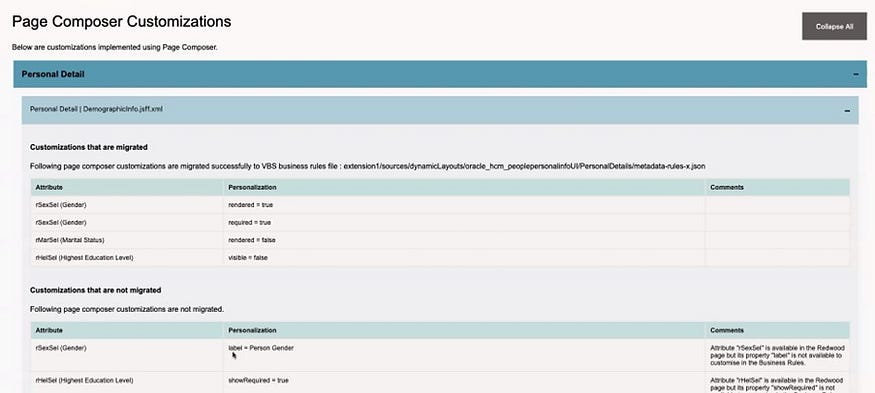
Today is the day! Oracle has released details of how to run the Redwood Customization Helper Tool. So what is it? It is a new tool that reports on your Responsive UX page personalisations that have been made in either Page Composer or Transaction Design Studio.

Page Composer Customizations Output

The tool outputs a JAR file which indicates which personalisations are supported in your current version of Visual Builder Express (VB Express) Business Rules. What’s even more exciting than the tool providing details of your personalisations to make the move to Redwood easier? Well, the tool also offers the option to migrate supported personalisations to your Redwood environment! It might not be quite as manual as we originally thought.

HCM Experience Design Studio Rules Supported for Migration

The above table lists all of the HCM Design Studio Rules which have the potential to be migrated using the Redwood Customization Helper Tool. Whilst not all functionality can be migrated, this is a massive improvement on what was originally communicated about the move from Responsive UX to the Redwood UX.

One key point to note is that the Customization Tool does not work with Single Sign On (SSO) accounts. If your Production pods are SSO only, you may want to run it against a non-prod pod where SSO is optional, providing all of the personalisations are present.

The second point of note is that you have to download an .exe file for it, so if your organisation has tight rules about what you can download, this may cause an additional complication. If you can obtain permission to download the file, it is definitely worth it.

Redwood Customization Helper Tool Forum on Customer Connect

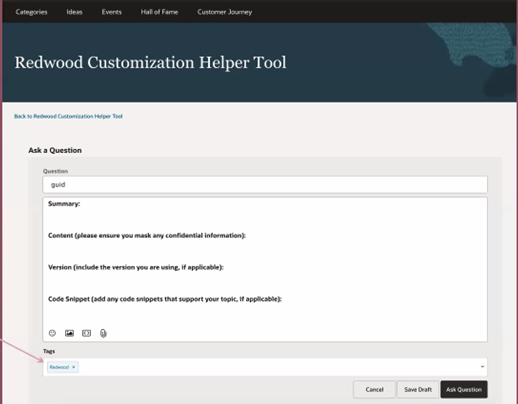
The final piece of information that I want to highlight is that Oracle has also created a new forum area on Customer Connect as well. This will make it easier to raise any questions relating to the new tool. If you add a tag of ‘Redwood’ the core team at the Oracle Centre of Excellence will pick up the query and answer it more quickly.

About the author:

Kate Mead is an Oracle-certified HCM Consultant and Solution Architect at Version 1 with 14 years of experience in Oracle HR and Payroll systems, including 7 years with Oracle HCM Cloud. She has worked across implementation projects and managed services, has a sound knowledge of UK Payroll legislation and — before becoming a consultant — was an HR Manager.

If you have any questions or would like more information on how Version 1 can help you realise the full potential of your Oracle Cloud instances, please contact her at kate.mead@version1.com

Please note all screenshots are the property of Oracle and are used according to their Copyright Guidelines

Oracle HCM Cloud Redwood Key Dates

Have you read my previous blog on Redwood in HCM Cloud? If not, check it out here! Now you know what Redwood UI is, it’s time to review the timeline for implementing Redwood for Oracle HCM Cloud.

Image by Kjjj3 from Pixabay

As of January 2024, these are the key dates, that organisations who use Oracle HCM Cloud should know, for Redwood implementation:

Release 24A

Majority of key HR and Payroll processes available in Redwood UI

Newly provisioned pods will be delivered with Redwood-enabled

Image by tigerlily713 from Pixabay

Release 24B

Redwood for Learn Self Service becomes mandatory

Image by Jagrit Parajuli from Pixabay

Release 24D

Checklists and Onboarding replaced with Journeys

Redwood for Timecards becomes mandatory

Image by Nile from Pixabay

Release 25A

New Go-lives must be Redwood

Image by WOKANDAPIX from Pixabay

Release 25B

All Employee Self Service (ESS) / Manager Self Service (MSS) must be Redwood

Image by StartupStockPhotos from Pixabay

Now is the time to start planning for your move to Redwood UI. Version 1 can help you plan and implement Redwood UI for all your Oracle Cloud modules — EPM, ERP and HCM. For more details, please get in touch!

About the author:

Kate Mead is an Oracle-certified HCM Consultant and Solution Architect at Version 1 with 14 years of experience in Oracle HR and Payroll systems, including 7 years with Oracle HCM Cloud. She has worked across implementation projects and managed services, has a sound knowledge of UK Payroll legislation and — before becoming a consultant — was an HR Manager.

If you have any questions or would like more information on how Version 1 can help you realise the full potential of your Oracle HCM Cloud instances, please contact her at kate.mead@version1.com

Oracle HCM Cloud Release 24A — Key New Features in Global HR

The first iteration of the What’s New 24A Oracle HCM Cloud has been released and it looks like it’s going to be a big one! There are a lot of changes, particularly around Journeys and Redwood.

Photo by Christin Hume on Unsplash

Here are a few of my highlights:

1. Redwood Global HR Enhancements

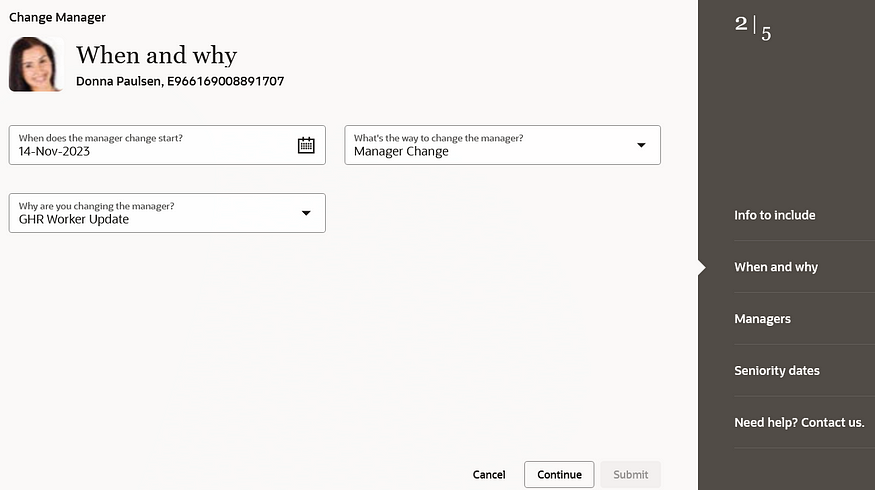
24A is the first HCM Cloud Release that brings the Redwood User Interface to the masses. All the key processes that your HR users follow are now available in the new UI. For more details, please check out my article on Redwood in 24A.

Redwood Change Manager

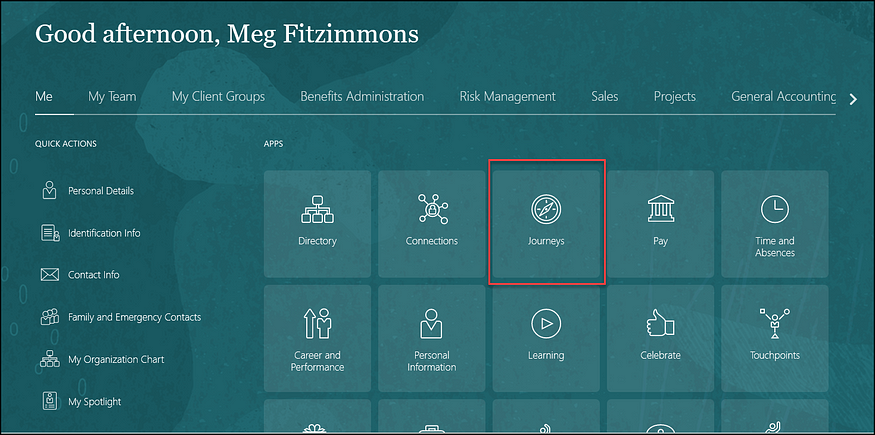
2. Journeys

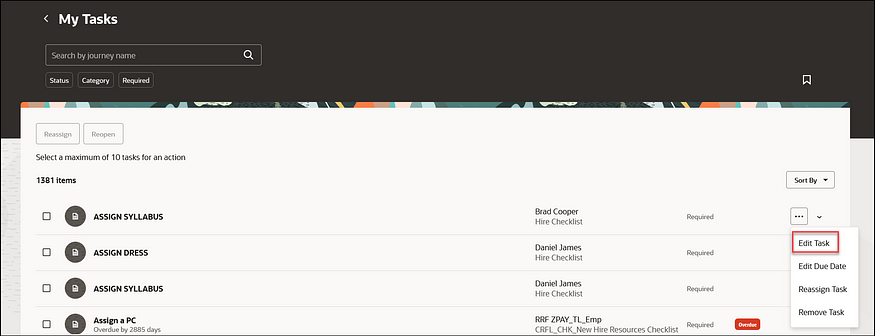
24A has a substantial number of new Journey-related features. These include an improved search functionality; allowing the use of Contextual Journeys in Redwood pages and the simplification of editing tasks. All of these new features are to help streamline processes for users.

Edit Journey Tasks

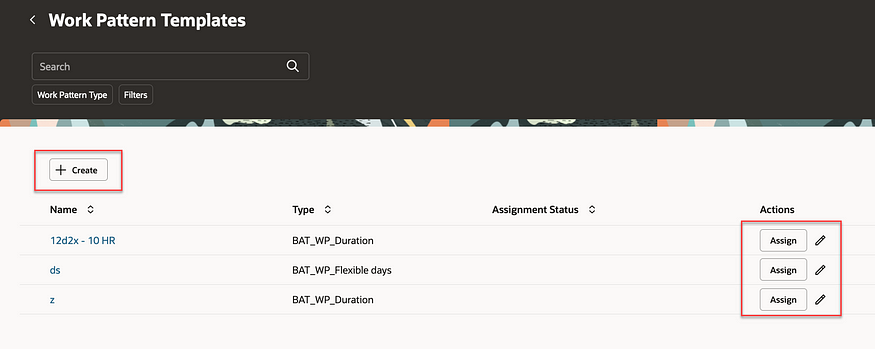
3. Work Pattern Templates and Assignment Rules

This is a helpful new feature that allows you to create rules to automatically assign working pattern templates to employees based on rules. This will minimise mistakes with incorrect working patterns being assigned to employees. The automation will speed up the hiring process and simplify making changes to employee data.

Work Pattern Templates

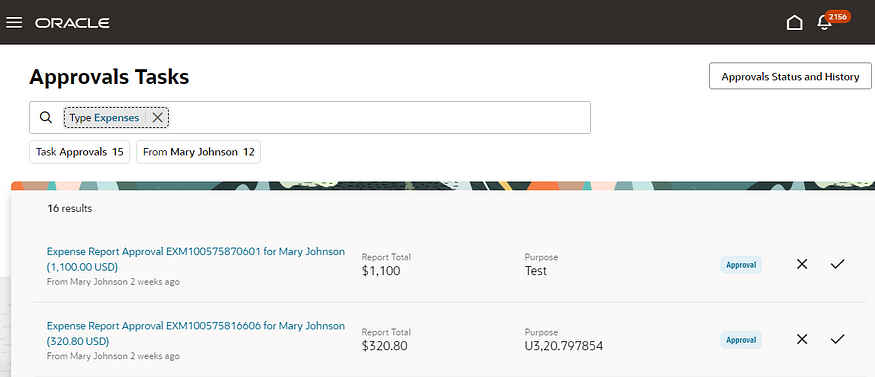
4. Approvals Work Area

The new Approvals Work Area is a new application that works across the whole of HCM Cloud. This new page has a user-friendly interface and intuitive search functionality which allows users to find tasks more easily than within the current BPM Worklist. Approvals and rejections of transactions can be made in the Work Area as well as viewing the status of historical transactions.

Approvals Work Area

5. Other Functionality of Note

Two areas of functionality are being made redundant in 2024. The first is the Share Personal Info page which will be made redundant in release 24B and there is no replacement for this functionality. Secondly, Checklists and Onboarding Tasks will be made redundant in release 24D. Oracle recommends moving to Redwood Journeys as soon as possible.

About the author:

Kate Mead is an Oracle-certified HCM Consultant and Solution Architect at Version 1 with 14 years of experience in Oracle HR and Payroll systems, including 7 years with Oracle HCM Cloud. She has worked across implementation projects and managed services, has a sound knowledge of UK Payroll legislation and — before becoming a consultant — was an HR Manager.

If you have any questions or would like more information on how Version 1 can help you realise the full potential of your Oracle HCM Cloud instances, please contact her at kate.mead@version1.com

Please note all screenshots are the property of Oracle and are used according to their Copyright Guidelines
Oracle HCM Cloud 24A — The Redwood Release!

As Oracle promised, 24A is the release that brings Redwood to the masses! There are so many Redwood new features in this release, now is the time to start your move away from Responsive UI to the new and improved Redwood-enabled Core HR applications.

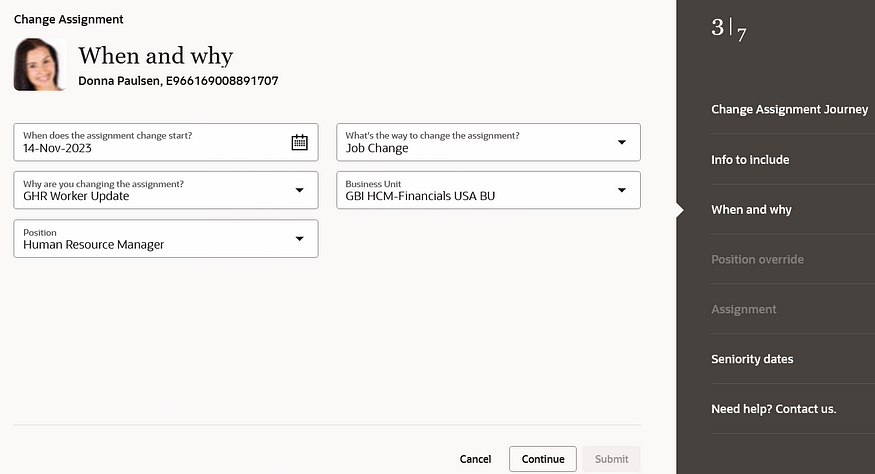
Change Assignment

So what is Redwood and why should I be excited about this?

Redwood is the new Oracle User Interface (UI) for all Oracle products. The long-term plan is for all applications within the Oracle Cloud EPM, ERP and HCM modules to have the same look and feel. The Redwood UI is designed to be mobile and tablet-friendly. When personalising pages, you can view how the page will look on named mobile device and tablet models, to see how the page will appear based on the dimensions of that particular device. All of this is to ensure that accessibility is central to the application.

Photo by Domenico Loia on Unsplash

So back to 24A. What features should I be looking out for?

There are numerous process flows now incorporated into the Redwood experience. These include Change Assignment, Promote, Change Position, Employment and Transfer. These are the processes that Oracle users have been waiting for.

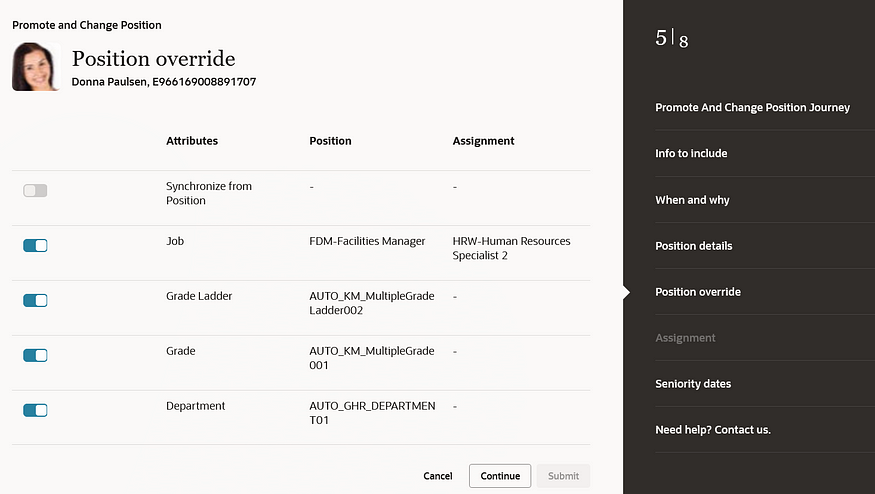
Position Override

Before 24A, the main applications that were within the Redwood UI were in the configuration areas, such as Workforce Structures. Now your HR users can carry out their day-to-day processes, such as carrying out promotions; changing line managers; managing contracts; and using the latest and greatest Oracle technology in a user-friendly and accessible interface.

For more details on release 24A, please see the Oracle 24A What’s New page here.

About the author:

Kate Mead is an Oracle-certified HCM Consultant and Solution Architect at Version 1 with 14 years of experience in Oracle HR and Payroll systems, including 7 years with Oracle HCM Cloud. She has worked across implementation projects and managed services, has a sound knowledge of UK Payroll legislation and — before becoming a consultant — was an HR Manager.

If you have any questions or would like more information on how Version 1 can help you realise the full potential of your Oracle HCM Cloud instances, please contact her at kate.mead@version1.com

Please note all screenshots are the property of Oracle and are used according to their Copyright Guidelines