It’s quarterly release time again, and there are some genuinely strong updates in Financials this quarter. I don’t often cover ERP features, but I did last quarter for the same reason and 26C feels similar. As always, more may follow later in the month, but here’s what’s been announced so far and what’s caught my attention.
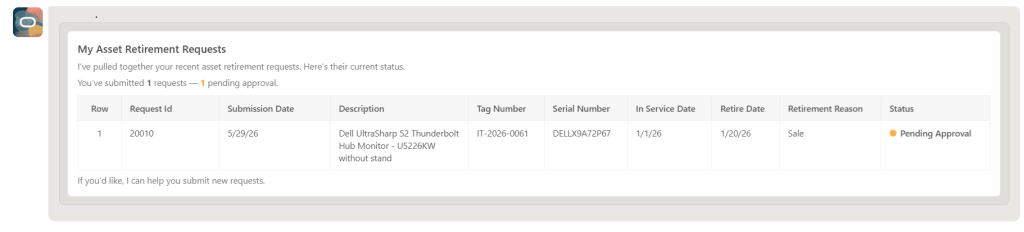
There are three Fixed Asset Agents in this release. The new Retirement Request Assistant makes it much easier for asset custodians to initiate and track asset retirements. Using a guided, conversational approach, users can submit requests for assets assigned to them or search for others using identifiers such as serial or tag number. They can capture key details like retirement date and reason, then track progress from submission through to completion. This removes the need for emails and manual coordination, giving users a simple self-service route that speeds things up and improves accountability.
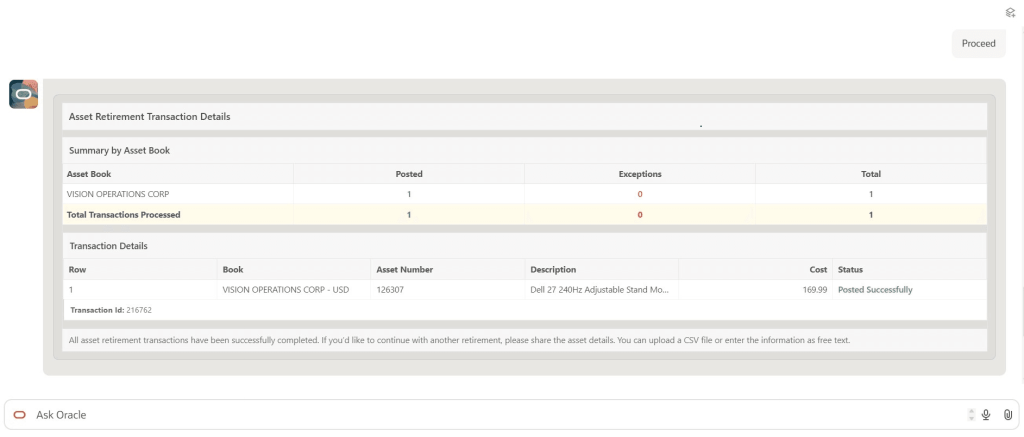
Supporting this, the Retirement Assistant helps finance teams review and process those requests. Fixed asset accountants can manage retirements through the same conversational interface, whether dealing with individual assets, multiple assets or file-based uploads. The assistant guides users through the required steps, validates the data, and highlights failed transactions so they can be corrected and resubmitted without starting again. The result is less manual effort, less rework, and quicker, more controlled processing.
The assistant also improves how exceptions are handled. Finance users can review requests, update key details such as retirement dates or proceeds of sale, and post transactions directly within the same experience. Because everything is handled in one place, there is less need to switch between screens or rekey data, which helps reduce errors. Overall, it creates a smoother end-to-end process while supporting stronger governance as volumes grow.
Alongside this, the Fixed Asset Inquiry Assistant offers a much more intuitive way to access asset information. Users can ask questions in natural language to retrieve details across financials, depreciation and distributions, as well as view current period activity. This makes it easier to understand asset movements, validate transactions and respond to audit queries without relying on multiple reports. Taken together, these assistants represent a clear step forward in usability, helping teams reduce effort while improving visibility and control across the asset lifecycle.
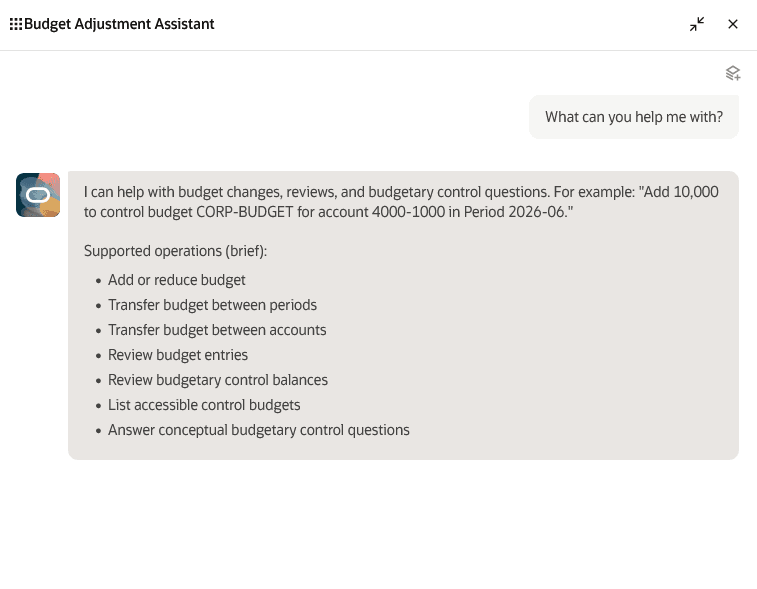
The Budget Adjustment Assistant introduces a more straightforward way for budget office users to manage EPM control budgets. Using natural language, users can create and review budget entries, add or reduce budgets, transfer amounts between accounts or periods, and review balances or previously approved entries. The assistant also flags and helps resolve issues at the point of entry, reducing the likelihood of errors and avoiding rework later.
For organisations, this translates into better efficiency and control. Users no longer need to navigate multiple forms or screens, which speeds up processing and reduces effort. At the same time, built-in validation improves data quality before transactions reach the ledger. The result is faster adjustments, fewer issues, and a more streamlined experience for teams managing complex budgets.
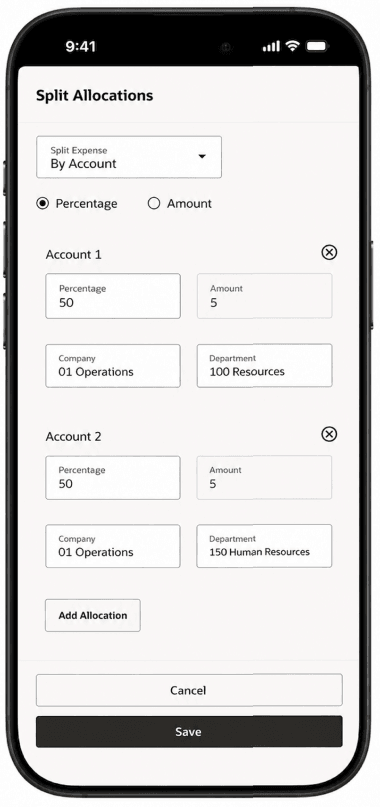
The next two enhancements build on the Expenses Agent introduced previously, extending its conversational, touchless approach into more complex scenarios. Cost allocation now allows users to split expenses across multiple cost centres, projects or tasks directly within the agent. Instead of manually distributing costs across lines, users can simply instruct the agent how to allocate amounts. This improves both accuracy and efficiency, ensuring costs are recorded correctly with far less effort.
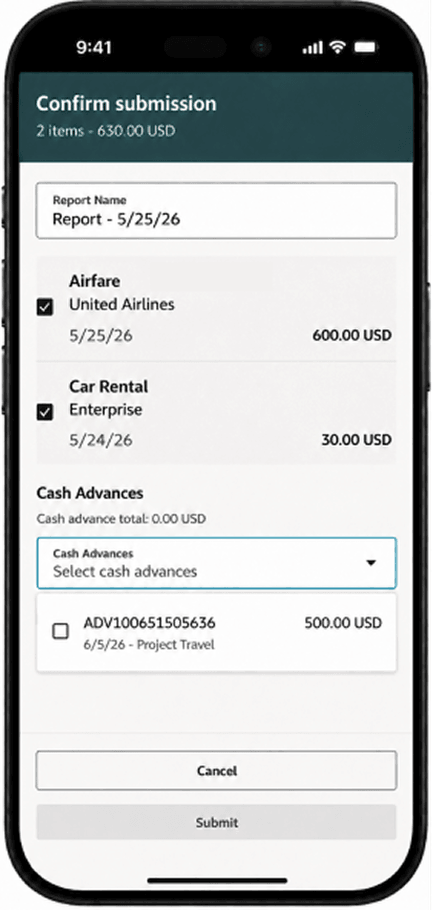
Another useful addition is the ability to apply cash advances during expense submission. Employees can select one or more available advances, or choose not to apply them and provide a justification where needed. The agent also handles rejected or withdrawn reports by automatically removing applied advances and notifying the user, helping maintain clarity throughout the process.
Together, these updates strengthen the Expenses Agent by reducing manual intervention and improving financial control. Organisations benefit from more accurate allocations, fewer unapplied advances, and better visibility where advances are not used. Employees benefit from a simpler, more guided process that keeps expense reporting moving and reduces delays across the end-to-end lifecycle.
As always, Oracle may introduce additional ERP Agents later in the month. If anything else stands out, I’ll share a follow-up once the full picture is clearer.
Please note all screenshots are the property of Oracle and are used according to their Copyright Guidelines
Oracle has been steadily building out its AI story in HCM Cloud, but the HCM Professional Concierge is one of the first examples that really feels tangible for HR teams. This is not AI added for the sake of it. It is a set of purpose-built, role-aware conversational agents, built directly into the HCM Redwood experience. For me, it stands out as one of the more considered uses of AI Agents in enterprise HR.
If you work in HR operations or as an HR Business Partner, the scenario will feel familiar. A manager wants to understand where their team sits on compensation ahead of a salary review. They open Employment Info, scroll through individual records, try to piece together performance data from one place, compensation history from another, and absence data from somewhere else. It is not a difficult task, but it is a fragmented one. Before long, ten minutes have passed just getting a basic view.
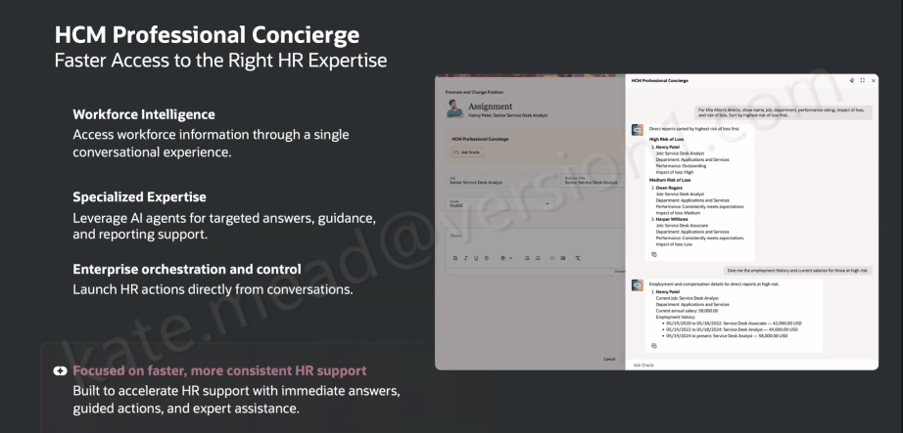
The HCM Professional Concierge simplifies this by bringing everything into a single conversational experience, embedded wherever the HR user is already working. Instead of navigating between screens, they ask a question. The agent brings together the relevant data, guides the next step, and in some cases can even trigger the action directly from the conversation.
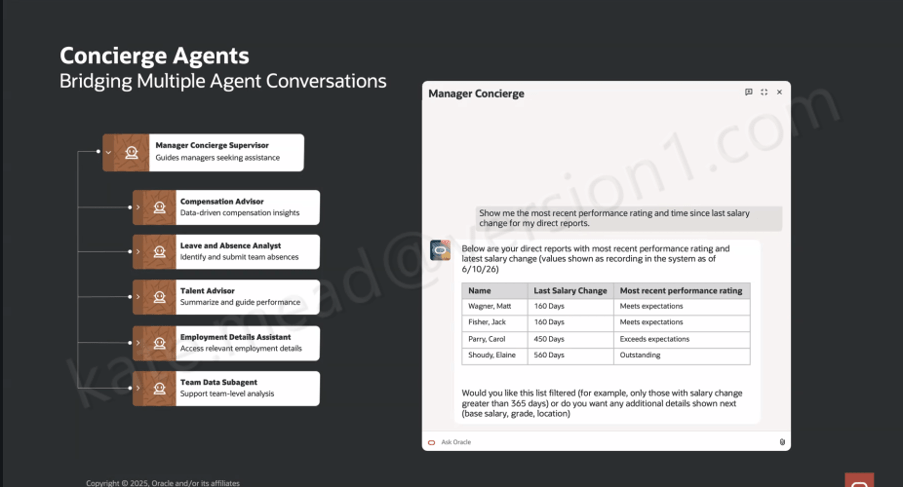
It is worth understanding that this is not a single AI agent working behind the scenes. Oracle has taken a supervisor and sub-agent approach, where a top-level Concierge Supervisor receives the user’s query, interprets the intent, and then routes it to the most appropriate specialist agent.
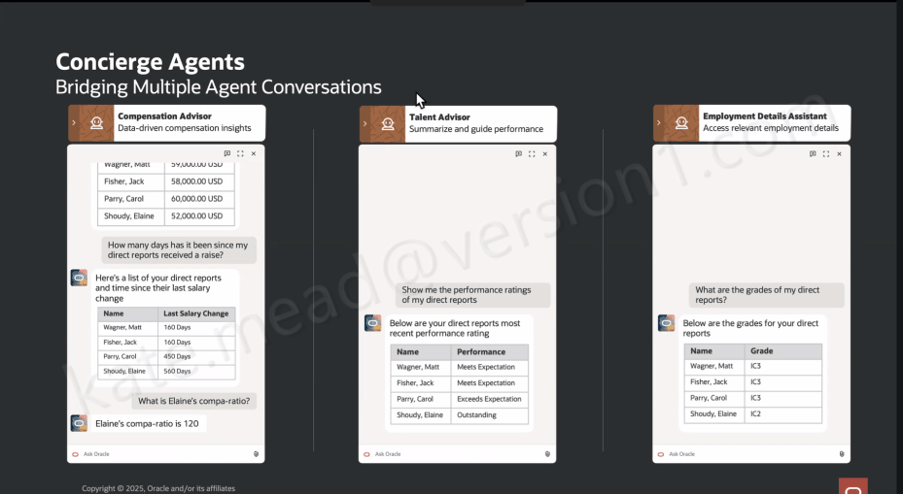
Within the HR Professional Concierge, those specialist agents each focus on a particular area of HR. For example, the Compensation Advisor brings together key information such as compensation data, compa‑ratios, time since the last salary change, and pay grade details for a manager’s direct reports. The Talent Advisor focuses on performance, helping to summarise ratings and support more informed performance conversations.
Other agents support core HR data and processes. The Employment Details Assistant provides access to employment history, assignment information and worker details, while the Leave and Absence Analyst helps identify and manage absence across a team. There is also support for understanding organisational design through the Workforce Structures agent.
In addition, the Concierge can surface policy and guidance through the Policy sub-agent, review personal worker data where needed, and launch reporting through the Reports sub-agent. For broader, team-level insight, the Team Data Hub helps bring data together to support analysis.
What this means in practice is that the user experiences a single, coherent conversation, even though multiple specialist agents may be working in the background to fulfil the request.
So when a manager asks, “show me the most recent performance rating and time since the last salary change for my direct reports”, the Manager Concierge Supervisor recognises that the query spans both compensation and talent data. It then coordinates across the Compensation Advisor and the Talent Advisor behind the scenes. What comes back is a single, joined-up view, rather than two separate outputs that the manager has to reconcile themselves.
That orchestration across multiple agents is where the real value starts to show. Conversational assistants in enterprise applications are not new in themselves. What is more interesting here is the ability to coordinate specialist agents within a single interaction, carry context across the conversation, and route requests intelligently based on both the topic and the data required.
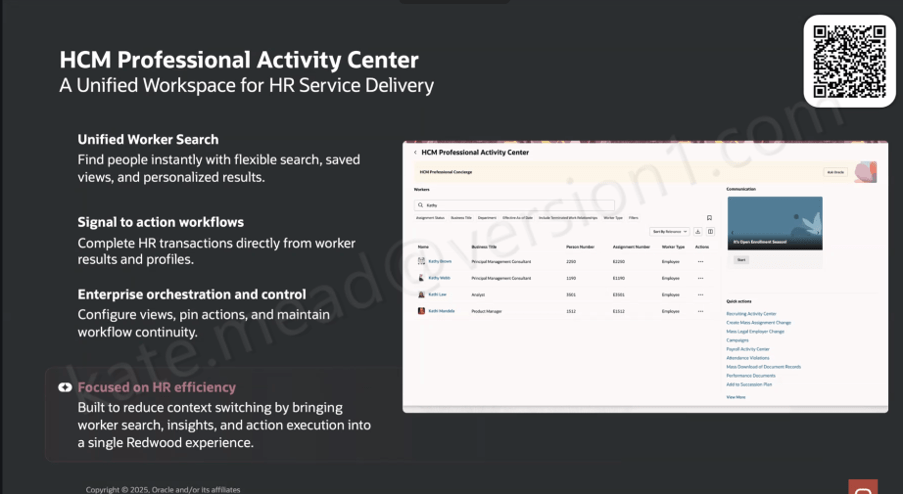
Oracle has introduced three distinct Concierge experiences, each designed around a specific user group and how they typically work. The HCM Professional Concierge is aimed at HR specialists and HR Business Partners. It sits within the HCM Professional Activity Centre, which has become the central workspace for HR service delivery, and supports the sort of queries an HR analyst would usually run. That includes pulling together workforce data for individuals or manager populations, reviewing compensation and employment history, running reports, looking up policies, and guiding HR actions within the flow of work.
The Manager Concierge is focused on line managers who need quick, straightforward access to information about their teams. It brings together compensation, absence, talent and employment data without the need to navigate into individual worker records. The experience adapts based on both the question being asked and the context of the manager’s team, giving them a practical way to not only view information but also complete common HR tasks directly.
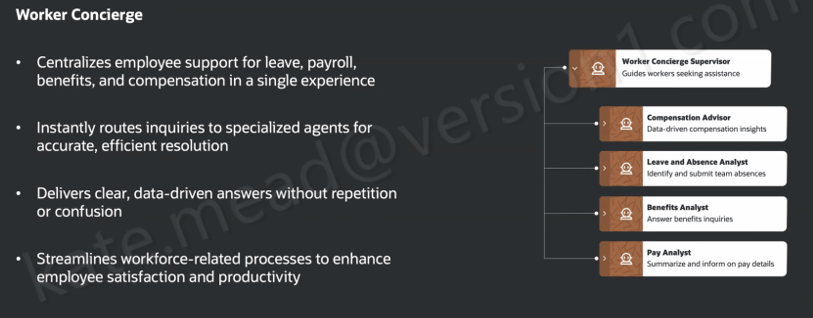
The Worker Concierge, meanwhile, is designed for employees themselves. It brings together support for areas such as leave, payroll, benefits and compensation into a single, consistent experience. Behind the scenes, it routes queries to the relevant specialist agent, whether that relates to absence, benefits, pay, or compensation, so the employee does not need to think about where to go to get the answer.
A simple scenario helps bring this to life. A line manager has been told that budget has been allocated for pay rises and promotions across the organisation. Before making any decisions, she wants a clear view of where her team currently stands. Using the Manager Concierge, she can ask a straightforward question in natural language, such as “how long has it been since my direct reports received a pay rise?” The Compensation Advisor returns the answer in a structured, easy-to-read format. She then follows up with a more specific question, “what is Elaine’s compa-ratio?”, and gets a direct response.
Within the same conversation, she can ask for performance ratings through the Talent Advisor and pull through grade information using the Employment Details Assistant. It all happens in one place, without needing to navigate between screens. Multiple specialist agents are working in the background, but from the manager’s perspective it feels like a single, joined-up interaction.
The HR specialist perspective is just as telling. If someone is working on an Employment Info page for a specific worker, they can open the Concierge panel and ask something like, “what is the salary history for Ravi?” or “where is Ravi located?” The response comes back as structured data pulled directly from HCM, without the need to navigate away or open multiple pages.
One question that comes up consistently when Oracle’s AI features are discussed is around data access and security. It is an important one, and the answer here is reassuring. The HCM Professional Concierge works within the same data and functional security model already applied across the HCM Redwood experience. If an HR specialist does not have permission to view a particular employee’s salary in the core application, they will not be able to access it through the Concierge either. There is no separate access layer being introduced. It simply operates within the role-based controls that are already in place.
For organisations working across multiple geographies, the same principle applies. The agent respects the existing configuration of Redwood pages, including any geography-specific policies and legislative requirements. There is also flexibility to tailor how the agent behaves by refining prompts to reflect your organisation’s terminology or local nuances.
The Concierge also sits within a broader shift in how Oracle is shaping the HR user experience. It is alongside the HCM Professional Activity Centre, which acts as a unified Redwood workspace for HR administration. The Activity Centre brings together a more flexible approach to worker search, with filtering, saved views and personalised results. From there, HR specialists can move straight into transactions from a worker’s profile without switching to a separate area. Common actions are surfaced directly in the interface, including access to areas such as the Recruiting Activity Centre, Mass Assignment Change, Mass Legal Employer Change, Payroll Activity Centre and Attendance Violations, which makes it easier to act on information as soon as it is identified.
The Concierge is always present within the Activity Center, giving HR specialists access to conversational support in the context of the work they are already doing.
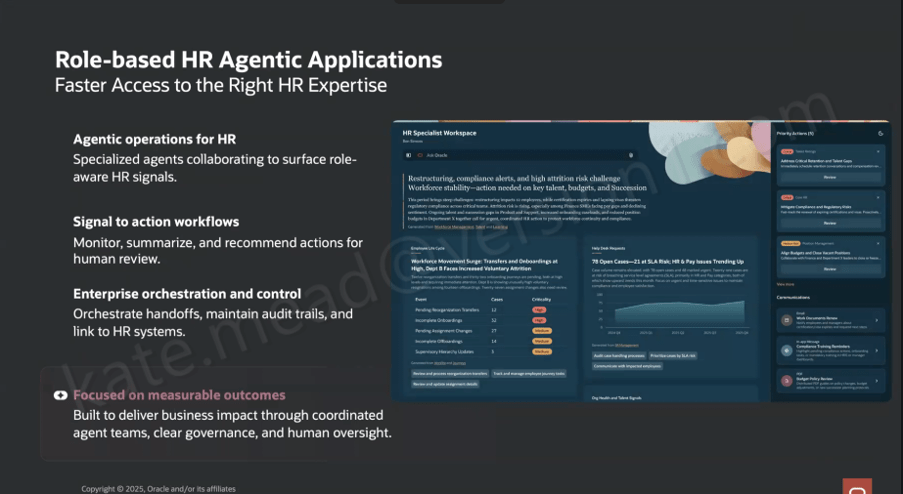
It also sits within a much broader direction Oracle is taking with role-based, agent-led HR applications. The HR Specialist Workspace is a good example of where this is heading. It builds on the same foundations, but moves towards a Redwood workspace where multiple specialist agents work together to surface relevant insights more proactively.
In that model, the workspace brings together a view of workforce priorities, potential restructuring impacts, compliance alerts, attrition risk and open HR cases. These are drawn from coordinated agent outputs across areas such as Workforce Management, Talent and Learning. The shift here is subtle but important. The agents are not just responding to questions, they are actively identifying what might need attention and presenting it to the user.
There is also a clear emphasis on governance. Audit trails, controls and human oversight are built into how actions are handed off. Oracle is quite deliberate in positioning this around measurable outcomes, with coordinated agent activity and clear decision points. That creates an important distinction from more autonomous AI models. Here, the agents surface and recommend, but people remain firmly in control of decisions and actions.
From an implementation perspective, the HCM Professional Concierge and its supporting agents are delivered as part of Oracle HCM Cloud Release 26C. There is no need to build these capabilities from the ground up. They are available out of the box, with the ability to adapt behaviour through prompt configuration so that it reflects your organisation’s terminology and ways of working.
As ever, I will keep a close eye on how this develops across the HCM suite and share updates as new capabilities emerge. If you are starting to think about how this fits into your wider HCM AI strategy, or you are planning for a 26C upgrade, now is a sensible point to begin that conversation.
Please note all screenshots are the property of Oracle and are used according to their Copyright Guidelines
It’s my favourite time of the quarter, Oracle has just shared what’s coming in release 26C. I don’t usually cover the Common Features updates, but I did last quarter because there were a few genuinely interesting additions, and 26C feels much the same. As always, more may follow later in the month, but here’s what’s been announced so far and what’s caught my attention.
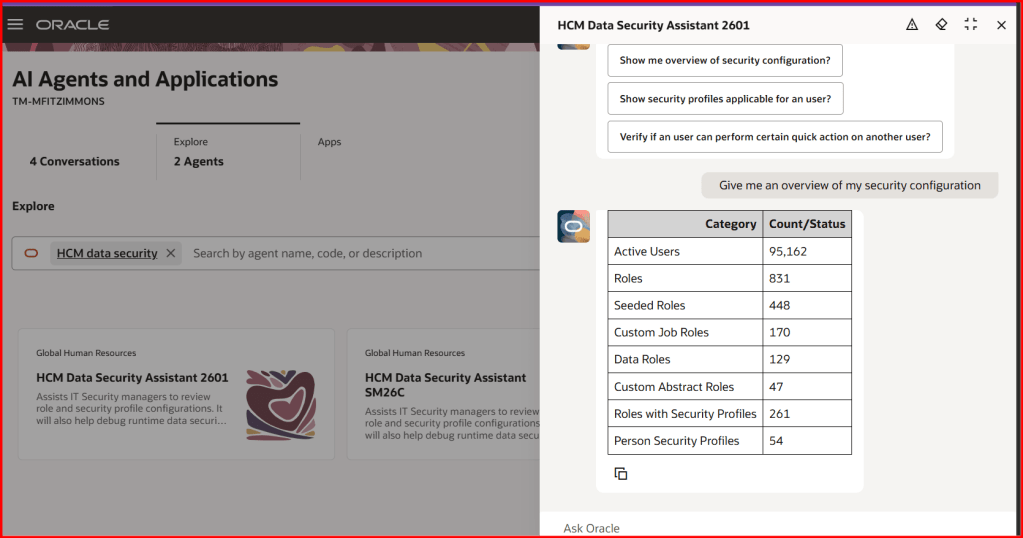
The first feature is one I’m particularly pleased to see. The HCM Data Security Assistant introduces AI into what has traditionally been one of the more complex parts of HCM. It gives a clearer, more contextual view of how data security is set up across roles, security profiles and user access, helping teams understand why someone can or cannot see certain information or carry out specific actions.
What makes this different is how you interact with it. By asking questions in plain language, security teams can review roles, compare access between users and explore configurations without having to manually work through layers of rules. It can even regenerate access control lists and be enhanced with your own internal documentation, so responses reflect your organisation’s standards as well as Oracle’s underlying model.
The real benefit is the time it saves and the confidence it gives. Instead of piecing things together or raising support requests, teams can investigate issues themselves and resolve them more quickly. This reduces delays for end users waiting on access and helps security teams respond more accurately. It also makes it easier to validate configurations and keep access aligned to policy, which is something many organisations still find challenging.
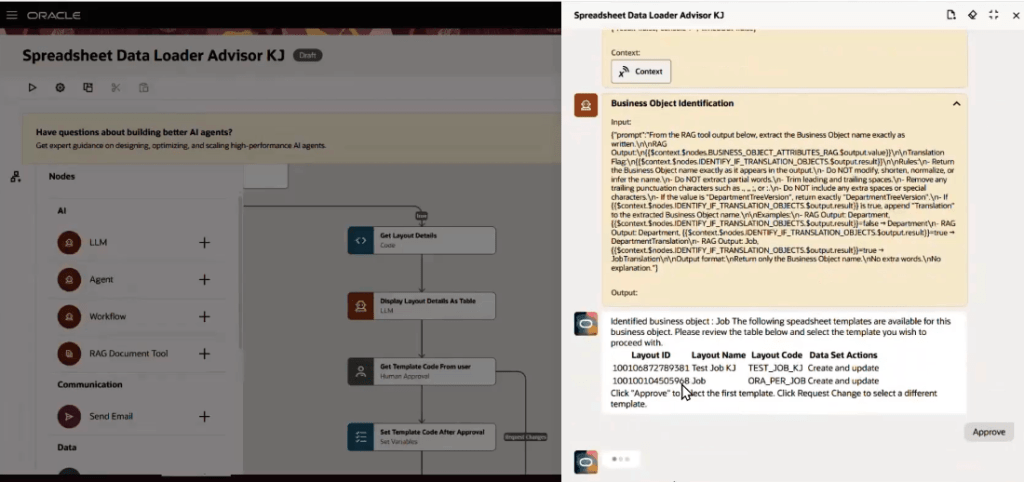
Spreadsheet data loaders tend to divide opinion. People either rely on them heavily or find them frustrating, usually because of the effort involved in finding the right template and getting the data structured correctly. That’s why I’m glad to see the introduction of the HSDL Advisor in 26C.
This brings a more guided approach to spreadsheet-based data loads. Rather than relying on detailed knowledge of templates, users can upload a CSV file and interact with the advisor using natural language. Behind the scenes, it identifies the correct business object, surfaces the right templates, maps the columns, validates the structure and prepares the file before triggering the load. It also provides clear visibility of progress, with links to monitor outcomes, and can answer questions about templates and configuration along the way.
In practice, this reduces much of the effort and risk associated with HSDL. Users no longer need to understand the technical structure in as much detail, and issues can be identified earlier in the process rather than after a failed load. The support for CSV uploads without needing desktop tools also makes it more accessible. Overall, it’s a more straightforward and reliable way to handle data loads, with fewer errors and less rework.
Within AI Agent Studio, one of the updates that stands out is the ability to manage extended agent interactions through long-running sessions. This allows conversations with AI agents to continue over a longer period, rather than needing to be completed in a single session.
This might sound like a small change, but it makes a real difference in practice. Users can step away, gather additional information or switch tasks, and then return to the same conversation without losing context. For more complex queries, where responses take time or require validation, this creates a much more practical way of working.
It also improves traceability. Having a continuous interaction makes it easier to track decisions and understand how an outcome was reached. For organisations starting to embed AI into everyday processes, this kind of control and continuity is important.
Another key change in 26C is the move away from the AI Configurator to AI Agent Studio as the single environment for managing AI prompts and agents. Where the Configurator focused on editing prompts in isolation, AI Agent Studio brings everything together in one place, allowing teams to design, test and manage both prompts and agents more effectively.
It builds on what’s already there but gives users more control. You can work with a wider range of models, manage variables more easily and test changes before publishing them. From a governance perspective, having one tool helps ensure consistency and reduces the likelihood of changes being made in isolation.
For organisations already using the AI Configurator, there will be some transition effort, as prompts will need to be recreated and validated. However, the ability to copy them into the new environment does help ease that process. In the long run, this feels like a more scalable and manageable way to support AI across HCM.
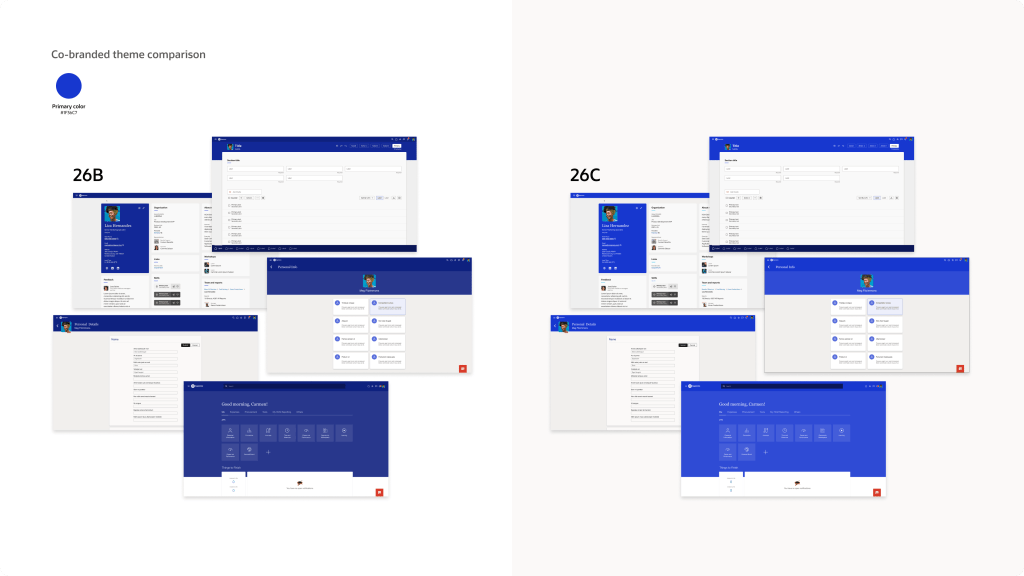
The final feature I want to highlight is a smaller one, but it will matter to a lot of organisations. The Redwood Appearance Editor has been updated so that brand colours are applied more accurately across Fusion Applications.
Previously, custom colours didn’t always appear exactly as expected, often looking slightly lighter or darker, which made it difficult to maintain a consistent look and feel. With 26C, the primary colour you define will now be applied more precisely across supported areas such as page headers, provided it meets WCAG accessibility standards.
It’s a subtle improvement, but it helps organisations present a more consistent and professional visual identity within the application. Getting branding right is an important part of employee experience, and this makes that easier to achieve while still maintaining accessibility.
As always, Oracle may introduce additional Common Features later in the month. If anything else stands out, I’ll share a follow-up with the highlights once the full picture is clear.
Please note all screenshots are the property of Oracle and are used according to their Copyright Guidelines
I realised recently that I have never actually written a post analysing a Compensation quarterly release. With 26D being the deadline for moving Compensation worksheets to Redwood, release 26C felt like the right time to change that. There is likely to be more to come over the next few weeks, but for now it is worth looking at what has been announced so far.
The feature many people have been waiting for to support that final move to Redwood is now here. The Redwood Workforce Compensation worksheet brings a much cleaner and more intuitive experience for managers, with everything presented in a single, streamlined view. From the landing page, managers can easily access their worksheets and use built-in capabilities such as audit trails, modelling and target application to review and adjust awards with greater confidence. Filtering, search and layout personalisation make it easier to focus on the right employees and the most relevant data. At the same time, guided information panels and simplified alerts help managers understand what needs attention without being overwhelmed. In practice, this reduces the time spent navigating the system and allows managers to focus on making informed compensation decisions.
The design also improves transparency and control. Managers can switch currencies, review how calculations have been derived, and access supporting information such as compensation history, notes and assignment details without leaving the worksheet. Key summary information remains visible while scrolling, so important totals and budgets are always in view. These changes make the process feel more straightforward and help reduce errors and rework, giving organisations greater confidence in the accuracy and consistency of outcomes.
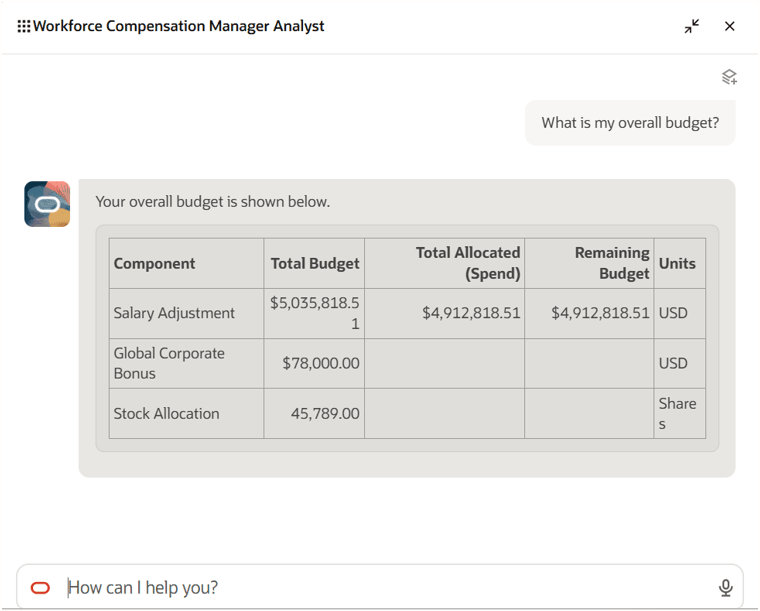
Another interesting addition is the Workforce Compensation Manager Analyst agent, which introduces a more conversational way for managers to interact with their compensation plans. Rather than moving between multiple worksheets and pages, managers can ask questions in natural language and get immediate answers on areas such as budget position, approval status, due dates and manager-level overages. Because the agent works within the context of a specific compensation plan, the responses are relevant and focused, without the need to interpret multiple screens or reports.
From a manager’s perspective, this removes a lot of the friction from the compensation cycle. It cuts down the number of clicks and removes the need to search for information across the system. Managers can quickly sense-check budgets, track progress and identify issues as they arise, all from a single interaction. This supports faster and more confident decision making and helps keep compensation cycles on track.
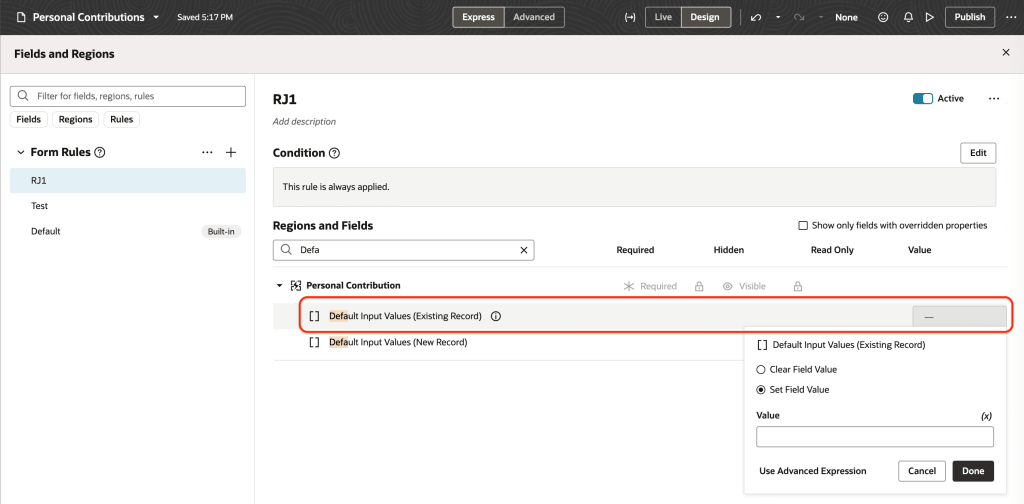
The enhancements to Redwood Individual Compensation extensibility give organisations far greater control over how compensation changes are entered and managed. Values can now be defaulted not only when creating proposals, but also when correcting or updating them, using dedicated attributes for each scenario. When combined with the ability to apply validation rules to the same fields, this creates a more structured approach to managing individual compensation. These capabilities sit across key processes such as hiring and promotion, as well as within dedicated compensation pages, ensuring consistent behaviour wherever compensation decisions are made.
For users, this reduces manual effort and helps prevent errors before they happen. Defaulting removes the need to repeatedly enter common values, while validation ensures entries meet organisational policies from the outset. At the same time, visibility of who created or updated a record, along with timestamps, strengthens auditability. This makes it easier to track changes and supports a more controlled and reliable process overall.
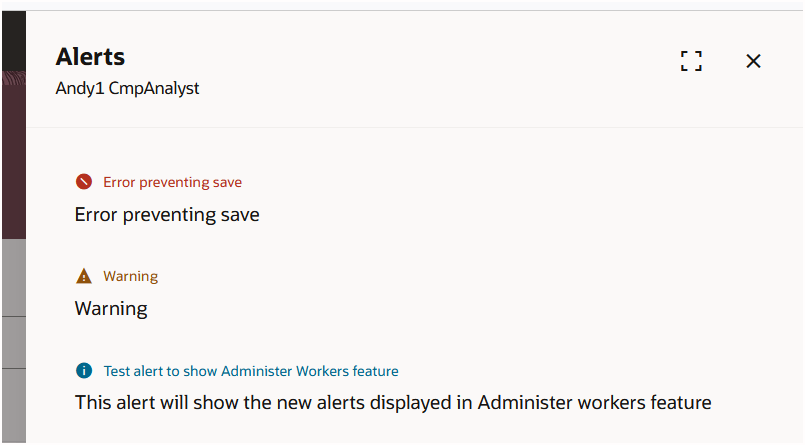
Alerts within Workforce Compensation have also been simplified. Instead of a wide range of alert types and icons, everything is now grouped into three clear categories: Error, Warning and Information. Existing alert variations have been consolidated, with only genuinely blocking issues presented as errors. This removes much of the visual noise that previously made alerts harder to interpret, and presents information in a more structured way.
For managers, the benefit is immediate. It becomes much easier to distinguish between issues that require action and those that are simply informational. This helps with prioritisation during the compensation process, reduces the risk of missing something important, and supports smoother progression through the cycle.
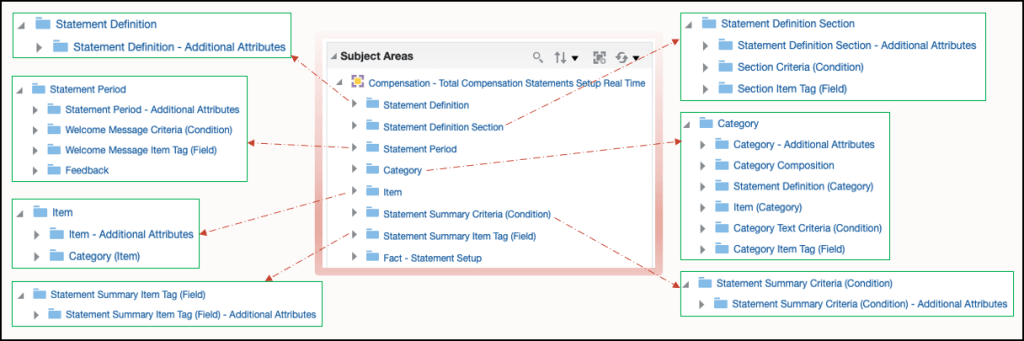
The final feature is one that has been requested for some time and originates from a customer idea raised on the Ideas Lab. The new Total Compensation Statements Setup OTBI subject area allows organisations to report on how their total compensation statements have been configured. It provides visibility of key elements such as statement definitions, periods, categories and items, along with the relationships between them. With enriched folders and sub-folders, users can explore the structure in more detail and understand how statements are built, without relying on manual documentation or configuration reviews.
This brings greater transparency and control over statement setup. It becomes easier to answer common questions, such as how many items or categories exist, how they are structured, and how they are distributed. This supports better governance and quicker troubleshooting, particularly when reviewing or refining statement designs. By making configuration data more accessible, organisations can maintain consistency in how total rewards are presented and reduce the effort required to manage these statements over time.
As mentioned earlier, Oracle is expected to release additional updates later this month. If anything particularly impactful is introduced, I will share a further update with a more detailed view.
Please note all screenshots are the property of Oracle and are used according to their Copyright Guidelines
With the final deadline for Redwood Recruiting having passed in 26B, the 26C release introduces further innovation, with a strong focus on AI alongside additional Redwood pages to improve the overall user experience. With that in mind, let’s take a look at what’s coming for Recruiting in 26C. As always, Oracle may introduce additional features as the quarter progresses, and if anything particularly notable appears, I’ll share a follow-up update.
The first feature I want to highlight introduces an AI-driven approach to initiating sourcing activity directly from the Recruiting Activity Centre. Oracle has provided a preconfigured agent template designed to sit within recruiting workflows and respond to key requisition activities. Once set up, the agent can automatically trigger when certain activity states are reached, such as when a requisition is awaiting submission, formatting, posting or approval. At that point, the agent can create candidate pools and, if activity slows, generate recruitment campaigns, for example where there have been no recent applications. This all runs in the background once the activity is assigned and the relevant scheduled process is running, removing the need for recruiters to step in manually.
The benefit here is removing friction at the start of the sourcing process and maintaining momentum without relying on manual intervention. Routine but essential tasks such as building candidate pools or launching campaigns are handled automatically and at the right time. This allows recruiters to focus on higher value activities such as engaging with candidates and hiring managers. It also introduces a more consistent approach to sourcing, with the same logic applied across requisitions. Over time, this should lead to faster pipeline creation, fewer delays in attracting candidates and a more proactive hiring approach, even when activity slows.
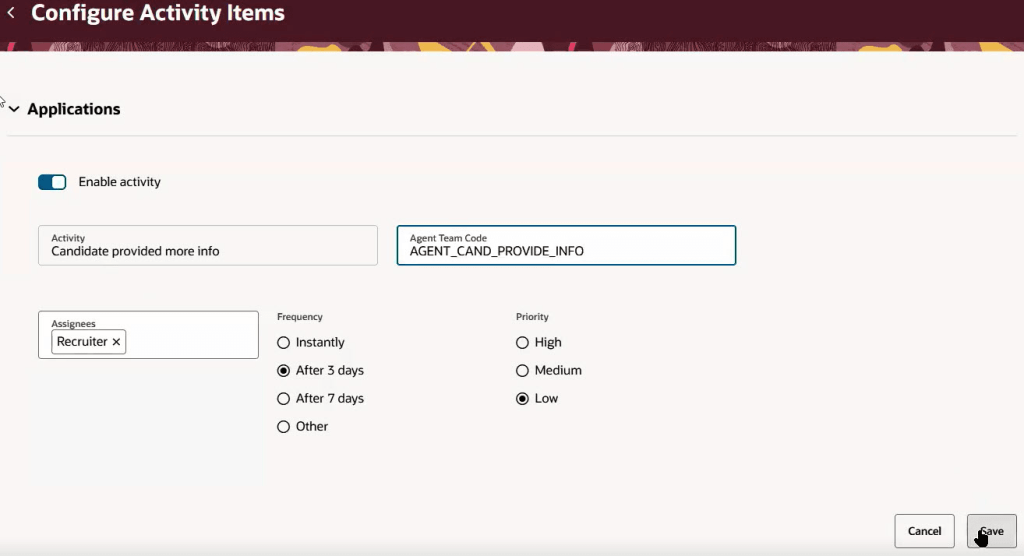
The next feature, Activity Centres: Automatically Launch AI Agents from Activities, builds on this by making AI agents a standard part of how Activity Centres operate across Recruiting, Sourcing and Interview processes. Organisations can configure published HCM workflow agents to respond automatically when activities are generated, carrying out actions or sending notifications without manual input. By assigning an agent to an activity through a simple configuration and running the scheduled process, the system can identify activities that require action and trigger the relevant agent. As the agent progresses, it updates its status so the system can track whether tasks are in progress, complete or need to be retried.
The value here is in keeping workflows moving without constant user involvement. Activities no longer sit waiting for someone to pick them up or remember the next step. Instead, the system helps move tasks forward and keeps stakeholders informed. This leads to quicker task completion and more consistent execution across recruitment stages, helping to reduce delays in the hiring process. It also improves coordination between recruiters, sourcing teams and interviewers by reducing the reliance on manual follow-ups and emails.
Another key update introduces a more structured and scalable way to support AI-driven content across the external candidate experience. Oracle has moved away from the earlier Prompt Lab approach and standardised on workflow agents that sit behind AI Assist capabilities on career site pages. These preconfigured agents, managed through AI Agent Studio, support a range of scenarios including generating job summaries for search, creating career site content, surfacing relevant assets on job descriptions and providing job fit insights to candidates. As these agents are designed to be reusable and channel agnostic, they can be applied consistently across the candidate journey while still allowing organisations to tailor them.
From a business perspective, this creates a more flexible and modern foundation for candidate engagement. Content generation becomes easier to manage and more consistent, reducing duplication and manual effort. Candidates benefit from richer and more relevant information, helping them better understand roles and suitability before applying. Importantly, this aligns with Oracle’s longer-term direction, giving customers a clearer path forward with a solution that is easier to extend, maintain and evolve as AI capabilities continue to mature.
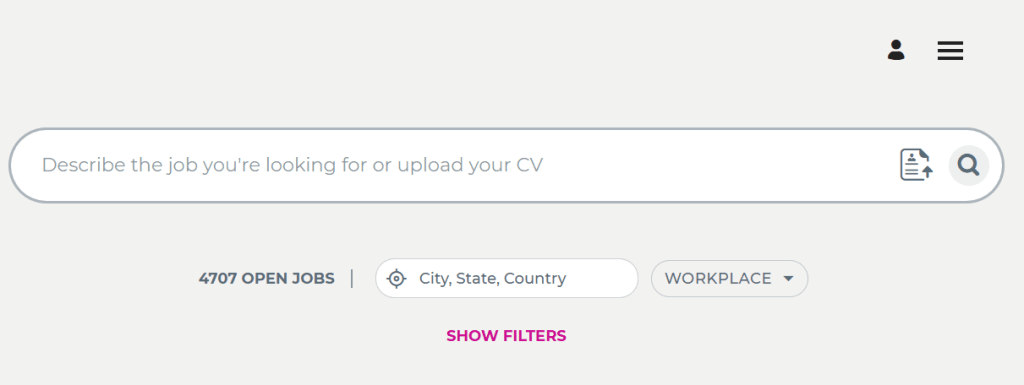
Smart Search is another enhancement that improves the job search experience in a practical way. Rather than being limited to fixed locations, candidates can now search based on proximity to any location that matters to them, including their current position. The introduction of a search radius provides a more realistic view of available opportunities, helping candidates focus on roles within a reasonable commute. Features such as browser-based location detection also remove friction, making it quicker to find relevant roles.
This is likely to improve both candidate satisfaction and application quality. Candidates are more likely to find roles that genuinely fit their circumstances, while organisations benefit from more relevant applicants. As Smart Search is expected to become the default in a future release, it is worth reviewing your current configuration, particularly the use of fixed versus proximity-based search, to ensure it reflects how your workforce operates.
For organisations using ‘Apply with Indeed’, it is important to plan ahead as this functionality will be discontinued in 27A due to changes in Indeed’s integration model. Transitioning to Direct Apply will help avoid disruption and provides a more seamless and modern candidate experience while ensuring continuity as the legacy functionality is retired.
Turning to Redwood enhancements, the Generate Job Requisition Posting Description Using AI Agent feature brings AI-assisted job description creation directly into the Redwood experience. Using a workflow agent, content can be generated across key sections such as the summary, responsibilities and qualifications. For recruiters and hiring managers, this makes it quicker and easier to create clear and consistent job adverts without starting from scratch.
The shift to an agent-based approach also provides a more robust and future-ready foundation, replacing earlier prompt-based methods while maintaining a familiar experience. For organisations, this means reduced manual effort, greater consistency in how roles are presented and ultimately a stronger candidate experience through clearer, more engaging job descriptions.
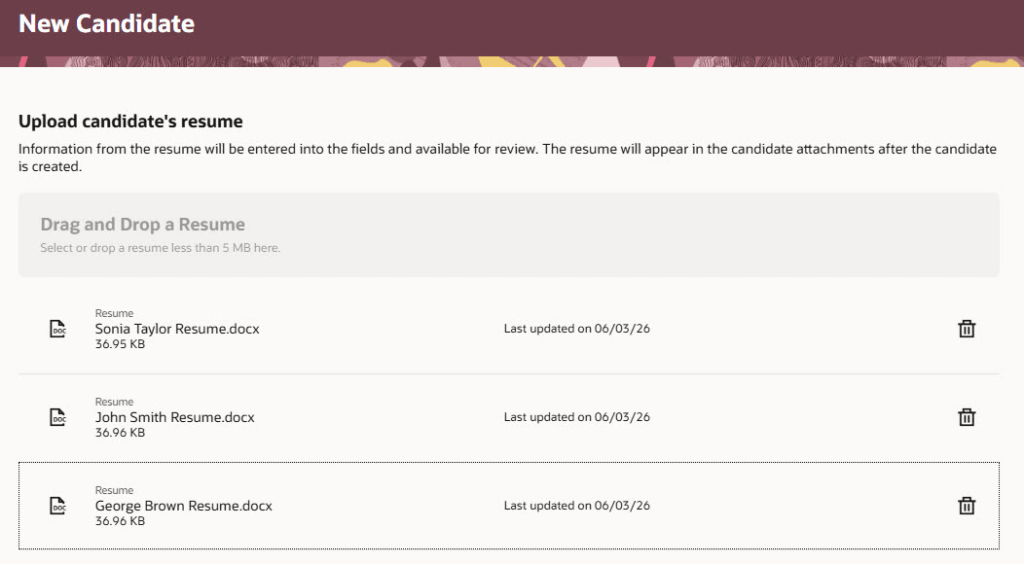
Another update, driven by customer feedback through the Ideas Lab, is Bulk Candidate Creation by Uploading Resumes. This allows recruiters to upload multiple CVs at once, with AI extracting key information and automatically populating candidate profiles. Rather than manually entering details for each individual, recruiters can review and refine the extracted information within the candidate record, balancing efficiency with data quality.
The benefit here is a significant reduction in administrative effort and a faster turnaround from receiving CVs to having candidates ready in the system. It also helps teams manage higher volumes more effectively, particularly during peak recruitment periods, while ensuring consistency in how candidate records are created.
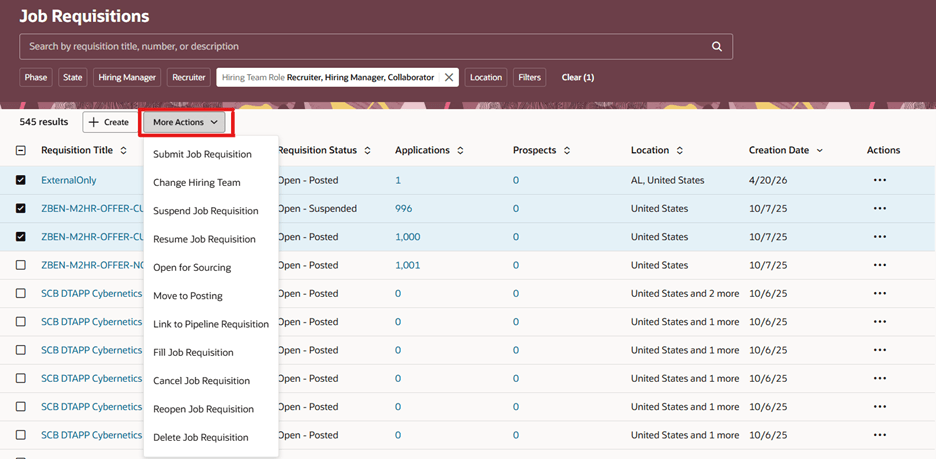
Finally, Bulk Actions on the Job Requisitions List makes it easier to manage large volumes of requisitions. Recruiters can now update multiple records in a single action rather than working through each one individually. This includes moving roles through the lifecycle, opening them for sourcing or updating hiring teams. The ability to update the hiring team across multiple requisitions is particularly useful when responsibilities change, removing repetitive manual updates.
For users, this delivers a clear improvement in efficiency and scalability. Bulk actions reduce time spent on administrative tasks and help teams keep pace during busy periods, while asynchronous processing allows larger updates to run smoothly in the background. The result is a more streamlined and consistent way of managing requisitions at scale.
Oracle often introduces additional features as the quarter progresses, so it is worth keeping an eye out for further updates. If anything particularly impactful emerges, I will share a follow-up. In the meantime, if you are planning your 26C adoption or want to explore the updates in more detail, take a look at my latest write-up covering the Core HR enhancements.
Please note all screenshots are the property of Oracle and are used according to their Copyright Guidelines
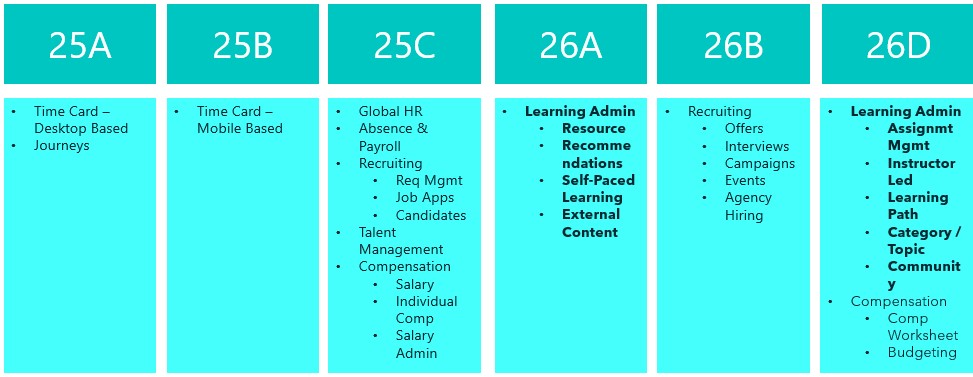
This is an exciting time for Oracle Learn. Release 26C is the last release before all Learn functionality becomes mandatory in Redwood, with the final switch happening in 26D. That deadline brings in the remaining Learning Admin tasks too. If you have not already made the move to Redwood for Learn, now really is the time to do it. In the meantime, here is a look at what is new in 26C.
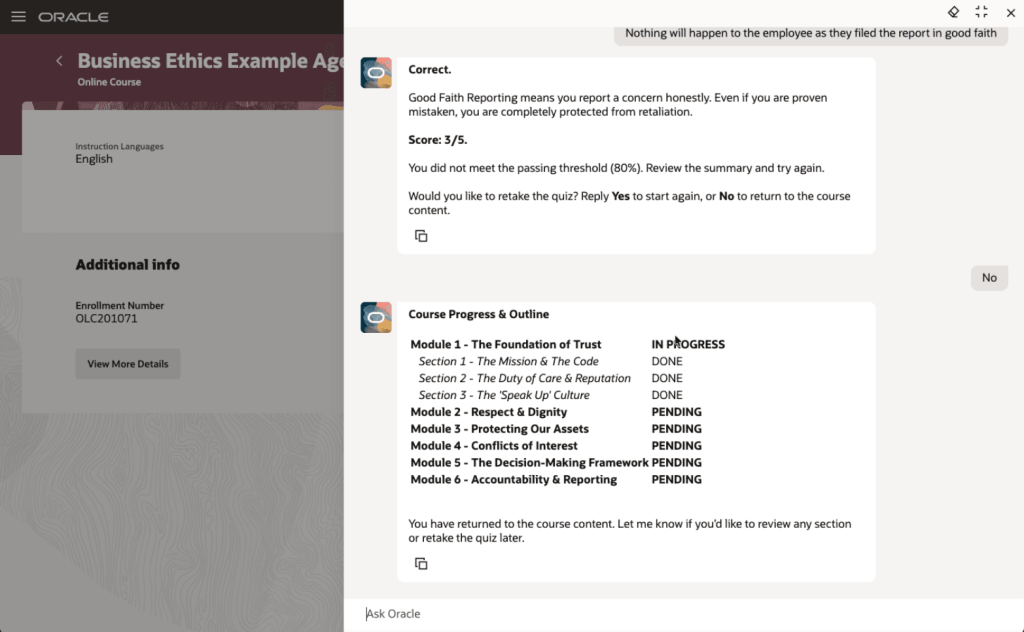
The first feature I want to highlight is not directly related to the Redwood deadline, but it is too interesting to leave until later. Oracle has introduced Agentic Courses, a new approach to self-paced learning that uses AI agents to guide learners through curated content in a far more interactive and responsive way. Instead of working through static material, learners are supported by an experience that adapts to their pace, checks their understanding as they go, and offers targeted support where it is needed.
The structure is still defined by learning designers, but each learner can move through the content in a way that suits them. That includes recap, reinforcement and extra support where required. What stands out here is the ability to deliver genuinely personalised learning at scale, without increasing the effort needed to design or administer it. Learning specialists can reuse templates and deploy them quickly, while the AI handles the day-to-day interaction with learners.
The end result is more effective training, faster progression to competency, and better use of employees’ time, all while keeping outcomes consistent. It is also worth noting that this is not an agentic application, so there is no requirement to purchase the Agentic App platform to use it.
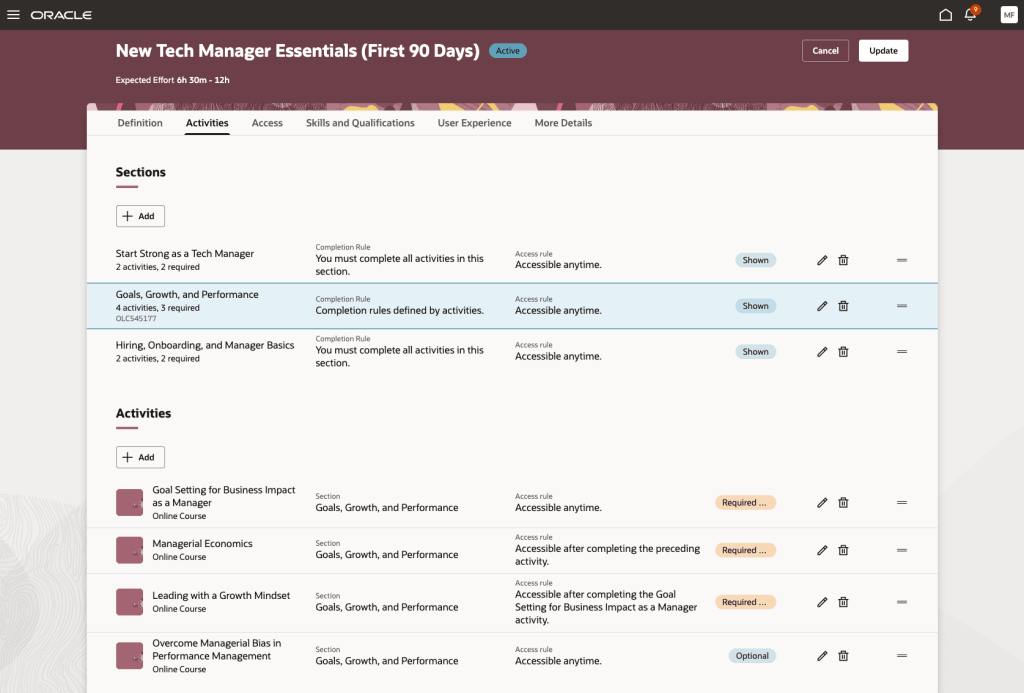
The next feature is the redesigned Redwood experience for specialisation management. This brings a much clearer and more visual approach to creating and managing learning paths. The new Activities tab pulls everything into a single interactive view, making it easier to understand the overall structure, see dependencies, and define completion and access rules. Alongside this, the Assignments tab gives a clear, near real-time view of learner progress, so administrators can track enrolments, monitor completion, and step in where needed.
The benefit here is both clarity and control. Learning specialists can build more structured and engaging learning journeys with less effort, while built-in checks help prevent common issues such as conflicting dependencies. For learners, it is much clearer what is expected and what comes next, which supports better engagement. For organisations, this means more effective delivery of training and stronger oversight of compliance and development programmes.
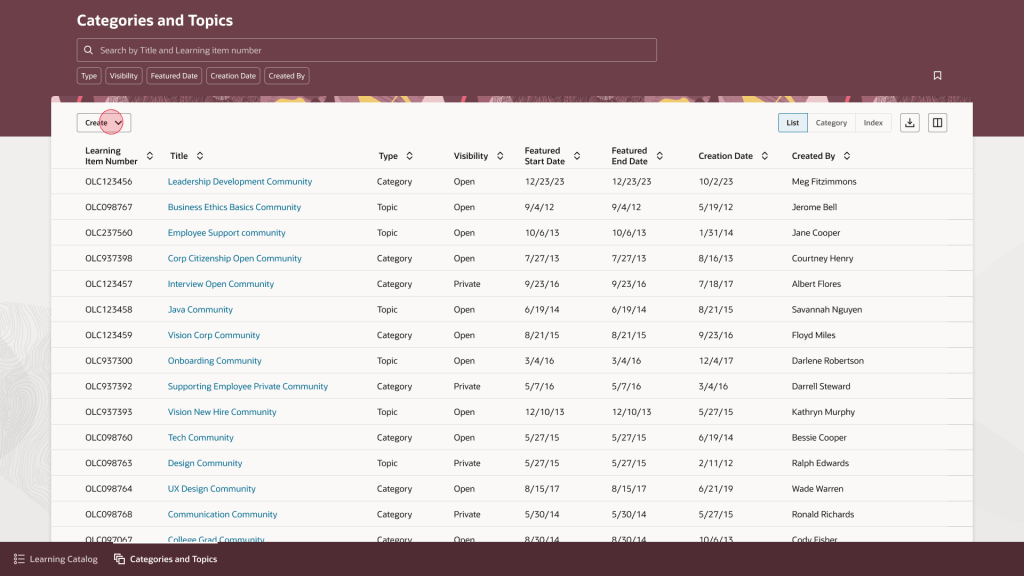
Another new page in Redwood is the updated experience for category and topic management. This gives learning teams a more straightforward way to organise and maintain their catalogue. The interface is built around tasks, with list, category and topic views supported by search, filtering and saved searches. Administrators can quickly create and update categories and topics, manage visibility and featured dates, and move easily between high-level structures and more detailed content.
The value here is in making catalogue management simpler and more consistent. Learning teams can organise content more effectively, which makes it easier for learners to find what they need. It also aligns with the wider Redwood experience, reducing the learning curve for administrators and helping improve productivity. In practice, this leads to a more organised and accessible catalogue that is easier to maintain over time.
Oracle has also introduced a set of enhancements to assignment status management. These give learning teams much tighter control over how assignments are handled, with expanded support for actions such as waitlisting, undoing completion, approving, withdrawing and allocating seats. There are also clearer rules around when each action can be applied.
In day-to-day terms, this means administrators can manage a wider range of scenarios directly within Redwood, without relying on workarounds. The improvement here is in both governance and day-to-day efficiency. By aligning actions to defined rules and adding more control, organisations can manage assignments more consistently and reduce the risk of error. It also becomes easier to handle exceptions and manage capacity, which supports a more reliable learner experience overall.
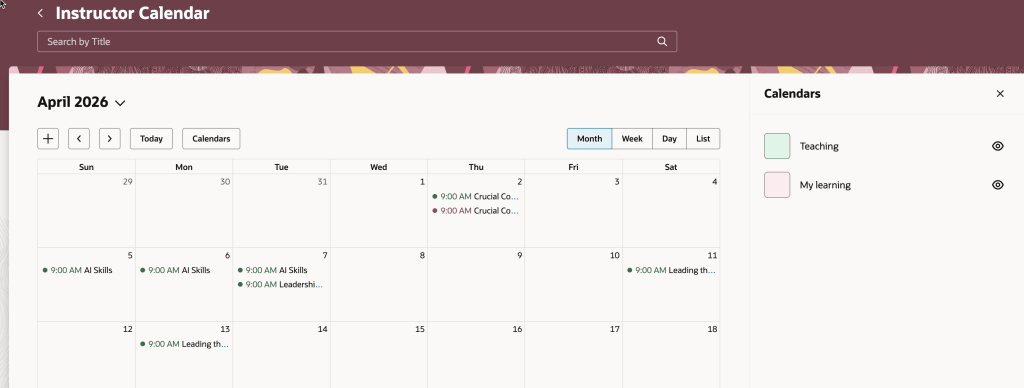
Another useful enhancement is within the Instructor Activity Center. The updated calendar now brings together teaching commitments and the instructor’s own learning calendar, making it easier to spot clashes and plan ahead. There is also a new seat availability filter, which highlights sessions that are low on enrolment, fully booked, or have waitlists.
This gives instructors a single, practical view of their schedule. They can manage their time more effectively, avoid conflicts, and take action where needed, for example by promoting under-enrolled sessions or adjusting plans. For organisations, this helps optimise class capacity and make better use of instructor time.
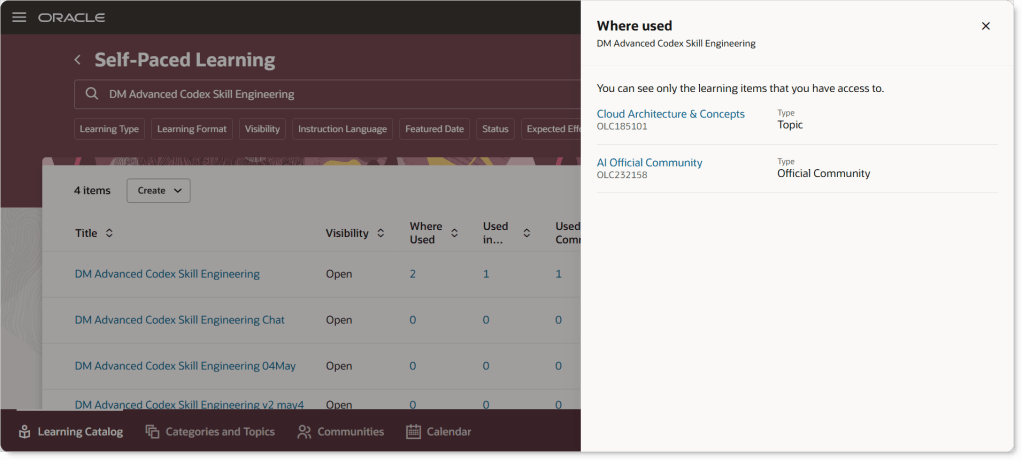
The final feature I want to call out is one that came directly from a customer idea. The Learning Catalog has been enhanced to give clearer visibility into how events, courses and learning paths are connected. The updated “Where Used” capability makes it much easier to explore these relationships, with clickable links that take you straight to related items. Supporting information is displayed in a structured way that mirrors the layout of the detail pages, making it easier to understand how everything fits together.
This improves transparency across the catalogue. Learning teams can see dependencies more clearly, which reduces the risk of unintended impact when making changes. It also supports more consistent management of learning structures, helping maintain a clean and well-organised catalogue over time.
As always, Oracle may introduce additional updates as the release cycle progresses, so it is worth keeping an eye out. If anything particularly interesting appears, I will share a follow-up to make sure you are fully up to date.
Please note all screenshots are the property of Oracle and are used according to their Copyright Guidelines
It’s that point in the quarter again, and Release 26C brings a solid set of Payroll updates across global capabilities, UK legislation, US compliance, and a particularly strong set of enhancements for Ireland. As always, Oracle may introduce further updates as the release progresses, but here’s what stands out so far.
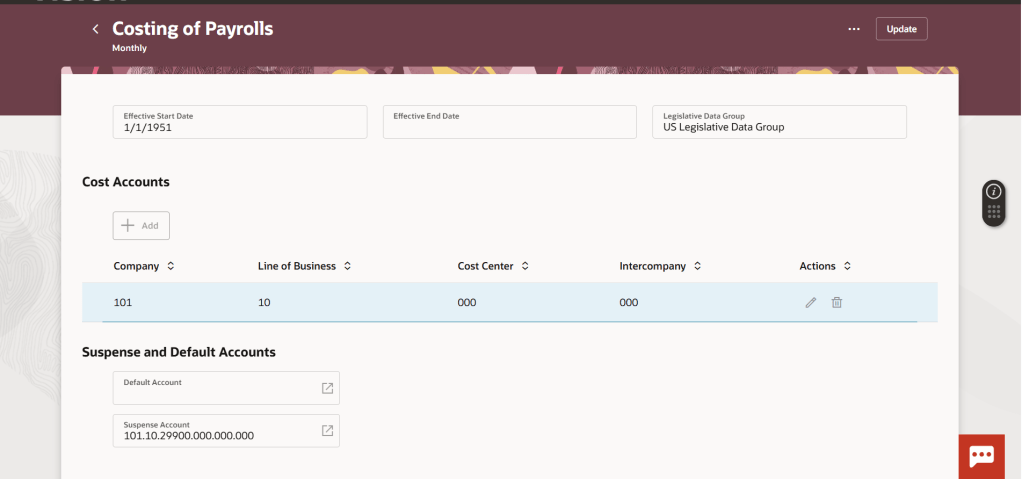
One of the most useful additions in this release is enhanced audit visibility for costing. Payroll and finance teams now have a clear, end-to-end view of changes made across costing setups. This means you can quickly understand what has changed, when it changed, and who made the change, without relying on manual tracking or investigation.
In practice, this improves both control and confidence. It supports audit readiness, reduces time spent investigating discrepancies, and makes it easier to explain costing outcomes to stakeholders. The fact that it is available straight away, with no setup required, makes it an easy win.
Another helpful improvement is the introduction of a consolidated view of costing configuration within the Redwood experience. Instead of switching between different areas to understand how costing is set up, everything is now visible in one place.
The benefit here is simplicity. It becomes much easier to validate configuration, spot inconsistencies, and understand how costing is applied across different levels. For teams supporting multiple payrolls or complex structures, this will save time and reduce the risk of mistakes.
The continued rollout of Redwood is also worth noting. Additional payroll setup pages have now moved across, bringing a more consistent and searchable user experience. For teams already using Redwood, this reduces the need to move between interfaces. For others, it is another step towards a more modern and intuitive payroll administration experience.
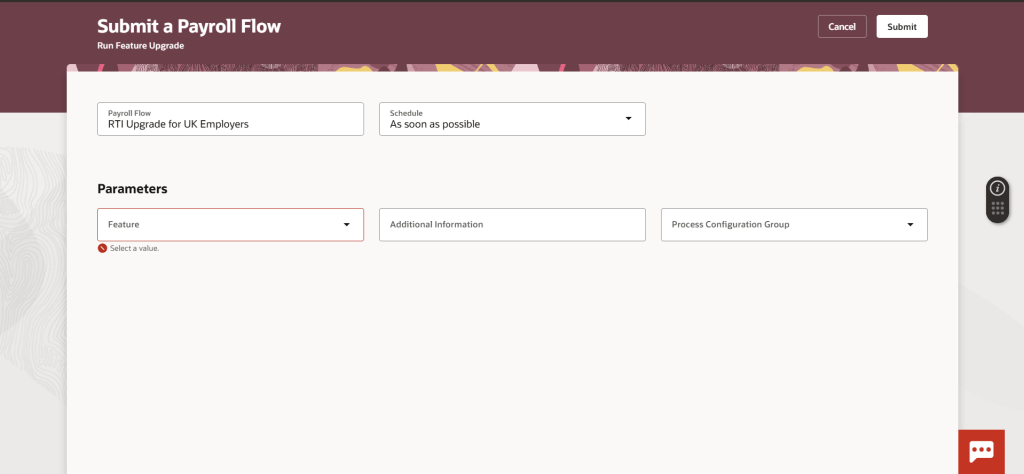
There are four key UK updates in 26C, starting with one that requires action. The update to RTI encryption introduces a stronger approach to protecting submission credentials. While this is not applied automatically, it is important to prioritise, as it ensures compliance with the latest security standards. The benefit is straightforward: improved protection of sensitive payroll data and reduced risk in RTI submissions.
The next update is the automatic enablement of Redwood for key employee self service pages, including Pension Enrolment and New Starter Declaration. For organisations already using these, it removes the need to manage profile options. For employees, it means a more consistent and user-friendly experience when completing important payroll-related tasks.
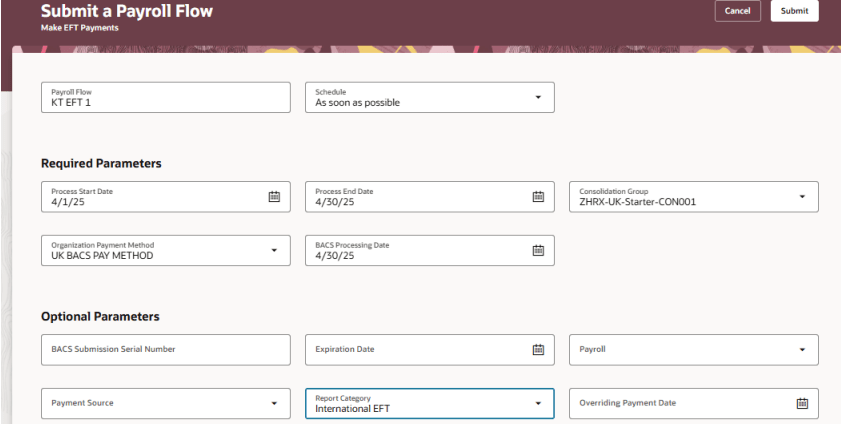
There is also an update to international payment formats to align with ISO 20022 standards. For payroll teams managing cross-border payments, this provides better alignment with modern banking requirements and supports smoother processing with financial institutions.
One of the more visible enhancements is the introduction of a digital P45 through Document of Record. Traditionally, P45s have been a manual and paper-heavy process. This change allows organisations to publish them directly to the employee record.
The benefit is flexibility and accessibility. Employees can access their P45 online, payroll teams reduce administrative effort, and organisations can move closer to fully digital processes. It does require some setup, but the long-term efficiency gains are clear.
For US customers, 26C focuses on simplifying compliance and improving visibility.
The automatic synchronisation of local tax jurisdictions based on employee address changes addresses a long-standing challenge. Instead of relying on manual updates, the system now helps keep tax data aligned automatically. This reduces the risk of incorrect tax withholding and lowers the administrative burden on payroll teams. It is particularly valuable for organisations with a mobile workforce or frequent address changes.
There is also an enhancement to the management of involuntary deductions within Redwood. This brings all relevant information into a single, structured view. The key benefit here is clarity. Payroll administrators can see everything they need in one place, making it easier to manage complex deductions, respond to queries, and ensure accuracy. It also supports better decision making without increasing complexity.
The final US update supports states where employer matching contributions must be included in SUI taxable wages. While this requires some planning to adopt, it ensures compliance with state-specific rules and avoids potential processing or reporting issues.
Ireland sees the most significant legislative investment in this release, with four new features. The introduction of Carer’s Leave brings support for extended unpaid leave in line with legislation. For employers, this provides a structured way to manage entitlements and ensures compliance. For employees, it offers clarity and consistency around a sensitive type of leave.
Domestic Violence Leave and Payment is another important addition, enabling organisations to support employees from day one of absence. Beyond compliance, this reflects a broader focus on employee wellbeing and responsible employment practices.
There is also a refinement to PRSI exemption handling, improving how exemptions are classified and reported. This leads to more accurate reporting and helps ensure that employees’ contribution records correctly reflect their entitlements.
Finally, NAERSA pension reporting is now supported through an end-to-end submission process. This simplifies what has historically been a fragmented activity, bringing submission, monitoring, and error handling into one place. For payroll teams, this means better control and less manual effort when managing pension reporting.
Release 26C feels like a well-rounded update for Payroll. There is a clear focus on improving visibility, reducing manual effort, and supporting compliance across multiple regions.
While some features require configuration or planning to adopt, many are available immediately and deliver quick benefits. As always, it is worth reviewing these in the context of your current processes to identify where you can simplify, streamline, or reduce risk.
If you are looking at 26C more broadly, you may also find my latest write-up on the Core HR updates useful.
Please note all screenshots are the property of Oracle and are used according to their Copyright Guidelines
It’s that time in the quarter again. Oracle has just shared what’s coming in Release 26C, and as you’d expect there is a clear emphasis on AI-driven enhancements, with plenty to take note of. More updates are likely to follow over the coming weeks, but for now it is worth taking a look at what has been announced so far.
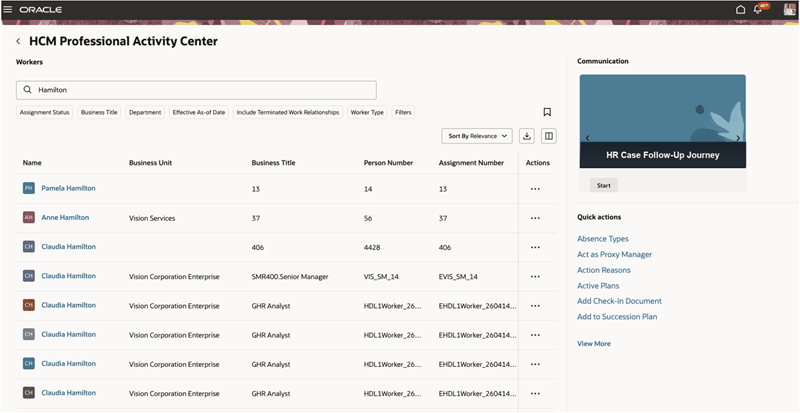
The first feature worth calling out is one many HR teams have been waiting for. Ever since the original Person Management page was effectively retired back in 2020, there has not really been a single, equivalent experience to replace it. What Oracle has delivered here is not a direct like-for-like replacement, and it is clear that is not the intention. Instead, this move aligns with the Redwood design approach and rethinks how users interact with person data. The result is a more modern, task-focused experience that brings together key information and actions in a way that feels far more consistent with the rest of the HCM suite.
In practical terms, it changes how users work day to day. Rather than navigating across multiple pages or relying on memory to find the right option, a HR user can open a worker’s record and see relevant insights alongside the actions they are most likely to take, whether that is updating employment details, reviewing assignments, or initiating changes. This reduces the need for constant clicking and context switching, making everyday tasks quicker and more intuitive. For those who have used the system for a long time, there may still be a sense that the original “one stop shop” is missing. However, this is a clear step forward. It signals a shift away from a single static page towards a more guided and contextual experience that better reflects how people actually work today. It may not replicate everything that Person Management once offered, but it goes a long way towards closing a gap that organisations have felt for some time.
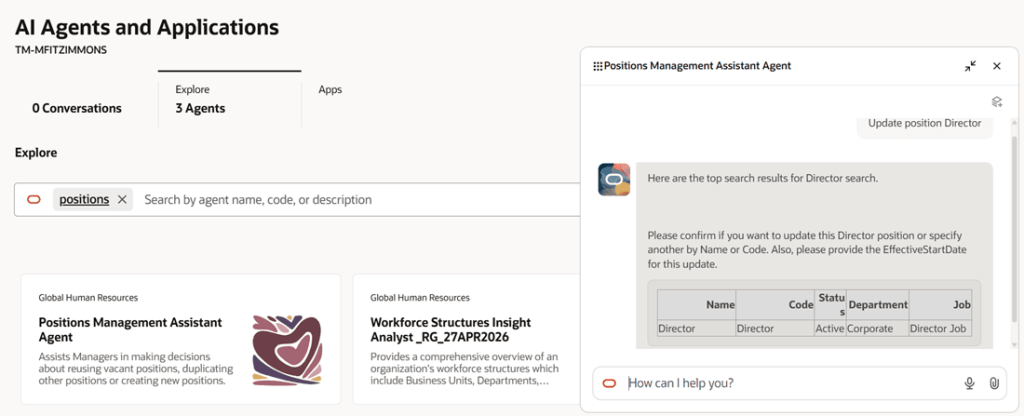
The next feature worth highlighting is AI-led, the Positions Management Assistant. This builds on the Positions Assistant introduced in 25D but takes things a step further by broadening what can be done through a single experience. Rather than focusing only on creating or viewing positions, it now brings editing into the same flow, giving HR teams and line managers a more complete way to manage positions. It uses natural language to understand what the user is trying to do and responds with relevant actions and guidance, which fits with the wider move towards more conversational, AI-driven ways of working.
In practice, this simplifies what can often be a fragmented process. A manager can ask to see vacant positions within their team and the assistant will surface them, suggest next steps and provide a direct route to raise a requisition. If a new position is needed, it can guide the user through creating one, reusing existing information where possible to save time and reduce errors. This makes the experience far more intuitive, particularly for occasional users, while also helping to improve consistency and accuracy. The overall result is a smoother, more guided approach that reduces manual effort, speeds up position management activities and helps organisations move more quickly when filling roles.
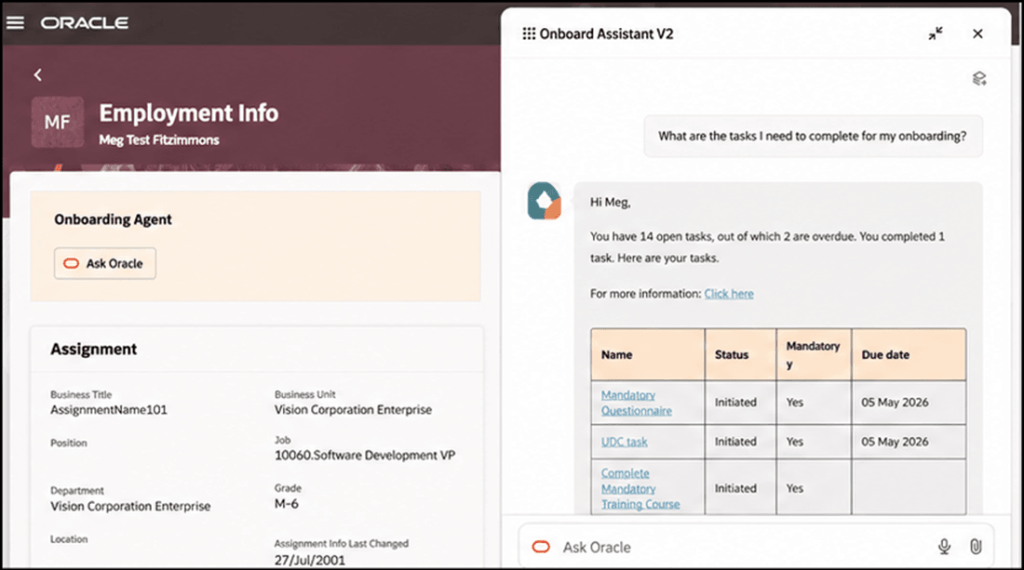
The next feature builds on something we saw introduced in 25D. The Onboarding Agent has now evolved into a workflow agent, marking another step in Oracle’s move towards more intelligent, guided employee experiences. The new Onboard Assistant takes the earlier self-service capability and turns it into a more interactive, conversational experience for new hires. Rather than working through static checklists or searching for information, users can ask questions in plain language and receive clear, relevant answers tailored to their role, location and organisational policies.
In practice, this makes the onboarding journey feel far more straightforward. A new starter can ask what tasks still need to be completed, check for anything overdue and follow a direct link to take action. The assistant can also surface useful resources, provide reminders and guide users through more complex steps when needed. For anyone unfamiliar with the system, this removes much of the uncertainty that can come with getting started. Overall, it creates a more supported and personalised experience that helps new hires get up to speed more quickly, reduces confusion and ensures that key onboarding activities are completed on time.
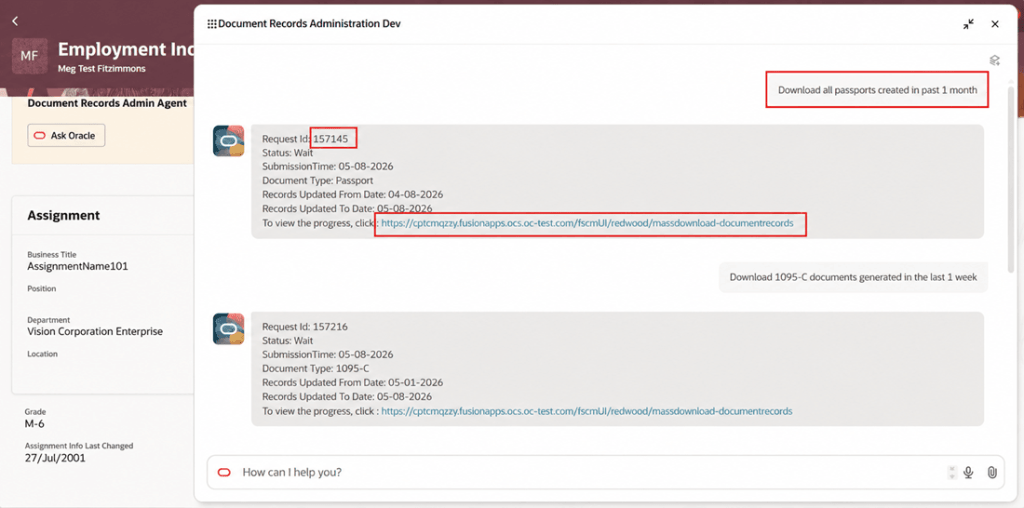
There are a couple of notable updates in Document Records, particularly around the use of AI. The first is the Document Records Administration Assistant, which is a clear example of how Oracle is embedding AI into everyday HR administration. In this case, the focus is on simplifying how users retrieve document records. Rather than working through multiple screens and manually applying filters, users can describe what they need in plain language. The assistant interprets the request and submits the appropriate mass download action, removing much of the effort from what has traditionally been quite a manual process.
In practice, this makes a real difference. A HR user could ask to download all passports created in the past month or retrieve payslips generated in the last week, and the assistant will identify the document type, apply the relevant criteria and trigger the correct request. For infrequent users in particular, this removes the need to understand the underlying navigation. The process becomes far quicker and far more straightforward. Overall, it provides a more intuitive way to retrieve document records, reducing admin time, improving accuracy and helping users get to the right outcome first time.
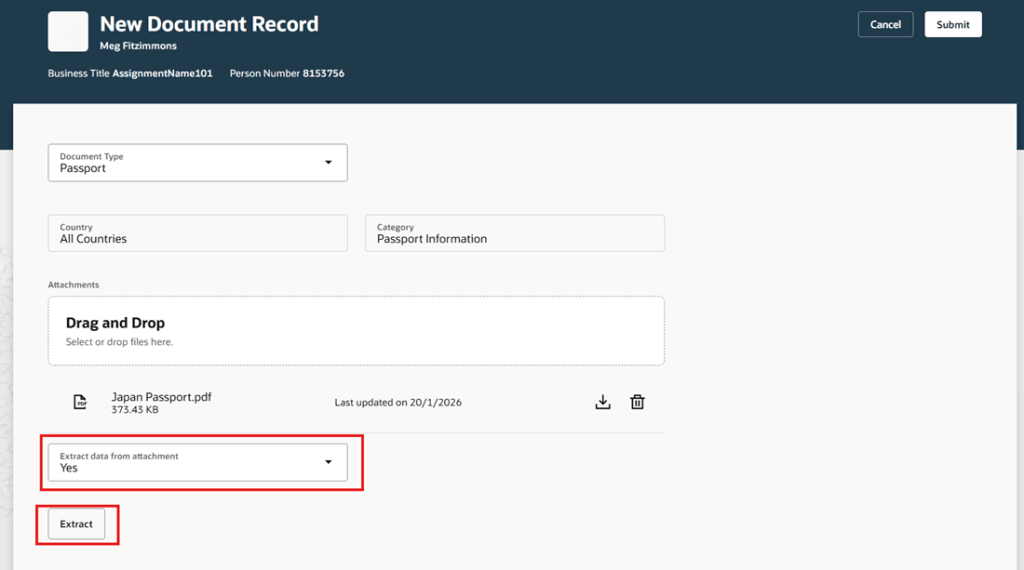
The second update focuses on using AI to extract data from attachments and prefill document record attributes. It is a relatively simple enhancement, but one that addresses a very common pain point in HR administration. When creating document records, users often have to rekey information that already exists in the uploaded file. This feature reduces that effort by using AI to identify and extract key details from the attachment and populate the relevant fields automatically. It aligns closely with the Redwood approach of reducing manual input and making everyday tasks quicker and easier to complete.
In practice, when a user uploads something like a passport or certification, the system can pick up details such as the document number, issuing country and validity dates, and populate these directly into the record. The user can then review and amend the information before saving, rather than starting from scratch. This not only saves time but also reduces the likelihood of manual errors. Over time, capabilities like this can have a noticeable impact on data quality, while also making the process far more efficient for both HR teams and employees managing their own records.
There are a number of upcoming changes around Redwood pages, and the timelines are now starting to feel very close. From 26C, the Redwood person pages will be enabled by default, covering key areas such as Personal Details, Contact Information, Identification Details, Family and Emergency Contacts, Additional Person Information and Person Identifiers for External Applications. For many organisations, this is the point where the move to Redwood becomes unavoidable for core HR data.
This continues in 26D, with areas such as Jobs, Locations, Departments, Enterprise HCM Information, Grade Ladders and all Employment pages, including actions like Add Assignment and Employment Information, also switching to Redwood by default. The same pattern carries into 27A, where processes such as Resign from Employment, Mass Assignment Change and Terminate Employment will be automatically enabled.
If you have not already moved to these Redwood pages, now is the time to start planning. Leaving it until they are switched on by default means losing control over when the change happens and removes the option to step back if needed. Moving earlier gives you the opportunity to test properly, prepare your users and resolve any issues before the transition becomes mandatory.
As mentioned earlier, Oracle is expected to release additional Core HR updates later this month. If anything stands out as particularly impactful, I will share a further update with a more detailed view. In the meantime, keep an eye out for the upcoming posts in this series where we will explore other areas of Fusion as part of Release 26C. If you are reviewing your own roadmap or considering how these changes might affect your organisation, now is a good time to start the conversation.
Please note all screenshots are the property of Oracle and are used according to their Copyright Guidelines
Oracle’s been moving quickly with its agentic finance capabilities, and the Payables Agent is one of the more practical outcomes so far. If you’re looking after accounts payable or running a shared services function, it’s worth taking a closer look at what it can do and what’s involved in getting up and running.
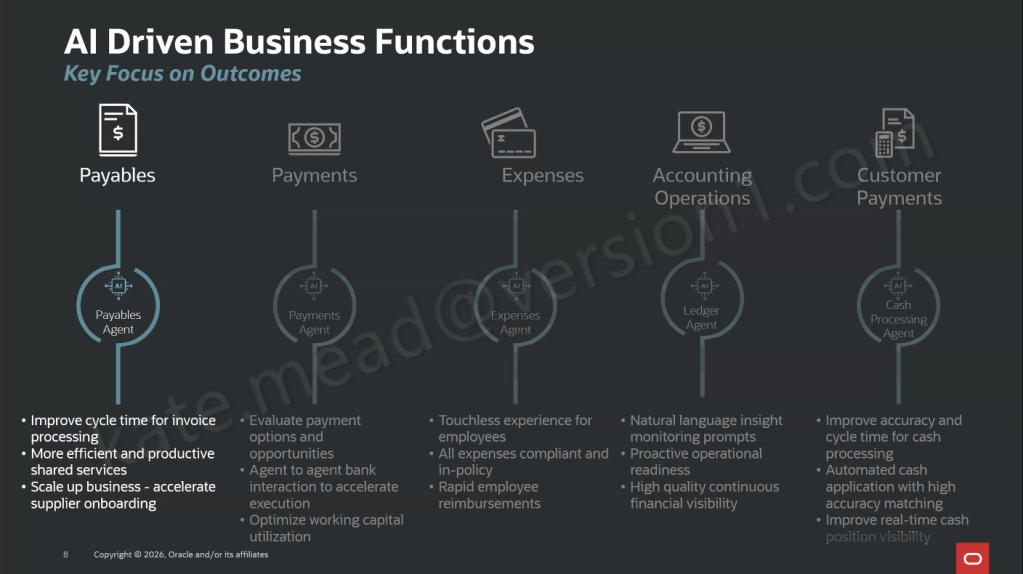
The Payables Agent is focused on the day-to-day reality of accounts payable, helping with invoice intake, compliance and control. It works to take invoices from wherever they come in and move them through to payment-ready with as little manual handling as possible. It sits alongside a wider set of Oracle AI agents across Payments, Expenses, Ledger and Customer Payments, each one aimed at a specific finance outcome.
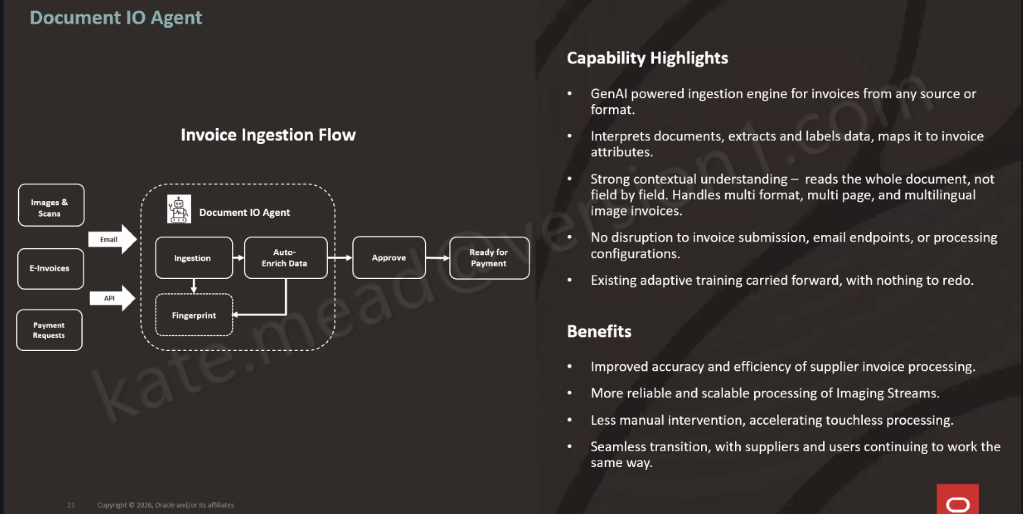
At the heart of it is Document IO, which handles invoice ingestion across different channels and formats. It routes everything through a consistent process and flags anything that needs a closer look, so exceptions can be picked up and dealt with quickly.
Document IO works a bit differently to traditional approaches. It reads the whole invoice rather than picking out individual fields, then extracts and maps the information straight into the right attributes in Oracle Fusion. It can handle different formats, multi-page documents and multiple languages without needing templates set up for each supplier, and you don’t have to change how invoices are sent in, as your existing email channels can stay as they are.
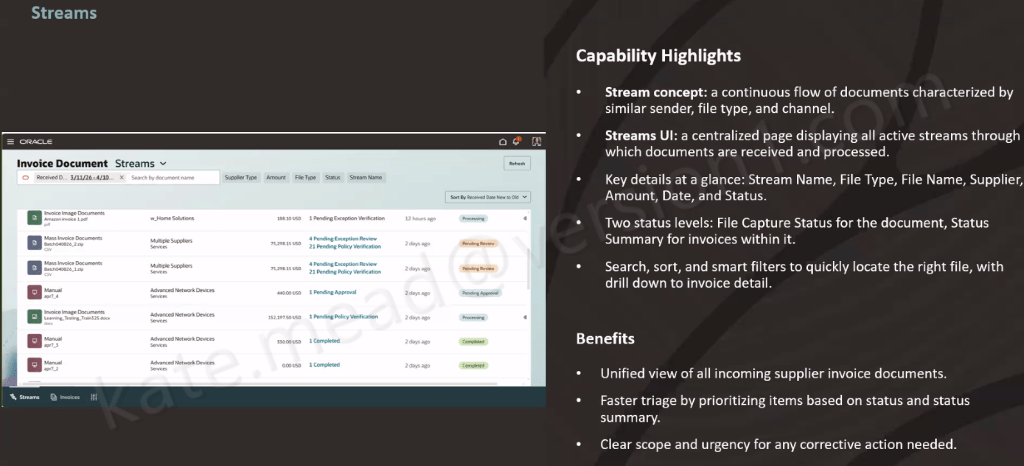
The Streams UI gives you a single place to keep on top of everything, bringing together all your active invoice streams. You can quickly see what’s coming in, what’s already been processed, and what needs attention. Out of the box, there are two streams available. The first covers invoice image documents, handling supplier invoices sent by email in different formats, across multiple pages and languages. The second is partner e-invoice integration, which connects to e-invoices via Thomson Reuters. That one does require a commercial agreement with Thomson Reuters to get started.
Converged streams bring your existing channels into the same view as well, including bulk uploads and manual entry. It means you get a single, consistent way of seeing and managing every invoice type in one place.
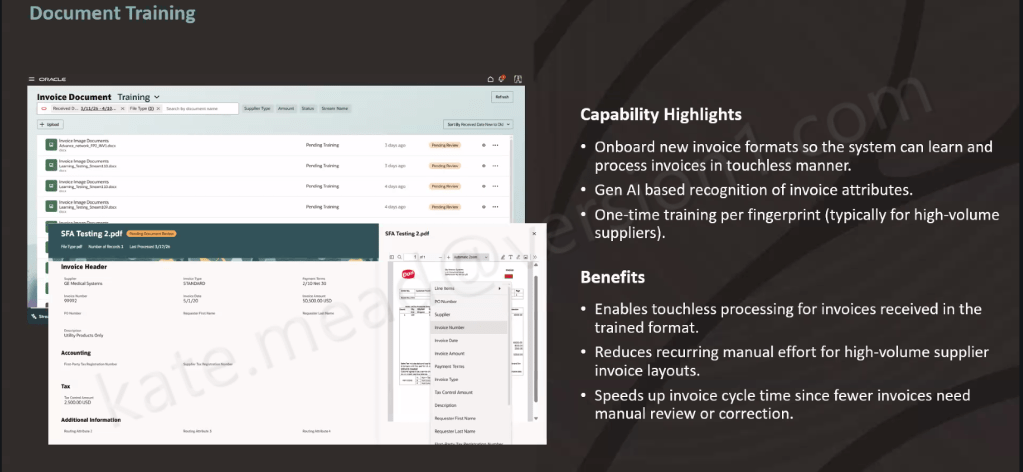
For suppliers with a consistent invoice layout and high volumes, document training makes things even smoother. You set the format up once, the system extracts the data using GenAI, you check and save it, and that format is then recognised going forward. After that, every invoice in the same layout is processed automatically, without the need to retrain.
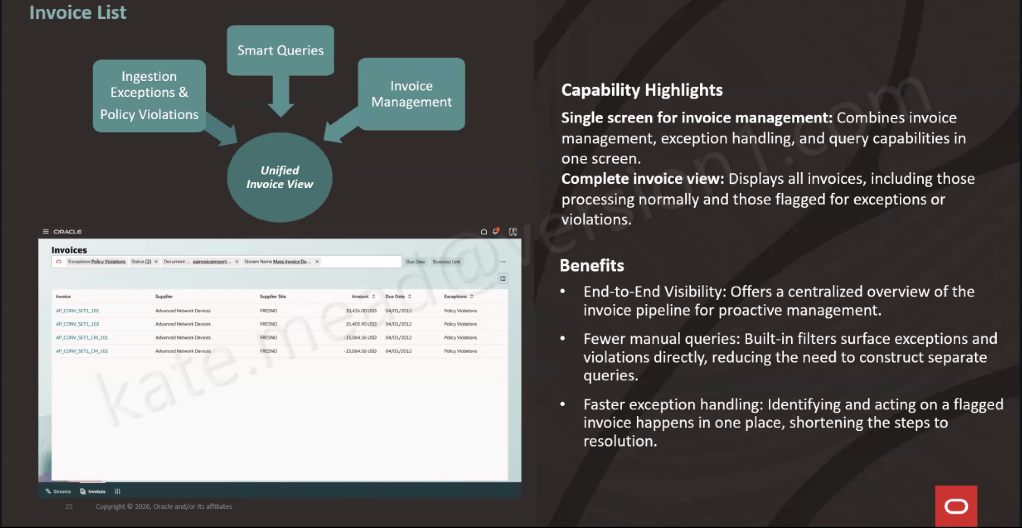
All of that is handled automatically in the background, with policy-driven validation, anomaly detection, PO matching, approval routing and budget checks applied to every invoice. A full audit trail is maintained throughout. Anything that needs attention is surfaced in the Invoice List UI, giving you a single place to manage invoices, handle exceptions and respond to queries. It means your team can focus their time where it really matters, rather than working through everything manually.
So, how do you get started? The Document IO Agent is already switched on by default, so there’s nothing you need to enable. From there, it’s really about setting up three key areas: where your invoices are received, how your streams are connected into the Streams UI, and, for higher-volume suppliers, putting a bit of time into training the system to recognise their invoice formats.
The best way to approach it is to take things in stages. Start with getting your invoice ingestion set up, then bring in converged streams and training, and finally test and refine at scale across different formats and volumes.
Stepping back, this is really about making day-to-day accounts payable that bit easier. A lot of the routine work is taken care of in the background, so your team can spend more time on the things that genuinely need their input. If you’re already using Oracle Fusion, it’s definitely worth exploring what this could look like in your own environment and where it might take the pressure off your team.
Please note all screenshots are the property of Oracle and are used according to their Copyright Guidelines




 K8 Mead