Reinventing How Work Works: The Business Case for Oracle Fusion Agentic Applications

Oracle has been making a clear and increasingly consistent argument over the past few months: enterprise software has reached the limits of what a system of record can do. I’ve written before about the introduction of Agentic Applications at AI World London, and about the specific HCM applications that were announced alongside them. But there’s a broader story here that I haven’t fully explored yet, and it’s one that I think matters for every Fusion customer, not just those focused on HCM.

This post draws on the “Reinventing How Work Works” webinar, which stepped back from individual applications and made the architectural and commercial case for why the shift to agentic is happening, what it actually looks like in practice, and where Oracle is taking this next. If you’re trying to build internal momentum for agentic adoption, or if you’re trying to explain to a leadership team why this is different from previous AI announcements, this is the post to share.
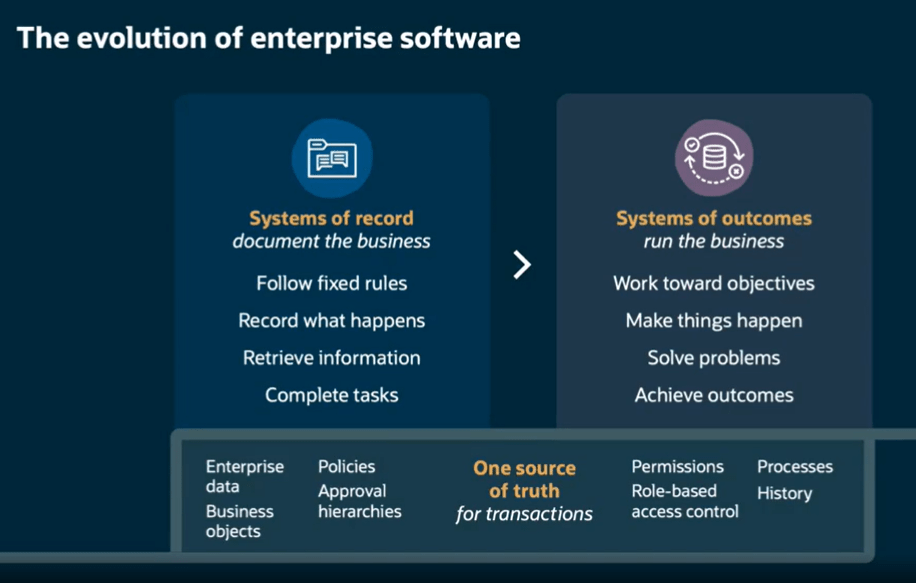
The framing that Oracle used throughout this webinar is, I think, one of the clearest explanations of what has actually changed. Traditional enterprise systems, including Fusion as it has historically operated, are systems of record. They follow fixed rules, capture what happened, retrieve information when asked, and complete transactions. They document the business. What they don’t do is run the business.

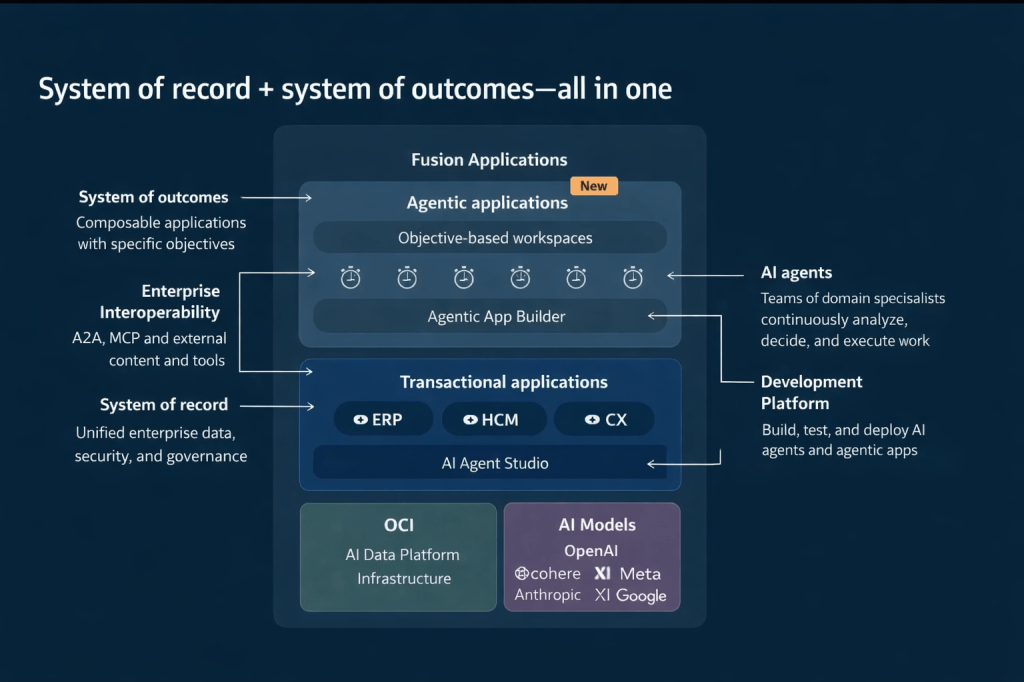
Agentic Applications represent a move to what Oracle calls systems of outcomes. Rather than waiting for a person to interpret data and decide what to do next, a system of outcomes works toward objectives, makes things happen, solves problems, and achieves results. The underlying system of record doesn’t go away. The data, governance, approval hierarchies, role-based access control, and audit history are still there, and in Oracle’s case, they’re still the source of truth for every transaction. What changes is the layer operating on top of that foundation.
This architecture diagram is worth studying if you haven’t seen it. Agentic Applications sit in a new composable layer above the existing ERP, HCM, and CX transactional applications. That layer is powered by teams of AI agents coordinated through Oracle AI Agent Studio, drawing on the full enterprise data model, security model, and process history that already exists in Fusion. Beneath all of this, Oracle Cloud Infrastructure (OCI) provides the AI data platform, and a range of large language models (LLMs), including those from OpenAI, Cohere, Meta, Anthropic, xAI, and Google, are available depending on the task and preference.
Every Fusion Agentic Application is built around four core dynamic areas. Understanding these is useful when you’re evaluating a specific application or explaining the concept to stakeholders.

The first is the Advisor, which is the “Ask Oracle” conversational interface. This is where a user can ask natural language questions and get contextual, data-aware responses rather than navigating to a report. The second is the Information Summary, which provides an intelligent, prioritised view of what’s happening right now in that area of the business, surfaced automatically rather than requiring the user to run queries. The third is Priority Actions, a curated queue of recommended next steps that the agents have identified based on current conditions, risk signals, and business objectives. The fourth is Communications, which handles notifications, responses, and outbound actions within the appropriate governance boundaries.
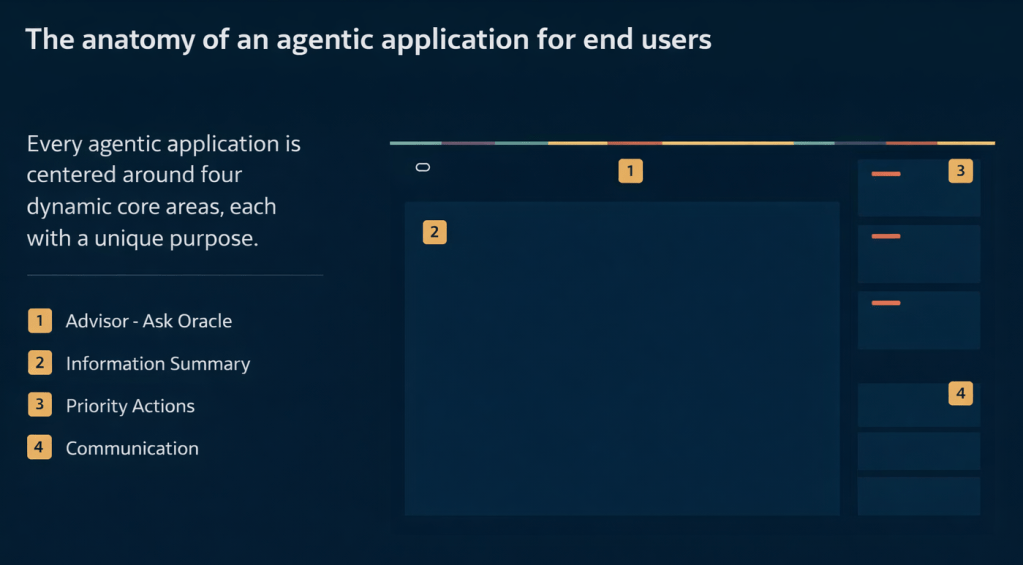
These four areas appear consistently across all 22 applications, which is deliberate. Oracle’s position is that once a user understands the structure in one application, they can navigate any other agentic application without relearning the interface.

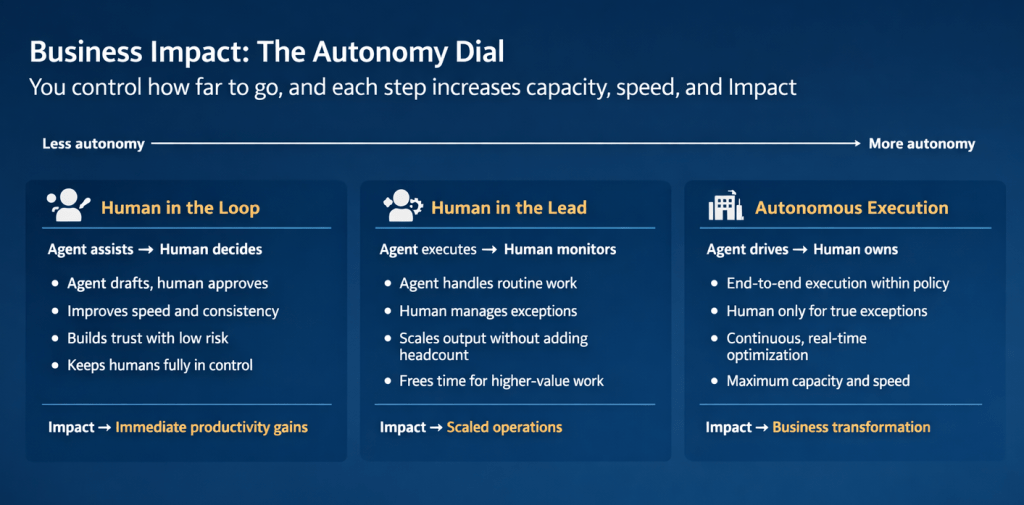
One of the most practically useful concepts introduced in this webinar is what Oracle calls the Autonomy Dial. It’s a spectrum with three positions, and it addresses one of the most common concerns I hear from customers and consultants: how much control do we give up?

At the “Human in the Loop” end, the agent assists and a person decides. The agent drafts, recommends, and prepares; the human reviews and approves. This builds trust, improves speed and consistency, and keeps people firmly in control. The business impact is described as immediate productivity gains.

In the middle is “Human in the Lead”, where the agent executes and a person monitors. The agent handles routine work and manages to policy; a person steps in for genuine exceptions. This scales output without adding headcount and frees teams for higher-value work. The impact here is scaled operations.

At the “Autonomous Execution” end, the agent drives and a person owns. End-to-end execution happens within policy, continuous real-time optimisation takes place, and human involvement is reserved for true exceptions. The impact is described as business transformation.

What I find compelling about this model is that it isn’t prescriptive. Oracle isn’t saying every organisation should start at one end or aim for the other. Each position on the dial represents a valid operating model depending on the process, the risk tolerance, and the maturity of the organisation. A payroll close process might comfortably sit at Human in the Lead. A workforce scheduling decision for a critical shift might warrant Human in the Loop until confidence is established. A high-volume procurement matching task might be a good candidate for Autonomous Execution relatively quickly.
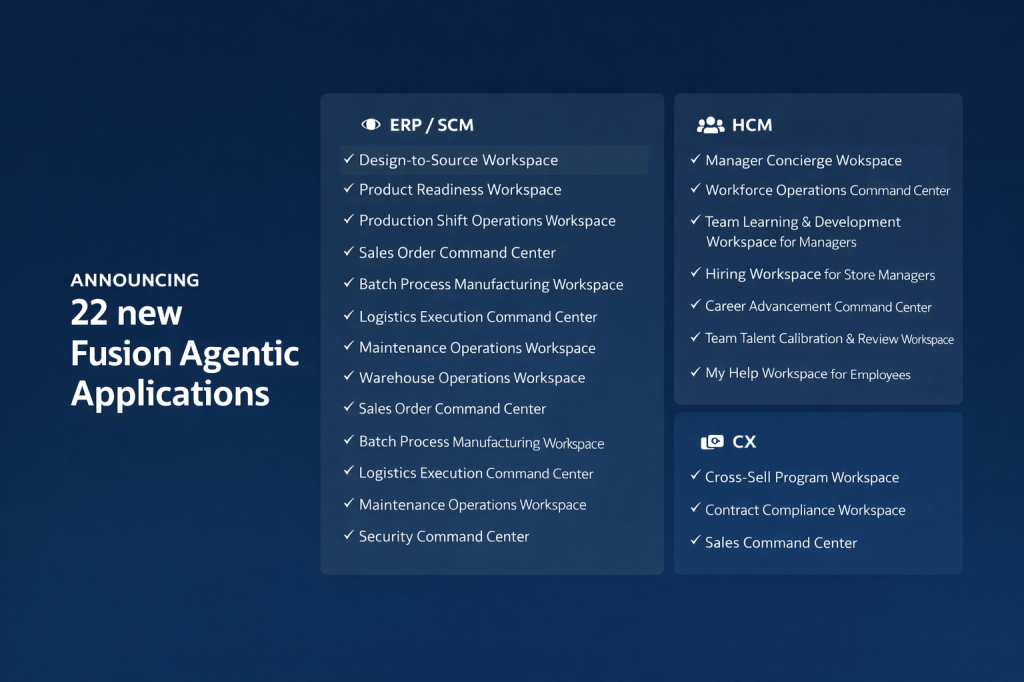
My earlier posts covered the eight HCM applications in detail. The full announcement of 22 applications in releases 26B / 26C spans ERP/SCM, HCM, and CX, and it’s worth understanding the breadth of this, because it signals how Oracle is positioning agentic across the entire Fusion suite rather than as an HCM-specific capability.

On the ERP and SCM side, the applications include Design-to-Source Workspace, Product Readiness Workspace, Production Shift Operations Workspace, Sales Order Command Centre, Batch Process Manufacturing Workspace, Logistics Execution Command Centre, Maintenance Operations Workspace, Warehouse Operations Workspace, Cost Accounting Close Workspace, Sourcing Command Centre, Collectors Workspace, and Security Command Centre.

The Design-to-Source Workspace is a useful example of the transformation logic. Previously, product design and bill of materials work happened in separate systems. Sourcing relied on items entered manually. Negotiation delays accumulated when information was missing or unresolved. With the agentic application, product specifications translate automatically into qualified supplier lists, bills of materials are generated directly from CAD files, at-risk negotiations are flagged automatically, and bids are evaluated across cost, lead time, quality, and risk in a single view. The outcome is faster time to market and improved sourcing cycle times.

On the CX side, three applications have been announced: Cross-Sell Program Workspace, Contract Compliance Workspace, and Sales Command Centre. For CX teams, the Sales Command Centre in particular brings together the kind of deal health monitoring, risk flagging, and next-step recommendation that previously required significant manual analysis across multiple reports.
I’ve written in detail about Oracle AI Agent Studio in previous posts, but the webinar highlighted several new capabilities that are worth calling out specifically, because some of them genuinely change what’s possible for teams building custom agentic applications.

The most significant new addition is the Agentic App Builder, which is released in 26C. This is what Oracle describes as a “no-code agentic brain”: you describe your objective in natural language, the system explains and builds the workflow, generates agents and the underlying code automatically, and allows you to diagnose and fix issues in real time. In the demo, a user types a description of a sales opportunity health and risk management app, and within moments a structured agentic application is assembled from reusable agents, with a Deal Summary Agent, a Risk Agent, a Customer Insights Agent, and a Process Agent already in place and connected. It’s a significant step forward from the existing builder experience.
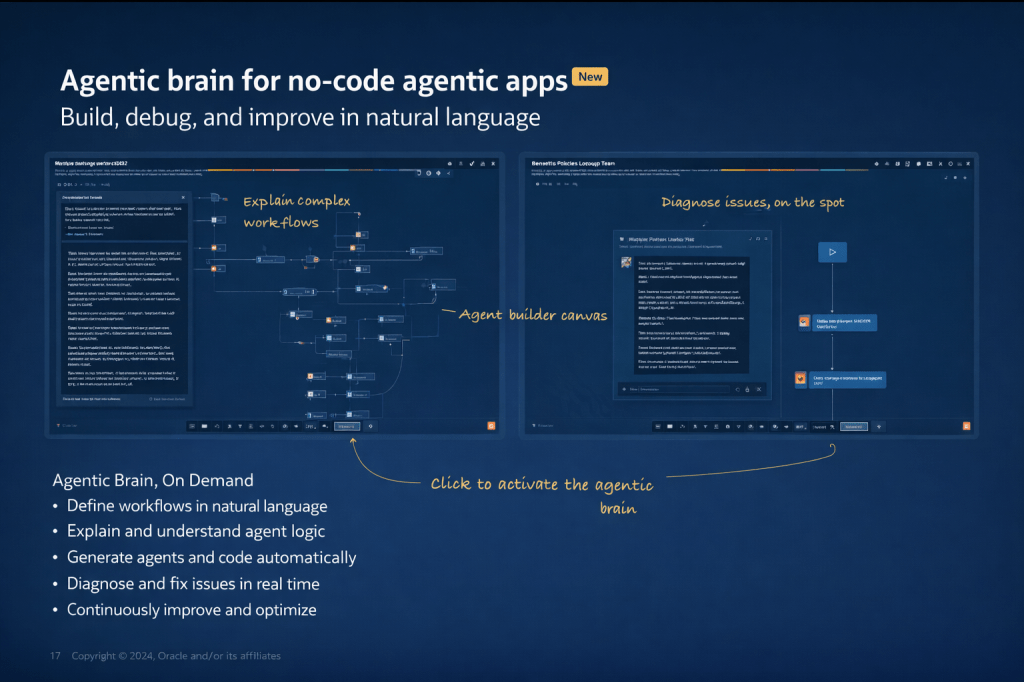
Alongside this, several other capabilities have been marked as new in the current release: Workflow Orchestration, Content Intelligence, Contextual Memory, Multi-Modal support, an Agent ROI Dashboard, and enhanced Security, Auditability, and Governance controls. Contextual Memory is worth paying attention to particularly, because it allows agents to retain information across interactions, which is what enables genuinely personalised, continuous support rather than stateless responses to each individual query.

The studio now also supports full interoperability through MCP (Model Context Protocol) and A2A (Agent-to-Agent) protocols, which means agents built in Fusion can exchange context with agents or tools running outside the Fusion estate, provided the appropriate governance controls are in place.
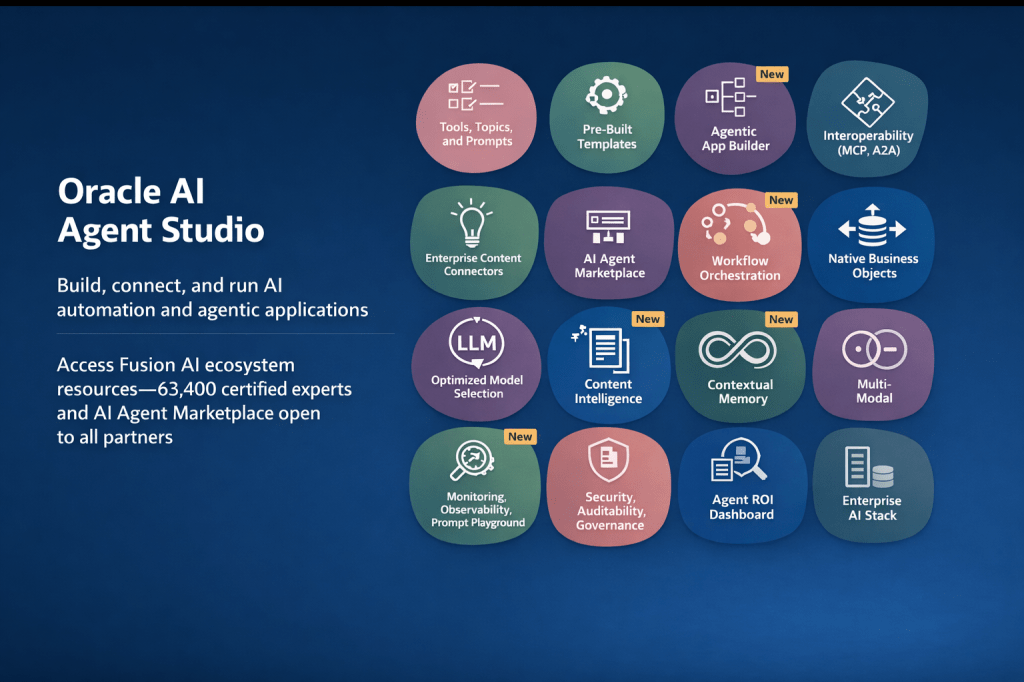
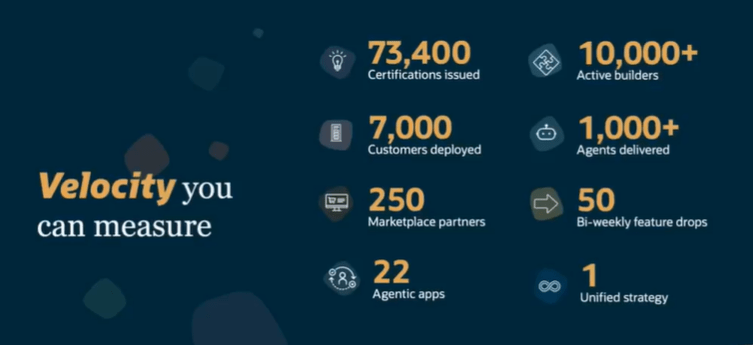
One thing the webinar made very clear is that Oracle isn’t building this alone. The Fusion AI ecosystem now includes 73,400 certified builders, 10,000 developers actively building agents, and over 100 pre-built agent templates in the AI Agent Marketplace, which is now open to all partners for submissions. Open standard support includes native MCP integration across connectors and an agent-to-agent registry within Oracle AI Agent Studio itself.
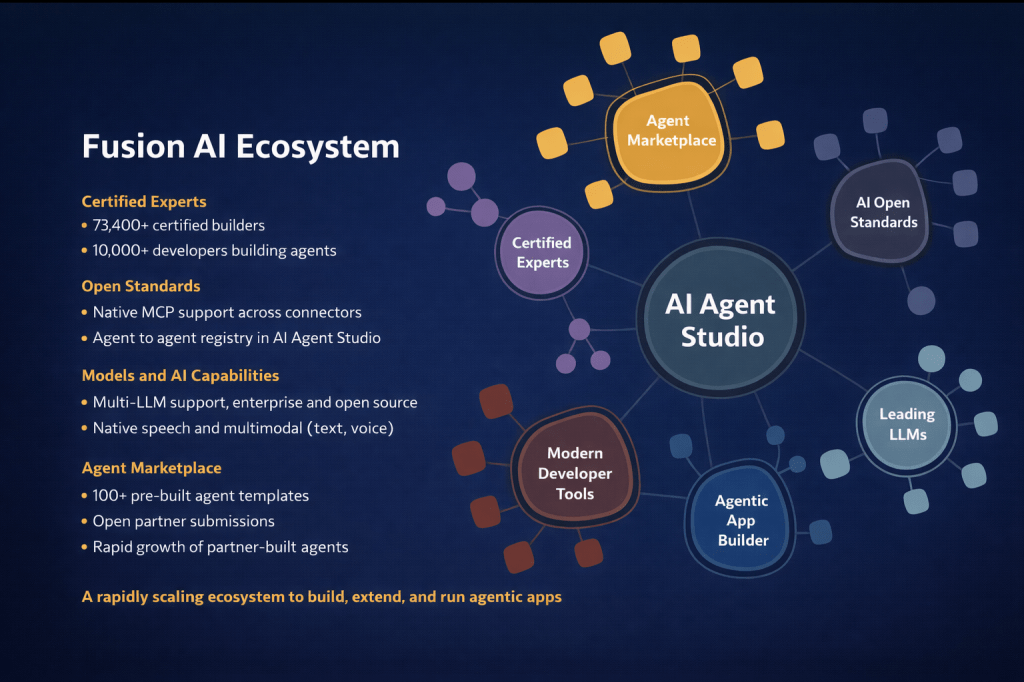
For customers, this matters because it means the pool of available agents and expertise is growing rapidly. You don’t need to build everything from scratch, and you don’t need to rely solely on Oracle to extend the platform. The open partner submission model for the marketplace is a meaningful shift, and it’s one that will accelerate the availability of domain-specific and industry-specific agents over the coming months.

The summary that Oracle closed with is a useful way to frame internal conversations: Fusion is moving from systems of record to systems of outcomes. Agentic Applications get work done. Oracle AI Agent Studio lets you build, deploy, and scale agents specific to your organisation. OCI AI Advantage runs it all securely at scale.

What I’d encourage any Fusion customer to take from this is that the window to start is now. The pricing model has already been simplified significantly (covered in my earlier post), the tooling to build and extend has matured substantially, and the evidence base from production deployments is solid. Starting with one application in one process area, positioned at Human in the Loop on the autonomy dial, is a low-risk, high-value entry point that builds organisational confidence while delivering measurable results.

If you’re thinking about where to start or how to make the case internally, I’m happy to talk it through. In the meantime, why not check out my earlier post on the HCM-specific Agentic Applications announced at AI World London? You can find it here. And if you missed the original announcement post covering the architecture, the maturity model, and the updated pricing, that’s a useful starting point too, and you can find it here.

Please note all screenshots are the property of Oracle and are used according to their Copyright Guidelines
A Day with Oracle: AI Success Navigator and Guided Learning Partner Enablement

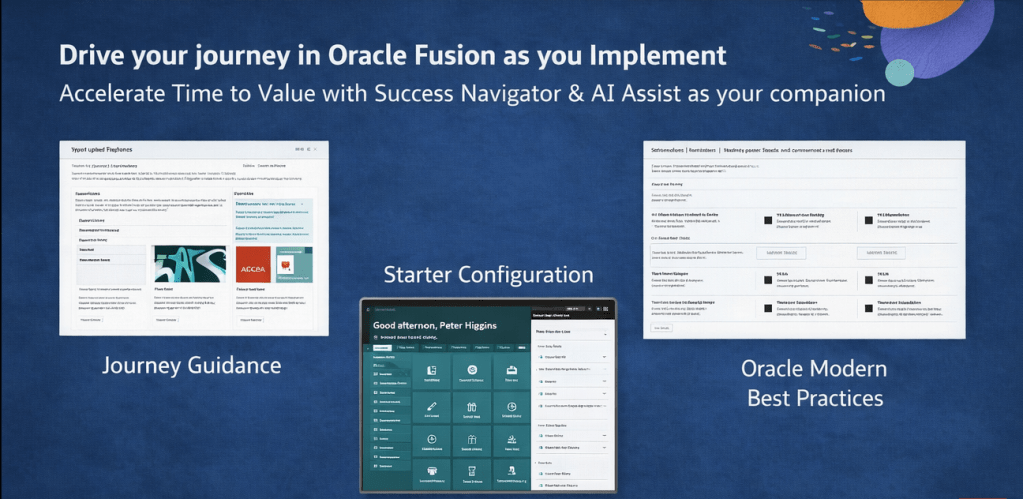
Today I had the opportunity to attend and present at a partner enablement event hosted by the Oracle AI Success Navigator product team, focused on how partners like Version 1 can best use Oracle’s tooling to bring genuine, measurable value to our customers. The session brought together presentations, product demos, hands-on labs, and open discussion, covering Oracle Cloud Success Navigator and Oracle Guided Learning (OGL). It was a useful day, and I wanted to share some of the key takeaways while they’re fresh.

If you haven’t come across Cloud Success Navigator yet, it’s Oracle’s digital engagement platform, provided free to Oracle Fusion Cloud customers, designed to help organisations design, implement, and accelerate their cloud and AI roadmaps. It sits at the centre of Oracle’s broader AI Factory offering, which Oracle launched as a bundled set of partner and customer services aimed at speeding up AI adoption.

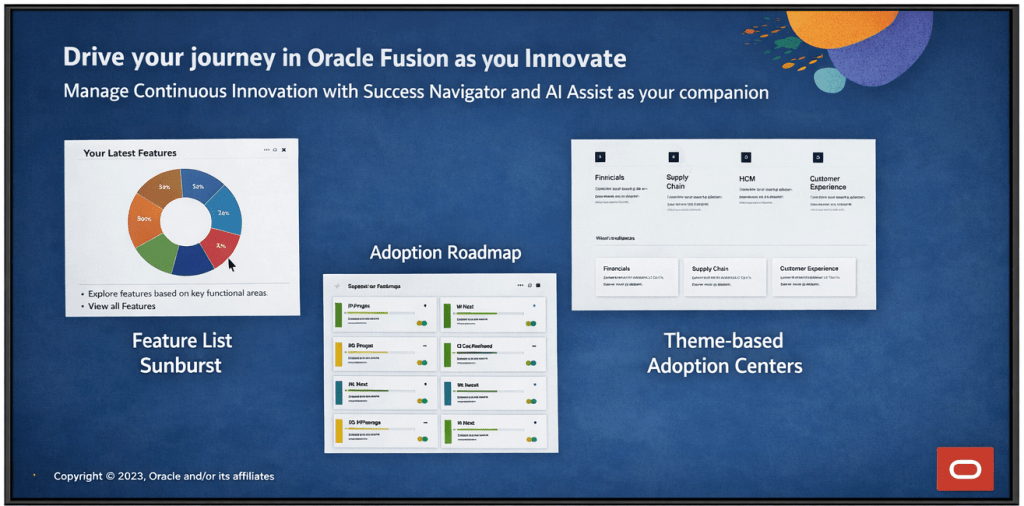
At its core, Cloud Success Navigator gives customers a single place to discover new features, plan adoption, track key milestones, and access Oracle Modern Best Practice (OMBP) guidance. The sunburst visualisation is particularly useful: it surfaces relevant features based on your production profile, so your team isn’t wading through capabilities that don’t apply to your configuration. You can tag features across Now, Next, and Later columns, which gives a clean, structured view of your innovation roadmap.

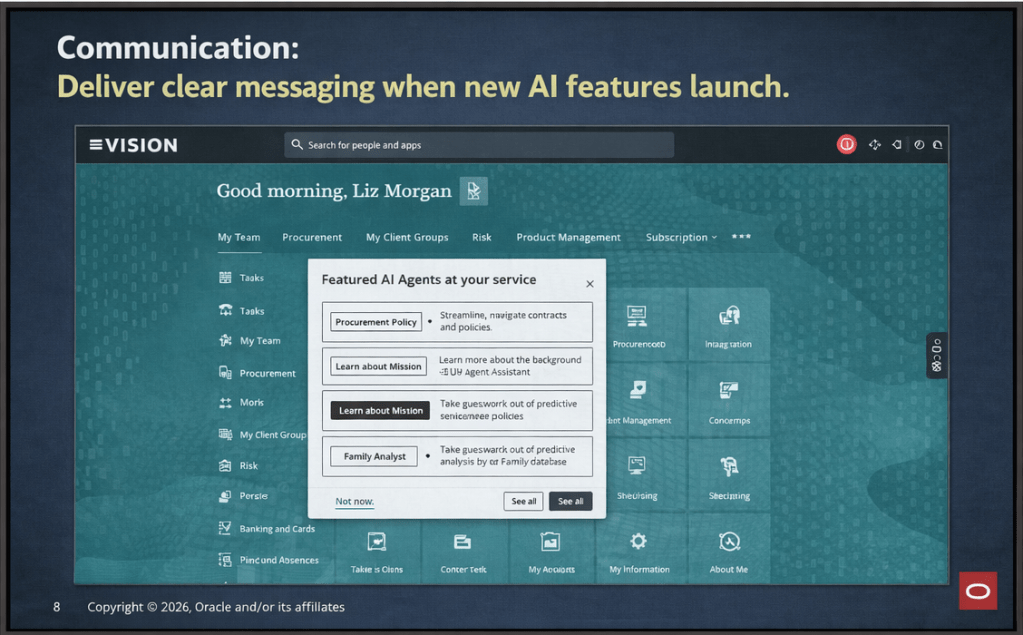
A significant addition to the platform is AI Assist, which was made generally available in late 2025. AI Assist is a generative AI-enabled assistant embedded throughout Navigator. It goes beyond a standard chatbot: it provides tailored recommendations, surfaces relevant documentation, highlights release roadmap changes based on your context, and flags project milestone risks. For partners, the practical implication is that our customers now have a self-service layer of intelligent guidance that can accelerate feature discovery and planning without always needing to raise a support request or wait for a consultant touchpoint.

How should Partners be using Success Navigator? This was, for me, the most valuable part of the day. The Oracle product team was clear that Navigator is not just a tool for customers to log into independently. The expectation is that partners should be actively bringing Navigator into their delivery model, whether that’s during implementation, post go-live optimisation, or ongoing managed service.

In practice, that means a few things. During implementation, your partner should be walking you through Navigator as part of onboarding, not treating it as a nice-to-have that gets mentioned at the end of a project. Feature planning sessions are more productive when they’re anchored in Navigator’s release data and OMBP content, rather than relying on spreadsheets or static documentation that goes out of date.

Post go-live, Navigator becomes a continuous value tool. The AI Assist agents can help customer teams stay ahead of quarterly release content, plan for Redwood migration milestones, and identify AI features that fit their production profile. Partners who are actively guiding their customers through this ensure their customers are in a much stronger position than those who are leaving customers to self-serve without direction.

One thing to note: Oracle has indicated that the platform continues to evolve, with enhancements planned around streamlined account management for customers with multiple accounts and improved programme management views. It’s worth keeping an eye on the in-application release announcements for Navigator itself.

The second major focus of the day was Oracle Guided Learning (OGL), Oracle’s digital adoption platform (DAP) built natively for Oracle Cloud applications. OGL delivers in-application guidance, directly overlaid onto the Oracle Fusion interface, so users get real-time, contextual help without having to leave the system or refer to separate documentation. The core capabilities OGL brings to a customer environment are worth spelling out clearly, because I still encounter organisations that underestimate what the platform can do.

Process guides provide step-by-step walkthroughs for complex transactions, walking a user through the exact steps required to complete a task within the application. Smart tips and beacons offer contextual pop-up hints and visual cues at key points in the UI. The Help Panel gives users access to self-service guidance and documentation from within the application. In-app messaging allows administrators to send announcements, policy updates, and maintenance communications directly to users as they work, rather than relying on email campaigns that often go unread. Analytics then close the loop: OGL captures how users are engaging with content, where they’re dropping off, and which features or processes need additional guidance investment.

What’s particularly relevant for customers right now is the AI integration within OGL. The OGL 26A release introduced generative AI capabilities into the content authoring experience: content developers can use an AI assistant within the Full Editor to generate and rephrase step text for process guides, smart tips, beacons, and messages. This significantly reduces the time needed to build and maintain a library of guides, which has historically been a barrier to adoption on smaller or resource-constrained engagements.

OGL also extends beyond Oracle applications. It can be deployed across third-party applications including Salesforce, ServiceNow, Microsoft SharePoint, and others, which is useful context for customers running a mixed application estate.

A thread running through both topics today was change management, and it’s one that I think partners sometimes treat as a soft add-on rather than a structural part of delivery. The reality is that both Navigator and OGL exist precisely because technology adoption is a change management problem as much as a technical one.

Navigator gives you the roadmap visibility and planning structure to keep customers engaged with what’s coming and why it matters. OGL gives you the in-application mechanism to reinforce new behaviours, communicate changes, and support users at the moment of need. Used together, they cover a significant portion of the adoption lifecycle: from feature discovery and prioritisation, through to in-system guidance and analytics-driven optimisation.

The enablement message from Oracle today was straightforward: partners who embed these tools into their delivery model are better placed to demonstrate continuous value to customers. Customers who have a structured adoption programme, supported by Navigator and OGL, tend to see higher feature utilisation and lower support overhead than those who treat go-live as the end of the engagement.

It was a practical and well-structured day. The Oracle AI Success Navigator product team clearly has a strong vision for how the platform should be used within the partner ecosystem, and the investment Oracle has made in AI Assist and the broader AI Factory infrastructure is evident. For those of us working in Oracle Fusion Cloud implementations and managed services, the message is clear: these tools are available, they’re free as part of the Oracle subscription, and using them well is increasingly a differentiator in how we position value to our customers.

If you’re currently working on an Oracle Fusion Cloud engagement and you haven’t had a detailed look at what Cloud Success Navigator and OGL can offer, now is a good time to start that conversation.

Please note all screenshots are the property of Oracle and are used according to their Copyright Guidelines
Oracle AI Success Navigator and OGL: A Partnership That’s Changing How We Adopt Oracle Fusion

Oracle has rebranded Oracle Cloud Success Navigator as Oracle AI Success Navigator, and while a name change might sound like a cosmetic exercise, what’s happening underneath is far more interesting. Oracle is actively strengthening the partnership between AI Success Navigator and Oracle Guided Learning (OGL), and for those of us who have long championed both products, this new direction is very exciting!

Oracle AI Success Navigator (formerly Oracle Cloud Success Navigator, or CSN) is Oracle’s platform for helping customers plan, implement, and continuously innovate with Oracle Cloud Applications. It’s included as part of your Oracle Cloud subscription, so if you’re not using it, you’re missing a trick to get more from your Fusion instance.

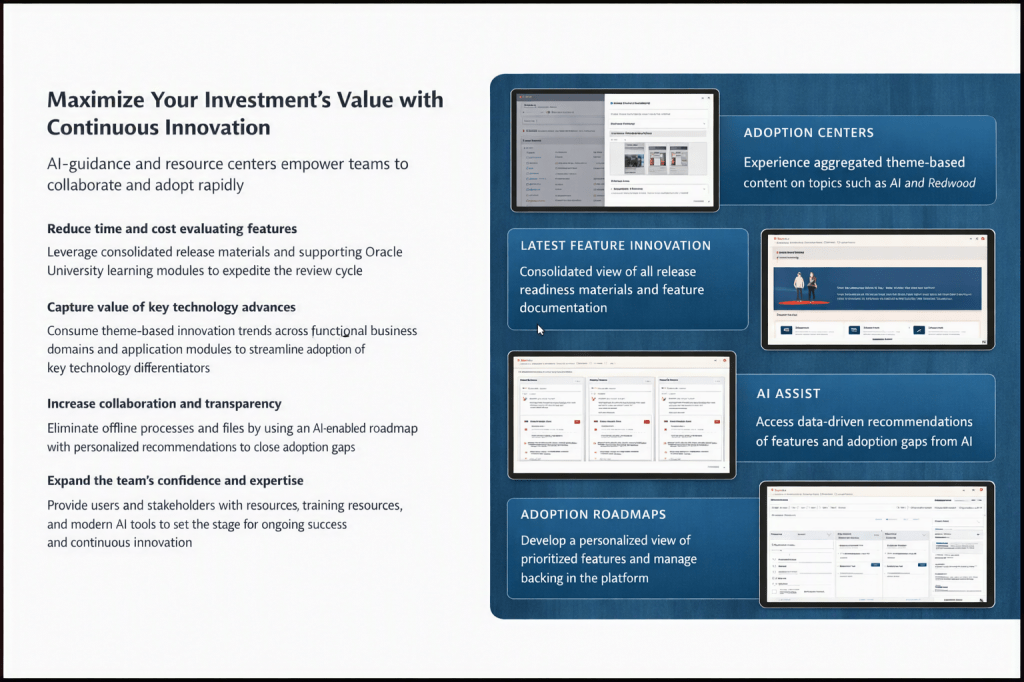
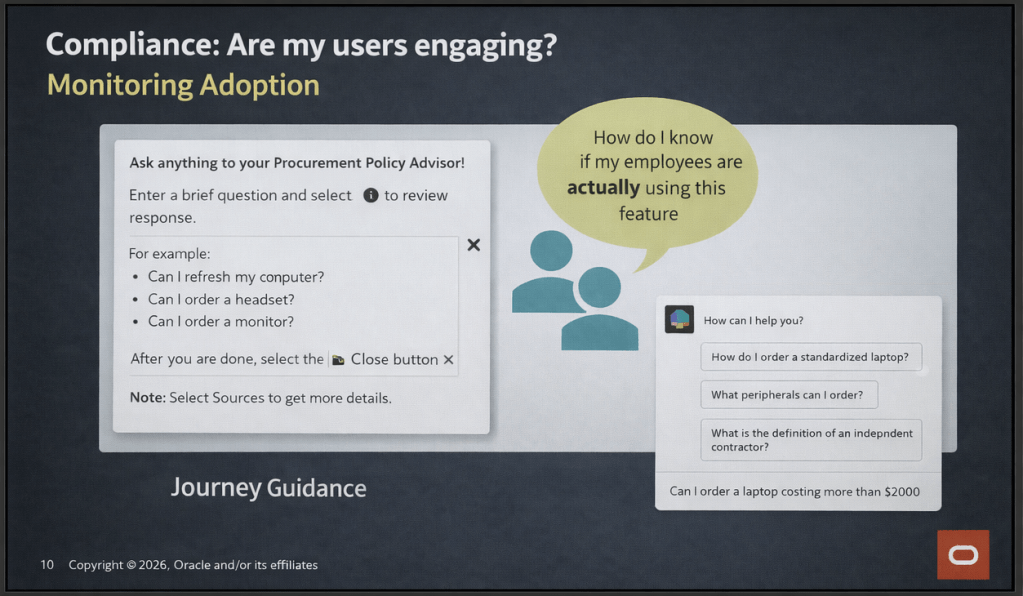
The AI Success Navigator platform gives you four key areas to work with: Latest Feature Innovation, a consolidated view of release readiness materials across your product pillars; Adoption Roadmaps, a personalised and prioritised feature backlog managed directly in the platform; Adoption Centres, theme-based content hubs covering topics like AI and Redwood; and AI Assist, an OCI Generative AI-powered chat interface that I’ll come back to in some detail.

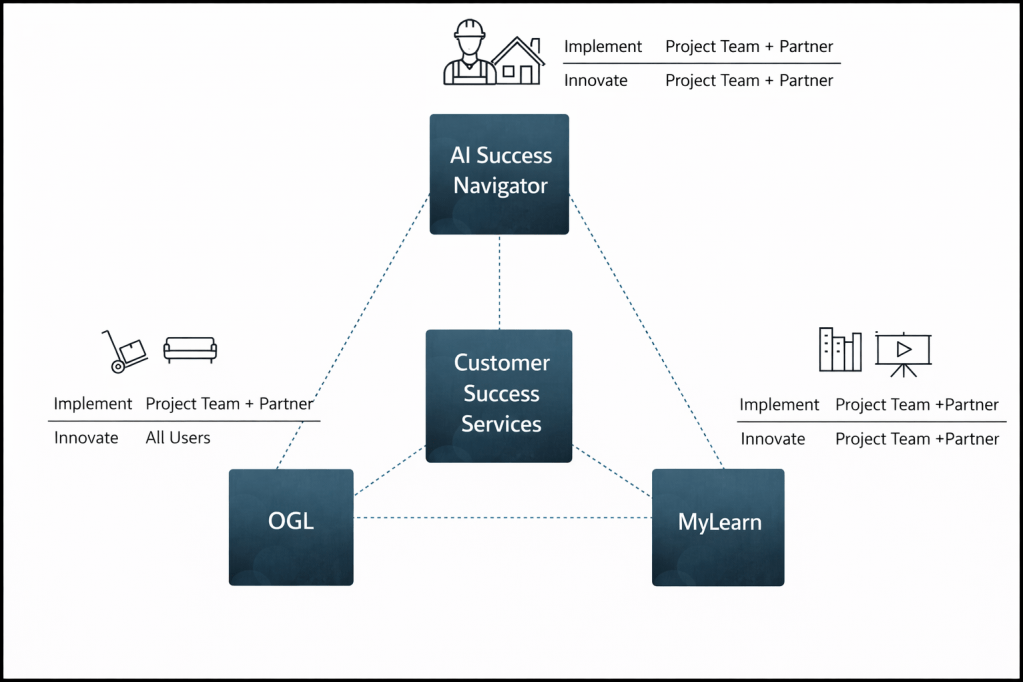
AI Success Navigator, OGL, and MyLearn are all interconnected and Oracle’s Customer Success Services sits in the middle of each. AI Success Navigator is the planning and intelligence layer and OGL is the point-of-need delivery mechanism inside the application. During implementation, OGL is primarily the concern of the project team and partner. Post-go-live, it becomes relevant to all users. MyLearn is the key mechanism for users to learn about Oracle Fusion and therefore is an important consideration.

What’s changing is that these products are no longer operating in isolation. OGL content is now surfaced within AI Success Navigator in the Oracle Modern Best Practice (OMBP) area as job aids, and within Starter Configuration. AI Assist is also being increasingly trained on OGL best practices and project success indicators, meaning the recommendations it produces are grounded in what good OGL adoption actually looks like.

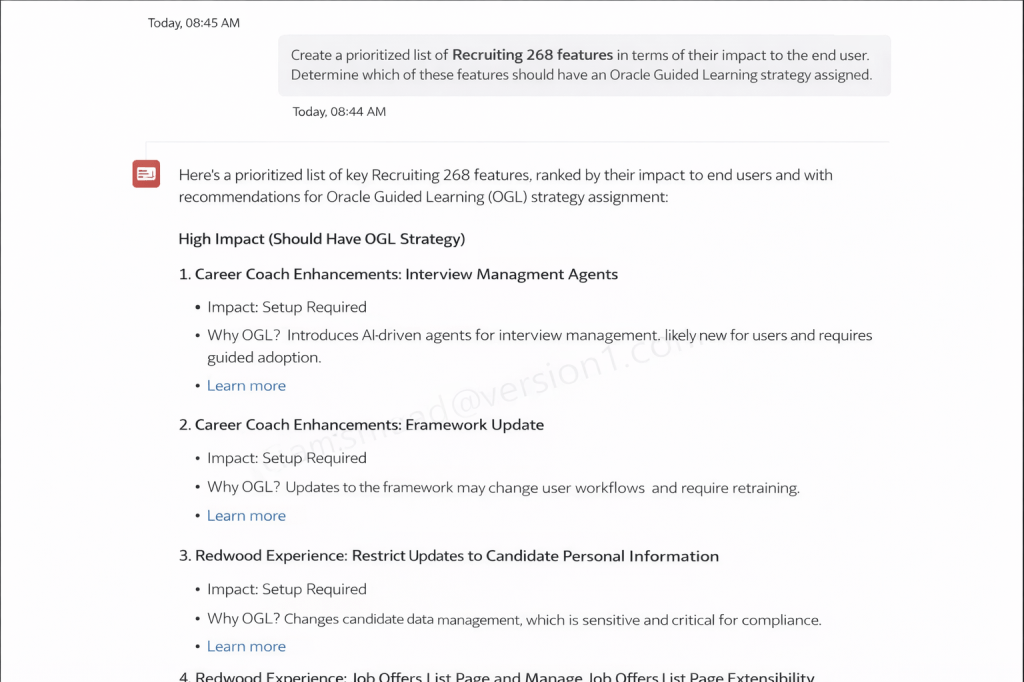
Are you aware of the opportunity to use Success Navigator’s AI Assist to help produce OGL Content? On a recent webinar the presenter asked AI Assist to produce a prioritised list of Recruiting 26B features ranked by end-user impact, with a recommendation on which should have an OGL strategy assigned. The output was a ranked list classifying features as high, medium, or low impact, with a clear rationale for each. Features like Career Coach Enhancements (Interview Management Agents) and the Redwood Experience changes to candidate data management were flagged as high impact, with specific reasoning around setup requirements and workflow changes for end users.

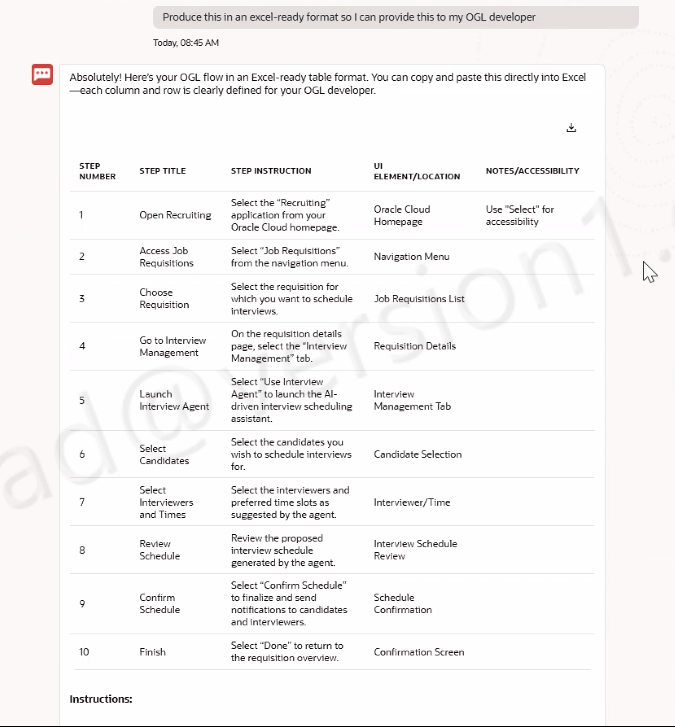
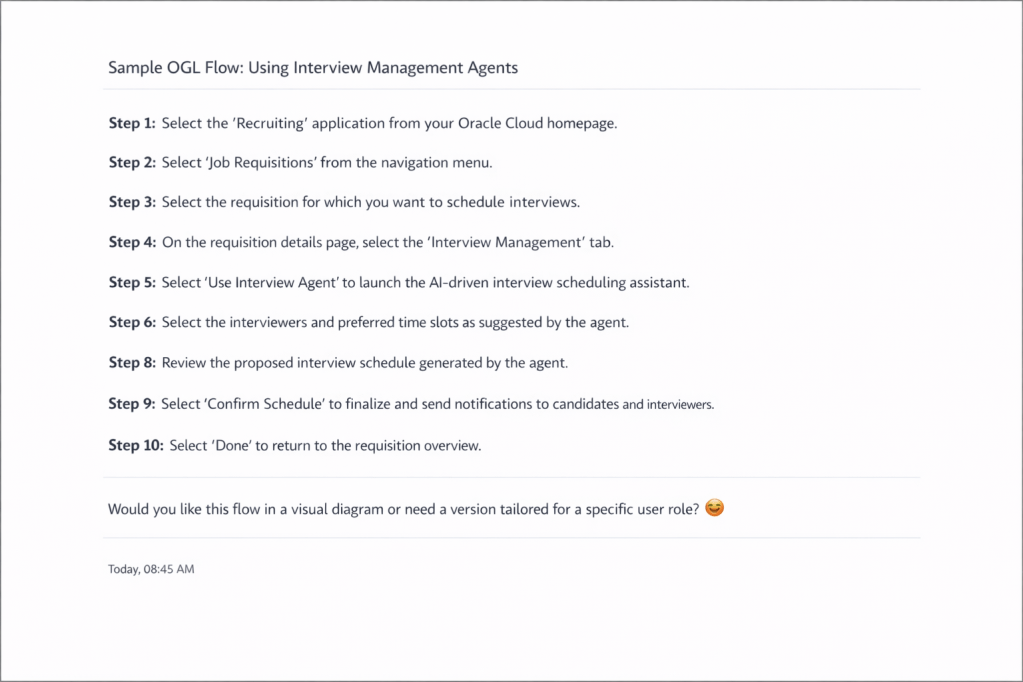
The next step was even more useful. Having identified that the Interview Management Agent feature needed OGL coverage, the presenter asked AI Assist to produce a sample OGL flow. The output was a structured, step-by-step guide covering navigation path, UI element locations, and accessibility notes. When the presenter asked for it in an Excel-ready format, AI Assist reformatted the output into a table with columns for Step Number, Step Title, Step Instruction, UI Element/Location, and Notes/Accessibility, ready for an OGL developer to pick up directly.

So what does this mean in practice? An OGL team no longer has to start from a blank page when a quarterly release drops. AI Success Navigator can triage features, identify which ones need OGL attention, and produce a first-draft flow that a developer can then validate and publish. That’s a material reduction in the time between a feature dropping and users having contextual guidance in the application.

One thing to note: AI-generated flows still need validation against the actual application UI and tailoring to your specific user roles and configuration. The AI is a starting point, not a finished product. But it’s a very good starting point.

The webinar also covered the Testing Agent, which I think gets overlooked. It lets you create test cases from scratch using AI, upload existing test scripts for conversion, and refine them through AI Assist. The connection to OGL is practical: well-structured test cases describe real user workflows, and those workflows are exactly the raw material you need to build accurate OGL guides. If your testing and OGL content creation are happening in silos today, AI Success Navigator gives you a way to bring them closer together.

I’ve always felt that AI Success Navigator and OGL were solving related problems without talking to each other enough. What Oracle is doing now is starting to close that gap, and it’s a direction I’m very happy about.

If you’re not already using Oracle AI Success Navigator and you have an Oracle Cloud subscription, start exploring it. If you’re an OGL practitioner, the AI Assist capability is worth your attention specifically. And if you want to understand how the two products can work together in your programme, now is a good time to start that conversation.

Please note all screenshots are the property of Oracle and are used according to their Copyright Guidelines