Oracle’s Ledger Agent Is Evolving: What You Need to Know About the New Ledger Agentic App

If you’re already using Oracle’s Ledger Agent, there’s an important change arriving with the Oracle Fusion Cloud ERP 26C release. Oracle has introduced the new Ledger Agentic App, which represents the next stage in the evolution of AI-assisted accounting within Fusion. While many of the capabilities will feel familiar, Oracle’s long-term investment is now focused on the Agentic App, and a retirement timeline has been confirmed for the existing Ledger Agent. The good news is that there’s plenty of time to prepare, and getting started is simpler than you might expect.

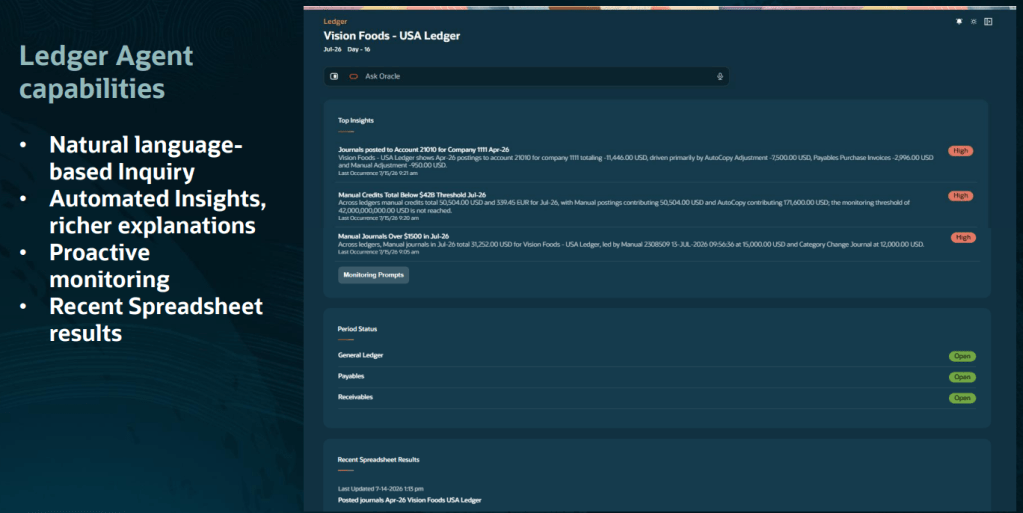
The Ledger Agentic App builds on the foundations of Ledger Agent and brings together accounting insights, proactive monitoring and conversational AI in a dedicated Ledger Workspace. For existing users, the experience will feel familiar. You can still ask questions using natural language and receive financial insights without needing to navigate reports or dashboards. What changes is the overall experience. Rather than offering standalone AI interactions, Oracle is creating a single workspace where accountants can investigate issues, review insights and interact with AI in one place.

In the 26C release, Oracle has enhanced the application’s understanding of accounting terminology and business context, helping it deliver more accurate responses and maintain the flow of conversations more effectively when users ask follow-up questions. This is more than a simple name change. The Ledger Agentic App provides the platform Oracle will use to deliver future accounting-focused AI capabilities.

What happens to the existing Ledger Agent? There’s no immediate pressure to switch. Oracle has confirmed that Ledger Agent will continue to be supported during both the 26C and 26D releases. However, it is scheduled for retirement in 27A, which means organisations currently using Ledger Agent should start planning their transition. 

Oracle recommends evaluating the Ledger Agentic App during 26C and completing the move during 26D, ensuring everything is in place well before Ledger Agent reaches end of life. Importantly, any monitoring prompts and generated insights you’ve already configured within Ledger Agent will remain available through the new Ledger Workspace, making the transition considerably easier. 

One of the most important considerations is licensing. For production environments, the Ledger Agentic App requires Oracle’s Agentic Apps SKU, which is licensed separately from your standard Oracle Fusion subscription. The Agentic Apps licence provides access not only to the Ledger Agentic App, but also to a growing portfolio of agentic applications across Oracle Fusion, including areas such as collections, payables close and billing operations. It also includes access to Oracle’s AI App Builder and agent orchestration capabilities, along with an annual allocation of AI units that can be shared across applications. Licensing models and pricing can vary, so it’s worth discussing your options with your Oracle Account Director to understand what this means for your organisation. 

The good news is that Oracle allows customers to explore the Ledger Agentic App in non-production environments without purchasing the Agentic Apps licence. This provides an opportunity to evaluate the experience, understand the potential benefits and prepare for the transition before making any production licensing decisions. 

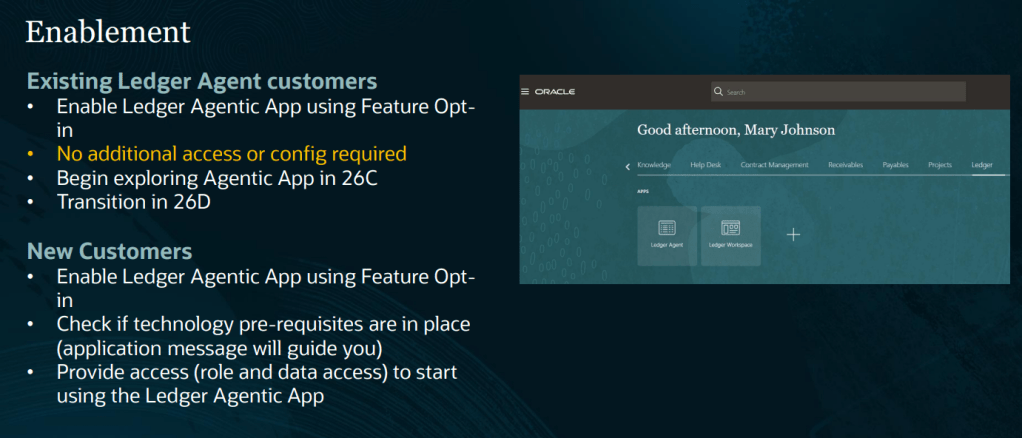
For organisations already using Ledger Agent, enabling the Agentic App is straightforward. There’s no requirement for additional security roles or data access configuration. Administrators simply need to enable the Ledger Agentic Application feature through the General Ledger functional area’s feature opt-in settings. 

Once enabled, users can access both the existing Ledger Agent and the new Ledger Workspace, providing a smooth transition period while teams become familiar with the new experience. If you haven’t yet adopted Ledger Agent, Oracle’s recommendation is even simpler: skip directly to the Ledger Agentic App. 

The introduction of the Ledger Agentic App offers a glimpse into Oracle’s wider vision for the future of finance operations. Oracle is investing heavily in AI capabilities that help finance teams move beyond basic enquiries and into areas such as exception management, root cause analysis and guided decision-making. Future enhancements are expected to help accountants investigate variances, resolve accounting issues and receive recommendations based on organisational policies and financial context. The aim is not to replace finance professionals. It’s to reduce the time spent searching for information and investigating routine issues, allowing teams to focus on higher-value analysis and decision-making. If your organisation is already benefiting from Ledger Agent, the new Ledger Agentic App is a natural next step. 

With support for Ledger Agent continuing through 26D, there is no urgent deadline. However, the transition period provides an ideal opportunity to explore the new experience, understand the licensing implications and begin preparing for Oracle’s future direction. The Ledger Agentic App is clearly where Oracle’s investment is focused, and organisations that start evaluating it now will be well positioned to take advantage of the new capabilities arriving over the next few releases. 

Please note that all screenshots are the property of Oracle and are used in accordance with Oracle’s Copyright Guidelines. 

Oracle’s Cash Processing Agent: Could This Be the End of Manual Cash Matching?

Anyone who has worked in Accounts Receivable or treasury knows that some tasks simply consume more time than they should. Matching receipts to invoices, investigating unidentified payments, tracking cash positions across multiple accounts, and working out how to address funding shortfalls are all activities that can eat into the working day. They are important, but they’re also repetitive, manual, and often frustrating.

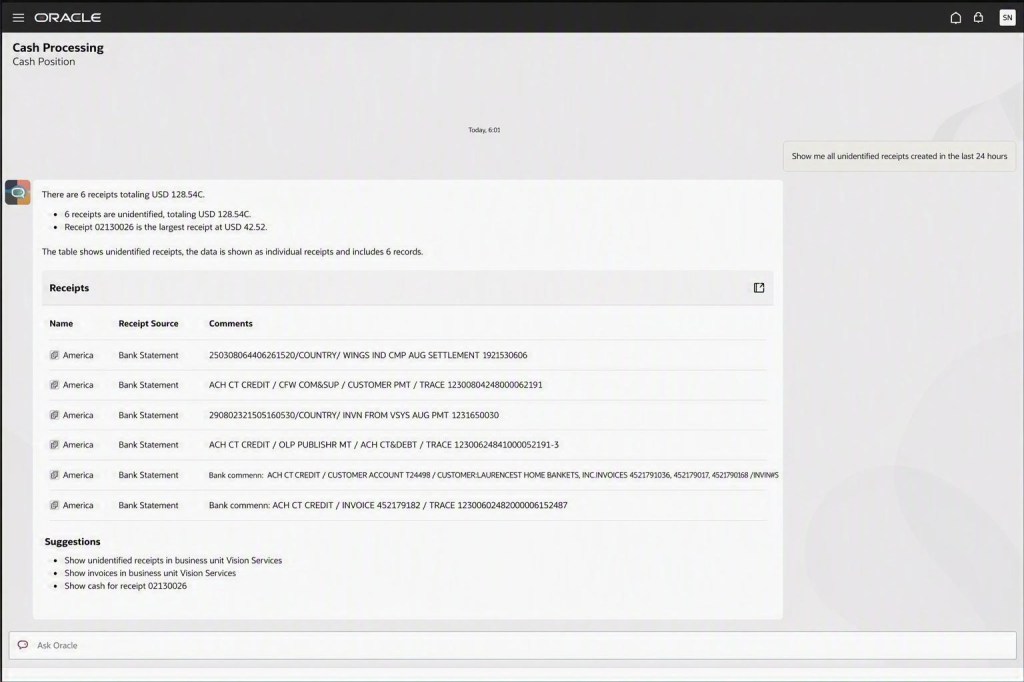
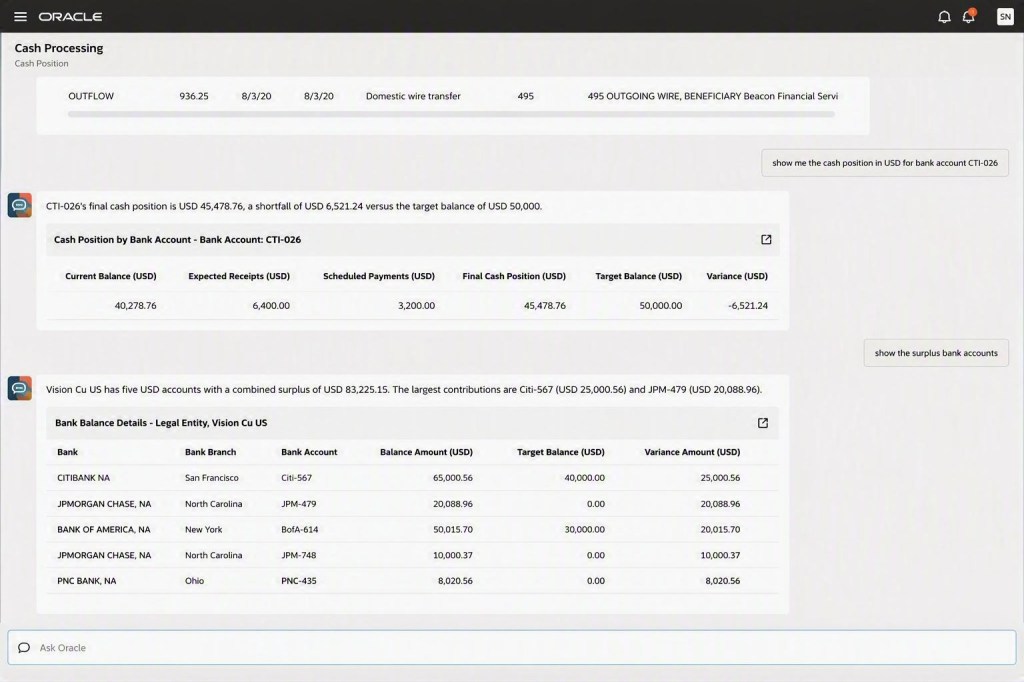
That’s why Oracle’s new Cash Processing Agent caught my attention. Rather than simply helping users analyse information faster, it actively performs many of the activities that finance teams traditionally carry out themselves. It creates receipts, matches payments to invoices, identifies exceptions, monitors liquidity, and even recommends actions when it detects potential cash shortfalls. For finance teams, this has the potential to change the way day-to-day cash management is handled.

Applying customer receipts can be one of the most labour-intensive processes within Accounts Receivable. Payment information arrives from different sources. Bank statements show money arriving in the account, remittance advice may be sent separately by email, and someone then needs to connect the two before applying the payment to the correct invoices.

The Cash Processing Agent automates much of that process. It can create receipts directly from bank statement transactions, extract information from remittance emails and attachments, identify the related invoices, and apply receipts automatically where sufficient information is available. When something doesn’t match, the agent doesn’t simply leave users with an unexplained exception. Instead, it surfaces the issue along with the information needed to investigate and resolve it.

What I particularly like is the conversational approach. Rather than navigating between multiple screens and work areas, users can investigate receipts, review supporting information and take corrective action from within the same experience.

For finance teams, the practical benefit is straightforward:

  • Less manual receipt processing
  • Faster application of customer payments
  • Reduced exception backlogs
  • More time spent resolving genuine issues rather than routine matching

The second area where the Cash Processing Agent adds value is cash position and liquidity management. Many treasury teams still spend a significant amount of time monitoring balances, identifying funding gaps and determining how those shortfalls should be addressed. Traditionally, this has been a reactive process. An analyst identifies a problem and then investigates the underlying cause before deciding what action to take.

The Cash Processing Agent takes a more proactive approach. It continuously monitors cash positions and highlights potential shortfalls as they emerge. Instead of simply raising an alert, it provides context by identifying the transactions contributing to the position and highlighting available surplus funds elsewhere. The agent can then recommend transfers that could be used to address the shortfall.

Users remain in control of the decision, but much of the investigation work has already been completed for them. This means treasury teams can spend less time gathering information and more time making informed decisions.

Like most AI capabilities, outcomes will depend heavily on the quality of the information available to the system. If bank statement imports are unreliable, customer payment data is incomplete, or cash management configurations need attention, those issues should be addressed before enabling the agent. The better the underlying data, the more accurately the agent can perform.

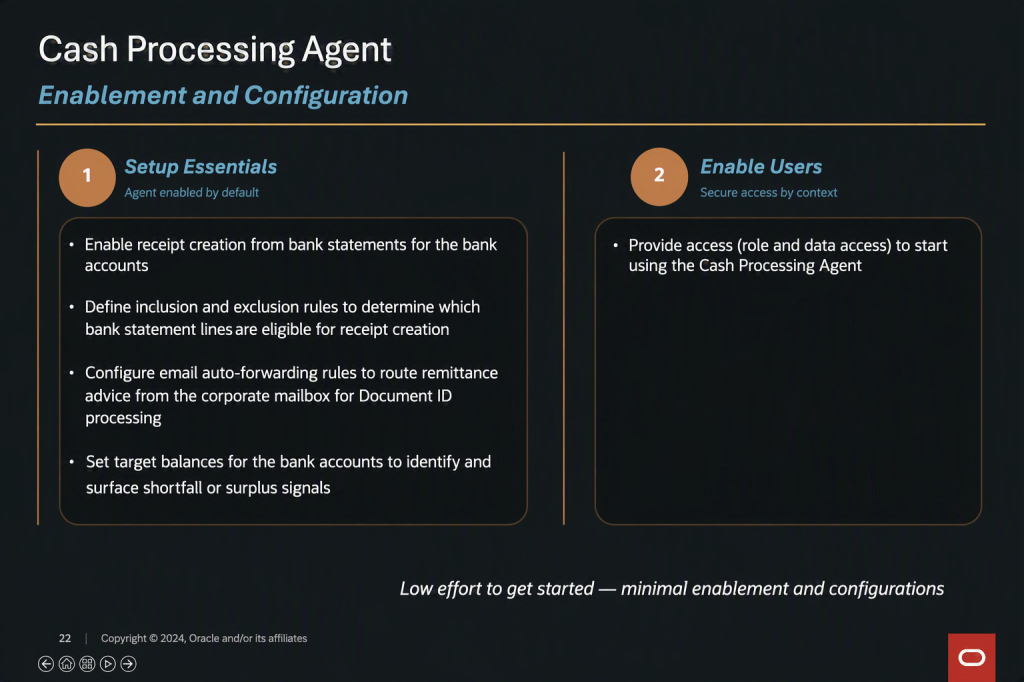
Fortunately, Oracle has kept the setup relatively straightforward. Organisations need to configure how bank statement transactions are processed, define which transactions the agent should work with, and establish how remittance information is captured. For liquidity management, threshold balances can be configured to determine when potential shortfalls should be highlighted.

There’s no shortage of AI announcements in the ERP market at the moment, but many still focus on helping users analyse information or generate content. What makes the Cash Processing Agent different is that it performs work that finance teams have traditionally completed themselves.

By automating receipt processing, identifying exceptions, monitoring liquidity and recommending actions, it has the potential to remove a significant amount of repetitive effort from both Accounts Receivable and treasury operations. For users, that means spending less time matching transactions and investigating balances, and more time focusing on the activities that genuinely require human judgement.

Please note that all screenshots are the property of Oracle and are used in accordance with Oracle’s Copyright Guidelines.
AI Configurator Is Being Retired. Here’s What You Need to Do Before Release 26D

If you’ve ever tweaked an Oracle AI prompt for a generative AI feature because the standard response didn’t quite fit your organisation’s needs, there’s an important change coming in Oracle Fusion Cloud.

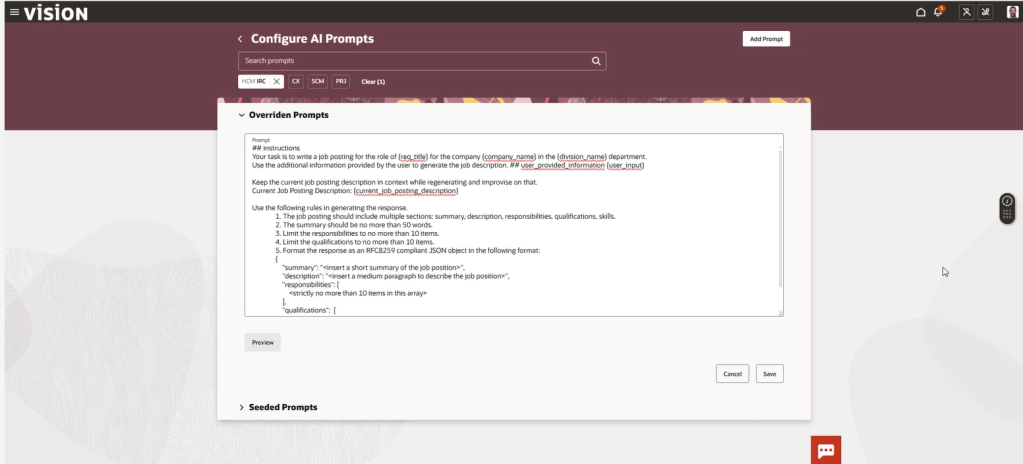
With release 26C, Oracle has officially deprecated AI Configurator, the tool within HCM Experience Design Studio that allows administrators to override delivered AI prompts. Oracle is replacing it with AI Agent Studio, and whilst the change is optional in 26C, it becomes mandatory from release 26D.

That might sound like plenty of time, but organisations that have customised AI prompts should start planning now. This isn’t an automatic migration, and any existing prompt overrides will need to be reviewed, recreated and tested in the new platform.

AI Configurator was introduced to give administrators greater control over Oracle’s embedded AI experiences. It allowed prompt text to be tailored so that AI-generated responses aligned more closely with organisational terminology, tone of voice or business requirements.

While useful, it was also fairly limited. Administrators could edit the wording of prompts, but they couldn’t introduce new variables, remove existing ones or properly evaluate changes before publishing them. Managing prompt customisations also sat separately from the rest of Oracle’s AI tooling, creating a fragmented experience.

Oracle’s direction of travel has been clear for some time. AI Agent Studio is becoming the central platform for building, configuring and governing AI capabilities across Fusion Applications, so it makes sense that prompt management is moving there too.

For many organisations, this is less about replacing one tool with another and more about adopting Oracle’s strategic platform for AI customisation going forward.

The good news is that AI Agent Studio doesn’t just replicate the functionality of AI Configurator; it significantly expands on it.

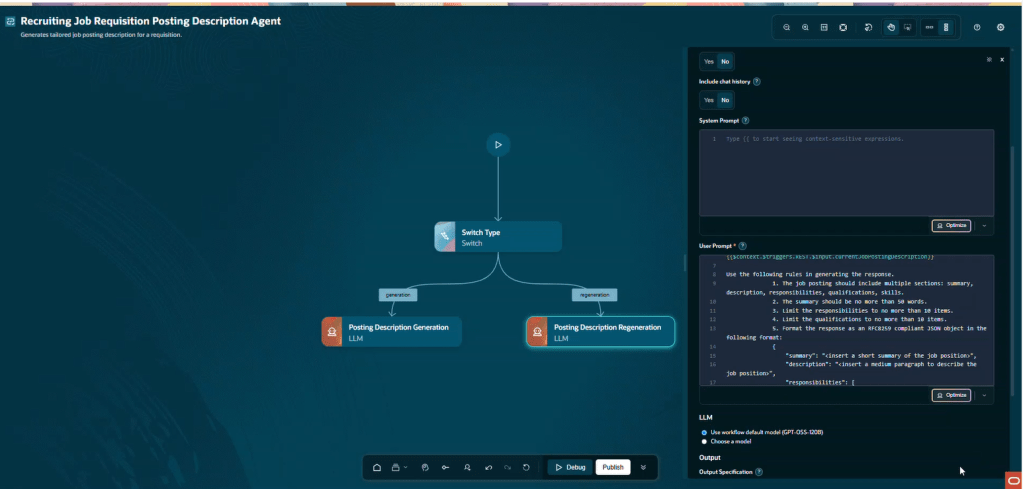
Prompt configurations are managed through Large Language Model (LLM) nodes within agent definitions, giving administrators much greater flexibility. Variables can be added or removed, prompts can be evaluated before being published, and configuration sits alongside the wider agent framework rather than in a separate administration tool. This provides a more consistent way of managing Oracle’s AI capabilities and brings prompt configuration into the same governance and security model used for agents.

Beyond prompt management, AI Agent Studio continues to evolve rapidly. Recent releases have introduced visual workflow design, debugging capabilities, policy models, connectors, Builder Assistant functionality and command line support. It is clear that Oracle’s future AI innovation is centred on this platform.

Does Your Organisation Need to Take Action? The answer depends on how you’ve been using Oracle’s AI capabilities. If you’ve been relying solely on Oracle’s delivered AI functionality and haven’t customised any prompts, the transition should be relatively straightforward. You’ll need to enable AI Agent Studio and validate that your existing AI features continue to behave as expected, but there is unlikely to be significant remediation work.

If you have created prompt overrides in AI Configurator, the situation is different. Oracle has confirmed that existing customisations are not automatically transferred into AI Agent Studio. Organisations will need to review their current configurations, recreate them within Agent Studio and carry out appropriate testing before moving into production.

During the transition period, AI Configurator remains available, allowing administrators to reference existing prompt overrides and use them as the basis for their new configurations. However, the responsibility for recreating and validating those customisations rests with each organisation.

If your organisation has customised prompts, I would recommend taking the following approach:

1. Document Existing Prompt Overrides. Before making any changes, review all existing prompt customisations and document them thoroughly. Capture both the prompt text and the business rationale behind each change. Understanding why an override was created is often just as important as understanding what was changed.

2. Identify the Equivalent Configuration in Agent Studio. Each customised prompt will need to be mapped to the relevant LLM node within AI Agent Studio. This is not simply a copy-and-paste exercise, so take time to understand how the functionality is represented in the new framework.

3. Enable AI Agent Studio. AI Agent Studio must be enabled before any migration work can begin. Organisations that haven’t yet activated the capability should factor this into their planning.

4. Rebuild and Review. As you recreate configurations, take the opportunity to challenge whether older customisations are still needed. In many organisations, prompt overrides were introduced to address specific requirements that may have evolved over time. Migration projects often provide a useful opportunity for housekeeping.

5. Test Before You Deploy. One of the advantages of AI Agent Studio is the ability to evaluate prompts before publishing them. Use this capability extensively. Compare outputs against existing behaviour and verify that the results continue to meet business expectations.

In most cases, very little. Oracle has stated that the end-user experience remains consistent, regardless of whether the underlying functionality is delivered through traditional prompt execution or agent-based execution. The transition primarily affects administrators, implementers and those responsible for configuring AI capabilities.

However, organisations that have invested time in prompt customisation should treat testing as a critical part of the transition. Small changes behind the scenes can sometimes produce noticeably different outputs, particularly where prompts have been heavily tailored.

The retirement of AI Configurator is about more than a product being withdrawn. It signals Oracle’s commitment to AI Agent Studio as the single platform for AI customisation across Fusion Applications.

For organisations that have not yet explored Agent Studio, this change provides a compelling reason to start. What is optional in 26C becomes mandatory in 26D, and those who begin preparing early will have far more flexibility than those who wait until the deadline is approaching.

My advice is simple: if you have prompt overrides in AI Configurator, review them now. Understand what needs to be recreated, familiarise yourself with AI Agent Studio and schedule time for testing. A proactive approach today will make the eventual transition considerably smoother.

Please note that all screenshots are the property of Oracle and are used in accordance with Oracle’s copyright guidelines.