Going Deeper with Oracle AI Agent Studio: Connecting, Triggering, and Building with Confidence – Part 3

In the first two blogs, I looked at how AI Agent Studio connects to the wider enterprise landscape and how agents are triggered and engaged, whether by systems, schedules or users. In this third part, I want to step back slightly and focus on what happens inside the agent itself, specifically how workflows are structured, how context is managed, and how you start designing for reliability rather than experimentation. This is the point where agent design shifts from “can we make it work?” to “can we trust it to run consistently in production?”, and the 26A capabilities give you far more control here than many people realise. To check out the previous blog, please click here.

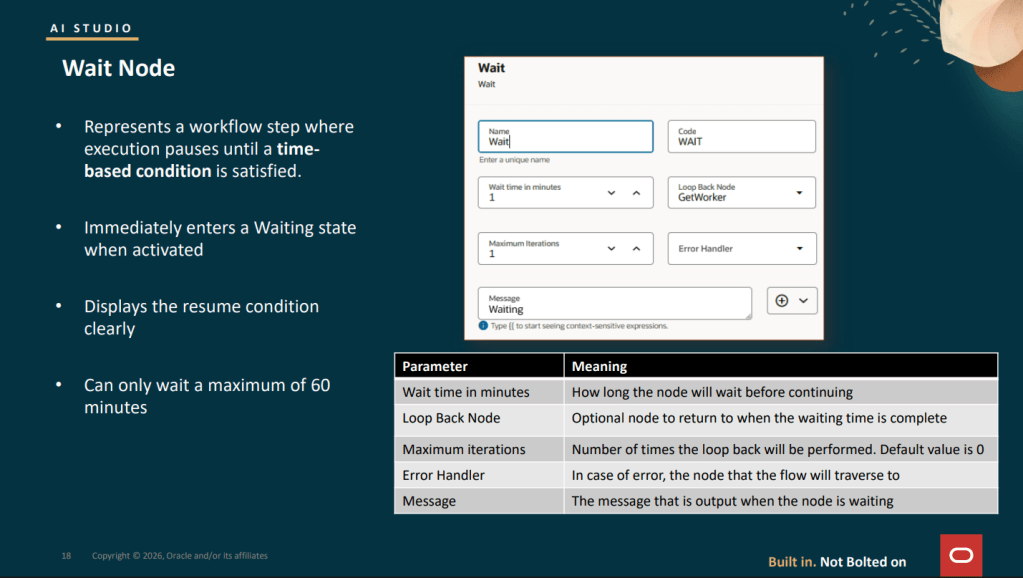
The Wait node, which is being introduced as part of the 26B release, addresses a long‑standing gap in workflow design, where there was no clean way for a workflow to pause and resume later without either completing immediately or blocking indefinitely. When a Wait node is reached, the workflow moves straight into a Waiting state and pauses execution for a configured period of time, up to a maximum of 60 minutes. Once that wait period expires, the workflow can optionally loop back to an earlier point before continuing, allowing it to re‑evaluate conditions or check for updates. This looping behaviour is controlled through two simple settings: the Loop Back Node, which defines where execution returns to, and Maximum Iterations, which limits how many times the workflow can loop before it continues forward regardless.

In practice, this enables a clean polling pattern that is otherwise difficult to model. For example, imagine a workflow that creates a receipt request in Fusion and then needs to confirm that the receipt has been posted before it can move on. By using a Wait node configured for five minutes and looping back to a Business Object read node up to ten times, the workflow effectively gives itself a 50‑minute window to detect the receipt posting automatically before either continuing or escalating. During each wait cycle, the node outputs ORA_USER_INPUT_REQUIRED, and once all iterations are exhausted it returns WAIT_TIME_EXPIRED_AND_MAX_ITERATIONS_REACHED, both of which can be evaluated in downstream If Condition nodes to route the flow appropriately.
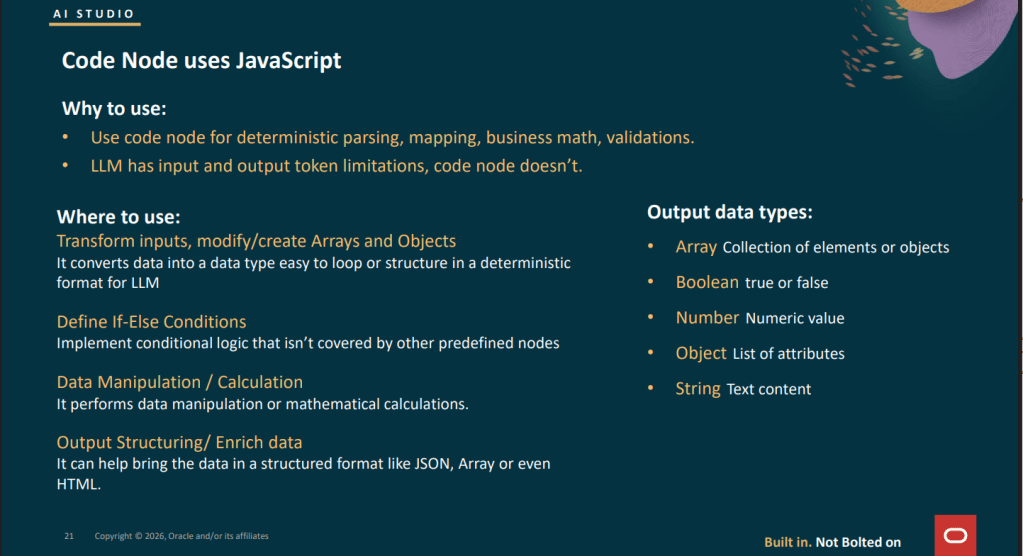
The Code node is one of the most powerful building blocks in a Workflow Agent, and also one of the most commonly underestimated. It executes JavaScript and returns a single value, whether that is an array, boolean, number, object or string. Its real value lies in handling the deterministic work that you should never push into an LLM node, such as data normalisation, threshold calculations, schema validation, array filtering and payload shaping. Used well, it provides a clean separation between predictable logic and probabilistic reasoning, which is a key ingredient in building workflows that behave consistently and are easier to trust in production.

There are a few important constraints to be aware of when designing logic for the Code node. Execution is limited to five seconds, with an upper limit of 100,000 statement executions, and functions cannot be defined within the code, which means recursion is not supported. Most built‑in JavaScript methods are available, but there is no external access, so no REST calls, file system operations, console logging or library imports. The code can read from $context, $currentItem and $currentItemIndex, but it cannot modify the $context object directly. Instead, it simply returns a value, and that returned output is the sole result of the node.

Some of the most effective patterns I’ve seen make particularly good use of the Code node for this kind of deterministic work. Common examples include normalising inconsistent date strings and currency values into canonical formats before passing them to a Business Object write node, or calculating variance percentages for three‑way match validation so that an If Condition node receives a simple boolean rather than needing to express complex arithmetic. Other strong patterns include generating idempotency keys using a combination of $context.$workflow.$traceId and object identifiers to prevent duplicate writes during retries, and filtering arrays returned from Business Object reads so that only active or primary records are passed into a For Loop for further processing.
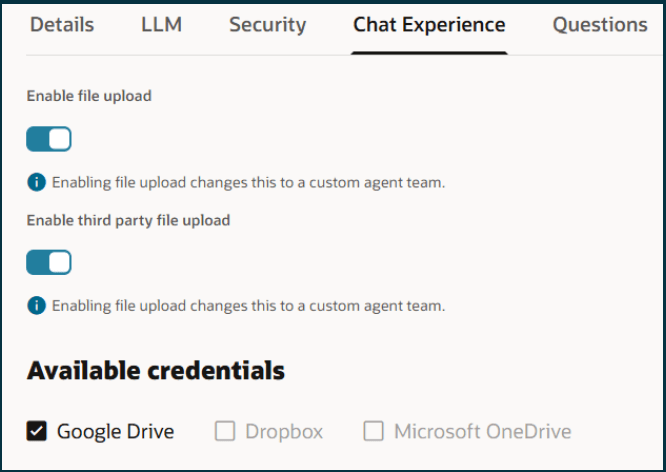
For workflows that are triggered through the AI chat interface, 26A also introduced support for file uploads during conversations with an agent, allowing users to attach up to five files with a combined size of 50 MB. A wide range of formats is supported, including PDF, DOCX, XLSX, PPTX, PNG, JPEG, HTML, Markdown, JSON, XML, CSV and ZIP. To work with these attachments inside a Workflow Agent, 26A required the delivered MultiFileProcessor tool to be added to an agent and that agent then included within the main workflow. This capability significantly expands what chat‑driven workflows can handle, particularly when dealing with documents, structured data and supporting evidence provided directly by the user. In 26B, this has been simplified significantly. Rather than introducing a separate agent, you can now add a Tool node directly into your Workflow Agent and select Chat Attachments Reader as the tool type. This keeps the workflow much cleaner and removes an unnecessary orchestration step. The tool reads the files uploaded in the current chat session and exposes the extracted content directly to downstream nodes, making it easier to act on user‑provided documents without additional plumbing or indirection.

Support is also in place for third‑party file storage, allowing users to upload files directly from Google Drive, Dropbox or Microsoft OneDrive, provided those credentials are configured under the Chat Experience tab in Credentials. Enabling this involves registering an OAuth application with the relevant provider, obtaining the client credentials, configuring the account in Credentials, and then switching on the option to allow users to upload files from connected cloud storage accounts on the agent’s Chat Experience tab. Once configured, this gives users a seamless way to bring external documents into agent‑driven workflows without needing to download and re‑upload files manually.
This third blog has focused on what really makes Workflow Agents robust in practice, from pausing and polling patterns, through deterministic logic in Code nodes, to handling documents and attachments cleanly inside workflows. These are the building blocks that move agents beyond experimentation and into something you can rely on day to day. In the final post in this four‑part series, I’ll bring everything together and look at the remaining 26A and 26B capabilities that round out the platform, focusing on how they support governance, scale and long‑term operational confidence when running AI agents in production.

Please note all screenshots are the property of Oracle and are used according to their Copyright Guidelines
Going Deeper with Oracle AI Agent Studio: Connecting, Triggering, and Building with Confidence – Part 2

In the first blog, I focused on how AI Agent Studio connects to the wider enterprise landscape, but once those connections are in place, the next question is how and when agents are actually set in motion. I touched briefly on triggers in an earlier post, but the depth available here really deserves a closer look. In AI Agent Studio, a published Workflow Agent can be kicked off in three distinct ways: via a webhook, through email, or on a schedule. Each option supports very different use cases, from event‑driven automation to time‑based controls, and understanding how to use them effectively is key to building agents that fit naturally into day‑to‑day operations rather than feeling bolted on.

The webhook trigger is the mechanism behind the invokeAsync API call discussed earlier, but it also supports a more flexible and powerful pattern. When configuring a webhook trigger, you can define named input variables, which are passed into the REST call as part of the parameters object. Within the workflow, those values are exposed via $context.$triggers.REST.$input.<InputName>, allowing you to build parameterised workflows that adapt their behaviour based on what the calling system provides. This is particularly useful when you want a single workflow to handle multiple variations of a process, with the external system supplying the context that determines how the agent responds.

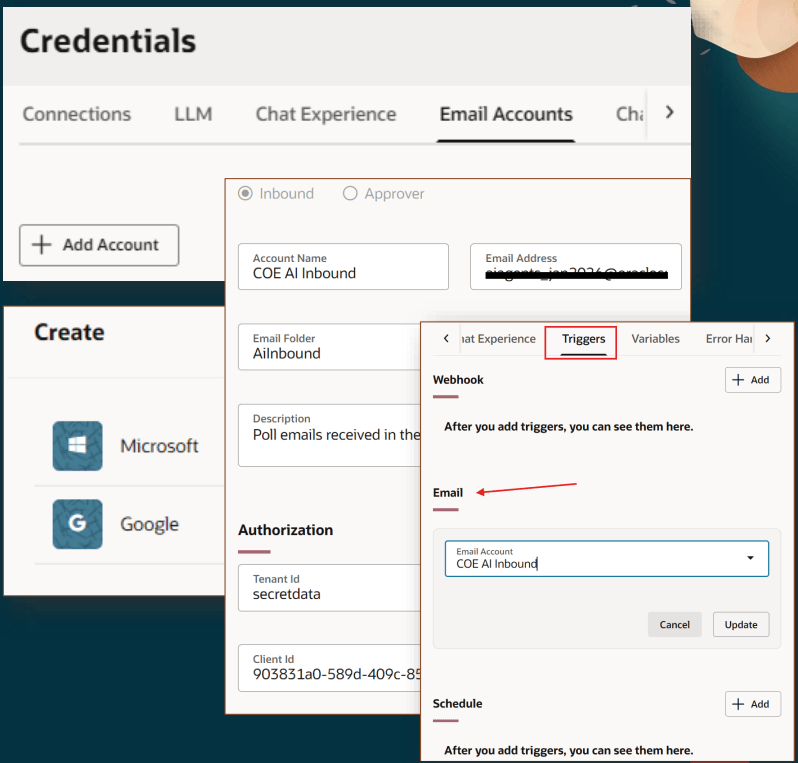
The email trigger is one I find particularly practical. You configure a Google or Microsoft email account under Credentials, set the account type to Inbound, and from that point on, any new email arriving in the inbox automatically kicks off the workflow. The email body, sender address, subject, headers and even attachment content are all exposed as context variables, such as $context.$triggers.EMAIL.$input.content, $context.$triggers.EMAIL.$input.fromAddress, and processed attachment text via $context.$triggers.EMAIL.$input.attachments[0].context. This makes document ingestion workflows genuinely straightforward to build. For example, a supplier can email a quote to a monitored inbox, the email trigger fires, a Document Processor node extracts the line items, and the workflow creates a purchase requisition in Fusion, with no human involvement unless an exception is identified.

The schedule trigger supports two distinct patterns, depending on how you want your workflow to run. Interval scheduling fires on a repeating, time‑based cadence, configured in seconds, minutes, hours or days from a defined anchor point, while recurrence scheduling uses more familiar calendar‑based patterns, either one‑off or repeating, such as weekly on specific days. One practical point to be aware of is that the user creating a scheduled workflow must be assigned the FAI Batch Job Manager Duty role (ORA_DR_FAI_BATCH_JOB_MANAGER_DUTY) for the scheduling job to be created successfully. It is an easy detail to miss during initial setup, but one that is worth flagging early to your security or roles team to avoid unnecessary delays.

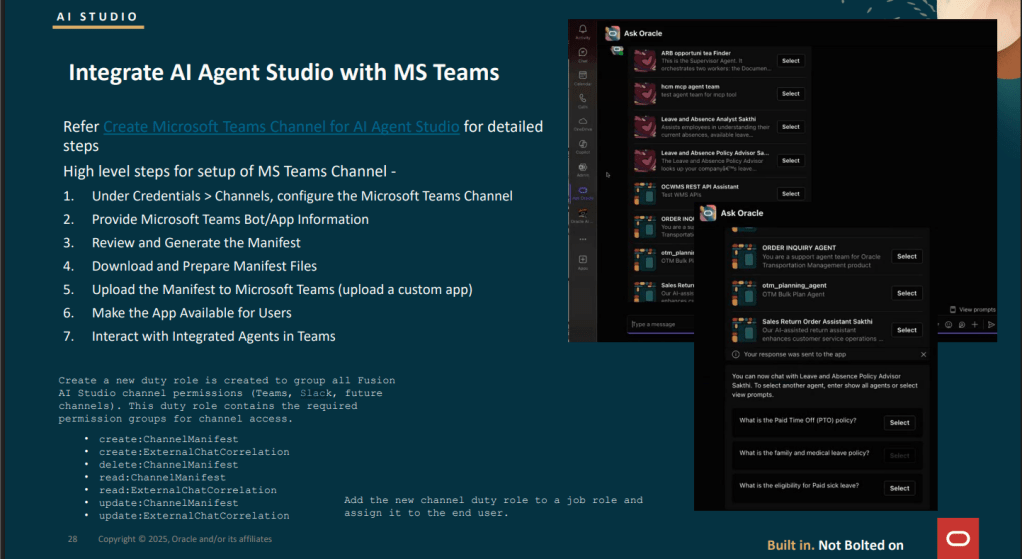
The 26A release also introduced native channel integrations for both Microsoft Teams and Slack, and I expect these to become the primary way many organisations interact with AI agents, rather than relying on the embedded Fusion chat widget. At a high level, the Microsoft Teams setup involves configuring the channel under Credentials, supplying the Teams bot or app details, generating and downloading the app manifest, and then uploading it to Teams as a custom application. Once this is in place, users can discover and select available agents directly within Teams and interact with them in exactly the same way they would through the native Fusion chat experience, but in a collaboration tool they already use every day.

One final point worth calling out is that a new duty role has been introduced to group all channel‑related permissions for both Microsoft Teams and Slack. This role includes permissions such as ChannelManifest and ExternalChatCorrelation, and it is required for any user who needs to configure channel integrations or interact with agents through Teams or Slack. As with any new security object, it is worth factoring this into your role review and security planning early, so it does not become a blocker when 26A goes live in your environment.

This blog is the second in a series of four exploring the latest capabilities in Oracle AI Agent Studio introduced in 26A. In this part, I’ve focused on how Workflow Agents are triggered and how those triggers shape real‑world usage, from event‑driven integrations through to scheduled and collaborative interactions. In the next post, I’ll move on to another key area of the platform, building on these foundations and looking at how the newer features work together to support robust, production‑ready agent solutions.

Please note all screenshots are the property of Oracle and are used according to their Copyright Guidelines
Going Deeper with Oracle AI Agent Studio: Connecting, Triggering, and Building with Confidence – Part 1

I’ve written quite a bit recently about Oracle AI Agent Studio and what it can do at a high level, and those posts have led to some really valuable conversations. A question that keeps coming up, though, is a very practical one: “This all sounds great, but how does it actually fit into the rest of my technology landscape?” Closely followed by, “How do I build something that’s reliable and production‑ready, rather than just impressive in a demo?” This post is my attempt to answer both, drawing on the training content from the AI World partner sessions, which goes into a level of detail that genuinely changes how you think about building with AI Agent Studio, particularly when it comes to integration, robustness and real‑world use. I should say up front that this series is a little more technical than my usual blogs, but it feels important to share, because this is the detail that turns AI from an interesting idea into something you can confidently run and scale.

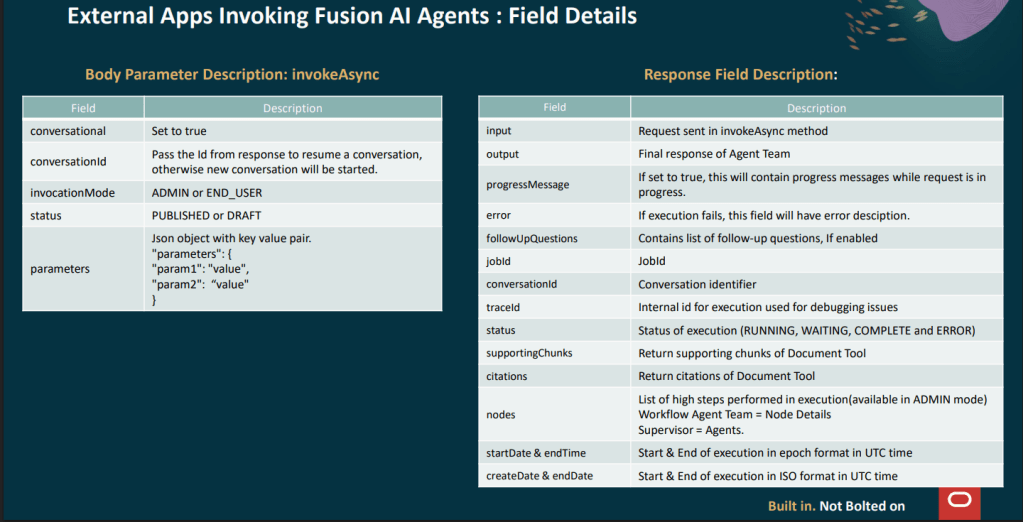
One announcement I haven’t covered yet is the invokeAsync REST API, introduced in 26A, which allows external applications to programmatically call published Agent Teams in Fusion, and this is a significant step forward for organisations where Fusion sits alongside other enterprise systems. It means those systems can now trigger Fusion AI agents directly, without a user ever needing to open the chat interface. The process works in two stages: an external application sends a POST request to the invoke endpoint, passing either a user prompt or structured data, and because AI agents may need time to reason or retrieve information, the call returns a job ID rather than an immediate response. That job ID is then used to poll a separate status endpoint, which returns the final output along with useful metadata such as status, conversation ID, trace ID and timing information. For development and testing, adding ?invocationMode=ADMIN to the status endpoint provides detailed debug output, including the full node execution trace, which is invaluable when you are building and troubleshooting. Authentication follows the standard OAuth 2.0 bearer token approach used across Fusion APIs, so if you are already familiar with OCI IAM and IDCS, there is nothing fundamentally new to configure.

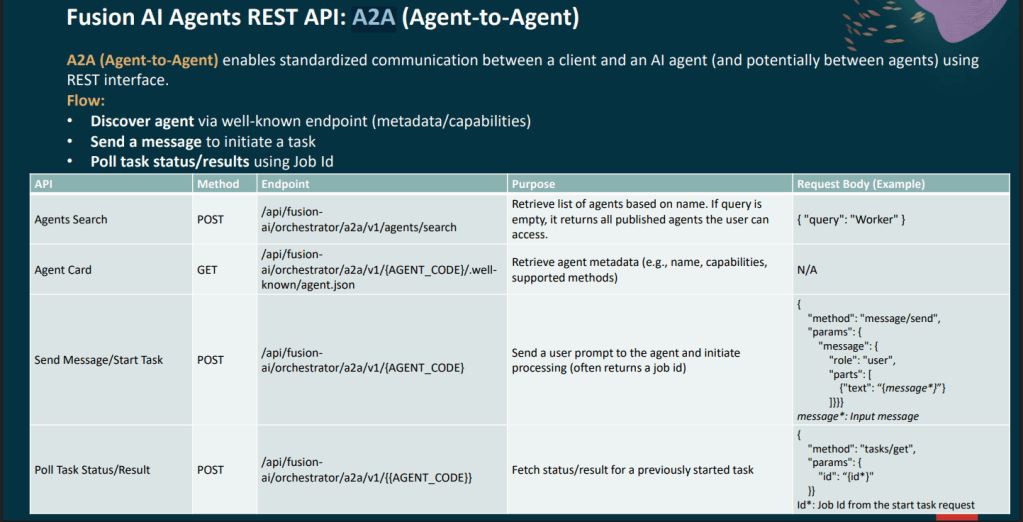
For those looking for a more standardised integration approach, Oracle also introduced support for the A2A, or Agent‑to‑Agent, protocol in 26A. A2A allows a client to discover agents through a well‑known metadata endpoint, often referred to as the agent card, initiate a task by sending a message, and then poll for the result using the same job ID pattern. The agents search endpoint makes it possible to query for published agents by name, which is particularly useful when you are building orchestration layers that need to dynamically discover and delegate work to specialist agents. The agent card itself returns the agent’s capabilities and supported methods in a structured format, making it much easier to establish interoperability between Fusion agents and third‑party systems without relying on custom, point‑to‑point integrations.

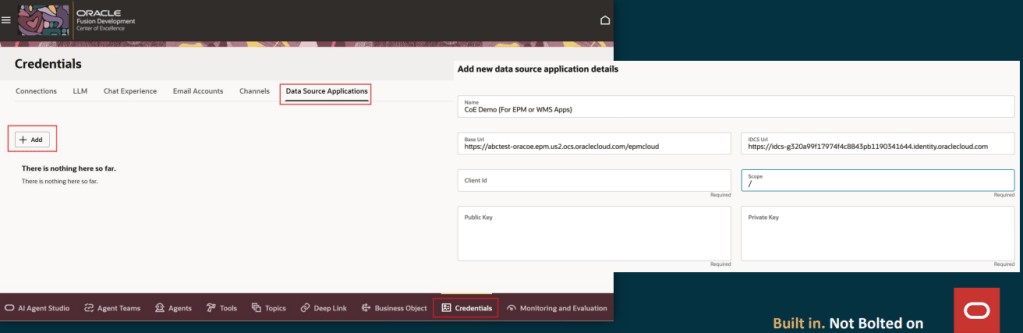
The relationship between Fusion and the outside world does not just work in one direction. In 26A, Oracle introduced Data Source Applications within the Credentials tab of AI Agent Studio, allowing administrators to configure OAuth connections to non‑Fusion systems such as EPM Cloud, WMS, or any external application with a compatible identity provider. Once a Data Source Application is set up with the base URL, IDCS URL, client ID, scope and key pair, it becomes available as a selectable source when creating a Business Object using the resource type “Other Data Source Application”. This makes it much easier for AI agents to securely reach out to external systems, bringing data back into Fusion in a controlled and repeatable way rather than relying on custom or hard‑coded integrations.

At runtime, when a Business Object function within a workflow needs to call an external system, the platform simply uses the saved configuration to obtain an OAuth token and invoke the target API behind the scenes. From the workflow designer’s point of view, it behaves exactly like any other Business Object node, with no additional complexity to manage. This opens up some genuinely powerful patterns, such as an HCM Workflow Agent that validates a job requisition in Fusion, checks headcount or budget in EPM, and then writes the outcome back to a Fusion record, all within a single, governed automation that remains transparent, secure and easy to maintain.

This blog is the first in a short series of four, where I will walk through some of the latest and most important functionality in Oracle AI Agent Studio introduced in 26A. In this opening post, I’ve focused on how agents connect to the wider enterprise landscape, because integration, reliability and governance are what ultimately determine whether AI delivers real value. In the next blogs, I’ll build on this foundation and explore other new capabilities in more detail, looking at how they work in practice and how you can apply them confidently in real‑world scenarios.

Please note all screenshots are the property of Oracle and are used according to their Copyright Guidelines
Agentic Applications for HCM Cloud

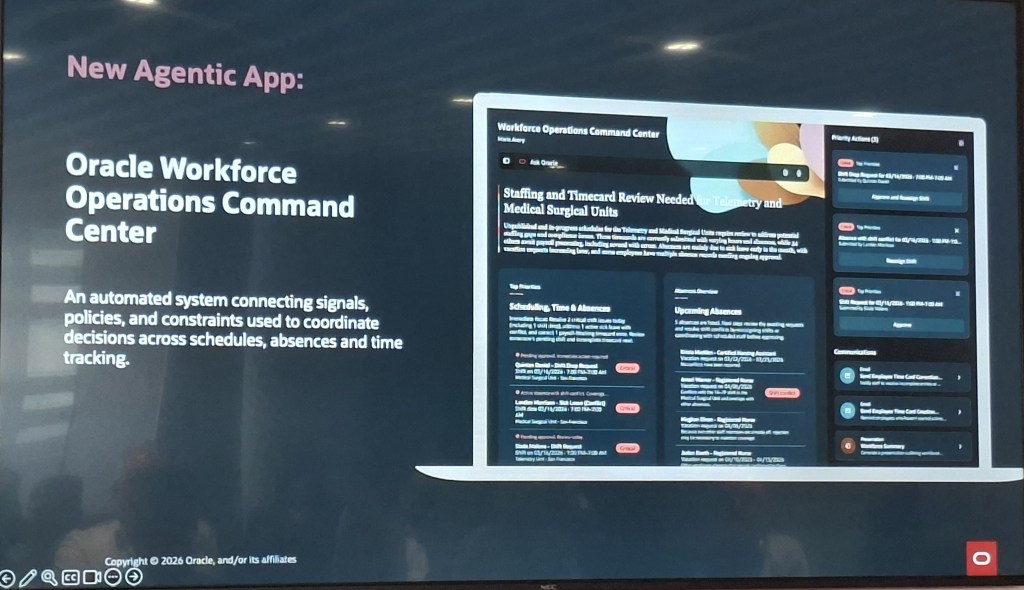
At the AI World London HCM Partner Summit, Oracle unveiled 22 new Agentic Applications across the Fusion suite, including eight designed specifically for HCM Cloud. One of the standout additions is the Workforce Operations Command Centre, which brings scheduling, time, and absence management into one coordinated hub. It highlights real‑time risks, helps managers make confident coverage decisions, and streamlines day‑to‑day operations. During the demo, we saw a live priority queue flagging shift conflicts and timecard issues by severity, with simple one‑click options to approve, reassign, or review — making it far easier to stay ahead of workforce challenges.

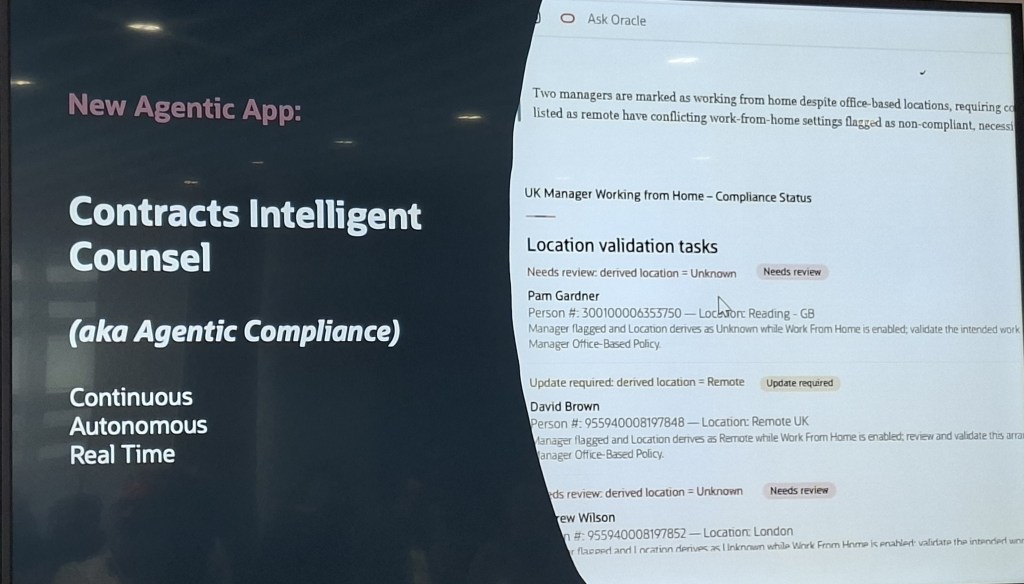
Oracle has also introduced a series of new workspaces designed to streamline everyday manager and employee tasks. The Hiring Workspace for Store Managers brings candidate details, interview scheduling, and urgent hiring requests together to support faster decisions, while the Manager Concierge Workspace unifies compensation, performance, talent, and absence insights with simple, policy‑backed actions. The Team Learning Workspace helps managers stay ahead of compliance risks and focus on development priorities, and the Career Advancement Command Centre connects employees to suitable roles, required skills, and training. Alongside this, the My Help Workspace offers a clear view of open requests and relevant knowledge articles, and Contracts Intelligent Counsel, also known as Agentic Compliance, provides continuous, autonomous monitoring of contract terms and policy changes to reduce compliance overhead.

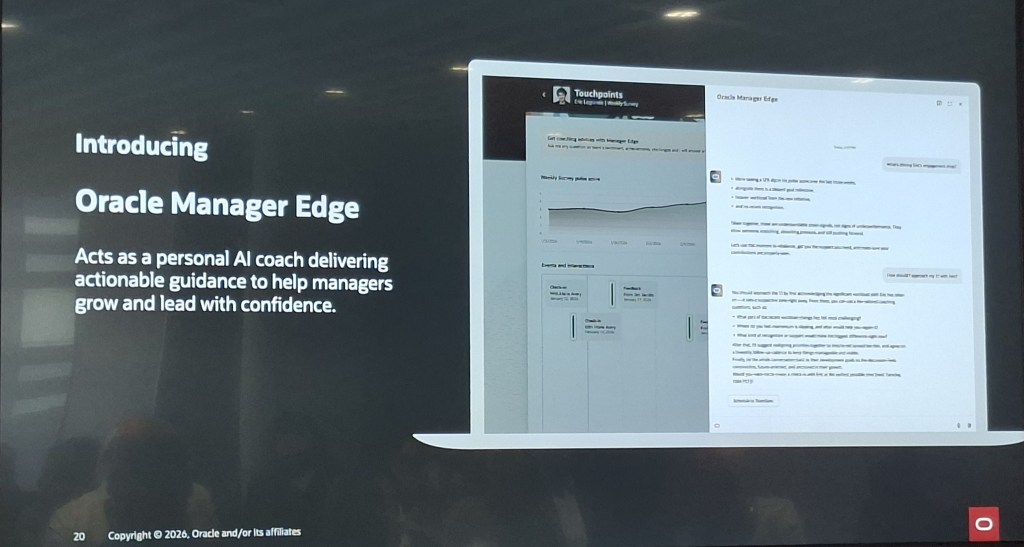
Oracle also unveiled Oracle Manager Edge, a new personal AI coach designed to give managers practical, data‑driven guidance directly within Touchpoints, with suggested actions seamlessly linked to Oracle Team Touchpoints. Although it isn’t an Agentic Application, it will be available through the AI Agent Studio once released, offering organisations an accessible way to bring personalised, context‑aware coaching into everyday management without additional complexity.


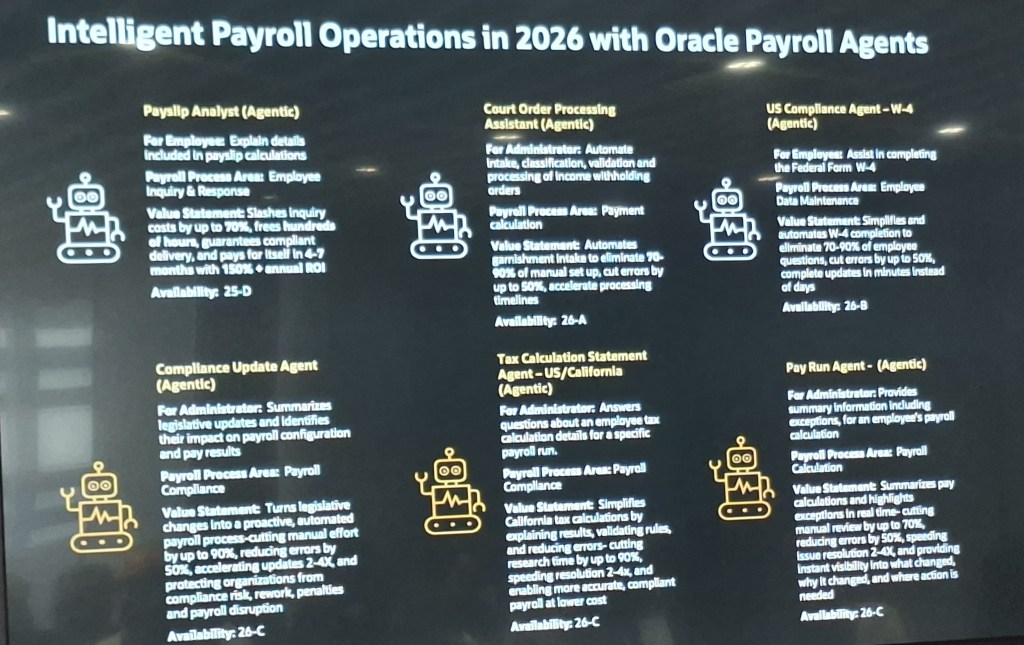
Oracle also confirmed six dedicated Payroll Agents designed to cut manual effort and improve payroll accuracy. The Payslip Analyst, already live in 25D, helps employees resolve payslip queries and has been shown to reduce inquiry costs by up to 70 per cent with a rapid ROI. The Compliance Update Agent (26C) converts legislative changes into proactive configuration updates, removing up to 90 per cent of the manual workload. The Court Order Processing Assistant (26A) fully automates garnishment intake, while the Tax Calculation Statement Agent (26C), currently specific to the US and California, explains the detailed tax logic behind each payroll run. The W‑4 Compliance Agent (26B) automates US tax‑form completion, and the Pay Run Agent (26C) provides real‑time summaries and flags exceptions, reducing manual review efforts by as much as 70 per cent. For UK and global payroll teams, the Payslip Analyst and Compliance Update Agent are the most relevant today, with the remaining agents focused on US‑specific requirements.

As Oracle continues to expand its portfolio of Agentic and AI‑driven capabilities, the direction is clear: more guidance, more automation, and less friction across everyday HR and payroll operations. For organisations already using Fusion, these new applications offer a practical way to improve decision‑making, strengthen compliance, and deliver a smoother experience for managers and employees alike. And with more innovation on the horizon, now is an ideal time to explore how these tools can support your roadmap and help your teams work smarter, not harder.

Please note all screenshots are the property of Oracle and are used according to their Copyright Guidelines.

Under the Hood: How Oracle’s Workflow Agents Actually Work

After sharing my initial thoughts on the Oracle AI World announcements earlier this week, I’ve since taken a closer look at what sits behind the headlines. The announcements focused on what Oracle is delivering, but what really interests me now is the how. That is where things get genuinely exciting for those of us who will be hands-on, building and configuring these new capabilities.

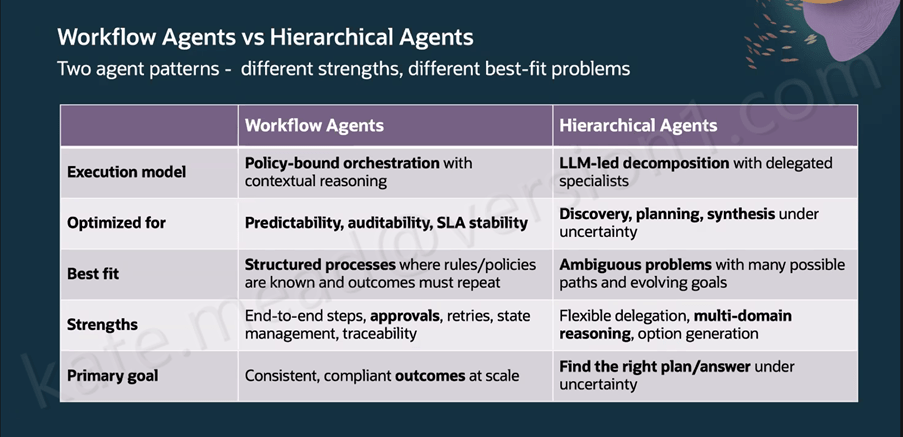
One thing that really helped me make sense of Oracle’s approach was the clear distinction between workflow agents and hierarchical agents. They serve very different purposes, and treating them as interchangeable would quickly lead to the wrong outcomes. Workflow Agents follow policy‑bound orchestration with contextual reasoning and are designed for predictability, auditability and stable SLAs, making them ideal for things like payroll deductions, purchase requisitions or leave approvals where governance and consistency are essential. Hierarchical Agents work differently, using LLM‑led decomposition with specialist sub‑agents, which makes them a better fit for open‑ended problems with many possible paths where multi‑domain reasoning matters more than repeatability. Oracle has intentionally designed the two to complement each other, with Workflow Agents providing the structure by defining stages, approvals, retries and SLAs, while Hierarchical Agents take on the heavier analytical or generative work within specific steps. The result is a balanced model that preserves governance while still giving teams the flexibility to tackle more complex reasoning tasks.

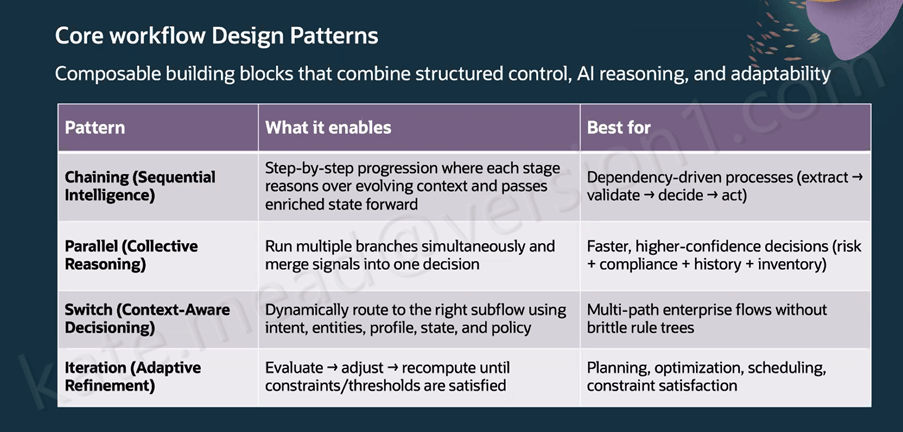
Oracle has outlined seven composable design patterns for building Workflow Agents, each suited to a different type of process. Chaining uses sequential intelligence to pass enriched context from one step to the next, which works well for extract‑validate‑decide‑act processes. Parallel execution allows multiple branches to run at the same time and then consolidates their outputs into a single decision, making it a strong fit for compliance or risk scenarios. Switch flows use context‑aware decisioning to route work based on intent, profile, state and policy; for example, an employee updating deductions after a new baby can trigger both Benefits and Payroll updates automatically with no handoff. Iteration supports adaptive refinement by recalculating until constraints are met, which suits planning and scheduling tasks. Looping introduces self‑correction, such as regenerating and revalidating an invoice when OCR results do not match. RAG‑assisted Reasoning retrieves the right policy information before applying thresholds or routing logic. Finally, timer‑based execution triggers actions on a schedule, such as checking invoice status and notifying the accounts payable owner before an SLA is at risk.

The Workflow Agent canvas in AI Agent Studio groups its building blocks into four areas that shape how an automation behaves. AI nodes include LLM, Agent, Workflow and the RAG Document Tool. Data nodes cover things like the Document Processor, Business Object Function, External REST, Tool and the Vector DB Reader or Writer. Logic nodes provide Code and Set Variables, while the Workflow Control nodes handle governance through Human Approval, If Condition, For Loop, While Loop, Switch, Run in Parallel, Wait and Return. At workflow level, the Triggers tab supports Webhook, Email and Schedule triggers, and the Error Handling section lets you notify recipients by email if a workflow reaches a permanent failure, using context expressions such as $context.$workflow.$traceId. For image-related tasks, the Vision LLM node is the correct choice, although it is classed as a premium tool and comes with associated pricing considerations.

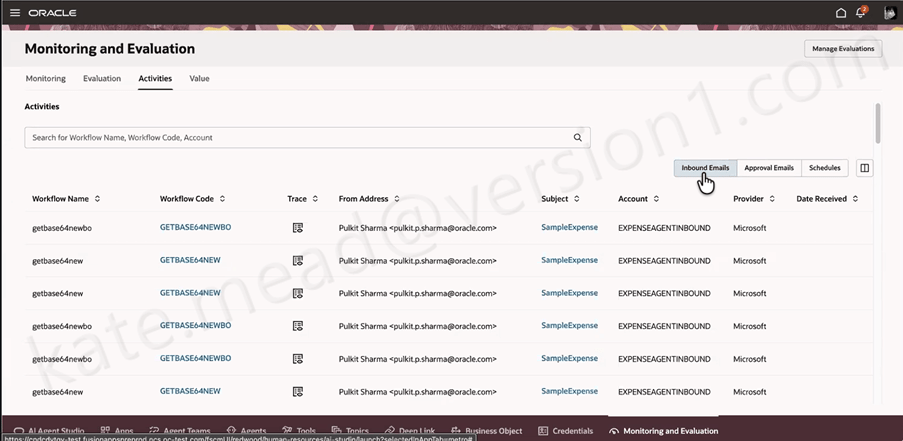
METRO, Oracle’s monitoring layer for Measurement, Evaluation and Testing for Real‑time Observability, gives teams a clear view of what their Workflow Agents are doing across inbound emails, approvals and scheduled runs. From the 26C release, it will also surface AI Unit consumption, which becomes increasingly important as organisations scale their use of agents and need tighter visibility and cost control.

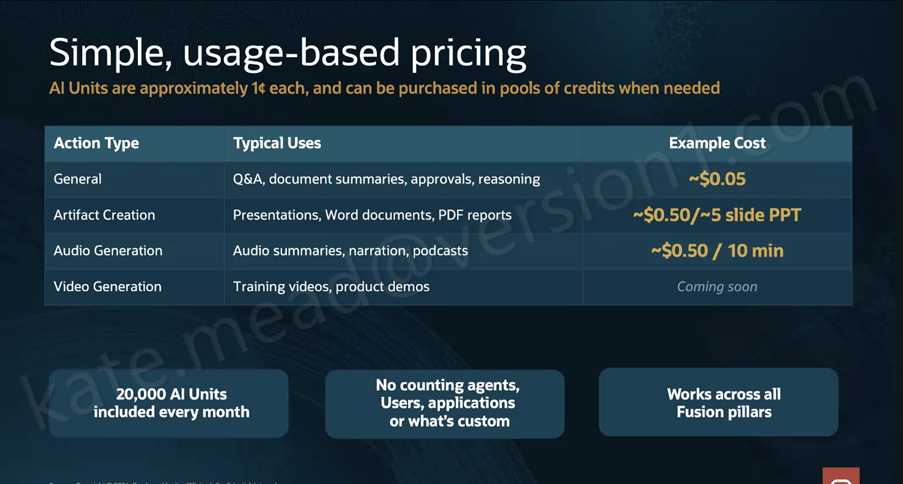
Pricing has been a major consideration for customers exploring AI Agents, and the new structure aims to simplify things through the introduction of AI Units, or AUs. Oracle is expected to publish the full details in April or May, but the core concept is that an AU costs roughly $0.01 and is calculated as: AU consumption = CEILING((Input Tokens + Output Tokens) / 10,000) × Action Value Factor. The Action Value Factor varies depending on the action type and the LLM tier being used. General actions such as Q&A, approvals and reasoning have a 0x factor on the Basic LLM, while Premium and Bring Your Own apply higher factors. Artifact creation and audio generation sit in higher tiers again, with video generation marked as coming soon. Every Fusion customer receives 20,000 AUs per month at no charge, pooled across all pillars with unused units rolling over to the end of the contract term. Additional AUs are available in $1,000 increments.

What I find most compelling about this architecture is that it’s built for the realities of enterprise work rather than an idealised version of it. The self‑correction loops, governance controls, evaluation framework and hybrid agent pattern all acknowledge that real business processes can be messy and that auditability is essential. The 22 new agentic applications arriving in 26B across ERP, HCM, SCM and CX give us a clear benchmark for what good looks like in practice. If you’re interested in exploring how Workflow Agents could support your organisation’s processes, now is a great time to start that conversation.

In the meantime, why not check out my earlier post covering the Oracle AI World announcements? You can find it here.

Please note all screenshots are the property of Oracle and are used according to their Copyright Guidelines
Oracle ERP Cloud Financials 26B

Don’t worry, I haven’t abandoned the world of HCM for ERP just yet. My enthusiasm for Oracle AI is very much alive, and with four new AI agents landing in Financials this release, I simply couldn’t ignore it. I’d never claim to be a Financials expert, but I do know how long ERP users have been asking for meaningful AI capabilities, and this release feels like a real response to that demand. Oracle has clearly leaned in, and there’s plenty here worth getting excited about.

The long awaited Ledger Agent brings an intelligent, AI‑powered experience to General Ledger, helping finance teams work more efficiently and proactively. It continuously monitors balances, journals, and transactions using configurable prompts, surfacing clear, contextual insights only when attention is needed. Accountants can ask natural language questions about balances, variances, journals, and process statuses, and receive precise, easy‑to‑understand explanations backed by correlated ledger and subledger data. By combining proactive monitoring, root‑cause insight, and seamless access to related ledger actions in a single guided experience, the Ledger Agent reduces time spent navigating multiple screens or compiling information manually, supports earlier detection and resolution of issues, and helps teams maintain accurate, up‑to‑date financial positions while respecting existing security and access controls.

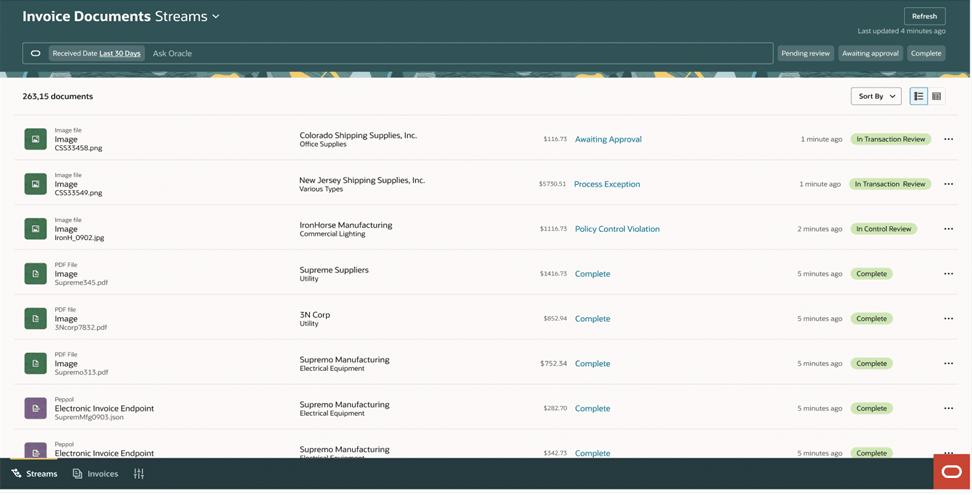
The Payables Agent delivers a modern, AI‑driven approach to invoice processing, helping organisations move towards a truly touchless Payables experience. It automates invoice ingestion, compliance, and control across multiple sources and formats, using GenAI to reduce manual effort, improve data accuracy, and surface only the exceptions that need attention. With unified capture, automated attribute defaulting, intelligent anomaly detection, and a single, streamlined view for managing invoices, teams gain full visibility and control across the invoice‑to‑pay lifecycle. The result is faster processing, stronger compliance, reduced risk of errors or fraud, and improved supplier satisfaction, allowing Payables to shift from a reactive cost centre to a value‑generating function that supports better financial outcomes.

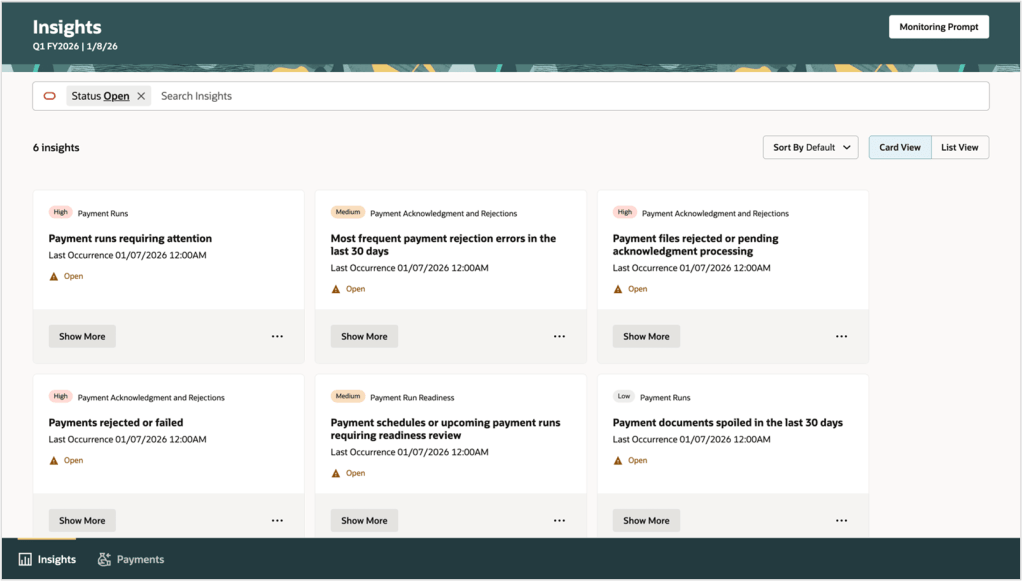
The Payments Agent introduces a smarter, more strategic approach to supplier payments by helping organisations optimise how and when they pay, rather than simply executing scheduled runs. Using AI‑driven insights and conversational guidance, it supports users across the full payment lifecycle, from evaluating payment options such as dynamic discounting and virtual cards, through creating and managing supplier offers, to executing and monitoring payments securely. By assessing the financial impact of different payment programmes in real time and translating decisions seamlessly into action, the Payments Agent improves cash flow, generates incremental financial benefits, and strengthens operational control. The result is a more proactive, insight‑led Payables function that reduces manual effort, highlights exceptions early, and enables finance teams to focus on working capital optimisation and stronger supplier relationships.

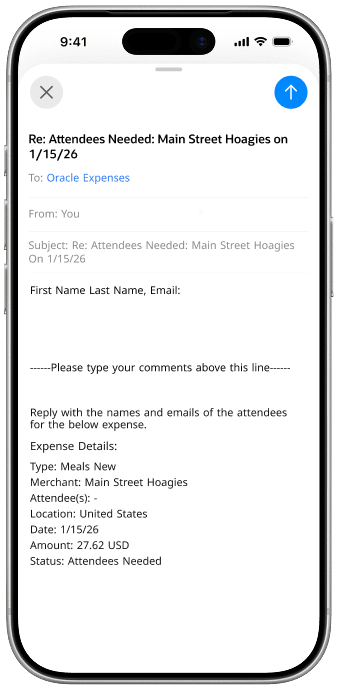
The Expenses Agent simplifies expense reporting by allowing employees to complete and submit expenses entirely through email, using natural language. Employees can forward receipts directly to the agent, which automatically creates the expense and prompts for any missing details, such as justifications, attendee information, or cost centres, via a simple email reply. Once all required information is captured, the expense is ready for submission or can be auto‑submitted in line with company policy. This conversational, email‑based approach reduces manual data entry, minimises errors, and cuts down on back‑and‑forth, accelerating reimbursements while improving compliance and delivering a far more intuitive experience for both employees and finance teams.

To wrap up, this has been my first step into writing about ERP Cloud Financials, and I’ve genuinely enjoyed exploring what Oracle is doing in this space, particularly around AI. I’d really welcome your feedback on this post, whether it’s what resonated, what you’d like to see more of, or where I could go deeper. If there’s interest, I’d be more than happy to write further blogs on Financials and continue sharing my perspective as these capabilities evolve.

Oracle HCM Cloud Learn 26B

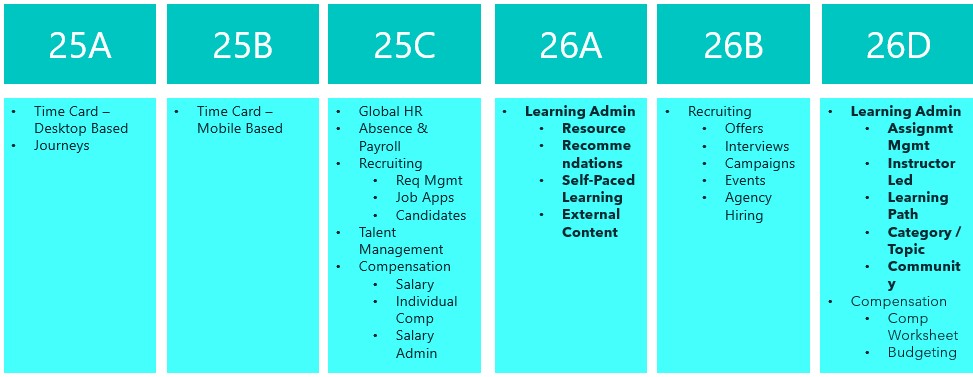
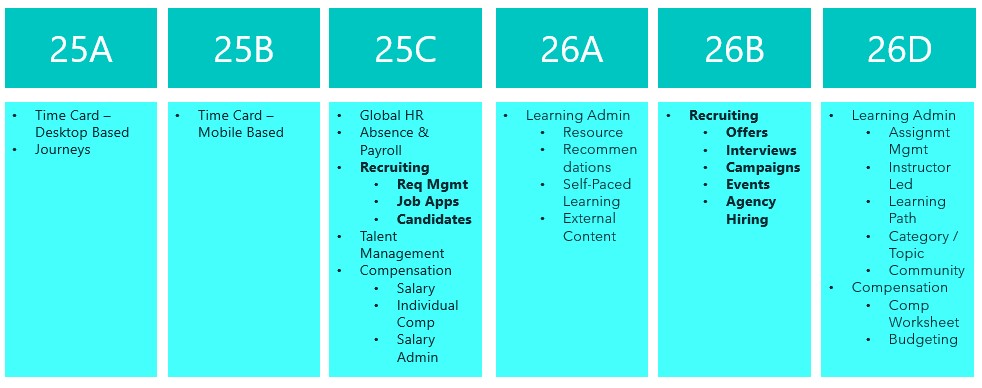
Release 26B is now here and we’re edging closer to the final Redwood deadline for Learn in 26D. This final deadline incorporates the remainder of the Learning Admin tasks, but the key one is Assignment Management. This is going to be a key focus for Oracle in the next couple of releases.

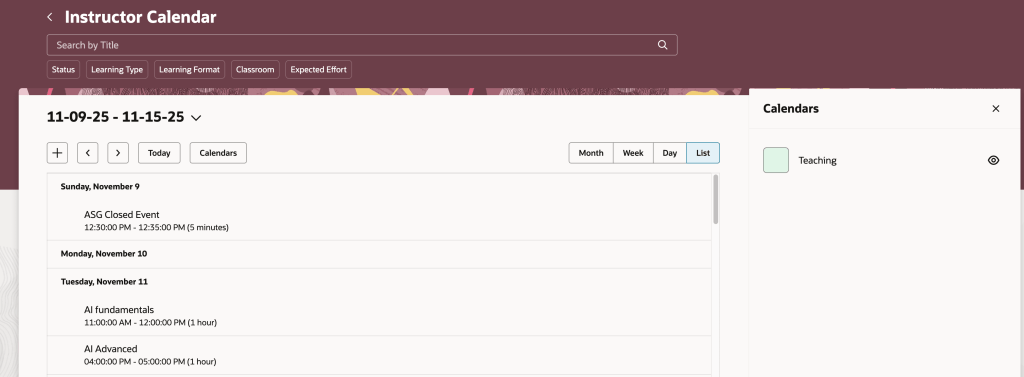
The first feature is one that came from the Customer Idea Lab, which means a customer logged it and other customers voted for it. The enhanced Instructor Activity Center brings all instructor‑led event management into a single, intuitive calendar‑based workspace. Instructors can view and manage sessions in multiple calendar views, access event details and materials directly from the calendar, create or join sessions quickly, and easily manage learners, attendance and enrolments. By centralising scheduling, session management and learner engagement, the experience reduces administration and allows instructors to focus more on delivering high‑quality learning.

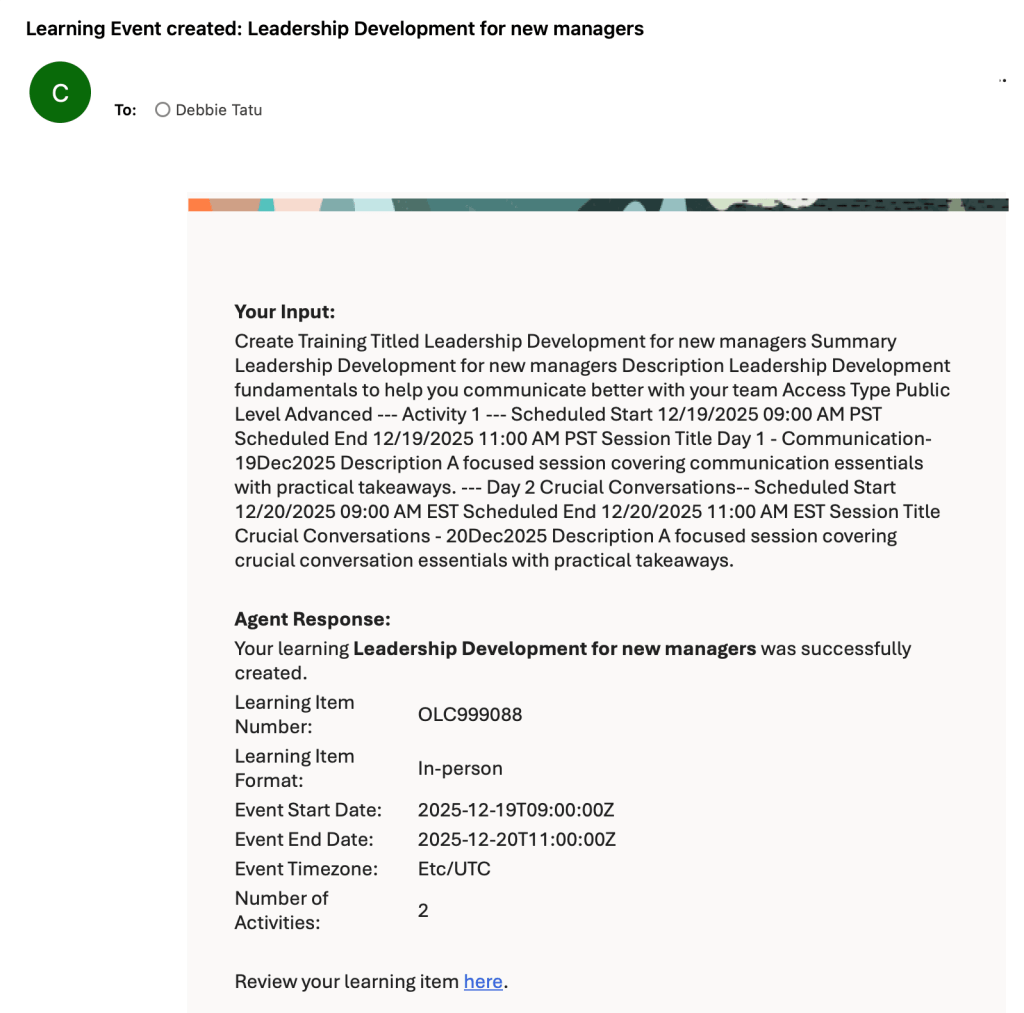
The enhanced Learning Creation Assistant now allows learning content to be created directly from email, making it faster and easier for instructors and learning teams to contribute new content. By simply sending instructions in the email body or as an attachment, users can generate a range of learning formats and receive a confirmation with a direct link to the draft item. This streamlined approach reduces administrative effort, removes reliance on complex workflows, and helps organisations accelerate knowledge sharing across the business.

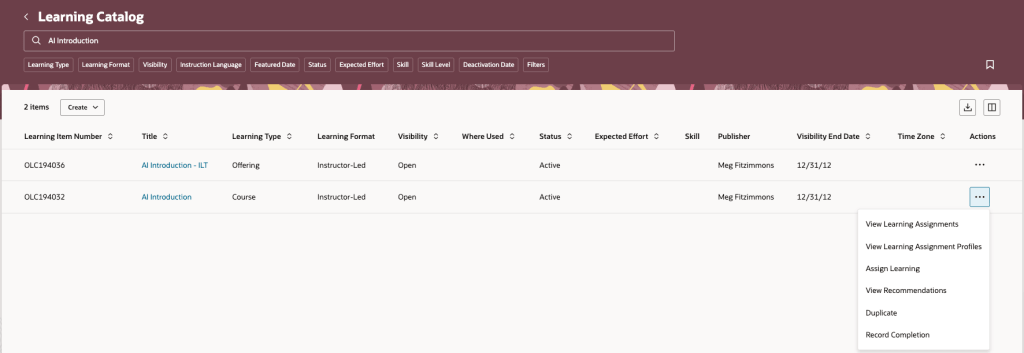
The updated Redwood Record and Request Learning experience makes it easier to record, request and track learning activity across the organisation, whether it sits inside or outside the learning catalogue. Teams can record completions, request external learning, and manage assignments more flexibly, including setting initial statuses and creating profiles with past start dates. Together, these enhancements provide a more complete and accurate view of workforce learning, supporting compliance, personalised development and better‑informed decision‑making.

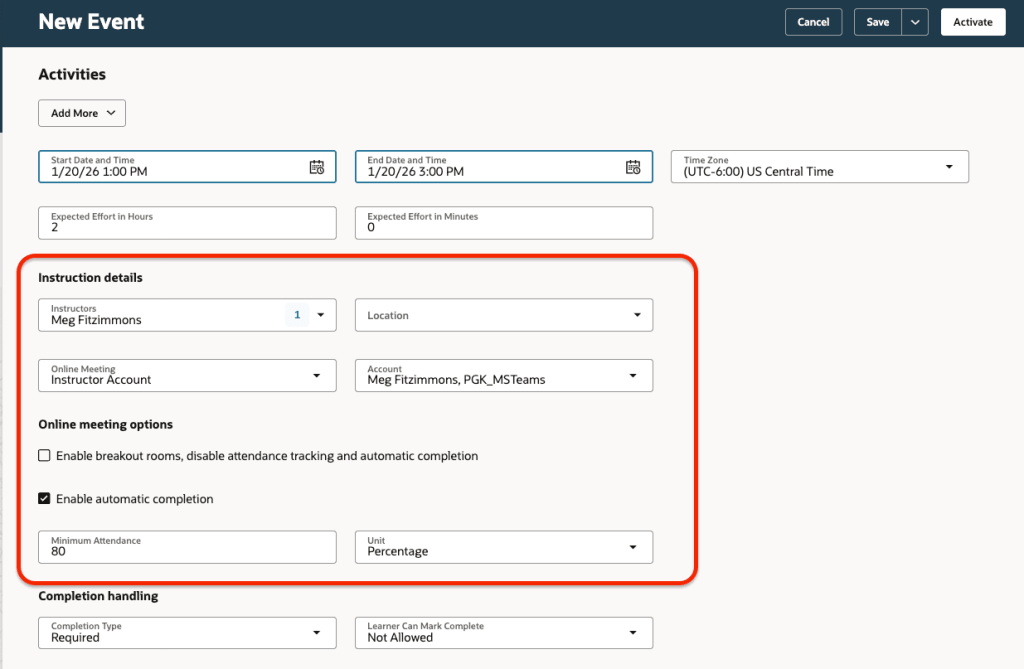
The enhanced support for online learning events makes it easier to deliver engaging, well‑managed virtual classrooms, including richer integration with Microsoft Teams. Instructors can use automated meeting creation, breakout rooms, attendance tracking and completion rules, while learners benefit from seamless access via notifications and calendar invites. Together, these improvements reduce manual effort for learning teams and create a smoother, more connected experience for both instructors and participants.

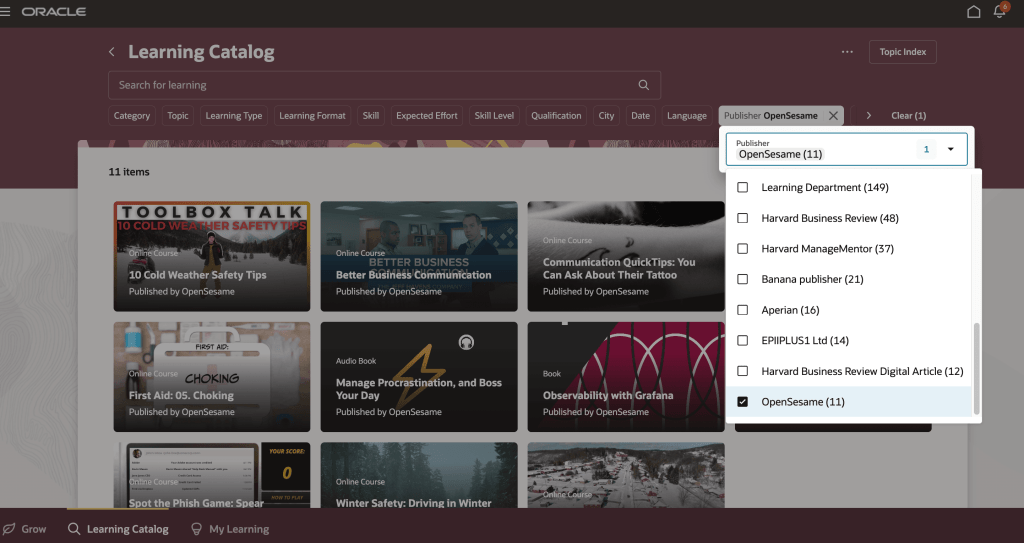
The final enhancements I want to highlight focus on third‑party learning content, specifically integrations with OpenSesame and Udemy. The OpenSesame integration makes it simple to bring high‑quality, third‑party content into Oracle Learning as self‑paced courses, with automated refreshes keeping the catalogue up to date and learner progress tracked seamlessly in a single transcript. Alongside this, the Udemy Business integration allows curated learning paths to be automatically imported and managed within Oracle Learning, giving learning teams clear visibility through xAPI tracking while providing learners with uninterrupted access to Udemy content. Together, these integrations reduce administration, improve catalogue visibility and broaden access to valuable learning resources real‑time tracking of learning outcomes.

Oracle often introduces a few additional features as the month progresses, so it’s always worth keeping an eye out. If anything particularly exciting appears, I’ll share a follow‑up blog to make sure you’re fully up to date. In the meantime, you can read my latest write‑up on the new Core HR features in Release 26B here.

Please note all screenshots are the property of Oracle and are used according to their Copyright Guidelines
Oracle HCM Cloud Recruit 26B

The final deadline to move to Recruit Redwood is the 26B release, so if you haven’t made the move yet, I’d strongly recommend doing so as soon as possible. With that in mind, let’s take a look at what’s coming up for Recruiting in 26B. As is often the case, Oracle may introduce additional features as the quarter progresses, and if any of those are particularly noteworthy, I’ll share a follow‑up update.

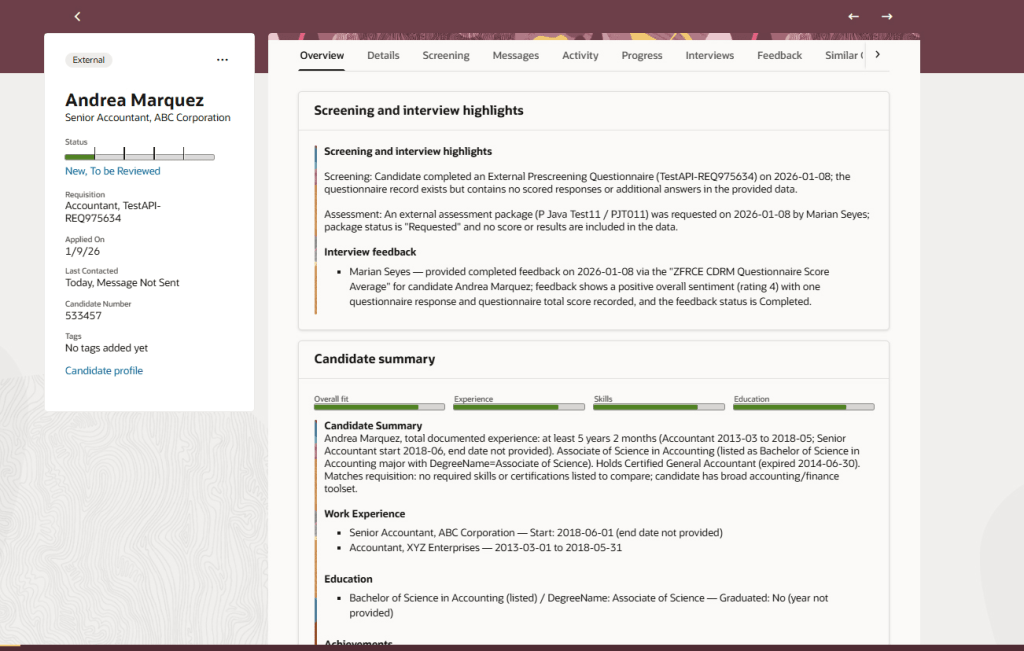
The Job Application Overview in the Redwood experience introduces an AI‑generated summary to help recruiters review applications more efficiently. When a candidate uploads a CV or adds further information after applying, the Overview tab automatically presents a concise summary across three key areas. This includes screening and interview highlights, showing the status of questionnaires, assessments and feedback; an AI‑driven candidate summary covering recent experience, education, skills, achievements and work preferences, with clear call‑outs where these align to the requisition; and a dedicated section for candidate attachments, bringing all supporting documents into one place.

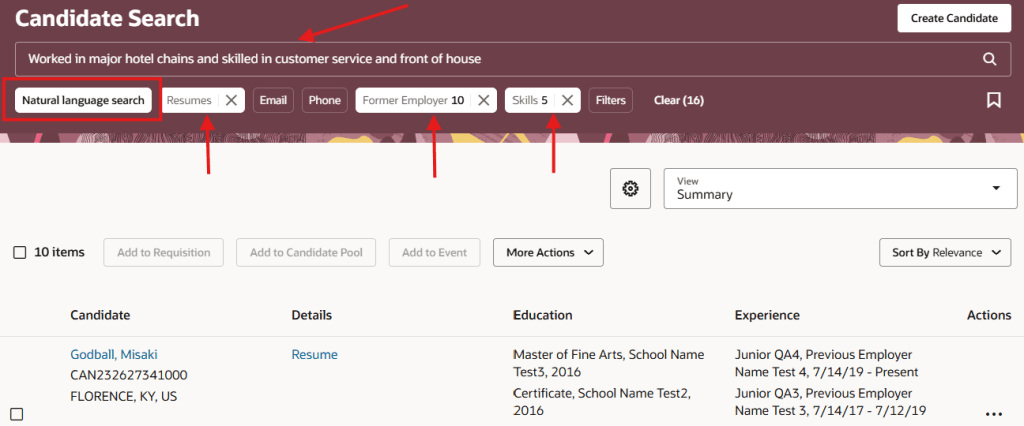
The next feature will not surprise you to hear, is another AI one. The generative AI search capability in the Redwood Candidate Experience makes it quicker and easier to find the right candidates using natural language. By simply describing the type of candidate you’re looking for, the AI automatically translates your input into relevant search filters and values. The search intelligently matches your wording to structured candidate data, applying keywords and related synonyms, and can also include CV content if required. Clear aggregation counts show how many candidates match each filter, while synonym‑based suggestions highlight potential matches found within resumes. All filters remain fully editable, allowing you to refine or adjust the results further and quickly narrow down to the most relevant candidates.

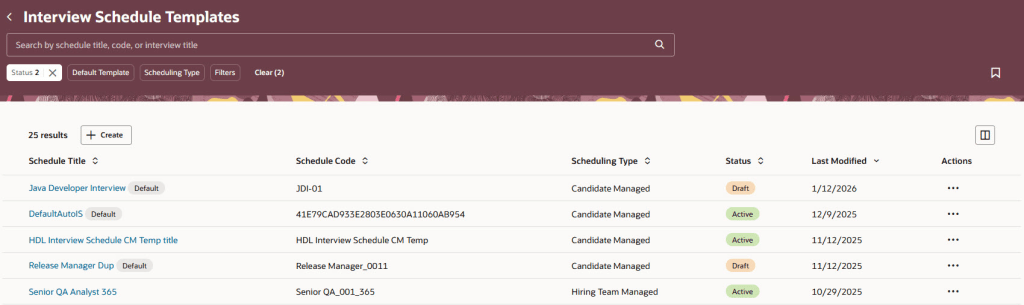
The Interview Schedule Templates list has been rebuilt in the Redwood experience using Visual Builder Studio, making it quicker and easier for recruiters to manage interview scheduling at scale. When the relevant profile options are enabled, the list is accessed via My Client Groups > Hiring. The redesigned page is built to reduce clicks and save time, with intuitive search and filtering, the ability to save searches, flexible sorting, and customisable columns so recruiters can see the information that matters most to them. Templates can be opened, reviewed and actioned directly from the list, and new interview schedule templates can be created just as easily. By aligning interview schedule management with other Redwood list pages, this update delivers a more consistent and efficient experience, helping recruiters spend less time on administration and more time focusing on candidates.

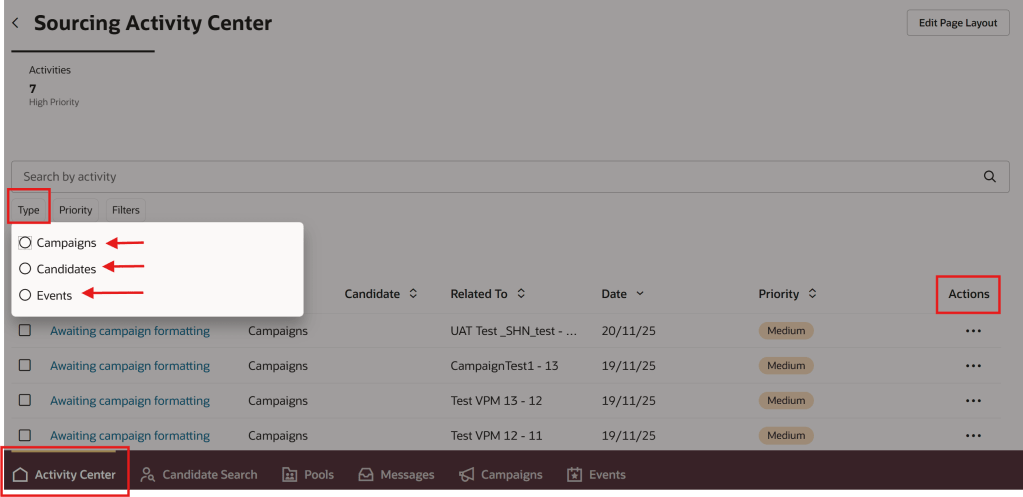
I love an Activity Centre, they’re a one stop shop for all transactions relating to that area. The new Sourcing Activity Centre provides recruiters with a single place to manage all sourcing‑related activities across campaigns, candidates and events, helping them stay on top of priorities and reduce manual tracking. Users with the appropriate access can reach the Sourcing Activity Centre directly from Candidate Sourcing or via a Quick Action. The activity list gives clear visibility of everything requiring attention, with the ability to filter by activity type and quickly identify high‑priority items. Recruiters can open activities to view more detail and take action directly from the list, making it easier to keep sourcing work moving without switching between pages. Activities span campaigns, candidates and events, including follow‑up tasks, campaign status updates and event‑related actions such as registrations and capacity management. By bringing these into one central view, the Sourcing Activity Centre helps recruiters work more efficiently, respond faster, and maintain momentum across their sourcing activities.

Oracle often introduce additional features as the quarter progresses, so it’s worth keeping an eye out for further updates. If anything particularly impactful appears, I’ll share a follow‑up blog to make sure you’re fully up to date. In the meantime, you may also be interested in my latest write‑up on the new Core HR features in Release 26B, which you can find here.

Please note all screenshots are the property of Oracle and are used according to their Copyright Guidelines
Oracle HCM Cloud Payroll 26B

It’s my favourite moment in the quarter, Oracle has just unveiled what’s coming in Release 26B. As you’d expect, this Payroll update includes a strong focus on Redwood‑driven improvements, alongside a welcome number of enhancements that have come directly from customer ideas, which is always great to see. While Oracle may add more features as the month progresses, let’s start by taking a look at what’s been announced so far.

The first feature I want to call out is one that originated directly from a customer idea. If you’re not familiar with Oracle’s Ideas page, it’s where customers can submit suggestions and vote on others, and those that gain the most support often attract Oracle’s attention. While there’s no guarantee an idea will make it into the product, it’s a great way to influence the roadmap. One such idea has led to the new Redwood Earnings and Deductions page, which brings all employee earnings and deductions into a single, streamlined workspace. From one clear summary view, payroll administrators can review and manage records across a chosen date range, drill into details such as values, costing and processing history, create new entries and even submit QuickPay, all without switching between pages. The result is a more intuitive day‑to‑day experience that supports accurate, timely payroll processing.

Another set of enhancements that’s worth calling out has also come directly from customer ideas, and it’s great to see Oracle responding to what users have been asking for. The new Redwood QuickPay and QuickPay Cycle flows make it far easier to run payroll for an individual employee when needed, all within a guided, Redwood‑based experience. Administrators can review and adjust earnings and deductions, submit QuickPay, and move through each stage of the process with clear visibility of tasks, results and statuses, including payslips and payments where required. With flexible task selection, automatic skipping of steps that aren’t relevant, and the ability to verify results as you go, off‑cycle processing becomes much simpler without losing control or confidence.

Alongside this, Oracle has also made it easier to manage corrective actions across payroll flows. A new security approach allows administrators to grant designated users the ability to resolve issues on flows they didn’t initiate, without relying on complex, per‑task group ownership. This reduces administrative overhead, speeds up issue resolution, and ensures access remains tightly controlled to only the flows each user is responsible for managing.

Turning to legislative updates, UK users will be pleased to see that a long‑awaited permanent solution for Statutory Neonatal Care Leave and Pay is now in place. Employers can record neonatal care absences and make statutory payments where eligibility is met from April 2025, with support for day‑one entitlement, accrual of up to 12 weeks’ leave, and flexible take‑up within 68 weeks of discharge, all backed by the necessary legislative data and RTI reporting. Alongside this, LGPS pension calculations during child‑related leave have been improved to ensure contributions are based on actual pensionable pay where it exceeds assumed pensionable pay, using daily proration to accurately handle pay changes mid‑leave and deliver more precise employee and employer contributions.

With the recent introduction of new Irish legislation, it’s no surprise that this release includes a strong set of updates for Ireland. Support has been added for Parent’s Leave Benefit payments and offsets through new payroll attributes that simplify absence setup and improve the accuracy and consistency of benefit calculations, alongside additional attributes to support the processing of parental leave more broadly. There are also important enhancements for statutory redundancy and termination lump sum payments, including a new predefined redundancy element to handle tax‑exempt payments and improved support for calculating and reporting termination lump sums based on service and exemption rules.

Further updates introduce payroll attributes to support Health and Safety entitlements and payments, helping organisations correctly calculate both statutory and benefit‑based payments linked to these absences. Finally, a new Ireland Gender Pay Gap reporting solution provides an assignment‑level extract and a ready‑to‑use spreadsheet template, streamlining the collection of pay and hours data and supporting all required statutory calculations. Together, these changes significantly reduce administrative effort while helping organisations remain compliant with Irish legislative requirements.

There’s just one update to call out for our US customers this time, but it’s an important one. Address Search has been enhanced to support FedRAMP‑compliant environments, meaning organisations operating in federally regulated pods can use the same address search functionality while meeting stringent security and data protection requirements. The experience remains unchanged for users, ensuring consistent behaviour across both commercial and FedRAMP environments while continuing to support downstream processes such as payroll.

As mentioned earlier, Oracle often releases additional features as the month goes on. If any of these turn out to be real stand‑outs, I’ll share a follow‑up blog to keep you up to date. In the meantime, you might like to take a look at my latest post on the new Core HR features in Release 26B, which you can find here.

Please note all screenshots are the property of Oracle and are used according to their Copyright Guidelines
Oracle Fusion Common Features 26B

It’s my favourite time of the quarter, Oracle has just shared what’s coming in release 26B. I don’t usually write about the Common Features releases, but this is where the really exciting developments for AI Agent Studio tend to appear, and this update is no exception. As ever, more features may follow later in the month, but for now let’s take a look at what’s been announced so far.

AI Agent Studio now supports the creation of agentic apps, bringing together multiple specialised AI agents to deliver a single, seamless user experience. Rather than relying on one general‑purpose agent, organisations can combine task‑focused agents such as Sales, Inventory or Finance, each with its own context and reasoning, to provide deeper insights and more relevant actions. This modular approach makes it easy to scale and evolve apps over time, while enabling them to analyse information, prioritise activities and recommend actions that help drive the business forward.

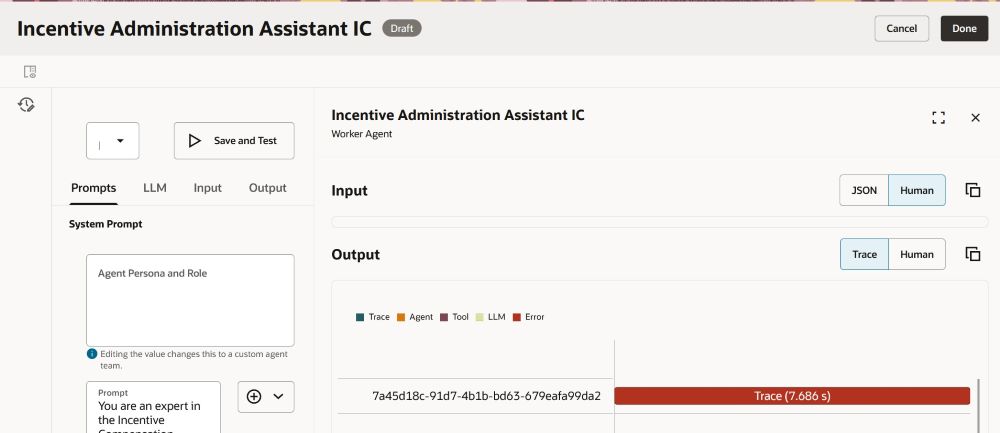
The new Playground capability in AI Agent Studio makes it much quicker, and safer, to refine and validate custom AI Agents by letting you edit and test individual parts of an agent team directly in the studio, rather than running the entire end‑to‑end flow each time. You can isolate specific nodes (including supervisor, agent and LLM nodes), tune prompts and parameters, and see results immediately using Save and Run, with dynamic prompt insertion to add expressions on the fly and Run History to track changes. In practice, this shortens the build–test cycle, improves quality control, and gives teams far more confidence when creating and evolving custom AI Agents because they can verify behaviour in real time before publishing. I’m really looking forward to this one!

AI Agent Studio now includes a set of Oracle‑managed, predefined topics that can be applied across agents and agent teams to help deliver more consistent and professional interactions. These topics support areas such as professional voice and tone, age‑neutral language and gender‑neutral responses, automatically shaping outputs to be appropriate, inclusive and business‑ready. By applying these topics directly within agents and nodes, organisations can accelerate agent design while increasing confidence that responses align with expected standards and organisational values.

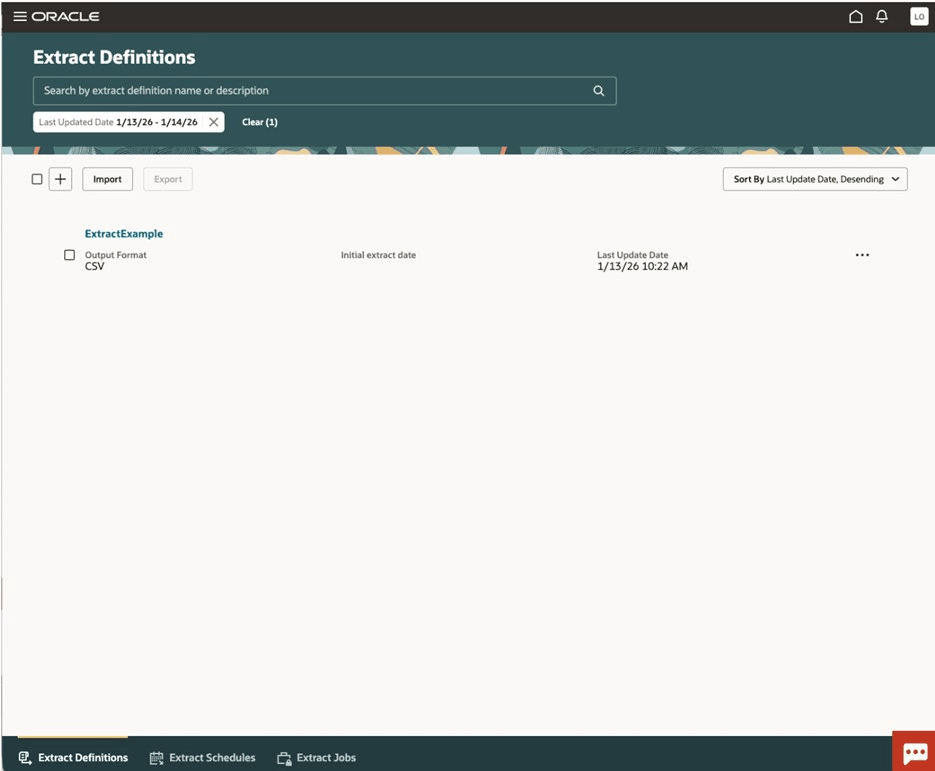
The final feature isn’t an AI one, but a integration change. This Redwood enhancement enables faster and more reliable data extraction by shifting reporting and integration workloads away from the transactional system and onto a read‑optimised replica, synchronised in near real time. By extracting data from a replicated Autonomous Data Warehouse, organisations can reduce load on live Fusion applications while benefiting from a modern architecture that abstracts business objects from the underlying data model. To support this, specific security changes are required, including enabling the external application integration profile option, assigning new extract and scheduling privileges, and granting roles to allow users to manage extracts and securely view or download files, ensuring controlled access to this high‑performance data extraction capability.

As noted earlier, Oracle may introduce further Common Features later this month. If any of these updates stand out, I’ll share a follow‑up blog covering the highlights. In the meantime, you might like to read my latest post exploring the new Core HR features in Release 26B, which you can find here.

Please note all screenshots are the property of Oracle and are used according to their Copyright Guidelines