Redwood Time & Labor — Planning Your Move

Everyone is talking Redwood for Oracle SaaS solutions, but let’s focus on Time & Labor (OTL). OTL stands out as one of the select modules that influences both Human Capital Management (HCM) and Enterprise Resource Planning (ERP). It serves a dual purpose: tracking time for payroll purposes and allocating costs within the Project Portfolio Management (PPM) module.
Redwood Timecard

With the upcoming Release 24D, the transition to Redwood Timecards becomes compulsory, signalling the end of support for Responsive Timecards. What does this entail? Post 24D, no bug fixes will be issued for Responsive Timecards. Moreover, should you submit a Service Request (SR) to Oracle concerning a Responsive Timecard, the recommended resolution will be to switch to Redwood. Considering that Release 24D is on the horizon, less than six months away, it’s crucial to start planning your migration immediately.
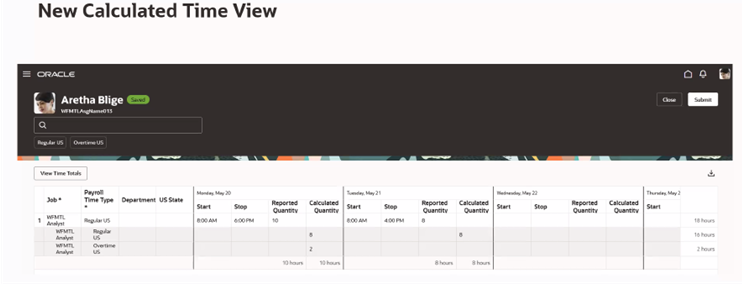
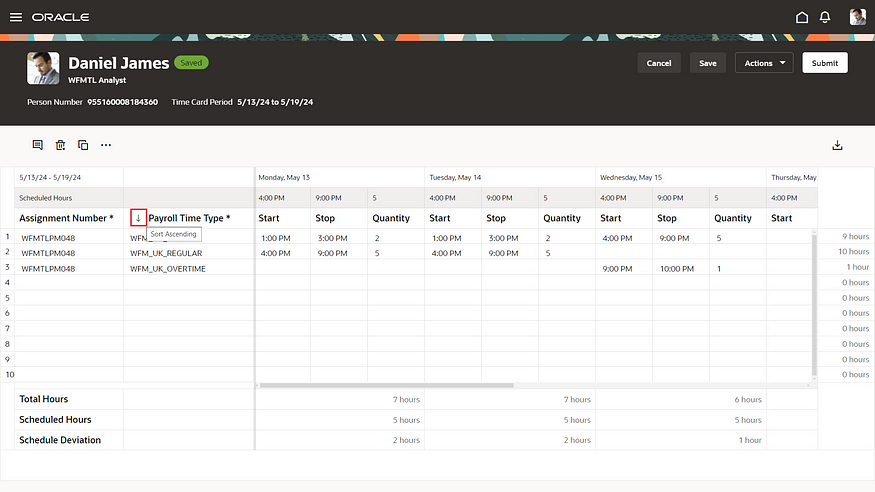
New Calculated Time View

As you start on the transition to Redwood, there are several key factors to consider. Security takes precedence; employees must possess edit rights to submit timecards, a shift from the current Responsive system. Similarly, managers will need edit rights to approve timecards directly within the interface.

Furthermore, please be aware of the following updates: 1)The Timecard Template now supersedes the ‘Copy Other’ feature found in Responsive timecards. 2) There is no support for daily details. 3) The Cost Override Layout is not supported. 4) Calculated Time has a new look (refer to the above screenshot). 5) For customising the sequence of timecard fields, the new unified layout is required.
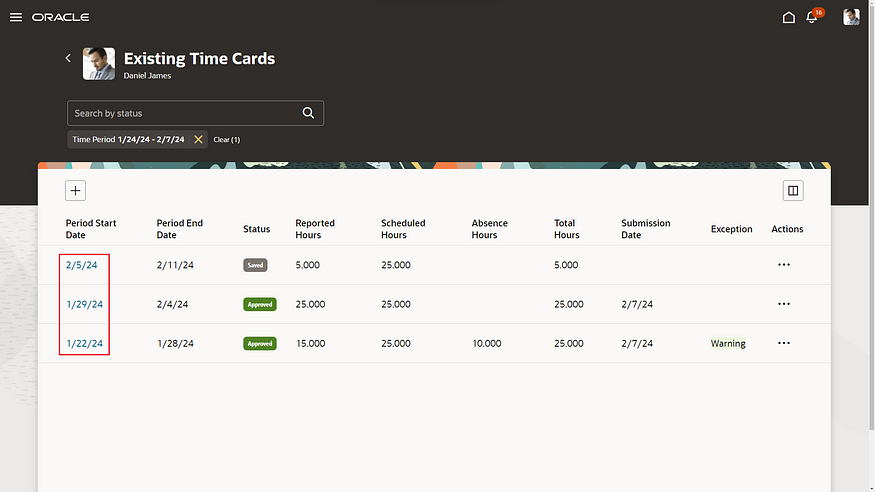
Redwood Existing Time Cards

So what are the benefits of the Unified Layout? It’s much simpler to configure, there is only one layout for reported time, calculated time, entry, edit and view. The guided process has been streamlined, so there are just three steps — display properties; timecard fields and time totals. The timecard attributes can be configured by role — Worker, Line Manager and Time & Labor Manager. Additionally, it is possible to filter the data sources by role.

Configure Time Entry Layout

What do you need to consider before you turn on the Unified Layout? The great news is that the delivered time entry layout components will continue to work! There is no need to set them up again. From a security role perspective, Time & Labor Administrators can edit existing non-unified layouts, but they cannot create new ones. The unified layout can include a combination of non-unified and unified timecard fields. If you have dependent timecard fields on a non-unified layout, they must be switched to independent timecard fields when moving to the unified layouts. Finally, if you need to be able to control the order of the timecard fields on a Redwood timecard, you must use the unified layout.

Oracle is set to introduce new features in the 23C and 24D updates. However, all essential functionalities required for transitioning to Redwood Time Cards are currently accessible. It’s advisable to activate Oracle Search and configure the necessary profile options for OTL within a separate pod for thorough testing. Familiarising yourself with the system through hands-on experience is vital for devising a realistic deployment schedule for Production before the 24D release.

Learn more about how Version 1 can help you maximise your Oracle Cloud instances here.

About the author:

Kate Mead is an Oracle-certified HCM Consultant and Solution Architect at Version 1 with 14 years of experience in Oracle HR and Payroll systems, including 7 years with Oracle HCM Cloud. She has worked across implementation projects and managed services, has a sound knowledge of UK Payroll legislation and — before becoming a consultant — was an HR Manager.

If you have any questions or would like more information on how Version 1 can help you realise the full potential of your Oracle Cloud instances, please contact her at kate.mead@version1.com

Please note all screenshots are the property of Oracle and are used according to their Copyright Guidelines
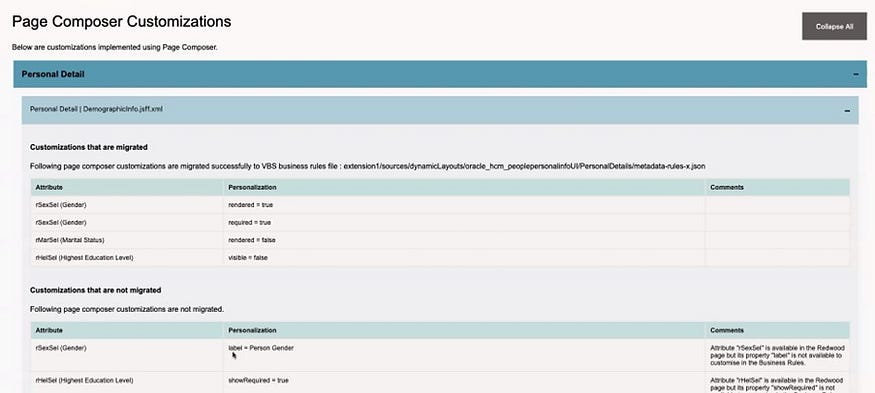
Oracle Cloud Redwood Customization Helper Tool

Today is the day! Oracle has released details of how to run the Redwood Customization Helper Tool. So what is it? It is a new tool that reports on your Responsive UX page personalisations that have been made in either Page Composer or Transaction Design Studio.

Page Composer Customizations Output

The tool outputs a JAR file which indicates which personalisations are supported in your current version of Visual Builder Express (VB Express) Business Rules. What’s even more exciting than the tool providing details of your personalisations to make the move to Redwood easier? Well, the tool also offers the option to migrate supported personalisations to your Redwood environment! It might not be quite as manual as we originally thought.

HCM Experience Design Studio Rules Supported for Migration

The above table lists all of the HCM Design Studio Rules which have the potential to be migrated using the Redwood Customization Helper Tool. Whilst not all functionality can be migrated, this is a massive improvement on what was originally communicated about the move from Responsive UX to the Redwood UX.

One key point to note is that the Customization Tool does not work with Single Sign On (SSO) accounts. If your Production pods are SSO only, you may want to run it against a non-prod pod where SSO is optional, providing all of the personalisations are present.

The second point of note is that you have to download an .exe file for it, so if your organisation has tight rules about what you can download, this may cause an additional complication. If you can obtain permission to download the file, it is definitely worth it.

Redwood Customization Helper Tool Forum on Customer Connect

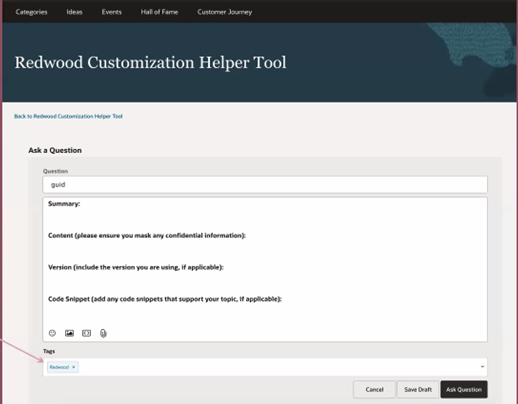
The final piece of information that I want to highlight is that Oracle has also created a new forum area on Customer Connect as well. This will make it easier to raise any questions relating to the new tool. If you add a tag of ‘Redwood’ the core team at the Oracle Centre of Excellence will pick up the query and answer it more quickly.

About the author:

Kate Mead is an Oracle-certified HCM Consultant and Solution Architect at Version 1 with 14 years of experience in Oracle HR and Payroll systems, including 7 years with Oracle HCM Cloud. She has worked across implementation projects and managed services, has a sound knowledge of UK Payroll legislation and — before becoming a consultant — was an HR Manager.

If you have any questions or would like more information on how Version 1 can help you realise the full potential of your Oracle Cloud instances, please contact her at kate.mead@version1.com

Please note all screenshots are the property of Oracle and are used according to their Copyright Guidelines

Oracle HCM Cloud Redwood Key Dates

Have you read my previous blog on Redwood in HCM Cloud? If not, check it out here! Now you know what Redwood UI is, it’s time to review the timeline for implementing Redwood for Oracle HCM Cloud.

Image by Kjjj3 from Pixabay

As of January 2024, these are the key dates, that organisations who use Oracle HCM Cloud should know, for Redwood implementation:

Release 24A

Majority of key HR and Payroll processes available in Redwood UI

Newly provisioned pods will be delivered with Redwood-enabled

Image by tigerlily713 from Pixabay

Release 24B

Redwood for Learn Self Service becomes mandatory

Image by Jagrit Parajuli from Pixabay

Release 24D

Checklists and Onboarding replaced with Journeys

Redwood for Timecards becomes mandatory

Image by Nile from Pixabay

Release 25A

New Go-lives must be Redwood

Image by WOKANDAPIX from Pixabay

Release 25B

All Employee Self Service (ESS) / Manager Self Service (MSS) must be Redwood

Image by StartupStockPhotos from Pixabay

Now is the time to start planning for your move to Redwood UI. Version 1 can help you plan and implement Redwood UI for all your Oracle Cloud modules — EPM, ERP and HCM. For more details, please get in touch!

About the author:

Kate Mead is an Oracle-certified HCM Consultant and Solution Architect at Version 1 with 14 years of experience in Oracle HR and Payroll systems, including 7 years with Oracle HCM Cloud. She has worked across implementation projects and managed services, has a sound knowledge of UK Payroll legislation and — before becoming a consultant — was an HR Manager.

If you have any questions or would like more information on how Version 1 can help you realise the full potential of your Oracle HCM Cloud instances, please contact her at kate.mead@version1.com

Oracle HCM Cloud 24A — The Redwood Release!

As Oracle promised, 24A is the release that brings Redwood to the masses! There are so many Redwood new features in this release, now is the time to start your move away from Responsive UI to the new and improved Redwood-enabled Core HR applications.

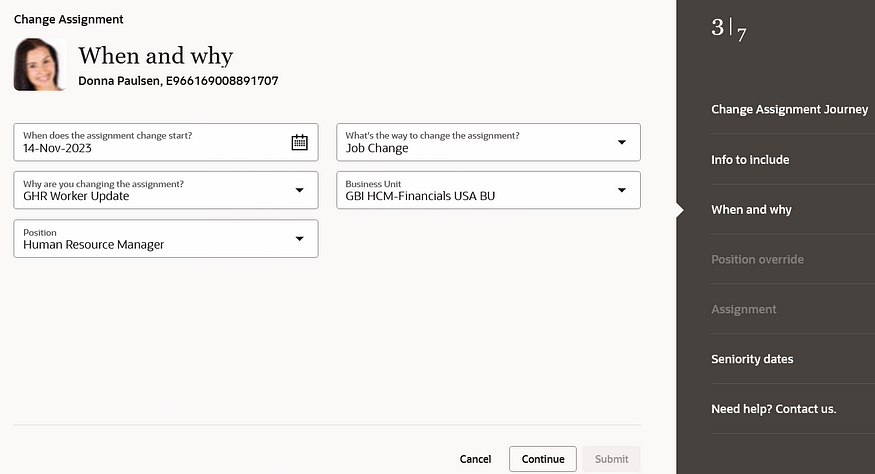
Change Assignment

So what is Redwood and why should I be excited about this?

Redwood is the new Oracle User Interface (UI) for all Oracle products. The long-term plan is for all applications within the Oracle Cloud EPM, ERP and HCM modules to have the same look and feel. The Redwood UI is designed to be mobile and tablet-friendly. When personalising pages, you can view how the page will look on named mobile device and tablet models, to see how the page will appear based on the dimensions of that particular device. All of this is to ensure that accessibility is central to the application.

Photo by Domenico Loia on Unsplash

So back to 24A. What features should I be looking out for?

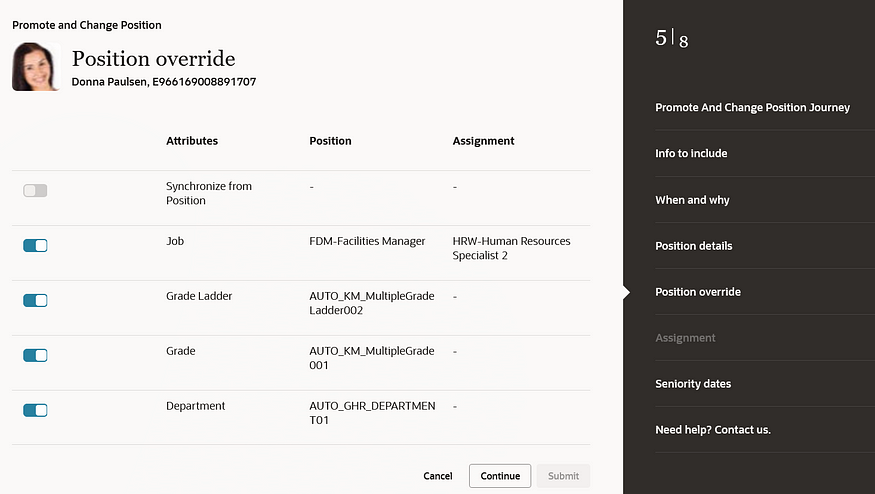
There are numerous process flows now incorporated into the Redwood experience. These include Change Assignment, Promote, Change Position, Employment and Transfer. These are the processes that Oracle users have been waiting for.

Position Override

Before 24A, the main applications that were within the Redwood UI were in the configuration areas, such as Workforce Structures. Now your HR users can carry out their day-to-day processes, such as carrying out promotions; changing line managers; managing contracts; and using the latest and greatest Oracle technology in a user-friendly and accessible interface.

For more details on release 24A, please see the Oracle 24A What’s New page here.

About the author:

Kate Mead is an Oracle-certified HCM Consultant and Solution Architect at Version 1 with 14 years of experience in Oracle HR and Payroll systems, including 7 years with Oracle HCM Cloud. She has worked across implementation projects and managed services, has a sound knowledge of UK Payroll legislation and — before becoming a consultant — was an HR Manager.

If you have any questions or would like more information on how Version 1 can help you realise the full potential of your Oracle HCM Cloud instances, please contact her at kate.mead@version1.com

Please note all screenshots are the property of Oracle and are used according to their Copyright Guidelines