Oracle HCM Cloud Core HR 24C

If you’ve followed my previous posts, you’ll know I love quarterly release time! There’s nothing better than the day when Oracle release the new features that we’re getting. As anticipated, this release is once again brimming with Redwood and Journey enhancements. Oracle is gearing up for 24D, where Checklists will be replaced by Journeys, and in 25B, Employee and Management Self Services tasks become mandatory in the Redwood interface.
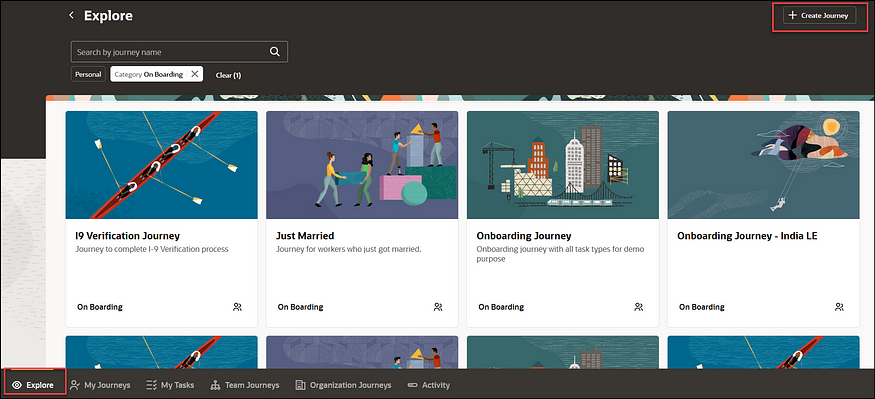
Redwood Journeys Explore Landing Page

Here are the top 5 new features in Core HR for Release 24C. Keep in mind that Oracle will continue to roll out additional features throughout the quarter, so stay tuned for my follow-up post:

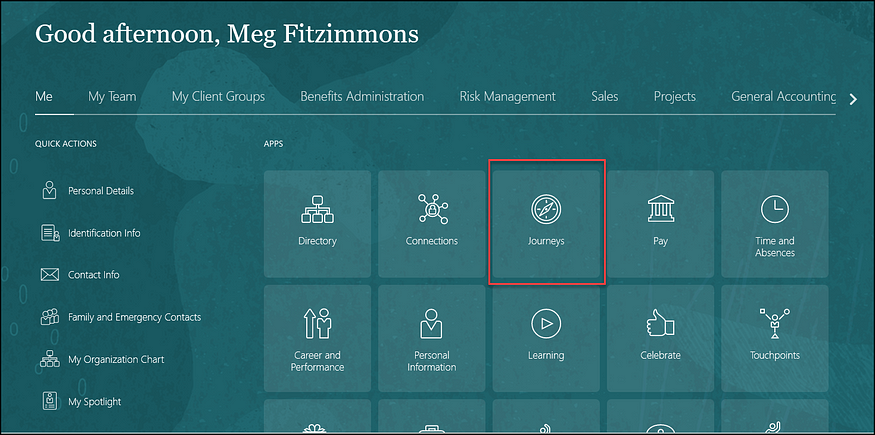
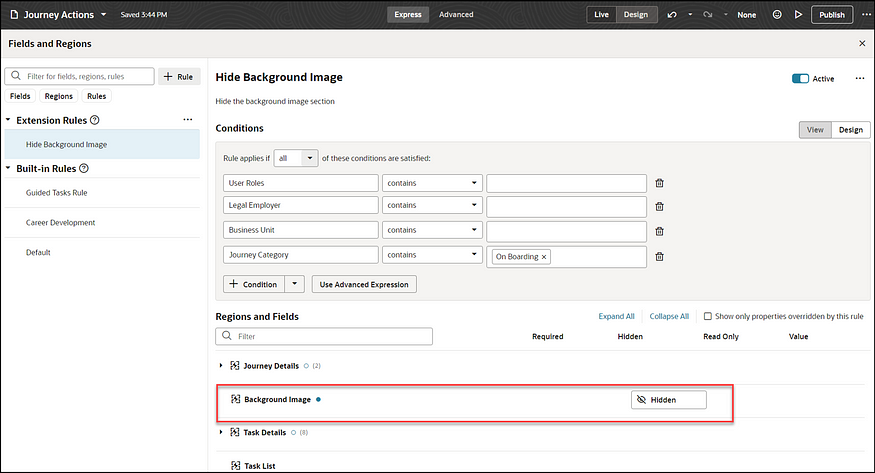
1)Redwood and Journeys are combined for the first feature. Business Rules, which allow you to personalise Redwood pages within Visual Builder Studio (VBS), are brought to Journeys. You can now use rules to incorporate or hide features within a Journey, to improve the experience for your users.
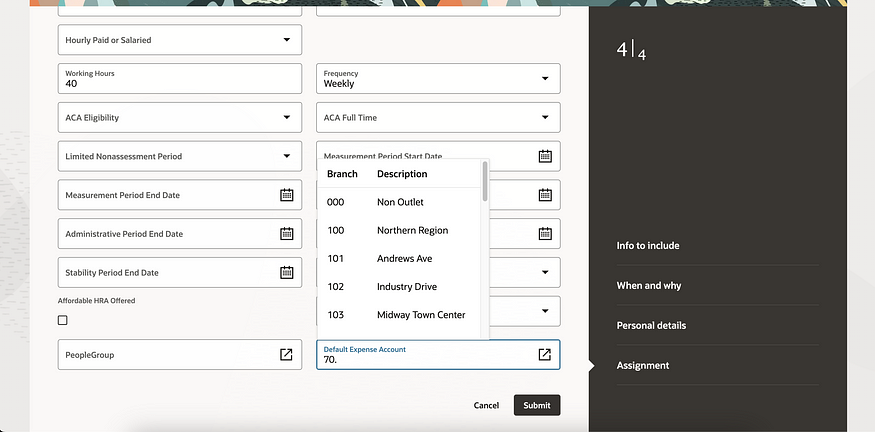
2) Any organisation which uses Expenses knows the importance of the Default Expense Account on an employee’s record. The journey to making all HR functions carried out in the Redwood toolset has made another leap forward. It is now possible to configure both the People Group and Default Expense Account key flexfields (KFF) within the Hire an Employee; Add a Contingent Worker / Pending Worker / Nonworker; Convert a Pending Worker and Create a Work Relationship.
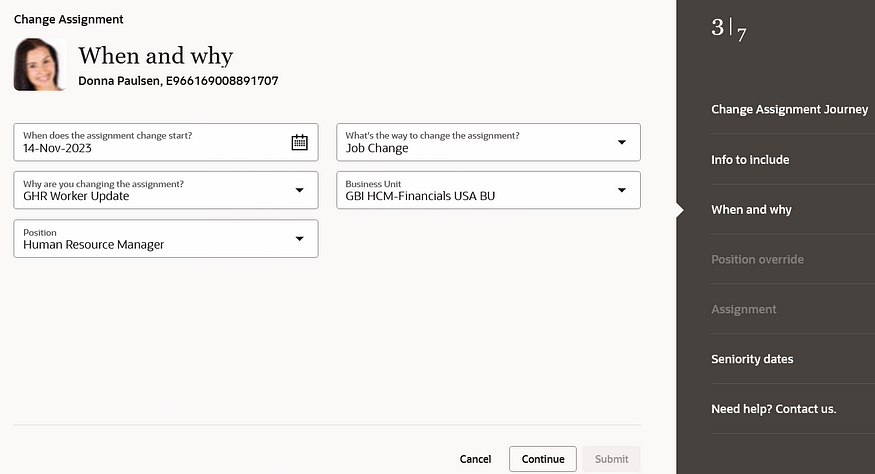
3) There have been significant improvements to the Redwood Update Employment flow in 24C. These include the automatic calculation of FTE and Headcount; Probation Period and End Date; Defaulting of Location from Department; Ability to Add Non-Workers as Managers; and the new display of the remaining working hours in the ‘Weekly Working Hours Step’. All these automatic calculations will remove the need for manual intervention.
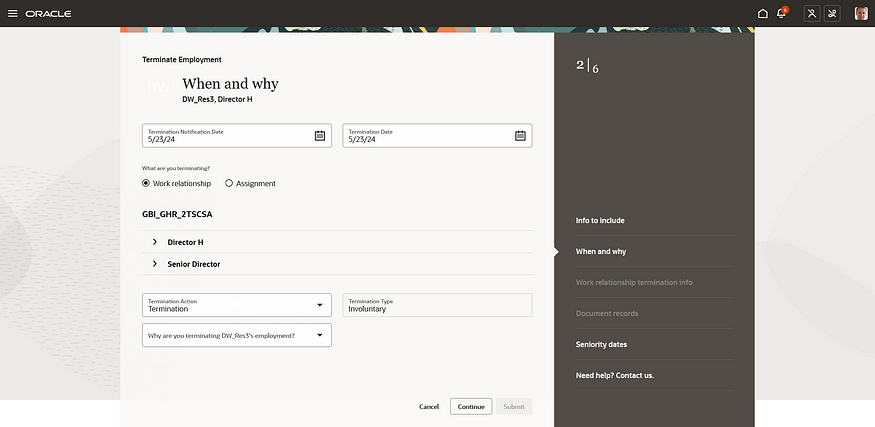
4) There is a new Redwood experience for Terminating Employment and for Employees to undertake Self Service Resignation. In addition to the process flow being moved to the Redwood toolset, so have the View, Reverse and Correct Termination. This ensures that more of the employee lifecycle process from onboarding to offboarding can be managed in the new streamlined Redwood UI.
5) There has been an improvement to the Work Patterns, which is particularly helpful for organisations which use rolling work patterns. The inclusion of non-working weeks provides significant value, especially for organisations with patterns like 2 weeks on, 2 weeks off.

As previously mentioned, Oracle is expected to introduce additional features in Core HR later this month. If these new features prove to be significant, I will create an updated blog post. Stay tuned for blogs covering other modules within HCM Cloud for Release 24C.

Click here to read more about Version 1’s Oracle capabilities.

About the author:

Kate Mead is an Oracle-certified HCM Consultant and Solution Architect at Version 1 with 14 years of experience in Oracle HR and Payroll systems, including 7 years with Oracle HCM Cloud. She has worked across implementation projects and managed services, has a sound knowledge of UK Payroll legislation and — before becoming a consultant — was an HR Manager.

If you have any questions or would like more information on how Version 1 can help you realise the full potential of your Oracle Cloud instances, please contact her at kate.mead@version1.com

Please note all screenshots are the property of Oracle and are used according to their Copyright Guidelines

Oracle HCM Cloud Core HR 24B

It’s my favourite time of the quarter when Oracle release the details of what’s coming in the next release! Oracle will continue to reveal details of 24B over March, but what has been announced in Core HR so far, is already looking great.

Team Activity Centre

Unsurprisingly, this is another Redwood-heavy release and I’m delighted with what has already been announced. As part of the drive to move Employee and Manager Self Service to Redwood, there is a new Team Activity Centre. This gives Line Managers a high-level overview of the important metrics relating to their team, including staff turnover and progression with goals and skills.

If your organisation is using Journeys, Line Managers can see details of outstanding tasks waiting to be completed. Additionally, key information that the Line Manager needs to view for their team, can be seen directly in the new Activity Centre, for example, compensation details, talent ratings and the status of recruitment requisitions.

Pending Workers

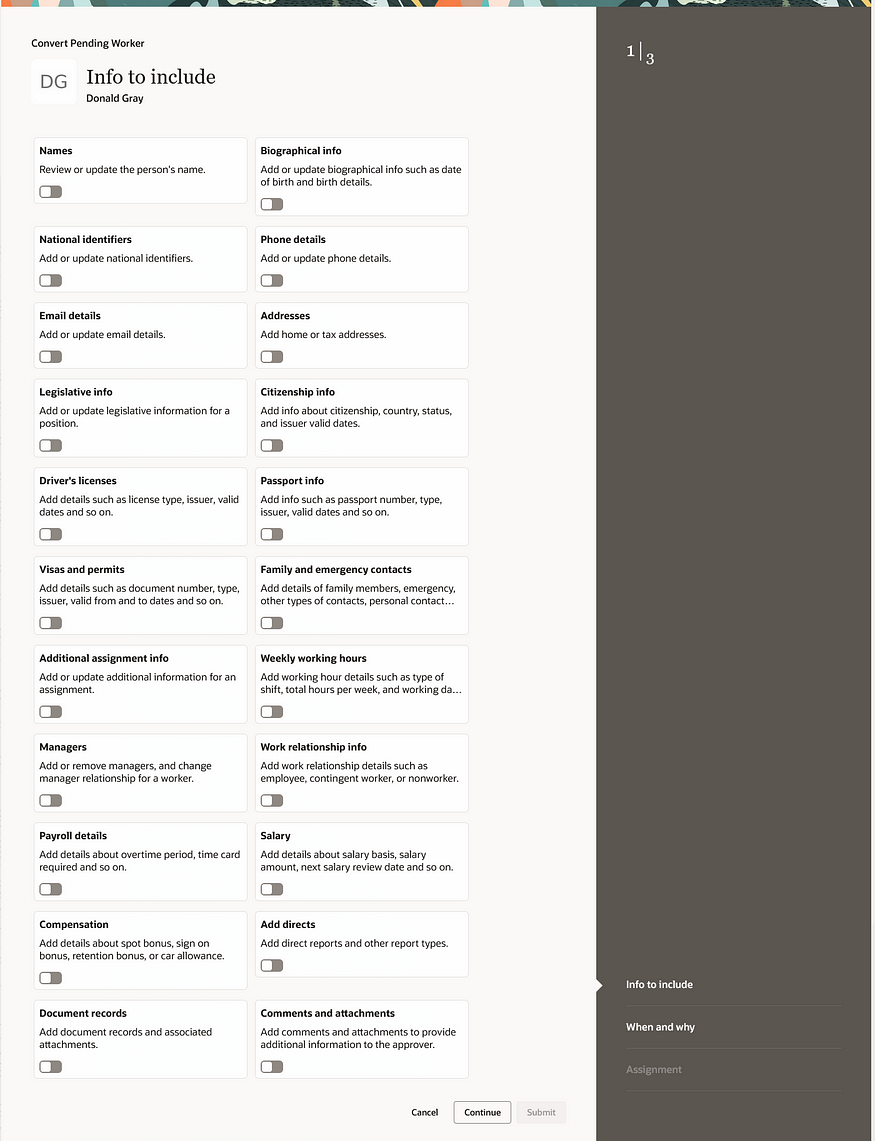
Pending Workers have joined Redwood now! This is another key page that HR teams use regularly which has been completely rewritten within the VBS toolset. It’s now a guided process and Guided Journeys can be incorporated into the process too.

Convert Pending Worker Flow

Journeys are another key theme of recent Core HR releases and this is no different. The worlds of Redwood and Journeys are meeting perfectly with a number of key new features in 24B.

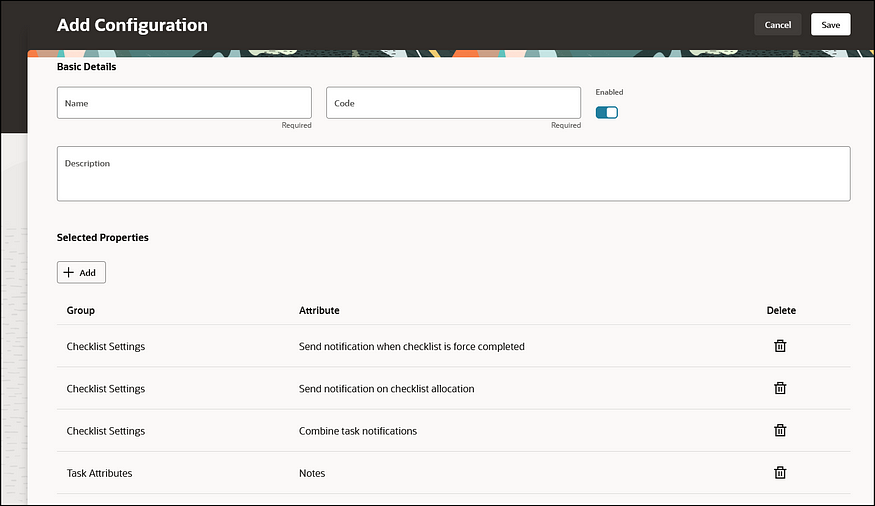
Journeys Configuration

Configuration has now moved to Redwood, with the new Journeys Configuration page. The new Journey Configurations page is the equivalent of the existing Configurations tab where Journeys were previously set up. The new page is designed to be easier to use, with fewer button clicks and better performance.

Journeys Console

Additionally, there is a new Journeys Console and Journeys Integrations application written in VBS to replace the existing View Console and Integrations tabs on the Checklist Templates page. These include the same optimisations that the Journeys Configuration page has.

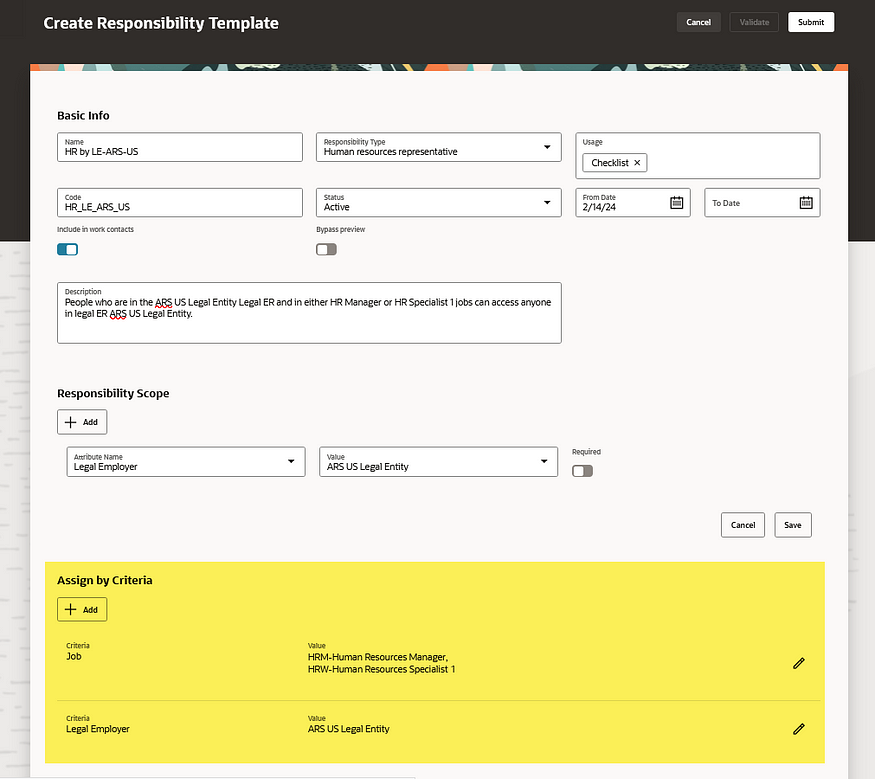
One more exciting new feature is the Autoprovisioning of Areas of Responsibility based on templates. It is now possible to mass assign, but also automatically end date, AOR based on user-defined template criteria. The new Assign by Criteria section allows organisations to add criteria and values that identify the user who should receive the responsibility with the Basic Info and Scope defined in the prior sections of the page.

As I said earlier, Oracle is likely to release more features in Core HR later in the month, so I will do an updated blog later in the month. Also, keep an eye out for blogs on other modules within HCM Cloud for Release 24B.

Learn more about how Version 1 can help you maximise your Oracle Cloud instances here.

About the author:

Kate Mead is an Oracle-certified HCM Consultant and Solution Architect at Version 1 with 14 years of experience in Oracle HR and Payroll systems, including 7 years with Oracle HCM Cloud. She has worked across implementation projects and managed services, has a sound knowledge of UK Payroll legislation and — before becoming a consultant — was an HR Manager.

If you have any questions or would like more information on how Version 1 can help you realise the full potential of your Oracle Cloud instances, please contact her at kate.mead@version1.com

Please note all screenshots are the property of Oracle and are used according to their Copyright Guidelines
Oracle HCM Cloud Release 24A — Key New Features in Global HR

The first iteration of the What’s New 24A Oracle HCM Cloud has been released and it looks like it’s going to be a big one! There are a lot of changes, particularly around Journeys and Redwood.

Photo by Christin Hume on Unsplash

Here are a few of my highlights:

1. Redwood Global HR Enhancements

24A is the first HCM Cloud Release that brings the Redwood User Interface to the masses. All the key processes that your HR users follow are now available in the new UI. For more details, please check out my article on Redwood in 24A.

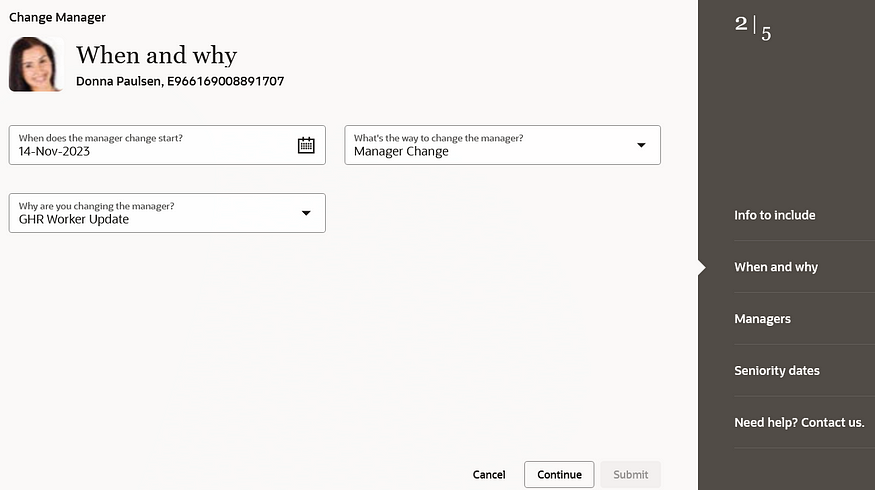
Redwood Change Manager

2. Journeys

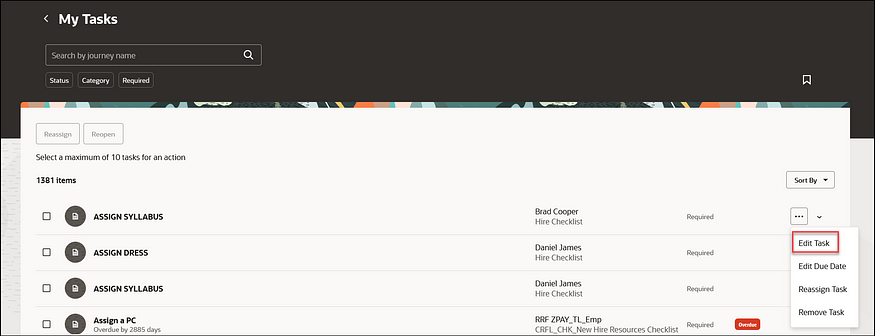
24A has a substantial number of new Journey-related features. These include an improved search functionality; allowing the use of Contextual Journeys in Redwood pages and the simplification of editing tasks. All of these new features are to help streamline processes for users.

Edit Journey Tasks

3. Work Pattern Templates and Assignment Rules

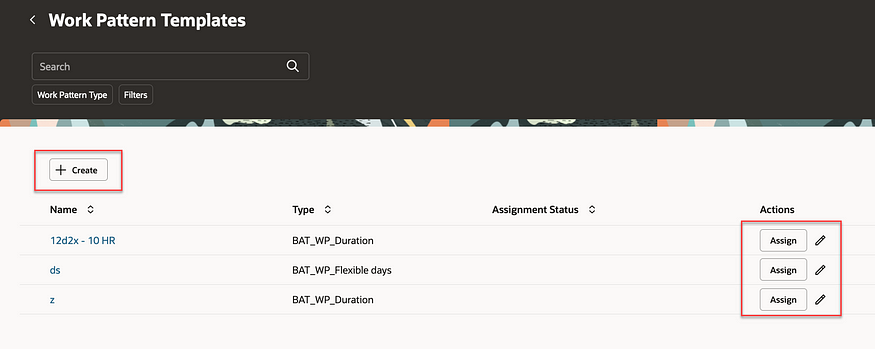
This is a helpful new feature that allows you to create rules to automatically assign working pattern templates to employees based on rules. This will minimise mistakes with incorrect working patterns being assigned to employees. The automation will speed up the hiring process and simplify making changes to employee data.

Work Pattern Templates

4. Approvals Work Area

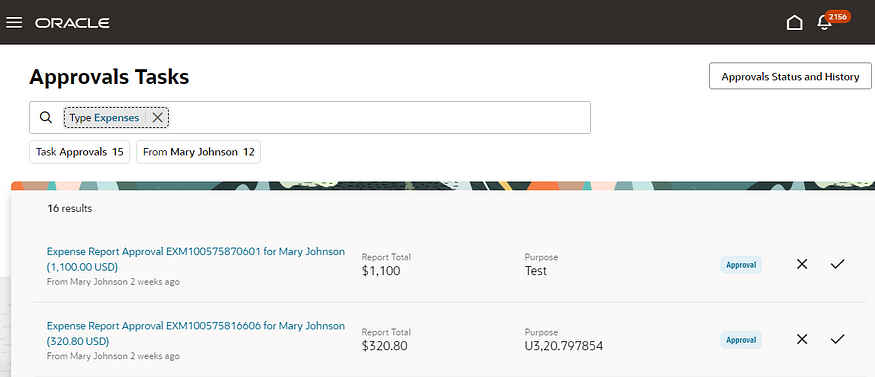
The new Approvals Work Area is a new application that works across the whole of HCM Cloud. This new page has a user-friendly interface and intuitive search functionality which allows users to find tasks more easily than within the current BPM Worklist. Approvals and rejections of transactions can be made in the Work Area as well as viewing the status of historical transactions.

Approvals Work Area

5. Other Functionality of Note

Two areas of functionality are being made redundant in 2024. The first is the Share Personal Info page which will be made redundant in release 24B and there is no replacement for this functionality. Secondly, Checklists and Onboarding Tasks will be made redundant in release 24D. Oracle recommends moving to Redwood Journeys as soon as possible.

About the author:

Kate Mead is an Oracle-certified HCM Consultant and Solution Architect at Version 1 with 14 years of experience in Oracle HR and Payroll systems, including 7 years with Oracle HCM Cloud. She has worked across implementation projects and managed services, has a sound knowledge of UK Payroll legislation and — before becoming a consultant — was an HR Manager.

If you have any questions or would like more information on how Version 1 can help you realise the full potential of your Oracle HCM Cloud instances, please contact her at kate.mead@version1.com

Please note all screenshots are the property of Oracle and are used according to their Copyright Guidelines
Oracle HCM Cloud 24A — The Redwood Release!

As Oracle promised, 24A is the release that brings Redwood to the masses! There are so many Redwood new features in this release, now is the time to start your move away from Responsive UI to the new and improved Redwood-enabled Core HR applications.

Change Assignment

So what is Redwood and why should I be excited about this?

Redwood is the new Oracle User Interface (UI) for all Oracle products. The long-term plan is for all applications within the Oracle Cloud EPM, ERP and HCM modules to have the same look and feel. The Redwood UI is designed to be mobile and tablet-friendly. When personalising pages, you can view how the page will look on named mobile device and tablet models, to see how the page will appear based on the dimensions of that particular device. All of this is to ensure that accessibility is central to the application.

Photo by Domenico Loia on Unsplash

So back to 24A. What features should I be looking out for?

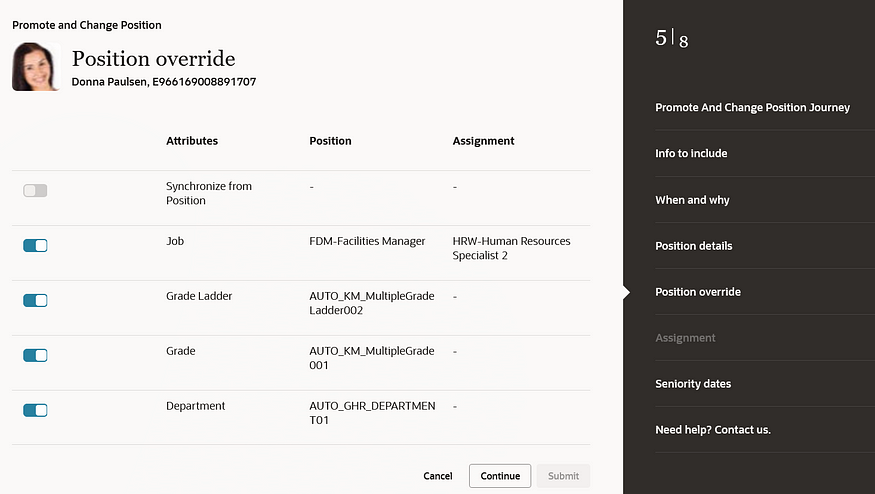
There are numerous process flows now incorporated into the Redwood experience. These include Change Assignment, Promote, Change Position, Employment and Transfer. These are the processes that Oracle users have been waiting for.

Position Override

Before 24A, the main applications that were within the Redwood UI were in the configuration areas, such as Workforce Structures. Now your HR users can carry out their day-to-day processes, such as carrying out promotions; changing line managers; managing contracts; and using the latest and greatest Oracle technology in a user-friendly and accessible interface.

For more details on release 24A, please see the Oracle 24A What’s New page here.

About the author:

Kate Mead is an Oracle-certified HCM Consultant and Solution Architect at Version 1 with 14 years of experience in Oracle HR and Payroll systems, including 7 years with Oracle HCM Cloud. She has worked across implementation projects and managed services, has a sound knowledge of UK Payroll legislation and — before becoming a consultant — was an HR Manager.

If you have any questions or would like more information on how Version 1 can help you realise the full potential of your Oracle HCM Cloud instances, please contact her at kate.mead@version1.com

Please note all screenshots are the property of Oracle and are used according to their Copyright Guidelines