
This is an exciting time for Oracle Learn. Release 26C is the last release before all Learn functionality becomes mandatory in Redwood, with the final switch happening in 26D. That deadline brings in the remaining Learning Admin tasks too. If you have not already made the move to Redwood for Learn, now really is the time to do it. In the meantime, here is a look at what is new in 26C.
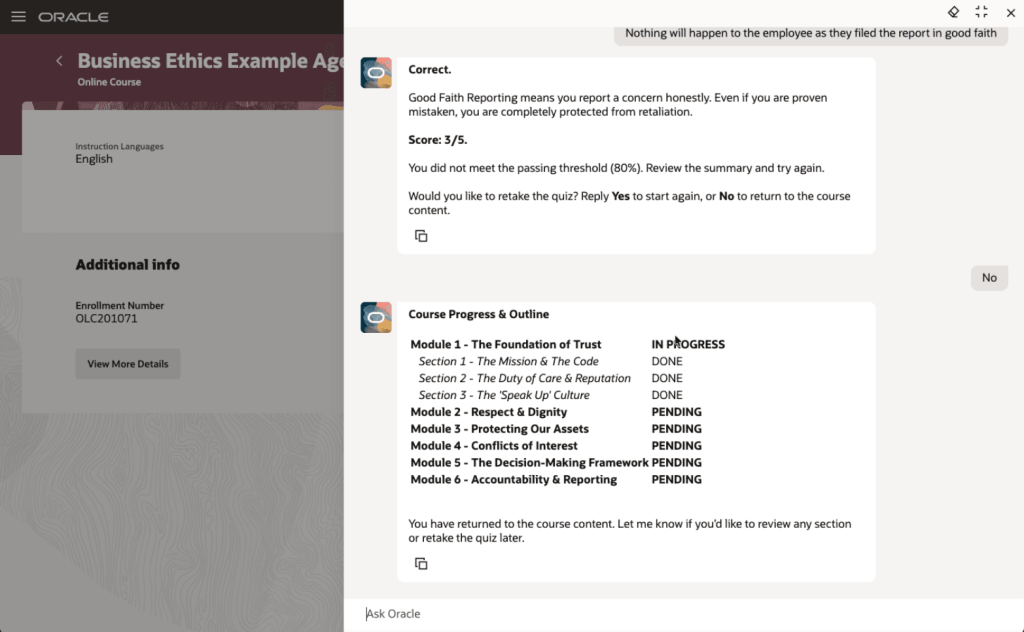
The first feature I want to highlight is not directly related to the Redwood deadline, but it is too interesting to leave until later. Oracle has introduced Agentic Courses, a new approach to self-paced learning that uses AI agents to guide learners through curated content in a far more interactive and responsive way. Instead of working through static material, learners are supported by an experience that adapts to their pace, checks their understanding as they go, and offers targeted support where it is needed.
The structure is still defined by learning designers, but each learner can move through the content in a way that suits them. That includes recap, reinforcement and extra support where required. What stands out here is the ability to deliver genuinely personalised learning at scale, without increasing the effort needed to design or administer it. Learning specialists can reuse templates and deploy them quickly, while the AI handles the day-to-day interaction with learners.
The end result is more effective training, faster progression to competency, and better use of employees’ time, all while keeping outcomes consistent. It is also worth noting that this is not an agentic application, so there is no requirement to purchase the Agentic App platform to use it.
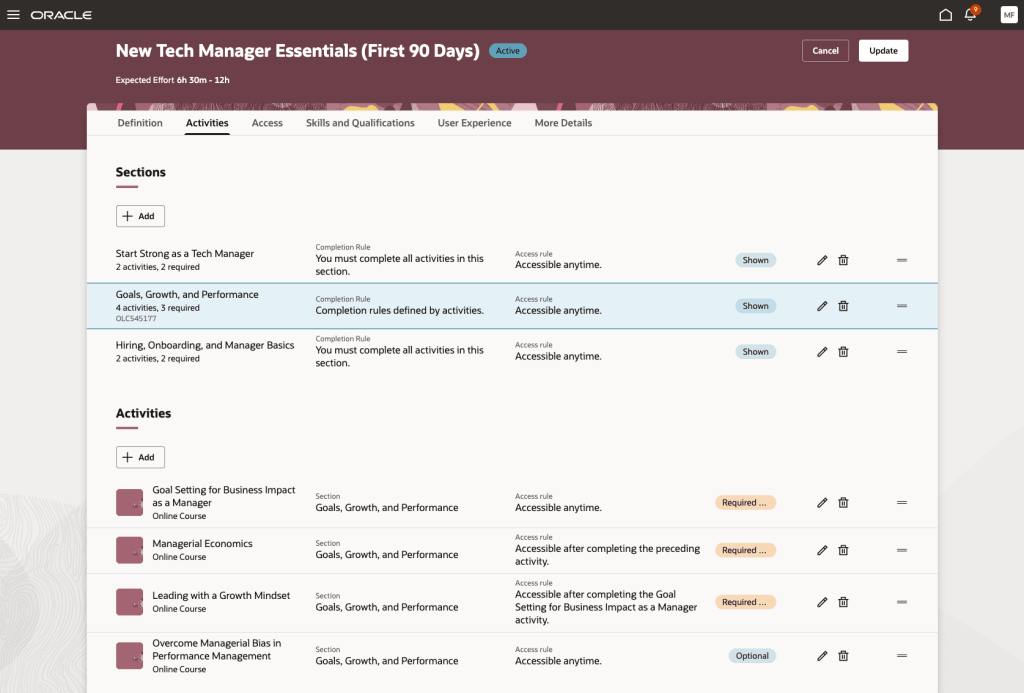
The next feature is the redesigned Redwood experience for specialisation management. This brings a much clearer and more visual approach to creating and managing learning paths. The new Activities tab pulls everything into a single interactive view, making it easier to understand the overall structure, see dependencies, and define completion and access rules. Alongside this, the Assignments tab gives a clear, near real-time view of learner progress, so administrators can track enrolments, monitor completion, and step in where needed.
The benefit here is both clarity and control. Learning specialists can build more structured and engaging learning journeys with less effort, while built-in checks help prevent common issues such as conflicting dependencies. For learners, it is much clearer what is expected and what comes next, which supports better engagement. For organisations, this means more effective delivery of training and stronger oversight of compliance and development programmes.
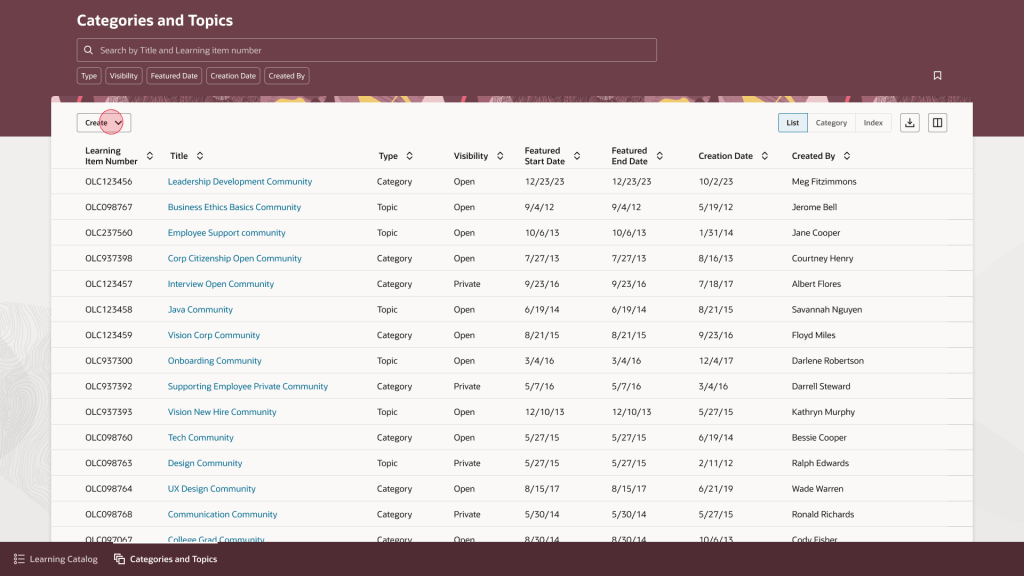
Another new page in Redwood is the updated experience for category and topic management. This gives learning teams a more straightforward way to organise and maintain their catalogue. The interface is built around tasks, with list, category and topic views supported by search, filtering and saved searches. Administrators can quickly create and update categories and topics, manage visibility and featured dates, and move easily between high-level structures and more detailed content.
The value here is in making catalogue management simpler and more consistent. Learning teams can organise content more effectively, which makes it easier for learners to find what they need. It also aligns with the wider Redwood experience, reducing the learning curve for administrators and helping improve productivity. In practice, this leads to a more organised and accessible catalogue that is easier to maintain over time.
Oracle has also introduced a set of enhancements to assignment status management. These give learning teams much tighter control over how assignments are handled, with expanded support for actions such as waitlisting, undoing completion, approving, withdrawing and allocating seats. There are also clearer rules around when each action can be applied.
In day-to-day terms, this means administrators can manage a wider range of scenarios directly within Redwood, without relying on workarounds. The improvement here is in both governance and day-to-day efficiency. By aligning actions to defined rules and adding more control, organisations can manage assignments more consistently and reduce the risk of error. It also becomes easier to handle exceptions and manage capacity, which supports a more reliable learner experience overall.
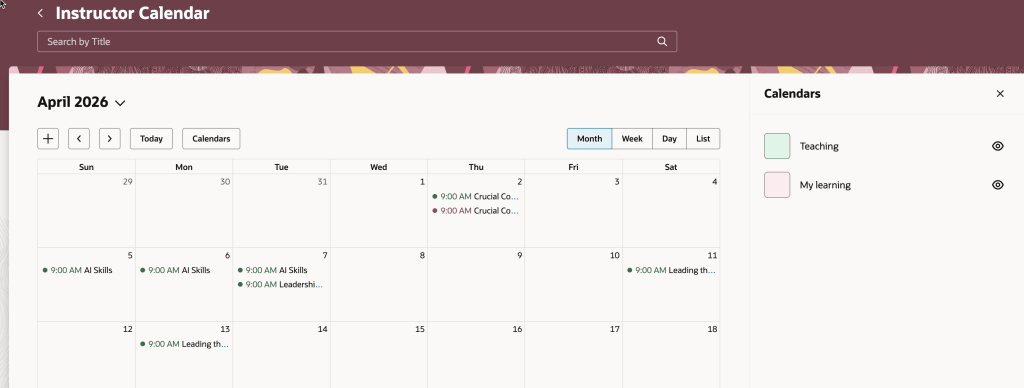
Another useful enhancement is within the Instructor Activity Center. The updated calendar now brings together teaching commitments and the instructor’s own learning calendar, making it easier to spot clashes and plan ahead. There is also a new seat availability filter, which highlights sessions that are low on enrolment, fully booked, or have waitlists.
This gives instructors a single, practical view of their schedule. They can manage their time more effectively, avoid conflicts, and take action where needed, for example by promoting under-enrolled sessions or adjusting plans. For organisations, this helps optimise class capacity and make better use of instructor time.
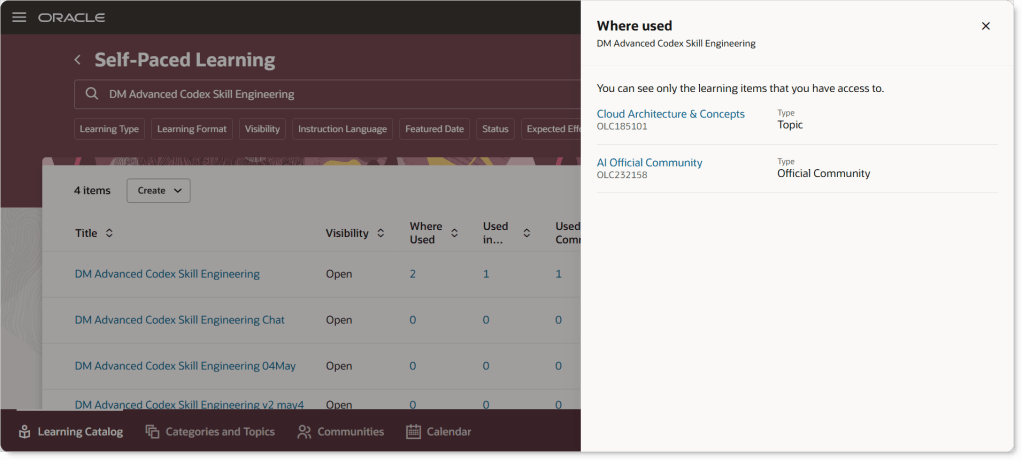
The final feature I want to call out is one that came directly from a customer idea. The Learning Catalog has been enhanced to give clearer visibility into how events, courses and learning paths are connected. The updated “Where Used” capability makes it much easier to explore these relationships, with clickable links that take you straight to related items. Supporting information is displayed in a structured way that mirrors the layout of the detail pages, making it easier to understand how everything fits together.
This improves transparency across the catalogue. Learning teams can see dependencies more clearly, which reduces the risk of unintended impact when making changes. It also supports more consistent management of learning structures, helping maintain a clean and well-organised catalogue over time.
As always, Oracle may introduce additional updates as the release cycle progresses, so it is worth keeping an eye out. If anything particularly interesting appears, I will share a follow-up to make sure you are fully up to date.
Please note all screenshots are the property of Oracle and are used according to their Copyright Guidelines


