
It’s one thing to understand Workflow Agents in theory. It’s another to sit down in Oracle AI Agent Studio and start building one. In my previous blog, I explored the architecture behind Workflow Agents and how Oracle has designed them to combine AI reasoning with structured business processes.
This time, I wanted to focus on the practical side. What do you actually see when you start building a Workflow Agent? Which settings matter? How do triggers work? What’s the best way to handle errors? And which data nodes should you use for different scenarios? These are the questions that tend to come up once organisations move beyond the concept stage and start planning real-world implementations.
Creating a new Workflow Agent is straightforward, but there are a few important decisions to make from the outset. The Details tab is where you define the basics, including the agent name, code, application family and product area. While these may seem like simple administrative fields, they’re worth getting right because they determine how the agent is categorised within AI Agent Studio and how it appears within monitoring and reporting.
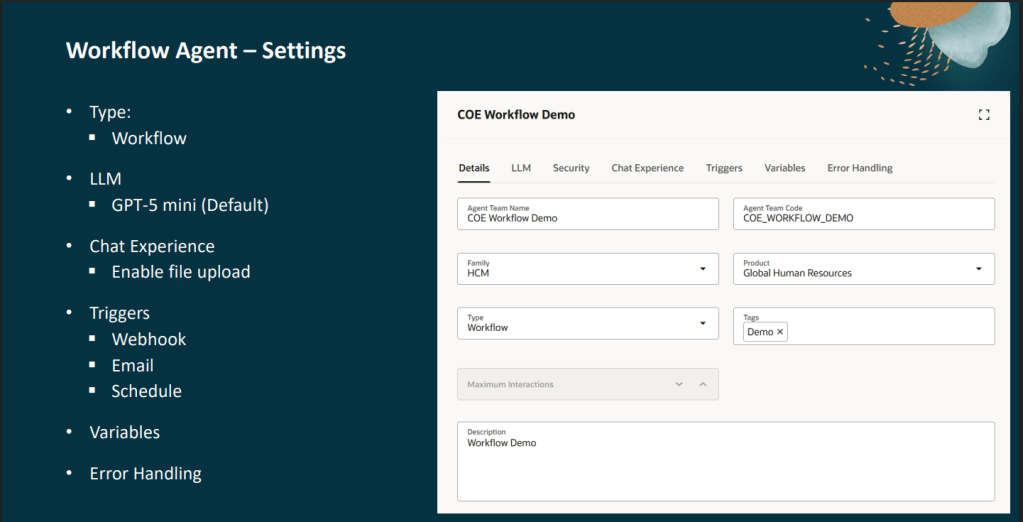
The LLM tab is where you select the large language model that will power the agent. Workflow Agents use GPT-5 mini by default, which is more than capable of handling many common automation scenarios such as document extraction, classification and policy-based decision making.
One point worth noting is that not all models are licensed in the same way. The OSS LLM is free to use and is provided as part of your Oracle subscription, while all other LLMs are deemed premium and therefore are charged as AI Units are consumed. For more information, please look at my previous blog on AI Agent pricing structures.
The Chat Experience tab allows you to enable file uploads. This becomes particularly useful when your workflow needs to process documents such as supplier quotes, invoices or legal correspondence. Files uploaded at runtime can then be passed directly to a Document Processor node for extraction and analysis.
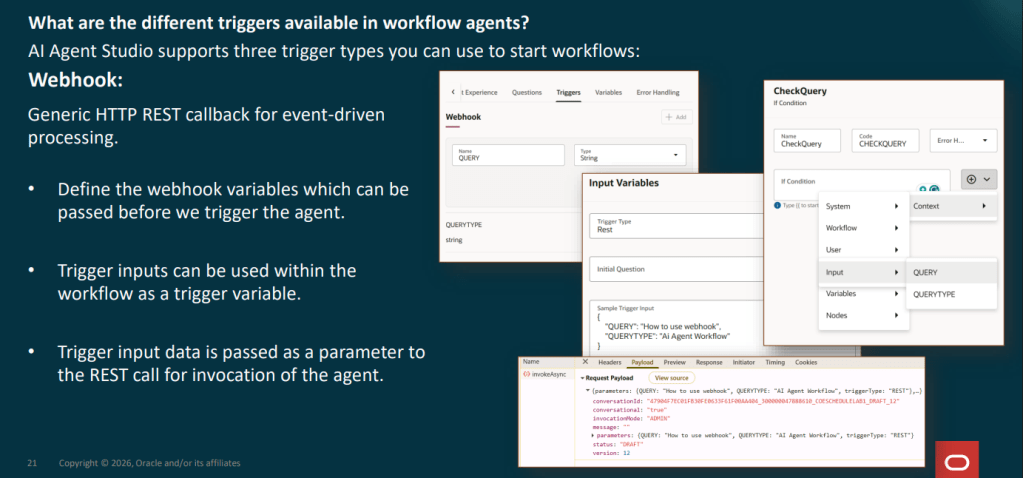
One of the first questions people ask is how a Workflow Agent actually starts running. Oracle currently supports three trigger types, each designed for different use cases.
Firstly, webhook triggers. These offer the greatest flexibility. When configuring a webhook, you define one or more input variables which become available through a REST endpoint. External systems can then pass information into the workflow when triggering the agent. This approach works particularly well when integrating with Oracle Fusion processes, third-party applications or custom solutions that need to launch an automated workflow in response to a specific business event.
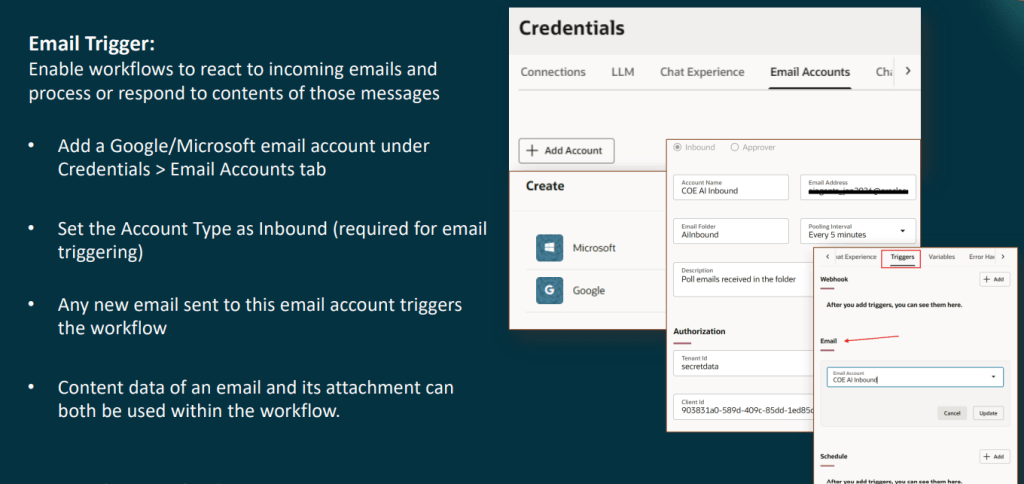
Email triggers are where Workflow Agents start to open up some interesting automation opportunities. After configuring an inbound Microsoft or Google email account within AI Agent Studio, every email received by that mailbox can automatically initiate a workflow. The agent has access to both the email content and any attachments, allowing it to classify, extract and process information without manual intervention.
For example, a payroll team could automatically process court garnishment orders received via email, while an accounts payable team could analyse supplier invoices arriving in a dedicated mailbox. The key benefit is that users don’t need to actively launch the process. The workflow begins as soon as the email arrives.
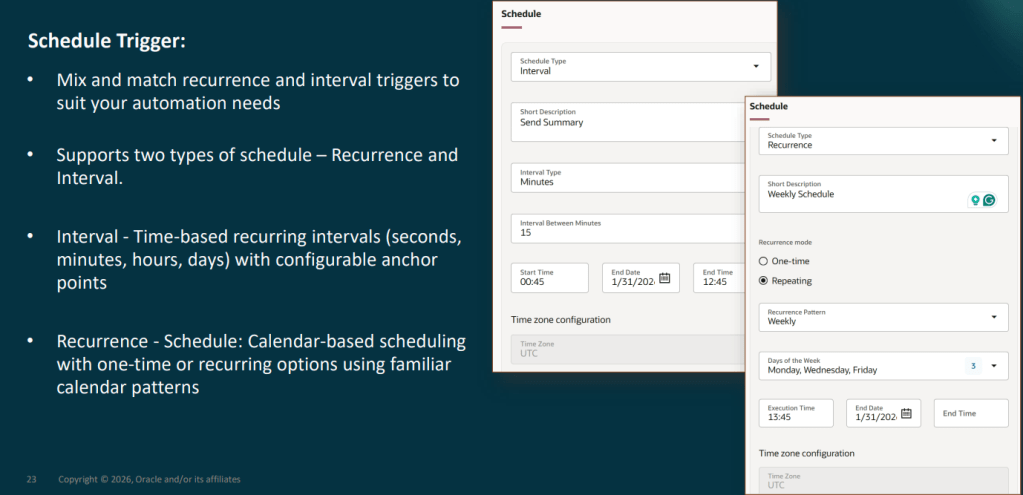
Schedule triggers are designed for recurring tasks. Whether you need a workflow to run every 30 minutes, every Monday morning, or on a specific schedule throughout the month, Oracle provides flexible scheduling options to support it. This makes them ideal for monitoring activities, batch processing and routine validation tasks that need to run automatically in the background.
If there’s one area that’s often overlooked during development, it’s error handling. Most people focus on getting the workflow working and only think about failures later. Unfortunately, it’s usually the first thing they need when moving into production.
Oracle provides a dedicated Error Handling tab where you can configure automated notifications whenever a workflow encounters an unrecoverable issue. Rather than sending a generic failure message, you can include contextual information such as:
- The workflow name
- Trace ID
- The node that failed
- The error message
- Business data being processed at the time
This makes troubleshooting far quicker because support teams receive meaningful information rather than simply being told that something went wrong.
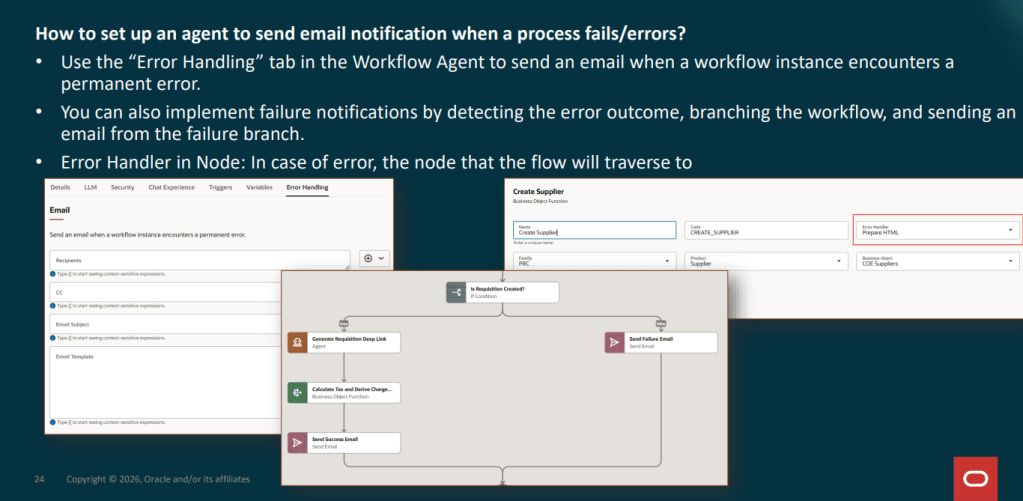
It’s also worth remembering that individual nodes can have their own error-handling paths. Rather than terminating the workflow entirely, you can redirect failures to alternative branches that perform logging, update status values or notify users before ending gracefully. In practice, combining workflow-level notifications with node-level recovery paths creates a much more resilient solution.
One of the more confusing aspects of Workflow Agent development is knowing which data node to use. Although several of the available nodes appear similar at first glance, they serve very different purposes.
The Document Processor is the starting point for document-based workflows. It extracts content from files such as PDFs, Word documents, HTML pages and scanned images, making the information available for downstream processing.
Vector Write creates embeddings and stores them within a vector index. Think of this as the step where knowledge is prepared and stored so that it can be searched later.
Vector Read retrieves relevant content from an existing vector index. This is typically used when a workflow needs to locate policies, procedures or reference material to support a decision.
The RAG Document Tool combines retrieval and grounding into a single step. Instead of manually connecting retrieval and generation components, the node retrieves relevant content and uses it to produce a grounded response from the LLM.
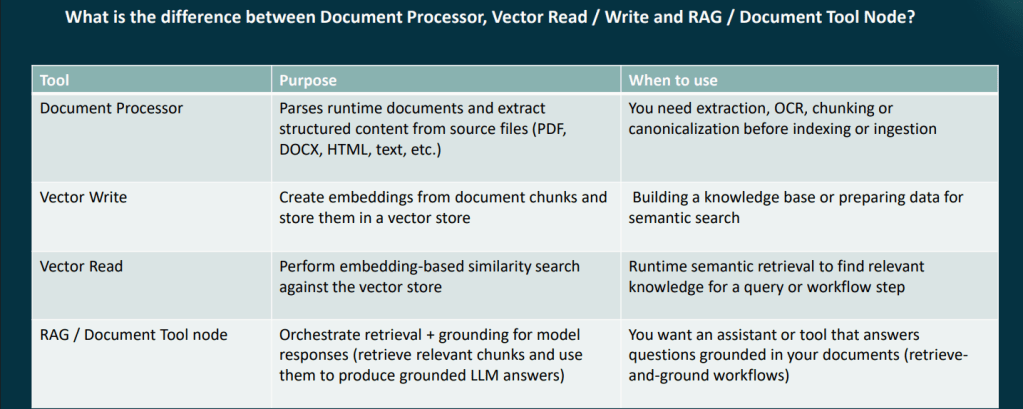
For knowledge-based workflows, the most common pattern is: Document Processor → Vector Write → Vector Read → LLM. Understanding this flow early can save a considerable amount of redesign later.
Perhaps the most important feature within Workflow Agents is the Human Approval node. This allows the workflow to pause and request approval before carrying out a specific action. The workflow only continues once an authorised individual has reviewed and approved the decision.
This approach strikes a balance between automation and governance. Routine tasks can be handled automatically, while higher-risk scenarios remain subject to human oversight. This is particularly important in HR, payroll and finance processes, where an incorrect decision can have a direct impact on employees or suppliers.
In many ways, this ability to blend AI-driven automation with structured controls is what makes Workflow Agents different from many other agent frameworks.
One of the most significant developments to AI Agent Studio is METRO (Measurement, Evaluation and Testing for Real-time Observability). METRO provides visibility into how agents are performing through dashboards covering:
- Accuracy
- Latency
- Token usage
- Execution tracing
- Evaluation scoring
For Workflow Agents, detailed tracing is particularly valuable because it allows teams to see exactly how an instance progressed through the workflow, identify bottlenecks and pinpoint failures.
Oracle have also introduced AI governance capabilities, including guardrails on requests and responses, instruction protection and integration with Oracle’s AI Governance framework. For organisations looking to deploy Workflow Agents into production environments, these additions provide greater confidence around monitoring, governance and ongoing optimisation.
Ready to Start Building? The best advice I can give is to start small. Choose a process you understand well. Something with clear inputs, defined outcomes and a manageable number of exceptions.
Build a simple proof of concept first. Get the trigger working. Add a data node. Introduce an LLM step. Test the error handling. Then gradually expand the workflow as your confidence grows.
Oracle has made Workflow Agents surprisingly accessible, and the observability features make it much easier to understand what’s happening behind the scenes as you develop and refine your solution. If you’re considering Workflow Agents and want to understand where they could deliver value in your organisation, now is a good time to start exploring the possibilities.
Please note that all screenshots are the property of Oracle and are used in accordance with Oracle’s Copyright Guidelines.


