
It’s that time again, quarterly release time, and 26D brings a solid set of updates for Core HR teams. There’s a meaningful enhancement to the Assignment Change Assistant, a quiet but important fix for position synchronisation via HCM Data Loader (HDL), continued evolution of the Activity Centre experience, and a deprecation notice that anyone who built agents in the last couple of releases needs to act on. As usual, Oracle may add further features throughout the month, so let’s take a look at what’s been introduced so far.
First introduced in 26C, the Assignment Change Assistant, now referred to as the Employment Updates Agent, has been extended considerably in 26D. The original release allowed managers and HR specialists to initiate assignment changes conversationally through the AI agent framework. In 26D, Oracle has addressed one of the natural limitations of that first version: users can now ask the agent for information before deciding what to change.
So rather than jumping straight into a transaction, a manager can open a conversation and ask something like “Who is David’s current manager?” or “What job is this person assigned to?” and get a direct answer from the agent before initiating any update. That’s a genuinely useful shift in how the assistant works. It moves from being a transaction tool to being a decision-support tool as well.
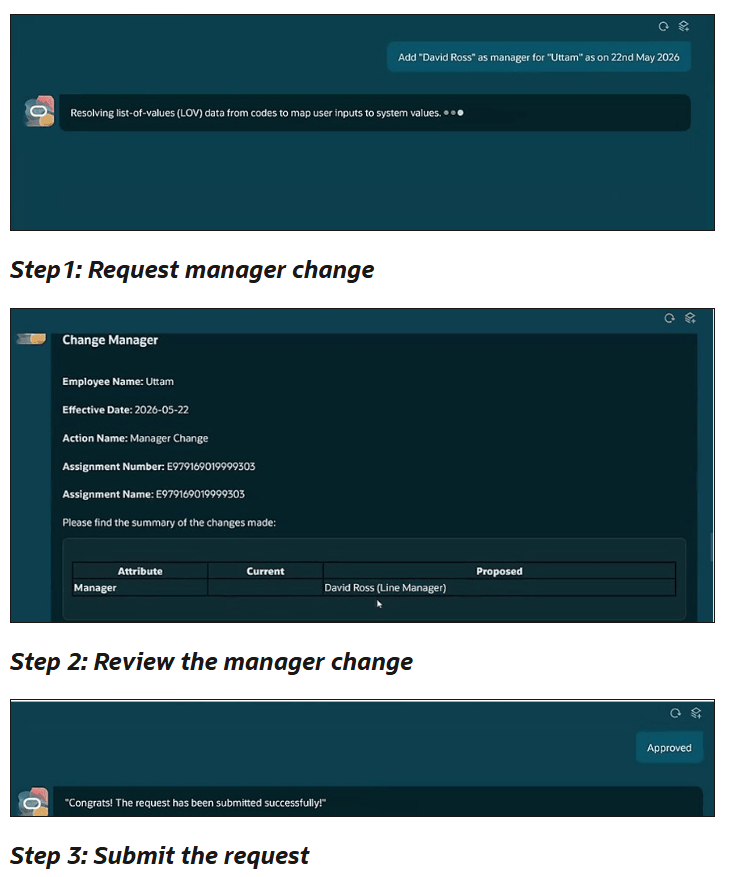
Beyond information retrieval, the supported transaction scope has grown. Change Working Hours and Change Manager are now supported processes alongside the original capabilities. Salary updates are also now handled directly through the agent: managers or HR specialists can specify either a new salary amount or a percentage increase , which covers the majority of straightforward salary adjustment scenarios without needing to exit to a quick action. For anything more complex, Oracle’s guidance is to use the standard quick actions, which is sensible.
Two other additions worth noting: Business Title can now be derived automatically from the selected Job or Position and presented in the review summary before submission, and on the review page, users can now click Request Change to modify any supported assignment attribute before submitting, not just the manager notes as was the case in 26C.
One thing to note: salary update access through the agent requires the user to already hold the privilege and data access needed to create a salary change through the standard application. The agent doesn’t grant any additional access beyond what the user already has.
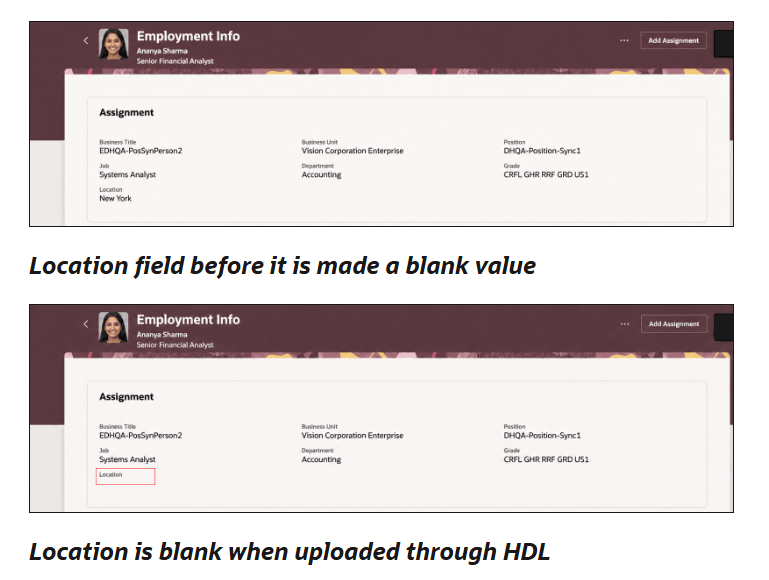
The next feature I want to highlight is Blank Position Values Now Synchronise Correctly via HDL. This one might look small on paper, but if you’ve ever had to unpick mismatched position and assignment data after a bulk load, you’ll appreciate exactly why it matters.
Prior to 26D, when a position attribute configured for synchronisation was cleared, running an HCM Data Loader (HDL) load would not propagate that blank value down to the assignment. The result was that the assignment retained a old value even though the corresponding position attribute had been removed. For organisations that rely on position synchronisation to keep assignment data consistent, this created a category of data discrepancy that was difficult to detect and time-consuming to resolve.
From 26D, blank values are synchronised to the assignment provided the attribute is configured for position synchronisation. The logic is straightforward: if Grade Ladder is a synchronised attribute and it’s removed from a position, the next HDL load can now clear that value on the corresponding assignments. In addition, Position Name can now be configured to synchronise with Assignment Name through HDL, so the Assignment Name is derived from the Position Name as part of the synchronisation process.
If your organisation built agents in 26A or 26B using either the Personal Information Assistant or the Person Legislative Information supervisor agent templates, this is the announcement you need to pay attention to. Both templates are deprecated in 26D. Agents already created from these templates will continue to function for now, but Oracle has confirmed these templates will no longer be enhanced. The replacement is the Person Data Assistant, introduced in 26C as a workflow agent that extends person data management with workflow-based child agents for selected data areas.
The practical implication is clear: any new development should be on Person Data Assistant, and existing agents built on the deprecated templates should be migrated. If your organisation has already deployed either of the old agents in production, now is the right time to start your migration planning. The agents won’t break overnight, but you’ll be building on a foundation that Oracle is no longer investing in, and the gap between the deprecated templates and Person Data Assistant will only widen with each subsequent release.
Start by reviewing what data areas your existing agents cover, map those to the Person Data Assistant’s workflow-based child agent structure, and assess the configuration effort involved. There’s no need to rush into a weekend migration, but equally don’t leave this until the deprecated templates stop functioning without warning.
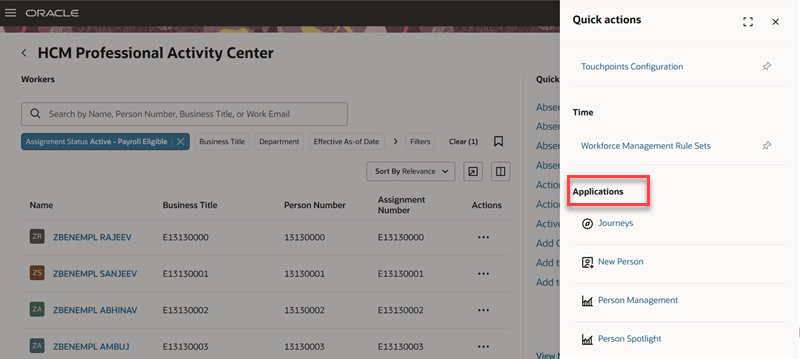
The HCM Professional Activity Centre was introduced in 26C and is already a firm favourite. 26D brings a couple of enhancements that make it meaningfully easier to use for both HR professionals and the administrators who configure it. Applications and quick actions are now consolidated into a single list under the Quick Actions section. Previously these were presented separately, which added navigation steps for users looking to get to a specific action or application. Now, selecting View More in the Quick Actions section shows pinned quick actions first, followed by other quick actions, and then the list of applications in one continuous view.
The second enhancement is organisation-level default pinning. Administrators can now define a default set of pinned quick actions for all users via the Structure tool. If a user hasn’t set their own pins, they’ll see the organisation defaults. If they have already personalised their pins, those personal choices remain and aren’t overridden. This gives administrators a sensible way to surface the most commonly needed actions for their user population without forcing any individual into a rigid layout.
One thing to note: navigation to a future hire’s person activity centre from search results has been disabled in this release.
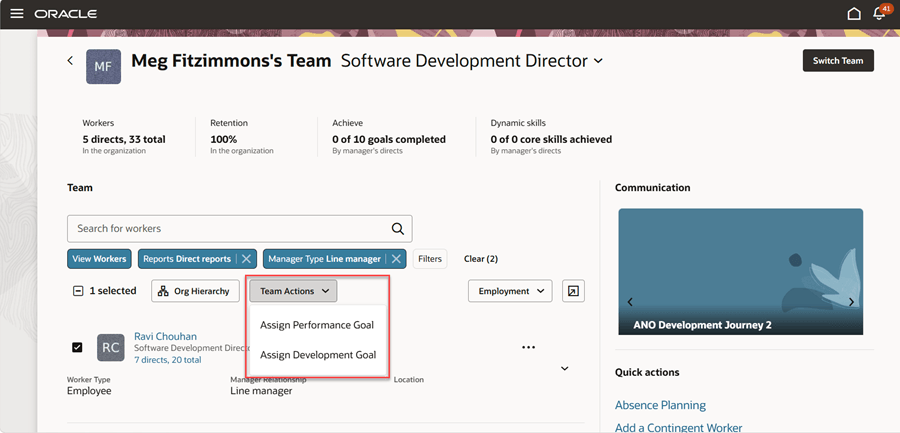
The Team Activity Centre enhancements in 26D follow a similar pattern to the Professional Activity Centre improvements above, with the addition of a genuinely useful capability for managers around goal assignment. Managers can now assign a performance or development goal to multiple direct and indirect reports selected through Team Activity Centre filters, all in a single action. Previously, assigning the same goal to a group of employees meant repeating the process person by person. For managers cascading goals across a team or department, that was a real time cost. This feature removes it.
The same quick actions and applications consolidation available in the Professional Activity Centre applies here too. Quick actions and applications are now in a single list under View More, with pinned actions appearing first. Organisation-level default pins work the same way.
Overall, 26D is another incremental but worthwhile update for Core HR. The headline change is the deprecation of the older personal information templates, so if you’ve built agents using those templates it’s worth starting your migration planning sooner rather than later. Beyond that, Oracle continues to refine both the AI and user experience story, with improvements that should make everyday HR processes a little smoother. As always, keep an eye on the readiness materials throughout the quarter, as Oracle sometimes introduces additional enhancements after the initial announcement.
Please note all screenshots are the property of Oracle and are used according to their Copyright Guidelines


