
When Oracle talks about AI in Fusion Applications, it’s easy to assume we’re talking about a chatbot sitting on top of an existing process. In reality, Oracle has been quietly embedding AI throughout the entire HR Help Desk lifecycle, from the moment an employee has a question through to the point a case is resolved and closed.
What’s particularly interesting is that these capabilities aren’t isolated features. They work together to create a service experience that is increasingly proactive, intelligent and efficient for both employees and service teams.
Let’s walk through what that journey looks like in practice. The best help desk case is often the one that never needs to be raised. Oracle’s AI-powered employee assistance capabilities, available through the My Help experience, allow employees to ask questions in natural language and receive immediate guidance based on knowledge articles and HR process information. Instead of navigating FAQs or searching through documentation, employees can simply ask questions in their own words and receive conversational responses. Whether an employee wants to understand a policy, find information about benefits, or work out how to complete a process such as requesting leave, the AI assistant acts as the first point of contact and attempts to resolve the issue through self-service.
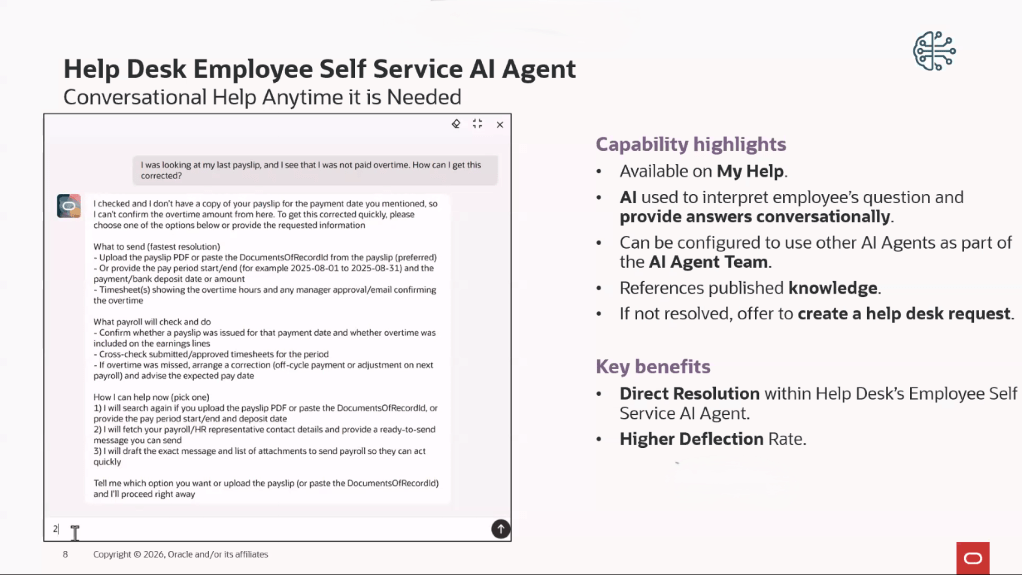
This is also the direction Oracle is taking strategically. Organisations still using Oracle Digital Assistant (ODA) skills for HR Help Desk should be aware that Oracle is moving towards the newer Redwood-based AI Agent framework, with legacy ODA capabilities being phased out in favour of the new experience.
Of course, self-service won’t solve every issue. When additional support is required, Oracle’s Help Desk Request Creator AI Agent can automatically create a help desk request using the details already captured during the conversation. Information such as the request description, category and other key details can be populated automatically, avoiding the frustrating experience of employees having to repeat everything they’ve already explained. For employees, that means a smoother support experience. For service teams, it means better-quality requests arriving in the queue with the right information from the outset.
One of the most time-consuming parts of any service desk operation is getting requests to the right team. In many organisations, someone still needs to review incoming requests, determine the nature of the issue and assign it appropriately. Oracle uses machine learning to automate much of this process. When a help desk request is created, whether through self-service, email or another channel, Oracle can analyse the content and predict the most appropriate category before routing it to the correct queue.
Imagine an employee emails HR because their tax code is incorrect on their payslip. Rather than waiting for manual triage, the system can identify the request as payroll-related and route it directly to the relevant team. What makes this particularly valuable is that the model improves over time. Oracle trains the categorisation engine using historical case data, allowing it to learn from previously resolved requests and continually improve its accuracy. Administrators can monitor performance through dedicated insights dashboards, helping them understand how effectively the model is classifying requests and what impact it is having on resolution times.
Once a case reaches a service agent, Oracle introduces another layer of AI support. A common challenge within HR Help Desk is the amount of time agents spend reviewing case history before taking action. Long-running cases often contain multiple updates, conversations and handovers, making it difficult to quickly understand what’s happened so far.
Oracle addresses this through a series of AI-powered summarisation capabilities. Agents can generate instant summaries of requests, review concise overviews of recent activity and use AI-generated handover notes when transferring cases between teams. When the case is resolved, AI can also generate draft resolution notes to help document the outcome.
These may seem like small improvements individually, but collectively they remove a significant amount of administrative effort from the case management process. In 26B, Oracle enhanced these capabilities by rebuilding them as configurable AI Agents managed through AI Agent Studio. While the experience remains familiar to end users, organisations gain much greater flexibility over how these capabilities operate.
Beyond summarisation, Oracle also provides a Resolution AI Agent that can analyse an open case and suggest a potential response. Rather than manually searching for relevant knowledge articles or previous resolutions, agents receive a recommended draft response based on the details of the current case. Importantly, the AI does not make decisions on behalf of the service agent. It provides recommendations, while the agent remains responsible for reviewing and approving the final response.
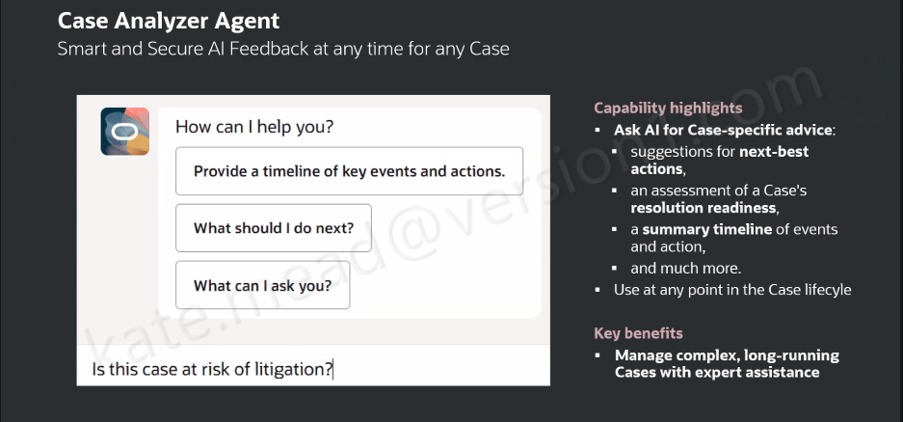
Of all the AI capabilities currently available within HR Help Desk, Case Analyzer is arguably the most transformative. Complex cases often involve multiple stakeholders, tasks, updates and handovers. Understanding the history of a case can sometimes take longer than resolving the issue itself. Case Analyzer is designed to address that challenge.
When launched, the AI Agent reviews the entire case record, including notes, messages, tasks, action plans and other relevant information. It then presents that information through a conversational interface that allows agents to explore the case in far greater detail. Agents can view a timeline of events, identify important developments, ask specific questions about the case and receive suggested next-best actions. The tool can also highlight potential escalation risks and help agents understand whether additional attention may be required.
What I particularly like about this capability is that it moves beyond simple summarisation. Rather than giving you a static overview, it allows you to have an interactive conversation with the case itself. For newer service agents, this can significantly reduce the time needed to understand a complex issue. For experienced agents, it provides confidence that important details haven’t been overlooked. Oracle has continued to invest in this capability, with 26B introducing configurable starter prompts that help guide users towards the types of questions they can ask.
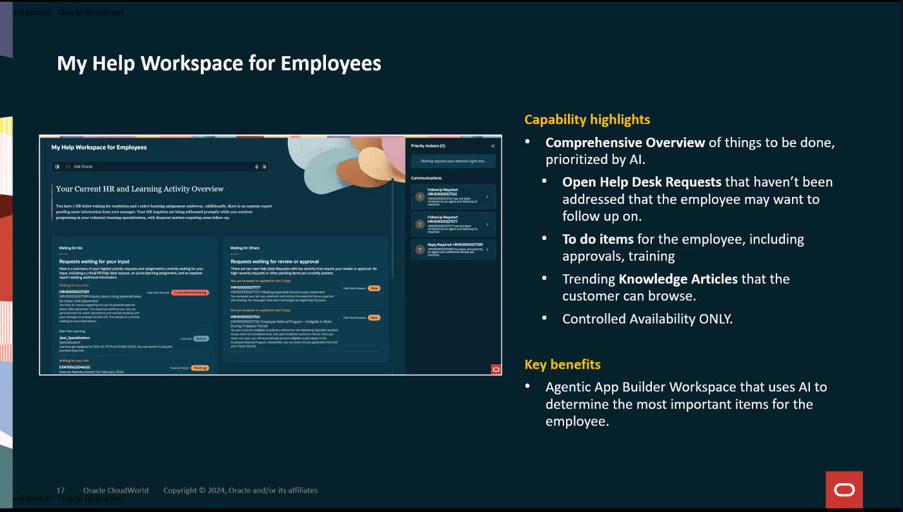
A controlled availability feature that is also worth watching is the evolution of My Help into a broader employee workspace. Rather than focusing solely on conversational support, the workspace brings together employee tasks, open requests and relevant knowledge content into a single AI-driven experience. While still in the early stages of adoption, it provides a useful glimpse into how Oracle sees the future of employee support. It should be noted that this utilises the Agentic Application Platform which requires a separate licence.
The real value is not any single AI feature. It’s the way they work together. Employees receive assistance before a case is raised. Requests are categorised and routed automatically. Agents receive summaries, recommendations and drafted responses. Complex cases can be analysed through a dedicated AI assistant. Resolution notes can be generated automatically at closure. Taken together, these capabilities represent a shift away from traditional ticket management and towards a more intelligent service model that actively supports both employees and HR service teams throughout the lifecycle of a request.
There is another important point worth mentioning. All of these capabilities are embedded within Oracle Fusion Applications and operate within the existing security and access framework. For organisations handling sensitive HR data, that matters just as much as the AI functionality itself.
If you’re already using Oracle HR Help Desk, it’s worth taking a fresh look at what’s available in your environment. Many of these capabilities have arrived gradually over recent releases, making them easy to overlook. Taken together, however, they represent one of the most comprehensive examples of how Oracle is embedding AI directly into everyday business processes.
Please note that all screenshots are the property of Oracle and are used in accordance with Oracle’s Copyright Guidelines.


