Before we get started, a quick thank you to one of my blog readers. This article came about following a direct request from a customer who asked if I could explain what is happening with Oracle Learning Offerings and the new Learning Paths functionality. It’s the first time I’ve been specifically asked to write a blog on a particular Oracle Fusion topic, and after looking into it I realised they’re probably not alone in being confused.
If you’ve recently seen references to Learning Paths, heard that Offerings are going away, or wondered what Redwood means for Oracle Learning, you’re not the only one. Oracle is changing terminology, introducing new Redwood-native learning objects and modernising Learning administration at the same time. That makes it difficult to understand exactly what is changing and, more importantly, what it means for customers who have spent years building and managing learning content in Oracle Learning. So let’s unpack it.
One of the biggest sources of confusion is that two separate changes are happening at the same time. In Oracle Fusion Learning 26B, Oracle rebranded Specialisations as Learning Paths. Oracle states that the self-service learning experience now consistently presents Specialisations as Learning Paths, although administrators may still see the old terminology in some classic administration pages for the time being.
Learning Paths are therefore the new name for what many Learning administrators have known as Specialisations. They are designed to provide a structured learning journey containing multiple learning items, helping organisations create role-based, compliance-based or career-development learning programmes. They are not a direct replacement for a single Offering.
For many years, Oracle Learning followed a fairly structured hierarchy. A typical eLearning item might look something like this: Course → Offering → Activity. This provided flexibility but often resulted in multiple objects needing to be created and maintained for even relatively simple learning content. If you wanted to publish a straightforward self-paced training course, you typically found yourself creating several related objects before learners could access the content. It worked, but it wasn’t always intuitive.
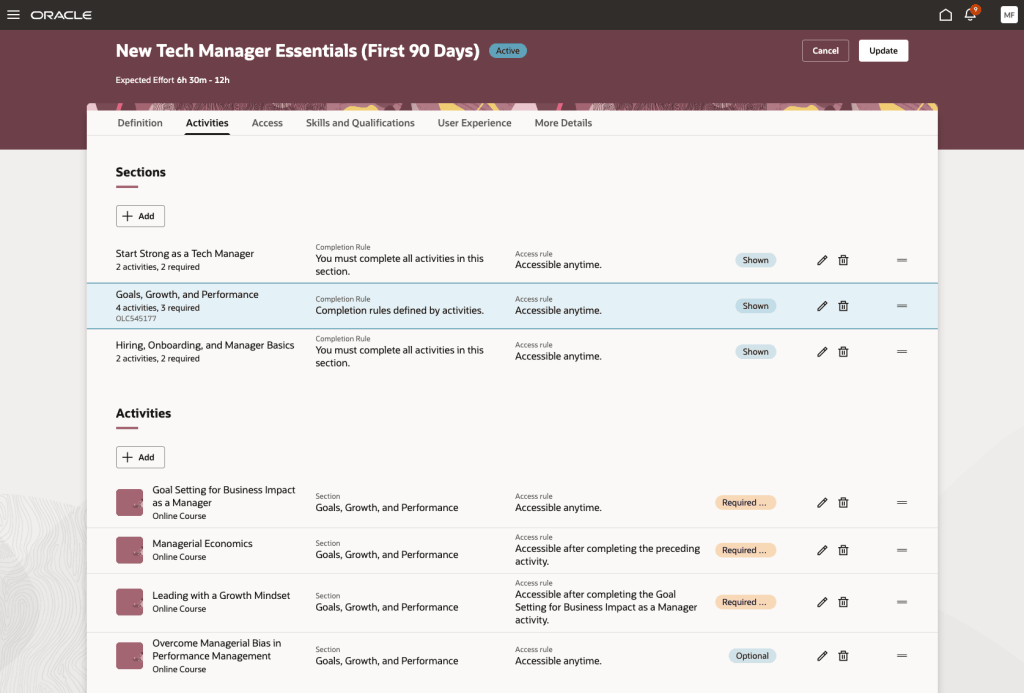
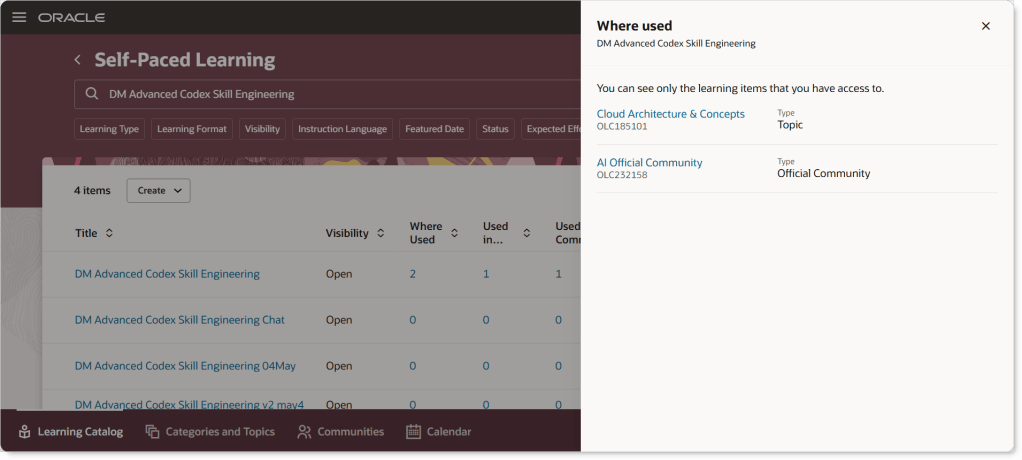
Oracle has been redesigning Learning as part of its broader Redwood strategy. One of the most significant developments arrived in 24D with the introduction of the new Redwood Self-Paced Learning experience. Oracle describes this as a redesigned process that combines what were previously separate activities into a single workflow, bringing together content, activities and learning publication within one experience.
The goal is simple: reduce complexity; simplify administration; improve usability and create a more modern learner experience. Rather than forcing administrators through multiple setup steps, Oracle is moving towards a more streamlined content creation model.
So are Offerings being removed? This is where things get interesting. There is a lot of discussion within the Oracle Learning community about Offerings becoming less central to the Learning architecture. Industry commentators have suggested Oracle’s long-term direction is towards Redwood-native learning objects rather than the traditional Offering-centred model. However, what is important is separating community interpretation from Oracle’s documented position.
What Oracle has clearly documented is:
Specialisations are becoming Learning Paths.
Redwood Self-Paced Learning introduces a simplified approach to managing self-paced learning content.
Oracle continues to invest heavily in Redwood Learning experiences.
What I have not yet found in Oracle readiness documentation is a statement saying: “Learning Paths replace Offerings.” In fact, these are different concepts serving different purposes. Think of a Learning Path as a curriculum rather than an individual training item. A Learning Path might include: multiple self-paced learning items; instructor-led training; assessments; recommended learning sequences or mandatory prerequisites. In other words, Learning Paths help define what learners should complete and in what order. They are ideal for: new starter onboarding; leadership programmes; compliance journeys; certification pathways and role-based development programmes. This is broadly the same purpose that Specialisations have always served, just under a new name.
For most organisations, I don’t think there is a need to panic. My advice would be: first, start becoming familiar with Redwood Learning administration if you haven’t already. Second, review how much you rely on traditional Course and Offering structures for new content creation. Third, start thinking about Learning Paths from a learner journey perspective rather than viewing them as a replacement for individual training content. Most importantly, don’t assume that every mention of Learning Paths is related to Offerings. In many cases Oracle is simply referring to the rebranding of Specialisations rather than introducing a direct replacement for existing Offerings.
Having worked with Oracle Learning for many years, I can understand why customers are asking questions. The terminology changes are significant, and because they are arriving alongside the wider Redwood transformation it’s easy to assume everything is changing at once. What I find encouraging is Oracle’s clear focus on simplifying Learning administration. The historic Course, Offering and Activity model could be powerful, but it could also feel overly complex for straightforward learning scenarios. Redwood Self-Paced Learning is a good example of Oracle reducing that complexity and making content easier to create and maintain.
For now, my advice is simple: treat Learning Paths as the evolution of Specialisations, keep an eye on Oracle’s Redwood Learning roadmap, and avoid assuming that Learning Paths are a direct one-for-one replacement for Offerings. The reality is a little more nuanced than that.
And finally, thank you again to the customer who suggested this topic. If there are other areas of Oracle Fusion you’d like me to explore in a future blog, feel free to get in touch. It seems I’ve accidentally opened the suggestions box.
Please note all screenshots are the property of Oracle and are used according to their Copyright Guidelines.
I’ll admit it. This is probably the first time I’ve written a blog focused on Oracle CX. Most of my content tends to centre around HCM, ERP, SCM, AI Agent Studio, or the wider Oracle Fusion platform. However, over the last few months I’ve been spending a lot more time working with Oracle Helpdesk. As Helpdesk sits within the Oracle CX product suite, that has naturally led me to take a closer look at some of the innovation happening within CX.
When I discovered that Oracle had developed an AI-powered assistant specifically designed to help organisations accelerate their move from the Classic user experience to Redwood, I was intrigued. Redwood migrations are a challenge that many Oracle customers are facing, and the idea of using AI not just to answer questions, but to actively guide and support that journey, felt like an interesting glimpse into where enterprise AI is heading.
It’s worth calling out an important caveat before I go any further. This particular capability is currently designed for Oracle CX Service and its associated extensibility framework. It is not available for HCM, ERP or SCM. However, what interested me as much as the solution itself was the fact that the CX product team is actively exploring and proving patterns that could potentially influence future AI-assisted implementation and configuration experiences across other Oracle product areas.
One of the biggest challenges with Redwood adoption is not usually understanding why you should move. Oracle has been clear about the benefits for some time. Redwood provides a more modern user experience, improved efficiency, greater flexibility through Visual Builder Studio, intelligent recommendations, and access to functionality that is only available within the Redwood user interface.
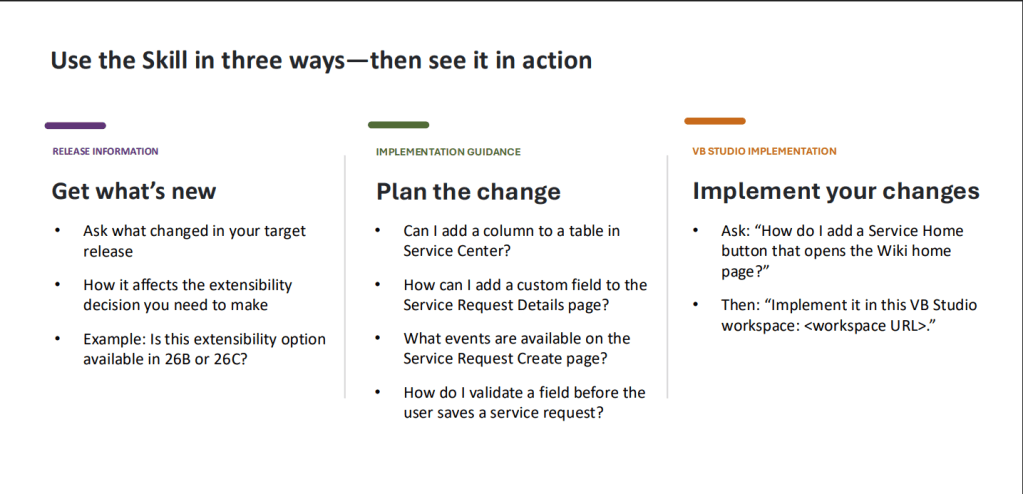
The real challenge is often understanding how to get there. Customers frequently ask questions such as: How do I recreate an existing extension in Redwood? Is a particular extensibility option available in my target release? What is the supported way to add custom functionality to a specific page? How do I avoid building something that won’t survive the next quarterly update? These are exactly the types of questions implementation teams spend significant amounts of time researching.
What caught my attention was that Oracle’s approach isn’t simply to place a large language model in front of documentation and hope for the best. Instead, the assistant is designed to provide grounded guidance using curated, release-aware sources that are specific to Fusion Service extensibility. The aim is to help users understand supported approaches, identify limitations, and surface any missing information required to answer the question accurately. That distinction is important.
One of the biggest misconceptions about enterprise AI is that the value comes from the model itself. In reality, the value often comes from the quality of the information that sits behind it. A generic AI model may be incredibly capable, but if it doesn’t understand the specific product, release, extensibility framework, or support boundaries involved, its answers can quickly become unreliable.
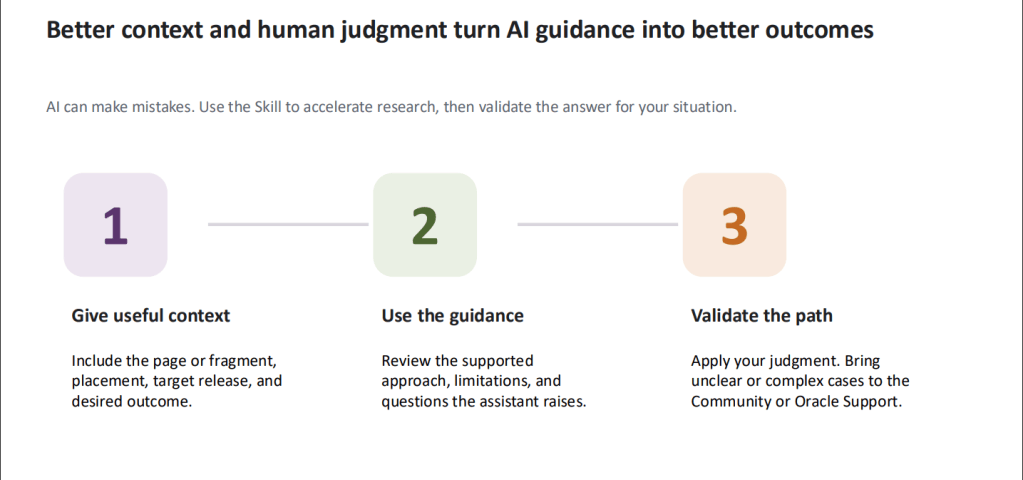
The CX team appears to have recognised this. The assistant routes questions to curated repositories of release-specific information and clearly highlights uncertainty or gaps where additional context is needed. Rather than positioning AI as an infallible expert, it is positioned as an accelerator for research and decision making. I also liked the emphasis on human judgement.
The guidance repeatedly reinforces that users should provide context, review the recommendations, and validate the proposed approach before implementation. In other words, AI helps you get to an answer faster, but it doesn’t remove the responsibility to apply experience and critical thinking. That’s a message I’ve been repeating in many of my recent AI-focused blogs, regardless of whether we’re talking about Agentic Apps, generative AI, or implementation accelerators.
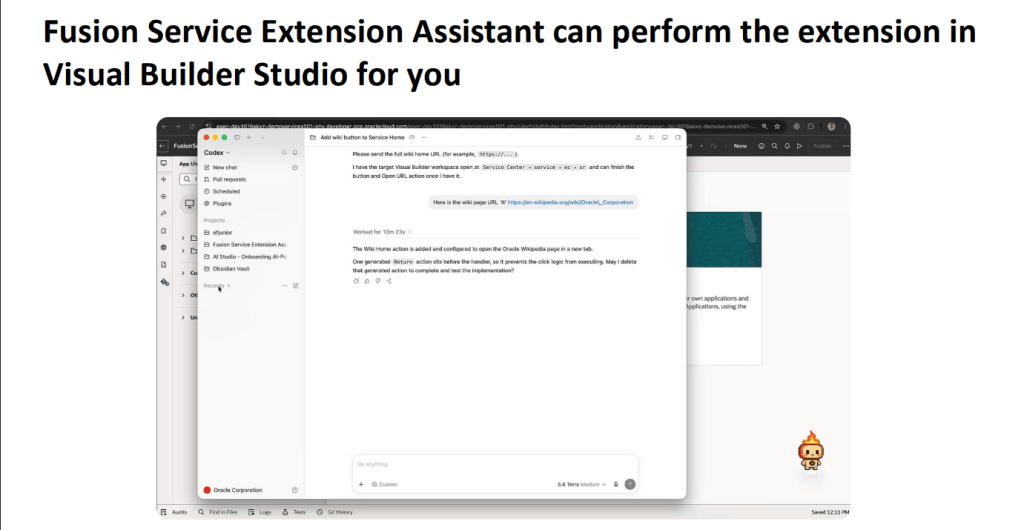
Perhaps the most interesting aspect is where this could lead. Today, the capability focuses on Fusion Service extensibility and Redwood migration activities. It can help users understand new release functionality, identify supported implementation patterns, and even assist with Visual Builder Studio-related work.
Tomorrow, could we see similar experiences helping HCM administrators understand Redwood customisations? Could ERP teams receive guided support when adapting role-based pages? Could SCM implementation consultants get release-aware recommendations about supported configuration options?
Those are questions only Oracle can answer. But what seems clear is that the CX team is exploring a practical application of AI that goes beyond simply generating content. Instead, it aims to reduce implementation effort, improve confidence, and help customers reach the right outcome more quickly. For me, that’s where enterprise AI becomes genuinely interesting. Not when it replaces expertise, but when it helps organisations make better use of it.
Please note that all screenshots are the property of Oracle and are used in accordance with Oracle’s Copyright Guidelines.
It’s quarterly release time again and Oracle has delivered a surprisingly practical set of updates for Procurement in 26D. There’s plenty of AI in this release, which won’t come as a surprise given Oracle’s recent direction. What I found interesting, though, is that many of these features aren’t about replacing procurement professionals or automating entire processes. Instead, they’re focused on removing friction. Making it easier to buy something. Easier to raise a request. Easier to manage contracts. Easier for suppliers to work with you. And honestly, that’s where I think the biggest value often comes from.
Most employees aren’t procurement experts. They don’t know the difference between a catalogue requisition, a non-catalogue request or an intake process. They simply need a laptop, a contractor, some software or a piece of equipment. The more effort they spend working out how to navigate procurement processes, the less time they’re spending on their actual job. That’s the theme that runs through Oracle Procurement 26D.
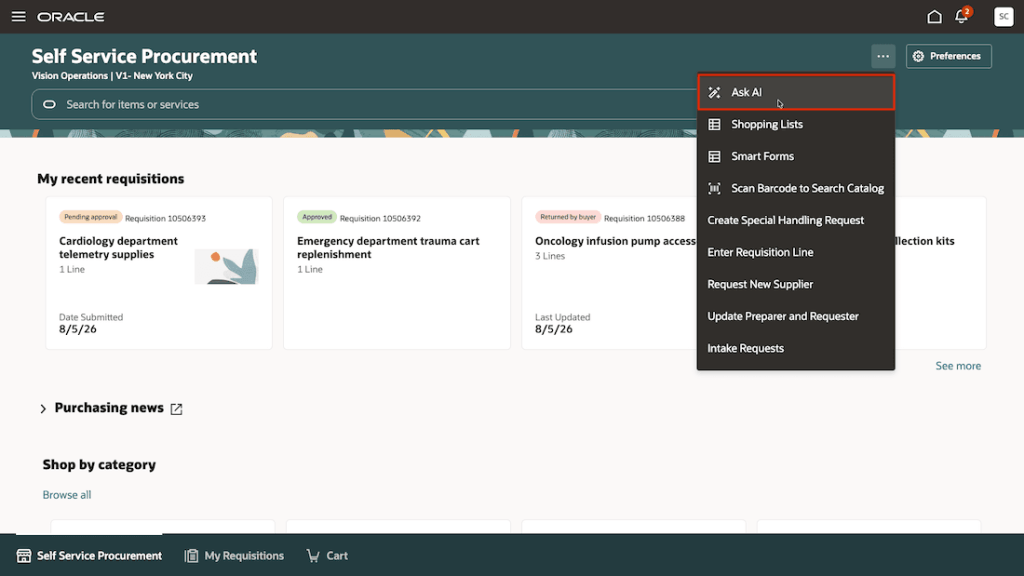
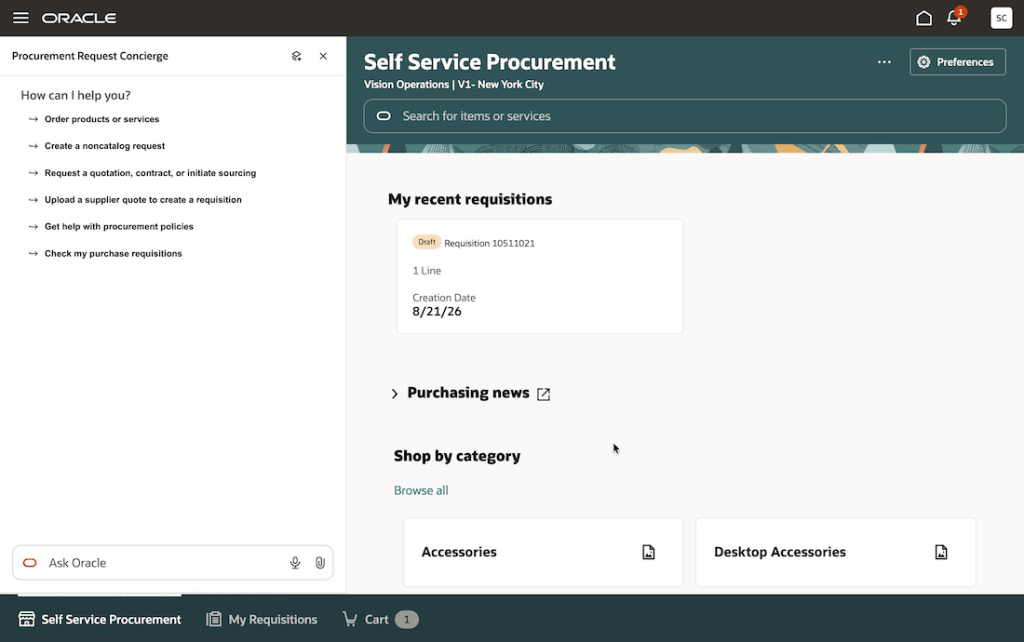
One of my favourite additions in this release is the new Procurement Request Concierge. If you’ve followed Oracle’s investment in AI across HCM, you’ll probably recognise the concept straight away. Rather than expecting users to understand which process they need, Oracle lets them start with a simple conversation.
An employee can describe what they’re trying to achieve and the Concierge works out the most appropriate route. Behind the scenes it might direct them to a catalogue purchase, an intake request, a procurement policy adviser or another specialised procurement assistant. I think this is an important shift.
For years, organisations have invested significant effort in training employees how to use procurement systems. Oracle is increasingly turning that around and teaching the system how to understand employees instead. That may seem like a subtle difference, but it has the potential to improve adoption, reduce incorrect requests and make procurement feel far less intimidating for occasional users.
Oracle has also continued enhancing the Intake Request Creation Assistant. The individual improvements are relatively small, but together they make the experience significantly more natural. The assistant can now understand units of measure, handle currencies more intelligently, capture supporting documents and retain information that doesn’t neatly fit into predefined fields. Oracle has also introduced AI-generated request summaries to help reviewers quickly understand what’s being requested.
What I like about these enhancements is that they’re focused on a real problem: people don’t speak in structured procurement forms. Users naturally describe what they need in their own words. Historically, procurement systems expected employees to translate those requirements into a format the system could understand. Increasingly, Oracle is teaching the system to do the translation instead. That’s exactly how AI should be used. The best AI isn’t always the most visible AI. Sometimes it’s simply the technology that quietly removes the annoying bits of a process.
Two enhancements to the Purchase Requisition Creation Guide stood out for me because they address challenges many organisations face every day. The first is multilingual support. For global organisations, English often becomes the default language for business systems, even when it isn’t the first language of many employees. Allowing employees to interact with procurement assistants in their preferred language reduces barriers and makes the technology accessible to a much wider audience.
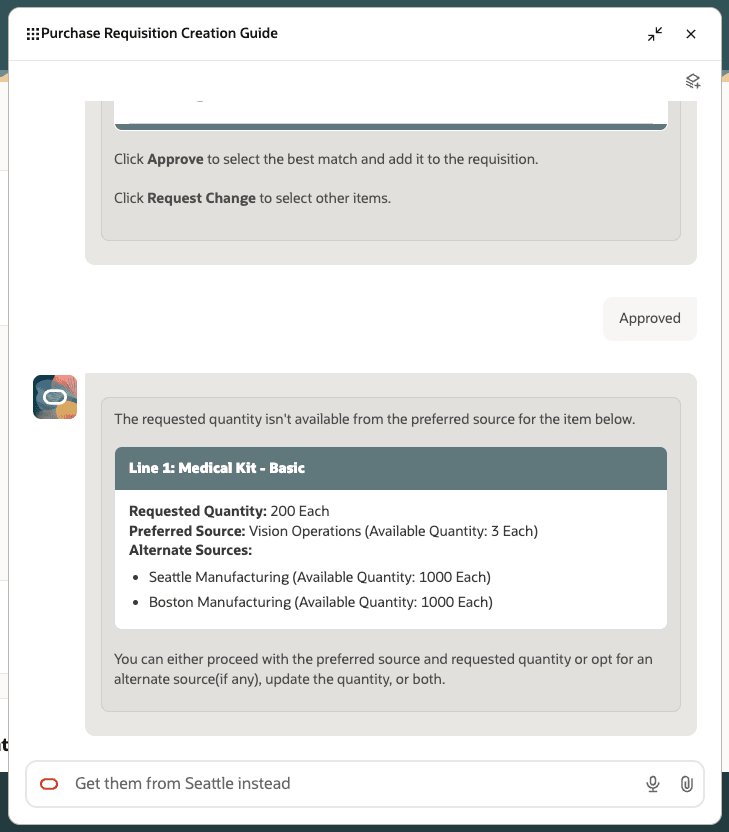
The second enhancement improves visibility into internal material sourcing. If stock isn’t available from a preferred internal source, requesters can now see alternative sourcing options immediately, rather than discovering availability issues later in the process. Neither feature is particularly flashy. Both are likely to save users frustration. And that’s often a much better measure of success.
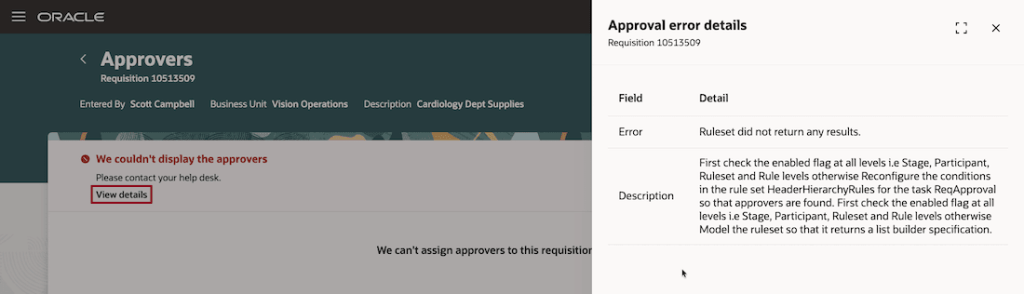
One of the updates that caught my attention has nothing to do with AI. Oracle has improved the way approval errors are communicated to users. Historically, requisitions could sometimes appear stuck with little indication of what had gone wrong. That inevitably leads to support calls, emails and frustration as users try to work out what happened. In 26D, error messages are clearer, more informative and provide better diagnostic information when something goes wrong. Whilst this isn’t ground breaking, improvements like this often have a disproportionate impact on user satisfaction because they address genuine everyday frustrations.
The biggest enhancements in 26D arguably sit within Enterprise Contracts. Both features focus on tasks that have traditionally required substantial manual effort. The first is AI-powered contract ingestion. Many organisations have large collections of contracts sitting in shared drives, document repositories and archive systems. Bringing those contracts into a structured contract management solution has often required significant manual effort and review. Oracle can now use AI to help classify those documents, extract key information and create contract records. If you’re undertaking a contract transformation programme, consolidating legacy systems or simply trying to improve contract visibility, this could significantly reduce the effort involved.
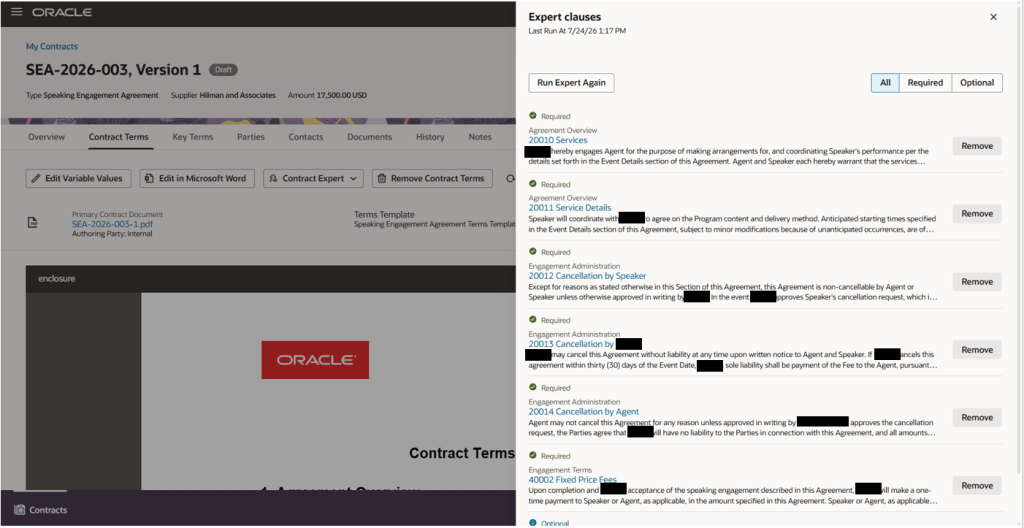
The second enhancement builds on Contract Expert. Rather than relying solely on traditional rules, Oracle can now evaluate contracts against policy guidance and recommend or automatically apply appropriate clauses. For me, the real value isn’t the AI itself. It’s consistency. As organisations grow, maintaining consistent contractual terms becomes increasingly difficult. Features that help ensure the right clauses are included at the right time can improve governance and reduce risk without creating additional work for contract authors. That’s the sort of practical AI adoption I like to see.
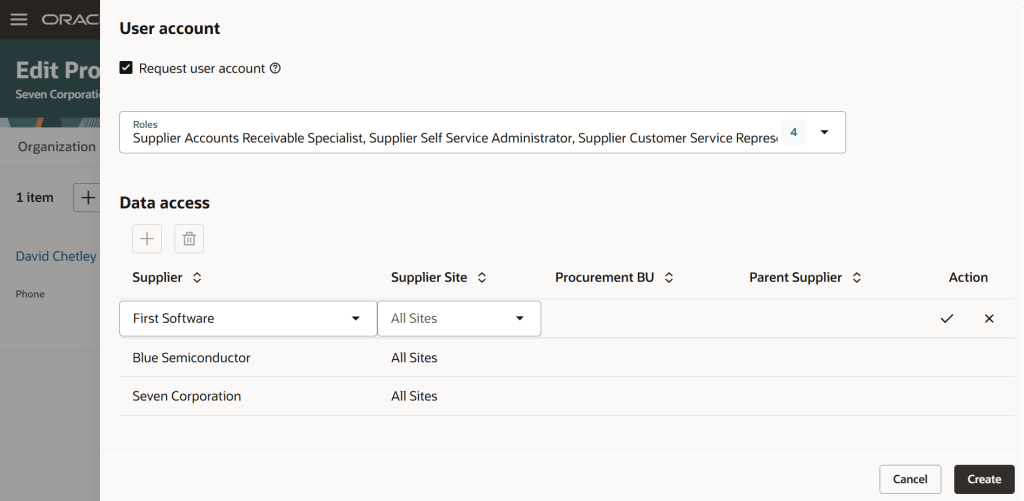
Several of the 26D enhancements focus on suppliers rather than internal users. Supplier contacts can now manage multiple supplier relationships using a single account, reducing the need for multiple logins and simplifying administration. Oracle has also introduced a new Redwood experience for supplier invoicing and payment management, creating a more modern and streamlined interface for suppliers submitting invoices and tracking payments. It’s easy to focus entirely on employee experience when reviewing release notes, but supplier experience matters too. The easier you make it for suppliers to do business with you, the smoother your procurement processes become overall.
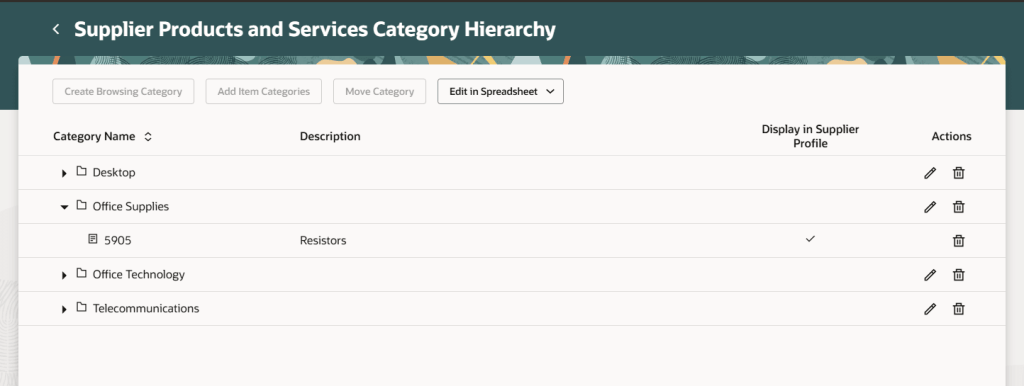
Like almost every Oracle release at the moment, 26D also continues the wider Redwood journey. Additional Supplier Management setup pages are now available in Redwood, reducing the need for administrators to move between classic and Redwood experiences. It’s not the biggest story of the release, but it reflects Oracle’s continued progress towards delivering a more consistent user experience across the entire procurement suite.
What I like about Procurement 26D is that Oracle hasn’t tried to solve procurement with a single headline-grabbing feature. Instead, we’re seeing dozens of improvements that make procurement easier for everyone involved. Employees get a simpler starting point. Requesters receive more intelligent guidance. Contract managers gain tools that improve consistency. Suppliers benefit from a more streamlined experience.
Yes, AI is everywhere in this release. But the most valuable features aren’t necessarily the ones shouting about AI. They’re the ones quietly helping people complete tasks faster, make better decisions and spend less time fighting the system. That’s not always the most exciting story. For most procurement teams, though, it’s probably exactly the right one.
Please note all screenshots are the property of Oracle and are used according to their Copyright Guidelines.
If Release 26D tells us anything, it’s that Oracle’s vision for finance is no longer about giving users better screens. It’s about giving them less work to do in the first place. That might sound like marketing speak, but this quarter’s ERP updates genuinely feel different. Across Payables, Payments, Expenses, Billing, Fixed Assets and Budgetary Control, Oracle continues to move beyond AI assistance and deeper into agent-led execution. In many cases, the software isn’t just helping users do the work. It’s identifying issues, recommending actions and increasingly resolving routine tasks on their behalf. The common theme throughout 26D is simple: finance professionals spend less time chasing transactions and more time focusing on decisions that genuinely need human judgement.
If you’ve read any of my previous AI blogs, you’ll know I keep coming back to Payables. That’s because it’s one of the clearest examples of where agentic AI can deliver measurable business value. Invoice processing is still surprisingly manual in many organisations. Someone uploads an invoice, someone investigates an exception, someone releases a hold, and someone else spends time trying to understand why the same issue keeps appearing month after month. Oracle is steadily removing those touchpoints.
The Payables Agent now supports more of the invoice lifecycle than ever before. Invoice ingestion has been enhanced with broader document support and improved integration options, making it easier to bring invoices into Oracle regardless of the format or source system. For organisations dealing with different supplier standards, languages and document types, that’s a practical improvement that should reduce manual effort from day one.
The feature that stood out most to me, however, is Actionable Insights. Rather than finance teams having to trawl through reports looking for recurring issues, Oracle now highlights patterns automatically. If users are repeatedly overriding exceptions or releasing holds without addressing the root cause, the system identifies the behaviour and recommends corrective action. This is where AI starts becoming genuinely useful. Rather than simply helping users process invoices faster, it helps organisations understand why problems occur in the first place.
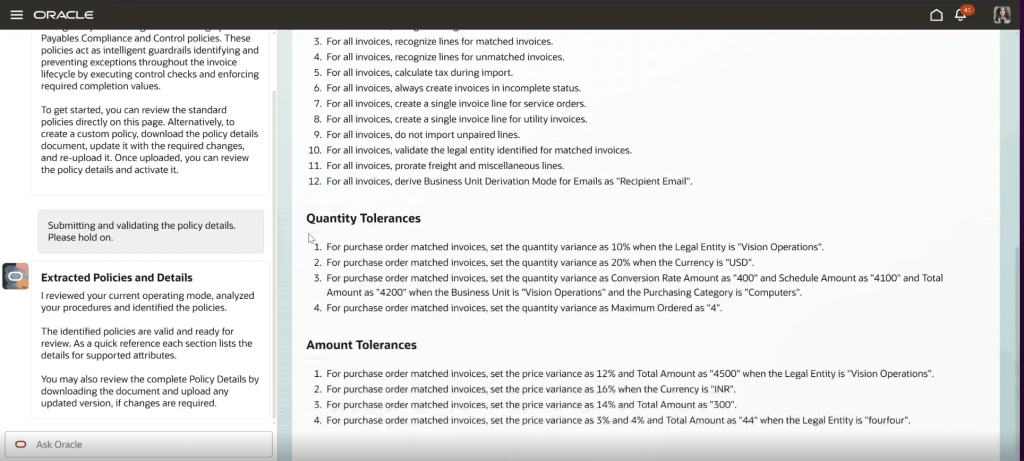
Oracle has also expanded automated exception resolution, allowing more invoice import errors to be addressed through predefined resolution paths rather than manual intervention. Combined with enhanced matching controls and business-specific tolerance rules, organisations have more flexibility to reduce unnecessary holds while still maintaining appropriate financial controls.
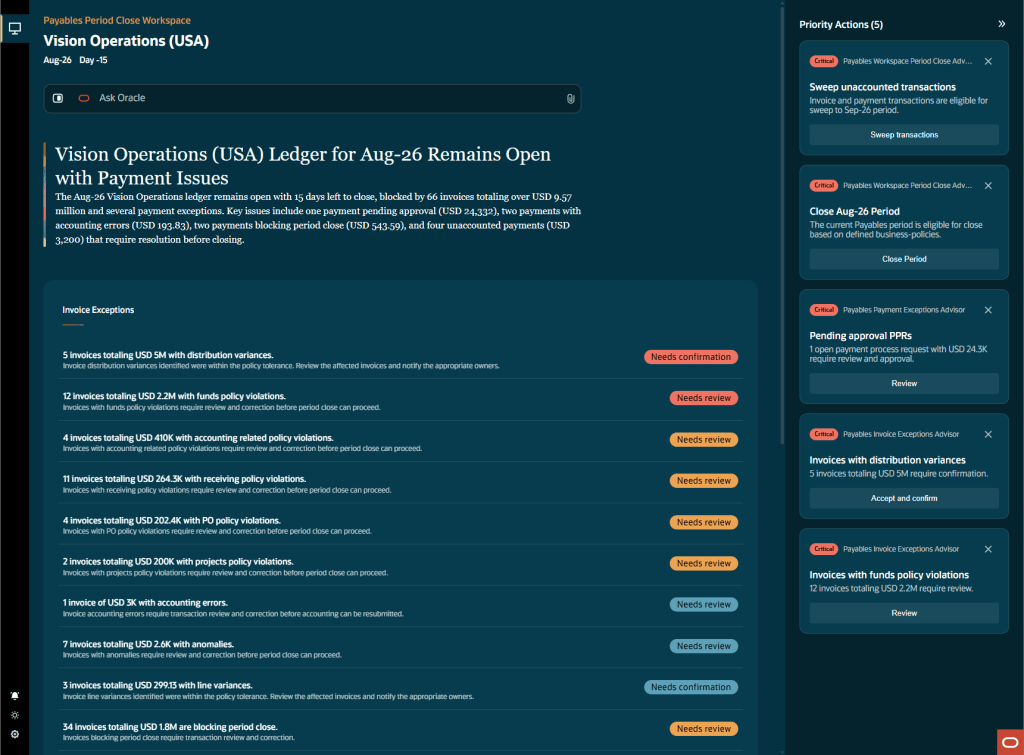
Another welcome addition is the new Payables Period Close Workspace. Month-end close is often less about processing transactions and more about coordinating people. Teams spend significant time identifying what still needs attention, chasing outstanding items and managing exceptions across multiple reports and spreadsheets. Oracle now brings those activities together into a single workspace that highlights priority actions, identifies high-value exceptions and guides users through the close process. For customers still relying on spreadsheets, email chains and manual status updates during close, this could make a significant difference.
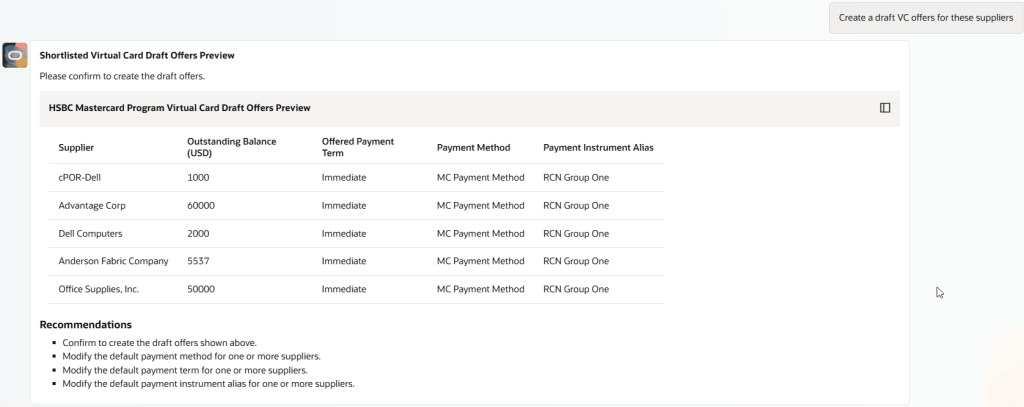
One of the criticisms I’ve had of some early AI assistants is that they often stop at telling users what they should do next. That’s useful, but it’s only half the journey. In 26D, Oracle is starting to close that gap. The Payments Agent can now support activities such as virtual card offers, dynamic discounting and supply chain financing, allowing payment specialists to move from opportunity identification into execution within the same experience.
What I find particularly interesting is Oracle’s focus on working capital optimisation. Rather than treating financing options as separate initiatives, the platform can compare multiple strategies and help users determine which approach is most appropriate for a particular supplier or payment population.
There’s also a practical enhancement that many finance teams will probably value more than the headline AI announcements. When payment processes fail, the agent can now explain the issue in business language and recommend a course of action. Anyone who has spent time trying to decipher technical process logs during a payment run will understand the value of that immediately.
Let’s be honest. Expense management isn’t usually anyone’s favourite process. It’s one of those areas where frustration tends to come from lots of small inefficiencies rather than one major issue. Missing receipts, incomplete itemisation, attendee information, rejected claims and lengthy approval cycles all add up. Oracle is tackling several of those issues in 26D.
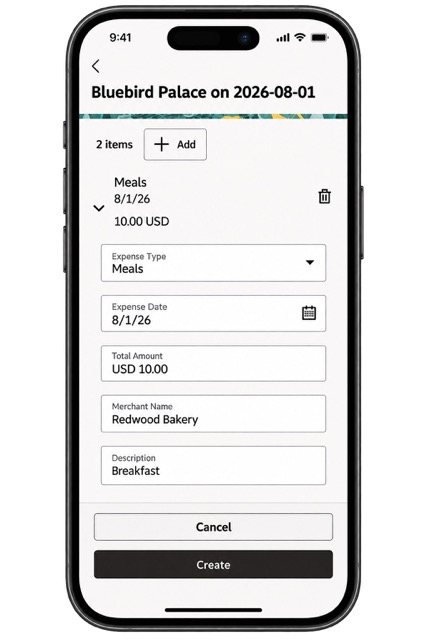
The Expenses Agent can now collect missing itemisation and attendee details through email interactions, allowing employees to provide information using natural language rather than navigating back into the application. That may sound like a small change, but anyone involved in expense administration knows that itemised expenses and entertainment claims often generate disproportionate amounts of back-and-forth communication. Capturing that information before the approval process begins should reduce delays and improve approval cycle times.
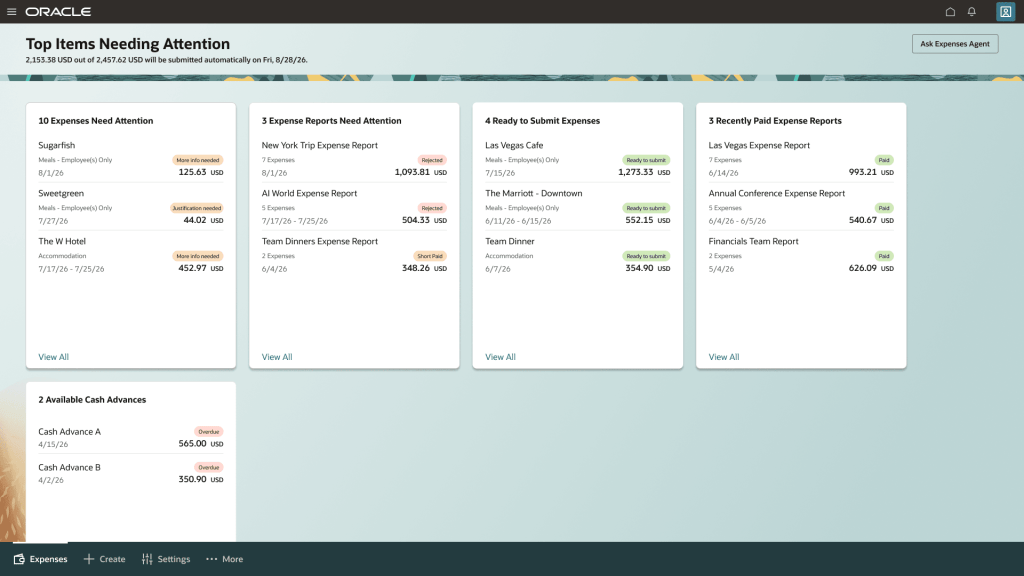
The new Expenses landing page is another welcome addition. Employees and delegates now have a single view showing reports requiring attention, reports ready for submission, recent payments and other key activities. For delegates managing expenses on behalf of multiple employees, this is particularly useful. Instead of jumping between multiple users and screens, they can manage activity from a single location and quickly identify where action is required. Oracle has already confirmed this will become the default experience in 27B, so now is probably a good time for organisations to start evaluating it.
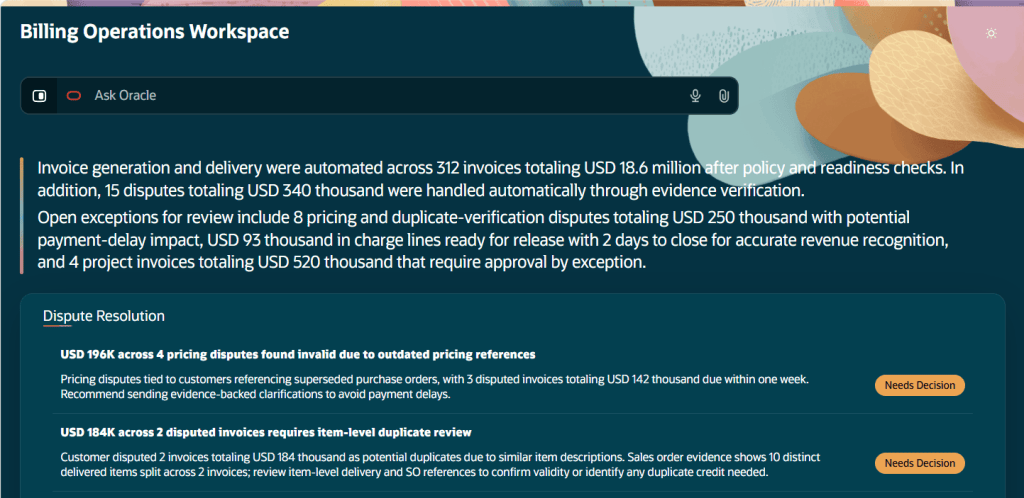
If there is one release area that genuinely feels different, it’s Billing. The new Billing Operations Workspace isn’t simply another dashboard. It’s built around the idea that agents should continuously perform routine work, while people focus on exceptions and decisions. The workspace covers project billing readiness, invoice generation and dispute resolution.
On the project billing side, the agent monitors overdue approvals, sends reminders and escalations according to defined procedures and identifies billing issues before they become month-end surprises. It can even update existing draft invoices when held transactions are released, eliminating manual rework that many project accounting teams know all too well.
For invoice generation and delivery, the agent handles qualifying activities automatically and surfaces only those situations requiring human review. Dispute management follows a similar pattern. Customer billing queries received by email can be converted into disputes, assessed by the agent and, where appropriate, resolved automatically or routed for review with supporting evidence. This is probably one of the strongest examples in 26D of Oracle’s broader vision for agent-led business processes.
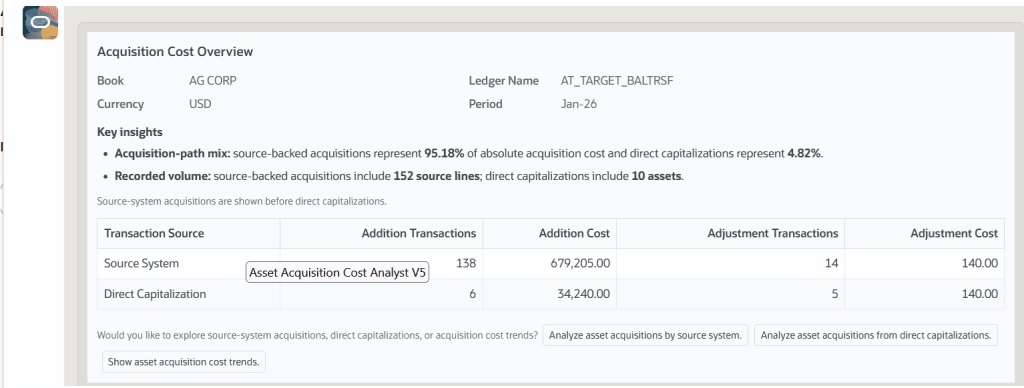
Fixed Assets rarely gets the same attention as Payables, Procurement or Financials, but Oracle has introduced several genuinely useful assistants in this area. New capabilities support asset additions, depreciation forecasting, acquisition cost analysis and capital expenditure planning. What’s interesting is that Oracle hasn’t focused on flashy demonstrations here. Instead, the emphasis is on reducing spreadsheet dependency.
The Asset Additions Assistant helps users create assets through a guided conversational experience. The Depreciation Projection Assistant provides on-demand forecasting from live data. Additional tools analyse acquisition costs and support capital expenditure planning activities. None of these capabilities are likely to dominate conversations, but they address real activities that finance teams perform every month. In my experience, that’s often where the biggest productivity gains come from.
The Budget Adjustment Assistant first appeared in 26C, but Oracle has continued to build on it in 26D. The most significant enhancement is policy validation. Budget transfers can now be validated against organisational policies before they enter the approval process, helping prevent invalid adjustments from progressing and creating unnecessary rework.
When validation issues are identified, the assistant explains the issue in plain language and provides guidance on how to resolve it. The approval process and audit trail are managed as part of the overall workflow. It’s worth noting that this enhanced capability is currently available through a controlled release, so customers interested in evaluating it will need to engage Oracle Support.
When Oracle first started talking about AI agents, I think many customers wondered whether they would be genuinely useful or simply another layer on top of existing processes. Release 26D provides some of the clearest evidence yet that Oracle is serious about changing how finance work gets done.
What stands out isn’t any single feature. It’s the number of areas where Oracle is systematically removing repetitive effort. Whether that’s invoice exceptions, payment investigations, expense administration, billing disputes, fixed asset analysis or budget adjustments, the goal is increasingly the same: let the system handle routine work and focus human attention where it adds the most value.
We’re still some distance away from a fully autonomous finance function, and frankly I don’t think most organisations would want that anyway. But we are moving closer to a world where finance professionals spend less time moving transactions between stages and more time applying judgement, managing risk and supporting the business. For me, that’s where the real value of AI sits. Not replacing finance teams, but helping them spend more time doing the work only they can do.
Oracle regularly introduces additional functionality throughout the quarter, so it’s worth keeping an eye on the What’s New documentation as Release 26D progresses. If any significant new ERP capabilities appear, I’ll be sure to cover them in a future update.
Please note all screenshots are the property of Oracle and are used in accordance with Oracle’s Copyright Guidelines.
When Oracle publishes its quarterly updates, most people head straight for HCM, ERP, Payroll or Learning. Common Features is usually the section that gets less attention. That’s understandable. Historically, it’s often been home to the more technical platform updates that only administrators and implementation teams get excited about. But every now and then a release comes along where the Common Features updates deserve a closer look. 26D is one of those releases.
This quarter brings a mixture of Redwood enhancements and AI Agent Studio improvements that focus less on flashy new functionality and more on solving some of the challenges organisations face when running Oracle Fusion at scale. Supportability, governance, testing, deployment, cost control and communication may not sound particularly exciting, but they’re often the difference between a successful implementation and a frustrating one.
Redwood has been Oracle’s strategic user experience for several years now, and most customers are either well into their migration journey or actively planning it. What caught my attention in 26D is that Oracle is continuing to address some of the operational gaps customers have identified along the way.
Organisations spend a lot of time trying to communicate important information to employees and managers. The problem is that emails get ignored, intranet posts go unread, and people rarely look in the places you’d like them to. Oracle’s answer in 26D is the introduction of contextual announcement banners for Redwood pages. Rather than displaying generic messages everywhere, organisations can now surface targeted information directly within specific business processes. Think payroll cut-off reminders, compliance notices, legislative updates, planned maintenance notifications or guidance for a particular transaction.
The real value here isn’t the banner itself. It’s the fact that the message can be contextual. You can display information when and where it’s actually relevant, rather than hoping users remember something they read in an email three weeks ago. For organisations operating across multiple countries or regulatory environments, this could become a simple but effective way to ensure users see the right information at the right time.
This is probably my favourite Redwood update in 26D: Built-In Issue Recording For Redwood Pages. Anyone who has ever raised a Service Request with Oracle knows the conversation often starts with exactly the same question: “Can you provide a recording of the issue?” Until now, that has usually meant reaching for external screen recording software, capturing screenshots, writing detailed reproduction steps and then trying to explain what the problem actually looks like. 26D makes that process much simpler.
Users can now record issues directly from Redwood pages and generate a recording identifier that can be attached to support requests. It isn’t a flashy feature. But it is exactly the sort of practical improvement that customers appreciate because it makes everyday support processes easier. Faster evidence gathering means faster diagnosis. Faster diagnosis means faster resolution. If you’re currently rolling out Redwood or supporting a large user community, this is one of those features you’ll probably start using immediately. It’s also worth noting that access is controlled through specific security privileges, so administrators will need to review role assignments before making the capability available to broader user groups.
I’ve written quite a few blogs about Oracle AI Agent Studio over the last year, and one thing has become increasingly clear. Oracle is moving beyond the “look what AI can do” phase and focusing on what organisations actually need to deploy AI responsibly and at scale. That’s exactly what we see in 26D. Rather than introducing lots of new AI capabilities, Oracle has concentrated on governance, testing, deployment controls and operational management. Frankly, that’s where the focus should be.
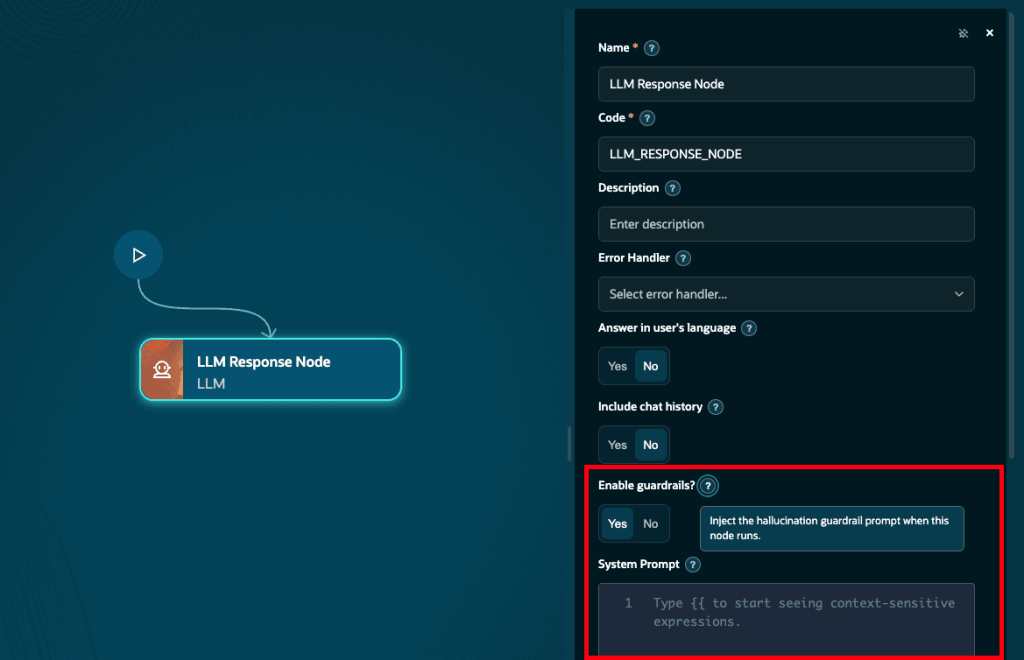
One of the biggest concerns organisations have when introducing AI is maintaining control over responses. Oracle has introduced prebuilt guardrails that can be applied to large language model workflow nodes within AI Agent Studio. The purpose is straightforward. Help keep responses grounded in approved enterprise content and reduce the risk of agents wandering into irrelevant, unsafe or inappropriate territory.
Let’s be clear: guardrails are not a silver bullet. They won’t eliminate every AI risk and they don’t replace broader governance controls. What they do provide is an additional layer of protection inside the workflow itself. For organisations looking at production AI deployments, that’s an important step forward. It is also encouraging to see Oracle making the guardrail instructions visible within debugging tools. Transparency is becoming increasingly important as organisations seek confidence in how AI agents are making decisions and generating responses.
Another welcome enhancement is greater control over model selection. Different models excel at different tasks. Some prioritise speed and efficiency, while others deliver stronger reasoning capabilities but at a higher cost. Until recently, model selection was often treated as a platform decision. Oracle is now giving organisations more flexibility to choose the model that best fits each use case. What I particularly like is the introduction of model lifecycle visibility.
The platform now flags deprecated models, helping organisations identify affected workflows before support is withdrawn. That might sound like a small change, but it removes the risk of discovering a model retirement after it’s already impacted a production process. Anyone responsible for AI governance will appreciate that level of visibility.
One of the challenges many organisations face with AI is that it often sits outside their established development lifecycle. Applications have deployment processes. Integrations have deployment processes. Reports have deployment processes. AI solutions frequently end up managed separately. 26D begins to change that.
Oracle has introduced CI/CD integration for AI Agent Studio workflows and applications, allowing organisations to incorporate AI artefacts into the same controlled release processes they already use elsewhere. For enterprise customers, this matters far more than a shiny new AI feature. It means AI development can follow the same approval processes, audit controls and change management practices as every other critical component within the Oracle landscape. That is exactly what many governance teams have been asking for.
If you’ve spoken to colleagues about AI over the last year, you’ll know that the conversation quickly moves beyond capabilities. Eventually someone asks: “How much is this going to cost?” That’s why I think AI budget management could prove to be one of the most important additions in this release.
Organisations can now allocate AI unit budgets, monitor consumption, set warning thresholds and automatically stop activity when budgets are exhausted. What this really delivers is visibility. Finance teams gain insight into usage patterns. IT teams gain operational control. Business leaders gain confidence that AI spending won’t suddenly spiral beyond expectations. As organisations move from pilot projects into large-scale adoption, this kind of governance capability becomes essential.
If I had to choose the single most important AI Agent Studio enhancement in 26D, it would be ATLAS. Traditional software testing is relatively straightforward. Given the same input, you expect the same output every time. AI doesn’t work like that. Testing AI systems has always been significantly more complex because quality can’t always be measured through traditional pass-or-fail criteria.
ATLAS gives organisations a structured framework for testing, validating and comparing AI workflows before they reach production. Teams can replay scenarios, validate expected workflow routes, measure quality, compare models and identify issues before users ever see them. That may not sound exciting. For organisations deploying AI into business-critical processes, it’s huge.
Good governance isn’t just about controlling access or managing budgets. It’s about ensuring solutions perform consistently and predictably. ATLAS helps bring that discipline to AI Agent Studio. Honestly, this feels like one of the strongest signals yet that Oracle is serious about supporting enterprise-grade AI adoption rather than simply delivering AI features.
Common Features may not be the first section of the release notes you read, but there is a surprising amount of value packed into 26D. The Redwood updates focus on solving real-world operational challenges. Contextual communications help organisations reach users more effectively, while built-in issue recording should make support processes noticeably smoother.
The AI Agent Studio enhancements are arguably even more significant. Oracle is investing heavily in the less glamorous side of AI; governance, testing, cost management, lifecycle control and deployment processes. Those capabilities might not generate headlines, but they’re exactly what organisations need before they can confidently scale AI across the business. None of these updates are likely to be described as revolutionary. But together they make Oracle Fusion easier to govern, easier to support and easier to scale. And in many organisations, that’s exactly the kind of innovation that delivers the greatest value.
Please note all screenshots are the property of Oracle and are used in accordance with Oracle’s copyright guidelines.
It’s that time again, quarterly release time, and Oracle Recruiting 26D is shaping up to be one of the more interesting releases we’ve seen for a while. At first glance, it’s easy to assume this is simply another AI-heavy update. After all, almost every major enhancement includes some form of advisor, agent or generative capability. But looking a little deeper, I think there’s a more interesting story here.
For years, recruiting technology has largely focused on helping recruiters process candidates more efficiently once a vacancy exists. A requisition opens, recruiters search for candidates, screening begins, interviews are arranged and eventually an offer is made. Release 26D starts to challenge that model.
Many of the new capabilities are focused on helping organisations anticipate hiring demand, build pipelines earlier, make more informed decisions and reduce administrative effort throughout the recruitment lifecycle. In other words, moving from reactive hiring towards proactive recruiting.
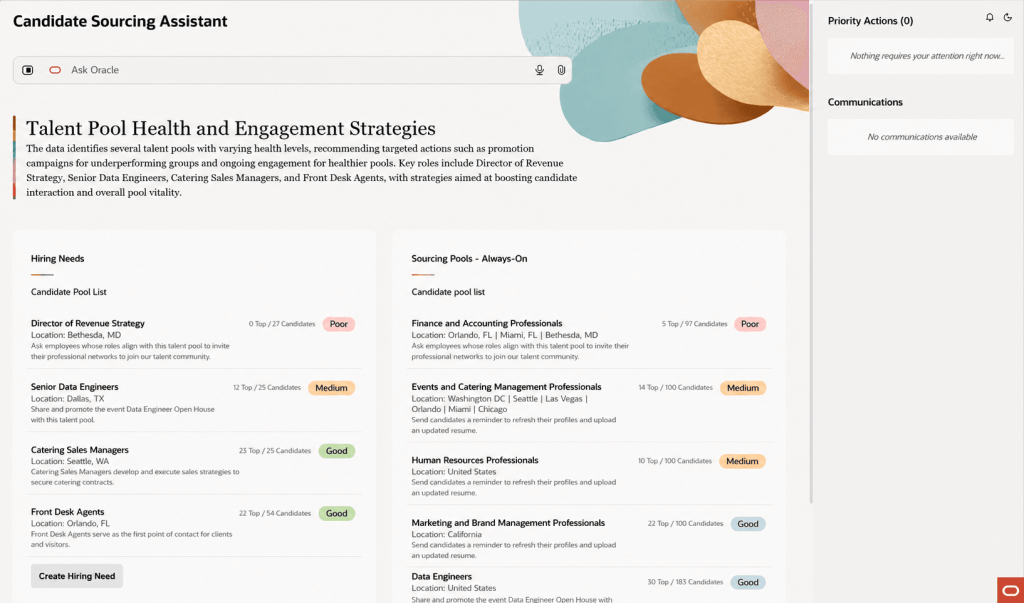
The feature that caught my attention most is Candidate Sourcing Workspace. Most recruitment teams know the pressure that comes with a new vacancy. As soon as a requisition is approved, the clock starts ticking. Recruiters begin searching, hiring managers want candidate shortlists immediately, and the race is on to identify suitable people. Oracle is trying to change that.
The new Candidate Sourcing Workspace allows recruiters to build and maintain talent pipelines before a requisition even exists. Using previous hiring patterns and anticipated demand, Oracle can help recruiters identify and nurture potential candidates in advance, creating a pool of talent ready to engage when opportunities arise.
Rather than starting every search from scratch, recruiters can draw from existing talent pools, review AI-generated candidate summaries and quickly identify the strongest matches for anticipated hiring needs. For organisations that regularly recruit into similar roles, this could have a significant impact on time-to-hire. More importantly, it allows recruiters to spend less time hunting for candidates and more time building relationships with them. That’s a much more strategic use of everyone’s time.
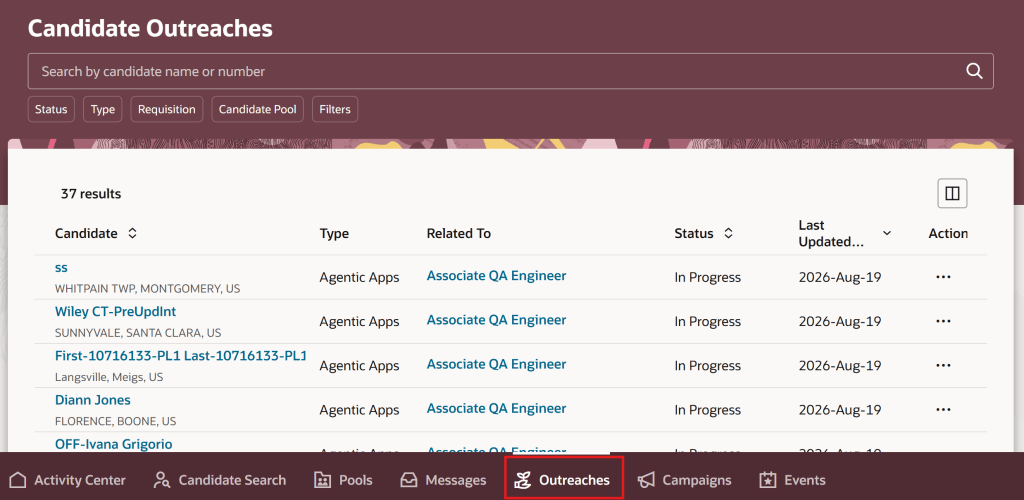
Supporting the new sourcing workspace is an enhanced outreach experience that brings together all candidate engagement activity into a single view. That might not sound particularly exciting on paper, but anyone who has ever managed a large recruitment campaign knows how easy it is for conversations to lose momentum. Candidates don’t respond immediately, follow-ups are forgotten, and promising prospects gradually disappear from the process. Oracle is addressing that problem with automated reminders, consolidated outreach tracking and AI-generated summaries of candidate responses. The result is a much clearer picture of who has been contacted, where conversations stand and what action should happen next.
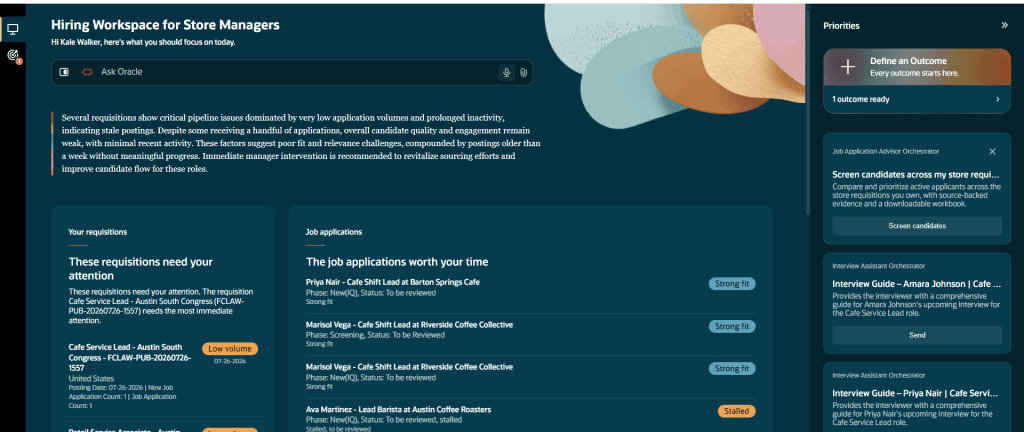
Another interesting addition is the new Hiring Workspace for Store Manager. Although initially aimed at retail organisations, the broader theme here is relevant to any organisation managing high-volume recruitment. The workspace allows managers to ask natural-language questions such as: “What requires my attention today?” or “Where is hiring off track?” and receive a structured response that highlights issues, priorities and recommended actions.
What I like about this feature is that Oracle isn’t simply presenting data differently. The platform is actively helping managers understand what requires attention and what they should do next. That may sound like a subtle distinction, but it’s an important one. Most recruitment systems already provide dashboards and reports. The challenge isn’t usually accessing information. It’s understanding what action should be taken based on that information. This workspace starts to bridge that gap.
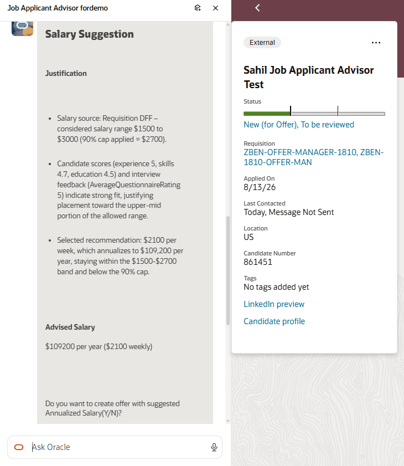
Probably the most practical AI enhancement in the release is the new Compensation Recommendation and Job Offer Creation Advisor. Creating a competitive offer has traditionally involved a mixture of salary benchmarking, internal comparisons and professional judgement. It can also be surprisingly time-consuming. Oracle’s new advisor pulls together relevant information from the requisition, candidate assessments and internal salary data to provide a recommended salary range before helping create the draft offer itself.
What particularly stood out to me is Oracle’s emphasis on explainability and guardrails. The recommendations are based on defined business criteria and Oracle explicitly states that protected characteristics such as age, gender, race and disability are not used when generating recommendations. In a world where organisations are rightly paying more attention to AI governance and pay equity, that’s an important message. Will recruiters still want human oversight? Absolutely. But reducing the administrative effort involved in preparing offers while supporting consistency of decision-making feels like a genuinely useful application of AI.
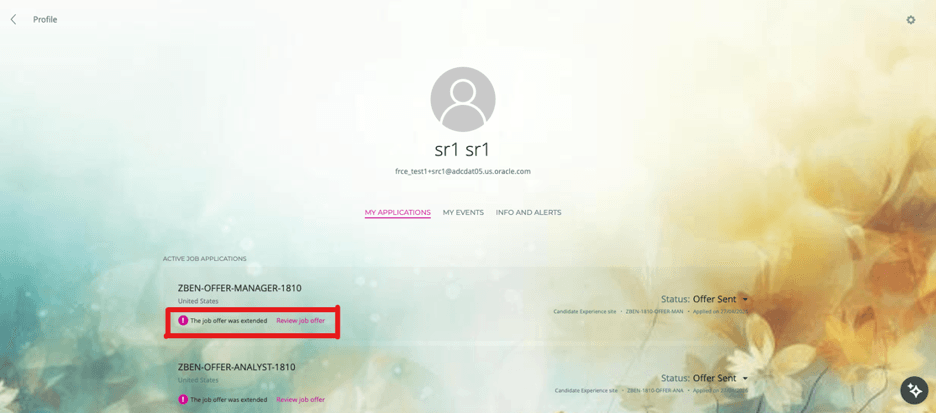
Not every valuable enhancement in 26D relies on AI. Oracle has also simplified how candidates access and respond to job offers by making offers available directly through candidate-facing experiences. External candidates can access offers through career sites, while internal candidates can access them through Opportunity Marketplace. They can review offer documentation, accept or decline offers and access completed documentation after acceptance.
It’s a relatively simple change, but one that removes a common point of friction. Offer emails can be missed, filtered or buried in busy inboxes. Giving candidates a consistent place to access offer information feels like a sensible improvement that should help remove avoidable delays from the process.
While most of the release focuses on new innovation, there is one update that deserves immediate attention. Oracle has confirmed that Digital Assistant (ODA) Fusion Apps templates for Recruiting will no longer be supported from November 2026. If your career site currently relies on Oracle Digital Assistant, now is the time to begin planning your transition. Oracle’s recommended path forward is Career Coach, which becomes the strategic candidate assistance experience going forward. This isn’t something I’d leave until the last minute. November 2026 will arrive much faster than many organisations expect, and early planning will help avoid unnecessary disruption.
What stands out to me about Recruiting in 26D is that Oracle appears to be focusing on the right problems. The most valuable features aren’t necessarily the ones generating content faster. They’re the ones helping organisations build stronger talent pipelines, make more consistent hiring decisions and remove friction from the recruitment process.
That’s why Candidate Sourcing Workspace was the feature that caught my eye. If organisations can move from scrambling to find candidates every time a requisition opens to maintaining an always-on pipeline of talent, that has the potential to transform recruitment performance far more than any chatbot ever could. There are still plenty of AI announcements in this release, but for once they feel connected to genuine business outcomes rather than being technology in search of a problem. And if you’re still relying on Oracle Digital Assistant on your career site, don’t overlook the deprecation announcement. November 2026 will arrive faster than you think.
Please note all screenshots are the property of Oracle and are used in accordance with Oracle’s Copyright Guidelines.
It’s quarterly release time again, and Oracle Fusion Absence Management 26D is one of those releases that probably won’t grab headlines. There’s no shiny new AI capability. No major redesign of the absence process. No feature that’s going to fundamentally change how organisations manage leave. What there is, however, is a collection of enhancements that solve genuine problems.
Some of these updates close long-standing gaps between Absence Management, Time and Labor, Payroll and Project Costing. Others make life easier for administrators. There’s even a small but welcome improvement that makes organisational events much more visible to employees. Individually, none of these features are ground breaking. Collectively, they make the product noticeably better.
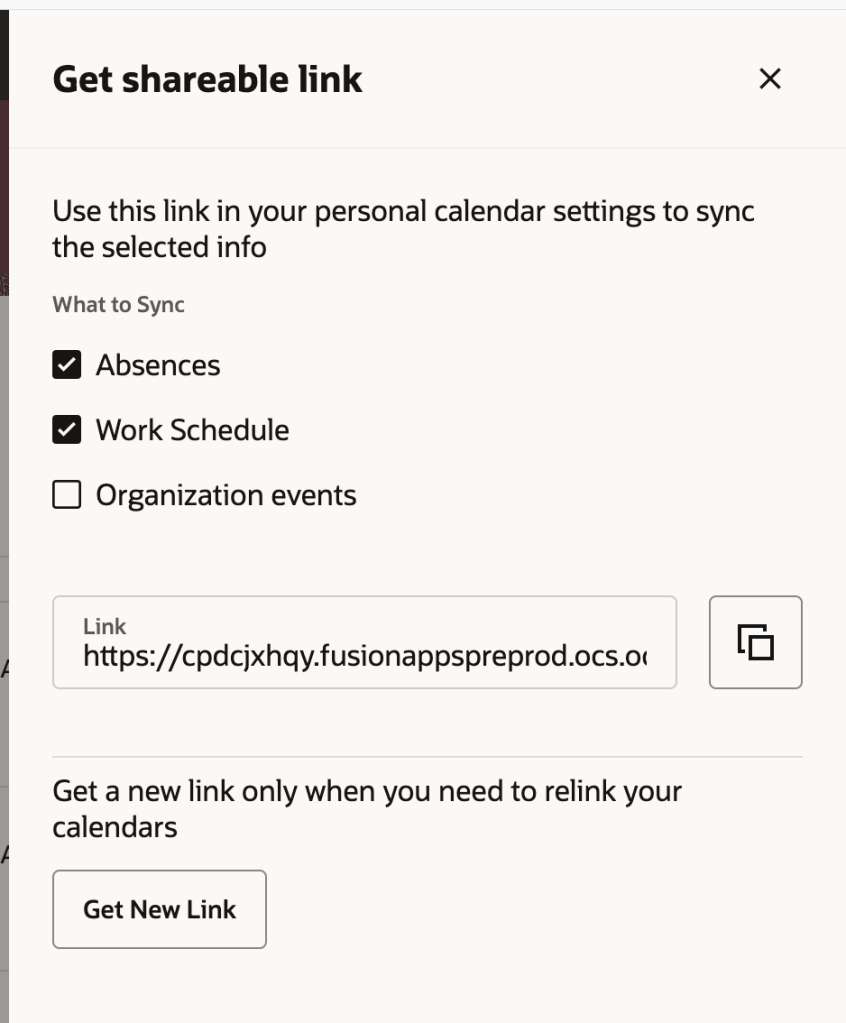
If I had to pick the feature that will have the biggest day-to-day impact, it’s probably Organisation Calendar Events in Calendar and Calendar Synchronisation. Many organisations maintain company shutdowns, public holidays, site closures, special events, or other important dates within organisation calendars. The problem has always been visibility. Unless employees actively looked in Oracle, those events were easy to miss.
With 26D, employees can now synchronise organisation calendar events alongside their absences and shifts using Oracle’s existing calendar integration. That means important organisation events can appear directly in the calendar applications people already use every day. For employees, it’s a small change that removes a surprising amount of friction. Instead of checking multiple systems to understand what’s happening, everything becomes visible in one place.
Oracle has also improved the Redwood calendar experience itself by allowing users to open calendar events and immediately see additional details such as descriptions, categories and timings without having to search elsewhere for information. It’s a simple enhancement, but one that’s likely to improve awareness and reduce confusion around organisation-wide events.
Oracle continues its journey towards a fully Redwood-based HCM experience, and in 26D the Leave Agreements administration page receives the Redwood treatment. While this might sound like another routine Redwood migration, it’s actually a worthwhile improvement for absence administrators. The previous experience wasn’t particularly intuitive and often required moving between different screens to manage agreements and related information. The new Redwood page brings everything together in a single location, making it much easier to search, filter, review and maintain leave agreements.
For organisations that manage complex collective agreements, union arrangements or other entitlement frameworks, reducing administrative effort is always welcome. This won’t fundamentally change how leave agreements work, but it does make them significantly easier to manage. And that’s often what good Redwood design should do.
One of the quieter additions in 26D is also one of the most sensible. Oracle has introduced a dedicated security role that provides access to the Absences and Entitlements page without requiring organisations to rely on broader HR Specialist access. That may not sound exciting, but it addresses a challenge many customers face when trying to align Oracle security with real-world operating models.
Not every organisation wants absence administrators to have the wider access typically associated with HR roles. Until now, customers often had to make compromises or develop workarounds. The new role provides much more flexibility when designing security models and supports the principle of providing users with only the access they actually need. For organisations with dedicated absence administration teams, that’s a genuinely useful addition.
This next enhancement will be particularly valuable for organisations using Oracle Project Costing. Historically, absence entries captured through Time and Labor didn’t always flow cleanly into Project Costing, creating gaps when organisations were trying to understand the true cost of project resources.
That might not sound significant initially, but when you’re managing project budgets or analysing resource utilisation, missing absence costs can distort the picture. With 26D, eligible absence entries can now be transferred to Project Costing while retaining the relevant project information. The result is more complete project cost data and fewer manual workarounds to reconcile information across systems. This is one of those features that many organisations may never notice directly, but finance teams and project managers will certainly appreciate the improved accuracy behind the scenes.
In my view, this is probably the most important update in the release: Transfer Calculated Time Entries for Absences to Payroll, Many organisations use Time and Labor calculations to generate additional payments such as overtime, shift premiums and other pay-related adjustments. The problem was that when those calculations were associated with absences rather than worked time, Payroll didn’t always receive the complete picture. That could create reconciliation challenges and introduce additional administrative effort during payroll processing. 26D closes that gap.
Calculated entries associated with absences can now be transferred through to Payroll alongside the underlying absence information. What sounds like a technical integration enhancement actually delivers a very practical benefit: payroll calculations become more complete, more accurate and require less manual intervention. For organisations with complex shift patterns, premium payments or heavily unionised environments, this could remove a long-standing source of frustration. And honestly, it feels like one of those features that should always have worked this way.
Absence Management 26D isn’t a release built around a single headline feature. Instead, Oracle has focused on improving existing processes, tightening integrations and making administration easier. The calendar enhancements make absence-related information more visible to employees. The new Redwood Leave Agreements experience provides a cleaner administration experience. Security becomes more flexible. Project costing becomes more accurate. Payroll receives more complete absence-related calculations.
The interesting thing about this release is that Oracle has focused on the areas customers typically only notice when something isn’t working properly. Whether it’s absence-related payments not reaching Payroll, project costing not reflecting employee leave, or staff struggling to find important organisation calendar events, these aren’t glamorous problems, but they’re the sort of issues that create extra administration, reconciliation work and user frustration. 26D won’t transform the way you manage absence, but it does remove a number of small pain points that many organisations have simply learned to live with. For me, that’s what makes this a stronger release than it first appears.
Please note that all screenshots are the property of Oracle and are used in accordance with Oracle’s Copyright Guidelines.
It’s quarterly release time again and, while Talent Management doesn’t have quite the same headline-grabbing AI announcements we’ve seen elsewhere in Oracle Fusion Cloud, Release 26D delivers something arguably more valuable. It removes friction.
Across performance management, succession planning and skills, Oracle continues to focus on helping managers and HR teams spend less time navigating processes and more time focusing on their people. There is a clear theme running through many of the enhancements in this release: making the information you already have easier to access and turning time-consuming tasks into something much simpler.
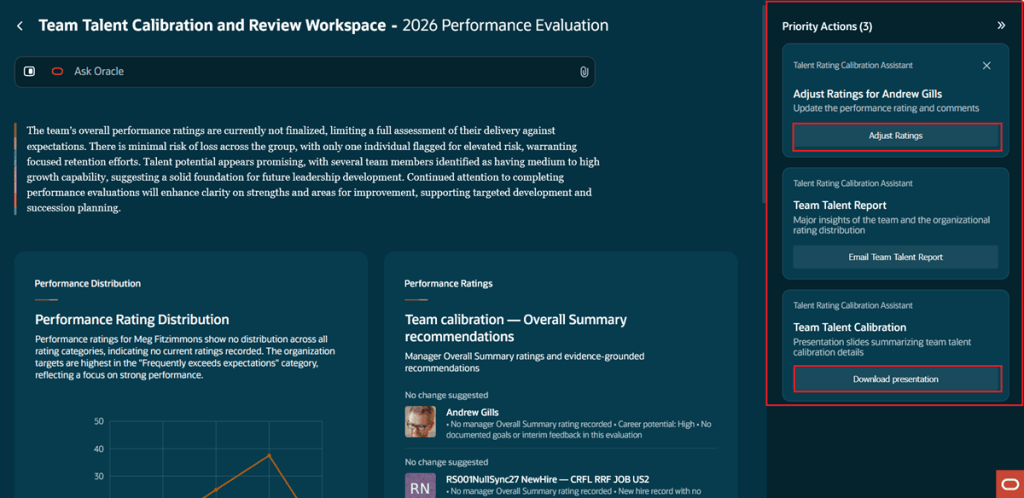
Oracle introduced the Team Talent Calibration and Review Workspace in 26C, but Release 26D feels like the point where it starts delivering real value. Managers can now see AI recommendations suggesting whether an employee’s overall performance rating should be adjusted or remain unchanged. What makes this more interesting than a simple AI-generated recommendation is the amount of information Oracle is now evaluating behind the scenes.
Rather than looking at a narrow set of data, Oracle is drawing on feedback, check-ins, goals, questionnaire responses and other performance information to build a richer picture of an employee’s contribution throughout the year. Let’s be clear, AI should never replace managerial judgement, particularly when it comes to performance discussions. However, it can help surface information that might otherwise be forgotten or overlooked during calibration sessions, especially in larger teams where managers are balancing multiple priorities.
One feature I particularly like is the new Talent Summary presentation. Oracle can now generate a ready-made presentation covering each employee’s performance and talent indicators, along with AI-generated strengths and development opportunities. Anyone who has ever spent hours building calibration packs before a talent review meeting will immediately understand the value of that enhancement.
Check-ins have quietly become one of the strongest parts of Oracle Performance Management and 26D continues that steady evolution. Several enhancements have been introduced that make the experience more structured and, perhaps more importantly, easier for managers to prepare for.
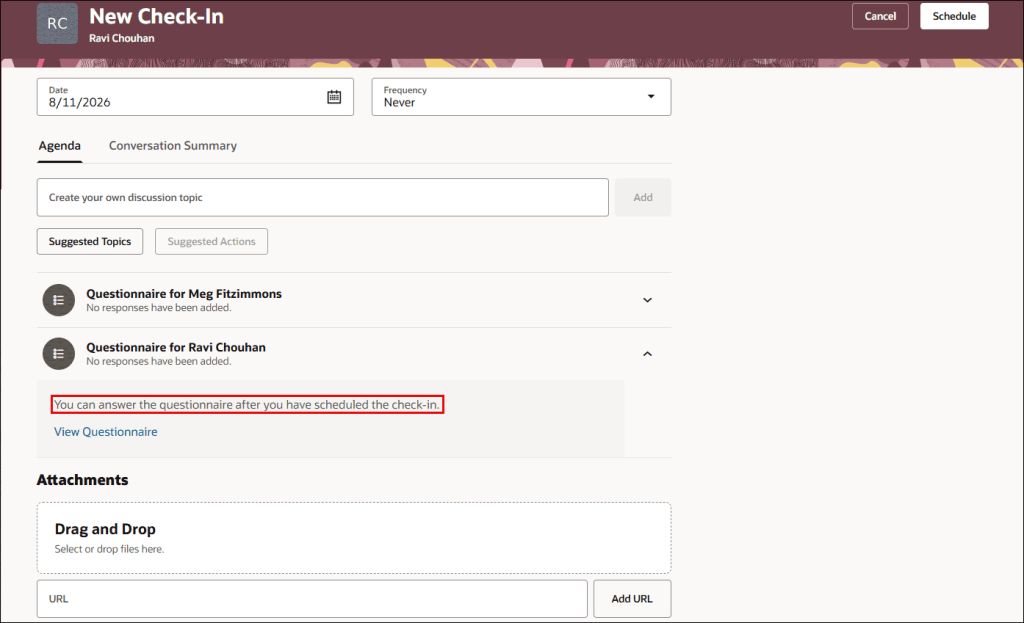
Organisations can now define default templates for check-ins, helping to drive consistency while reducing the amount of setup required when creating new conversations. Oracle has also introduced the ability to include questionnaires directly within check-ins and surface recent employee feedback alongside the discussion. What I like about these changes is that they help managers come into conversations with context already available.
One of the biggest challenges with performance management isn’t collecting information. It’s getting the right information in front of managers at the point they need it. By bringing feedback, discussion points and supporting information together in one place, Oracle is helping make those conversations more meaningful.
The AI-generated summaries introduced in earlier releases have also been enhanced, allowing Oracle to use a broader range of information when generating check-in notes and conversation summaries. Individually, these enhancements may seem relatively small. Together, they make the entire check-in process feel much more mature.
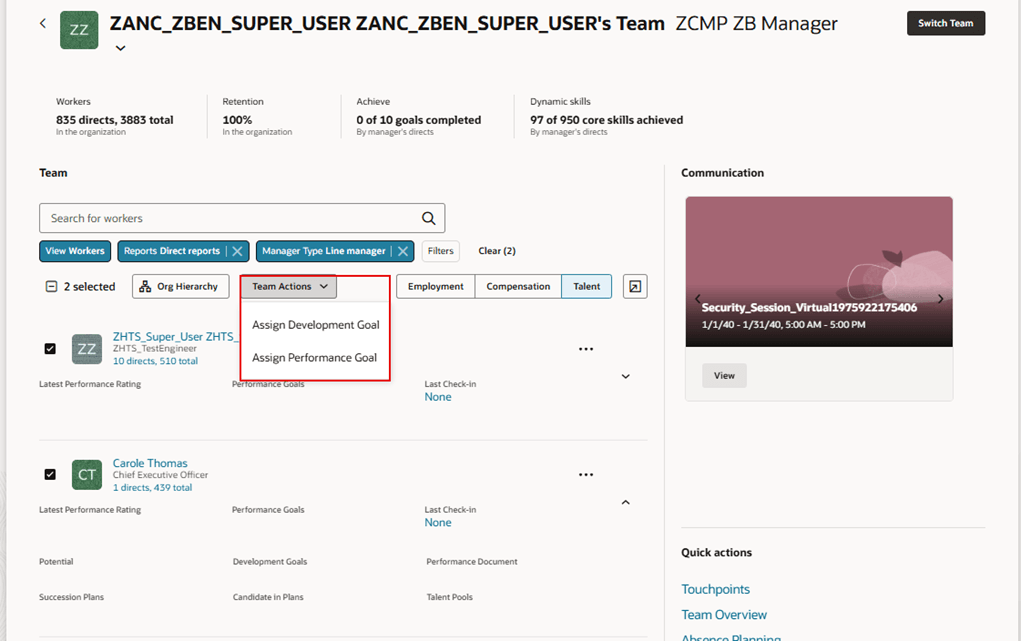
One of my favourite enhancements in this release is also one of the least complicated. Managers can now assign performance and development goals to multiple employees at the same time from the Team Activity Centre This isn’t an exciting AI announcement. It isn’t revolutionary. It’s simply practical.
Many organisations establish common goals across teams or departments, yet managers have traditionally had to assign those goals employee by employee. It’s not difficult, but it is repetitive and time-consuming. Release 26D removes that unnecessary administrative effort and allows managers to assign goals to multiple team members in a single action. Features like this don’t usually make marketing headlines, but they’re often the ones users appreciate the most because they save time every single day.
Most organisations recognise the importance of succession planning. The challenge is often finding the right information when you need it. Even organisations with well-maintained talent profiles and strong skills data can struggle to identify suitable successors quickly and consistently. Release 26D aims to simplify that process through enhancements to the Succession Planning Agent. HR teams can now describe the type of candidate they’re looking for using natural language and receive recommendations based on available workforce, talent and skills information.
What stands out to me is not necessarily the AI itself, but the accessibility it creates. For years, organisations have invested significant effort building richer talent profiles, managing skills data and maintaining employee information. Features like this finally make that data easier to use during real-life talent decisions. That’s where the true value lies.
Skills continue to be a major focus area across Oracle HCM, with many organisations looking beyond traditional job-based workforce planning and moving towards a more skills-driven approach. For customers using Techwolf, Oracle has introduced a new integration that synchronises Techwolf skills directly into Oracle Fusion HCM.
Now, I appreciate this won’t apply to every organisation. However, for those already using Techwolf as part of their skills strategy, this could remove a significant amount of ongoing administration. Maintaining multiple skills repositories is rarely a sustainable long-term approach. Automating the movement of skills data between systems helps improve consistency and gives organisations greater confidence in the information they’re using to support talent decisions. As skills initiatives continue to mature, integrations like this become increasingly important.
A smaller enhancement that shouldn’t be overlooked is the additional flexibility Oracle has introduced within All-in-One Evaluations. HR teams can now make greater use of star-based ratings, define read-only sections within evaluation documents and customise some of the terminology displayed to managers and employees. None of these changes are transformational on their own, but they provide welcome flexibility for organisations that have invested time tailoring performance processes around their own ways of working.
The ability to lock down completed sections is particularly useful for organisations that want tighter control over different stages of the evaluation process while still maintaining visibility for managers and employees. Sometimes success isn’t about introducing entirely new functionality. It’s about giving organisations more control over the tools they already use.
Talent Management 26D isn’t a release packed with revolutionary new capabilities, and honestly, I think that’s perfectly fine. Instead, Oracle has focused on making existing processes easier, smarter and less time-consuming. Calibration becomes more informed, check-ins become more effective, goal management becomes simpler, succession planning becomes more accessible and skills information becomes better connected.
What links all these enhancements together is a common objective: helping managers and HR teams spend less time administering talent processes and more time focusing on the people behind them. Sometimes those are the releases that deliver the biggest impact. As always, Oracle may add additional functionality to the release over the coming weeks. If any significant talent features appear, I’ll be sure to cover them in a future update.
Please note all screenshots are the property of Oracle and are used in accordance with Oracle’s Copyright Guidelines.
It’s quarterly release season again and Oracle has already revealed a healthy batch of new features for Help Desk in 26D. What struck me most this quarter wasn’t necessarily the number of new features, but how much Oracle continues to invest in making support part of the wider employee experience. The latest updates are less about helping agents work faster and more about helping employees find answers, complete actions and stay on top of requests without having to navigate multiple areas of HCM.
There’s also an important reminder for anyone still running Classic HR Help Desk. Oracle has reconfirmed that the Redwood migration deadline is fast approaching and, if you haven’t started planning yet, now is the time. As always, Oracle may add further features as the release progresses, but let’s take a look at the highlights from the first wave of 26D announcements.
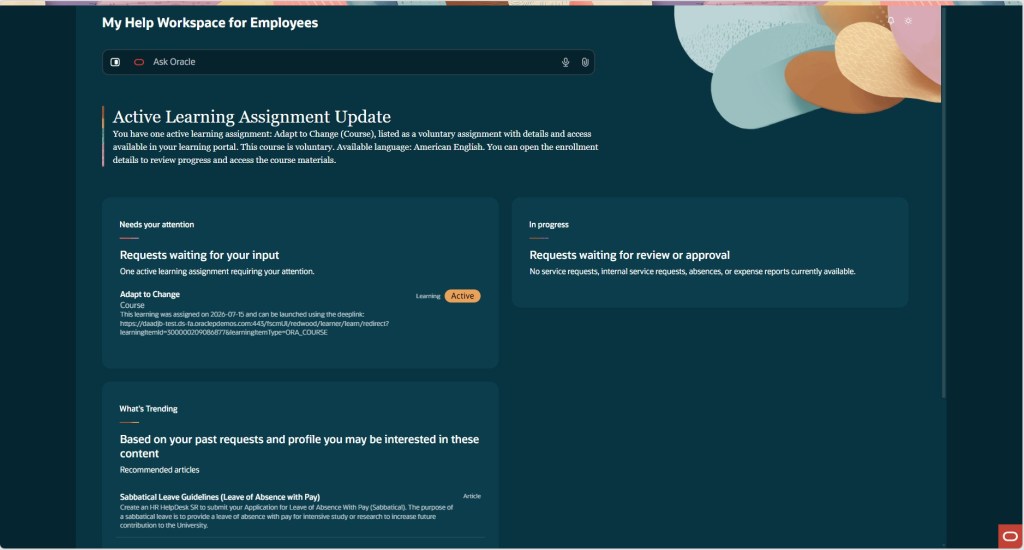
The standout feature in 26D for me is the new My Help Workspace for Employees. If you’ve ever watched employees navigate Oracle HCM, you’ll know one of the biggest frustrations isn’t necessarily finding information. It’s remembering where everything lives. Help requests sit in one place, learning assignments in another, expenses somewhere else, and absence requests somewhere else again. Oracle is clearly trying to tackle that problem.
The new workspace gives employees a single place to see the activities and requests that need their attention. Whether that’s a Help Desk request waiting for a response, an outstanding task, or useful knowledge content, employees can quickly see what requires action without having to navigate around multiple parts of Oracle HCM.
What I particularly like is that it isn’t just a reporting page. Employees can take action directly from the workspace. If a Help Desk analyst is waiting for additional information, the employee can respond immediately. If a request seems to have gone quiet, they can follow up without having to navigate elsewhere.
Oracle has also made it easier to get support when employees need it. The Ask Oracle search capability is available directly within the workspace, with access to a full AI-powered chat experience without taking users away from what they’re doing. This feels very much like the direction Oracle is heading with many of its AI investments. Rather than forcing users to jump between modules, Oracle is bringing information and actions together in a single experience and letting AI help guide employees to the next thing they should do.
For organisations exploring Oracle’s Agentic AI strategy, this is probably one of the clearest real-world examples we’ve seen so far. It’s practical, employee-facing and solves a genuine problem rather than introducing technology for technology’s sake.
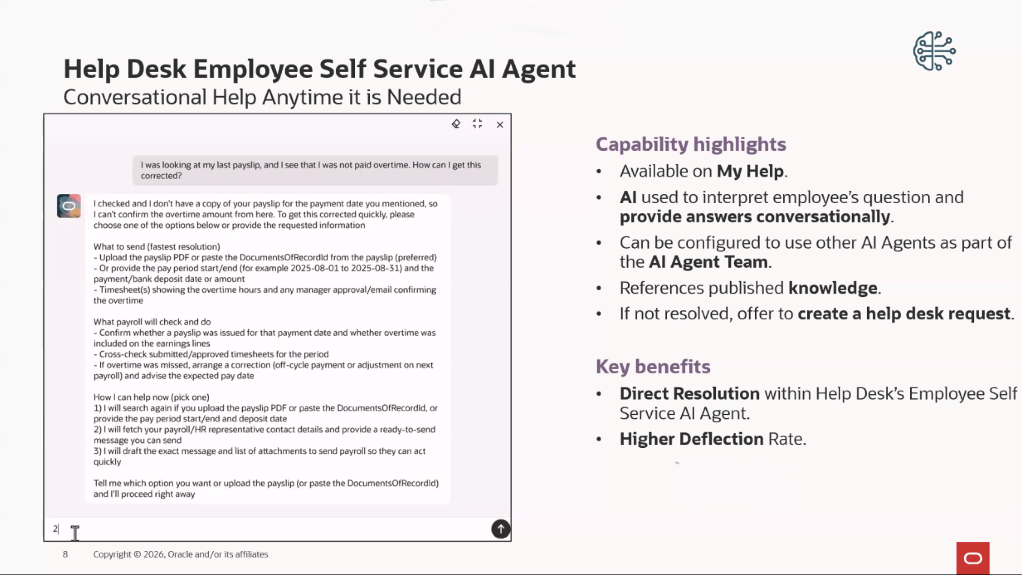
The Employee Help Desk Self Service Assistant continues to mature with every release, and 26D includes a collection of smaller enhancements that together make a significant difference. The most interesting addition is the use of the Classification Agent when requests are created through the assistant. Instead of employees having to work out categories, priorities and classifications themselves, the AI can now determine much of that information automatically. That might not sound particularly exciting on the surface, but anyone who has spent time reviewing Help Desk data will immediately recognise the value. Better categorisation means better reporting, more consistent routing and less manual effort for support teams.
Oracle has also improved how knowledge content is surfaced by filtering results based on Business Unit. In practice, that means employees are more likely to see information that is relevant to their part of the organisation rather than scrolling through articles that may not apply to them.
One enhancement that I think many customers will appreciate is the ability to identify requests created through the AI assistant using a dedicated source code. Until now, measuring AI adoption has often been surprisingly difficult. Organisations can now report on how many requests originated through the assistant, making it far easier to understand whether employees are actually using the capability and whether it is delivering value. For me, that’s an important step. AI shouldn’t just be implemented. It should be measurable.
Oracle has also continued its push to make AI Agent Studio the centre of AI configuration by allowing the assistant to be run and customised directly from the platform. That gives organisations more flexibility to tailor the experience as their AI strategy evolves.
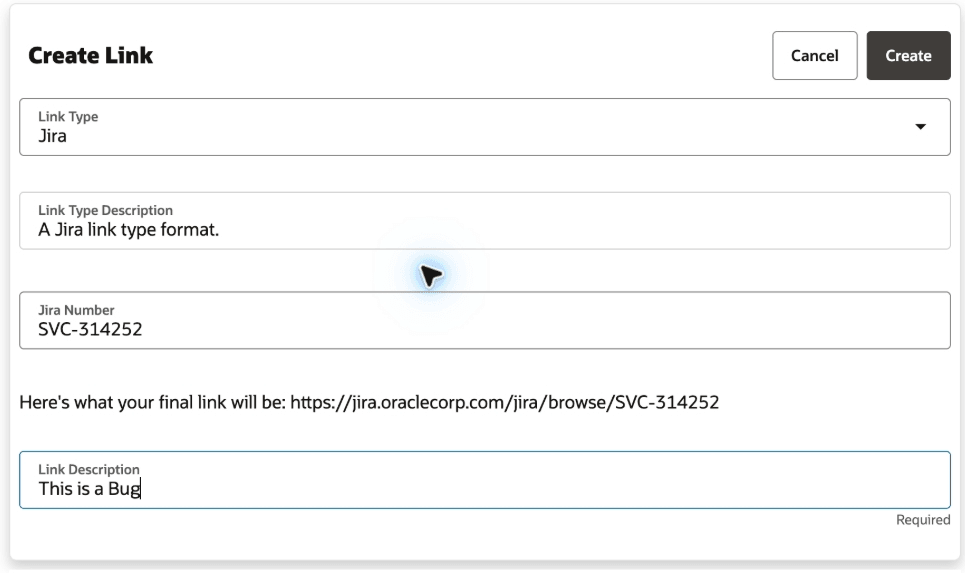
One of the more practical additions in 26D is the ability to associate external links directly with Help Desk requests. Whether your teams work with Jira, SharePoint, Confluence, Google Workspace or other business systems, agents can now link relevant records directly from within a service request.
This isn’t a headline-grabbing feature, but it’s exactly the sort of improvement that saves people time every day. Instead of searching through emails, chat messages or separate applications to find supporting information, agents can access everything they need from the Help Desk request itself. For organisations where support processes span multiple systems and teams, small improvements like this can have a surprisingly positive impact on efficiency and collaboration.
Another area receiving attention in 26D is administration. A number of Help Desk configuration pages have now been brought into the Redwood experience, including Categories, Severities, Channels and Visibilities, Message Types and SmartText. On the surface, this might not feel like a particularly exciting enhancement. However, administrators who regularly manage Help Desk configurations will probably appreciate it more than most.
One of the frustrations during Oracle’s Redwood journey has been moving backwards and forwards between Redwood pages and older administration screens. Every additional configuration page that moves to Redwood helps create a more consistent experience. It’s not transformational, but it is another sign that Oracle’s commitment to Redwood remains firmly on track.
Normally I finish these blogs by talking about what’s coming next. This quarter, I want to finish with a warning. Oracle has reconfirmed that Classic HR Help Desk will no longer be available from 27B. If you’re already running Help Desk in Redwood, that’s not a problem. If you’re still using Classic HR Help Desk, however, this deadline should be firmly on your radar. The reason isn’t simply that Oracle is retiring the old experience. Increasingly, the innovation is happening exclusively in Redwood.
Many of the capabilities organisations are looking at today, including AI-powered self-service, modern employee experiences, enhanced case management capabilities and the new My Help Workspace for Employees, are only available in the Redwood experience. As each quarterly update arrives, that gap is becoming more noticeable. That’s becoming a recurring theme across Oracle HCM as a whole. The question is no longer whether organisations should move to Redwood. The question is whether they’re leaving themselves enough time to get there.
Migration isn’t something I’d recommend leaving until the final few months before an update. There are prerequisites to review, validation activities to complete, testing cycles to run and potentially business processes that need to be reviewed along the way. Starting early gives you time to resolve issues before they become critical path activities. Oracle has provided migration guidance, workbooks and checklists to support the transition, but the key message remains the same: if you’re still on Classic HR Help Desk, this should be a priority for the remainder of 2026.
Overall, this isn’t a release packed with dozens of transformational features, but it does show a very clear direction of travel. Oracle continues to invest heavily in AI-assisted support, employee self-service and Redwood-first experiences, while gradually bringing together information and actions that have traditionally been scattered across multiple areas of HCM.
For most organisations, the new My Help Workspace for Employees and the continued evolution of the Self Service Assistant will be the features worth paying closest attention to. They demonstrate how Oracle is moving beyond simply answering questions and towards helping employees complete tasks, resolve issues and manage their work through AI-assisted experiences. And if you’re still running Classic HR Help Desk, the Redwood migration deadline should probably be the feature getting the most attention of all.
Please note that all screenshots are the property of Oracle and are used in accordance with Oracle’s Copyright Guidelines.
It’s quarterly release time again, and while Payroll 26D doesn’t contain the sort of headline-grabbing feature that will completely transform how payroll teams work, it does include a collection of enhancements that solve real-world problems. There’s continued progress on Oracle’s Redwood journey, some useful legislative updates for UK and Irish payroll, stronger visibility into tax calculations for US payroll teams, and a handful of practical improvements that should reduce administration effort and simplify troubleshooting.
What stood out to me this quarter is that many of the enhancements focus on making payroll easier to manage rather than simply adding new functionality. Several address common frustrations that payroll teams have been dealing with for years, while others provide much-needed transparency into processes that have traditionally felt like a black box. As always, Oracle may introduce additional features over the coming weeks, but here’s what has caught my attention so far.
One theme that won’t surprise anyone by now is Redwood. Oracle continues to replace classic payroll pages with their modern Redwood equivalents, and 26D brings another significant batch of payroll administration pages across. At this stage, most payroll customers understand that the question is no longer whether Redwood is coming, but when they’re going to adopt it. Releases like 26D continue to chip away at the remaining classic pages and make that transition increasingly inevitable. While not every Redwood page introduces brand new functionality, many do improve usability and create a more consistent experience across HCM Cloud.
The Legal Entity Calculation Card and Legal Reporting Unit Calculation Card have now moved to Redwood. These cards hold payroll statutory unit and tax reporting unit defaults, making them some of the more important configuration pages within Payroll. For customers already using Redwood profile options, the new experience is enabled automatically. Functionally, very little changes, but it continues Oracle’s journey towards a consistent user experience across the application.
The Fast Formula migration is probably the Redwood enhancement that will attract the most attention from payroll specialists. The new page introduces a genuinely modern code editor experience, including syntax highlighting and quicker access to database items and functions. Anyone who spends their day building or troubleshooting formulas will likely find it easier to navigate than the classic version. That said, there is one notable omission. Expression Builder isn’t available in the Redwood experience yet, which may influence how quickly some organisations choose to move over. It’s not a blocker for everyone, but it’s definitely something worth testing before making the switch.
Oracle has also moved a further six payroll setup pages into Redwood: Balance Exceptions, Balance Exceptions and Reports, Element Security Profiles, Features by Country or Territory, Organisation Payment Methods and Run Types. It should be noted that these pages are enabled by default. One point worth highlighting relates to Organisation Payment Methods. If you’ve previously granted access through custom job roles, you’ll need to review those roles and ensure they include both the Organisation Payment Method Management Duty role and the Manage Organisation Payment Method function privilege.
One Redwood enhancement I’m particularly pleased to see is the update to Balance Adjustments. Historically, making multiple balance corrections could be a fairly manual process, particularly when trying to understand the wider impact of those changes. The new experience allows administrators to work with multiple adjustments in a single transaction while immediately seeing the before and after effect across affected balances.
The ability to apply separate costing to individual adjustments and navigate directly from Balance Results into Balance Adjustment creates a much smoother experience than before. It’s the sort of enhancement that won’t generate much excitement in release announcements, but for payroll teams dealing with corrections and reconciliations it could save a significant amount of time.
The Retropay enhancement is another feature that feels small on paper but addresses an issue that has caught a number of organisations out in practice. Where employees are processed through multiple payroll runs within the same period, for example a bonus run followed by the regular payroll run, previous behaviour could sometimes create duplicate retro entries or unnecessary offset adjustments. Those situations could take time to understand and even longer to explain.
The new logic helps Oracle determine whether the entry has already been processed within a later payroll run before generating retrospective adjustments, creating a cleaner and more predictable outcome. This feature is disabled by default and requires the Set Late Recurring Retro Entry Earliest Date process to be run, so customers will want to carefully consider when to enable it.
There are a number of UK-specific enhancements in 26D and, I’ve called out three that address genuine operational scenarios rather than simply introducing administrative changes. The first on is Process Results Enhancements. Anyone who regularly analyses payroll results will appreciate this one. The Run Pension Automatic Enrolment Letters process now displays the employee name and payroll relationship number. Send HMRC XML results show the flow name instead of the payroll action ID, and Pension Assessor Updates include employee details alongside a direct link to the pension component within Earnings and Deductions. These aren’t transformational changes, but they’re exactly the sort of usability improvements that reduce investigation time when payroll teams are trying to locate information quickly.
This Enhanced Statutory Parental Bereavement Leave and Pay for Northern Ireland Employees enhancement delivers support for legislative changes effective from 6 April 2026. Oracle now supports the expanded eligibility requirements for Northern Ireland employees, including miscarriage-related absences and day-one eligibility. The system also records and reports qualifying payments separately from existing statutory parental bereavement pay arrangements. The enhancement is automatically enabled and requires no customer action.
The next one is the Use Published Schedules to Determine UK Statutory Sick Pay Qualifying Days. Customers using Workforce Management alongside UK Statutory Sick Pay should pay close attention to this enhancement. Where a published schedule exists before the absence begins, Oracle can now use that published schedule to determine SSP qualifying days rather than relying solely on the employee’s work pattern. For organisations with complex scheduling arrangements, this should help ensure SSP calculations more accurately reflect planned working patterns. Customers planning to use this functionality should review the Schedule Hierarchy Starting Point configuration within relevant sickness absence types.
The US payroll enhancements arguably provide the strongest collection of updates this quarter, combining compliance improvements, increased transparency, and continued investment in AI-assisted payroll analysis. Managing SECURE 603 eligibility has often required manual effort, particularly for organisations with large employee populations. Oracle now automates the determination of catch-up eligibility outcomes through the Start-of-Year process, evaluating high-earner status based on payroll statutory units, tax reporting units, or tax groups depending on configuration. The inclusion of a draft mode is particularly welcome, allowing payroll teams to review outcomes before committing them in final mode. Some complex organisational structures will still require manual intervention, but for many employers this should significantly reduce annual administration effort.
The next feature is the Tax Calculation Statement Page: Federal Income Tax. This is probably my favourite enhancement in the US payroll release. Payroll teams are regularly asked why a particular tax deduction was calculated in a certain way, yet historically obtaining that answer often meant navigating several screens or performing manual calculations. Oracle has introduced a new Tax Calculation Statement view that provides complete visibility into Federal Income Tax calculations. Administrators can either review the calculation components directly or work through a step-by-step breakdown showing intermediate values and calculation logic. For troubleshooting and employee query resolution alone, this has the potential to save a huge amount of time.
Oracle continues to expand the capabilities of its Payroll Run Analyst AI Agent. The agent can now answer natural language questions relating to Federal Income Tax calculations, allowing administrators to ask questions such as why a calculation was performed a particular way or which attributes contributed to the result. This is one of the more practical examples of AI within payroll. Rather than trying to automate the payroll process itself, Oracle is using AI to make it easier for payroll professionals to understand and investigate payroll outcomes.
Oracle has added a new Tax Enforcement Level field within the Federal component of the employee Tax Withholding card. This allows administrators to determine whether annual limit tax tracking should occur at the PSU, TRU, or tax group level. Because the setting exists at employee level, it can also override organisation-level defaults when required. For organisations with more complex employment structures, the additional flexibility will be welcome.
Oracle has also improved how USOPTE statutory tax rule overrides are managed. Payroll administrators can now create, update, delete, and end-date override records directly from the Statutory Rules interface, while also reviewing override history over previous years. It brings what has sometimes been tracked externally back into Oracle in a much more controlled and auditable way.
Oracle continues to invest heavily in Irish payroll, and that’s entirely understandable. Irish Payroll is still relatively new within Oracle Fusion compared to some of the more mature localisations, and Oracle have been steadily expanding both functionality and legislative coverage release after release. The pace of delivery remains impressive, with large number of enhancements arriving in 26D alone. While some of these changes are legislative in nature, others help bring Irish Payroll into line with capabilities that customers in longer-established payroll localisations have already been benefiting from.
The Payroll Activity Centre is now available for Irish payroll customers. This provides administrators with a consolidated view of payroll activity, balances, and exceptions, including Irish-specific values such as PAYE, PRSI, USC, and My Future Fund deductions. The real value isn’t the visibility itself, but the ability to identify and resolve issues earlier in the payroll cycle before they become employee-facing problems.
Oracle has updated eligibility calculations for SSP and Illness Benefit so that they now use recorded sickness absence dates rather than medical certificate dates. It’s a relatively straightforward change, but one that better reflects how absences are typically managed in practice.
The Periodic Foreign Tax Credit enhancement allows payroll teams to apply periodic or annual foreign tax credits through the employee’s PAYE Additional Information card. Rather than waiting for relief to be claimed after year end, payroll can now reduce tax liability during payroll processing itself. For employees with cross-border tax obligations, that has the potential to improve cash flow and reduce the impact of dual taxation while relief is being processed.
Oracle now automatically applies the Department of Social Protection’s 15% net-pay deduction cap for applicable Notice of Attachment deductions. Whenever statutory limits apply, the payroll calculation automatically uses the lower of the requested deduction amount or the permitted cap.
The final enhancement supports deletion requests for previously submitted My Future Fund contribution records. The Send File Submission process can now determine whether an earlier submission exists and automatically generate either an initial submission or a deletion request as appropriate. Additional audit reporting has also been introduced to maintain visibility of deleted contribution records.
Overall, I wouldn’t describe 26D as a blockbuster Payroll release, but that’s not necessarily a criticism. Some of the most valuable payroll enhancements aren’t the flashy ones. They’re the improvements that make investigations quicker, reduce administration effort, improve compliance, or remove manual work that payroll teams have quietly accepted as part of daily life.
For me, the stand-out areas this quarter are the continued maturity of the Redwood payroll experience, the Retropay processing enhancement, and the new transparency around US Federal Income Tax calculations. Together they show Oracle continuing to focus on usability and operational efficiency rather than simply adding more functionality.
If you’re planning your 26D review, I’d recommend paying particular attention to the Redwood changes and checking whether there are opportunities to simplify payroll administration processes as part of your wider upgrade planning. And as always, keep an eye on the What’s New documentation throughout the release cycle. Oracle occasionally slips in additional gems after the initial announcement, and payroll is no exception.
Please note that all screenshots are the property of Oracle and are used in accordance with Oracle’s Copyright Guidelines.