Oracle Fusion HR Help Desk: What AI Actually Looks Like in Practice

When Oracle talks about AI in Fusion Applications, it’s easy to assume we’re talking about a chatbot sitting on top of an existing process. In reality, Oracle has been quietly embedding AI throughout the entire HR Help Desk lifecycle, from the moment an employee has a question through to the point a case is resolved and closed.

What’s particularly interesting is that these capabilities aren’t isolated features. They work together to create a service experience that is increasingly proactive, intelligent and efficient for both employees and service teams.

Let’s walk through what that journey looks like in practice. The best help desk case is often the one that never needs to be raised. Oracle’s AI-powered employee assistance capabilities, available through the My Help experience, allow employees to ask questions in natural language and receive immediate guidance based on knowledge articles and HR process information. Instead of navigating FAQs or searching through documentation, employees can simply ask questions in their own words and receive conversational responses. Whether an employee wants to understand a policy, find information about benefits, or work out how to complete a process such as requesting leave, the AI assistant acts as the first point of contact and attempts to resolve the issue through self-service.
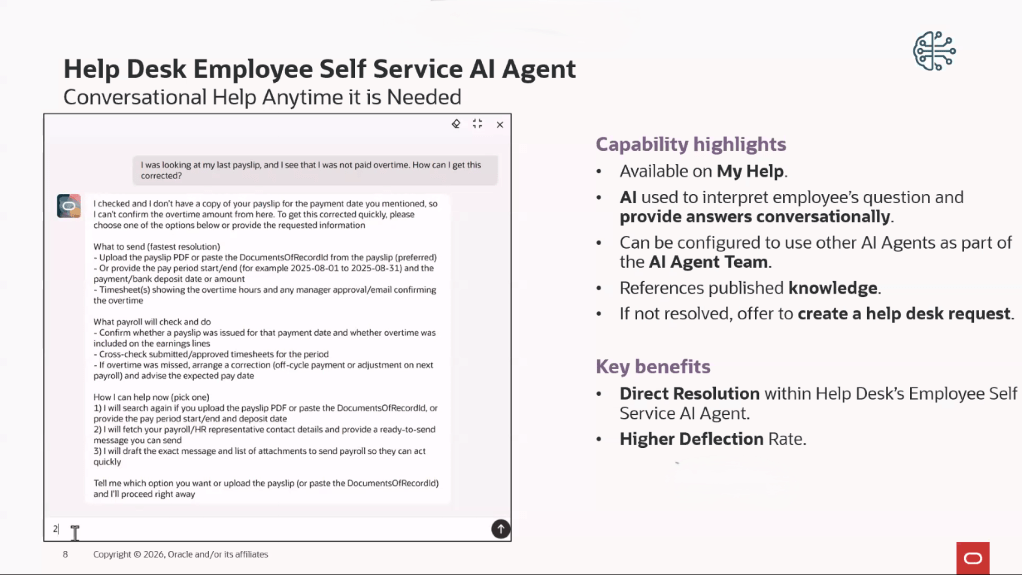
This is also the direction Oracle is taking strategically. Organisations still using Oracle Digital Assistant (ODA) skills for HR Help Desk should be aware that Oracle is moving towards the newer Redwood-based AI Agent framework, with legacy ODA capabilities being phased out in favour of the new experience.

Of course, self-service won’t solve every issue. When additional support is required, Oracle’s Help Desk Request Creator AI Agent can automatically create a help desk request using the details already captured during the conversation. Information such as the request description, category and other key details can be populated automatically, avoiding the frustrating experience of employees having to repeat everything they’ve already explained. For employees, that means a smoother support experience. For service teams, it means better-quality requests arriving in the queue with the right information from the outset.

One of the most time-consuming parts of any service desk operation is getting requests to the right team. In many organisations, someone still needs to review incoming requests, determine the nature of the issue and assign it appropriately. Oracle uses machine learning to automate much of this process. When a help desk request is created, whether through self-service, email or another channel, Oracle can analyse the content and predict the most appropriate category before routing it to the correct queue.

Imagine an employee emails HR because their tax code is incorrect on their payslip. Rather than waiting for manual triage, the system can identify the request as payroll-related and route it directly to the relevant team. What makes this particularly valuable is that the model improves over time. Oracle trains the categorisation engine using historical case data, allowing it to learn from previously resolved requests and continually improve its accuracy. Administrators can monitor performance through dedicated insights dashboards, helping them understand how effectively the model is classifying requests and what impact it is having on resolution times.

Once a case reaches a service agent, Oracle introduces another layer of AI support. A common challenge within HR Help Desk is the amount of time agents spend reviewing case history before taking action. Long-running cases often contain multiple updates, conversations and handovers, making it difficult to quickly understand what’s happened so far.

Oracle addresses this through a series of AI-powered summarisation capabilities. Agents can generate instant summaries of requests, review concise overviews of recent activity and use AI-generated handover notes when transferring cases between teams. When the case is resolved, AI can also generate draft resolution notes to help document the outcome.

These may seem like small improvements individually, but collectively they remove a significant amount of administrative effort from the case management process. In 26B, Oracle enhanced these capabilities by rebuilding them as configurable AI Agents managed through AI Agent Studio. While the experience remains familiar to end users, organisations gain much greater flexibility over how these capabilities operate.

Beyond summarisation, Oracle also provides a Resolution AI Agent that can analyse an open case and suggest a potential response. Rather than manually searching for relevant knowledge articles or previous resolutions, agents receive a recommended draft response based on the details of the current case. Importantly, the AI does not make decisions on behalf of the service agent. It provides recommendations, while the agent remains responsible for reviewing and approving the final response.
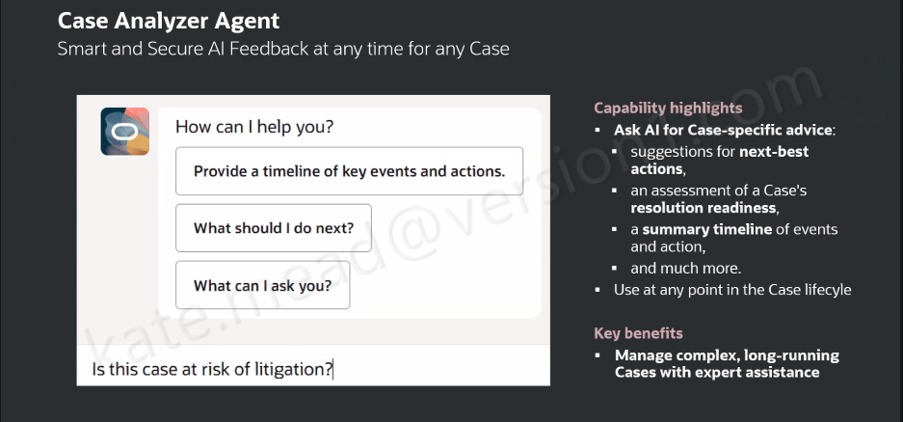
Of all the AI capabilities currently available within HR Help Desk, Case Analyzer is arguably the most transformative. Complex cases often involve multiple stakeholders, tasks, updates and handovers. Understanding the history of a case can sometimes take longer than resolving the issue itself. Case Analyzer is designed to address that challenge.

When launched, the AI Agent reviews the entire case record, including notes, messages, tasks, action plans and other relevant information. It then presents that information through a conversational interface that allows agents to explore the case in far greater detail. Agents can view a timeline of events, identify important developments, ask specific questions about the case and receive suggested next-best actions. The tool can also highlight potential escalation risks and help agents understand whether additional attention may be required.

What I particularly like about this capability is that it moves beyond simple summarisation. Rather than giving you a static overview, it allows you to have an interactive conversation with the case itself. For newer service agents, this can significantly reduce the time needed to understand a complex issue. For experienced agents, it provides confidence that important details haven’t been overlooked. Oracle has continued to invest in this capability, with 26B introducing configurable starter prompts that help guide users towards the types of questions they can ask.
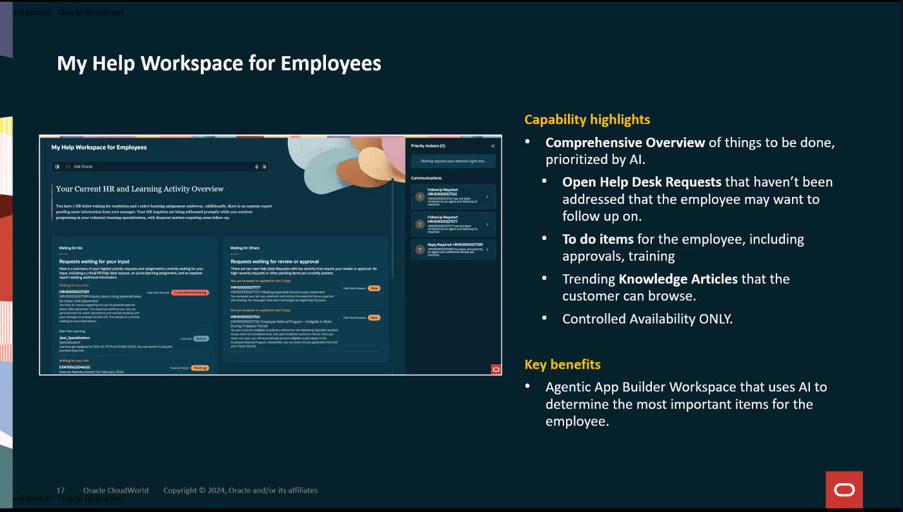
A controlled availability feature that is also worth watching is the evolution of My Help into a broader employee workspace. Rather than focusing solely on conversational support, the workspace brings together employee tasks, open requests and relevant knowledge content into a single AI-driven experience. While still in the early stages of adoption, it provides a useful glimpse into how Oracle sees the future of employee support. It should be noted that this utilises the Agentic Application Platform which requires a separate licence.

The real value is not any single AI feature. It’s the way they work together. Employees receive assistance before a case is raised. Requests are categorised and routed automatically. Agents receive summaries, recommendations and drafted responses. Complex cases can be analysed through a dedicated AI assistant. Resolution notes can be generated automatically at closure. Taken together, these capabilities represent a shift away from traditional ticket management and towards a more intelligent service model that actively supports both employees and HR service teams throughout the lifecycle of a request.

There is another important point worth mentioning. All of these capabilities are embedded within Oracle Fusion Applications and operate within the existing security and access framework. For organisations handling sensitive HR data, that matters just as much as the AI functionality itself.

If you’re already using Oracle HR Help Desk, it’s worth taking a fresh look at what’s available in your environment. Many of these capabilities have arrived gradually over recent releases, making them easy to overlook. Taken together, however, they represent one of the most comprehensive examples of how Oracle is embedding AI directly into everyday business processes.

Please note that all screenshots are the property of Oracle and are used in accordance with Oracle’s Copyright Guidelines.
Choosing the Right LLM for Oracle AI Agent Studio: Balancing Cost, Performance and AI Unit Consumption

When Oracle introduced AI Agent Studio, it gave organisations the ability to build and deploy custom AI agents directly within Oracle Fusion. As customers move from experimentation into production, one question comes up repeatedly: So, which LLM should I use? At first glance, this looks like a technical decision. In reality, it has significant implications for cost, performance and the way your AI agents operate at scale. With Oracle’s new AI Unit pricing model, the LLM you choose can directly affect how quickly you consume your AI allocation, making model selection an important part of both solution design and budget planning.

The Good News is that Oracle Gives You Choice, Oracle AI Agent Studio allows organisations to select the LLM that best fits their requirements. For some use cases, a basic model may provide everything you need. For others, a premium model delivers the additional reasoning and conversational capabilities required for more complex business processes.

The important thing is that Oracle is not forcing customers into a single approach. Instead, organisations can align model selection to the specific needs of each AI agent. This flexibility is particularly valuable because not every business process requires the same level of intelligence.

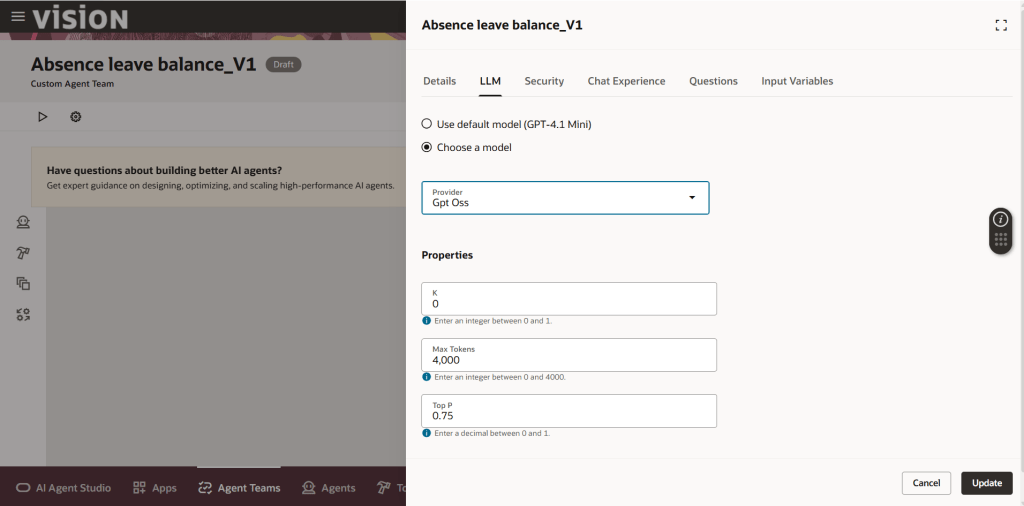
I get asked a lot, how can I check which LLM my agent is using. If you go to AI Agent Studio, find your agent and click on the edit button and then the cog button, the below options will appear. Click on the LLM tab and review what is selected. In this example, the default was GPT-4.1 Mini which is a premium LLM, so I’ve switched it to the free GPT OSS. Just click update and it is all saved.

One of the biggest misconceptions surrounding AI agents is that every use case requires the most powerful model available. In practice, many agents perform relatively focused tasks:

  • Classifying documents
  • Extracting information from forms
  • Routing requests
  • Generating standard responses
  • Performing workflow actions

For these kinds of activities, a basic LLM may deliver perfectly acceptable results while keeping AI Unit consumption lower. The challenge is that many organisations instinctively select a premium model for every use case without fully understanding the cost implications. As with any cloud service, right-sizing matters.

Another key consideration is the impact on AI Unit consumption. Oracle’s new pricing model is based on AI Units rather than traditional licensing metrics such as users, agents or tokens. Every Fusion customer receives a monthly allocation of AI Units, with additional capacity available if required.

Where this becomes relevant is the relationship between the selected LLM and AI Unit consumption. During Oracle’s recent pricing briefing, examples showed that general actions using a premium model consume AI Units, while actions using a basic LLM can often be performed without additional AI Unit charges. This means the model choice behind an agent can have a direct effect on ongoing operational costs. For organisations planning multiple custom agents, this quickly becomes an architectural consideration rather than simply a design preference.

When deciding whether to use a basic or premium model, I encourage customers to focus on business risk and business value. Ask yourself:

  • What is the impact if the answer is wrong?
  • Does the process involve customer interactions?
  • Is there financial or compliance risk?
  • Does the agent need to reason across multiple pieces of information?
  • Is a human reviewing the output before action is taken?

For low-risk activities, a basic model may be entirely appropriate. For more complex scenarios, such as HR advisory services, financial decision support or customer-facing interactions, the additional capability of a premium model may justify the additional AI Unit consumption. The goal should not be to minimise AI Unit usage at all costs. The goal should be to use the right model for the right task.

One particularly important point that emerged from Oracle’s pricing session is that AI Units consumed in non-production environments also count towards usage when premium models are being used. This means development, testing and experimentation activities can contribute to overall AI consumption.

Many organisations are accustomed to thinking about production workloads when budgeting cloud services, but AI introduces a different dynamic. Agent testing, prompt refinement and user acceptance testing all have the potential to generate usage. As AI adoption grows, development and testing practices will need to evolve to take this into account.

The reality is that most organisations do not yet have mature governance processes for AI consumption. That will need to change. Oracle has already introduced observability and analytics capabilities to help customers understand performance, accuracy and AI Unit consumption. Future releases will also provide additional controls such as budgets and consumption caps. These capabilities will become increasingly important as organisations deploy larger numbers of AI agents across HR, Finance, Procurement, Supply Chain and Customer Experience. Without visibility, it becomes difficult to understand whether the business value being generated justifies the cost being incurred.

When building agents in Oracle AI Agent Studio, my recommendation would be to always start with the business outcome rather than the technology. Not every use case requires a premium model, and not every process should be optimised purely for cost. The most successful organisations will take a balanced approach, matching model capability to business need. Use premium models where reasoning, accuracy and user experience are critical. Use simpler models for straightforward, repetitive tasks where the additional intelligence offers limited value.

Most importantly, monitor consumption from the beginning. AI Units are becoming the new currency of Oracle AI, and understanding how your model choices affect usage will be essential to scaling AI successfully across the enterprise.

Please note all screenshots are the property of Oracle and are used in accordance with Oracle’s Copyright Guidelines.
Turning on AI in Fusion Procurement

While many organisations are still working out where AI can genuinely improve business processes, Oracle has been steadily embedding generative AI into Oracle Fusion Cloud Procurement. Some of these capabilities are already well established. Both the Procurement Policy Advisor and Supplier Portal Advisor have been available for around a year and are being used by many organisations to improve self-service, increase process efficiency and reduce support overhead. More recently, Oracle has introduced agentic applications such as the new Sourcing Command Centre, released in Oracle Fusion Cloud Procurement 26B, which moves beyond answering questions to actively identifying issues and recommending actions.

The result is not simply faster access to information. These capabilities are designed to reduce administrative effort, improve compliance, support better decision-making and help procurement teams focus on higher-value activities. Three innovations illustrate how Oracle is approaching AI in procurement today: Procurement Policy Advisor, Supplier Portal Advisor and Sourcing Command Centre.

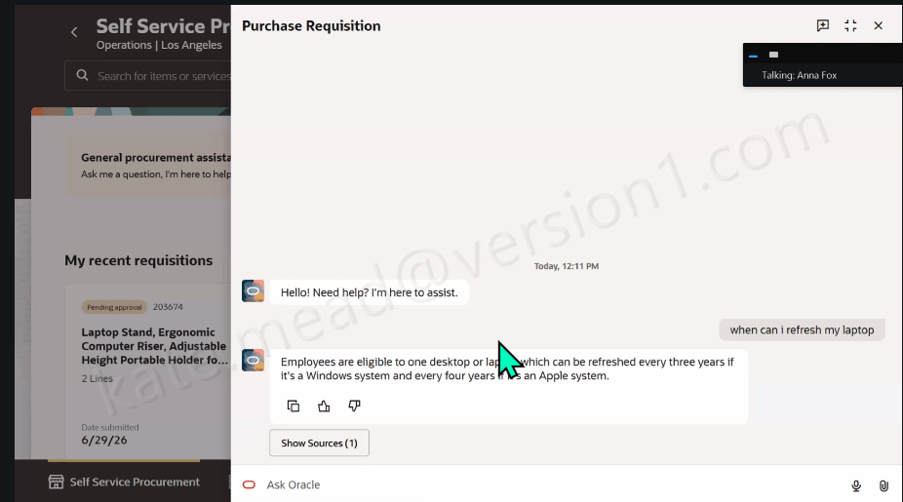
One of the biggest frustrations for employees raising requisitions is finding the information they need. Questions about purchasing policies, approved suppliers, spending limits or equipment refresh cycles often result in searches through intranet pages, policy documents or calls to the procurement team. Oracle’s Procurement Policy Advisor addresses this challenge by providing answers directly within the Self Service Procurement experience. Users can ask questions in plain English and receive immediate responses based on their organisation’s procurement policies and supporting documentation. The capability is designed to provide seamless access to procurement policies while employees are ordering the products and services they need.

Whether an employee wants to know when they are eligible for a replacement laptop or which products can be ordered through approved catalogues, the information is available without leaving the requisition process. Importantly, responses are grounded in approved source documents, allowing users to see exactly where the information has come from. This helps build confidence in the accuracy of the advice while supporting consistent policy compliance across the organisation.

For procurement teams, the benefits are equally significant. By reducing repetitive policy queries and making guidance available at the point of need, organisations can improve the user experience while reducing demand on internal support teams. Oracle specifically highlights streamlined access to policy documents and improved compliance as key outcomes of the solution. As one of Oracle’s earlier procurement AI capabilities, Procurement Policy Advisor is already a proven and mature use case, giving organisations a practical way to deliver the benefits of AI without changing core procurement processes.

Suppliers often need support with routine activities such as invoice submission, payment enquiries or updating organisation details. While these requests may seem straightforward, they can consume significant amounts of time for procurement and accounts payable teams.

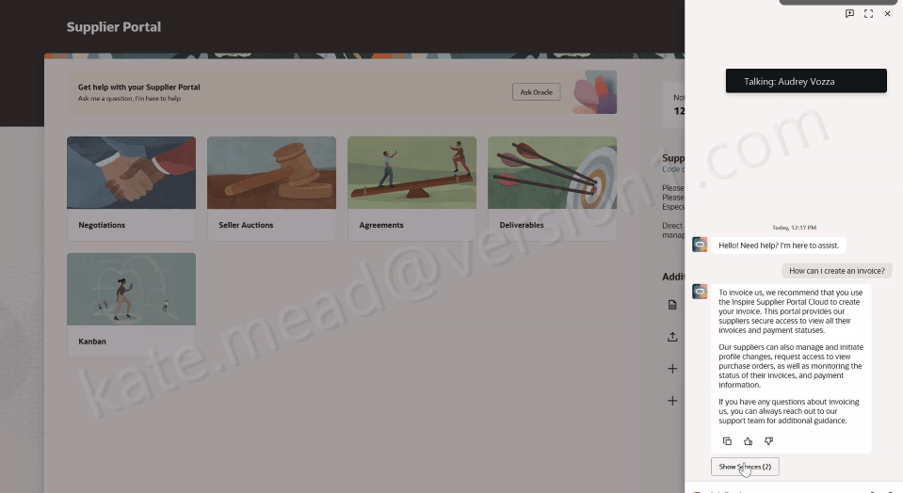
Supplier Portal Advisor extends Oracle’s AI capabilities to the supplier community by providing a self-service assistant within the Supplier Portal. Oracle describes it as a chat-based experience that answers policy, process and how-to questions directly within the application using an organisation’s own supplier support content. Rather than searching through documentation or contacting support teams, suppliers can receive immediate guidance within the portal. Organisations can tailor the advisor using their own supplier-facing documentation, policies, invoicing instructions and onboarding guidance, ensuring answers reflect their specific ways of working. This creates a more consistent experience for suppliers while reducing the number of routine enquiries that procurement and finance teams need to manage.

The value becomes particularly apparent for organisations with large supplier populations, where even a small reduction in support requests can deliver meaningful efficiency gains. Suppliers are able to resolve questions themselves, while procurement teams can focus their time on supplier relationships, sourcing activities and strategic initiatives rather than handling repetitive enquiries.

Like Procurement Policy Advisor, Supplier Portal Advisor is no longer a new concept. It has been available since 2025 and is already helping organisations extend AI-driven self-service beyond employees and into their wider supplier ecosystem.

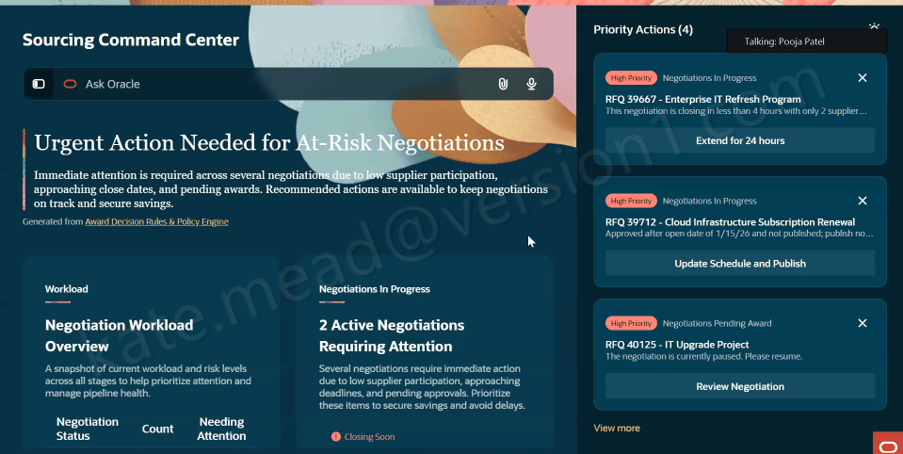
While answering questions is valuable, Oracle’s Sourcing Command Centre takes AI a significant step further by helping sourcing teams identify risks, prioritise activities and take action more quickly. Unlike the Policy Advisor and Supplier Portal Advisor, which are now established capabilities, Sourcing Command Centre is a new addition introduced as part of Oracle Fusion Cloud Procurement 26B. Oracle positions it as an AI-powered agentic command centre where specialist sourcing agents continuously analyse negotiations, supplier participation and award readiness to identify risks, opportunities and recommended actions.

Organisations interested in adopting Sourcing Command Centre should also be aware that it sits within Oracle’s broader Agentic Applications strategy. Customers will need to license the Agentic Applications Platform before they can take advantage of the capability, making it important to understand both the business case and licensing implications as part of any evaluation.

Managing multiple sourcing events often requires buyers to monitor negotiations, track supplier participation, review timelines and assess award options across numerous screens and reports. Important issues can be overlooked simply because of the volume of information involved. Sourcing Command Centre brings these activities together into a single workspace. AI-generated summaries highlight negotiations that require attention and prioritise actions based on sourcing data and business rules. Oracle states that the solution surfaces negotiations needing immediate intervention, including events with low supplier participation, negotiations approaching close dates and sourcing activities awaiting award decisions.

Rather than simply identifying issues, the solution enables users to act directly from the workspace. Recommended actions can include extending negotiations, updating schedules, resuming paused events and communicating with suppliers without navigating elsewhere in the application. The Command Centre can also assist with award decisions by analysing supplier responses and recommending award scenarios. This enables sourcing teams to evaluate options more efficiently while maintaining visibility of how recommendations have been generated. Oracle highlights AI-recommended award actions, negotiation-specific analysis and the ability to apply recommended awards directly from the workspace.

For organisations looking to increase procurement productivity and accelerate sourcing cycles, this represents a significant shift. Rather than AI acting solely as an information assistant, it becomes an active participant in managing procurement processes and helping users drive outcomes.

Although these capabilities address different aspects of the procurement lifecycle, they share a common theme. The Procurement Policy Advisor and Supplier Portal Advisor focus on providing accurate, contextual answers based on an organisation’s own policies and documentation. Both have now matured into established capabilities that are delivering value in real-world implementations. Sourcing Command Centre builds on that foundation by helping procurement professionals identify priorities and take action. It represents Oracle’s next step towards agentic applications that can not only answer questions but also recommend and execute tasks within defined business controls.

Together, these innovations demonstrate Oracle’s practical approach to AI in Fusion Applications. Rather than replacing procurement professionals, they are designed to remove friction, surface relevant information at the right time and support more informed decision-making. For organisations using Oracle Fusion Procurement, AI is no longer an experimental technology. It is becoming an increasingly practical part of day-to-day procurement operations, helping employees, suppliers and sourcing teams work more efficiently while maintaining visibility, governance and control.

Please note all screenshots are the property of Oracle and are used according to their Copyright Guidelines

AI for Managing Cash in Oracle Fusion ERP

Cash management has traditionally relied on a combination of spreadsheets, separate banking platforms and a significant amount of manual effort to build forecasts, manage liquidity and chase overdue payments. Oracle is taking a different approach by embedding AI directly into Oracle Fusion Cloud ERP, helping finance teams make better decisions using the same platform where transactions already exist.

Recent developments across cash forecasting, banking connectivity, payments and collections all point towards a common goal: helping finance and treasury teams spend less time gathering information and more time acting on it. Rather than introducing another standalone tool, Oracle is bringing intelligence directly into day-to-day finance processes.

For many organisations, obtaining an accurate view of future cash position remains a challenge. Forecasting often relies on multiple spreadsheets, assumptions and manual updates, making it difficult to respond quickly when circumstances change.

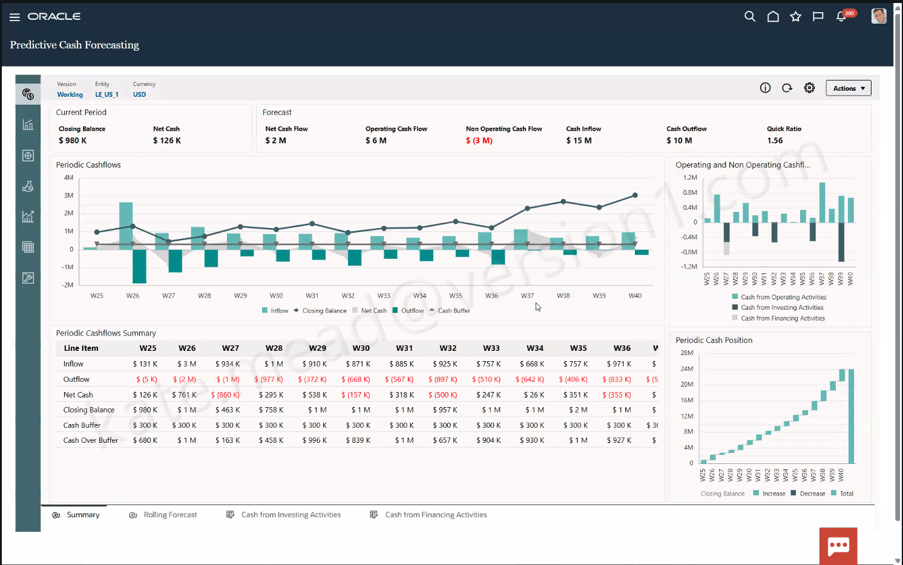
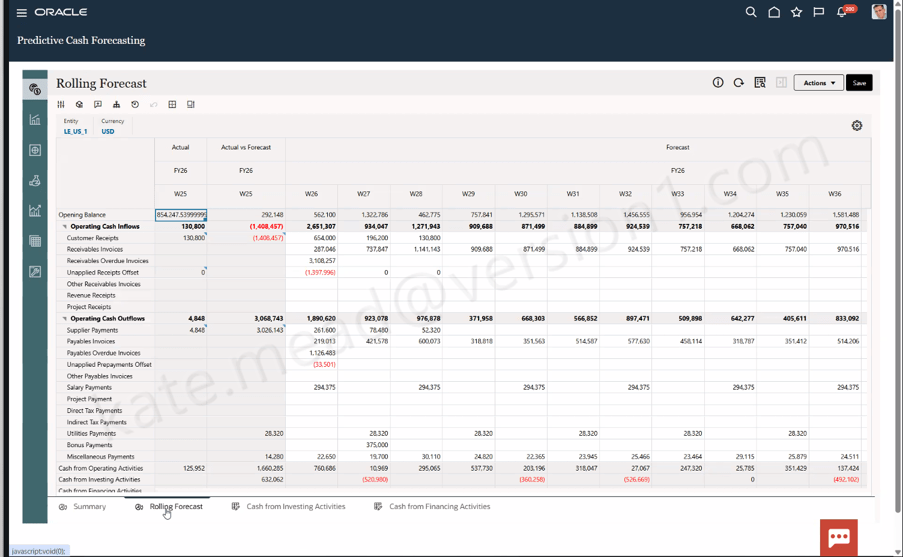
Oracle’s Predictive Cash Forecasting capability aims to improve visibility by bringing together current cash balances, expected inflows, expected outflows and cash flow projections into a single rolling forecast. Finance and treasury teams can view projected cash positions over future periods, supported by visual cash flow analysis and cash position forecasting.

One particularly useful feature is the ability to compare forecasted and actual cash flows across successive periods. This helps identify variances early, allowing treasury teams to investigate unusual spending patterns or unexpected changes in cash movement before they become larger issues.

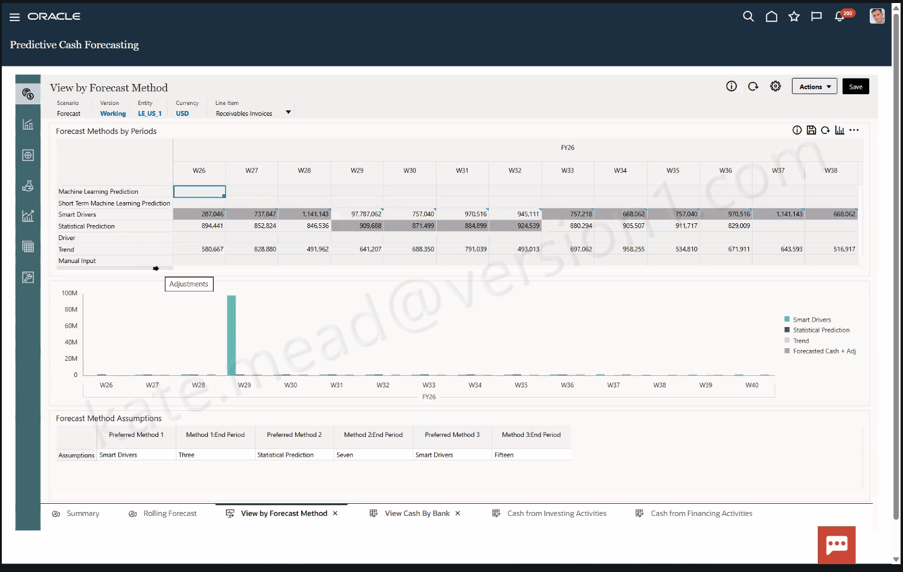
The AI capability becomes more apparent through Oracle’s forecasting methods. Organisations can review forecasts generated using different approaches, including machine learning models, statistical forecasting techniques, moving averages and trend-based methods. Rather than relying on a single forecasting model for every scenario, finance teams can select the most appropriate forecasting approach for different periods within the forecast horizon.

This flexibility can help improve forecast accuracy while giving users greater confidence in the forecasts they rely on for decision-making.

Before planning an implementation, it is worth noting that Predictive Cash Forecasting requires Oracle EPM Planning licensing. Organisations should confirm their current licensing position and security roles before including it within their roadmap. Businesses already using the standalone Predictive Cash Forecasting capability within Oracle EPM can continue to do so, as the existing solution remains fully supported.

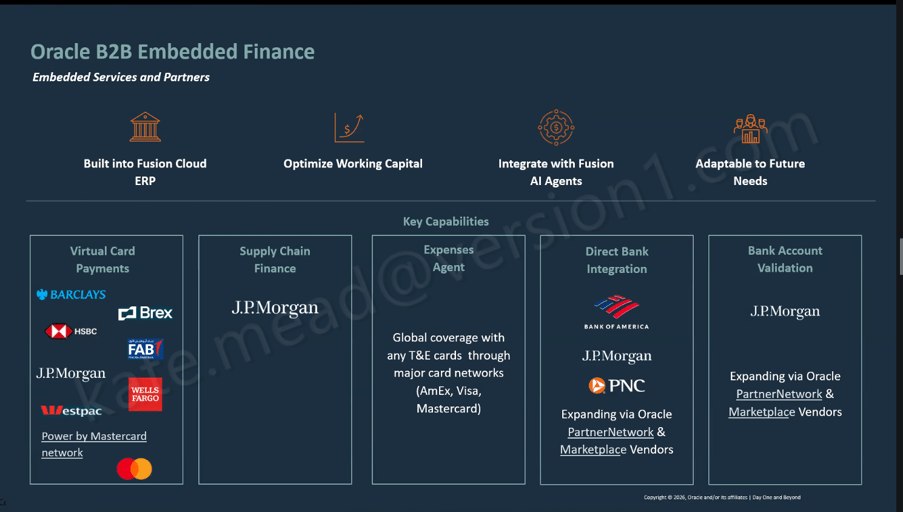
Banking connectivity has often been an area where finance teams depend on custom integrations, file transfers and manual reconciliation activities. Oracle’s embedded banking strategy seeks to simplify these processes by connecting Oracle Fusion Cloud ERP more directly with participating banking partners.

The capability supports a range of services including virtual card payments, direct banking connectivity, supply chain finance, bank account validation and real-time banking information. Oracle continues to expand its ecosystem of banking partnerships to support these services.

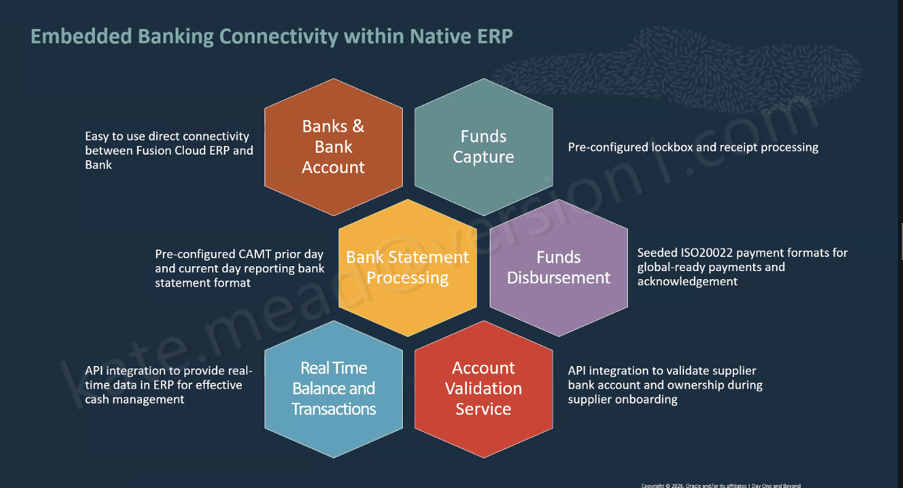
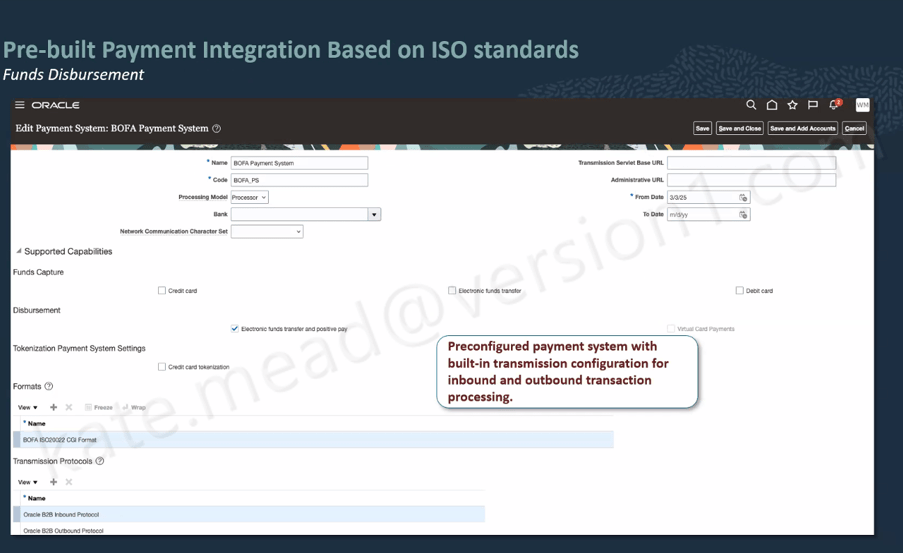
From an operational perspective, embedded banking simplifies several key activities, including bank account setup, receipt processing, bank statement processing, payment execution and balance visibility. Standard support for ISO 20022 payment formats also reduces the effort traditionally associated with formatting payments for different banking providers.

One feature attracting particular attention is supplier bank account validation. During supplier onboarding, bank account details can be validated automatically, helping organisations confirm account ownership and reduce payment risks before transactions are processed. The immediate benefits are clear. Finance teams can reduce failed payments, improve supplier data quality and strengthen controls designed to prevent payment fraud.

Organisations should be aware that bank account validation currently has geographical and banking partner limitations. If this capability forms part of your business case, it is worth discussing current coverage with Oracle before implementation to ensure it aligns with your supplier population and operating regions.

Within Accounts Payable, Oracle’s Payments Agent focuses on helping organisations make better payment decisions while improving processing efficiency. For many finance teams, payment runs are often viewed as an administrative activity. However, payment timing can have a significant impact on working capital, supplier relationships and available discounts.

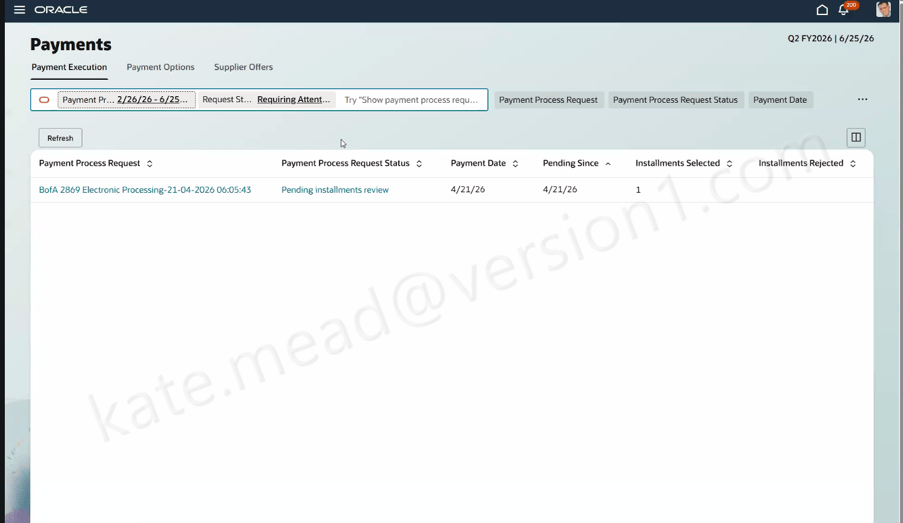
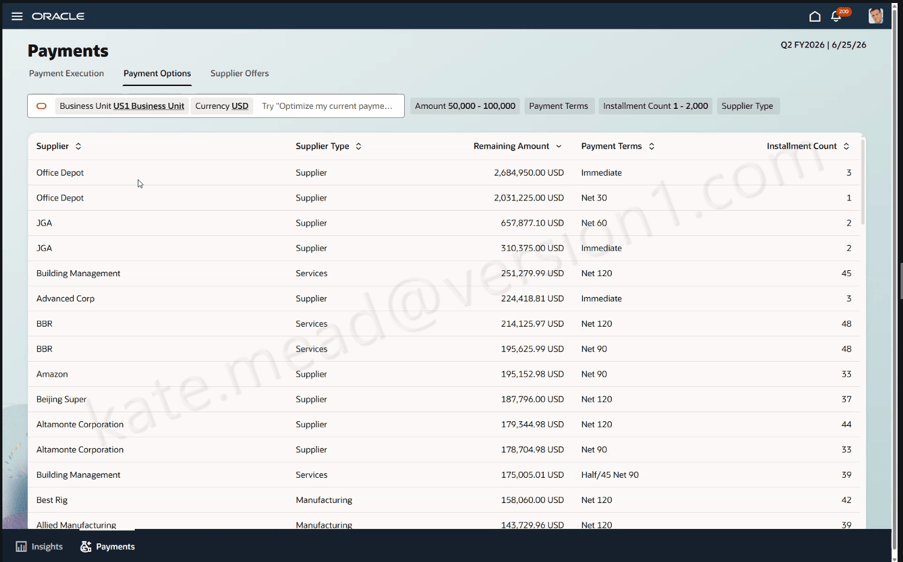
Oracle’s Payments work area provides visibility of payment proposals, supplier offers and outstanding balances within a single workspace. This makes it easier for AP teams to identify early payment discounts, supplier incentives and rebate opportunities that may otherwise be overlooked.

Additional views allow users to analyse payment information at supplier level, providing insight into balances, payment terms and instalment arrangements. This helps finance teams validate payment recommendations and understand the potential impact of alternative payment decisions. The result is a more informed approach to payment management, where teams can balance cash preservation with supplier engagement and commercial opportunities.

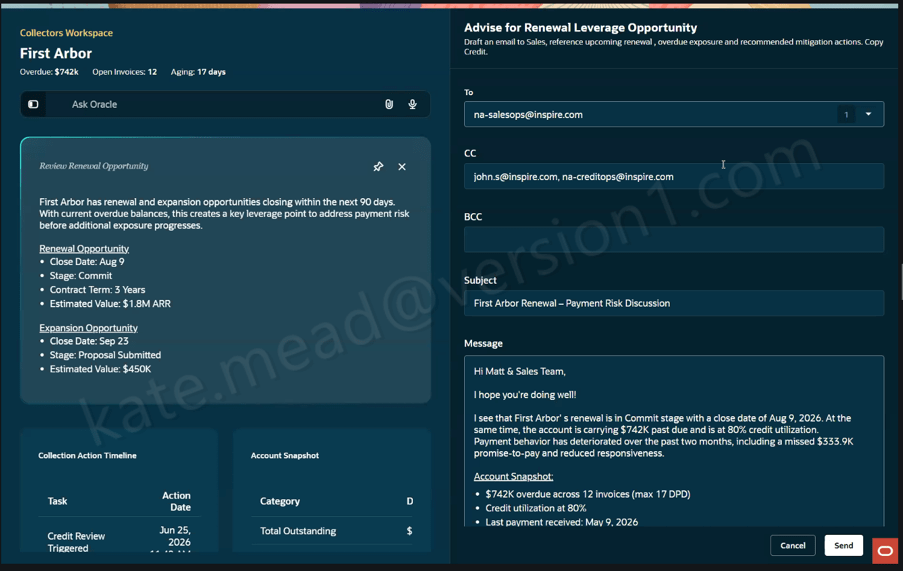
While all of these developments are valuable, the most significant day-to-day impact may come from Oracle’s AI-driven Collections Workspace. Managing collections has traditionally been heavily dependent on individual collector experience. Determining who to contact, which accounts present the highest risk and how best to approach each customer can consume a significant amount of time.

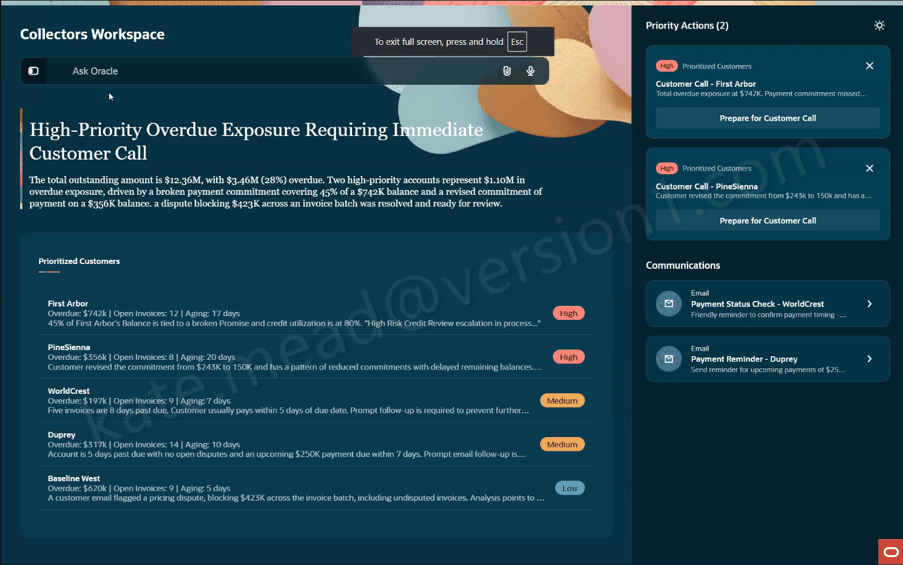
Oracle’s Collections Workspace brings this information together in a prioritised view, helping teams focus on the accounts that require immediate attention. Customers can be ranked based on overdue balances, risk factors, broken payment commitments and unresolved disputes.

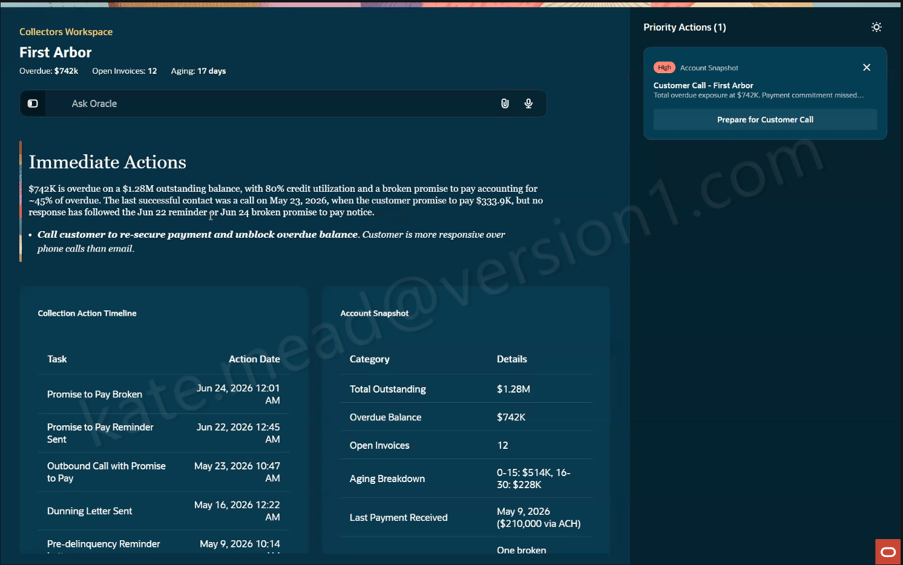
The embedded AI assistant provides collectors with account summaries, collection histories and recommended next actions. Rather than spending time researching account details before every customer interaction, collectors can access the information they need in a single workspace.

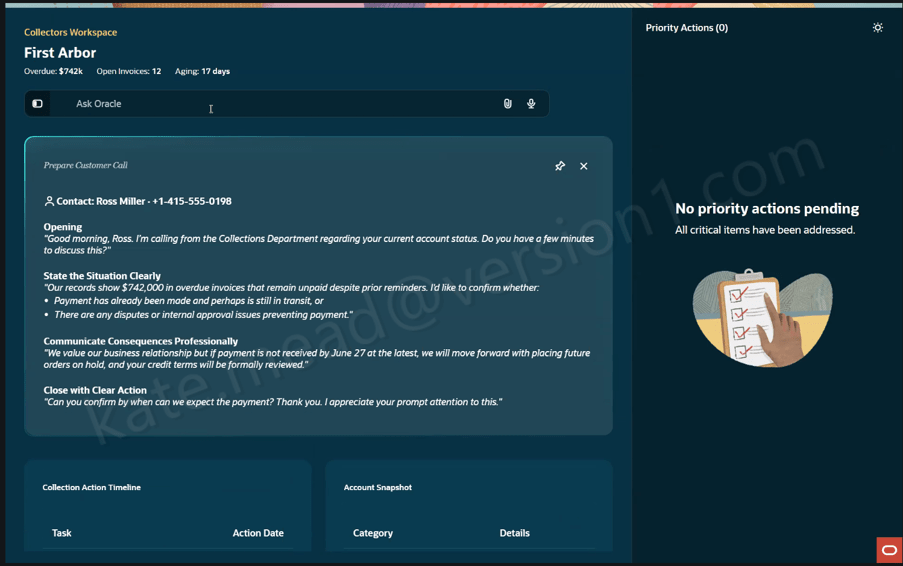
Perhaps most impressive is the ability to generate suggested call preparation notes based on a customer’s payment history and current account status. This helps collectors enter conversations better prepared and with a clearer understanding of the issues that need to be resolved.

The workspace also supports post-call follow-up activities. By analysing conversation records and account information, Oracle can identify actions that may require attention and help route information to the appropriate teams.

For collections teams, the practical benefit is simple: less time spent preparing for conversations and more time focused on resolving outstanding debt and improving cash collection performance. It is important to note that the Collections Workspace forms part of Oracle’s Agentic Applications strategy and requires the appropriate licence to be enabled.

As with any new capability, success depends on understanding the prerequisites before embarking on an implementation. Predictive Cash Forecasting requires Oracle EPM Planning licensing, whether accessed through Oracle ERP or a standalone EPM environment. Appropriate security roles should also be reviewed early in the project lifecycle. Organisations considering bank account validation should confirm current banking partner support and geographical coverage before building business processes around the capability.

The good news is that these innovations do not require a complete finance transformation programme to begin delivering value. Many organisations can adopt individual capabilities incrementally, allowing them to target specific business challenges while building towards a wider AI-enabled finance strategy.

What stands out across all of these developments is that Oracle is focusing on practical outcomes rather than AI for its own sake. Whether it is improving cash forecasting accuracy, reducing payment risk, identifying supplier discount opportunities or helping collections teams recover debt more effectively, the emphasis is on solving real business problems.

For organisations looking to improve liquidity management, strengthen financial controls and increase efficiency across finance operations, these capabilities are well worth exploring.

Please note all screenshots are the property of Oracle and are used according to their Copyright Guidelines

Oracle’s HCM Professional Concierge: What It Is, How It Works, and Why It Matters for HR Teams

Oracle has been steadily building out its AI story in HCM Cloud, but the HCM Professional Concierge is one of the first examples that really feels tangible for HR teams. This is not AI added for the sake of it. It is a set of purpose-built, role-aware conversational agents, built directly into the HCM Redwood experience. For me, it stands out as one of the more considered uses of AI Agents in enterprise HR.

If you work in HR operations or as an HR Business Partner, the scenario will feel familiar. A manager wants to understand where their team sits on compensation ahead of a salary review. They open Employment Info, scroll through individual records, try to piece together performance data from one place, compensation history from another, and absence data from somewhere else. It is not a difficult task, but it is a fragmented one. Before long, ten minutes have passed just getting a basic view.

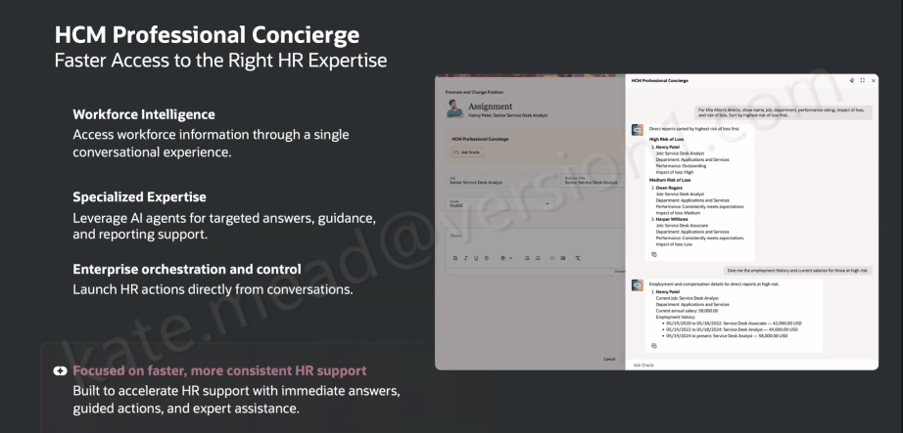
The HCM Professional Concierge simplifies this by bringing everything into a single conversational experience, embedded wherever the HR user is already working. Instead of navigating between screens, they ask a question. The agent brings together the relevant data, guides the next step, and in some cases can even trigger the action directly from the conversation.

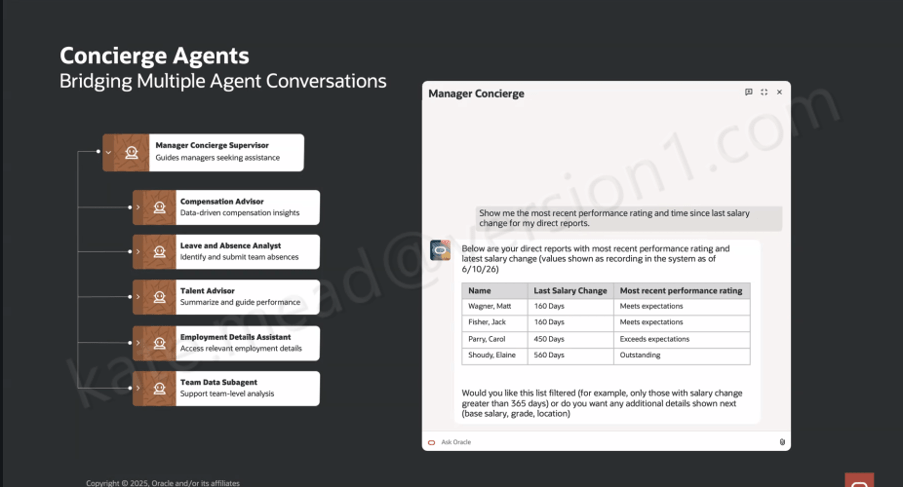
It is worth understanding that this is not a single AI agent working behind the scenes. Oracle has taken a supervisor and sub-agent approach, where a top-level Concierge Supervisor receives the user’s query, interprets the intent, and then routes it to the most appropriate specialist agent.
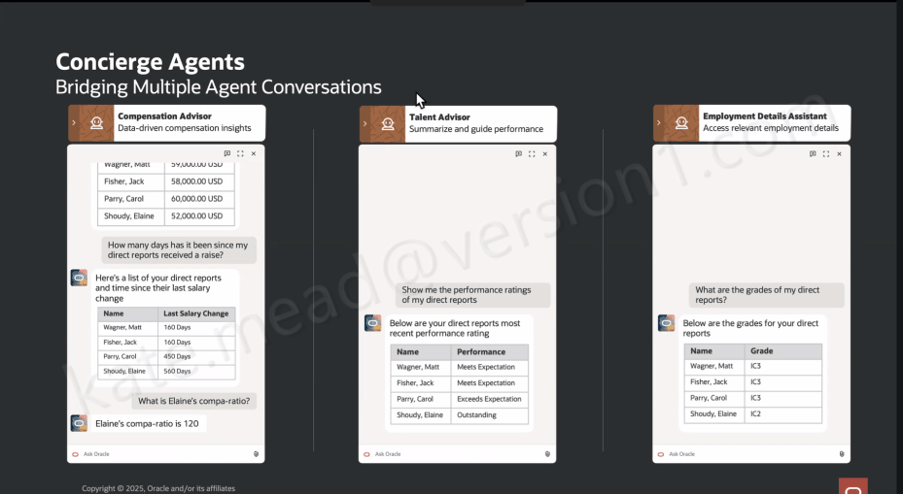
Within the HR Professional Concierge, those specialist agents each focus on a particular area of HR. For example, the Compensation Advisor brings together key information such as compensation data, compa‑ratios, time since the last salary change, and pay grade details for a manager’s direct reports. The Talent Advisor focuses on performance, helping to summarise ratings and support more informed performance conversations.

Other agents support core HR data and processes. The Employment Details Assistant provides access to employment history, assignment information and worker details, while the Leave and Absence Analyst helps identify and manage absence across a team. There is also support for understanding organisational design through the Workforce Structures agent.
In addition, the Concierge can surface policy and guidance through the Policy sub-agent, review personal worker data where needed, and launch reporting through the Reports sub-agent. For broader, team-level insight, the Team Data Hub helps bring data together to support analysis.
What this means in practice is that the user experiences a single, coherent conversation, even though multiple specialist agents may be working in the background to fulfil the request.
So when a manager asks, “show me the most recent performance rating and time since the last salary change for my direct reports”, the Manager Concierge Supervisor recognises that the query spans both compensation and talent data. It then coordinates across the Compensation Advisor and the Talent Advisor behind the scenes. What comes back is a single, joined-up view, rather than two separate outputs that the manager has to reconcile themselves.

That orchestration across multiple agents is where the real value starts to show. Conversational assistants in enterprise applications are not new in themselves. What is more interesting here is the ability to coordinate specialist agents within a single interaction, carry context across the conversation, and route requests intelligently based on both the topic and the data required.

Oracle has introduced three distinct Concierge experiences, each designed around a specific user group and how they typically work. The HCM Professional Concierge is aimed at HR specialists and HR Business Partners. It sits within the HCM Professional Activity Centre, which has become the central workspace for HR service delivery, and supports the sort of queries an HR analyst would usually run. That includes pulling together workforce data for individuals or manager populations, reviewing compensation and employment history, running reports, looking up policies, and guiding HR actions within the flow of work.

The Manager Concierge is focused on line managers who need quick, straightforward access to information about their teams. It brings together compensation, absence, talent and employment data without the need to navigate into individual worker records. The experience adapts based on both the question being asked and the context of the manager’s team, giving them a practical way to not only view information but also complete common HR tasks directly.

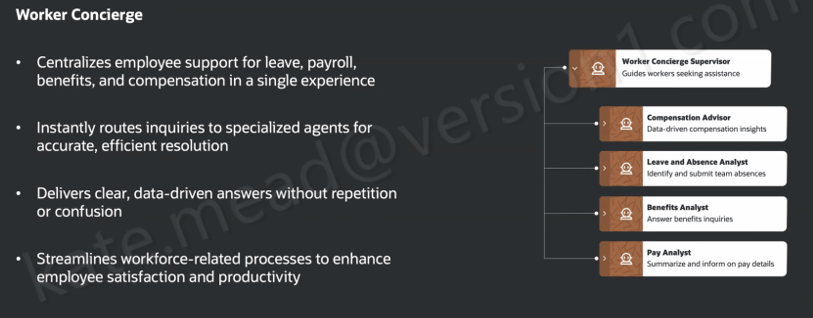
The Worker Concierge, meanwhile, is designed for employees themselves. It brings together support for areas such as leave, payroll, benefits and compensation into a single, consistent experience. Behind the scenes, it routes queries to the relevant specialist agent, whether that relates to absence, benefits, pay, or compensation, so the employee does not need to think about where to go to get the answer.

A simple scenario helps bring this to life. A line manager has been told that budget has been allocated for pay rises and promotions across the organisation. Before making any decisions, she wants a clear view of where her team currently stands. Using the Manager Concierge, she can ask a straightforward question in natural language, such as “how long has it been since my direct reports received a pay rise?” The Compensation Advisor returns the answer in a structured, easy-to-read format. She then follows up with a more specific question, “what is Elaine’s compa-ratio?”, and gets a direct response.

Within the same conversation, she can ask for performance ratings through the Talent Advisor and pull through grade information using the Employment Details Assistant. It all happens in one place, without needing to navigate between screens. Multiple specialist agents are working in the background, but from the manager’s perspective it feels like a single, joined-up interaction.

The HR specialist perspective is just as telling. If someone is working on an Employment Info page for a specific worker, they can open the Concierge panel and ask something like, “what is the salary history for Ravi?” or “where is Ravi located?” The response comes back as structured data pulled directly from HCM, without the need to navigate away or open multiple pages.

One question that comes up consistently when Oracle’s AI features are discussed is around data access and security. It is an important one, and the answer here is reassuring. The HCM Professional Concierge works within the same data and functional security model already applied across the HCM Redwood experience. If an HR specialist does not have permission to view a particular employee’s salary in the core application, they will not be able to access it through the Concierge either. There is no separate access layer being introduced. It simply operates within the role-based controls that are already in place.

For organisations working across multiple geographies, the same principle applies. The agent respects the existing configuration of Redwood pages, including any geography-specific policies and legislative requirements. There is also flexibility to tailor how the agent behaves by refining prompts to reflect your organisation’s terminology or local nuances.

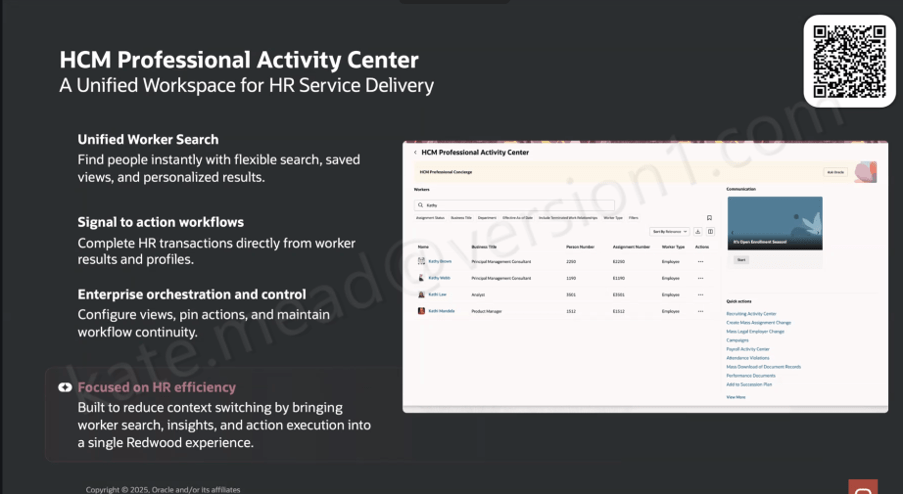
The Concierge also sits within a broader shift in how Oracle is shaping the HR user experience. It is alongside the HCM Professional Activity Centre, which acts as a unified Redwood workspace for HR administration. The Activity Centre brings together a more flexible approach to worker search, with filtering, saved views and personalised results. From there, HR specialists can move straight into transactions from a worker’s profile without switching to a separate area. Common actions are surfaced directly in the interface, including access to areas such as the Recruiting Activity Centre, Mass Assignment Change, Mass Legal Employer Change, Payroll Activity Centre and Attendance Violations, which makes it easier to act on information as soon as it is identified.

The Concierge is always present within the Activity Center, giving HR specialists access to conversational support in the context of the work they are already doing.

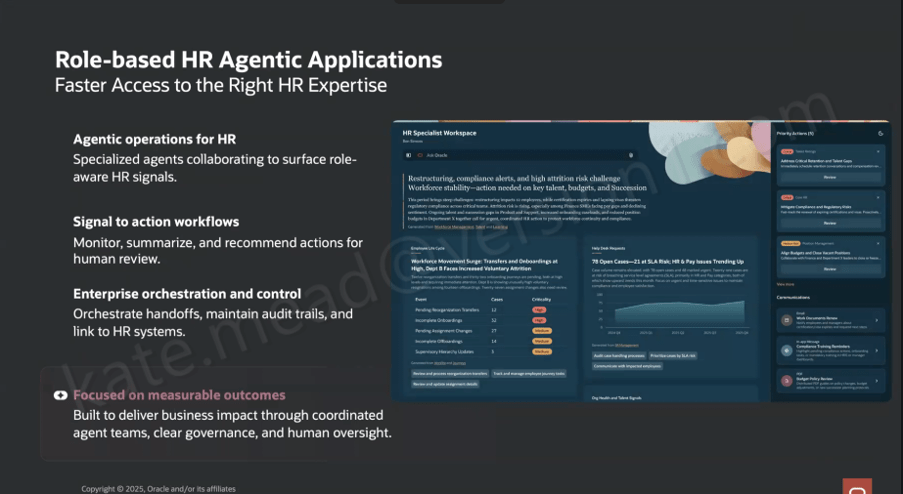
It also sits within a much broader direction Oracle is taking with role-based, agent-led HR applications. The HR Specialist Workspace is a good example of where this is heading. It builds on the same foundations, but moves towards a Redwood workspace where multiple specialist agents work together to surface relevant insights more proactively.

In that model, the workspace brings together a view of workforce priorities, potential restructuring impacts, compliance alerts, attrition risk and open HR cases. These are drawn from coordinated agent outputs across areas such as Workforce Management, Talent and Learning. The shift here is subtle but important. The agents are not just responding to questions, they are actively identifying what might need attention and presenting it to the user.

There is also a clear emphasis on governance. Audit trails, controls and human oversight are built into how actions are handed off. Oracle is quite deliberate in positioning this around measurable outcomes, with coordinated agent activity and clear decision points. That creates an important distinction from more autonomous AI models. Here, the agents surface and recommend, but people remain firmly in control of decisions and actions.

From an implementation perspective, the HCM Professional Concierge and its supporting agents are delivered as part of Oracle HCM Cloud Release 26C. There is no need to build these capabilities from the ground up. They are available out of the box, with the ability to adapt behaviour through prompt configuration so that it reflects your organisation’s terminology and ways of working.

As ever, I will keep a close eye on how this develops across the HCM suite and share updates as new capabilities emerge. If you are starting to think about how this fits into your wider HCM AI strategy, or you are planning for a 26C upgrade, now is a sensible point to begin that conversation.

Please note all screenshots are the property of Oracle and are used according to their Copyright Guidelines

Getting Started with Oracle Payables Agent: Inbox to Invoice, Touchlessly

Oracle’s been moving quickly with its agentic finance capabilities, and the Payables Agent is one of the more practical outcomes so far. If you’re looking after accounts payable or running a shared services function, it’s worth taking a closer look at what it can do and what’s involved in getting up and running.

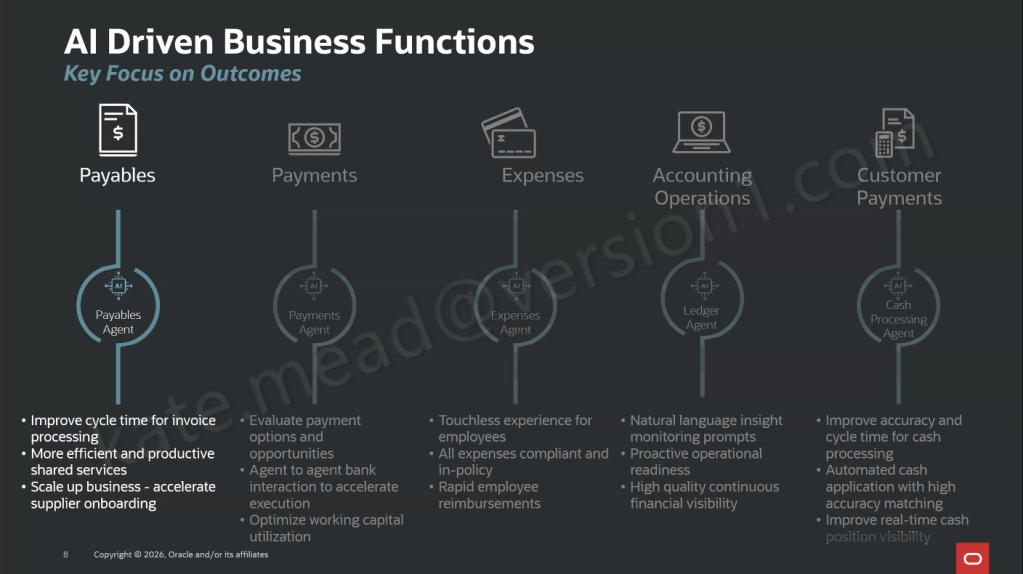
The Payables Agent is focused on the day-to-day reality of accounts payable, helping with invoice intake, compliance and control. It works to take invoices from wherever they come in and move them through to payment-ready with as little manual handling as possible. It sits alongside a wider set of Oracle AI agents across Payments, Expenses, Ledger and Customer Payments, each one aimed at a specific finance outcome.

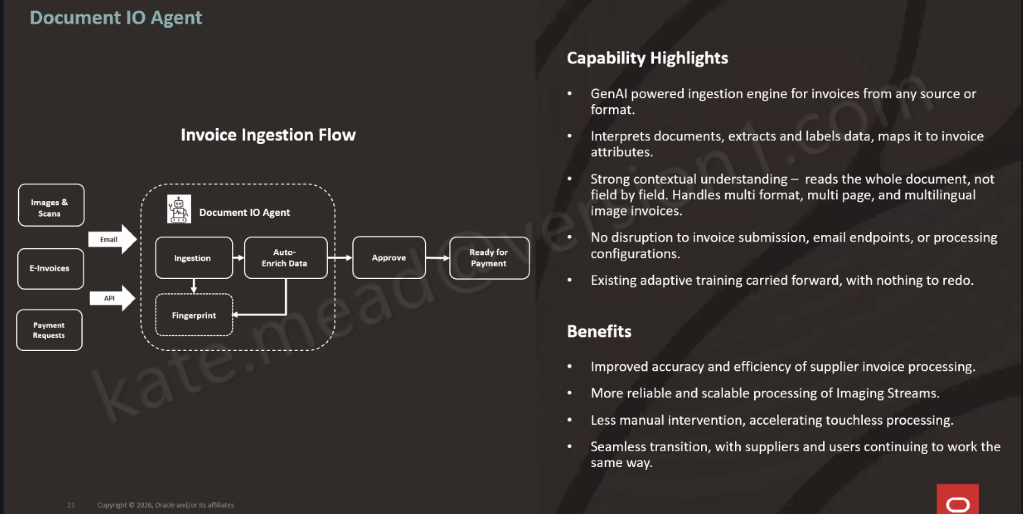
At the heart of it is Document IO, which handles invoice ingestion across different channels and formats. It routes everything through a consistent process and flags anything that needs a closer look, so exceptions can be picked up and dealt with quickly.

Document IO works a bit differently to traditional approaches. It reads the whole invoice rather than picking out individual fields, then extracts and maps the information straight into the right attributes in Oracle Fusion. It can handle different formats, multi-page documents and multiple languages without needing templates set up for each supplier, and you don’t have to change how invoices are sent in, as your existing email channels can stay as they are.

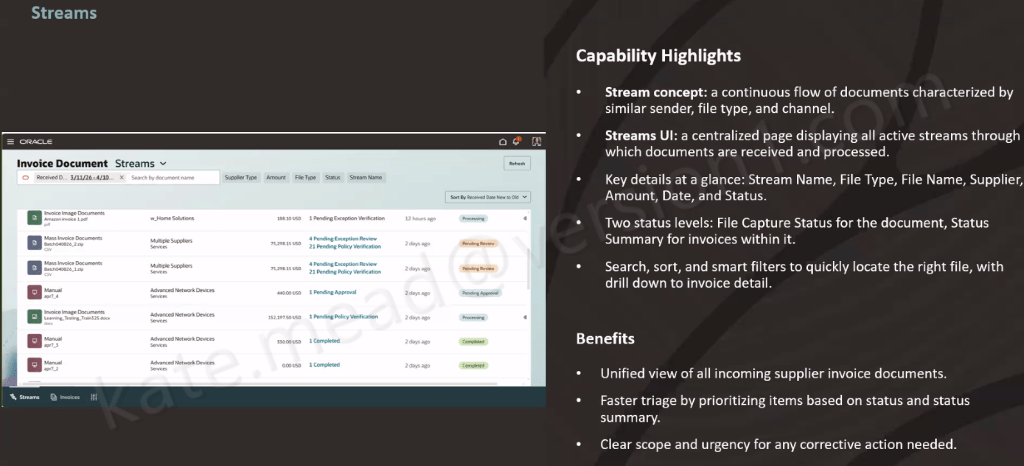
The Streams UI gives you a single place to keep on top of everything, bringing together all your active invoice streams. You can quickly see what’s coming in, what’s already been processed, and what needs attention. Out of the box, there are two streams available. The first covers invoice image documents, handling supplier invoices sent by email in different formats, across multiple pages and languages. The second is partner e-invoice integration, which connects to e-invoices via Thomson Reuters. That one does require a commercial agreement with Thomson Reuters to get started.

Converged streams bring your existing channels into the same view as well, including bulk uploads and manual entry. It means you get a single, consistent way of seeing and managing every invoice type in one place.

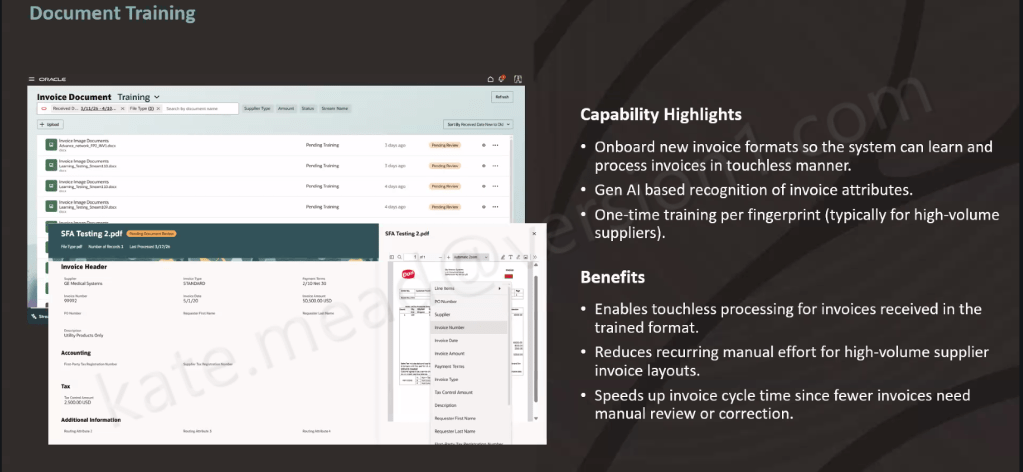
For suppliers with a consistent invoice layout and high volumes, document training makes things even smoother. You set the format up once, the system extracts the data using GenAI, you check and save it, and that format is then recognised going forward. After that, every invoice in the same layout is processed automatically, without the need to retrain.

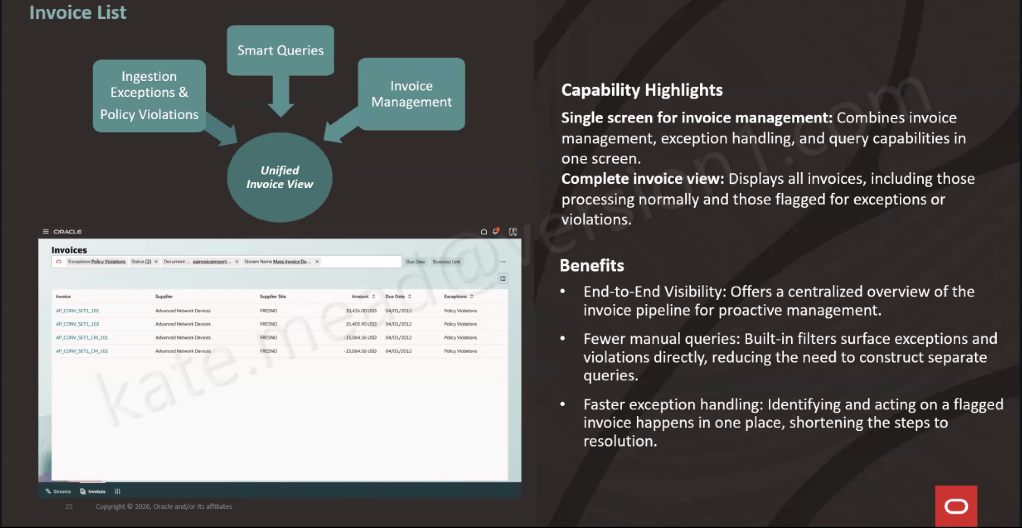
All of that is handled automatically in the background, with policy-driven validation, anomaly detection, PO matching, approval routing and budget checks applied to every invoice. A full audit trail is maintained throughout. Anything that needs attention is surfaced in the Invoice List UI, giving you a single place to manage invoices, handle exceptions and respond to queries. It means your team can focus their time where it really matters, rather than working through everything manually.

So, how do you get started? The Document IO Agent is already switched on by default, so there’s nothing you need to enable. From there, it’s really about setting up three key areas: where your invoices are received, how your streams are connected into the Streams UI, and, for higher-volume suppliers, putting a bit of time into training the system to recognise their invoice formats.

The best way to approach it is to take things in stages. Start with getting your invoice ingestion set up, then bring in converged streams and training, and finally test and refine at scale across different formats and volumes.

Stepping back, this is really about making day-to-day accounts payable that bit easier. A lot of the routine work is taken care of in the background, so your team can spend more time on the things that genuinely need their input. If you’re already using Oracle Fusion, it’s definitely worth exploring what this could look like in your own environment and where it might take the pressure off your team.

Please note all screenshots are the property of Oracle and are used according to their Copyright Guidelines

Oracle Fusion App Builder: Streamline Your Agentic Applications

Over the bank holiday weekend, with the heat driving me indoors, I opened up my Fusion demo environment and decided to try building my first Oracle Agentic Application. Within a few minutes, it was up and running. That is not marketing spin, it is genuinely how quick and straightforward the experience was. It also gave me a good reason to sit down and share what I found.

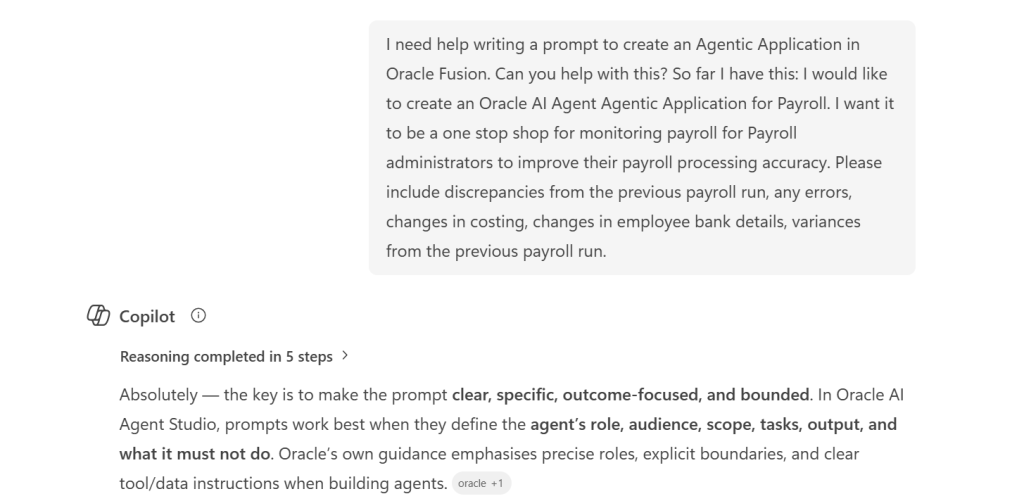
Officially, the Agentic Application Builder does not arrive until Release 26C. However, if you are already familiar with AI Agent Studio and have access to a non production pod, there is more than enough available today to start building something meaningful and to get a feel for where this is going. Over the weekend, I put together two applications. The first used one of Oracle’s out of the box prompts, and the second was based on a custom prompt I created with support from Microsoft Copilot. Both came together quickly, which is really the point.

Before getting into what I built, it is worth being clear on how this fits together architecturally. AI Agent Studio, which is included within your Fusion Applications subscription, will introduce the Agentic Application Builder in Release 26C. It provides a low code way to create and extend agentic applications directly within Fusion. What makes it different is the starting point. Rather than beginning with code or a process diagram, you simply describe the business outcome you want to achieve, and the builder identifies the right agents, creates the initial structure, and connects to your enterprise data. It is also important to understand the licensing model. While you can explore, test, and build in non production environments without any additional cost, a separate licence is required to deploy and run these agentic applications in production. This means there is nothing to stop you getting hands on now and understanding the art of the possible before making any investment decisions.

Applications built in this way run natively within Fusion Applications, using your existing business objects and data, and operating under Fusion’s role based security. That is worth pausing on, because it means you are not creating something separate or bolting on additional functionality. These agents are working within the same security and access model your users already rely on in their day to day roles.

The builder brings applications together using reusable agent teams. These can be provided by Oracle, developed by partners, or created in house to suit your own needs. Each team is designed to handle a specific role, and the builder assembles them into a single application that works towards a common business outcome.

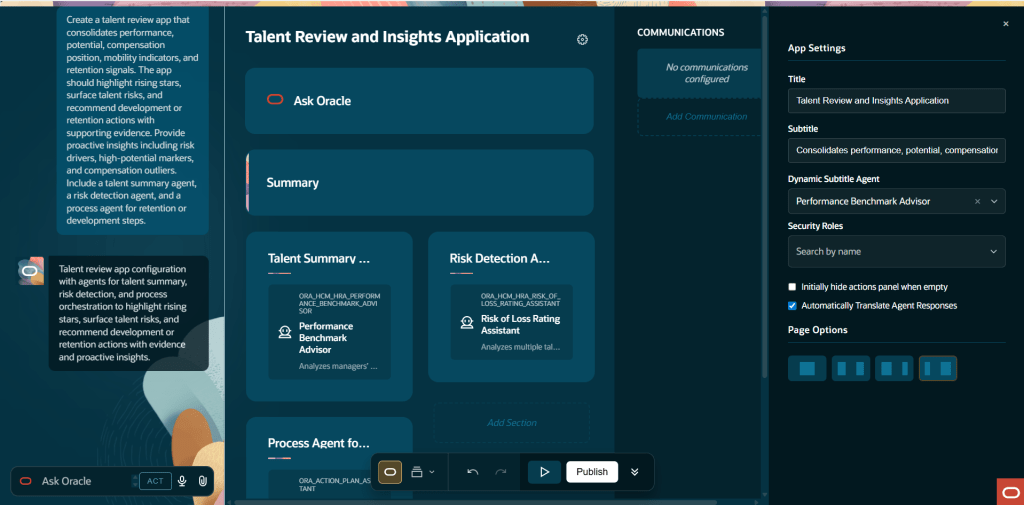
For my first build, I started with one of Oracle’s out of the box example applications. From selecting the template to having a working framework in front of me took only a few minutes. The App Builder presents a range of example agentic applications from the outset, giving you something tangible to work from straight away. You can select one, use it as a foundation, adapt it to your needs, and build from there. In my case, I chose the Talent Review and Insights application.

The steps are: go to AI Agent Studio, open the Apps tab, select Add, enter the name, code, and description for your agentic app, and navigate to the App Builder. Select one of the example apps and you’re looking at a working framework almost immediately.

That speed was the first thing that stood out to me. The framework clearly sets out the agent teams involved, the different sections of the application, and how everything fits together. You are not faced with a blank canvas. Instead, you can immediately see which published workflow agent teams are available to include, and the structure gives you a clear sense of how the application will operate before you have made any changes.

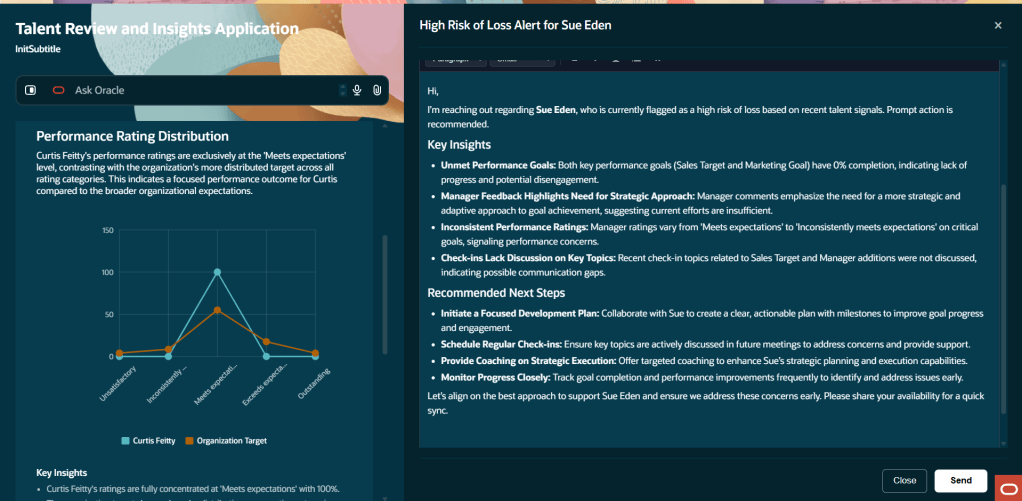
What really caught my attention was the quality of the insights it produced. This is not a static report. The agents actively draw on the data in your environment and present findings in a way that is designed to prompt action, not just provide information. For an HR practitioner used to working with standard Talent Review dashboards, the difference in how those insights are surfaced is immediately noticeable.

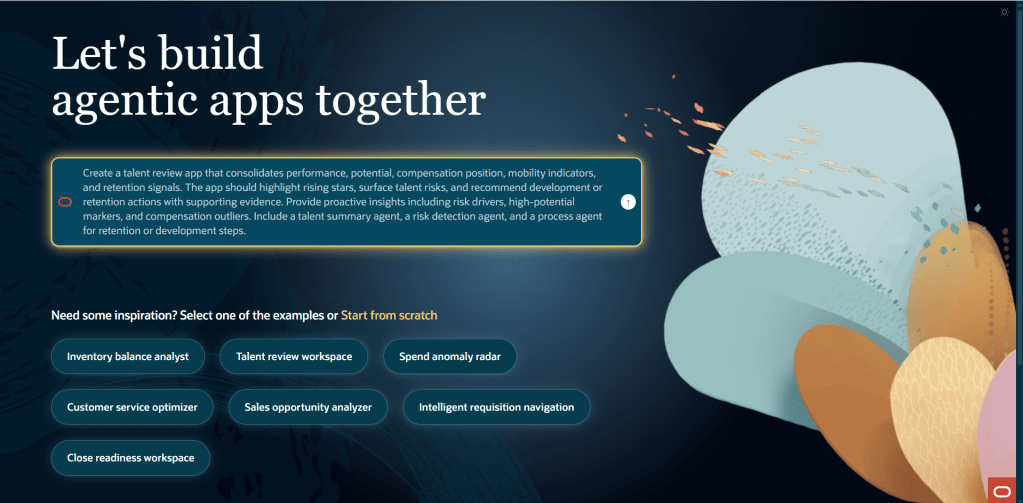
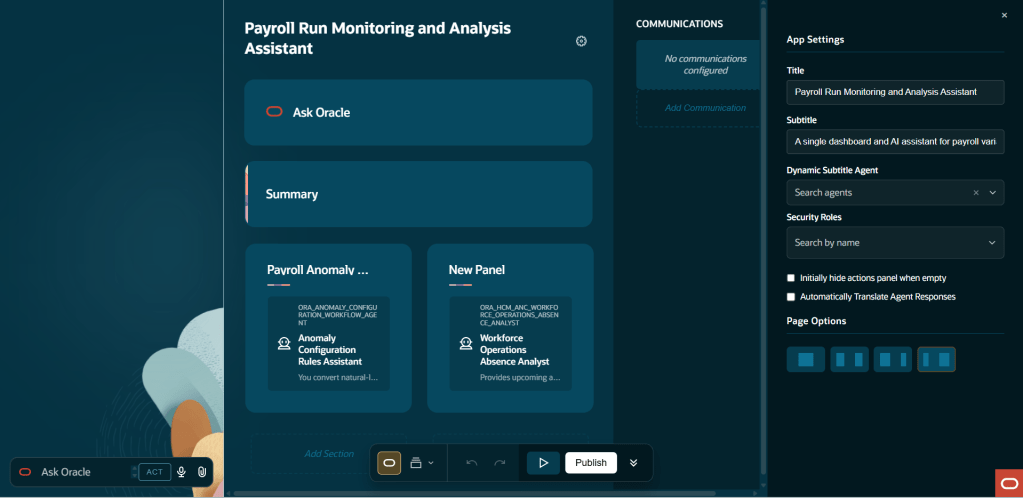
The second build is the one I found most interesting, and it was just as quick to put together. I used Microsoft Copilot to help shape a detailed natural language prompt, then passed that into the App Builder through the Ask Oracle interface to generate a completely custom agentic application from scratch.

The prompt set out an application designed for Payroll Administrators, bringing everything into a single workspace to monitor payroll activity and improve processing accuracy. The aim was to give payroll teams a clear, action focused view of exceptions, anomalies, and key changes that need investigation before payroll is finalised. In practice, that means removing the need for administrators to piece together that picture across multiple pages and reports.

The App Builder works through three clear phases: intent, assembly, and refinement. You start by describing the business objective in plain language, the builder then suggests the most relevant agents and proposes an initial structure, and from there you refine the application through layout changes, naming, and added detail before publishing. The whole journey, from a simple prompt to a structured application framework, moves quickly. If anything takes time, it is shaping the prompt itself rather than waiting for the builder to respond.

What I found is that the quality of the prompt makes a real difference to what the builder produces. The prompt I created with Copilot was clear about the user persona, the business context, and the type of information needed, focusing on a Payroll Administrator working in a pre finalisation scenario and looking for exceptions, anomalies, and priority changes. The application that came back reflected that level of clarity. In many ways, it is no different to working with any AI tool. The prompt is the critical part. The clearer and more specific you are, the more useful and relevant the outcome will be.

For those looking to get familiar with the structure ahead of 26C, an agentic application is built from three core elements: agent teams, communications, and actions. Agent teams sit at the heart of it. Only published workflow agent teams that have been enabled for use in applications are available to select, which helps ensure consistency and control over how these applications are put together.

Communications allow the application to send emails and messages using predefined templates. These templates can take the form of PowerPoint, PDF, email, or simple text. For email templates, the agent can be given the ability to suggest recipients, generate a subject line, and complete sections of the content. For PDF and PowerPoint templates, the agent can generate titles and populate the content, helping to streamline how information is produced and shared.

Actions define what happens as the application runs, including where human approval is needed along the way. The flow itself is straightforward. A widget or user interface element triggers a command, that command determines which action to run, and the action then executes its steps in sequence. There is a good level of flexibility in how those steps are defined. You can keep an action visible in the interface after it has run, navigate users to another application, send a command to an agent, refresh what the agent is showing, or switch the application context. Taken together, these steps allow you to shape how the application behaves and how users interact with it.

Once built and tested, you publish the app. Users can then access it from the AI Agents page, reached via Me > Quick Actions > Show More > AI Agent Studio > AI Agents.

I realise I am starting to sound a bit like an Oracle advert, so it is worth being honest about the experience. In its current pre release state, not everything behaves as you would expect from a finished product. Some agent team options are not yet fully populated, and there are limits to how far you can test the end to end flow in a sandbox without complete data. That is to be expected at this stage.

What is clear, though, is the direction of travel. The App Builder is designed to enable functional consultants and technically minded administrators to create agent driven applications without writing code, and to do so quickly. Starting with natural language removes much of the usual barrier, building from reusable agent teams means you are not starting from scratch each time, and the inclusion of example templates means you can have something up and running in the time it takes to make a coffee. For organisations investing in the Fusion Agentic Apps Platform, this is where a great deal of tailored capability is likely to be developed over the coming releases.

If you have access to a non prod pod and want to get ahead of 26C, it is well worth spending some time in AI Agent Studio now. The core concepts you will be working with, including agent teams, sections, communications, and actions, are already in place and align with what will be available in the full release.

I will share a more detailed walkthrough once 26C is live and the full feature set is available. In the meantime, if you are interested in where this is heading, it is worth taking a look at my earlier write up on AI Agent Studio and what it means for Oracle Fusion HCM.

Please note all screenshots are the property of Oracle and are used according to their Copyright Guidelines

Oracle Expenses Agent: The Touchless Future of Employee Expense Management

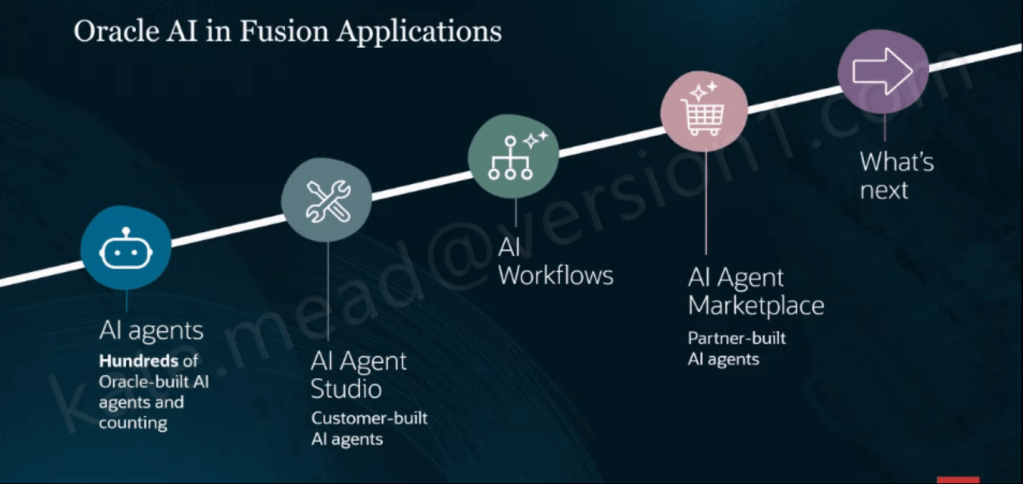
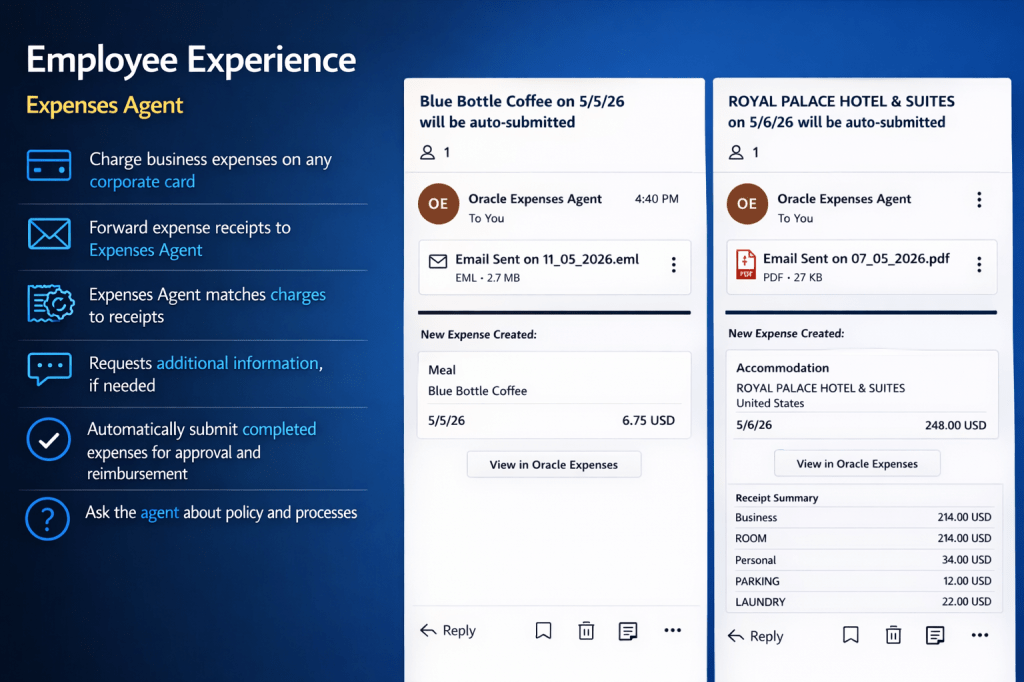
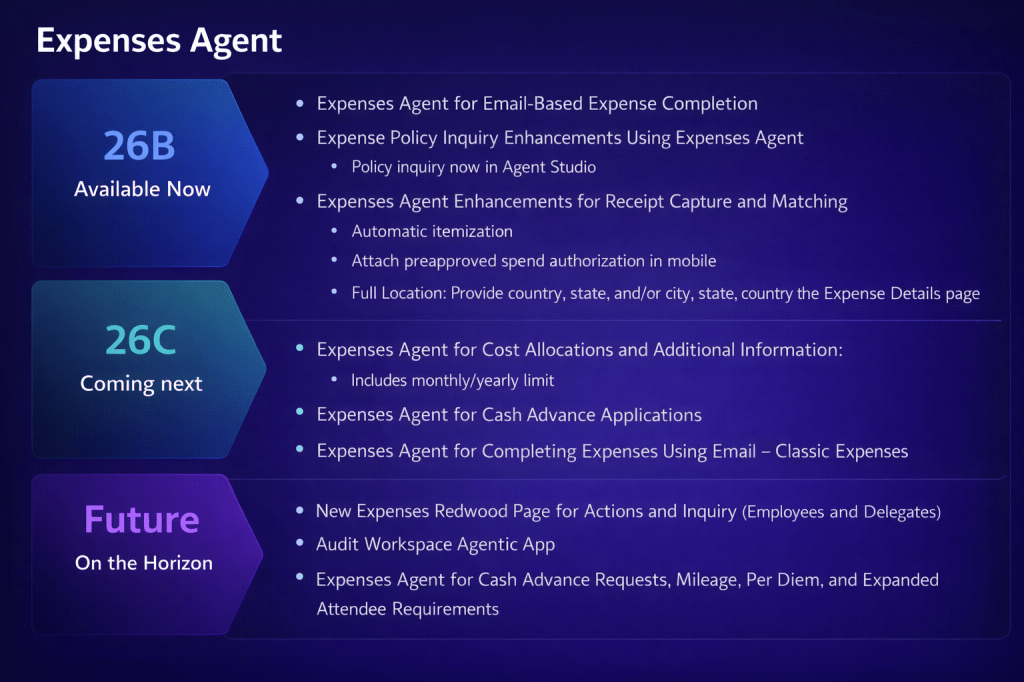
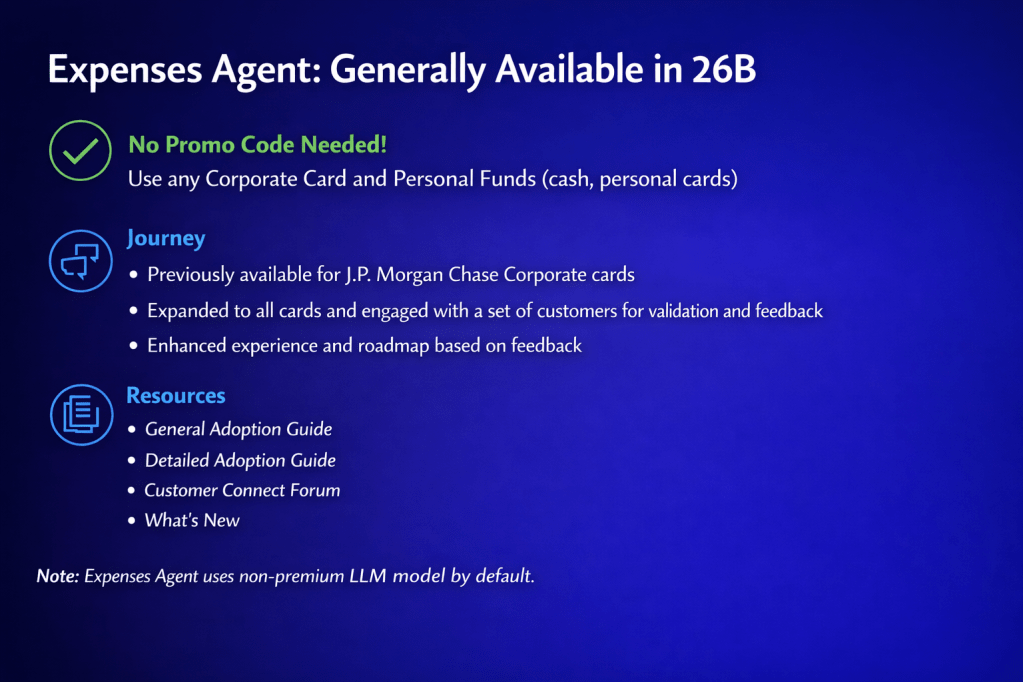
With Release 26B, the Oracle Expenses Agent is now generally available to all customers. There are no promo codes or pilot requirements to worry about. If you are using Oracle Fusion Cloud Expenses, you can start using it straight away. The Expenses Agent is part of a much broader set of Oracle-built agents embedded across Fusion Applications, alongside Oracle AI Agent Studio for building your own agents, AI Workflows, and an AI Agent Marketplace for partner solutions. It is included as part of your existing Fusion Cloud Expenses licence and is updated by Oracle each quarter, so you continue to benefit from ongoing enhancements without additional effort.

Across the Financials suite, Oracle has introduced a range of agents covering Payables, Expenses, Accounting Operations, Payments and Cash Processing. Each is designed to streamline processes, cut down cycle times and reduce the level of manual effort required from finance teams.

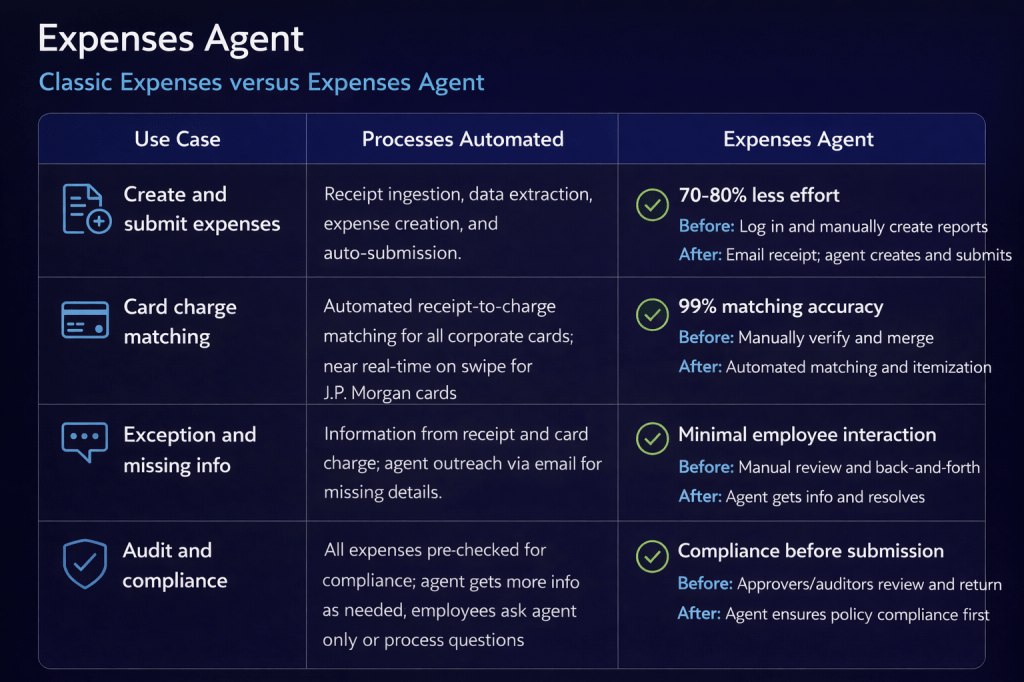
At its core, the Expenses Agent is designed to deliver a touchless experience. An employee simply makes a purchase and forwards the receipt by email, and the agent takes it from there. It reads the receipt, extracts the key details, matches it to the card transaction, creates the expense line, and submits it for approval. If anything is missing, it reaches out to the employee directly. Where everything is complete and compliant with policy, it moves straight through without any manual intervention. Employees can also interact with the agent using natural language to ask questions about policies and processes, making it much easier for infrequent travellers to find the information they need without unnecessary friction.

Oracle reports a 70-80% reduction in the effort required to create and submit expenses, along with 99% accuracy when matching card transactions. Just as importantly, compliance checks happen upfront rather than after submission. In a traditional process, approvers often have to send non-compliant claims back for correction. With the agent, expenses are checked before they reach the approver, helping to avoid rework and keep the process moving smoothly.

I have seen the Expenses Agent in action first hand, and it really brings the experience to life. Recently, I was out for lunch with an Oracle colleague who showed me how they submitted the expense. They simply took a photo of the receipt and, by the time we had walked up the escalator, the expense had already been checked against company policy and confirmed as compliant. It was then automatically matched to the corporate card transaction. It is a small moment, but it shows just how quick and effortless the process can be in practice.

The 26B release broadens support across all corporate cards and personal expense types, building on earlier versions that were limited to J.P. Morgan Chase corporate cards. It also introduces a number of enhancements, including email-based expense completion, the ability to query policies through Oracle AI Agent Studio, automatic receipt itemisation, mobile attachment of pre-approved spend authorisations, and more detailed location information within the Expenses page.

One point to be aware of is that the Expenses Agent uses a non‑premium large language model by default, so there is no additional cost to use it. If you find that performance does not fully meet your requirements, you do have the option to switch to a premium model. This can enhance capability, but it does come with a cost based on token usage.

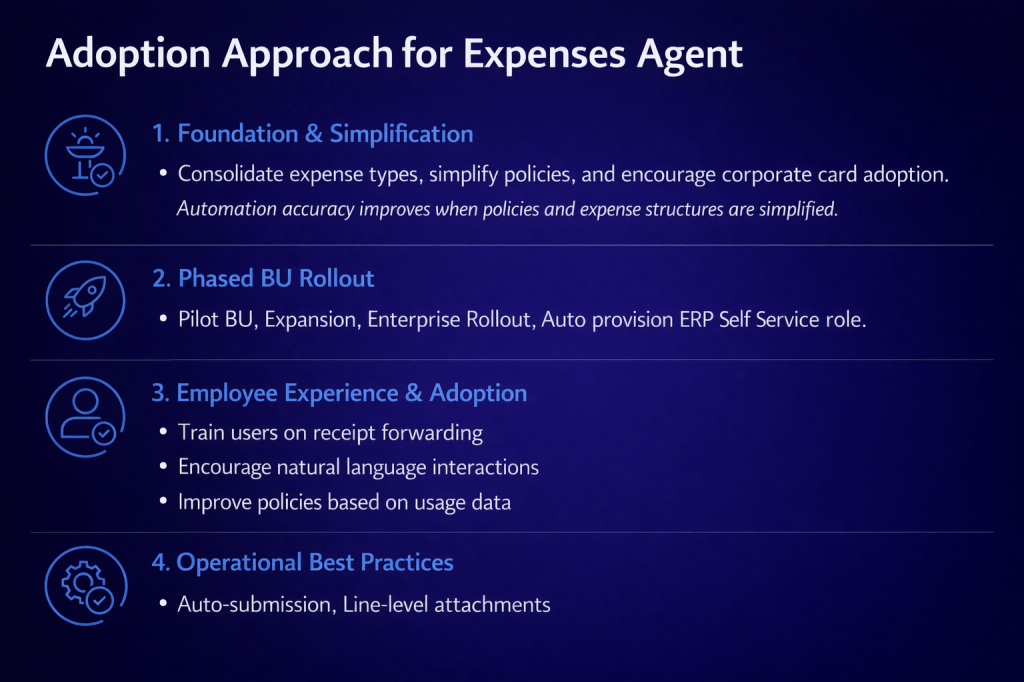
Oracle recommends a structured, four-stage approach to adoption. It starts with laying the right foundations by simplifying expense types, refining policies and encouraging the use of corporate cards, as cleaner and more consistent data improves automation accuracy. From there, organisations can move to a phased rollout by business unit, typically starting with a pilot group before expanding more widely, supported by auto‑provisioning of the ERP Self Service role. The next step is to focus on employee experience and adoption, ensuring users are comfortable with receipt forwarding and interacting with the agent in natural language. Finally, it is about embedding operational best practices, such as enabling auto‑submission and using line-level attachments to support a smooth, efficient process.

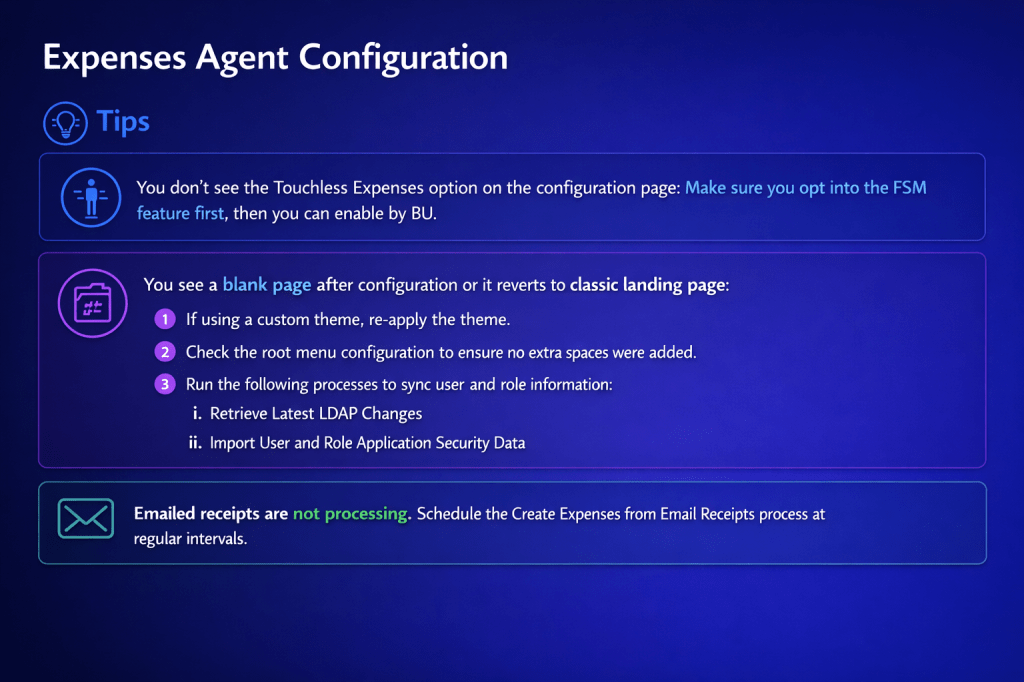
There are a few practical points to be aware of before going live. If Touchless Expenses is not visible on the configuration page, you will need to opt into the relevant FSM feature before enabling it at business unit level. If you encounter a blank page after configuration, or the interface falls back to the classic landing page, it is worth reapplying any custom theme, checking the root menu configuration for stray spaces, and running the Retrieve Latest LDAP Changes and Import User and Role Application Security Data processes. If emailed receipts are not being processed, make sure the Create Expenses from Email Receipts process is scheduled to run at regular intervals, as it does not trigger automatically.

Looking ahead, the 26C release will introduce further enhancements, including support for Cost Allocations and Additional Information such as monthly and yearly limits, along with Cash Advance Applications and email-based completion for Classic Expenses customers who have not yet moved to Touchless. Beyond that, Oracle has outlined plans for a new Redwood Expenses page for employees and delegates, an Audit Workspace Agentic application, and expanded agent capabilities covering Cash Advance Requests, Mileage, Per Diem and more advanced attendee requirements.

If you have not yet looked at the Expenses Agent, it is worth starting with the basics. Taking time to simplify policies and increase corporate card adoption will deliver immediate improvements to your current process, while also setting you up to get the most value from the agent when you choose to enable it. If you would like to understand what this could look like in your organisation, now is a good time to start the conversation and explore how to get value from it early.

Please note all screenshots are the property of Oracle and are used according to their Copyright Guidelines

Reinventing How Work Works: The Business Case for Oracle Fusion Agentic Applications

Oracle has been making a clear and increasingly consistent argument over the past few months: enterprise software has reached the limits of what a system of record can do. I’ve written before about the introduction of Agentic Applications at AI World London, and about the specific HCM applications that were announced alongside them. But there’s a broader story here that I haven’t fully explored yet, and it’s one that I think matters for every Fusion customer, not just those focused on HCM.

This post draws on the “Reinventing How Work Works” webinar, which stepped back from individual applications and made the architectural and commercial case for why the shift to agentic is happening, what it actually looks like in practice, and where Oracle is taking this next. If you’re trying to build internal momentum for agentic adoption, or if you’re trying to explain to a leadership team why this is different from previous AI announcements, this is the post to share.

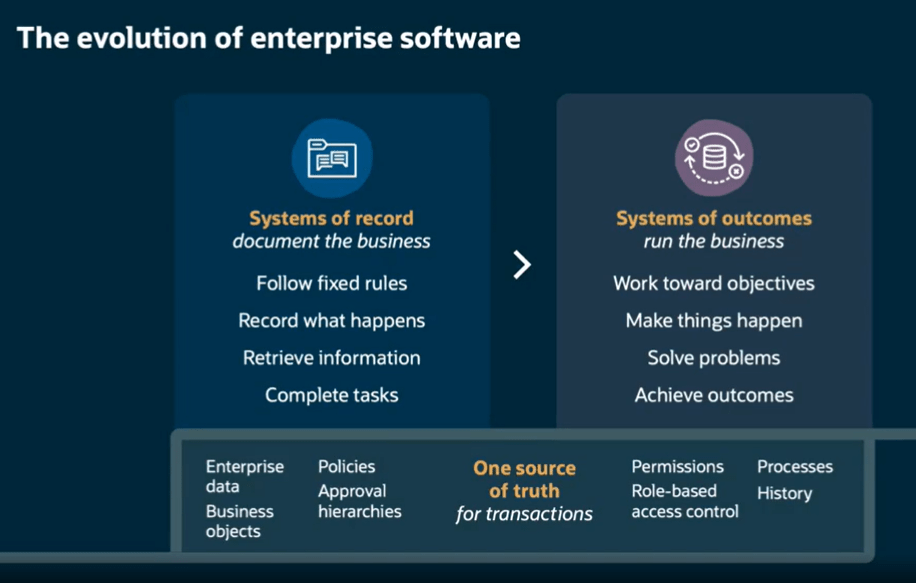
The framing that Oracle used throughout this webinar is, I think, one of the clearest explanations of what has actually changed. Traditional enterprise systems, including Fusion as it has historically operated, are systems of record. They follow fixed rules, capture what happened, retrieve information when asked, and complete transactions. They document the business. What they don’t do is run the business.

Agentic Applications represent a move to what Oracle calls systems of outcomes. Rather than waiting for a person to interpret data and decide what to do next, a system of outcomes works toward objectives, makes things happen, solves problems, and achieves results. The underlying system of record doesn’t go away. The data, governance, approval hierarchies, role-based access control, and audit history are still there, and in Oracle’s case, they’re still the source of truth for every transaction. What changes is the layer operating on top of that foundation.

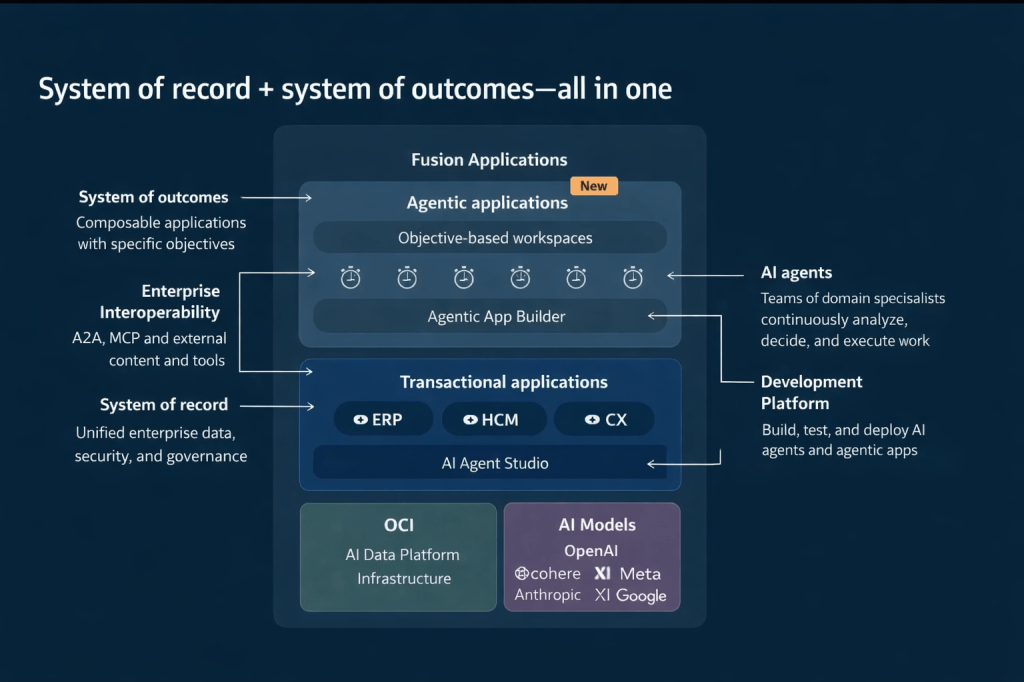
This architecture diagram is worth studying if you haven’t seen it. Agentic Applications sit in a new composable layer above the existing ERP, HCM, and CX transactional applications. That layer is powered by teams of AI agents coordinated through Oracle AI Agent Studio, drawing on the full enterprise data model, security model, and process history that already exists in Fusion. Beneath all of this, Oracle Cloud Infrastructure (OCI) provides the AI data platform, and a range of large language models (LLMs), including those from OpenAI, Cohere, Meta, Anthropic, xAI, and Google, are available depending on the task and preference.

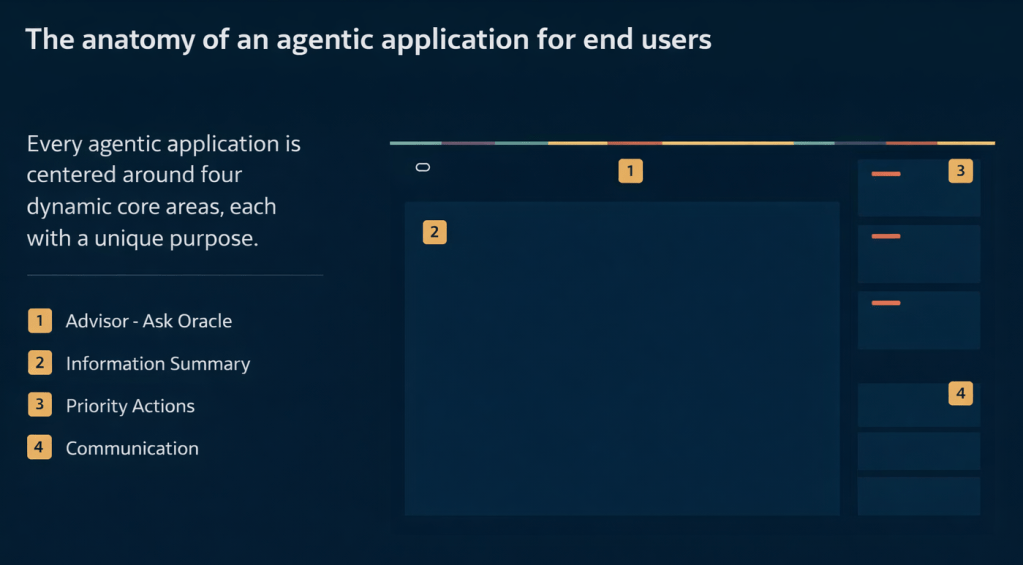
Every Fusion Agentic Application is built around four core dynamic areas. Understanding these is useful when you’re evaluating a specific application or explaining the concept to stakeholders.

The first is the Advisor, which is the “Ask Oracle” conversational interface. This is where a user can ask natural language questions and get contextual, data-aware responses rather than navigating to a report. The second is the Information Summary, which provides an intelligent, prioritised view of what’s happening right now in that area of the business, surfaced automatically rather than requiring the user to run queries. The third is Priority Actions, a curated queue of recommended next steps that the agents have identified based on current conditions, risk signals, and business objectives. The fourth is Communications, which handles notifications, responses, and outbound actions within the appropriate governance boundaries.

These four areas appear consistently across all 22 applications, which is deliberate. Oracle’s position is that once a user understands the structure in one application, they can navigate any other agentic application without relearning the interface.

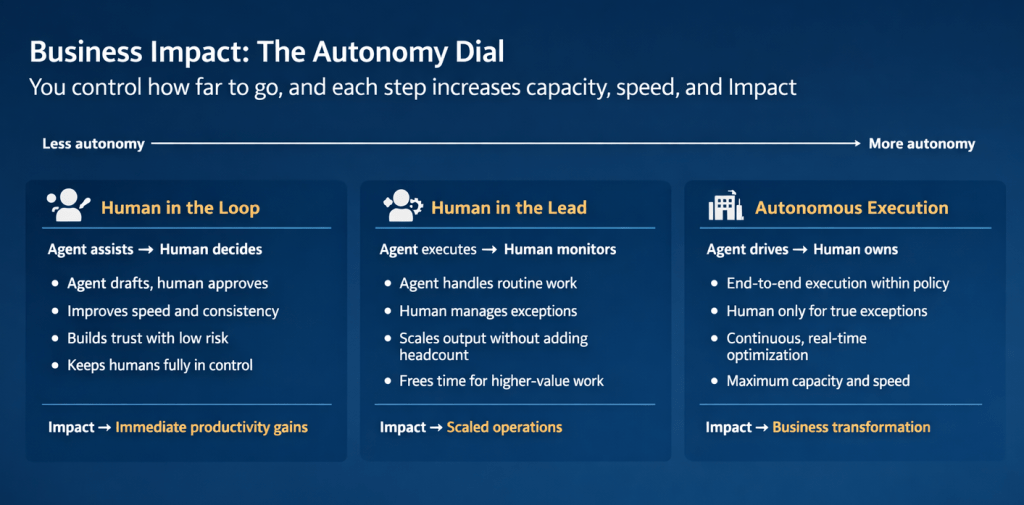
One of the most practically useful concepts introduced in this webinar is what Oracle calls the Autonomy Dial. It’s a spectrum with three positions, and it addresses one of the most common concerns I hear from customers and consultants: how much control do we give up?

At the “Human in the Loop” end, the agent assists and a person decides. The agent drafts, recommends, and prepares; the human reviews and approves. This builds trust, improves speed and consistency, and keeps people firmly in control. The business impact is described as immediate productivity gains.

In the middle is “Human in the Lead”, where the agent executes and a person monitors. The agent handles routine work and manages to policy; a person steps in for genuine exceptions. This scales output without adding headcount and frees teams for higher-value work. The impact here is scaled operations.

At the “Autonomous Execution” end, the agent drives and a person owns. End-to-end execution happens within policy, continuous real-time optimisation takes place, and human involvement is reserved for true exceptions. The impact is described as business transformation.

What I find compelling about this model is that it isn’t prescriptive. Oracle isn’t saying every organisation should start at one end or aim for the other. Each position on the dial represents a valid operating model depending on the process, the risk tolerance, and the maturity of the organisation. A payroll close process might comfortably sit at Human in the Lead. A workforce scheduling decision for a critical shift might warrant Human in the Loop until confidence is established. A high-volume procurement matching task might be a good candidate for Autonomous Execution relatively quickly.

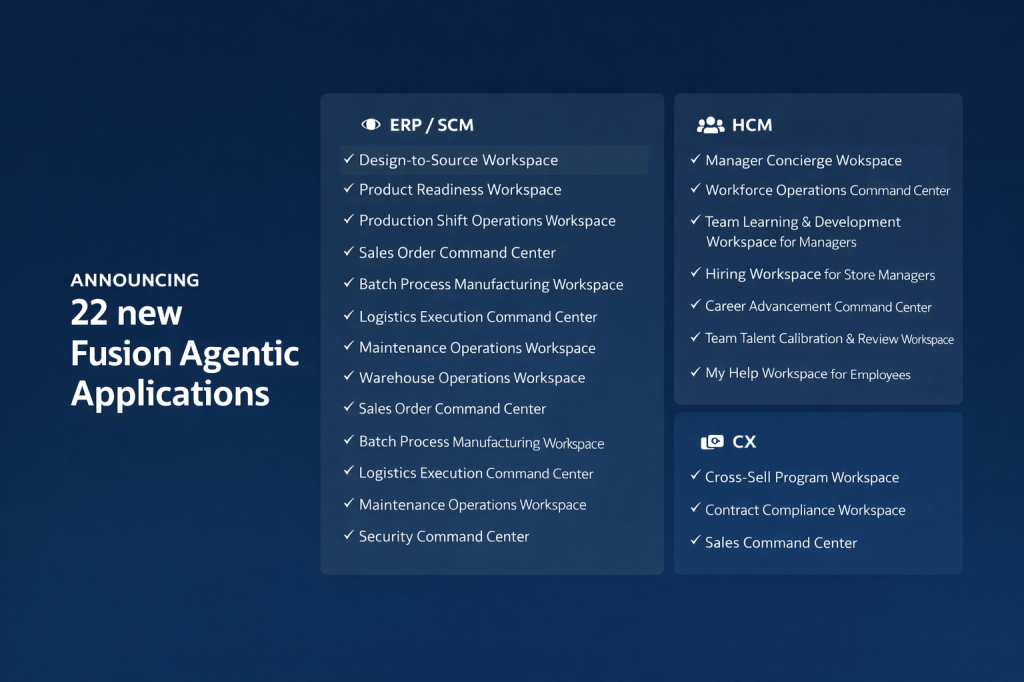
My earlier posts covered the eight HCM applications in detail. The full announcement of 22 applications in releases 26B / 26C spans ERP/SCM, HCM, and CX, and it’s worth understanding the breadth of this, because it signals how Oracle is positioning agentic across the entire Fusion suite rather than as an HCM-specific capability.

On the ERP and SCM side, the applications include Design-to-Source Workspace, Product Readiness Workspace, Production Shift Operations Workspace, Sales Order Command Centre, Batch Process Manufacturing Workspace, Logistics Execution Command Centre, Maintenance Operations Workspace, Warehouse Operations Workspace, Cost Accounting Close Workspace, Sourcing Command Centre, Collectors Workspace, and Security Command Centre.

The Design-to-Source Workspace is a useful example of the transformation logic. Previously, product design and bill of materials work happened in separate systems. Sourcing relied on items entered manually. Negotiation delays accumulated when information was missing or unresolved. With the agentic application, product specifications translate automatically into qualified supplier lists, bills of materials are generated directly from CAD files, at-risk negotiations are flagged automatically, and bids are evaluated across cost, lead time, quality, and risk in a single view. The outcome is faster time to market and improved sourcing cycle times.

On the CX side, three applications have been announced: Cross-Sell Program Workspace, Contract Compliance Workspace, and Sales Command Centre. For CX teams, the Sales Command Centre in particular brings together the kind of deal health monitoring, risk flagging, and next-step recommendation that previously required significant manual analysis across multiple reports.

I’ve written in detail about Oracle AI Agent Studio in previous posts, but the webinar highlighted several new capabilities that are worth calling out specifically, because some of them genuinely change what’s possible for teams building custom agentic applications.

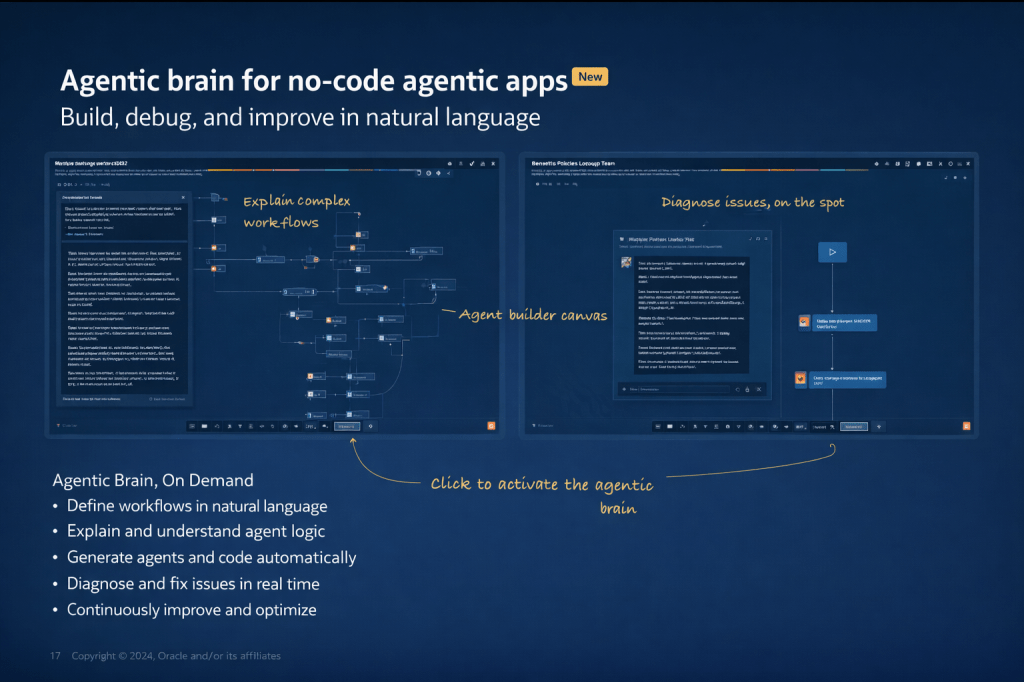
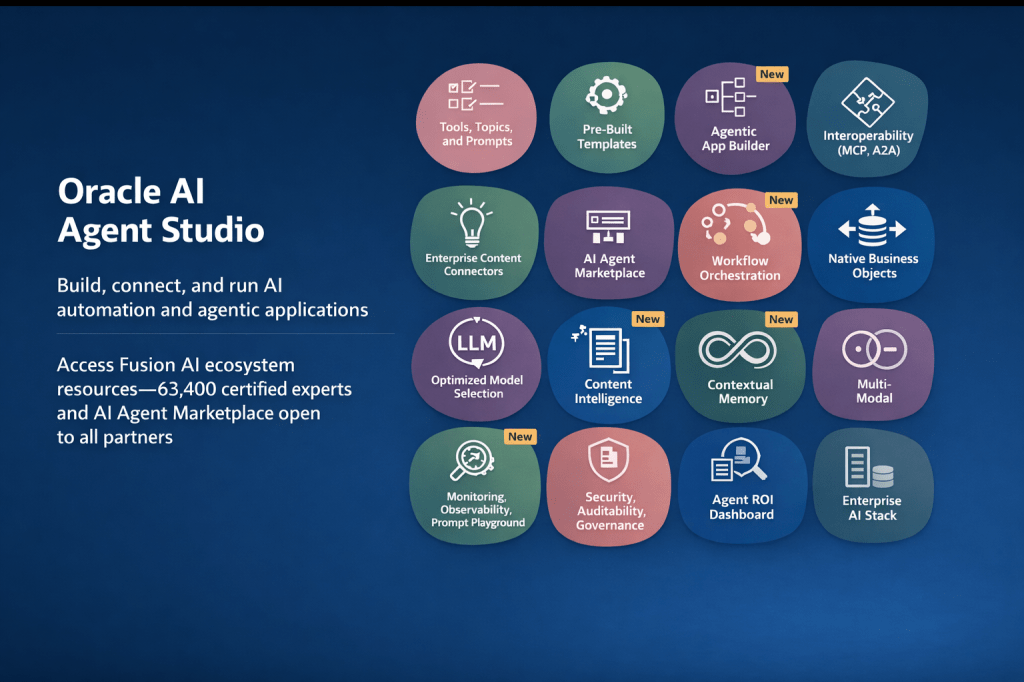
The most significant new addition is the Agentic App Builder, which is released in 26C. This is what Oracle describes as a “no-code agentic brain”: you describe your objective in natural language, the system explains and builds the workflow, generates agents and the underlying code automatically, and allows you to diagnose and fix issues in real time. In the demo, a user types a description of a sales opportunity health and risk management app, and within moments a structured agentic application is assembled from reusable agents, with a Deal Summary Agent, a Risk Agent, a Customer Insights Agent, and a Process Agent already in place and connected. It’s a significant step forward from the existing builder experience.

Alongside this, several other capabilities have been marked as new in the current release: Workflow Orchestration, Content Intelligence, Contextual Memory, Multi-Modal support, an Agent ROI Dashboard, and enhanced Security, Auditability, and Governance controls. Contextual Memory is worth paying attention to particularly, because it allows agents to retain information across interactions, which is what enables genuinely personalised, continuous support rather than stateless responses to each individual query.

The studio now also supports full interoperability through MCP (Model Context Protocol) and A2A (Agent-to-Agent) protocols, which means agents built in Fusion can exchange context with agents or tools running outside the Fusion estate, provided the appropriate governance controls are in place.

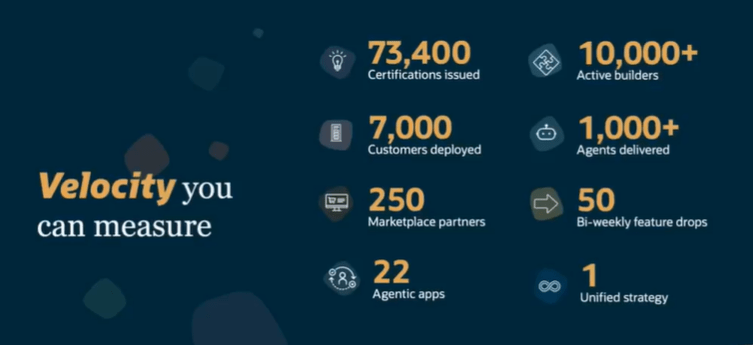
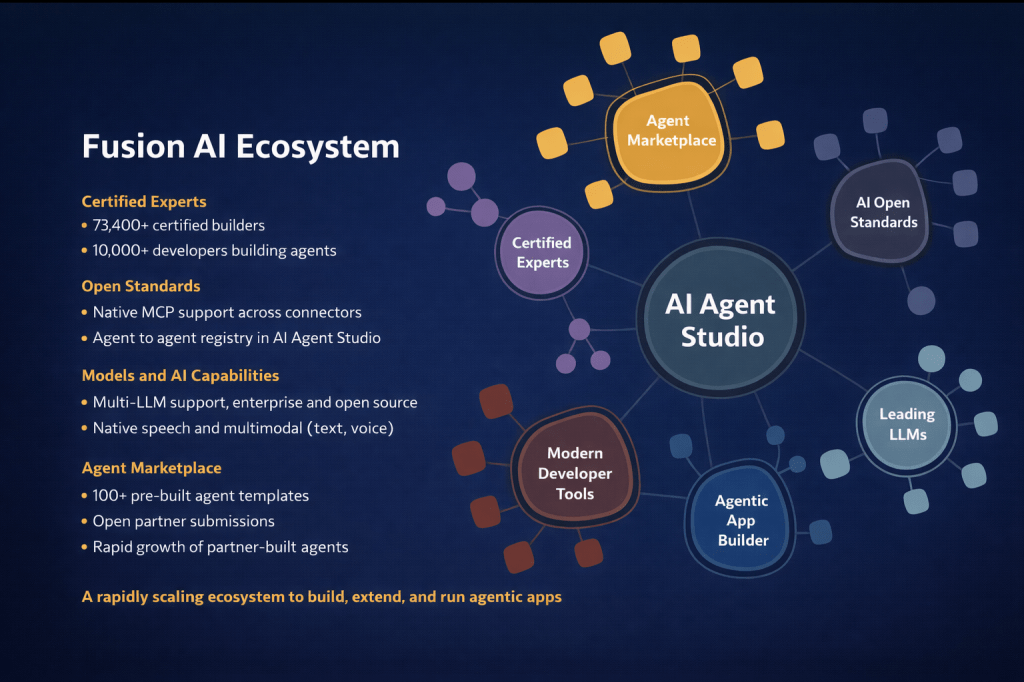
One thing the webinar made very clear is that Oracle isn’t building this alone. The Fusion AI ecosystem now includes 73,400 certified builders, 10,000 developers actively building agents, and over 100 pre-built agent templates in the AI Agent Marketplace, which is now open to all partners for submissions. Open standard support includes native MCP integration across connectors and an agent-to-agent registry within Oracle AI Agent Studio itself.

For customers, this matters because it means the pool of available agents and expertise is growing rapidly. You don’t need to build everything from scratch, and you don’t need to rely solely on Oracle to extend the platform. The open partner submission model for the marketplace is a meaningful shift, and it’s one that will accelerate the availability of domain-specific and industry-specific agents over the coming months.

The summary that Oracle closed with is a useful way to frame internal conversations: Fusion is moving from systems of record to systems of outcomes. Agentic Applications get work done. Oracle AI Agent Studio lets you build, deploy, and scale agents specific to your organisation. OCI AI Advantage runs it all securely at scale.

What I’d encourage any Fusion customer to take from this is that the window to start is now. The pricing model has already been simplified significantly (covered in my earlier post), the tooling to build and extend has matured substantially, and the evidence base from production deployments is solid. Starting with one application in one process area, positioned at Human in the Loop on the autonomy dial, is a low-risk, high-value entry point that builds organisational confidence while delivering measurable results.

If you’re thinking about where to start or how to make the case internally, I’m happy to talk it through. In the meantime, why not check out my earlier post on the HCM-specific Agentic Applications announced at AI World London? You can find it here. And if you missed the original announcement post covering the architecture, the maturity model, and the updated pricing, that’s a useful starting point too, and you can find it here.

Please note all screenshots are the property of Oracle and are used according to their Copyright Guidelines

Going Deeper with Oracle AI Agent Studio: Connecting, Triggering, and Building with Confidence – Part 4

Over the last three blogs, I’ve explored how AI Agent Studio connects to the wider enterprise, how agents are triggered and interacted with, and how workflows are designed to be reliable and production‑ready. In this final part of the series, I want to pull those threads together and focus on the capabilities that help agents scale safely and operate with confidence over time. This is where governance, control and operational discipline really come into play, and where the newer 26A and 26B features start to show how Oracle is shaping AI Agent Studio for long‑term, enterprise use rather than short‑lived experimentation.

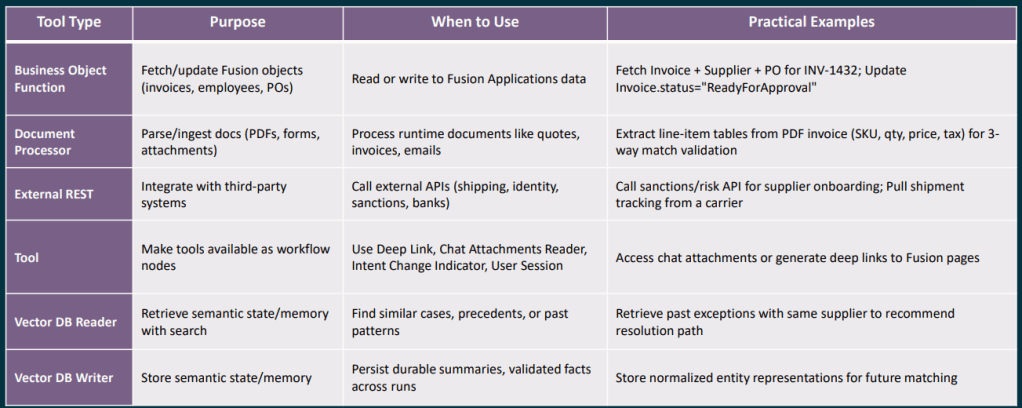
Choosing the right document or memory node is an area where I see a lot of confusion in conversations with clients, so it is worth being very clear about what each one is designed to do. The Document Processor node is intended for runtime documents, attachments that arrive as part of a specific workflow execution, such as a supplier quote received by email, an invoice uploaded through chat, or a UCM attachment linked to a Fusion business object. Its job is to retrieve the file, extract the text, and pass that content on to the next node in the workflow. It is not designed for querying a stable or long‑lived corpus of documents, such as policy or reference material that you want to reuse and search repeatedly over time.

The RAG Document Tool node is designed for exactly that stable, reusable collection of information. You curate a set of documents within an Oracle AI Agent Studio Document Tool, move them through the lifecycle from Ready to Publish to Published, and the RAG node then performs semantic retrieval against that content to ground downstream LLM reasoning in your own policies, playbooks or manuals. To get the best results, it is important to use specific queries with clear discriminators such as module, process area, country or version, which helps improve retrieval precision. It is also good practice to include an explicit “no results” fallback path in your workflow, rather than allowing the LLM to guess when retrieval confidence is low.

The Vector DB Reader and Writer nodes serve a different purpose again, providing durable semantic memory that persists across workflow runs. They are best used to store normalised, reusable knowledge units such as validated resolution summaries, previous exception details, or extracted entity representations. Entries should be kept short and semantically focused, enriched with meaningful metadata to support filtering, and assigned stable document IDs to avoid duplicates. Raw PII or permission‑restricted data should never be stored without a deliberate access control design. When reading from the vector store, metadata filters should always be applied, and low‑confidence matches should be treated the same as no result at all, routing the workflow to a deterministic fallback rather than continuing on uncertain ground.

One theme that came through strongly in the partner training sessions, and one I think represents genuinely good discipline, is treating Workflow Agent testing as a first‑class concern rather than something bolted on at the end. Oracle’s evaluation framework for Workflow Agents, often referred to as Workflow Evals, is based on supplying structured JSON test inputs and asserting expected outputs. These evaluations are intended to be run as a regression suite whenever you change a prompt, adjust a node configuration, swap a tool, or update a policy, helping you catch unintended side effects early and keep agent behaviour stable as it evolves.

A good starting point is to define around five core paths through the workflow: the happy path, two or three of the most common exception scenarios, and at least one case that deals with missing or poor‑quality input data. From there, you should be tracking things like overall pass rate, branch accuracy, schema validity, and retry or escalation behaviour. The aim is not simply to prove that the workflow reaches an end state, but to make sure it routes correctly and predictably under every condition that genuinely matters in production.

For anyone building more complex workflows, the full context variable reference is well worth bookmarking. In practice, a small set of variables tends to do a lot of the heavy lifting, such as $context.$nodes.<nodecode>.$status to check whether a preceding node succeeded or failed, and $context.$nodes.<human_node_code>.$actionPerformed to capture whether a Human Approval step resulted in APPROVE, REJECT or REQUEST_CHANGES. You can also use $context.$nodes.<human_node_code>.$feedbackReceived to pick up any comments provided by the approver, and $context.$workflow.$traceId to generate idempotency keys or include trace references in error notifications. For conversational workflows, $context.$system.$chatHistory is particularly useful, as it exposes the full session history and allows the agent to reason about what has already been discussed.

The 26A roadmap also includes several upcoming capabilities that will significantly extend what is possible in the near term. Support for the Model Context Protocol, or MCP, means Workflow Agents will be able to invoke tools exposed by MCP servers, broadening the integration landscape well beyond traditional REST APIs. The Agent Studio Help Assistant, an AI‑driven guide embedded directly within the studio, should also make agent design far more accessible, particularly for practitioners who are new to the tooling. Alongside this, multi‑modal enhancements, including end‑user Q&A over images and documents uploaded in chat and semantic search across non‑text assets, open up an entirely new set of document understanding and reasoning use cases.

Looking a little further ahead, the roadmap includes capabilities such as breakpoint‑style debugging, automated prompt engineering, multi‑user development environments, and a Bring Your Own LLM option, alongside additional interaction channels including WhatsApp, SMS and telephony. Taken together, these signal a sustained level of investment in the platform and a clear focus on making AI Agent Studio more powerful, more accessible, and more suitable for enterprise‑scale use. The overall direction is a positive one, and it is clear that Oracle is building towards a mature, long‑term agent platform rather than a short‑term experiment.

The partner training sessions that informed this post covered a lot of practical ground, and I genuinely believe they will save teams a significant amount of time as they start building in earnest. If you are already exploring AI Agent Studio and would like to talk through any of these patterns in more detail, I would be very happy to continue the conversation. And if you have not yet read the earlier posts in this series, it is worth starting at the beginning with the overview of how Workflow Agents are structured, which sets the context for everything covered here.

Please note all screenshots are the property of Oracle and are used according to their Copyright Guidelines