Oracle HCM Cloud Compensation 26C

I realised recently that I have never actually written a post analysing a Compensation quarterly release. With 26D being the deadline for moving Compensation worksheets to Redwood, release 26C felt like the right time to change that. There is likely to be more to come over the next few weeks, but for now it is worth looking at what has been announced so far.

The feature many people have been waiting for to support that final move to Redwood is now here. The Redwood Workforce Compensation worksheet brings a much cleaner and more intuitive experience for managers, with everything presented in a single, streamlined view. From the landing page, managers can easily access their worksheets and use built-in capabilities such as audit trails, modelling and target application to review and adjust awards with greater confidence. Filtering, search and layout personalisation make it easier to focus on the right employees and the most relevant data. At the same time, guided information panels and simplified alerts help managers understand what needs attention without being overwhelmed. In practice, this reduces the time spent navigating the system and allows managers to focus on making informed compensation decisions.

The design also improves transparency and control. Managers can switch currencies, review how calculations have been derived, and access supporting information such as compensation history, notes and assignment details without leaving the worksheet. Key summary information remains visible while scrolling, so important totals and budgets are always in view. These changes make the process feel more straightforward and help reduce errors and rework, giving organisations greater confidence in the accuracy and consistency of outcomes.
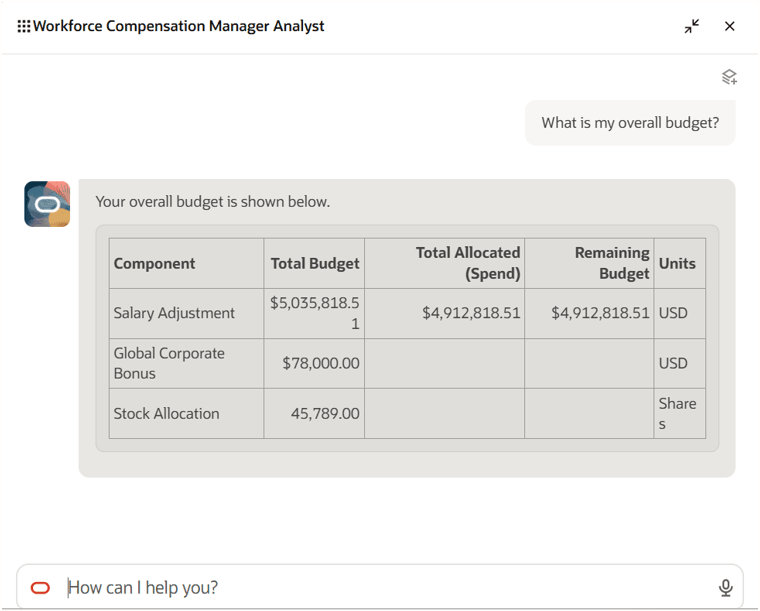
Another interesting addition is the Workforce Compensation Manager Analyst agent, which introduces a more conversational way for managers to interact with their compensation plans. Rather than moving between multiple worksheets and pages, managers can ask questions in natural language and get immediate answers on areas such as budget position, approval status, due dates and manager-level overages. Because the agent works within the context of a specific compensation plan, the responses are relevant and focused, without the need to interpret multiple screens or reports.

From a manager’s perspective, this removes a lot of the friction from the compensation cycle. It cuts down the number of clicks and removes the need to search for information across the system. Managers can quickly sense-check budgets, track progress and identify issues as they arise, all from a single interaction. This supports faster and more confident decision making and helps keep compensation cycles on track.
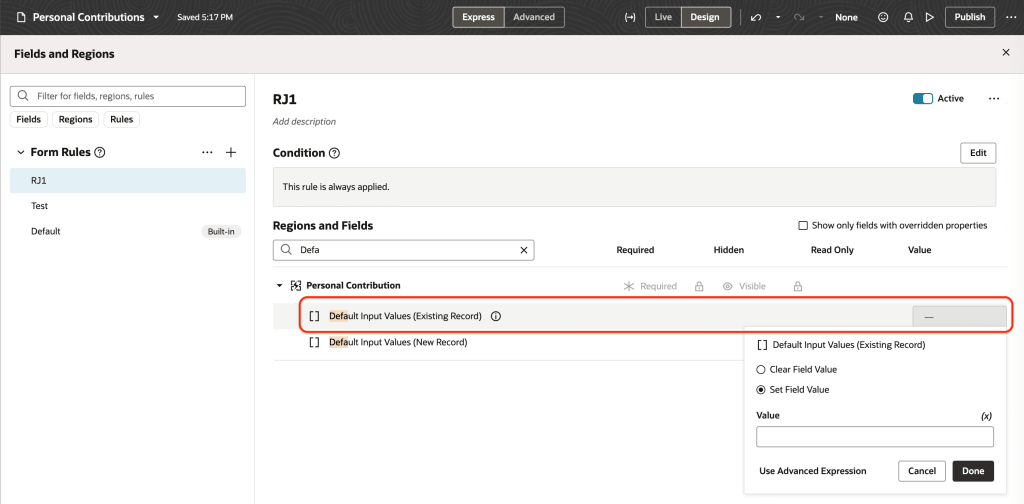
The enhancements to Redwood Individual Compensation extensibility give organisations far greater control over how compensation changes are entered and managed. Values can now be defaulted not only when creating proposals, but also when correcting or updating them, using dedicated attributes for each scenario. When combined with the ability to apply validation rules to the same fields, this creates a more structured approach to managing individual compensation. These capabilities sit across key processes such as hiring and promotion, as well as within dedicated compensation pages, ensuring consistent behaviour wherever compensation decisions are made.

For users, this reduces manual effort and helps prevent errors before they happen. Defaulting removes the need to repeatedly enter common values, while validation ensures entries meet organisational policies from the outset. At the same time, visibility of who created or updated a record, along with timestamps, strengthens auditability. This makes it easier to track changes and supports a more controlled and reliable process overall.
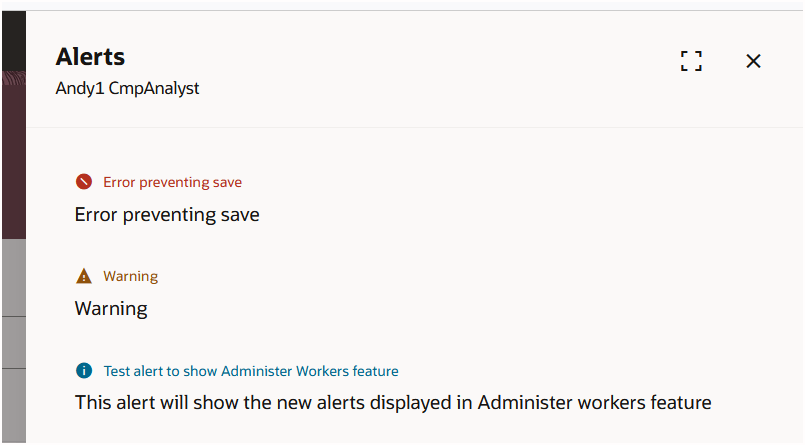
Alerts within Workforce Compensation have also been simplified. Instead of a wide range of alert types and icons, everything is now grouped into three clear categories: Error, Warning and Information. Existing alert variations have been consolidated, with only genuinely blocking issues presented as errors. This removes much of the visual noise that previously made alerts harder to interpret, and presents information in a more structured way.

For managers, the benefit is immediate. It becomes much easier to distinguish between issues that require action and those that are simply informational. This helps with prioritisation during the compensation process, reduces the risk of missing something important, and supports smoother progression through the cycle.
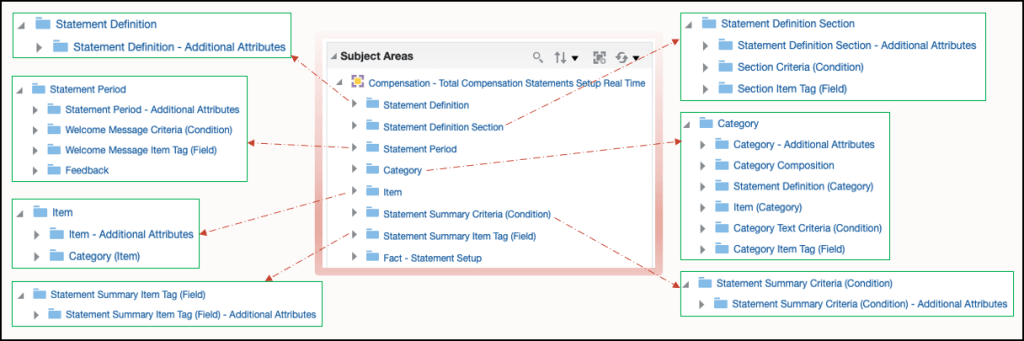
The final feature is one that has been requested for some time and originates from a customer idea raised on the Ideas Lab. The new Total Compensation Statements Setup OTBI subject area allows organisations to report on how their total compensation statements have been configured. It provides visibility of key elements such as statement definitions, periods, categories and items, along with the relationships between them. With enriched folders and sub-folders, users can explore the structure in more detail and understand how statements are built, without relying on manual documentation or configuration reviews.

This brings greater transparency and control over statement setup. It becomes easier to answer common questions, such as how many items or categories exist, how they are structured, and how they are distributed. This supports better governance and quicker troubleshooting, particularly when reviewing or refining statement designs. By making configuration data more accessible, organisations can maintain consistency in how total rewards are presented and reduce the effort required to manage these statements over time.

As mentioned earlier, Oracle is expected to release additional updates later this month. If anything particularly impactful is introduced, I will share a further update with a more detailed view.

Please note all screenshots are the property of Oracle and are used according to their Copyright Guidelines
Oracle HCM Cloud Recruit 26C

With the final deadline for Redwood Recruiting having passed in 26B, the 26C release introduces further innovation, with a strong focus on AI alongside additional Redwood pages to improve the overall user experience. With that in mind, let’s take a look at what’s coming for Recruiting in 26C. As always, Oracle may introduce additional features as the quarter progresses, and if anything particularly notable appears, I’ll share a follow-up update.

The first feature I want to highlight introduces an AI-driven approach to initiating sourcing activity directly from the Recruiting Activity Centre. Oracle has provided a preconfigured agent template designed to sit within recruiting workflows and respond to key requisition activities. Once set up, the agent can automatically trigger when certain activity states are reached, such as when a requisition is awaiting submission, formatting, posting or approval. At that point, the agent can create candidate pools and, if activity slows, generate recruitment campaigns, for example where there have been no recent applications. This all runs in the background once the activity is assigned and the relevant scheduled process is running, removing the need for recruiters to step in manually.

The benefit here is removing friction at the start of the sourcing process and maintaining momentum without relying on manual intervention. Routine but essential tasks such as building candidate pools or launching campaigns are handled automatically and at the right time. This allows recruiters to focus on higher value activities such as engaging with candidates and hiring managers. It also introduces a more consistent approach to sourcing, with the same logic applied across requisitions. Over time, this should lead to faster pipeline creation, fewer delays in attracting candidates and a more proactive hiring approach, even when activity slows.

The next feature, Activity Centres: Automatically Launch AI Agents from Activities, builds on this by making AI agents a standard part of how Activity Centres operate across Recruiting, Sourcing and Interview processes. Organisations can configure published HCM workflow agents to respond automatically when activities are generated, carrying out actions or sending notifications without manual input. By assigning an agent to an activity through a simple configuration and running the scheduled process, the system can identify activities that require action and trigger the relevant agent. As the agent progresses, it updates its status so the system can track whether tasks are in progress, complete or need to be retried.

The value here is in keeping workflows moving without constant user involvement. Activities no longer sit waiting for someone to pick them up or remember the next step. Instead, the system helps move tasks forward and keeps stakeholders informed. This leads to quicker task completion and more consistent execution across recruitment stages, helping to reduce delays in the hiring process. It also improves coordination between recruiters, sourcing teams and interviewers by reducing the reliance on manual follow-ups and emails.

Another key update introduces a more structured and scalable way to support AI-driven content across the external candidate experience. Oracle has moved away from the earlier Prompt Lab approach and standardised on workflow agents that sit behind AI Assist capabilities on career site pages. These preconfigured agents, managed through AI Agent Studio, support a range of scenarios including generating job summaries for search, creating career site content, surfacing relevant assets on job descriptions and providing job fit insights to candidates. As these agents are designed to be reusable and channel agnostic, they can be applied consistently across the candidate journey while still allowing organisations to tailor them.

From a business perspective, this creates a more flexible and modern foundation for candidate engagement. Content generation becomes easier to manage and more consistent, reducing duplication and manual effort. Candidates benefit from richer and more relevant information, helping them better understand roles and suitability before applying. Importantly, this aligns with Oracle’s longer-term direction, giving customers a clearer path forward with a solution that is easier to extend, maintain and evolve as AI capabilities continue to mature.

Smart Search is another enhancement that improves the job search experience in a practical way. Rather than being limited to fixed locations, candidates can now search based on proximity to any location that matters to them, including their current position. The introduction of a search radius provides a more realistic view of available opportunities, helping candidates focus on roles within a reasonable commute. Features such as browser-based location detection also remove friction, making it quicker to find relevant roles.

This is likely to improve both candidate satisfaction and application quality. Candidates are more likely to find roles that genuinely fit their circumstances, while organisations benefit from more relevant applicants. As Smart Search is expected to become the default in a future release, it is worth reviewing your current configuration, particularly the use of fixed versus proximity-based search, to ensure it reflects how your workforce operates.

For organisations using ‘Apply with Indeed’, it is important to plan ahead as this functionality will be discontinued in 27A due to changes in Indeed’s integration model. Transitioning to Direct Apply will help avoid disruption and provides a more seamless and modern candidate experience while ensuring continuity as the legacy functionality is retired.

Turning to Redwood enhancements, the Generate Job Requisition Posting Description Using AI Agent feature brings AI-assisted job description creation directly into the Redwood experience. Using a workflow agent, content can be generated across key sections such as the summary, responsibilities and qualifications. For recruiters and hiring managers, this makes it quicker and easier to create clear and consistent job adverts without starting from scratch.

The shift to an agent-based approach also provides a more robust and future-ready foundation, replacing earlier prompt-based methods while maintaining a familiar experience. For organisations, this means reduced manual effort, greater consistency in how roles are presented and ultimately a stronger candidate experience through clearer, more engaging job descriptions.

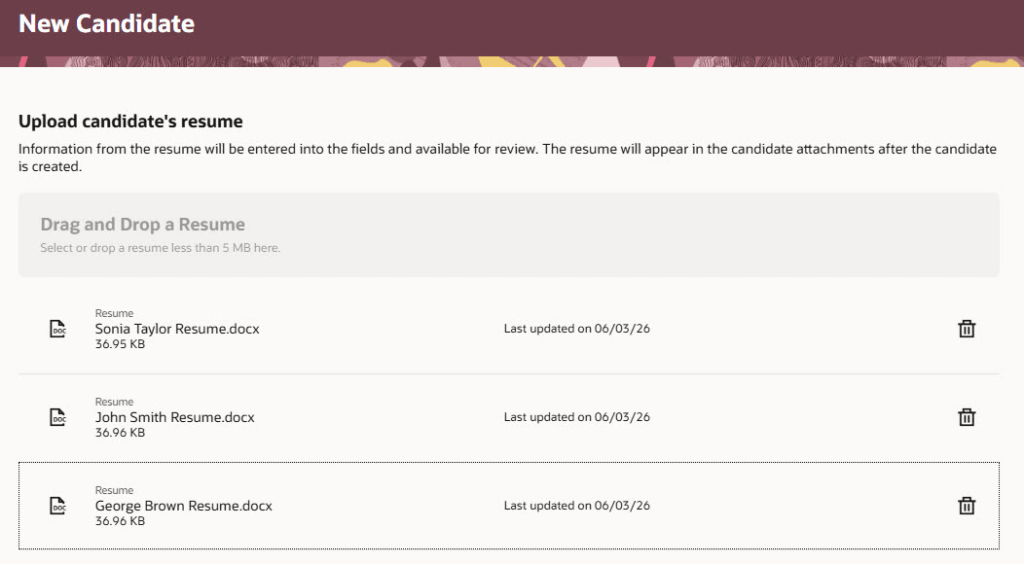
Another update, driven by customer feedback through the Ideas Lab, is Bulk Candidate Creation by Uploading Resumes. This allows recruiters to upload multiple CVs at once, with AI extracting key information and automatically populating candidate profiles. Rather than manually entering details for each individual, recruiters can review and refine the extracted information within the candidate record, balancing efficiency with data quality.

The benefit here is a significant reduction in administrative effort and a faster turnaround from receiving CVs to having candidates ready in the system. It also helps teams manage higher volumes more effectively, particularly during peak recruitment periods, while ensuring consistency in how candidate records are created.

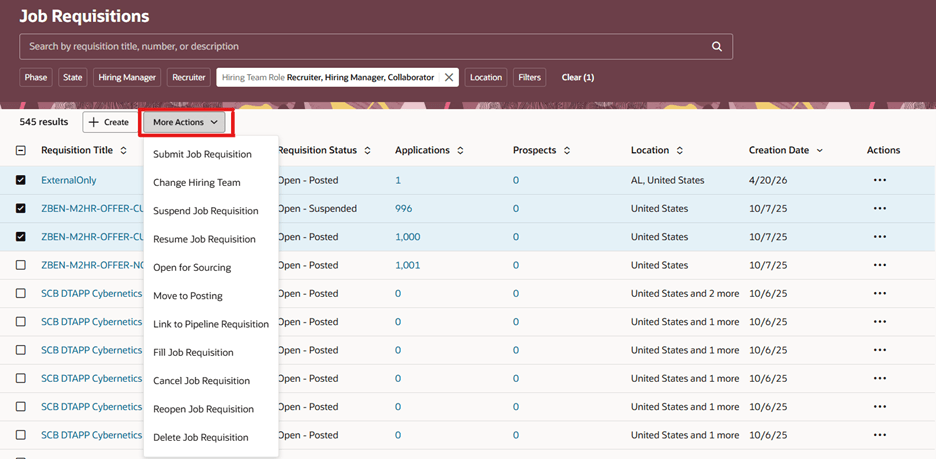
Finally, Bulk Actions on the Job Requisitions List makes it easier to manage large volumes of requisitions. Recruiters can now update multiple records in a single action rather than working through each one individually. This includes moving roles through the lifecycle, opening them for sourcing or updating hiring teams. The ability to update the hiring team across multiple requisitions is particularly useful when responsibilities change, removing repetitive manual updates.

For users, this delivers a clear improvement in efficiency and scalability. Bulk actions reduce time spent on administrative tasks and help teams keep pace during busy periods, while asynchronous processing allows larger updates to run smoothly in the background. The result is a more streamlined and consistent way of managing requisitions at scale.

Oracle often introduces additional features as the quarter progresses, so it is worth keeping an eye out for further updates. If anything particularly impactful emerges, I will share a follow-up. In the meantime, if you are planning your 26C adoption or want to explore the updates in more detail, take a look at my latest write-up covering the Core HR enhancements.

Please note all screenshots are the property of Oracle and are used according to their Copyright Guidelines
Oracle HCM Cloud Learn 26C

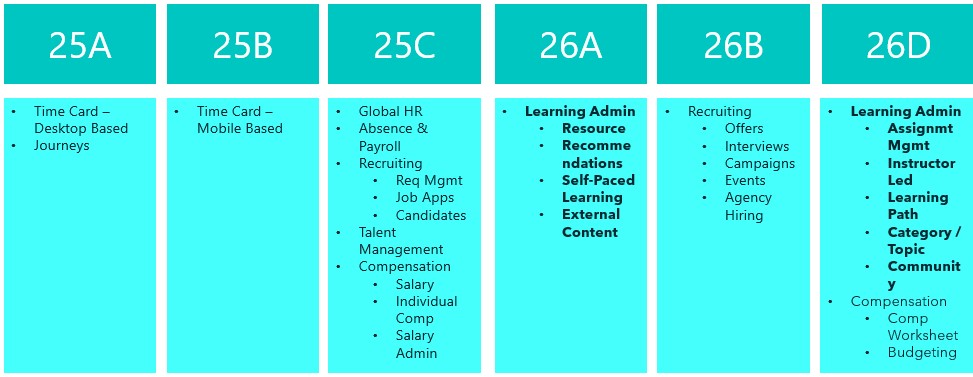
This is an exciting time for Oracle Learn. Release 26C is the last release before all Learn functionality becomes mandatory in Redwood, with the final switch happening in 26D. That deadline brings in the remaining Learning Admin tasks too. If you have not already made the move to Redwood for Learn, now really is the time to do it. In the meantime, here is a look at what is new in 26C.

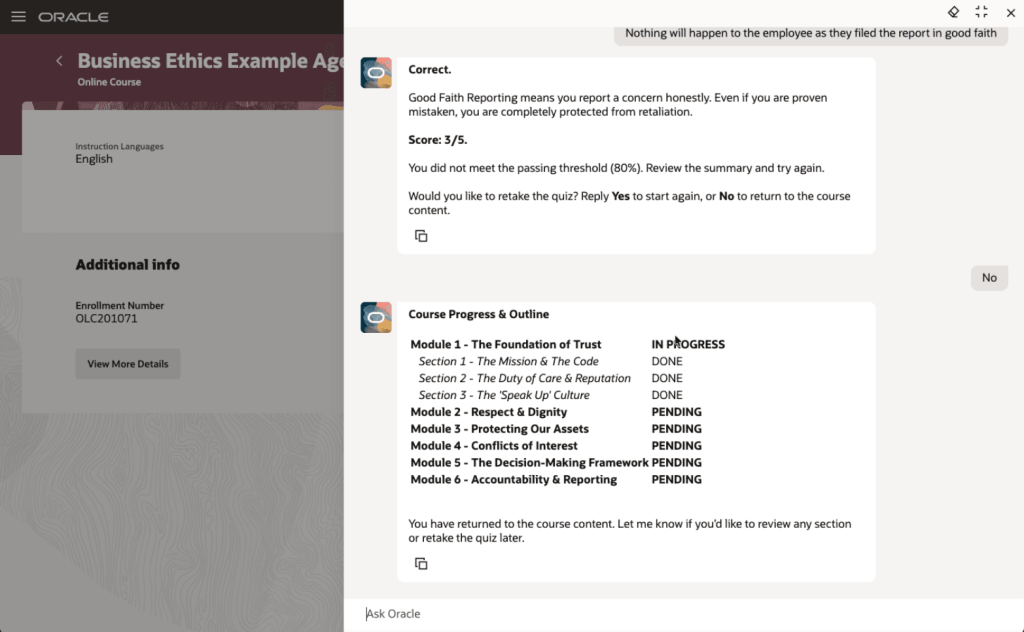
The first feature I want to highlight is not directly related to the Redwood deadline, but it is too interesting to leave until later. Oracle has introduced Agentic Courses, a new approach to self-paced learning that uses AI agents to guide learners through curated content in a far more interactive and responsive way. Instead of working through static material, learners are supported by an experience that adapts to their pace, checks their understanding as they go, and offers targeted support where it is needed.

The structure is still defined by learning designers, but each learner can move through the content in a way that suits them. That includes recap, reinforcement and extra support where required. What stands out here is the ability to deliver genuinely personalised learning at scale, without increasing the effort needed to design or administer it. Learning specialists can reuse templates and deploy them quickly, while the AI handles the day-to-day interaction with learners.

The end result is more effective training, faster progression to competency, and better use of employees’ time, all while keeping outcomes consistent. It is also worth noting that this is not an agentic application, so there is no requirement to purchase the Agentic App platform to use it.

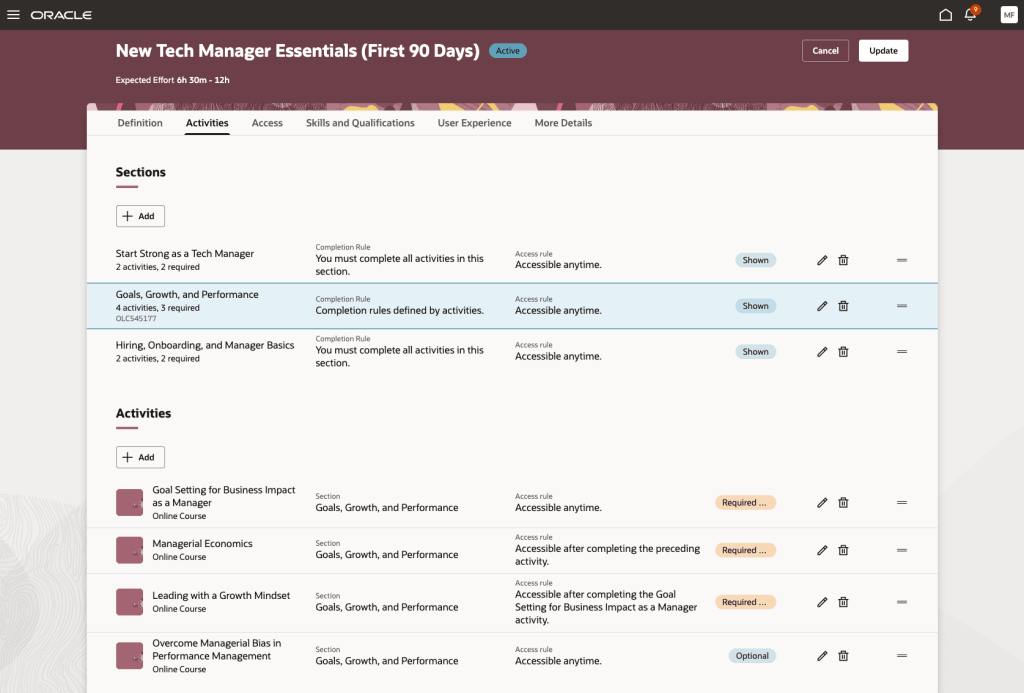
The next feature is the redesigned Redwood experience for specialisation management. This brings a much clearer and more visual approach to creating and managing learning paths. The new Activities tab pulls everything into a single interactive view, making it easier to understand the overall structure, see dependencies, and define completion and access rules. Alongside this, the Assignments tab gives a clear, near real-time view of learner progress, so administrators can track enrolments, monitor completion, and step in where needed.

The benefit here is both clarity and control. Learning specialists can build more structured and engaging learning journeys with less effort, while built-in checks help prevent common issues such as conflicting dependencies. For learners, it is much clearer what is expected and what comes next, which supports better engagement. For organisations, this means more effective delivery of training and stronger oversight of compliance and development programmes.

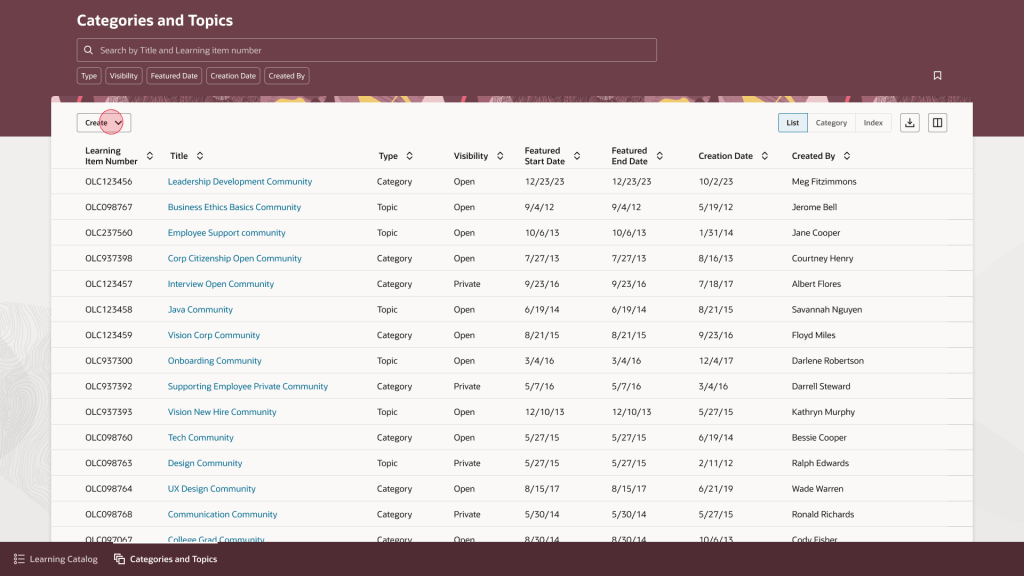
Another new page in Redwood is the updated experience for category and topic management. This gives learning teams a more straightforward way to organise and maintain their catalogue. The interface is built around tasks, with list, category and topic views supported by search, filtering and saved searches. Administrators can quickly create and update categories and topics, manage visibility and featured dates, and move easily between high-level structures and more detailed content.

The value here is in making catalogue management simpler and more consistent. Learning teams can organise content more effectively, which makes it easier for learners to find what they need. It also aligns with the wider Redwood experience, reducing the learning curve for administrators and helping improve productivity. In practice, this leads to a more organised and accessible catalogue that is easier to maintain over time.

Oracle has also introduced a set of enhancements to assignment status management. These give learning teams much tighter control over how assignments are handled, with expanded support for actions such as waitlisting, undoing completion, approving, withdrawing and allocating seats. There are also clearer rules around when each action can be applied.

In day-to-day terms, this means administrators can manage a wider range of scenarios directly within Redwood, without relying on workarounds. The improvement here is in both governance and day-to-day efficiency. By aligning actions to defined rules and adding more control, organisations can manage assignments more consistently and reduce the risk of error. It also becomes easier to handle exceptions and manage capacity, which supports a more reliable learner experience overall.

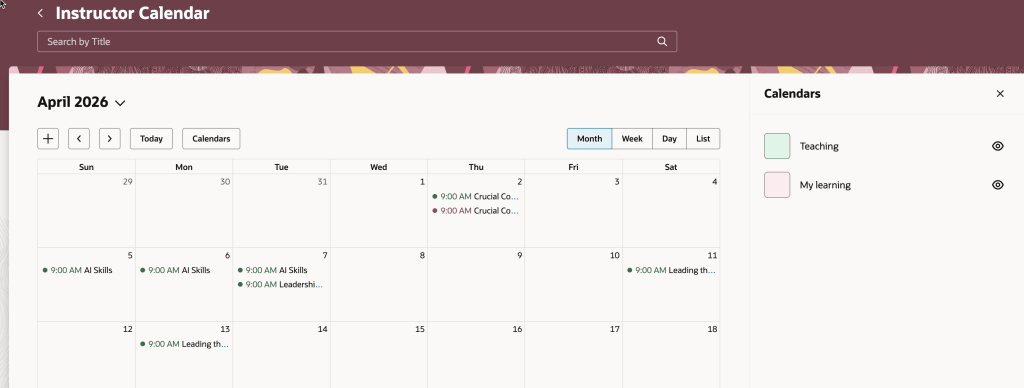
Another useful enhancement is within the Instructor Activity Center. The updated calendar now brings together teaching commitments and the instructor’s own learning calendar, making it easier to spot clashes and plan ahead. There is also a new seat availability filter, which highlights sessions that are low on enrolment, fully booked, or have waitlists.

This gives instructors a single, practical view of their schedule. They can manage their time more effectively, avoid conflicts, and take action where needed, for example by promoting under-enrolled sessions or adjusting plans. For organisations, this helps optimise class capacity and make better use of instructor time.

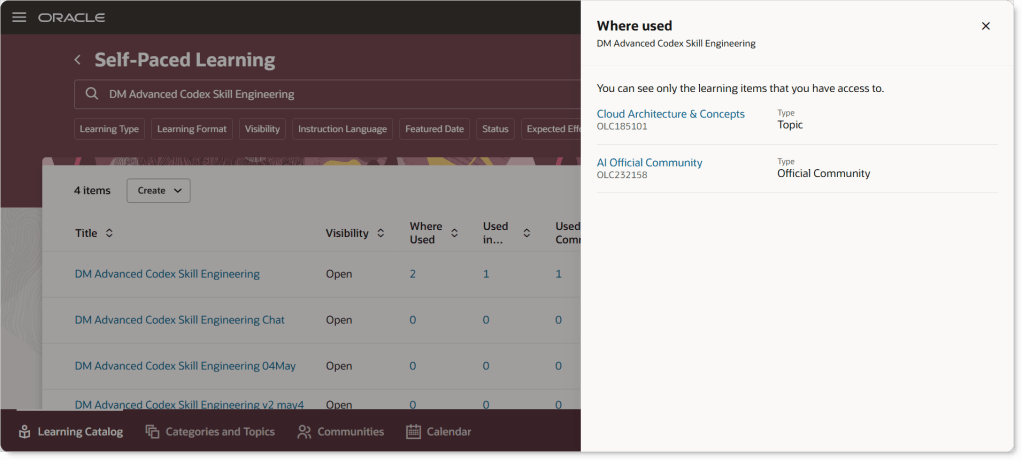
The final feature I want to call out is one that came directly from a customer idea. The Learning Catalog has been enhanced to give clearer visibility into how events, courses and learning paths are connected. The updated “Where Used” capability makes it much easier to explore these relationships, with clickable links that take you straight to related items. Supporting information is displayed in a structured way that mirrors the layout of the detail pages, making it easier to understand how everything fits together.

This improves transparency across the catalogue. Learning teams can see dependencies more clearly, which reduces the risk of unintended impact when making changes. It also supports more consistent management of learning structures, helping maintain a clean and well-organised catalogue over time.

As always, Oracle may introduce additional updates as the release cycle progresses, so it is worth keeping an eye out. If anything particularly interesting appears, I will share a follow-up to make sure you are fully up to date.

Please note all screenshots are the property of Oracle and are used according to their Copyright Guidelines
Oracle HCM Cloud Payroll 26C

It’s that point in the quarter again, and Release 26C brings a solid set of Payroll updates across global capabilities, UK legislation, US compliance, and a particularly strong set of enhancements for Ireland. As always, Oracle may introduce further updates as the release progresses, but here’s what stands out so far.

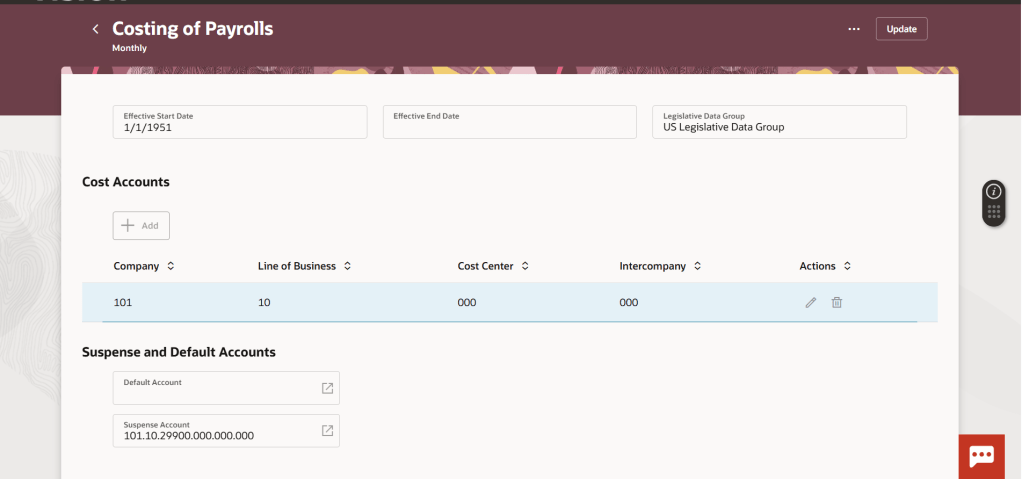
One of the most useful additions in this release is enhanced audit visibility for costing. Payroll and finance teams now have a clear, end-to-end view of changes made across costing setups. This means you can quickly understand what has changed, when it changed, and who made the change, without relying on manual tracking or investigation.

In practice, this improves both control and confidence. It supports audit readiness, reduces time spent investigating discrepancies, and makes it easier to explain costing outcomes to stakeholders. The fact that it is available straight away, with no setup required, makes it an easy win.

Another helpful improvement is the introduction of a consolidated view of costing configuration within the Redwood experience. Instead of switching between different areas to understand how costing is set up, everything is now visible in one place.

The benefit here is simplicity. It becomes much easier to validate configuration, spot inconsistencies, and understand how costing is applied across different levels. For teams supporting multiple payrolls or complex structures, this will save time and reduce the risk of mistakes.

The continued rollout of Redwood is also worth noting. Additional payroll setup pages have now moved across, bringing a more consistent and searchable user experience. For teams already using Redwood, this reduces the need to move between interfaces. For others, it is another step towards a more modern and intuitive payroll administration experience.

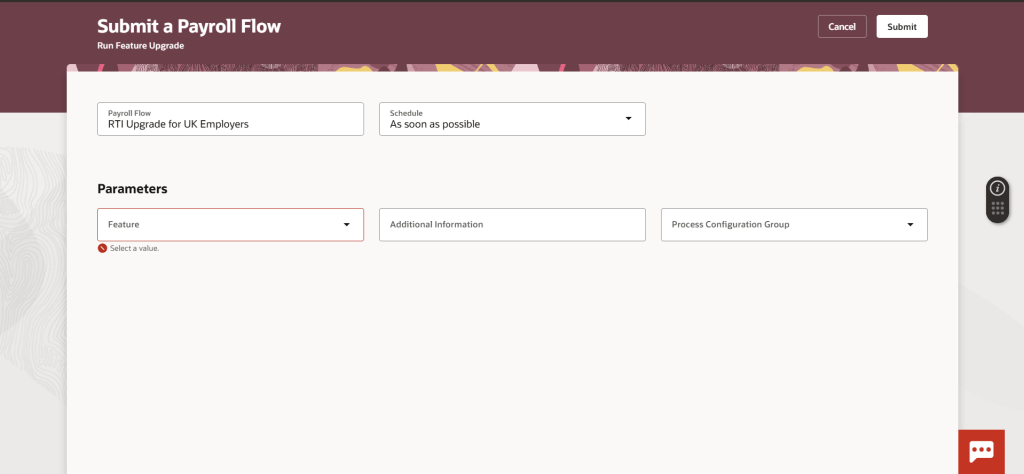
There are four key UK updates in 26C, starting with one that requires action. The update to RTI encryption introduces a stronger approach to protecting submission credentials. While this is not applied automatically, it is important to prioritise, as it ensures compliance with the latest security standards. The benefit is straightforward: improved protection of sensitive payroll data and reduced risk in RTI submissions.

The next update is the automatic enablement of Redwood for key employee self service pages, including Pension Enrolment and New Starter Declaration. For organisations already using these, it removes the need to manage profile options. For employees, it means a more consistent and user-friendly experience when completing important payroll-related tasks.

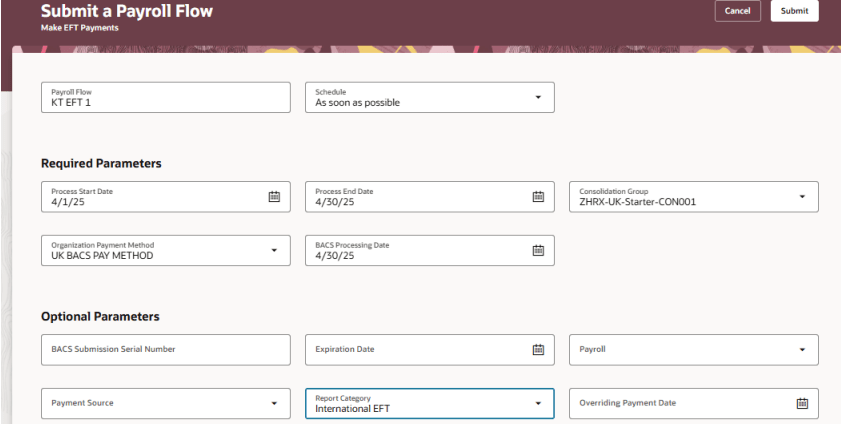
There is also an update to international payment formats to align with ISO 20022 standards. For payroll teams managing cross-border payments, this provides better alignment with modern banking requirements and supports smoother processing with financial institutions.

One of the more visible enhancements is the introduction of a digital P45 through Document of Record. Traditionally, P45s have been a manual and paper-heavy process. This change allows organisations to publish them directly to the employee record.

The benefit is flexibility and accessibility. Employees can access their P45 online, payroll teams reduce administrative effort, and organisations can move closer to fully digital processes. It does require some setup, but the long-term efficiency gains are clear.

For US customers, 26C focuses on simplifying compliance and improving visibility.

The automatic synchronisation of local tax jurisdictions based on employee address changes addresses a long-standing challenge. Instead of relying on manual updates, the system now helps keep tax data aligned automatically. This reduces the risk of incorrect tax withholding and lowers the administrative burden on payroll teams. It is particularly valuable for organisations with a mobile workforce or frequent address changes.

There is also an enhancement to the management of involuntary deductions within Redwood. This brings all relevant information into a single, structured view. The key benefit here is clarity. Payroll administrators can see everything they need in one place, making it easier to manage complex deductions, respond to queries, and ensure accuracy. It also supports better decision making without increasing complexity.

The final US update supports states where employer matching contributions must be included in SUI taxable wages. While this requires some planning to adopt, it ensures compliance with state-specific rules and avoids potential processing or reporting issues.

Ireland sees the most significant legislative investment in this release, with four new features. The introduction of Carer’s Leave brings support for extended unpaid leave in line with legislation. For employers, this provides a structured way to manage entitlements and ensures compliance. For employees, it offers clarity and consistency around a sensitive type of leave.

Domestic Violence Leave and Payment is another important addition, enabling organisations to support employees from day one of absence. Beyond compliance, this reflects a broader focus on employee wellbeing and responsible employment practices.

There is also a refinement to PRSI exemption handling, improving how exemptions are classified and reported. This leads to more accurate reporting and helps ensure that employees’ contribution records correctly reflect their entitlements.

Finally, NAERSA pension reporting is now supported through an end-to-end submission process. This simplifies what has historically been a fragmented activity, bringing submission, monitoring, and error handling into one place. For payroll teams, this means better control and less manual effort when managing pension reporting.

Release 26C feels like a well-rounded update for Payroll. There is a clear focus on improving visibility, reducing manual effort, and supporting compliance across multiple regions.

While some features require configuration or planning to adopt, many are available immediately and deliver quick benefits. As always, it is worth reviewing these in the context of your current processes to identify where you can simplify, streamline, or reduce risk.

If you are looking at 26C more broadly, you may also find my latest write-up on the Core HR updates useful.

Please note all screenshots are the property of Oracle and are used according to their Copyright Guidelines
Oracle HCM Cloud Core HR 26C

It’s that time in the quarter again. Oracle has just shared what’s coming in Release 26C, and as you’d expect there is a clear emphasis on AI-driven enhancements, with plenty to take note of. More updates are likely to follow over the coming weeks, but for now it is worth taking a look at what has been announced so far.

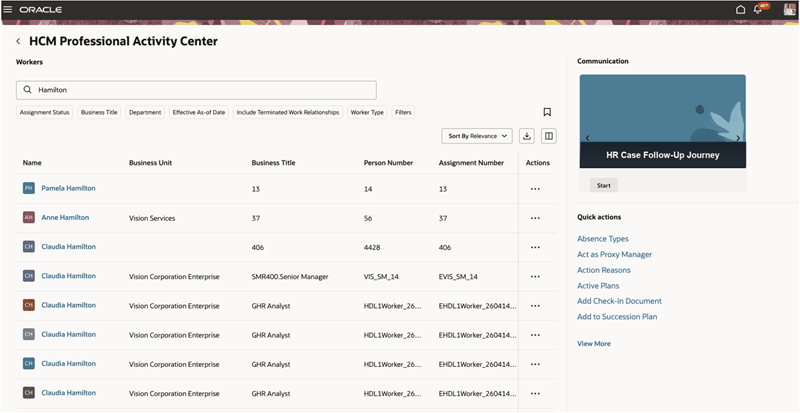
The first feature worth calling out is one many HR teams have been waiting for. Ever since the original Person Management page was effectively retired back in 2020, there has not really been a single, equivalent experience to replace it. What Oracle has delivered here is not a direct like-for-like replacement, and it is clear that is not the intention. Instead, this move aligns with the Redwood design approach and rethinks how users interact with person data. The result is a more modern, task-focused experience that brings together key information and actions in a way that feels far more consistent with the rest of the HCM suite.

In practical terms, it changes how users work day to day. Rather than navigating across multiple pages or relying on memory to find the right option, a HR user can open a worker’s record and see relevant insights alongside the actions they are most likely to take, whether that is updating employment details, reviewing assignments, or initiating changes. This reduces the need for constant clicking and context switching, making everyday tasks quicker and more intuitive. For those who have used the system for a long time, there may still be a sense that the original “one stop shop” is missing. However, this is a clear step forward. It signals a shift away from a single static page towards a more guided and contextual experience that better reflects how people actually work today. It may not replicate everything that Person Management once offered, but it goes a long way towards closing a gap that organisations have felt for some time.

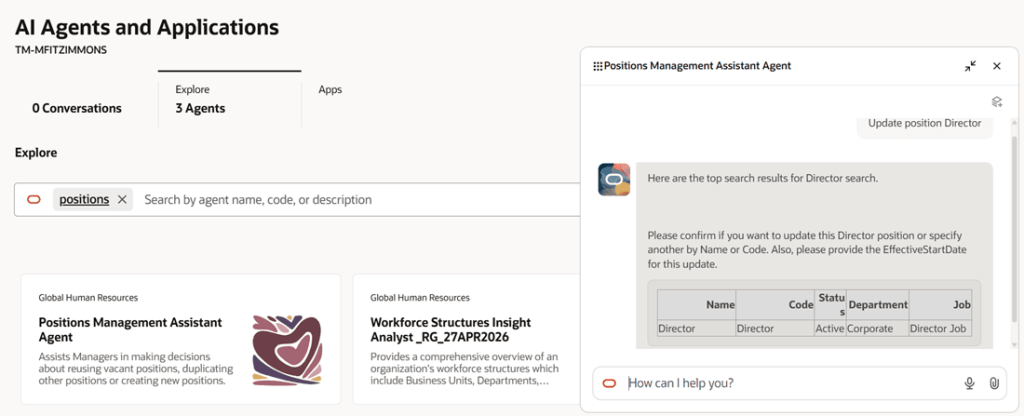
The next feature worth highlighting is AI-led, the Positions Management Assistant. This builds on the Positions Assistant introduced in 25D but takes things a step further by broadening what can be done through a single experience. Rather than focusing only on creating or viewing positions, it now brings editing into the same flow, giving HR teams and line managers a more complete way to manage positions. It uses natural language to understand what the user is trying to do and responds with relevant actions and guidance, which fits with the wider move towards more conversational, AI-driven ways of working.

In practice, this simplifies what can often be a fragmented process. A manager can ask to see vacant positions within their team and the assistant will surface them, suggest next steps and provide a direct route to raise a requisition. If a new position is needed, it can guide the user through creating one, reusing existing information where possible to save time and reduce errors. This makes the experience far more intuitive, particularly for occasional users, while also helping to improve consistency and accuracy. The overall result is a smoother, more guided approach that reduces manual effort, speeds up position management activities and helps organisations move more quickly when filling roles.

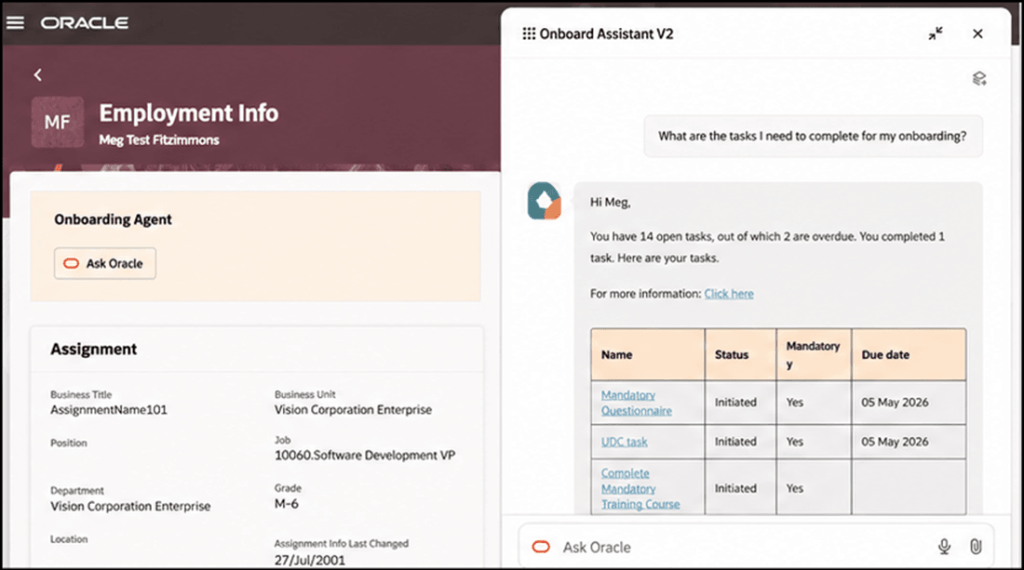
The next feature builds on something we saw introduced in 25D. The Onboarding Agent has now evolved into a workflow agent, marking another step in Oracle’s move towards more intelligent, guided employee experiences. The new Onboard Assistant takes the earlier self-service capability and turns it into a more interactive, conversational experience for new hires. Rather than working through static checklists or searching for information, users can ask questions in plain language and receive clear, relevant answers tailored to their role, location and organisational policies.

In practice, this makes the onboarding journey feel far more straightforward. A new starter can ask what tasks still need to be completed, check for anything overdue and follow a direct link to take action. The assistant can also surface useful resources, provide reminders and guide users through more complex steps when needed. For anyone unfamiliar with the system, this removes much of the uncertainty that can come with getting started. Overall, it creates a more supported and personalised experience that helps new hires get up to speed more quickly, reduces confusion and ensures that key onboarding activities are completed on time.

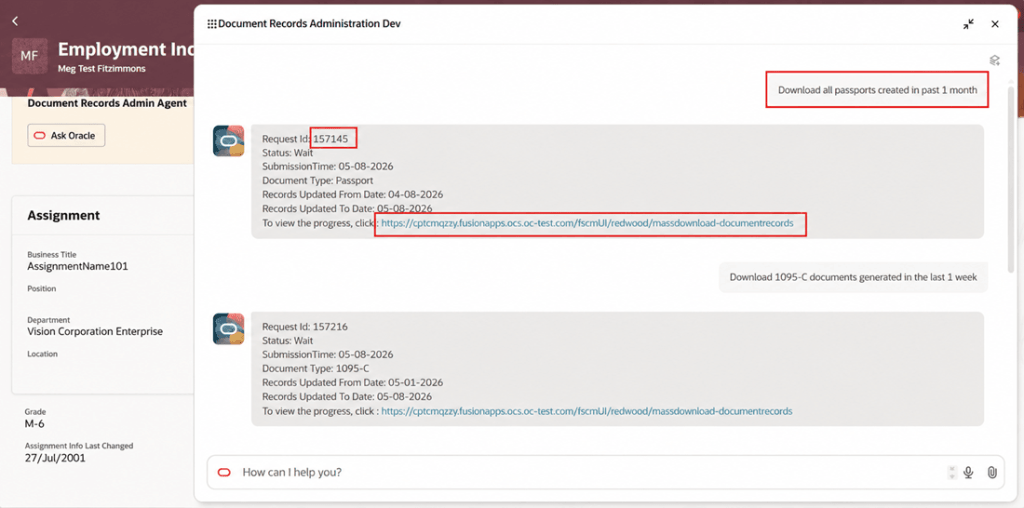
There are a couple of notable updates in Document Records, particularly around the use of AI. The first is the Document Records Administration Assistant, which is a clear example of how Oracle is embedding AI into everyday HR administration. In this case, the focus is on simplifying how users retrieve document records. Rather than working through multiple screens and manually applying filters, users can describe what they need in plain language. The assistant interprets the request and submits the appropriate mass download action, removing much of the effort from what has traditionally been quite a manual process.

In practice, this makes a real difference. A HR user could ask to download all passports created in the past month or retrieve payslips generated in the last week, and the assistant will identify the document type, apply the relevant criteria and trigger the correct request. For infrequent users in particular, this removes the need to understand the underlying navigation. The process becomes far quicker and far more straightforward. Overall, it provides a more intuitive way to retrieve document records, reducing admin time, improving accuracy and helping users get to the right outcome first time.

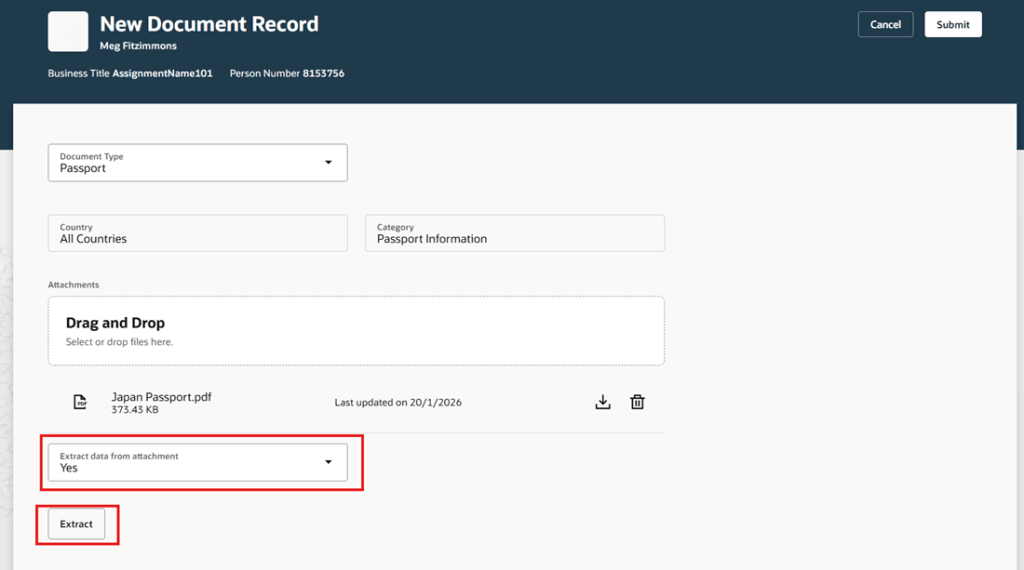
The second update focuses on using AI to extract data from attachments and prefill document record attributes. It is a relatively simple enhancement, but one that addresses a very common pain point in HR administration. When creating document records, users often have to rekey information that already exists in the uploaded file. This feature reduces that effort by using AI to identify and extract key details from the attachment and populate the relevant fields automatically. It aligns closely with the Redwood approach of reducing manual input and making everyday tasks quicker and easier to complete.

In practice, when a user uploads something like a passport or certification, the system can pick up details such as the document number, issuing country and validity dates, and populate these directly into the record. The user can then review and amend the information before saving, rather than starting from scratch. This not only saves time but also reduces the likelihood of manual errors. Over time, capabilities like this can have a noticeable impact on data quality, while also making the process far more efficient for both HR teams and employees managing their own records.

There are a number of upcoming changes around Redwood pages, and the timelines are now starting to feel very close. From 26C, the Redwood person pages will be enabled by default, covering key areas such as Personal Details, Contact Information, Identification Details, Family and Emergency Contacts, Additional Person Information and Person Identifiers for External Applications. For many organisations, this is the point where the move to Redwood becomes unavoidable for core HR data.

This continues in 26D, with areas such as Jobs, Locations, Departments, Enterprise HCM Information, Grade Ladders and all Employment pages, including actions like Add Assignment and Employment Information, also switching to Redwood by default. The same pattern carries into 27A, where processes such as Resign from Employment, Mass Assignment Change and Terminate Employment will be automatically enabled.

If you have not already moved to these Redwood pages, now is the time to start planning. Leaving it until they are switched on by default means losing control over when the change happens and removes the option to step back if needed. Moving earlier gives you the opportunity to test properly, prepare your users and resolve any issues before the transition becomes mandatory.

As mentioned earlier, Oracle is expected to release additional Core HR updates later this month. If anything stands out as particularly impactful, I will share a further update with a more detailed view. In the meantime, keep an eye out for the upcoming posts in this series where we will explore other areas of Fusion as part of Release 26C. If you are reviewing your own roadmap or considering how these changes might affect your organisation, now is a good time to start the conversation.

Please note all screenshots are the property of Oracle and are used according to their Copyright Guidelines
Getting Started with Oracle Payables Agent: Inbox to Invoice, Touchlessly

Oracle’s been moving quickly with its agentic finance capabilities, and the Payables Agent is one of the more practical outcomes so far. If you’re looking after accounts payable or running a shared services function, it’s worth taking a closer look at what it can do and what’s involved in getting up and running.

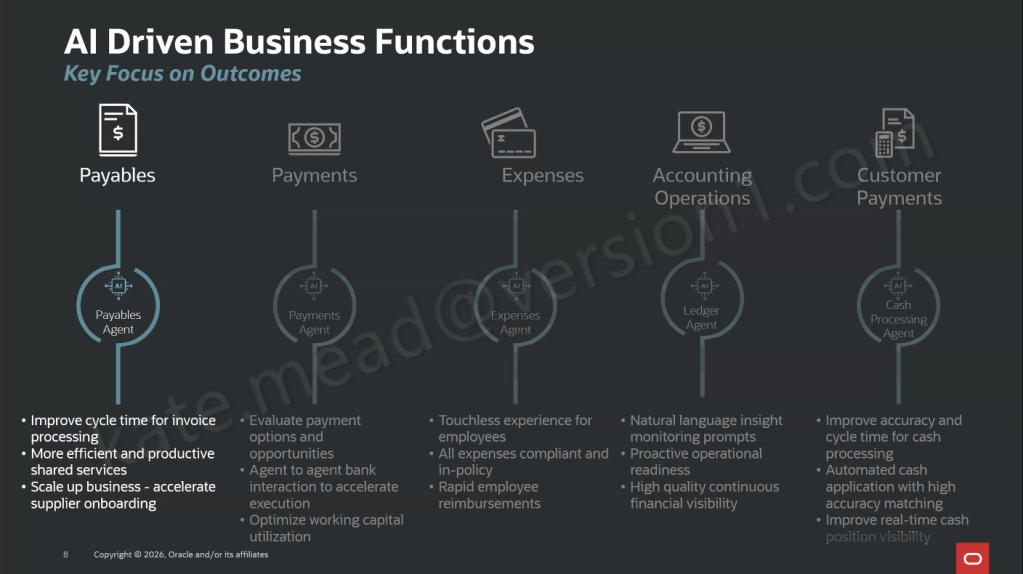
The Payables Agent is focused on the day-to-day reality of accounts payable, helping with invoice intake, compliance and control. It works to take invoices from wherever they come in and move them through to payment-ready with as little manual handling as possible. It sits alongside a wider set of Oracle AI agents across Payments, Expenses, Ledger and Customer Payments, each one aimed at a specific finance outcome.

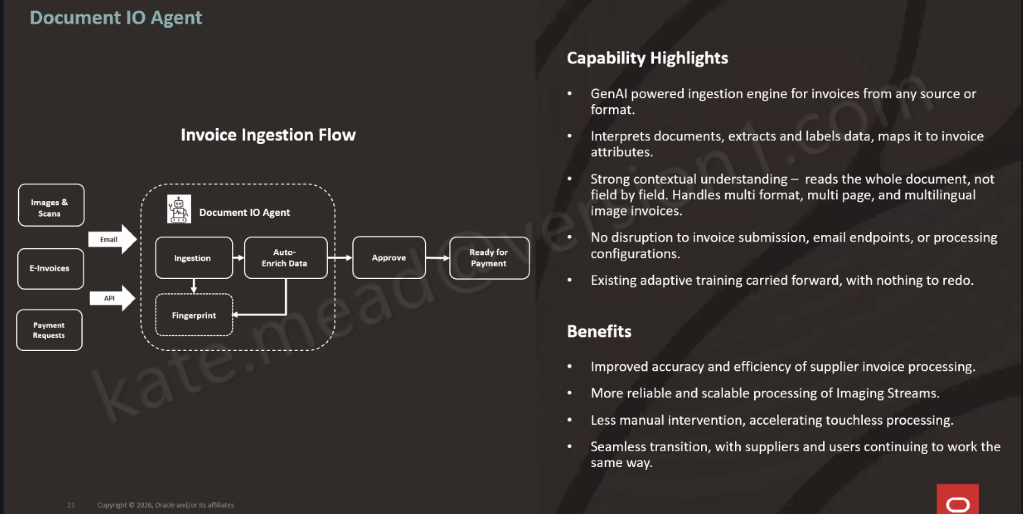
At the heart of it is Document IO, which handles invoice ingestion across different channels and formats. It routes everything through a consistent process and flags anything that needs a closer look, so exceptions can be picked up and dealt with quickly.

Document IO works a bit differently to traditional approaches. It reads the whole invoice rather than picking out individual fields, then extracts and maps the information straight into the right attributes in Oracle Fusion. It can handle different formats, multi-page documents and multiple languages without needing templates set up for each supplier, and you don’t have to change how invoices are sent in, as your existing email channels can stay as they are.

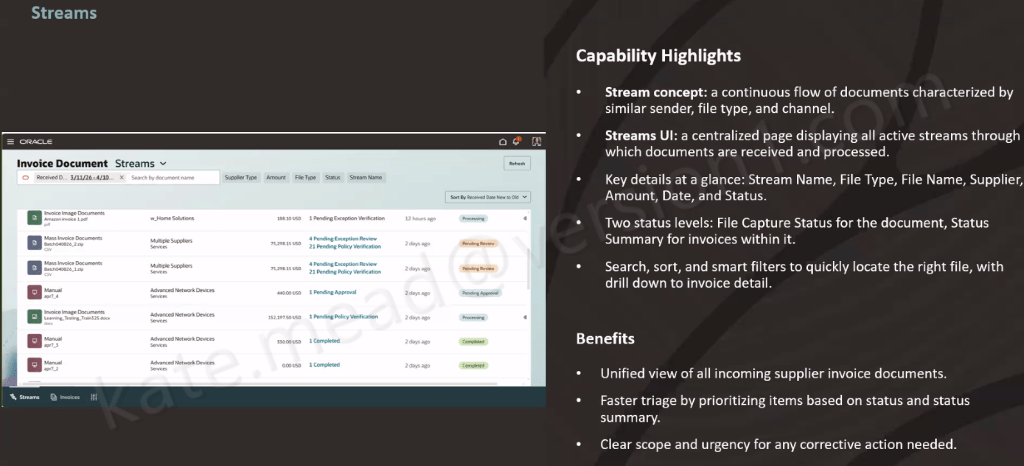
The Streams UI gives you a single place to keep on top of everything, bringing together all your active invoice streams. You can quickly see what’s coming in, what’s already been processed, and what needs attention. Out of the box, there are two streams available. The first covers invoice image documents, handling supplier invoices sent by email in different formats, across multiple pages and languages. The second is partner e-invoice integration, which connects to e-invoices via Thomson Reuters. That one does require a commercial agreement with Thomson Reuters to get started.

Converged streams bring your existing channels into the same view as well, including bulk uploads and manual entry. It means you get a single, consistent way of seeing and managing every invoice type in one place.

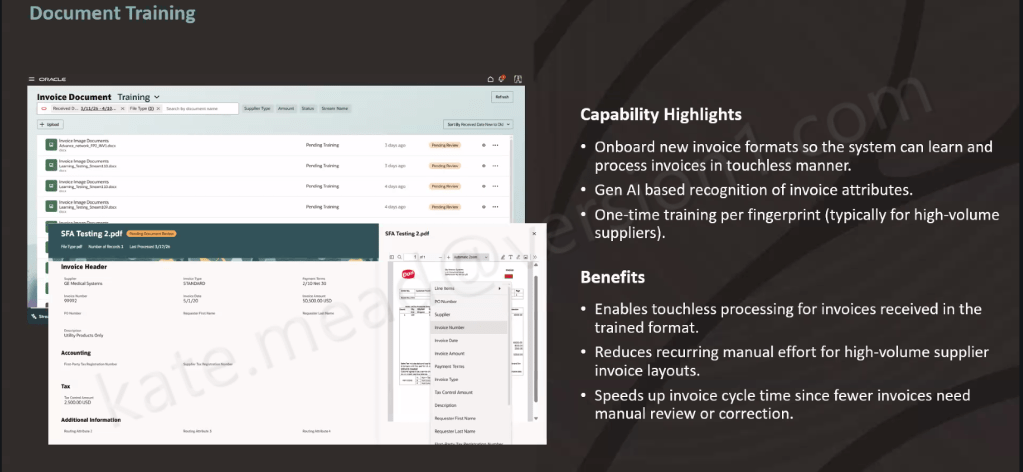
For suppliers with a consistent invoice layout and high volumes, document training makes things even smoother. You set the format up once, the system extracts the data using GenAI, you check and save it, and that format is then recognised going forward. After that, every invoice in the same layout is processed automatically, without the need to retrain.

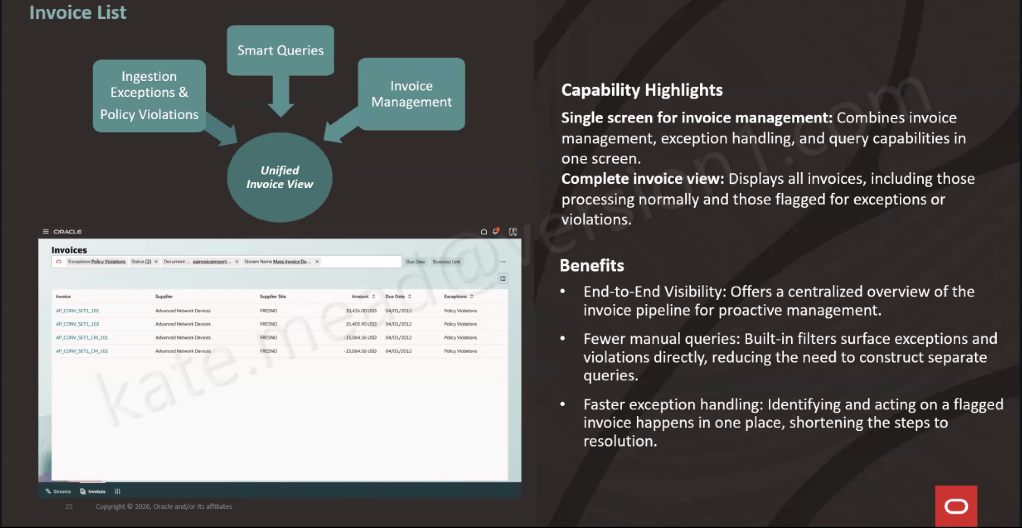
All of that is handled automatically in the background, with policy-driven validation, anomaly detection, PO matching, approval routing and budget checks applied to every invoice. A full audit trail is maintained throughout. Anything that needs attention is surfaced in the Invoice List UI, giving you a single place to manage invoices, handle exceptions and respond to queries. It means your team can focus their time where it really matters, rather than working through everything manually.

So, how do you get started? The Document IO Agent is already switched on by default, so there’s nothing you need to enable. From there, it’s really about setting up three key areas: where your invoices are received, how your streams are connected into the Streams UI, and, for higher-volume suppliers, putting a bit of time into training the system to recognise their invoice formats.

The best way to approach it is to take things in stages. Start with getting your invoice ingestion set up, then bring in converged streams and training, and finally test and refine at scale across different formats and volumes.

Stepping back, this is really about making day-to-day accounts payable that bit easier. A lot of the routine work is taken care of in the background, so your team can spend more time on the things that genuinely need their input. If you’re already using Oracle Fusion, it’s definitely worth exploring what this could look like in your own environment and where it might take the pressure off your team.

Please note all screenshots are the property of Oracle and are used according to their Copyright Guidelines
Oracle Fusion App Builder: Streamline Your Agentic Applications

Over the bank holiday weekend, with the heat driving me indoors, I opened up my Fusion demo environment and decided to try building my first Oracle Agentic Application. Within a few minutes, it was up and running. That is not marketing spin, it is genuinely how quick and straightforward the experience was. It also gave me a good reason to sit down and share what I found.

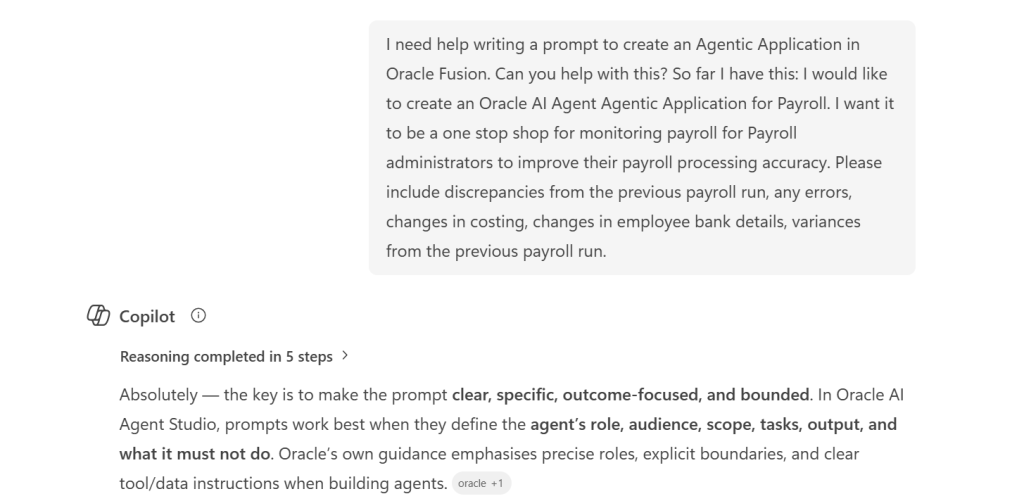
Officially, the Agentic Application Builder does not arrive until Release 26C. However, if you are already familiar with AI Agent Studio and have access to a non production pod, there is more than enough available today to start building something meaningful and to get a feel for where this is going. Over the weekend, I put together two applications. The first used one of Oracle’s out of the box prompts, and the second was based on a custom prompt I created with support from Microsoft Copilot. Both came together quickly, which is really the point.

Before getting into what I built, it is worth being clear on how this fits together architecturally. AI Agent Studio, which is included within your Fusion Applications subscription, will introduce the Agentic Application Builder in Release 26C. It provides a low code way to create and extend agentic applications directly within Fusion. What makes it different is the starting point. Rather than beginning with code or a process diagram, you simply describe the business outcome you want to achieve, and the builder identifies the right agents, creates the initial structure, and connects to your enterprise data. It is also important to understand the licensing model. While you can explore, test, and build in non production environments without any additional cost, a separate licence is required to deploy and run these agentic applications in production. This means there is nothing to stop you getting hands on now and understanding the art of the possible before making any investment decisions.

Applications built in this way run natively within Fusion Applications, using your existing business objects and data, and operating under Fusion’s role based security. That is worth pausing on, because it means you are not creating something separate or bolting on additional functionality. These agents are working within the same security and access model your users already rely on in their day to day roles.

The builder brings applications together using reusable agent teams. These can be provided by Oracle, developed by partners, or created in house to suit your own needs. Each team is designed to handle a specific role, and the builder assembles them into a single application that works towards a common business outcome.

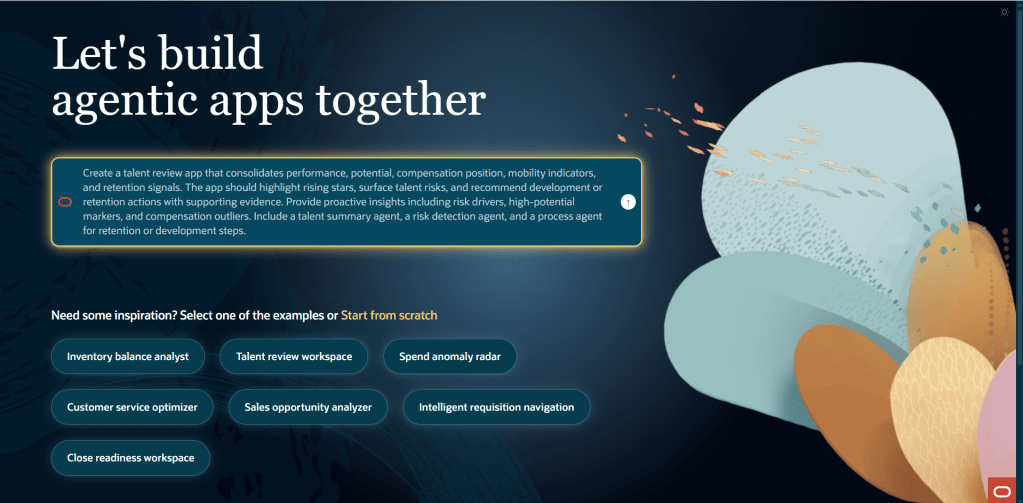
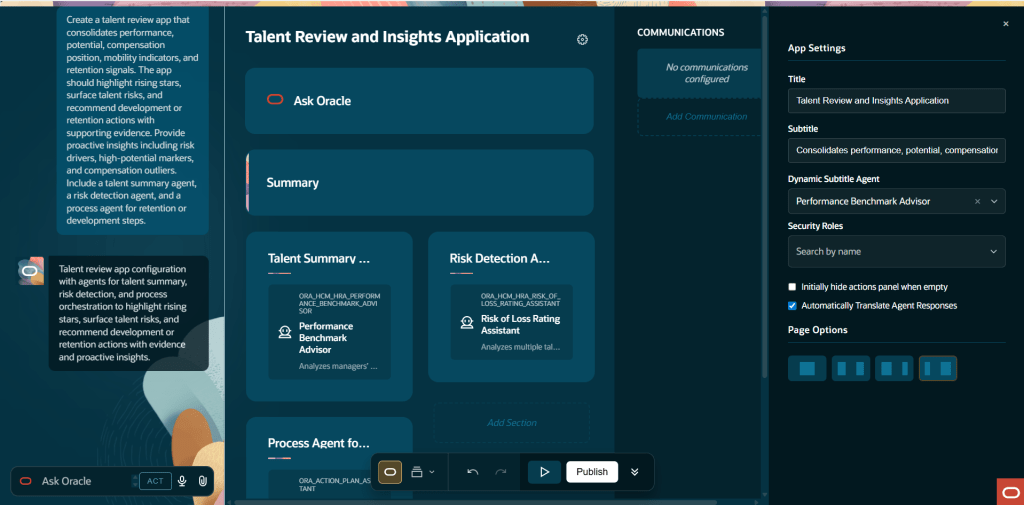
For my first build, I started with one of Oracle’s out of the box example applications. From selecting the template to having a working framework in front of me took only a few minutes. The App Builder presents a range of example agentic applications from the outset, giving you something tangible to work from straight away. You can select one, use it as a foundation, adapt it to your needs, and build from there. In my case, I chose the Talent Review and Insights application.

The steps are: go to AI Agent Studio, open the Apps tab, select Add, enter the name, code, and description for your agentic app, and navigate to the App Builder. Select one of the example apps and you’re looking at a working framework almost immediately.

That speed was the first thing that stood out to me. The framework clearly sets out the agent teams involved, the different sections of the application, and how everything fits together. You are not faced with a blank canvas. Instead, you can immediately see which published workflow agent teams are available to include, and the structure gives you a clear sense of how the application will operate before you have made any changes.

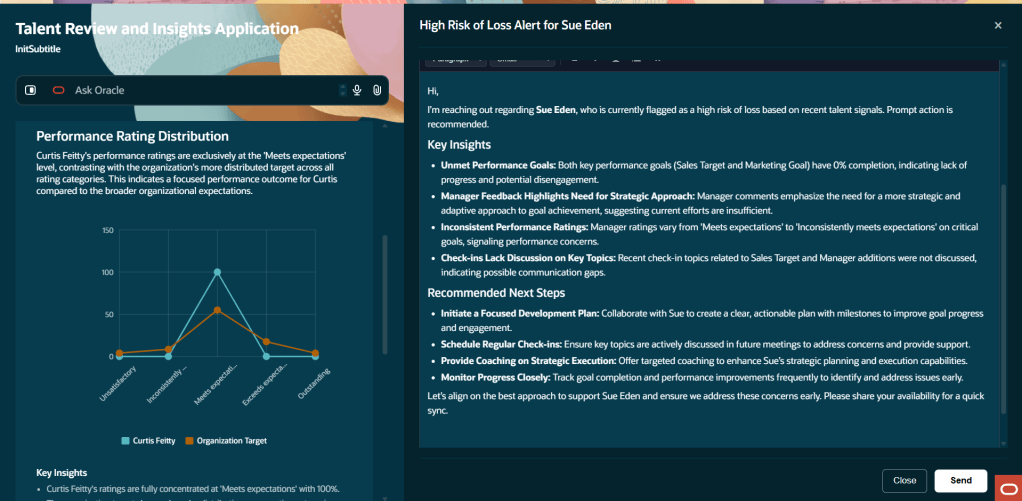
What really caught my attention was the quality of the insights it produced. This is not a static report. The agents actively draw on the data in your environment and present findings in a way that is designed to prompt action, not just provide information. For an HR practitioner used to working with standard Talent Review dashboards, the difference in how those insights are surfaced is immediately noticeable.

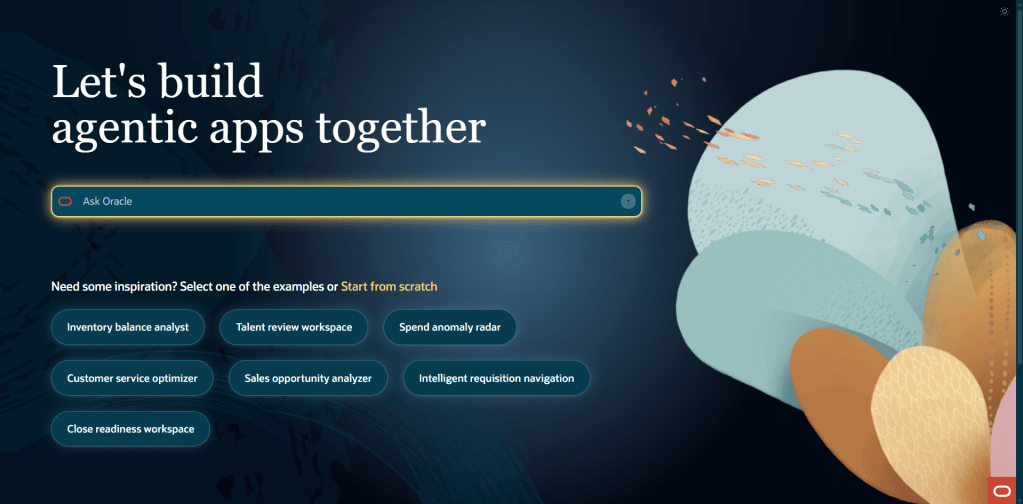
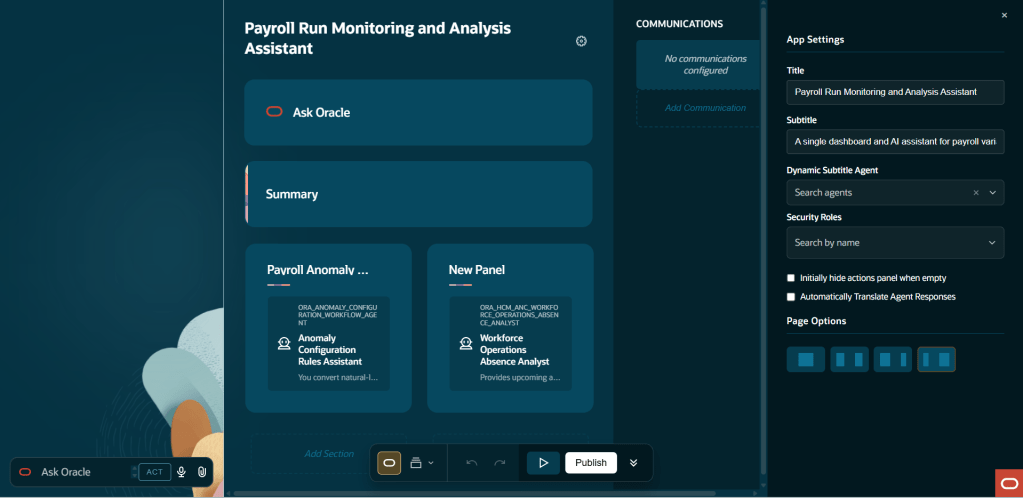
The second build is the one I found most interesting, and it was just as quick to put together. I used Microsoft Copilot to help shape a detailed natural language prompt, then passed that into the App Builder through the Ask Oracle interface to generate a completely custom agentic application from scratch.

The prompt set out an application designed for Payroll Administrators, bringing everything into a single workspace to monitor payroll activity and improve processing accuracy. The aim was to give payroll teams a clear, action focused view of exceptions, anomalies, and key changes that need investigation before payroll is finalised. In practice, that means removing the need for administrators to piece together that picture across multiple pages and reports.

The App Builder works through three clear phases: intent, assembly, and refinement. You start by describing the business objective in plain language, the builder then suggests the most relevant agents and proposes an initial structure, and from there you refine the application through layout changes, naming, and added detail before publishing. The whole journey, from a simple prompt to a structured application framework, moves quickly. If anything takes time, it is shaping the prompt itself rather than waiting for the builder to respond.

What I found is that the quality of the prompt makes a real difference to what the builder produces. The prompt I created with Copilot was clear about the user persona, the business context, and the type of information needed, focusing on a Payroll Administrator working in a pre finalisation scenario and looking for exceptions, anomalies, and priority changes. The application that came back reflected that level of clarity. In many ways, it is no different to working with any AI tool. The prompt is the critical part. The clearer and more specific you are, the more useful and relevant the outcome will be.

For those looking to get familiar with the structure ahead of 26C, an agentic application is built from three core elements: agent teams, communications, and actions. Agent teams sit at the heart of it. Only published workflow agent teams that have been enabled for use in applications are available to select, which helps ensure consistency and control over how these applications are put together.

Communications allow the application to send emails and messages using predefined templates. These templates can take the form of PowerPoint, PDF, email, or simple text. For email templates, the agent can be given the ability to suggest recipients, generate a subject line, and complete sections of the content. For PDF and PowerPoint templates, the agent can generate titles and populate the content, helping to streamline how information is produced and shared.

Actions define what happens as the application runs, including where human approval is needed along the way. The flow itself is straightforward. A widget or user interface element triggers a command, that command determines which action to run, and the action then executes its steps in sequence. There is a good level of flexibility in how those steps are defined. You can keep an action visible in the interface after it has run, navigate users to another application, send a command to an agent, refresh what the agent is showing, or switch the application context. Taken together, these steps allow you to shape how the application behaves and how users interact with it.

Once built and tested, you publish the app. Users can then access it from the AI Agents page, reached via Me > Quick Actions > Show More > AI Agent Studio > AI Agents.

I realise I am starting to sound a bit like an Oracle advert, so it is worth being honest about the experience. In its current pre release state, not everything behaves as you would expect from a finished product. Some agent team options are not yet fully populated, and there are limits to how far you can test the end to end flow in a sandbox without complete data. That is to be expected at this stage.

What is clear, though, is the direction of travel. The App Builder is designed to enable functional consultants and technically minded administrators to create agent driven applications without writing code, and to do so quickly. Starting with natural language removes much of the usual barrier, building from reusable agent teams means you are not starting from scratch each time, and the inclusion of example templates means you can have something up and running in the time it takes to make a coffee. For organisations investing in the Fusion Agentic Apps Platform, this is where a great deal of tailored capability is likely to be developed over the coming releases.

If you have access to a non prod pod and want to get ahead of 26C, it is well worth spending some time in AI Agent Studio now. The core concepts you will be working with, including agent teams, sections, communications, and actions, are already in place and align with what will be available in the full release.

I will share a more detailed walkthrough once 26C is live and the full feature set is available. In the meantime, if you are interested in where this is heading, it is worth taking a look at my earlier write up on AI Agent Studio and what it means for Oracle Fusion HCM.

Please note all screenshots are the property of Oracle and are used according to their Copyright Guidelines
Oracle Expenses Agent: The Touchless Future of Employee Expense Management

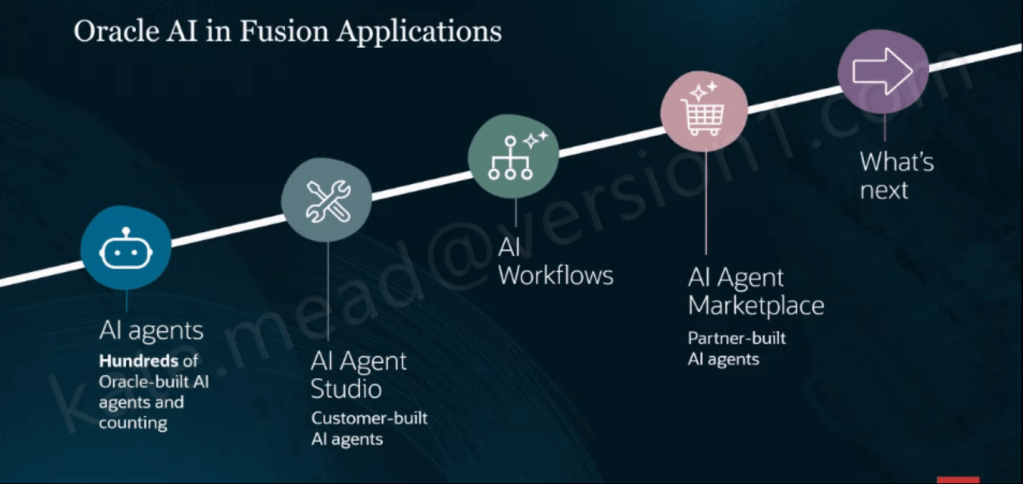
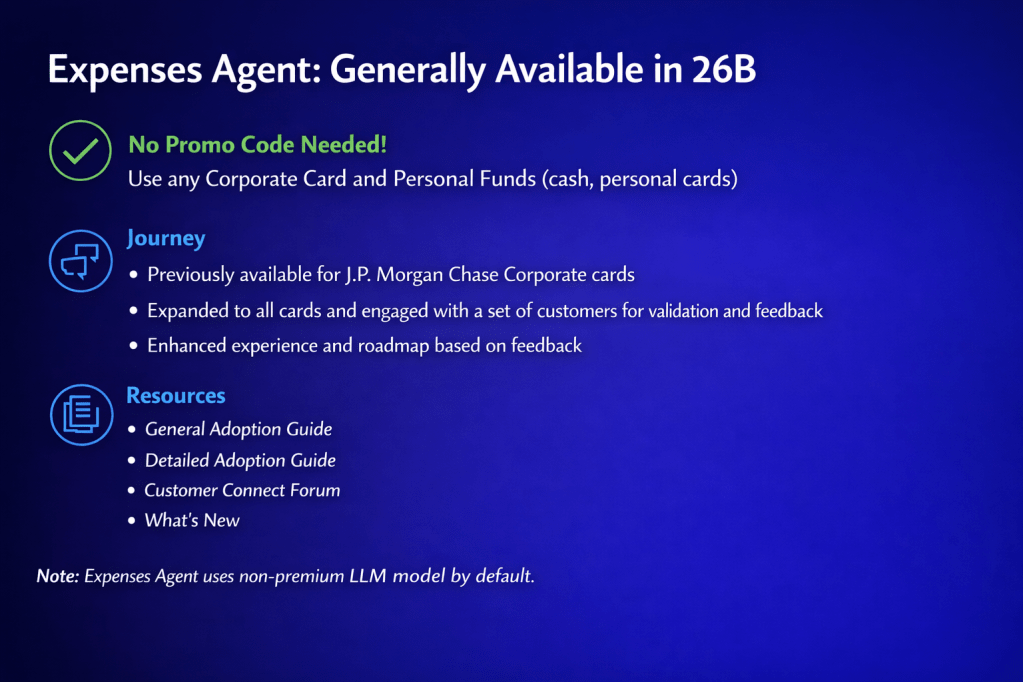
With Release 26B, the Oracle Expenses Agent is now generally available to all customers. There are no promo codes or pilot requirements to worry about. If you are using Oracle Fusion Cloud Expenses, you can start using it straight away. The Expenses Agent is part of a much broader set of Oracle-built agents embedded across Fusion Applications, alongside Oracle AI Agent Studio for building your own agents, AI Workflows, and an AI Agent Marketplace for partner solutions. It is included as part of your existing Fusion Cloud Expenses licence and is updated by Oracle each quarter, so you continue to benefit from ongoing enhancements without additional effort.

Across the Financials suite, Oracle has introduced a range of agents covering Payables, Expenses, Accounting Operations, Payments and Cash Processing. Each is designed to streamline processes, cut down cycle times and reduce the level of manual effort required from finance teams.

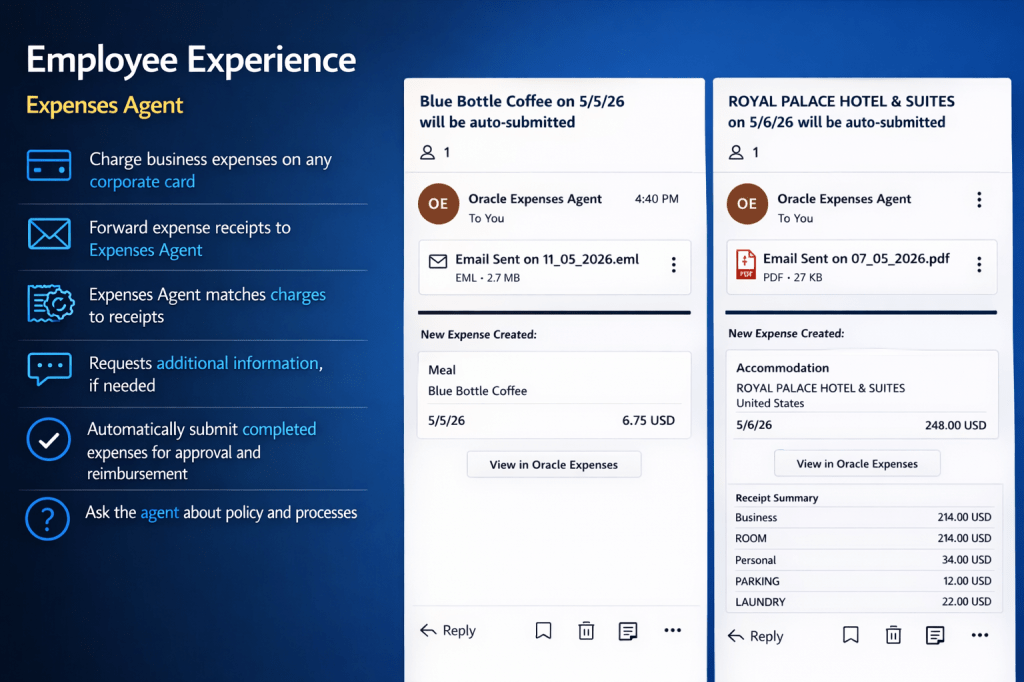
At its core, the Expenses Agent is designed to deliver a touchless experience. An employee simply makes a purchase and forwards the receipt by email, and the agent takes it from there. It reads the receipt, extracts the key details, matches it to the card transaction, creates the expense line, and submits it for approval. If anything is missing, it reaches out to the employee directly. Where everything is complete and compliant with policy, it moves straight through without any manual intervention. Employees can also interact with the agent using natural language to ask questions about policies and processes, making it much easier for infrequent travellers to find the information they need without unnecessary friction.

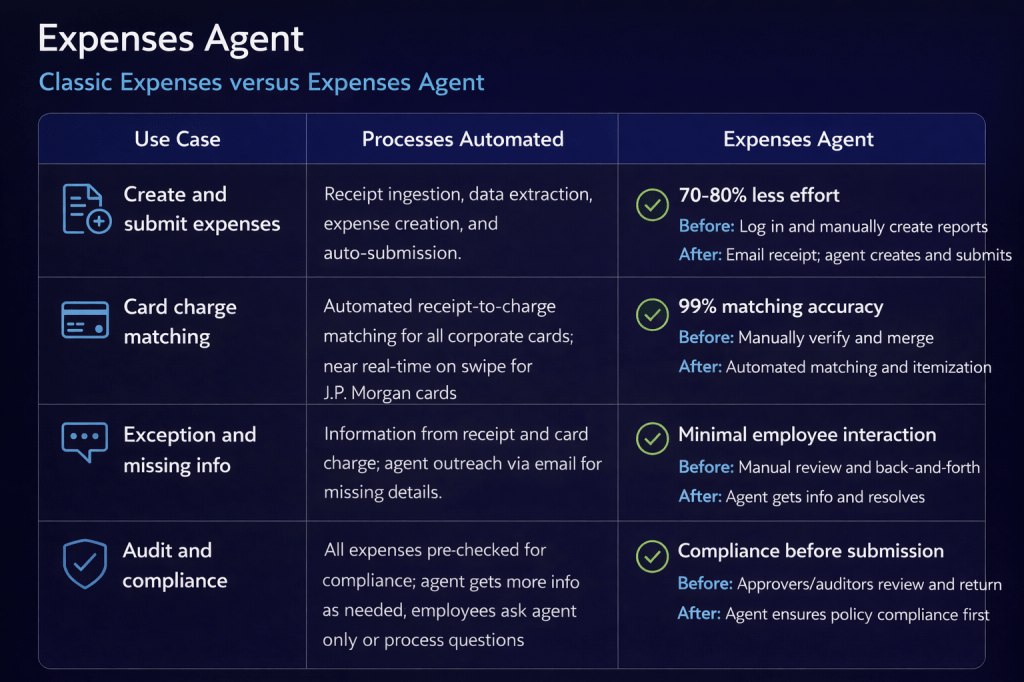
Oracle reports a 70-80% reduction in the effort required to create and submit expenses, along with 99% accuracy when matching card transactions. Just as importantly, compliance checks happen upfront rather than after submission. In a traditional process, approvers often have to send non-compliant claims back for correction. With the agent, expenses are checked before they reach the approver, helping to avoid rework and keep the process moving smoothly.

I have seen the Expenses Agent in action first hand, and it really brings the experience to life. Recently, I was out for lunch with an Oracle colleague who showed me how they submitted the expense. They simply took a photo of the receipt and, by the time we had walked up the escalator, the expense had already been checked against company policy and confirmed as compliant. It was then automatically matched to the corporate card transaction. It is a small moment, but it shows just how quick and effortless the process can be in practice.

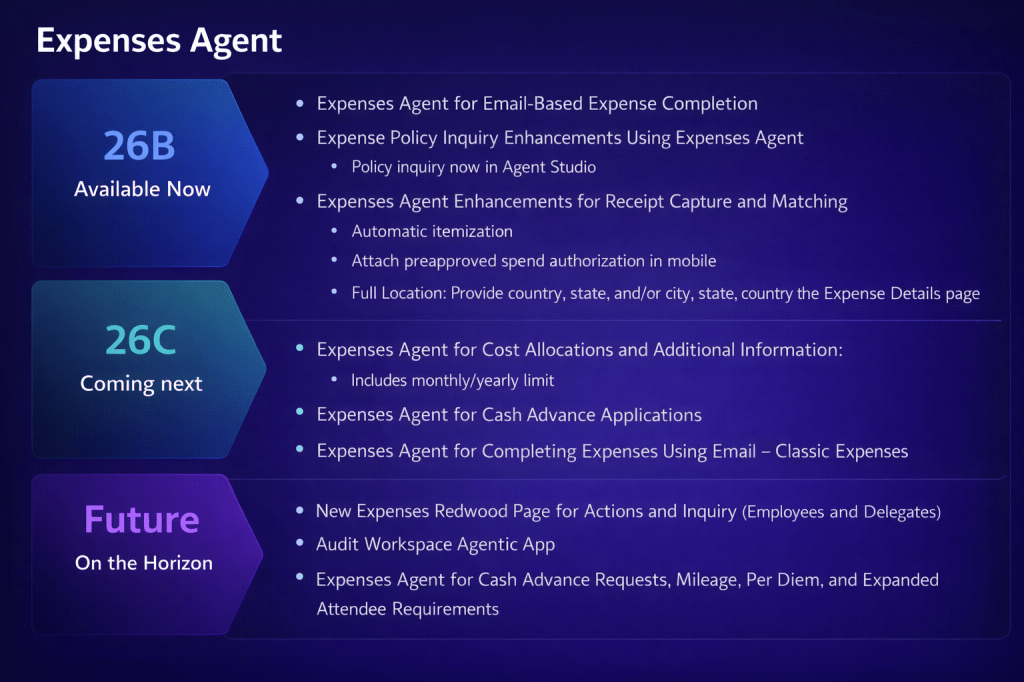
The 26B release broadens support across all corporate cards and personal expense types, building on earlier versions that were limited to J.P. Morgan Chase corporate cards. It also introduces a number of enhancements, including email-based expense completion, the ability to query policies through Oracle AI Agent Studio, automatic receipt itemisation, mobile attachment of pre-approved spend authorisations, and more detailed location information within the Expenses page.

One point to be aware of is that the Expenses Agent uses a non‑premium large language model by default, so there is no additional cost to use it. If you find that performance does not fully meet your requirements, you do have the option to switch to a premium model. This can enhance capability, but it does come with a cost based on token usage.

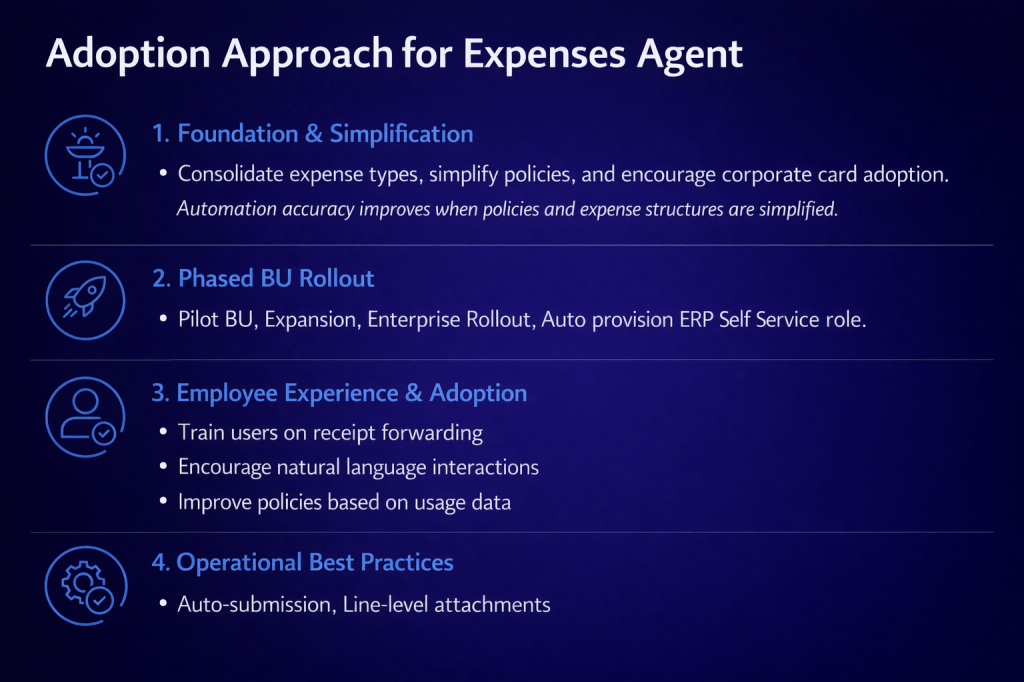
Oracle recommends a structured, four-stage approach to adoption. It starts with laying the right foundations by simplifying expense types, refining policies and encouraging the use of corporate cards, as cleaner and more consistent data improves automation accuracy. From there, organisations can move to a phased rollout by business unit, typically starting with a pilot group before expanding more widely, supported by auto‑provisioning of the ERP Self Service role. The next step is to focus on employee experience and adoption, ensuring users are comfortable with receipt forwarding and interacting with the agent in natural language. Finally, it is about embedding operational best practices, such as enabling auto‑submission and using line-level attachments to support a smooth, efficient process.

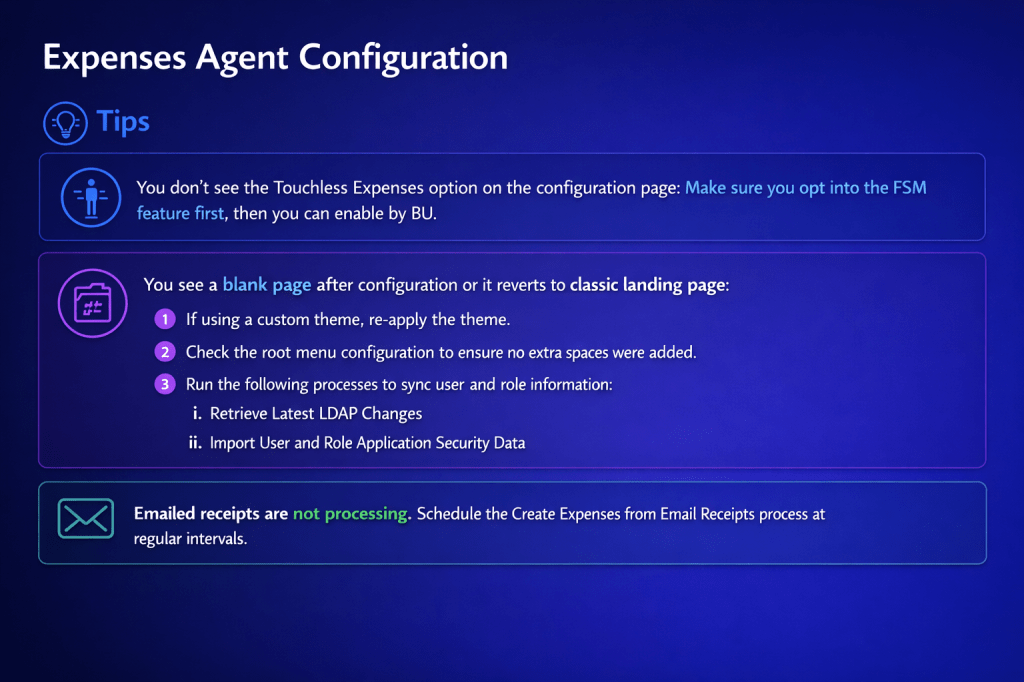
There are a few practical points to be aware of before going live. If Touchless Expenses is not visible on the configuration page, you will need to opt into the relevant FSM feature before enabling it at business unit level. If you encounter a blank page after configuration, or the interface falls back to the classic landing page, it is worth reapplying any custom theme, checking the root menu configuration for stray spaces, and running the Retrieve Latest LDAP Changes and Import User and Role Application Security Data processes. If emailed receipts are not being processed, make sure the Create Expenses from Email Receipts process is scheduled to run at regular intervals, as it does not trigger automatically.

Looking ahead, the 26C release will introduce further enhancements, including support for Cost Allocations and Additional Information such as monthly and yearly limits, along with Cash Advance Applications and email-based completion for Classic Expenses customers who have not yet moved to Touchless. Beyond that, Oracle has outlined plans for a new Redwood Expenses page for employees and delegates, an Audit Workspace Agentic application, and expanded agent capabilities covering Cash Advance Requests, Mileage, Per Diem and more advanced attendee requirements.

If you have not yet looked at the Expenses Agent, it is worth starting with the basics. Taking time to simplify policies and increase corporate card adoption will deliver immediate improvements to your current process, while also setting you up to get the most value from the agent when you choose to enable it. If you would like to understand what this could look like in your organisation, now is a good time to start the conversation and explore how to get value from it early.

Please note all screenshots are the property of Oracle and are used according to their Copyright Guidelines
Reinventing How Work Works: The Business Case for Oracle Fusion Agentic Applications

Oracle has been making a clear and increasingly consistent argument over the past few months: enterprise software has reached the limits of what a system of record can do. I’ve written before about the introduction of Agentic Applications at AI World London, and about the specific HCM applications that were announced alongside them. But there’s a broader story here that I haven’t fully explored yet, and it’s one that I think matters for every Fusion customer, not just those focused on HCM.

This post draws on the “Reinventing How Work Works” webinar, which stepped back from individual applications and made the architectural and commercial case for why the shift to agentic is happening, what it actually looks like in practice, and where Oracle is taking this next. If you’re trying to build internal momentum for agentic adoption, or if you’re trying to explain to a leadership team why this is different from previous AI announcements, this is the post to share.

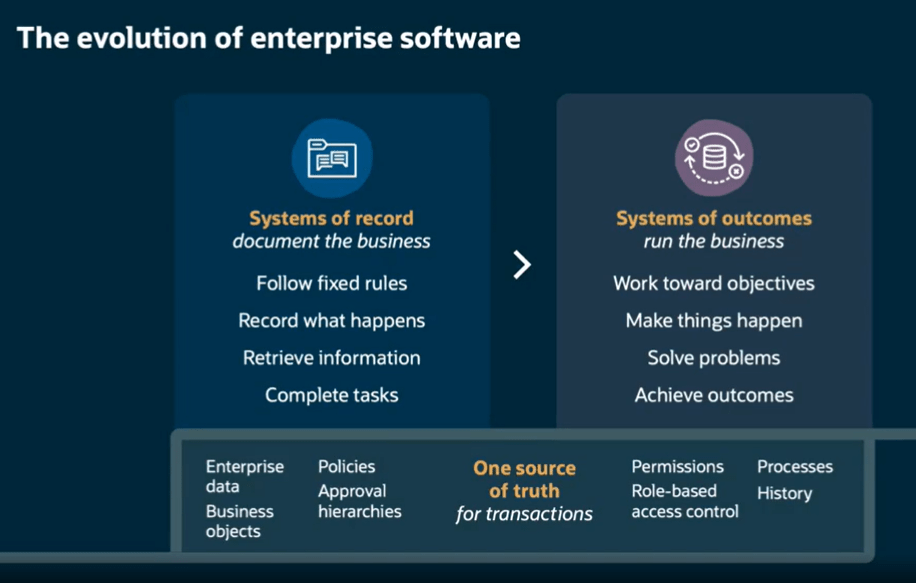
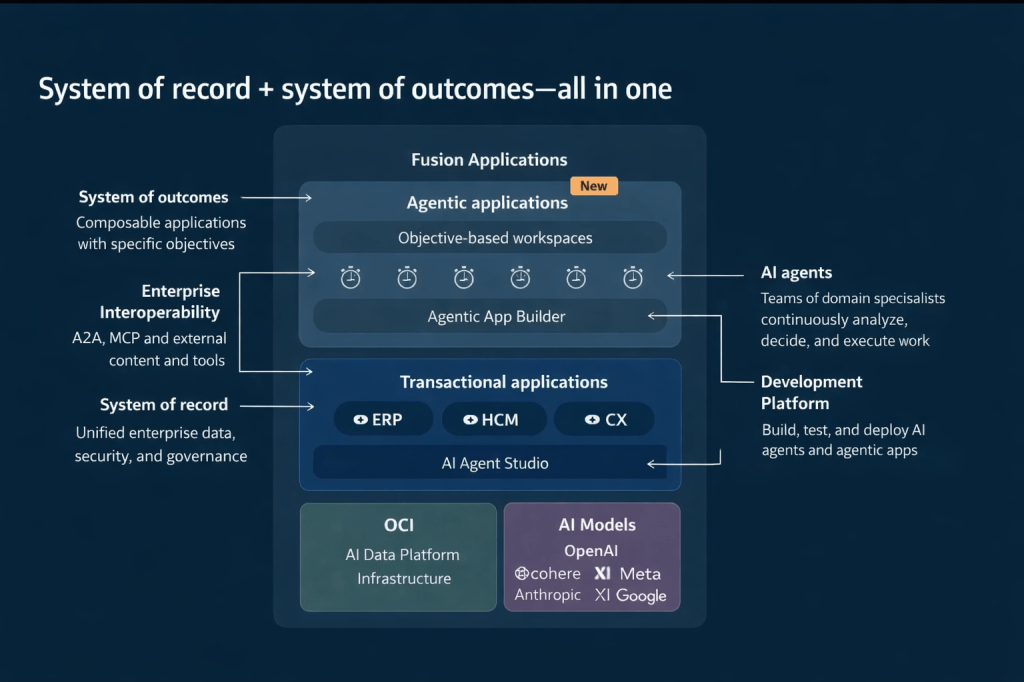
The framing that Oracle used throughout this webinar is, I think, one of the clearest explanations of what has actually changed. Traditional enterprise systems, including Fusion as it has historically operated, are systems of record. They follow fixed rules, capture what happened, retrieve information when asked, and complete transactions. They document the business. What they don’t do is run the business.

Agentic Applications represent a move to what Oracle calls systems of outcomes. Rather than waiting for a person to interpret data and decide what to do next, a system of outcomes works toward objectives, makes things happen, solves problems, and achieves results. The underlying system of record doesn’t go away. The data, governance, approval hierarchies, role-based access control, and audit history are still there, and in Oracle’s case, they’re still the source of truth for every transaction. What changes is the layer operating on top of that foundation.

This architecture diagram is worth studying if you haven’t seen it. Agentic Applications sit in a new composable layer above the existing ERP, HCM, and CX transactional applications. That layer is powered by teams of AI agents coordinated through Oracle AI Agent Studio, drawing on the full enterprise data model, security model, and process history that already exists in Fusion. Beneath all of this, Oracle Cloud Infrastructure (OCI) provides the AI data platform, and a range of large language models (LLMs), including those from OpenAI, Cohere, Meta, Anthropic, xAI, and Google, are available depending on the task and preference.

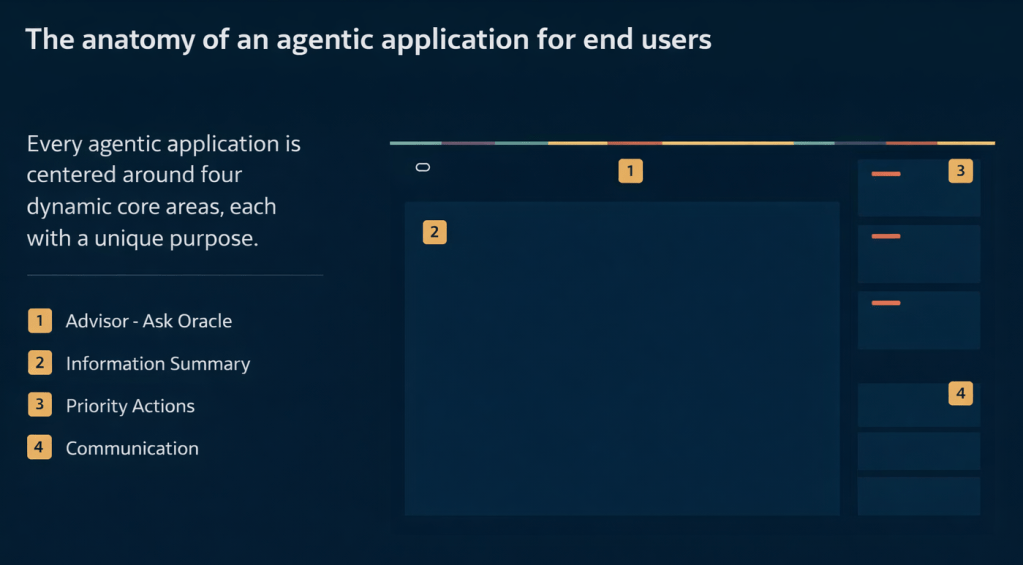
Every Fusion Agentic Application is built around four core dynamic areas. Understanding these is useful when you’re evaluating a specific application or explaining the concept to stakeholders.

The first is the Advisor, which is the “Ask Oracle” conversational interface. This is where a user can ask natural language questions and get contextual, data-aware responses rather than navigating to a report. The second is the Information Summary, which provides an intelligent, prioritised view of what’s happening right now in that area of the business, surfaced automatically rather than requiring the user to run queries. The third is Priority Actions, a curated queue of recommended next steps that the agents have identified based on current conditions, risk signals, and business objectives. The fourth is Communications, which handles notifications, responses, and outbound actions within the appropriate governance boundaries.

These four areas appear consistently across all 22 applications, which is deliberate. Oracle’s position is that once a user understands the structure in one application, they can navigate any other agentic application without relearning the interface.

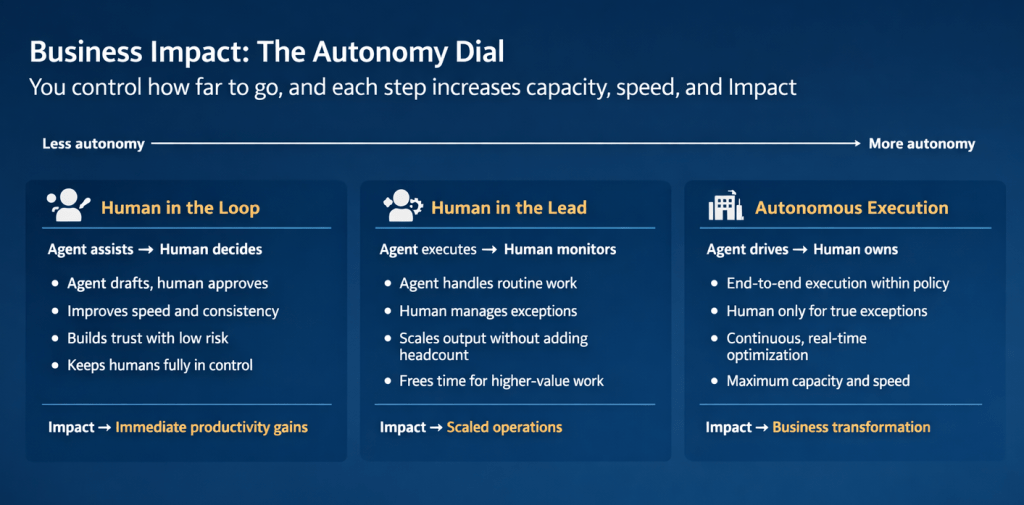
One of the most practically useful concepts introduced in this webinar is what Oracle calls the Autonomy Dial. It’s a spectrum with three positions, and it addresses one of the most common concerns I hear from customers and consultants: how much control do we give up?

At the “Human in the Loop” end, the agent assists and a person decides. The agent drafts, recommends, and prepares; the human reviews and approves. This builds trust, improves speed and consistency, and keeps people firmly in control. The business impact is described as immediate productivity gains.

In the middle is “Human in the Lead”, where the agent executes and a person monitors. The agent handles routine work and manages to policy; a person steps in for genuine exceptions. This scales output without adding headcount and frees teams for higher-value work. The impact here is scaled operations.

At the “Autonomous Execution” end, the agent drives and a person owns. End-to-end execution happens within policy, continuous real-time optimisation takes place, and human involvement is reserved for true exceptions. The impact is described as business transformation.

What I find compelling about this model is that it isn’t prescriptive. Oracle isn’t saying every organisation should start at one end or aim for the other. Each position on the dial represents a valid operating model depending on the process, the risk tolerance, and the maturity of the organisation. A payroll close process might comfortably sit at Human in the Lead. A workforce scheduling decision for a critical shift might warrant Human in the Loop until confidence is established. A high-volume procurement matching task might be a good candidate for Autonomous Execution relatively quickly.

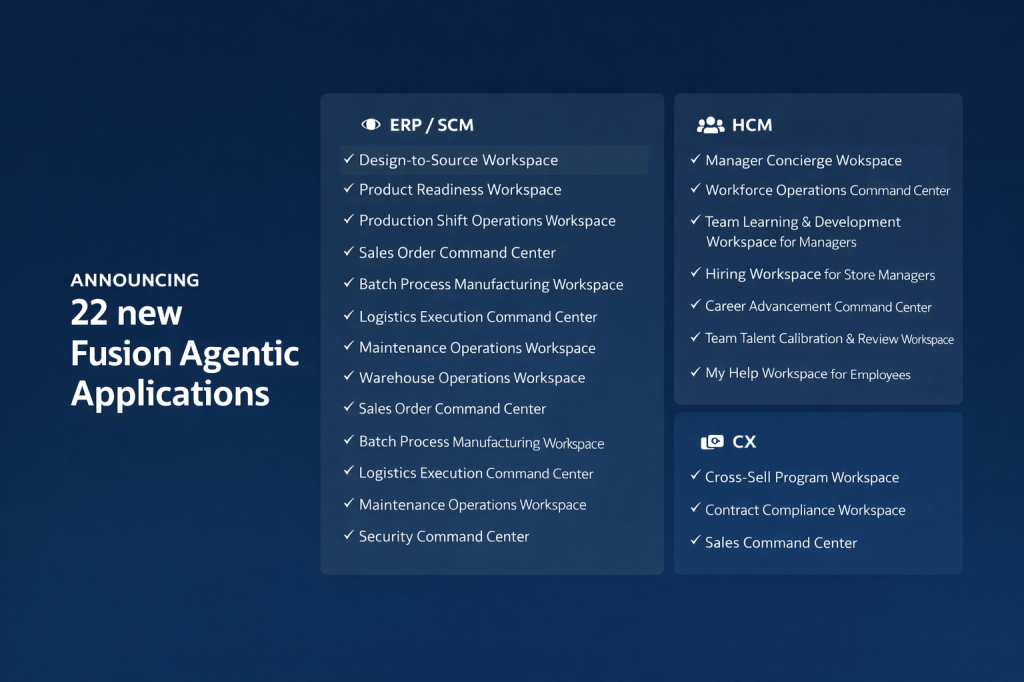
My earlier posts covered the eight HCM applications in detail. The full announcement of 22 applications in releases 26B / 26C spans ERP/SCM, HCM, and CX, and it’s worth understanding the breadth of this, because it signals how Oracle is positioning agentic across the entire Fusion suite rather than as an HCM-specific capability.

On the ERP and SCM side, the applications include Design-to-Source Workspace, Product Readiness Workspace, Production Shift Operations Workspace, Sales Order Command Centre, Batch Process Manufacturing Workspace, Logistics Execution Command Centre, Maintenance Operations Workspace, Warehouse Operations Workspace, Cost Accounting Close Workspace, Sourcing Command Centre, Collectors Workspace, and Security Command Centre.

The Design-to-Source Workspace is a useful example of the transformation logic. Previously, product design and bill of materials work happened in separate systems. Sourcing relied on items entered manually. Negotiation delays accumulated when information was missing or unresolved. With the agentic application, product specifications translate automatically into qualified supplier lists, bills of materials are generated directly from CAD files, at-risk negotiations are flagged automatically, and bids are evaluated across cost, lead time, quality, and risk in a single view. The outcome is faster time to market and improved sourcing cycle times.

On the CX side, three applications have been announced: Cross-Sell Program Workspace, Contract Compliance Workspace, and Sales Command Centre. For CX teams, the Sales Command Centre in particular brings together the kind of deal health monitoring, risk flagging, and next-step recommendation that previously required significant manual analysis across multiple reports.

I’ve written in detail about Oracle AI Agent Studio in previous posts, but the webinar highlighted several new capabilities that are worth calling out specifically, because some of them genuinely change what’s possible for teams building custom agentic applications.

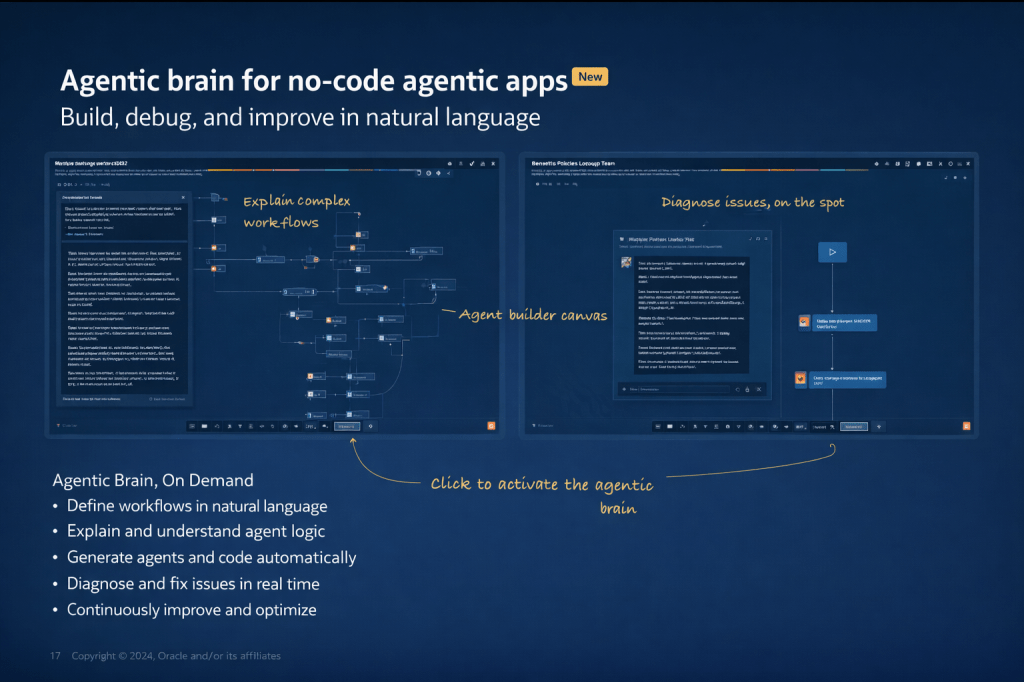
The most significant new addition is the Agentic App Builder, which is released in 26C. This is what Oracle describes as a “no-code agentic brain”: you describe your objective in natural language, the system explains and builds the workflow, generates agents and the underlying code automatically, and allows you to diagnose and fix issues in real time. In the demo, a user types a description of a sales opportunity health and risk management app, and within moments a structured agentic application is assembled from reusable agents, with a Deal Summary Agent, a Risk Agent, a Customer Insights Agent, and a Process Agent already in place and connected. It’s a significant step forward from the existing builder experience.

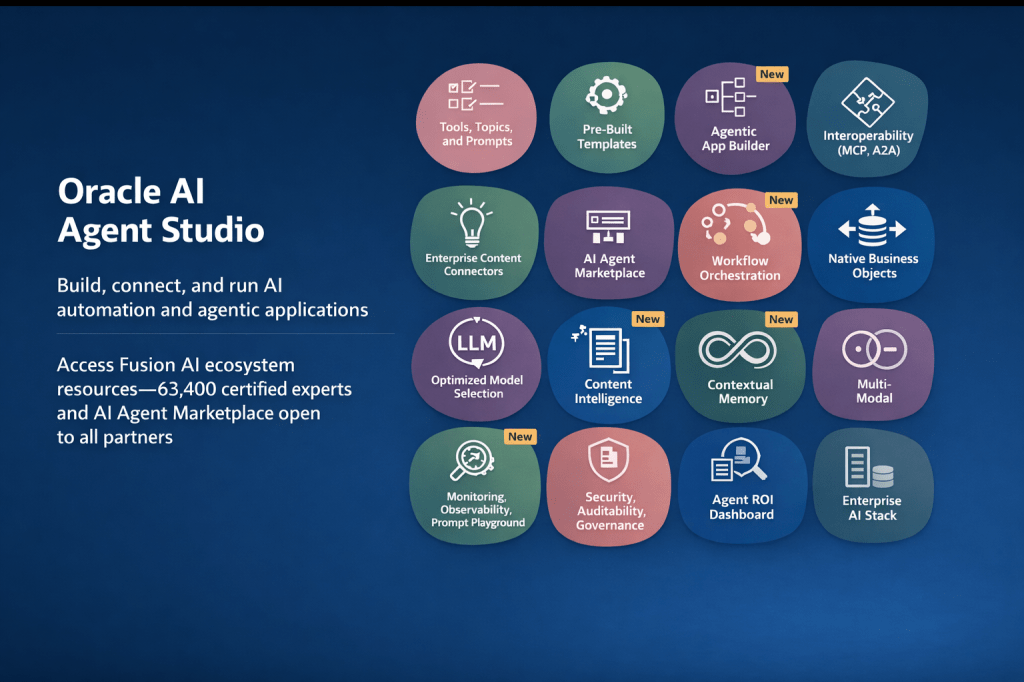
Alongside this, several other capabilities have been marked as new in the current release: Workflow Orchestration, Content Intelligence, Contextual Memory, Multi-Modal support, an Agent ROI Dashboard, and enhanced Security, Auditability, and Governance controls. Contextual Memory is worth paying attention to particularly, because it allows agents to retain information across interactions, which is what enables genuinely personalised, continuous support rather than stateless responses to each individual query.

The studio now also supports full interoperability through MCP (Model Context Protocol) and A2A (Agent-to-Agent) protocols, which means agents built in Fusion can exchange context with agents or tools running outside the Fusion estate, provided the appropriate governance controls are in place.

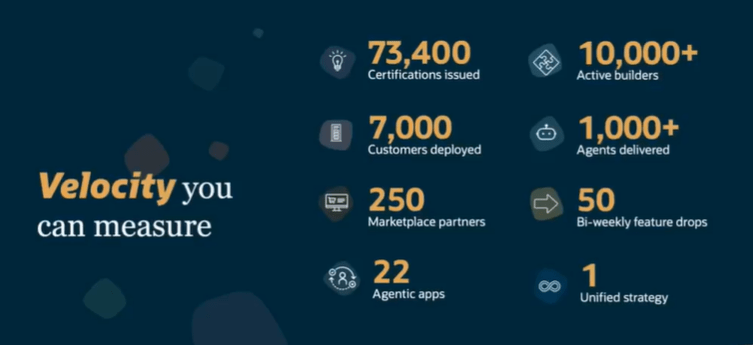
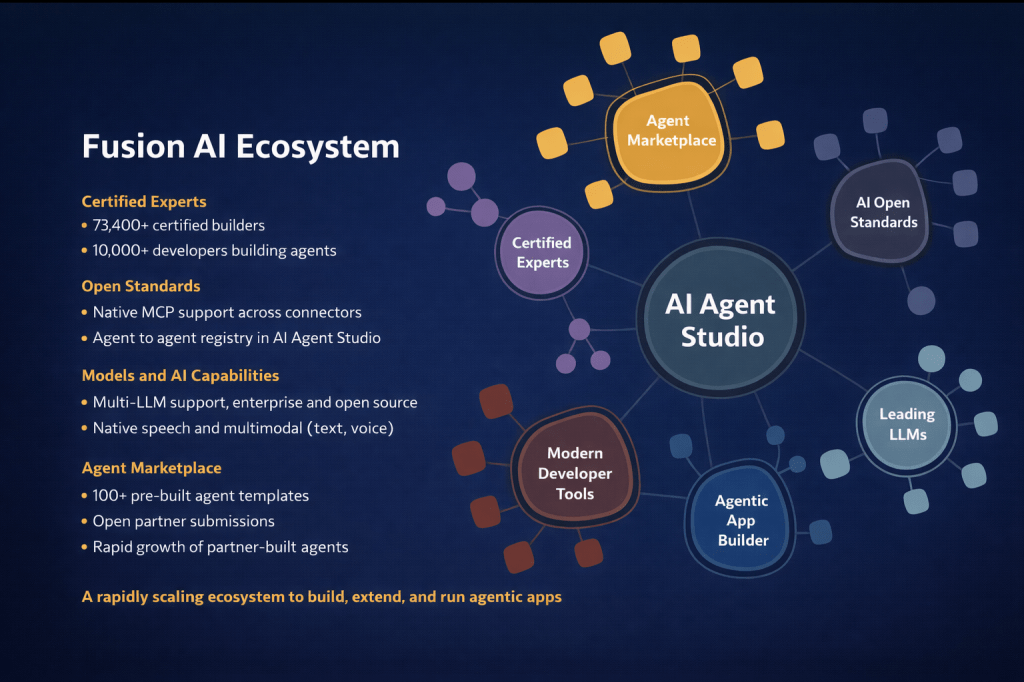
One thing the webinar made very clear is that Oracle isn’t building this alone. The Fusion AI ecosystem now includes 73,400 certified builders, 10,000 developers actively building agents, and over 100 pre-built agent templates in the AI Agent Marketplace, which is now open to all partners for submissions. Open standard support includes native MCP integration across connectors and an agent-to-agent registry within Oracle AI Agent Studio itself.

For customers, this matters because it means the pool of available agents and expertise is growing rapidly. You don’t need to build everything from scratch, and you don’t need to rely solely on Oracle to extend the platform. The open partner submission model for the marketplace is a meaningful shift, and it’s one that will accelerate the availability of domain-specific and industry-specific agents over the coming months.

The summary that Oracle closed with is a useful way to frame internal conversations: Fusion is moving from systems of record to systems of outcomes. Agentic Applications get work done. Oracle AI Agent Studio lets you build, deploy, and scale agents specific to your organisation. OCI AI Advantage runs it all securely at scale.

What I’d encourage any Fusion customer to take from this is that the window to start is now. The pricing model has already been simplified significantly (covered in my earlier post), the tooling to build and extend has matured substantially, and the evidence base from production deployments is solid. Starting with one application in one process area, positioned at Human in the Loop on the autonomy dial, is a low-risk, high-value entry point that builds organisational confidence while delivering measurable results.

If you’re thinking about where to start or how to make the case internally, I’m happy to talk it through. In the meantime, why not check out my earlier post on the HCM-specific Agentic Applications announced at AI World London? You can find it here. And if you missed the original announcement post covering the architecture, the maturity model, and the updated pricing, that’s a useful starting point too, and you can find it here.

Please note all screenshots are the property of Oracle and are used according to their Copyright Guidelines
A Day with Oracle: AI Success Navigator and Guided Learning Partner Enablement

Today I had the opportunity to attend and present at a partner enablement event hosted by the Oracle AI Success Navigator product team, focused on how partners like Version 1 can best use Oracle’s tooling to bring genuine, measurable value to our customers. The session brought together presentations, product demos, hands-on labs, and open discussion, covering Oracle Cloud Success Navigator and Oracle Guided Learning (OGL). It was a useful day, and I wanted to share some of the key takeaways while they’re fresh.

If you haven’t come across Cloud Success Navigator yet, it’s Oracle’s digital engagement platform, provided free to Oracle Fusion Cloud customers, designed to help organisations design, implement, and accelerate their cloud and AI roadmaps. It sits at the centre of Oracle’s broader AI Factory offering, which Oracle launched as a bundled set of partner and customer services aimed at speeding up AI adoption.
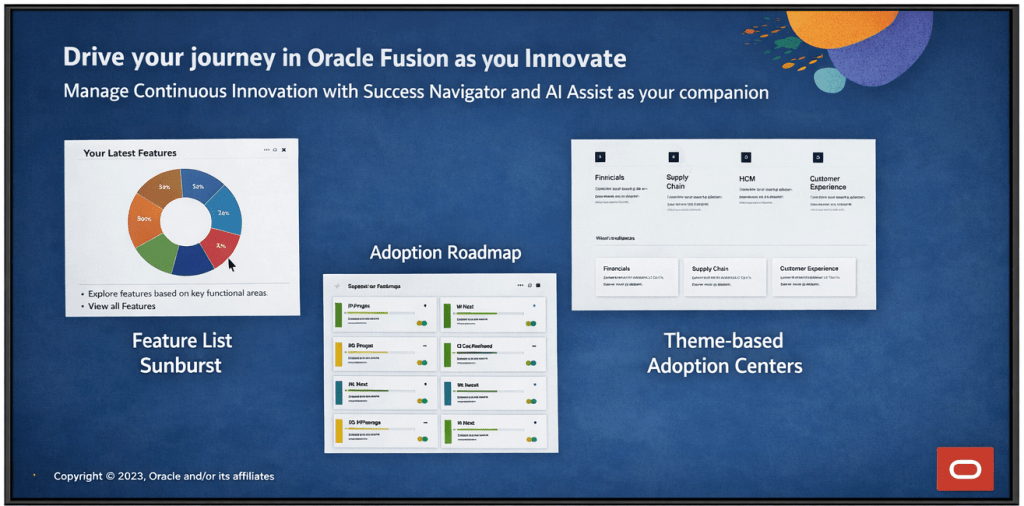
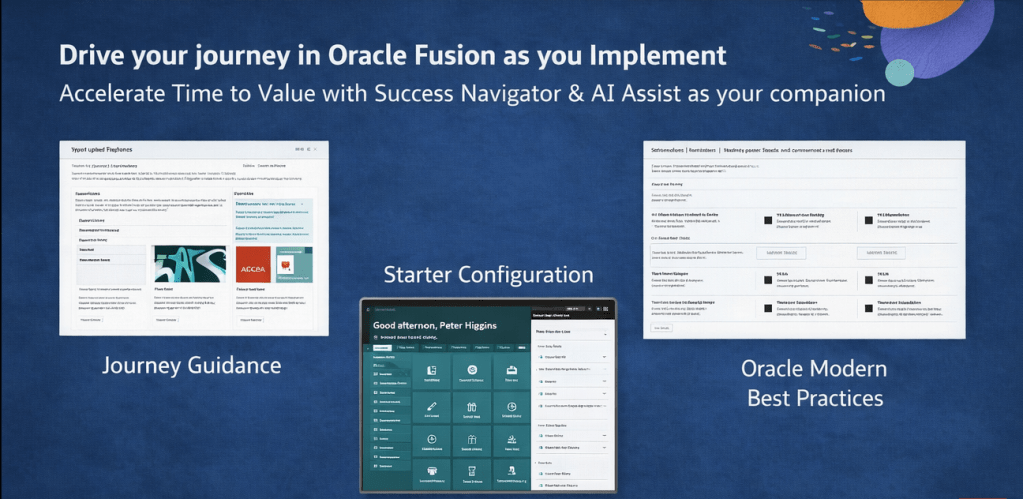
At its core, Cloud Success Navigator gives customers a single place to discover new features, plan adoption, track key milestones, and access Oracle Modern Best Practice (OMBP) guidance. The sunburst visualisation is particularly useful: it surfaces relevant features based on your production profile, so your team isn’t wading through capabilities that don’t apply to your configuration. You can tag features across Now, Next, and Later columns, which gives a clean, structured view of your innovation roadmap.
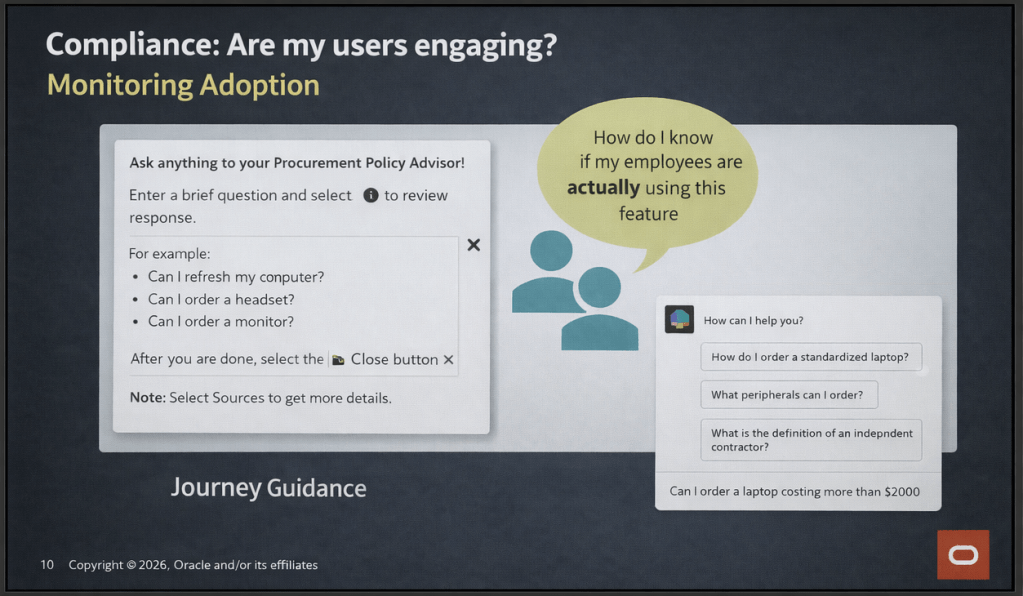
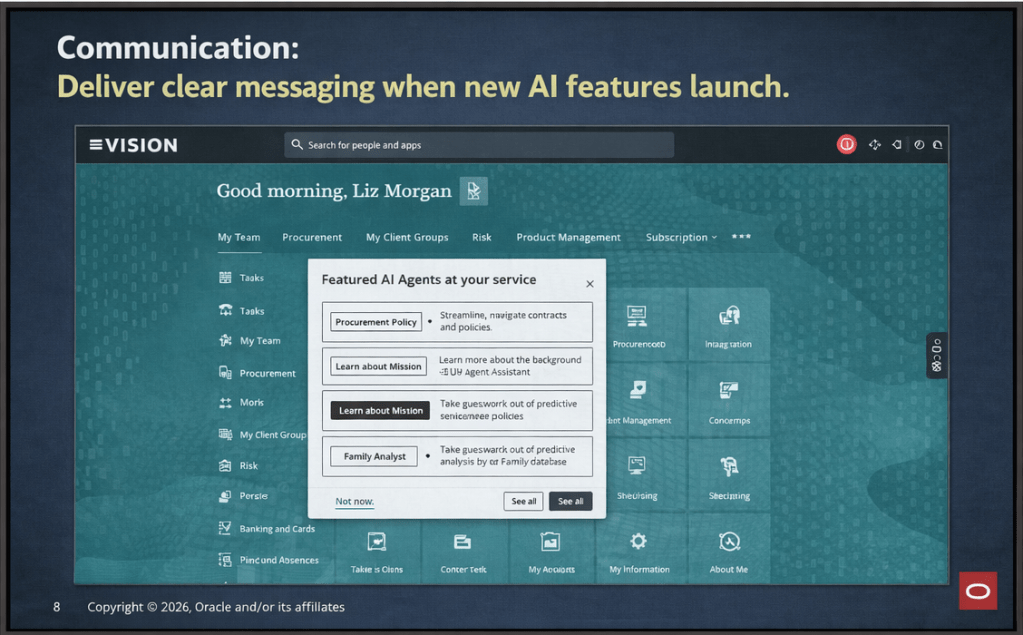
A significant addition to the platform is AI Assist, which was made generally available in late 2025. AI Assist is a generative AI-enabled assistant embedded throughout Navigator. It goes beyond a standard chatbot: it provides tailored recommendations, surfaces relevant documentation, highlights release roadmap changes based on your context, and flags project milestone risks. For partners, the practical implication is that our customers now have a self-service layer of intelligent guidance that can accelerate feature discovery and planning without always needing to raise a support request or wait for a consultant touchpoint.

How should Partners be using Success Navigator? This was, for me, the most valuable part of the day. The Oracle product team was clear that Navigator is not just a tool for customers to log into independently. The expectation is that partners should be actively bringing Navigator into their delivery model, whether that’s during implementation, post go-live optimisation, or ongoing managed service.

In practice, that means a few things. During implementation, your partner should be walking you through Navigator as part of onboarding, not treating it as a nice-to-have that gets mentioned at the end of a project. Feature planning sessions are more productive when they’re anchored in Navigator’s release data and OMBP content, rather than relying on spreadsheets or static documentation that goes out of date.

Post go-live, Navigator becomes a continuous value tool. The AI Assist agents can help customer teams stay ahead of quarterly release content, plan for Redwood migration milestones, and identify AI features that fit their production profile. Partners who are actively guiding their customers through this ensure their customers are in a much stronger position than those who are leaving customers to self-serve without direction.

One thing to note: Oracle has indicated that the platform continues to evolve, with enhancements planned around streamlined account management for customers with multiple accounts and improved programme management views. It’s worth keeping an eye on the in-application release announcements for Navigator itself.

The second major focus of the day was Oracle Guided Learning (OGL), Oracle’s digital adoption platform (DAP) built natively for Oracle Cloud applications. OGL delivers in-application guidance, directly overlaid onto the Oracle Fusion interface, so users get real-time, contextual help without having to leave the system or refer to separate documentation. The core capabilities OGL brings to a customer environment are worth spelling out clearly, because I still encounter organisations that underestimate what the platform can do.

Process guides provide step-by-step walkthroughs for complex transactions, walking a user through the exact steps required to complete a task within the application. Smart tips and beacons offer contextual pop-up hints and visual cues at key points in the UI. The Help Panel gives users access to self-service guidance and documentation from within the application. In-app messaging allows administrators to send announcements, policy updates, and maintenance communications directly to users as they work, rather than relying on email campaigns that often go unread. Analytics then close the loop: OGL captures how users are engaging with content, where they’re dropping off, and which features or processes need additional guidance investment.

What’s particularly relevant for customers right now is the AI integration within OGL. The OGL 26A release introduced generative AI capabilities into the content authoring experience: content developers can use an AI assistant within the Full Editor to generate and rephrase step text for process guides, smart tips, beacons, and messages. This significantly reduces the time needed to build and maintain a library of guides, which has historically been a barrier to adoption on smaller or resource-constrained engagements.

OGL also extends beyond Oracle applications. It can be deployed across third-party applications including Salesforce, ServiceNow, Microsoft SharePoint, and others, which is useful context for customers running a mixed application estate.

A thread running through both topics today was change management, and it’s one that I think partners sometimes treat as a soft add-on rather than a structural part of delivery. The reality is that both Navigator and OGL exist precisely because technology adoption is a change management problem as much as a technical one.

Navigator gives you the roadmap visibility and planning structure to keep customers engaged with what’s coming and why it matters. OGL gives you the in-application mechanism to reinforce new behaviours, communicate changes, and support users at the moment of need. Used together, they cover a significant portion of the adoption lifecycle: from feature discovery and prioritisation, through to in-system guidance and analytics-driven optimisation.

The enablement message from Oracle today was straightforward: partners who embed these tools into their delivery model are better placed to demonstrate continuous value to customers. Customers who have a structured adoption programme, supported by Navigator and OGL, tend to see higher feature utilisation and lower support overhead than those who treat go-live as the end of the engagement.

It was a practical and well-structured day. The Oracle AI Success Navigator product team clearly has a strong vision for how the platform should be used within the partner ecosystem, and the investment Oracle has made in AI Assist and the broader AI Factory infrastructure is evident. For those of us working in Oracle Fusion Cloud implementations and managed services, the message is clear: these tools are available, they’re free as part of the Oracle subscription, and using them well is increasingly a differentiator in how we position value to our customers.

If you’re currently working on an Oracle Fusion Cloud engagement and you haven’t had a detailed look at what Cloud Success Navigator and OGL can offer, now is a good time to start that conversation.

Please note all screenshots are the property of Oracle and are used according to their Copyright Guidelines