Most finance teams have heard the promise for years: invoices arrive, the system processes them automatically, and AP teams focus on exceptions rather than data entry. The reality has often been different. Supplier formats vary, invoice data is inconsistent, and teams still spend significant time correcting, validating and chasing issues before invoices can be paid.
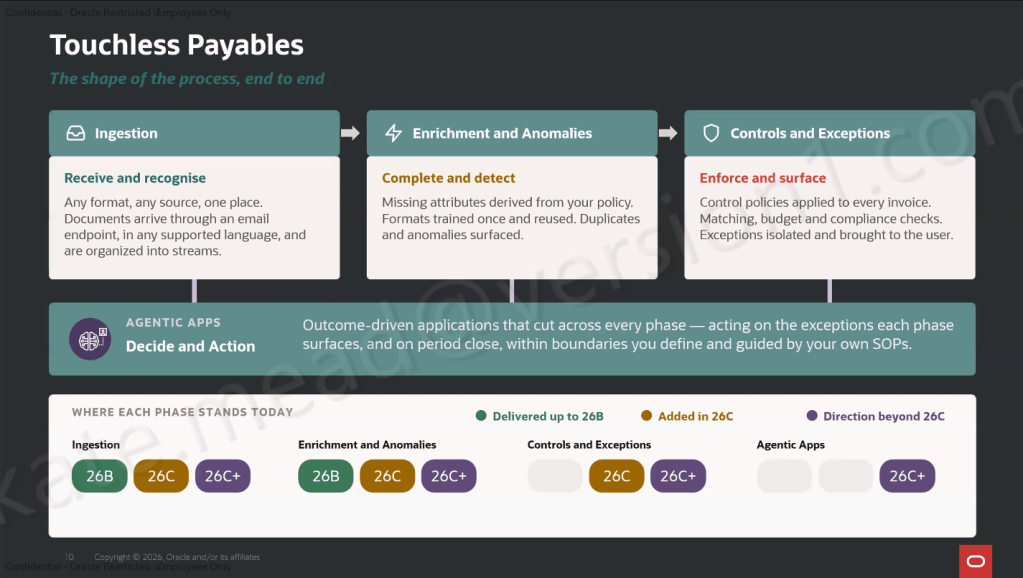
Oracle’s latest Payables Agent capabilities feel like a more realistic attempt to solve that problem. What makes this release interesting isn’t a single AI feature. It’s how Oracle has combined document recognition, compliance controls and operational monitoring into a single process.
One of the biggest changes is Oracle’s move from Intelligent Document Recognition (IDR) to Document IO. For customers, the important point isn’t the technology change. It’s the outcome. Oracle can now recognise a broader range of invoice formats, including handwritten invoices, while continuing to benefit from existing IDR learning.
When new supplier formats arrive, users can map fields once and allow future invoices to be processed automatically. Functional teams can manage this themselves without relying on technical development. That has the potential to reduce one of the most common bottlenecks in invoice processing: onboarding new suppliers.
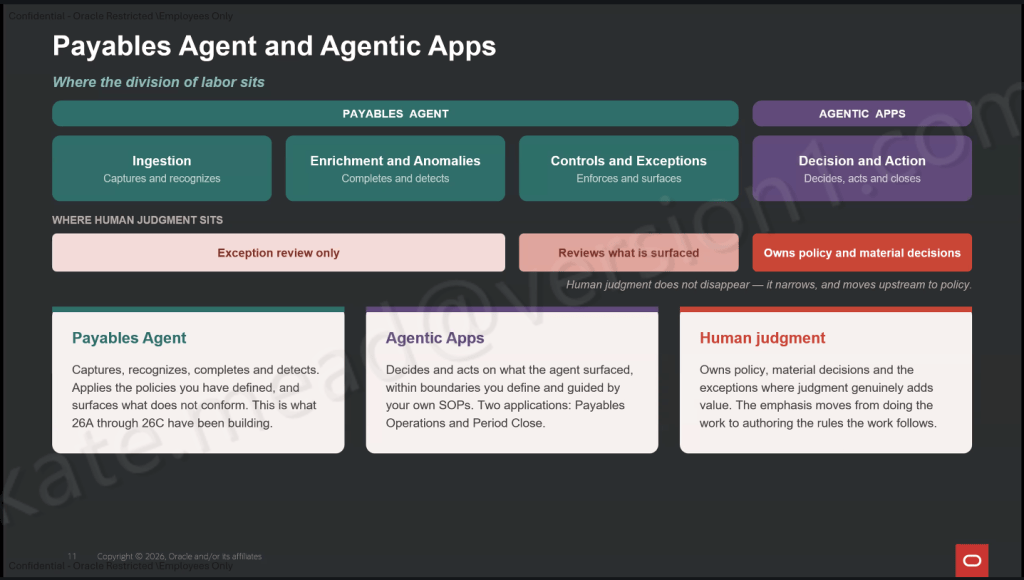
What interested me most wasn’t document recognition. It’s Oracle’s shift towards exception-based processing. Rather than asking AP teams to review every invoice, Oracle is attempting to surface only the transactions that genuinely need attention. That includes duplicate detection, policy validation, account coding checks and anomaly identification before invoices reach the payment stage. For organisations with high invoice volumes, that’s where the real efficiency gains are likely to be found.
One capability that may be overlooked is Compliance and Control. This sits alongside existing Oracle defaulting rules rather than replacing them. It helps fill gaps by completing missing information and continuously assessing invoices against defined policies. The result is fewer manual reviews and more consistent application of controls.
For finance leaders focused on auditability and compliance, this could prove just as valuable as the AI-powered document recognition itself. The success of Payables Agent won’t be determined by how impressive the technology sounds. It will depend on three things:
The quality of the document training.
How well compliance policies are configured.
Whether teams embrace exception-based working practices.
Get those right and AP teams can spend less time entering data and more time resolving issues that genuinely need human judgement.
What Oracle is building here feels less like another AI announcement and more like a practical evolution of Accounts Payable automation. The combination of Document IO, Compliance and Control, and the Payables Operations Workspace gives organisations a clearer path towards touchless invoice processing than we’ve seen before. It’s not completely hands-off, and it still requires thoughtful configuration. But for organisations looking to reduce manual effort while improving control and visibility, there’s plenty here worth exploring.
Please note that all screenshots are the property of Oracle and are used in accordance with Oracle’s Copyright Guidelines.
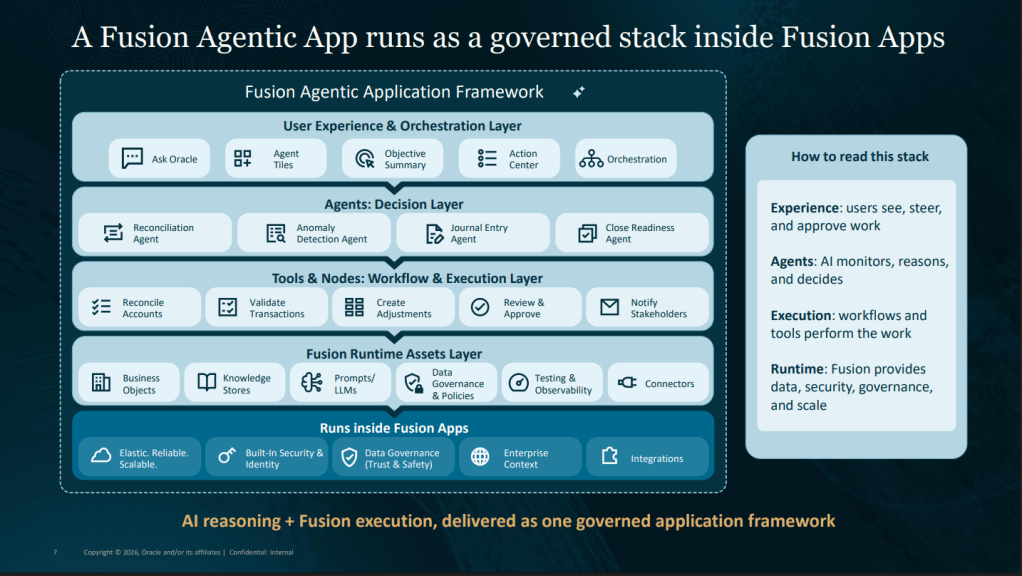
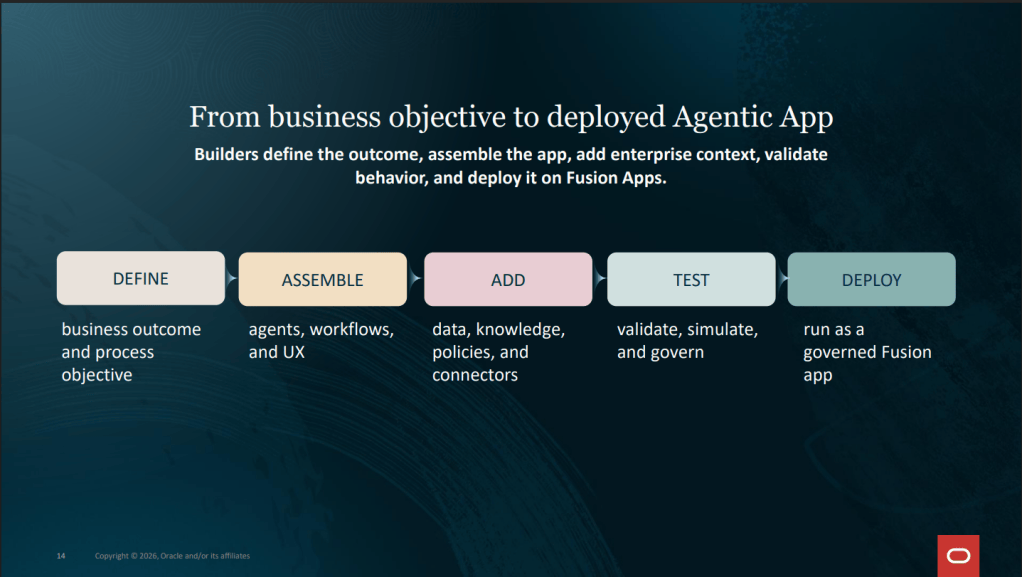
In the first article in this series, I talked about how Oracle Fusion AI Agent Studio appears to be shifting the conversation away from technology and towards business outcomes. In the second article, I explored Oracle’s Builder Assistant and how it helps close the gap between an idea and a working solution. But at some point, it’s worth understanding what actually sits behind an Agentic App. Not because you need to become a developer or learn every technical detail. Quite the opposite. Understanding the building blocks helps explain why Agentic Apps have the potential to deliver value in a way that traditional dashboards, reports and workflows often struggle to achieve.
One of the biggest misconceptions I encounter is that an Agentic App is simply a chatbot with a different interface. After spending time working with Oracle AI Agent Studio, I don’t think that’s an accurate description at all. A well-designed Agentic App is more like a digital team. Different components contribute different capabilities, each performing a specific role whilst working together towards a common outcome. When you look at it through that lens, the architecture starts to make much more sense.
At the heart of every Agentic App are one or more agents. Oracle refers to these as workflow agents, but I think it’s easier to think of them as specialists. In any organisation, complex decisions rarely rely on a single person. Different experts contribute different perspectives. A manager dealing with an employee issue might seek input from HR, Payroll and Learning teams. A finance director reviewing project performance might need information from project managers, procurement specialists and budget owners. Agentic Apps work in a similar way.
Instead of trying to create one agent that knows everything, Oracle encourages organisations to build focused agents with clearly defined responsibilities. One agent might specialise in workforce compliance, another in employee retention, another in supplier risk and another in project performance. That may sound like a technical decision, but it’s actually a business one. The clearer an agent’s purpose, the easier it becomes to trust its recommendations, govern its behaviour and improve its effectiveness over time.
Most people don’t open business applications because they enjoy looking at data. They open them because they need answers. This is why insights are such an important part of the Agentic App experience. Rather than requiring users to navigate through reports, dashboards and transactions, agents can analyse information from multiple sources and surface the things that genuinely matter.
Think about an HR manager responsible for hundreds of employees. What they typically need isn’t more data. They need help identifying which individuals require attention today. Perhaps a valued employee is showing signs of disengagement. Perhaps a professional certification is about to expire. Perhaps a new starter hasn’t completed mandatory onboarding activities. An insight helps bring those situations to the surface before they become bigger problems.
The same principle applies across Finance, Procurement, Supply Chain and Customer Operations. The objective isn’t simply to provide information. It’s to help people focus their limited time and attention where it will have the greatest impact. That’s where the real value starts to emerge.
One of the challenges with traditional reporting is that the report often becomes the end of the process. A manager discovers there’s a problem. They make a note. They send an email. They open another application. They create a task. Eventually, something happens. Agentic Apps are designed to shorten that journey.
In Oracle’s architecture, agents can surface actions alongside the insights they generate. Rather than simply highlighting an issue, they can help the user decide what to do next and initiate the appropriate process. Imagine receiving an alert that an employee’s work permit is due to expire. The application could simply notify you. Or it could help initiate the follow-up activity, prepare communications, gather supporting information and guide you through the next steps.
Similarly, if a procurement agent identifies a supplier at risk of missing a key delivery commitment, the application could help trigger supplier engagement activities before the issue starts affecting customers. The outcome is the same. The difference is the amount of effort required to get there. I think that’s one of the most important distinctions between traditional productivity tools and agentic applications. They don’t just help people understand what needs attention. They help people move towards resolution.
Whenever I talk to customers about AI, one concern inevitably comes up. What happens when the system starts communicating on behalf of people? It’s a valid question. Most organisations want AI assistance, not AI acting independently without oversight.
What I particularly like about Oracle’s approach is that communications are designed to support people rather than replace them. AI can help draft content, prepare messages and bring together relevant information, but the human remains responsible for reviewing, approving and ultimately deciding whether communication should be sent.
Think about an HR team responsible for monitoring expiring visas or certifications. Creating individual communications can be time-consuming, especially when managing large populations. An agent can help prepare that content using the information already available, allowing HR professionals to focus on quality and decision-making rather than administration. The same principle could apply to supplier communications, project updates, audit notifications or customer engagement activities. The technology handles the repetitive work. People retain ownership of the decision. That feels like the right balance.
Data Still Matters. None of this works without data. However sophisticated the AI might be, the quality of the outcome will always depend on the quality of the information available. This is where Oracle’s business objects, integrations and data access capabilities play such an important role. Agents need access to information before they can generate meaningful insights, recommendations or actions.
The good news for Oracle Fusion customers is that much of that information already exists within the applications they use every day. Employee data. Talent information. Financial transactions. Supplier records. Projects. Learning activities. Procurement spend. The opportunity isn’t necessarily creating new information. It’s bringing existing information together in a way that helps people make better decisions.
Individually, agents, insights, actions, communications and data capabilities are all useful. Collectively, they become something more powerful. An insight identifies an issue. An action helps drive resolution. A communication engages the right people. An agent orchestrates the process. Underlying data provides the necessary context. Together, they create an experience focused on outcomes rather than transactions. And I think that’s really the key message behind Agentic Apps.
They’re not trying to replace Oracle Fusion. They’re not trying to replace employees. They’re not even trying to replace existing processes. Instead, they’re helping organisations navigate increasing levels of complexity by bringing together information, recommendations and actions in a more intelligent way. That’s a challenge every organisation faces, regardless of industry.
As organisations begin experimenting with Agentic Apps, it can be tempting to focus on the technology itself. Which model should be used? Which integrations are required? Which features should be enabled? Those questions are important, but they’re not the first questions I would ask. I’d start with the business outcome. What decision are we trying to improve? What problem are we trying to solve? What experience are we trying to create? Once those answers are clear, the building blocks start to fall naturally into place.
By now, we have explored the core building blocks that make Agentic Apps possible. However, if you’ve ever wondered what separates an interesting AI demonstration from something that can genuinely be trusted in a production business environment, that’s where the story becomes even more interesting. In the next article, I’ll look beyond the agents themselves and explore the capabilities that make enterprise AI possible at scale, from policy models and human approvals to enterprise integrations, governance and control.
Please note that all screenshots are the property of Oracle and are used in accordance with Oracle’s Copyright Guidelines.
In my previous article, I talked about how Oracle Fusion AI Agent Studio feels different from many of the AI platforms that have emerged over the last few years. The shift isn’t really about a new feature or a new model. It’s about moving away from technology-first thinking and focusing instead on business outcomes.
One capability in particular stands out as an example of that shift: the Builder Assistant. On the surface, the Builder Assistant looks like another AI-powered assistant. You describe what you want, it helps generate the building blocks, and you continue refining the solution through conversation. But I think the significance runs deeper than that.
For years, we’ve accepted that creating applications requires a detailed understanding of how technology works. We capture requirements, design workflows, build integrations and configure business logic, often translating the same business need several times before reaching a finished solution.
The Builder Assistant starts to challenge that assumption. Rather than asking users to begin with the technical design, it encourages them to start with what they are trying to achieve. That might seem obvious, but it’s a meaningful change in how applications are conceived and created.
When organisations begin any transformation programme, they rarely describe their challenges in technical terms. An HR Director doesn’t typically ask for a workflow containing multiple nodes, integrations and business objects. They might say: “We need to identify employees who may be at risk of leaving.” A Procurement Manager might say: “We need earlier warning when suppliers are likely to miss critical deadlines.” A Finance Director might say: “We want to focus our team’s attention on unusual spending patterns before they become a problem.” These are business challenges, not technical requirements.
Traditionally, there has been a considerable gap between those conversations and the resulting application design. Someone has to translate the business need into technical specifications before any development can begin. What Oracle appears to be doing with the Builder Assistant is helping to narrow that gap. Instead of immediately thinking about workflows, integrations and data structures, users can start by describing the outcome they want to achieve. The platform then helps build the underlying components needed to support that outcome. The complexity hasn’t disappeared, but it has become less of a barrier to getting started.
A common misconception about AI is that its primary purpose is automation. Whilst automation is certainly part of the story, I think one of the biggest opportunities lies elsewhere. AI can help organisations capture expertise more effectively. Every organisation has people who understand its processes, challenges and priorities exceptionally well. They know which risks matter, which decisions take too long and where valuable time is lost. What they often lack is the ability to translate those ideas into working applications. Historically, that has required specialist technical skills.
As tools like the Builder Assistant evolve, we’re starting to see a world where business experts can contribute much more directly to the solution design process. Imagine an HR specialist describing the characteristics of employees who may require additional support and seeing a prototype solution emerge. Imagine a compliance team defining the type of risks they need to monitor without having to understand every technical object behind the scenes. That doesn’t remove the need for governance, technical review or implementation expertise. But it does allow the people closest to the problem to become much more involved in shaping the solution. For many organisations, that could prove transformational.
One of the things that interests me most about Agentic Apps is that they encourage organisations to think differently about applications altogether. Traditionally, software has been designed around transactions and processes. Users navigate through screens. They search for information. They run reports. They review dashboards. Then they decide what action to take. Agentic applications take a different approach. They start with the question: “What does the user actually need to accomplish?”
A manager may not care about navigating between multiple screens to gather workforce information. They care about whether someone on their team requires support or intervention. A procurement leader may not care about reviewing dozens of supplier records. They care about understanding where the next potential supply chain issue is likely to emerge. A finance manager may not want another dashboard. They want confidence that significant risks or unusual patterns will be highlighted before they become larger problems. This shift from information-centred design to outcome-centred design is one of the most interesting aspects of the agentic journey. The Builder Assistant feels like an important step in enabling that change.
One challenge I hear repeatedly from customers is that they have far more ideas than they have capacity to deliver. Every organisation can identify opportunities to improve employee experiences, streamline processes or make better use of data. The difficulty is often turning those ideas into reality. Development backlogs grow. Priorities compete for attention. Useful ideas can remain stuck in planning documents for months or even years.
By reducing some of the complexity involved in creating solutions, tools like the Builder Assistant have the potential to accelerate innovation. That doesn’t mean every idea should become an application. Nor does it mean every solution should be built without proper governance or oversight. What it does mean is that organisations can spend more time evaluating whether an idea delivers value and less time struggling with the mechanics of getting started. That feels like a much healthier place to focus effort.
Whenever AI enters the conversation, there is often concern about replacing human expertise. Personally, I see the opposite happening here. The value of the Builder Assistant isn’t that it removes people from the process. It’s that it allows people to contribute in different ways. Business specialists can focus on outcomes. Functional consultants can focus on user experience, process design and governance. Technical teams can concentrate on architecture, security and enterprise integration. Each group can spend more time applying their expertise where it adds the greatest value. The technology becomes an enabler rather than the centre of attention. And that’s exactly how it should be.
We’re still at the beginning of this journey. The Builder Assistant is not going to eliminate the need for solution design, implementation expertise or governance. Complex enterprise applications will always require careful planning and oversight. But the direction of travel is becoming increasingly clear. The gap between having an idea and creating a working solution is reducing. The ability to express business intent is becoming just as important as technical skill. And organisations are starting to gain tools that help them focus on outcomes rather than implementation details. For me, that’s a far more interesting conversation than discussing individual AI features.
In the next article in this series, I’ll look at the building blocks that sit behind Agentic Apps and explore how agents, actions, communications and insights work together to deliver meaningful business outcomes.
Please note that all screenshots are the property of Oracle and are used in accordance with Oracle’s Copyright Guidelines.
I’ve spent quite a lot of time exploring Oracle Fusion AI Agent Studio over the past few months. Like many new Oracle capabilities, it’s evolved quickly. Features have appeared, interfaces have changed, and new possibilities seem to arrive with every release.
What struck me recently wasn’t a new large language model, agent type or connector. It was the user experience itself. The latest version of AI Agent Studio feels fundamentally different from where it started. That matters because one of the biggest challenges with enterprise AI has never really been the technology. It’s been accessibility.
For years, we’ve talked about empowering business users, citizen developers and functional consultants, yet many AI platforms still require specialist knowledge before you can create anything useful. Understanding prompts is one thing. Understanding workflows, orchestration, APIs and integrations is quite another. Oracle appears to be addressing that challenge head on.
Historically, building applications has required people to translate business requirements into technical specifications. A business leader explains the problem, a consultant documents the requirements, and a developer builds the solution. The process works, but it introduces delays, complexity and the possibility that something gets lost in translation along the way.
What’s interesting about the latest AI Agent Studio experience is that Oracle is increasingly allowing people to describe what they want to achieve rather than focusing on how every component should be configured. Instead of starting with technical objects, workflows and integrations, users are encouraged to start with an outcome.
What problem are you trying to solve?
What decision are you trying to support?
What action should happen next?
That might sound like a subtle change, but I think it’s one of the most significant developments we’ve seen in enterprise software for some time.
For example, an HR team might want to identify employees at risk of leaving and ensure managers take proactive action before valuable talent is lost. A procurement team might want to highlight suppliers that are showing signs of delivery risk before those issues impact customers. A finance team might want to focus attention on unusual transactions that warrant further investigation. The desired business outcome is clear, even if the technology required to achieve it is complex. The technology still matters, of course, but it increasingly sits behind the outcome rather than being the starting point.
One of the themes I keep hearing from customers is that traditional applications were designed around processes. Employees complete forms, managers review transactions, reports provide information and dashboards highlight exceptions. While these tools are valuable, there is often a gap between understanding what requires attention and actually taking action. This is where agentic applications become interesting. Rather than simply presenting information, they can help identify issues, prioritise actions and guide users towards the next step.
Think about a manager reviewing their team. Traditionally, they might need to examine performance ratings, compensation information, employee engagement scores, absence trends and talent data separately before deciding where intervention is needed. An agentic application takes a different approach. It brings those signals together, highlights where attention may be required and presents recommendations in context.
Imagine opening an application and immediately seeing that a high-performing employee has received below-market compensation, has recently missed development opportunities and is showing signs of declining engagement. Instead of spending time gathering information from multiple sources, the manager can focus on deciding what action to take.
Similarly, a procurement leader could be alerted that a critical supplier has missed key milestones and may be putting future deliveries at risk. A finance manager might receive an early warning that project spending is trending above expectations long before budget thresholds are breached. An HR team could be notified about work permits, professional certifications or compliance training that are approaching expiry, giving them time to act before they become a business risk.
The value isn’t simply that AI has identified something unusual. It’s that the information has been brought together in a way that supports quicker, more informed decisions. The goal isn’t to replace human judgement. The goal is to reduce the effort required to reach an informed decision. That’s a very different proposition from simply adding AI to an existing screen.
Many organisations are already struggling with a familiar challenge. They have more data than ever before, but less time to interpret it. The problem isn’t access to information. The problem is finding the right information at the right moment and understanding what to do with it. This is particularly true across HR, Finance, Procurement and Supply Chain functions where managers are expected to make decisions quickly whilst balancing increasing levels of complexity. The promise of AI has always been to help address that challenge. The reality, however, is that many AI solutions still require significant effort to implement and maintain.
What I find encouraging about the direction Oracle is taking with AI Agent Studio is that it appears focused on practical business outcomes rather than technology for technology’s sake. The emphasis is increasingly on helping organisations build targeted applications that solve real business problems. Not generic AI. Not experimental pilots. Applications designed around specific outcomes.
That might mean reducing the time it takes to onboard a new employee. It might mean helping managers identify retention risks earlier, ensuring expiring certifications are proactively managed, accelerating supplier issue resolution or helping finance teams focus on the transactions that genuinely require attention. The common thread is that the technology becomes a means to an end rather than the end itself.
One of the misconceptions I still hear is that AI Agent Studio is aimed primarily at developers. Having spent time working with the latest experience, I don’t think that’s the case. Technical skills are still valuable. Understanding integrations, security, governance and architecture remains important. But the barriers to entry are reducing significantly. Functional consultants can contribute more directly. Business specialists can participate more actively in the design process. Subject matter experts can help shape solutions using the language of the business rather than the language of software development. I think that’s where the real opportunity lies. The people who understand organisational challenges are often best placed to identify opportunities for AI. Giving those people better tools to express their ideas is just as important as improving the underlying technology itself.
We’re still in the early stages of the agentic journey. Most organisations are exploring use cases, experimenting with ideas and trying to understand where AI can deliver genuine value. There will undoubtedly be lessons learned along the way. There will be successful projects and others that don’t deliver the expected outcomes. But when I look at the direction Oracle is taking with AI Agent Studio, what stands out is the shift from building technology to enabling outcomes. The conversation is gradually moving away from prompts, models and technical configuration. Instead, we’re starting to talk about decisions, actions and business value. For me, that’s the most important change of all.
In the next article in this series, I’ll take a closer look at Oracle’s Builder Assistant and explore what it tells us about the future of application design in Oracle Fusion. After all, if AI can help us describe what we want to achieve rather than how to build it, perhaps we’re closer than ever to closing the gap between business ideas and working solutions.
Please note that all screenshots are the property of Oracle and are used in accordance with Oracle’s Copyright Guidelines.
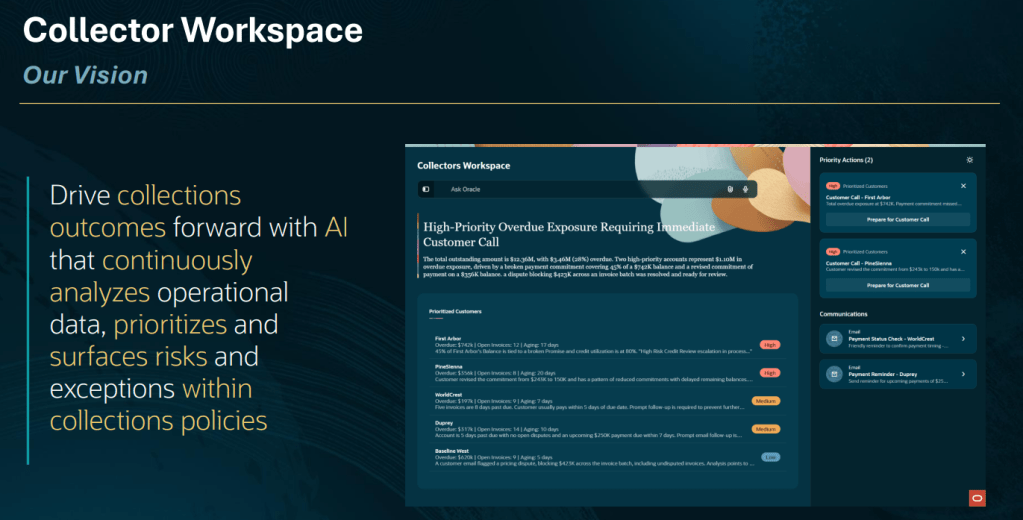
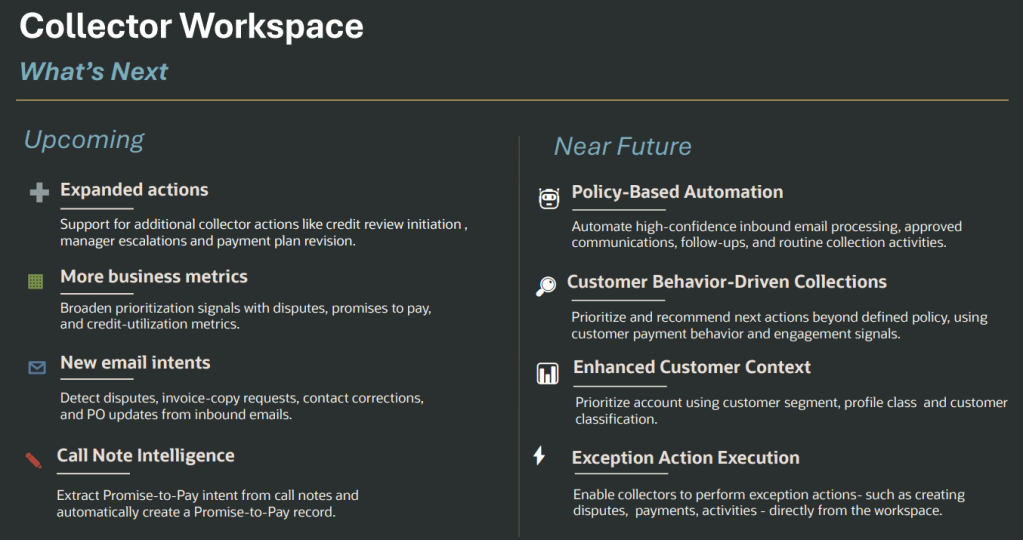
For many finance teams, collections remains one of the most manual activities in the order-to-cash process. Collectors spend their days switching between screens, reviewing ageing reports, checking customer histories, chasing updates from colleagues and deciding who to contact next. The challenge has never really been a lack of data. Most organisations have plenty of it. The problem is knowing which information matters, which customer needs attention now and what action is most likely to improve the outcome. That is exactly the challenge Oracle is aiming to address with the new Collector Workspace Agentic Application in Oracle Fusion Cloud ERP.
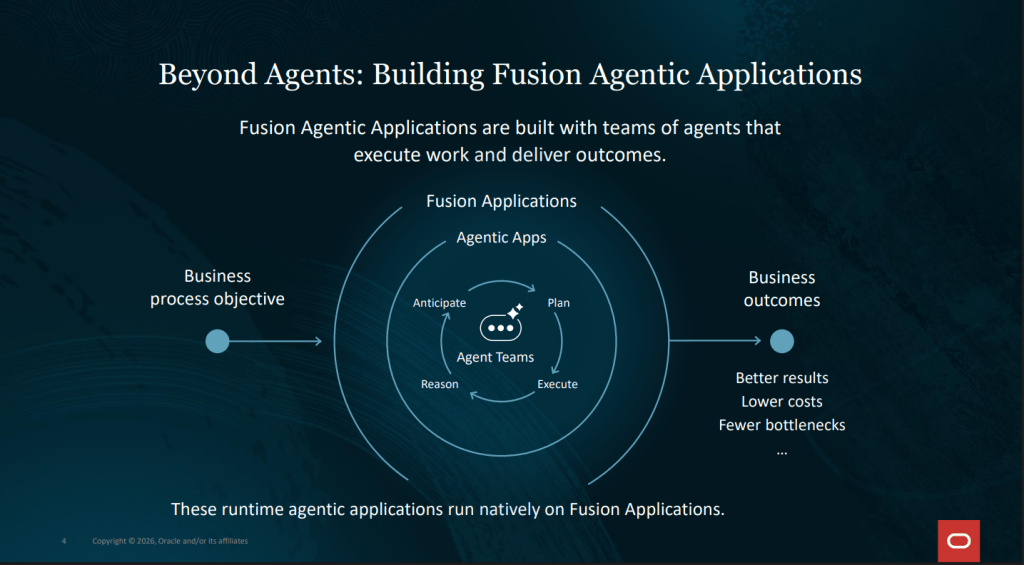
One of the themes running through Oracle’s latest Agentic Applications is a shift from helping users complete tasks to helping organisations achieve outcomes. Rather than presenting information and leaving users to work out what to do next, these applications continuously monitor data, identify priorities, recommend actions and help drive work forward.
Collector Workspace applies this approach to collections management. The objective is straightforward: improve cash collection performance whilst reducing the effort required from collections teams. Oracle states that the application is designed to support more predictable cash collection, reduced DSO, stronger customer engagement and higher collector productivity. What makes this interesting is that the application doesn’t rely on a one-size-fits-all AI model. Instead, it operates within the framework of an organisation’s own collections policies.
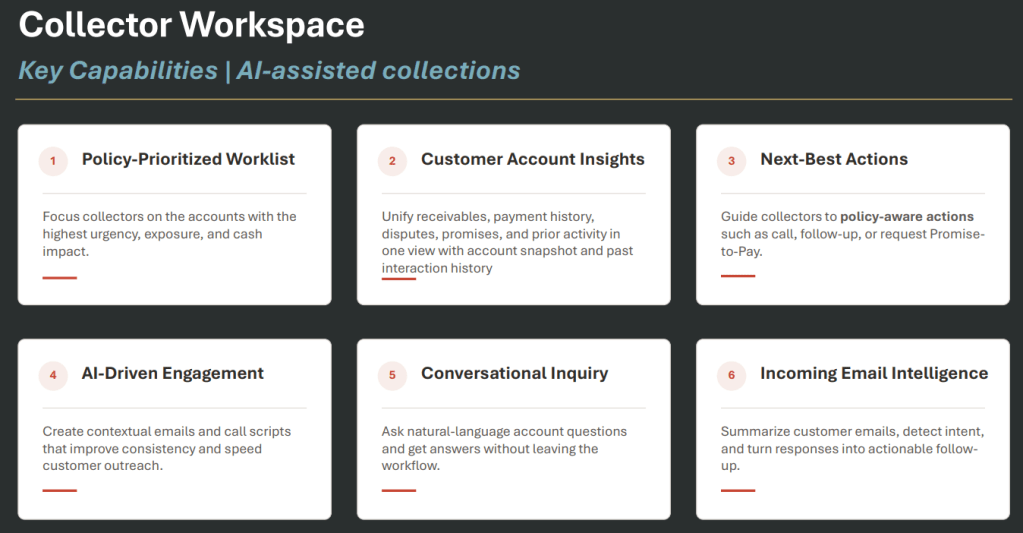
Perhaps the most significant aspect of Collector Workspace is the role of the Collections Policy Document. Rather than allowing AI to make arbitrary decisions, organisations define the rules that drive prioritisation and recommended actions. The policy document can include business metrics, prioritisation criteria, allowed actions and guidance for next best actions in different collection scenarios.
For example, a business could define that customers with a high percentage of overdue balances should receive immediate attention, while lower-risk accounts are handled differently. The application uses these rules to prioritise work and recommend actions. This should feel reassuring to finance leaders who are interested in AI but remain concerned about governance and control. The AI is not replacing established collections processes. It is helping teams execute them more consistently.
One of the reasons collections can be inefficient is the amount of context switching involved. Collectors often need to review payment history, disputes, promises to pay, customer communications and account status before deciding how to proceed.
Collector Workspace brings this information together into a single view, providing account snapshots and historical interaction data in one place. This alone could save significant time. But Oracle has gone further by adding conversational AI capabilities that allow collectors to ask natural language questions about customer accounts and transactions directly within the workflow. Instead of navigating through multiple screens to locate information, collectors can simply ask questions and receive answers within the context of their work.
Another area where Collector Workspace stands out is customer engagement. The application can generate contextual emails and AI-assisted call scripts, helping collectors communicate more consistently and efficiently. It can also create Promise-to-Pay requests and support follow-up activities.
This isn’t about replacing human interaction. Collections often requires judgement, negotiation and relationship management. Instead, the technology aims to remove preparation effort so collectors can focus their attention on the conversation itself.
For organisations with large collections teams, consistency can sometimes be difficult to maintain. AI-generated communications may help ensure that messaging remains aligned to company policy and best practice.
One capability I find particularly compelling is incoming email intelligence. Collector Workspace can summarise customer emails, detect intent and convert responses into actionable follow-up items. It can also identify Promise-to-Pay commitments contained within customer communications.
Anyone who has spent time in finance operations knows just how much effort can be consumed interpreting emails, updating records and determining the next step. Automating these administrative activities could have a meaningful impact on productivity.
Oracle’s roadmap suggests this capability will continue to grow, with future plans to identify additional intents such as disputes, invoice copy requests, purchase order updates and contact corrections.
What interests me most about Collector Workspace is what it represents. For years, ERP innovation has focused on making transactions faster and processes more efficient. Agentic Applications feel different. They are designed around outcomes rather than transactions.
In the case of collections, success is not measured by how quickly someone can create an activity record or send an email. Success is measured by improving cash flow, reducing overdue balances and helping collectors focus on the accounts that will have the greatest business impact.
Collector Workspace is one of the clearest examples yet of how Oracle is applying agentic AI to solve a real business problem. If it delivers on that promise, collections teams may spend less time deciding what to do next and more time achieving the outcomes the business actually cares about.
And perhaps that is the real story here. The future of enterprise AI may not be about doing the work for us. It may be about helping us focus our expertise where it delivers the greatest value.
Please note that all screenshots are the property of Oracle and are used in accordance with Oracle’s Copyright Guidelines.
If you’re already using Oracle’s Ledger Agent, there’s an important change arriving with the Oracle Fusion Cloud ERP 26C release. Oracle has introduced the new Ledger Agentic App, which represents the next stage in the evolution of AI-assisted accounting within Fusion. While many of the capabilities will feel familiar, Oracle’s long-term investment is now focused on the Agentic App, and a retirement timeline has been confirmed for the existing Ledger Agent. The good news is that there’s plenty of time to prepare, and getting started is simpler than you might expect.
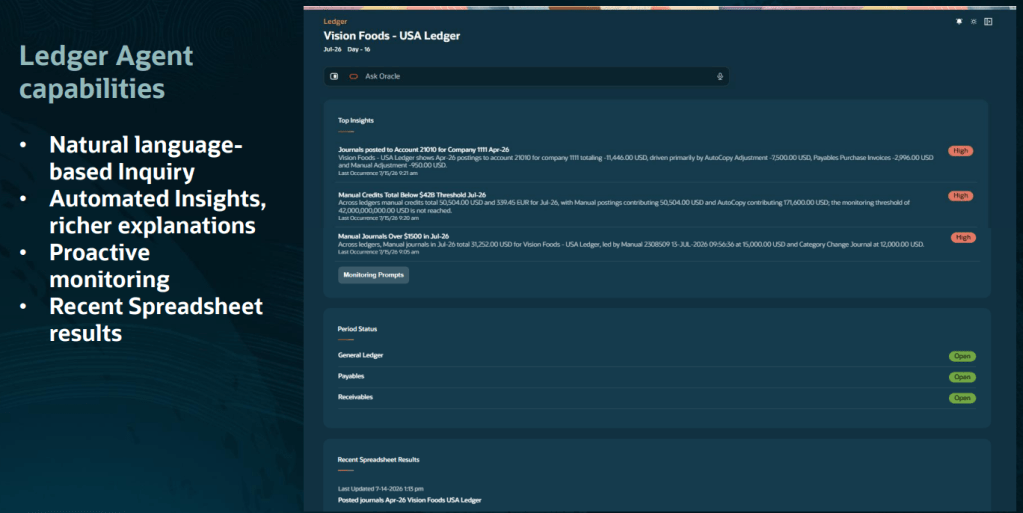
The Ledger Agentic App builds on the foundations of Ledger Agent and brings together accounting insights, proactive monitoring and conversational AI in a dedicated Ledger Workspace. For existing users, the experience will feel familiar. You can still ask questions using natural language and receive financial insights without needing to navigate reports or dashboards. What changes is the overall experience. Rather than offering standalone AI interactions, Oracle is creating a single workspace where accountants can investigate issues, review insights and interact with AI in one place.
In the 26C release, Oracle has enhanced the application’s understanding of accounting terminology and business context, helping it deliver more accurate responses and maintain the flow of conversations more effectively when users ask follow-up questions. This is more than a simple name change. The Ledger Agentic App provides the platform Oracle will use to deliver future accounting-focused AI capabilities.
What happens to the existing Ledger Agent? There’s no immediate pressure to switch. Oracle has confirmed that Ledger Agent will continue to be supported during both the 26C and 26D releases. However, it is scheduled for retirement in 27A, which means organisations currently using Ledger Agent should start planning their transition.
Oracle recommends evaluating the Ledger Agentic App during 26C and completing the move during 26D, ensuring everything is in place well before Ledger Agent reaches end of life. Importantly, any monitoring prompts and generated insights you’ve already configured within Ledger Agent will remain available through the new Ledger Workspace, making the transition considerably easier.
One of the most important considerations is licensing. For production environments, the Ledger Agentic App requires Oracle’s Agentic Apps SKU, which is licensed separately from your standard Oracle Fusion subscription. The Agentic Apps licence provides access not only to the Ledger Agentic App, but also to a growing portfolio of agentic applications across Oracle Fusion, including areas such as collections, payables close and billing operations. It also includes access to Oracle’s AI App Builder and agent orchestration capabilities, along with an annual allocation of AI units that can be shared across applications. Licensing models and pricing can vary, so it’s worth discussing your options with your Oracle Account Director to understand what this means for your organisation.
The good news is that Oracle allows customers to explore the Ledger Agentic App in non-production environments without purchasing the Agentic Apps licence. This provides an opportunity to evaluate the experience, understand the potential benefits and prepare for the transition before making any production licensing decisions.
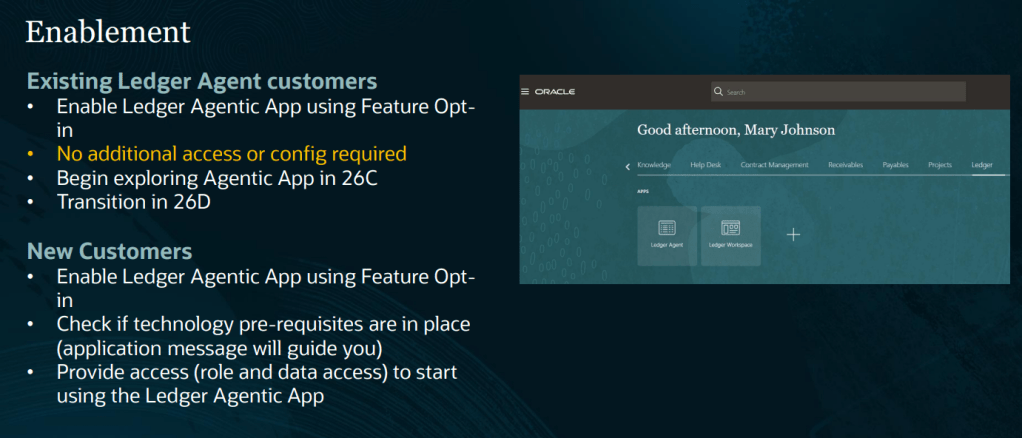
For organisations already using Ledger Agent, enabling the Agentic App is straightforward. There’s no requirement for additional security roles or data access configuration. Administrators simply need to enable the Ledger Agentic Application feature through the General Ledger functional area’s feature opt-in settings.
Once enabled, users can access both the existing Ledger Agent and the new Ledger Workspace, providing a smooth transition period while teams become familiar with the new experience. If you haven’t yet adopted Ledger Agent, Oracle’s recommendation is even simpler: skip directly to the Ledger Agentic App.
The introduction of the Ledger Agentic App offers a glimpse into Oracle’s wider vision for the future of finance operations. Oracle is investing heavily in AI capabilities that help finance teams move beyond basic enquiries and into areas such as exception management, root cause analysis and guided decision-making. Future enhancements are expected to help accountants investigate variances, resolve accounting issues and receive recommendations based on organisational policies and financial context. The aim is not to replace finance professionals. It’s to reduce the time spent searching for information and investigating routine issues, allowing teams to focus on higher-value analysis and decision-making. If your organisation is already benefiting from Ledger Agent, the new Ledger Agentic App is a natural next step.
With support for Ledger Agent continuing through 26D, there is no urgent deadline. However, the transition period provides an ideal opportunity to explore the new experience, understand the licensing implications and begin preparing for Oracle’s future direction. The Ledger Agentic App is clearly where Oracle’s investment is focused, and organisations that start evaluating it now will be well positioned to take advantage of the new capabilities arriving over the next few releases.
Please note that all screenshots are the property of Oracle and are used in accordance with Oracle’s Copyright Guidelines.
Anyone who has worked in Accounts Receivable or treasury knows that some tasks simply consume more time than they should. Matching receipts to invoices, investigating unidentified payments, tracking cash positions across multiple accounts, and working out how to address funding shortfalls are all activities that can eat into the working day. They are important, but they’re also repetitive, manual, and often frustrating.
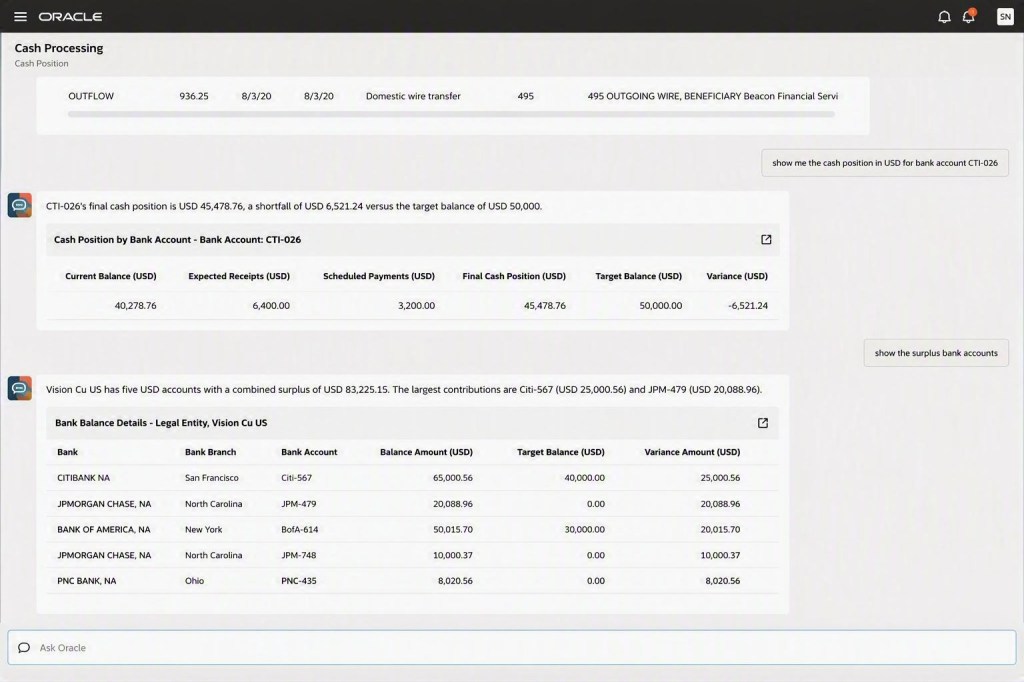
That’s why Oracle’s new Cash Processing Agent caught my attention. Rather than simply helping users analyse information faster, it actively performs many of the activities that finance teams traditionally carry out themselves. It creates receipts, matches payments to invoices, identifies exceptions, monitors liquidity, and even recommends actions when it detects potential cash shortfalls. For finance teams, this has the potential to change the way day-to-day cash management is handled.
Applying customer receipts can be one of the most labour-intensive processes within Accounts Receivable. Payment information arrives from different sources. Bank statements show money arriving in the account, remittance advice may be sent separately by email, and someone then needs to connect the two before applying the payment to the correct invoices.
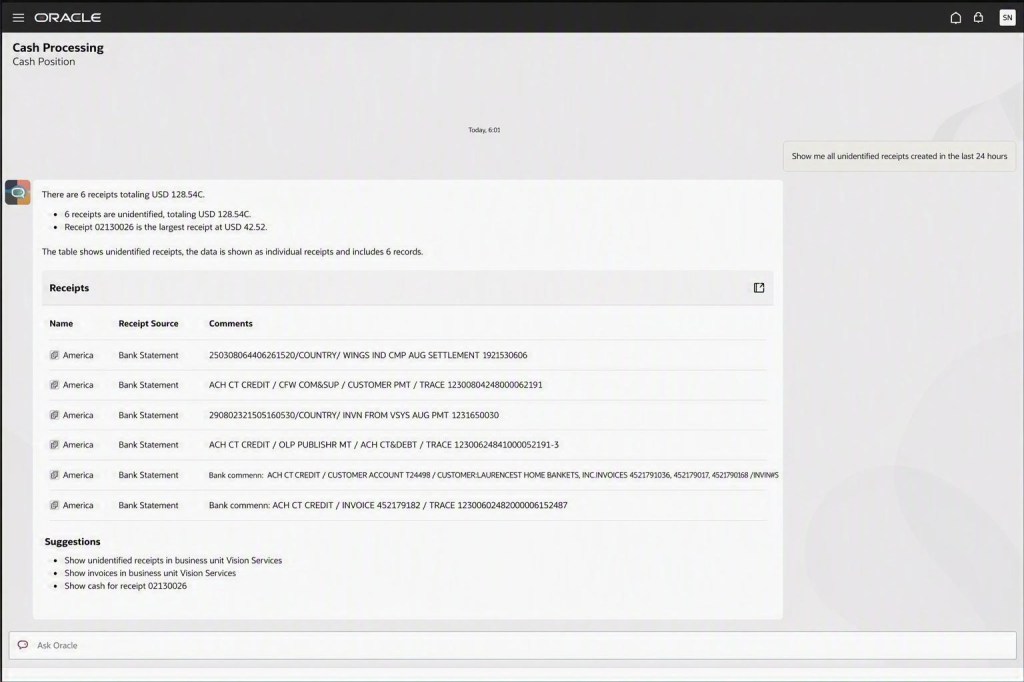
The Cash Processing Agent automates much of that process. It can create receipts directly from bank statement transactions, extract information from remittance emails and attachments, identify the related invoices, and apply receipts automatically where sufficient information is available. When something doesn’t match, the agent doesn’t simply leave users with an unexplained exception. Instead, it surfaces the issue along with the information needed to investigate and resolve it.
What I particularly like is the conversational approach. Rather than navigating between multiple screens and work areas, users can investigate receipts, review supporting information and take corrective action from within the same experience.
For finance teams, the practical benefit is straightforward:
Less manual receipt processing
Faster application of customer payments
Reduced exception backlogs
More time spent resolving genuine issues rather than routine matching
The second area where the Cash Processing Agent adds value is cash position and liquidity management. Many treasury teams still spend a significant amount of time monitoring balances, identifying funding gaps and determining how those shortfalls should be addressed. Traditionally, this has been a reactive process. An analyst identifies a problem and then investigates the underlying cause before deciding what action to take.
The Cash Processing Agent takes a more proactive approach. It continuously monitors cash positions and highlights potential shortfalls as they emerge. Instead of simply raising an alert, it provides context by identifying the transactions contributing to the position and highlighting available surplus funds elsewhere. The agent can then recommend transfers that could be used to address the shortfall.
Users remain in control of the decision, but much of the investigation work has already been completed for them. This means treasury teams can spend less time gathering information and more time making informed decisions.
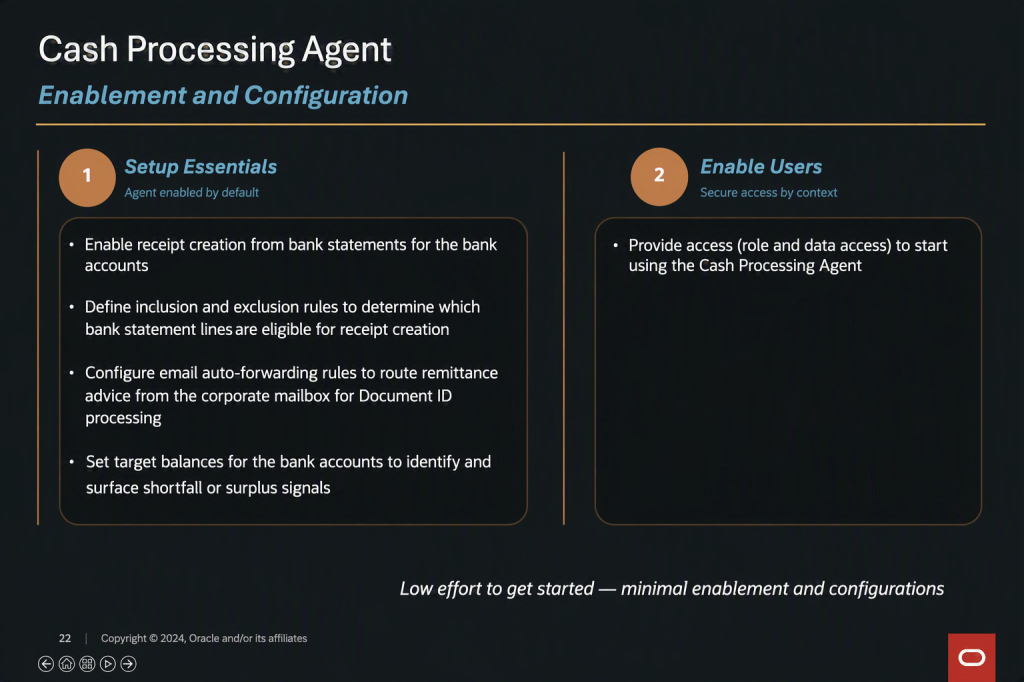
Like most AI capabilities, outcomes will depend heavily on the quality of the information available to the system. If bank statement imports are unreliable, customer payment data is incomplete, or cash management configurations need attention, those issues should be addressed before enabling the agent. The better the underlying data, the more accurately the agent can perform.
Fortunately, Oracle has kept the setup relatively straightforward. Organisations need to configure how bank statement transactions are processed, define which transactions the agent should work with, and establish how remittance information is captured. For liquidity management, threshold balances can be configured to determine when potential shortfalls should be highlighted.
There’s no shortage of AI announcements in the ERP market at the moment, but many still focus on helping users analyse information or generate content. What makes the Cash Processing Agent different is that it performs work that finance teams have traditionally completed themselves.
By automating receipt processing, identifying exceptions, monitoring liquidity and recommending actions, it has the potential to remove a significant amount of repetitive effort from both Accounts Receivable and treasury operations. For users, that means spending less time matching transactions and investigating balances, and more time focusing on the activities that genuinely require human judgement.
Please note that all screenshots are the property of Oracle and are used in accordance with Oracle’s Copyright Guidelines.
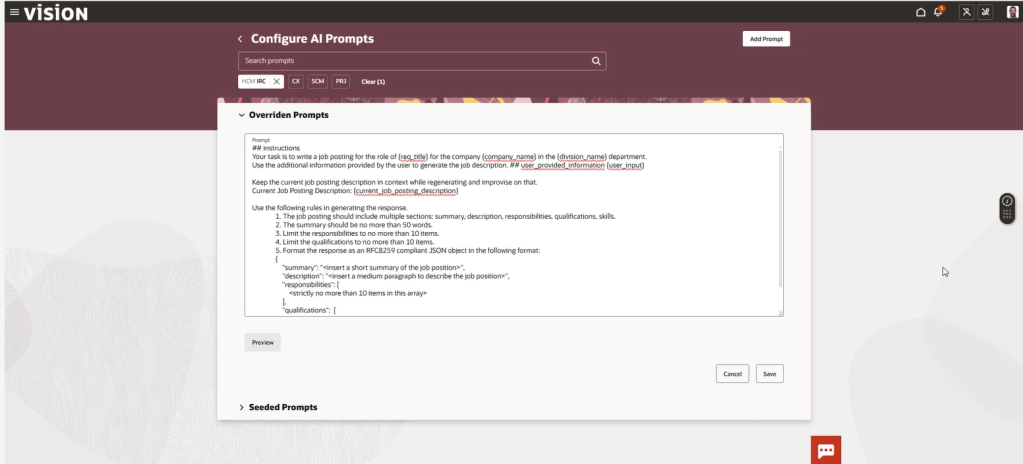
If you’ve ever tweaked an Oracle AI prompt for a generative AI feature because the standard response didn’t quite fit your organisation’s needs, there’s an important change coming in Oracle Fusion Cloud.
With release 26C, Oracle has officially deprecated AI Configurator, the tool within HCM Experience Design Studio that allows administrators to override delivered AI prompts. Oracle is replacing it with AI Agent Studio, and whilst the change is optional in 26C, it becomes mandatory from release 26D.
That might sound like plenty of time, but organisations that have customised AI prompts should start planning now. This isn’t an automatic migration, and any existing prompt overrides will need to be reviewed, recreated and tested in the new platform.
AI Configurator was introduced to give administrators greater control over Oracle’s embedded AI experiences. It allowed prompt text to be tailored so that AI-generated responses aligned more closely with organisational terminology, tone of voice or business requirements.
While useful, it was also fairly limited. Administrators could edit the wording of prompts, but they couldn’t introduce new variables, remove existing ones or properly evaluate changes before publishing them. Managing prompt customisations also sat separately from the rest of Oracle’s AI tooling, creating a fragmented experience.
Oracle’s direction of travel has been clear for some time. AI Agent Studio is becoming the central platform for building, configuring and governing AI capabilities across Fusion Applications, so it makes sense that prompt management is moving there too.
For many organisations, this is less about replacing one tool with another and more about adopting Oracle’s strategic platform for AI customisation going forward.
The good news is that AI Agent Studio doesn’t just replicate the functionality of AI Configurator; it significantly expands on it.
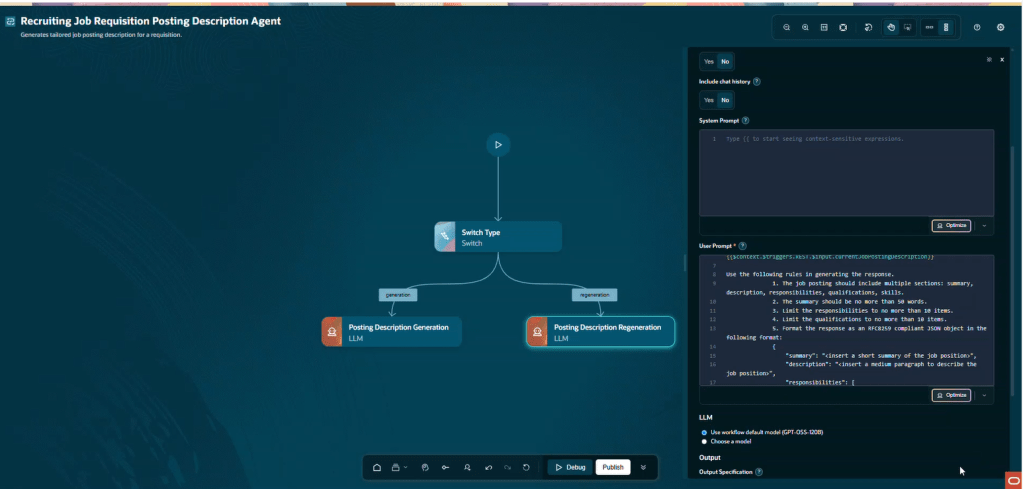
Prompt configurations are managed through Large Language Model (LLM) nodes within agent definitions, giving administrators much greater flexibility. Variables can be added or removed, prompts can be evaluated before being published, and configuration sits alongside the wider agent framework rather than in a separate administration tool. This provides a more consistent way of managing Oracle’s AI capabilities and brings prompt configuration into the same governance and security model used for agents.
Beyond prompt management, AI Agent Studio continues to evolve rapidly. Recent releases have introduced visual workflow design, debugging capabilities, policy models, connectors, Builder Assistant functionality and command line support. It is clear that Oracle’s future AI innovation is centred on this platform.
Does Your Organisation Need to Take Action? The answer depends on how you’ve been using Oracle’s AI capabilities. If you’ve been relying solely on Oracle’s delivered AI functionality and haven’t customised any prompts, the transition should be relatively straightforward. You’ll need to enable AI Agent Studio and validate that your existing AI features continue to behave as expected, but there is unlikely to be significant remediation work.
If you have created prompt overrides in AI Configurator, the situation is different. Oracle has confirmed that existing customisations are not automatically transferred into AI Agent Studio. Organisations will need to review their current configurations, recreate them within Agent Studio and carry out appropriate testing before moving into production.
During the transition period, AI Configurator remains available, allowing administrators to reference existing prompt overrides and use them as the basis for their new configurations. However, the responsibility for recreating and validating those customisations rests with each organisation.
If your organisation has customised prompts, I would recommend taking the following approach:
1. Document Existing Prompt Overrides. Before making any changes, review all existing prompt customisations and document them thoroughly. Capture both the prompt text and the business rationale behind each change. Understanding why an override was created is often just as important as understanding what was changed.
2. Identify the Equivalent Configuration in Agent Studio. Each customised prompt will need to be mapped to the relevant LLM node within AI Agent Studio. This is not simply a copy-and-paste exercise, so take time to understand how the functionality is represented in the new framework.
3. Enable AI Agent Studio. AI Agent Studio must be enabled before any migration work can begin. Organisations that haven’t yet activated the capability should factor this into their planning.
4. Rebuild and Review. As you recreate configurations, take the opportunity to challenge whether older customisations are still needed. In many organisations, prompt overrides were introduced to address specific requirements that may have evolved over time. Migration projects often provide a useful opportunity for housekeeping.
5. Test Before You Deploy. One of the advantages of AI Agent Studio is the ability to evaluate prompts before publishing them. Use this capability extensively. Compare outputs against existing behaviour and verify that the results continue to meet business expectations.
In most cases, very little. Oracle has stated that the end-user experience remains consistent, regardless of whether the underlying functionality is delivered through traditional prompt execution or agent-based execution. The transition primarily affects administrators, implementers and those responsible for configuring AI capabilities.
However, organisations that have invested time in prompt customisation should treat testing as a critical part of the transition. Small changes behind the scenes can sometimes produce noticeably different outputs, particularly where prompts have been heavily tailored.
The retirement of AI Configurator is about more than a product being withdrawn. It signals Oracle’s commitment to AI Agent Studio as the single platform for AI customisation across Fusion Applications.
For organisations that have not yet explored Agent Studio, this change provides a compelling reason to start. What is optional in 26C becomes mandatory in 26D, and those who begin preparing early will have far more flexibility than those who wait until the deadline is approaching.
My advice is simple: if you have prompt overrides in AI Configurator, review them now. Understand what needs to be recreated, familiarise yourself with AI Agent Studio and schedule time for testing. A proactive approach today will make the eventual transition considerably smoother.
Please note that all screenshots are the property of Oracle and are used in accordance with Oracle’s copyright guidelines.
I’ve written about Oracle’s Agentic Applications a few times now, covering the original announcement, the HCM workspaces and, more recently, my hands-on experience with the Agentic App Builder. Every time I think I’ve reached the end of the story, Oracle introduces something new.
This time, rather than looking at individual features, I want to focus on the bigger picture. What is Oracle actually trying to achieve with Agentic Apps, and why should Fusion customers be paying attention? Because what we’re seeing isn’t just another set of AI features. It’s a shift in how enterprise applications are designed to support work.
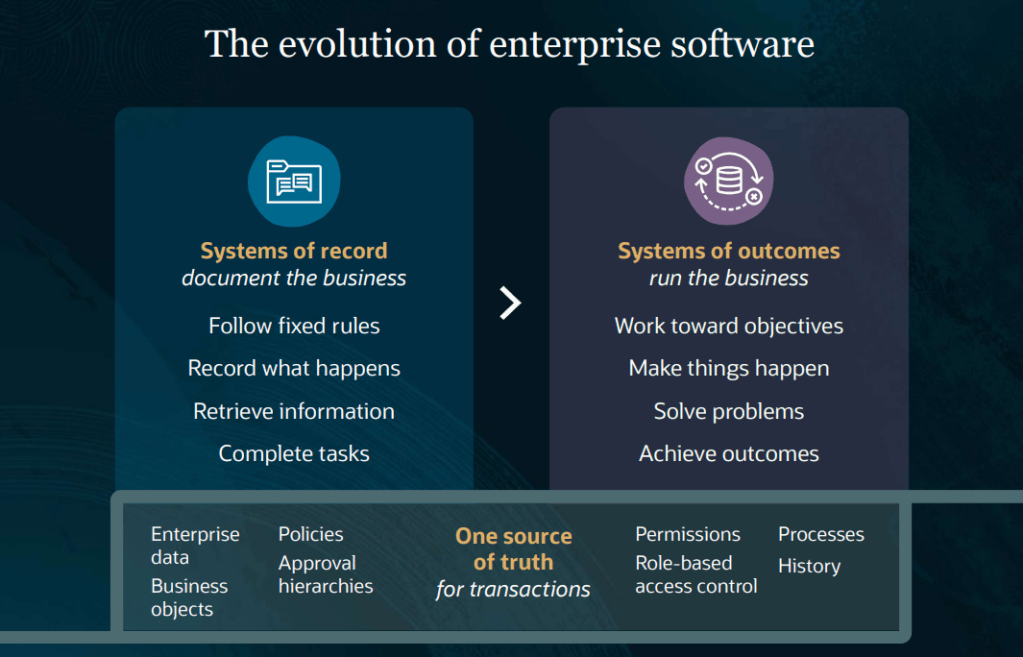
For years, ERP and HCM systems have been systems of record. They capture transactions, store data and provide the processes organisations need to run their business. Employees perform tasks and the system records the outcome.
Agentic Applications introduce a different approach. Rather than simply waiting for users to initiate work, the application continuously analyses data, identifies priorities, recommends actions and, where appropriate, helps execute tasks within existing security and governance frameworks.
The result is a move from recording activity to driving outcomes. That’s a significant change.
Employees aren’t removed from the process. In fact, judgement, approval and decision-making remain firmly in human hands. What changes is the amount of manual effort required to gather information, identify next steps and coordinate routine activities.
Oracle describes this as moving from systems of record to systems of outcomes, and the more I see of the strategy, the more that description feels accurate.
One thing that often gets lost in conversations about AI is that not all AI capabilities are the same. Oracle’s approach now spans four distinct layers.
At the most familiar level are generative AI features embedded directly within Fusion user experiences, helping users generate content, summaries and recommendations. The next layer introduces Answer Agents, which provide contextual information and guidance within the flow of work. Beyond that are Workflow Agents that can execute multi-step business processes on behalf of users.
Finally, Oracle has introduced Agentic Applications. These are goal-driven workspaces that coordinate multiple agents and business processes to achieve a specific outcome. The 22 workspaces announced across HCM, ERP, SCM and CX sit firmly within this final category.
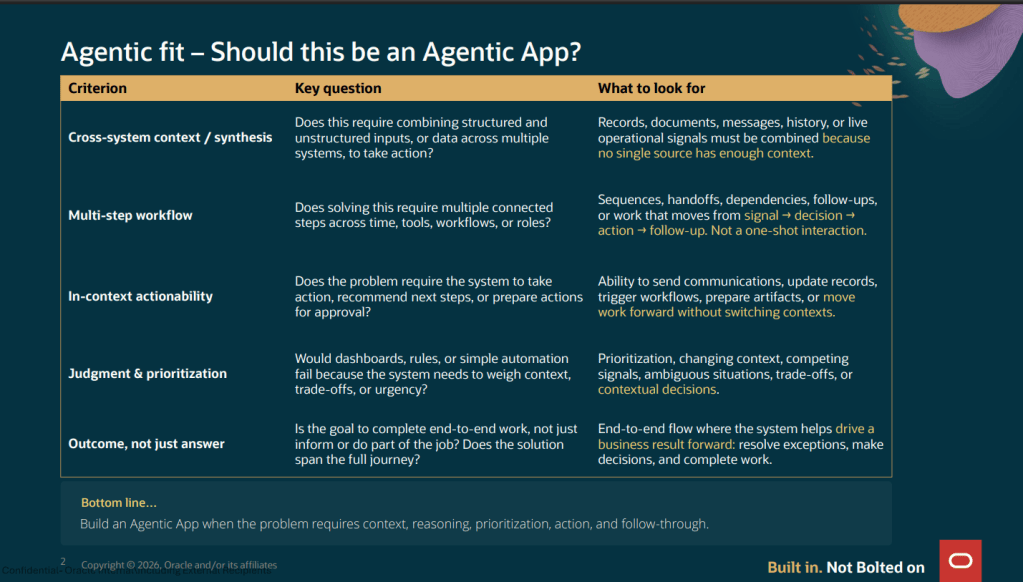
For customers starting their AI journey, understanding these layers is important. Not every use case requires a fully agentic application, but they do provide a glimpse of where enterprise software is heading.
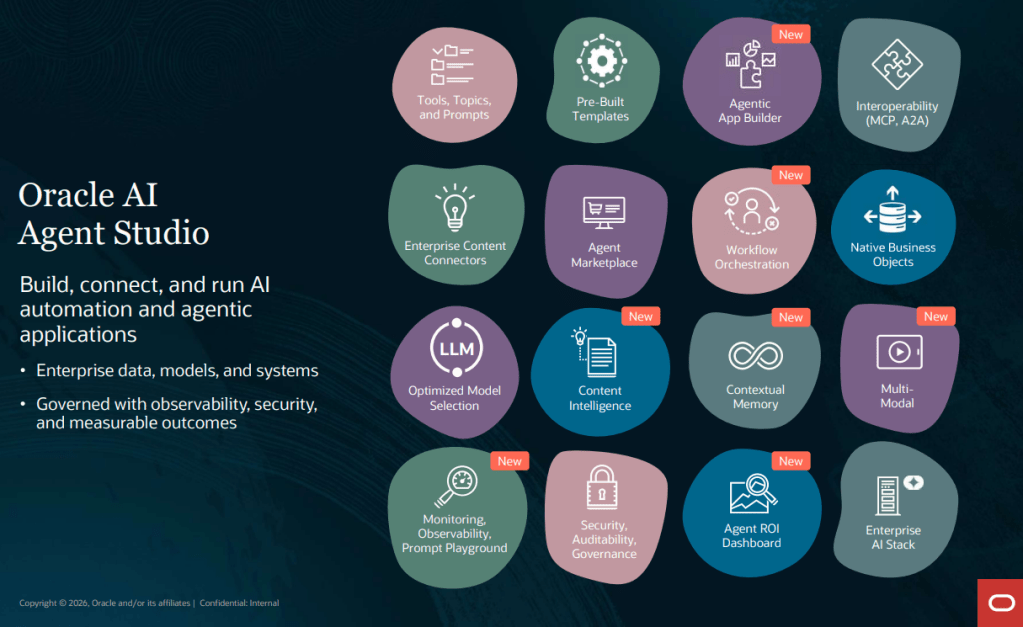
Alongside the growing catalogue of pre-built applications, Oracle has continued to invest in the tooling behind them. One of the most important additions is contextual memory, allowing agents to retain relevant information across interactions rather than treating every conversation as a completely new request.
Content Intelligence is another significant development. It enables agents to combine transactional data with enterprise content such as policies, procedures and knowledge articles. This creates opportunities for more sophisticated use cases in areas such as compliance, onboarding and employee support.
Oracle has also expanded support for multimodal interactions, enabling agents to work with information beyond text, including images and voice-based inputs.
For organisations looking at AI as part of a broader technology landscape, Oracle’s support for industry standards such as the Model Context Protocol (MCP) is particularly interesting. It opens the door for Fusion agents to work alongside agents and services running on other platforms, helping organisations avoid creating isolated AI ecosystems.
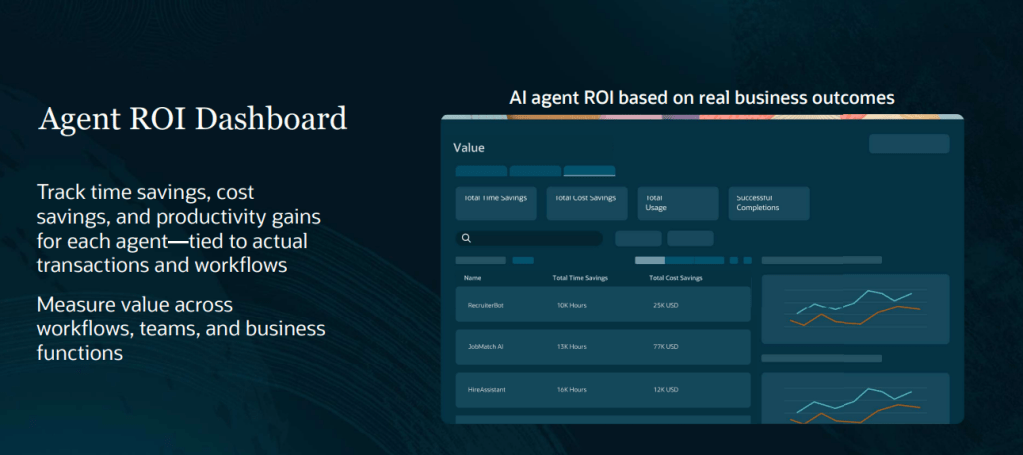
One challenge every AI programme faces is proving value. Organisations understandably want to move beyond demonstrations and understand whether AI is delivering measurable business benefits. Oracle’s new Agent ROI Dashboard aims to address this. The dashboard tracks metrics such as usage, successful completions, time savings and cost savings, giving organisations a way to monitor the impact of individual agents over time.
While the methodology behind any ROI calculation should always be considered carefully, the availability of these metrics provides a practical starting point for conversations with project sponsors and steering committees. Instead of discussing potential benefits in theory, organisations can begin measuring outcomes based on actual usage patterns.
The HCM workspaces have received a lot of attention since their launch, but some of the ERP and SCM use cases are equally compelling.
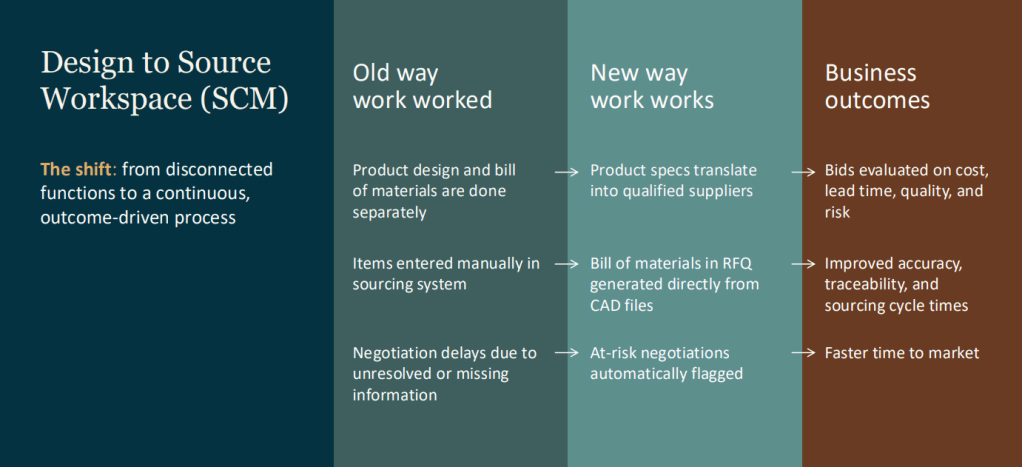
One example is the Design-to-Source Workspace. Traditionally, moving from product design to sourcing can involve multiple teams, disconnected systems and significant manual effort. The workspace connects these activities, helping organisations move more efficiently from bill of materials creation through to supplier engagement and sourcing decisions. What’s particularly interesting is that the workspace doesn’t simply display information. It continuously monitors progress, identifies risks and highlights areas requiring attention.
Another example is the Collectors Workspace within ERP. Collections teams often spend considerable time gathering information from different sources before they can determine the appropriate next action. The Collectors Workspace brings together customer history, disputes, payment behaviour and other relevant information into a single view, helping teams focus their attention where it will have the greatest impact.
In both examples, the goal isn’t to replace experienced employees. It’s to remove the effort associated with collecting and organising information, allowing people to spend more time making informed decisions.
Oracle has continued to expand its HCM agentic application portfolio, with workspaces covering areas such as hiring, career development, workforce operations, employee support and team management. Despite the variety of use cases, a common theme runs throughout them all.
The applications take responsibility for gathering information, coordinating activities and surfacing recommendations, while people remain responsible for decisions that require judgement, experience and empathy. That balance is important because successful AI adoption isn’t about removing human involvement. It’s about enabling people to focus on higher-value work.
The most interesting aspect of Oracle’s Agentic Applications isn’t any individual workspace or feature. It’s the direction of travel. For years, organisations have invested heavily in putting consistent processes and accurate data into their enterprise systems. Agentic Applications represent Oracle’s next step, using that foundation to actively help organisations achieve business outcomes rather than simply record activity. Not every organisation will adopt these capabilities at the same pace, and governance, security and change management will remain critical considerations.
However, the conversation is already changing. Instead of asking how technology can automate individual tasks, organisations can start asking how it can help deliver broader business objectives. That is a much bigger shift than simply adding another AI feature to an application.
If you’re exploring Oracle’s AI strategy, my recommendation is to start small. Identify a business process where information gathering and routine coordination consume significant time, evaluate one of the pre-built agentic applications, and measure the results. The new Agent ROI Dashboard gives organisations a practical way to begin that journey using real data rather than assumptions.
Please note all screenshots are the property of Oracle and are used according to their Copyright Guidelines
It’s one thing to understand Workflow Agents in theory. It’s another to sit down in Oracle AI Agent Studio and start building one. In my previous blog, I explored the architecture behind Workflow Agents and how Oracle has designed them to combine AI reasoning with structured business processes.
This time, I wanted to focus on the practical side. What do you actually see when you start building a Workflow Agent? Which settings matter? How do triggers work? What’s the best way to handle errors? And which data nodes should you use for different scenarios? These are the questions that tend to come up once organisations move beyond the concept stage and start planning real-world implementations.
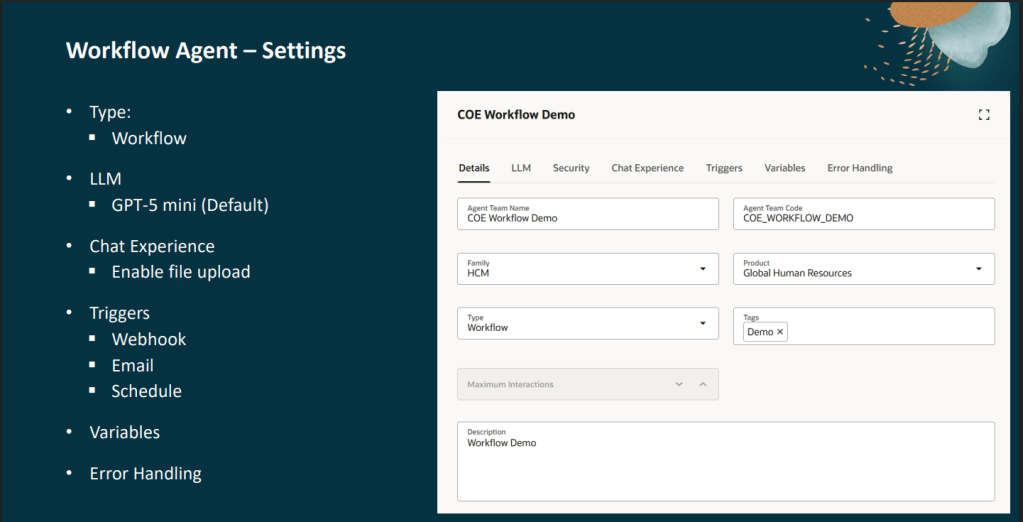
Creating a new Workflow Agent is straightforward, but there are a few important decisions to make from the outset. The Details tab is where you define the basics, including the agent name, code, application family and product area. While these may seem like simple administrative fields, they’re worth getting right because they determine how the agent is categorised within AI Agent Studio and how it appears within monitoring and reporting.
The LLM tab is where you select the large language model that will power the agent. Workflow Agents use GPT-5 mini by default, which is more than capable of handling many common automation scenarios such as document extraction, classification and policy-based decision making.
One point worth noting is that not all models are licensed in the same way. The OSS LLM is free to use and is provided as part of your Oracle subscription, while all other LLMs are deemed premium and therefore are charged as AI Units are consumed. For more information, please look at my previous blog on AI Agent pricing structures.
The Chat Experience tab allows you to enable file uploads. This becomes particularly useful when your workflow needs to process documents such as supplier quotes, invoices or legal correspondence. Files uploaded at runtime can then be passed directly to a Document Processor node for extraction and analysis.
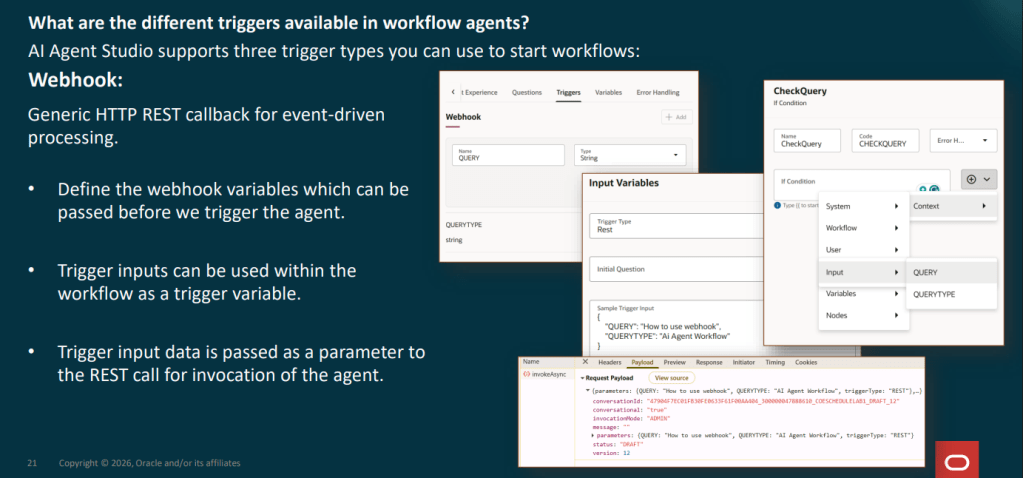
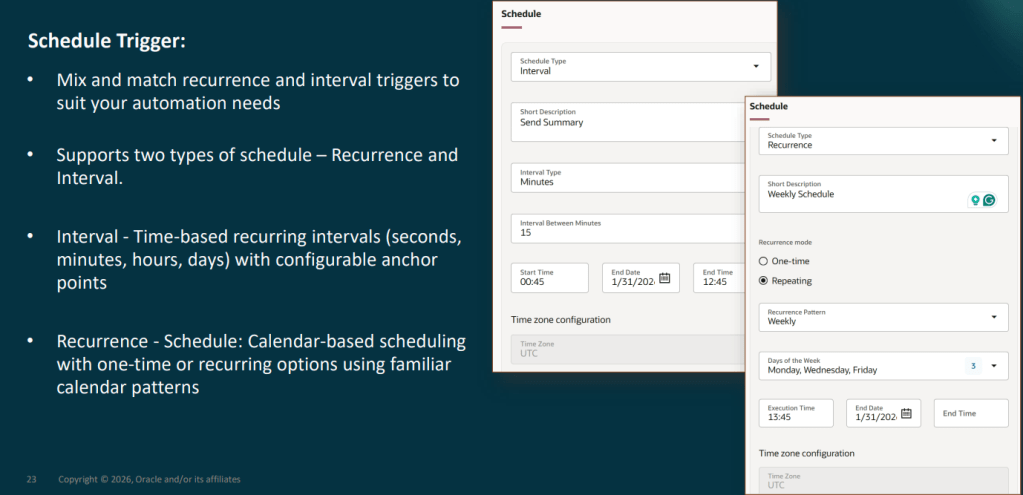
One of the first questions people ask is how a Workflow Agent actually starts running. Oracle currently supports three trigger types, each designed for different use cases.
Firstly, webhook triggers. These offer the greatest flexibility. When configuring a webhook, you define one or more input variables which become available through a REST endpoint. External systems can then pass information into the workflow when triggering the agent. This approach works particularly well when integrating with Oracle Fusion processes, third-party applications or custom solutions that need to launch an automated workflow in response to a specific business event.
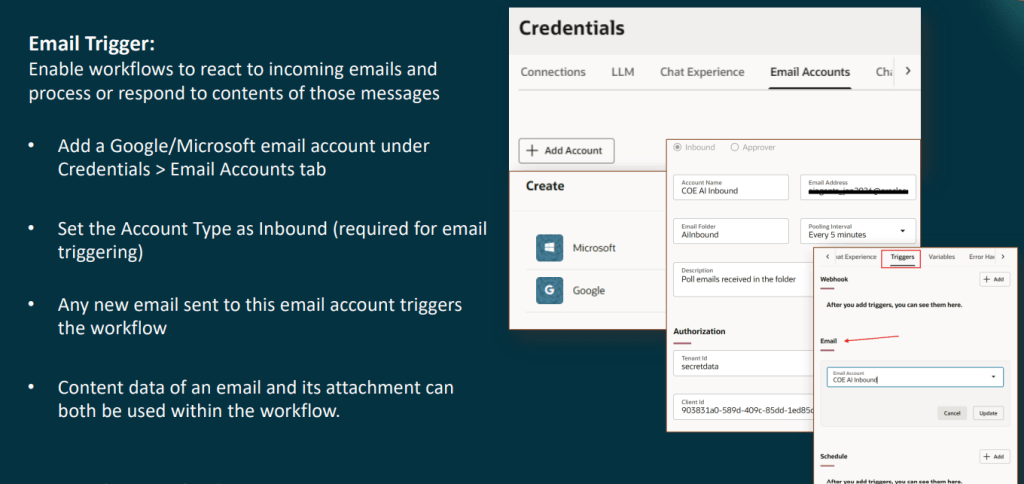
Email triggers are where Workflow Agents start to open up some interesting automation opportunities. After configuring an inbound Microsoft or Google email account within AI Agent Studio, every email received by that mailbox can automatically initiate a workflow. The agent has access to both the email content and any attachments, allowing it to classify, extract and process information without manual intervention.
For example, a payroll team could automatically process court garnishment orders received via email, while an accounts payable team could analyse supplier invoices arriving in a dedicated mailbox. The key benefit is that users don’t need to actively launch the process. The workflow begins as soon as the email arrives.
Schedule triggers are designed for recurring tasks. Whether you need a workflow to run every 30 minutes, every Monday morning, or on a specific schedule throughout the month, Oracle provides flexible scheduling options to support it. This makes them ideal for monitoring activities, batch processing and routine validation tasks that need to run automatically in the background.
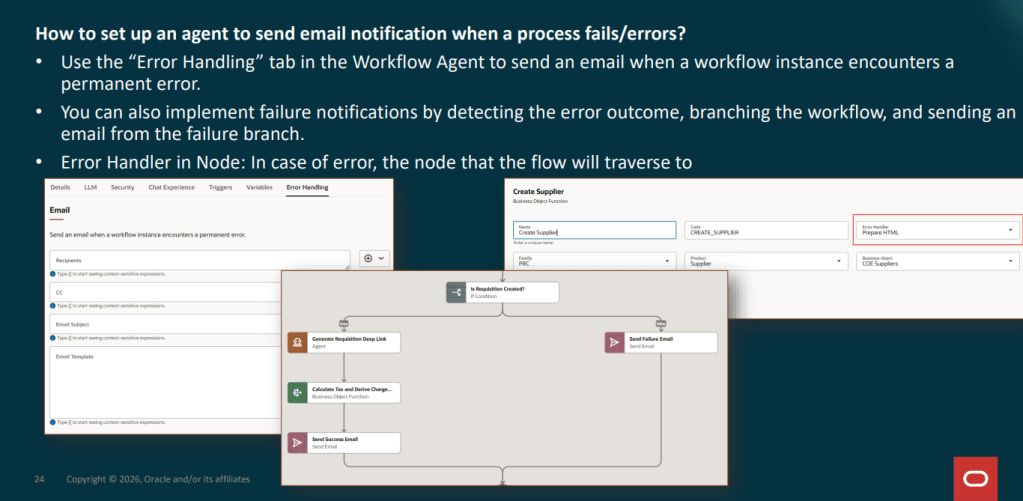
If there’s one area that’s often overlooked during development, it’s error handling. Most people focus on getting the workflow working and only think about failures later. Unfortunately, it’s usually the first thing they need when moving into production.
Oracle provides a dedicated Error Handling tab where you can configure automated notifications whenever a workflow encounters an unrecoverable issue. Rather than sending a generic failure message, you can include contextual information such as:
The workflow name
Trace ID
The node that failed
The error message
Business data being processed at the time
This makes troubleshooting far quicker because support teams receive meaningful information rather than simply being told that something went wrong.
It’s also worth remembering that individual nodes can have their own error-handling paths. Rather than terminating the workflow entirely, you can redirect failures to alternative branches that perform logging, update status values or notify users before ending gracefully. In practice, combining workflow-level notifications with node-level recovery paths creates a much more resilient solution.
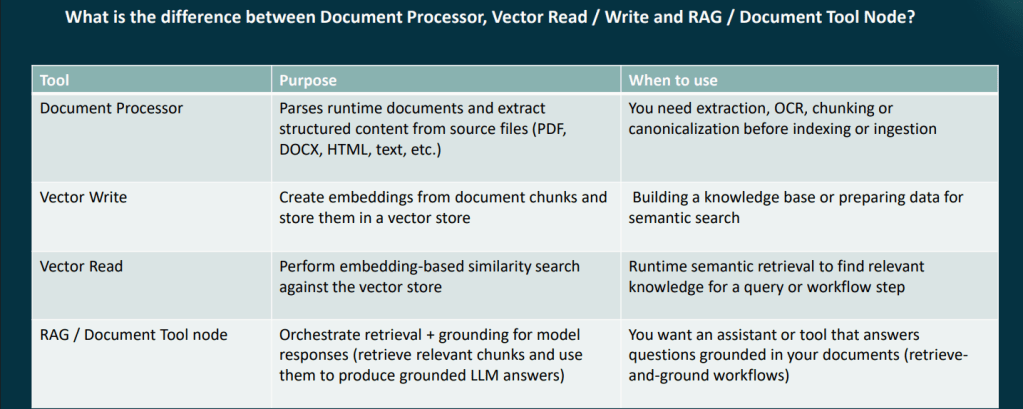
One of the more confusing aspects of Workflow Agent development is knowing which data node to use. Although several of the available nodes appear similar at first glance, they serve very different purposes.
The Document Processor is the starting point for document-based workflows. It extracts content from files such as PDFs, Word documents, HTML pages and scanned images, making the information available for downstream processing.
Vector Write creates embeddings and stores them within a vector index. Think of this as the step where knowledge is prepared and stored so that it can be searched later.
Vector Read retrieves relevant content from an existing vector index. This is typically used when a workflow needs to locate policies, procedures or reference material to support a decision.
The RAG Document Tool combines retrieval and grounding into a single step. Instead of manually connecting retrieval and generation components, the node retrieves relevant content and uses it to produce a grounded response from the LLM.
For knowledge-based workflows, the most common pattern is: Document Processor → Vector Write → Vector Read → LLM. Understanding this flow early can save a considerable amount of redesign later.
Perhaps the most important feature within Workflow Agents is the Human Approval node. This allows the workflow to pause and request approval before carrying out a specific action. The workflow only continues once an authorised individual has reviewed and approved the decision.
This approach strikes a balance between automation and governance. Routine tasks can be handled automatically, while higher-risk scenarios remain subject to human oversight. This is particularly important in HR, payroll and finance processes, where an incorrect decision can have a direct impact on employees or suppliers.
In many ways, this ability to blend AI-driven automation with structured controls is what makes Workflow Agents different from many other agent frameworks.
One of the most significant developments to AI Agent Studio is METRO (Measurement, Evaluation and Testing for Real-time Observability). METRO provides visibility into how agents are performing through dashboards covering:
Accuracy
Latency
Token usage
Execution tracing
Evaluation scoring
For Workflow Agents, detailed tracing is particularly valuable because it allows teams to see exactly how an instance progressed through the workflow, identify bottlenecks and pinpoint failures.
Oracle have also introduced AI governance capabilities, including guardrails on requests and responses, instruction protection and integration with Oracle’s AI Governance framework. For organisations looking to deploy Workflow Agents into production environments, these additions provide greater confidence around monitoring, governance and ongoing optimisation.
Ready to Start Building? The best advice I can give is to start small. Choose a process you understand well. Something with clear inputs, defined outcomes and a manageable number of exceptions.
Build a simple proof of concept first. Get the trigger working. Add a data node. Introduce an LLM step. Test the error handling. Then gradually expand the workflow as your confidence grows.
Oracle has made Workflow Agents surprisingly accessible, and the observability features make it much easier to understand what’s happening behind the scenes as you develop and refine your solution. If you’re considering Workflow Agents and want to understand where they could deliver value in your organisation, now is a good time to start exploring the possibilities.
Please note that all screenshots are the property of Oracle and are used in accordance with Oracle’s Copyright Guidelines.